

Håndtering av brukertilgang bør ikke føles som en konstant sikkerhetsrisiko – men for mange IT-team gjør det nettopp det. Svake passord, foreldreløse kontoer og spredte autentiseringssystemer gjør det vanskelig å balansere sikkerhet og effektivitet.
De beste IAM-verktøyene løser dette ved å automatisere tilgang, forenkle autentisering og gi deg tydelig oversikt over hvem som har tilgang til hva. I denne veiledningen har jeg samlet de beste løsningene for å hjelpe deg med å opprettholde sikkerhet, samsvar og kontroll.
Why Trust Our Software Recommendations
6,700+
Reviews
20
Industry experts
16+
Evaluation factors
14
Years
Our team has been testing and reviewing software since 2012. As tech leaders ourselves, we know how difficult—and important—it is to choose the right software.
For this guide, we evaluated tools using hands-on testing and independent research, scoring tools using our selection criteria.
Our reviews reflect our human editorial judgment, not a sales pitch.
Expert reviewers:
- Paulo Gardini MiguelTech Director
 Tim FisherVP of AI
 Gabriel RosasTech Lead & Software Architect
 Christhian GruhnTech Lead & Platform Architect

Sammenligningstabell for løsninger for identitets- og tilgangsstyring
Denne sammenligningstabellen oppsummerer prisdetaljene for mine utvalgte løsninger for identitets- og tilgangsstyring:
| Tool | Best For | Trial Info | Price | ||
|---|---|---|---|---|---|
| 1 | Best for identity management across global orgs | Free demo available | from $5/person/month | Website | |
| 2 | Best for managing identity, access, and endpoints | 14-day free trial | From $2/device/month | Website | |
| 3 | Best for HR-driven app access automation | 14-day free trial | From $8/user/month (billed annually) | Website | |
| 4 | Best for bulk user account creation | 30-day free trial | From $7/user/month (min 5 seats) | Website | |
| 5 | Best for cross-platform user management | 30-day free trial | From $9/user/month (billed annually) | Website | |
| 6 | Best for multi-factor authentication | 30-day free trial | From $3/user/month (billed annually) | Website | |
| 7 | Best for automating access processes | 30-day free trial | From $3/user/month (billed annually) | Website | |
| 8 | Best for developer-friendly customization | Free trial available | From $35/month | Website | |
| 9 | Best for Microsoft suite compatibility | Pricing for Microsoft Entra Verified ID is upon request. | Website | ||
| 10 | Best for workforce-specific solutions | 30-day free trial | From $6/user/month (billed annually) | Website |


Anmeldelser av de beste løsningene for identitets- og tilgangsstyring
Nedenfor finner du mine detaljerte sammendrag av de beste løsningene for identitets- og tilgangsstyring som kom med på kortlisten. Anmeldelsene mine gir en detaljert gjennomgang av de viktigste funksjonene, fordelene og ulempene, integrasjonene og ideelle bruksområdene for hvert verktøy, slik at du kan finne det som passer best for deg.
 Best for identity management across global orgs
- Free demo available
- from $5/person/month
Visit WebsiteCustomer Rating:4.9/5
Deel facilitates identity and access management from worker onboarding to offboarding. Deel IT is a platform designed to help you manage and automate your global IT operations across more than 130 countries. It streamlines processes like onboarding and offboarding, ensuring your team members have the necessary equipment and software from day one.
Why I Picked Deel IT: Deel offers a robust multi-factor authentication (MFA) system. By enforcing MFA, Deel IT adds an extra layer of security, ensuring that only authorized users can access your company's resources. This feature is crucial in protecting sensitive data and maintaining compliance with various regulations. It also has role-based permissions that allow you to assign specific access levels to users based on their roles. By implementing role-based permissions, you can prevent unauthorized access to critical systems and data.
Standout features & integrations:
Other features include certified data erasure, which ensures that all sensitive information is securely removed from devices during offboarding or decommissioning. This process helps maintain data privacy and compliance with global regulations. Additionally, Deel IT offers real-time device tracking, allowing you to monitor the location and status of your IT assets worldwide. Some integrations include Hubstaff, QuickBooks, Google Workspace, Slack, JIRA, Microsoft 365, NetSuite, Salesforce, HubSpot, Microsoft Dynamics CRM, Microsoft Teams, and Zendesk.
Pros and Cons
Pros:
- Strong security features, including MFA and role-based permissions
- Comprehensive device lifecycle management
- Efficient global equipment procurement and deployment
Cons:
- Some features may require additional customization
- Doesn't offer more advanced IT features
Learn more about Deel IT: Best for managing identity, access, and endpoints
- 14-day free trial
- From $2/device/month
Visit WebsiteCustomer Rating:4.7/5
Scalefusion OneIdP organization setup screen for entering company details and configuring login settings. Scalefusion OneIdP is a conditional access and identity management platform that integrates with Unified Endpoint Management (UEM) to secure user and device authentication across your organization.
Why I Picked Scalefusion OneIdP: I picked Scalefusion OneIdP because of its strong focus on conditional access management. It’s particularly useful for enforcing security policies that validate both user identity and device compliance before granting access. I also appreciate its ability to combine identity management and device security in a single platform, which helps reduce the complexity of managing multiple tools. Its just-in-time admin access is another standout, allowing you to grant elevated privileges temporarily without long-term security risks.
Standout Features & Integrations:
Features include multi-factor authentication (MFA), conditional single sign-on (SSO) that validates device status in real time, and unified dashboards for device and identity management. Scalefusion OneIdP also supports continuous access evaluation to ensure security compliance remains up-to-date. Some integrations include Google Workspace, Microsoft Entra, Amazon Web Services (AWS), Cisco Duo, Okta, Salesforce, Bamboo HR, Slack, Notion, HubSpot, Figma, Zoom, and Asana.
Pros and Cons
Pros:
- Strong device-based security enforcement
- Supports multi-factor authentication (MFA)
- Broad third-party integration support
Cons:
- Higher pricing for some users
- Limited advanced customization options
Learn more about Scalefusion OneIdP: Best for HR-driven app access automation
- 14-day free trial
- From $8/user/month (billed annually)
Visit WebsiteCustomer Rating:4.8/5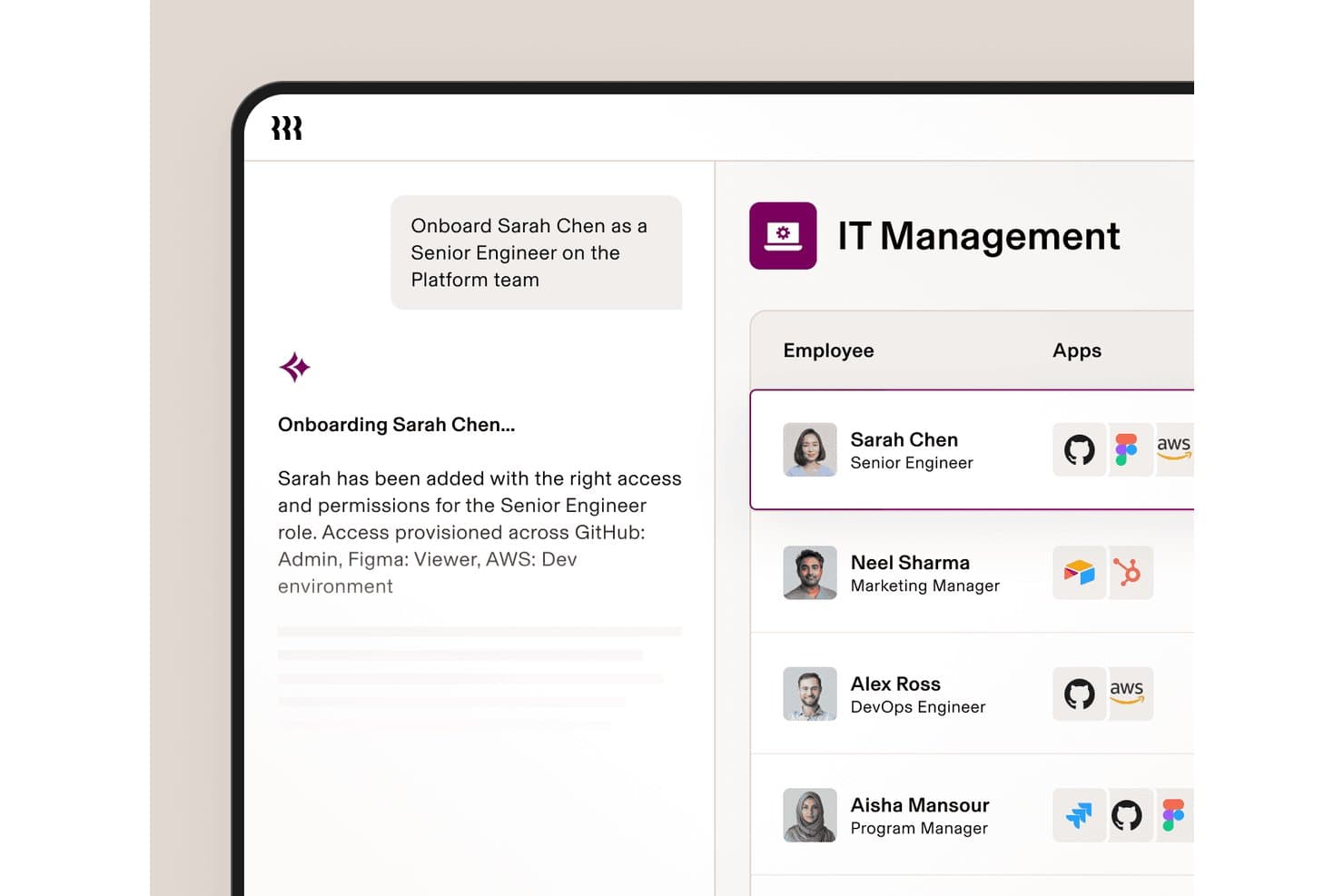
Rippling IT automates app access provisioning during employee onboarding. Rippling IT is an IAM platform that ties SSO, MFA, user lifecycle management, and access policy enforcement directly to your HR data model, covering both cloud apps and legacy systems through SAML, OIDC, LDAP, RADIUS, and SCIM.
Who Is Rippling IT Best For?
Rippling IT is a strong fit for IT teams that manage access alongside HR workflows, especially at companies where onboarding, offboarding, and role changes drive most of their provisioning workload.
Why I Picked Rippling IT
I picked Rippling IT as one of the best because no other IAM tool I've seen ties access provisioning this tightly to live HR data. When a new hire's record is created, Rippling automatically grants access to the right apps based on their role, department, and location, without a ticket or manual step. I also love Supergroups, which let me build dynamic access policies from any employee attribute, so a cross-app rule like blocking Jira for engineers who haven't completed security training enforces itself.
Rippling IT Key Features
- Virtual LDAP and cloud RADIUS: Connects legacy apps and network hardware to your identity layer using LDAP, and handles Wi-Fi and VPN login through a hosted cloud RADIUS server.
- Device trust certificates: Rippling acts as its own certificate authority, issuing role-based certificates that verify device posture at every login attempt.
- SSH key management: Assigns and revokes SSH keys per user or group, with automatic revocation triggered by role changes or offboarding.
- Automated compliance monitoring: Continuously checks your environment against SOC 2 and NIST controls, collects audit evidence, and flags gaps with suggested fixes.
Rippling IT Integrations
Rippling IT offers 600+ pre-built SSO integrations, including GitHub, Jira, Slack, Salesforce, Zoom, AWS, Microsoft 365, Google Workspace, Datadog, and HubSpot. It also supports custom SAML, SCIM, JIT apps, virtual LDAP, cloud RADIUS, REST API access, Terraform, SDKs, and webhooks.
Pros and Cons
Pros:
- Device trust strengthens conditional access
- Attribute-based policies enforce least-privilege access
- HR-triggered provisioning reduces onboarding mistakes
Cons:
- Enterprise deployment options remain limited
- Infrastructure PAM lacks session recording
Learn more about Rippling IT: Best for bulk user account creation
- 30-day free trial
- From $7/user/month (min 5 seats)
Visit WebsiteCustomer Rating:4.2/5
The reporting tool in ADManager Plus helps in identifying and mitigating potential security risks within the Active Directory environment. ManageEngine ADManager Plus is a comprehensive software designed for managing Active Directory (AD) environments, offering a range of features that simplify user and group management as well as reporting.
Why I Picked ManageEngine ADManager Plus: One of the most notable aspects of ADManager Plus is its ability to simplify Active Directory (AD) management tasks. This includes user provisioning, de-provisioning, and administration, which are essential for maintaining an organized and secure IT environment. The tool also supports bulk user creation, allowing administrators to create multiple user accounts in just a few minutes.
Standout features & integrations:
ManageEngine ADManager Plus excels with other features like workflow automation, which automates repetitive tasks and approval processes. Another standout feature is its role-based access control, which enhances security by implementing granular access controls based on user roles. Integrations include ServiceDesk Plus, ServiceNow, Zendesk, Freshservice, Jira, Zoho People, BambooHR, Ultipro, and Workday.
Pros and Cons
Pros:
- Automates repetitive tasks
- Bulk creation, modification, deletion, and restoration of Active Directory objects
- Robust role delegation features,
Cons:
- Potential integration challenges with certain third-party applications
- The tool offers limited customization options for advanced users
Learn more about ManageEngine ADManager Plus: Best for cross-platform user management
- 30-day free trial
- From $9/user/month (billed annually)
Visit WebsiteCustomer Rating:4.6/5
Image 9: JumpCloud devices activity overview JumpCloud is an efficient Directory-as-a-Service platform that manages users across various systems, applications, and networks. Its emphasis on cross-platform compatibility ensures that businesses can streamline user access across multiple systems regardless of their platform.
Why I Picked JumpCloud: In determining the right identity management tools, JumpCloud stood out primarily because of its comprehensive cross-platform capability. I chose it because it offers unparalleled versatility in managing users across various operating systems and devices, distinguishing itself from competitors. For businesses that operate on diverse platforms and require coherent user management, JumpCloud emerges as the top choice.
Standout features & integrations:
JumpCloud's features, such as centralized directory services, multi-factor authentication, and device management, offer a holistic approach to user management. Furthermore, it integrates effortlessly with numerous applications and platforms, from Windows and macOS to Linux, as well as SaaS applications and IaaS providers.
Pros and Cons
Pros:
- Centralized directory services simplify user management
- Robust multi-factor authentication enhances security
- Comprehensive cross-platform support
Cons:
- Some advanced features are restricted to premium plans
- Custom integrations could be challenging for niche software
- Initial setup might require a bit of a learning curve
Learn more about JumpCloud: Best for multi-factor authentication
- 30-day free trial
- From $3/user/month (billed annually)
Visit WebsiteCustomer Rating:4.5/5
Image 4: Ping Identity's repository directory selection feature screenshot. Ping Identity offers a robust identity platform that ensures secure and easy user experiences. A standout in their suite is their multi-factor authentication (MFA) prowess, making them an optimal choice for those keen on strengthening their security layers, fitting with the title "Best for multi-factor authentication."
Why I Picked Ping Identity: While evaluating various tools, the sheer strength of Ping Identity's MFA capabilities caught my attention. I determined it to be one of the most reliable platforms for this security aspect. The depth of their MFA offering, from biometrics to one-time passwords, makes them distinct in a crowded marketplace. With security breaches becoming more sophisticated, it's clear why Ping Identity is the best for multi-factor authentication.
Standout features & integrations:
Beyond its renowned MFA, Ping Identity offers adaptive authentication, single sign-on, and intelligent API security. It's designed to evolve with changing security needs, making it future-ready. Integration-wise, Ping Identity easily connects with many enterprise applications, cloud platforms, and infrastructure setups, ensuring a cohesive security environment.
Pros and Cons
Pros:
- Broad enterprise application integration range
- Strong adaptive authentication capabilities
- Comprehensive MFA options including biometrics
Cons:
- Deployment can be intricate for larger organizations
- Some advanced features necessitate higher pricing tiers
- Might require a steeper learning curve for beginners
Learn more about Ping Identity: Best for automating access processes
- 30-day free trial
- From $3/user/month (billed annually)
Visit WebsiteCustomer Rating:4.9/5
Zygon gives your team a centralized view of all approved apps, their owners, contract types, access methods, and renewal timelines. Zygon is a modern identity governance platform that helps IT and security teams manage user access across all applications.
Why I Picked Zygon: One reason I picked Zygon is its ability to detect and manage shadow IT. It can identify unmanaged identities and applications, including those created without IT's knowledge. This helps you gain control over all access points and reduce security risks. I also like its automation features that let you set up workflows that handle account provisioning and deprovisioning across all your apps. This ensures that users have the right access at the right time and that access is revoked when needed.
Standout features & integrations:
Other features include dynamic filtering and tagging of identities, which lets you organize and act on specific groups of users. Zygon also provides real-time alerts when discrepancies are found, so you can address issues quickly. Some integrations include n8n, Make, MS Teams, Google Workspace, Entra ID, Slack, Microsoft 365, and Okta.
Pros and Cons
Pros:
- Offers instant notifications for discrepancies
- Automates identity lifecycle processes
- Provides a consolidated view of all identities and access points
Cons:
- Limited visibility into historical changes
- Could offer more native integrations
Learn more about Zygon:

Image 3: Auth0 identity and access management solutions Auth0 is a platform for authentication and authorization that provides developers with resources and tools to create customized authentication experiences. It's known for being developer-friendly and highly customizable.
Why I Picked Auth0: In selecting identity management tools, Auth0 immediately stood out because of its emphasis on catering to developers. Most platforms provide ready-made solutions, but Auth0's power is its adaptability. I chose it precisely because it allows developers to mold their authentication process according to their application's requirements. When considering customization capabilities, it's no wonder Auth0 emerged as the best pick for developer-friendly customization.
Standout features & integrations:
Auth0 shines with its adaptable authentication flows, versatile SDKs, and login box (Lock). Furthermore, the platform supports multi-factor authentication and provides actionable insights through its logging and reporting. In terms of integrations, Auth0 offers smooth connections with a myriad of third-party apps, and SaaS platforms and can be used across various development stacks, adding to its versatility.
Pros and Cons
Pros:
- Streamlined third-party integrations
- Offers extensive SDKs catering to different tech stacks
- Adaptable authentication flows for diverse applications
Cons:
- Initial setup can be time-consuming for complex use cases
- Some advanced features require moving to higher pricing tiers
- Might be overwhelming for non-developers
Learn more about Auth0: Best for Microsoft suite compatibility
- Pricing for Microsoft Entra Verified ID is upon request.

Image 12: Microsoft Entra Verified ID identity and access management solutions Microsoft Entra Verified ID is an identity verification solution that integrates easily with the extensive Microsoft suite. Tailored to ensure flawless compatibility, it's the optimal choice for businesses relying on Microsoft applications for their daily operations.
Why I Picked Microsoft Entra Verified ID: Microsoft Entra Verified ID caught my attention during my evaluation process due to its deep integration capabilities with Microsoft's suite of products. Its design specifically for compatibility with Microsoft tools sets it apart from other identity verification solutions. Given this distinct compatibility focus, it is the premier choice for businesses deeply entrenched in the Microsoft ecosystem.
Standout features & integrations:
Microsoft Entra Verified ID boasts multi-factor authentication, secure single sign-on, and adaptive access policies. Additionally, its integrations are primarily centered on Microsoft products, ensuring that tools like Microsoft 365, Azure, and Dynamics 365 work together without hitches.
Pros and Cons
Pros:
- Multi-factor authentication adds an additional layer of security
- Secure single sign-on ensures ease of access across tools
- Tailored for exceptional compatibility with Microsoft products
Cons:
- Requires a Microsoft ecosystem for optimal utility
- Some businesses may find its features too Microsoft-specific
- Might not be the first choice for non-Microsoft-centric businesses
Learn more about Microsoft Entra Verified ID: Best for workforce-specific solutions
- 30-day free trial
- From $6/user/month (billed annually)

Image 8: Okta Workforce Identity Cloud dashboard overview Okta Workforce Identity Cloud addresses the unique identity and access management needs of businesses and their employees. With an emphasis on solutions tailored to workforce scenarios, it streamlines the process of identity verification, access control, and security for all workforce members.
Why I Picked Okta Workforce Identity Cloud: While comparing various tools for identity management, Okta Workforce Identity Cloud caught my attention because of its workforce-centric approach. I chose it because it focuses on solutions designed explicitly for workforce scenarios. Given businesses’ unique challenges in managing their workforce's digital identities, Okta stands out as the most adept for this specialized requirement.
Standout features & integrations:
Okta boasts adaptive multi-factor authentication, centralized access management, and a user-friendly self-service portal. These tools enhance workforce productivity without compromising security. Regarding integrations, Okta smoothly connects with various enterprise applications, including HR systems, VPNs, and other critical business tools.
Pros and Cons
Pros:
- Vast integration ecosystem with crucial business tools
- Centralized access management simplifies administration
- Tailored solutions for workforce identity management
Cons:
- Periodic changes and updates may demand recurrent training for administrators
- The setup may require technical expertise for complex environments
- Some advanced features might be available only in higher-tier plans
Learn more about Okta Workforce Identity Cloud:
Andre bemerkelsesverdige løsninger for identitets- og tilgangsstyring
Her er noen flere alternativer for løsninger for identitets- og tilgangsstyring som ikke kom med på kortlisten, men som likevel er verdt å undersøke:
- 11IBM Security VerifyBest for AI-driven insights
- 12Akamai Identity CloudBest for global content delivery integration
- 13AWS Identity and Access Management (IAM)Best for Amazon ecosystem integration
- 14NetIQ Identity ManagerBest for large enterprise scalability
- 15Thales SafeNet Trusted AccessBest for security hardware integration
- 16WSO2 Identity ServerBest for open-source flexibility
- 17ForgeRockBest for identity lifecycle management
- 18CakewalkBest for uncovering shadow IT
- 19ScalefusionBest for conditional access management
- 20RipplingGood for comprehensive HR and IT management
- 21OneLoginGood for streamlined cloud-based identity management
- 22FusionAuthGood for customizable identity and access
- 23FronteggGood for rapid SaaS application development
- 24CyberArk Workforce Identity and Access Management (IAM)Good for securing remote workforce access
- 25SailPointGood for AI-driven identity governance
Relaterte anmeldelser av løsninger for tilgangsstyring
How I Evaluate Identity and Access Management Solutions
I evaluate IAM tools in two layers: the core capabilities—SSO, MFA, and user provisioning—every platform must have, and the differentiators like PAM and threat detection that separate the best.
Core Functionality (Table Stakes For This List)
When I'm selecting tools for my list, I rank each one on a scale from 0 (does not offer the functionality) to 5 (excels in this area) for each core functionality listed below. Then, I calculate the tool's total score into a percentage. Each tool needs to achieve a minimum total score of 75% to be considered for inclusion.
- Single Sign-On (SSO): I check for broad federation protocol support (SAML, OIDC, OAuth) and whether users can access cloud, on-prem, and legacy apps from one login session.
- Multi-Factor Authentication (MFA): The range of available factors matters—push notifications, TOTP, hardware keys, biometrics—along with adaptive policies that adjust based on risk signals.
- User Lifecycle Management: I evaluate how well a platform automates provisioning and deprovisioning, like instantly revoking access across all connected apps when someone leaves the organization.
- Access Policies & RBAC: Granular policy controls are key here, including role-based and attribute-based rules that restrict access by device type, location, or group membership.
- Directory & App Integrations: A solid IAM tool connects to your existing directories (AD, LDAP, HRIS) and offers a wide catalog of pre-built app connectors so you're not building everything custom.
- Audit Logs & Compliance Reporting: I look for detailed, exportable access logs and pre-built report templates mapped to frameworks like SOC 2, HIPAA, or ISO 27001 for audit readiness.
Once I have a list of tools that meet the criteria, I consider what sets each platform apart.
Differentiating Factors (What Sets Vendors Apart)
Here's how I compare and contrast different vendors:
Standout Features
Passwordless authentication is a big differentiator—I look for platforms that support FIDO2/WebAuthn or passkeys, which eliminate credential theft as an attack vector entirely. Identity threat detection also matters, especially tools that use behavioural analytics to flag anomalous logins like impossible travel or credential stuffing attempts. I evaluate access governance capabilities too, particularly automated certification campaigns that let managers review and revoke stale entitlements before auditors come knocking.
Beyond Features
Compliance certifications carry real weight here—I check whether a vendor holds SOC 2 Type II, ISO 27001, or FedRAMP authorization, since your IAM provider's posture directly affects your own audit outcomes. Deployment flexibility is another factor I consider, because teams running hybrid environments need options beyond pure SaaS. Ecosystem integration depth also separates contenders; a platform that connects natively to your SIEM, ITSM, and HRIS tools saves months of custom development that would otherwise slow down your rollout.
Slik velger du en løsning for identitets- og tilgangsstyring
Det er lett å gå seg vill i lange funksjonslister og komplekse prismodeller. For å hjelpe deg med å holde fokus mens du går gjennom den unike programvareutvelgelsesprosessen din, får du her en sjekkliste over faktorer du bør ha i bakhodet:
| Faktor | Hva du bør vurdere |
|---|---|
| FaktorSkalerbarhet | Hva du bør vurdereKan løsningen vokse med virksomheten din? Vurder om den støtter flere brukere og nye funksjoner etter hvert som behovene dine øker. |
| FaktorIntegrasjoner | Hva du bør vurdereFungerer den med de eksisterende systemene dine? Kontroller kompatibilitet med verktøy som HR-programvare, CRM og skytjenester. |
| FaktorTilpasningsmuligheter | Hva du bør vurdereKan du tilpasse den til arbeidsflytene dine? Se etter fleksibilitet i innstillinger, brukerroller og dashbord, slik at de samsvarer med prosessene i teamet ditt. |
| FaktorBrukervennlighet | Hva du bør vurdereEr den brukervennlig for alle? Vurder læringskurven og om teamet ditt enkelt kan ta den i bruk uten omfattende opplæring. |
| FaktorImplementering og innføring | Hva du bør vurdereHvor raskt kan du komme i gang? Vurder tiden og ressursene som kreves for oppsettet, inkludert eventuell hjelp fra leverandøren eller tredjepartstjenester. |
| FaktorKostnad | Hva du bør vurdereEr den innenfor budsjettet ditt? Sammenlign prisplaner, skjulte gebyrer og verdien som tilbys av ulike løsninger, for å finne riktig balanse. |
| FaktorSikkerhetstiltak | Hva du bør vurdereOppfyller den sikkerhetsbehovene dine? Sørg for at den tilbyr sterk kryptering, regelmessige oppdateringer og samsvar med bransjestandarder for å beskytte dataene dine. |
| FaktorKrav til samsvar | Hva du bør vurdereSamsvarer den med bransjeregelverket ditt? Kontroller at den støtter nødvendige samsvarstiltak som GDPR, HIPAA eller andre relevante standarder. |
Hva er løsninger for identitets- og tilgangsadministrasjon?
Løsninger for identitets- og tilgangsadministrasjon er verktøy som hjelper organisasjoner med å kontrollere brukertilgang til informasjon og systemer. Disse verktøyene brukes vanligvis av IT-fagfolk og sikkerhetsteam, og skaper verdi ved å sikre at bare autoriserte brukere får tilgang til bestemte ressurser.
Funksjoner som enkel pålogging, flerfaktorautentisering og tilgangslogger bidrar til å administrere brukeridentiteter, styrke sikkerheten og oppfylle samsvarskrav. Alt i alt forenkler disse verktøyene tilgangsadministrasjonen og forbedrer sikkerheten for virksomheter.
Funksjoner
Her er de viktigste funksjonene alle gode løsninger for identitets- og tilgangsadministrasjon bør ha:
- Enkel pålogging: Gjør det mulig for brukere å få tilgang til flere applikasjoner med ett sett påloggingsopplysninger, noe som forenkler tilgangen og forbedrer brukeropplevelsen.
- Flerfaktorautentisering: Legger til et ekstra sikkerhetslag ved å kreve flere verifiseringstrinn utover bare et passord.
- Tilgangslogger: Registrerer brukeraktivitet og tilgangsmønstre, slik at organisasjoner kan overvåke sikkerhet og samsvar.
- Analyse av brukeradferd: Analyserer brukerhandlinger for å oppdage uvanlig aktivitet og potensielle sikkerhetstrusler.
- Adaptiv autentisering: Justerer autentiseringskravene basert på brukerens kontekst og risikonivå, noe som styrker sikkerheten.
- Integrasjonsmuligheter: Fungerer sømløst med eksisterende systemer som HR-programvare og skytjenester, slik at driften blir enklere.
- Tilpassbare oversikter: Gir fleksibilitet i hvordan informasjon vises, slik at teamene kan tilpasse visningene etter behovene sine.
- Verktøy for samsvarsrapportering: Gir rapporter og innsikt som hjelper organisasjoner med å oppfylle bransjespesifikke samsvarskrav.
- Sikkerhet med null tillit: Implementerer en sikkerhetsmodell som krever verifisering for hver forespørsel, uavhengig av brukerens plassering.
- Rollebasert tilgangskontroll: Tildeler tillatelser basert på brukerroller og sikrer at personer bare får tilgang til det de trenger.
Fordeler
Implementering av løsninger for identitets- og tilgangsadministrasjon gir flere fordeler for teamet og virksomheten din. Her er noen av fordelene du kan se frem til:
- Forbedret sikkerhet: Flerfaktorautentisering og rollebasert tilgangskontroll beskytter sensitive data mot uautorisert tilgang.
- Bedre samsvar: Verktøy for samsvarsrapportering hjelper organisasjonen din med å oppfylle bransjestandarder og forskrifter på en enklere måte.
- Forenklet brukertilgang: Enkel pålogging reduserer antallet passord brukerne må huske, noe som forbedrer brukeropplevelsen.
- Effektiv overvåking: Tilgangslogger og analyse av brukeradferd gir innsikt i brukeraktivitet og bidrar til å oppdage potensielle trusler.
- Kostnadsbesparelser: Ved å automatisere oppgaver innen tilgangsadministrasjon kan teamet fokusere på mer strategiske aktiviteter og spare tid og ressurser.
- Skalerbarhet: Med integrasjonsmuligheter kan disse løsningene vokse sammen med virksomheten din og støtte flere brukere og applikasjoner.
- Tilpassbar opplevelse: Tilpassbare oversikter gjør det mulig for teamene å tilpasse grensesnittet til sine spesifikke behov, noe som forbedrer brukervennligheten.
Kostnader og priser
Ved valg av løsninger for identitets- og tilgangsadministrasjon er det nødvendig å forstå de ulike prismodellene og abonnementene som er tilgjengelige. Kostnadene varierer basert på funksjoner, teamstørrelse, tillegg og mer. Tabellen nedenfor oppsummerer vanlige abonnementer, gjennomsnittsprisene deres og typiske funksjoner som er inkludert i løsninger for identitets- og tilgangsadministrasjon:
Sammenligningstabell for abonnementer for løsninger for identitets- og tilgangsadministrasjon
| Abonnementstype | Gjennomsnittspris | Vanlige funksjoner |
|---|---|---|
| AbonnementstypeGratisabonnement | Gjennomsnittspris$0 | Vanlige funksjonerGrunnleggende brukeradministrasjon, begrensede integrasjoner og brukerstøtte fra fellesskapet. |
| AbonnementstypePersonlig abonnement | Gjennomsnittspris$5-$25/bruker/måned | Vanlige funksjonerEnkel pålogging, flerfaktorautentisering og grunnleggende rapportering. |
| AbonnementstypeBedriftsabonnement | Gjennomsnittspris$30-$60/bruker/måned | Vanlige funksjonerAvansert rapportering, rollebasert tilgangskontroll og utvidet brukerstøtte. |
| AbonnementstypeVirksomhetsabonnement | Gjennomsnittspris$70-$120/bruker/måned | Vanlige funksjonerTilpassede integrasjoner, samsvarsverktøy, dedikert brukerstøtte og skaleringsmuligheter. |
Vanlige spørsmål
Her er noen svar på vanlige spørsmål om løsninger for identitets- og tilgangsadministrasjon:
Hvilke bransjer har størst nytte av løsninger for identitets- og tilgangsadministrasjon?
Ja, bransjer som håndterer sensitive data, for eksempel finans, helsevesen og offentlig sektor, har stor nytte av løsninger for identitets- og tilgangsadministrasjon. Disse verktøyene bidrar til å beskytte konfidensiell informasjon ved å sørge for at bare autoriserte brukere får tilgang. En helseleverandør kan for eksempel bruke disse løsningene til å sikre pasientjournaler, mens et finansselskap kan beskytte kundetransaksjoner. Hvis bransjen din krever strengt personvern og tilgangskontroll, er disse løsningene verdt å vurdere.
Kan løsninger for identitets- og tilgangsadministrasjon integreres med eksisterende systemer?
Ja, de fleste løsninger for identitets- og tilgangsadministrasjon tilbyr integrasjonsmuligheter med eksisterende systemer. Dette gjør det mulig å koble til applikasjoner som CRM, HR-programvare og skytjenester. Før du velger en løsning, bør du kontrollere at den er kompatibel med din nåværende programvarestakk. Noen løsninger tilbyr API-er for tilpassede integrasjoner, noe som sikrer en smidig overgang.
Hvor lang tid tar det å implementere løsninger for identitets- og tilgangsadministrasjon?
Implementeringstiden varierer avhengig av hvor komplekse systemene dine er, og hvilke funksjoner løsningen har. Det kan ta alt fra noen dager til flere uker. For å fremskynde prosessen bør du ha en tydelig plan, sette av ressurser og sørge for at teamet ditt er klart for opplæring. Noen leverandører tilbyr hjelp med innføringen for å hjelpe deg raskt i gang.
Passer løsninger for identitets- og tilgangsadministrasjon for små bedrifter?
IAM-løsninger autentiserer brukere ved å kontrollere påloggingsopplysninger mot en sikker database. Når brukeren er verifisert, tildeler disse løsningene tilgangsnivåer basert på brukerroller, slik at brukerne bare får de nødvendige tillatelsene, for eksempel «redigering» eller «visning».
Kan IAM-løsninger bidra til etterlevelse av regelverk?
Ja, IAM-løsninger kan støtte etterlevelse av regelverk ved å tilby verktøy for tilgangskontroll, revisjonsspor og rapportering. De bidrar til å sikre at bare autoriserte brukere får tilgang til sensitive data, og hjelper dermed med å oppfylle bransjespesifikke forskrifter som GDPR og HIPAA.
Hvor lang tid tar det å implementere løsninger for identitets- og tilgangsadministrasjon?
Implementeringstiden varierer avhengig av hvor komplekse systemene dine er, og hvilke funksjoner løsningen har. Det kan ta alt fra noen dager til flere uker. For å fremskynde prosessen bør du ha en tydelig plan, sette av ressurser og sørge for at teamet ditt er klart for opplæring. Noen leverandører tilbyr hjelp med innføringen for å hjelpe deg raskt i gang.