

Programvare for datasyn gir deg verktøyene du trenger for å hente ut, analysere og tolke informasjon fra bilder eller video ved hjelp av AI. Hvis du leter etter den beste måten å automatisere oppgaver med visuelle data eller ta i bruk maskinsyn som nybegynner i prosjektene dine, er det avgjørende å velge en løsning som passer til arbeidsflytene dine og kan håndtere behovene dine etter hvert som virksomheten vokser.
I denne veiledningen får du en målrettet gjennomgang av plattformer med omfattende funksjoner for merking, trening, distribusjon og administrasjon av datasynmodeller, slik at du kan jobbe raskt og ta velinformerte beslutninger.
Why Trust Our Software Recommendations
6,700+
Reviews
20
Industry experts
16+
Evaluation factors
14
Years
Our team has been testing and reviewing software since 2012. As tech leaders ourselves, we know how difficult—and important—it is to choose the right software.
For this guide, we evaluated tools using hands-on testing and independent research, scoring tools using our selection criteria.
Our reviews reflect our human editorial judgment, not a sales pitch.
Expert reviewers:
- Paulo Gardini MiguelTech Director
 Tim FisherVP of AI
 Gabriel RosasTech Lead & Software Architect
 Christhian GruhnTech Lead & Platform Architect

Sammenligningstabell for programvare for datasyn
Denne sammenligningstabellen oppsummerer prisopplysningene for mine beste utvalgte programmer for datasyn:
| Tool | Best For | Trial Info | Price | ||
|---|---|---|---|---|---|
| 1 | Best for managing large annotation teams | Free demo available | Pricing upon request | Website | |
| 2 | Best for cloud-native image and video analysis | 12-month free tier available | From $0.001/image | Website | |
| 3 | Best for industry-specific visual recognition | Free demo available | Pricing upon request | Website | |
| 4 | Best for integrated image and video annotation | Free demo available | Pricing upon request | Website | |
| 5 | Best for building end-to-end AI vision pipelines | Free plan + free demo available | From $30/month | Website | |
| 6 | Best for rapid model deployment on custom datasets | Free plan + free trial + free demo available | From $99/month | Website | |
| 7 | Best for automated data annotation at scale | Free demo available | Pricing upon request | Website | |
| 8 | Best for advanced data labeling workflows | Free trial available | Pricing upon request | Website | |
| 9 | Best for scalable AI model lifecycle management | 14-day free trial available | Pricing upon request | Website | |
| 10 | Best for enterprise-grade annotation services | Free demo available | Pricing upon request | Website |


Anmeldelser av den beste programvaren for datasyn
Nedenfor finner du mine detaljerte sammendrag av den beste programvaren for datasyn som kom med på kortlisten min. Anmeldelsene mine gir en detaljert gjennomgang av funksjonene, de beste bruksområdene og integrasjonene for hver plattform, slik at du kan finne den som passer best for deg.
 Best for managing large annotation teams
- Free demo available
- Pricing upon request
Visit WebsiteCustomer Rating:4.9/5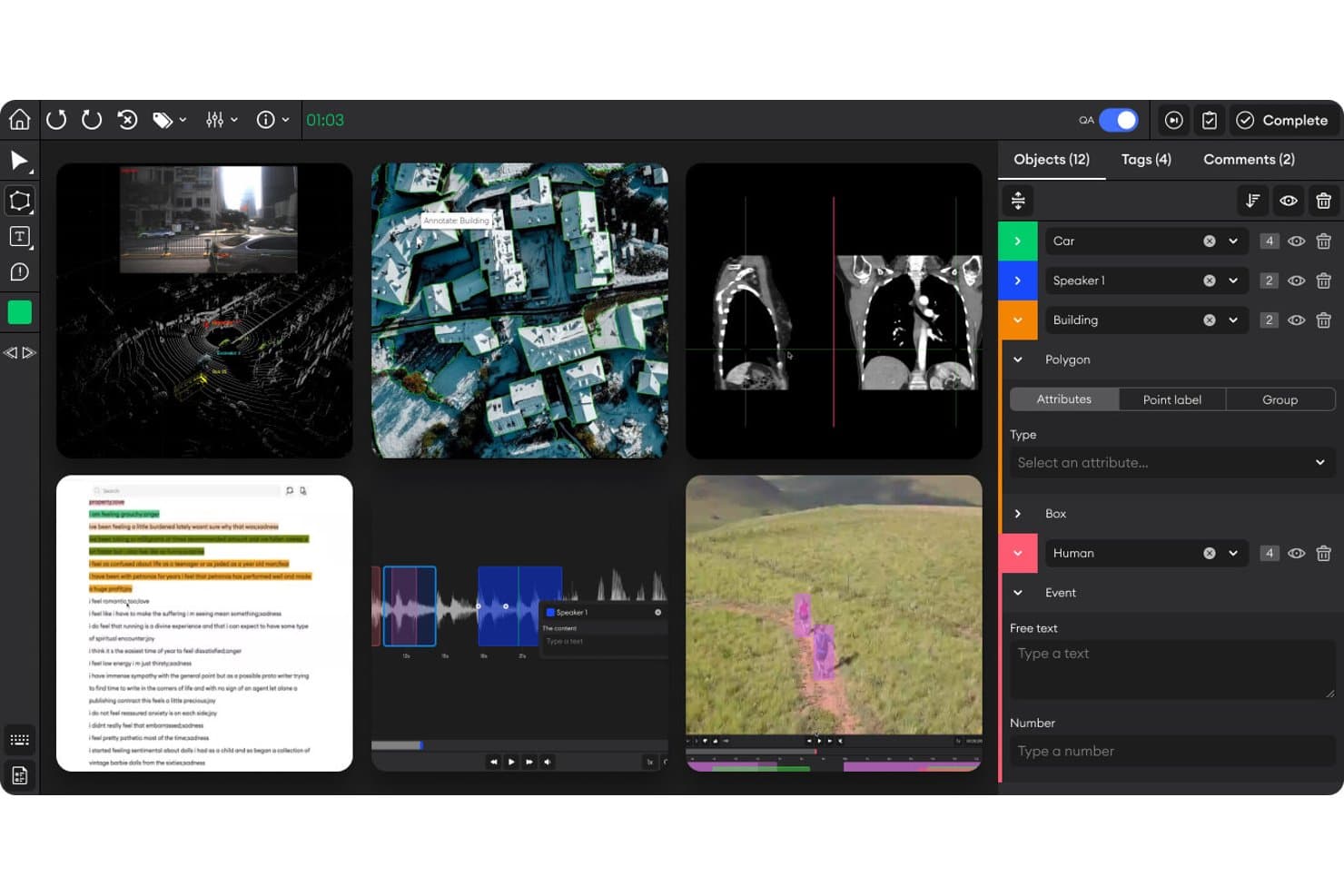
SuperAnnotate offers a multi-modal annotation workspace supporting images, medical scans, LiDAR, audio, and video with object labeling, polygon tools, and attribute panels. SuperAnnotate is an annotation project management platform designed for computer vision teams, offering advanced tools for image, video, text, and audio data labeling, collaboration, and quality assurance workflows.
Who Is SuperAnnotate Best For?
Annotation managers and data science leads at companies coordinating large, distributed teams for computer vision data labeling projects.
Why I Picked SuperAnnotate
I picked SuperAnnotate as one of the best because my team relies on its advanced annotation management tools to coordinate large teams, apply QA workflows across image and video data, and track project progress at scale. Its collaboration features let us handle complex data pipelines smoothly.
SuperAnnotate Key Features
- Multimodal annotation support: Label image, video, text, and audio data in unified projects.
- Python SDK and API: Automate data import, export, and integration into custom ML pipelines.
- Advanced label taxonomy configuration: Create complex, hierarchical labeling structures tailored to each project.
- Integrated vendor and workforce management: Organize tasks across internal teams and external annotation vendors.
SuperAnnotate Integrations
SuperAnnotate offers native integrations with AWS S3, GCP, Nvidia, Databricks, Snowflake, and IBM Cloud. A Python SDK and REST API are available for custom integrations into existing machine learning pipelines.
Pros and Cons
Pros:
- Vendor and workforce management included
- Advanced collaboration and QA workflows
- Multimodal annotation on a single platform
Cons:
- Reporting limited to annotation-focused metrics
- No built-in model training capability
Learn more about SuperAnnotate: Best for cloud-native image and video analysis
- 12-month free tier available
- From $0.001/image
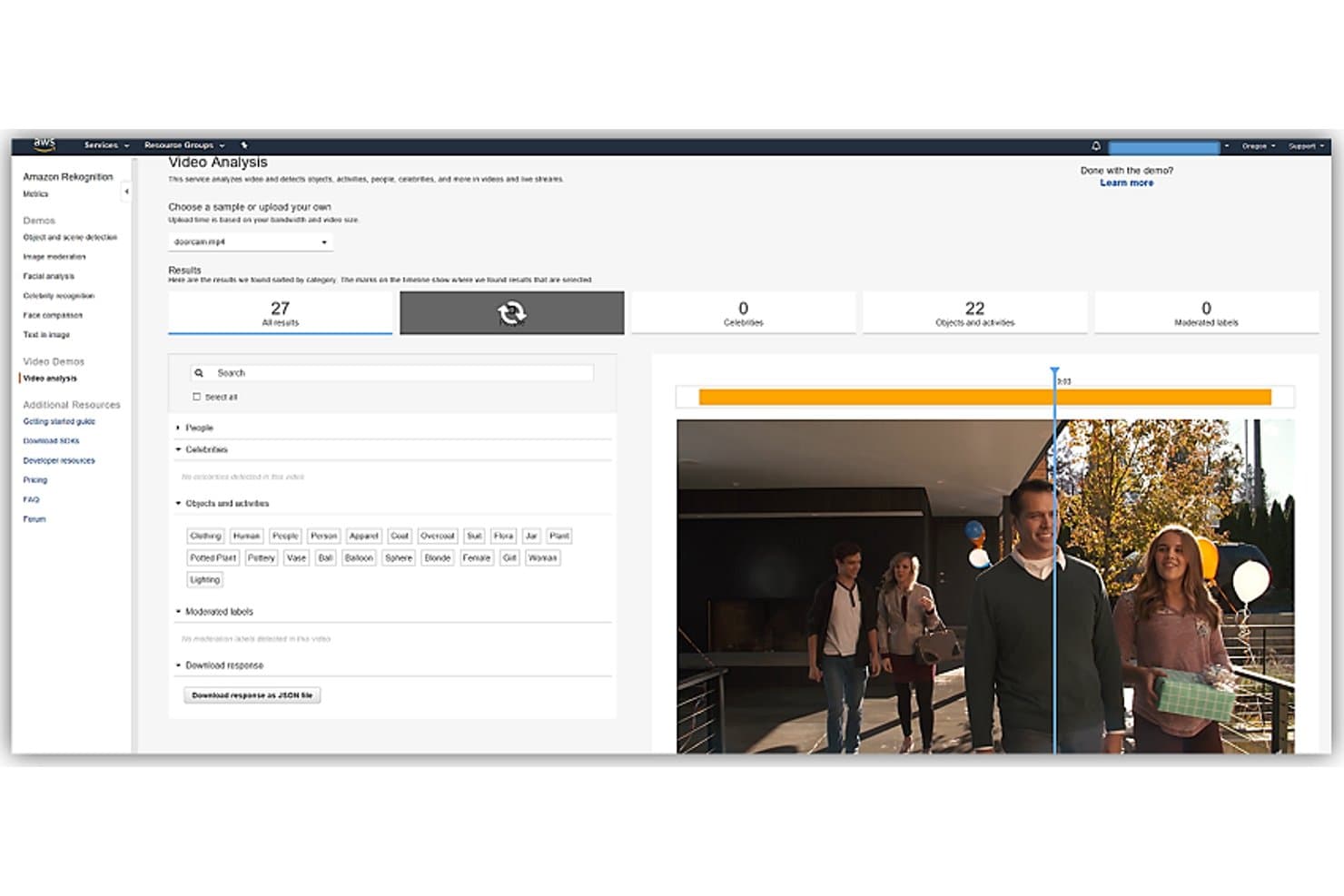
Amazon Rekognition offers a video analysis demo that detects objects, activities, people, and celebrities in video streams with 27 total results. Amazon Rekognition is a cloud-based computer vision platform that provides image and video analysis, object and facial detection, content moderation, scene labeling, and support for building custom vision models.
Who Is Amazon Rekognition Best For?
Teams managing high-volume image or video analysis on AWS infrastructure or building scalable, cloud-native computer vision workflows.
Why I Picked Amazon Rekognition
I picked Amazon Rekognition as one of the best because I can analyze massive image and video datasets directly in the cloud. I rely on its real-time video stream analysis and custom image classification to automate content moderation and facial recognition for high-scale projects.
Amazon Rekognition Key Features
- Face comparison and search: Match faces in images or video against collections at scale.
- Text detection (OCR): Identify and extract text from images in multiple scripts and formats.
- Image moderation: Detect explicit, suggestive, or unsafe image content using pre-trained classifiers.
- Celebrity recognition: Automatically tag known public figures in photos and videos.
Amazon Rekognition Integrations
Amazon Rekognition offers native integrations across the AWS ecosystem, including S3, Lambda, Kinesis, SageMaker Ground Truth, SNS, and SQS. An API is available for custom integrations.
Pros and Cons
Pros:
- Scales for high-volume processing in cloud
- Real-time video and image analysis capabilities
- Pre-trained models for common image tasks
Cons:
- Lacks pixel-level segmentation features
- No offline or on-premises deployment option
Learn more about Amazon Rekognition: Best for industry-specific visual recognition
- Free demo available
- Pricing upon request
Visit WebsiteCustomer Rating:4/5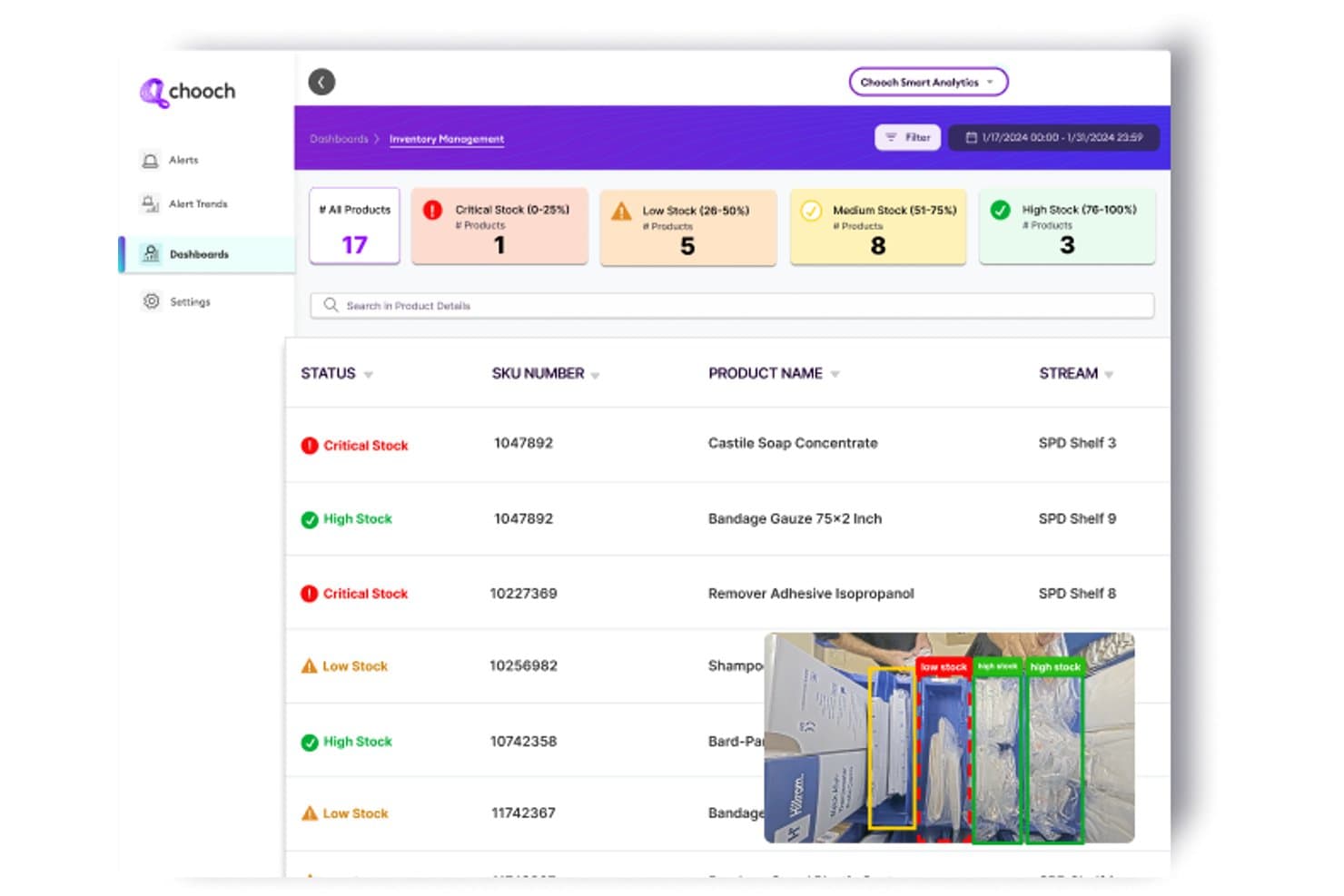
Chooch AI offers an inventory management dashboard with real-time computer vision stock level detection, categorizing products by critical, low, medium, and high stock status. Chooch AI is a computer vision platform designed for organizations that need custom training, rapid annotation, and scalable model deployment across cloud, edge, and on-prem environments.
Who Is Chooch AI Best For?
Chooch AI suits ML engineers and IT teams in manufacturing, healthcare, or industrial sectors who need tailored visual recognition for complex environments.
Why I Picked Chooch AI
I picked Chooch AI as one of the best because it gives me pre-built visual recognition models tailored for healthcare, manufacturing, and public safety. My team deploys these models on edge devices for real-time detection in industrial use cases.
Chooch AI Key Features
- Smart Annotation: Automatically labels objects in images and video with bounding boxes and polygons.
- Continuous learning: Allows retraining of deployed models with new data to improve accuracy.
- Edge deployment: Runs vision models on devices like Nvidia Jetson for low-latency processing.
- Integrated API and SDK: Provides REST API and SDKs for accessing and integrating computer vision capabilities in applications.
Chooch AI Integrations
Native integrations are not publicly listed. Chooch AI provides an API and SDKs for building custom integrations.
Pros and Cons
Pros:
- Custom AI model training for unique datasets
- Supports deployment on edge, cloud, on-prem
- Industry-ready visual recognition models available
Cons:
- Advanced 3D or temporal analysis limited
- Few public third-party user reviews
Learn more about Chooch AI:
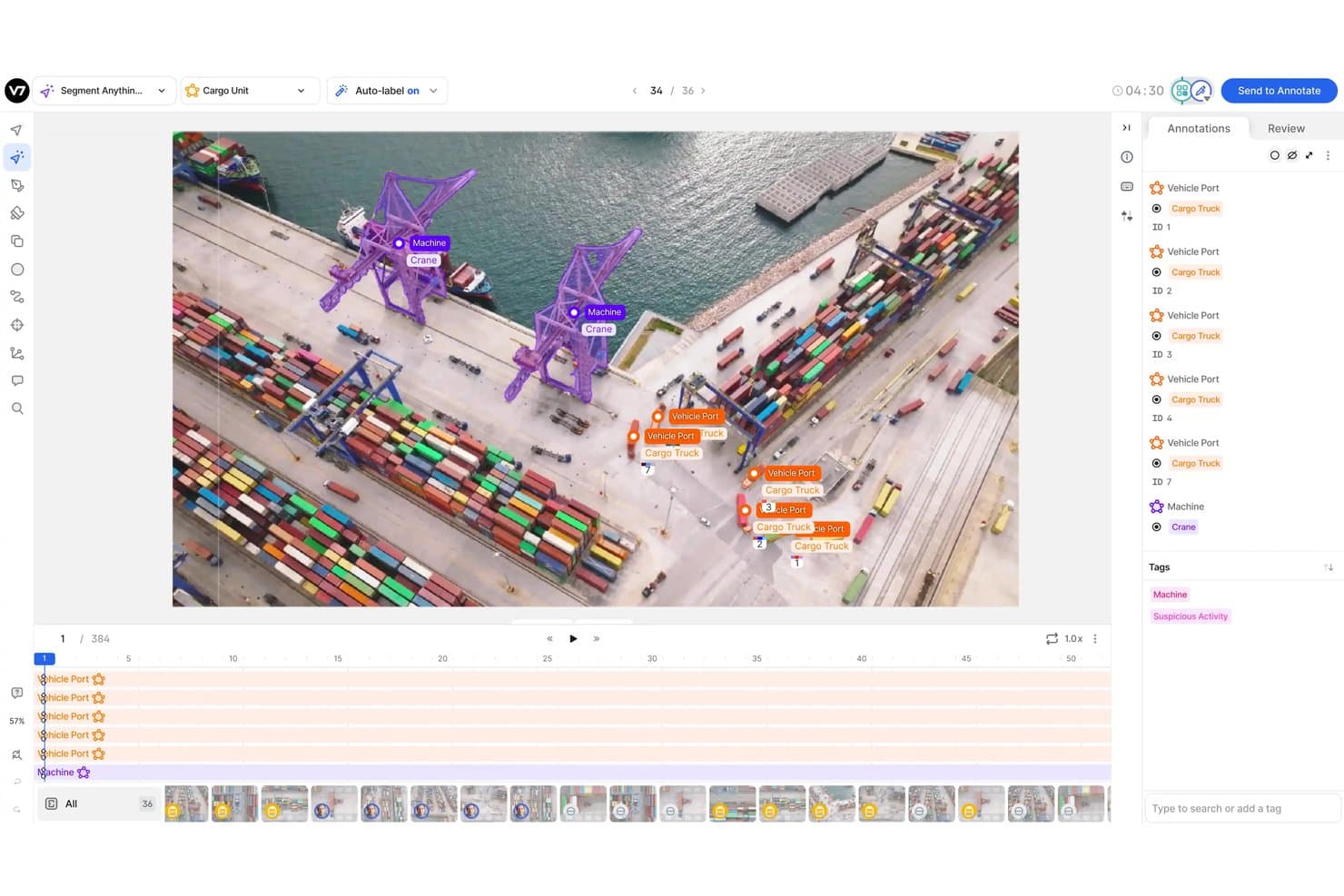
V7 offers an AI-powered annotation workspace for labeling cargo port footage with object segmentation, auto-labeling, and multi-class tagging tools. V7 is a computer vision platform designed for teams who need advanced tools for labeling, annotating, and managing large volumes of images and videos.
Who Is V7 Best For?
Ideal for machine learning and data science teams in industries like healthcare, automotive, or manufacturing that require detailed image and video annotation workflows.
Why I Picked V7
I picked V7 as one of the best because I can manage complex image and video annotation projects in a single workspace. I use integrated tools like auto-labeling with segmentation models and video object tracking, all tied into a review and QA workflow.
V7 Key Features
- Consensus and QA workflows: Assign annotation tasks and manage multi-level review processes for quality control.
- Dataset versioning: Track changes and maintain different versions of annotated datasets for audit and reproducibility.
- DICOM and medical imagery support: Annotate and manage specialized medical formats like DICOM and NifTI directly in the platform.
- Python SDK and REST API: Integrate dataset management and annotation pipelines into your custom ML or automation workflows.
V7 Integrations
V7 provides native integrations with AWS and Google Cloud, and offers an API for building custom integrations.
Pros and Cons
Pros:
- Customizable QA and consensus review workflows
- Built-in video object and frame annotation
- Supports medical formats like DICOM and NifTI
Cons:
- Limited support for 3D and lidar annotation
- No built-in model training feature
Learn more about V7: Best for building end-to-end AI vision pipelines
- Free plan + free demo available
- From $30/month
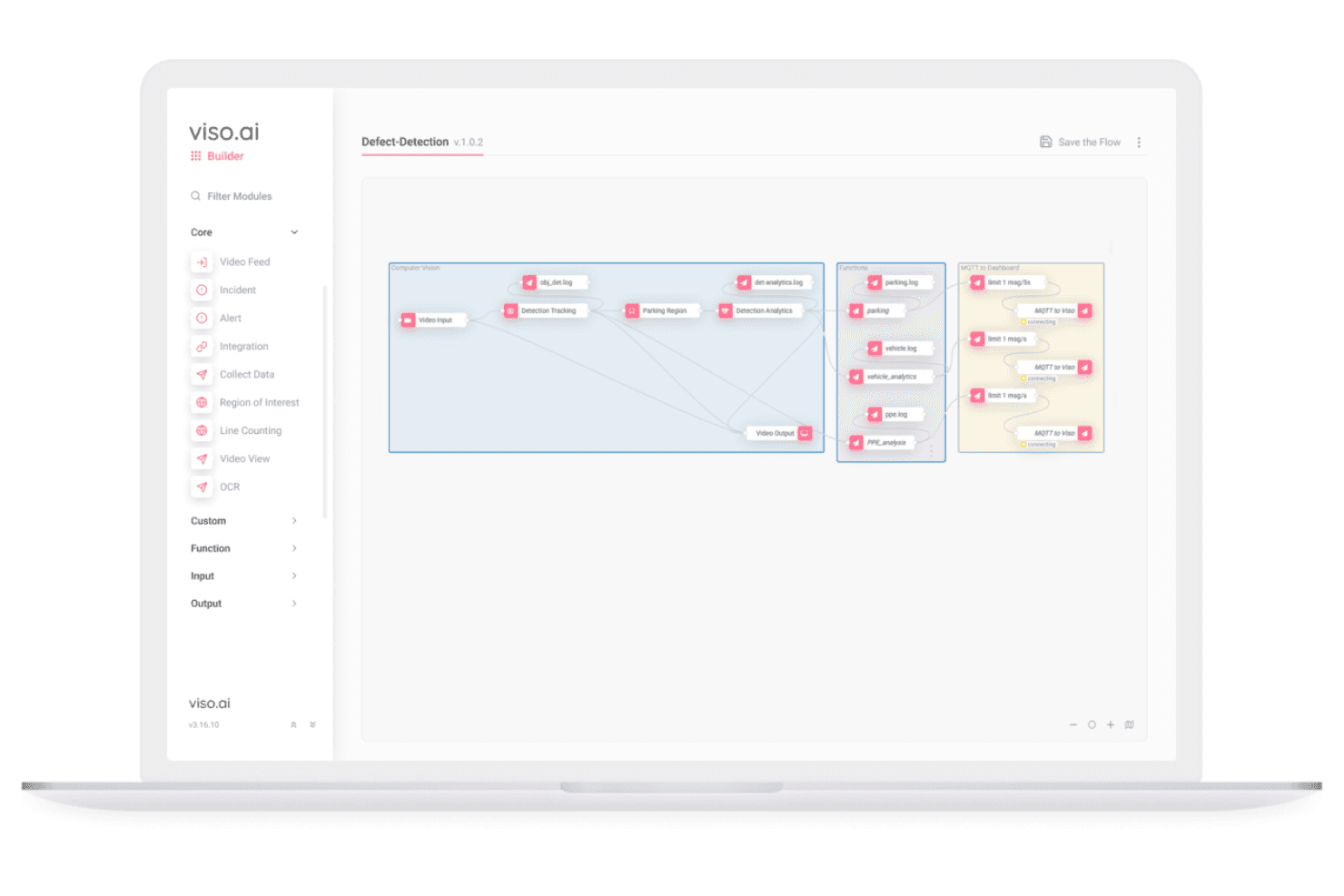
Viso Suite lets users build end-to-end AI vision pipelines visually. Viso Suite is an end-to-end computer vision platform for building, training, deploying, and managing AI vision pipelines at scale across edge, on-premises, and cloud environments.
Who Is Viso Suite Best For?
Enterprises and IT teams deploying large-scale visual AI workflows across multiple sites, industries, and edge or hybrid infrastructure environments.
Why I Picked Viso Suite
I picked Viso Suite as one of the best because I can design, deploy, and manage entire AI vision pipelines from data collection to real-time inference in a unified environment. The no-code workflow builder and support for edge, cloud, and on-prem deployment make large-scale projects practical.
Viso Suite Key Features
- Advanced object detection models: Choose from a library of state-of-the-art models for complex visual recognition tasks.
- Collaborative annotation workflows: Multiple users can label and review datasets within built-in QA tools.
- Real-time video stream processing: Analyze and track visual data from thousands of live cameras simultaneously.
- Granular role-based access control: Manage security and user permissions for projects at the workspace and deployment level.
Viso Suite Integrations
Viso Suite offers native integrations with IP camera systems, Google Cloud Platform, Azure, and AWS, and provides an API for custom integrations.
Pros and Cons
Pros:
- Supports complex multi-camera video analytics
- Built-in collaborative data annotation workflow
- Scales to thousands of edge or cloud devices
Cons:
- Annotation tools focus on 2D data only
- Little third-party review or community support
Learn more about Viso Suite: Best for rapid model deployment on custom datasets
- Free plan + free trial + free demo available
- From $99/month
Visit WebsiteCustomer Rating:4.8/5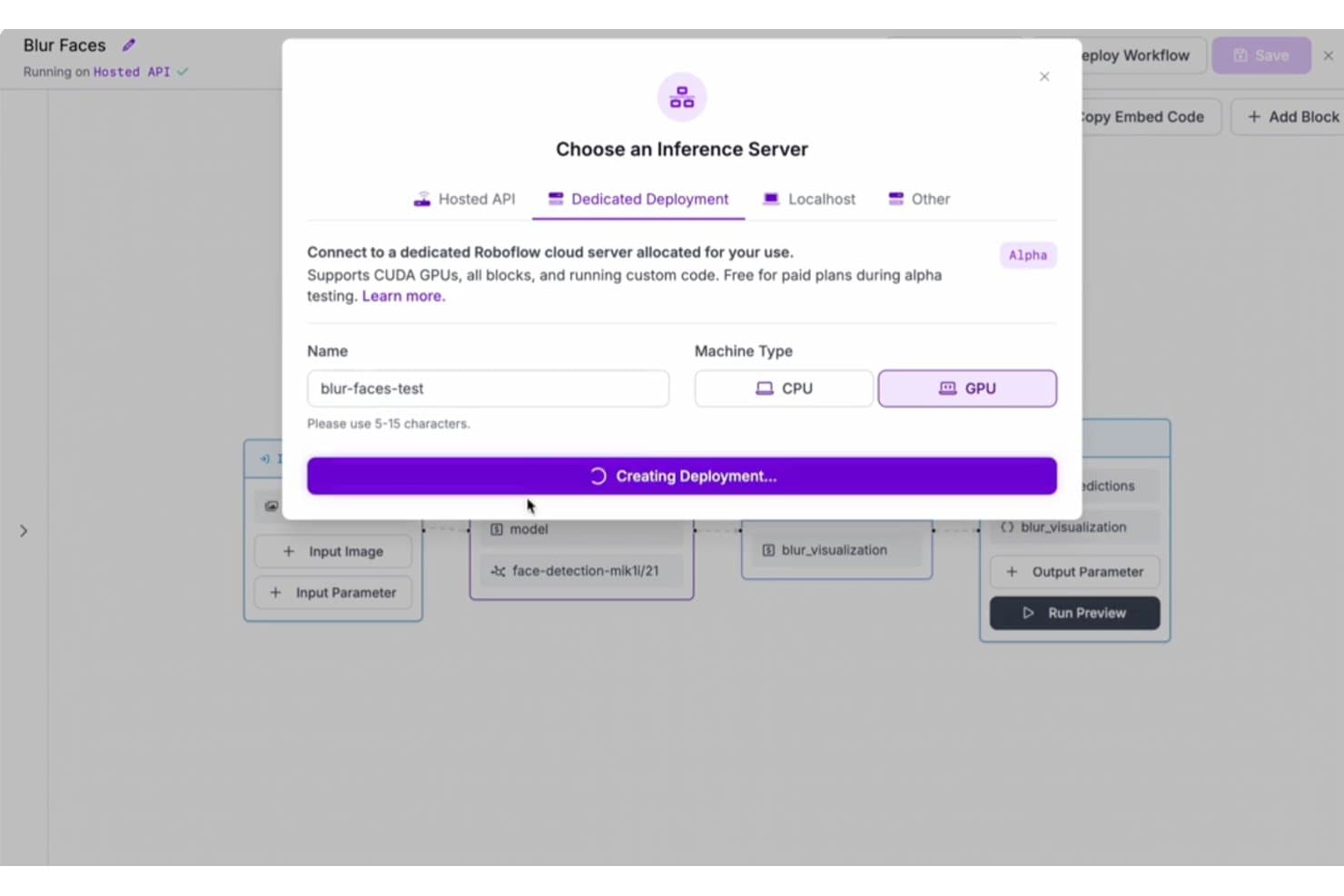
Roboflow offers a Dedicated Deployment option with GPU support for running computer vision workflows on dedicated cloud servers. Roboflow is a computer vision platform for building, annotating, training, and deploying custom image classification and object detection models using your own datasets.
Who Is Roboflow Best For?
ML engineers and developers at startups or enterprises who need to deploy and iterate on custom computer vision models quickly.
Why I Picked Roboflow
I picked Roboflow as one of the best because I can upload my own datasets, annotate them, and deploy custom computer vision models in minutes. My team uses its model training pipeline and one-click deployment tools to optimize rapid iteration.
Roboflow Key Features
- Pre-built model library: Choose from a collection of public computer vision models ready to deploy or fine-tune.
- API and SDK access: Connect models directly to your applications using REST APIs and supported SDKs.
- Collaborative annotation workspace: Assign annotation tasks, review progress, and manage datasets with team members in a unified platform.
- Support for multiple export formats: Export datasets and models to formats compatible with TensorFlow, PyTorch, YOLO, and more.
Roboflow Integrations
Roboflow offers native integrations with HuggingFace, Google Cloud Vision, Supervisely, SuperAnnotate, OBS, IBM Cloud, LabelMe, YOLOv8, and more. Zapier is supported, and an API is available for custom integrations.
Pros and Cons
Pros:
- Supports export to major AI model formats
- Built-in collaborative data annotation workspace
- Fast deployment of custom vision models
Cons:
- Advanced video analytics features are limited
- Lacks native support for 3D annotation
Learn more about Roboflow: Best for automated data annotation at scale
- Free demo available
- Pricing upon request
Visit WebsiteCustomer Rating:4.8/5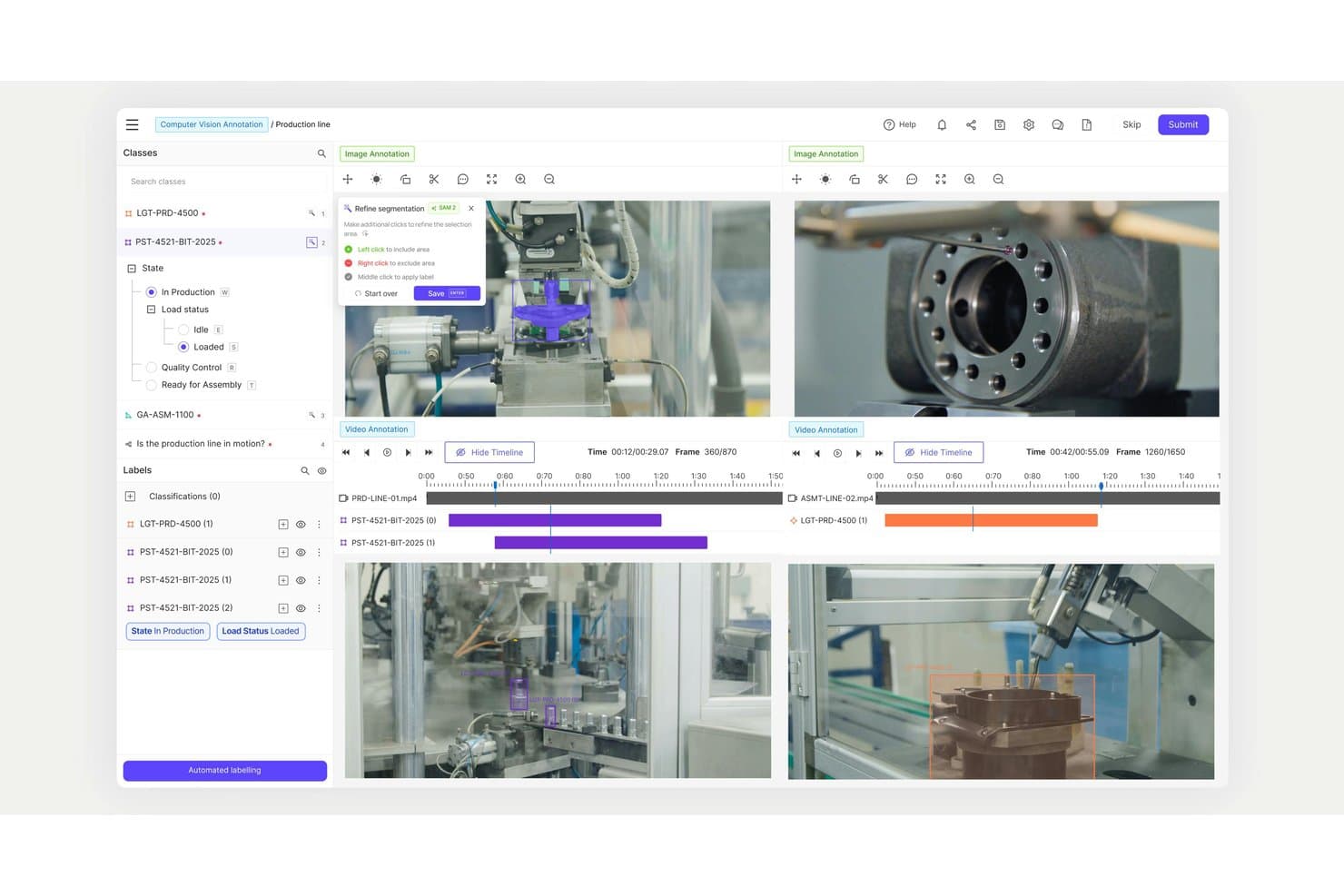
Encord offers a multi-video annotation workspace with timeline controls, segmentation refinement tools, and classification labels for production line computer vision tasks. Encord is a data-centric computer vision software platform that provides large-scale image, video, and multimodal annotation tools alongside integrated automated labeling, quality assurance workflows, and workflow management designed for enterprise AI teams.
Who Is Encord Best For?
Enterprise data science teams and ML engineers in regulated industries who need large-scale, automated annotation for complex computer vision projects.
Why I Picked Encord
I picked Encord as one of the best because I can automate annotation for huge datasets using AI-driven labeling workflows, deploy advanced tools for images, video, and 3D, and rely on integrated QA processes to handle complex, scaled-up computer vision tasks.
Encord Key Features
- Multimodal annotation tools: Annotate images, videos, LiDAR, and text data in one platform.
- Built-in active learning: Use model-in-the-loop capabilities to identify and prioritize edge cases.
- Collaborative project workspaces: Support simultaneous annotation and review across large teams.
- Role-based access control: Set roles and permissions for teams to maintain security and compliance.
Encord Integrations
Encord offers native integrations with AWS S3, Google Cloud Storage, and Azure Blob Storage. An API is available for custom integrations.
Pros and Cons
Pros:
- Supports video, 3D, and multimodal labeling
- Advanced QA and audit trail workflows
- Automated annotation for high-volume image datasets
Cons:
- Annotation interface can lag with huge datasets
- No built-in model training pipeline
Learn more about Encord: Best for advanced data labeling workflows
- Free trial available
- Pricing upon request
Visit WebsiteCustomer Rating:4.5/5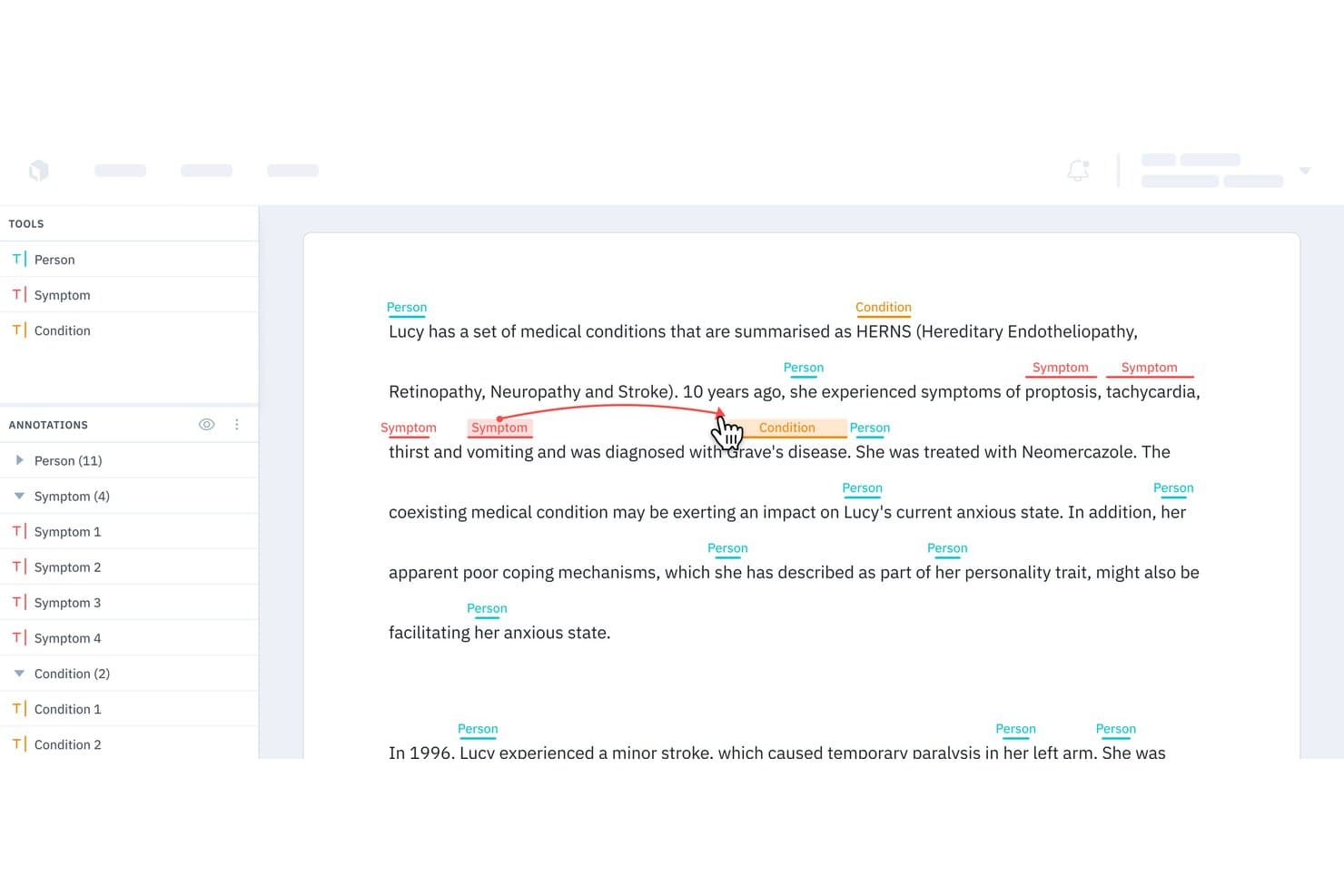
Labelbox offers a named entity recognition (NER) annotation interface that allows users to label medical text with tags like Person, Symptom, and Condition, with relationship linking between entities. Labelbox is a computer vision data labeling platform that gives your team advanced tools to annotate, manage, and quality-control large image, video, and 3D datasets for machine learning workflows.
Who Is Labelbox Best For?
Labelbox is a strong fit for data science teams and ML engineers at mid-sized to enterprise organizations managing large-scale computer vision projects.
Why I Picked Labelbox
I picked Labelbox as a high-performance tool because I rely on its advanced data labeling workflows for large-scale image, video, and 3D annotation projects. My team uses its auto-labeling and review features to speed up QA and handle collaboration across complex datasets.
Labelbox Key Features
- Label editor customization: Build tailored annotation interfaces for unique computer vision data types.
- Ontology management: Define hierarchical label structures to match your project’s requirements.
- Model-assisted labeling: Integrate your models to generate pre-labels and incorporate active learning strategies.
- Python SDK and API: Access automation and integration options for large-scale data and workflow management.
Labelbox Integrations
Labelbox offers native integrations with Google Cloud Storage, Amazon S3, Snowflake, MySQL, Kafka, Looker, Redshift, MotherDuck, and more. An API is available for custom integrations.
Pros and Cons
Pros:
- Advanced automation for quality assurance workflows
- Supports image, video, and 3D labeling
- Handles large-scale data annotation projects
Cons:
- Occasional platform slowdowns on massive datasets
- No built-in computer vision model training
Learn more about Labelbox: Best for scalable AI model lifecycle management
- 14-day free trial available
- Pricing upon request
Visit WebsiteCustomer Rating:4.3/5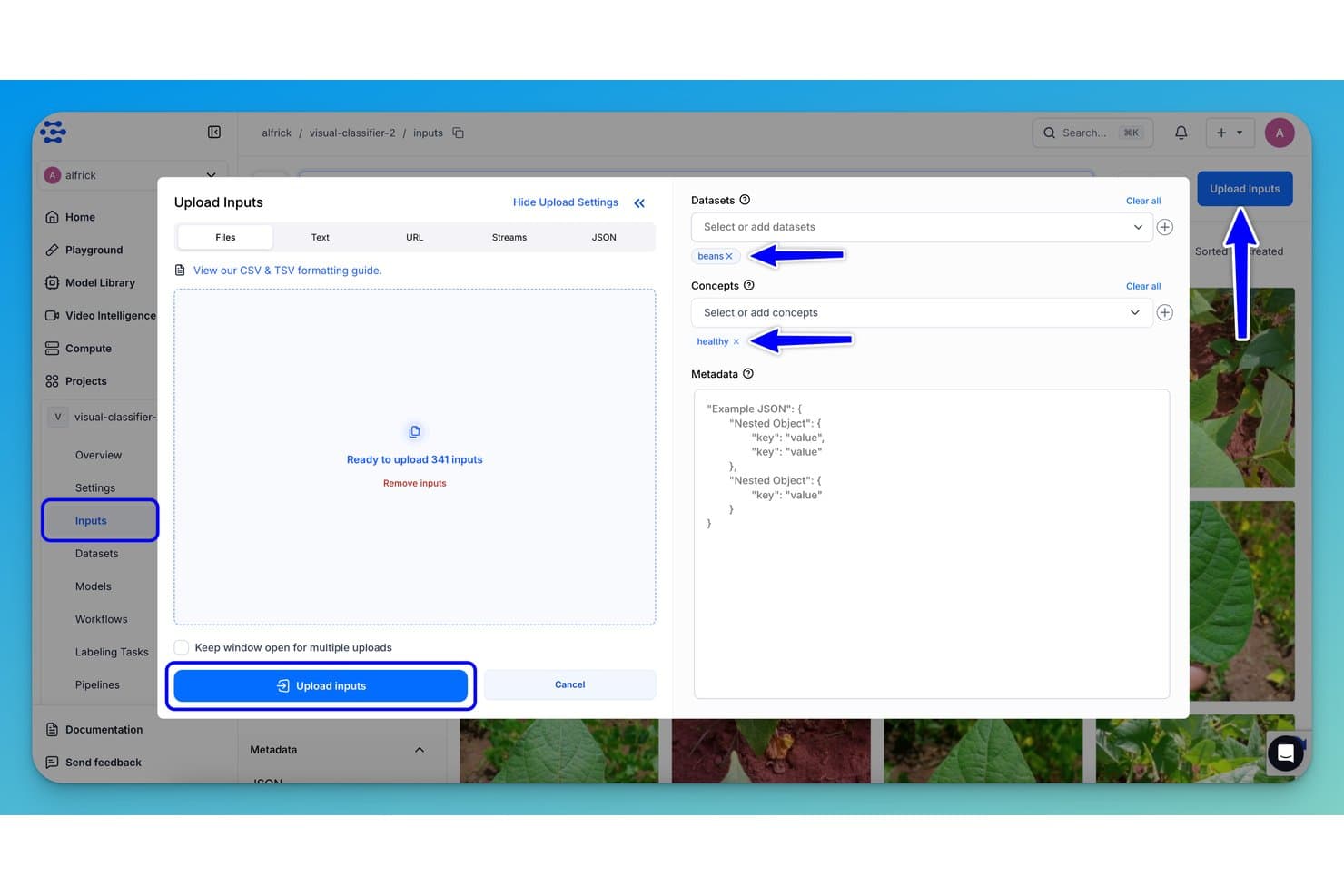
Clarifai offers an Upload Inputs dialog where users can assign datasets and concepts like 'beans' and 'healthy' before bulk uploading 341 images for model training. Clarifai is an enterprise computer vision platform for developing, training, and deploying image and video recognition models at scale, with extensive tools for custom model management, data annotation, and real-time visual analysis.
Who Is Clarifai Best For?
Enterprises and teams with dedicated machine learning engineers or data scientists working on large-scale computer vision projects.
Why I Picked Clarifai
I picked Clarifai as one of the best because I can manage every stage of my AI model pipeline, from dataset annotation to deployment, in one system. I rely on its advanced MLOps, powerful video analysis, and smooth edge deployment options.
Clarifai Key Features
- Pre-trained model library: Access a wide selection of ready-to-use computer vision models for rapid deployment.
- Collaborative data annotation tools: Enable teams to label and manage large image and video datasets in a shared workspace.
- API and SDK integrations: Connect models and workflows to your applications using REST APIs and multiple programming SDKs.
- Customizable workflow pipelines: Design and manage end-to-end vision processing pipelines tailored to complex project needs.
Clarifai Integrations
Clarifai offers native integrations with Snowflake and Amazon S3, and provides an API and SDKs for custom apps integrations in Python, Java, and Node.js.
Pros and Cons
Pros:
- On-premises, cloud, and edge deployment options
- Fast annotation and collaboration workflow tools
- Pre-trained models for many image tasks
Cons:
- Limited published benchmarks for some models
- Complex automation setup for advanced pipelines
Learn more about Clarifai:
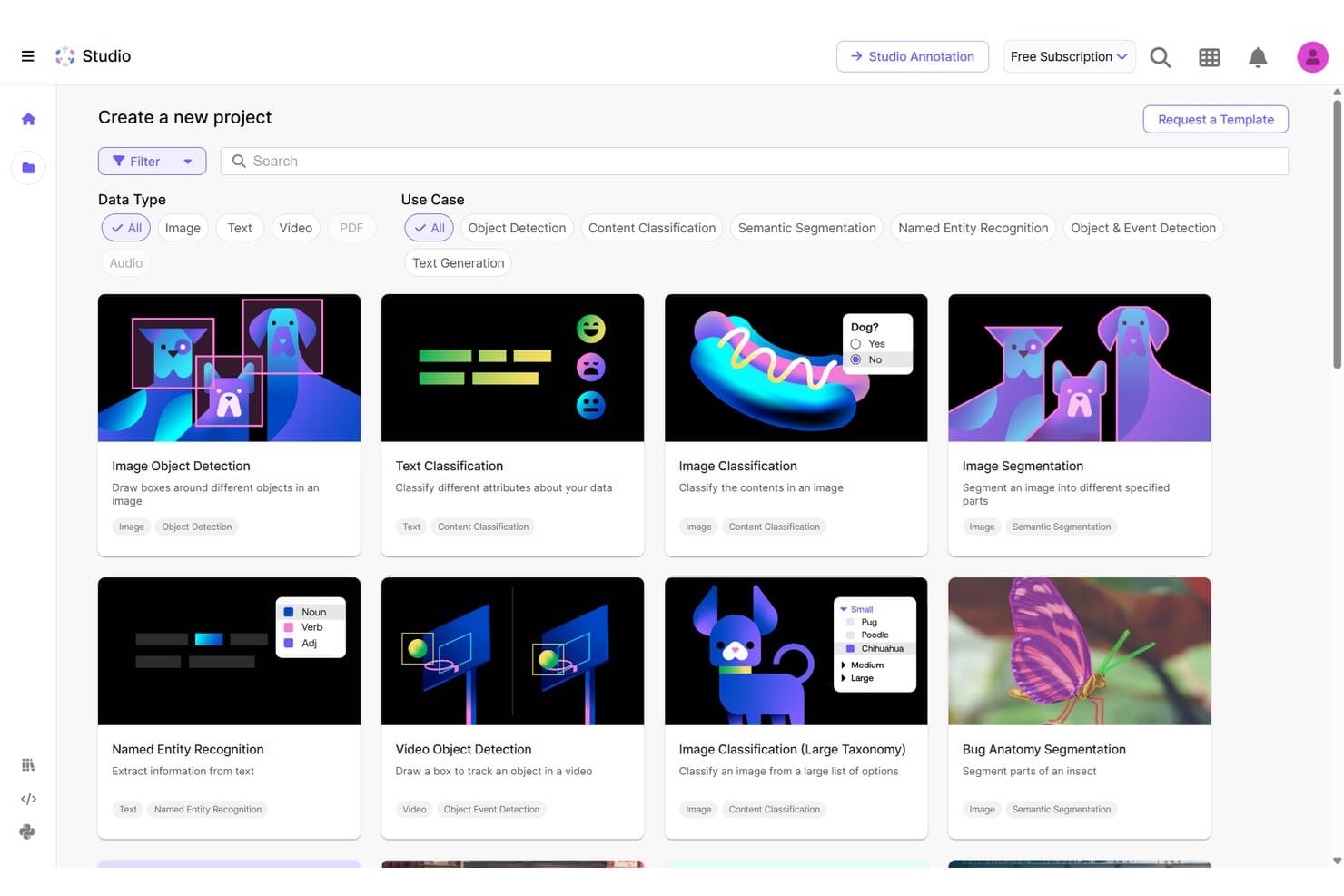
Scale AI offers a project template gallery with computer vision options like Image Object Detection, Image Classification, and Image Segmentation for training data labeling. Scale AI is an enterprise-focused computer vision software platform offering extensive annotation, dataset management, and scalable APIs for image, video, and 3D data workflows.
Who Is Scale AI Best For?
Scale AI suits large enterprises and advanced AI teams managing demanding computer vision projects and complex, high-volume data annotation workflows.
Why I Picked Scale AI
I picked Scale AI as one of the best because I rely on its enterprise-grade annotation services for large, complex computer vision datasets. My team uses its advanced annotation workflows, fast QA processes, and support for video and 3D data for demanding vision projects.
Scale AI Key Features
- Multi-modality data support: Annotate images, videos, LiDAR, and text data optimized for language models within a unified platform.
- API-driven integration: Connect data pipelines through REST APIs for optimized dataset management and automation.
- Real-time collaboration tools: Enable multiple users to review, comment, and adjust visual labels simultaneously.
- Secure data environment: Protect sensitive information with enterprise-grade access controls and privacy safeguards.
Scale AI Integrations
Native integrations are not publicly listed. Scale AI provides an API for custom integrations.
Pros and Cons
Pros:
- Supports 2D, 3D, and video annotation
- Advanced quality control on labeled datasets
- High-volume annotation for complex data types
Cons:
- No clear documentation of native third-party integrations
- Limited suitability for small team projects
Learn more about Scale AI:
Annen programvare for datasyn
Her er noen flere alternativer for programvare for datasyn som ikke kom med på kortlisten min, men som likevel er verdt å undersøke:
- 11SuperviselyBest for no-code project configuration
- 12CVATBest for open-source annotation customization
- 13Vertex AIBest for integrating with Google Cloud
- 14DataLoopBest for automated data pipeline management
- 15Azure AI Custom VisionBest for rapid custom model training via API
- 16UltralyticsBest for pretrained YOLO model support
- 17Hive AIBest for large-scale content moderation
- 18OpenCVBest for open-source algorithm libraries
- 19Milestone SystemsBest for forensic video investigation
How I Evaluate Computer Vision Software
I split my evaluation into baseline requirements—like annotation tooling and API deployment—and differentiators like edge support and MLOps maturity.
Core Functionality (Table Stakes For This List)
When I'm selecting tools for my list, I rank each one on a scale from 0 (does not offer the functionality) to 5 (excels in this area) for each core functionality listed below. Then, I calculate the tool's total score into a percentage. Each tool needs to achieve a minimum total score of 75% to be considered for inclusion.
- Image Recognition & Classification: I evaluate how well a platform classifies objects, scenes, and attributes in static images, from pre-trained general models to custom classifiers trained on domain-specific data like retail product catalogs or medical scans.
- Object Detection & Segmentation: I look for support beyond basic bounding boxes, checking whether the tool handles instance segmentation, semantic segmentation, or pose estimation for use cases like warehouse inventory counting or defect inspection on production lines.
- Model Training & Customization: The ability to fine-tune or train models on your own labeled datasets matters here. I check for AutoML options, architecture flexibility, hyperparameter tuning, and experiment tracking so teams can iterate without starting from scratch.
- Video Analysis Capabilities: I consider whether the platform can process live video streams with multi-object tracking and event detection, not just frame-by-frame image analysis. Real-time surveillance feeds and manufacturing line monitoring are where this really gets tested.
- Data Annotation & Labeling: Strong annotation tooling with collaboration features, QA review workflows, and AI-assisted auto-labeling saves enormous time. I look at how each platform handles labeling for both images and video, including support for polygon, keypoint, and 3D annotation types.
- Deployment & API Integration: I check whether models can be deployed across cloud, on-prem, and edge environments via REST APIs, SDKs, or containerized runtimes. Platforms that support exports to formats like ONNX or TensorRT give your team more flexibility when targeting specific hardware.
Once I have a list of tools that meet the criteria, I consider what sets each platform apart.
Differentiating Factors (What Sets Vendors Apart)
Here's how I compare and contrast different vendors:
Standout Features
Edge deployment support is a major differentiator—I check whether a platform can push models to devices like NVIDIA Jetson boards or industrial cameras for real-time inference without relying on cloud connectivity. MLOps tooling matters just as much once models hit production. Drift detection and automated retraining pipelines keep accuracy from degrading as real-world conditions shift. I also look at pre-trained model libraries, since a strong catalog of ready-to-use models for tasks like OCR or pose estimation lets teams validate use cases before investing in custom training.
Beyond Features
Compliance and security weigh heavily in my evaluation, especially for platforms handling facial recognition or biometric data. I check for certifications like SOC 2 and HIPAA, plus built-in privacy features like PII blurring and audit logs. Deployment flexibility also matters—a platform that supports cloud, on-prem, and hybrid options gives your team room to meet data residency requirements without rearchitecting later. Pricing transparency is another factor I consider closely, since costs can spiral when training compute, storage, and per-inference fees are all billed separately.
Slik velger du programvare for datasyn
Det er lett å gå seg vill i lange funksjonslister og komplekse prisstrukturer. For å hjelpe deg med å holde fokus mens du går gjennom den unike prosessen med å velge programvare, får du her en sjekkliste over faktorer du bør ha i mente:
| Faktor | Hva bør du vurdere? |
|---|---|
| FaktorSkalerbarhet | Hva bør du vurdere?Vil plattformen håndtere økende datamengder, flere modeller eller nye lokasjoner uten redusert ytelse? |
| FaktorIntegrasjoner | Hva bør du vurdere?Kan du koble verktøyet til de nåværende systemene, skylagringen, IoT-enhetene eller datapipelines uten spesialutvikling? |
| FaktorTilpasningsmuligheter | Hva bør du vurdere?Lar det deg tilpasse modellarbeidsflyter eller grensesnitt for merking slik at de passer til teamets unike prosjekter, miljøer eller datatyper? |
| FaktorBrukervennlighet | Hva bør du vurdere?Vil tekniske og ikke-tekniske teammedlemmer kunne bruke plattformen effektivt, eller krever bruken inngående ML-kompetanse? |
| FaktorImplementering og oppstart | Hva bør du vurdere?Hvilke ressurser, hvilken dokumentasjon eller støtte tilbys for å få modellene og dataene dine i drift på det nye systemet uten lange forsinkelser? |
| FaktorKostnad | Hva bør du vurdere?Er alle kostnadene tydelige – inkludert beregningsressurser for trening, datalagring, API-bruk og merking? Vær oppmerksom på skjulte kostnader og gebyrer ved overskridelse. |
| FaktorSikkerhetstiltak | Hva bør du vurdere?Tilbyr verktøyet rollebasert tilgang, datakryptering og revisjonslogger for å beskytte datasettene og immaterielle rettigheter knyttet til modellene mot interne og eksterne trusler? |
| FaktorKrav til samsvar | Hva bør du vurdere?Støtter programvaren personvern og bransjestandarder (GDPR, HIPAA osv.) som er relevante for sektoren eller regionen din? |
Hva er programvare for datasyn?
Programvare for datasyn er en kategori verktøy som bruker AI til å oppdage, analysere og tolke bilder eller video. Disse plattformene gjør det mulig for team å automatisere oppgaver som bildemerking, objektdeteksjon og videoanalyse. Ved å støtte modelltrening, distribusjon og integrasjon med andre systemer hjelper programvare for datasyn virksomheter med å hente ut innsikt og automatisere prosesser fra visuelle data i et bredt spekter av datasynsprogrammer.
Funksjoner
Ved valg av programvare for datamaskinsyn bør du se etter følgende nøkkelfunksjoner:
- Bildeklassifisering: Tildeler etiketter eller kategorier til bilder, slik at store datasett kan organiseres og sorteres automatisk ved å gjenkjenne viktige elementer eller mønstre.
- Objektgjenkjenning: Finner og identifiserer objekter i bilder eller videorammer, og støtter bruksområder som kvalitetssikring, lagerstyring eller sikkerhet i bilindustrien.
- Segmentering: Deler bilder inn i separate regioner eller objekter, noe som muliggjør presis analyse, måling eller isolering av områder som medisinske skanninger eller kartlagte miljøer.
- Videobehandling: Analyserer og trekker ut informasjon fra videostrømmer eller videofiler, slik at sanntidsgjenkjenning, hendelsessporing og bevegelsesanalyse kan brukes til overvåking.
- Verktøy for dataannotering: Tilbyr grensesnitt for manuell merking av bilder eller rammer, og støtter modellens nøyaktighet ved å sikre at dataene er riktig merket for trening.
- Batchbehandling: Håndterer store mengder bilder eller videoer i én enkelt arbeidsflyt, noe som sparer tid og innsats under modelltrening, validering eller oppgaver med ny behandling.
- API-integrasjon: Gjør det mulig for programvaren å koble seg til andre plattformer, slik at automatiserte behandlingsrør kan opprettes og synsfunksjoner bygges inn i dine egne applikasjoner.
- Rollebasert tilgang: Lar deg administrere tillatelser for brukergrupper, slik at de riktige teammedlemmene kan annotere data, gjennomgå resultater eller distribuere modeller på en sikker måte.
- Rapportering og visualisering: Tilbyr instrumentpaneler eller analyseverktøy for å visualisere resultater, følge forbedringer og kommunisere funn tydelig på tvers av team eller interessenter.
- Maskinvarekompatibilitet: Støtter ulike GPU-er, CPU-er eller spesialiserte akseleratorer, noe som gjør utrulling og skalering enklere på tvers av infrastrukturen din.
Vanlige AI-funksjoner i programvare for datamaskinsyn
I tillegg til standardfunksjonene i programvare for datamaskinsyn som er nevnt ovenfor, integrerer mange av disse løsningene AI med funksjoner som:
- Automatisk merking: Bruker AI til automatisk å generere annoteringer for bilder eller videorammer, noe som reduserer tiden som kreves for klargjøring av datasett og det manuelle arbeidet betydelig.
- Avviksdeteksjon: Bruker maskinlæring til å identifisere uvanlige mønstre eller feil i bilder eller video, og støtter bruksområder som kvalitetskontroll eller sikkerhetsovervåking.
- Ansiktsgjenkjenning: Bruker dyp læring til å oppdage og samsvare ansikter i bilder eller video, og muliggjør identitetsverifisering, tilgangskontroll eller kundeanalyse.
- Posisjonsestimering: Bruker AI-modeller til å fastslå posisjonen og orienteringen til objekter eller personer, og støtter bruksområder innen sportsanalyse, robotikk eller ergonomiske vurderinger.
- Scene- og miljøforståelse: Bruker AI til å tolke komplekse miljøer, gjenkjenne forhold mellom objekter og forutsi kontekst for oppgaver som autonom navigasjon eller detaljhandelsanalyse.
- Aktiv læring: Integrerer AI for å foreslå hvilke dataprøver som bør merkes neste gang, optimaliserer arbeidsflyter for annotering og forbedrer modellens ytelse med mindre merkede data.
Fordeler
Implementering av programvare for datamaskinsyn gir flere fordeler for teamet og virksomheten din. Her er noen av fordelene du kan se frem til:
- Raskere beslutningstaking: Automatisert analyse av bilder og videostrømmer gir innsikt i sanntid for bruksområder som kvalitetskontroll eller sikkerhetsovervåking.
- Økt produktivitet: Automatisering av arbeidsflyter og AI-drevne annoteringsverktøy hjelper teamet med å behandle mer data med mindre manuelt arbeid.
- Skalerbar drift: Distribusjonsalternativer i skyen, lokalt og på kanten gjør det mulig å gå fra pilotprosjekter til storskalaproduksjon uten omfattende omarbeiding.
- Forbedret nøyaktighet: Tilpassbar modelltrening og arbeidsflyter for aktiv læring forbedrer kontinuerlig resultatene for gjenkjenning, klassifisering og segmentering.
- Bedre datasikkerhet: Rollebasert tilgang, revisjonslogging og funksjoner for samsvar beskytter sensitive visuelle data og ivaretar personvernkrav.
- Enklere integrasjoner: API-tilgang og SDK-er kobler modeller til eksisterende forretningssystemer for smidig dataflyt og tilpassede arbeidsflyter.
- Handlingsrettet innsikt: Rapporteringsinstrumentpaneler og visualiseringer omdanner komplekse visuelle data til tydelige, forretningsrelevante funn for bedre strategisk planlegging.
Kostnader og priser
Valg av programvare for datamaskinsyn krever en forståelse av de ulike prismodellene og abonnementene som er tilgjengelige. Kostnadene varierer basert på funksjoner, teamstørrelse, tillegg og mer. Tabellen nedenfor oppsummerer vanlige abonnementer, gjennomsnittsprisene deres og typiske funksjoner som er inkludert i programvareløsninger for datamaskinsyn:
Sammenligningstabell for programvare for datasyn
| Plantype | Gjennomsnittspris | Vanlige funksjoner |
|---|---|---|
| PlantypeGratisabonnement | Gjennomsnittspris$0 | Vanlige funksjonerBegrensede datasett, grunnleggende bildebehandling, nødvendige annoteringsverktøy og brukerstøtte fra fellesskapet. |
| PlantypePersonlig abonnement | Gjennomsnittspris$25-$100/bruker/måned | Vanlige funksjonerTilgang for én bruker, batchbehandling, sentrale datasynmodeller, dataeksport og e-poststøtte. |
| PlantypeForretningsabonnement | Gjennomsnittspris$100-$500/bruker/måned | Vanlige funksjonerFlerbrukersamarbeid, avansert modelltilpasning, API-tilgang, integrasjonsalternativer og prioritert brukerstøtte. |
| PlantypeAbonnement for store virksomheter | Gjennomsnittspris$500+/bruker/måned | Vanlige funksjonerTilpasset distribusjon, rollebasert tilgang, funksjoner for overholdelse av regelverk, dedikert onboarding, tilpassede SLA-er og full brukerstøtte. |
Vanlige spørsmål om programvare for datasyn
Her er noen svar på vanlige spørsmål om programvare for datasyn:
Hvilke bransjer bruker programvare for datasyn?
Du finner programvare for datasyn i produksjon, helsetjenester, detaljhandel, sikkerhet, logistikk og landbruk – i utgangspunktet overalt der organisasjoner ønsker å hente ut verdi fra visuelle data til inspeksjon, automatisering eller analyse.
Kan ikke-tekniske brukere arbeide med plattformer for datasyn?
Ja, mange plattformer tilbyr nå grensesnitt som krever lite kode, veiledede arbeidsflyter og forhåndstrente modeller, slik at fageksperter og operatører kan merke data og bruke grunnleggende modeller uten inngående ekspertise innen maskinlæring.
Hvordan beskytter programvare for datasyn sensitive data?
De fleste plattformer tilbyr funksjoner som datakryptering, rollebasert tilgang, revisjonslogger og alternativer for behandling på enheten for å beskytte sensitive bilder eller videoer og hjelpe deg med å oppfylle krav til regelverksetterlevelse.
Er det mulig å integrere programvare for datasyn med eksisterende forretningssystemer?
Ja, API-tilgang og SDK-er er vanlig, noe som gjør det enkelt å koble til ERP-, MES-, VMS- eller skylagringsplattformer og bygge inn datasynresultater i dine egne arbeidsflyter.
Hva bør jeg vite om å skalere opp en datasynløsning?
Kontroller om løsningen kan håndtere økende datamengder, flere brukere og distribusjoner i skyen, lokalt installert eller på kantenheter uten ytelsesproblemer eller komplisert rekonfigurering.