

AI-verktøy for koding er applikasjoner som bruker kunstig intelligens til å hjelpe deg med å skrive, gjennomgå eller forbedre kode raskere og mer pålitelig. Hvis du leter etter verktøy som kan øke produktiviteten, redusere repetitive oppgaver eller løse krevende programmeringsutfordringer, har du kommet til rett sted.
Med så mange alternativer og teknologi som endrer seg raskt, er det vanskelig å vite hva som faktisk fungerer. Jeg tar deg gjennom de beste alternativene for 2026, slik at du kan velge det som passer best til den daglige kodingen og behovene til teamet ditt.
Why Trust Our Software Recommendations
6,700+
Reviews
20
Industry experts
16+
Evaluation factors
14
Years
Our team has been testing and reviewing software since 2012. As tech leaders ourselves, we know how difficult—and important—it is to choose the right software.
For this guide, we evaluated tools using hands-on testing and independent research, scoring tools using our selection criteria.
Our reviews reflect our human editorial judgment, not a sales pitch.
Expert reviewers:
- Paulo Gardini MiguelTech Director
 Tim FisherVP of AI
 Gabriel RosasTech Lead & Software Architect
 Christhian GruhnTech Lead & Platform Architect

Sammenligningstabell for AI-verktøy for koding
Denne sammenligningstabellen oppsummerer prisdetaljene for mine beste utvalgte AI-verktøy for koding:
| Tool | Best For | Trial Info | Price | ||
|---|---|---|---|---|---|
| 1 | Best for instant project setup in the browser | Free plan available | From $18/month (billed annually) | Website | |
| 2 | Best for optimizing team code reviews | Free plan + free demo available | From $30/user/month (billed annually) | Website | |
| 3 | Best for integrating cloud development workflows | Free plan available | From $19/user/month | Website | |
| 4 | Best for seamless integration with JetBrains IDEs | Free plan available | From $199/user/month | Website | |
| 5 | Best for using conversational coding features | 30-day free trial | From $19/user/month (billed annually) | Website | |
| 6 | Best for real-time code suggestions in editors | Free plan + 30-day free trial available | From $4/user/month | Website | |
| 7 | Best for handling complex multi-file projects | Not available | From $20/month | Website | |
| 8 | Best for privacy-focused code completion | Free demo available | From $39/user/month (billed annually) | Website | |
| 9 | Best for collaborative code editing with AI | Free plan available | From $20/month | Website | |
| 10 | Best for autonomous end-to-end software tasks | Free plan available | From $20/user/month | Website |


Anmeldelser av de beste AI-verktøyene for koding
Nedenfor finner du mine detaljerte sammendrag av de beste AI-verktøyene for koding som kom med på kortlisten. Anmeldelsene mine gir en detaljert gjennomgang av funksjonene, egenskapene og integrasjonene til hvert verktøy, slik at du kan finne det beste alternativet for deg.
 Best for instant project setup in the browser
- Free plan available
- From $18/month (billed annually)
Visit WebsiteCustomer Rating:4.4/5
Replit's AI agent features a priority-labeled to-do list app with color-coded tags and a live canvas preview. Replit is a browser-based AI coding platform where developers can write, run, and deploy full-stack applications using an AI Agent that generates code, manages databases, and handles hosting from a single environment.
Who Is Replit Best For?
Replit is a strong fit for indie developers and early-stage startup teams who need to go from idea to deployed app without managing infrastructure or local dev environments.
Why I Picked Replit
I picked Replit as one of the best because there's genuinely no faster path from idea to running app in a browser. I open a new project, describe what I need, and Agent 4 spins up parallel agents that handle authentication, database setup, and UI simultaneously. The entire stack, including hosting and a built-in PostgreSQL database, is provisioned automatically inside the same workspace, with no terminal configuration needed.
Replit Key Features
- Infinite canvas: Visually organize ideas, run agents, and design workflows using a flexible project workspace.
- Integrated AI chat assistant: Interact with a conversational AI inside your coding environment for task guidance and code help.
- GitHub repository integration: Import, sync, and version control your projects directly inside Replit workspaces.
- Secrets manager: Store API keys and sensitive credentials securely within your project.
Replit Integrations
Replit offers 450+ native integrations including GitHub, Adyen, Stripe, OpenAI, Google Workspace, Ashby, Amplitude, Bitbucket, Brex, and Databricks. An API is available for custom integrations.
Pros and Cons
Pros:
- Built-in database and hosting environment
- Agent 4 generates entire apps from prompts
- Browser-based IDE requires no local setup
Cons:
- Interface layout feels heavily cluttered
- High usage-based billing credit consumption
Learn more about Replit: 2Best for optimizing team code reviews
Qodo
- Free plan + free demo available
- From $30/user/month (billed annually)
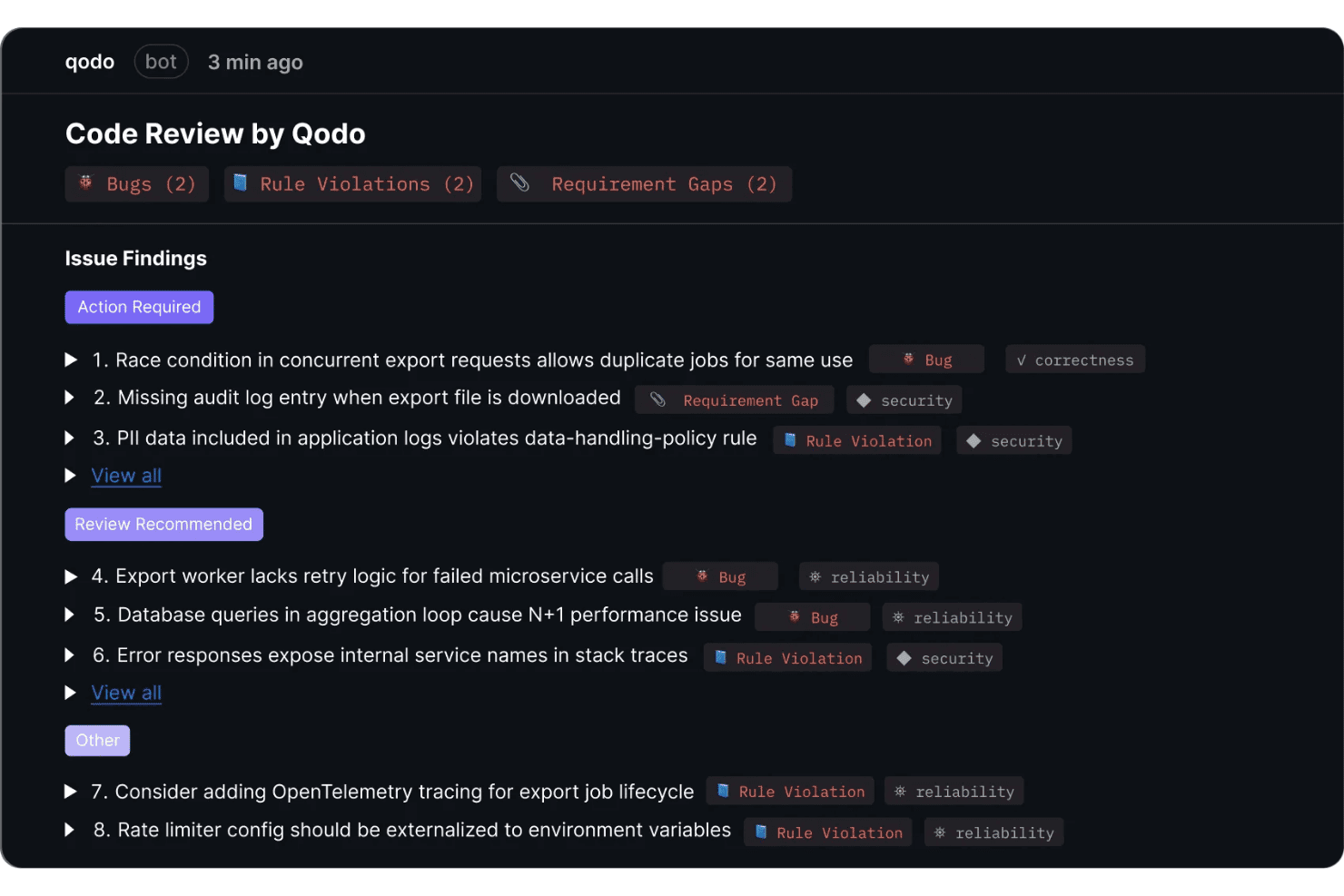
Qodo provides automated code review with categorized issue findings including bugs, rule violations, and requirement gaps with severity prioritization. Qodo is an AI code review and governance platform that runs agentic PR analysis, enforces coding standards through a self-learning rules system, and generates unit tests automatically as part of the review workflow.
Who Is Qodo Best For?
Qodo is a strong fit for engineering teams at mid-size to enterprise companies that need structured, automated code review across multiple repos and contributors.
Why I Picked Qodo
Qodo earns its spot as one of the best on my shortlist because of how it handles code review at the PR level. I love the Living Rules System, which learns your team's coding conventions directly from your PR history and turns them into enforceable, machine-readable standards. What I find especially useful is that when Qodo flags a missing test, it generates one automatically, so reviewers aren't just identifying gaps but closing them in the same workflow.
Qodo Key Features
- Agentic PR code review: Specialized AI agents analyze every pull request with cross-repo context to catch bugs and rule violations.
- Multi-IDE integration: Offers native plugins for VS Code, JetBrains IDEs, and Visual Studio to fit different team workflows.
- Governance portal: Centralized dashboard provides risk intelligence, audit trails, and relationship mapping between repos.
- Slash command automation: Developers and reviewers can trigger reviews and request improvements using slash commands directly in PR comments.
Qodo Integrations
Qodo offers native integrations with Google Cloud, Copilot, Amazon Q, Tabnine, Cursor, and Windsurf. An API is available for custom integrations.
Pros and Cons
Pros:
- Cross-repo dependency analysis flags hidden risks
- Generates unit tests from pull request context
- Automated code review enforces custom team rules
Cons:
- Not suitable for solo developers or small teams
- Autocomplete capabilities are currently being deprecated
Learn more about Qodo: Best for integrating cloud development workflows
- Free plan available
- From $19/user/month

Amazon Q Developer offers an automated code review feature that detects critical security vulnerabilities like unsanitized input execution directly within the IDE. Amazon Q Developer is an AI coding assistant built by AWS that combines inline code suggestions, agentic code generation, automated test creation, security scanning, and legacy code modernization across IDEs, CLI, and the AWS Console.
Who Is Amazon Q Developer Best For?
It's a natural fit for software and DevOps engineers who build, deploy, and operate applications within the AWS ecosystem.
Why I Picked Amazon Q Developer
I picked Amazon Q Developer as one of the best because its cloud workflow integration goes deeper than any other AI coding tool I've used. When writing CloudFormation templates or CDK constructs, it pulls context from my actual AWS environment, not just generic documentation. I can also ask it to diagnose console errors or analyze VPC reachability directly in the AWS Management Console, which keeps cloud troubleshooting inside the same AI-assisted workflow as my code.
Amazon Q Developer Key Features
- Automated test generation: Create unit tests for your code with AI-driven suggestions directly in your IDE.
- Security scanning and secret detection: Uncover security vulnerabilities and hardcoded secrets in your codebase during development.
- Multi-language support: Generate and review code across more than 20 programming languages and frameworks.
- Automated documentation creation: Build project documentation, readmes, and data flow diagrams from your code context.
Amazon Q Developer Integrations
Amazon Q Developer offers native integrations with AWS Management Console, GitHub, GitLab Duo, Datadog, Wiz, CloudZero, Microsoft Teams, and Slack. An API is available within the AWS ecosystem for custom integrations.
Pros and Cons
Pros:
- Works across IDEs, CLI, and AWS Console
- Excellent for modernizing legacy Java or .NET code
- Deep AWS resource context in coding suggestions
Cons:
- IDE plugins sunsetting for Kiro
- Strict monthly agent usage limits
Learn more about Amazon Q Developer: Best for seamless integration with JetBrains IDEs
- Free plan available
- From $199/user/month
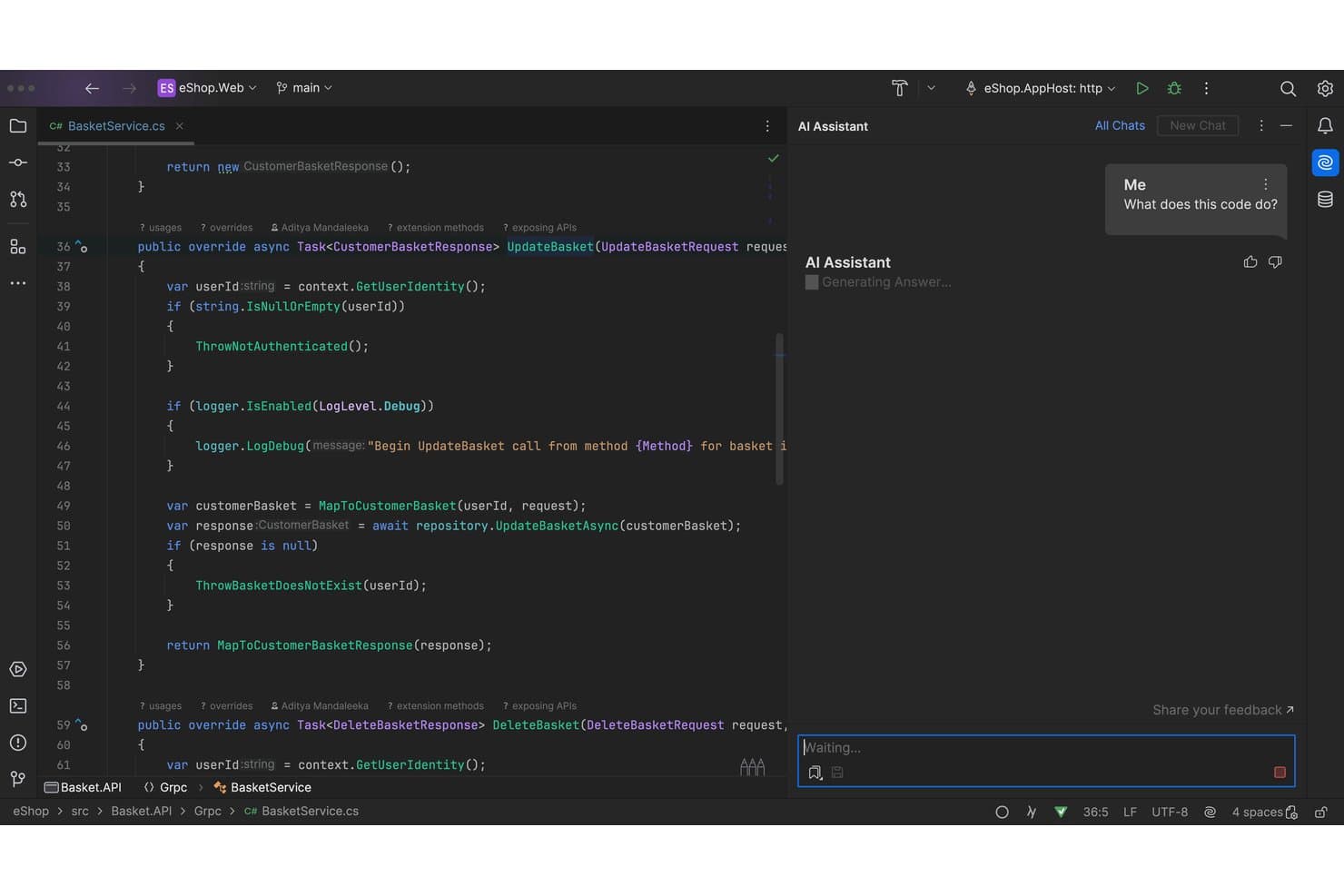
JetBrains AI offers an inline AI Assistant panel that explains selected code by generating answers directly within the IDE editor. JetBrains AI is an AI coding assistant built natively into JetBrains IDEs, offering code completion powered by the Mellum model, AI chat, agentic code generation via Junie, and multi-file refactoring across 20+ programming languages.
Who Is JetBrains AI Best For?
JetBrains AI is a natural fit for software developers and engineering teams already working within the JetBrains ecosystem who want AI assistance without switching tools.
Why I Picked JetBrains AI
JetBrains AI earns its spot on my shortlist because the IDE integration goes far deeper than a plugin layered on top of an editor. I use it inside IntelliJ IDEA with full access to the project's type inference, dependency graph, and refactoring engine, so code completions and Junie's agentic task execution are grounded in real codebase context rather than text-window guesswork. Next Edit Suggestions predicts changes anywhere in the file, not just the current line, which I find genuinely useful during active refactoring sessions.
JetBrains AI Key Features
- AI chat with model selection: Chat with multiple built-in models including Anthropic, OpenAI, and Google Gemini directly from your IDE.
- Local model support: Run supported large language models like Ollama or LM Studio entirely on your own hardware.
- Claude Agent integration: Use Anthropic’s Claude-powered coding agent natively for complex multi-step tasks.
- .aiignore file support: Restrict AI access to sensitive code and directories within your projects using an .aiignore file.
JetBrains AI Integrations
JetBrains AI offers native integrations with Google, OpenAI, AWS, Octopus Deploy, Oracle, Red Hat, Pivotal, among others, and provides an API for custom integrations.
Pros and Cons
Pros:
- Multi-agent coding including Junie and Claude
- ML-powered code completion contextual to project
- Deep integration with JetBrains IDE features
Cons:
- Requires active paid IDE subscription
- Not available for VS Code or Visual Studio
Learn more about JetBrains AI: Best for using conversational coding features
- 30-day free trial
- From $19/user/month (billed annually)

Gemini Code Assist offers an agent mode diff view in VS Code that rewrites README files with tracked additions and deletions shown inline. Gemini Code Assist is Google's AI coding assistant that combines in-IDE code completion, natural language chat, agentic multi-file editing, and automated GitHub code review, all powered by the Gemini 2.5 model with a context window of up to 2 million tokens.
Who Is Gemini Code Assist Best For?
It's a strong fit for enterprise development teams already embedded in the Google Cloud ecosystem who need governance controls alongside AI coding capabilities.
Why I Picked Gemini Code Assist
I picked Gemini Code Assist as one of the best because its in-IDE natural language chat is grounded in a 2-million token context window, so extended coding conversations about a full monorepo never lose context mid-session. When I ask it to trace a bug across multiple services, it already knows the codebase. Agent mode then executes multi-file edits from conversational prompts, with Human-in-the-Loop checkpoints keeping me in control throughout.
Gemini Code Assist Key Features
- Gemini CLI: Run an AI-powered agent directly from the terminal for code understanding, file manipulation, and troubleshooting.
- Automated GitHub code review: Use a Gemini-powered agent to summarize pull requests and provide multi-file code review inside GitHub.
- Private codebase customization: Let teams connect their private codebase for tailored code suggestions and organizational best practice alignment.
- Usage metrics dashboard: Track daily active use, acceptance rates, and code suggestion exposures across your team.
Gemini Code Assist Integrations
Gemini Code Assist offers native integrations with Visual Studio Code, JetBrains IDEs (IntelliJ, PyCharm, GoLand, WebStorm), Android Studio, Google Cloud Workstations, Cloud Shell, Firebase, Colab Enterprise, BigQuery, Apigee API Management, and GitHub. An API is available for custom integrations.
Pros and Cons
Pros:
- Automated pull request reviews on GitHub
- Agent mode supports multi-file code transformation
- Handles monorepos with 2 million token context
Cons:
- Free tier restricts premium models
- Requires complex multi-step cloud setup
Learn more about Gemini Code Assist: Best for real-time code suggestions in editors
- Free plan + 30-day free trial available
- From $4/user/month
Visit WebsiteCustomer Rating:4.8/5
GitHub Copilot offers an AI chat panel with step-by-step implementation planning and inline code editing directly within VS Code. GitHub Copilot is an AI coding assistant from GitHub that delivers inline code completion, multi-file code generation, conversational chat, agentic task execution, and automated code review directly inside your IDE.
Who Is GitHub Copilot Best For?
GitHub Copilot is a strong fit for individual developers and engineering teams already working within the GitHub ecosystem who want AI assistance built directly into their existing IDE workflow.
Why I Picked GitHub Copilot
GitHub Copilot earns its spot as one of the best on my shortlist because of how its next-edit suggestions work in practice. Unlike standard autocomplete, it predicts the next change I need to make based on the edit I just completed, keeping me moving through a refactor without stopping to think about what comes next. I also like that I can switch between models mid-session, choosing Claude Sonnet for nuanced refactors or GPT-5 mini for quick completions, directly inside VS Code or JetBrains.
GitHub Copilot Key Features
- Copilot chat: Chat directly with the AI assistant inside your IDE or on GitHub.com for guidance and code explanations.
- Cloud agent: Assign coding tasks as GitHub Issues and let Copilot autonomously create branches, write code, and open pull requests.
- Copilot CLI: Use AI-powered coding help directly in your terminal for commands, scripting, and file edits.
- Code review automation: Let Copilot review pull requests or file diffs, highlighting issues and suggesting changes before merge.
GitHub Copilot Integrations
GitHub Copilot offers native integrations with VS Code, Visual Studio, JetBrains IDEs, Xcode, Neovim, Eclipse, Raycast, SQL Server Management Studio, Zed, and GitHub. An API is available for custom integrations.
Pros and Cons
Pros:
- Smoothly integrates inside GitHub Issues
- Offers native next-edit token prediction
- Multi-model agentic support in editors
Cons:
- No fine-tuning on private codebases
- Context window can limit large edits
Learn more about GitHub Copilot: Best for handling complex multi-file projects
- Not available
- From $20/month
Visit WebsiteCustomer Rating:4.3/5
Claude Code features a multi-session terminal UI where AI agents can run parallel coding tasks, edit CSS variables, and commit changes directly from the interface. Claude Code is an agentic AI coding tool from Anthropic that works in your terminal and IDE to read codebases, generate and edit code across multiple files, run tests, and submit pull requests.
Who Is Claude Code Best For?
Claude Code suits individual developers and engineering teams who work on large, established codebases and prefer a terminal-first development workflow.
Why I Picked Claude Code
I picked Claude Code as one of the best because of how it handles entire repository structures rather than isolated files. Its agentic search maps the full codebase and dependency graph before touching a single line, so when I ask it to refactor a module, it understands what breaks downstream. The parallel subagent execution (running tens to hundreds of agents simultaneously) means complex, multi-file changes get verified before they're returned, which I genuinely can't say about most other tools in this space.
Claude Code Key Features
- Issue-to-PR workflow: Converts GitHub or GitLab issues into pull requests by generating code, tests, and documentation.
- VS Code and JetBrains integration: Installs as a plugin to work directly inside major IDEs for editing and reviewing code.
- Agent view dashboard: Lets you manage and track all active and historical Claude Code sessions in one place.
- Customizable routines: Allows teams to schedule or trigger code agent tasks on a set schedule or in response to specific events.
Claude Code Integrations
Claude Code offers native integrations with Snowflake, Harvey, Lovable, GitLab, CodeRabbit, Legora, Rogo, Hebbia, and more.
Pros and Cons
Pros:
- Parallel agent execution for multi-file edits
- Generates pull requests including tests and docs
- Handles large and complex codebases natively
Cons:
- Frequently hits strict token caps
- Lacks inline single-line code completion
Learn more about Claude Code: Best for privacy-focused code completion
- Free demo available
- From $39/user/month (billed annually)
Visit WebsiteCustomer Rating:4.6/5
Tabnine offers an AI-powered chat assistant within VS Code that refactors code and suggests type-safe reusable functions in real time. Tabnine is an AI code assistant built around a zero-data-retention architecture, offering real-time code completion, AI chat, agentic code generation, and an Enterprise Context Engine that indexes your organization's codebase and coding standards.
Who Is Tabnine Best For?
Tabnine is a strong fit for enterprise engineering teams in regulated industries where self-hosted or air-gapped AI deployment is a hard requirement.
Why I Picked Tabnine
I picked Tabnine as one of the best because its zero-data-retention architecture sets it apart from every major cloud-first competitor. Your code never leaves your environment, and you can deploy the entire platform on-premises or fully air-gapped, which matters when working with proprietary codebases or regulated data. The Enterprise Context Engine indexes your organization's codebase and coding standards locally, so completions are both private and contextually tuned to how your team actually writes code.
Tabnine Key Features
- AI-powered chat in the IDE: Interact with an AI assistant directly in your coding environment to get code explanations or suggestions.
- Agentic development workflows: Use autonomous agents that can automate code changes, refactorings, and pull requests in local or CI pipelines.
- Multi-language code support: Generate, complete, and review code in over 20 programming languages and frameworks.
- IDE and CLI integrations: Works across 15+ major IDEs, as well as terminal environments, for broad developer workflow coverage.
Tabnine Integrations
Tabnine offers native integrations with Atlassian Jira Cloud and GitHub, GitLab, and Bitbucket Pipelines. It connects to 15+ major IDEs and provides an API for custom integrations.
Pros and Cons
Pros:
- Strong governance and auditability features
- Indexes connected external team repositories
- On-premises and air-gapped deployment available
Cons:
- Setup requires extensive DevOps configuration
- Requires heavy local hardware resources
Learn more about Tabnine: Best for collaborative code editing with AI
- Free plan available
- From $20/month
Visit WebsiteCustomer Rating:5/5
Cursor offers an agent-centric interface where AI autonomously replaces components across multiple files, showing diffs and a review workflow. Cursor is an AI-native code editor that combines codebase-indexed autocomplete, multi-file agentic code generation, and autonomous debugging into a single VS Code-based environment.
Who Is Cursor Best For?
Cursor is a strong fit for professional software engineers and engineering teams who work in complex, multi-file codebases and want AI deeply embedded in their daily coding workflow.
Why I Picked Cursor
Cursor earns its spot as one of the best on my shortlist because of how it handles collaborative AI coding at the team level. Composer lets my team edit across 20+ files simultaneously from a single natural language prompt, which makes large refactors something we can actually delegate to AI. Bugbot runs agentic code reviews directly on GitHub PRs, so the whole team gets AI-flagged feedback without changing their existing review workflow.
Cursor Key Features
- Cloud agents: Run AI-driven build, test, and demo workflows on dedicated remote agents from inside the editor.
- Supermaven tab completion: Deliver fast, context-aware multi-line and function-level code completions as you type.
- Multi-model support: Choose between models from OpenAI, Anthropic, Gemini, xAI, or use Cursor's own Composer models.
- Vector codebase indexing: Enable semantic search and context retrieval across large codebases using vector embeddings.
Cursor Integrations
Cursor offers native integrations with Slack, Datadog, Figma, Linear, Canva, Asana, Kraken, Merge, Composio, and more. An API is available for custom integrations.
Pros and Cons
Pros:
- Blazing-fast custom tab autocomplete model
- AI-powered agentic code review in GitHub
- Handles bulk multi-file code refactoring
Cons:
- Requires entire team to switch to Cursor
- Not available as a plugin for other IDEs
Learn more about Cursor:

Devin offers AI-powered code review analysis that automatically identifies potential bugs and flags issues directly within GitHub pull requests. Devin is an autonomous AI software engineer that independently writes code, executes multi-step tasks, reviews pull requests, runs tests, and works across full repositories — all from a single task prompt.
Who Is Devin Best For?
Devin is a strong fit for engineering teams at growth-stage or enterprise companies managing large backlogs of structured tasks like migrations, refactors, and test coverage.
Why I Picked Devin
Devin earns its spot on my shortlist because no other AI coding tool I've tested actually completes tasks end-to-end without me staying in the loop. I give it a Linear ticket, and it spins up its own sandboxed environment with a browser and terminal, writes and tests the code, and opens a PR. The parallel agent model is what I find most impressive: my team can run multi-repo migrations with dozens of Devin instances working simultaneously, compressing months of backlog work into weeks.
Devin Key Features
- PR review and visual QA: Uses browser-based automation to identify bugs and organize code diffs before merging.
- DeepWiki documentation: Automatically generates thorough documentation and system diagrams for complex legacy codebases.
- Scheduled chore automation: Handles daily QA, documentation updates, and user feedback tasks with customizable workflows.
- Integrated cloud and desktop agents: Lets you deploy session-based agents through a web app, desktop client, or command-line interface.
Devin Integrations
Devin offers native integrations with GitHub, GitLab, Bitbucket, Linear, Jira, Slack, Microsoft Teams, Datadog, Sentry, AWS, Azure, Snowflake, and more, and provides an API for custom integrations.
Pros and Cons
Pros:
- Generates documentation and diagrams from codebase
- Handles legacy code migrations and refactoring
- Executes multi-repo tasks fully autonomously
Cons:
- Struggles with highly ambiguous tasks
- No native IDE plugin for VS Code
Learn more about Devin:
Andre AI-verktøy for koding
Her er noen andre AI-verktøy for koding som ikke kom med på kortlisten min, men som likevel er verdt å undersøke:
- 11AiderBest for code-focused AI chat
- 12ClineBest for managing pull requests with conversation
- 13CodeRabbitBest for automated code review
- 14OpenAI CodexBest for generating code from natural language
- 15Augment CodeBest for contextual code analysis
- 16GitLab DuoBest for AI-powered DevSecOps pipeline support
- 17Kilo CodeBest for building apps visually from sketches
How I Evaluate AI Coding Tools
To earn a spot on this list, an AI coding tool has to do more than autocomplete a few lines—it needs to meaningfully change how you write, debug, or review code day to day. I split my evaluation into two layers: the core functionality every tool must deliver and the differentiating factors that separate one option from the next.
Core Functionality (Table Stakes For This List)
When I'm selecting tools for my list, I rank each one on a scale from 0 (does not offer the functionality) to 5 (excels in this area) for each core functionality listed below. Then, I calculate the tool's total score into a percentage. Each tool needs to achieve a minimum total score of 75% to be considered for inclusion.
- AI Code Generation: I evaluate whether the tool can turn a natural language prompt into a working function—like generating a REST endpoint from a plain description.
- Code Completion: Real-time suggestions should go beyond single tokens—I look for multi-line block completions that adapt to the patterns already in your code.
- Multi-Language Support: The tool should handle mainstream languages like Python, TypeScript, and Go, plus frameworks your team actually uses in production.
- IDE Integration: I check for native plugins across VS Code, JetBrains, and Neovim so developers don't have to leave their preferred editor to use AI features.
- Codebase Context Awareness: Suggestions should reflect your actual repo—I look for tools that index project files and understand dependencies, not just the open tab.
- AI Debugging & Refactoring: I evaluate whether the tool can spot bugs, suggest fixes, and refactor code—like extracting a method or simplifying nested logic.
Once I have a list of tools that meet the criteria, I consider what sets each platform apart.
Differentiating Factors (What Sets Vendors Apart)
Here's how I compare and contrast different vendors:
Standout Features
Agentic task execution is a major differentiator—I look for tools that can scaffold a feature, run tests, and open a PR without you hand-holding each step. Multi-model flexibility also matters, since swapping between LLMs lets you balance cost and quality depending on the task. I evaluate natural language codebase chat too, which lets developers ask questions like "where is rate limiting handled?" and get answers grounded in the actual repo.
Beyond Features
Security and data handling is high on my list—I check whether vendors offer zero-data-retention policies and let you exclude proprietary code from model training. Toolchain integrations matter too, especially Git provider hooks for PR review and commit generation across GitHub, GitLab, or Bitbucket. I also evaluate pricing models, since per-seat and usage-based plans scale very differently when you're rolling out to a 50-person engineering team.
Slik velger du AI-verktøy for koding
Det er lett å gå seg vill i lange funksjonslister og kompliserte prismodeller. For å hjelpe deg med å holde fokus mens du går gjennom den unike prosessen din for valg av programvare, er her en sjekkliste over faktorer du bør ha i mente:
| Faktor | Hva du bør vurdere |
|---|---|
| FaktorSkalerbarhet | Hva du bør vurdereVil verktøyet støtte teamstørrelsen din – enten det er en håndfull utviklere eller en global utviklerorganisasjon? Vurder prisendringer og lisensadministrasjon etter hvert som bruken øker. |
| FaktorIntegrasjoner | Hva du bør vurdereKan det kobles direkte til IDE-ene, kodevertstjenestene, supportsystemene og CI/CD-verktøyene dine? Kontroller at det støtter hele den nåværende teknologistakken din for å unngå flaskehalser i arbeidsflyten. |
| FaktorTilpasningsmuligheter | Hva du bør vurdereKan du justere forslag, modeller eller policyer etter arbeidsflytene, teamnormene eller sikkerhetspreferansene dine? Se etter alternativer for å tilpasse instruksjoner eller utelate bestemte filer. |
| FaktorBrukervennlighet | Hva du bør vurdereHvor raskt kan utviklerne dine begynne å bruke det uten omfattende dokumentasjon eller feilsøking? La mindre erfarne teammedlemmer prøve å komme i gang, og følg med på hvor raskt de blir produktive. |
| FaktorImplementering og opplæring | Hva du bør vurdereHvilke ressurser – veiledninger for oppsett, administratorkontroller og støtte for migrering – er tilgjengelige? Vurder tiden og innsatsen som kreves for utrulling og innledende opplæring av teamet. |
| FaktorKostnad | Hva du bør vurdereKan du forutsi månedlige eller årlige kostnader over tid, inkludert kostnader ved oppgradering? Sammenlign abonnementer per bruker med bruksbaserte abonnementer ut fra forventet bruk og oppgavevolum. |
| FaktorSikkerhetstiltak | Hva du bør vurdereHvilke beskyttelser finnes for kildekode, påloggingsinformasjon og brukerdata? Se etter SOC 2, SSO og retningslinjer for videreopplæring av modeller med kodebasen din. |
| FaktorTilgjengelig kundestøtte | Hva du bør vurdereFår du rask hjelp hvis noe slutter å fungere? Kontroller hvilke kanaler som finnes (chat, e-post, telefon), tjenestenivåavtaler og tilgjengelighet i teamets viktigste arbeidstid. |
Hva er AI-verktøy for koding?
AI-verktøy for koding er utviklingsverktøy som bruker kunstig intelligens til å hjelpe deg med å skrive, gjennomgå og forbedre kode på tvers av flere språk og miljøer. Disse verktøyene kan generere kode fra instruksjoner, fullføre kode mens du skriver og gi forslag basert på konteksten i kodebasen din. Det gjør daglige utviklingsoppgaver raskere og mer pålitelige for enkeltpersoner og team.
Funksjoner
Når du velger AI-verktøy for koding, bør du se etter følgende viktige funksjoner:
- AI-kodegenerering: Konverterer instruksjoner eller beskrivelser på naturlig språk til fungerende kode, slik at du kan sette fart på repetitive kodeoppgaver eller komme raskt i gang med nye moduler.
- Fullføring av kode: Gir sanntids- og kontekstavhengige forslag mens du skriver, og forutsier og setter inn de neste linjene eller kodeblokkene for å redusere antall tastetrykk og friksjon.
- Støtte for flere språk: Håndterer flere programmeringsspråk og rammeverk, slik at du kan bruke ett verktøy på tvers av ulike prosjekter og unngå å bytte mellom spesialiserte plattformer.
- Integrasjon med IDE: Fungerer direkte i det foretrukne utviklingsmiljøet ditt gjennom programtillegg eller utvidelser, slik at arbeidsflyten forblir sentralisert og kjent.
- Kontekstforståelse for kodebasen: Forstår prosjektets struktur og avhengigheter for å vise relevante forslag, noe som reduserer generiske eller feilutsatte resultater.
- AI-drevet feilsøking: Identifiserer feil mens du koder, forklarer feil og anbefaler eller utfører rettelser for å fremskynde feilsøkingen og forbedre kodens pålitelighet.
- Automatisert refaktorering: Foreslår eller utfører kodeforbedringer, for eksempel forenkling av logikk eller omorganisering av funksjoner, samtidig som programmets virkemåte bevares.
- Generering av enhetstester: Produserer eller oppretter automatisk testtilfeller for funksjonene dine for å forbedre testdekningen og avdekke problemer før utrulling.
- Dokumentasjonsstøtte: Genererer eller oppdaterer dokumentasjonsstrenger, README-filer og bruksveiledninger basert på koden din, slik at du bruker mindre tid på manuell dokumentasjon.
- Sikkerhetsanalyse: Marker usikre kodemønstre og sårbarheter tidlig i utviklingen, og støtter sikrere lanseringer og arbeid med samsvar.
Fordeler
Implementering av AI-verktøy for koding gir flere fordeler for teamet og virksomheten din. Her er noen av fordelene du kan se frem til:
- Raskere utviklingssykluser: Umiddelbar kodegenerering, smart autofullføring og automatisert refaktorering hjelper teamet ditt med å levere nye funksjoner og forbedringer mye raskere.
- Høyere kodekvalitet: AI-assistert feilsøking, testgenerering og kodegjennomgang oppdager feil og foreslår rettelser før problemene når produksjonsmiljøet.
- Bedre produktivitet for utviklere: Sømløs IDE-integrasjon og kodebasebevisste forslag holder utviklerne fokuserte og reduserer tiden som brukes på å bytte mellom verktøy eller lete etter eksempler.
- Enklere opplæring: Chat med kodebasen på naturlig språk og dokumentasjonsverktøy hjelper nye teammedlemmer med å bli raskt kjent med arkitekturen og kodemønstrene.
- Fleksibilitet på tvers av språk: Støtte for mange språk og rammeverk gjør det mulig for team å arbeide på tvers av ulike prosjekter uten å lære nye verktøy for hvert enkelt prosjekt.
- Færre repetitive oppgaver: Automatisk generering av standardkode, dokumentasjonsstøtte og oppretting av testskjeletter frigjør teamet, slik at det kan fokusere på den kreative siden av utviklingen.
- Forbedret sikkerhetsnivå: Innebygd sikkerhetsanalyse hjelper deg med å markere sårbare kodemønstre tidlig, noe som reduserer risikoen for å introdusere kritiske feil.
Kostnader og priser
Valg av AI-verktøy for koding krever en forståelse av de ulike prismodellene og abonnementene som er tilgjengelige. Kostnadene varierer basert på funksjoner, teamstørrelse, tillegg og mer. Tabellen nedenfor oppsummerer vanlige abonnementer, gjennomsnittsprisene deres og typiske funksjoner som er inkludert i løsninger med AI-verktøy for koding:
Sammenligningstabell for abonnementer for AI-verktøy for koding
| Abonnementstype | Gjennomsnittspris | Vanlige funksjoner |
|---|---|---|
| AbonnementstypeGratisabonnement | Gjennomsnittspris$0 | Vanlige funksjonerGrunnleggende kodefullføring, begrenset AI-kodegenerering, begrensede prosjekter og brukerstøtte fra fellesskapet. |
| AbonnementstypePersonlig abonnement | Gjennomsnittspris$5-$25 per bruker/måned | Vanlige funksjonerStøtte for flere språk, IDE-integrasjoner, utvidet kodegenerering, begrensede feilsøkingsverktøy og standard brukerstøtte. |
| AbonnementstypeForretningsabonnement | Gjennomsnittspris$20-$50 per bruker/måned | Vanlige funksjonerTeamadministrasjon, forbedret sikkerhet, avansert feilsøking, API-tilgang, prioritert brukerstøtte og samsvarsfunksjoner. |
| AbonnementstypeVirksomhetsabonnement | Gjennomsnittspris$50-$120 per bruker/måned | Vanlige funksjonerTilpassede integrasjoner, SSO, avansert datahåndtering, revisjonslogger, administratorkontroller, dedikert opplæring og SLA-støtte. |
Vanlige spørsmål om AI-kodeverktøy
Her er svar på noen vanlige spørsmål om AI-kodeverktøy:
Kan AI-kodeverktøy erstatte menneskelige utviklere?
Nei, AI-kodeverktøy er utviklet for å hjelpe utviklere, ikke erstatte dem. De bidrar til å automatisere repetitive oppgaver, generere kodebiter og oppdage feil, men er fortsatt avhengige av menneskelig ekspertise når det gjelder kritisk tenkning, arkitektur og endelig gjennomgang av koden.
Hvordan håndterer AI-kodeverktøy sensitiv kode eller data?
De fleste anerkjente AI-kodeverktøy tilbyr konfigurerbare innstillinger for personvern, inkludert alternativer for å unnta proprietær kode fra modelltrening og oppfylle sikkerhetsstandarder som SOC 2 eller SSO-krav.
Støtter AI-kodeverktøy flere programmeringsspråk?
Ja, de fleste AI-kodeverktøy støtter populære språk som Python, JavaScript, TypeScript, Java og Go, slik at teamet kan arbeide på tvers av ulike kodebaser uten å bytte verktøy.
Hva bør jeg vurdere før jeg tar i bruk AI-kodeverktøy i teamet mitt?
Kontroller at integrasjonen er kompatibel med IDE-ene, lagringsstedene for kode og sikkerhetskravene dine. Vurder hvordan prisen vil øke i takt med teamet, og om det tilbys opplæringsressurser for en smidig innføring.
Kan AI-kodeverktøy bidra til opplæring av nye utviklere?
Ja, funksjoner som AI-chat med forståelse av kodebasen og automatisert dokumentasjonsstøtte kan gjøre det mye raskere for nyansatte å forstå ukjente prosjekter og komme inn i teamets konvensjoner.