

Le migliori piattaforme di IA senza codice aiutano i team a creare, testare e distribuire applicazioni basate sull'IA senza scrivere codice personalizzato. Questi strumenti consentono agli utenti di trasformare più rapidamente i dati in modelli e flussi di lavoro, riducendo la dipendenza da risorse ingegneristiche specializzate.
I team ricorrono spesso alle piattaforme di IA senza codice quando lo sviluppo manuale dei modelli rallenta i progetti, la limitata disponibilità di competenze in ambito data science crea colli di bottiglia o le configurazioni errate portano a risultati inaffidabili. Problemi come la gestione incoerente dei dati, il comportamento poco chiaro dei modelli e le iterazioni lente rendono più difficile la collaborazione tra i team aziendali, dei dati e informatici.
Con oltre 20 anni di esperienza nel settore come Direttore tecnologico, ho testato e valutato decine di piattaforme di IA senza codice in contesti reali per analizzarne accuratezza, integrazioni e facilità d'uso. Questa guida mette in evidenza le migliori piattaforme di IA senza codice, che accelerano lo sviluppo, migliorano la collaborazione e aiutano i team a distribuire soluzioni di IA in modo più affidabile. Ogni recensione analizza funzionalità, vantaggi e svantaggi e casi d'uso più adatti, per aiutarti a scegliere lo strumento giusto.
Perché fidarsi dei nostri consigli sui software
6,700+
Reviews
20
Industry experts
16+
Evaluation factors
14
Years
Il nostro team testa e recensisce software dal 2012. In quanto leader tecnologici noi stessi, sappiamo quanto sia difficile — e importante — scegliere il software giusto.
Per questa guida, abbiamo valutato gli strumenti attraverso test praticie ricerche indipendenti, assegnando un punteggio agli strumenti in base ai nostri criteri di selezione.
Le nostre recensioni riflettono il nostro giudizio editoriale umano, non un discorso di vendita.
Revisori esperti:
- Paulo Gardini MiguelDirettore tecnico
 Tim FisherVP dell'IA
 Gabriel RosasTech Lead e architetto software
 Christhian GruhnTech Lead e architetto della piattaforma

Tabella comparativa delle piattaforme di IA senza codice
Questa tabella comparativa riassume i dettagli sui prezzi delle mie migliori piattaforme di IA senza codice:
| Tool | Best For | Trial Info | Price | ||
|---|---|---|---|---|---|
| 1 | Ideale per la distribuzione di chatbot senza codice | Disponibile piano gratuito | A partire da $32/mese (fatturato annualmente) | Website | |
| 2 | Ideale con oltre 1.000 connettori preconfigurati | Demo gratuita disponibile | Prezzo su richiesta | Website | |
| 3 | Ideale per la distribuzione aziendale di app con IA agentica | Piano gratuito disponibile | Prezzi su richiesta | Website | |
| 4 | Ideale per app senza codice nell'ecosistema Zoho | Prova gratuita di 15 giorni | A partire da $9/utente/mese | Website | |
| 5 | Ideale per lo sviluppo su larga scala di app aziendali governato dall'IA | Demo gratuita disponibile | Prezzo su richiesta | Website | |
| 6 | Ideale per agenti di intelligenza artificiale nei flussi di lavoro aziendali regolamentati | Piano gratuito disponibile | Prezzi su richiesta | Website | |
| 7 | Ideale per incorporare modelli di apprendimento automatico nel runtime dell'applicazione | Piano gratuito disponibile | A partire da $1,090/mese | Website |


Recensioni delle migliori piattaforme di IA senza codice
Di seguito trovi i miei riepiloghi dettagliati delle migliori piattaforme di IA senza codice incluse nel mio elenco. Le mie recensioni offrono un’analisi dettagliata delle funzionalità principali, dei vantaggi & degli svantaggi, delle integrazioni e dei casi d’uso ideali di ogni strumento, per aiutarti a trovare quello più adatto a te.
 Ideale per la distribuzione di chatbot senza codice
- Disponibile piano gratuito
- A partire da $32/mese (fatturato annualmente)
Visit WebsiteCustomer Rating:4.4/5
Chatbase permette di testare le risposte del tuo bot e affinare le istruzioni di sistema personalizzate in tempo reale. Chatbase è una piattaforma AI no-code che permette ad aziende e team di supporto di creare chatbot AI personalizzati per siti web, app e strumenti interni, aiutando ad automatizzare le interazioni con i clienti e a semplificare la distribuzione delle informazioni senza la necessità di scrivere codice.
Per chi è ideale Chatbase?
Chatbase è indicato per team IT e responsabili delle operazioni aziendali di organizzazioni di medie e grandi dimensioni che desiderano implementare chatbot AI senza programmare.
Perché ho scelto Chatbase
Ho scelto Chatbase perché offre uno dei percorsi più rapidi dal dato grezzo a un agente AI funzionante. Non richiede una complessa mappatura logica ed è in grado di scansionare un sito web o inserire un documento per generare immediatamente un bot che comprenda le sfumature della tua attività specifica. Inoltre, la sua attenzione all'accessibilità consente ai team di creare un assistente di supporto specializzato sfruttando le basi di conoscenza esistenti invece di dover costruire i flussi di lavoro da zero.
Funzionalità principali di Chatbase
- Azioni AI: Collega il tuo chatbot ad API esterne per eseguire attività come controllare lo stato degli ordini o prenotare appuntamenti direttamente dalla chat.
- Supporto multilingue: Implementa chatbot che possono comprendere e rispondere in più lingue.
- Acquisizione di fonti dati personalizzate: Carica documenti o collega fonti dati per addestrare i chatbot sui tuoi contenuti.
- Analisi delle conversazioni: Monitora le interazioni con gli utenti e le prestazioni del chatbot tramite dashboard analitici integrati.
Integrazioni di Chatbase
Chatbase offre integrazioni native con Slack, WhatsApp, Zendesk, Stripe e Zapier. È disponibile un'API per integrazioni personalizzate.
Pros and Cons
Pros:
- Visual flow builder per la progettazione delle conversazioni
- Raccoglie feedback degli utenti dopo le chat
- Certificazione SOC 2 Type II
Cons:
- Nessuna funzione integrata di trasferimento chat live
- Il piano gratuito prevede limiti mensili di messaggi bassi
Learn more about Chatbase: Ideale con oltre 1.000 connettori preconfigurati
- Demo gratuita disponibile
- Prezzo su richiesta

Il builder di workflow senza codice di Celigo consente ai team di automatizzare i processi e collegare strumenti basati su AI senza scrivere codice. Celigo è una piattaforma di integrazione e automazione progettata per i team IT e i responsabili delle operazioni aziendali che devono connettere applicazioni cloud, automatizzare flussi di lavoro e gestire processi di dati complessi senza la necessità di una programmazione avanzata.
Per chi è ideale Celigo?
Team IT e responsabili operativi di aziende di medie e grandi dimensioni che hanno bisogno di automatizzare e orchestrare processi tra diverse applicazioni cloud.
Perché ho scelto Celigo
Ho scelto Celigo tra i migliori perché posso accedere a oltre 1.000 connettori preconfigurati per automatizzare i flussi di dati tra app cloud senza scrivere codice. Il mio team utilizza questi connettori per collegare rapidamente sistemi come Salesforce, NetSuite e Shopify per l'automazione dei processi in tempo reale. In pratica, questo significa che possiamo lanciare nuove integrazioni in poche ore invece che in settimane, anche quando si tratta di strumenti di nicchia o specifici di settore.
Funzionalità principali di Celigo
- Editor di flussi visivo: Interfaccia drag-and-drop che permette di progettare e distribuire integrazioni senza codifica.
- Dashboard di gestione degli errori: Pannello centralizzato per monitorare, analizzare e risolvere errori di integrazione.
- Template di integrazione riutilizzabili: Modelli preconfigurati per i processi aziendali più comuni per velocizzare la distribuzione.
- Controlli di accesso basati sui ruoli: Imposta permessi dettagliati per utenti e team che gestiscono le integrazioni.
Integrazioni di Celigo
Le integrazioni includono Salesforce, Microsoft Dynamics 365 Business Central, Oracle NetSuite, Walmart, SAP, Snowflake, Acumatica, ADP, Adobe e 3M.
Pros and Cons
Pros:
- Strumenti integrati di mappatura dei dati con intelligenza artificiale
- Dashboard per il monitoraggio e la gestione degli errori in tempo reale
- Supporta l'orchestrazione complessa tra più app senza necessità di codice
Cons:
- Alcuni connettori prevedono costi di licenza aggiuntivi
- La creazione di script personalizzati richiede conoscenze di JavaScript
Learn more about Celigo: Ideale per la distribuzione aziendale di app con IA agentica
- Piano gratuito disponibile
- Prezzi su richiesta
Visit WebsiteCustomer Rating:4.6/5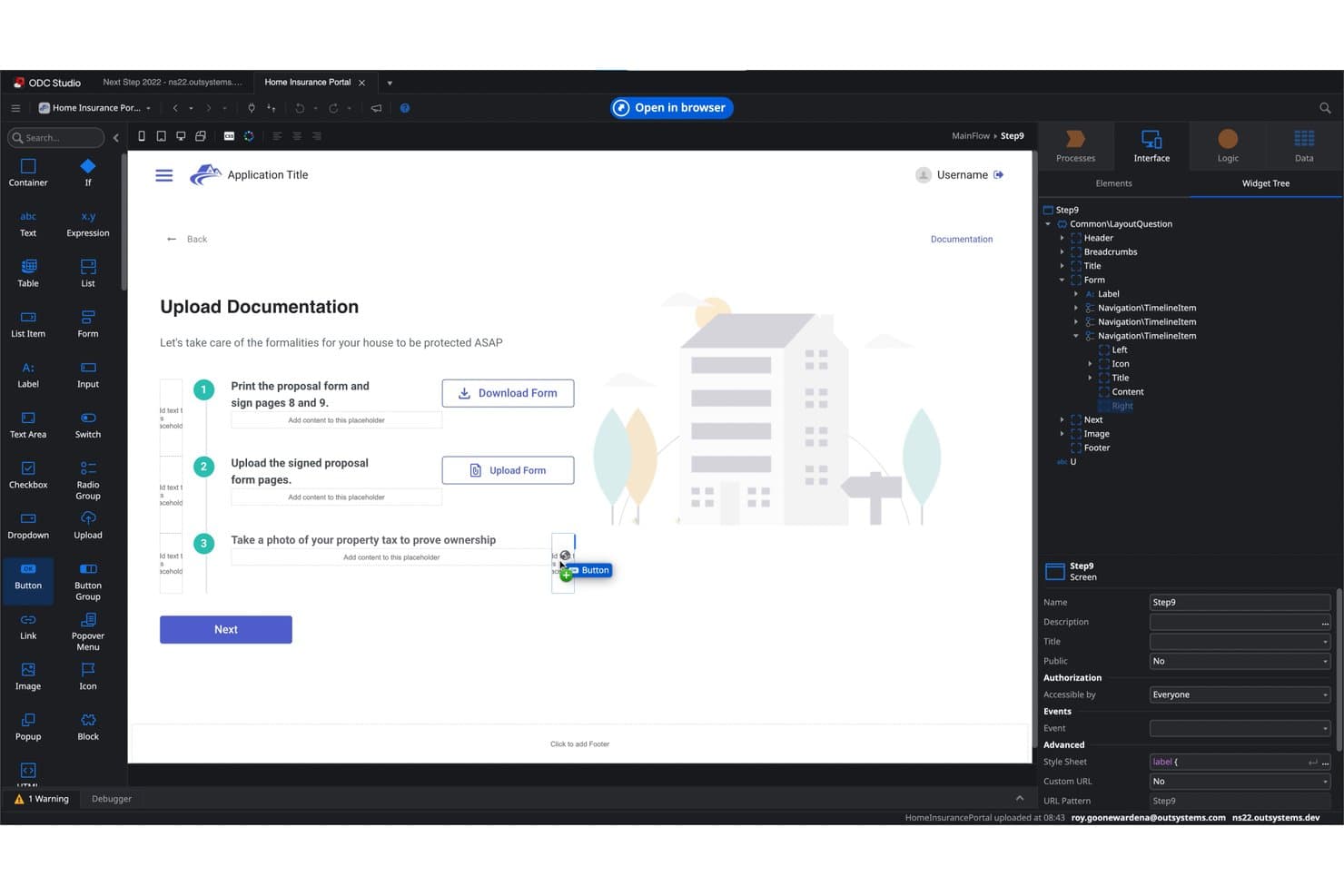
OutSystems consente agli utenti di creare visivamente flussi per il caricamento dei documenti. OutSystems è una piattaforma di IA a basso codice che consente ai team aziendali di creare, distribuire e governare applicazioni web e mobili a stack completo utilizzando un generatore visivo, la generazione di app tramite IA generativa e l'orchestrazione di flussi di lavoro multi-agente.
Per chi è più adatto OutSystems?
OutSystems è particolarmente adatto ai team IT e di sviluppo aziendali che devono distribuire applicazioni basate sull'IA su larga scala, con i controlli di governance e conformità richiesti dai settori regolamentati.
Perché ho scelto OutSystems
OutSystems si è guadagnato un posto nella mia selezione perché la sua proposta di IA agentica va ben oltre quella dei tipici strumenti per lo sviluppo a basso codice. Mentor genera circa l'80% di un MVP a partire da un prompt in linguaggio naturale, mentre Agent Workbench consente di orchestrare flussi di lavoro multi-agente con controlli che prevedono l'intervento umano negli ambienti di sviluppo, QA e produzione. Trovo questa combinazione particolarmente interessante per i team IT aziendali che sviluppano app basate sull'IA in presenza di rigorosi requisiti di governance.
Funzionalità principali di OutSystems
- Grafico del contesto aziendale: Una mappa architetturale dinamica che tiene traccia di tutte le app, dei dati, delle dipendenze e delle policy di governance dell'organizzazione, per prevenire derive strutturali durante la crescita dei team.
- Oltre 400 connettori preconfigurati: Integrazioni native con SAP, Salesforce, ServiceNow, Oracle e altri strumenti, oltre al supporto per le API REST/SOAP per connettersi a sistemi personalizzati o legacy.
- Pipeline di distribuzione multi-ambiente: Ambienti di runtime separati per sviluppo, QA e produzione, con promozione tra gli ambienti con un solo clic, controllo delle versioni e ripristino automatico.
- Dashboard di osservabilità degli agenti IA: Monitoraggio in tempo reale dell'esecuzione degli agenti, dell'utilizzo dei token, dei risultati dei flussi di lavoro e delle metriche delle prestazioni degli agenti IA distribuiti.
Integrazioni di OutSystems
OutSystems offre oltre 400 connettori preconfigurati, tra cui SAP, Salesforce, ServiceNow, Oracle, Microsoft Dynamics e NetSuite. Supporta inoltre le API REST e SOAP, Integration Builder, le connessioni ai database e le integrazioni del Marketplace per la connettività personalizzata.
Pros and Cons
Pros:
- Agent Workbench orchestra flussi di lavoro IA multi-agente
- Mentor genera automaticamente circa l'80% delle app MVP
- Generatore visivo di applicazioni web e mobili a stack completo
Cons:
- Nessuno strumento nativo di AutoML o di addestramento dei modelli
- Non è progettato per utenti aziendali non tecnici
Learn more about OutSystems: Ideale per app senza codice nell'ecosistema Zoho
- Prova gratuita di 15 giorni
- A partire da $9/utente/mese
Visit WebsiteCustomer Rating:4.3/5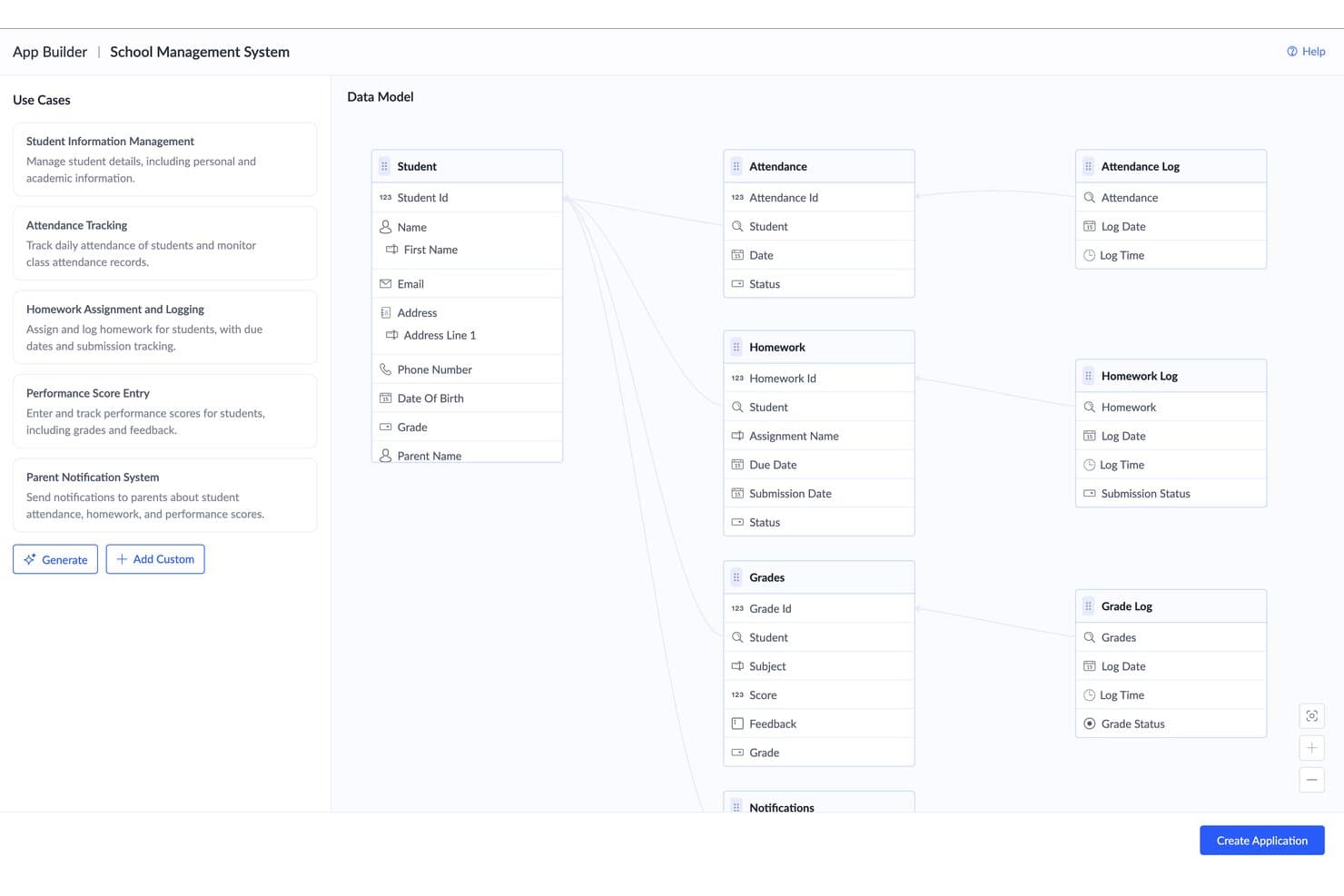
Zoho Creator genera automaticamente un modello di dati relazionale a partire dai casi d'uso. Zoho Creator è una piattaforma per lo sviluppo di applicazioni senza codice che consente di creare app web e mobili utilizzando un generatore visivo con trascinamento, la generazione di app basata sull'intelligenza artificiale tramite prompt in linguaggio naturale, l'addestramento di modelli ML senza codice, agenti di intelligenza artificiale e la progettazione automatizzata dei flussi di lavoro.
Per chi è più adatto Zoho Creator?
Zoho Creator è particolarmente adatto ai team IT e agli analisti aziendali che lavorano già nell'ecosistema Zoho e hanno bisogno di creare e distribuire app personalizzate senza dipendere da risorse dedicate allo sviluppo.
Perché ho scelto Zoho Creator
Zoho Creator si è guadagnato un posto nella mia selezione perché è la piattaforma senza codice basata sull'intelligenza artificiale più efficace per i team che utilizzano già l'ecosistema Zoho. Apprezzo in particolare il suo Modeler AI, che consente di addestrare e distribuire modelli ML personalizzati (ad esempio OCR per l'elaborazione dei documenti o l'analisi del sentiment sui ticket di assistenza) direttamente come campi della logica dell'app, senza richiedere competenze di data science. La capacità di CoCreator di generare app complete a partire da un prompt in linguaggio naturale o dall'immagine di un diagramma di processo consente di passare dallo schizzo di un flusso di lavoro a un'app web e mobile distribuita in un'unica sessione.
Funzionalità principali di Zoho Creator
- Progettista di processi Blueprint: Uno strumento visivo in stile BPM per mappare direttamente nelle app le fasi dei processi, le transizioni e i flussi di approvazione.
- Distribuzione automatica multicanale: Le app create in Creator generano automaticamente versioni native per iOS e Android insieme all'app web, a partire da un'unica compilazione.
- Distribuzione ibrida e in sede: Creator supporta opzioni di hosting cloud, in sede e ibride per i team con rigorosi requisiti di residenza dei dati o conformità normativa.
- Portali basati sui ruoli: Portali personalizzati con il marchio per utenti esterni, come clienti o fornitori, con set di autorizzazioni e controlli degli accessi configurabili.
Integrazioni di Zoho Creator
Zoho Creator offre integrazioni native nell'ecosistema Zoho, tra cui Zoho CRM, Books, Desk, Analytics, WorkDrive, Flow e RPA. Si collega inoltre a Google Drive, Dropbox, Box, OneDrive, Salesforce e Slack, con API REST e connettori personalizzati per sistemi aggiuntivi.
Pros and Cons
Pros:
- Genera app complete e ricche di funzionalità a partire da prompt testuali
- Offre un generatore e una piattaforma di distribuzione di modelli di intelligenza artificiale senza codice
- Supporta opzioni di distribuzione ibride e in sede
Cons:
- Le funzionalità avanzate richiedono il linguaggio di scripting Deluge
- Spiegabilità e governance limitate dei modelli di intelligenza artificiale
Learn more about Zoho Creator: Ideale per lo sviluppo su larga scala di app aziendali governato dall'IA
- Demo gratuita disponibile
- Prezzo su richiesta
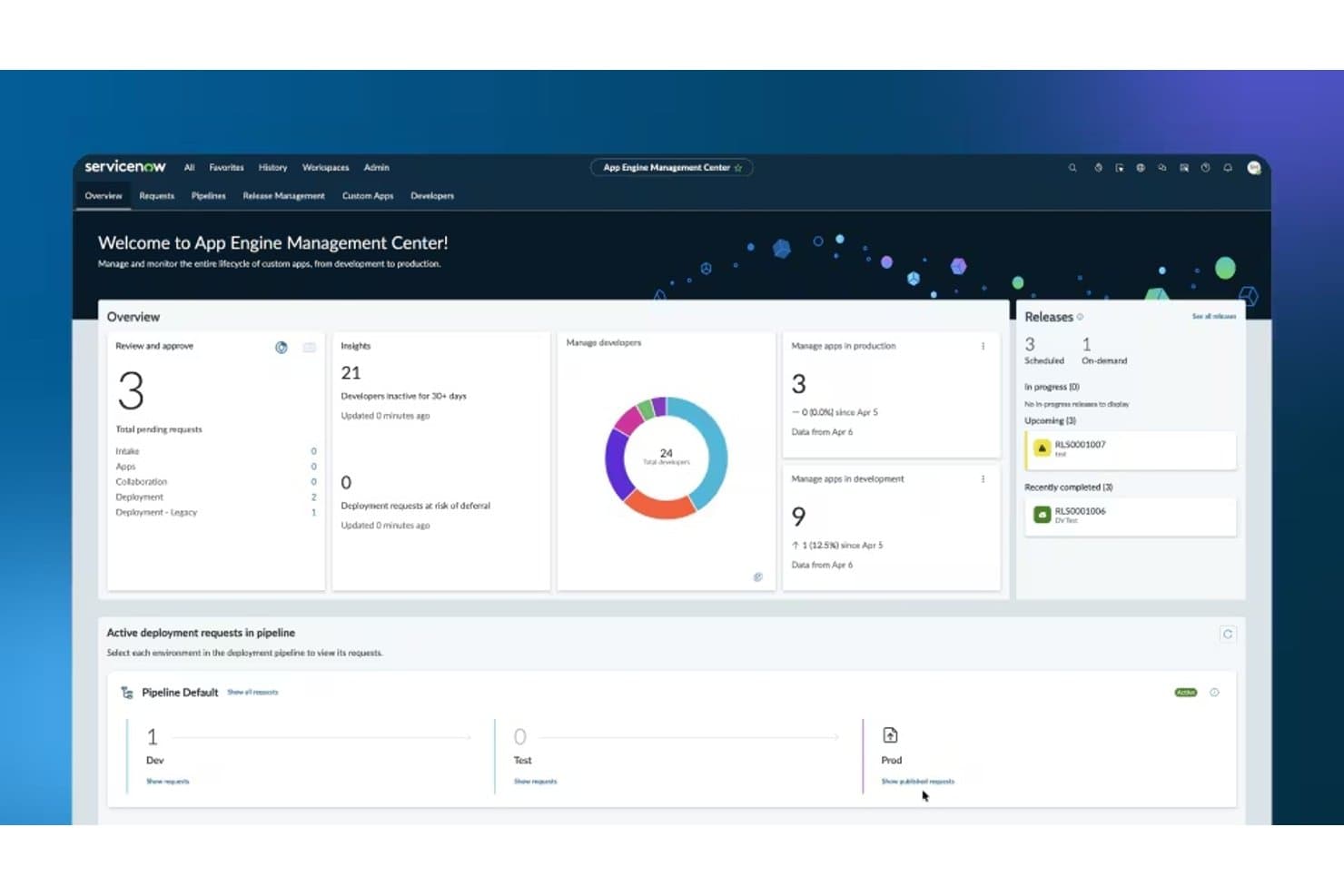
Dashboard di ServiceNow App Engine per la gestione dello sviluppo delle app, delle distribuzioni, delle release e delle attività degli sviluppatori. ServiceNow App Engine è una piattaforma di sviluppo di applicazioni senza codice e a basso codice, basata sulla piattaforma Now, che consente sia agli sviluppatori aziendali sia agli sviluppatori professionisti di creare, automatizzare e distribuire applicazioni aziendali basate sull'IA, sotto il controllo di strumenti IT di livello enterprise.
Per chi è più adatto ServiceNow App Engine?
ServiceNow App Engine è pensato per le aziende che hanno già investito in ServiceNow e desiderano ampliare lo sviluppo da parte degli utenti aziendali tra le diverse unità organizzative senza perdere il controllo dell'IT.
Perché ho scelto ServiceNow App Engine
ServiceNow App Engine è entrato nella mia rosa ristretta perché nessun'altra piattaforma che ho testato combina lo sviluppo da parte degli utenti aziendali, governato dall'IA, con questo livello di controllo IT di livello enterprise. L'App Engine Management Center (AEMC) consente agli utenti aziendali di creare applicazioni in App Engine Studio, mentre l'IT mantiene un controllo rigoroso sulle pipeline di distribuzione, sui flussi di approvazione e sui controlli degli accessi. Inoltre, l'agente di creazione genera applicazioni complete e pronte per la produzione a partire da istruzioni in linguaggio naturale, con agenti IA già integrati.
Funzionalità principali di ServiceNow App Engine
- Progettazione dei flussi: uno strumento di automazione dei processi senza codice con logica basata sul trascinamento, diramazioni, trigger e approvazioni in più fasi; per la maggior parte dei flussi di lavoro aziendali non è necessario scrivere script.
- Agente virtuale: un generatore di chatbot basato sull'IA con un ambiente di lavoro NLU integrato per definire intenti ed entità in linguaggio naturale nei canali web, mobili e del portale.
- Intelligenza predittiva: apprendimento automatico basato su modelli per attività di classificazione, somiglianza e raggruppamento, come l'instradamento dei ticket, il rilevamento degli incidenti gravi e i suggerimenti intelligenti.
- Hub di integrazione: una libreria di connettori predefiniti per oltre 100 applicazioni aziendali, oltre al supporto per REST, SOAP e JDBC per integrazioni personalizzate.
Integrazioni di ServiceNow App Engine
Hub di integrazione offre oltre 100 connettori predefiniti, tra cui Jira, GitHub, Slack, Microsoft 365, Salesforce, SAP, Workday, AWS, Azure e Google Cloud Platform. Supporta inoltre connessioni REST, SOAP e JDBC per integrazioni personalizzate.
Pros and Cons
Pros:
- Sviluppo di app governato dall'IA con supervisione dell'IT
- Agenti IA a stack completo integrati per impostazione predefinita
- Automazione approfondita dei flussi di lavoro per i processi aziendali
Cons:
- Le funzionalità avanzate di IA richiedono licenze aggiuntive
- La trasparenza dei prezzi è costantemente insufficiente
Learn more about ServiceNow App Engine: Ideale per agenti di intelligenza artificiale nei flussi di lavoro aziendali regolamentati
- Piano gratuito disponibile
- Prezzi su richiesta
Visit WebsiteCustomer Rating:4.4/5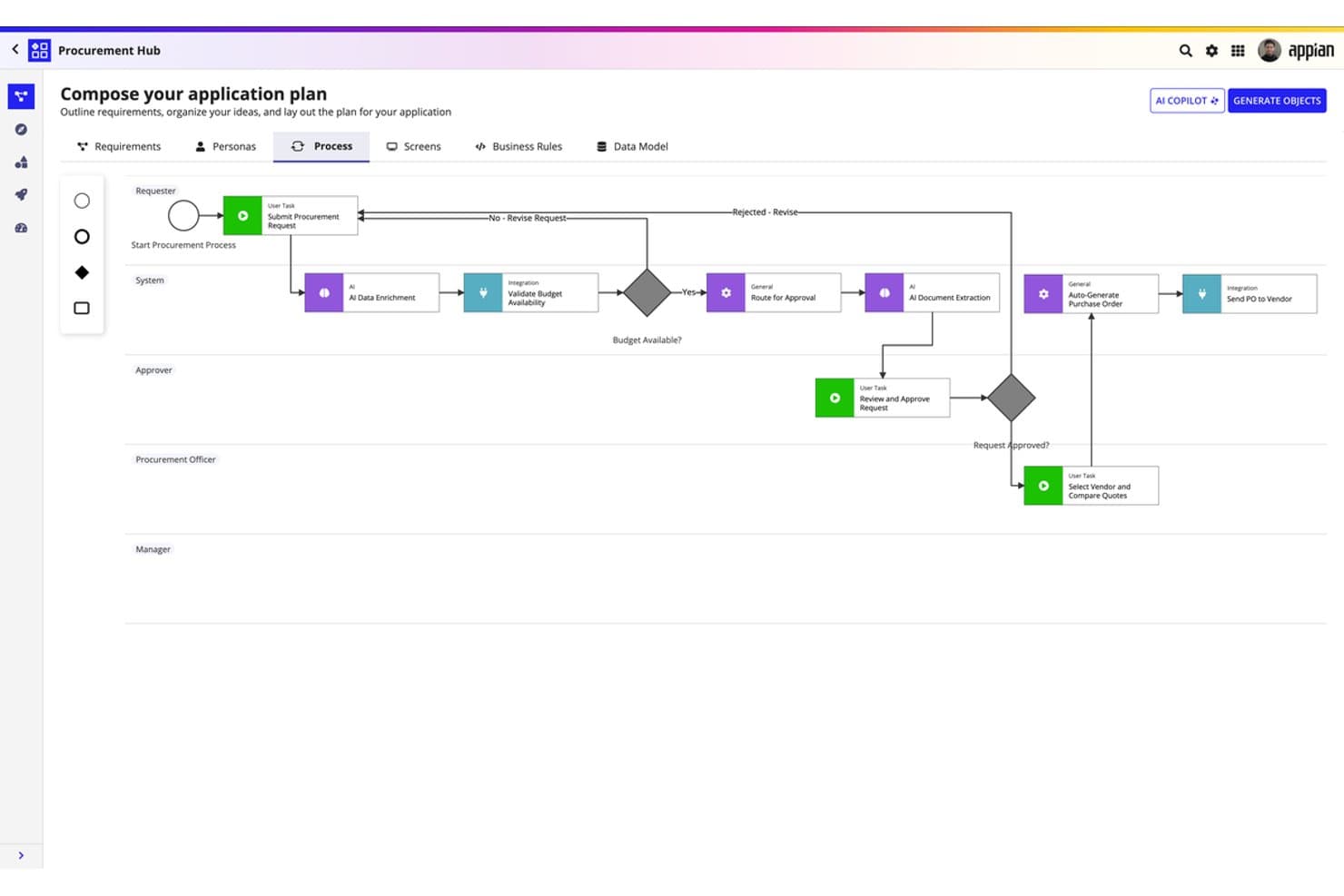
Appian consente agli utenti di comporre visivamente flussi di lavoro per gli approvvigionamenti basati sull'intelligenza artificiale senza scrivere codice. Appian è una piattaforma aziendale a basso codice/senza codice che combina la creazione visiva di app, gli agenti di intelligenza artificiale, l'elaborazione intelligente dei documenti e l'automazione dei flussi di lavoro di livello BPM in implementazioni cloud e autogestite.
Per chi è più adatto Appian?
Appian è particolarmente adatto ai team IT e operativi aziendali di settori regolamentati—servizi finanziari, enti governativi, sanità e difesa—che necessitano di agenti di intelligenza artificiale governati integrati nei flussi di lavoro critici per la missione.
Perché ho scelto Appian
Appian è entrato nella mia lista ristretta soprattutto per la serietà con cui gestisce la governance dell'intelligenza artificiale all'interno di flussi di lavoro ad alto rischio. Sono particolarmente colpito da Agent Studio, che consente di definire in linguaggio naturale gli obiettivi degli agenti autonomi di intelligenza artificiale e di integrarli direttamente in processi di livello BPM, con tracce di audit complete e possibilità di escalation verso un operatore già integrate. A questo si aggiunge la sua architettura Private AI, nella quale nessun dato dei clienti viene mai utilizzato per addestrare un modello esterno: il risultato è una piattaforma progettata specificamente per ambienti regolamentati, come le agenzie federali o i sistemi sanitari.
Funzionalità principali di Appian
- Federazione Data Fabric: Connette e interroga dati distribuiti tra sistemi cloud, locali e preesistenti senza richiedere la migrazione dei dati, supportando fino a 50 milioni di righe.
- Studio per la gestione dei casi: Offre moduli predefiniti—pannelli di controllo, instradamento e report—che coprono circa l'80% delle esigenze tipiche dei flussi di lavoro per la gestione dei casi, senza necessità di scrivere codice.
- Elaborazione intelligente dei documenti: Estrae e classifica i dati da documenti complessi utilizzando l'intelligenza artificiale generativa, con configurazione senza codice e validazione con intervento umano integrate.
- Implementazione in più ambienti: Supporta la promozione tra ambienti di sviluppo, test e produzione con governance CI/CD in configurazioni cloud, Kubernetes autogestite e ibride.
Integrazioni di Appian
Appian offre oltre 100 connettori predefiniti, tra cui Salesforce, SAP, Workday, Microsoft SharePoint, DocuSign, AWS, Oracle e NetSuite. Le integrazioni del Marketplace includono OpenAI e Azure OpenAI, mentre REST, SOAP, JDBC e l'SDK di integrazione supportano connessioni personalizzate.
Pros and Cons
Pros:
- Generatore visivo di agenti per flussi di lavoro regolamentati
- Private AI con tracce di audit complete
- Strumenti di process mining e intelligence in tempo reale
Cons:
- Nessuna interfaccia per l'addestramento di modelli di apprendimento automatico personalizzati
- Le funzionalità chiave di intelligenza artificiale sono disponibili solo nei piani superiori
Learn more about Appian: Ideale per incorporare modelli di apprendimento automatico nel runtime dell'applicazione
- Piano gratuito disponibile
- A partire da $1,090/mese
Visit WebsiteCustomer Rating:4.4/5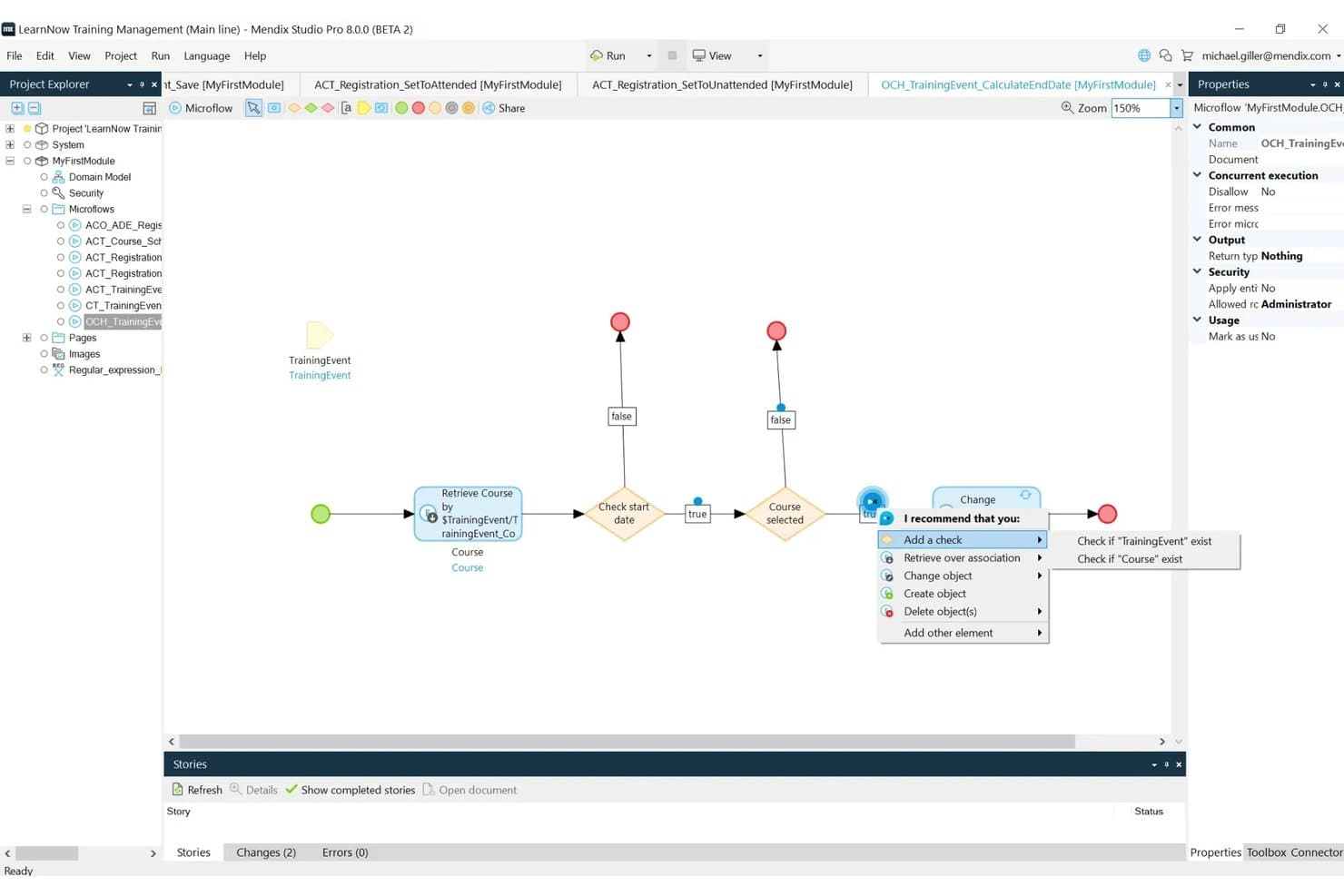
Mendix dispone di un editor visivo dei flussi di lavoro per configurare la logica dell'applicazione con componenti a basso codice. Mendix è una piattaforma di IA a basso codice basata su un IDE basato su modelli che consente di assemblare visivamente applicazioni web e mobili, incorporare modelli di apprendimento automatico personalizzati direttamente nel runtime dell'applicazione, orchestrare agenti IA e automatizzare flussi di lavoro in più fasi.
Per chi è più adatto Mendix?
Mendix è particolarmente adatto ai team aziendali IT e di sviluppo applicazioni che devono distribuire app con funzionalità di IA in ambienti regolamentati e complessi.
Perché ho scelto Mendix
Mendix si è guadagnato un posto nella mia selezione perché offre ML Kit, che consente di incorporare direttamente nel runtime dell'applicazione, tramite ONNX, modelli di apprendimento automatico personalizzati creati con TensorFlow o PyTorch, senza richiedere un server di modelli separato. Apprezzo il fatto che non si tratti semplicemente di un connettore a un servizio di IA esterno: il modello viene effettivamente eseguito all'interno dell'applicazione, riducendo la latenza e impedendo ai dati sensibili di lasciare il tuo ambiente. ONNX Model Zoo offre inoltre modelli pre-addestrati per la classificazione delle immagini, l'elaborazione del linguaggio naturale e il riconoscimento vocale, senza richiedere alcun addestramento iniziale.
Funzionalità principali di Mendix
- Generatore di flussi di lavoro Maia: Crea diagrammi completi dei flussi di lavoro direttamente da prompt in linguaggio naturale o immagini caricate all'interno di Studio Pro.
- Generatore di agenti IA: Un kit di avvio visivo per assemblare agenti IA autonomi in più fasi, in grado di interrogare basi di conoscenza, chiamare API esterne e inoltrare le richieste a revisori umani.
- Catalogo Mendix Connect: Un registro centralizzato dei metadati che individua, registra e governa automaticamente tutte le API, le origini dati e i servizi della tua organizzazione.
- Distribuzione in più ambienti: Distribuisci app su cloud pubblico, cloud privato, infrastruttura locale, SAP BTP o cloud del governo statunitense autorizzato FedRAMP da un'unica piattaforma.
Integrazioni di Mendix
Mendix offre connettività documentata per REST, SOAP, OData, GraphQL, SQL/JDBC, AsyncAPI e WSDL, oltre a connettori per SAP, Salesforce, i servizi AWS, Amazon Bedrock e Kafka. Connect Catalog governa API e origini dati, mentre Connector Kit supporta le integrazioni personalizzate.
Pros and Cons
Pros:
- I modelli di apprendimento automatico vengono eseguiti nell'app per ridurre la latenza
- Generatore visivo di agenti per flussi di lavoro IA complessi
- Certificazioni avanzate di sicurezza e conformità incluse
Cons:
- L'addestramento dei modelli di apprendimento automatico deve avvenire esternamente
- La scalabilità orizzontale richiede un piano premium
Learn more about Mendix:
Altre piattaforme di IA senza codice
Ecco alcune ulteriori opzioni di piattaforme di IA senza codice che non sono entrate nel mio elenco, ma che vale comunque la pena valutare:
- 8Microsoft Power AppsIdeale per la creazione di app AI native per Microsoft 365
- 9DataikuIdeale per la governance completa del ML su larga scala
- 10DataRobotIdeale per l'analisi predittiva
- 11Gemini Enterprise Agent PlatformIdeale per l'orchestrazione multi-agente su scala aziendale
Come valuto le piattaforme di IA senza codice
Se una piattaforma non è in grado di portare una persona senza competenze di programmazione da un problema aziendale a un modello di IA funzionante e distribuito, non merita un posto in questo elenco. Divido la mia valutazione in due livelli: le funzionalità fondamentali che ogni strumento deve offrire per essere idoneo e i fattori distintivi che differenziano una piattaforma dall'altra.
Funzionalità fondamentali (criteri imprescindibili per questo elenco)
Quando seleziono gli strumenti per il mio elenco, assegno a ciascuno un punteggio su una scala da 0 (non offre la funzionalità) a 5 (eccelle in questo ambito) per ognuna delle funzionalità fondamentali elencate di seguito. Poi converto il punteggio totale dello strumento in una percentuale. Ogni strumento deve raggiungere un punteggio totale minimo del 75% per essere preso in considerazione.
- Generatore visivo di applicazioni: cerco strumenti che offrano interfacce di tipo drag-and-drop o interfacce visive per progettare applicazioni, flussi di lavoro e modelli di dati senza richiedere agli utenti di scrivere codice.
- Funzionalità di IA/ML integrate: ho dato priorità esclusivamente agli strumenti che offrono funzionalità di IA native e predefinite, come l'addestramento di modelli di machine learning, l'IA generativa, l'elaborazione del linguaggio naturale, la visione artificiale o l'analisi predittiva, accessibili senza programmazione.
- Addestramento e distribuzione dei modelli: ho preferito le piattaforme che consentono agli utenti di addestrare, testare e distribuire modelli di IA/ML direttamente all'interno della piattaforma, utilizzando flussi di lavoro guidati o automatizzati (ad esempio, AutoML).
- Acquisizione e integrazione dei dati: ho valutato quanto bene le piattaforme si connettano ai dati provenienti da più fonti (database, API, file, app SaaS) tramite connettori predefiniti o configurazione visiva.
- Automazione dei flussi di lavoro e dei processi: ho cercato piattaforme dotate di strumenti efficaci per progettare flussi di lavoro automatizzati basati sull'IA, logiche decisionali e attivatori tramite un editor visivo.
- Distribuzione e pubblicazione delle API: ho preferito le piattaforme che consentono di distribuire applicazioni, modelli o automazioni completati come endpoint utilizzabili, applicazioni web o componenti incorporati senza codice personalizzato.
Una volta ottenuto un elenco di strumenti che soddisfano questi criteri, considero ciò che distingue ciascuna piattaforma.
Fattori distintivi (ciò che differenzia i fornitori)
Ecco come confronto i diversi fornitori:
Funzionalità distintive
Il monitoraggio dei modelli con rilevamento del drift è un aspetto importante: voglio vedere avvisi automatici quando un modello distribuito per il rilevamento delle frodi o la previsione della domanda inizia a degradarsi, oltre ad attivatori integrati per il nuovo addestramento. Anche gli strumenti di spiegabilità sono importanti, perché spesso i team IT devono mostrare agli stakeholder il motivo per cui un modello di IA ha preso una determinata decisione. Cerco piattaforme che abbinino queste funzionalità a controlli dei bias e registri di audit. Il supporto all'IA generativa, come l'ingegneria dei prompt e i flussi di lavoro RAG, è sempre più utile per i team che sviluppano applicazioni interne di IA generativa.
Oltre le funzionalità
La flessibilità di distribuzione è un aspetto che valuto attentamente: il fatto che una piattaforma supporti l'hosting nel cloud, ibrido o on-premise è importante quando i team gestiscono dati sensibili che non possono lasciare la propria infrastruttura. Sicurezza e conformità sono strettamente collegate in questo contesto. Verifico la presenza delle certificazioni SOC 2, ISO 27001 e dei framework di governance specifici per l'IA, soprattutto mentre le normative sulla responsabilità nell'IA si fanno più stringenti a livello globale. Anche la scalabilità ha un ruolo: una piattaforma che gestisce bene una prova di concetto, ma cede sotto carichi di inferenza di livello enterprise, non sarà utile ai team a lungo termine.
Come scegliere le piattaforme di IA senza codice
È facile perdersi in lunghi elenchi di funzionalità e strutture tariffarie complesse. Per aiutarti a rimanere concentrato mentre affronti il tuo esclusivo processo di selezione del software, ecco una lista di fattori da tenere a mente:
| Fattore | Cosa considerare |
| Scalabilità | La piattaforma può crescere insieme alle tue esigenze? Verifica se supporta l'aumento del volume di dati e del carico degli utenti senza problemi di prestazioni. |
| Integrazioni | Si connette agli strumenti che già utilizzi? Assicurati che supporti i software che usi già per evitare interruzioni nei flussi di lavoro. |
| Personalizzazione | Puoi adattarla ai tuoi processi? Cerca opzioni per modificare i flussi di lavoro e le interfacce in base alle esigenze specifiche del tuo team. |
| Facilità d'uso | È intuitiva per il tuo team? Valuta la curva di apprendimento e se il tuo team può adattarsi rapidamente all'utilizzo senza una formazione approfondita. |
| Implementazione e inserimento | Quanto velocemente puoi iniziare? Considera il tempo e le risorse necessari per la configurazione e la formazione, nonché la disponibilità di assistenza durante questa fase. |
| Costo | Rientra nel tuo budget? Confronta i piani tariffari e fai attenzione ai costi nascosti. Considera i costi a lungo termine e i potenziali risparmi derivanti dall'automazione. |
| Misure di sicurezza | I tuoi dati sono protetti? Cerca crittografia, controlli degli accessi e conformità alle normative sulla protezione dei dati per garantire la sicurezza delle tue informazioni. |
| Disponibilità dell'assistenza | L'aiuto è disponibile quando ne hai bisogno? Verifica se l'assistenza è disponibile 24 ore su 24, 7 giorni su 7, e accessibile tramite più canali, come chat, e-mail o telefono. |
Cosa sono le piattaforme di intelligenza artificiale senza codice?
Le piattaforme di intelligenza artificiale senza codice consentono agli utenti di creare e implementare modelli di intelligenza artificiale senza scrivere codice. Questi strumenti sono generalmente utilizzati da analisti aziendali, professionisti del marketing e altri professionisti non tecnici che hanno bisogno di sfruttare l'intelligenza artificiale per l'analisi dei dati e il processo decisionale.
Le interfacce con funzionalità di trascinamento, i modelli predefiniti e le capacità di integrazione favoriscono l'accessibilità, la facilità d'uso e una rapida implementazione. Nel complesso, questi strumenti consentono agli utenti di sfruttare in modo efficiente la tecnologia dell'intelligenza artificiale, risparmiando tempo e risorse.
Funzionalità delle piattaforme di intelligenza artificiale senza codice
Quando selezioni piattaforme di intelligenza artificiale senza codice, presta attenzione alle seguenti funzionalità principali:
- Interfaccia con funzionalità di trascinamento: semplifica il processo di creazione dei modelli di intelligenza artificiale consentendo agli utenti di disporre visivamente i componenti senza scrivere codice.
- Modelli predefiniti: offrono modelli pronti all'uso che aiutano gli utenti a implementare rapidamente soluzioni di intelligenza artificiale senza partire da zero.
- Integrazione dei dati: garantisce una connessione fluida con database e strumenti esistenti, come i software di riconoscimento delle immagini, rendendo il trasferimento e l'analisi dei dati semplici.
- Flussi di lavoro personalizzabili: consentono agli utenti di adattare i processi per soddisfare esigenze aziendali specifiche, aumentando flessibilità ed efficienza.
- Analisi in tempo reale: offre informazioni immediate sui dati, consentendo di prendere decisioni e apportare modifiche tempestivamente.
- Elaborazione automatizzata dei dati: riduce l'inserimento manuale estraendo e organizzando automaticamente le informazioni, risparmiando tempo e riducendo gli errori.
- Scalabilità: supporta volumi di dati e carichi di utenti in crescita, garantendo prestazioni costanti con l'espansione delle esigenze aziendali.
- Misure di sicurezza: proteggono le informazioni sensibili con crittografia e controlli degli accessi, preservando l'integrità dei dati e la conformità normativa.
- Strumenti di collaborazione: facilitano il lavoro di squadra consentendo a più utenti di lavorare contemporaneamente sui progetti, migliorando la produttività.
- Inserimento intuitivo: offre risorse formative e assistenza per agevolare la transizione e aiutare gli utenti a sfruttare rapidamente al massimo i vantaggi dello strumento.
Vantaggi delle piattaforme di intelligenza artificiale senza codice
L'implementazione di piattaforme di intelligenza artificiale senza codice offre diversi vantaggi al tuo team e alla tua azienda. Eccone alcuni:
- Implementazione più rapida: implementa rapidamente soluzioni di intelligenza artificiale utilizzando modelli predefiniti e interfacce con funzionalità di trascinamento, riducendo il tempo necessario per arrivare sul mercato.
- Costi ridotti: risparmia sulle spese di sviluppo eliminando la necessità di competenze specialistiche di programmazione e di cicli di sviluppo lunghi.
- Maggiore produttività: automatizza le attività ripetitive con l'elaborazione automatizzata dei dati, lasciando al tuo team più tempo da dedicare ad attività strategiche.
- Maggiore accessibilità: consenti agli utenti non tecnici di creare e gestire modelli di intelligenza artificiale, ampliando la partecipazione e l'innovazione all'interno dell'organizzazione.
- Migliore processo decisionale: sfrutta l'analisi in tempo reale per ottenere informazioni e prendere tempestivamente decisioni consapevoli, migliorando i risultati aziendali.
- Scalabilità: adattati facilmente alla crescita dei volumi di dati e delle esigenze degli utenti, garantendo che le tue soluzioni di intelligenza artificiale rimangano efficaci con l'evoluzione dell'azienda.
- Migliore collaborazione: utilizza gli strumenti di collaborazione per consentire ai membri del team di lavorare insieme sui progetti, migliorando la comunicazione e l'efficienza.
Costi e prezzi delle piattaforme di intelligenza artificiale senza codice
La scelta di un software di IA senza codice richiede una conoscenza dei vari modelli e piani tariffari disponibili. I costi variano in base alle funzionalità, alle dimensioni del team, ai componenti aggiuntivi e ad altri fattori. La tabella seguente riassume i piani più comuni, i relativi prezzi medi e le funzionalità tipicamente incluse nelle soluzioni di piattaforme di IA senza codice:
Tabella comparativa dei piani per le piattaforme di IA senza codice
| Tipo di piano | Prezzo medio | Funzionalità comuni |
| Piano gratuito | $0 | Accesso limitato alle funzionalità, elaborazione di base dei dati e supporto della comunità. |
| Piano personale | $10-$30 /utente /mese | Accesso alle funzionalità standard, integrazioni di base e opzioni di personalizzazione limitate. |
| Piano aziendale | $50-$100 /utente /mese | Funzionalità avanzate, integrazioni premium, sicurezza potenziata e supporto prioritario. |
| Piano aziendale | $100+ /utente /mese | Accesso completo alle funzionalità, integrazioni personalizzate, gestione dedicata dell'account e supporto a livello aziendale. |
Domande frequenti sulle piattaforme di IA senza codice
Ecco alcune risposte alle domande comuni sulle piattaforme di IA senza codice:
Vale la pena utilizzare l'IA senza codice?
Le piattaforme di IA senza codice possono rappresentare un investimento prezioso per la tua azienda. Riducono i costi di sviluppo eliminando la necessità di data scientist o sviluppatori specializzati. Questi strumenti consentono ai membri del team non tecnici di creare soluzioni di IA, rendendo i progetti di IA più convenienti e scalabili per aziende di tutte le dimensioni. Possono inoltre offrire integrazioni con le tecnologie più recenti del settore, come i \u003ca href=\u0022https://thectoclub.com/tools/best-natural-language-generation-software/\u0022\u003esoftware di generazione del linguaggio naturale\u003c/a\u003e o gli strumenti di riconoscimento visivo.
Quale piattaforma senza codice è la migliore?
La piattaforma senza codice migliore per te dipende dalle tue esigenze specifiche. Per chi è alle prime armi, Softr è un’ottima scelta. Se hai bisogno di un equilibrio tra potenza e facilità d’uso, Bubble è l’ideale. Per semplici app mobili, Glide è eccellente. Ogni piattaforma offre punti di forza unici, quindi considera i requisiti del tuo progetto.
Le piattaforme di IA senza codice sono in grado di gestire attività complesse?
Sebbene le piattaforme di IA senza codice siano progettate per essere facili da usare, alcune sono in grado di gestire attività complesse. Offrono funzionalità avanzate come flussi di lavoro personalizzati e integrazioni in grado di gestire progetti sofisticati. Tuttavia, per le attività altamente complesse, potresti avere comunque bisogno di alcune competenze tecniche.
Come scelgo la piattaforma di IA senza codice più adatta?
Per scegliere la piattaforma di IA senza codice più adatta, valuta le competenze tecniche del tuo team, i requisiti del progetto e il budget. Considera fattori come la scalabilità, le funzionalità di integrazione e la facilità d’uso. Valuta le versioni di prova per verificare quanto la piattaforma soddisfi le tue esigenze prima di prendere una decisione.