

Una valida alternativa a BetterCloud offre al tuo team una gestione centralizzata del SaaS, controlli granulari degli accessi e flussi di lavoro automatizzati per l'inserimento, la disabilitazione degli utenti e la conformità. Se stai cercando un'alternativa a BetterCloud, probabilmente stai affrontando difficoltà legate alla proliferazione delle applicazioni SaaS, al provisioning manuale degli utenti o a lacune nella visibilità e nella sicurezza complete del tuo ecosistema SaaS.
La soluzione giusta può aiutarti a gestire ambienti applicativi complessi, ridurre i rischi e stare al passo con l'evoluzione delle esigenze aziendali. In questo elenco troverai opzioni selezionate che rispondono a queste priorità, consentendoti di confrontare funzionalità, integrazioni e punti di forza per scegliere la soluzione più adatta al tuo ambiente IT.
Che cos'è BetterCloud?
BetterCloud è una piattaforma di gestione SaaS che centralizza il controllo sulle applicazioni cloud, automatizza le attività del ciclo di vita degli utenti e applica i criteri di sicurezza in tutta l'organizzazione.
I team IT utilizzano BetterCloud per gestire l'inserimento, la disabilitazione, le autorizzazioni e la conformità degli utenti per diversi strumenti SaaS da un'unica dashboard. Questo aiuta a ridurre il lavoro manuale, migliorare la visibilità e mantenere standard di sicurezza coerenti con la crescita dell'ambiente SaaS.
Tabella di confronto delle alternative a BetterCloud
Questa tabella di confronto riassume i dettagli sui prezzi delle migliori alternative a BetterCloud che ho selezionato:
| Tool | Best For | Trial Info | Price | ||
|---|---|---|---|---|---|
| 1 | Ideale per l'automazione degli accessi SaaS attivata dall'HR | Demo gratuita disponibile | A partire da $8/utente/mese (più un canone mensile di base) | Website | |
| 2 | Ideale per l'integrazione sicura dell'accesso singolo | Prova gratuita di 30 giorni + demo gratuita disponibile | A partire da $6/utente/mese (con fatturazione annuale) | Website | |
| 3 | Ideale per la gestione unificata di dispositivi e utenti | Prova gratuita di 30 giorni + dimostrazione gratuita disponibile | Prezzi su richiesta | Website | |
| 4 | Ideale per l'integrazione dei flussi di lavoro aziendali | Demo gratuita disponibile | Prezzo su richiesta | Website | |
| 5 | Ideale per l'ottimizzazione dei contratti con i fornitori | Demo gratuita disponibile | Prezzi su richiesta | Website | |
| 6 | Ideale per la gestione automatizzata del ciclo di vita SaaS | Demo gratuita disponibile | Prezzi su richiesta | Website | |
| 7 | Ideale per i controlli di governance delle identità | Dimostrazione gratuita disponibile | Prezzi su richiesta | Website | |
| 8 | Ideale per la gestione degli acquisti SaaS | Demo gratuita disponibile | A partire da $250/mese | Website | |
| 9 | Ideale per la visibilità sulla spesa SaaS | Demo gratuita disponibile | Prezzi su richiesta | Website | |
| 10 | Ideale per l'individuazione e il monitoraggio dell'utilizzo del SaaS | Dimostrazione gratuita disponibile | Prezzi su richiesta | Website |


Perché fidarsi dei nostri consigli sui software
6,700+
Reviews
20
Industry experts
16+
Evaluation factors
14
Years
Il nostro team testa e recensisce software dal 2012. In quanto leader tecnologici noi stessi, sappiamo quanto sia difficile — e importante — scegliere il software giusto.
Per questa guida, abbiamo valutato gli strumenti attraverso test praticie ricerche indipendenti, assegnando un punteggio agli strumenti in base ai nostri criteri di selezione.
Le nostre recensioni riflettono il nostro giudizio editoriale umano, non un discorso di vendita.
Revisori esperti:
- Paulo Gardini MiguelDirettore tecnico
 Tim FisherVP dell'IA
 Gabriel RosasTech Lead e architetto software
 Christhian GruhnTech Lead e architetto della piattaforma

Recensioni delle alternative a BetterCloud
Di seguito sono riportati i miei riepiloghi dettagliati delle migliori alternative a BetterCloud incluse nel mio elenco ristretto. Le mie recensioni offrono una panoramica dettagliata delle funzionalità, delle integrazioni e dei casi d’uso ideali di ciascuna piattaforma, per aiutarti a trovare quella più adatta a te.
 Ideale per l'automazione degli accessi SaaS attivata dall'HR
- Demo gratuita disponibile
- A partire da $8/utente/mese (più un canone mensile di base)
Visit WebsiteCustomer Rating:4.8/5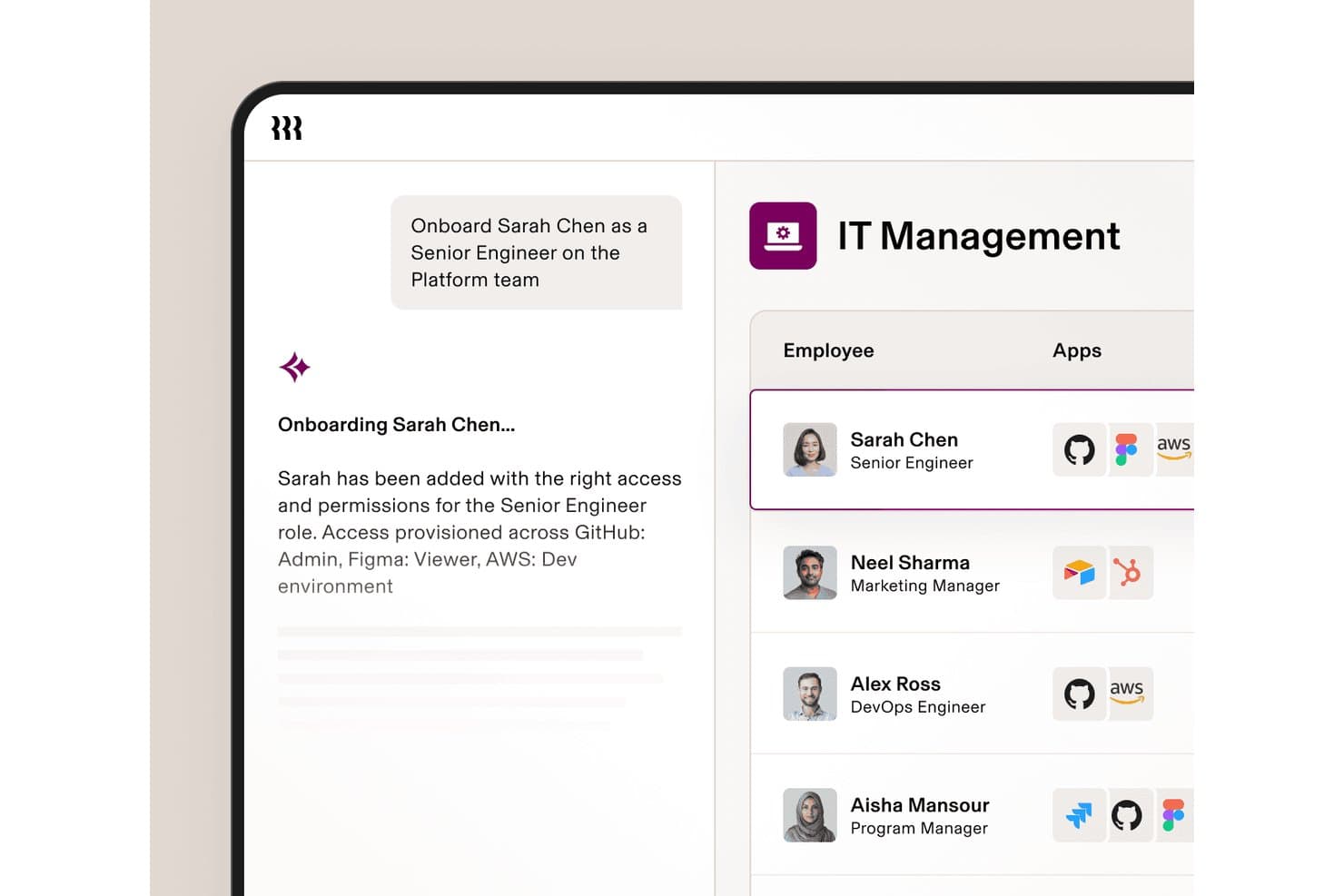
Rippling IT automatizza il provisioning delle app durante l'inserimento di nuovi dipendenti. Rippling IT è una piattaforma di gestione IT per aziende in crescita che aiuta i team a gestire dispositivi dei dipendenti, app, accessi e sicurezza da un unico sistema connesso.
Per chi è più adatto Rippling IT?
Rippling IT è adatto ai team IT e HR che hanno bisogno che gli eventi del ciclo di vita dei dipendenti attivino il provisioning SaaS, le modifiche agli accessi e i flussi di lavoro per la disattivazione degli account.
Perché Rippling IT è una buona alternativa a BetterCloud
Ho scelto Rippling IT perché la sua automazione dell'accesso SaaS attivata dall'HR collega gli eventi del ciclo di vita dei dipendenti al provisioning delle app e alle modifiche degli accessi. Il mio team può utilizzare l'inserimento, i cambi di ruolo e la disattivazione degli account per aggiornare gli accessi SaaS, gestendo al contempo dispositivi e sicurezza da un unico sistema. Questo lo rende un'alternativa pratica a BetterCloud quando HR e IT hanno bisogno di flussi di lavoro condivisi per la gestione degli accessi.
Funzionalità principali di Rippling IT
- Distribuzione dei dispositivi senza intervento : Spedisce dispositivi preconfigurati con le app e i criteri necessari.
- Automazione del servizio di assistenza : Risolve le richieste IT dei dipendenti tramite flussi di lavoro di supporto automatizzati.
- Monitoraggio della conformità : Tiene traccia dei controlli SOC 2 e NIST, delle evidenze e delle lacune di conformità.
- Governance dell'AI : Monitora l'utilizzo degli strumenti di AI, la spesa e le identità degli agenti.
Integrazioni di Rippling IT
Rippling IT offre oltre 600 integrazioni native, tra cui Google (G Suite), Microsoft 365, Slack, Jira, GitHub, Datadog, Zoom, Asana, Salesforce e HubSpot. Fornisce inoltre un'API e strumenti per sviluppatori per integrazioni personalizzate e app dell'App Shop.
Pros and Cons
Pros:
- Gli eventi HR attivano modifiche agli accessi alle app
- I controlli dei dispositivi e del SaaS condividono un'unica console
- I flussi di lavoro per la disattivazione degli account riducono gli accessi persistenti agli account
Cons:
- Il modello incentrato sull'HRIS potrebbe non essere adatto ai team esclusivamente IT
- L'individuazione del SaaS è meno specializzata rispetto a BetterCloud
Learn more about Rippling IT: 2Ideale per l'integrazione sicura dell'accesso singolo
Okta
- Prova gratuita di 30 giorni + demo gratuita disponibile
- A partire da $6/utente/mese (con fatturazione annuale)
Visit WebsiteCustomer Rating:4.6/5
Okta centralizza gli accessi sicuri con SSO e i controlli delle identità Se il tuo team ha bisogno di una gestione sicura e centralizzata degli accessi, Okta offre una piattaforma dedicata per l'accesso singolo e il controllo delle identità. Gli amministratori IT e i responsabili della sicurezza utilizzano Okta per unificare l'autenticazione nelle applicazioni cloud e locali, riducendo la proliferazione delle password e i rischi legati agli accessi. A differenza di BetterCloud, Okta è specializzata nella gestione delle identità e degli accessi, risultando particolarmente adatta alle organizzazioni che danno priorità all'autenticazione sicura degli utenti e all'accesso semplificato alle applicazioni.
A chi è più adatta Okta?
Team IT e di sicurezza di aziende di piccole e grandi dimensioni in tutto il mondo che implementano soluzioni sicure per l'accesso singolo e la gestione delle identità.
Perché ho scelto Okta
Quando l'accesso singolo sicuro è la tua priorità assoluta, Okta offre una soluzione mirata che BetterCloud non è in grado di eguagliare. Ho scelto Okta perché fornisce un'autenticazione centralizzata e controlli granulari degli accessi per tutte le tue applicazioni cloud e locali. La piattaforma supporta l'autenticazione adattiva a più fattori, consentendoti di applicare criteri di sicurezza basati sul contesto dell'utente e sul rischio. Se la tua organizzazione deve ridurre l'affaticamento causato dalle password e rafforzare la sicurezza delle identità, le funzionalità di accesso singolo di Okta sono progettate appositamente per questa esigenza.
Funzionalità principali di Okta
Alcune altre funzionalità di Okta possono aiutare il tuo team a gestire identità e accessi in modo più efficace:
- Gestione del ciclo di vita: Automatizza il provisioning e il deprovisioning degli utenti nelle applicazioni connesse.
- Directory universale: Archivia e gestisce i profili e gli attributi degli utenti in una directory centralizzata.
- Gestione degli accessi alle API: Protegge le API con OAuth e criteri di accesso personalizzati.
- Reimpostazione autonoma della password: Consente agli utenti di reimpostare autonomamente le proprie password senza l'intervento dell'IT.
Integrazioni di Okta
Le integrazioni includono Microsoft 365, Google Workspace, Salesforce, Slack, Zoom, AWS, ServiceNow, Box, Workday e altro.
Pros and Cons
Pros:
- Supporta l'accesso singolo in centinaia di applicazioni cloud e locali
- Offre l'autenticazione adattiva a più fattori per criteri di sicurezza avanzati
- Fornisce flussi di lavoro automatizzati per il provisioning e il deprovisioning degli utenti
Cons:
- Non fornisce automazione delle operazioni SaaS né monitoraggio della sicurezza dei file
- Non dispone di analisi granulari sull'utilizzo delle applicazioni SaaS
Learn more about Okta: Ideale per la gestione unificata di dispositivi e utenti
- Prova gratuita di 30 giorni + dimostrazione gratuita disponibile
- Prezzi su richiesta
Visit WebsiteCustomer Rating:4.6/5
JumpCloud gestisce utenti e dispositivi nei sistemi Windows, Mac e Linux Gestire sia i dispositivi sia le identità degli utenti da un'unica piattaforma è il punto di forza di JumpCloud. I gruppi IT alla ricerca di un'alternativa a BetterCloud utilizzano JumpCloud per unificare i servizi di directory, la gestione dei dispositivi e il controllo degli accessi negli ambienti Windows, Mac e Linux. Questo approccio aiuta le organizzazioni a semplificare la sicurezza degli endpoint e la gestione del ciclo di vita degli utenti senza dover gestire più strumenti.
A chi è più adatto JumpCloud?
Amministratori IT di organizzazioni di piccole e medie dimensioni in tutto il mondo che supervisionano la gestione unificata di dispositivi e utenti.
Perché ho scelto JumpCloud
Se hai bisogno di un controllo unificato sia sui dispositivi sia sulle identità degli utenti, JumpCloud offre una combinazione che BetterCloud non fornisce. Ho scelto JumpCloud perché consente di gestire i servizi di directory, i criteri di sicurezza dei dispositivi e l'autenticazione degli utenti da un'unica console di amministrazione. La piattaforma supporta la gestione multipiattaforma dei dispositivi per Windows, Mac e Linux, consentendo di applicare standard di sicurezza indipendentemente dalla combinazione di dispositivi utilizzata. Per i gruppi IT che desiderano ridurre la proliferazione degli strumenti e centralizzare la gestione degli endpoint e delle identità, JumpCloud riunisce queste funzionalità in un unico luogo.
Funzionalità principali di JumpCloud
Alcune altre funzionalità di JumpCloud possono aiutare il tuo gruppo a soddisfare più esigenze di gestione IT:
- LDAP e RADIUS nel cloud: Fornisce servizi LDAP e RADIUS basati sul cloud per un accesso sicuro a reti e applicazioni.
- Autenticazione a più fattori (MFA): Impone l'MFA sia per gli accessi ai dispositivi sia per l'accesso alle applicazioni.
- Gestione dei criteri: Consente di creare e distribuire criteri di sicurezza a gruppi di dispositivi.
- Accesso singolo (SSO): Supporta l'integrazione SSO con un'ampia gamma di applicazioni cloud.
Integrazioni di JumpCloud
Le integrazioni includono Google Workspace, Microsoft 365, Okta, Salesforce, Slack, GitHub, Workday, BambooHR e altro.
Pros and Cons
Pros:
- Gestisce identità degli utenti e dispositivi nei sistemi Windows, Mac e Linux
- Offre servizi di directory basati sul cloud con supporto per LDAP e RADIUS
- Fornisce l'autenticazione a più fattori integrata per l'accesso ai dispositivi e alle applicazioni
Cons:
- Non dispone di funzionalità avanzate per la gestione e l'automazione delle applicazioni SaaS
- La gestione dei dispositivi per le piattaforme mobili è meno completa rispetto a quella dei computer desktop
Learn more about JumpCloud: Ideale per l'integrazione dei flussi di lavoro aziendali
- Demo gratuita disponibile
- Prezzo su richiesta
Visit WebsiteCustomer Rating:4.4/5
ServiceNow gestisce flussi di lavoro dei servizi su larga scala tra le unità IT e aziendali ServiceNow si distingue per i responsabili IT e i team aziendali che devono collegare flussi di lavoro complessi tra reparti e sistemi. La piattaforma va oltre la gestione SaaS offrendo funzionalità avanzate di automazione, gestione dei servizi e integrazione per le grandi organizzazioni. Se cerchi un'alternativa a BetterCloud in grado di unificare i processi IT, HR e aziendali su un'unica piattaforma, ServiceNow è progettato per offrire questo livello di scalabilità e flessibilità.
Per chi è più adatto ServiceNow?
Dirigenti IT e delle operations di grandi aziende in tutto il mondo che integrano i flussi di lavoro tra la gestione dei servizi IT e le funzioni aziendali.
Perché ho scelto ServiceNow
Quando è necessario integrare i flussi di lavoro tra più sistemi aziendali, ServiceNow offre funzionalità che vanno ben oltre ciò che BetterCloud mette a disposizione. Ho scelto ServiceNow perché consente di progettare, automatizzare e monitorare flussi di lavoro automatizzati end-to-end che coinvolgono IT, HR, sicurezza e operations aziendali, supportando al contempo un approccio zero trust all'accesso e alla governance. Il motore dei flussi di lavoro e gli strumenti low-code della piattaforma si basano su numerosi connettori che aiutano a collegare processi e dati tra diversi reparti, riducendo i silos e il lavoro manuale. Per le organizzazioni che desiderano unificare la gestione dei servizi e l'automazione su larga scala, ServiceNow offre la profondità e la flessibilità necessarie.
Funzionalità principali di ServiceNow
Altre funzionalità di ServiceNow possono aiutarti a gestire in modo più efficace gli ambienti tecnologici aziendali:
- Gestione degli incidenti: monitora, assegna priorità e risolve gli incidenti IT da una dashboard centralizzata.
- Gestione degli asset: monitora gli asset hardware e software durante tutto il loro ciclo di vita.
- Catalogo dei servizi: consente agli utenti di richiedere servizi IT e aziendali tramite un portale personalizzabile.
- Gestione delle modifiche: controlla e documenta le modifiche ai sistemi e all'infrastruttura per ridurre i rischi.
Integrazioni di ServiceNow
Le integrazioni includono Microsoft Teams, Slack, Jira, GitHub, Salesforce, SAP, Oracle, Microsoft Dynamics 365, Okta e altro.
Pros and Cons
Pros:
- Supporta l'automazione di flussi di lavoro complessi tra IT, HR e funzioni aziendali
- Offre funzionalità granulari per la gestione di incidenti, asset e modifiche
- Fornisce strumenti low-code per la creazione di applicazioni aziendali personalizzate
Cons:
- L'implementazione e la configurazione richiedono tempo e risorse tecniche significative
- La personalizzazione richiede spesso competenze specialistiche nello sviluppo con ServiceNow
 Ideale per l'ottimizzazione dei contratti con i fornitori
- Demo gratuita disponibile
- Prezzi su richiesta
Visit WebsiteCustomer Rating:4.6/5
CloudEagle.ai monitora la spesa SaaS e offre la gestione delle licenze tra i team CloudEagle.ai è progettato per i team IT, approvvigionamento e finanza che devono ottimizzare i contratti e i rinnovi dei fornitori SaaS. A differenza delle altre alternative a BetterCloud, combina la gestione dei contratti con l'analisi della spesa e i flussi di lavoro per i rinnovi in un'unica piattaforma. Questo approccio consente di ottenere visibilità sui termini contrattuali, evitare rinnovi a sorpresa e negoziare prezzi migliori con i fornitori.
Per chi è più adatto CloudEagle.ai?
Responsabili finanziari e IT di aziende di medie e grandi dimensioni a livello globale, impegnati nell'ottimizzazione dei contratti con i fornitori e nel controllo delle spese SaaS.
Perché ho scelto CloudEagle.ai
Per i team IT e approvvigionamento concentrati sull'ottimizzazione dei contratti con i fornitori, CloudEagle.ai offre un insieme di funzionalità che va oltre ciò che si trova in BetterCloud. Ho scelto CloudEagle.ai perché centralizza l'archiviazione dei contratti, monitora le date di rinnovo e supporta l'ottimizzazione della spesa con promemoria automatici che aiutano a evitare il mancato rispetto delle scadenze. La piattaforma analizza inoltre i termini contrattuali e i dati di spesa, offrendo alle principali parti interessate una maggiore leva nelle negoziazioni e una visibilità più completa sul portafoglio SaaS. Se vuoi ridurre la spesa superflua e migliorare la gestione dei fornitori, l'approccio di CloudEagle.ai incentrato sui contratti è particolarmente adatto.
Funzionalità principali di CloudEagle.ai
Altre funzionalità di CloudEagle.ai possono aiutarti a gestire il tuo ecosistema SaaS in modo più strategico:
- Rilevamento automatico delle applicazioni SaaS: rileva e cataloga tutte le applicazioni SaaS utilizzate nella tua organizzazione.
- Pannello di analisi della spesa: visualizza la spesa SaaS per reparto, fornitore o utente, per una migliore supervisione del budget.
- Revisioni degli accessi degli utenti: consente di verificare e gestire gli accessi degli utenti agli strumenti SaaS da un'unica interfaccia.
- Automazione dei flussi di lavoro per i rinnovi: semplifica il processo di revisione, approvazione ed esecuzione dei rinnovi SaaS.
Integrazioni di CloudEagle.ai
Le integrazioni includono Okta, Microsoft Active Directory, Google Workspace, NetSuite, QuickBooks, Sage Intacct, Salesforce, Slack e altri.
Pros and Cons
Pros:
- Centralizza l'archiviazione dei contratti SaaS e il monitoraggio dei rinnovi per i team IT
- Fornisce analisi della spesa per individuare le licenze inutilizzate o sottoutilizzate
- Offre promemoria automatici per i prossimi rinnovi e le scadenze dei contratti
Cons:
- Le opzioni di personalizzazione dei report potrebbero essere meno avanzate rispetto a quelle dei concorrenti
- L'insieme di funzionalità è incentrato sulla gestione dei contratti, non sulle operazioni SaaS più ampie
Learn more about CloudEagle.ai: Ideale per la gestione automatizzata del ciclo di vita SaaS
- Demo gratuita disponibile
- Prezzi su richiesta
Visit WebsiteCustomer Rating:4.6/5
Josys rileva automaticamente le applicazioni SaaS e gestisce gli accessi da un'unica dashboard Josys offre una gestione automatizzata del ciclo di vita delle applicazioni SaaS, progettata per i team IT che gestiscono ambienti applicativi complessi. Se devi semplificare l'onboarding, l'offboarding e la distribuzione delle applicazioni tra più strumenti cloud, Josys centralizza questi processi in un'unica piattaforma. Il suo approccio orientato all'automazione contribuisce a ridurre il lavoro manuale e a minimizzare gli errori rispetto alle altre alternative a BetterCloud.
Per chi è più indicato Josys?
I team delle operazioni IT e degli approvvigionamenti di organizzazioni di medie dimensioni in Nord America e in Europa che automatizzano la gestione del ciclo di vita SaaS tra i diversi reparti.
Perché ho scelto Josys
Josys si distingue per la sua attenzione all'automazione dell'intero ciclo di vita SaaS, un'esigenza fondamentale per i team IT che gestiscono un ecosistema SaaS in crescita composto da applicazioni cloud. Ho scelto Josys come alternativa a BetterCloud perché funziona come uno strumento centralizzato per la gestione SaaS che consente di automatizzare l'onboarding, l'offboarding e la distribuzione delle applicazioni da un'unica dashboard. L'automazione dei flussi di lavoro della piattaforma utilizza connettori integrati per ridurre i passaggi manuali e garantire un'applicazione coerente delle policy nell'intero ambiente SaaS. Se desideri minimizzare gli errori e risparmiare tempo nelle attività ripetitive di gestione degli utenti, Josys offre un'automazione mirata che va oltre ciò che forniscono molte altre piattaforme.
Funzionalità principali di Josys
Altre funzionalità di Josys possono aiutarti a gestire gli ambienti SaaS in modo più efficiente:
- Gestione delle licenze: monitora e gestisci l'utilizzo delle licenze SaaS in tutta l'organizzazione per evitare sprechi e garantire la conformità.
- Registri di audit: conserva registri dettagliati delle azioni degli utenti e delle modifiche per le revisioni di sicurezza e gli audit di conformità.
- Controlli degli accessi basati sui ruoli: assegna autorizzazioni granulari a utenti e amministratori in base a ruoli e responsabilità.
- Rilevamento automatico delle applicazioni: identifica e cataloga tutte le applicazioni SaaS in uso, comprese quelle aggiunte senza l'approvazione dell'IT.
Integrazioni principali di Josys
Le integrazioni includono Microsoft Entra ID, Google Workspace, BambooHR, Workday, Slack, Zoom, Asana, Jira, AWS e altro ancora.
Pros and Cons
Pros:
- Automatizza i flussi di lavoro di onboarding e offboarding per più applicazioni SaaS
- Centralizza la gestione delle licenze SaaS e il monitoraggio dell'utilizzo in un'unica dashboard
- Offre controlli granulari degli accessi basati sui ruoli per gli amministratori IT
Cons:
- Le opzioni per i flussi di lavoro personalizzati potrebbero essere meno flessibili rispetto a quelle di BetterCloud
- La documentazione pubblica limitata rende più difficile valutare le funzionalità
Learn more about Josys: Ideale per i controlli di governance delle identità
- Dimostrazione gratuita disponibile
- Prezzi su richiesta

SailPoint protegge le identità aziendali con la governance e l'analisi delle identità Per le organizzazioni che necessitano di una governance avanzata delle identità, SailPoint offre un approccio mirato al controllo degli accessi e alla conformità. I team addetti alla sicurezza e i responsabili IT utilizzano SailPoint per automatizzare la gestione del ciclo di vita delle identità e applicare criteri di accesso granulari in ambienti complessi. A differenza di BetterCloud, SailPoint è specializzata in controlli di governance approfonditi, il che la rende particolarmente adatta ai settori regolamentati e alle aziende con rigorosi requisiti di conformità.
Per chi è più adatta SailPoint?
Responsabili della sicurezza e della conformità di grandi aziende a livello globale che implementano la governance delle identità e i controlli degli accessi.
Perché ho scelto SailPoint
Se la tua organizzazione necessita di una governance delle identità più avanzata di quella offerta da BetterCloud, vale la pena prendere in considerazione SailPoint. Ho scelto SailPoint perché offre certificazioni automatizzate degli accessi e controlli degli accessi basati su criteri, che aiutano a garantire la conformità negli ambienti altamente regolamentati. La piattaforma supporta inoltre registri di audit e report dettagliati, semplificando la dimostrazione della conformità durante le revisioni di sicurezza. Per i team IT e di sicurezza concentrati sulla gestione e sulla governance del ciclo di vita delle identità, SailPoint offre controlli che vanno oltre la gestione SaaS standard.
Funzionalità principali di SailPoint
Alcune altre funzionalità di SailPoint possono aiutare il tuo team a rafforzare la gestione delle identità e la sicurezza:
- Modellazione degli accessi basata sui ruoli: consente di definire e gestire i ruoli degli utenti per semplificare l'assegnazione degli accessi.
- Strumenti per la gestione delle password: offre la reimpostazione autonoma delle password e la sincronizzazione tra i sistemi.
- Criteri di separazione dei compiti: rileva e impedisce diritti di accesso in conflitto all'interno del tuo ambiente.
- Supporto per applicazioni cloud e locali: gestisce le identità sia nelle applicazioni basate sul cloud sia nelle applicazioni legacy locali.
Integrazioni di SailPoint
Le integrazioni includono AWS, SAP, Microsoft Active Directory, Oracle, Salesforce, ServiceNow, Box, Epic Systems e altro.
Pros and Cons
Pros:
- Automatizza le certificazioni degli accessi per le organizzazioni orientate alla conformità
- Supporta l'applicazione granulare dei criteri per i controlli di governance delle identità
- Gestisce le identità sia nei sistemi cloud sia nei sistemi locali
Cons:
- Le funzionalità di reportistica possono richiedere personalizzazioni per specifiche esigenze di conformità
- L'interfaccia utente è meno moderna rispetto a quella di alcuni concorrenti SaaS
Learn more about SailPoint: Ideale per la gestione degli acquisti SaaS
- Demo gratuita disponibile
- A partire da $250/mese

Vendr gestisce in un unico luogo gli acquisti SaaS, i rinnovi e le trattative con i fornitori Quando il tuo team deve assumere il controllo degli acquisti SaaS, Vendr offre una piattaforma dedicata alla gestione degli acquisti e dei rinnovi del software. I responsabili degli acquisti e i responsabili delle risorse IT utilizzano Vendr per centralizzare le trattative con i fornitori, monitorare i termini dei contratti e ottimizzare la spesa SaaS. A differenza di BetterCloud, Vendr si concentra sull'intero ciclo di vita degli acquisti, rappresentando una scelta efficace per le organizzazioni che desiderano standardizzare e automatizzare il modo in cui acquistano e gestiscono gli strumenti SaaS.
Per chi è più adatto Vendr?
Team addetti agli acquisti e alla finanza di organizzazioni di medie e grandi dimensioni in Nord America che gestiscono gli acquisti SaaS e le trattative con i fornitori.
Perché ho scelto Vendr
Per le organizzazioni che desiderano strutturare e rendere più trasparenti gli acquisti SaaS, Vendr offre una soluzione mirata per un'esigenza che BetterCloud non copre. Ho scelto Vendr perché centralizza la gestione dei contratti e automatizza il monitoraggio dei rinnovi, aiutando i team IT e gli uffici acquisti a evitare scadenze mancate e costi imprevisti. La piattaforma offre inoltre supporto nelle trattative con i fornitori, dando al tuo team accesso a informazioni di mercato e parametri di riferimento durante il processo di acquisto. Se devi gestire l'intero ciclo di vita degli acquisti SaaS, Vendr offre funzionalità che vanno oltre la gestione SaaS standard.
Funzionalità principali di Vendr
Altre funzionalità di Vendr possono aiutare il tuo team a gestire gli acquisti SaaS in modo più efficiente:
- Analisi della spesa SaaS: Monitora e visualizza la spesa per il software in tutta l'organizzazione.
- Automazione del flusso di approvazione: Indirizza le richieste di acquisto attraverso sequenze di approvazione personalizzabili.
- Accesso al database dei fornitori: Fornisce informazioni consultabili su migliaia di fornitori e prodotti SaaS.
- Calendario dei rinnovi: Mostra i prossimi rinnovi dei contratti in una dashboard centralizzata.
Integrazioni di Vendr
Le integrazioni includono Okta, Azure AD, Google Workspace, NetSuite, QuickBooks, Workday, BambooHR, Ironclad, Slack e altro.
Pros and Cons
Pros:
- Centralizza i dati dei contratti SaaS per una maggiore visibilità sugli acquisti
- Offre supporto nelle trattative con i fornitori e parametri di riferimento sui prezzi di mercato
- Automatizza i promemoria dei rinnovi per aiutare a prevenire le scadenze mancate
Cons:
- Non dispone della gestione diretta del ciclo di vita degli utenti o dei controlli degli accessi
- Si concentra sugli acquisti, non sulle operazioni o sull'automazione SaaS
Learn more about Vertice:

Zylo monitora l'utilizzo e i rinnovi SaaS per offrire una visibilità completa sulla spesa SaaS Se il tuo team ha bisogno di una visione chiara della spesa e dell'utilizzo del SaaS, Zylo è stato creato proprio per questo scopo. La piattaforma è progettata per i professionisti IT, degli acquisti e della finanza che desiderano monitorare, analizzare e ottimizzare i costi SaaS in tutta l'azienda. A differenza di BetterCloud, Zylo è specializzato nel fornire dati dettagliati sulla spesa e nell'individuare abbonamenti inutilizzati o ridondanti.
Per chi è più adatto Zylo?
Responsabili degli asset IT e della finanza in organizzazioni di medie e grandi dimensioni in Nord America ed Europa che cercano visibilità sulla spesa e sull'utilizzo del SaaS.
Perché ho scelto Zylo
Per le organizzazioni che devono tenere sotto controllo la spesa SaaS, Zylo offre una visibilità più approfondita rispetto a BetterCloud. Ho scelto Zylo perché individua automaticamente tutte le applicazioni SaaS in uso e monitora la spesa sia a livello organizzativo sia a livello di singolo utente. Le analisi della piattaforma evidenziano le licenze sottoutilizzate e gli abbonamenti duplicati, facilitando l'individuazione di opportunità di risparmio. Se la tua priorità è comprendere e controllare le spese SaaS, le funzionalità di Zylo per la visibilità sulla spesa sono particolarmente adatte.
Funzionalità principali di Zylo
Altre funzionalità di Zylo possono aiutarti a gestire in modo più completo il tuo ambiente SaaS:
- Gestione dei contratti: Centralizza i contratti SaaS e le date di rinnovo per facilitarne il monitoraggio.
- Analisi dell'utilizzo: Fornisce report dettagliati sull'utilizzo delle applicazioni nei diversi reparti.
- Ottimizzazione delle licenze: Suggerisce modifiche al numero di licenze in base ai dati sull'utilizzo effettivo.
- Informazioni sui fornitori SaaS: Offre benchmark e informazioni sui fornitori SaaS per supportare le trattative.
Integrazioni principali di Zylo
Le integrazioni native non sono attualmente elencate pubblicamente.
Pros and Cons
Pros:
- Monitora la spesa SaaS in tutti i reparti e le unità aziendali
- Centralizza la gestione dei contratti e dei rinnovi per i fornitori SaaS
- Offre analisi dettagliate dell'utilizzo per una migliore governance del SaaS
Cons:
- Non dispone di funzionalità granulari di gestione del ciclo di vita degli utenti e di automazione
- Non supporta la configurazione diretta delle app SaaS o l'applicazione di policy
Learn more about Zylo: 10Ideale per l'individuazione e il monitoraggio dell'utilizzo del SaaS
Torii
- Dimostrazione gratuita disponibile
- Prezzi su richiesta

Torii rileva l'IT ombra e ottimizza l'utilizzo del SaaS con strumenti di automazione Se hai bisogno di una visibilità approfondita sull'utilizzo del SaaS in tutta la tua organizzazione, Torii è stato creato per te. I team IT e i responsabili degli acquisti utilizzano Torii per individuare, monitorare e analizzare automaticamente ogni app SaaS in uso, incluso l'IT ombra. A differenza di BetterCloud, Torii è specializzato nel mettere in evidenza i modelli di utilizzo e i dati sulla spesa per aiutarti a ottimizzare il tuo portafoglio SaaS.
A chi è più adatto Torii?
Ai team delle operazioni IT e agli amministratori SaaS di aziende di medie dimensioni in tutto il mondo che individuano l'IT ombra e monitorano l'utilizzo dei software.
Perché ho scelto Torii
Quando si tratta di scoprire e monitorare l'utilizzo del SaaS, Torii offre un livello di visibilità che BetterCloud non raggiunge. Ho scelto Torii perché individua automaticamente tutte le app SaaS presenti nel tuo ambiente, comprese quelle non gestite dall'IT, aiutandoti ad affrontare i rischi dell'IT ombra. La piattaforma monitora anche l'utilizzo delle licenze e la spesa, permettendoti di identificare gli abbonamenti sottoutilizzati e ottimizzare i costi. Per i team IT concentrati sulla gestione del SaaS e sull'analisi della spesa, Torii porta in primo piano l'individuazione e il monitoraggio dell'utilizzo.
Funzionalità principali di Torii
Alcune altre funzionalità di Torii possono aiutare il tuo team a gestire le operazioni SaaS in modo più efficace:
- Inserimento e disattivazione automatizzati: semplifica il provisioning e il deprovisioning degli utenti nelle app SaaS collegate.
- Generatore di flussi di lavoro personalizzati: consente di progettare e automatizzare i processi IT per la gestione delle app.
- Pannello per la gestione dei rinnovi: monitora i prossimi rinnovi contrattuali e invia avvisi per evitare di non rispettare le scadenze.
- Motore di applicazione delle regole: applica automaticamente le regole di utilizzo e sicurezza alle applicazioni SaaS individuate.
Integrazioni di Torii
Le integrazioni includono Okta, Google Workspace, JumpCloud, SAP SuccessFactors, ADP Workforce Now, NetSuite, Expensify, AWS e altro ancora.
Pros and Cons
Pros:
- Individua automaticamente le applicazioni SaaS sia gestite sia non gestite in uso
- Monitora l'utilizzo delle licenze e la spesa per tutti gli strumenti SaaS collegati
- Offre l'automazione dei flussi di lavoro per i processi di inserimento e disattivazione
Cons:
- La documentazione pubblica e le risorse di supporto sono meno complete
- Non dispone delle funzionalità granulari di gestione degli accessi presenti in BetterCloud
Learn more about Torii:
Altre alternative a BetterCloud
Ecco alcune ulteriori alternative a BetterCloud che non sono state incluse nel mio elenco ristretto, ma che vale comunque la pena prendere in considerazione:
- 11LumosIdeale per automatizzare le richieste di accesso
- 12ZluriIdeale per il provisioning delle applicazioni per i dipendenti
- 13DoControlIdeale per controlli granulari sull'accesso ai dati
- 14Netskope OneIdeale per la protezione dei dati cloud in tempo reale
Come valuto le alternative a BetterCloud
Scompongo la valutazione in due livelli: le capacità di base che un'alternativa a BetterCloud deve possedere—come l'automazione del ciclo di vita delle applicazioni SaaS e i controlli degli accessi—e i fattori differenzianti che distinguono gli strumenti.
Funzionalità di base (requisiti fondamentali per questa lista)
Quando seleziono gli strumenti per la mia lista, valuto ciascuno su una scala da 0 (funzionalità assente) a 5 (eccelle in quest'area) per ogni funzionalità di base elencata di seguito. Poi calcolo il punteggio totale dello strumento in percentuale. Ogni strumento deve raggiungere un punteggio totale minimo del 65% per essere preso in considerazione.
- Profondità di integrazione multi-SaaS: Controllo quanti connettori nativi offre uno strumento e se queste integrazioni vanno oltre il collegamento a livello SSO, entrando nel dettaglio ad azione con app come Google Workspace, Microsoft 365, Slack e Salesforce.
- Automazione del ciclo di vita degli utenti: Ogni strumento viene valutato in base alla capacità di automatizzare tutto il ciclo di joiner-mover-leaver—ad esempio, il provisioning delle app per un nuovo assunto innescato dall’HRIS e la revoca dell’accesso non appena una persona viene terminata.
- Costruttore di flussi di lavoro e playbook: Cerco un motore no-code o low-code che supporti ramificazioni condizionali e azioni multi-step, come la sospensione automatica degli account di un utente su varie app SaaS al verificarsi di un alert di sicurezza.
- Gestione accessi e privilegi SaaS: Qui conta il controllo centralizzato dei permessi, delle appartenenze ai gruppi e delle politiche di condivisione dei file—soprattutto la capacità di auditare chi ha accesso amministrativo tra le app collegate.
- Scoperta e visibilità sul SaaS: Gli strumenti dovrebbero rendere visibili dati di utilizzo delle app e informazioni sull’impiego delle licenze, cosicché i team IT possano individuare SaaS sconosciuti e identificare licenze inutilizzate che stanno erodendo il budget in silenzio.
- Controlli di sicurezza e conformità: Verifico se la piattaforma include enforcement delle policy, scansione tipo DLP e tracce di audit a supporto dei flussi di lavoro di conformità per normative come SOC 2 o ISO 27001.
Una volta che ho una lista di strumenti che soddisfano questi criteri, considero cosa differenzia ciascuna piattaforma.
Fattori differenzianti (cosa distingue i fornitori)
Ecco come paragono e contrappongo i diversi fornitori:
Funzionalità distintive
L’automazione innescata dall’HRIS è un grande differenziatore: cerco strumenti che facciano partire dei flussi di onboarding non appena una nuova risorsa è segnata come attiva in Workday o BambooHR, senza passaggi manuali. Anche l’assegnazione granulare di amministratori delegati è importante, poiché i responsabili di reparto o i tecnici MSP spesso devono gestire solo i loro utenti senza accedere alle impostazioni globali. Valuto inoltre se una piattaforma offre un portale self-service che consenta agli utenti finali di richiedere l’accesso alle app o gestire il reset delle password, riducendo così i ticket IT di routine.
Oltre le funzionalità
Guardo con attenzione alla profondità dell’ecosistema di integrazioni: strumenti che forniscono API aperte e costruttori di connettori personalizzati danno ai team la flessibilità di connettere app SaaS di nicchia oltre alle integrazioni native. Anche la posizione sulla conformità è rilevante, soprattutto se il fornitore possiede certificazioni SOC 2 Type II o ISO 27001 e fornisce tracce di audit esportabili per la raccolta delle evidenze. Considero anche il target a cui si rivolge il prodotto, dato che alcune piattaforme sono pensate per team IT aziendali che gestiscono migliaia di utenti, mentre altre sono più adatte a piccoli team SMB o MSP che gestiscono più tenant.
Perché cercare un'alternativa a BetterCloud?
Sebbene BetterCloud sia una buona scelta come alternativa a BetterCloud, ci sono diversi motivi per cui alcuni utenti cercano soluzioni alternative. Potresti essere alla ricerca di un'alternativa a BetterCloud perché…
- Hai bisogno di controlli degli accessi più granulari a livello di file
- Il tuo team desidera un'automazione più approfondita per i flussi di lavoro di sicurezza SaaS
- Hai bisogno di integrazioni con applicazioni SaaS non supportate da BetterCloud
- La tua organizzazione necessita di prezzi più trasparenti o flessibili
- Cerchi uno strumento con funzionalità più solide per la reportistica sulla conformità
- Hai bisogno del supporto per ambienti globali o multi-tenant
Se ti riconosci in una di queste situazioni, sei nel posto giusto. Il mio elenco include diverse alternative a BetterCloud più adatte ai team che affrontano queste difficoltà con BetterCloud e cercano soluzioni alternative.
Funzionalità principali di BetterCloud
Ecco alcune delle funzionalità principali di BetterCloud, per aiutarti a mettere a confronto ciò che offrono le soluzioni alternative:
- Flussi di lavoro automatizzati per l'onboarding e l'offboarding degli utenti
- Gestione centralizzata delle autorizzazioni e degli accessi alle app SaaS
- Automazione basata su criteri per le attività di sicurezza e conformità
- Monitoraggio in tempo reale delle attività SaaS e delle modifiche alla configurazione
- Avvisi personalizzati per comportamenti degli utenti sospetti o rischiosi
- Azioni in blocco per la gestione di utenti, gruppi e licenze
- Registri di controllo dettagliati e report per le esigenze di conformità
- Integrazione con le principali piattaforme SaaS, come Google Workspace e Microsoft 365
- Amministrazione delegata per team IT distribuiti
- Modelli di flusso di lavoro predefiniti per i processi IT più comuni