


PDQ Connect vs. NinjaOne : Comparaison et avis d’experts pour 2026
Découvrez comment PDQ Connect et NinjaOne se comparent pour la gestion des correctifs en conditions réelles : ma comparaison met en lumière les points forts, les lacunes et quelle solution s'adapte réellement à votre flux de travail en 2026.

Nous évaluons les outils indépendamment ; les commissions aident à financer nos tests. Consultez notre politique de transparence et notre méthodologie.
Keeping systems up to date shouldn’t feel like a headache, but for many IT teams, patch management turns into a constant cycle of urgent fixes, missed updates, and mounting security concerns.
Choosing the right patch management software can make or break your routine. You’re likely wrestling with automation, security, and ease of use—which is where both PDQ Connect and NinjaOne promise answers, though each brings a different approach.
In this article, you’ll get a clear, side-by-side comparison of these two tools. I’ll walk you through pros and cons, use cases, pricing, security, and usability, so you can make the right call for your team.
PDQ Connect

4.6/5
- Free trial + demo available
- From $12/device/year
NinjaOne
4.7/5
- 14-day free trial + free demo available
- Pricing upon request
Pourquoi faire confiance à nos recommandations de logiciels
6,700+
Reviews
20
Industry experts
16+
Evaluation factors
14
Years
Notre équipe teste et évalue des logiciels depuis 2012. En tant que leaders technologiques nous-mêmes, nous savons à quel point il est difficile — et important — de choisir le bon logiciel.
Pour ce guide, nous avons évalué les outils grâce à des tests pratiques et une recherche indépendante, en notant les outils selon nos critères de sélection.
Nos avis reflètent notre jugement éditorial humain, et non un argumentaire de vente.
Réviseurs experts:
- Paulo Gardini MiguelDirecteur technique
 Tim FisherVP de l'IA
 Gabriel RosasTech Lead et architecte logiciel
 Christhian GruhnTech Lead et architecte plateforme

| PDQ Connect | NinjaOne | |
|---|---|---|
| Free Trial | Free trial + demo available | 14-day free trial + free demo available |
| Pricing | From $12/device/year | Pricing upon request |
Tarification et coûts cachés : PDQ Connect vs NinjaOne
PDQ Connect propose une tarification par appareil avec des niveaux qui évoluent selon les fonctionnalités et le nombre d’endpoints. Aucun frais d’intégration ni de mise en route ne sont facturés, mais attendez-vous à des coûts supplémentaires si vous avez besoin d’intégrations additionnelles ou d’un support premium. NinjaOne utilise un modèle d’abonnement basé sur un devis sur-mesure, généralement selon le nombre d’endpoints gérés, avec des modules avancés ou des fonctionnalités réservés à des niveaux supérieurs ou sous licence séparée — la personnalisation tarifaire peut donc se complexifier selon la diversité de votre parc et de vos besoins spécifiques.
Choisir l’offre la mieux adaptée ne se limite pas au prix affiché. Je recommande de dresser l’inventaire complet de vos actifs, vos usages attendus, vos besoins de support, et votre potentiel de croissance. Demandez à chaque fournisseur un devis personnalisé basé sur votre mix de systèmes et fonctionnalités requises, en considérant à la fois les frais directs d’abonnement et les coûts indirects (add-ons, support, etc.). Cette démarche vous évitera les surprises et garantira une solution parfaitement adaptée à vos impératifs techniques et opérationnels.
| PDQ Connect | NinjaOne | |
|---|---|---|
| 2-Factor Authentication | Yes | Yes |
| Anti-Virus | Yes | Yes |
| API | Yes | Yes |
| Bug Tracking | No | Yes |
| Customer Management | No | Yes |
| Data Export | Yes | Yes |
| Data Import | Yes | Yes |
| Email Integration | No | Yes |
| External Integrations | Yes | Yes |
| Malware Protection | Yes | Yes |
| Multi-User | Yes | Yes |
| Notifications | Yes | Yes |
| Project Management | No | Yes |
| SAP Integration | No | Yes |
| Ticket Management | Yes | Yes |
| Intégration | PDQ Connect | NinjaOne |
|---|---|---|
| IntégrationActive Directory | PDQ Connect✅ | NinjaOne✅ |
| IntégrationMicrosoft Intune | PDQ Connect❌ | NinjaOne✅ |
| IntégrationServiceNow | PDQ Connect❌ | NinjaOne✅ |
| IntégrationSlack | PDQ Connect❌ | NinjaOne✅ |
| IntégrationConnectWise | PDQ Connect❌ | NinjaOne✅ |
| IntégrationAutotask | PDQ Connect❌ | NinjaOne✅ |
| IntégrationFreshdesk | PDQ Connect✅ | NinjaOne❌ |
| IntégrationJira | PDQ Connect✅ | NinjaOne❌ |
| IntégrationAPI | PDQ Connect✅ | NinjaOne✅ |
| IntégrationZapier | PDQ Connect✅ | NinjaOne❌ |
NinjaOne propose un éventail plus large d’intégrations natives pour la gestion des services IT, la communication et la virtualisation, alors que PDQ Connect reste simple mais offre Zapier pour une automatisation flexible. Les deux solutions disposent d’une API, ce qui rend ces plateformes adaptables en cas de besoins spécifiques ou de workflows personnalisés pour la gestion de correctifs.
| Facteur | PDQ Connect | NinjaOne |
|---|---|---|
| FacteurChiffrement des données | PDQ ConnectUtilise un chiffrement de bout en bout pour les données en transit et au repos. | NinjaOneApplique un chiffrement fort pour les données en transit et au repos. |
| FacteurContrôles d’accès | PDQ ConnectPropose des rôles utilisateurs granulaire et des paramètres de permission. | NinjaOneFournit des accès détaillés par rôle et des journaux d’audit. |
| FacteurConformité réglementaire | PDQ ConnectConforme SOC 2, garantissant des opérations sécurisées. | NinjaOneSupporte la conformité SOC 2 et HIPAA, avec documentation supplémentaire. |
| FacteurValidation des correctifs | PDQ ConnectVérifie l’authenticité du correctif avant déploiement. | NinjaOneOffre des tests automatisés des correctifs et des options de retour arrière. |
| FacteurGaranties de disponibilité | PDQ ConnectAssure une haute disponibilité grâce à une architecture cloud. | NinjaOnePublie une disponibilité 24/7 avec surveillance globale de l’infrastructure. |
NinjaOne paraît plus avancé pour les organisations ayant de forts besoins en conformité, tandis que PDQ Connect assure une sécurité simple et une gestion efficace des mises à jour. D’après mon expérience, la documentation approfondie de NinjaOne et ses capacités d’audit renforcent sa position dans les secteurs hautement régulés, alors que la simplicité de PDQ Connect conviendra parfaitement aux équipes axées sur la gestion de correctifs essentielle.
| Facteur | PDQ Connect | NinjaOne |
| Interface utilisateur | Tableau de bord épuré et intuitif, axé sur les tâches de mise à jour. | Interface moderne et unifiée avec widgets personnalisables. |
| Intégration initiale | Démarrage rapide avec configuration simple et parcours guidés. | Intégration détaillée avec ressources de formation et info-bulles. |
| Support | Support par e-mail et forums communautaires actifs. | Chat en direct 24/7, assistance téléphonique et centre d’aide riche en ressources. |
| Automatisation | Planification facile à configurer mais moins d'options d’automatisation. | Automatisations flexibles pour la gestion des mises à jour, alertes et scripts personnalisés. |
| Documentation | Base de connaissances ciblée et concise pour les opérations principales. | Documentation approfondie avec guides pas à pas et vidéos. |
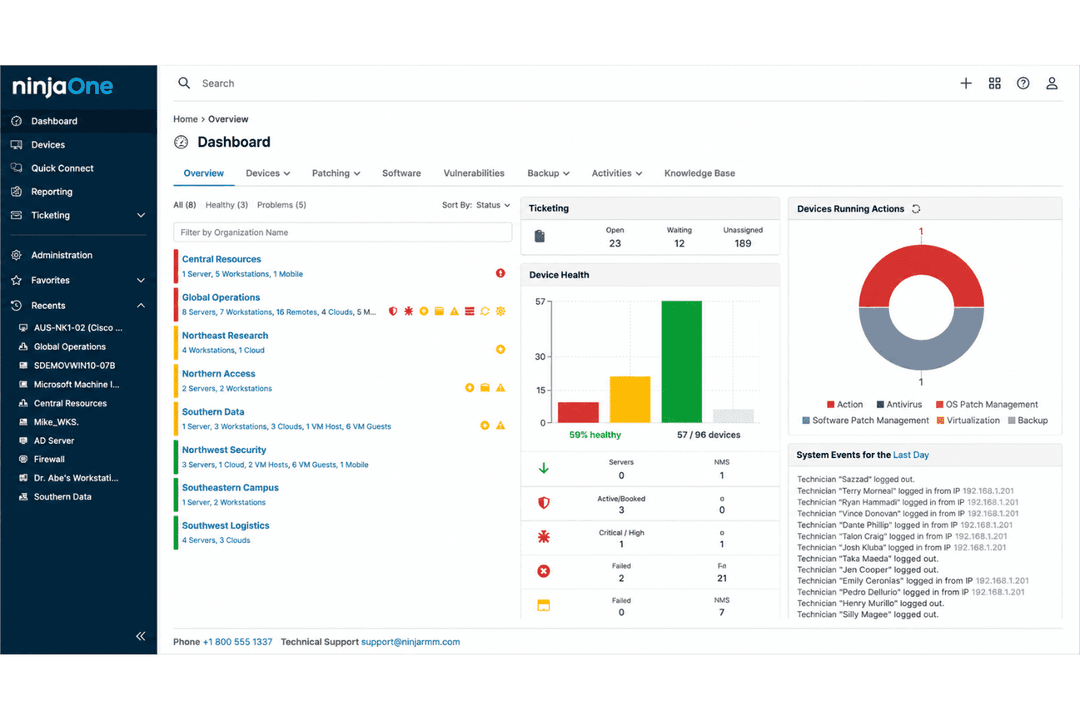
Les deux outils sont faciles à prendre en main, mais NinjaOne va plus loin avec davantage d’options d’automatisation et un support plus présent. Je trouve que PDQ Connect est idéal si vous préférez une interface minimaliste et un déploiement rapide, tandis que NinjaOne conviendra aux équipes recherchant plus de possibilités de personnalisation et d’accompagnement.
PDQ Connect
- Automates Windows and macOS patch deployment with granular scheduling controls.
- Inventory scanning helps pinpoint unpatched or missing software.
- No remote agent required for updates on most devices.
- Limited support for Linux and mobile environments.
- RMM options are basic compared to other all-in-one platforms.
- No dedicated onboarding support.
NinjaOne
- Deploys fast and delivers detailed endpoint visibility with no on-premise infrastructure to purchase, configure, and manage.
- Pulls patching, backup, remote access, and ticketing into one console.
- Automates patching with CVE and CVSS context, stability scoring, and dependable scripting.
- Built-in reporting is thin for client-facing work.
- Mobile device management is less robust than desktop support.
- The service desk and PSA are sized for SMB teams rather than enterprise ITSM or high-end MSP workflows.
PDQ Connect
- Financial InstitutionsFinancial institutions can use PDQ Connect to support compliance and maintain visibility across endpoints.
- K–12 EducationSchools benefit from agentless updates, prebuilt packages, and batch deployment across many Windows PCs.
- Managed Service ProvidersService providers use PDQ's scripting options and reporting for efficient multi-client patch management.
- Healthcare ClinicsAgentless patching and minimal infrastructure keep compliance easy for smaller clinics with mostly Windows devices.
- Distributed WorkforcesRemote deployment supports offsite or hybrid employees without complex VPN or agent installs.
- SMBs With WindowsSmall and midsize businesses running mostly Windows get fast setup and coverage without advanced requirements.
NinjaOne
- Managed Service ProvidersNinjaOne’s multi-tenant architecture and remote support streamline managing multiple client environments from a single dashboard.
- Small to Midsize BusinessesDevice-based pricing and easy deployment provide SMBs effective IT management without extra complexity.
- Healthcare IT DepartmentsPatch management and compliance reporting features help healthcare teams meet standards and secure sensitive data.
- Education InstitutionsRemote monitoring and access ease support for student and faculty devices across multiple sites.
- Hybrid Workforce SupportPolicy management, help desk, and remote access empower teams supporting remote and distributed users.
- Enterprise IT TeamsMulti-tenant architecture and automation scale to support large, distributed fleets and high endpoint volume.
Qui devrait utiliser PDQ Connect et qui devrait utiliser NinjaOne ?
PDQ Connect convient aux petites et moyennes équipes informatiques ou aux organisations soucieuses de leur budget qui recherchent une solution de gestion des mises à jour simple, sans fonctionnalités superflues. NinjaOne est mieux adapté aux MSP, aux secteurs réglementés et aux grandes entreprises qui recherchent une gestion complète des terminaux, des pistes d’audit détaillées et une gestion IT intégrée. Si vous privilégiez la rapidité et la simplicité, PDQ Connect est idéal ; si votre équipe a besoin d’automatisation, d’intégrations et de contrôles avancés, optez pour NinjaOne.
| PDQ Connect | NinjaOne | |
|---|---|---|
| Automation | PDQ Connect Basic scheduling for patch jobs and scripts. | NinjaOne Advanced automation for patching, alerts, and workflows. |
| Compliance Tools | PDQ Connect SOC 2 compliant, less focus on regulated industries. | NinjaOne Advanced reporting, audit trails, and HIPAA/SOC 2 support. |
| Integrations | PDQ Connect Fewer integrations, includes Zapier for flexibility. | NinjaOne Broad integrations, especially for ITSM and RMM tools. |
| Pricing Model | PDQ Connect Simple seat-based pricing with limited add-ons. | NinjaOne Custom endpoint-based pricing with modular add-on options. |
| User Interface | PDQ Connect Clean, minimal dashboard focused on patching. | NinjaOne Highly customizable dashboard with widgets and integrations. |
| Cloud-Based Management | Both deliver a cloud-based experience, letting you manage patching and monitoring from anywhere. |
|---|---|
| Patch Automation | Both automate patch deployment to endpoints, reducing manual work and risk of missed updates. |
| Reporting | Both provide detailed reporting on patch status, failed updates, and compliance across managed devices. |
| User Access Controls | Each tool offers defined user roles and permissions for managing who can deploy or approve patches. |
| Windows Support | Each product is built for robust Windows patching, handling updates across Windows endpoints natively. |