

Avis sur HeadSpin 2026 : Avantages, Inconvénients, Fonctionnalités et Tarifs Expliqués
Cet avis sur HeadSpin explore ses fonctions de test, ses points forts et ses faiblesses, ainsi que ses tarifs, pour savoir s’il s’agit du bon outil de gestion des tests pour votre équipe.

Nous évaluons les outils indépendamment ; les commissions aident à financer nos tests. Consultez notre politique de transparence et notre méthodologie.
HeadSpin is a test management software built for teams who need to test mobile and web apps on real devices under real-world network conditions. It uses AI to surface performance issues tied to actual user experience data across a globally distributed device network. I'd consider it over BrowserStack if you need more than device and browser compatibility coverage—HeadSpin goes deeper into performance diagnostics, giving you actionable data on what's degrading the user experience and exactly where it's happening.
HeadSpin Evaluation Summary

4.6/5
- From $39/month (billed annually)
- Free demo available
Pourquoi faire confiance à nos recommandations de logiciels
6,700+
Reviews
20
Industry experts
16+
Evaluation factors
14
Years
Notre équipe teste et évalue des logiciels depuis 2012. En tant que leaders technologiques nous-mêmes, nous savons à quel point il est difficile — et important — de choisir le bon logiciel.
Pour ce guide, nous avons évalué les outils grâce à des tests pratiques et une recherche indépendante, en notant les outils selon nos critères de sélection.
Nos avis reflètent notre jugement éditorial humain, et non un argumentaire de vente.
Réviseurs experts:
- Paulo Gardini MiguelDirecteur technique
 Tim FisherVP de l'IA
 Gabriel RosasTech Lead et architecte logiciel
 Christhian GruhnTech Lead et architecte plateforme

HeadSpin Overview
When judging test management options, I think HeadSpin stands out if you want device diversity, integrated performance analytics, and AI-driven insights in one place. Its deep integrations, detailed reporting, and real-world network testing set it apart, especially for mobile and IoT QA. Pricing is on the higher side, and onboarding can challenge new users, but teams prioritizing advanced analytics and global coverage will appreciate what HeadSpin offers.
For fast-paced environments and businesses with a distributed qa footprint, I’d select HeadSpin over more basic testing platforms.
Pros
- Offers real device cloud for global testing coverage.
- Detailed performance and user experience analytics are included.
- Supports automation for mobile, web, and IoT testing.
Cons
- Pricing can be higher than many alternatives.
- UI can feel cluttered when running complex tests.
- API documentation lacks depth for custom workflows.
Is HeadSpin Right For Your Needs?
Who Would be a Good Fit for HeadSpin?
HeadSpin is best suited for organizations that need real-world device testing, advanced analytics, or global test coverage with strict reliability requirements. It serves industries where mobile performance and cross-device quality directly affect user satisfaction.
Teams with significant QA workloads and those handling high-frequency, production-grade releases typically get the most value from its deep diagnostics and AI-driven insights.
- Mobile App DevelopersMobile teams needing global device access and real-world user scenario simulation will benefit from HeadSpin’s robust device lab and session recording capabilities.
- Telecom ProvidersTelecom companies can use HeadSpin’s network simulation and cross-region device testing to optimize apps for varying connectivity environments.
- Financial ServicesBanks and fintech companies value HeadSpin’s security-focused diagnostics and analytics when testing secure, transaction-heavy mobile apps.
- Enterprise QA TeamsLarge-scale QA operations that require automated regression, device health tracking, and cross-platform transparency thrive with HeadSpin’s workflow automation.
- IoT Solution ProvidersCompanies testing IoT devices benefit from HeadSpin’s ability to simulate user journeys and troubleshoot device-to-app interactions.
- Media & Streaming FirmsVideo and content streaming platforms use HeadSpin’s performance analytics to ensure high-quality playback across many devices and networks.
Who Would be a Bad Fit for HeadSpin?
Smaller businesses or teams with limited automation needs, basic QA requirements, or a narrow device focus may find HeadSpin’s pricing and complexity excessive. It may also overwhelm organizations that don’t need cross-geography, multi-device functionality or prefer simpler test management software. Light use cases rarely justify the investment required to take full advantage of HeadSpin’s platform depth.
- Small StartupsTeams with light QA needs or limited budgets won’t maximize HeadSpin’s advanced analytics or device cloud features.
- Manual Test TeamsBusinesses relying mostly on manual testing won’t benefit from the automation and AI workflow tools HeadSpin provides.
- Single-Platform TeamsCompanies building for just one platform or device type don’t need HeadSpin’s cross-platform device infrastructure.
- Local Service ProvidersOrganizations operating in a single geographic region rarely make use of HeadSpin’s global device labs or network condition simulation.
- Education & NonprofitsSectors where simple compliance or low-complexity flows are priority may find the cost and features misaligned.
- Freelance TestersIndependent QA consultants or small agencies may be overwhelmed or priced out by the enterprise-focused capabilities.
Notre méthodologie d'évaluation
Comment nous testons et notons les outils
Nous avons passé des années à développer, affiner et améliorer notre système de test et de notation des logiciels. Cette grille d’évaluation est conçue pour saisir les subtilités de la sélection des logiciels et ce qui rend un outil efficace, en se concentrant sur les aspects critiques du processus de décision.
Vous trouverez ci-dessous le détail de notre processus de test et de notation sur sept critères. Cela nous permet de fournir une évaluation impartiale du logiciel basée sur les fonctionnalités principales, les caractéristiques distinctives, la facilité d’utilisation, l’intégration, l’accompagnement lors de la prise en main, le support client, les avis utilisateurs et le rapport qualité-prix.
Fonctionnalité principale (25% de la note finale)
Le point de départ de notre évaluation est toujours la fonctionnalité principale de l’outil. Possède-t-il les fonctions de base auxquelles un utilisateur s’attend ? Certaines de ces fonctionnalités principales sont-elles limitées à des forfaits plus chers ? Nous attendons d’un outil qu’il soit au moins à la hauteur des capacités de base de ses concurrents.
Fonctionnalités remarquables (25% de la note finale)
Ensuite, nous évaluons les fonctionnalités exceptionnelles qui dépassent la fonctionnalité de base habituellement trouvée dans ce type d’outil. Un score élevé reflète des fonctionnalités spécialisées ou uniques rendant le produit plus rapide, plus efficace ou apportant une valeur ajoutée à l’utilisateur.
Nous évaluons aussi la facilité d’intégration avec d’autres outils courants dans la pile technologique pour élargir les fonctionnalités et l’utilité du logiciel. Les outils dotés de nombreuses intégrations natives, de connexions tierces et d’un accès API facilitant des intégrations personnalisées obtiennent les meilleurs scores.
Facilité d’utilisation (10% de la note finale)
Nous considérons la rapidité et la simplicité d’exécution des tâches principales avec l’outil. Les logiciels les mieux notés sont bien conçus, intuitifs, proposent des applications mobiles, offrent des modèles et rendent des tâches relativement complexes très simples.
Accompagnement lors de la prise en main (10% de la note finale)
Nous savons que l’adoption rapide d’une nouvelle plateforme au sein d’une équipe est cruciale. Nous évaluons donc la facilité avec laquelle un nouvel utilisateur peut apprendre et utiliser un outil avec un minimum de formation. Les meilleures solutions permettent une mise en route rapide, sans nécessité de support.
Support client (10% de la note finale)
Nous analysons la facilité et la rapidité avec lesquelles il est possible d’obtenir de l’aide par téléphone, chat en direct ou base de connaissances. Les outils et entreprises offrant une assistance en temps réel obtiennent les meilleurs scores, tandis que les chatbots sont moins bien notés.
Avis utilisateurs (10% de la note finale)
Au-delà de nos propres tests et évaluations, nous tenons compte du net promoter score des utilisateurs actuels et passés. Nous regardons la probabilité qu’ils choisiraient à nouveau l’outil pour ses fonctionnalités principales. Un logiciel bien noté reflète un net promoter score élevé.
Rapport qualité-prix (10% de la note finale)
Enfin, en tenant compte de tous les autres critères, nous examinons le prix moyen des forfaits d’entrée de gamme par rapport aux fonctionnalités principales et à la valeur des autres critères. Un logiciel offrant plus, pour moins cher, obtiendra un meilleur score.
Core Features
Real Device Cloud
Test across a vast network of real mobile devices and browsers. This ensures true-to-life results in various geographies.
Automated Test Execution
Schedule and run tests automatically across devices and platforms. Save time and eliminate manual intervention for release cycles.
Performance Analytics
Receive in-depth analytics on app performance, responsiveness, and stability. Visualize network, device, and user metrics in one dashboard.
Session Recording and Replay
Capture, replay, and debug test sessions with granular logs. Pinpoint issues by retracing steps on actual devices.
AI-Driven Issue Detection
Get automatic insights into failures and performance bottlenecks with AI. The platform prioritizes issues so you know what to tackle first.
Network Condition Simulation
Test how apps behave under different network scenarios, like 3G or LTE. Identify and solve connectivity problems before users experience them.

Ease of Use
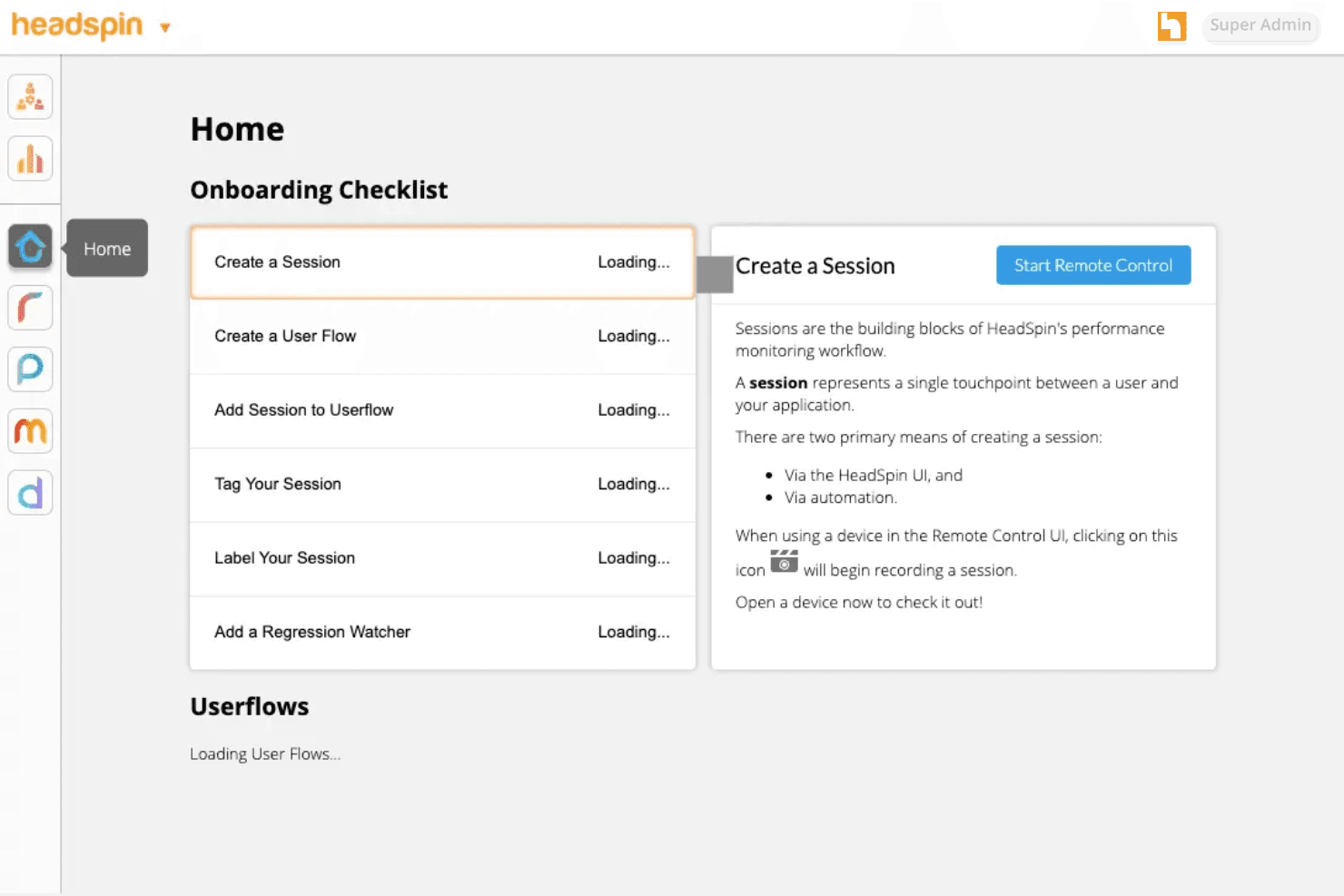
HeadSpin’s dashboard provides unmatched device and test visibility, but its complex feature set can overwhelm new users. In my experience, navigating advanced performance analytics and filtering logs takes extra effort.
Power users appreciate the depth for debugging, while teams without dedicated QA engineers may need more ramp-up time before it feels intuitive.
Integrations
HeadSpin integrates with Appium, Selenium, Jenkins, Jira, GitHub, GitLab, Azure, Slack, CircleCI, and Tricentis Tosca, among others.
HeadSpin also offers a comprehensive API and supports custom integrations for advanced workflows.

HeadSpin Specs
- A/B Testing: Yes
- API: Yes
- Automated Testing: Yes
- Browser Compatibility Testing: Yes
- Bug Tracking: No
- Calendar Management: No
- CI/CD Integration: Yes
- Dashboard: Yes
- Data Export: Yes
- Data Import: Yes
- Data Visualization: Yes
- Developer Tools: Yes
- External Integrations: Yes
- History/Version Control: No
- Manual Testing: Yes
- Multi-User: Yes
- Notifications: Yes
- Performance Testing: Yes
- Regression Testing: Yes
- Scheduling: No
- Status Notifications: No
- Third-Party Plugins/Add-Ons: Yes


