

Avis BugBug 2026 : Avantages, Inconvénients, Fonctionnalités et Tarifs
Au cours de ma carrière, j'ai utilisé de nombreux outils d'automatisation des tests, y compris BugBug. Permettez-moi de vous présenter les fonctionnalités de cet outil, ses alternatives, et bien plus encore.

Nous évaluons les outils indépendamment ; les commissions aident à financer nos tests. Consultez notre politique de transparence et notre méthodologie.
BugBug is a no-code automation testing tool for teams that need to record, manage, and run browser tests without writing code. I'd consider it if your team wants reliable test coverage but doesn't have the bandwidth for tools like Selenium, where getting started means configuring environments and writing scripts before you can test anything. BugBug lets you go from zero to running tests much faster, which makes it a practical fit for leaner teams where developers aren't dedicated to QA.
BugBug Evaluation Summary
4.8/5
- From $99/month (billed annually)
- 14-day free trial + free plan available
Pourquoi faire confiance à nos recommandations de logiciels
6,700+
Reviews
20
Industry experts
16+
Evaluation factors
14
Years
Notre équipe teste et évalue des logiciels depuis 2012. En tant que leaders technologiques nous-mêmes, nous savons à quel point il est difficile — et important — de choisir le bon logiciel.
Pour ce guide, nous avons évalué les outils grâce à des tests pratiques et une recherche indépendante, en notant les outils selon nos critères de sélection.
Nos avis reflètent notre jugement éditorial humain, et non un argumentaire de vente.
Réviseurs experts:
- Paulo Gardini MiguelDirecteur technique
 Tim FisherVP de l'IA
 Gabriel RosasTech Lead et architecte logiciel
 Christhian GruhnTech Lead et architecte plateforme

BugBug Overview
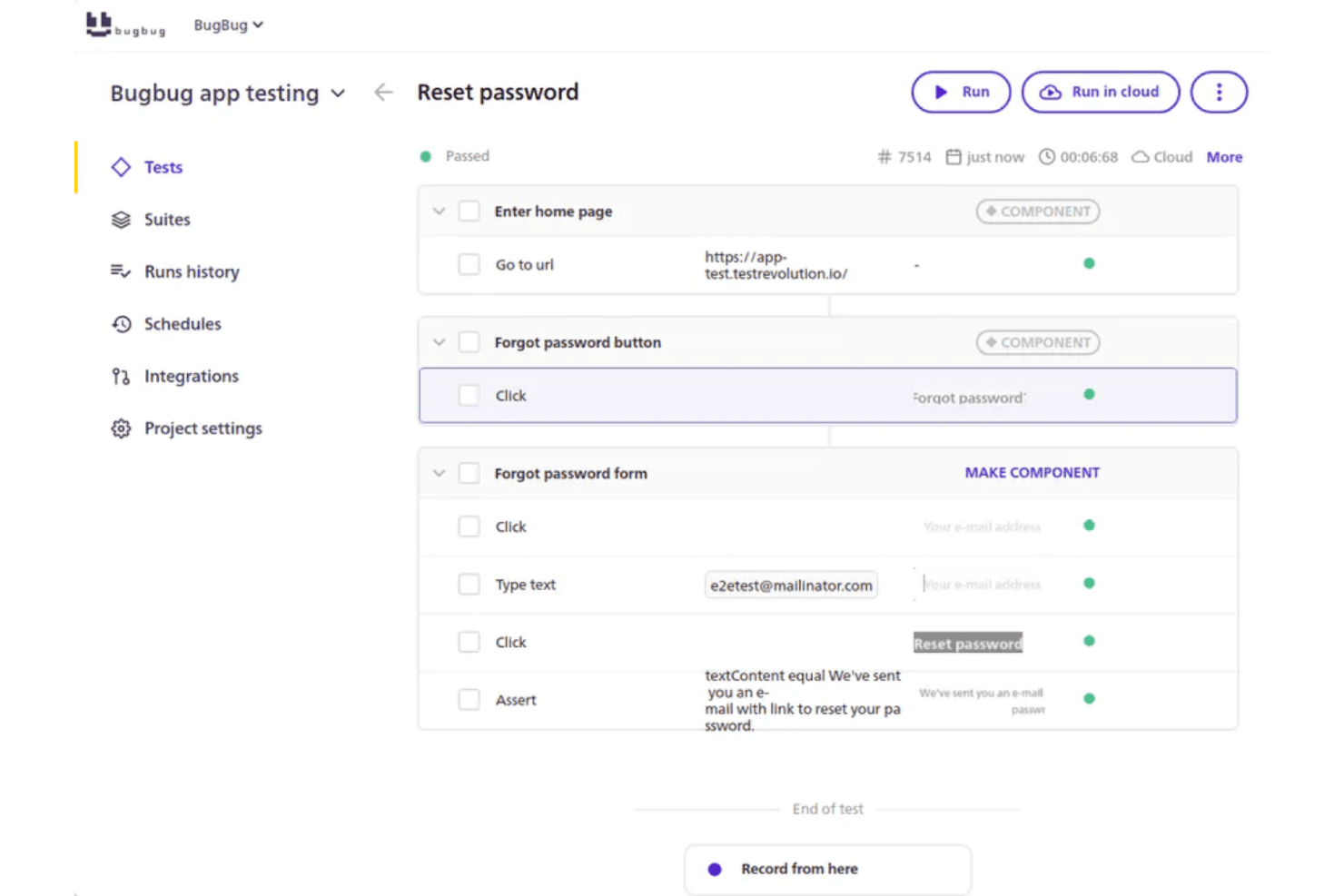
When judging BugBug as an automation testing tool, its intuitive interface and fast onboarding set it apart for teams new to automation or those prioritizing speed over complexity. The pricing is transparent and competitive, and support is responsive, though advanced integrations and deep customization options are limited compared to some alternatives.
If you’re selecting a tool for quick browser test automation, especially in agile or small-to-midsize environments, BugBug’s straightforward workflow and easy maintenance make it a strong contender.
Pros
- Your team will find BugBug's interface intuitive and easy to navigate.
- BugBug helps your work with its robust bug-tracking capabilities without unnecessary complexity.
- You can quickly set up BugBug, saving your team time and effort.
Cons
- Your team might find BugBug's advanced reporting options limited.
- BugBug lacks some customization features you might need for specific workflows.
- You may encounter occasional performance issues during high-traffic periods.
Is BugBug Right For Your Needs?
Who Would be a Good Fit for BugBug?
BugBug is perfect for small to medium-sized tech startups and agile development teams that need a straightforward bug tracking solution. If your team values simplicity and efficiency without the burden of complex systems, BugBug’s intuitive interface and robust bug-tracking capabilities will meet your needs. QA departments in software companies can also benefit from BugBug’s quick setup and ease of use, allowing you to focus on testing and delivering high-quality software.
- Tech StartupsYour startup will benefit from BugBug’s simplicity and efficiency, making it easy to manage bugs without a steep learning curve.
- Agile TeamsBugBug supports your agile processes with its straightforward tracking, helping you adapt quickly to changes and improve velocity.
- QA DepartmentsYour QA team will appreciate BugBug’s intuitive interface, enabling you to quickly identify and resolve issues.
- Software DevelopmentBugBug’s robust bug-tracking capabilities will enhance your development workflow, ensuring you deliver quality software.
- Freelance DevelopersAs a freelancer, you’ll find BugBug’s ease of use and quick setup ideal for managing projects independently.
- Educational InstitutionsBugBug is a great tool for teaching software testing concepts, offering students a hands-on experience with real-world bug tracking.
Who Would be a Bad Fit for BugBug?
Large enterprises or teams needing advanced customization and reporting features might find BugBug lacking. If your work involves complex workflows and data analytics, BugBug’s more straightforward approach and limited reporting options won’t meet your needs. Companies in industries that require detailed customization and integration with other complex systems may struggle with BugBug’s simplicity.
- Large CorporationsYour corporation might need more advanced features and customization than BugBug can provide.
- Data-Driven TeamsIf your team relies on detailed analytics, BugBug’s limited reporting won’t suffice.
- Complex WorkflowsFor workflows that need extensive customization, BugBug may fall short.
- Enterprise IT DepartmentsYour IT department may find BugBug’s simplicity limiting for complex system integrations.
- Financial InstitutionsThe lack of advanced security features might make BugBug unsuitable for your industry.
- Regulated IndustriesIf you work in a highly regulated industry, BugBug’s basic compliance features might not meet your requirements.
Notre méthodologie d'évaluation
Comment nous testons et notons les outils
Nous avons passé des années à développer, affiner et améliorer notre système de test et de notation des logiciels. Cette grille d’évaluation est conçue pour saisir les subtilités de la sélection des logiciels et ce qui rend un outil efficace, en se concentrant sur les aspects critiques du processus de décision.
Vous trouverez ci-dessous le détail de notre processus de test et de notation sur sept critères. Cela nous permet de fournir une évaluation impartiale du logiciel basée sur les fonctionnalités principales, les caractéristiques distinctives, la facilité d’utilisation, l’intégration, l’accompagnement lors de la prise en main, le support client, les avis utilisateurs et le rapport qualité-prix.
Fonctionnalité principale (25% de la note finale)
Le point de départ de notre évaluation est toujours la fonctionnalité principale de l’outil. Possède-t-il les fonctions de base auxquelles un utilisateur s’attend ? Certaines de ces fonctionnalités principales sont-elles limitées à des forfaits plus chers ? Nous attendons d’un outil qu’il soit au moins à la hauteur des capacités de base de ses concurrents.
Fonctionnalités remarquables (25% de la note finale)
Ensuite, nous évaluons les fonctionnalités exceptionnelles qui dépassent la fonctionnalité de base habituellement trouvée dans ce type d’outil. Un score élevé reflète des fonctionnalités spécialisées ou uniques rendant le produit plus rapide, plus efficace ou apportant une valeur ajoutée à l’utilisateur.
Nous évaluons aussi la facilité d’intégration avec d’autres outils courants dans la pile technologique pour élargir les fonctionnalités et l’utilité du logiciel. Les outils dotés de nombreuses intégrations natives, de connexions tierces et d’un accès API facilitant des intégrations personnalisées obtiennent les meilleurs scores.
Facilité d’utilisation (10% de la note finale)
Nous considérons la rapidité et la simplicité d’exécution des tâches principales avec l’outil. Les logiciels les mieux notés sont bien conçus, intuitifs, proposent des applications mobiles, offrent des modèles et rendent des tâches relativement complexes très simples.
Accompagnement lors de la prise en main (10% de la note finale)
Nous savons que l’adoption rapide d’une nouvelle plateforme au sein d’une équipe est cruciale. Nous évaluons donc la facilité avec laquelle un nouvel utilisateur peut apprendre et utiliser un outil avec un minimum de formation. Les meilleures solutions permettent une mise en route rapide, sans nécessité de support.
Support client (10% de la note finale)
Nous analysons la facilité et la rapidité avec lesquelles il est possible d’obtenir de l’aide par téléphone, chat en direct ou base de connaissances. Les outils et entreprises offrant une assistance en temps réel obtiennent les meilleurs scores, tandis que les chatbots sont moins bien notés.
Avis utilisateurs (10% de la note finale)
Au-delà de nos propres tests et évaluations, nous tenons compte du net promoter score des utilisateurs actuels et passés. Nous regardons la probabilité qu’ils choisiraient à nouveau l’outil pour ses fonctionnalités principales. Un logiciel bien noté reflète un net promoter score élevé.
Rapport qualité-prix (10% de la note finale)
Enfin, en tenant compte de tous les autres critères, nous examinons le prix moyen des forfaits d’entrée de gamme par rapport aux fonctionnalités principales et à la valeur des autres critères. Un logiciel offrant plus, pour moins cher, obtiendra un meilleur score.
Core Features
Bug Tracking
BugBug lets you easily log and track bugs with a clear interface, helping your team stay organized. You can update bug status and assign tasks quickly, ensuring nothing falls through the cracks.
Local and Cloud Test Runs
Execute tests on your local machine or in the cloud, depending on your needs. This flexibility supports both development workflows and continuous integration pipelines.
Test Scheduling
Schedule tests to run automatically at set intervals or specific times. This helps teams catch regressions early by running tests overnight or before deployments.
Detailed Reporting
Access clear, visual reports with step-by-step screenshots and logs for each test run. This makes it easy to pinpoint where and why a test failed.
Notification System
Stay informed with customizable notifications that alert you and your team to changes or updates. This ensures that important updates never go unnoticed.
Search and Filter
Quickly find specific bugs or issues using the search and filter options, saving your team valuable time. This feature helps you focus on what matters most.
Ease of Use
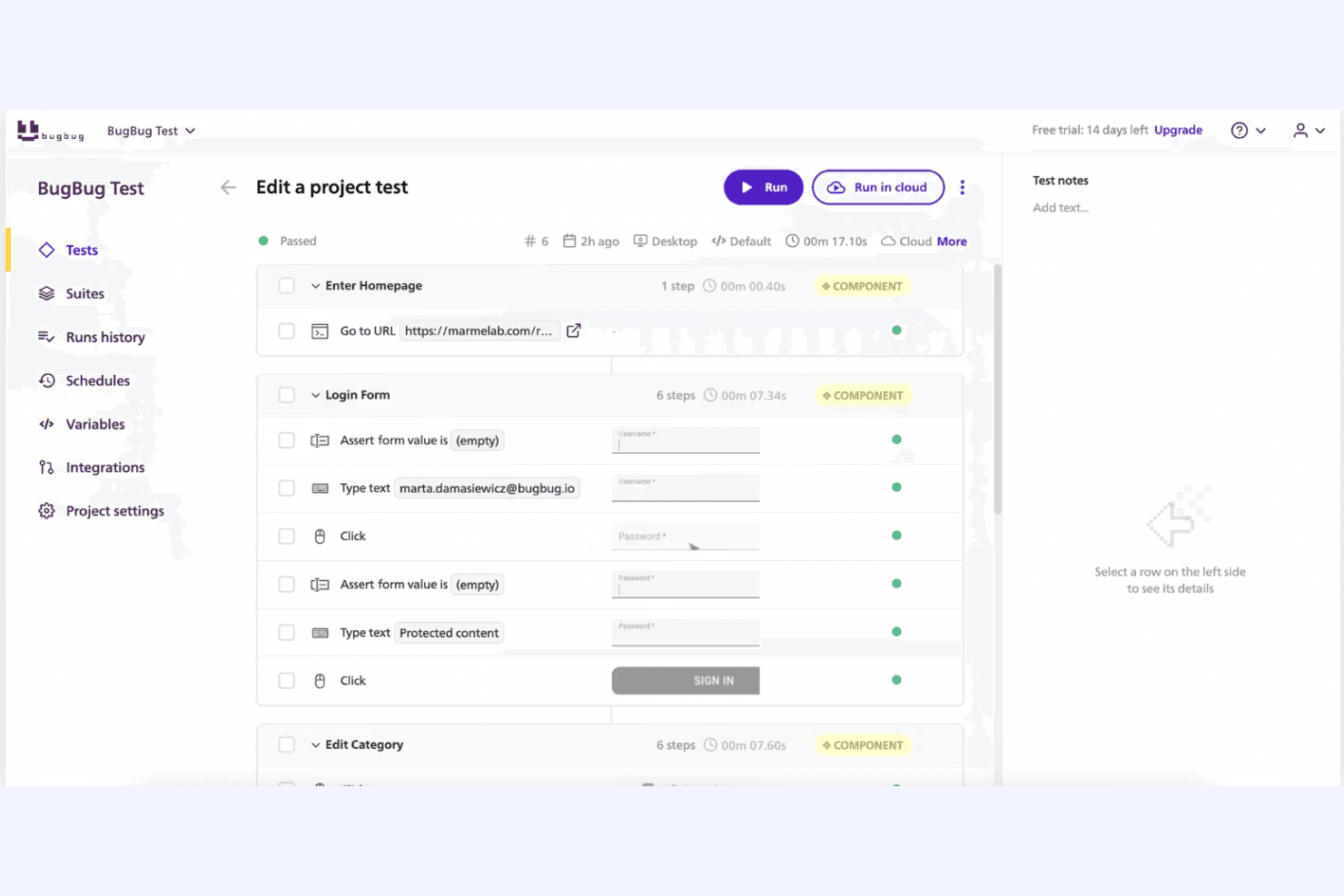
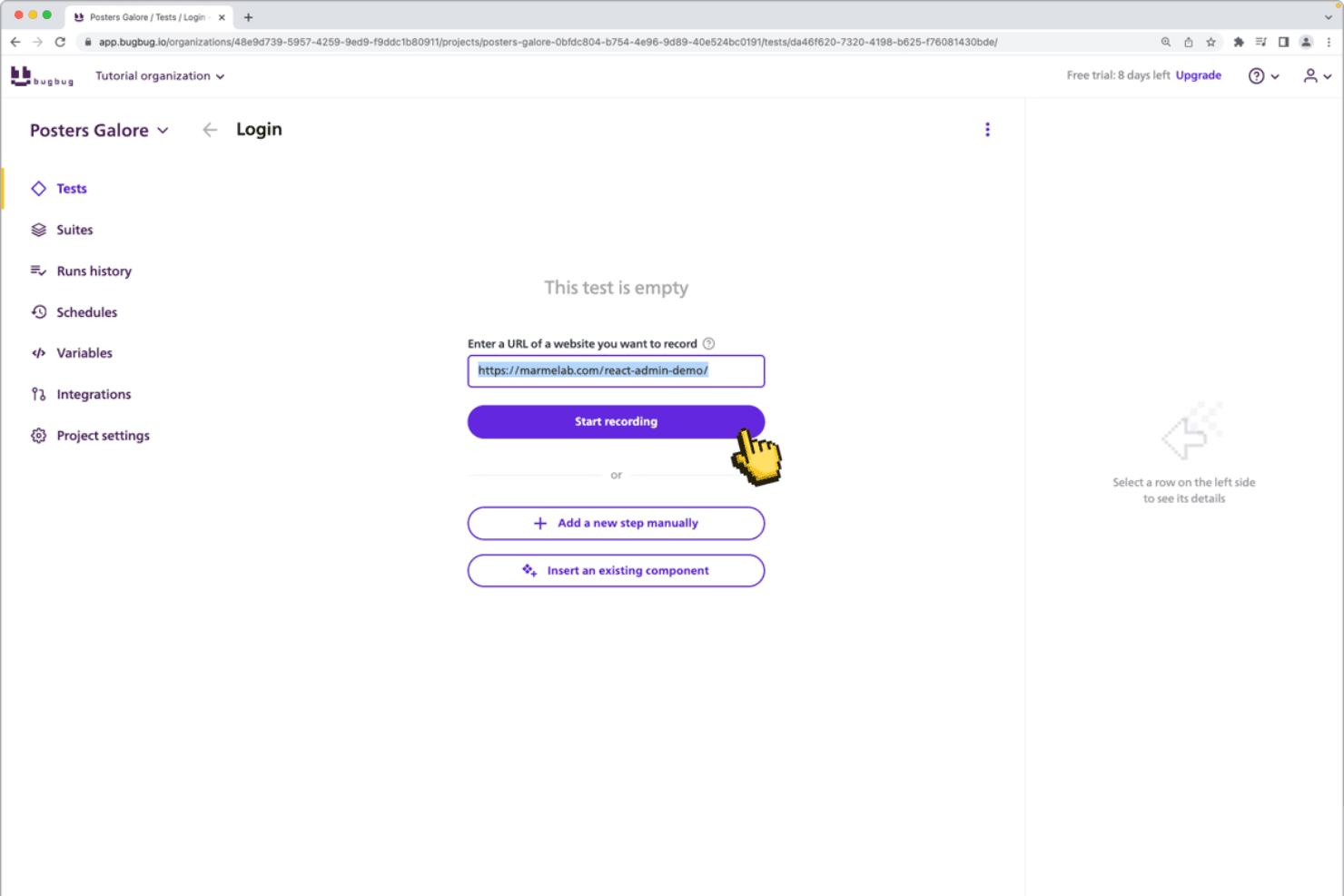
BugBug stands out for its user-friendly interface and straightforward setup, making it a breeze for your team to start tracking bugs without hassle. Its intuitive design means you won’t waste time learning complex systems, and even non-technical members will find it easy to navigate. The dashboard provides a clear overview of tasks, helping you manage issues efficiently. With real-time collaboration and quick search features, BugBug ensures your team can work effectively and stay organized.
Integrations
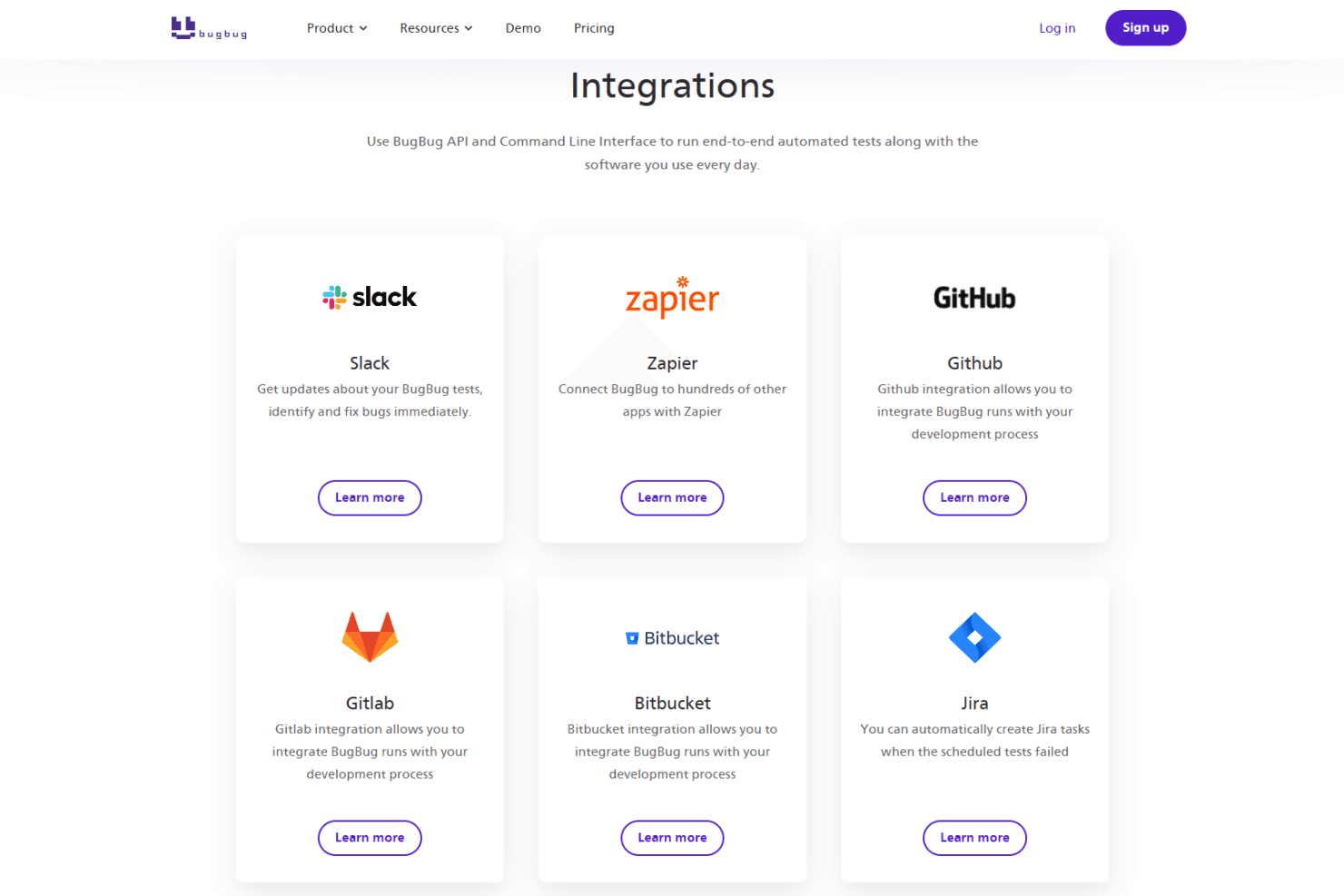
BugBug integrates with Slack, Zapier, Github, Gitlab, Bitbucket, Jira, and Trello.
BugBug also offers an API and a command line interface (CLI) for custom workflows and CI/CD pipeline integration.
New Product Updates from BugBug
 Opens new window
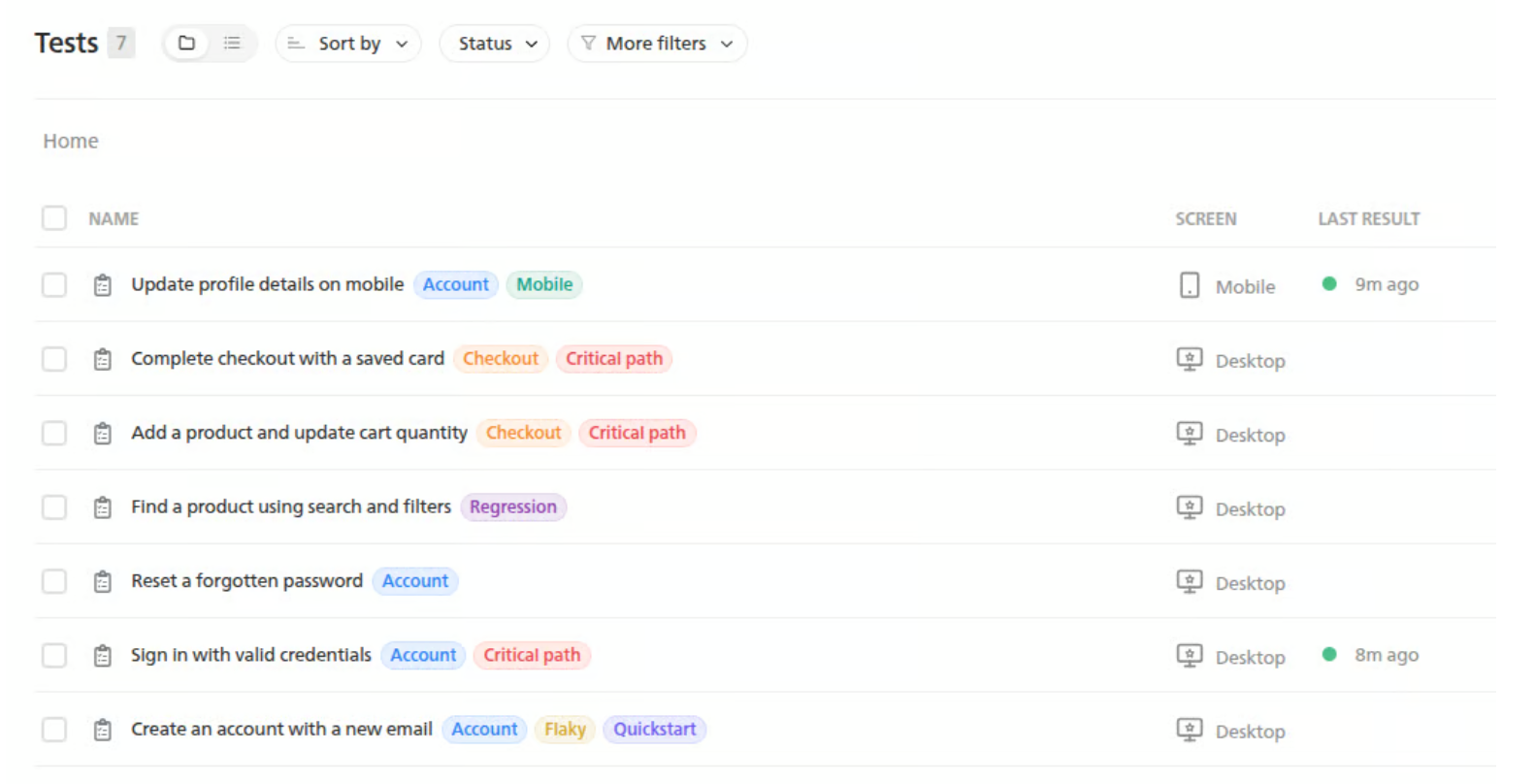
BugBug Adds Tags for Tests, Suites, and Runs
BugBug now lets users apply colored Tags to tests, suites, and runs, including multiple items at once. Tags can also be used to filter tests, suites, and run history for faster organization and tracking. Highlights include:
- Tags: Add colored labels to tests, suites, and runs.
- Test Organization: Mark items such as flaky tests, work in progress, or AI-created tests.
- Release Tracking: Label runs by release or deployment.
- Filtering: Filter tests, suites, and run history by tag.
- Bulk Tagging: Apply tags to multiple items at once.
- Plan Availability: Use Tags on all BugBug plans, including Free.
Visit BugBug’s official site for more details.
 Opens new window
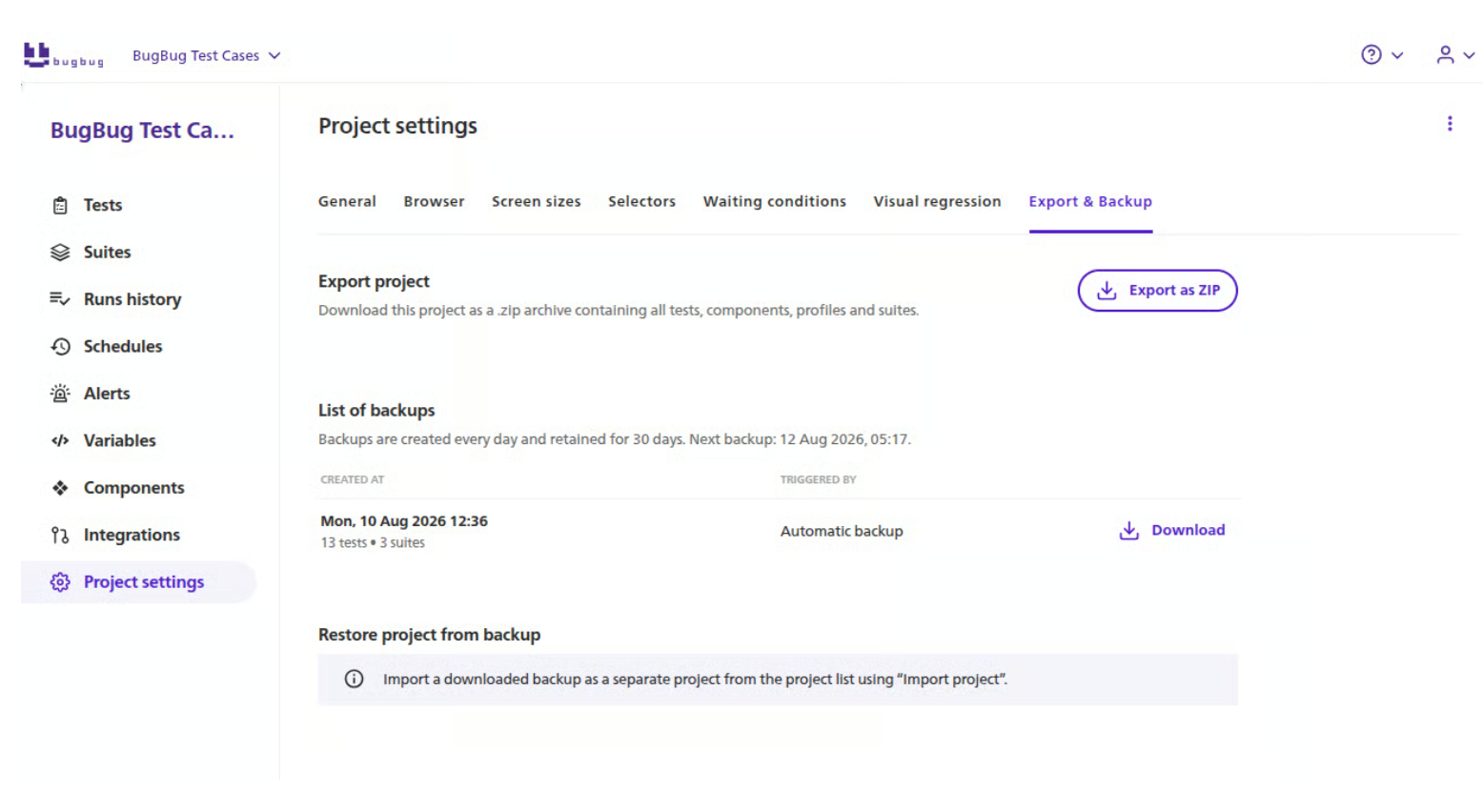
BugBug Adds MCP, Test Backups, and Suite Setup Controls
BugBug adds MCP connections for Claude Code, Cursor, and Codex, daily YAML test backups, and suite-level setup and cleanup steps. These updates help teams manage tests with AI tools, protect test data, and avoid repeating setup or cleanup actions in every test. Highlights include:
- BugBug MCP: Connect Claude Code, Cursor, or Codex to create and maintain tests, run suites, generate reports, and investigate failures.
- Daily Test Backups: Back up tests automatically in YAML each day on paid plans.
- Before All Steps: Run setup actions once before a suite starts instead of repeating them in each test.
- After All Steps: Run cleanup actions once after a suite finishes.
Visit BugBug’s official site for more details.
 Opens new window
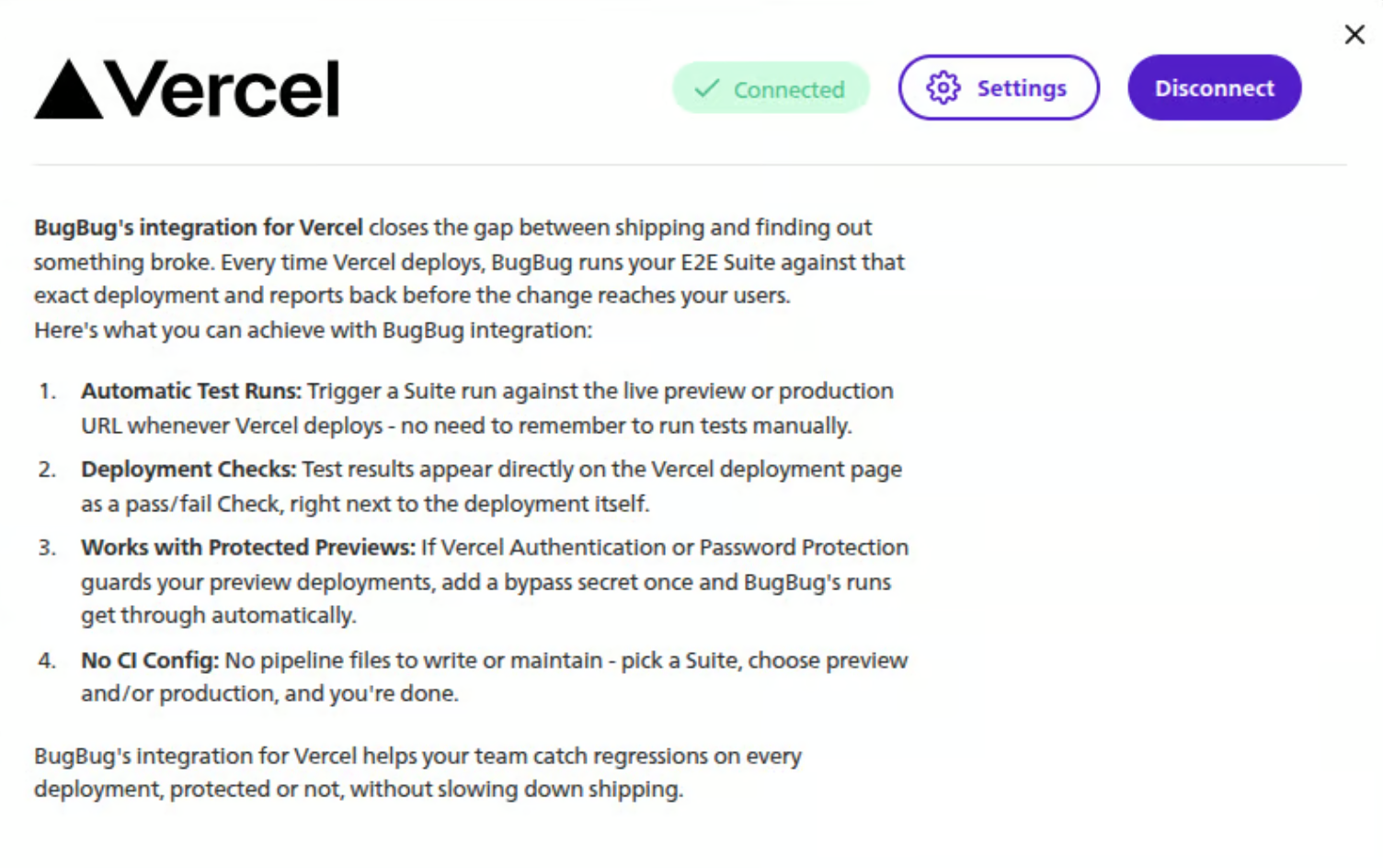
BugBug Adds Vercel Integration
BugBug’s new Vercel integration helps teams automate end-to-end testing as part of their deployment workflow. It can run the right tests for Preview vs. Production and makes outcomes visible in both Vercel and BugBug. Highlights include:
- Automated Deployment Tests: Trigger BugBug tests automatically when Vercel Preview or Production deployments run.
- Environment-Specific Suites: Assign different test suites to Preview and Production deployments.
- Deployment URL Testing: Test newly deployed URLs automatically as part of the workflow.
- Test Results: Review results in Vercel and open detailed run information in BugBug.
Visit BugBug’s official site for more details.
BugBug Adds MCP Beta, Daily Backups, and Suite Setup Controls
BugBug MCP connects supported AI tools to create and maintain tests, run suites, generate reports, and investigate failures. Paid plans also get daily backups, while Before all and After all steps handle one-time setup and cleanup for each suite run. Highlights include:
- MCP Beta: Connects Claude Code, Cursor, and Codex to BugBug testing workflows.
- AI Test Management: Supports creating, maintaining, and running tests through connected AI tools.
- Failure Investigation: Lets AI tools help analyze test failures and generate reports.
- Daily Backups: Automatically backs up tests in YAML on paid plans.
- Before All: Runs setup steps once before a suite starts.
- After All: Runs cleanup steps once after a suite finishes.
Visit BugBug’s official site for more details.
 Opens new window
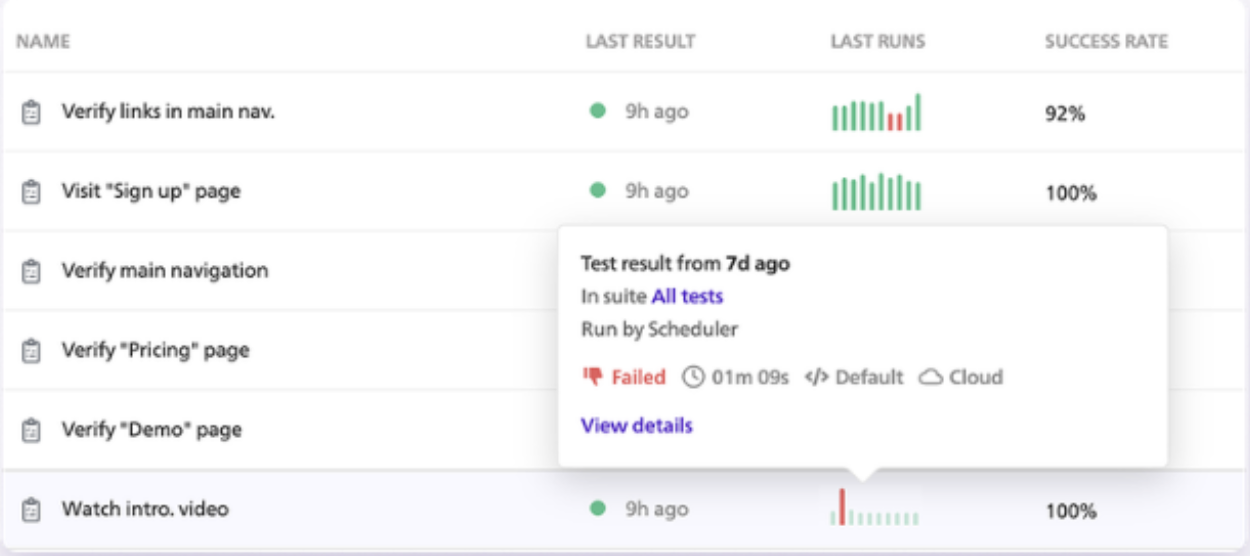
BugBug Expands Test Organization, Analysis, and API Controls
BugBug adds folders for tests and components, reliability charts, a has (not) attribute assertion, and API-based component creation. These updates improve test management and give teams more control over reusable automation. Highlights include:
- Folders: Organizes tests and reusable components into structured groups.
- Run-History Charts: Helps teams spot unstable or flaky tests at a glance.
- Attribute Assertion: Checks whether elements have or do not have specific attributes.
- Components API: Creates reusable components through the Public API.
- Dedicated API Endpoint: Provides a separate
api.bugbug.ioaddress for integrations.
Visit BugBug’s official site for more details.
 Opens new window
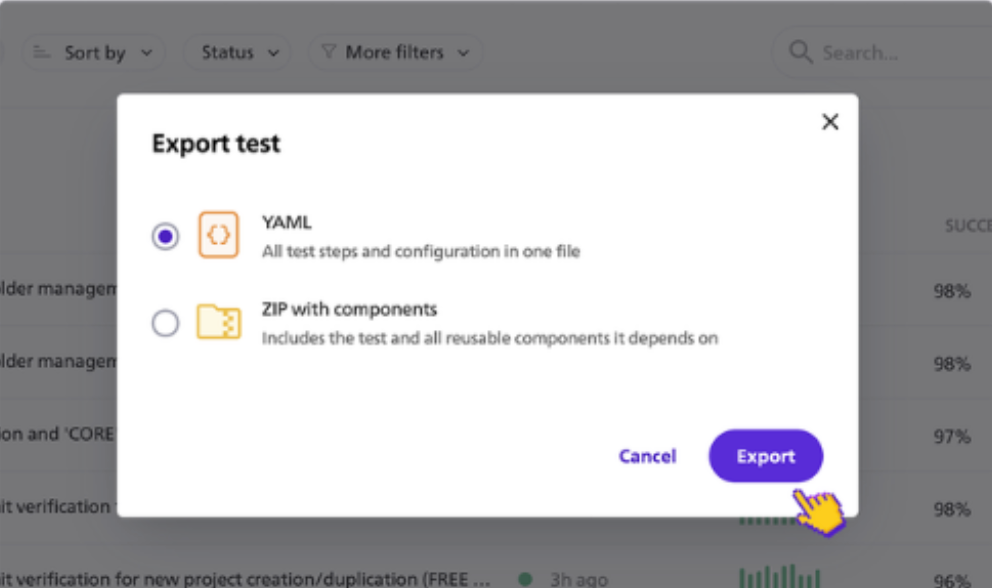
BugBug Adds YAML Test Import, Export, and Project Backups
BugBug lets teams export tests as human-readable YAML, store them in Git, edit them outside the platform, and import them back. It also supports full-project ZIP exports for backup and portability. Highlights include:
- YAML Export: Saves tests as human-readable YAML files for external use.
- YAML Import: Re-imports edited test definitions back into BugBug.
- Git Versioning: Lets teams track test changes and review them like code.
- Project Backups: Exports entire projects as ZIP files for backup and portability.
Visit BugBug’s official site for more details.
 Opens new window
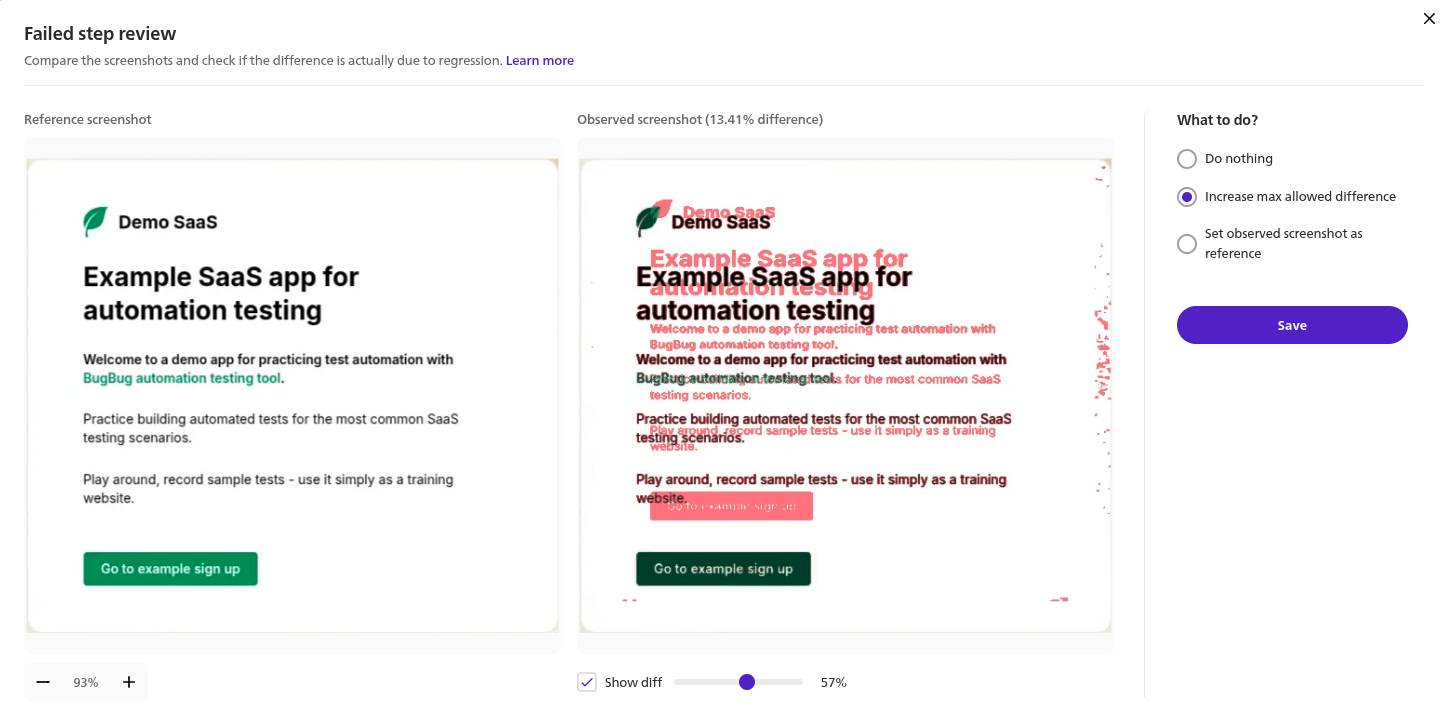
BugBug Adds Visual Regression Testing
BugBug has added visual regression testing to help teams catch unintended UI changes earlier. You can compare pages or specific elements against saved reference screenshots, improving confidence in layout and styling updates. Highlights include:
- Visual Regression Testing: Compare pages or elements against reference screenshots during automated tests.
- Automated UI Validation: Detect layout shifts, missing elements, and unintended style changes automatically.
- Integrated Visual Checks: Add visual regression checks directly to automated test flows.
Visit BugBug's official site for more details.
BugBug Specs
- A/B Testing: No
- API: Yes
- Automated Testing: Yes
- Browser Compatibility Testing: Yes
- Bug Tracking: Yes
- Calendar Management: No
- CI/CD Integration: Yes
- Dashboard: Yes
- Data Export: Yes
- Data Import: Yes
- Data Visualization: Yes
- Developer Tools: Yes
- External Integrations: Yes
- History/Version Control: Yes
- Manual Testing: No
- Multi-User: Yes
- Notifications: Yes
- Performance Testing: No
- Regression Testing: Yes
- Scheduling: Yes
- Status Notifications: Yes
- Third-Party Plugins/Add-Ons: Yes


