

Reseña de Setyl 2026: Pros, Contras, Características y Precios

Revisamos herramientas de forma independiente y las comisiones ayudan a financiar nuestras pruebas. Consulta nuestra política de transparencia, nuestra metodología o sugiere una herramienta.
Losing track of laptops, hunting down software licenses, and relying on messy spreadsheets can waste time and money. Setyl is an IT asset management software that tackles those problems by giving you a clear view of every device, license, and user. It’s a strong fit for midsize organizations across various industries, like finance, professional services, and tech, where assets move often and accountability matters. In this review, I’ll cover Setyl’s features, pros and cons, best and worst use cases, pricing, and more—so you can see if it makes your daily IT work easier and your team more efficient and accurate.
Setyl Evaluation Summary

4.9/5
- From $300/month
- Free demo available
Por qué confiar en nuestras recomendaciones de software
6,700+
Reviews
20
Industry experts
16+
Evaluation factors
14
Years
Nuestro equipo lleva probando y evaluando software desde 2012. Como líderes tecnológicos, sabemos lo difícil —y lo importante— que es elegir el software adecuado.
Para esta guía, evaluamos las herramientas mediante pruebas prácticas e investigación independiente, puntuando las herramientas según nuestros criterios de selección.
Nuestras reseñas reflejan nuestro criterio editorial humano, no un discurso de ventas.
Revisores expertos:
- Paulo Gardini MiguelDirector técnico
 Tim FisherVP de IA
 Gabriel RosasTech Lead y arquitecto de software
 Christhian GruhnTech Lead y arquitecto de plataforma

Setyl Overview
Setyl gives IT teams a clear way to manage hardware, software, and users in one place, which makes day-to-day tracking easier. It focuses on ease of use, so even non-technical staff can pick it up quickly. Overall, it's suitable for teams that are looking to upgrade from basic tracking tools and spreadsheets, but are not quite ready for highly complex enterprise solutions.
Pros
- You can easily track and manage a large number of IT assets in one place.
- You can track the full history of each asset, which makes audits easier.
- Alerts help you catch expiring warranties or licenses before they lapse.
Cons
- Reports feel limited if you need deep, custom insights.
- Visual customization is limited if you want tailored dashboards.
- Doesn’t offer the complex functionalities that may be needed for large enterprise organizations
Is Setyl Right For Your Needs?
Who Would be a Good Fit for Setyl?
Setyl is best suited for midsize organizations that need clear visibility and control across both hardware and software assets without the complexity of legacy enterprise systems. It’s ideal for IT, finance, and operations leaders who want to streamline workflows, automate onboarding and offboarding, and maintain compliance as teams and technology stacks grow. Companies in tech, professional services, and finance particularly benefit from Setyl’s unified approach to asset, license, and spend management.
- Tech & Professional Services FirmsIdeal for fast-scaling teams managing distributed staff, shared software, and multiple client environments.
- Finance TeamsSpend visibility, renewal tracking, and license utilization metrics help control budgets.
- Midsize OrganizationsBuilt for midsize companies that need comprehensive visibility without the overhead of legacy systems.
- Remote/Hybrid TeamsYou can track devices and licenses even when teams span different locations.
- IT & Security TeamsYou’ll have audit trails, compliance readiness, and insights into shadow IT.
- HR/Ops DepartmentsYou can tie onboarding/offboarding workflows to asset allocations, reducing gaps.
Who Would be a Bad Fit for Setyl?
Setyl may not be the right choice for organizations at the extreme ends of the spectrum—either too small to need structured IT management or so large and regulated that they require fully customized, certified enterprise systems. Highly specialized industries like engineering, defense, or large-scale financial institutions may also find their requirements exceed Setyl’s current focus and flexibility.
- Massive EnterprisesYou’ll likely outgrow its depth and need enterprise-grade custom workflows.
- Enterprises with On-Prem RequirementsSetyl currently only offers a cloud-based solution.
- Defense/Government OrganizationsStrict controls and certifications may exceed what Setyl supports today.
- Heavy Engineering and Industrial OperationsManaging complex machinery, maintenance schedules, and physical plant assets typically requires niche industry tools.
- Very Small BusinessesTeams with only a few employees and devices will find Setyl more powerful than necessary for their scale.
- Custom Platform DevelopersIf you need highly specialized asset modeling or custom-built workflows, Setyl’s structured framework may feel restrictive.
Nuestra metodología de revisión
Cómo probamos y puntuamos las herramientas
Hemos invertido años construyendo, refinando y mejorando nuestro sistema de pruebas y puntuación de software. La rúbrica está diseñada para captar los matices de la selección de software y lo que hace a una herramienta efectiva, enfocándose en aspectos críticos del proceso de toma de decisiones.
A continuación, puedes ver exactamente cómo nuestro sistema de prueba y puntuación funciona a través de siete criterios. Esto nos permite ofrecer una evaluación imparcial del software basada en funcionalidad central, características destacadas, facilidad de uso, incorporación, soporte al cliente, integraciones, reseñas de clientes y relación calidad-precio.
Funcionalidad principal (25% de la puntuación final)
El punto de partida de nuestra evaluación siempre es la funcionalidad central de la herramienta. ¿Tiene las características y funciones básicas que un usuario esperaría encontrar? ¿Alguna de esas funciones principales está limitada a planes de precios superiores? Esperamos que una herramienta esté a la altura de las capacidades básicas de sus competidores.
Características destacadas (25% de la puntuación final)
Luego, evaluamos las características poco comunes y sobresalientes que van más allá de la funcionalidad principal que normalmente se encuentra en herramientas de su tipo. Una puntuación alta refleja características especializadas o únicas que hacen el producto más rápido, eficiente o que ofrecen valor adicional al usuario.
También evaluamos qué tan fácil es integrar con otras herramientas que normalmente forman parte del ecosistema tecnológico para expandir la funcionalidad y utilidad del software. Las herramientas que ofrecen abundantes integraciones nativas, conexiones de terceros y acceso API para crear integraciones personalizadas obtienen la mejor puntuación.
Facilidad de uso (10% de la puntuación final)
Consideramos cuán rápido y sencillo es ejecutar las tareas definidas por la funcionalidad principal usando la herramienta. El software con mejor puntuación está bien diseñado, es intuitivo, ofrece aplicaciones móviles, proporciona plantillas y hace que tareas relativamente complejas parezcan sencillas.
Incorporación (10% de la puntuación final)
Sabemos lo importante que es la adopción rápida por parte del equipo para una nueva plataforma, por lo que evaluamos cuán fácil es aprender y usar una herramienta con entrenamiento mínimo. Evaluamos cuán rápido un miembro del equipo puede configurarla y comenzar a utilizarla sin experiencia previa. Las soluciones con mayor puntuación requieren poco o ningún soporte.
Soporte al cliente (10% de la puntuación final)
Revisamos qué tan rápido y sencillo es resolver dudas y encontrar ayuda por teléfono, chat en vivo o base de conocimientos. Las herramientas y compañías que proporcionan soporte en tiempo real obtienen la mejor puntuación, mientras que los chatbots obtienen la peor.
Reseñas de clientes (10% de la puntuación final)
Además de nuestras pruebas y evaluaciones, consideramos la puntuación neta de promotores por parte de clientes actuales y anteriores. Revisamos la probabilidad de que elijan la herramienta de nuevo para la funcionalidad principal. Una puntuación alta refleja una alta puntuación neta de promotores actuales o pasados.
Relación calidad-precio (10% de la puntuación final)
Por último, considerando todos los demás criterios, revisamos el precio promedio de los planes de nivel básico comparado con las funciones principales y consideramos el valor de los demás criterios de evaluación. El software que ofrezca más, por menos, obtendrá una puntuación mayor.
Core Features
Hardware and Software Asset Tracking
You can log every laptop, phone, or piece of software and see who has it at any time. It keeps a full history, so you never lose track.
User Management
You can assign assets to people and know who’s responsible. This makes onboarding, offboarding, and accountability easy.
Lifecycle Tracking
You can follow assets from purchase to disposal. This helps you plan upgrades and avoid surprise failures.
Warranty & License Alerts
You’ll get reminders before contracts expire. That way you don’t overspend or miss renewals.
Reporting & Audits
You can record and track all compliance information, ensuring you are always audit-ready. It saves you from digging through spreadsheets.
Multi-Site Visibility
You can manage assets across offices or regions in one view. It keeps everything consistent, no matter the location.

Ease of Use
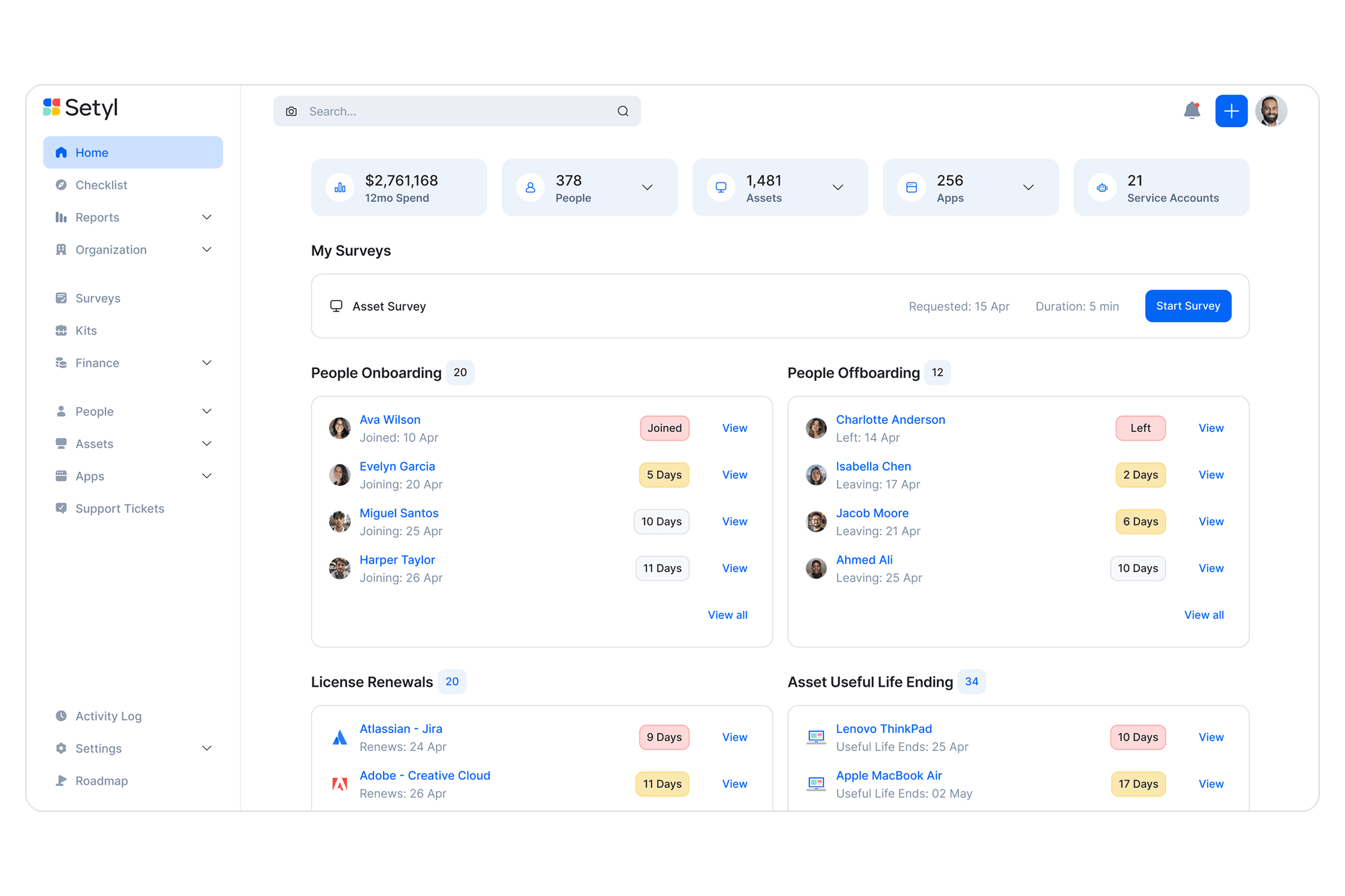
Setyl’s layout is clean and intuitive, so you and your team can pick it up quickly without tons of training. Tasks like assigning assets or pulling reports feel straightforward, and you don’t get lost in cluttered menus. Some advanced settings take a little practice, but overall, it makes tracking assets less of a chore and more of a routine you can trust.
Integrations
Setyl integrates natively with Intune, Jamf, Iru (Kandji), Landsweeper, Meraki, Zendesk, Jira Service Management, Okta, Microsoft 365, Google Workspace, Slack, Zoom, NetSuite, Xero, and BambooHR.
Setyl also provides an API and connects with third-party integration tools like Zapier.

Setyl Specs
- 2-Factor Authentication: Yes
- API: Yes
- Asset Tagging: Yes
- Dashboard: Yes
- Data Export: Yes
- Data Import: Yes
- Data Visualization: Yes
- Database: Yes
- Document Management: Yes
- External Integrations: Yes
- Hardware Integration: No
- Hardware Modernization: No
- Inventory Tracking: Yes
- Multi-User: Yes
- Network Device Performance Monitoring: No
- Network Traffic Monitoring: No
- Network Visualization: Yes
- Notifications: Yes
- Scheduling: Yes
- Status Notifications: Yes
- Third-Party Plugins/Add-Ons: Yes
- Workflow Management: Yes


