

Reseña de Momentic: Ventajas, Desventajas, Características y Precios Explicados
Momentic es una plataforma de pruebas de extremo a extremo impulsada por IA que permite a los equipos escribir y ejecutar pruebas en inglés sencillo, utilizando automatización basada en intención, localizadores autorreparables y agentes autónomos para reducir el mantenimiento y mejorar la fiabilidad.

Revisamos herramientas de forma independiente y las comisiones ayudan a financiar nuestras pruebas. Consulta nuestra política de transparencia, nuestra metodología o sugiere una herramienta.
Momentic is an AI-native end-to-end testing tool for teams that need to automate web application testing without writing and maintaining large volumes of test code. I'd consider it if your team is spending too much time keeping tests from breaking after UI changes—something that's a constant drain with code-heavy tools like Cypress. Where Cypress gives you full scripting control, Momentic lets AI generate and self-heal tests, which means less manual upkeep and faster coverage for teams that don't have dedicated QA engineers writing automation full-time.
Momentic Evaluation Summary
0/5
- Pricing upon request
- Free demo available
Por qué confiar en nuestras recomendaciones de software
6,700+
Reviews
20
Industry experts
16+
Evaluation factors
14
Years
Nuestro equipo lleva probando y evaluando software desde 2012. Como líderes tecnológicos, sabemos lo difícil —y lo importante— que es elegir el software adecuado.
Para esta guía, evaluamos las herramientas mediante pruebas prácticas e investigación independiente, puntuando las herramientas según nuestros criterios de selección.
Nuestras reseñas reflejan nuestro criterio editorial humano, no un discurso de ventas.
Revisores expertos:
- Paulo Gardini MiguelDirector técnico
 Tim FisherVP de IA
 Gabriel RosasTech Lead y arquitecto de software
 Christhian GruhnTech Lead y arquitecto de plataforma

Momentic Overview
From my perspective, what really sets Momentic apart is how deeply AI is built into the entire testing experience—not just as a feature, but as the foundation.
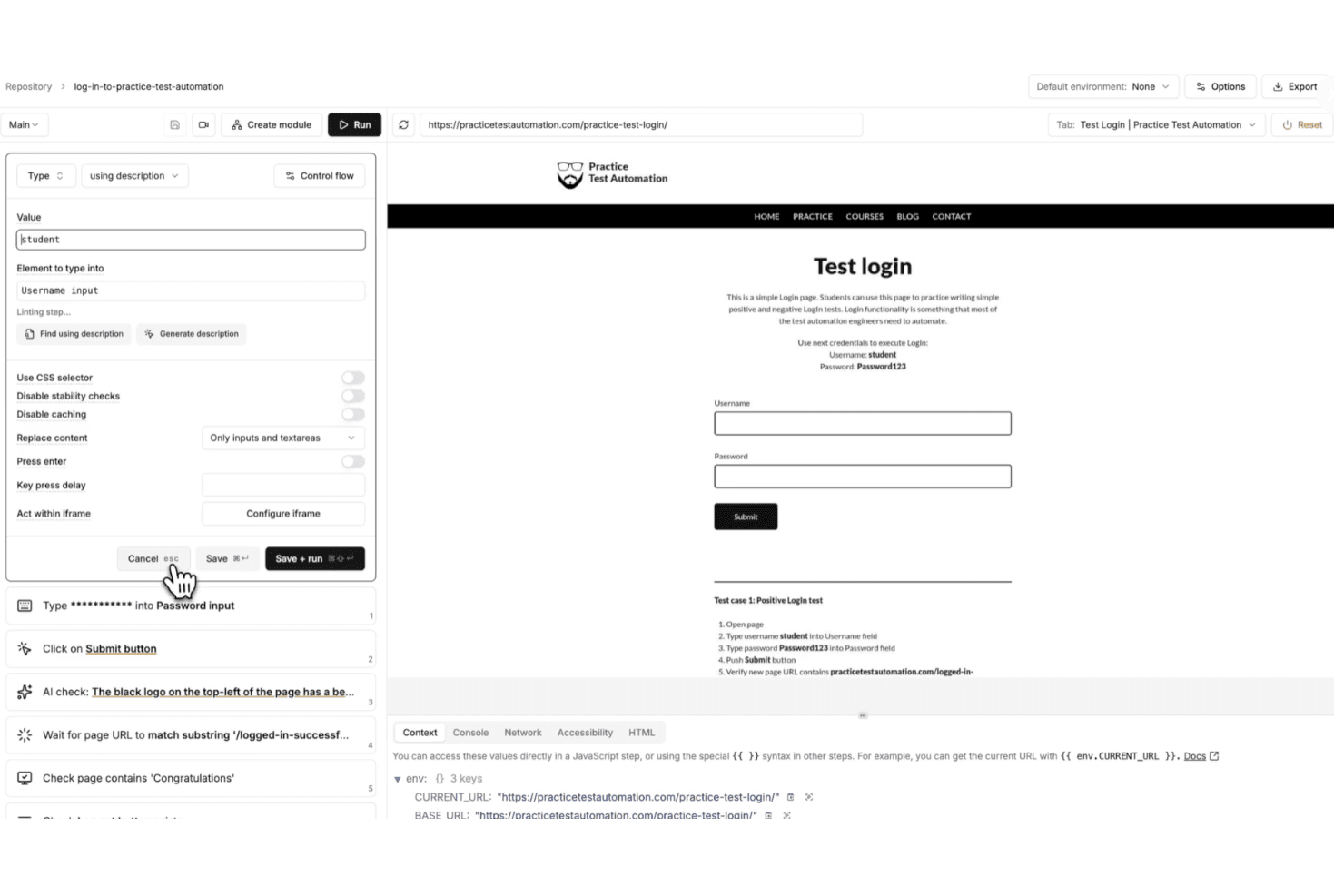
Instead of writing and maintaining brittle scripts, you define tests in plain English and let Momentic interpret your intent at runtime. I’ve found this especially valuable if you’re trying to reduce maintenance, since features like self-healing locators, smart waits, and built-in caching help your tests stay stable even as your UI changes.
You also get more than just test creation. With an autonomous agent that can generate coverage, built-in debugging tools, and flexible cloud or CI-based execution, Momentic gives you a more hands-off way to scale testing without adding complexity.
Pros
- Plain-English test creation lowers barrier for non-technical team members.
- Self-healing locators reduce maintenance when UI elements frequently change.
- Smart waiting minimizes flaky tests caused by timing and asynchronous loading issues.
Cons
- Limited browser support currently restricted to Chrome and Chromium environments.
- No code export limits flexibility for teams wanting full script ownership.
- Mobile testing setup is complex and requires significant environment configuration.
Is Momentic Right For Your Needs?
Who Would be a Good Fit for Momentic?
Momentic is a strong choice if you prioritize speed, scalability, and low test maintenance over traditional code-heavy frameworks. I find it especially effective for teams shipping frequently, since its natural-language tests, self-healing locators, and AI-driven workflows help you maintain reliable end-to-end coverage without constantly fixing brittle scripts.
- SaaS StartupsMomentic’s fast onboarding and AI-powered test creation help small teams automate workflows quickly with minimal engineering overhead and ongoing maintenance effort.
- Agile Product TeamsSelf-healing locators and intent-based assertions reduce test flakiness during rapid releases and frequent UI updates across evolving product features.
- DevOps DepartmentsCLI workflows and CI/CD integrations enable automated regression testing on every commit, helping teams catch issues earlier in development cycles.
- Teams Without Dedicated QA Automation EngineersBecause tests are written in plain English, engineering teams can own testing without needing deep expertise in frameworks like Playwright or Selenium.
- Remote Engineering TeamsBuilt-in notifications and integrations help distributed teams stay aligned on test results, failures, and deployment readiness without manual coordination.
- Modern Web Application TeamsMomentic’s focus on dynamic, JavaScript-heavy applications makes it well-suited for teams building frequently changing, component-driven user interfaces.
Who Would be a Bad Fit for Momentic?
Momentic isn’t the best choice if you need full control over your test code, broad cross-browser coverage, or strict control over where test data and artifacts are stored. It’s built for modern, fast-moving environments—not teams relying on legacy systems, complex authentication flows, or highly customized frameworks. If your workflows depend on Safari or Firefox testing, exporting code to maintain ownership, or running everything fully on-prem, you’ll likely run into limitations with Momentic’s current approach.
- Full Code Ownership NeedsMomentic does not generate or export test code, which limits flexibility for teams that require direct control, versioning, and customization of underlying test scripts.
- Cross-Browser Testing Teams (Safari/Firefox)Limited support for non-Chromium browsers makes it unsuitable for teams that must validate experiences across Safari, Firefox, or diverse user environments.
- Strict Data Residency RequirementsCloud-stored test artifacts like caches and memory traces may conflict with organizations that require fully on-premise infrastructure and complete data control policies.
- SSO-Heavy ApplicationsApplications relying heavily on third-party SSO providers (Google, GitHub, etc.) can be difficult to automate reliably due to anti-bot protections and authentication restrictions.
- Manual QA DepartmentsMomentic is built for automation, not manual or exploratory testing workflows.
- Mature, Mobile-Heavy DevelopmentWhile Momentic supports iOS and Android testing, setup can still be complex and less mature compared to dedicated mobile testing frameworks.
Nuestra metodología de revisión
Cómo probamos y puntuamos las herramientas
Hemos invertido años construyendo, refinando y mejorando nuestro sistema de pruebas y puntuación de software. La rúbrica está diseñada para captar los matices de la selección de software y lo que hace a una herramienta efectiva, enfocándose en aspectos críticos del proceso de toma de decisiones.
A continuación, puedes ver exactamente cómo nuestro sistema de prueba y puntuación funciona a través de siete criterios. Esto nos permite ofrecer una evaluación imparcial del software basada en funcionalidad central, características destacadas, facilidad de uso, incorporación, soporte al cliente, integraciones, reseñas de clientes y relación calidad-precio.
Funcionalidad principal (25% de la puntuación final)
El punto de partida de nuestra evaluación siempre es la funcionalidad central de la herramienta. ¿Tiene las características y funciones básicas que un usuario esperaría encontrar? ¿Alguna de esas funciones principales está limitada a planes de precios superiores? Esperamos que una herramienta esté a la altura de las capacidades básicas de sus competidores.
Características destacadas (25% de la puntuación final)
Luego, evaluamos las características poco comunes y sobresalientes que van más allá de la funcionalidad principal que normalmente se encuentra en herramientas de su tipo. Una puntuación alta refleja características especializadas o únicas que hacen el producto más rápido, eficiente o que ofrecen valor adicional al usuario.
También evaluamos qué tan fácil es integrar con otras herramientas que normalmente forman parte del ecosistema tecnológico para expandir la funcionalidad y utilidad del software. Las herramientas que ofrecen abundantes integraciones nativas, conexiones de terceros y acceso API para crear integraciones personalizadas obtienen la mejor puntuación.
Facilidad de uso (10% de la puntuación final)
Consideramos cuán rápido y sencillo es ejecutar las tareas definidas por la funcionalidad principal usando la herramienta. El software con mejor puntuación está bien diseñado, es intuitivo, ofrece aplicaciones móviles, proporciona plantillas y hace que tareas relativamente complejas parezcan sencillas.
Incorporación (10% de la puntuación final)
Sabemos lo importante que es la adopción rápida por parte del equipo para una nueva plataforma, por lo que evaluamos cuán fácil es aprender y usar una herramienta con entrenamiento mínimo. Evaluamos cuán rápido un miembro del equipo puede configurarla y comenzar a utilizarla sin experiencia previa. Las soluciones con mayor puntuación requieren poco o ningún soporte.
Soporte al cliente (10% de la puntuación final)
Revisamos qué tan rápido y sencillo es resolver dudas y encontrar ayuda por teléfono, chat en vivo o base de conocimientos. Las herramientas y compañías que proporcionan soporte en tiempo real obtienen la mejor puntuación, mientras que los chatbots obtienen la peor.
Reseñas de clientes (10% de la puntuación final)
Además de nuestras pruebas y evaluaciones, consideramos la puntuación neta de promotores por parte de clientes actuales y anteriores. Revisamos la probabilidad de que elijan la herramienta de nuevo para la funcionalidad principal. Una puntuación alta refleja una alta puntuación neta de promotores actuales o pasados.
Relación calidad-precio (10% de la puntuación final)
Por último, considerando todos los demás criterios, revisamos el precio promedio de los planes de nivel básico comparado con las funciones principales y consideramos el valor de los demás criterios de evaluación. El software que ofrezca más, por menos, obtendrá una puntuación mayor.
Core Features
AI-Powered Test Creation
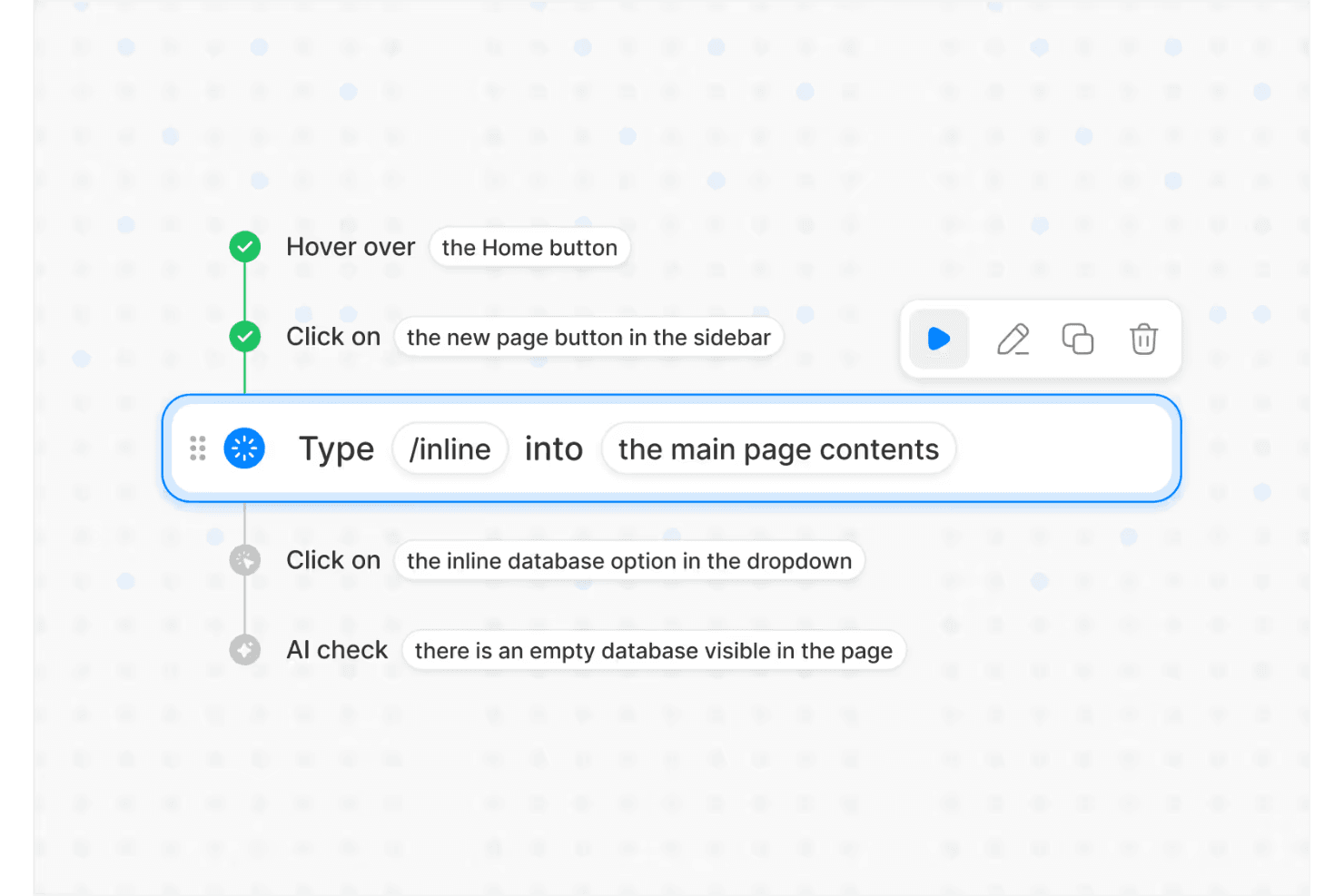
Describe test flows in plain English and Momentic’s AI builds the automation for you, making test authoring accessible to any engineer.
Self-Healing Locators
Selectors automatically adapt as your UI changes, reducing maintenance by tracking user intent instead of exact DOM structure.
Autonomous Testing Agent
Momentic’s AI explores your app, finds critical user flows, and generates or updates tests as your product evolves.
AI-Powered Assertions
Validate UI state, content, and behavior using flexible, intent-based checks that reduce false positives and handle dynamic outputs more effectively..
Regression Testing Automation
Run high-signal test suites on every commit and pull request to catch critical bugs before code merges or deploys.
Flexible Execution (Cloud + CLI)
Run tests in the cloud for quick setup or locally via CLI for CI/CD integration, version control, and developer-centric workflows.
Ease of Use
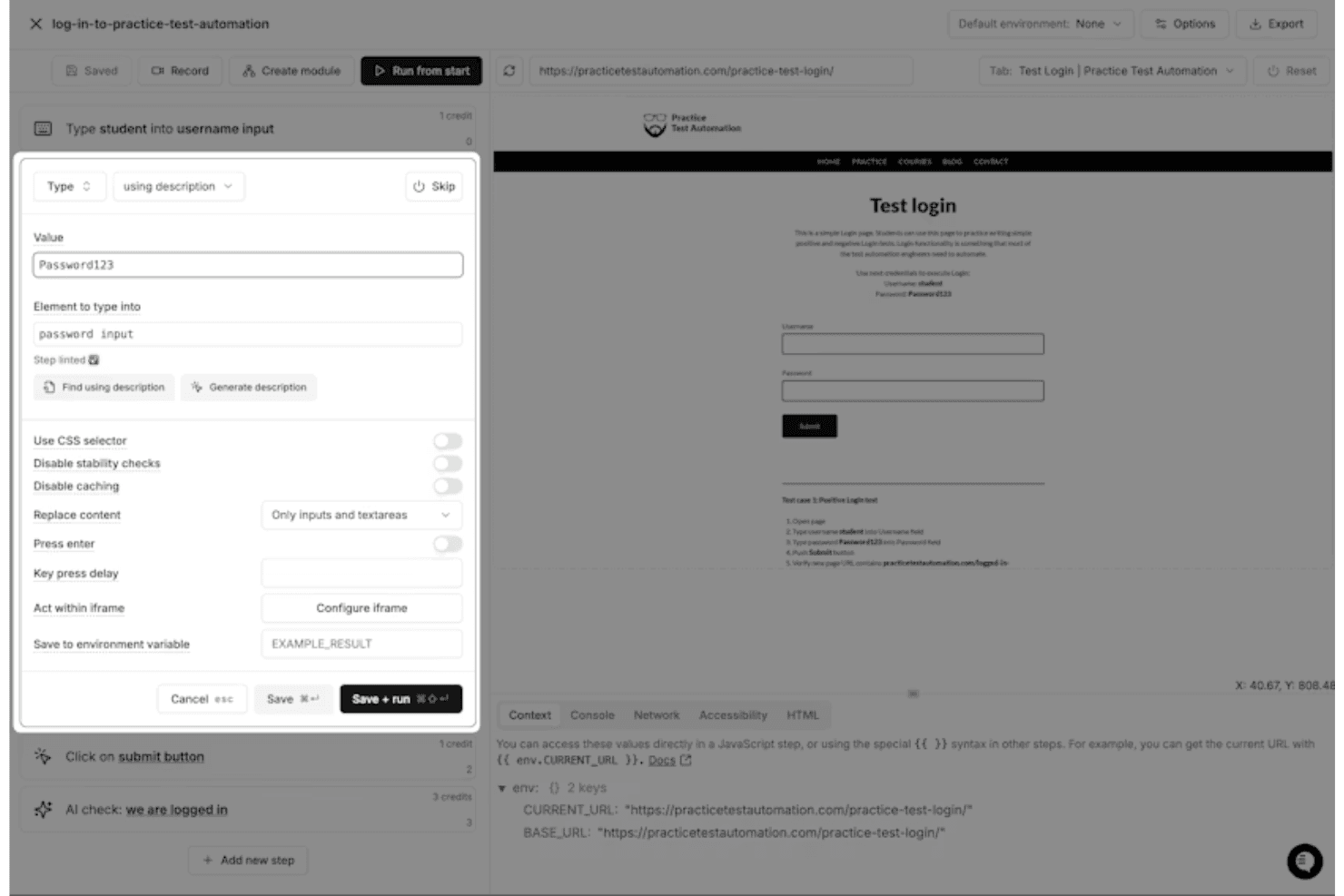
Overall, I think Momentic is one of the more approachable end-to-end testing tools available, largely because of its plain-English test creation and interactive editor. Instead of writing and maintaining code, you define test steps in natural language and get immediate feedback through a built-in browser preview and debugging tools. Features like self-healing locators and smart waiting also reduce the need for constant maintenance. That said, it’s not completely “no-skill”—you still need to learn how to write clear, unambiguous prompts and structure tests effectively to get reliable results.
Integrations
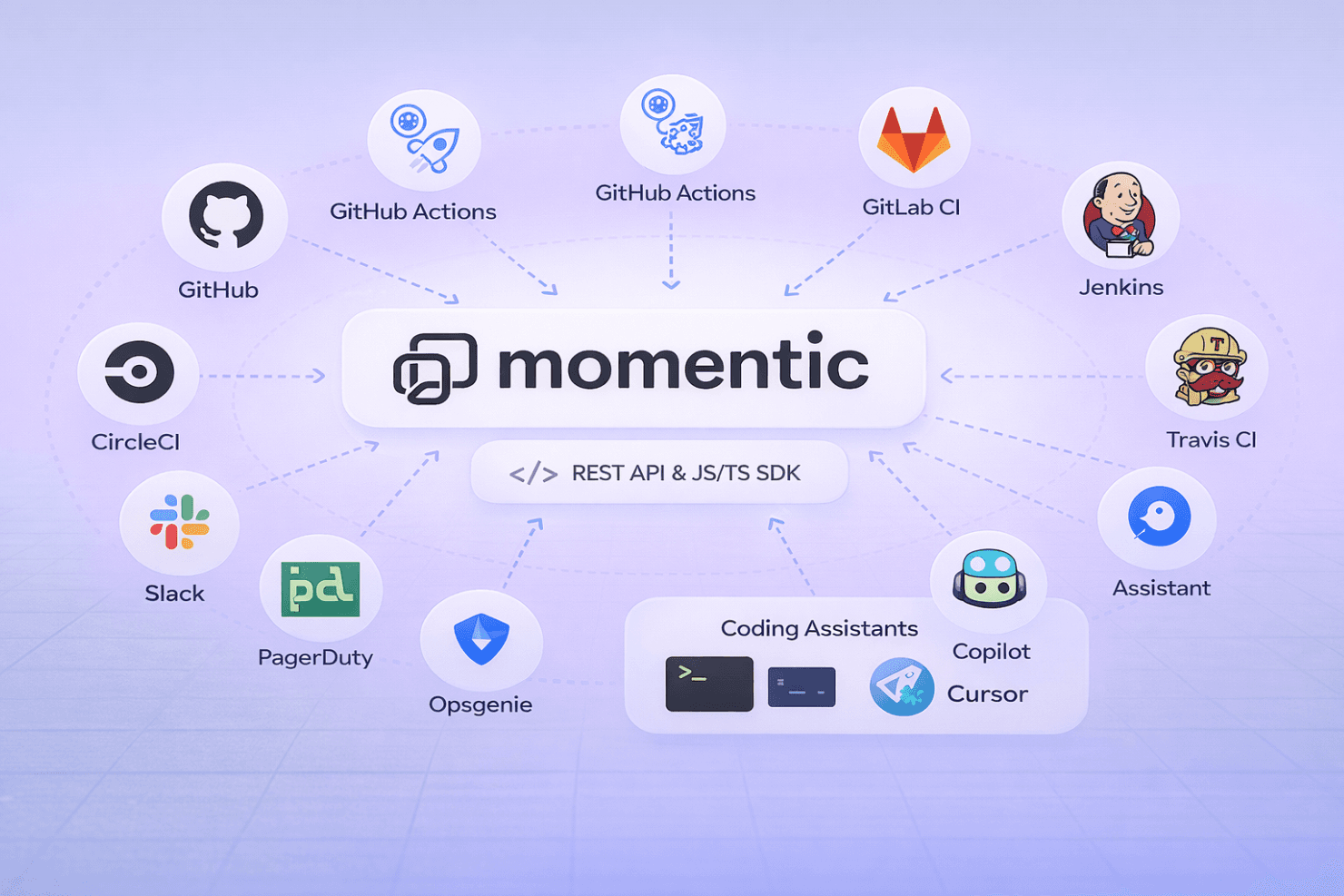
Momentic integrates with major CI/CD platforms, including GitHub Actions, CircleCI, GitLab CI, Jenkins, and Travis CI, making it easy to run automated tests as part of your development pipeline. It also supports notifications via Slack, PagerDuty, Opsgenie, and webhook-based systems for alerting and incident workflows.
Beyond that, Momentic offers a REST API and JavaScript/TypeScript SDK for building custom workflows, along with a CLI for deeper integration into local development and CI environments. It also supports integrations with coding assistants (like Copilot and Cursor) through its MCP framework, enabling AI-driven test creation and maintenance directly from developer tools.
Momentic Specs
- API: Yes
- Bug Tracking: Yes
- CI/CD Integration: Yes
- Cloud Deployment: Yes
- Code Review: Yes
- Code Transformation: No
- Collaboration Support: Yes
- Data Export: Yes
- Data Import: Yes
- Developer Tools: Yes
- External Integrations: Yes
- Git Integration: Yes
- History/Version Control: No
- IDE Plugins: Yes
- Local Deployment: No
- Multi-User: Yes
- Notifications: Yes
- Project Management: No
- Release Management: No
- Static Analysis: Yes
- Task Scheduling/Tracking: Yes
- Testing: Yes


