

Momentic im Test: Vorteile, Nachteile, Funktionen und Preise erklärt
Momentic ist eine KI-gestützte End-to-End-Testplattform, die Teams ermöglicht, Tests in einfachem Englisch zu schreiben und auszuführen. Durch absichtsbasierte Automatisierung, selbstheilende Lokatoren und autonome Agenten werden Wartungsaufwand reduziert und die Zuverlässigkeit verbessert.

Wir bewerten Tools unabhängig; Provisionen helfen, unsere Tests zu finanzieren. Siehe unsere Transparenzrichtlinie und unsere Methodik.
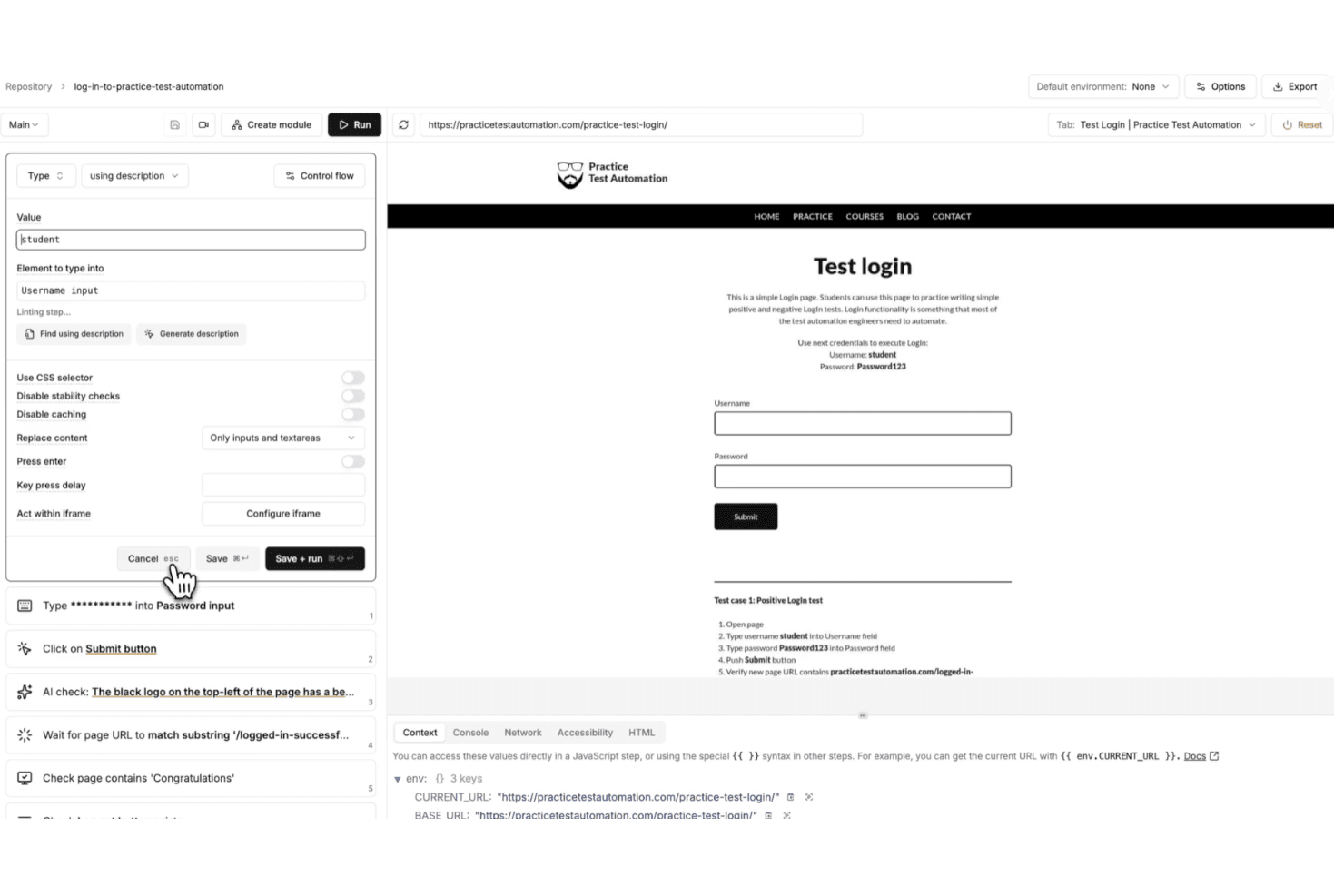
Momentic is an AI-native end-to-end testing tool for teams that need to automate web application testing without writing and maintaining large volumes of test code. I'd consider it if your team is spending too much time keeping tests from breaking after UI changes—something that's a constant drain with code-heavy tools like Cypress. Where Cypress gives you full scripting control, Momentic lets AI generate and self-heal tests, which means less manual upkeep and faster coverage for teams that don't have dedicated QA engineers writing automation full-time.
Momentic Evaluation Summary
0/5
- Pricing upon request
- Free demo available
Warum Sie unseren Software-Empfehlungen vertrauen können
6,700+
Reviews
20
Industry experts
16+
Evaluation factors
14
Years
Unser Team testet und bewertet Software seit 2012. Als Tech-Führungskräfte wissen wir selbst, wie schwierig – und wichtig – es ist, die richtige Software auszuwählen.
Für diesen Leitfaden haben wir Tools mithilfe von praktischen Tests und unabhängiger Recherche bewertet und dabei unsere Bewertungskriterien angewendet.
Unsere Bewertungen spiegeln unser menschliches redaktionelles Urteilsvermögen wider, keine Verkaufsstrategie.
Expertenprüfer:
- Paulo Gardini MiguelTech-Direktor
 Tim FisherVP für KI
 Gabriel RosasTech Lead & Software-Architekt
 Christhian GruhnTech Lead & Plattform-Architekt

Momentic Overview
From my perspective, what really sets Momentic apart is how deeply AI is built into the entire testing experience—not just as a feature, but as the foundation.
Instead of writing and maintaining brittle scripts, you define tests in plain English and let Momentic interpret your intent at runtime. I’ve found this especially valuable if you’re trying to reduce maintenance, since features like self-healing locators, smart waits, and built-in caching help your tests stay stable even as your UI changes.
You also get more than just test creation. With an autonomous agent that can generate coverage, built-in debugging tools, and flexible cloud or CI-based execution, Momentic gives you a more hands-off way to scale testing without adding complexity.
Pros
- Plain-English test creation lowers barrier for non-technical team members.
- Self-healing locators reduce maintenance when UI elements frequently change.
- Smart waiting minimizes flaky tests caused by timing and asynchronous loading issues.
Cons
- Limited browser support currently restricted to Chrome and Chromium environments.
- No code export limits flexibility for teams wanting full script ownership.
- Mobile testing setup is complex and requires significant environment configuration.
Is Momentic Right For Your Needs?
Who Would be a Good Fit for Momentic?
Momentic is a strong choice if you prioritize speed, scalability, and low test maintenance over traditional code-heavy frameworks. I find it especially effective for teams shipping frequently, since its natural-language tests, self-healing locators, and AI-driven workflows help you maintain reliable end-to-end coverage without constantly fixing brittle scripts.
- SaaS StartupsMomentic’s fast onboarding and AI-powered test creation help small teams automate workflows quickly with minimal engineering overhead and ongoing maintenance effort.
- Agile Product TeamsSelf-healing locators and intent-based assertions reduce test flakiness during rapid releases and frequent UI updates across evolving product features.
- DevOps DepartmentsCLI workflows and CI/CD integrations enable automated regression testing on every commit, helping teams catch issues earlier in development cycles.
- Teams Without Dedicated QA Automation EngineersBecause tests are written in plain English, engineering teams can own testing without needing deep expertise in frameworks like Playwright or Selenium.
- Remote Engineering TeamsBuilt-in notifications and integrations help distributed teams stay aligned on test results, failures, and deployment readiness without manual coordination.
- Modern Web Application TeamsMomentic’s focus on dynamic, JavaScript-heavy applications makes it well-suited for teams building frequently changing, component-driven user interfaces.
Who Would be a Bad Fit for Momentic?
Momentic isn’t the best choice if you need full control over your test code, broad cross-browser coverage, or strict control over where test data and artifacts are stored. It’s built for modern, fast-moving environments—not teams relying on legacy systems, complex authentication flows, or highly customized frameworks. If your workflows depend on Safari or Firefox testing, exporting code to maintain ownership, or running everything fully on-prem, you’ll likely run into limitations with Momentic’s current approach.
- Full Code Ownership NeedsMomentic does not generate or export test code, which limits flexibility for teams that require direct control, versioning, and customization of underlying test scripts.
- Cross-Browser Testing Teams (Safari/Firefox)Limited support for non-Chromium browsers makes it unsuitable for teams that must validate experiences across Safari, Firefox, or diverse user environments.
- Strict Data Residency RequirementsCloud-stored test artifacts like caches and memory traces may conflict with organizations that require fully on-premise infrastructure and complete data control policies.
- SSO-Heavy ApplicationsApplications relying heavily on third-party SSO providers (Google, GitHub, etc.) can be difficult to automate reliably due to anti-bot protections and authentication restrictions.
- Manual QA DepartmentsMomentic is built for automation, not manual or exploratory testing workflows.
- Mature, Mobile-Heavy DevelopmentWhile Momentic supports iOS and Android testing, setup can still be complex and less mature compared to dedicated mobile testing frameworks.
Unsere Bewertungsmethodik
Wie wir Werkzeuge testen & bewerten
Wir haben Jahre damit verbracht, unser System zur Softwareprüfung und -bewertung aufzubauen, zu verfeinern und zu verbessern. Das Bewertungsraster ist darauf ausgelegt, die Feinheiten der Softwareauswahl und Effektivität eines Tools einzufangen, wobei wir uns auf kritische Aspekte des Entscheidungsprozesses konzentrieren.
Nachfolgend sehen Sie genau, wie unser Test- und Bewertungssystem anhand von sieben Kriterien funktioniert. Es ermöglicht uns eine unparteiische Bewertung der Software basierend auf Grundfunktionalität, besonderen Funktionen, Benutzerfreundlichkeit, Onboarding, Kundensupport, Integrationen, Kundenbewertungen und Preis-Leistungs-Verhältnis.
Grundfunktionalität (25 % der Endbewertung)
Der Ausgangspunkt unserer Bewertung ist immer die Grundfunktionalität des Werkzeugs. Verfügt es über die grundlegenden Funktionen und Merkmale, die ein Benutzer erwarten würde? Sind grundlegende Funktionen auf höherpreisige Tarife beschränkt? Im Kern erwarten wir, dass ein Tool den Basisfähigkeiten seiner Konkurrenten standhält.
Besondere Features (25 % der Endbewertung)
Anschließend bewerten wir ungewöhnliche, herausragende Funktionen, die über die typische Grundfunktionalität von Tools dieser Art hinausgehen. Eine hohe Bewertung zeigt spezialisierte oder einzigartige Eigenschaften, die das Produkt schneller, effizienter oder für den Nutzer wertvoller machen.
Wir bewerten außerdem, wie einfach sich das Tool mit anderen üblichen Werkzeugen im Technologie-Stack integrieren lässt, um die Funktionalität und den Nutzen der Software zu erweitern. Tools mit vielen nativen Integrationen, Drittanbieter-Anbindungen und API-Zugang zur Erstellung kundenspezifischer Integrationen erhalten die besten Bewertungen.
Benutzerfreundlichkeit (10 % der Endbewertung)
Wir betrachten, wie schnell und einfach Aufgaben aus dem Bereich der Grundfunktionalität mit dem Tool erledigt werden können. Gut bewertete Software ist durchdacht gestaltet, intuitiv bedienbar, bietet mobile Apps, Vorlagen und lässt relativ komplexe Aufgaben einfach erscheinen.
Onboarding (10 % der Endbewertung)
Wir wissen, wie wichtig die schnelle Einführung eines neuen Tools für das Team ist, daher bewerten wir, wie leicht sich ein Werkzeug mit minimalem Training erlernen und nutzen lässt. Wir bewerten, wie schnell ein Teammitglied ohne Vorerfahrung anfangen kann. Hoch bewertete Lösungen benötigen wenig bis gar keine Unterstützung.
Kundensupport (10 % der Endbewertung)
Wir prüfen, wie schnell und einfach man bei Problemen Hilfe per Telefon, Live-Chat oder Wissensdatenbank erhält. Tools und Anbieter mit Echtzeit-Support werden besser bewertet, während Chatbots schlechter abschneiden.
Kundenbewertungen (10 % der Endbewertung)
Neben unserer eigenen Prüfung beziehen wir den Net Promoter Score aktueller und ehemaliger Kunden mit ein. Wir bewerten, wie wahrscheinlich es ist, dass sie sich erneut für das Werkzeug entscheiden würden. Hoch bewertete Software weist einen hohen Net Promoter Score auf.
Preis-Leistungs-Verhältnis (10 % der Endbewertung)
Abschließend vergleichen wir unter Berücksichtigung aller Kriterien den durchschnittlichen Preis der Einstiegspakete mit den Grundfunktionen und bewerten den Mehrwert aus den anderen Bewertungsbereichen. Software, die mehr fürs gleiche Geld bietet, schneidet besser ab.
Core Features
AI-Powered Test Creation
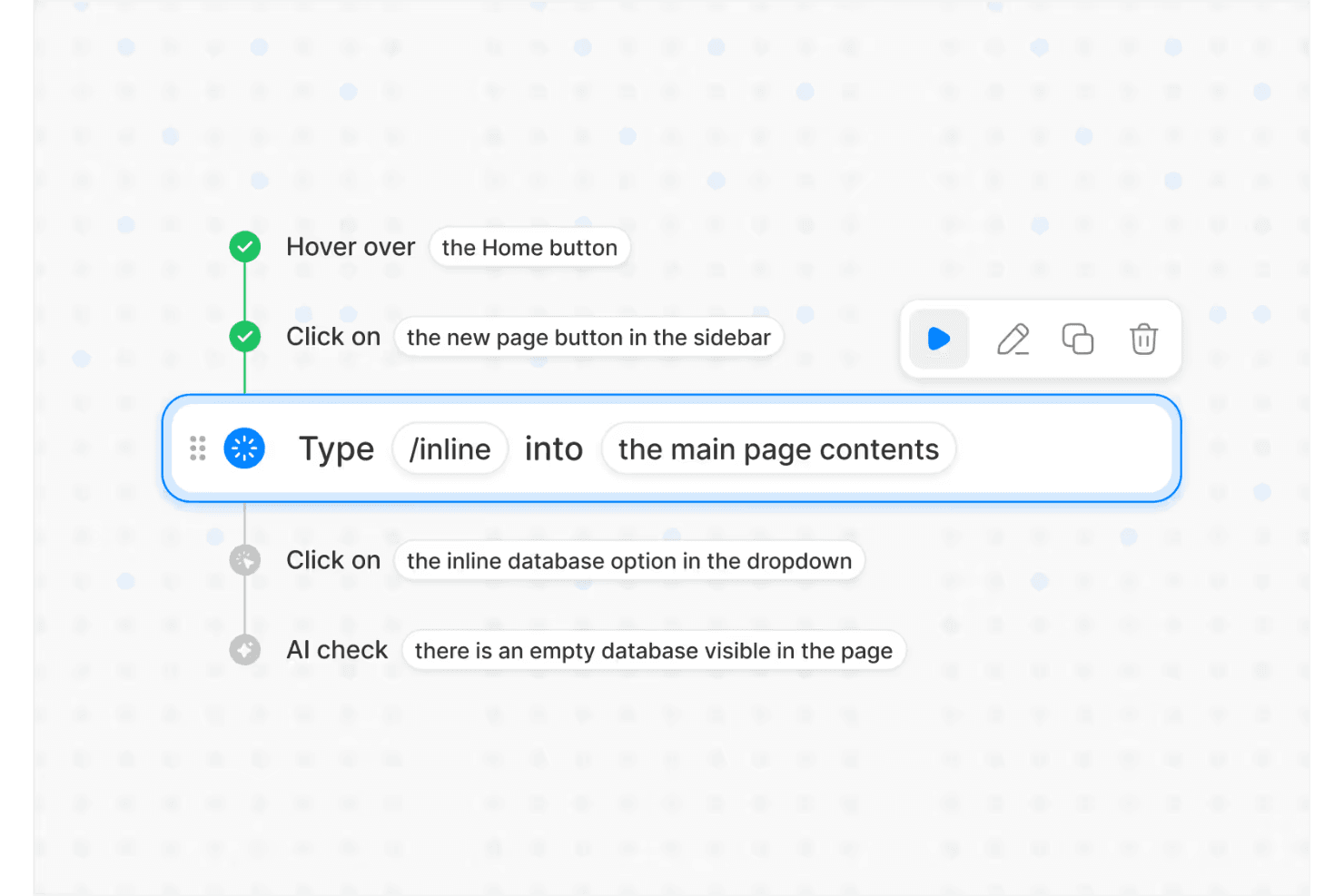
Describe test flows in plain English and Momentic’s AI builds the automation for you, making test authoring accessible to any engineer.
Self-Healing Locators
Selectors automatically adapt as your UI changes, reducing maintenance by tracking user intent instead of exact DOM structure.
Autonomous Testing Agent
Momentic’s AI explores your app, finds critical user flows, and generates or updates tests as your product evolves.
AI-Powered Assertions
Validate UI state, content, and behavior using flexible, intent-based checks that reduce false positives and handle dynamic outputs more effectively..
Regression Testing Automation
Run high-signal test suites on every commit and pull request to catch critical bugs before code merges or deploys.
Flexible Execution (Cloud + CLI)
Run tests in the cloud for quick setup or locally via CLI for CI/CD integration, version control, and developer-centric workflows.
Ease of Use
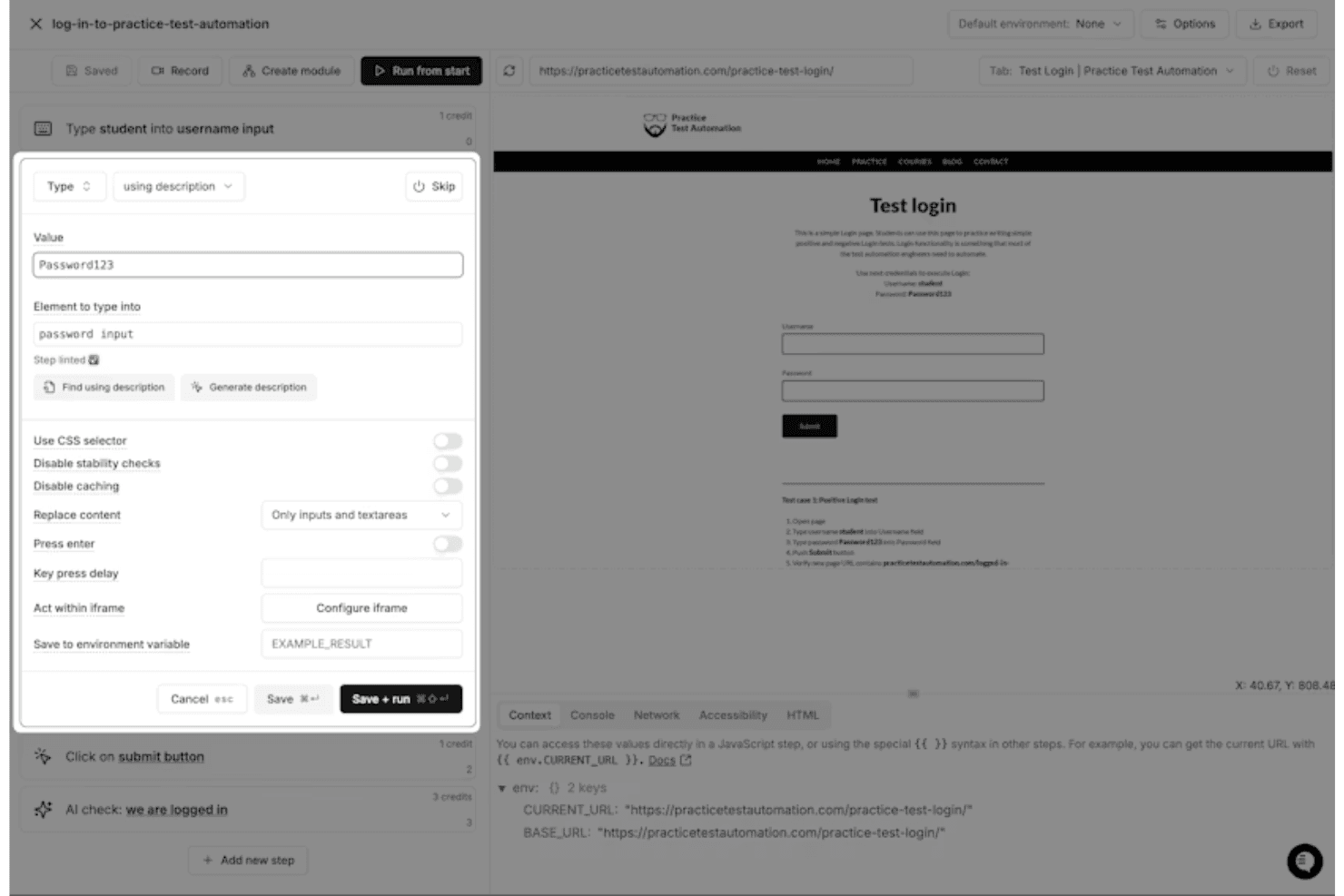
Overall, I think Momentic is one of the more approachable end-to-end testing tools available, largely because of its plain-English test creation and interactive editor. Instead of writing and maintaining code, you define test steps in natural language and get immediate feedback through a built-in browser preview and debugging tools. Features like self-healing locators and smart waiting also reduce the need for constant maintenance. That said, it’s not completely “no-skill”—you still need to learn how to write clear, unambiguous prompts and structure tests effectively to get reliable results.
Integrations
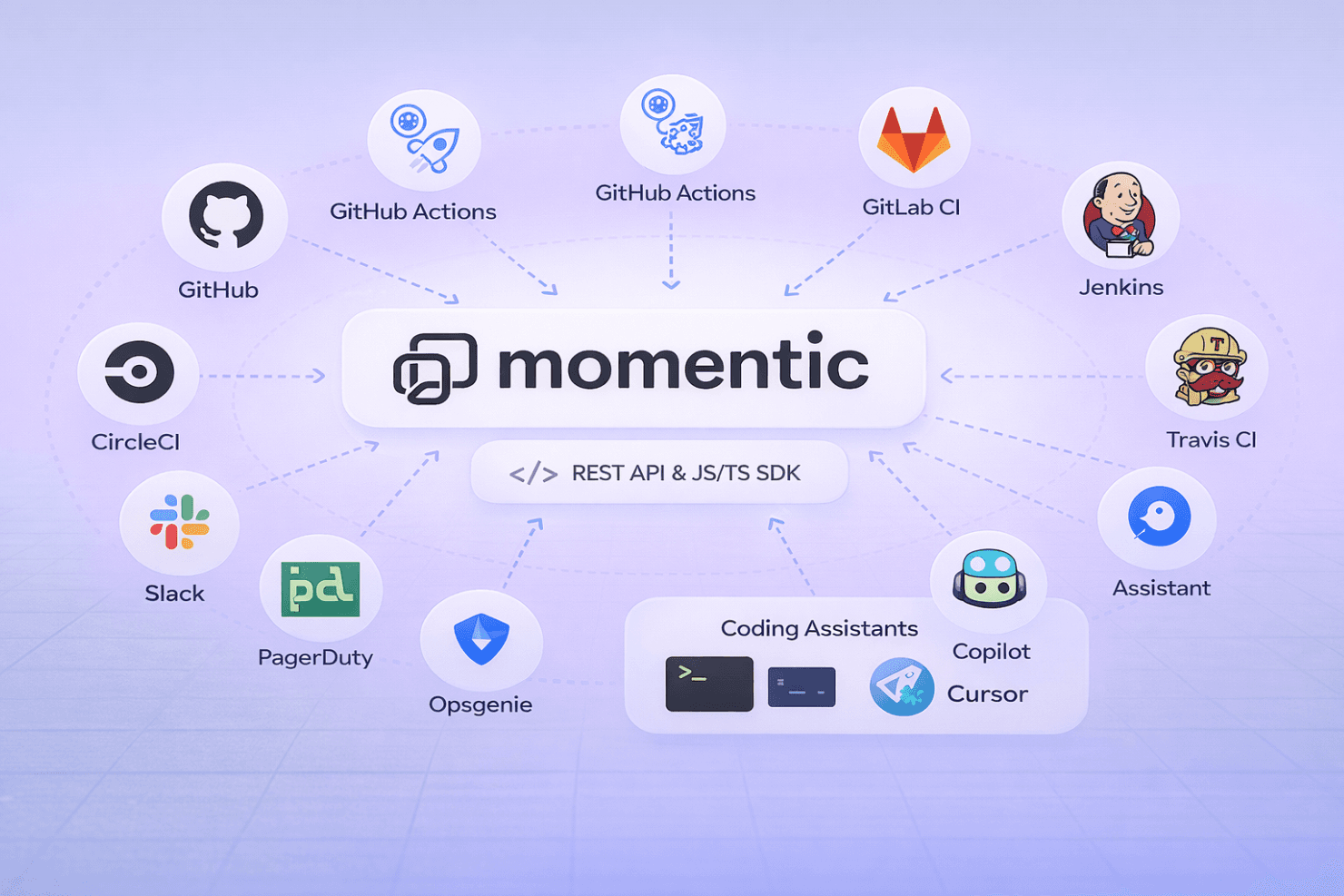
Momentic integrates with major CI/CD platforms, including GitHub Actions, CircleCI, GitLab CI, Jenkins, and Travis CI, making it easy to run automated tests as part of your development pipeline. It also supports notifications via Slack, PagerDuty, Opsgenie, and webhook-based systems for alerting and incident workflows.
Beyond that, Momentic offers a REST API and JavaScript/TypeScript SDK for building custom workflows, along with a CLI for deeper integration into local development and CI environments. It also supports integrations with coding assistants (like Copilot and Cursor) through its MCP framework, enabling AI-driven test creation and maintenance directly from developer tools.
Momentic Specs
- API: Yes
- Bug Tracking: Yes
- CI/CD Integration: Yes
- Cloud Deployment: Yes
- Code Review: Yes
- Code Transformation: No
- Collaboration Support: Yes
- Data Export: Yes
- Data Import: Yes
- Developer Tools: Yes
- External Integrations: Yes
- Git Integration: Yes
- History/Version Control: No
- IDE Plugins: Yes
- Local Deployment: No
- Multi-User: Yes
- Notifications: Yes
- Project Management: No
- Release Management: No
- Static Analysis: Yes
- Task Scheduling/Tracking: Yes
- Testing: Yes


