

Ücretsiz yapay zekâ uygulama oluşturucuları; istemler, görsel düzenleyiciler veya bağlı aracılar aracılığıyla uygulamalar oluşturmanıza yardımcı olan, ücretsiz bir plan ya da deneme sürümü sunan araçlardır. Bir CTO için temel soru, ücretsiz olarak neleri doğrulayabileceğiniz ve entegrasyonlara, yönetişime veya kod üzerinde daha fazla kontrole ihtiyaç duyduğunuzda nelerin değiştiğidir. Bu karşılaştırmada, ücretsiz katman sınırlarına ve proje uygunluğuna odaklanarak istem odaklı oluşturucular, görsel platformlar, yapay zekâ kodlama araçları ve veriye bağlı aracılar ele alınmaktadır.
Why Trust Our Software Recommendations
6,700+
Reviews
20
Industry experts
16+
Evaluation factors
14
Years
Our team has been testing and reviewing software since 2012. As tech leaders ourselves, we know how difficult—and important—it is to choose the right software.
For this guide, we evaluated tools using hands-on testing and independent research, scoring tools using our selection criteria.
Our reviews reflect our human editorial judgment, not a sales pitch.
Expert reviewers:
- Paulo Gardini MiguelTech Director
 Tim FisherVP of AI
 Gabriel RosasTech Lead & Software Architect
 Christhian GruhnTech Lead & Platform Architect

Karşılaştırma Tablosu: Ücretsiz Yapay Zekâ Uygulama Oluşturucuları
Kısa listeme giren ücretsiz yapay zekâ uygulama oluşturucularının özelliklerini yan yana karşılaştırın.
Score legend (out of 5)
- Excellent4.5–5
- Good4–4.4
- Average3–3.9
- Below average2–2.9
- Poor1–1.9
Sorted by: Default
| Tool | Starting Price | Website | |||||||
|---|---|---|---|---|---|---|---|---|---|
Best for AI agents that manage business apps | 4.0 out of 5 | 4 | 4 | 4 | 4 | 4 | 4 | $25/month Free plan + 7-day free trial + free demo available | Website |
Best for portals with 50 free client users | 3.7 out of 5 | 4 | 4 | 3 | 4 | 4 | 3 | $79/month Free plan + 14-day free trial + free demo available | Website |
Best for business apps with inspectable logic | 3.7 out of 5 | 4 | 4 | 3 | 4 | 3 | 4 | $10/builder/month Free plan + free trial + free demo available | Website |
Best for visual control of AI-built apps | 3.3 out of 5 | 3 | 4 | 2 | 4 | 4 | 3 | $32/month Free plan available | Website |
Best for undoing AI edits with checkpoints | 3.8 out of 5 | 3 | 4 | 3 | 5 | 4 | 4 | $20/month Free plan available | Website |
Best for WhatsApp agents tied to app data | 3.5 out of 5 | 3 | 3 | 3 | 4 | 4 | 4 | $20/month Free plan available | Website |
Best for validating ideas with token-free rollback | 3.7 out of 5 | 3 | 4 | 4 | 4 | 3 | 4 | $25/month Free plan + free demo available | Website |
Best for self-hosted agent workflows | 3.8 out of 5 | 3 | 4 | 4 | 4 | 4 | 4 | $23/builder/month Free plan + free trial + free demo available | Website |
Best for building SaaS apps with billing | 4.0 out of 5 | 4 | 4 | 4 | 5 | 4 | 3 | $25/month Free plan + free demo available | Website |
Best for turning Figma designs into live apps | 3.5 out of 5 | 3 | 3 | 4 | 4 | 3 | 4 | $90/user/month Free plan available | Website |


Ücretsiz Yapay Zekâ Uygulama Oluşturucusu İncelemeleri
Aşağıda, kısa listeme giren ücretsiz yapay zekâ uygulama oluşturucularıyla ilgili ayrıntılı özetlerimi bulabilirsiniz. İncelemelerim; doğru seçeneği bulmanıza yardımcı olmak için özellikleri, ücretsiz plan sınırlarını ve en iyi kullanım alanlarını kapsar.
 Best for AI agents that manage business apps
- Free plan + 7-day free trial + free demo available
- From $25/month
Visit WebsiteCustomer Rating:4.7/5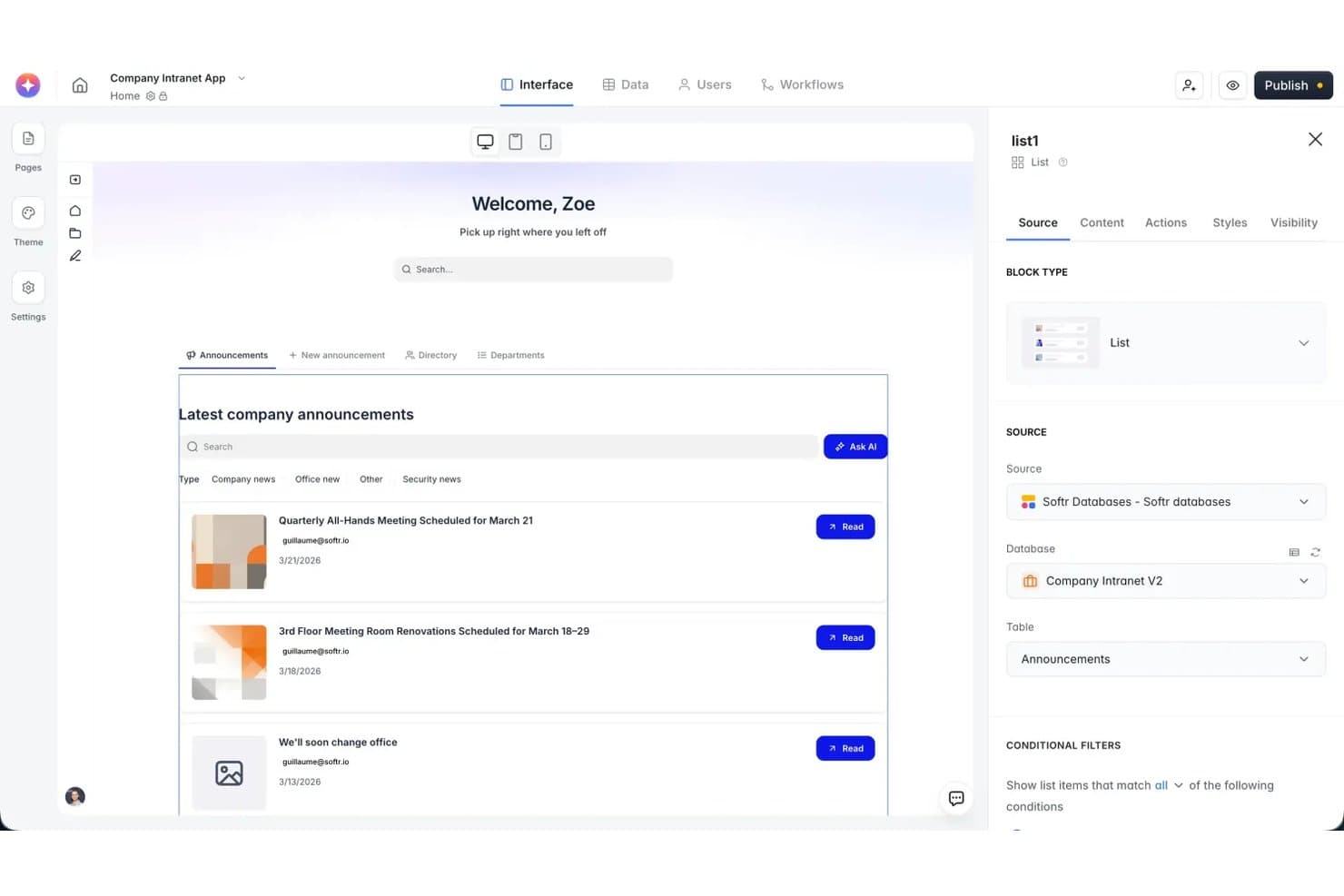
Softr lets users configure list block sources and filters visually. Softr is an AI app builder with a permanent free plan for business apps, combining prompt-generated pages, databases, permissions, and workflows with visual editing and publishing on a Softr subdomain.
Who Is Softr Best For?
Softr is designed for business users and startup founders building client portals, internal tools, and workflows without dedicated developers.
Why I Picked Softr
I picked Softr for free AI app building because its MCP connection lets Claude or ChatGPT build and manage databases, pages, permissions, and workflows. You can publish apps for free on a Softr subdomain, and MCP actions don't consume Softr AI credits, which are limited to five per month for built-in AI features on the free plan.
Softr Key Features
- Relational databases: Link records across tables and create filtered, sortable views.
- Visual app editor: Customize pages with blocks for charts, calendars, forms, and grids.
- App templates: Start with editable templates for client portals, CRMs, and other business applications.
- App history: Restore one of the latest five saved snapshots on the free plan.
Softr Integrations
Softr supports 21+ external data sources, including Airtable, Google Sheets, Notion, and HubSpot. Airtable, Google Sheets, Notion, REST API connections, and MCP are available on the free plan, while HubSpot requires a Business plan or higher. Workflow API actions have separate plan requirements.
What’s Free?
Softr offers a free-forever plan that includes unlimited apps, up to five app users, five monthly AI credits, and 500 monthly workflow actions. Apps can be published on a Softr subdomain, while custom domains and additional AI credits require a paid plan.
Pros and Cons
Pros:
- Generated apps publish to shareable subdomains
- Visual editor supports no-code customization
- MCP agents edit app pages and data
Cons:
- Custom user groups require Pro plan
- Five monthly AI credits constrain iteration
Learn more about Softr: Best for portals with 50 free client users
- Free plan + 14-day free trial + free demo available
- From $79/month
Visit WebsiteCustomer Rating:4.9/5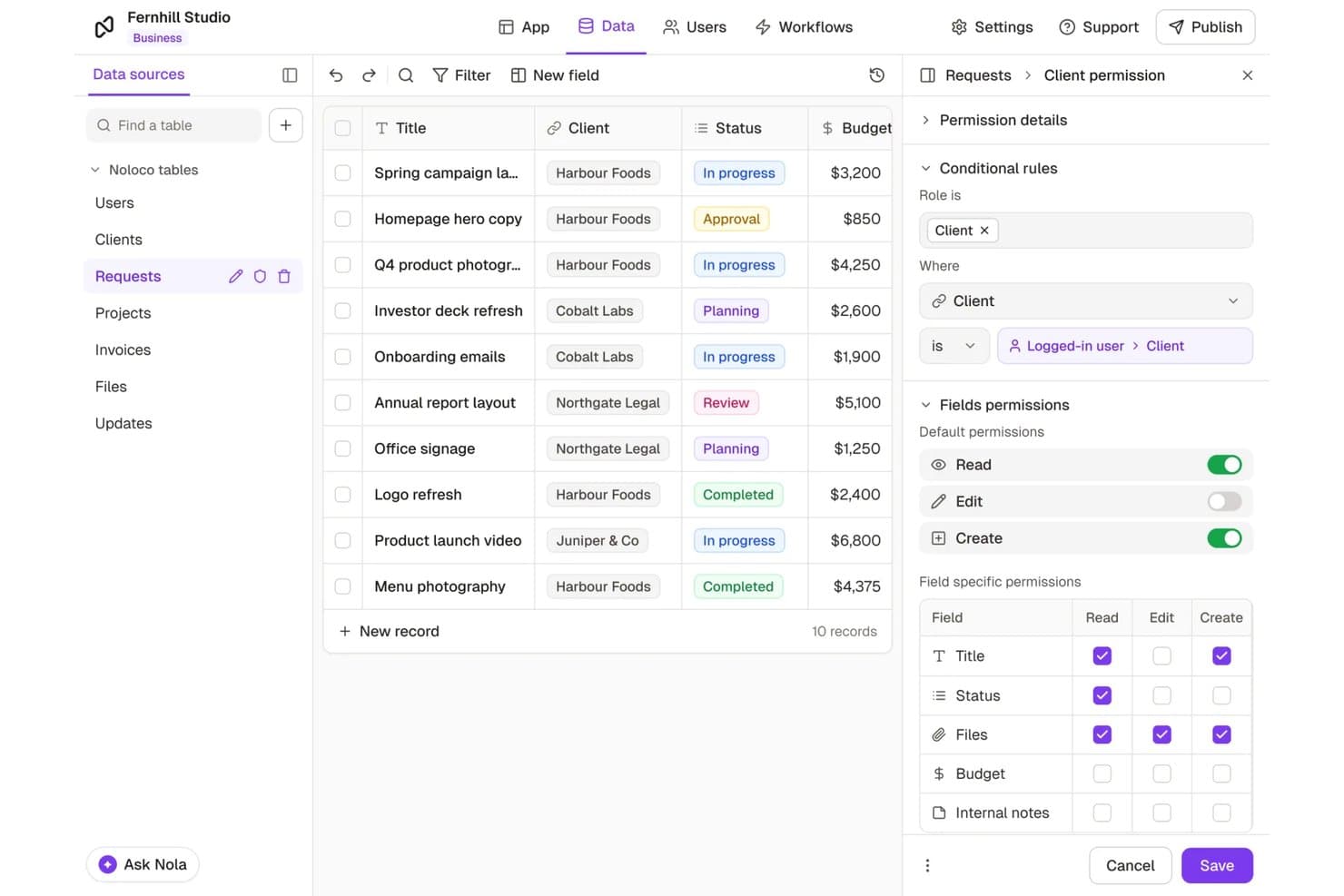
Noloco lets users control field-level data access per client role. Noloco is a free AI app builder for business applications and client portals. Its Nola assistant generates tables, pages, workflows, and record-level permissions from prompts, while the no-code editor supports further customization.
Who Is Noloco Best For?
Noloco is best for small businesses, agencies, and professional services teams building client portals for up to 50 active clients on the free plan.
Why I Picked Noloco
I picked Noloco for its free client portal capabilities, which support up to 50 active clients. Nola can generate portal pages, workflows, and record-level permissions from prompts, while the visual builder lets me adjust the app structure. Role- and record-level permissions also let me control which client records each user can access.
Noloco Key Features
- Relational data tables: Link records across tables with lookups, rollups, and formulas.
- Conditional forms: Configure field visibility conditions and default values.
- Progressive web app: Publish browser-installable apps for mobile and desktop devices.
- Record views: Organize records in table, Kanban board, card, and calendar layouts.
Noloco Integrations
Noloco lists 41 integrations, including native connections to Airtable, Google Sheets, Postgres, Supabase, Xano, and MySQL. External data sources require Build or Enterprise; Free uses Noloco Tables and CSV import. Each app has a GraphQL API, and Zapier is listed.
What's Free?
Noloco lists 41 integrations, including native connections to Airtable, Google Sheets, Postgres, Supabase, Xano, and MySQL. It also supports Zapier, Make, and n8n for workflow integrations, alongside a GraphQL API for accessing application data. External data sources require the Build or Enterprise plan.
Pros and Cons
Pros:
- Unlimited published apps on free plan
- Role-based permissions restrict client record access
- AI prompts generate app structures
Cons:
- Nola cannot configure external integrations directly
- Free plan limited to 100 monthly workflow runs
Learn more about Noloco: Best for business apps with inspectable logic
- Free plan + free trial + free demo available
- From $10/builder/month (billed annually)
Visit WebsiteCustomer Rating:4.6/5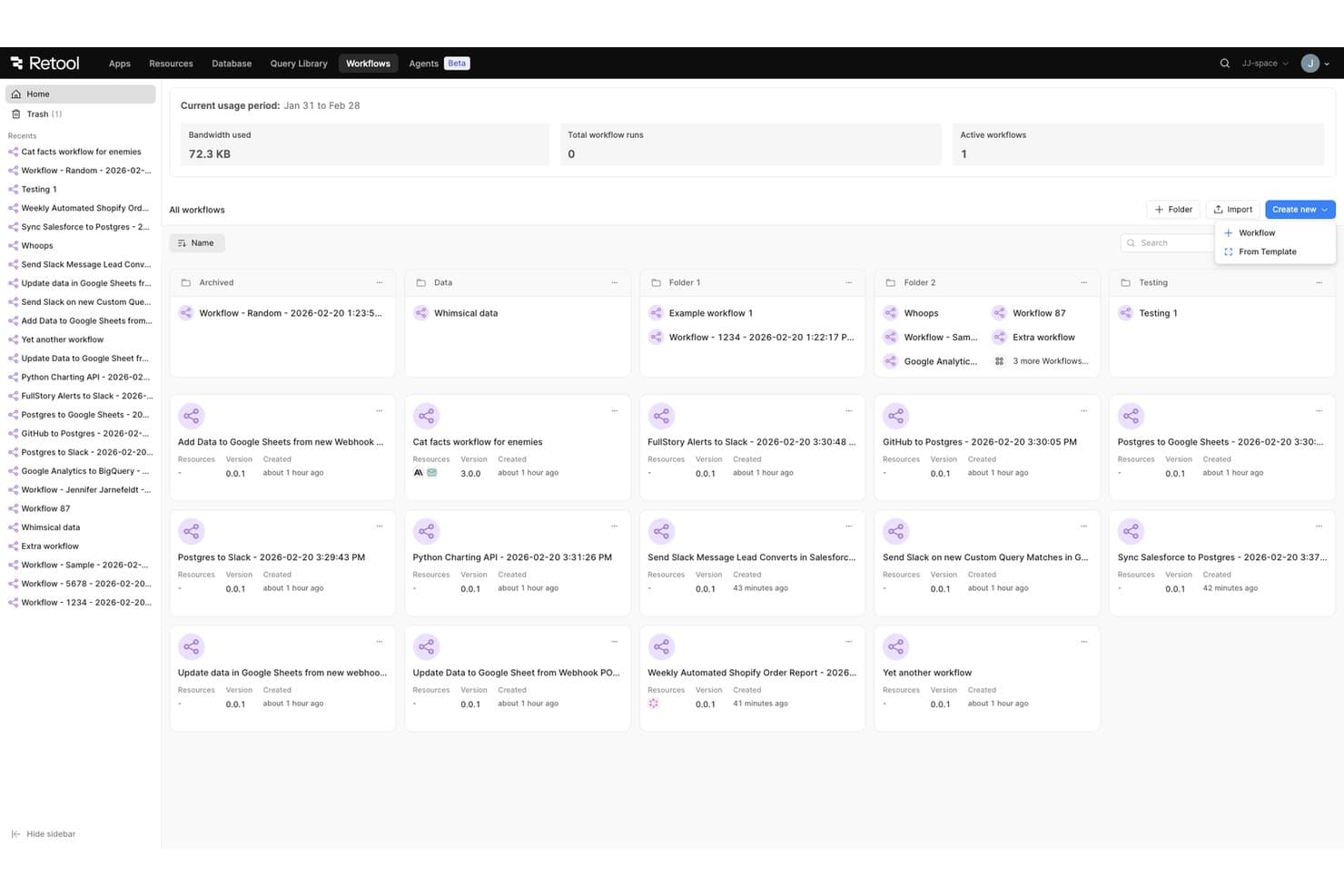
Retool Workflows lets users manage and organize automated workflows in one place. Retool is an AI app builder with a free plan for creating internal business applications. It generates React-based apps from prompts and supports live previews, manual code editing, and connections to databases and APIs.
Who Is Retool Best For?
Retool is best for IT teams, software developers, and operations teams building internal business applications with connected data sources and editable application logic.
Why I Picked Retool
I picked Retool as best for business apps with inspectable logic because its AI builder generates React applications with access to the underlying code and functions. I like that the Data and Code tabs let me inspect query results, review functions, and edit application files. For an internal inventory app, I can check data operations, adjust the generated code, and preview changes before publishing.
Retool Key Features
- Workflow triggers: Run automations on schedules or through webhook events.
- UI component library: Build classic Retool interfaces with more than 100 prebuilt components.
- Ready-made templates: Start from templates for admin panels, dashboards, and internal business applications.
- Mobile app builder: Create mobile applications with Retool Mobile, included in the free plan.
Retool Integrations
Retool supports 70+ integrations, including Google Sheets, Slack, GitHub, MySQL, MongoDB, Snowflake, PostgreSQL, and Salesforce. It also supports custom connections through REST and GraphQL APIs.
What’s Free?
Retool offers a free-forever plan for up to five users, with 250 pooled AI credits, 500 workflow runs per month, and 5GB of Retool Database storage. The Free plan excludes external users, embedded apps, audit logs, and custom SSO.
Pros and Cons
Pros:
- Templates cover internal business applications
- Prompt-based edits include live previews
- Generated app code supports manual inspection
Cons:
- Free plan excludes staging environments
- Free AI credits capped at 250 monthly
Learn more about Retool: Best for visual control of AI-built apps
- Free plan available
- From $32/month (billed annually)
Visit WebsiteCustomer Rating:4.4/5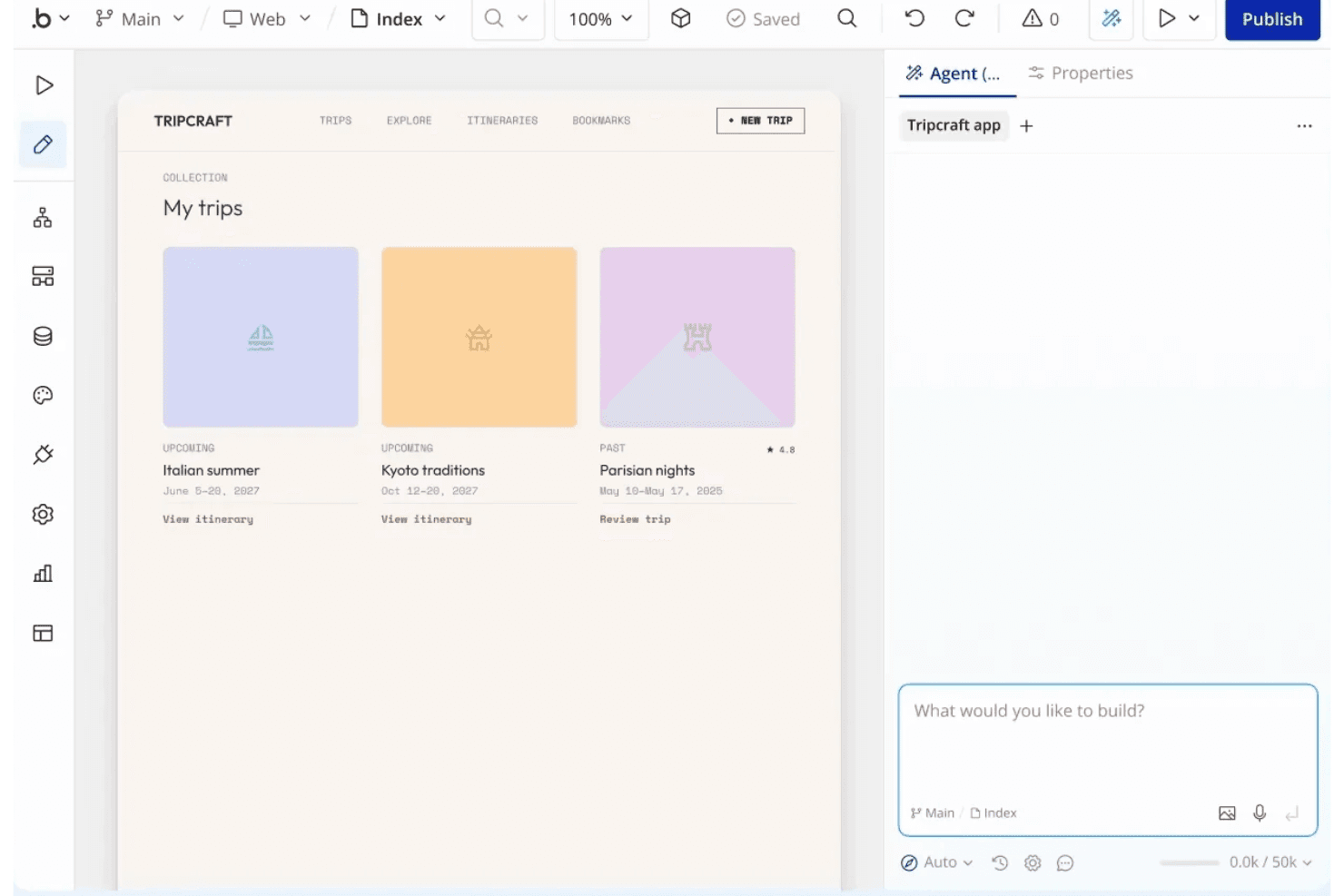
Bubble lets users build and preview app UIs visually with an AI agent. Bubble is a free AI app builder for web and native mobile apps. It generates interfaces, workflows, and databases from prompts, with a visual editor for modifying app layouts, data, and logic.
Who Is Bubble Best For?
Bubble is best for founders and nontechnical builders who want visual control over AI-generated apps when developing MVPs and business applications.
Why I Picked Bubble
I picked Bubble for visual control of AI-built apps because its AI Agent generates screens, workflows, and database structures that I can inspect and modify in the visual editor. I can adjust form fields, workflow conditions, and approval steps when building an MVP, rather than relying entirely on additional prompts.
Bubble Key Features
- Mobile testing: Preview native iOS and Android apps on a device before publishing.
- Visual workflow editor: Create and modify event-based workflows, conditions, and actions.
- Privacy rules: Restrict data visibility, search access, and certain editing permissions.
- Marketplace templates: Start with editable app templates, including free and paid options.
Bubble Integrations
Bubble supports connections with OpenAI, Anthropic Claude, and Google Gemini through plugins or API calls. Its plugin marketplace offers additional third-party connections, while the API Connector supports custom integrations with JSON-based REST APIs.
What’s Free?
Bubble offers a free-forever plan for building and testing web and native mobile apps, including 500 monthly AI credits. Initial app generation does not consume credits, but additional credits and live deployment require a paid plan.
Pros and Cons
Pros:
- Web and mobile apps share backend data
- Manual edits do not consume AI credits
- AI-generated workflows remain visually editable
Cons:
- Free users cannot purchase additional AI credits
- Free apps cannot be deployed live
Learn more about Bubble: Best for undoing AI edits with checkpoints
- Free plan available
- From $20/month
Visit WebsiteCustomer Rating:4.4/5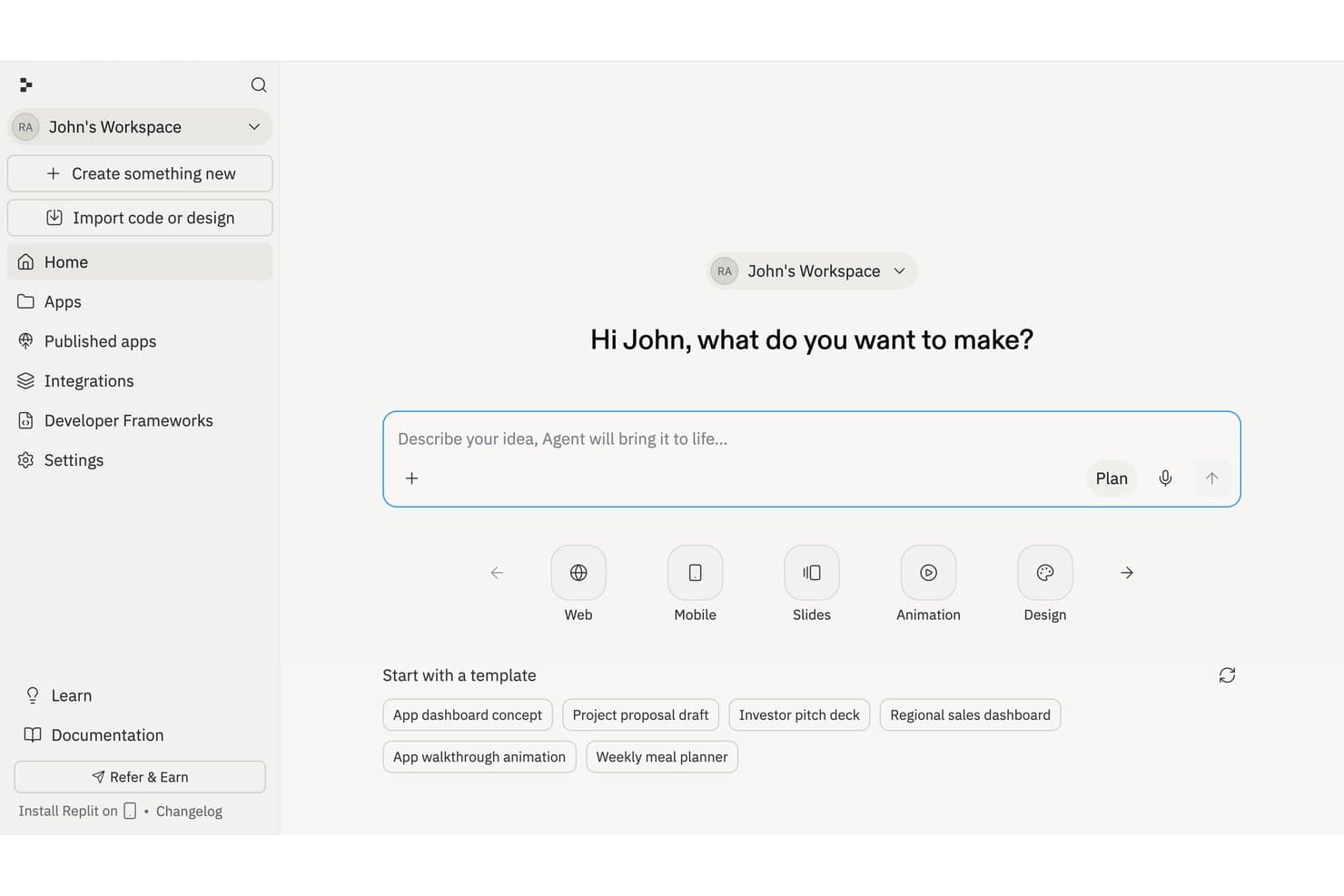
Replit lets users describe an idea and generate an app instantly. Replit is an AI app builder with a free starter plan that generates app interfaces, backend logic, and database structures from natural-language prompts. It also includes visual design tools, a built-in database, and app hosting.
Who Is Replit Best For?
Replit is best for solo founders and product managers who want to build and test app prototypes from natural-language prompts without setting up a local development environment.
Why I Picked Replit
I chose Replit for its Agent checkpoints, which save project files, database states, and AI context during development. These checkpoints let me restore an earlier project state after an AI-generated change causes problems, which is useful when testing and revising app prototypes.
Replit Key Features
- AI app generation: Agent creates app interfaces, backend logic, and database structures from natural-language prompts.
- Design Canvas: Create and adjust app designs visually.
- Managed SQL database: Query data, manage schemas, and view data in Replit.
- App publishing: Starter includes one published app, with a link that expires after 30 days.
Replit Integrations
Replit supports integrations with Google Sheets, Slack, Airtable, Google Drive, GitHub, Notion, and Stripe. Third-party connectors generally require a paid plan, while integration availability depends on the service and connection method.
What’s Free?
Replit offers a free starter plan, not just a time-limited trial. It includes one published app whose link expires after 30 days, and most third-party connectors require a paid plan.
Pros and Cons
Pros:
- Built-in SQL database supports visual editing
- Prompts generate full-stack app prototypes
- Agent checkpoints restore earlier project states
Cons:
- Third-party connectors require paid access
- Starter limits publishing to one live project
Learn more about Replit: Best for WhatsApp agents tied to app data
- Free plan available
- From $20/month
Visit WebsiteCustomer Rating:5/5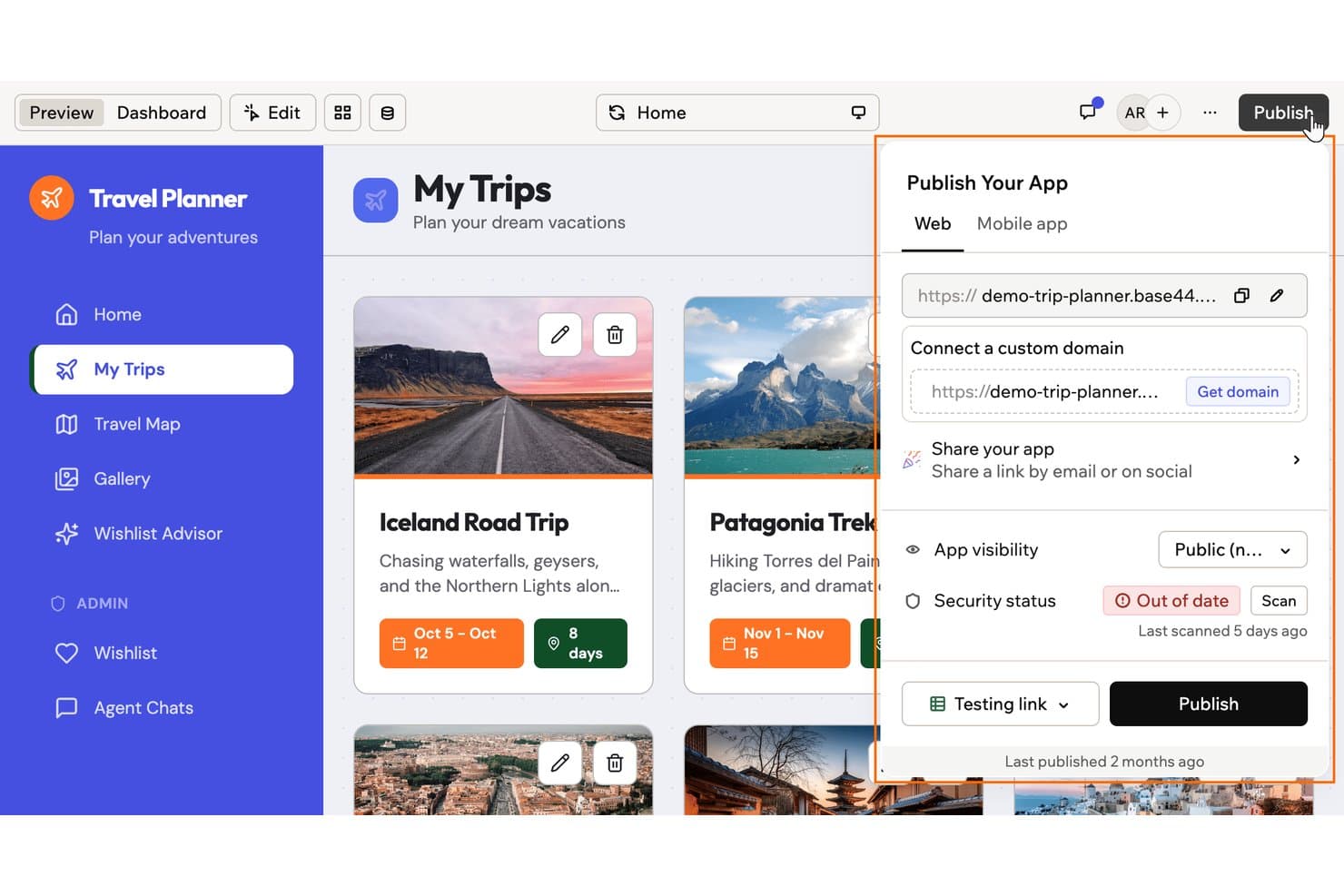
Base44 lets users publish and share their app with a custom domain. Base44 is a free AI app builder that generates web app interfaces, workflows, backend logic, and databases from plain-language prompts. It includes visual editing, authentication, and publishing tools.
Who Is Base44 Best For?
Base44 is best for small business owners, founders, and non-technical teams building web apps and AI agents that interact with business records.
Why I Picked Base44
I picked Base44 as best for WhatsApp agents tied to app data because its AI agents can retrieve and update application records. This supports use cases such as checking inventory or updating service requests through conversational interactions. Base44 also provides authentication and user permissions for its apps.
Base44 Key Features
- Visual editor: Adjust app layouts, colors, text, and other design elements through a visual editor.
- App templates: Start from prebuilt app templates and customize them for different use cases.
- Version history: Access earlier project versions when reviewing app changes.
- App preview: Review app layouts and test interactions before publishing.
Base44 Integrations
Base44 supports connectors for Google Sheets, Google Drive, Slack, and Notion. It also supports custom API integrations and connections to Zapier through manual setup. Connector availability depends on the subscription plan.
What’s Free?
Base44 offers a free-forever plan with up to five apps, 25 monthly message credits, and 100 monthly integration credits. The plan includes authentication, database functionality, visual editing, and publishing on a Base44 URL. Message credits are limited to five per day.
Pros and Cons
Pros:
- Visual editor supports direct layout changes
- Free publishing includes authentication and databases
- Prompt-based generation includes frontend and backend logic
Cons:
- Exported apps depend on Base44 backend services
- Free plan limits AI messages to five credits daily
Learn more about Base44: 7Best for validating ideas with token-free rollback
Bolt
- Free plan + free demo available
- From $25/month
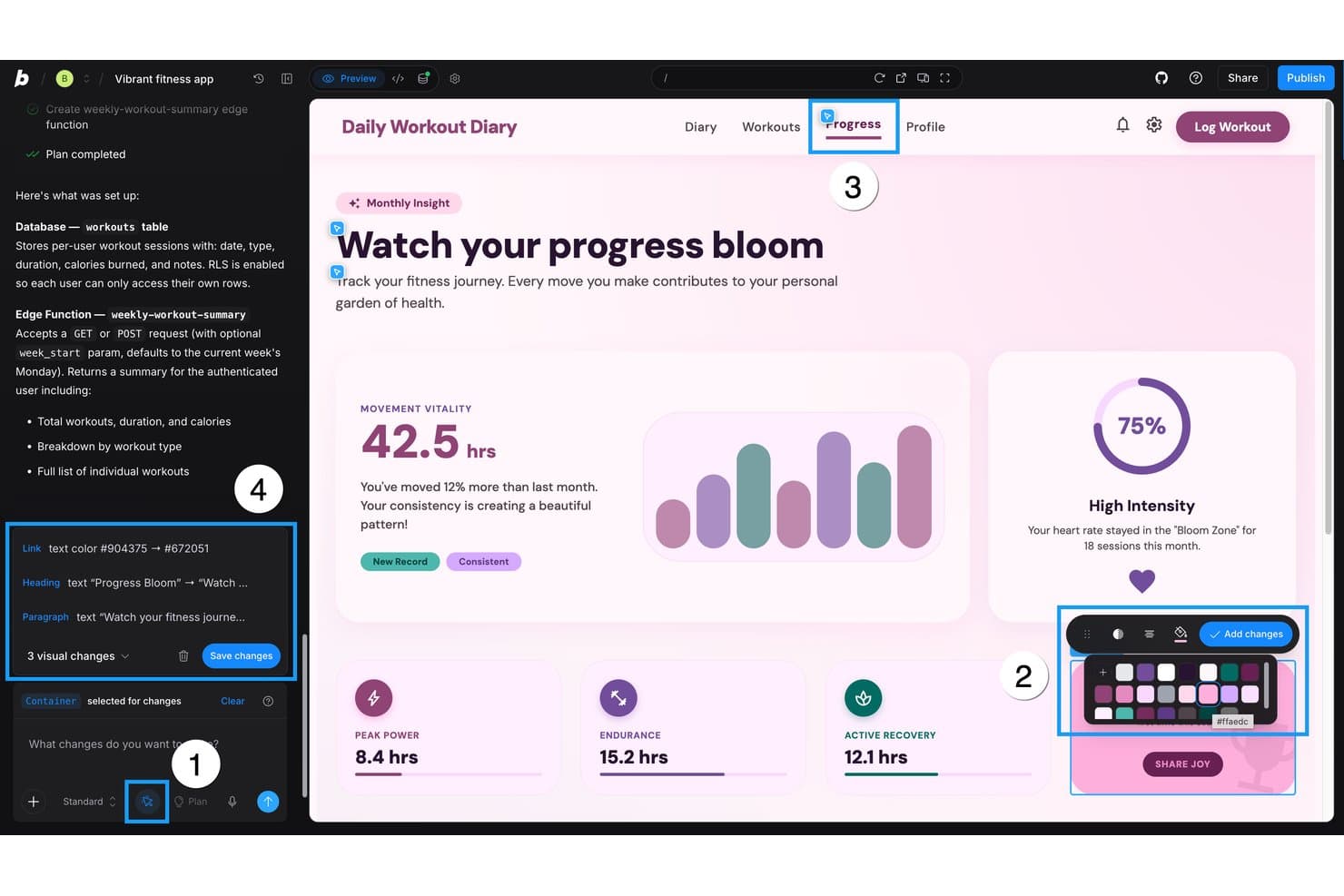
Bolt lets users make visual edits to their app UI with AI assistance. Bolt is a free AI app builder that turns prompts into responsive full-stack apps, with live previews, conversational and code-based editing, built-in databases, and website publishing.
Who Is Bolt Best For?
Developers and nontechnical app creators who want to build, test, and share interactive web app prototypes using natural-language prompts.
Why I Picked Bolt
I picked Bolt as best for validating ideas with token-free rollback because its version history lets me preview and restore earlier project versions without spending tokens. I can test a generated sign-up flow, revert a UI change, and publish the prototype to a shareable URL. Version history restores project code, not database contents.
Bolt Key Features
- Prompt-to-app generation: Create responsive full-stack apps from plain-language prompts.
- Live build preview: View app changes as Bolt generates and updates code.
- Built-in database: Add tables, authentication, file storage, and server functions.
- JavaScript technology support: Build apps using React, Vite, Tailwind CSS, Node.js, and other supported JavaScript technologies.
Bolt Integrations
Bolt lists eight built-in connectors, including GitHub, Linear, Jira, Notion, Sentry, Miro, Context7, and Granola. It also supports custom connectors through remote MCP servers.
What’s Free?
Bolt has a free-forever plan, not just a limited-time trial, with 1 million tokens per month and a 300,000-token daily cap. Free websites include Bolt branding, and file uploads are limited to 10 MB.
Pros and Cons
Pros:
- Live previews support interactive app testing
- Prompts generate testable full-stack prototypes
- Token-free rollback restores previous app versions
Cons:
- Version history excludes direct code edits
- Free plan capped at 300K tokens daily
Learn more about Bolt: Best for self-hosted agent workflows
- Free plan + free trial + free demo available
- From $23/builder/month
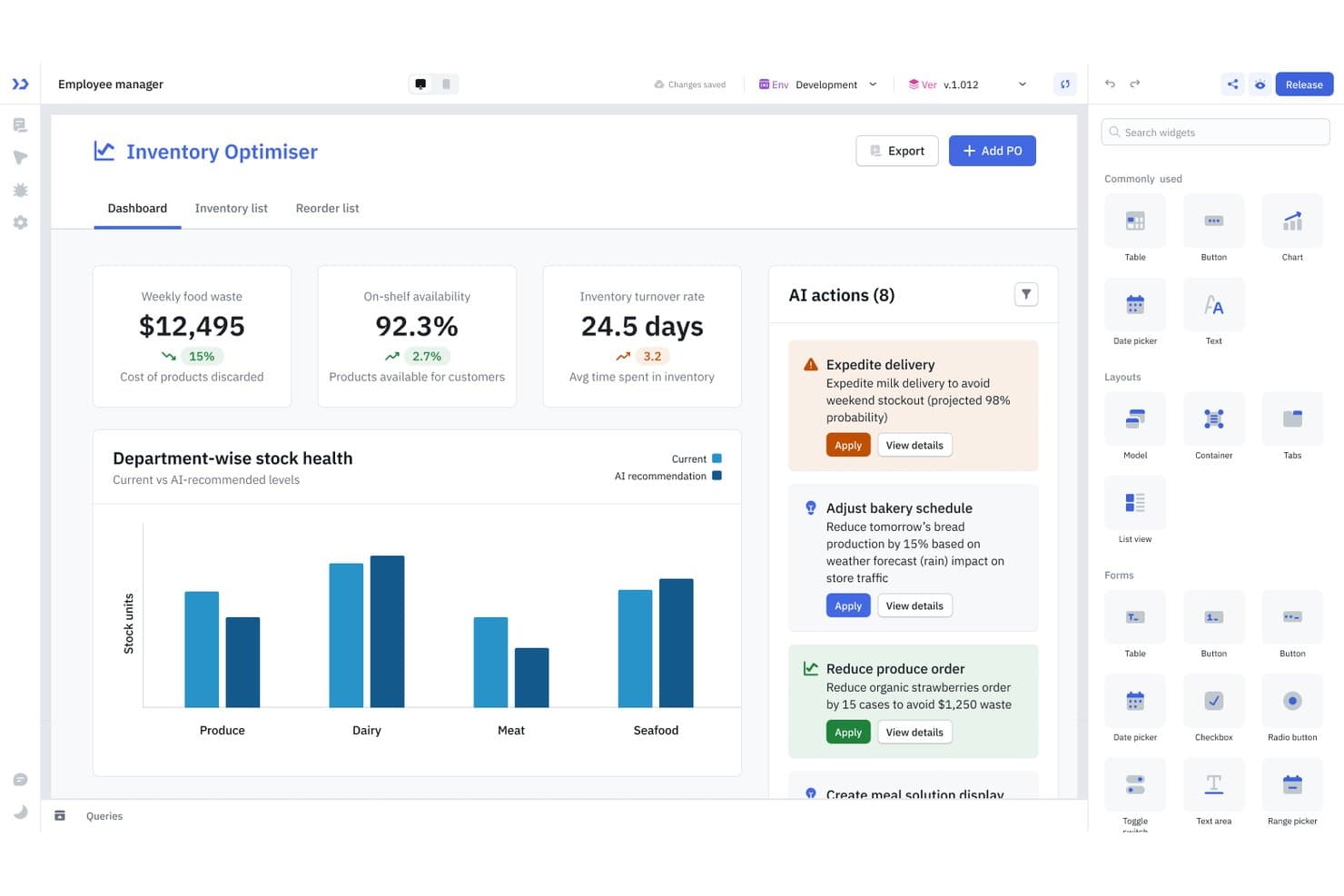
ToolJet lets users build inventory dashboards with AI-driven actions and widgets. ToolJet is a free-plan AI app builder for internal tools that generates app pages, components, queries, and events from prompts, with a visual builder for editing and data-source connections.
Who Is ToolJet Best For?
ToolJet is best for IT and operations teams building internal tools on self-hosted infrastructure; it's a good fit for ToolJet’s agent and workflow capabilities.
Why I Picked ToolJet
I picked ToolJet as best for self-hosted agent workflows because its free Self-Hosted plan includes a visual workflow builder, unlimited workflow runs, and two agents. I can connect agent nodes to data sources, REST APIs, and JavaScript steps, then trigger workflows from app events or webhooks. The free plan also includes 100 monthly AI credits for app generation.
ToolJet Key Features
- App sharing: Release apps by URL or embed them in web pages with an iframe.
- App templates: Start from 57 business-app templates with screens, workflows, and sample data.
- Built-in database: Manage PostgreSQL-based tables, records, and queries through visual tools or SQL.
- Data connectors: Connect apps to databases, APIs, business tools, messaging services, and cloud storage.
ToolJet Integrations
ToolJet supports 80+ data-source integrations, including Google Sheets, Slack, Airtable, PostgreSQL, REST API, and OpenAI. It can also connect to external services through REST APIs.
What’s Free?
ToolJet offers a free Self-Hosted plan alongside a 14-day free trial. The Free plan includes 100 monthly AI credits, while its Self-Hosted free plan includes two builders, up to 50 end users, and unlimited workflow runs.
Pros and Cons
Pros:
- MCP builds don't consume ToolJet credits
- Self-hosted workflows include two agents
- Prompts generate pages, queries, and events
Cons:
- Audit logs require a higher-tier plan
- Free plan limited to two builders
Learn more about Tooljet: Best for building SaaS apps with billing
- Free plan + free demo available
- From $25/month
Visit WebsiteCustomer Rating:4.5/5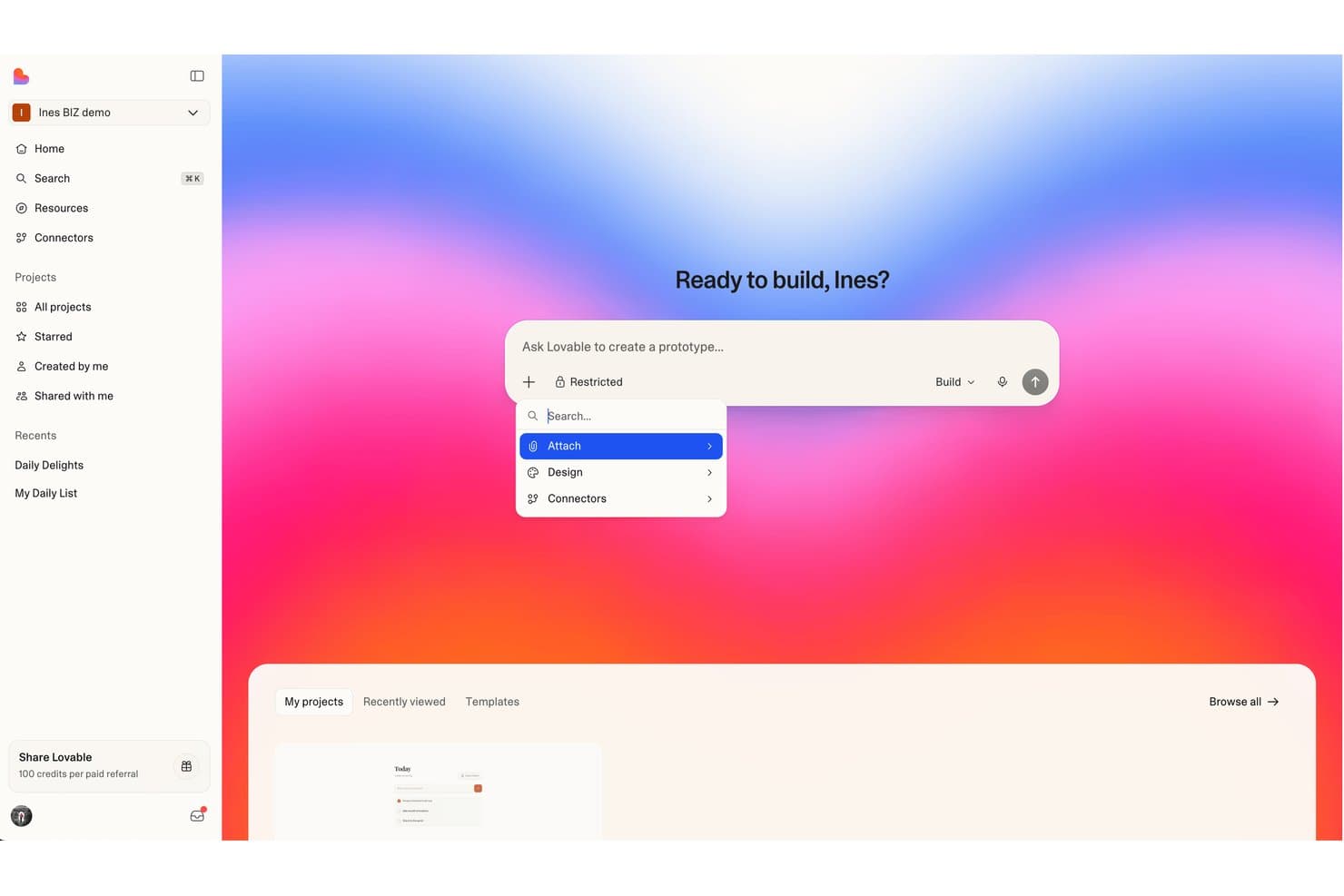
Lovable lets users attach files, apply design settings, and add connectors when building prototypes. Lovable is a free AI app builder that generates web apps from natural-language prompts, including interfaces, databases, authentication, and application logic. It supports conversational editing, visual changes, and web publishing.
Who Is Lovable Best For?
Lovable is best for startup founders and product teams building SaaS prototypes that require user authentication, databases, and subscription billing.
Why I Picked Lovable
I picked Lovable because it supports SaaS app development with user authentication, databases, and Stripe subscription billing. Its prompt-based builder can generate signup flows, subscription pages, and application logic, while visual editing lets users modify interface elements. Projects can also be published to a lovable.app URL for testing.
Lovable Key Features
- Version history: Preview, bookmark, and revert project code versions.
- AI-assisted debugging: Identify application errors and request code fixes through Agent Mode.
- Preview selection: Select interface elements in the preview to request changes.
- Browser testing: Test application workflows and interactions using Lovable's browser testing tools.
Lovable Integrations
Lovable offers 136 connectors, including Stripe, Google Sheets, Slack, Airtable, and GitHub. It also supports custom connections through APIs and MCP-compatible tools. Connector availability and functionality vary by service.
What’s Free?
Lovable offers a free plan with five daily build credits, capped at 30 per month. It also includes one monthly connector credit, 20 Cloud credits, four AI credits, and publishing to a lovable.app address. These allowances limit usage, and unused daily build credits do not roll over.
Pros and Cons
Pros:
- Visual editing supports interface changes
- Free plan supports live web publishing
- Prompt-built apps include data and logic
Cons:
- Version rollback excludes database data
- Free build credits capped monthly
Learn more about Lovable:
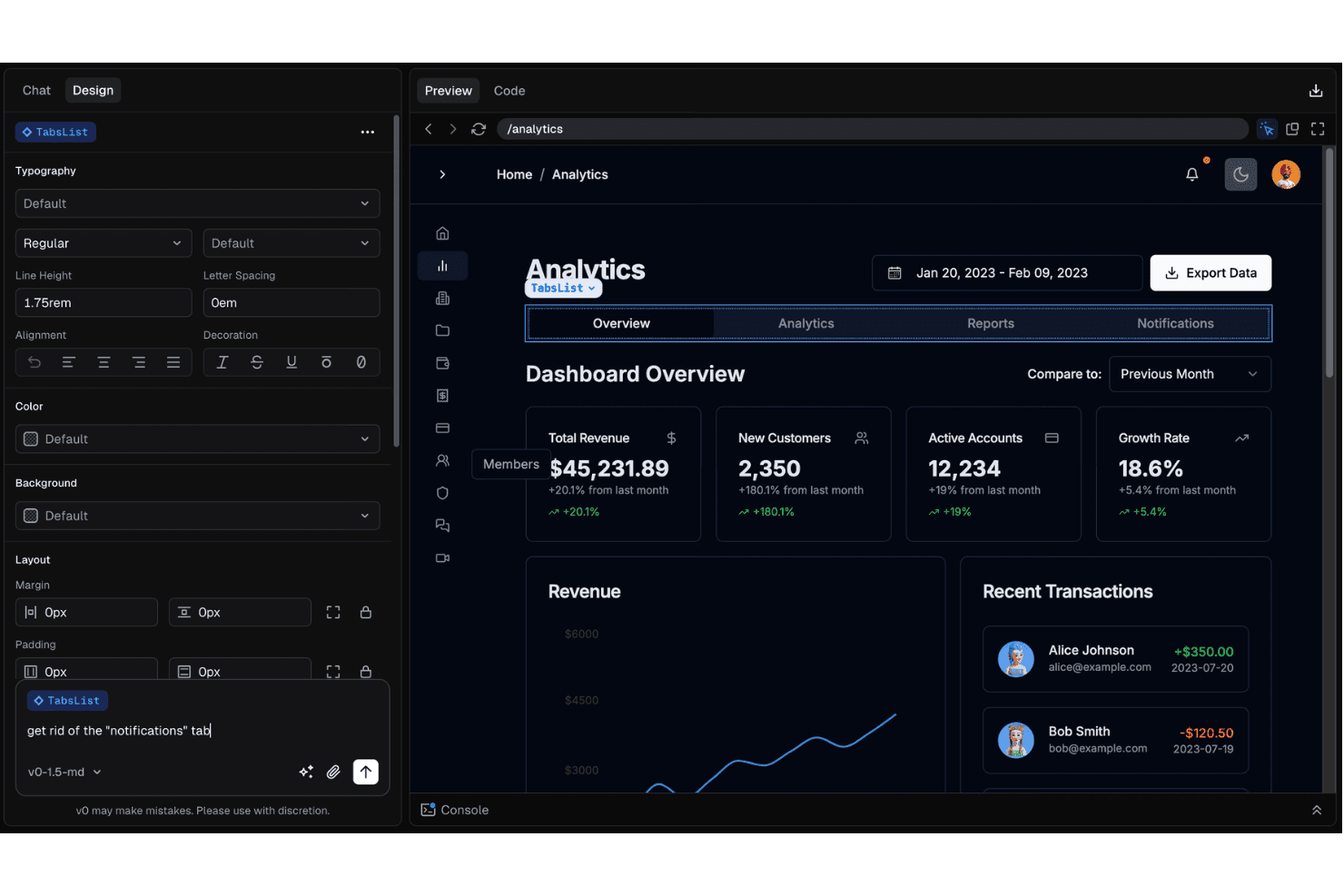
v0 lets users edit dashboard components via natural language chat. v0 is a free AI app builder that generates web applications from natural-language prompts. It includes visual editing through Design Mode, a built-in code editor, GitHub synchronization, backend integrations, and deployment to Vercel.
Who Is v0 Best For?
v0 is best for product designers and frontend developers who want to turn Figma designs into web applications and refine the generated layouts.
Why I Picked v0
I picked v0 for turning Figma designs into live apps because it can generate web interfaces from Figma files, including their layouts, colors, and spacing. I can then refine individual elements in Design Mode and apply those changes to the generated code.
v0 Key Features
- App templates: Start from templates for apps, landing pages, dashboards, and components.
- Backend generation: Generate database schemas, authentication flows, API routes, and CRUD operations.
- Design Mode: Adjust layouts, colors, typography, and spacing through visual editing.
- Version rollback: Review previous code versions and restore an earlier generation.
v0 Integrations
v0 has native integrations with GitHub and Figma, and documented integrations with Supabase, Neon, Upstash, Vercel Blob, Stripe, and Twilio. It also offers a v0 API and TypeScript SDK for custom integrations.
What's Free?
v0 offers an ongoing free plan, not a limited-time trial. It’s limited to seven messages per day.
Pros and Cons
Pros:
- Design Mode supports visual UI editing
- Supports full-stack app generation
- Generates web interfaces from Figma files
Cons:
- Design Mode unavailable on mobile viewports
- Free plan limited to seven daily messages
Learn more about v0:
Diğer Ücretsiz Yapay Zekâ Uygulama Oluşturucuları
Birkaç ek seçenek kısa listeme girmedi, ancak yine de göz atmaya değer:
- 11Google AI StudioBest for apps grounded in Google Search and Maps
- 12AppsmithAdds AI actions to business data apps
- 13GlideBuilds connected apps that share business data
- 14AdaloValidates MVPs before app store launch
- 15ThunkableTurns prompts into native apps
- 16RocketBuilds apps from existing designs
- 17FlutterFlow Lets you explore app changes in parallel
- 18DraftbitLets you compare app screens before building
- 19AnythingKeeps apps live after a downgrade
- 20Bolt.newQueues app changes during a build
- 21IdeavoBest for building without builder credits
How I Evaluate Free AI App Builders
First, I define <b>what counts as free</b>. A free AI app builder must offer a permanent plan for building and using apps, not just a trial; usage limits can still apply. From there, I weigh core functionality most, especially generating apps from prompts and publishing them; standout features like version rollback; and the upgrade path as users and data grow.
Core Functionality (Table Stakes For This List)
In addition to my free plan requirements, I use a scoring system to select tools for my list. I score each one on a scale from 0 (does not offer the functionality) to 5 (excels in this area) for each core functionality listed below, based on what's available on the free plan. I then convert the total into a percentage to help assess each tool's overall fit, with extra weight on any functionalities I've deemed essential.
- AI-Assisted App Generation (Essential): I look for prompts that create usable screens plus data or workflow logic, then allow follow-up edits such as adding an approval step.
- No-Code/Low-Code Interface: Can a business user adjust fields, conditions, and screens visually, such as changing an intake form without hand-coding?
- App Publishing/Deployment: I check whether a team can share a working app, such as an internal request form, through a live link on the free plan.
- Data & Logic Integration: I look for editable data fields and basic rules that support real tasks, such as routing a request by its category.
- Templates & Starting Points: Does the free plan offer adaptable starting points, such as a project tracker or client portal, that teams can tailor to their needs?
Once I have a list of tools that meet the criteria, I consider what sets each platform apart.
Differentiating Factors (What Sets Vendors Apart)
Here's how I compare and contrast different vendors:
Standout Features
Version history and rollback is the first thing I check. When an AI edit breaks a working screen, you need to revert without rebuilding. I look at how granular the rollback is and whether it's available on the free plan. Conversational app editing matters just as much—I evaluate whether follow-up prompts can refine a single component, like adjusting form validation, without regenerating the entire app. Multi-platform export rounds out my list. Tools like Bolt and Replit let you ship one project to web and mobile, which saves a full rebuild cycle during validation.
Beyond Features
I check whether free-tier apps can be exported as code or handed off to a developer when a prototype outgrows the builder. Tools like Replit and Bolt let you pull the source, while others lock it behind a paid plan. Data portability matters just as much—I look at whether you can export your app data and how transparent the vendor is about using your prompts to train models. I also evaluate community depth, since an active forum or Discord often fills gaps that limited free-plan support leaves open.
Ücretsiz Yapay Zekâ Uygulama Oluşturucuları Nasıl Seçilir?
Ücretsiz planının, temel sınırları gizlemeden uygulamanızı bir istemden kullanılabilir ve taşınabilir bir projeye dönüştürüp dönüştüremediğini test ederek bir oluşturucu seçin.
| Önceliğiniz… | Şunları arayın… |
|---|---|
| Önceliğiniz…Eksiksiz bir uygulamayı ücretsiz doğrulamak | Şunları arayın…Kullanım ve yayınlama sınırları açıkça belirtilmiş, kalıcı bir ücretsiz plan |
| Önceliğiniz…İş akışlarını kod yazmadan değiştirmek | Şunları arayın…Düzenlenebilir alanlar, koşullar ve ekranlar |
| Önceliğiniz…Kötü bir yapay zekâ düzenlemesinden kurtulmak | Şunları arayın…Açık bir geri alma yolu sunan sürüm geçmişi |
| Önceliğiniz…Çıkmaz bir prototipten kaçınmak | Şunları arayın…Kodu ve uygulama verilerini dışa aktarmak için belgelenmiş bir yöntem |
Kısa Listeniz Nasıl Değerlendirilir?
- Tanımlı bir oluşturma denemesi gerçekleştirin: 60 dakika içinde her oluşturucuya bir başvuru formu oluşturmasını, başvuruları kaydetmesini ve bir isteği kategoriye göre yönlendirmesini söyleyin; neyin çalıştığını kaydedin.
- Ücretsiz planla yayınlamayı test edin: Deneme uygulamasını yayınlayın ve URL'sini iki değerlendiriciyle paylaşın; erişim, kullanım veya markalama ile ilgili sınırlamaları not edin.
- Düzenleme sonrası kurtarmayı kontrol edin: İstem tabanlı bir değişiklik yapın, ardından önceki sürümü geri yüklemeyi deneyin; geri almanın mümkün olup olmadığını ve ne kadarını geri çevirdiğini belgeleyin.
- Taşınabilirlik ayrıntılarını isteyin: Güncel dışa aktarma belgelerini ve plandan ayrıldıktan sonra uygulama verilerini ve kaynak kodunu korumaya ilişkin yazılı koşulları isteyin.
- Ödünleşiminizi seçin: 12 aylık bir ayrılma senaryosu kaydedin: görsel kontrol ve daha hızlı kurulum karşısında kod erişimi ve gelecekteki değişiklikler üzerinde daha fazla kontrol.
Ücretsiz Yapay Zekâ Uygulama Oluşturucuları Nedir?
Ücretsiz yapay zekâ uygulama oluşturucuları; istemleri, görsel düzenleyicileri veya bağlı aracıları kullanarak uygulamalar oluşturmanıza yardımcı olan, ücretsiz bir plan sunan araçlardır. Ekranlar, veri yapıları veya iş akışı mantığı oluşturabilirler; ancak ücretsiz plan sınırları kullanımı, yayınlamayı veya gelişmiş özelliklere erişimi kısıtlayabilir. BT ekipleri için bu araçlar, ücretli bir plana geçmeden önce bir uygulama fikrini test etme olanağı sunar.
Ücretsiz Yapay Zekâ Uygulama Oluşturucularının Özellikleri
Ücretsiz yapay zekâ uygulama oluşturucuları genellikle temel oluşturma ve test araçlarını içerirken ücretli planlar çoğunlukla daha yüksek sınırlar, daha kapsamlı entegrasyonlar ve dağıtım denetimleri ekler.
Genellikle Ücretsiz Sunulan Özellikler
- Komut tabanlı oluşturma: Bir uygulamayı günlük dille açıklayın; oluşturucu ekranlar, alanlar veya basit iş akışları gibi bir başlangıç noktası oluşturur. Her ayrıntıyı oluşturmadan önce bir fikri test etmek için kullanın.
- Görsel düzenleme: Kodu değiştirmek yerine görsel bir arayüz üzerinden ekranları ve bileşenleri ayarlayın. Bu, ilk oluşturma işleminden sonra formları, etiketleri ve düzenleri geliştirmenize yardımcı olur.
- Temel veri depolama: Form gönderimleri veya görev ayrıntıları gibi kayıtları oluşturun ve oluşturucunun içinde depolayın. Ücretsiz planlar genellikle depolama alanını veya kayıt sayısını sınırlar.
- Şablonlar: Boş bir projeyle başlamak yerine dizin veya proje takip aracı gibi önceden oluşturulmuş bir uygulama yapısıyla başlayın. Şablonlar, özelleştirebileceğiniz işlevsel bir yapı sağlayabilir.
- Uygulama önizlemesi: Uygulamanızı paylaşmadan önce görüntüleyin ve test edin. Önizleme, geliştirme sırasında gezinmeyi, alan davranışını ve ekran düzenini kontrol etmenize yardımcı olur.
- Temel iş akışı mantığı: Bir seçime göre alan gösterme gibi basit koşullar veya eylemler ayarlayın. Bu, özel kod gerektirmeden basit süreçleri destekler.
- Sınırlı yayımlama: Çalışan bir uygulamayı oluşturucu tarafından barındırılan bir bağlantı veya önizleme ortamı üzerinden paylaşın. Ücretsiz planlar kullanıcıları, kullanımı, markalamayı veya yayımlanan proje sayısını sınırlayabilir.
Genellikle Ücretli Sunulan Özellikler
- Daha yüksek yapay zekâ kullanım sınırları: Kullanılabilir komutların, oluşturma işlemlerinin veya yapay zekâ eylemlerinin sayısını artırın. Bu, bir ekibin sık sık düzenleme yaptığı veya birden fazla projeyi desteklediği durumlarda önemlidir.
- Gelişmiş entegrasyonlar: Uygulamayı daha fazla harici hizmete, veritabanına veya API'ye bağlayın. Bu bağlantılar, iş akışlarının oluşturucunun yerleşik depolama alanının dışındaki verileri kullanmasını sağlayabilir.
- Özel alan adları: Bir uygulamayı, oluşturucu tarafından barındırılan bir adres yerine kuruluşunuzun kontrol ettiği bir alanda yayımlayın. Bu, müşterilere veya daha geniş bir kurum içi kullanıcı kitlesine yönelik uygulamalar için uygun olabilir.
- Kod dışa aktarma: Geliştiricilerin incelemesi ve değiştirmesi için oluşturulan kaynak kodunu indirin veya bu koda erişin. Teslim için güvenmeden önce dışa aktarmanın uygulamanın tamamını ve bağımlılıklarını içerip içermediğini kontrol edin.
- Gelişmiş izinler: Kullanıcılar, ekipler veya uygulama verileri için daha ayrıntılı erişim kuralları belirleyin. Bu denetimler, bir uygulamanın farklı bölümlerini kimlerin görüntüleyebileceğini, düzenleyebileceğini veya yönetebileceğini ayırmaya yardımcı olur.
- Ekip iş birliği: Birden fazla kişiye projeleri oluşturma ve sürdürme erişimi verin; bu genellikle paylaşılan çalışma alanları veya rol ayarlarıyla sağlanır. Ücretli planlar merkezi proje yönetimi de sunabilir.
- Sürüm geçmişi: Önceki uygulama durumlarını inceleyin ve istenmeyen bir değişiklikten sonra önceki bir sürümü geri yükleyin. Kullanılabilir geçmiş ve geri alma seçenekleri plana göre değişir.
- Genişletilmiş dağıtım denetimleri: Üretim ortamları, uygulama kapasitesi veya dağıtım ayarları gibi seçenekleri yapılandırın. Bu denetimler, bir prototipin daha fazla kullanıcıyı veya canlı bir iş akışını desteklemesi gerektiğinde kullanışlıdır.
Avantajlar
Ücretsiz planlar kullanımı, yayımlamayı veya gelişmiş özellikleri sınırlasa da ücretsiz yapay zekâ uygulama oluşturucularını şu amaçlarla kullanabilirsiniz:
- Uygulama fikirlerini test etmek: Komut tabanlı oluşturma, bir fikri değerlendirmek için başlangıç ekranları, veri yapıları veya basit iş akışları oluşturabilir.
- Hızlıca bir başlangıç noktası oluşturmak: Proje takip araçları ve dizinler gibi uygulamalara yönelik şablonlar, uyarlayabileceğiniz bir yapı sağlar.
- Ekranları kod olmadan ayarlamak: Görsel düzenleyiciler, ilk oluşturma işleminden sonra alanları, etiketleri ve düzenleri değiştirmenize olanak tanır.
- Temel iş akışı mantığını denemek: Düzenlenebilir veri alanları ve basit koşullar, bir isteği kategoriye göre yönlendirme gibi görevleri test etmenize olanak tanır.
- Uygulama davranışını önizlemek: Önizleme araçları, paylaşmadan önce gezinmeyi, düzenleri ve alan davranışını kontrol etmenize yardımcı olur.
- Çalışan bir prototipi paylaşmak: Oluşturucu tarafından barındırılan bağlantılar, ücretsiz planın erişim veya kullanım sınırlarına tabi olarak değerlendiricilerin bir uygulamayı denemesine olanak tanıyabilir.
Maliyetler ve Fiyatlandırma
Ücretsiz bir planla başlayabilirsiniz ancak kullanım ve yayımlama sınırları yaygındır. Uygulamanızın ileride daha fazla kapasiteye ihtiyacı olursa aşağıda katmanlara göre tipik fiyat aralıkları ve özellikler yer alır.
Yapay Zekâ Uygulama Oluşturucuları için Plan Karşılaştırma Tablosu
| Plan Türü | Ortalama Fiyat | Yaygın Özellikler |
|---|---|---|
| Plan TürüÜcretsiz Plan | Ortalama Fiyat$0/ay | Yaygın ÖzelliklerKomut tabanlı oluşturma, görsel düzenleme, temel veri depolama, sınırlı yayınlama ve uygulama önizlemeleri. |
| Plan TürüKişisel Plan | Ortalama Fiyat$10–$40/ay | Yaygın ÖzelliklerDaha yüksek yapay zekâ kullanım limitleri, daha fazla proje, özel alan adları, kod dışa aktarma ve genişletilmiş yayınlama seçenekleri. |
| Plan Türüİşletme Planı | Ortalama Fiyat$50–$500/ay | Yaygın ÖzelliklerEkip iş birliği, gelişmiş entegrasyonlar, genişletilmiş kullanıcı limitleri, erişim denetimleri ve artırılmış kullanım kotaları. |
| Plan TürüKurumsal Plan | Ortalama FiyatÖzel fiyatlandırma | Yaygın ÖzelliklerÖzel kullanım limitleri, gelişmiş izinler, özel destek, güvenlik denetimleri ve ihtiyaçlara göre uyarlanmış dağıtım seçenekleri. |
Fiyatlar ve faturalandırma birimleri oluşturucuya göre değişir. Bazıları kullanıcı başına ücret alırken diğerleri maliyetleri uygulama kapasitesine, yapay zekâ kredilerine veya kullanıma göre belirler.
SSS
Ücretsiz yapay zekâ uygulama oluşturucuları hakkında sık sorulan soruların bazı yanıtları:
Ücretsiz bir yapay zekâ uygulama oluşturucusu üretim ortamında kullanılacak bir uygulama oluşturabilir mi?
Evet, ancak yalnızca ücretsiz plan uygulamanın gerçek iş yükünü ve dağıtım gereksinimlerini destekliyorsa. Uygulamaya güvenmeden önce gerçekçi veriler, kullanıcı sayıları ve erişim modelleriyle test edin. Planın kimlik doğrulama, yedekleme, izleme ve iş akışınızın gerektirdiği entegrasyonları içerip içermediğini kontrol edin. Kullanım sınırlarını ve bu sınırlara ulaştığınızda ne olacağını doğrulayın. Birkaç değerlendirici için çalışan bir prototip, ekibinizin kullanılabilirlik veya destek gereksinimlerini karşılamayabilir. Ücretsiz katmanı başlangıç noktası olarak değerlendirin ve yükseltme veya geçiş yolunu belgeleyin.
Ücretsiz yapay zekâ uygulama oluşturucuları işletme verilerinizi korur mu?
Güvenlik denetimleri sağlayıcıya göre değişir; bu nedenle işletme verilerini girmeden önce plan ayrıntılarını kontrol edin. Sağlayıcının komutları ve uygulama kayıtlarını nasıl depoladığını, komutları modelleri eğitmek için kullanıp kullanmadığını ve verileri ne kadar süre sakladığını inceleyin. Kullanılabilir kimlik doğrulama, izin, şifreleme ve yedekleme denetimlerini kuruluşunuzun gereksinimleriyle karşılaştırın. Sağlayıcının şartlarını ve güvenlik önlemlerini doğrulayana kadar hassas veya düzenlemeye tabi bilgilerle test yapmaktan kaçının. Plan, BT ekibinizin gerektirdiği denetimlerden yoksunsa sentetik veriler kullanın veya başka bir ortam seçin.
Ücretsiz yapay zekâ uygulama oluşturucuları uygulamaları uygulama mağazalarında yayınlayabilir mi?
Bazen, ancak birçok ücretsiz plan uygulama mağazalarında dağıtım yerine önizlemelere veya web bağlantılarına odaklanır. Oluşturucunun yerel bir mobil uygulama oluşturup oluşturamadığını ve yayınlamanın ücretli bir plan, geliştirici hesabı veya ek yapılandırma gerektirip gerektirmediğini kontrol edin. İmzalama, mağazaya gönderme ve gelecekteki güncellemeler de dâhil olmak üzere tüm süreci erkenden test edin. Mobil uyumlu bir web uygulaması dâhili bir pilot çalışma için yeterli olabilir, ancak otomatik olarak bir uygulama mağazası kaydı sağlamaz. Bir oluşturucu seçmeden önce hedef kullanıcılarınızın neye ihtiyaç duyduğunu doğrulayın.