

Kurumsal hizmetleri yönetmek, özellikle ekipler büyüdükçe ve süreçler departmanlara yayıldıkça karmaşık görünebilir. Ancak doğru yazılım, talepleri merkezileştirerek, görünürlüğü artırarak ve manuel çalışmayı azaltarak bu karmaşıklığa düzen getirebilir. Kurumsal hizmet yönetimi araçları, kaynakları etkili bir şekilde tahsis etmelerine ve daha verimli iş birliği yapmalarına yardımcı olarak yoğun çalışan BT, İK ve operasyon ekiplerini destekler.
Yazılımları bağımsız olarak test edip inceleyen biri olarak, karar vermeden önce açık ve tarafsız bilgilere sahip olmanın önemini biliyorum. Gereksiz karmaşıklıklar olmadan güçlü işlevler sunan seçenekleri belirlemek için bu alandaki önde gelen platformları değerlendirdim.
Bu makalede, öne çıkan araçları (ne yaptıklarını, neden önemli olduklarını ve modern bir ESM stratejisinin parçası olarak kuruluşunuzun günlük operasyonlarını nasıl destekleyebileceklerini) ele alacağım. Makalenin sonunda, hangi platformların ekibinizin ihtiyaçlarına uyduğunu ve her birinin hangi alanlarda öne çıktığını daha net bir şekilde anlayacaksınız.
Why Trust Our Software Recommendations
6,700+
Reviews
20
Industry experts
16+
Evaluation factors
14
Years
Our team has been testing and reviewing software since 2012. As tech leaders ourselves, we know how difficult—and important—it is to choose the right software.
For this guide, we evaluated tools using hands-on testing and independent research, scoring tools using our selection criteria.
Our reviews reflect our human editorial judgment, not a sales pitch.
Expert reviewers:
- Paulo Gardini MiguelTech Director
 Tim FisherVP of AI
 Gabriel RosasTech Lead & Software Architect
 Christhian GruhnTech Lead & Platform Architect

Kurumsal Hizmet Yönetimi Yazılımı Karşılaştırma Tablosu
Bu karşılaştırma tablosu, en iyi kurumsal hizmet yönetimi yazılımı seçimlerim için fiyatlandırma ayrıntılarını özetlemektedir:
Sorted by: Default
| Tool | Starting Price | Website | |
|---|---|---|---|
Best for IT teams | 4.6 out of 5 | $19/user/month 14-day free trial | Book Demo |
Best for integrating PSA and RMM | 4.6 out of 5 | Pricing upon request 14-day free trial | Website |
Best with native AI copilots for service teams | 4.5 out of 5 | Pricing upon request Free demo available | Website |
Best for the education sector | 4.3 out of 5 | £51/user/month Not available | Website |
Best for asset-centric organizations | 4.0 out of 5 | Pricing upon request Free demo available | Website |
Best for large enterprises | Not rated | Pricing upon request Free demo available | Website |
Best for security compliance | Not rated | Pricing upon request Free demo available | Website |
Best for AI-driven automation | Not rated | Pricing upon request Free demo available | Website |
Best for budget-conscious users | Not rated | Pricing upon request 30-day free trial available | Website |
Best for growing businesses | Not rated | $90/user/year Free trial + demo available | Website |


En İyi Kurumsal Hizmet Yönetimi Yazılımı İncelemesi
Aşağıda, kısa listeme giren en iyi kurumsal hizmet yönetimi yazılımlarının ayrıntılı özetlerini bulabilirsiniz. Her incelemede aracın ne yaptığı, neden öne çıktığı ve seçeneklerinizi değerlendirirken aklınızda bulundurmanız gereken temel noktalar ele alınmaktadır. Ayrıca hangi platformun kuruluşunuzun ihtiyaçlarıyla en iyi şekilde örtüştüğüne karar vermenize yardımcı olmak için özellikler, entegrasyonlar, fiyatlandırma, avantajlar ve dezavantajlar hakkında notlar da bulacaksınız.
 Best for IT teams
- 14-day free trial
- From $19/user/month (billed annually)
Visit WebsiteCustomer Rating:4.6/5
Freshservice is a cloud-based service management platform designed to help IT teams manage incidents, requests, assets, and changes from a centralized workspace. Freshservice simplifies IT operations with guided workflows, automation, and a user-friendly interface. It’s often chosen by teams that want reliable ITSM coverage without the complexity of heavier enterprise systems.
Why I picked Freshservice: I chose Freshservice because it provides a balanced set of ITSM capabilities that suit a wide range of technical environments. Its incident and change management tools help teams handle daily operational needs with structure and predictability. The platform also emphasizes usability, which makes it easier for teams to adopt and maintain over time. For organizations that need IT-focused service management with straightforward configuration, Freshservice offers a strong middle ground between simplicity and capability.
Standout features & integrations:
Features an intuitive ticketing system that organizes incidents and service requests, a built-in knowledge base that supports user self-service, and asset management tools that track hardware and software throughout their lifecycle. The platform also provides change management workflows to help teams implement updates safely and reporting tools that give visibility into service trends and team performance.
Integrations include Microsoft Teams, Slack, Jira, Google Workspace, Office 365, AWS, Azure, Salesforce, Zapier, and Trello.
Pros and Cons
Pros:
- Includes reporting tools that help teams monitor service performance
- Provides structured workflows for managing incidents, assets, and changes
- Offers an approachable interface suited to IT teams of various sizes
Cons:
- Works best with consistent network connectivity
- Advanced workflow customization may require additional setup effort
Learn more about Freshservice: Best for integrating PSA and RMM
- 14-day free trial
- Pricing upon request
Visit WebsiteCustomer Rating:4.6/5
SuperOps’ service desk board lets teams manage tickets by priority, status, and SLA in one centralized view. For businesses seeking an enterprise service management software solution, SuperOps offers a compelling platform designed to enhance IT operations for both internal teams and managed service providers. It provides a unified solution that integrates essential functionalities like endpoint management, ticketing, and automation. By addressing challenges such as device management and service delivery, SuperOps appeals to IT professionals and business leaders aiming to streamline operations and improve service quality.
Why I Picked SuperOps
I picked SuperOps as a standout choice for enterprise service management software due to its integration of Professional Services Automation (PSA) and Remote Monitoring and Management (RMM) into a single platform. This combination allows you to manage endpoints, automate workflows, and resolve incidents seamlessly. The platform's use of AI for proactive automation and continuous learning enhances operational efficiency, enabling your team to focus on strategic initiatives rather than routine tasks.
SuperOps Key Features
In addition to its core functionalities, I also found several other features that make SuperOps a great choice:
- Unified Endpoint Control: Provides full visibility and control over all workstations, servers, and network devices.
- Cross-OS Mobile Management: Manage mobile devices across various operating systems from a single console.
- Automated Ticketing Workflows: Streamline support ticket organization and resolution with built-in automation.
- Executive Reporting: Offers comprehensive dashboards for tracking risk posture, SLA adherence, and audit readiness.
SuperOps Integrations
Integrations include Microsoft 365, Google Workspace, QuickBooks, Xero, Slack, FreshBooks, Zapier, ConnectWise, Autotask, and ServiceNow. An API is also available for custom integrations.
Pros and Cons
Pros:
- Integrated RMM and PSA platform
- AI-driven workflow automation tools
- Built-in patch and backup management
Cons:
- Advanced automation requires technical expertise
- Limited event log visibility
Learn more about SuperOps: Best with native AI copilots for service teams
- Free demo available
- Pricing upon request
Visit WebsiteCustomer Rating:4.5/5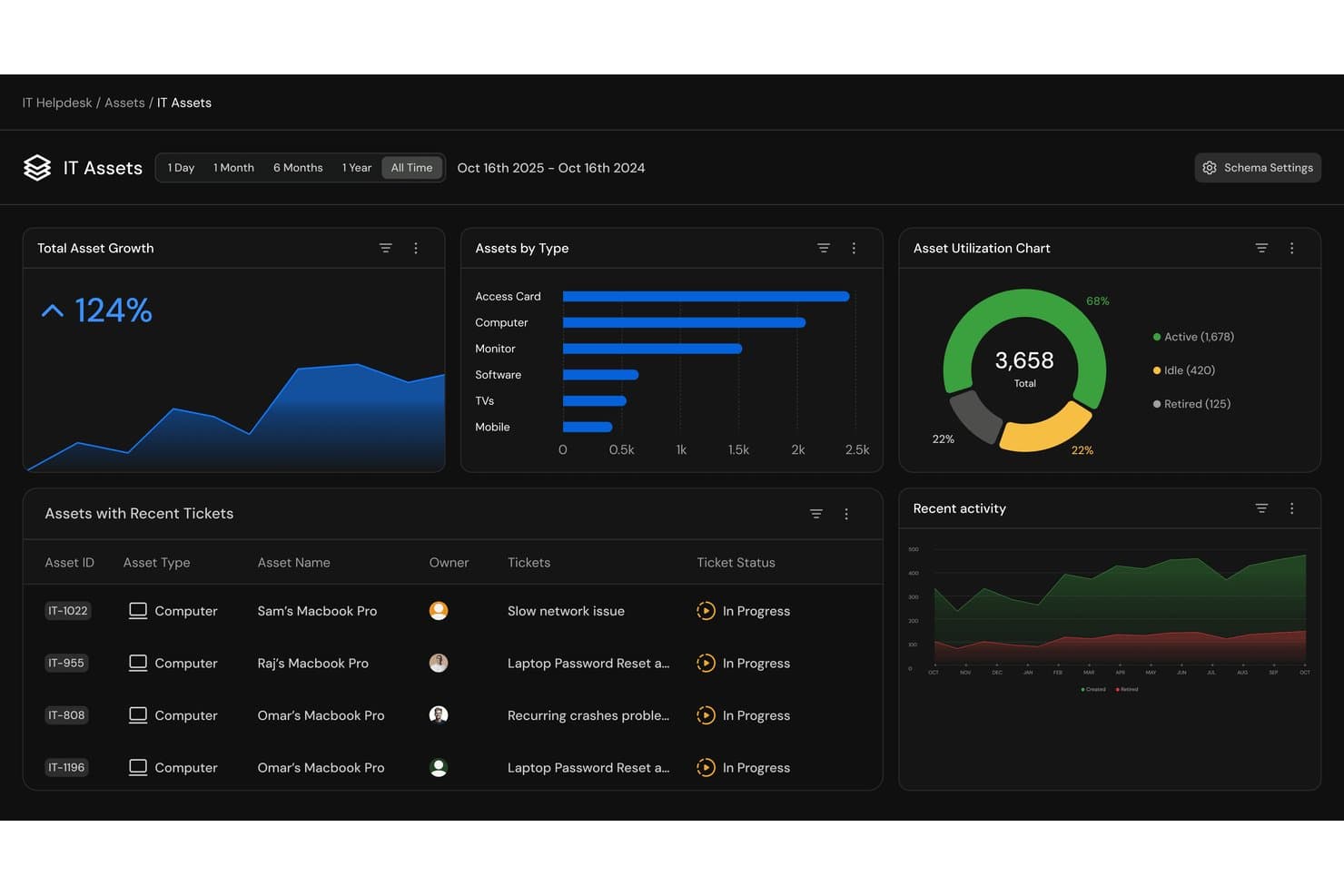
Serval offers an IT Assets dashboard featuring asset growth metrics, asset type breakdowns, utilization charts, and recent ticket tracking for enterprise service management. Serval is an AI-native IT service management platform that uses specialized AI agents to automate help desk requests, access provisioning, and employee onboarding and offboarding workflows.
Who Is Serval Best For?
Serval is a strong fit for IT teams that handle high volumes of repetitive service requests and want to automate resolution, whether they replace their existing ITSM tools or run Serval alongside them.
Why I Picked Serval
I’ve included Serval in my top picks because its AI architecture is genuinely native, not a feature added later. Serval’s help desk agent and Catalyst, its automation agent, help my team automate ticket resolution and trigger provisioning workflows, while AI Suggestions surfaces opportunities for further automation. I particularly like Catalyst, which converts plain-language descriptions into working TypeScript workflows for tasks like access provisioning and employee onboarding.
Serval Key Features
- Multi-channel intake: Handle requests from Slack, Teams, email, and web portal in a unified service desk interface.
- Workspace segregation: Segment IT, Security, HR, and Finance requests into separate queues with tailored workflows and knowledge sources.
- AI Suggestions: Surfaces automation opportunities from ticket patterns and recommends new skills, workflows, app connections, and knowledge updates.
- Analytics: Tracks resolution rates, time saved, and SLA performance through built-in dashboards.
Serval Integrations
Serval offers native integrations with Okta, Google Workspace, Microsoft Teams, Slack, Notion, Confluence, Jira, GitHub, ServiceNow, and Salesforce. An API is available for custom integrations.
Pros and Cons
Pros:
- Catalyst generates workflows from plain language
- Automates onboarding and offboarding workflows natively
- Native AI agents resolve tickets autonomously
Cons:
- May be more complex than needed for basic IT support
- Smaller ecosystem than established ITSM platforms
Learn more about Serval:

TOPdesk supports schools and universities by helping IT, facilities, and campus operations teams deliver services through a shared platform. The tool is designed for organizations that manage a broad mix of requests—from classroom technology issues to building maintenance—and need a central system that serves staff, faculty, and students.
Why I picked TOPdesk: I selected TOPdesk because its structure and feature set align well with the needs of educational institutions. The platform handles both IT and facilities requests, which is valuable in environments where support teams often collaborate to resolve issues that span classrooms, labs, and campus spaces. Its self-service portal and knowledge-sharing tools also make it easier for students and staff to get answers quickly, reducing demand on front-line support teams during busy periods.
Standout features & integrations:
Features include an incident management system to track and respond to student and staff requests, an asset management module to monitor educational equipment and resources, and a facilities management component to support building maintenance and campus operations. The platform also offers a self-service portal and knowledge base that help users resolve common questions independently, along with reporting tools that highlight service trends across campus departments.
Integrations include Microsoft 365, Google Workspace, Azure Active Directory, Slack, Jira, Salesforce, Zapier, and Microsoft Teams.
Pros and Cons
Pros:
- Scales effectively for multi-campus institutions
- Offers self-service tools that reduce demand on support teams
- Supports both IT and facilities workflows common in educational environments
Cons:
- Some interface components may feel dated compared to newer platforms
- Requires coordinated setup across departments for full value
Learn more about TOPdesk: 5Best for asset-centric organizations
IFS
- Free demo available
- Pricing upon request
Visit WebsiteCustomer Rating:4/5
IFS Assyst helps organizations manage IT and non-IT assets throughout their lifecycle while supporting structured service and change workflows. Formerly known as Axios, the platform is designed for teams that need strong configuration management, clear asset relationships, and predictable service delivery across distributed environments.
Why I picked IFS: I selected IFS Assyst because it provides comprehensive asset and configuration management capabilities that address the needs of organizations with complex equipment inventories or tightly controlled technical environments. Its CMDB, lifecycle tracking, and standardized service processes make it well-suited to teams that require precise oversight of assets and their dependencies. The platform also supports enterprise-level change and incident workflows, helping teams maintain consistency across operational systems.
Standout features & integrations:
Features an extensive asset and configuration management system that tracks resources from acquisition through retirement, along with a CMDB that maps dependencies among services, applications, and infrastructure components. The platform also offers a detailed service catalog to standardize request types, incident and problem management tools to handle operational issues, and change management workflows to help teams introduce updates with minimal disruption. Reporting features give visibility into lifecycle costs, service activity, and operational trends.
Integrations include Microsoft 365, Salesforce, SAP, Oracle, Azure, AWS, Google Cloud, ServiceNow, Jira, and IBM tools.
Pros and Cons
Pros:
- Offers strong visibility into asset relationships and service dependencies
- Supports complex change and service workflows across large organizations
- Provides full lifecycle asset tracking with a detailed CMDB
Cons:
- Might be more than smaller enterprises need for basic service management
- Setup and configuration require significant effort and expertise
Learn more about IFS : Best for large enterprises
- Free demo available
- Pricing upon request

ServiceNow helps large enterprises manage and automate service workflows across IT, HR, and operations. ServiceNow is a cloud-based platform designed for organizations with complex, multi-team environments. It centralizes service delivery, supports structured workflows, and provides tools for tracking requests, coordinating tasks, and managing high-volume operations across departments.
Why I picked ServiceNow: I selected ServiceNow because it offers the depth and scalability required by large enterprises with interconnected processes. Its workflow engine supports detailed routing rules, approvals, and cross-department coordination, making it suitable for organizations that manage thousands of requests and depend on consistent service outcomes. The platform’s analytics, automation options, and broad module set also make it a strong fit for teams that need a unified view of service operations.
Standout features & integrations:
Features include a unified self-service portal where employees can submit and track requests, AI-assisted case handling that helps route and prioritize incoming work, and performance analytics that highlight trends in service activity and operational bottlenecks. The platform also supports IT operations management, employee service management, and complex workflow orchestration, helping large organizations maintain consistency across teams and departments.
Integrations include a wide range of enterprise systems, including Salesforce, Workday, Microsoft Teams, Slack, SAP, Oracle, Google Cloud Platform, and Amazon Web Services.
Pros and Cons
Pros:
- Provides strong analytics for monitoring performance and trends
- Centralizes service operations across multiple departments
- Supports complex workflows and large organizational structures
Cons:
- Requires ongoing administrative ownership to manage configurations
- Implementation can be time-intensive
Learn more about ServiceNow Customer Service Management:

Ivanti helps organizations manage IT services while maintaining strong security and compliance practices across devices and applications. Ivanti combines traditional IT service management with endpoint management, patching, and vulnerability insights, making it a fit for organizations that need to keep systems secure while handling day-to-day service requests.
Why I picked Ivanti: I selected Ivanti because it addresses service management and security requirements together, which is valuable for teams operating in regulated or risk-sensitive environments. Its patch automation and risk-based vulnerability tools help IT teams prioritize remediation efforts, while its service desk capabilities cover core ITSM needs. This combination makes Ivanti suitable for companies that want a more security-aware approach to service operations without having to manage separate tools for compliance and support.
Standout features & integrations:
Features include centralized IT asset management to track devices and software across the organization, automated patch management to improve the security posture, and vulnerability insights to help teams identify and prioritize high-risk issues. The platform also supports incident, problem, and change management workflows, as well as compliance reporting that highlights configuration gaps and areas requiring attention.
Integrations include Microsoft Teams, Slack, ServiceNow, Salesforce, AWS, Azure, Google Workspace, Jira, Okta, and Active Directory.
Pros and Cons
Pros:
- Provides asset visibility across devices and applications
- Automates patching and helps prioritize high-risk vulnerabilities
- Combines IT service management with security and compliance capabilities
Cons:
- Not ideal for teams that do not need security-focused functionality
- Setup and administration can require significant technical expertise
Learn more about Ivanti:

BMC Helix uses AI and automation to help enterprises manage incidents, assets, and service workflows across cloud and hybrid environments. BMC Helix is an enterprise service management platform designed for organizations seeking to strengthen IT operations through predictive capabilities and automated processes. It aligns with ITIL practices and supports service delivery across distributed, complex environments.
Why I picked BMC Helix: I chose BMC Helix because it brings together ITSM, AIOps, and automation in a way that appeals to large organizations managing mixed cloud and on-premise environments. Its predictive insights help teams identify issues before they escalate, while its no-code workflow tools allow process owners to create or adjust service logic without relying heavily on developers. This balance of automation and configurability makes it practical for enterprises with layered systems and high service volumes.
Standout features & integrations:
Features cognitive service management that uses AI to classify, route, and prioritize requests; multi-cloud management tools for overseeing resources across cloud and hybrid setups; and dependency mapping that visualizes relationships among services, applications, and infrastructure components. These capabilities help teams maintain visibility over complex technology landscapes and automate routine operational tasks.
Integrations include Microsoft Teams, Slack, Jira, Salesforce, AWS, Microsoft Azure, and Google Cloud.
Pros and Cons
Pros:
- Offers no-code tools for configuring service workflows
- Supports hybrid and multi-cloud environments
- Uses AI to help identify and manage issues proactively
Cons:
- Works best with structured onboarding and ongoing administrative support
- Initial setup can feel complex for new teams
Learn more about BMC Helix: Best for budget-conscious users
- 30-day free trial available
- Pricing upon request

ManageEngine ServiceDesk Plus provides IT teams with essential service management features at accessible price points, making it a practical option for organizations with tighter budgets. The platform supports incident, asset, and change management in a centralized environment, providing structure without the cost or complexity of larger enterprise systems.
Why I picked ManageEngine ServiceDesk Plus: I selected ServiceDesk Plus because it delivers core ITSM capabilities in editions that scale by need, allowing teams to choose the functionality that matches their budget and operational complexity. Its incident workflows, asset tracking, and change processes give smaller or cost-sensitive teams the tools they need to manage IT operations more effectively. For companies moving beyond email-based support or basic ticketing, ServiceDesk Plus offers a structured but approachable step up.
Standout features & integrations:
Features an incident management module that helps teams categorize, prioritize, and resolve tickets, along with asset management tools that track hardware and software throughout their lifecycle. The platform also offers a service catalog for handling standard requests, change management workflows for planned updates, and reporting dashboards that give visibility into team performance and resource usage. Contract and vendor management are also available, helping teams monitor renewal dates and agreements.
Integrations include Microsoft 365, Jira, Slack, Microsoft Teams, Zoho CRM, G Suite, AWS, Azure, Google Workspace, and Salesforce.
Pros and Cons
Pros:
- Includes reporting and contract tracking tools for operational visibility
- Provides incident, asset, and change management in one platform
- Offers core ITSM capabilities at accessible price points
Cons:
- Setup and configuration still require some administrative effort
- Advanced ITSM features are limited to higher-tier editions
Learn more about ManageEngine:

Atomicwork boosts IT and HR service delivery for growing companies with AI-driven automation. Atomicwork is an AI-driven service management solution that supports IT, HR, and other internal service teams. It centralizes employee requests, automates routine tasks, and provides a conversational interface that lets people ask for help directly within the tools they already use.
Why I picked Atomicwork: I chose Atomicwork because it offers a modern, lightweight approach to service management that suits organizations without large ITSM footprints. Its AI assistant can handle a significant portion of routine requests, reducing the daily workload for small- and mid-sized teams. The platform’s focus on chat-based intake, automated responses, and simple workflow configuration makes it more accessible than heavier enterprise systems, which is often the right fit for companies looking to scale without adding operational overhead.
Standout features & integrations:
Features an AI assistant that helps employees get answers to common questions, trigger requests, and resolve simple tasks directly within chat tools. The platform also provides a service catalog, asset tracking, workflow automation, and built-in knowledge management that automatically surfaces relevant information based on request context. These capabilities support both IT and HR teams without requiring extensive setup.
Integrations include Microsoft Teams, Slack, Okta, Google Workspace (with Google Drive support for document syncing), Jira, Azure Active Directory, and Salesforce.
Pros and Cons
Pros:
- Works directly inside chat tools for easy adoption
- Offers a simple, modern interface suitable for smaller teams
- Handles routine requests through AI, reducing manual workload
Cons:
- Requires consistent connectivity for best performance
- Less suited for large, highly complex enterprise environments
Learn more about Atomicwork:
Diğer Kurumsal Hizmet Yönetimi Yazılımları
İşte kısa listeme girmeyen ancak yine de göz atmaya değer bazı ek kurumsal hizmet yönetimi yazılımı seçenekleri:
- 11SysAidBest for easy user interface
- 12TeamDynamixBest for public sector organizations
- 13AtlassianBest for Agile IT teams
- 14ServiceaideBest for AI-assisted support operations
How I Evaluate Enterprise Service Management Software
When an IT director needs HR, facilities, and IT services unified in one platform, I evaluate tools in two layers: core ESM requirements and the differentiators that distinguish top contenders.
Core Functionality (Table Stakes For This List)
When I'm selecting tools for my list, I rank each one on a scale from 0 (does not offer the functionality) to 5 (excels in this area) for each core functionality listed below. Then, I calculate the tool's total score into a percentage. Each tool needs to achieve a minimum total score of 65% to be considered for inclusion.
- Multi-Department Service Delivery: I look for purpose-built support beyond IT—things like onboarding request templates for HR or workspace move workflows for facilities teams.
- ITIL-Aligned Process Management: Each tool should cover incident, problem, change, and request management with structured workflows that map to established ITIL practices.
- Self-Service Portal & Catalog: A configurable portal where employees browse available services, submit requests through dynamic forms, and search knowledge articles matters here.
- Workflow Automation Engine: I evaluate whether the platform offers a visual, low-code workflow builder for approvals, escalations, and routing across departments.
- CMDB & Asset Management: The tool should maintain configuration items with relationship mapping so teams can trace how a server outage impacts upstream business services.
- SLA Management & Reporting: I check for multi-tier SLA tracking and dashboards that let service desk managers and department leads monitor performance against targets.
Once I have a list of tools that meet this criteria, I consider what sets each platform apart.
Differentiating Factors (What Sets Vendors Apart)
Here's how I compare and contrast different vendors:
Standout Features
AI-powered virtual agents are a major differentiator. I look for platforms where employees can resolve password resets or submit leave requests through a chat interface without ever filing a ticket. Low-code app builders also matter because teams like legal or procurement often have niche workflows that pre-built templates don't cover. I evaluate each platform's integration marketplace too, since ESM tools need to connect with systems like Workday, SAP, Slack, or Microsoft Teams to keep cross-departmental processes moving.
Beyond Features
Licensing models deserve close attention. Some vendors charge per agent while others use per-employee pricing, and that distinction changes the math entirely when you're rolling ESM out to HR, facilities, and finance teams who aren't full-time agents. I also evaluate compliance certifications like SOC 2 Type II and ISO 27001, especially for organizations in regulated industries. Implementation timelines matter too—I check whether platforms offer pre-built ESM templates that shorten rollout versus requiring months of custom configuration.
Kurumsal Hizmet Yönetimi Yazılımı Nasıl Seçilir?
Uzun özellik listeleri ve karmaşık fiyatlandırma yapıları arasında kaybolmak kolaydır. Seçenekleri değerlendirirken odağınızı korumanıza yardımcı olmak için yazılım seçme sürecinizde göz önünde bulundurmanız gereken temel faktörleri içeren bir kontrol listesi hazırladım.
| Faktör | Göz Önünde Bulundurulması Gerekenler |
|---|---|
| FaktörÖlçeklenebilirlik | Göz Önünde Bulundurulması GerekenlerYazılımın kuruluşunuzla birlikte büyüyüp büyüyemeyeceğini değerlendirin. Artan kullanıcı trafiğini veya veri hacmini karşılayabilecek mi? Uzun vadeli büyümeyi maliyet artışlarına yol açmadan destekleyen ölçeklenebilir bir mimari ve esnek fiyatlandırma planları arayın. |
| FaktörEntegrasyonlar | Göz Önünde Bulundurulması GerekenlerPlatformun mevcut araçlarınıza ne kadar iyi bağlandığını inceleyin. CRM, ERP veya iletişim platformlarınız gibi sistemlerle uyumluluğunu kontrol edin. Mevcut teknoloji yığınınıza uyum sağlamak için kapsamlı geçici çözümler veya özel geliştirme gerektiren araçlardan kaçının. |
| FaktörÖzelleştirilebilirlik | Göz Önünde Bulundurulması GerekenlerYazılımı iş akışlarınıza ne kadar kolay uyarlayabileceğinizi değerlendirin. Alanları, formları, süreçleri ve otomasyon kurallarını özelleştirme olanağı arayın. Katı sistemler benimsenmeyi sınırlayabilir ve platformu ekibinizin ihtiyaçlarına uyarlamayı zorlaştırabilir. |
| FaktörKullanım kolaylığı | Göz Önünde Bulundurulması GerekenlerGenel kullanıcı deneyimini değerlendirin. Arayüz sezgisel mi? Öğrenme eğrisi ne kadar dik? Eğitim süresini en aza indiren ve ilk günden itibaren üretkenliği destekleyen bir çözüm seçin. |
| FaktörUygulama ve işe alıştırma | Göz Önünde Bulundurulması GerekenlerSistemi tamamen uygulamanın ve ekibinizi eğitmenin ne kadar süreceğini düşünün. Belgeler, video eğitimleri, şablonlar ve rehberli turlar da dâhil olmak üzere güçlü işe alıştırma desteği sunan platformları tercih edin. |
| FaktörMaliyet | Göz Önünde Bulundurulması GerekenlerAbonelik ücretleri, uygulama maliyetleri, destek düzeyleri ve ücretli eklentiler dâhil olmak üzere toplam sahip olma maliyetini inceleyin. Genel değeri belirlemek için sunulan özellikleri ve hizmet düzeylerini bütçe kısıtlarınızla karşılaştırın. |
| FaktörGüvenlik önlemleri | Göz Önünde Bulundurulması GerekenlerAlınan güvenlik önlemlerini inceleyin. GDPR veya HIPAA gibi standartlara uyumluluk, veri şifreleme, erişim denetimleri ve düzenli denetimler arayın. Güçlü güvenlik uygulamaları, hassas kurumsal bilgilerin korunmasına yardımcı olur. |
| FaktörDestek kullanılabilirliği | Göz Önünde Bulundurulması GerekenlerMüşteri desteğinin kalitesini ve kullanılabilirliğini değerlendirin. Sağlayıcının 7/24 destek sunup sunmadığını ve hangi kanallar üzerinden hizmet verdiğini kontrol edin. Hızlı yanıt veren destek, sorunların hızla çözülmesine ve hizmet sürekliliğinin korunmasına yardımcı olur. |
Kurumsal Hizmet Yönetimi Yazılımı Nedir?
Kurumsal hizmet yönetimi yazılımı, kuruluşların BT, İK ve tesisler gibi departmanlar genelinde hizmet sunumunu yönetmesine ve otomatikleştirmesine yardımcı olur. Bu platformlar talepleri, olayları ve varlık verilerini merkezileştirerek ekiplerin sorunları daha tutarlı bir şekilde çözmesini ve manuel çalışmayı azaltmasını sağlar. Genellikle olay yönetimi, hizmet talepleri, bilgi paylaşımı ve varlık takibi için araçlar içerir; böylece ekipler süreçleri tek bir sistem üzerinden koordine edebilir.
Kurumsal Hizmet Yönetimi Yazılımının Özellikleri
Kurumsal hizmet yönetimi yazılımı seçerken aşağıdaki temel özelliklere dikkat edin:
- Olay yönetimi: Hizmet kesintilerini kaydetmek, önceliklendirmek ve çözmek için yapılandırılmış bir yöntem sunarak ekiplerin sorunları verimli bir şekilde ele almasını ve kesinti süresini en aza indirmesini sağlar.
- Hizmet talebi yönetimi: Çalışanların rutin talepleri veya soruları merkezi bir portal üzerinden iletmesine olanak tanır; hizmet ekiplerinin gelen işleri düzenlemesine ve tutarlı şekilde yanıt vermesine yardımcı olur.
- Varlık takibi: Donanım, yazılım ve diğer kurumsal kaynaklar hakkında görünürlük sağlayarak eksiksiz yaşam döngüsü yönetimini destekler ve güncelliğini yitirmiş veya yanlış konumlandırılmış varlık riskini azaltır.
- Değişiklik yönetimi: Onay adımları, belgelendirme seçenekleri ve sistem ya da süreç değişiklikleri sırasında riski azaltan yapılandırılmış iş akışları sunarak kontrollü güncellemeleri destekler.
- Self servis portalı: Çalışanlara, basit sorunları bağımsız olarak çözmelerine yardımcı olan formlara, sık sorulan sorulara ve standart çözümlere erişim sağlar; destek taleplerinin sayısını azaltır ve sonuç olarak genel çalışan deneyimini iyileştirir.
- Bilgi bankası: Ekiplerin bilgi paylaşmasını ve karar alma süreçlerini iyileştirmesini sağlayarak makaleleri, sorun giderme adımlarını ve kurum içi belgeleri depolar ve düzenler.
- Entegrasyon olanakları: Birleşik iş akışlarını desteklemek için hizmet platformunu iletişim araçlarına, kimlik sağlayıcılara, bulut ortamlarına, izleme sistemlerine ve diğer iş uygulamalarına bağlar.
- Raporlama ve analiz: Hizmet trendleri, ekip performansı, varlık kullanımı ve operasyonel darboğazlar hakkında görünürlük sağlayarak veriye dayalı iyileştirme çalışmalarına olanak tanır.
- Özelleştirilebilirlik: Yöneticilerin alanları, iş akışlarını, formları ve otomasyon kurallarını kurumsal süreçlere ve departmana özgü gereksinimlere uyacak şekilde uyarlamasına olanak tanır.
- Güvenlik önlemleri: Hassas kurumsal verileri güvence altına almak için şifreleme, erişim denetimleri, uyumluluk sertifikaları (GDPR veya HIPAA gibi) ve diğer korumaları içerir.
Kurumsal Hizmet Yönetimi Yazılımının Faydaları
Kurumsal hizmet yönetimi yazılımı, ekiplerin verimliliği artırmasına, iletişimi kolaylaştırmasına ve departmanlar genelinde daha tutarlı hizmet sunmasına yardımcı olabilir. Kuruluşların bu platformları kullanmaya başladıklarında genellikle gördüğü temel faydalardan bazıları şunlardır:
- Artan verimlilik: Bilet yönlendirme, bildirimler ve talep alımı gibi rutin görevleri otomatikleştiren bu platformlar, manuel çalışmayı azaltmaya ve hizmet ekiplerinin daha yüksek değer taşıyan sorumluluklara odaklanabilmesi için zaman kazanmasına yardımcı olur.
- Geliştirilmiş hizmet sunumu: Merkezi bilet ve talep yönetimi, ekiplerin sorunlara daha hızlı yanıt vermesine ve departmanlar genelinde daha öngörülebilir, düzenli bir iş akışını sürdürmesine olanak tanır.
- Daha iyi varlık denetimi: Varlık takip araçları donanım, yazılım ve diğer kaynaklar hakkında görünürlük sağlayarak yaşam döngüsü yönetimini destekler ve beklenmeyen maliyetleri veya kesinti sürelerini azaltmaya yardımcı olur.
- Bilinçli karar alma: Raporlama ve analiz; hizmet trendleri, tekrarlayan sorunlar, ekip performansı ve operasyonel darboğazlar hakkında bilgi sağlayarak veriye dayalı iyileştirmelere olanak tanır.
- Artan kullanıcı memnuniyeti: Self servis portalları ve bilgi bankaları gibi özellikler, çalışanlara bilgilere hızlı erişim sunar ve yaygın sorunları bağımsız olarak çözmelerine olanak tanıyarak genel deneyimlerini iyileştirir.
- Ölçeklenebilirlik: Bu platformlar, kuruluşlar büyüdükçe genişleyebilir ve tüm sistemin yenilenmesini gerektirmeden ek kullanıcıları, departmanları ve hizmet alanlarını destekleyebilir.
- Güvenlik güvencesi: Şifreleme, erişim denetimleri ve uyumluluk çerçeveleri gibi yerleşik önlemler hassas verilerin korunmasına ve kurumsal güvenlik standartlarının sürdürülmesine yardımcı olur.
Kurumsal Hizmet Yönetimi Yazılımının Maliyetleri ve Fiyatlandırması
Kurumsal hizmet yönetimi yazılımı seçmek, mevcut çeşitli fiyatlandırma modellerinin ve planların anlaşılmasını gerektirir. Maliyetler özelliklere, ekip büyüklüğüne, eklentilere ve diğer unsurlara göre değişir. Aşağıdaki tabloda yaygın planlar, ortalama fiyatları ve kurumsal hizmet yönetimi yazılımı çözümlerinde genellikle bulunan özellikler özetlenmiştir:
Kurumsal Hizmet Yönetimi Yazılımı İçin Plan Karşılaştırma Tablosu
| Plan Türü | Ortalama Fiyat | Yaygın Özellikler |
|---|---|---|
| Plan TürüÜcretsiz Plan | Ortalama Fiyat$0/user/month | Yaygın ÖzelliklerTemel olay yönetimi, sınırlı hizmet talepleri ve topluluk desteği. |
| Plan TürüKişisel Plan | Ortalama Fiyat$5-$25/user/month | Yaygın ÖzelliklerOlay yönetimi, hizmet talebi yönetimi, varlık takibi ve e-posta desteği. |
| Plan Türüİşletme Planı | Ortalama Fiyat$30-$60/user/month | Yaygın ÖzelliklerGelişmiş raporlama, değişiklik yönetimi, bilgi bankası ve telefon desteği. |
| Plan TürüKurumsal Plan | Ortalama Fiyat$70-$120/user/month | Yaygın ÖzelliklerÖzelleştirilebilirlik, entegrasyon olanakları, güvenlik önlemleri ve özel hesap yönetimi. |
Kurumsal Hizmet Yönetimi Yazılımı SSS'leri
Kurumsal hizmet yönetimi yazılımı hakkında sık sorulan soruların bazı yanıtlarını burada bulabilirsiniz:
Yazılım, iş birimleri genelinde hizmet düzeyi anlaşmalarını uygulamanıza nasıl yardımcı olabilir?
Kaçırılan son tarihleri önlemek için her departman için SLA’ler belirleyebilir ve bunları tek bir yerden takip edebilirsiniz. Zamanlayıcılarınız, uyarılarınız ve eskalasyon kurallarınız taleplerin ilerlemesini sağlar; bir işlem geride kaldığında sistem bunu hızla öne çıkararak ekibinizin daha büyük bir soruna dönüşmeden önce gerekli düzenlemeleri yapmasına olanak tanır. Bu, kuruluş genelinde net ve tutarlı hizmet beklentilerinin korunmasına yardımcı olur.
Kurumsal hizmet yönetimi yazılımının yatırım getirisini nasıl ölçer ve bu yatırıma nasıl gerekçe sunarsınız?
Ekibinizin manuel işleri ve tekrarlayan görevleri ortadan kaldırarak ne kadar zaman kazandığını takip ederek başlayın. Ardından daha hızlı tamamlanma süreleri, daha az gecikme ve azalan hata oranları gibi iyileşmeleri ölçün. Bu kazanımları abonelik ve uygulama maliyetleriyle karşılaştırmak, yazılımın finansal etkisini daha net görmenizi sağlar ve yönetime değerini göstermenize yardımcı olur.
Kurumsal hizmet yönetimi yazılımını benimserken hangi değişiklik yönetimi zorluklarını beklemelisiniz?
Ekipler bağımsız çalışmaya alışkınsa yeni araçlara veya ortak süreçlere direnç gösterebilir. Açık iletişim, destekleyici eğitim ve aşamalı bir kullanıma sunma süreci geçişi kolaylaştırabilir. Kademeli benimseme, hayal kırıklığını azaltır ve kullanıcıların kendilerini bunalmış hissetmeden uyum sağlamaları için zaman tanır.
Bu tür bir yazılımda özel iş akışları oluşturup oluşturmamaya veya kullanıma hazır işlevleri kullanıp kullanmamaya nasıl karar verirsiniz?
Mevcut sürecinizin özelleştirme gerektirecek kadar benzersiz olup olmadığını değerlendirerek başlayın. Değilse yerleşik iş akışları ihtiyaçlarınızı karşılayabilir ve daha hızlı kullanıma başlamanıza yardımcı olabilir. Özel yapılandırmaların bakımı daha fazla çaba gerektirir; bu nedenle gereksinimlerinize uyan en basit kurulumu seçmek en iyisidir.
Kurumsal hizmet yönetimi yazılımını kullanırken veri kalitesini nasıl yönetirsiniz?
Alanların, adlandırma kurallarının ve kayıtların tutarlı kalmasından sorumlu bir kişi veya ekip belirleyin. Hataları veya güncel olmayan bilgileri tespit etmek için eski talepleri, varlık kayıtlarını ve hizmet verilerini düzenli olarak gözden geçirin. Temiz veriler raporlama doğruluğunu artırır ve ekipler arasındaki karmaşayı azaltır.
Özellik listeleri benzer görünen tedarikçileri nasıl karşılaştırabilirsiniz?
Özellik kontrol listelerine güvenmek yerine her platformun gerçek iş akışları sırasında nasıl performans gösterdiğine odaklanın. Talep yönlendirme veya varlık aramaları gibi ekibinizin her hafta karşılaştığı senaryolarla demoları test edin. Bu, yalnızca pazarlama sayfalarından anlaşılmayan kullanılabilirlik, performans ve esneklik farklılıklarını ortaya çıkarmanıza yardımcı olur.