

An AI agent platform is software that helps you build, deploy, and manage teams of AI-powered agents to automate and coordinate complex business processes at scale. If you’re comparing the best AI agent platforms, you’re likely dealing with pressure to orchestrate everything from customer experience to IT operations—without losing oversight, flexibility, or compliance. In this guide, I break down how top solutions support multi-agent workflows, governance, and automation so you can find a platform that fits both your technical landscape and operational demands.
Why Trust Our Software Recommendations
6,700+
Reviews
20
Industry experts
16+
Evaluation factors
14
Years
Our team has been testing and reviewing software since 2012. As tech leaders ourselves, we know how difficult—and important—it is to choose the right software.
For this guide, we evaluated tools using hands-on testing and independent research, scoring tools using our selection criteria.
Our reviews reflect our human editorial judgment, not a sales pitch.
Expert reviewers:
- Paulo Gardini MiguelTech Director
 Tim FisherVP of AI
 Gabriel RosasTech Lead & Software Architect
 Christhian GruhnTech Lead & Platform Architect

AI Agent Platform Comparison Table
This comparison table summarizes pricing details for my top AI agent platform selections:
| Tool | Best For | Trial Info | Price | ||
|---|---|---|---|---|---|
| 1 | Best for RPA-plus-agent automation in enterprise | Free plan available | From $25/month | Website | |
| 2 | Best for self-hosted multi-agent automation | Free trial available | From €20/month (billed annually) | Website | |
| 3 | Best for enterprise multi-agent IT automation | Free plan available | Pricing upon request | Website | |
| 4 | Best for agent observability and eval workflows | Free plan + free demo available | From $39/user/month | Website | |
| 5 | Best for enterprise CX agent deployments at scale | Free demo available | Pricing upon request | Website | |
| 6 | Best for graph-based multi-agent orchestration | Free plan + free trial + free demo available | From $39/user/month | Website | |
| 7 | Best for no-code multi-agent workforce builds | Free demo available | Pricing upon request | Website | |
| 8 | Best for Python-native multi-agent collaboration | Free plan + free trial available | Pricing upon request | Website | |
| 9 | Best for Microsoft-native multi-agent deployments | 30-day free trial available | From $0.165 per 1M input tokens | Website | |
| 10 | Best for multi-agent orchestration on Google Cloud | Free demo available | Pricing upon request | Website |


AI Agent Platforms Reviews
Below are my detailed summaries of the best AI agent platforms that made it onto my shortlist. My reviews offer a detailed look at the features, best use cases, and capabilities of each platform to help you find the best one for you.
 Best for RPA-plus-agent automation in enterprise
- Free plan available
- From $25/month
Visit WebsiteCustomer Rating:4.6/5
UiPath lets users build AI agent orchestration flows visually. UiPath is an agentic automation platform that combines RPA robots, multi-agent orchestration, LLM integration, and human-in-the-loop controls to automate complex, multi-step enterprise workflows.
Who Is UiPath Best For?
UiPath is a strong fit for enterprise IT and automation engineering teams managing complex, multi-system workflows that mix legacy infrastructure with modern AI agents.
Why I Picked UiPath
UiPath earns its spot on my shortlist because no other platform in this category converges RPA robots and AI agents the way it does. I love that Maestro orchestrates agents, robots, and human approvals within a single BPMN workflow, so your team can automate across both modern APIs and legacy systems that have no APIs at all. Agent Builder lets you configure multi-agent logic visually or in code, while the AI Trust Layer governs every LLM call across providers like Azure OpenAI, Anthropic, and AWS Bedrock from one centralized policy layer.
UiPath Key Features
- Context Grounding: Retrieves information from permissioned, access-controlled knowledge bases using vector databases like FAISS and Pinecone for RAG-style workflows.
- Action Center HITL controls: Pauses agent execution at defined checkpoints so human reviewers can approve, reject, or redirect decisions before high-risk actions proceed.
- MCP-native tool integration: Connects agents to external systems through four MCP integration types in Orchestrator, covering pre-built, coded, command-based, and remote server options.
- Maestro Case Management: Models complex, adaptive workflows with stages, SLA tracking, escalation rules, and exception handling across agents, robots, and human participants.
UiPath Integrations
UiPath offers native integrations with Azure OpenAI, Anthropic, Google Vertex AI, AWS Bedrock, Snowflake, Databricks, Salesforce, and CyberArk. An API is available for custom integrations.
Pros and Cons
Pros:
- Integrates agentic automation with legacy systems
- Advanced audit trails and governance features
- Orchestrates agents, robots, and humans together
Cons:
- Limited independent container deployment
- Needs significant hardware resources
Learn more about UiPath: 2Best for self-hosted multi-agent automation
n8n
- Free trial available
- From €20/month (billed annually)
Visit WebsiteCustomer Rating:4.7/5
n8n lets users build AI agent workflows with tools, memory, and branching logic. n8n is an open-source AI agent platform that combines a visual workflow canvas with embedded JavaScript and Python support to build, orchestrate, and deploy single-agent and multi-agent automation pipelines.
Who Is n8n Best For?
n8n is a strong fit for DevOps and IT engineering teams that need full control over their infrastructure and want to run AI agent workflows on their own servers.
Why I Picked n8n
I've included n8n in my top picks because it's the only tool on this list where you can run the entire agent runtime on your own infrastructure, including air-gapped environments, with no data leaving your network. I particularly like the supervisor/worker multi-agent architecture, which lets you build hierarchical pipelines where a coordinating agent delegates tasks to specialized sub-agents for research, QA, or execution. The built-in human-in-the-loop approval gates are also a genuine differentiator, letting you embed manual checkpoints before any high-risk agent action runs.
n8n Key Features
- Model-agnostic LLM routing: Connect multiple LLM providers—OpenAI, Anthropic, Gemini, and self-hosted models—within a single workflow and route tasks to different models based on logic you define.
- AI Evaluations framework: Run pre-deployment regression tests on agent workflows using real data to track correctness, token usage, and response quality before pushing changes to production.
- Git-based version control: Manage workflow definitions as code with full version history, staging and production environment separation, and side-by-side workflow diffs for auditable change management.
- Vector database integration: Connect natively to Pinecone, Qdrant, Weaviate, and other vector stores to build RAG pipelines that let agents query internal knowledge bases, documents, and wikis.
n8n Integrations
n8n offers 500+ native integration nodes, including OpenAI, Anthropic, Google Gemini, Pinecone, Qdrant, Weaviate, Salesforce, HubSpot, Slack, and GitHub. An API is available for custom integrations.
Pros and Cons
Pros:
- Manages vector database queries
- Commits workflow versions directly
- Fully self-hosted in air-gapped environments
Cons:
- Workflow editor lacks auto-save functionality
- Visual canvas gets cluttered on large workflows
Learn more about n8n: Best for enterprise multi-agent IT automation
- Free plan available
- Pricing upon request
Visit WebsiteCustomer Rating:4.6/5
Kore.ai lets users build and validate multi-agent AI workflows visually. Kore.ai is an enterprise AI agent platform that lets you build, orchestrate, and govern multi-agent systems using a visual studio, a compiled declarative agent language, and an AI-generated agent architect.
Who Is Kore.ai Best For?
Kore.ai is a strong fit for large enterprises in regulated industries—banking, healthcare, insurance, and government—that need to deploy multi-agent IT automation with strict compliance and governance requirements.
Why I Picked Kore.ai
I picked Kore.ai as one of the best because it's built specifically for the kind of multi-agent IT automation that large enterprises actually need—think coordinating ServiceNow ticket resolution, BMC Helix alerts, and Jira updates across a single workflow without manual handoffs. I'm particularly impressed by its six natively compiled orchestration patterns, which let you run supervisor, fan-out, and delegation logic as first-class constructs rather than workarounds. The engine-enforced guardrails and FedRAMP Moderate authorization make it the right call for regulated environments where governance isn't optional.
Kore.ai Key Features
- Agent Blueprint Language (ABL): A compiled, declarative DSL that lets you define agent goals, tools, memory, and guardrail logic as Git-native YAML artifacts with full CI/CD pipeline support.
- Model Hub: A model-agnostic routing layer that supports OpenAI, Anthropic, Cohere, NVIDIA, Meta LLaMA 2, Hugging Face open-source models, and bring-your-own-model configurations.
- Auto Loop™: A continuous optimization engine that monitors production agent outcomes and auto-tunes prompts, tools, and workflows without manual re-engineering cycles.
- Agent Evals: An automated testing framework that runs multi-scenario quality and safety evaluations with regression tracking integrated directly into deployment pipelines.
Kore.ai Integrations
Kore.ai offers native integrations with ServiceNow, BMC Helix, Jira, Ivanti, Salesforce, SAP, Workday, ADP, Slack, and Microsoft Teams. An API is available for custom integrations.
Pros and Cons
Pros:
- CI/CD-native agent versioning with full audit trails
- Recompiles execution paths automatically
- Agent orchestration patterns are natively compiled
Cons:
- Knowledge base refresh is not fully automatic
- Steep platform engineering requirements for advanced use
Learn more about Kore.ai: Best for agent observability and eval workflows
- Free plan + free demo available
- From $39/user/month
Visit WebsiteCustomer Rating:4.4/5
LangChain LangSmith surfaces coding agent insights by category, effectiveness, and hallucination rate. LangChain LangSmith is an AI agent platform that combines agent building, LLM orchestration, production deployment, and deep observability—including full trace visualization, online and offline evaluations, and automated issue detection—into a single engineering-focused environment.
Who Is LangChain LangSmith Best For?
LangChain LangSmith fits AI engineering teams that need deep visibility into agent behaviour across the full development lifecycle—from local testing through production monitoring.
Why I Picked LangChain LangSmith
LangChain LangSmith earns its spot on my shortlist because no other AI agent platform matches its depth of observability and evaluation tooling. I love that SmithDB delivers full step-by-step trace visualization across every tool call and LLM decision, and LangSmith Engine automatically clusters production failures every six hours, identifies root causes, and can open a GitHub PR with a proposed fix. Paired with both offline and online evaluation pipelines, my team can catch regressions before deployment and score live agent behaviour in production.
LangChain LangSmith Key Features
- LangSmith Sandboxes: Run agent-generated code in ephemeral microVMs with full root access, Docker support, and sub-second cold starts for isolated execution at scale.
- LangSmith Fleet: A no-code agent builder where non-technical users can create, configure, and deploy agents into Slack, Teams, or Gmail using prebuilt templates.
- LLM Gateway: Routes LLM traffic across providers through a centralized LangSmith layer, giving you per-agent model routing and cost visibility in one place.
- Memory Store: Provides persistent, semantic search-enabled long-term memory for agents across sessions, with short- and long-term memory APIs built into the deployment runtime.
LangChain LangSmith Integrations
LangChain LangSmith offers native integrations with OpenAI, Anthropic, Google Gemini, Slack, Microsoft Teams, Gmail, Google Calendar, GitHub, Linear, and Tavily, plus native support for open standards like MCP, A2A, Agent Protocol, and OpenTelemetry. It provides an SDK and API for custom integrations, connects to any remote MCP server, and supports BYOC deployment on AWS, GCP, and Azure.
Pros and Cons
Pros:
- Pro-code and no-code agent building options
- Automated issue root cause detection built in
- Deepest agent trace visualization and dashboards
Cons:
- Requires Python or JS/TS SDK for integration
- Full features tightly coupled to LangChain stack
Learn more about LangChain LangSmith: Best for enterprise CX agent deployments at scale
- Free demo available
- Pricing upon request
Visit WebsiteCustomer Rating:4.6/5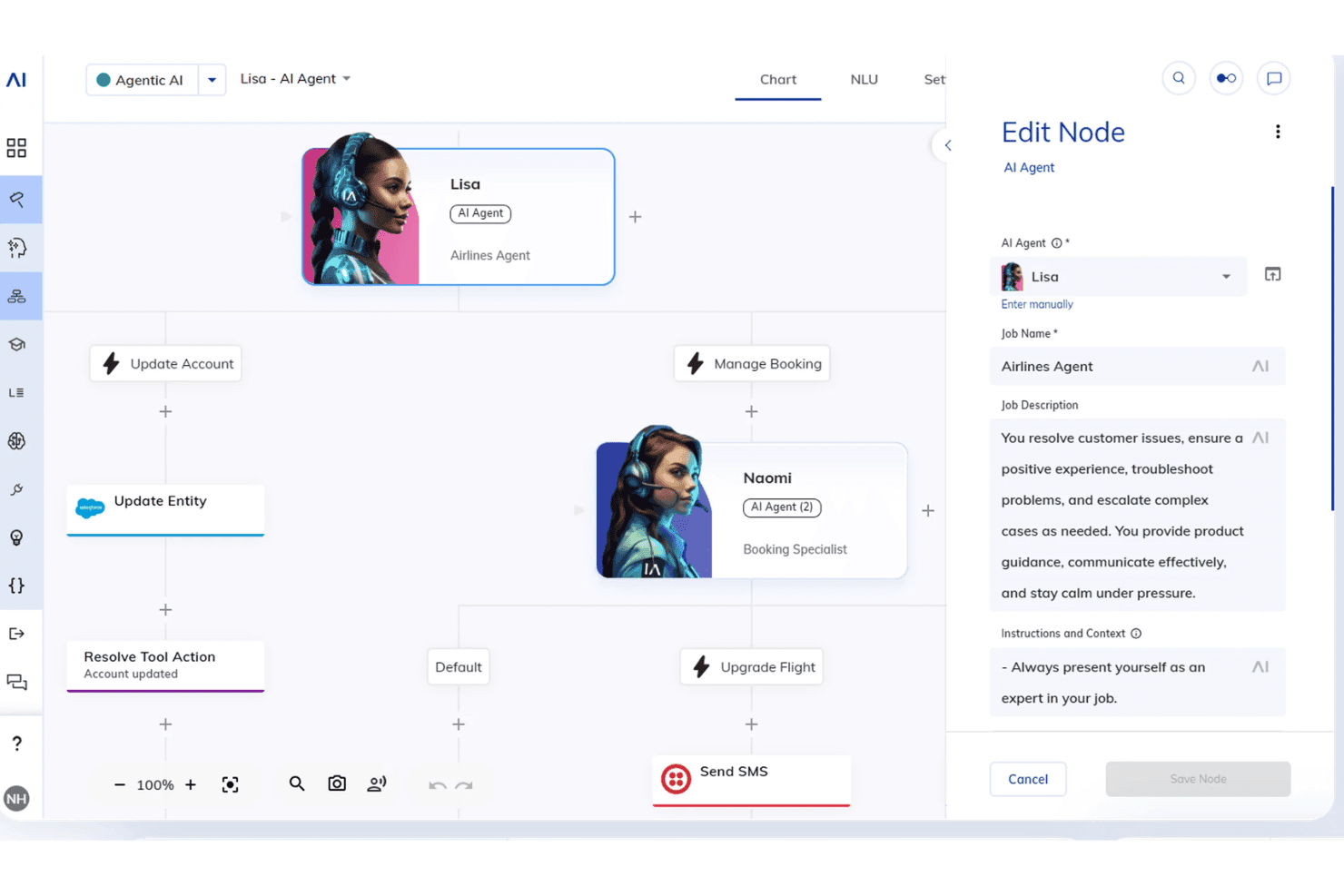
NICE Cognigy.AI lets users build AI agent workflows visually. NiCE Cognigy.AI is an enterprise AI agent platform built for contact center deployments, combining a low-code visual agent builder, multi-LLM orchestration, native RAG, and multi-agent coordination across voice and digital channels.
Who Is NiCE Cognigy.AI Best For?
NiCE Cognigy.AI is built for large enterprises in regulated industries that need to deploy AI agents across high-volume customer service and contact center operations.
Why I Picked NiCE Cognigy.AI
NiCE Cognigy.AI earns its spot on my shortlist because no other platform I've tested handles enterprise CX agent deployments at the scale Cognigy does—Lufthansa runs 16 million AI interactions annually through it, and DHL has automated over 30 million service interactions. I particularly like the Composite AI architecture, which blends autonomous LLM reasoning with deterministic rule-based flows inside a single agent conversation, so compliance-critical steps never get handed off to uncontrolled agentic behaviour. The AI Ops Center adds real-time observability across LLM latency, NLU scoring, and Knowledge AI query performance, with automatic failover to secondary models when primary ones hit outages or rate limits.
NiCE Cognigy.AI Key Features
- Multi-LLM routing: Assign different LLMs per agent task, with one-click model switching and automatic failover to secondary models during outages or rate-limit events.
- Knowledge AI (native RAG): Ingest PDFs, FAQs, internal wikis, and web content via vector search to deliver generative answers grounded in verified enterprise knowledge sources.
- MCP client and server support: Connect to external MCP-exposed tools as a client and expose Cognigy workflows as MCP tools to external AI systems like Claude and ChatGPT.
- Agent Copilot: Provide live AI assistance to human agents on voice and chat channels, including real-time coaching, automated wrap-ups, and instant knowledge retrieval during live interactions.
NiCE Cognigy.AI Integrations
NiCE Cognigy.AI offers native integrations with OpenAI, Anthropic, Google Gemini, AWS Bedrock, Azure OpenAI, Mistral AI, Genesys, Confluence, and Salesforce. An API is available for custom integrations.
Pros and Cons
Pros:
- Real-time AI Ops Center for observability
- Authenticates enterprise users securely
- Routes tasks among specialized instances
Cons:
- Primarily built for contact center automation
- No self-serve pilot or SMB entry point
Learn more about NiCE Cognigy.AI: Best for graph-based multi-agent orchestration
- Free plan + free trial + free demo available
- From $39/user/month
Visit WebsiteCustomer Rating:4.4/5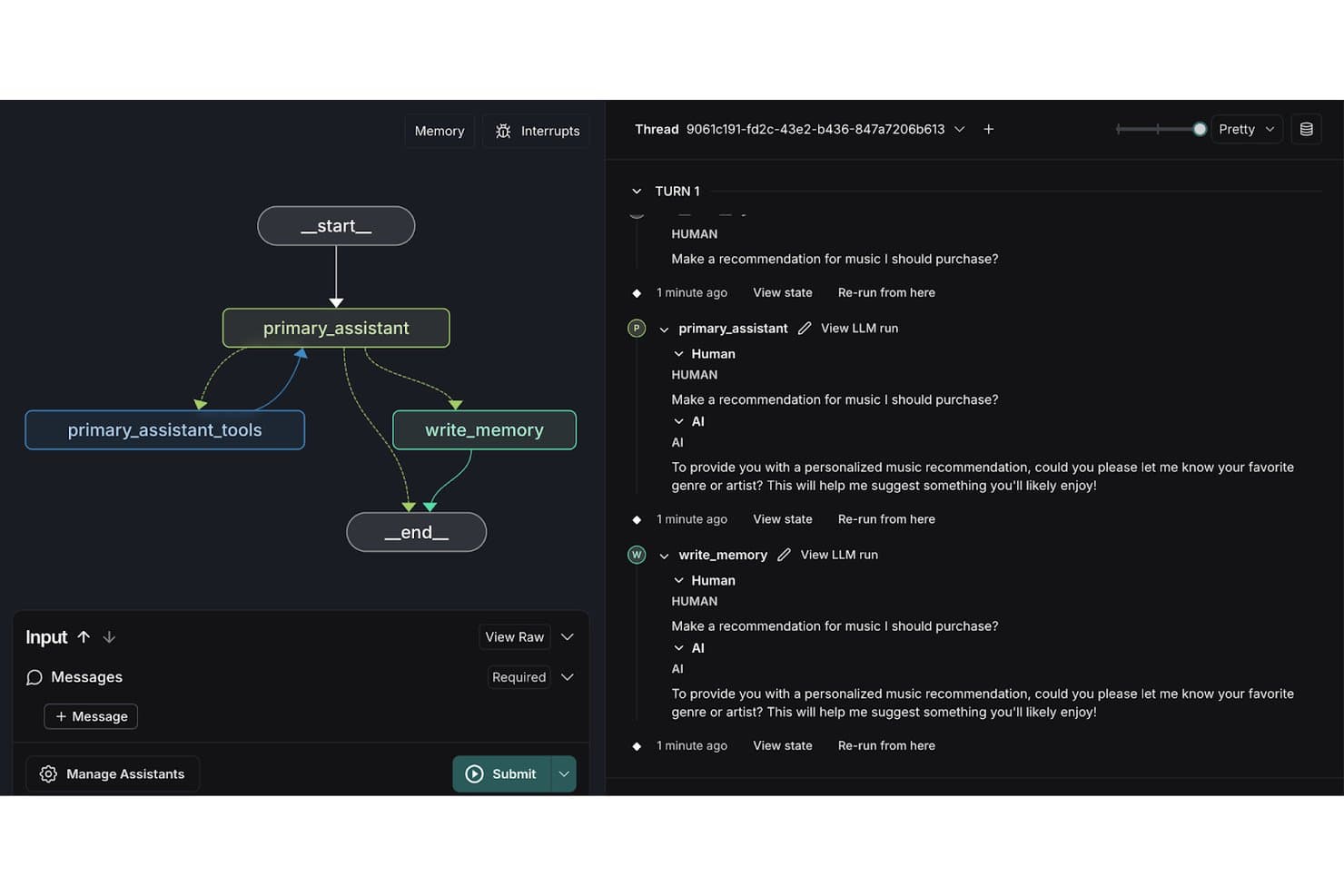
LangChain LangGraph visualizes agent workflows with memory and tool nodes. LangChain LangGraph is a graph-based AI agent framework that supports stateful, multi-step agent workflows, multi-agent orchestration, human-in-the-loop controls, and long-term memory management across Python and JavaScript/TypeScript environments.
Who Is LangChain LangGraph Best For?
LangChain LangGraph is a strong fit for engineering teams building complex, stateful AI agents that require fine-grained control over multi-step workflows and multi-agent coordination.
Why I Picked LangChain LangGraph
LangChain LangGraph earns its spot on my shortlist because its
StateGraphmodel gives you explicit, node-by-node control over how agents think, branch, retry, and loop—something linear chain-based frameworks simply can't replicate. I particularly like its supervisor/worker architecture for multi-agent orchestration, where a top-level agent decomposes tasks and delegates to specialized subagents running in parallel. Built-in checkpointing at every graph node means long-running agents can pause for human approval, resume after a failure, or rewind to any prior state for debugging.LangChain LangGraph Key Features
- LangSmith tracing: Captures distributed traces of every agent step, LLM call, and tool invocation so you can inspect exactly what happened inside a running agent.
- Human-in-the-loop interrupt gates: Pauses agent execution at defined graph nodes to request human approval or input before proceeding to the next step.
- Long-term memory store: Persists agent state and conversation context across sessions using a built-in memory store with semantic search support.
- LangGraph Studio: A visual IDE for inspecting, debugging, and iterating on agent execution graphs in real time during development.
LangChain LangGraph Integrations
LangChain LangGraph offers native integrations with OpenAI, Anthropic, Google Gemini, Mistral, Pinecone, Weaviate, Chroma, pgvector, PostgreSQL, and Redis. An API is available for custom integrations.
Pros and Cons
Pros:
- First-class human-in-the-loop interrupt gates
- Stores semantic historical interactions
- Fine-grained control over agent workflows
Cons:
- High scaling can trigger memory issues
- Predefined static graph state design is required
Learn more about LangChain LangGraph: Best for no-code multi-agent workforce builds
- Free demo available
- Pricing upon request
Visit WebsiteCustomer Rating:4.3/5
Relevance AI lets users build and manage AI agents from one dashboard. Relevance AI is an AI agent platform built around a visual multi-agent canvas, letting you design, deploy, and govern autonomous agent workforces with built-in LLM orchestration, a 2,700+ integration library, hybrid RAG memory, and a native eval and observability system.
Who Is Relevance AI Best For?
Relevance AI is a strong fit for operations and automation teams that need to deploy multi-agent workflows without writing infrastructure code from scratch.
Why I Picked Relevance AI
I picked Relevance AI as one of the best because the visual Workflows canvas lets you assemble entire multi-agent pipelines without writing a line of infrastructure code. You can connect specialist agents with defined handoffs, parallel execution streams, and built-in approval gates, all from a drag-and-drop interface. I also love that every agent ships with an auto-generated eval suite that scores live production runs and blocks failing versions from deploying.
Relevance AI Key Features
- Hybrid RAG memory: Connect agents to internal knowledge bases with semantic search, auto-syncing with Google Drive, SharePoint, Notion, and Confluence.
- Sandboxed code execution: Run Python and JavaScript natively within agent tool steps in an isolated sandbox environment.
- LLM routing: Route tasks across multiple providers—including Anthropic, OpenAI, and Google—with fallback models and per-task cost-optimized model selection.
- Human-in-the-loop approval gates: Pause agent execution at configurable checkpoints for human sign-off before high-stakes actions proceed.
Relevance AI Integrations
Relevance AI offers native integrations with Salesforce, HubSpot, Slack, Google Drive, SharePoint, Notion, Confluence, GitHub, Snowflake, and DataDog. An API is available for custom integrations.
Pros and Cons
Pros:
- Embeds secure script execution spaces
- Integrated evaluation gates and agent versioning
- Visual workforce canvas for multi-agent workflows
Cons:
- No self-hosted or on-premises deployment option
- GTM and sales templates dominate use cases
Learn more about Relevance AI: Best for Python-native multi-agent collaboration
- Free plan + free trial available
- Pricing upon request
Visit WebsiteCustomer Rating:4.2/5
CrewAI lets users build AI automations from natural language descriptions. CrewAI is a Python-native AI agent platform that lets you build, orchestrate, and deploy multi-agent systems using a code-first SDK, a visual studio editor, and a suite of tools for memory management, LLM routing, and workflow automation.
Who Is CrewAI Best For?
CrewAI is a strong fit for engineering teams that need to build and govern multi-agent AI systems in Python, particularly in organizations with compliance or security requirements.
Why I Picked CrewAI
I picked CrewAI as one of the best because it's built Python-first, which means agent definitions, tool bindings, and orchestration logic all live in code your team already versions and reviews. I especially like how it separates Crews (autonomous, role-based agents that delegate tasks between themselves) from Flows (deterministic, event-driven pipelines with conditional branching and typed state), letting you blend both patterns in a single runtime depending on how much autonomy a given workflow needs.
CrewAI Key Features
- LLM routing per agent: Assign a different LLM to each agent in a crew, including a separate model dedicated specifically to tool/function calls.
- Human-in-the-loop gates: The
@human_feedbackdecorator pauses flow execution at defined checkpoints so a human can review, override, or approve before the next step runs. - Enterprise connector repository: Pre-built connectors for Salesforce, Jira, Snowflake, Microsoft 365, Google Workspace, Slack, and Zendesk pipe real system data directly into agent workflows.
- PII redaction at runtime: A governance hook automatically strips personally identifiable information at every LLM and tool call before data leaves your environment.
CrewAI Integrations
CrewAI offers native integrations with Salesforce, HubSpot, Snowflake, Jira, Zendesk, Slack, Gmail, Microsoft 365, Teams, and Google Workspace. An API is available for custom integrations.
Pros and Cons
Pros:
- Per-agent LLM assignment for advanced orchestration
- Hierarchical memory structure with composite scoring
- Native Python SDK with code and visual builder
Cons:
- Complex automation setup requires strong Python skills
- Consumes high local memory
Learn more about CrewAI: Best for Microsoft-native multi-agent deployments
- 30-day free trial available
- From $0.165 per 1M input tokens

Microsoft Foundry lets users build multi-agent sequential workflows visually. Microsoft Foundry is an AI agent platform built on Azure that lets you build, deploy, and orchestrate agents using a 10,000+ model catalogue, multi-agent workflows, and native integrations across the Microsoft ecosystem.
Who Is Microsoft Foundry Best For?
Microsoft Foundry is the right fit for enterprise IT and engineering teams already running on Azure who need to build and orchestrate multi-agent AI workflows across the Microsoft ecosystem.
Why I Picked Microsoft Foundry
Microsoft Foundry earns its spot on my shortlist because of how deeply it's wired into the Azure ecosystem for multi-agent deployments. I love that Connected Agents lets one agent call another as a specialized sub-agent, so you can decompose something like an IT incident response workflow into discrete agents handling detection, diagnosis, and remediation in parallel. The Agent Harness adds planning and to-do tracking on top of that, keeping long-running autonomous runs on course without constant human intervention.
Microsoft Foundry Key Features
- Model benchmark leaderboard: Compare 10,000+ models side by side on quality, latency, throughput, and cost before committing to a deployment.
- PyRIT red teaming: Run automated adversarial simulations against your agents to surface safety and security vulnerabilities before going to production.
- Provisioned Throughput Units (PTUs): Reserve dedicated model processing capacity on a monthly or annual basis for predictable latency on high-volume workloads.
- Per-agent Entra identity: Each hosted agent is automatically assigned its own Microsoft Entra identity, giving you granular access control at the individual agent level.
Microsoft Foundry Integrations
Microsoft Foundry offers native integrations with Microsoft 365, Teams, SharePoint, Fabric, Entra, Cosmos DB, Key Vault, Azure Functions, and GitHub. An API is available for custom integrations.
Pros and Cons
Pros:
- Per-agent Entra identity enables granular access
- MSC/LLM model benchmark leaderboard built in
- Integrated multi-agent orchestration with A2A protocol
Cons:
- Needs proprietary cloud infrastructure
- No built-in disaster recovery for agent state
Learn more about Microsoft Foundry: Best for multi-agent orchestration on Google Cloud
- Free demo available
- Pricing upon request
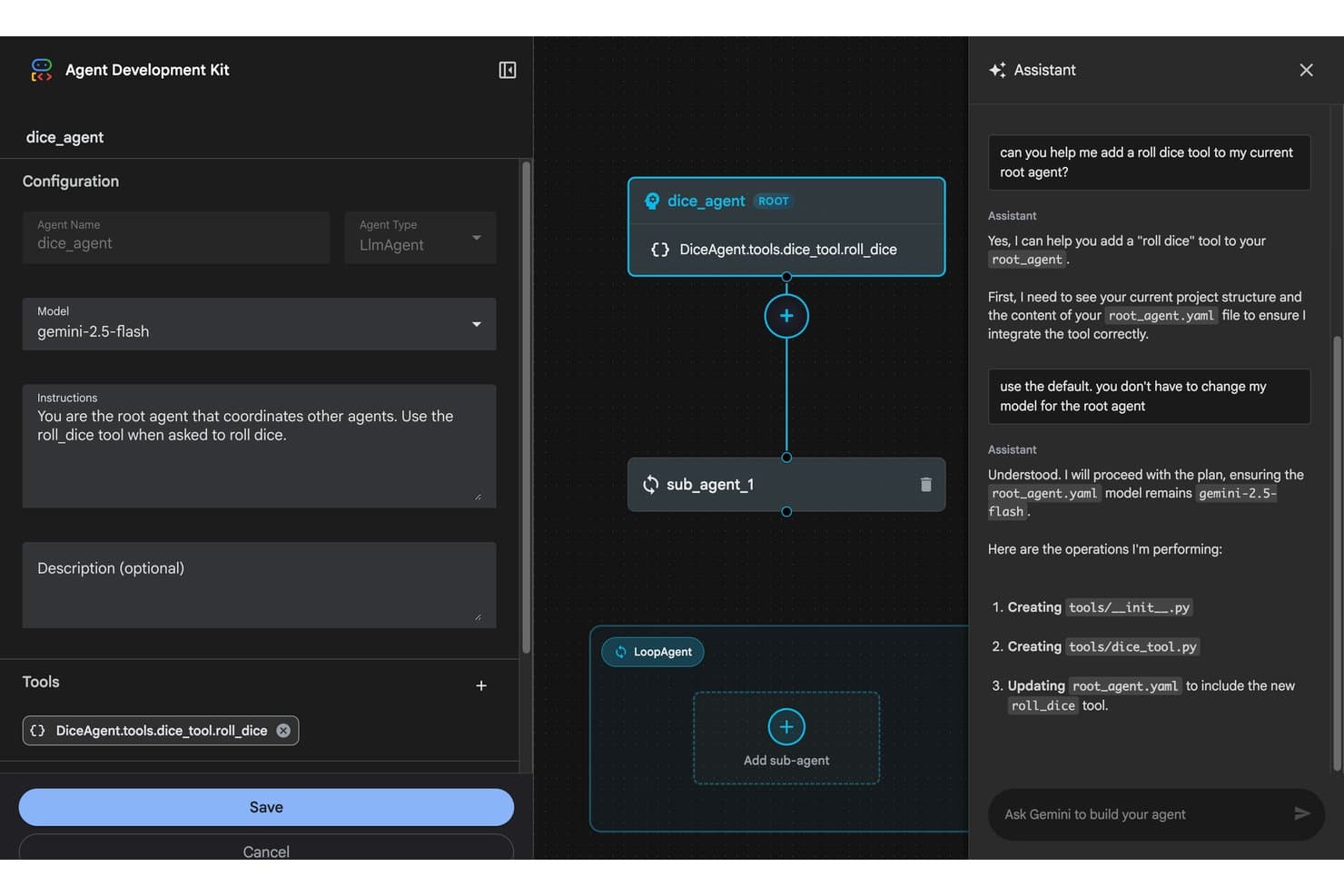
Agent Development Kit (ADK) lets users build agents visually with AI chat assistance. Google ADK is an open-source, code-first AI agent framework with multi-language SDKs (Python, TypeScript, Go, Java, and Kotlin) for building, evaluating, and deploying single agents, multi-agent pipelines, and graph-based workflows with built-in support for MCP, A2A protocol, and sandboxed code execution.
Who Is Agent Development Kit (ADK) Best For?
ADK is a strong fit for engineering teams already running infrastructure on Google Cloud who need to build and orchestrate production-grade multi-agent systems at scale.
Why I Picked Agent Development Kit (ADK)
ADK earns its spot on my shortlist because of how naturally it handles multi-agent orchestration on Google Cloud infrastructure. I love that ADK 2.0 introduced graph-based and collaborative workflow patterns, where a coordinator agent dynamically delegates tasks to specialized sub-agents, letting teams decompose complex IT and DevOps pipelines across purpose-built agents. Per-agent model assignment means each sub-agent runs the right model for its task, and native A2A protocol support lets those agents talk across frameworks without custom plumbing.
Agent Development Kit (ADK) Key Features
- Multi-language SDK support: Build agents in Python, TypeScript, Go, Java, or Kotlin using consistent APIs across all five languages.
- ADK Eval framework: Run test files, evalset, and conformance evaluations with LLM-as-judge scoring, hallucination detection, and automated user simulation for production agent reliability testing.
- Human-in-the-loop controls: Pause and resume agent execution mid-workflow using
RequestedInputevents and tool confirmation flows before high-risk actions execute. - Sandboxed code execution: Run agent-generated code and shell commands in isolated server-side sandboxes via the Code Execution Tool, Daytona integration, or Bash Tool.
Agent Development Kit (ADK) Integrations
Agent Development Kit offers native integrations with Gemini, Claude, BigQuery, Firestore, Datadog, Jira, Confluence, Cloud Run, and GKE. An API is available for custom integrations.
Pros and Cons
Pros:
- Native support for open agent communication protocols
- Interprets local shell commands safely
- Multi-language SDKs for Python, Go, Java, TypeScript, Kotlin
Cons:
- Most production deployments remain Google Cloud-only
- State management in multi-turn agents is complex
Learn more about Agent Development Kit (ADK):
Other AI Agent Platforms
Here are some additional AI agent platform options that didn’t make it onto my shortlist, but are still worth checking out:
- 11Amazon Bedrock AgentCoreBest for AWS-native multi-agent deployments
- 12DataikuBest for governing agents across the enterprise
- 13RasaBest for self-hosted conversational agents
- 14WriterBest for enterprise knowledge-work agent governance
- 15AgentforceBest for Salesforce-native enterprise agent deployment
- 16Microsoft Copilot StudioBest for Microsoft 365-native multi-agent workflows
- 17Botpress StudioBest for visual and code-based multi-agent builds
- 18VellumBest for version-controlled agent evaluation
- 19Sema4.aiBest for back-office agents on Snowflake data
- 20MastraBest for TypeScript-native multi-agent workflows
Related Reviews
How I Evaluate AI Agent Platforms
To make this list, a platform has to deliver real, measurable AI value—whether that means autonomously resolving IT incidents, orchestrating multi-step DevOps workflows, or coordinating specialized agents across business functions. I split my evaluation into two layers: core functionality every platform must meet to qualify, and the differentiating factors that separate the best from the rest.
Core Functionality (Table Stakes For This List)
When I'm selecting tools for my list, I rank each one on a scale from 0 (does not offer the functionality) to 5 (excels in this area) for each core functionality listed below. I then calculate the tool's total score as a percentage, using 75% as a benchmark to help assess its overall fit for the list.
- Agent building framework: I evaluate whether a platform offers SDK-based, visual, or hybrid agent design with support for defining roles, goals, and multi-agent hierarchies.
- LLM orchestration: I look for flexibility across model providers, including per-agent model routing and the ability to swap between proprietary and open-source LLMs at runtime.
- Tool and API integration: The connector ecosystem matters here—I check for native integrations, custom function calling, and secure auth handling for enterprise systems like databases and internal APIs.
- Memory and context management: I evaluate how each platform handles short-term and long-term memory, including RAG pipelines, vector store support, and shared context across agents.
- Multi-step reasoning and autonomy: Platforms need to go beyond simple prompt chains. I look for autonomous planning, self-correction loops, and the ability to handle long-running, multi-step tasks without constant human input.
- Agent observability and governance: I check for tracing, evaluation tooling, cost and token tracking, guardrails, and audit controls that let you monitor and govern agent behaviour in production.
Once I have a list of tools that meet the criteria, I consider what sets each platform apart.
Differentiating Factors (What Sets Vendors Apart)
Here's how I compare and contrast different vendors:
Standout Features
I look for human-in-the-loop controls that go beyond simple approval buttons—things like staged escalation workflows and intervention points before high-risk actions like production deployments or database writes. Prompt and agent versioning is equally important; I check whether a platform supports git-style rollback and A/B testing so teams can iterate safely. I also evaluate each platform's evaluation and simulation harness, since replaying production traces against golden datasets before shipping changes catches failures that unit tests miss.
Beyond Features
I evaluate each platform's deployment model and data residency options, since teams in regulated industries need self-hosted or VPC deployments where agent traces and LLM traffic stay within controlled boundaries. Pricing transparency matters just as much—autonomous agents can generate unpredictable compute costs, so I check for built-in token budgets and rate limits that prevent runaway loops in production. I also look at ecosystem maturity, including SDK quality, documentation depth, and community activity, because a platform with strong CI/CD integration and pre-built agent templates gets your team to production faster.
How to Choose an AI Agent Platform
When picking an AI agent platform, focus on your operational priorities and where agent automation will have the most impact for your business:
| If your priority is… | Look for… |
|---|---|
| If your priority is…Full agent observability and compliance | Look for…Tracing, audit logs, and versioning |
| If your priority is…Enterprise-wide agent governance | Look for…Centralized policy and access control |
| If your priority is…Cloud or on-prem data residency requirements | Look for…VPC/self-hosted deployment options |
| If your priority is…Multi-agent orchestration for IT workflows | Look for…Native connectors for ITSM, RPA, APIs |
| If your priority is…No-code adoption by business users | Look for…Drag-and-drop or workflow builders |
How to Vet Your Shortlist
- Test real-time agent tracing: Launch a workflow and review audit/trace artifacts for full agent reasoning and action logs.
- Request a security whitepaper: Ask for the latest documentation including data residency, third-party subprocessors, and LLM traffic flow.
- Trial agent evaluation features: Run a test suite against your own sample conversations or workflows and inspect evaluation harness capabilities.
- Check deployment options: Request a copy of the self-hosting or VPC setup instructions, or schedule a walkthrough within two weeks.
- Tradeoff—native stack integration vs. open ecosystem: Decide whether deep compatibility with existing cloud/RPA systems is more valuable than extensive SDKs and custom extension flexibility.
What Are AI Agent Platforms?
AI agent platforms are software systems that let you design, deploy, and manage teams of autonomous AI agents for automating and coordinating complex business processes. These platforms provide frameworks for building multi-agent workflows, connecting to APIs, and handling memory, context, and observability. Teams use them to maintain oversight, enforce governance, and safely scale AI-driven automation across their infrastructure and operations.
Features of AI Agent Platform
When selecting an AI agent platform, keep an eye out for the following key features:
- Agent building framework: Lets you create custom agents by defining their roles, behaviours, and interaction logic. Supports SDKs, visual builders, or hybrid approaches so you can design simple to complex agent teams suited to your needs.
- LLM orchestration: Provides tools for routing queries across different large language models, including support for model swaps at runtime. This allows you to optimize cost and accuracy and ensures your agents use the best language model for each scenario.
- API and tool integration: Offers built-in connectors and secure integration frameworks for connecting agents to databases, SaaS platforms, and internal systems. Enables your agents to take real actions, access business data, and trigger automations across your stack.
- Memory and context management: Supports both short-term and long-term context retention using vector databases, retrieval-augmented generation (RAG), or custom memory systems. This allows agents to hold ongoing conversations, reference past data, and improve decision-making over time.
- Multi-agent workflow orchestration: Lets you coordinate groups of agents to tackle multi-step tasks, delegate work, and share information. Useful for deploying agents that manage complex business processes or need to collaborate on larger projects.
- Observability and governance: Includes features like trace logs, audit trails, evaluation tools, and access controls. Gives you visibility into agent actions, enables compliance, and helps you monitor AI performance in production settings.
- Autonomous task planning: Equips agents with planning, self-correction, and iterative reasoning capabilities. Supports agents in tackling long-running or complex tasks without constant human prompts.
- Versioning and rollback: Enables you to track, test, and rollback changes to agent prompts, logic, or workflows—essential for safe updates, A/B testing, and compliance requirements.
- Deployment flexibility: Provides options for cloud, self-hosted, or VPC deployments. Critical for teams with data residency, security, or regulatory requirements that need full control over infrastructure and agent traffic.
- Evaluation and testing harness: Offers simulation tools, replay features, or golden dataset evaluations to stress-test agents before release. Helps you catch logic slips and ensure reliability before agents interact with live data or users.
Benefits of AI Agent Platforms
Implementing AI agent platforms provides several benefits for your team and your business. Here are a few you can look forward to:
- Enhanced automation across workflows: Coordinate multi-agent systems to automate complex business and IT processes, reducing manual tasks and human error.
- Improved observability and governance: Access features like audit trails, trace logs, and evaluation tools to monitor agent actions and maintain compliance with internal policies.
- Direct integration with enterprise systems: Connect agents to APIs, databases, and SaaS platforms using built-in connectors and secure authentication, allowing your agents to act on real business data.
- Flexible deployment and data residency: Choose between cloud, self-hosted, or virtual private cloud deployments to meet your organization’s security and regulatory requirements.
- Version control and rollback capabilities: Iterate safely with built-in prompt and workflow versioning so you can test, approve, and revert changes as needed.
- Human-in-the-loop control: Insert approval steps, escalations, or intervention points before high-risk actions, ensuring oversight when it matters most.
- Advanced memory and context management: Enable agents to retain short-term and long-term memory using vector stores or retrieval-augmented generation, making interactions more relevant and context-aware over time.
Costs and Pricing of AI Agent Platforms
Selecting AI agent platforms requires an understanding of the various pricing models and plans available. Costs vary based on features, team size, add-ons, and more. The table below summarizes common plans, their average prices, and typical features included in AI agent platform solutions:
Plan Comparison Table for AI Agent Platforms
| Plan Type | Average Price | Common Features |
|---|---|---|
| Plan TypeFree Plan | Average Price$0 | Common FeaturesBasic agent building tools, limited workflows, community support, and access to standard integrations. |
| Plan TypePersonal Plan | Average Price$20–$40/user/month | Common FeaturesVisual builders, single-agent deployment, workflow templates, customer support, and basic observability tools. |
| Plan TypeBusiness Plan | Average Price$50–$150/user/month | Common FeaturesMulti-agent orchestration, advanced connectors, memory and context management, versioning, and role-based access controls. |
| Plan TypeEnterprise Plan | Average Price$200+/user/month | Common FeaturesCustom deployment options, VPC or self-hosting, advanced governance, audit logs, SLAs, and dedicated onboarding support. |
AI Agent Platform FAQs
Here are some answers to common questions about AI agent platforms:
How do AI agent platforms handle security and compliance?
AI agent platforms typically offer data security features like audit logs, role-based access control, and data encryption. For teams with strict compliance needs, look for platforms with self-hosted or VPC deployment options and detailed documentation on data residency. It’s important to verify support for SOC 2, HIPAA, GDPR, or industry-specific standards if your business has regulatory requirements.
Can you integrate AI agent platforms with existing IT systems?
Yes, a good workflow automation platform gives you connectors or API frameworks to integrate your AI agents. You can tie agents into ITSM tools, RPA platforms, data sources, or SaaS apps. Some platforms have native integrations, while others let you build custom connections using function calling, code execution, or webhooks to power automated workflows. Always check for secure authentication and authorization methods.
What kind of deployment models do AI agent platforms support?
You’ll find options for cloud, self-hosted, and virtual private cloud (VPC) deployments. Cloud models provide the fastest time to value, but self-hosted and VPC deployments are better if you need strict network control for your AI models and LLMs. Request an open-source framework or whitepapers to make sure your infrastructure meets platform requirements.
How can teams evaluate agent performance before deploying to production?
Most leading platforms include evaluation harnesses, trace logs, and a visual editor for version control. You can test system prompts, run custom agents against test datasets, and use human-in-the-loop guardrails before going live. This lets you catch logic errors, assess accuracy, and test for reliability under real-world scenarios—crucial for production environments.
What are typical signs you need an AI agent platform versus traditional automation tools?
If your team needs agentic workflows, task delegation, and autonomous decision-making across complex multi-agent systems, an AI agent platform fits better than traditional automation tools. Platforms also help when you require memory, context handling, or observability that basic chatbots and traditional workflow automation can’t deliver.