

V-ați săturat să analizați munți de date fără a obține informații clare? Software-ul pentru mineritul proceselor ar putea fi răspunsul. Acesta vă ajută să identificați ineficiențele și blocajele din operațiunile dumneavoastră, economisind timp și resurse.
Din experiența mea în testarea și evaluarea software-ului, am constatat că instrumentele potrivite pot transforma modul în care echipa dumneavoastră abordează gestionarea proceselor. Vă voi prezenta cele mai bune soluții pentru mineritul proceselor, oferindu-vă informații imparțiale care să vă ajute să luați decizii în cunoștință de cauză.
Veți descoperi cum se pot potrivi aceste instrumente nevoilor dumneavoastră specifice, indiferent dacă lucrați într-un startup mic sau într-o întreprindere mare. Rămâneți alături de noi pentru o analiză aprofundată a funcțiilor, avantajelor și dezavantajelor, precum și a elementelor care diferențiază fiecare opțiune.
Why Trust Our Software Recommendations
6,700+
Reviews
20
Industry experts
16+
Evaluation factors
14
Years
Our team has been testing and reviewing software since 2012. As tech leaders ourselves, we know how difficult—and important—it is to choose the right software.
For this guide, we evaluated tools using hands-on testing and independent research, scoring tools using our selection criteria.
Our reviews reflect our human editorial judgment, not a sales pitch.
Expert reviewers:
- Paulo Gardini MiguelTech Director
 Tim FisherVP of AI
 Gabriel RosasTech Lead & Software Architect
 Christhian GruhnTech Lead & Platform Architect

Tabel comparativ al software-ului pentru mineritul proceselor
Acest tabel comparativ prezintă pe scurt detaliile privind prețurile pentru selecția mea de software de top pentru mineritul proceselor:
Sorted by: Default
| Tool | Starting Price | Website | |
|---|---|---|---|
Best for automation opportunity discovery | 5.0 out of 5 | Pricing upon request Free demo available | Website |
Best for harmonizing RPA and process mining | 4.6 out of 5 | $25/month Free plan available | Website |
Best for AI-driven process insights | 4.5 out of 5 | Pricing upon request Free demo | Website |
Best for connecting operations to customer experiences | 4.3 out of 5 | Pricing upon request Free trial + demo available | Website |
Best for root cause analysis | 4.5 out of 5 | Pricing upon request Free demo available | Website |
Best for integrating financial insights | Not rated | Pricing upon request | Website |
Best for scalability and enterprise integration | Not rated | $150/user/month | Website |
Best for combining RPA with process analytics | Not rated | $750/user/month | Website |
Best for real-time process performance | Not rated | $120/user/month | Website |
Best for rapid process discovery | Not rated | $99/user/month | Website |


Recenzii ale celui mai bun software pentru mineritul proceselor
Mai jos sunt prezentările mele detaliate ale celui mai bun software pentru mineritul proceselor care a ajuns pe lista mea scurtă. Recenziile mele oferă o analiză detaliată a funcțiilor principale, avantajelor și dezavantajelor, integrărilor și cazurilor de utilizare ideale pentru fiecare instrument, pentru a vă ajuta să îl găsiți pe cel mai potrivit pentru dumneavoastră.
 Best for automation opportunity discovery
- Free demo available
- Pricing upon request
Visit WebsiteCustomer Rating:5/5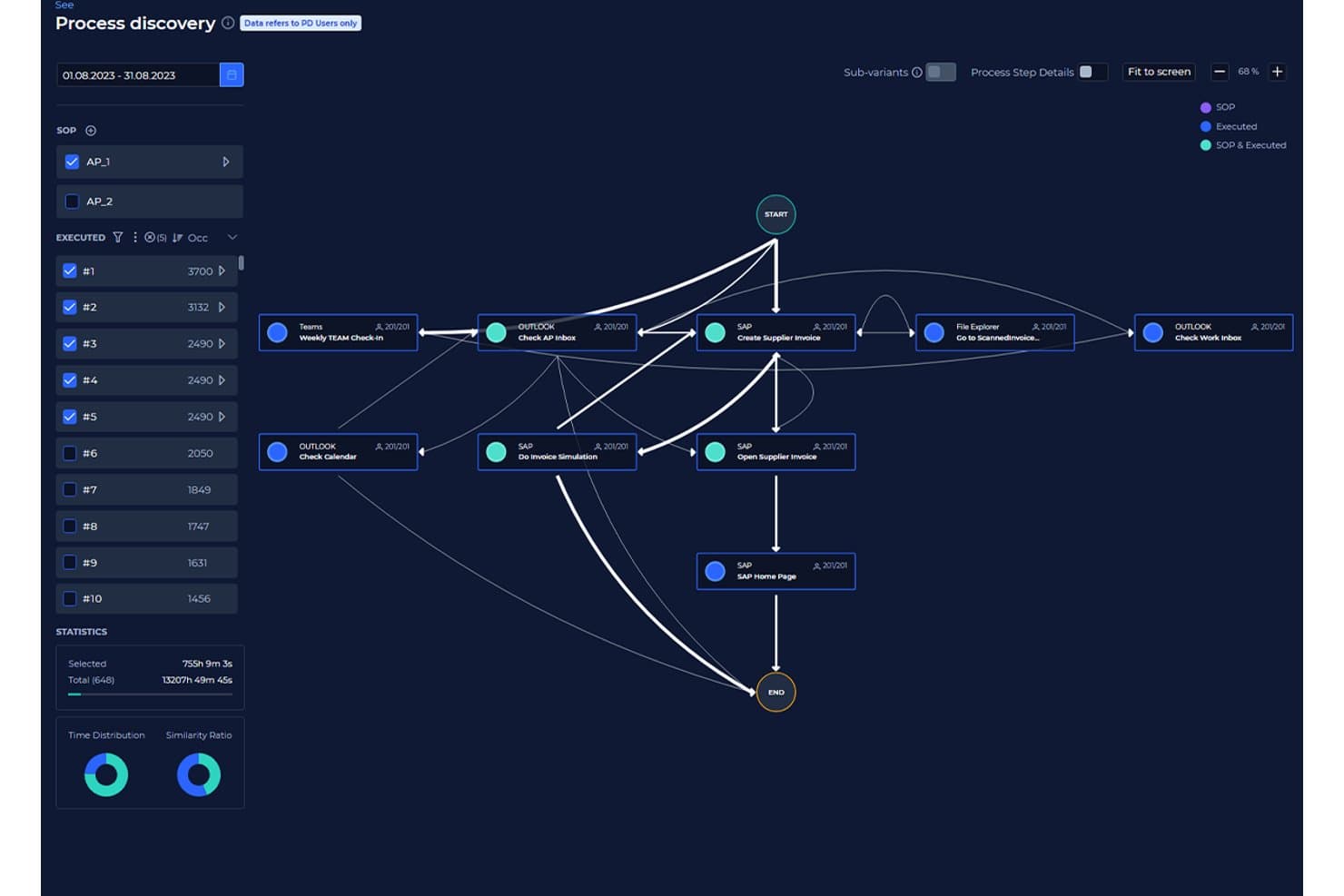
KYP.ai visualizes process flows to uncover execution patterns. KYP.ai is a process intelligence platform that captures desktop-level activity across applications and systems to reconstruct process flows, identify inefficiencies, and generate production-ready automation code—without relying on traditional event log extraction.
Who Is KYP.ai Best For?
KYP.ai is a strong fit for operations and automation teams in BPO, business services, and BFSI enterprises that need to identify and prioritize automation opportunities across desktop workflows.
Why I Picked KYP.ai
I picked KYP.ai because it surfaces automation opportunities that traditional process mining tools miss entirely. Most event-log-based tools can't see what happens in spreadsheets, email threads, or manual handoffs between systems, but KYP.ai captures all of it at the desktop level. I especially like that it doesn't just identify inefficiencies—it calculates automation ROI by task type and then generates production-ready agent code for platforms like UiPath and Copilot Studio, so there's no gap between discovery and execution.
KYP.ai Key Features
- 360° enterprise view: Aggregates real-time data from desktops, applications, and systems for a unified view of organizational activity.
- Conformance and compliance tracking: Captures regulatory steps and automatically flags deviations from company standards or SLAs.
- Performance analytics dashboard: Provides task durations, workload distributions, and bottleneck reports with interactive filtering options.
- Integration database: Combines data from enterprise systems, BI tools, and workforce platforms for enhanced process visibility.
KYP.ai Integrations
KYP.ai offers integrations through its API and Integration Database, allowing you to connect with platforms like PowerBI, UiPath, SAP Joule, and Copilot Studio. An API is available for custom integrations.
Pros and Cons
Pros:
- Built-in ROI quantification per process and task
- Auto-generates deployment-ready automation code
- Captures desktop activity traditional log mining misses
Cons:
- Minimal public user reviews for peer benchmarking
- No pre-built ITSM or ServiceNow connectors
Learn more about KYP.ai: Best for harmonizing RPA and process mining
- Free plan available
- From $25/month
Visit WebsiteCustomer Rating:4.6/5
UiPath Process Mining Software drag-and-drop feature UiPath excels in its commitment to bringing RPA (Robotic Process Automation) and process mining together under one platform. This harmonization ensures organizations can automate tasks while simultaneously gaining insights into their processes.
Why I Picked UiPath: UiPath came to my attention due to its unique blend of RPA and process mining. In weighing the offerings of multiple tools, I determined that UiPath provided a harmonious blend not commonly found elsewhere. It's this synchronization of automation and insights that convinced me it's "best for harmonizing RPA and process mining."
Standout Features & Integrations:
Central to UiPath's offering is its Orchestrator, a platform that coordinates software robots ensuring they're deployed where most needed. Additionally, the UiPath Studio empowers users to craft custom workflows. Integration-wise, UiPath offers compatibility with a wide array of applications, including SAP, Oracle, and Salesforce.
Pros and Cons
Pros:
- Custom workflow creation with UiPath Studio
- Orchestrator platform for efficient bot deployment
- A unique fusion of RPA and process mining
Cons:
- Licensing model can be complex for some users
- Might be overkill for small-scale operations
- The steeper learning curve for those new to RPA
Learn more about UiPath:

Celonis process mining software benchmarking capabilities Celonis stands as a beacon for organizations leaning into the future, harnessing the power of AI to derive deep insights from their processes. The AI core of Celonis sets it apart, driving smarter process decisions and forward-thinking strategies.
Why I Picked Celonis: The decision to include Celonis stemmed from its strong AI-driven analytics. Among the myriad of tools available, Celonis particularly stood out due to its AI core, which I believe is pivotal for future-ready businesses. It’s this AI-centric approach that led me to deem it "best for AI-driven process insights."
Standout Features & Integrations:
At the heart of Celonis is its AI engine that powers deep process insights, pushing businesses to optimize at every turn. The platform also supports process simulations, enabling hypothetical scenario testing. On the integration front, Celonis is versatile, interfacing with a multitude of data sources from ERPs to CRMs.
Pros and Cons
Pros:
- Broad integration capabilities with diverse data sources
- Process simulation for strategic planning
- AI engine for deep, predictive insights
Cons:
- Priced on the higher side for smaller businesses
- Advanced features can be daunting to newcomers
- Might require a shift in mindset to fully harness AI benefits
Learn more about Celonis: 4Best for connecting operations to customer experiences
Pega
- Free trial + demo available
- Pricing upon request
Visit WebsiteCustomer Rating:4.3/5
Pega's App Studio process mining software people hub feature Pega Platform stands out not just as a process mining tool but as a holistic platform connecting operational processes to customer experiences. When the goal is to see how backend operations impact front-end customer interactions, Pega is the go-to choice.
Why I Picked the Pega Platform: My selection of Pega was influenced by its unique approach to blending operational processes with customer experience. Unlike many other tools, Pega offers a bridge between back-end operations and front-end customer touchpoints. This dual focus led me to choose it as "best for connecting operations to customer experiences."
Standout Features & Integrations:
Pega connects BPM, case management, and real-time analytics. This trio ensures that businesses can tweak processes based on customer feedback in real-time. As for integrations, Pega has built-in connectors for leading CRM, ERP, and data warehousing tools.
Pros and Cons
Pros:
- Built-in connectors for leading business tools
- Real-time analytics for quick decision-making
- Synchronous view of operations and customer experience
Cons:
- Requires dedicated training to maximize its potential
- Can be overwhelming with its myriad of features
- Higher price point compared to some competitors
Learn more about Pega : Best for root cause analysis
- Free demo available
- Pricing upon request
Visit WebsiteCustomer Rating:4.5/5
market-leading dashboard of QPR ProcessAnalyzer process mining software QPR ProcessAnalyzer stands as a tool that doesn’t just showcase processes but delves deep into the 'why' behind process behaviors. For organizations that aim to understand the root causes of process variations, QPR offers invaluable insights.
Why I Picked QPR ProcessAnalyzer: In comparing tools, QPR ProcessAnalyzer's prowess in root cause analysis became evident. Many tools can showcase 'what' is happening, but few can consistently identify 'why' it's happening. It was this strength in root cause determination that made me label it as "best for root cause analysis."
Standout Features & Integrations:
The tool is equipped with advanced diagnostic tools, making root cause analysis precise. It also supports AI-based predictions for process outcomes. When it comes to integrations, QPR easily syncs with most major ERPs and data warehouses.
Pros and Cons
Pros:
- Efficient integration with major ERPs
- AI-based predictions for enhanced Foresight
- Precision in root cause analysis
Cons:
- Some features might be redundant for smaller setups
- AI predictions require clean datasets for accuracy
- Might be a learning curve for non-technical users
Learn more about QPR ProcessAnalyzer:

PwC's effort mining reports and dashboard PwC's process mining solution is more than just a visualization tool; it bridges the gap between processes and financial insights. This melding of process data with financial analytics makes PwC unparalleled when it comes to financial-centric process mining.
Why I Picked PwC: In my comparative analysis, I noticed a gap: few tools effectively connect process mining with financial insights. PwC filled this void perfectly. I chose PwC as "best for integrating financial insights" due to its prowess in merging process data with financial metrics, offering a holistic view of business operations.
Standout Features & Integrations:
PwC boasts features that connect operational processes directly with financial performance indicators. Additionally, it has risk assessment tools that tie financial risks to processes. As for integrations, PwC's tool integrates with most enterprise financial systems and ERPs.
Pros and Cons
Pros:
- Broad compatibility with financial systems
- Risk assessment features tied to financial metrics
- Deep integration of process data with financial insights
Cons:
- The pricing model might be on the higher side for some
- The interface can be intricate for first-timers
- It might be overkill for smaller businesses
Learn more about PwC: Best for scalability and enterprise integration
- From $150/user/month (min 10 seats)

IBM process mining software process discovery dashboard IBM Process Mining offers businesses a robust solution to analyze, monitor, and optimize their operations. Tailored for larger enterprises, this tool stands out for its scalability and deep integration capabilities.
Why I Picked IBM Process Mining:
When selecting tools, the scalability and integration capabilities of IBM Process Mining caught my eye. Given IBM's longstanding reputation in the enterprise space, it's no surprise that they have a tool designed with scalability at its core.
It's this focus on large-scale operations and enterprise compatibility that led me to believe it's "best for scalability and enterprise integration."
Standout Features & Integrations:
IBM's tool provides a comprehensive view of business operations, offering metrics-driven insights. It also includes a simulation feature, allowing for hypothetical scenario analyses. The platform integrates with IBM's vast ecosystem but also offers connectors to other enterprise-grade software solutions.
Pros and Cons
Pros:
- Extensive integration capabilities with enterprise software
- Metrics-driven insights for data-driven decisions
- Designed with large enterprises in mind
Cons:
- The cost might be prohibitive for some organizations
- Requires a deep understanding to utilize its full potential
- It might be overwhelming for small businesses
Learn more about IBM Process Mining: Best for combining RPA with process analytics
- From $750/user/month (billed annually)

Automation Anywhere's bot insights dashboard Automation Anywhere merges the realms of Robotic Process Automation (RPA) with the analytical dimension, presenting a holistic tool for businesses looking to automate and analyze simultaneously. Its dual capability serves organizations that prioritize both automation and insights derived from their processes.
Why I Picked Automation Anywhere: When deliberating on tools with the potential to not only automate but also offer process insights, Automation Anywhere rose to the top of my list. Most tools specialize in one or the other, but Automation Anywhere successfully combines both, which is a rare find. Based on this integrated approach, I tagged it as "best for combining RPA with process analytics."
Standout Features & Integrations:
The tool's strength resides in its Bot Insight feature, which presents real-time analytics directly from the bots. Additionally, the platform's IQ Bot employs AI to learn from human users and makes decisions based on that learning. Integration-wise, Automation Anywhere interfaces smoothly with most enterprise software, from ERPs to CRMs.
Pros and Cons
Pros:
- Adaptive AI learning with IQ Bot
- Real-time insights through the Bot Insight feature
- Dual capability of RPA and process analytics
Cons:
- Comprehensive features might be overwhelming
- High price point for small businesses
- The steeper learning curve for beginners
Learn more about Automation Anywhere - RPA | Robotic Process Automation:

ARIS process mining software process model overlay feature ARIS Process Mining delves into processes, uncovering inefficiencies and offering real-time visibility into how processes are performing. Its commitment to real-time insights ensures organizations always have an up-to-date view of their operations.
Why I Picked ARIS Process Mining: I chose ARIS for its undeniable emphasis on real-time process analytics. In my opinion, having immediate visibility into processes is invaluable. Thus, seeing ARIS’s dedication to offering real-time insights, I felt it deserved the label "best for real-time process performance."
Standout Features & Integrations:
ARIS emphasizes real-time process discovery, allowing businesses to understand and adapt processes on the fly. Its conformance checking ensures processes adhere to predefined models. Regarding integrations, ARIS connects efficiently with major ERP systems and various other data sources.
Pros and Cons
Pros:
- Efficient integration with leading ERP systems
- Conformance checking against set models
- Immediate visibility into process performance
Cons:
- Some features might be excessive for simpler operations
- May be complex for non-technical users
- Requires proper training for full utility
Learn more about ARIS Process Mining: Best for rapid process discovery
- From $99/user/month (billed annually)

Disco's sandbox dashboard Disco by Fluxicon is an agile tool designed to dive swiftly into your data and showcase processes with minimal setup time. Its speed and efficiency make it the prime choice for organizations aiming for rapid process discovery.
Why I Picked Disco by Fluxicon: When deliberating over which tool would serve businesses looking for quick results, Disco stood out. Its efficiency in dissecting large datasets quickly without compromising on accuracy was remarkable. I labeled it "best for rapid process discovery" as its nimbleness allows businesses to get actionable insights in record time.
Standout Features & Integrations:
Disco shines with its speed, capable of analyzing vast datasets in moments. Its visualization tools are intuitive, making the interpretation straightforward. For integrations, Disco supports a variety of data formats and connects effortlessly with major ERPs and IT systems.
Pros and Cons
Pros:
- Supports multiple data formats for ease of integration
- Intuitive visualization tools for quick interpretation
- Exceptional speed in process data analysis
Cons:
- Annual billing might not be preferable for all organizations
- Pricing can be a barrier for smaller businesses
- Lacks some of the deeper analytics tools of competitors
Learn more about Disco by Fluxicon:
Alte soluții software pentru mineritul proceselor
Iată câteva opțiuni suplimentare de software pentru mineritul proceselor care nu au ajuns pe lista mea scurtă, dar care merită totuși analizate:
- 11iGrafx Process Explorer 360Best for comprehensive process visualization
- 12ApromoreBest for open-source process analytics
- 13AppianGood for rapid application development
- 14NintexGood for drag-and-drop workflow design
- 15Process StreetGood for checklist-driven workflows
- 16SAP SignavioGood for collaborative process design
- 17Kofax TotalAgilityGood for bridging process management and automation
- 18Scout PlatformGood for automating process discovery
- 19Kofax InsightGood for visual business intelligence analytics
- 20UpFlux Process MiningGood for optimizing cycle times
- 21mpmXGood for performance-driven process insights
- 22SilicoGood for predictive process analytics
How I Evaluate Process Mining Software
I split my evaluation into baseline criteria—like whether a tool can ingest SAP or ServiceNow event logs—and differentiators that separate the best options from the rest.
Core Functionality (Table Stakes For This List)
When I'm selecting tools for my list, I rank each one on a scale from 0 (does not offer the functionality) to 5 (excels in this area) for each core functionality listed below. Then, I calculate the tool's total score into a percentage. Each tool needs to achieve a minimum total score of 65% to be considered for inclusion.
- Event Log Ingestion: I look at what source formats and systems each tool can pull event data from—like importing ticket lifecycle logs from ServiceNow or order-to-cash records from SAP.
- Automated Process Discovery: Each tool should generate visual process maps directly from raw logs, so I evaluate how well it reconstructs real execution paths without manual modeling.
- Conformance Checking: I check whether the tool can overlay discovered processes against a reference model and flag deviations, such as skipped approvals in a change management workflow.
- Performance Analytics: Dashboards should surface KPIs like cycle times, bottleneck locations, and throughput across process variants—not just static case counts.
- Root Cause & Variant Analysis: Drilling into why certain incident tickets take three times longer matters, so I evaluate how each tool lets you filter variants and isolate contributing factors.
- System Integrations & Connectors: I look for pre-built connectors to the enterprise systems IT teams rely on—SAP, Oracle, Salesforce, Jira, ServiceNow—and whether open APIs support custom sources.
Once I have a list of tools that meet this criteria, I consider what sets each platform apart.
Differentiating Factors (What Sets Vendors Apart)
Here's how I compare and contrast different vendors:
Standout Features
Task mining is a big differentiator—I look for tools that capture desktop-level user interactions to fill gaps that system logs miss, like manual data entry between two disconnected apps. Process simulation matters too, because modeling a proposed change before rolling it out to production beats guessing. I also evaluate how well a platform hands off insights to automation tools like UiPath or Power Automate, since discovering a bottleneck is only useful if you can act on it.
Beyond Features
Security and compliance certifications like SOC 2 and ISO 27001 matter when your process data includes sensitive ITSM records or customer information—I check what each vendor offers for data masking and role-based access. Implementation speed is another factor I weigh, especially whether a platform includes pre-built accelerators for common IT workflows like incident management. I also consider deployment flexibility, since some organizations need on-premise options to meet internal data residency policies.
Cum să alegeți software-ul pentru mineritul proceselor
Este ușor să vă pierdeți în liste lungi de funcții și structuri complexe de prețuri. Pentru a vă ajuta să rămâneți concentrat în timp ce parcurgeți procesul unic de selectare a software-ului, iată o listă de verificare a factorilor de care trebuie să țineți cont:
| Factor | Ce trebuie luat în considerare |
|---|---|
| FactorScalabilitate | Ce trebuie luat în considerareVa crește software-ul odată cu afacerea dumneavoastră? Verificați dacă poate gestiona un volum mai mare de date și un număr crescut de utilizatori fără probleme de performanță. |
| FactorIntegrări | Ce trebuie luat în considerareSe conectează la sistemele dumneavoastră existente? Căutați o integrare simplă cu instrumente precum ERP, CRM și baze de date. |
| FactorPosibilitatea de personalizare | Ce trebuie luat în considerareÎl puteți adapta la procesele dumneavoastră? Asigurați-vă că software-ul permite ajustarea fluxurilor de lucru pentru a corespunde nevoilor dumneavoastră. |
| FactorUșurința de utilizare | Ce trebuie luat în considerareEste ușor de folosit de către echipa dumneavoastră? Luați în considerare curba de învățare și dacă interfața este suficient de intuitivă pentru utilizarea zilnică. |
| FactorImplementare și integrare inițială | Ce trebuie luat în considerareCât timp va dura configurarea? Evaluați timpul și resursele necesare pentru implementare, inclusiv instruirea și asistența. |
| FactorCost | Ce trebuie luat în considerareSe încadrează în bugetul dumneavoastră? Comparați taxele de abonament și costurile suplimentare și verificați dacă este disponibilă o perioadă de testare gratuită sau o demonstrație. |
| FactorMăsuri de securitate | Ce trebuie luat în considerareDatele dumneavoastră sunt protejate? Căutați criptare, conformitate cu reglementările privind datele și certificări de securitate ale furnizorului. |
| FactorDisponibilitatea asistenței | Ce trebuie luat în considerareEste disponibil ajutorul atunci când aveți nevoie? Verificați existența asistenței non-stop, timpii de răspuns și calitatea opțiunilor de servicii pentru clienți disponibile. |
Ce este software-ul pentru mineritul proceselor?
Software-ul pentru mineritul proceselor este un instrument care analizează procesele de afaceri pentru a identifica ineficiențele și blocajele. Profesioniști precum analiștii de afaceri, managerii de procese și specialiștii IT folosesc de obicei aceste instrumente pentru a obține informații și a îmbunătăți operațiunile. Funcțiile de vizualizare a datelor, descoperire a proceselor și analiză a performanței ajută la înțelegerea fluxurilor de lucru și la optimizarea proceselor. În ansamblu, aceste instrumente oferă informații valoroase care conduc la operațiuni mai eficiente și mai rentabile.
Funcții
Atunci când selectați software pentru mineritul proceselor, urmăriți următoarele funcții esențiale:
- Descoperirea proceselor: Cartografiază automat procesele de afaceri pentru o înțelegere și o analiză mai bune.
- Verificarea conformității: Compară procesele actuale cu modelele dorite pentru a identifica abaterile.
- Analiza performanței: Evaluează eficiența și viteza proceselor pentru a localiza blocajele.
- Vizualizarea datelor: Oferă diagrame și grafice clare și interactive pentru a facilita înțelegerea datelor.
- Capacități de integrare: Se conectează fără probleme la sistemele de afaceri existente, precum ERP și CRM.
- Tablouri de bord personalizabile: Permit utilizatorilor să adapteze vizualizările și rapoartele pentru a răspunde nevoilor specifice ale afacerii.
- Analiză predictivă: Oferă prognoze și informații utile pentru anticiparea rezultatelor viitoare ale proceselor.
- Monitorizare în timp real: Oferă actualizări în timp real pentru urmărirea proceselor pe măsură ce se desfășoară, furnizând informații imediate.
- Informații bazate pe AI: Utilizează inteligența artificială pentru a oferi analize și recomandări mai aprofundate.
- Măsuri de securitate: Asigură protecția datelor prin criptare și conformitatea cu reglementările.
Beneficii
Implementarea unui software de minare a proceselor oferă mai multe beneficii echipei și afacerii dumneavoastră. Iată câteva dintre avantajele de care vă puteți bucura:
- Eficiență îmbunătățită: Identifică blocajele și ineficiențele, contribuind la accelerarea proceselor.
- Luarea unor decizii mai bune: Oferă informații și vizualizări ale datelor pentru a sprijini alegerile informate.
- Conformitate îmbunătățită: Asigură alinierea proceselor la reglementări prin verificarea conformității.
- Reducerea costurilor: Diminuează risipa și optimizează utilizarea resurselor prin analiza performanței.
- Transparență sporită: Oferă o vizibilitate clară asupra proceselor prin monitorizarea în timp real.
- Informații predictive: Ajută la anticiparea tendințelor și rezultatelor viitoare prin analiza predictivă.
- Personalizare: Adaptează tablourile de bord și rapoartele la nevoile specifice ale afacerii, îmbunătățind ușurința în utilizare.
Costuri și prețuri
Alegerea unui software de minare a proceselor necesită înțelegerea diferitelor modele și planuri de tarifare disponibile. Costurile variază în funcție de caracteristici, dimensiunea echipei, suplimente și alți factori. Tabelul de mai jos prezintă pe scurt planurile comune, prețurile medii ale acestora și caracteristicile incluse de obicei în soluțiile software de minare a proceselor:
Tabel comparativ al planurilor pentru software-ul de minare a proceselor
| Tipul planului | Preț mediu | Caracteristici comune |
|---|---|---|
| Tipul planuluiPlan gratuit | Preț mediu$0 | Caracteristici comuneDescoperirea de bază a proceselor, vizualizarea limitată a datelor și asistență din partea comunității. |
| Tipul planuluiPlan personal | Preț mediu$10-$50/user/month | Caracteristici comuneDescoperirea proceselor, analiza performanței și integrarea de bază a datelor. |
| Tipul planuluiPlan de afaceri | Preț mediu$50-$150/user/month | Caracteristici comuneVizualizarea avansată a datelor, monitorizare în timp real și tablouri de bord personalizabile. |
| Tipul planuluiPlan pentru întreprinderi | Preț mediu$150+/user/month | Caracteristici comuneAnaliză predictivă, informații bazate pe AI, asistență prioritară și capacități complete de integrare. |
Întrebări frecvente despre software-ul de minare a proceselor
Iată câteva răspunsuri la întrebările frecvente despre software-ul de minare a proceselor:
Care sunt provocările frecvente la implementarea software-ului de minare a proceselor?
Printre provocările frecvente se numără problemele legate de calitatea datelor, complexitatea integrării și rezistența la schimbare în cadrul echipelor. Pentru a depăși aceste obstacole, este esențial să asigurați colectarea unor date exacte și să comunicați clar echipei beneficiile minării proceselor.
Cum sprijină software-ul de minare a proceselor conformitatea?
Software-ul de minare a proceselor sprijină conformitatea prin oferirea unor funcții de verificare a conformității. Aceste funcții vă permit să comparați procesele actuale cu standardele de reglementare, ajutându-vă să identificați și să corectați abaterile pentru a menține conformitatea cu reglementările din domeniu.
Este posibilă personalizarea software-ului de minare a proceselor pentru a răspunde unor nevoi specifice?
Multe instrumente de minare a proceselor oferă opțiuni de personalizare, precum tablouri de bord și rapoarte ajustabile. Astfel, puteți adapta software-ul la procesele și cerințele unice ale afacerii dumneavoastră, asigurându-vă că răspunde în mod eficient nevoilor operaționale specifice.