

Lucrul într-un mediu agil înseamnă că lucrurile se mișcă rapid, iar păstrarea cerințelor în ordine poate părea, în sine, o activitate cu normă întreagă. Am văzut cât de repede pot deraia proiectele complexe atunci când echipele nu au sistemul potrivit pentru a înregistra modificările, a urmări activitatea și a menține pe toată lumea aliniată.
Din experiența mea în evaluarea software-ului, am constatat că alegerea instrumentului potrivit poate determina succesul sau eșecul proiectului. De aceea, îmi propun să vă ofer o analiză echilibrată și bine documentată a celor mai bune instrumente disponibile pentru gestionarea cerințelor agile. Veți descoperi instrumente potrivite pentru diverse nevoi ale proiectelor, de la colaborarea în echipă până la cerințele de conformitate.
Rămâneți alături de noi pentru a găsi soluția perfectă pentru echipa dvs. și pentru a evita problemele obișnuite ale gestionării proiectelor agile.
Why Trust Our Software Recommendations
6,700+
Reviews
20
Industry experts
16+
Evaluation factors
14
Years
Our team has been testing and reviewing software since 2012. As tech leaders ourselves, we know how difficult—and important—it is to choose the right software.
For this guide, we evaluated tools using hands-on testing and independent research, scoring tools using our selection criteria.
Our reviews reflect our human editorial judgment, not a sales pitch.
Expert reviewers:
- Paulo Gardini MiguelTech Director
 Tim FisherVP of AI
 Gabriel RosasTech Lead & Software Architect
 Christhian GruhnTech Lead & Platform Architect

Tabel comparativ al instrumentelor de gestionare a cerințelor agile
Acest tabel comparativ rezumă detaliile privind prețurile pentru selecția mea de top de instrumente pentru gestionarea cerințelor agile:
Sorted by: Default
| Tool | Starting Price | Website | |
|---|---|---|---|
Best for Git-based backlog and requirements | 4.5 out of 5 | $35/month 30-day free trial and free plan available | Website |
Best for strategic backlog prioritization | 4.6 out of 5 | $7/user/month Free plan available | Website |
Best for Jira-linked requirements documentation | 4.3 out of 5 | $5.78/user/month Free plan + 7-day trial available | Website |
Best for regulated requirements reviews and audits | Not rated | Pricing upon request Free 30-day trial available + free demo available | Website |
Best for lightweight database-driven requirements | Not rated | $10/user/month Free plan + trial available | Website |
Best for linking requirements to test and defects | Not rated | $41.20/user/month Free 30-day trial available | Website |
Best for AI-assisted requirements and testing | Not rated | $5/month Free 30-day trial available | Website |
Best for model-based engineering traceability | Not rated | Pricing upon request Free demo available | Website |
Best for hardware engineering requirements traceability | 4.6 out of 5 | $995/year 30-day free trial + free demo available | Website |
Best for Azure DevOps requirements traceability | 4.5 out of 5 | Pricing upon request Free 30 days trial available | Website |


Recenzii ale celor mai bune instrumente de gestionare a cerințelor agile
Mai jos sunt rezumatele mele detaliate ale celor mai bune instrumente pentru gestionarea cerințelor agile care au ajuns pe lista mea scurtă. Recenziile mele oferă o privire detaliată asupra principalelor funcții, avantajelor și dezavantajelor, integrărilor și cazurilor ideale de utilizare ale fiecărui instrument, pentru a vă ajuta să îl găsiți pe cel mai potrivit pentru dvs.
 Best for Git-based backlog and requirements
- 30-day free trial and free plan available
- From $35/month
Visit WebsiteCustomer Rating:4.5/5
Backlog combines tasks, issues, and features for unified team tracking. Backlog is a project management tool designed to help teams plan, track, and deliver their work by combining tasks, bugs, and features in one environment. It's used by product, development, and design teams that need to manage their backlog items, track issues, and visualize progress.
Why I picked Backlog: It provides one workspace where your team can handle tasks and requirements without bouncing between different tools. You can build backlog items, link them to issues or pull requests, and monitor progress through Gantt or Kanban views to keep work on track. It also includes custom workflows and issue types so you can shape the process around how your team operates.
Standout Features and Integrations:
Features include version control, which helps track changes and updates. The tool's task management capabilities allow your team to organize and prioritize effectively. You'll also find its collaboration tools useful for keeping everyone connected and informed.
Integrations include Jira, Redmine, Jenkins, Git, Slack, Google Drive, Dropbox, Microsoft Teams, and more.
Pros and Cons
Pros:
- All-in-one workspace
- User-friendly
- Git and backlog integration
Cons:
- Weak reporting & analytics
- Limited compliance feature
Learn more about Backlog: Best for strategic backlog prioritization
- Free plan available
- From $7/user/month
Visit WebsiteCustomer Rating:4.6/5
Hygger helps teams organize backlogs, plan work, and track delivery. Hygger is a work-management platform that helps teams collect ideas, structure their backlog, and track the development process. It's suited for product, design, and engineering groups who want a clearer view into what to build next and how to get there.
Why I picked Hygger: You'll benefit from the way your team can score backlog items based on impact and effort instead of relying on urgency alone. You can organize work on Kanban boards, use RICE or ICE to rank features, and move chosen items into development boards so nothing slips through. It gives you linked items, status tracking, and several backlog views to keep planning and delivery aligned.
Standout Features and Integrations:
Features include the value/effort prioritization matrix, so your team can rank backlog items with clarity. You'll find custom prioritization criteria where you can define your own factors and weight them to match your context. The two-dimensional Kanban board with swimlanes and labels gives you a flexible view of backlog items across stages.
Integrations include Slack, GitHub, GitLab, Google Drive, Dropbox, Jira, and more.
Pros and Cons
Pros:
- Simple visual boards
- Kanban visualization
- Backlog prioritization frameworks
Cons:
- Limited test management
- Not a formal requirements management tool
Learn more about Hygger: Best for Jira-linked requirements documentation
- Free plan + 7-day trial available
- From $5.78/user/month (billed annually)
Visit WebsiteCustomer Rating:4.3/5
Confluence helps teams create, organize, and share work across projects. Confluence is a cloud-based workspace designed to help teams create, organize, and share content across projects and knowledge areas. It's used by teams that need to capture information, work together, and keep everyone on the same page, such as product development and marketing.
Why I picked Confluence: It creates a flexible space for documenting ideas, requirements, decisions, and shared knowledge, preventing information from getting scattered. You can work together on pages, add diagrams or whiteboards, build structured databases, and link everything to your task or issue trackers. You also receive templates, permissions, and audit logs to maintain organized and accountable content.
Standout Features and Integrations:
Features include real-time collaborative editing so your team can work on documents together at the same time, automated rule runs that reduce manual document work and help you keep content fresh, structured page trees, and databases to organize and reuse information across your projects.
Integrations include Jira, Trello, Slack, Microsoft Teams, Google Drive, Bitbucket, and more.
Pros and Cons
Pros:
- Real-time editing capabilities
- Customizable templates
- Strong documentation structure
Cons:
- Limited traceability
- Risk of content sprawl
 Best for regulated requirements reviews and audits
- Free 30-day trial available + free demo available
- Pricing upon request

Jama Connect aligns requirements with test and risk workflows. Jama Connect is a development platform that helps teams author, manage, trace, and verify requirements alongside test and risk data. Its ecosystem is built for organizations working on complex systems and products, supporting workflows across engineering, testing, and compliance.
Why I picked Jama Connect: It gives your team a clean view of how requirements, tests, and risks connect across the project. You get live traceability, risk-detection dashboards, and baselining tools to track changes and impact. It also offers templates built for regulated work, which helps when you're preparing for audits. If you're handling complex systems and need strong traceability with compliance support, it's a good fit.
Standout Features and Integrations:
Features include end-to-end traceability, impact analysis, and risk management. The tool also supports real-time collaboration and review with stakeholders. You'll find its compliance support for industry standards beneficial for regulated industries.
Integrations include Jira, Microsoft Excel, MATLAB, GitHub, Microsoft Word, Confluence, and more.
Pros and Cons
Pros:
- In-depth review workflow features
- REST API enables integrations and traceability
- Strong compliance support
Cons:
- Large projects can slow reporting and performance
- Can be resource-intensive
Learn more about Jama Connect: Best for lightweight database-driven requirements
- Free plan + trial available
- From $10/user/month

Notion organizes shared documentation and adaptable project structures. Notion is a workspace tool designed for teams to create, collaborate on, and organize content such as notes, tasks, and databases. It's used by project, product, and operations teams that need a shared place for documentation and flexible structures.
Why I picked Notion: It provides one space to capture requirements, ideas, decisions, and shared knowledge without jumping between tools. You can set up pages or databases for your backlog, switch between Kanban and table views, and link tasks or designs so everything stays connected. Templates and custom properties help you shape the workspace around how your team works.
Standout Features and Integrations:
Features include a drag-and-drop editor that simplifies organizing your content. The tool's database functionality supports complex data management and tracking. You'll also appreciate the real-time collaboration feature, which makes teamwork more efficient.
Integrations include Slack, Google Drive, Asana, GitHub, Zapier, and more.
Pros and Cons
Pros:
- Flexible templates
- Combine docs and tasks
- Lightweight requirements management
Cons:
- Limited advanced project management features
- No formal traceability
Learn more about Notion: Best for linking requirements to test and defects
- Free 30-day trial available
- From $41.20/user/month (billed annually)

SpiraTeam links requirements with tests, tasks, bugs, and releases. SpiraTeam is an application lifecycle management platform that helps teams manage requirements, test cases, tasks, bugs, and releases together. It's built for software development environments where requirements and quality are highly interconnected.
Why I picked SpiraTeam: It helps your team keep requirements, tests, and defects connected so you always see how work fits together. You can write user stories, link them to test cases and issues, and track progress across everything in one place. Its dashboards and traceability views show the full path from requirement to release. If you need tighter alignment between requirements and quality in an agile, waterfall, or hybrid setup, it fits well.
Standout Features and Integrations:
Features include a requirements tracing matrix that lets you see status from requirement to test and defect, built-in task and bug tracking so your team uses fewer disconnected tools, and release management charts that help you track deliverables and risk as you move toward iteration end.
Integrations include Jira, GitHub, Azure DevOps, Jenkins, GitLab, TestRail, Microsoft Teams, and more.
Pros and Cons
Pros:
- Detailed reporting capabilities
- Strong defect tracking
- All-in-one ALM suite
Cons:
- Requires training for new users
- Initial setup complexity
Learn more about SpiraTeam: Best for AI-assisted requirements and testing
- Free 30-day trial available
- From $5/month (billed annually)

aqua turns notes and prompts into structured requirements and tests. aqua is a cloud-based platform designed to manage requirements, tests, and defects together with AI assistance. It's used by quality assurance, product, and engineering teams that need to convert input such as notes or voice prompts into structured work items, coordinate test coverage, and handle change tracking.
Why I picked aqua: It offers faster creation of requirements and test assets without the usual manual work. You can turn text, voice, or visuals into structured requirements, link them to test cases automatically, and track coverage through dashboards. Custom fields, templates, and workflow setups help you shape the tool around how your team works.
Standout Features and Integrations:
Features include detailed test case management, which provides complete coverage of your testing scenarios. The tool's defect tracking helps you identify and resolve issues efficiently. You'll also find the reporting features valuable for gaining insights into testing progress and quality metrics.
Integrations include Jenkins, Jira, Azure DevOps, Ranorex, UFT, JMeter, and more.
Pros and Cons
Pros:
- Modern interface
- Requirements-test integration
- AI-assisted test generation
Cons:
- Learning curve for AI features
- Few community resources, tutorials, and third-party support
Learn more about aqua cloud: Best for model-based engineering traceability
- Free demo available
- Pricing upon request

Polarion ALM coordinates requirements, testing, change, and release work. Polarion ALM is a browser-based platform designed to manage development from requirements through testing, change, and release. It serves engineering, quality assurance, and systems teams working in regulated or complex environments. The platform helps coordinate projects, control change, and support audit-readiness.
Why I picked Polarion ALM: Its on-premise deployment lets your team manage product requirements, tests, and releases in one place instead of switching between separate tools. You get LiveDocs for shared specifications, full traceability from requirement to code, and versioning tools that show past project states. It also supports workflows, electronic signatures, and branching when you're dealing with regulatory or audit demands. If you're handling complex work and need strong audit trails, it fits well.
Standout Features and Integrations:
Features include live collaboration via browser-based wikis and threaded discussions across roles, change and configuration management that records who changed what and when for audit readiness, and reuse and branching tools that let you share specifications across product variants while maintaining traceability.
Integrations include Azure DevOps Server, Jira, Git, Simulink, HP QC, ServiceNow, Teamcenter, Salesforce, and more.
Pros and Cons
Pros:
- Unified ALM platform
- ISO/ASPICE standard support
- End-to-end traceability
Cons:
- Limited agility for lightweight projects
- Limited LiveDocs collaboration
Learn more about Polarion ALM: Best for hardware engineering requirements traceability
- 30-day free trial + free demo available
- From $995/year (billed annually)
Visit WebsiteCustomer Rating:4.6/5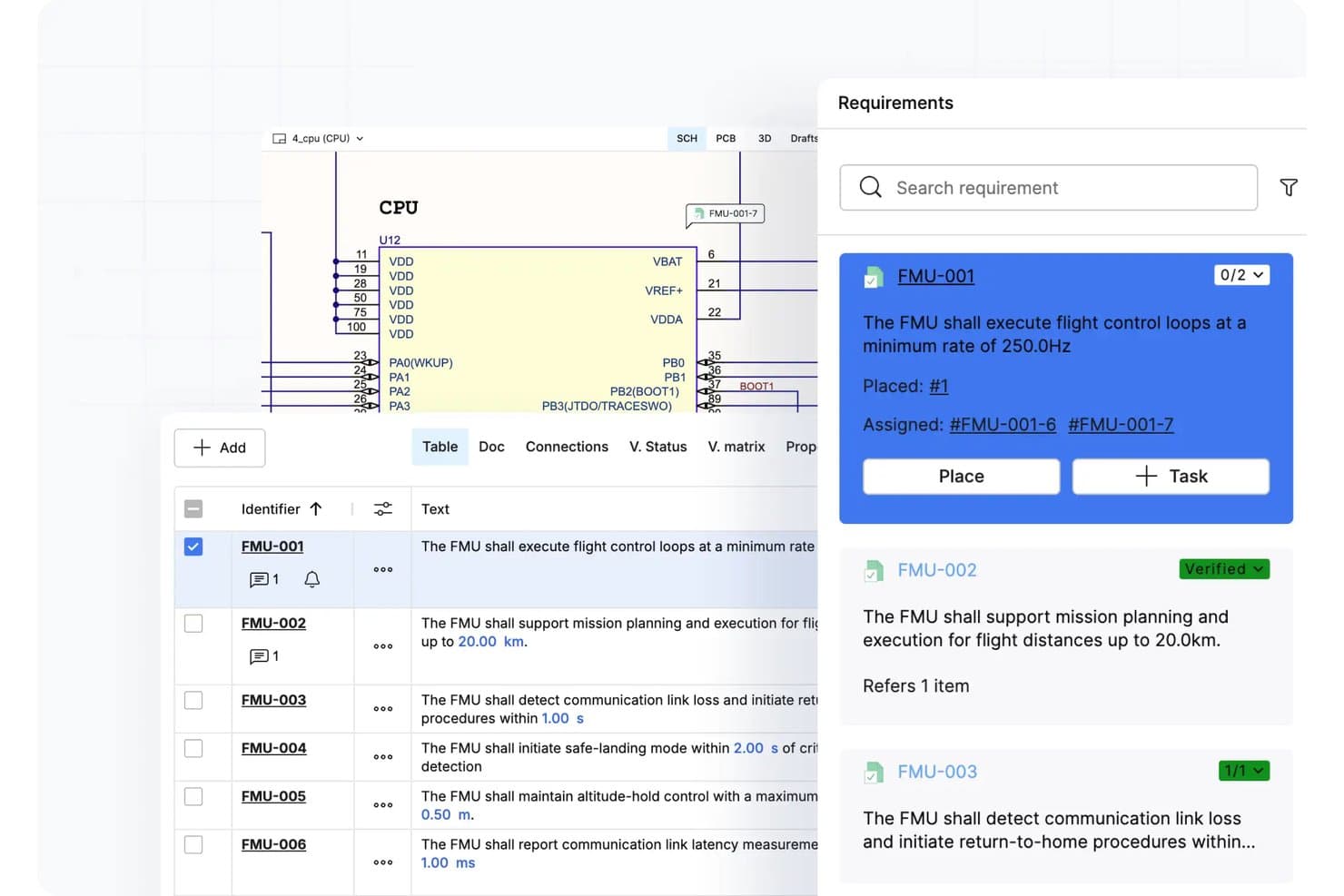
Requirements Portal links schematic components directly to tracked requirements. Requirements Portal is Altium's requirements management tool for hardware and systems engineering teams, offering structured requirements capture, design-linked traceability, verification tracking, and AI-assisted review workflows.
Who Is Requirements Portal Best For?
Requirements Portal is a strong fit for hardware and systems engineering teams that need to link requirements directly to PCB designs, schematics, and verification activities.
Why I Picked Requirements Portal
I've included Requirements Portal in my top picks because it's the strongest option I've found for hardware engineering teams that need requirements tied directly to physical design artifacts. I like how it links requirements to schematics, PCB layouts, and BOM components, so when a requirement changes, you can immediately see what's affected in the design. Its Connections Graph then maps those relationships visually, showing verification status at a glance across the full requirements set.
Requirements Portal Key Features
- AI Engineering Assistant: Uses AI to draft, improve, and flag issues in requirements, with all proposed changes held for human review before being applied.
- Formal review workflow: Assigns reviewers and approvers to requirements, collects ratings, and closes reviews with a recorded timestamp and approver identity.
- Requirement import: Pulls existing requirements from PDF, DOCX, XLSX, or CSV files and maps fields directly into structured specifications.
- Insights dashboard: Displays charts for requirement state, verification status, and AI-assisted quality assessments scoped to a specification or project.
Requirements Portal Integrations
Requirements Portal offers native integration with Altium Designer for viewing requirements alongside schematics and PCB layouts. Its REST and Python APIs support custom connections.
Pros and Cons
Pros:
- Small teams report quicker design iterations
- Formal reviews capture ratings and approvals
- Links requirements to design and verification
Cons:
- No sprint planning, capacity, or velocity tracking
- No epic, story, or sprint workflows
Learn more about Requirements Portal: Best for Azure DevOps requirements traceability
- Free 30 days trial available
- Pricing upon request
Visit WebsiteCustomer Rating:4.5/5
Modern Requirements organizes requirements across Azure DevOps workflows. Modern Requirements is a requirements management software built to work inside Azure DevOps. It's designed for teams handling complex development work, including regulated industries, helping them author, manage, trace, and report on requirements. If you're working across development, testing, and release, it brings those processes into one environment.
Why I picked Modern Requirements: It keeps your team aligned because it works directly inside Azure DevOps, so you don't have to jump between tools. You can build living documents, trace requirements through testing and release work, and use versioning and baselines to track changes over time. Its AI assistant also helps you write and refine requirements faster. If you rely on Azure DevOps and need a strong traceability matrix, it fits naturally into your workflow.
Standout Features and Integrations:
Features include authoring tools that let you create requirements, use-case diagrams, and wireframes directly in your project; trace-analysis tools that help you map requirements to tests, documents, and code; and reporting tools that pull information from your work items and output audit-ready documents.
Integrations include Azure DevOps Server, Jira, ServiceNow, GitHub, GitLab, IBM DOORS, and more.
Pros and Cons
Pros:
- Formal DevOps workflow support
- Strong traceability and versioning
- Deep Azure integration
Cons:
- Limited non-Microsoft integrations
- Dependency on Azure DevOps
Learn more about Modern Requirements:
Alte instrumente pentru gestionarea cerințelor agile
Iată câteva opțiuni suplimentare de instrumente pentru gestionarea cerințelor agile care nu au ajuns pe lista mea scurtă, dar merită totuși verificate:
How I Evaluate Agile Requirements Management Tools
I look at these tools in two layers: baseline capabilities like managing a backlog from epic to sprint, and differentiators that determine which tools actually work for your team's scale.
Core Functionality (Table Stakes For This List)
When I'm selecting tools for my list, I rank each one on a scale from 0 (does not offer the functionality) to 5 (excels in this area) for each core functionality listed below. Then, I calculate the tool's total score into a percentage. Each tool needs to achieve a minimum total score of 65% to be considered for inclusion.
- Backlog & Story Management: I evaluate how each tool handles the hierarchy from epics down to stories and acceptance criteria, including whether you can prioritize and estimate items during grooming.
- Requirements Traceability: Each tool should let me link a requirement to its downstream tasks, test cases, and defects so I can trace coverage from a feature request through release.
- Agile Workflow Support: I check for Scrum and Kanban board options, sprint planning capabilities, and agile reporting like burndown charts and velocity tracking across iterations.
- Collaboration & Commenting: Teams need to discuss requirement changes in context, so I look for threaded comments, @mentions, and review workflows that keep feedback tied to items.
- Version Control & Audit History: Regulated teams often need to baseline requirements before a release. I evaluate whether the tool tracks change history with rollback and comparison views.
- Dev Tool Integrations: A tool's value drops fast if it sits outside your pipeline, so I look for native, bi-directional sync with platforms like Jira, Azure DevOps, GitHub, or GitLab.
Once I have a list of tools that meet this criteria, I consider what sets each platform apart.
Differentiating Factors (What Sets Vendors Apart)
Here's how I compare and contrast different vendors:
Standout Features
Visual story mapping is a big differentiator. Tools that let you lay out user journeys spatially make it far easier to plan releases around real workflows instead of flat backlog lists. I also evaluate scaled agile support, especially for enterprise teams running multiple ARTs that need PI planning boards and cross-team dependency views. Stakeholder review portals matter too, since product owners often need executives or customers to approve requirements without adding licensed seats.
Beyond Features
Compliance readiness is a major consideration. Teams building medical devices or automotive software need electronic signatures, baselining, and audit-ready exports that satisfy standards like IEC 62304 or ISO 26262. I also evaluate scalability—whether the tool handles a single Scrum team's backlog as well as a 500-person program with multiple value streams. Deployment options matter here too, since some organizations require self-hosted or private cloud setups with SSO and regional data residency to meet internal security policies.
Cum să alegi un instrument de gestionare a cerințelor agile
Este ușor să vă pierdeți în liste lungi de funcții și structuri complexe de prețuri. Pentru a vă ajuta să rămâneți concentrat în timp ce parcurgeți procesul unic de selectare a software-ului, iată o listă de factori de care trebuie să țineți cont:
| Factor | Ce trebuie luat în considerare |
|---|---|
| FactorScalabilitate | Ce trebuie luat în considerareVa crește instrumentul odată cu echipa dvs.? Luați în considerare dacă poate gestiona mai mulți utilizatori și proiecte pe măsură ce vă extindeți. Căutați exemple de clienți actuali cu o creștere similară. |
| FactorIntegrări | Ce trebuie luat în considerareSe conectează cu instrumentele dvs. existente? Confirmați că acceptă integrări cu stiva tehnologică actuală pentru a evita întreruperile fluxului de lucru. |
| FactorPosibilitate de personalizare | Ce trebuie luat în considerareÎl puteți adapta la procesele dvs.? Verificați dacă instrumentul permite modificarea fluxurilor de lucru și a tablourilor de bord pentru a corespunde nevoilor echipei dvs. |
| FactorUșurință în utilizare | Ce trebuie luat în considerareEste intuitiv pentru echipa dvs.? Luați în considerare curba de învățare și dacă este necesară instruirea. Instrumentele cu o interfață simplă sunt adesea adoptate mai rapid. |
| FactorImplementare și integrare inițială | Ce trebuie luat în considerareCât timp va dura configurarea? Evaluați timpul și resursele necesare pentru implementare. Căutați instrumente cu integrare inițială ghidată și asistență. |
| FactorCost | Ce trebuie luat în considerareVi-l puteți permite pe termen lung? Comparați planurile tarifare și verificați dacă există taxe ascunse. Asigurați-vă că instrumentul se încadrează în bugetul dvs. fără a sacrifica funcțiile esențiale. |
| FactorMăsuri de securitate | Ce trebuie luat în considerareSunt datele dvs. protejate? Căutați instrumente cu măsuri de securitate solide, precum criptarea și auditurile regulate, pentru a proteja informațiile sensibile. |
| FactorCerințe de conformitate | Ce trebuie luat în considerareRespectă standardele din industrie? Confirmați că instrumentul respectă reglementările relevante pentru domeniul dvs., precum GDPR sau HIPAA, pentru a evita problemele juridice. |
Ce sunt instrumentele pentru gestionarea cerințelor agile?
Instrumentele pentru gestionarea cerințelor agile sunt soluții software care ajută echipele să își gestioneze și să își adapteze cerințele proiectelor pe parcursul ciclului de dezvoltare. Aceste instrumente sunt utilizate de obicei de managerii de proiect, dezvoltatori și analiști de afaceri pentru a se asigura că proiectele sunt aliniate la obiectivele de afaceri și la nevoile utilizatorilor.
Funcții precum colaborarea în timp real, controlul versiunilor și gestionarea listei de activități ajută echipele să rămână organizate și să răspundă rapid la schimbări. În general, aceste instrumente oferă structura și flexibilitatea necesare pentru a menține proiectele pe drumul cel bun și aliniate la așteptările utilizatorilor.
Funcții
Când selectați instrumente pentru gestionarea cerințelor agile, urmăriți următoarele funcții esențiale:
- Colaborare în timp real: Permite mai multor membri ai echipei să lucreze împreună simultan, menținându-i pe toți aliniați și informați.
- Controlul versiunilor: Urmărește modificările și păstrează un istoric al cerințelor, astfel încât să puteți reveni la versiunile anterioare dacă este necesar.
- Gestionarea listei de sarcini: Ajută la prioritizarea sarcinilor și a poveștilor utilizatorilor, menținând echipa concentrată asupra celor mai importante activități.
- Fluxuri de lucru personalizabile: Permit echipelor să adapteze procesele pentru a corespunde nevoilor specifice și pentru a optimiza eficiența.
- Raportare și analiză: Oferă informații despre progresul și performanța proiectului, ajutând echipele să ia decizii informate.
- Asistență pentru conformitate: Se asigură că instrumentul respectă standardele și reglementările din domeniu, reducând riscul problemelor juridice.
- Măsuri de protecție a securității: Protejează datele sensibile prin criptare și audituri regulate, păstrându-vă informațiile în siguranță.
- Capacități de integrare: Se conectează la instrumentele existente din stiva dvs. tehnologică, menținând continuitatea fluxului de lucru.
- Integrare interactivă: Oferă configurare ghidată și resurse de instruire, facilitând începerea rapidă a activității pentru echipe.
- Instrumente de prioritizare a sarcinilor: Ajută echipele să se concentreze asupra sarcinilor cu impact ridicat, evaluând valoarea în raport cu efortul.
Beneficii
Implementarea instrumentelor agile de gestionare a cerințelor oferă mai multe beneficii pentru echipa și afacerea dvs. Iată câteva dintre acestea:
- Colaborare îmbunătățită: Funcțiile de colaborare în timp real mențin membrii echipei aliniați și informați, reducând neînțelegerile.
- Adaptabilitate sporită: Controlul versiunilor și gestionarea listei de sarcini ajută echipele să răspundă rapid la modificări și să ajusteze prioritățile după cum este necesar.
- Luarea unor decizii mai bune: Raportarea și analiza oferă informații despre progresul proiectului, ajutând echipele să ia decizii informate.
- Securitate sporită: Măsurile de protecție a securității protejează datele sensibile, oferindu-vă liniște în ceea ce privește siguranța informațiilor.
- Conformitate cu reglementările: Asistența pentru conformitate se asigură că proiectele dvs. respectă standardele din domeniu, reducând riscul problemelor juridice.
- Integrare eficientă: Resursele de integrare interactivă facilitează familiarizarea rapidă a utilizatorilor noi, economisind timp și efort.
- Concentrare optimizată asupra sarcinilor: Instrumentele de prioritizare a sarcinilor ajută echipa să se concentreze asupra sarcinilor cu impact ridicat, maximizând productivitatea.
Costuri și prețuri
Selectarea instrumentelor agile de gestionare a cerințelor necesită înțelegerea diferitelor modele și planuri de preț disponibile. Costurile variază în funcție de funcții, dimensiunea echipei, suplimente și alți factori. Tabelul de mai jos prezintă pe scurt planurile comune, prețurile medii ale acestora și funcțiile incluse de obicei în soluțiile de gestionare agilă a cerințelor:
Tabel comparativ al planurilor pentru instrumentele agile de gestionare a cerințelor
| Tipul planului | Preț mediu | Funcții comune |
|---|---|---|
| Tipul planuluiPlan gratuit | Preț mediu$0 | Funcții comuneGestionarea de bază a sarcinilor, integrări limitate și asistență din partea comunității. |
| Tipul planuluiPlan personal | Preț mediu$5-$25/utilizator/lună | Funcții comuneGestionarea sarcinilor, instrumente de colaborare, raportare de bază și integrări limitate. |
| Tipul planuluiPlan pentru afaceri | Preț mediu$10-$150/utilizator/lună | Funcții comuneRaportare avansată, integrări complete, funcții de securitate îmbunătățite și asistență prioritară pentru clienți. |
| Tipul planuluiPlan pentru întreprinderi | Preț mediu$14-$500/utilizator/lună | Funcții comuneFluxuri de lucru personalizabile, asistență pentru conformitate, un manager de cont dedicat și opțiuni avansate de securitate. |
Întrebări frecvente despre instrumentele agile de gestionare a cerințelor
Iată câteva răspunsuri la întrebările frecvente despre instrumentele agile de gestionare a cerințelor:
Ce industrii beneficiază cel mai mult de instrumentele agile de gestionare a cerințelor?
Industrii precum dezvoltarea software, industria auto, industria aerospațială și serviciile medicale beneficiază considerabil de aceste instrumente. Ele ajută la gestionarea cerințelor în schimbare și se asigură că proiectele respectă standardele industriei. De exemplu, în dezvoltarea software, facilitează colaborarea și permit urmărirea poveștilor utilizatorilor și a sprinturilor. În industriile reglementate, oferă suport pentru conformitate, astfel încât să fie respectate reglementările necesare.
Se pot integra instrumentele agile de gestionare a cerințelor cu software-ul existent?
Da, majoritatea instrumentelor agile de gestionare a cerințelor oferă integrări cu software popular precum Jira, Slack și GitHub. Aceste integrări contribuie la menținerea continuității fluxului de lucru și îmbunătățesc colaborarea în echipă. Înainte de a alege un instrument, verificați dacă acesta este compatibil cu software-ul pe care echipa îl utilizează deja. Astfel, tranziția este mai ușoară, iar eficiența instrumentului în stiva tehnologică existentă este maximizată.
Cum sprijină instrumentele agile de gestionare a cerințelor echipele la distanță?
Aceste instrumente sprijină echipele la distanță prin funcții de colaborare în timp real și acces bazat pe cloud. Membrii echipei pot lucra simultan la proiecte din locații diferite, astfel încât toată lumea să fie la curent. Căutați instrumente care oferă acces mobil și integrări cu platforme de comunicare precum Zoom sau Microsoft Teams pentru a îmbunătăți colaborarea la distanță.
Instrumentele agile de gestionare a cerințelor necesită expertiză tehnică pentru configurare?
Nu, nu toate instrumentele necesită expertiză tehnică pentru configurare. Unele oferă interfețe intuitive și procese de inițiere ghidate pentru a ajuta echipele să înceapă rapid. Cu toate acestea, instrumentele mai complexe pot necesita asistență IT pentru personalizare sau integrarea cu alte sisteme. Este esențial să evaluați competențele tehnice ale echipei și să alegeți un instrument care corespunde nivelului lor de pregătire, pentru a evita complicațiile inutile.