

Având la dispoziție atât de multe programe software diferite pentru ingineria calității, este dificil să vă dați seama care este potrivit pentru dumneavoastră. Știți că doriți să vă asigurați că produsele inginerești îndeplinesc anumite standarde de reglementare, de calitate și de piață, dar trebuie să aflați care instrument este cel mai potrivit. Vă ajut eu! În această postare vă voi facilita alegerea, împărtășindu-vă experiențele mele personale de utilizare a zeci de instrumente diferite pentru ingineria calității, cu diverse echipe și proiecte, precum și selecția mea de cele mai bune programe software pentru ingineria calității.
Why Trust Our Software Recommendations
6,700+
Reviews
20
Industry experts
16+
Evaluation factors
14
Years
Our team has been testing and reviewing software since 2012. As tech leaders ourselves, we know how difficult—and important—it is to choose the right software.
For this guide, we evaluated tools using hands-on testing and independent research, scoring tools using our selection criteria.
Our reviews reflect our human editorial judgment, not a sales pitch.
Expert reviewers:
- Paulo Gardini MiguelTech Director
 Tim FisherVP of AI
 Gabriel RosasTech Lead & Software Architect
 Christhian GruhnTech Lead & Platform Architect

Tabel comparativ al programelor software pentru ingineria calității
Acest tabel comparativ sintetizează detaliile privind prețurile pentru selecția mea de top de programe software pentru ingineria calității:
Sorted by: Default
| Tool | Starting Price | Website | |
|---|---|---|---|
Best for large-scale device testing | Not rated | Pricing upon request Not available | Website |
Best for AI tests you can export to code | 4.9 out of 5 | $17/month Free plan + free demo available | Book Demo |
Best for faster test feedback | 5.0 out of 5 | $59/seat/month 60-day free trial | Website |
Best for outsourcing quality engineering, test creation, and issue reports | 4.9 out of 5 | From 1¢/AI credit Free demo available | Website |
Best for extensive device coverage | 4.6 out of 5 | Pricing upon request | Website |
Best for low-code test automation | 4.8 out of 5 | Pricing upon request 14-day free trial + free demo available | Website |
Best for AI insights using natural language via a chat interface | 4.3 out of 5 | $10/user/month Free plan + free demo available | Website |
Best continuous testing automation platform for enterprise | 4.2 out of 5 | Pricing upon request Free trial + free demo available | Website |
Best software quality assurance suite for devops | Not rated | Free Trial | Website |
Best collaboration tool for behavior-driven development | Not rated | $33.65/per user per month 14 Days Free Trial | Website |


Recenzii ale celor mai bune programe software pentru ingineria calității
Mai jos sunt prezentate rezumatele mele detaliate ale celor mai bune programe software pentru ingineria calității care au ajuns pe lista mea scurtă. Recenziile mele oferă o analiză detaliată a principalelor funcții, avantajelor și dezavantajelor, integrărilor și cazurilor ideale de utilizare pentru fiecare instrument, pentru a vă ajuta să îl găsiți pe cel mai potrivit pentru dumneavoastră.


TestDevLab’s mobile testing setup shows app validation on real devices. TestDevLab helps software teams improve product quality without building a large in-house QA department. It’s a strong fit for teams that need managed testing across web, mobile, and desktop products, with specialized support for automation, performance, security, accessibility, and audio/video quality testing.
Who Is TestDevLab Best For?
TestDevLab is a good fit for product and engineering teams in fintech, communications, gaming, healthcare, and IoT who need specialized QA expertise beyond what an in-house testing team can cover.
Why I Picked TestDevLab
I picked TestDevLab because it gives your team access to large-scale device testing without needing to maintain your own device lab. Its testing coverage spans 5,000+ real devices, which helps you catch compatibility issues across different operating systems, browsers, screen sizes, and hardware setups. I also like that TestDevLab can support manual testing, test automation, performance testing, security testing, and accessibility testing, so your team can validate product quality across multiple release risks. This makes it a good fit for teams building web, mobile, or desktop products that need reliable QA coverage across many user environments.
TestDevLab Key Features
Beyond device coverage, TestDevLab offers several testing services that help your team manage quality across the development lifecycle:
- Test automation: Build and maintain automated test suites that connect to your CI/CD pipeline for ongoing regression testing.
- Performance testing: Test how your product responds under load, stress, spike, and endurance conditions before release.
- Security testing: Assess web, mobile, desktop, API, and network systems for vulnerabilities that could put users or data at risk.
- QA reporting: Get structured reports with test results, defect details, coverage insights, and quality trends your team can act on.
TestDevLab Integrations
TeIntegrations are not listed by TestDevLab.
Pros and Cons
Pros:
- Tests across 5,000+ real device configurations
- Covers automation, performance, security, and accessibility testing
- Supports AI-augmented testing for faster QA coverage
Cons:
- Requires vendor involvement for testing setup and execution
- Not a self-serve quality engineering platform
Learn more about TestDevLab: Best for AI tests you can export to code
- Free plan + free demo available
- From $17/month (billed annually)
Visit WebsiteCustomer Rating:4.9/5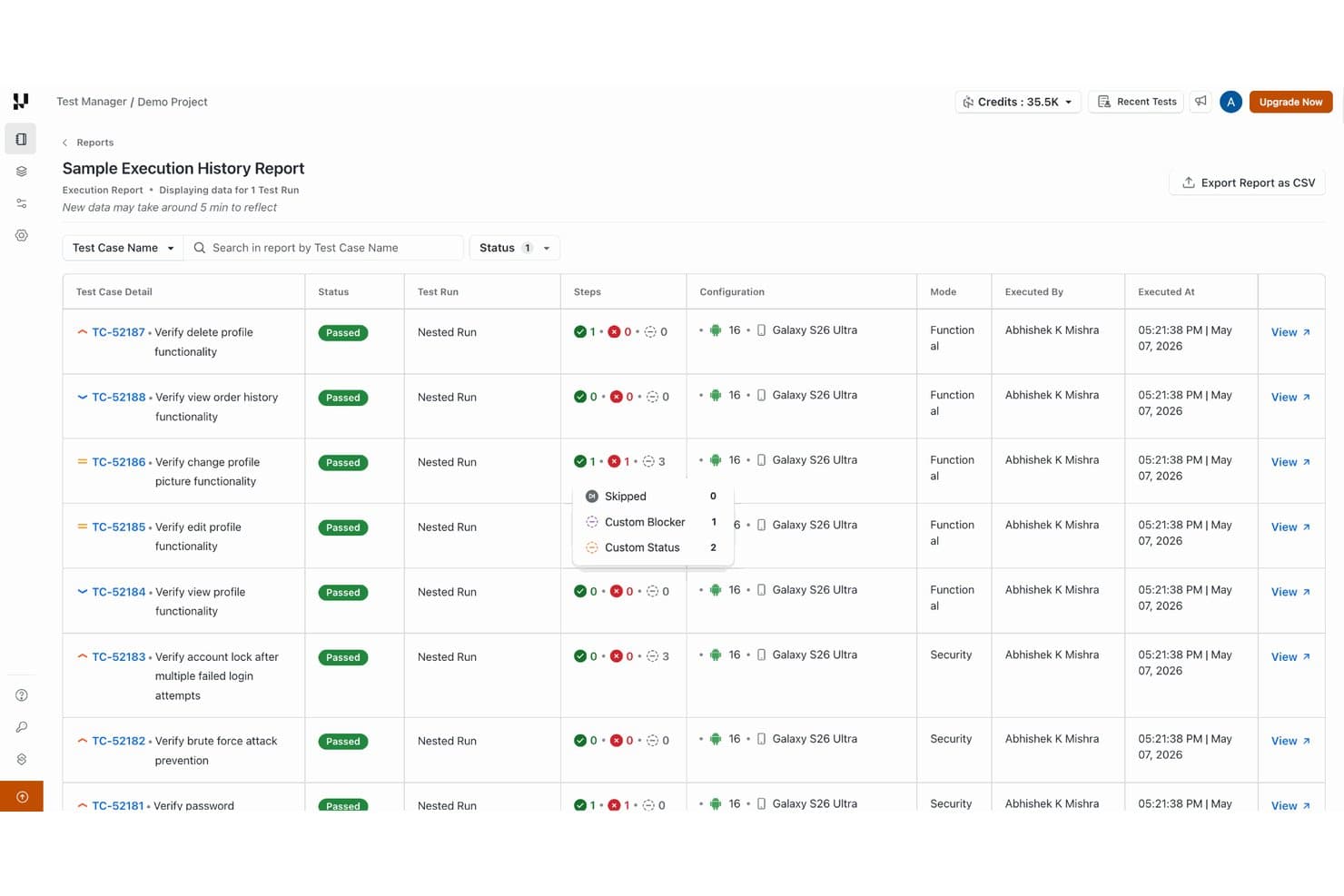
TestMu AI tracks test case execution history with step-level status details. TestMu AI is an AI-native quality engineering platform built around KaneAI, its end-to-end testing agent, offering natural-language test authoring, self-healing automation, visual regression testing, and CI/CD-integrated execution across web, mobile, API, and database layers.
Who Is TestMu AI Best For?
TestMu AI is a strong fit for QA and automation engineers who want to author tests in plain language and export them directly to Selenium, Playwright, or Appium code.
Why I Picked TestMu AI
I picked TestMu AI as one of the best because its Kane CLI lets you describe a test in plain English and immediately export the result as working Selenium, Playwright, or Appium code—something I haven't seen executed as cleanly elsewhere. I also like that KaneAI's Auto-Heal doesn't just swap locators at runtime: if fallback locators fail, it rebuilds them from the original natural-language instruction, so your tests stay alive through UI changes without manual intervention.
TestMu AI Key Features
- Visual regression testing: KaneAI captures viewport and full-page screenshots during web tests and routes comparisons through SmartUI, where you can approve or reject detected changes.
- Test versioning and rollback: KaneAI tracks changes to test steps as numbered versions, letting you compare versions side by side or roll back to an earlier state.
- Adaptive flow control: Tests support natural-language If/Else and While loops so they can handle dynamic UI elements, popups, and retry conditions without hard-coded logic.
- Jira and Azure DevOps sync: KaneAI reads ticket summaries, descriptions, and comments to generate test cases directly from your existing tracker, then syncs results back.
TestMu AI Integrations
TestMu AI documents 120+ integrations, including Jira, Azure DevOps, GitHub, GitHub Actions, GitLab CI, Jenkins, CircleCI, and Azure Pipelines. It also supports REST APIs and webhooks for CI/CD connectivity.
Pros and Cons
Pros:
- Broad browser and device coverage without labs
- AI-assisted cases surface broader edge coverage
- Export generated tests into maintainable framework code
Cons:
- Sessions lag, disconnect, or devices become unavailable
- Generated tests need correction for complex workflows
Learn more about TestMu AI:

Appsurify's Risk Map helps you visualize modified code areas and predict where potential defects may have been introduced. Appsurify’s TestBrain is a risk-based testing solution that delivers test results on a per-change basis. It's one of the best quality engineering software tools in the market for experienced testing teams who want to build more efficiencies into their test automation practice, providing features that help QA teams streamline their software testing environment, reduce CI pipeline build times, achieve Shift Left testing, and reduce overall costs.
Appsurify has two main subscription plans available: Plus and Professional. Appsurify Plus is tailored for small businesses and startups, and it starts at $59 per seat/month with a 60-day free trial. The Professional plan best suits the QA automation testing requirements of midsize teams and large enterprises. SaaS and on-premise license options are available, but the latter is only bundled with the Professional plan.
Both subscription packages come with a variety of features such as smart test selection and execution, auto-mapping of tests to code, advanced reporting, advanced analytics, risk alerts, and flaky failure prevention. Both plans support various test types, including UI, E2E, integration, unit, API tests, and more. The features exclusive to the Professional package are prioritized manual testing, full onboarding, and priority support, although standard support and initial setup onboarding are included in the Plus package too.
Learn more about Appsurify TestBrain: Best for outsourcing quality engineering, test creation, and issue reports
- Free demo available
- From 1¢/AI credit
Visit WebsiteCustomer Rating:4.9/5
QA Wolf offers fully managed end-to-end test coverage. QA Wolf is a high-quality testing service used to outsource quality engineering tasks. Their service includes an expert team of QA engineers to write, run, and repeat all your critical tests. They are used by companies like Gumroad, MainStreet, Mailchimp, Replay, and Padlet.
QA Wolf does quality engineering (QE) by having their team run tests, investigate failures, and then write up a bug/issue report with repro steps, a video recording, logs, and any other data you need. You can log into the platform to view progress at any time or wait for a scheduled review session. Key services include building a test plan for you, end-to-end test coverage, failure triaging and test maintenance, high-quality bug reports, fast parallel test run infrastructure, and an easy-to-use app for real-time status updates.
QA Wolf's software is built on Microsoft Playwright, which is a common product chosen for open-source developments. This gives clients the freedom to carry all their existing tests and data with them should they ever want to bring their testing in-house on the test suite of their choice.
QA Wolf integrates with tools like Stripe, Salesforce, email providers, Auth0, SMS, Github, and even more options through their flexible API.
Learn more about QA Wolf:

Testlio's platform provides a centralized interface for managing and analyzing different test runs, showcasing real-time test results. Testlio is a managed application testing platform that combines a global network of expert testers with robust client services. This ensures that your software delivers seamless user experiences across various devices, languages, and locations.
I like that Testlio offers AI-driven test creation and refactoring capabilities. By leveraging advanced AI technologies, Testlio accelerates the development and maintenance of test cases, allowing your team to adapt swiftly to evolving project requirements. This means faster test cycles and more accurate results, keeping your projects on track.
The platform also grants access to over 600,000 real devices across different operating systems, locations, and configurations. This allows you to test under real-world conditions, replicating diverse user environments to uncover issues that might be missed in limited lab testing.
Learn more about Testlio: Best for low-code test automation
- 14-day free trial + free demo available
- Pricing upon request
Visit WebsiteCustomer Rating:4.8/5
Reflect offers a no-code test automation interface for creating tests. Reflect is an AI-powered quality engineering tool built for fast, code-free test automation. It allows you to create and run end-to-end, regression, and API tests simply by describing actions in plain English—no CSS selectors or XPath required. Companies use Reflect to reduce QA bottlenecks, increase test coverage, and cut down on time spent maintaining flaky test suites.
Reflect supports quality engineering by letting you build and maintain tests faster than traditional frameworks. You can record browser actions, use AI prompts to define test steps, and convert manual test cases into automated runs via a Chrome extension. The platform continuously adapts tests as your app evolves, minimizing maintenance.
It also runs visual checks, API validations, and data-driven scenarios across multiple browsers. After each run, Reflect gives you a detailed breakdown—complete with repro steps, console/network logs, and HD video—so you can debug fast.
Reflect integrates with CI/CD platforms like GitHub, Jenkins, CircleCI, Azure DevOps, and Codefresh, as well as issue trackers like Jira and Linear. You can also connect it to Slack, TestRail, Google Calendar, Zapier, Office 365, and more to keep your testing pipeline synced and your team in the loop.
Learn more about Reflect: Best for AI insights using natural language via a chat interface
- Free plan + free demo available
- From $10/user/month
Visit WebsiteCustomer Rating:4.3/5
Send your error and defect notifications to a single inbox, or even integrate with Slack to send alerts there. New Relic is a performance monitoring system for data for engineers to monitor, debug, and improve their entire stack. It's designed to help you keep an eye on your software's health and performance with a variety of flexible reports and dashboards. It's incredibly useful for getting a clear, detailed picture of how your software is performing. It's not just about spotting problems—although it's great at that—it's also about understanding trends, identifying potential issues before they become big problems, and generally keeping everything running smoothly.
The APM (Application Performance Monitoring) feature is a feature worth noting. It gives you real-time insights into your software's performance, so you can spot and fix issues quickly. Then there's the Infrastructure Monitoring feature, which lets you keep an eye on your entire infrastructure, from servers to cloud services. And the Browser Monitoring feature is great for understanding how your software is performing from the user's perspective. They also have a generative AI assistant, New Relic Grok, which can inject conversational questions like "What caused this CPU spike?" and answer them via a chat interface.
Integrations include over 600 apps that include cloud platforms like AWS, Google Cloud, and Microsoft Azure, CI/CD tools like Jenkins, CircleCI, and Travis CI, communication tools like Slack and PagerDuty, and other monitoring and analytics tools like Grafana, Datadog, and Splunk. It also has an API you can use to build custom integrations.
New Relic has a free version available. Their paid plans start at $49/user/month and offer additional features, like SAML single sign-on, 24x7 support availability, 2-hour critical initial support response SLA, and additional data ingest per month.
Learn more about New Relic: Best continuous testing automation platform for enterprise
- Free trial + free demo available
- Pricing upon request
Visit WebsiteCustomer Rating:4.2/5
Tricentis’s no-code Continuous Testing Platform offers AI-driven performance analytics and reporting. Tricentis’s Continuous Testing Platform supports the entire testing lifecycle across enterprise and custom applications. Tricentis uses AI-driven data analytics to power faster, smarter testing and its platform is fully automated and codeless, making it easy and quick to set up and run automated tests, whether you’re a developer or a business leader.
The Tosca automated testing module separates the automation model from the underlying application. This means that changes to the application’s source code don’t impact the test automation. This helps to accelerate software testing by removing bottlenecks.
Tricentis pricing information is unavailable. Free trials are available for the qTest and NeoLoad modules.
Learn more about Tricentis Tosca:

Among its many DevOps solutions, Perforce offers robust mobile testing automation capabilities. Perforce’s suite of software development tools for enterprise teams includes a variety of solutions for planning, developing, and creating; testing and validating; and operating, managing, and scaling software.
Perforce has a range of DevOps solutions that address quality, compliance, security, speed, and collaboration throughout the entire product lifecycle from ideation to launch. This makes it an excellent choice for enterprise quality engineering.
Each Perforce tool has its own pricing model, available on request. A free trial is available.
Learn more about Perforce Suite: Best collaboration tool for behavior-driven development
- 14 Days Free Trial
- $33.65/per user per month (€29/u/m)

CucumberStudio is a tool that fosters behavior-driven development (BDD) collaboration. CucumberStudio helps teams to arrive at a clear shared understanding of precisely what the product should do and co-design effective acceptance tests. CucumberStudio also allows teams to accelerate test cycles through test automation.
Thanks to its seamless Git integration, CucumberStudio serves as a single source of truth by automatically ensuring documentation is up to date, accessible, and easy to understand even for non-technical members of cross-functional teams.
CucumberStudio pricing starts from ~$33.65/per user per month (€29/u/m). CucumberStudio offers a 14-day free trial and a free open source version, CucumberOpen, is also available.
Learn more about CucumberStudio:
Alte programe software pentru ingineria calității
Iată câteva opțiuni suplimentare de programe software pentru ingineria calității care nu au ajuns pe lista mea scurtă, dar care merită totuși analizate:
- 11KataliumBest open-source testing automation tool
- 12Inflectra SuiteBest holistic application testing product ecosystem
- 13LinearBBest software quality engineering tool for managing team health
- 14ApexonBest for implementing test automation within your workflow
- 15SympliBest tool for collaboration between designers and developers
- 16SeaLightsBest enterprise quality governance and software risk scoring
- 17LucidchartBest for collaborative system planning and analysis
- 18KualiteeBest for AI-driven test case generation
- 19BugBugBest low-code solution for startups & SMBs
- 20Jama SoftwareBest for traceability and verification
How I Evaluate Quality Engineering Tools
I split my evaluation into two layers: baseline requirements like CI/CD integration and cross-environment test automation, and the differentiators that matter for QA teams and DevOps engineers.
Core Functionality (Table Stakes For This List)
When I'm selecting tools for my list, I rank each one on a scale from 0 (does not offer the functionality) to 5 (excels in this area) for each core functionality listed below. Then, I calculate the tool's total score into a percentage. Each tool needs to achieve a minimum total score of 65% to be considered for inclusion.
- Test Automation Capabilities: I evaluate whether a tool can automate functional, regression, and end-to-end tests across UI, API, and mobile layers rather than limiting you to manual execution.
- CI/CD Pipeline Integration: Each tool should connect with systems like Jenkins, GitHub Actions, or GitLab CI so tests trigger automatically on every build or deployment.
- Test Management & Reporting: I look for structured test case organization, execution tracking, and dashboards that show pass/fail trends and coverage gaps across releases.
- Cross-Environment Testing Coverage: The tool needs to support testing across multiple browsers, operating systems, and devices—not just Chrome on a single desktop OS.
- Defect & Issue Tracker Integration: Two-way sync with tools like Jira or Azure Boards matters here, so failed tests surface as trackable defects with logs and context attached.
- Scripting or Codeless Authoring: I check whether the platform supports code-based frameworks (Selenium, Playwright, Python) or codeless test builders—or ideally both—to serve mixed-skill QA teams.
Once I have a list of tools that meet the criteria, I consider what sets each platform apart.
Differentiating Factors (What Sets Vendors Apart)
Here's how I compare and contrast different vendors:
Standout Features
Self-healing test capabilities save QA teams hours of maintenance when a front-end refactor changes button IDs or element paths mid-sprint. I also look for visual regression testing, which catches layout shifts and styling bugs that functional assertions miss entirely. Shift-left tooling matters here too—IDE plugins and PR-level test triggers let developers catch issues before code ever hits the main branch.
Beyond Features
Scalability matters—I evaluate whether a platform supports parallel execution across distributed or containerized environments so test suites don't bottleneck during release sprints. Security and compliance certifications like SOC 2 and ISO 27001 are worth checking, especially if your team handles sensitive test data or operates in regulated industries. I also consider the integration ecosystem, specifically whether the tool connects with observability platforms like Datadog or New Relic to correlate test failures with production-level diagnostics.
Cum să alegeți un program software pentru ingineria calității
Este ușor să vă pierdeți în liste lungi de funcții și structuri complexe de prețuri. Pentru a vă ajuta să rămâneți concentrați în timp ce parcurgeți procesul dumneavoastră unic de selectare a programului software, iată o listă de verificare a factorilor de care trebuie să țineți cont:
| Factor | Aspecte de luat în considerare |
|---|---|
| FactorScalabilitate | Aspecte de luat în considerarePoate programul software să crească odată cu afacerea dumneavoastră? Căutați opțiuni care acceptă volume mai mari de date și mai mulți utilizatori fără probleme. Luați în considerare planurile de creștere viitoare și perioadele de cerere maximă. |
| FactorIntegrări | Aspecte de luat în considerareSe conectează la sistemele dumneavoastră actuale? Verificați compatibilitatea cu instrumentele pe care le utilizați deja, cum ar fi sistemele de gestionare a proiectelor sau sistemele ERP, pentru a evita insulele de date. |
| FactorPosibilități de personalizare | Aspecte de luat în considerareÎl puteți adapta fluxului dumneavoastră de lucru? Căutați programe software care vă permit să ajustați procesele și tablourile de bord pentru a răspunde nevoilor echipei dumneavoastră, fără o complexitate excesivă. |
| FactorUșurință în utilizare | Aspecte de luat în considerareÎl va considera echipa dumneavoastră intuitiv? Alegeți un program software cu o interfață ușor de utilizat pentru a reduce la minimum timpul de instruire și erorile. Testați versiunea demonstrativă pentru a evalua claritatea navigării. |
| FactorImplementare și integrare inițială | Aspecte de luat în considerareCât timp va dura să îl puneți în funcțiune? Luați în considerare resursele necesare pentru configurare, instruire și migrarea datelor. Optați pentru instrumente cu ghiduri clare și asistență. |
| FactorCost | Aspecte de luat în considerareSe încadrează în bugetul dumneavoastră? Comparați planurile de abonament, taxele ascunse și costul total de deținere. Evaluați prețul în raport cu valoarea funcțiilor și economiile potențiale. |
| FactorMăsuri de securitate | Aspecte de luat în considerareVă protejează datele? Asigurați-vă că programul software respectă standardele de protecție a datelor și oferă funcții precum criptarea și autentificarea multifactorială. |
| FactorDisponibilitatea asistenței | Aspecte de luat în considerareVeți avea acces la ajutor atunci când este necesar? Căutați opțiuni de asistență disponibile 24/7, timpi de răspuns și canale de comunicare disponibile pentru a rezolva rapid problemele. |
Ce este un program software pentru ingineria calității?
Programele software pentru ingineria calității cuprind instrumente și aplicații utilizate pentru a asigura și îmbunătăți calitatea produselor și proceselor inginerești. Aceste soluții software facilitează diverse activități, precum gestionarea conformității, optimizarea proceselor, gestionarea defectelor și monitorizarea performanței.
Acestea sunt utilizate pe scară largă în proiectele inginerești pentru a gestiona și îmbunătăți calitatea produselor pe parcursul întregului ciclu de dezvoltare, de la proiectare până la producție.
Funcții
Iată funcțiile esențiale pe care ar trebui să le aibă orice program software excelent pentru ingineria calității:
- Urmărirea defectelor: Ajută la identificarea, înregistrarea și monitorizarea defectelor pe parcursul procesului de dezvoltare, asigurând soluționarea lor la timp.
- Gestionarea testării: Organizează și gestionează cazurile de testare, programările și rezultatele pentru a îmbunătăți eficiența și eficacitatea testării.
- Gestionarea conformității: Asigură respectarea reglementărilor și standardelor din industrie de către produse, reducând riscul penalităților pentru neconformitate.
- Automatizarea proceselor: Automatizează sarcinile și procesele repetitive, economisind timp și reducând erorile umane în activitățile de asigurare a calității.
- Analiză bazată pe inteligență artificială: Analizează datele pentru a oferi informații utile și analize predictive, sprijinind gestionarea proactivă a calității.
- Tablouri de bord personalizabile: Permite utilizatorilor să adapteze tablourile de bord la nevoile lor specifice, oferind acces rapid la datele și indicatorii relevanți.
- Capacități de integrare: Se conectează la instrumentele și sistemele existente pentru a oferi un flux de lucru fluent și pentru a evita izolarea datelor.
- Măsuri de protecție a securității: Protejează datele sensibile prin criptare și alte măsuri de securitate, asigurând integritatea și confidențialitatea datelor.
- Interfață ușor de utilizat: Oferă un design intuitiv care reduce timpul necesar pentru învățare și îmbunătățește experiența utilizatorului.
- Instrumente de colaborare în timp real: Facilitează comunicarea și colaborarea între membrii echipei, îmbunătățind coordonarea proiectelor și procesul decizional.
Beneficii
Implementarea unui software pentru ingineria calității oferă mai multe beneficii pentru echipa și compania dumneavoastră. Iată câteva dintre acestea:
- Îmbunătățirea calității produselor: Prin utilizarea urmăririi defectelor și a gestionării testării, echipa dumneavoastră poate identifica și remedia problemele din timp, obținând produse de calitate superioară.
- Economisirea timpului: Automatizarea proceselor reduce sarcinile manuale, eliberând timp pentru ca echipa dumneavoastră să se concentreze pe activități mai strategice.
- Conformitatea cu reglementările: Gestionarea conformității asigură respectarea standardelor din industrie de către produsele dumneavoastră, reducând riscul penalităților.
- Îmbunătățirea procesului decizional: Analizele bazate pe inteligență artificială oferă informații utile care ajută echipa dumneavoastră să ia rapid decizii fundamentate.
- Colaborare mai bună: Instrumentele de colaborare în timp real permit o comunicare mai fluentă între membrii echipei, îmbunătățind coordonarea.
- Eficiența costurilor: Prin integrarea cu sistemele existente, software-ul reduce nevoia de resurse suplimentare, economisind costuri.
- Securitatea datelor: Măsurile de protecție a securității protejează informațiile sensibile, asigurând integritatea datelor și liniștea dumneavoastră.
Costuri și prețuri
Selectarea unui software pentru ingineria calității necesită înțelegerea diferitelor modele și planuri de tarifare disponibile. Costurile variază în funcție de caracteristici, dimensiunea echipei, extensii și alți factori. Tabelul de mai jos rezumă planurile obișnuite, prețurile medii ale acestora și caracteristicile incluse de regulă în soluțiile software pentru ingineria calității:
Tabel comparativ al planurilor pentru software-ul de inginerie a calității
| Tipul planului | Preț mediu | Caracteristici comune |
|---|---|---|
| Tipul planuluiPlan gratuit | Preț mediu$0 | Caracteristici comuneUrmărirea de bază a defectelor, gestionarea limitată a testării și raportare de bază. |
| Tipul planuluiPlan personal | Preț mediu$5-$25/utilizator/lună | Caracteristici comuneUrmărirea avansată a defectelor, instrumente de gestionare a testării și tablouri de bord personalizabile. |
| Tipul planuluiPlan pentru companii | Preț mediu$30-$60/utilizator/lună | Caracteristici comuneGestionarea completă a conformității, automatizarea proceselor și capacități de integrare. |
| Tipul planuluiPlan pentru întreprinderi | Preț mediu$70+/utilizator/lună | Caracteristici comuneAnaliză bazată pe inteligență artificială, măsuri de protecție a securității îmbunătățite și colaborare în timp real. |
Întrebări frecvente
Iată câteva răspunsuri la întrebările frecvente despre software-ul de inginerie a calității:
Care sunt cele 3 C-uri ale calității software-ului?
Cele 3 C-uri ale calității software-ului sunt competența, completitudinea și corectitudinea. Competența asigură faptul că software-ul funcționează conform așteptărilor, completitudinea înseamnă că îndeplinește toate cerințele specificate, iar corectitudinea se referă la absența erorilor și a defectelor. Căutați instrumente care contribuie la menținerea acestor standarde.
Care sunt cele 4 dimensiuni ale calității software-ului?
Cele 4 dimensiuni ale calității software-ului includ funcționalitatea, fiabilitatea, ușurința în utilizare și eficiența. Funcționalitatea asigură faptul că software-ul răspunde nevoilor utilizatorilor, fiabilitatea se concentrează pe performanța constantă, ușurința în utilizare se referă la cât de simplu este de utilizat, iar eficiența vizează gestionarea resurselor. Alegeți instrumente care excelează în aceste domenii.
Care sunt cei cinci factori ai calității software-ului?
Cei cinci factori principali ai calității software-ului sunt corectitudinea, fiabilitatea, eficiența, integritatea și ușurința în utilizare. Corectitudinea asigură funcționalitatea precisă, fiabilitatea înseamnă performanță constantă, eficiența implică gestionarea resurselor, integritatea protejează împotriva accesului neautorizat, iar ușurința în utilizare se referă la simplitatea utilizării.
Cum poate software-ul de inginerie a calității să îmbunătățească fluxul de lucru al echipei mele?
Software-ul de inginerie a calității poate automatiza sarcinile repetitive, poate îmbunătăți urmărirea defectelor și poate asigura conformitatea. Prin eficientizarea proceselor și furnizarea de informații în timp real, acesta ajută echipa să se concentreze pe activități strategice și să ia decizii bine fundamentate, îmbunătățind în cele din urmă productivitatea și calitatea produsului.