

Programele pentru gestionarea patch-urilor Linux vă ajută să automatizați detectarea, implementarea și monitorizarea patch-urilor pe sistemele Linux. Dacă sunteți în căutarea acestor soluții, probabil aveți nevoie de o modalitate de a vă menține mediile sigure și conforme, fără a adăuga un volum nesfârșit de activități manuale. Sistemele fără patch-uri cresc riscurile de securitate și fac auditurile extrem de dificile, așa că alegerea instrumentului potrivit este foarte importantă. În acest ghid veți găsi o prezentare generală a celor mai bune opțiuni disponibile, veți afla prin ce se diferențiază fiecare și veți obține informații practice care vă vor ajuta să alegeți instrumentul potrivit pentru infrastructura echipei dumneavoastră.
Why Trust Our Software Recommendations
6,700+
Reviews
20
Industry experts
16+
Evaluation factors
14
Years
Our team has been testing and reviewing software since 2012. As tech leaders ourselves, we know how difficult—and important—it is to choose the right software.
For this guide, we evaluated tools using hands-on testing and independent research, scoring tools using our selection criteria.
Our reviews reflect our human editorial judgment, not a sales pitch.
Expert reviewers:
- Paulo Gardini MiguelTech Director
 Tim FisherVP of AI
 Gabriel RosasTech Lead & Software Architect
 Christhian GruhnTech Lead & Platform Architect

Tabel comparativ al programelor pentru gestionarea patch-urilor Linux
Acest tabel comparativ sintetizează detaliile privind prețurile pentru selecția mea de programe de top pentru gestionarea patch-urilor Linux.
Sorted by: Default
| Tool | Starting Price | Website | |
|---|---|---|---|
Best for cloud-native remote patching | 4.9 out of 5 | Pricing upon request Free plan + free demo available | Website |
Best for policy-based cross-platform updating | 4.7 out of 5 | $1/endpoint/month 15-day free trial + free demo available | Website |
Best for multi-OS patch deployment simplicity | 4.4 out of 5 | Pricing upon request 30-day free trial + free demo | Website |
Best for compliance-driven patch automation | Not rated | Pricing upon request 30-day free trial + free demo | Website |
Best for real-time vulnerability remediation | Not rated | Pricing upon request 30-day free trial | Website |
Best for automated lifecycle management at scale | Not rated | Pricing upon request Free trial | Website |
Best for centralized Ubuntu administration | Not rated | $25/machine/year 30-day free trial | Website |
Best for open-source provisioning workflows | Not rated | Free plan Free plan | Website |
Best for multi-distribution Linux management | Not rated | Pricing upon request Free demo | Website |
Best for open source automation and orchestration | Not rated | Free plan Free plan | Website |


Recenzii ale celor mai bune programe pentru gestionarea patch-urilor Linux
Mai jos sunt prezentate rezumatele mele detaliate ale celor mai bune programe pentru gestionarea patch-urilor Linux care au ajuns pe lista mea scurtă. Recenziile mele oferă o analiză detaliată a funcțiilor, cazurilor de utilizare și integrărilor fiecărei platforme, pentru a vă ajuta să o găsiți pe cea mai potrivită pentru dumneavoastră.
 Best for cloud-native remote patching
- Free plan + free demo available
- Pricing upon request
Visit WebsiteCustomer Rating:4.9/5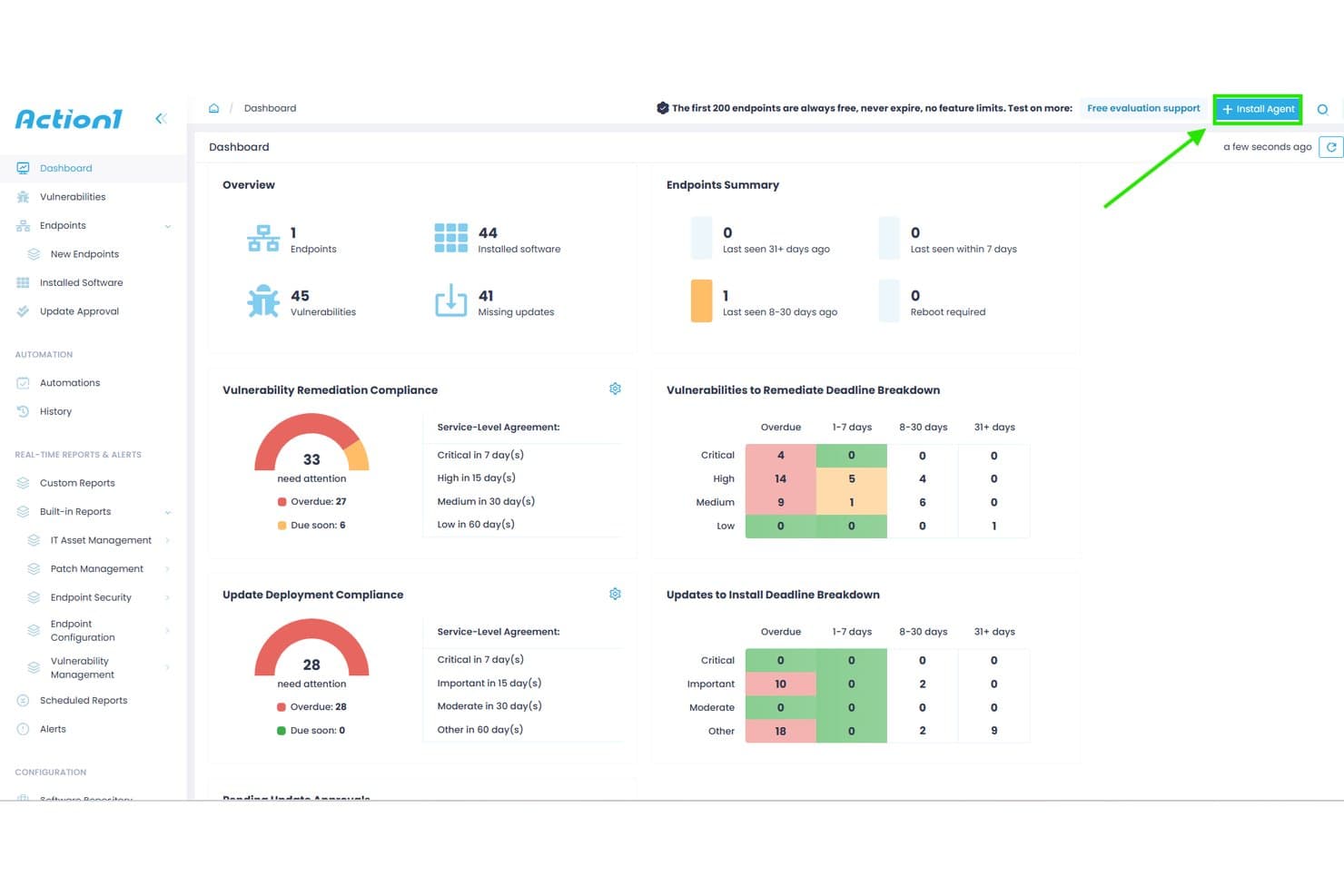
Action1 offers a centralized dashboard displaying vulnerability remediation compliance, update deployment compliance, and endpoint summaries for patch management. Action1 is a cloud-native endpoint management platform that automates OS and third-party patch deployment across Windows, macOS, and Linux systems, with CVE-mapped vulnerability assessment, ring-based staged rollouts, and compliance reporting.
Who Is Action1 Best For?
Action1 is a strong fit for IT teams in small to mid-sized organizations managing mixed-OS environments with distributed or remote endpoints across cloud and on-prem infrastructure.
Why I Picked Action1
I picked Action1 as one of the best because its cloud-native, VPN-less architecture means I can push patches to remote Debian and Ubuntu Linux endpoints without standing up any on-prem infrastructure. What I particularly like is the ring-based staged rollout system, which automatically halts deployment if a patch causes issues mid-rollout. The peer-to-peer patch distribution also handles bandwidth pressure when pushing updates across large, geographically distributed fleets simultaneously.
Action1 Key Features
- Real-time vulnerability assessment: Continuously identifies missing patches and matches vulnerabilities to CVEs on managed Linux endpoints.
- Unified cross-OS console: Manage patching for Linux, Windows, and macOS systems through a single web-based dashboard.
- 100+ audit-ready report templates: Generate compliance and remediation reports exportable in CSV and HTML formats.
- ServiceNow CMDB integration: Enriches ServiceNow CMDB with inventory and operational data from managed Linux endpoints.
Action1 Integrations
Action1 offers native integrations with ServiceNow, Microsoft Entra ID, Okta, Duo, Google, Active Directory, Rapid7, Tenable, CrowdStrike, Microsoft Defender, and provides an API for custom integrations.
Pros and Cons
Pros:
- Automated ring-based patch deployment
- Real-time vulnerability scanning for Linux endpoints
- Cloud-native platform with remote patching
Cons:
- Requires agent installation on every endpoint
- Only supports Debian and Ubuntu Linux
Learn more about Action1: Best for policy-based cross-platform updating
- 15-day free trial + free demo available
- From $1/endpoint/month (billed annually)
Visit WebsiteCustomer Rating:4.7/5
Automox offers a centralized dashboard displaying compliant devices, patch status, outstanding patches by severity, and device troubleshooting insights for Linux and cross-platform patch management. Automox is a cloud-native endpoint management platform that automates OS and third-party patching across Linux, Windows, and macOS systems using policy-driven rules and Bash-scriptable Worklets.
Who Is Automox Best For?
Automox is a strong fit for IT and security teams managing distributed endpoint fleets across mixed operating systems without on-premises patching infrastructure.
Why I Picked Automox
Automox earns its spot on my shortlist because of how its policy engine handles Linux patching across distros at scale. I can build severity-based policies targeting Ubuntu, RHEL, and Debian endpoints separately, so critical patches get prioritized without applying the same blanket rule to every host. When a package falls outside Automox's 580+ natively supported titles, Worklets let me push custom Bash scripts directly from the console without switching tools.
Automox Key Features
- Cross-platform patching console: Manage patching for Linux, Windows, and macOS devices from a single unified dashboard.
- Linux distribution support: Supports a wide range of Linux distros, including RHEL, Ubuntu, Debian, Oracle Linux, Fedora, Rocky, and AlmaLinux.
- Third-party application patching: Offers native patching for hundreds of Linux-compatible third-party software packages.
- Role-based access controls (RBAC): Set granular permissions for users to segment responsibilities and restrict actions within the platform.
Automox Integrations
Automox offers native integrations with Splashtop for remote access and supports vulnerability scanners. An API is available for custom integrations, and custom Bash or PowerShell scripts extend functionality to other tools.
Pros and Cons
Pros:
- Patch scheduling and reboot coordination controls
- Policy-based automation for Linux fleet management
- Wide distro coverage including Rocky and AlmaLinux
Cons:
- Limited out-of-the-box compliance reporting tools
- Reporting options are limited for compliance needs
 Best for multi-OS patch deployment simplicity
- 30-day free trial + free demo
- Pricing upon request
Visit WebsiteCustomer Rating:4.4/5
ManageEngine Patch Manager Plus offers a dedicated Install Linux Patch configuration interface with deployment policy settings and patch listing controls. ManageEngine Patch Manager Plus is a multi-OS patch management platform that automates patch detection, testing, and deployment across Linux, Windows, and macOS endpoints, with dedicated support for eight major Linux distributions.
Who Is ManageEngine Patch Manager Plus Best For?
It's a strong fit for IT administrators and security teams in mid-to-large enterprises that need centralized patch control across heterogeneous server and endpoint fleets.
Why I Picked ManageEngine Patch Manager Plus
ManageEngine Patch Manager Plus earns its spot on my shortlist because it patches eight Linux distros (RHEL, Ubuntu, Debian, SUSE, Oracle Linux, Rocky Linux, CentOS, and Amazon Linux) alongside Windows and macOS from one console. I particularly like the Automated Patch Deployment (APD) feature, which runs the full scan-to-install cycle without per-host intervention. The built-in patch testing and approval workflow also lets my team validate updates before they reach production servers.
ManageEngine Patch Manager Plus Key Features
- Patch rollback: Quickly revert Linux patches if issues arise after deployment.
- Custom deployment templates: Create and reuse specific patch deployment configurations for Linux environments.
- Real-time audit logs: Track every patch event and administrative action for compliance and troubleshooting.
- Bandwidth optimization: Download Linux patches once and distribute them to endpoints using internal servers.
ManageEngine Patch Manager Plus Integrations
ManageEngine Patch Manager Plus offers native integrations with Tenable.io, Tenable.sc, ServiceDesk Plus, and Jira, and provides an API for custom integrations.
Pros and Cons
Pros:
- Automated patch testing and approval workflow
- Centralized console for Linux, Windows, macOS
- Supports eight major Linux distributions
Cons:
- Limited native regulatory compliance mapping
- Initial server configuration is complex
Learn more about ManageEngine Patch Manager Plus: Best for compliance-driven patch automation
- 30-day free trial + free demo
- Pricing upon request

SecPod SanerNow Cyberhygiene Platform offers a Patch Management Status dashboard displaying remediation job details, device host statuses, patch sizes, and overall patch installation results across multiple Windows devices. SecPod SanerNow is a cloud-native cyberhygiene platform that combines patch management, vulnerability detection, and compliance monitoring across 37+ Linux variants, Windows, macOS, and 550+ third-party applications from a single lightweight agent.
Who Is SecPod SanerNow Cyberhygiene Platform Best For?
It's a strong fit for IT security and compliance teams at mid-size to large enterprises operating under regulatory frameworks like HIPAA, PCI, or NIST.
Why I Picked SecPod SanerNow Cyberhygiene Platform
SanerNow earns its spot on my shortlist because of how it maps patch status directly to compliance frameworks like HIPAA, PCI, and NIST in real time. I particularly like that its 190,000+ SCAP-based vulnerability feed auto-maps CVEs to missing Linux patches and layers EPSS exploit probability scores on top of CVSS severity. Pre-tested Linux patches ship within 24 hours of release, so my team isn't waiting on slow vendor cycles when a critical CVE drops.
SecPod SanerNow Cyberhygiene Platform Key Features
- Cloud-native patching console: Manage patch operations from a unified web console for Linux, Windows, macOS, and third-party apps.
- Single lightweight agent: Deploy patches, scan for vulnerabilities, and monitor compliance with one multifunctional agent across all endpoints.
- Policy-driven patch automation: Set custom rules to automate scan frequency, patch approval, and deployment based on business requirements.
- Pre-deployment test area: Isolate and test Linux patches before rolling them out to production systems globally.
SecPod SanerNow Cyberhygiene Platform Integrations
SanerNow offers native integrations with Freshservice, ServiceNow, SymphonyAI Summit, AWS Marketplace, and Azure Marketplace. An API is available for custom integrations.
Pros and Cons
Pros:
- Supports 37+ Linux distributions, including legacy
- Automated Linux patch rollback and staging
- Real-time compliance reporting for Linux endpoints
Cons:
- Public pricing not available on the website
- No native agentless Linux patching option
Learn more about SecPod SanerNow Cyberhygiene Platform: Best for real-time vulnerability remediation
- 30-day free trial
- Pricing upon request
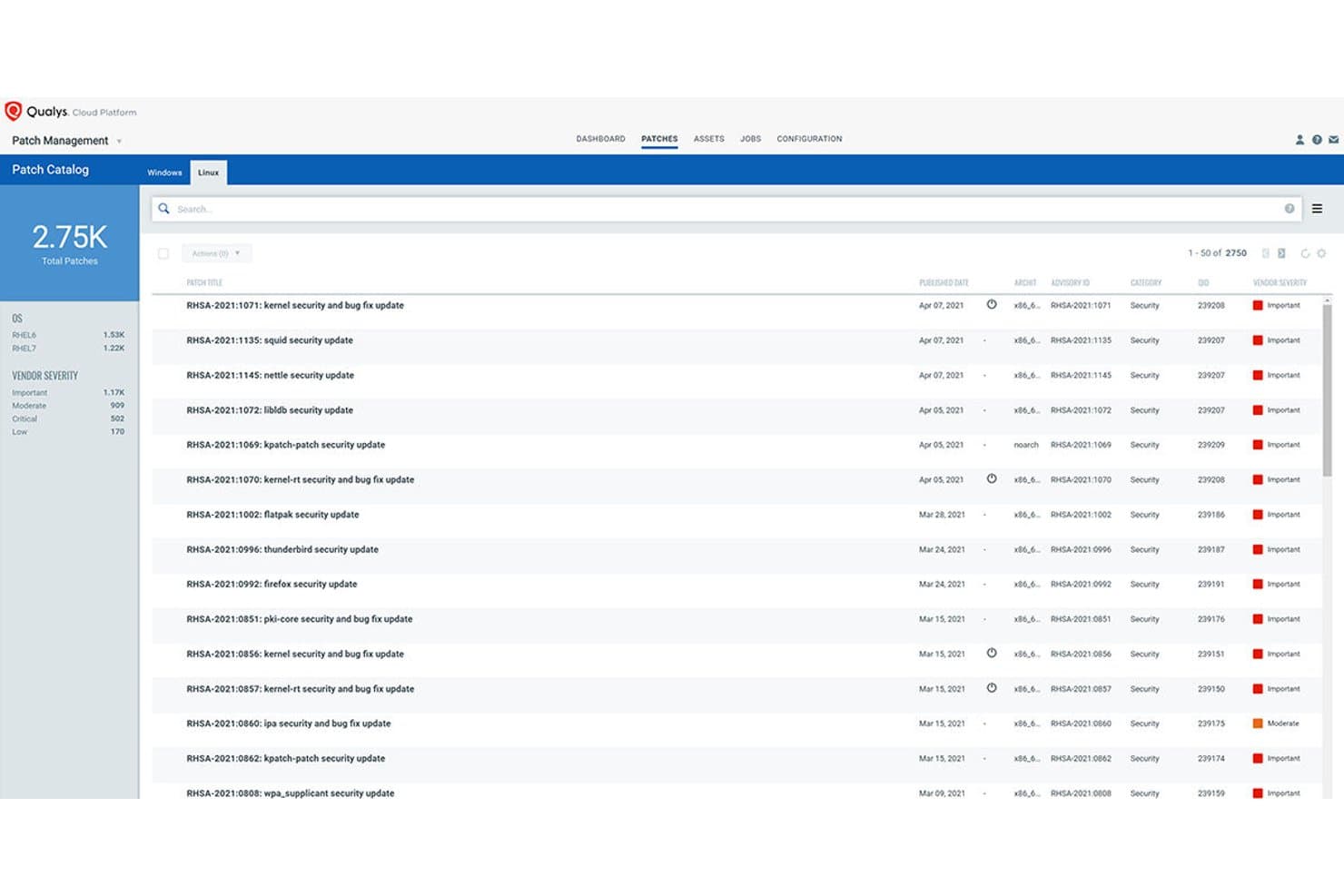
Qualys Patch Management offers a Linux Patch Catalog displaying 2,750 total patches with vendor severity ratings, advisory IDs, and published dates for RHEL systems. Qualys Patch Management is a cloud-native patch management solution that integrates directly with vulnerability detection to identify, prioritize, and deploy patches across Linux and Windows systems through a single lightweight agent.
Who Is Qualys Patch Management Best For?
It's a strong fit for security-focused IT and infrastructure teams in mid-to-large enterprises that need to tie patch deployment directly to vulnerability risk data.
Why I Picked Qualys Patch Management
I picked Qualys Patch Management as one of the best because its VMDR integration is unlike anything else in this category. When a new CVE drops, the platform automatically maps it to the relevant patch, scores it using TruRisk, and flags whether it's tied to active ransomware campaigns. From there, Zero-Touch Patch Jobs can trigger deployment across Linux fleets without manual intervention.
Qualys Patch Management Key Features
- Multi-distro Linux patching: Supports patch deployment for RHEL, CentOS, Ubuntu, Debian, SUSE, Oracle Linux, Rocky Linux, Alma Linux, and Amazon Linux.
- Pre- and post-patch scripting: Lets you configure custom scripts to run automatically before and after patch jobs.
- Yum repository management: Integrates with internal Yum repositories to manage patch staging and dependency handling for Linux systems.
- Patch compliance dashboards: Offers real-time dashboards for tracking patch status and compliance posture across all managed Linux endpoints.
Qualys Patch Management Integrations
Qualys Patch Management offers native integration with the broader Qualys Cloud Platform, including VMDR and Global AssetView. An API is available for custom integrations, and native integrations with Splunk and ServiceNow are also supported.
Pros and Cons
Pros:
- Provides risk-based patch prioritization scoring
- Supports multi-distro Linux patch orchestration
- Maps real-time CVEs directly to patches
Cons:
- Limited air-gapped or agentless deployment options
- Requires installation of Qualys Cloud Agent
Learn more about Qualys Patch Management: Best for automated lifecycle management at scale
- Free trial
- Pricing upon request

Red Hat Satellite offers a Red Hat Repositories interface where admins can browse, filter, and enable recommended RPM repositories for RHEL 8 x86_64 patch management. Red Hat Satellite is an infrastructure management platform built for RHEL environments that centralizes patch deployment, CVE remediation, compliance enforcement, and system provisioning across physical, virtual, and cloud infrastructure.
Who Is Red Hat Satellite Best For?
Red Hat Satellite is a strong fit for large enterprises managing 1,000 or more RHEL systems with dedicated infrastructure staff to maintain the platform.
Why I Picked Red Hat Satellite
Red Hat Satellite earns its spot on my shortlist because of how it structures patching across lifecycle environments. I can curate distinct Content Views for Dev, QA, and Production, promoting a tested patch set through each stage before it touches production servers. The CVE prioritization engine, powered by Red Hat Insights, also ranks vulnerabilities by actual risk to your environment rather than generic severity scores alone.
Red Hat Satellite Key Features
- Centralized security hub: Issue and manage patches from a single interface across large RHEL environments.
- OpenSCAP integration: Scan and remediate servers for compliance using industry-standard security protocols.
- Unified provisioning workflows: Provision bare-metal and virtual hosts with automated integration for DNS, DHCP, and identity.
- Agent-based and agentless execution: Manage endpoints with both lightweight agents and remote SSH-based workflows.
Red Hat Satellite Integrations
Red Hat Satellite offers native integrations with Red Hat Ansible Automation Platform, OpenSCAP, Red Hat Insights, VMware vSphere, and DNS, DHCP, and identity services. An API is available for custom integrations.
Pros and Cons
Pros:
- Offers air-gapped and disconnected mode support
- Granular patch promotion across staged environments
- Tailored for large RHEL and CentOS environments
Cons:
- Limited native support for Debian distributions
- Native support limited to Red Hat-based distros
Learn more about Red Hat Satellite: Best for centralized Ubuntu administration
- 30-day free trial
- From $25/machine/year

Ubuntu Landscape offers a centralized patch management dashboard displaying upgrade statuses, security updates, and instance health across thousands of Linux machines. Canonical Landscape is Ubuntu's native systems management platform, built by Canonical, that centralizes patch deployment, compliance reporting, and repository management across Ubuntu desktops, servers, cloud instances, and airgapped environments.
Who Is Canonical Landscape Best For?
Canonical Landscape suits IT teams that have standardized on Ubuntu across their server and desktop fleets, particularly in regulated industries needing built-in compliance reporting.
Why I Picked Canonical Landscape
I picked Canonical Landscape as one of the best because no other tool patches Ubuntu fleets with the same depth of native integration. I particularly like how policy-based patch rules apply across up to 40,000 machines from a single instance, and Livepatch handles critical kernel CVEs without scheduling a reboot. The built-in compliance reporting maps directly to frameworks like DISA-STIG, PCI-DSS, and CIS Benchmark out of the box.
Canonical Landscape Key Features
- Custom profiles: Manage different Ubuntu machine classes with tailored update and patch policies.
- Scriptable API: Automate patching tasks and integrate systems using a REST API.
- APT repository mirroring: Mirror and manage both internal and external software repositories securely.
- Dynamic search groups: Create real-time asset groups for targeted patching or compliance actions.
Canonical Landscape Integrations
Canonical Landscape offers native integrations with Canonical Livepatch, Ubuntu Pro, Azure Active Directory, Google, Okta, and IBM for identity management, and supports API access for custom integrations.
Pros and Cons
Pros:
- Handles airgapped and public cloud environments
- Automated compliance reports for major standards
- Deep Ubuntu CVE and security patching integration
Cons:
- Lacks granular patch rollback capabilities
- No support for non-Ubuntu distributions
Learn more about Ubuntu Landscape:

Foreman offers a centralized monitoring dashboard displaying host configuration status, run distribution, task status, and a configuration sync chart for Linux patch management. Foreman is an open-source lifecycle management platform that handles provisioning, configuration, and patch management for Linux servers across bare-metal, virtual, and cloud environments through its Katello plugin.
Who Is Foreman Best For?
Foreman suits Linux system administrators and infrastructure teams managing large server fleets who have the in-house sysadmin expertise to configure and maintain an open-source toolchain.
Why I Picked Foreman
I picked Foreman as one of the best because its Katello plugin gives you a structured, promotion-based patching workflow that's rare in the open-source space. I can define content views that freeze a snapshot of packages, then promote them through lifecycle environments (Dev, QA, Production) before anything touches a live server. The remote execution plugin handles the actual patching via SSH across host groups, with scheduling and concurrency controls that prevent a single job from overwhelming production systems.
Foreman Key Features
- OpenSCAP compliance scanning: Integrates with OpenSCAP to automate system compliance and vulnerability assessments.
- Discovery plugin: Automatically detects and registers new hardware on the network for rapid onboarding.
- Multi-distro repository management: Supports hosting and syncing package repositories for RHEL, CentOS, Debian, Ubuntu, and more.
- Role-based access control: Provides granular permissions management with user, role, and organization-level access settings.
Foreman Integrations
Foreman has native integrations with Ansible, Puppet, Chef, Salt, VMware vCenter, oVirt, Amazon EC2, Google Compute Engine, OpenStack, and FreeIPA, and provides a RESTful API for custom integrations.
Pros and Cons
Pros:
- OpenSCAP compliance and CVE reporting
- Supports RHEL, CentOS, Debian, Ubuntu, Fedora
- Lifecycle-based promotion for patch workflows
Cons:
- No native Windows patch management support
- Requires strong Linux sysadmin knowledge
Learn more about Foreman: Best for multi-distribution Linux management
- Free demo
- Pricing upon request
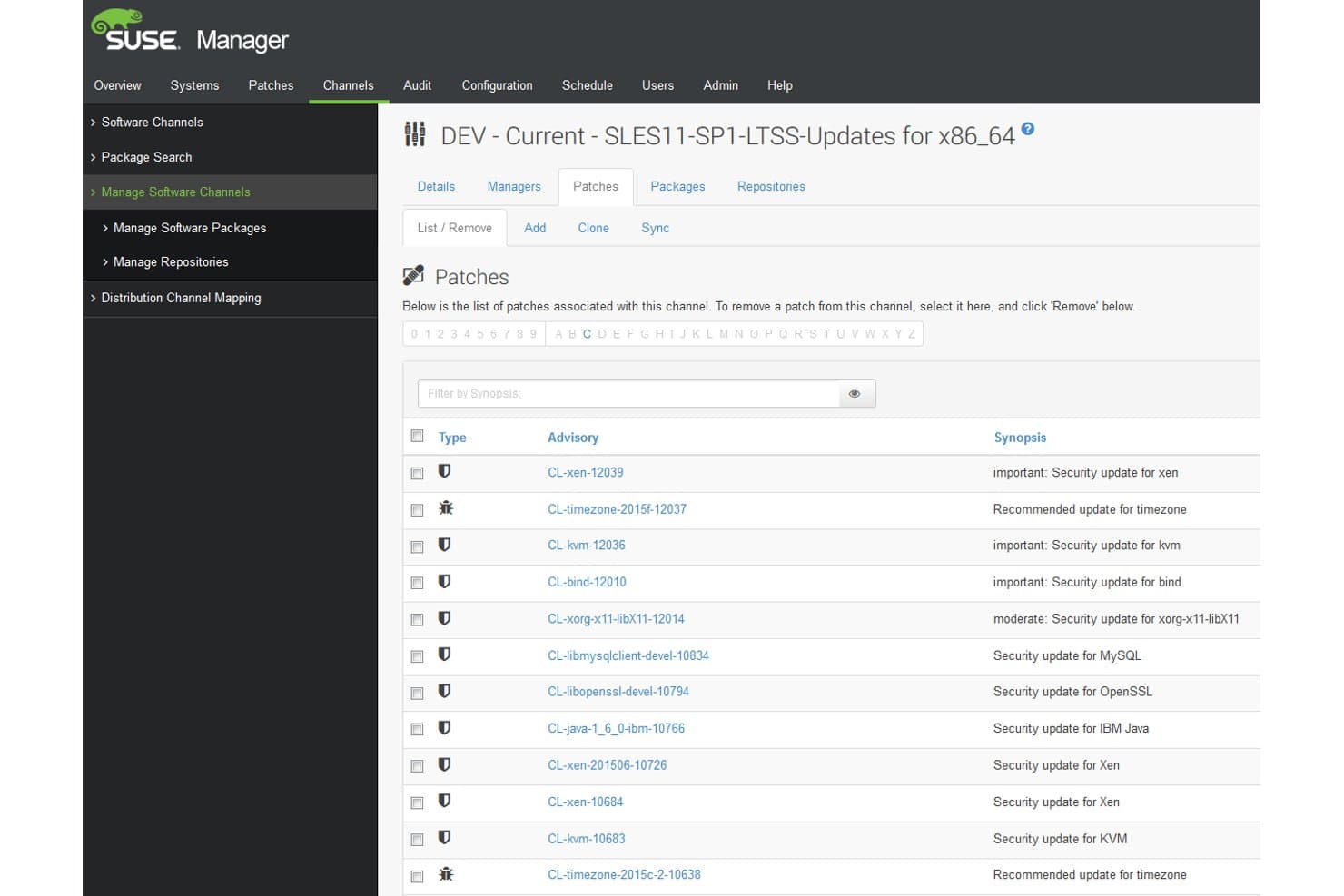
SUSE Multi-Linux Manager offers a detailed patch management interface listing security and recommended updates with advisory codes, types, and synopses for a specific software channel. SUSE Multi-Linux Manager is an open-source Linux patch management platform that centralizes patch deployment, CVE remediation, configuration management, and OpenSCAP-based compliance auditing across 16+ Linux distributions from a single console.
Who Is SUSE Multi-Linux Manager Best For?
It's a strong fit for enterprise IT and infrastructure teams managing large, mixed-distro Linux environments across on-prem, cloud, and hybrid infrastructure.
Why I Picked SUSE Multi-Linux Manager
SUSE Multi-Linux Manager earns its spot on my shortlist because it handles multi-distro patching at a scale I haven't seen matched elsewhere. My team can manage RHEL, Ubuntu, Debian, Oracle Linux, and 12+ other distributions from a single console, without maintaining separate toolchains per distro. I also rely on the Content Lifecycle Management feature to stage patches through dev and test environments before pushing them to production systems.
SUSE Multi-Linux Manager Key Features
- OpenSCAP-based compliance auditing: Run automated security scans using OpenSCAP and apply remediation scripts or Ansible playbooks for compliance standards.
- Salt and Ansible integration: Manage configuration and automation across systems using both SaltStack and native Ansible playbooks.
- Containerized architecture: Deploy the management server and proxies as containers for quick redeployment and reliability.
- Cloud marketplace availability: Access and deploy SUSE Multi-Linux Manager through AWS, Azure, Google Cloud, and Oracle Cloud marketplaces.
SUSE Multi-Linux Manager Integrations
SUSE Multi-Linux Manager offers native integrations with Ansible, SaltStack, OpenSCAP, SCAP Security Guide, and is available in the AWS, Azure, Google Cloud, and Oracle Cloud marketplaces. An API is available for custom integrations.
Pros and Cons
Pros:
- Multi-stage patch lifecycle and approvals
- Automated OpenSCAP compliance auditing available
- Supports 16+ Linux distributions natively
Cons:
- Requires high system resources for deployment
- No native iOS or Android mobile app
Learn more about SUSE Multi-Linux Manager:
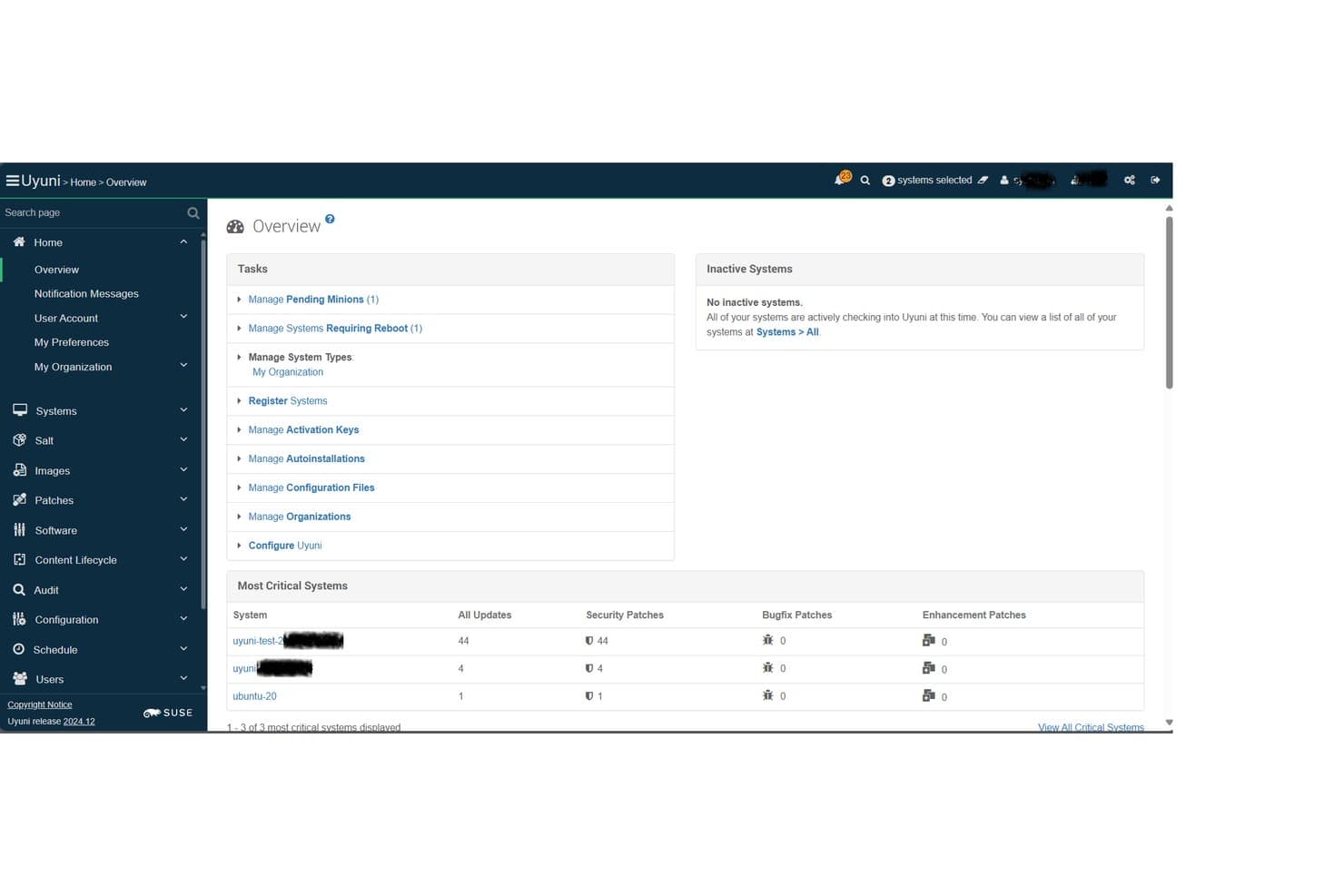
Uyuni offers a centralized Overview dashboard displaying critical system patch counts, pending minions, and security updates across managed Linux systems. Uyuni is an open-source Linux infrastructure management platform built on Salt that combines multi-distro patch management, compliance auditing, provisioning, and configuration management across physical, virtual, cloud, and container environments.
Who Is Uyuni Best For?
Uyuni is a strong fit for Linux system administrators and infrastructure teams managing large, mixed-distro server fleets who need enterprise-grade patch control without a commercial license.
Why I Picked Uyuni
I picked Uyuni as one of the best because its Salt-based orchestration engine sets it apart from every other open-source option in this space. The Uyuni Server runs as a full Salt Master, so my team can execute patch actions across thousands of Linux nodes simultaneously without per-host manual intervention. I also rely on its content lifecycle management to stage patches through dev, test, and production channels before anything reaches live systems.
Uyuni Key Features
- Multi-distro client support: Manage and patch a wide variety of Linux distributions, including SUSE, Red Hat, Ubuntu, Debian, AlmaLinux, Rocky Linux, and more.
- Compliance auditing and reporting: Track hardware and software changes, audit compliance status, and generate detailed reports for your Linux environments.
- Drift detection: Identify and alert on systems that deviate from defined hardened baselines or security templates.
- Visualization and grouping: Organize servers using tags and view their relationships with graphical dashboards for easier system oversight.
Uyuni Integrations
Uyuni offers native integrations with Salt (SaltStack) for configuration management and Cobbler for provisioning. It supports a range of Linux distributions as managed clients and provides an API for custom integrations.
Pros and Cons
Pros:
- Open source with no vendor lock-in
- Salt-based bulk automation for patch tasks
- Supports many enterprise and community Linux distros
Cons:
- No built-in PCI or HIPAA compliance templates
- Steep operational setup for new users
Learn more about Uyuni:
Alte programe pentru gestionarea patch-urilor Linux
Iată câteva opțiuni suplimentare de programe pentru gestionarea patch-urilor Linux care nu au ajuns pe lista mea scurtă, dar care merită totuși analizate:
- 11Ivanti Neurons for Patch ManagementBest for predictive patching with risk insights
- 12AWS Systems Manager Patch ManagerBest for managing patching within AWS environments
- 13Red Hat Ansible Automation PlatformBest for playbook-driven update routines
- 14TaniumBest for real-time endpoint patch deployment
- 15Heimdal SecurityBest for integrated threat and update control
- 16Progress ChefBest for infrastructure as code patch automation
- 17Puppet EnterpriseBest for codified patch policy management
- 18NinjaOneBest for intuitive multi-site patch workflows
- 19HCL BigFixBest for scalable enterprise patch enforcement
- 20Jetpatch Patch ManagementBest for agent-based patch orchestration
How I Evaluate Linux Patch Management Software
I split my evaluation into two layers: the baseline requirements a tool must meet—like multi-distro support and CVE mapping—and the differentiators that separate good tools from great ones.
Core Functionality (Table Stakes for This List)
When I'm selecting tools for my list, I rank each one on a scale from 0 (does not offer the functionality) to 5 (excels in this area) for each core functionality listed below. Then, I calculate the tool's total score as a percentage. Each tool needs to achieve a minimum total score of 65% to be considered for inclusion.
- Multi-Distro Support: I check whether a tool can patch across the distributions your fleet actually runs—RHEL, Ubuntu, Debian, SUSE, and Oracle Linux at a minimum.
- Automated Patch Deployment: The tool should handle detection, download, and installation without you SSH-ing into each host manually or stitching together cron jobs and scripts.
- CVE Remediation: I evaluate how well the platform maps missing patches to specific CVEs and whether it lets you prioritize by severity so you fix the urgent ones first.
- Scheduling & Maintenance Windows: Good tools let you define patch windows, stagger rollouts across server groups, and orchestrate reboots so production traffic isn't interrupted.
- Compliance Reporting: I look for audit trails and dashboards that show patch status across your fleet—the kind of evidence auditors ask for during PCI or SOC 2 reviews.
- Agent or Agentless Coverage: Whether a platform uses lightweight agents, agentless SSH connections, or both, it should cover on-prem servers, cloud instances, and hybrid setups.
Once I have a list of tools that meet the criteria, I consider what sets each platform apart.
Differentiating Factors (What Sets Vendors Apart)
Here's how I compare and contrast different vendors:
Standout Features
Live kernel patching is a big differentiator. If a tool supports kpatch or KernelCare, your team can apply kernel updates on production servers without scheduling a reboot. I also evaluate third-party package patching, since most Linux fleets run Apache, NGINX, Docker, or MySQL alongside the OS. Unpatched third-party packages create real gaps. Automated rollback is another separator—snapshot-based or transactional rollbacks let you recover when a patch breaks something in staging or production.
Beyond Features
Deployment model matters a lot. Some teams need air-gapped or disconnected installs for regulated environments, while others want SaaS with zero infrastructure overhead. I evaluate whether a platform fits into existing toolchains—integrations with Jira or ServiceNow for change management, and with scanners like Tenable or Rapid7 for vulnerability context. Scalability across hybrid setups is another factor I check, especially bandwidth-efficient patch distribution for fleets spread across cloud regions and on-prem data centers.
Cum să alegeți programele pentru gestionarea patch-urilor Linux
Este ușor să vă pierdeți în liste lungi de funcții și structuri complexe de prețuri. Pentru a vă ajuta să rămâneți concentrați pe parcursul procesului de selecție a programului, iată o listă de verificare a factorilor de care trebuie să țineți cont:
| Factor | Aspecte de luat în considerare |
|---|---|
| FactorScalabilitate | Aspecte de luat în considerareVa putea programul să gestioneze numărul actual și estimat de servere? Întrebați despre limitele de extindere, gruparea nodurilor și posibilitatea de a aplica patch-uri în medii hibride. |
| FactorIntegrări | Aspecte de luat în considerareFuncționează instrumentul cu sistemele dumneavoastră de gestionare a tichetelor, SIEM sau scanerele de vulnerabilități? Verificați compatibilitatea cu platformele esențiale din stiva dumneavoastră de monitorizare și operațiuni. |
| FactorPosibilități de personalizare | Aspecte de luat în considerarePuteți ajusta fluxurile de lucru pentru aplicarea patch-urilor astfel încât să se potrivească intervalelor de mentenanță, controalelor de modificări sau proceselor de aprobare? Căutați politici flexibile, nu o soluție „universală”. |
| FactorUșurință în utilizare | Aspecte de luat în considerareEste interfața intuitivă? Se pot familiariza rapid administratorii noi cu sistemul? Feriți-vă de fluxurile de lucru complexe care încetinesc ciclurile de aplicare a patch-urilor sau generează erori în producție. |
| FactorImplementare și integrare inițială | Aspecte de luat în considerareCât timp și ce nivel de experiență internă va necesita configurarea? Analizați documentația disponibilă, asistența dedicată pentru integrarea inițială și instrumentele de migrare pentru parcuri mari de dispozitive. |
| FactorCost | Aspecte de luat în considerareCare este modelul de tarifare — per nod, per site, pe bază de abonament? Luați în considerare costurile recurente ale licențelor, angajamentele minime și costul total la scara completă a implementării. |
| FactorMăsuri de protecție a securității | Aspecte de luat în considerareCe mecanisme de autentificare, criptare și control al accesului sunt incluse? Confirmați că instrumentul corespunde cerințelor de securitate și audit ale organizației dumneavoastră. |
| FactorCerințe de conformitate | Aspecte de luat în considerareAcceptă programul cerințele dumneavoastră de conformitate (PCI, HIPAA, SOC 2)? Întrebați despre șabloanele de rapoarte de conformitate, pistele de audit pentru patch-uri și dovezile necesare auditurilor externe. |
Ce sunt programele pentru gestionarea patch-urilor Linux?
Programele pentru gestionarea patch-urilor Linux automatizează procesul de identificare, implementare și monitorizare a actualizărilor și patch-urilor de securitate pe sistemele Linux. Aceste instrumente vă ajută echipa să mențină un nivel uniform de securitate, să remedieze vulnerabilitățile și să gestioneze cerințele de conformitate pentru diferite distribuții Linux, de pe un tablou de bord centralizat. Programele pentru gestionarea patch-urilor sunt concepute pentru a se integra în medii de infrastructură diverse, oferind suport pentru orice, de la servere locale la configurații cloud și hibride.
Funcțiile programelor pentru gestionarea patch-urilor Linux
Atunci când alegeți un program pentru gestionarea patch-urilor Linux, urmăriți următoarele funcții esențiale:
- Compatibilitate cu mai multe distribuții: Gestionați actualizările pentru mai multe distribuții Linux majore din același tablou de bord, reducând efortul administrativ pentru echipele care lucrează în medii mixte.
- Implementarea automatizată a patch-urilor: Identificați, descărcați și instalați rapid actualizările fără intervenție manuală, asigurând menținerea sistemelor la zi și securizate.
- Prioritizarea CVE-urilor: Asociați patch-urile cu CVE-uri specifice și prioritizați implementarea actualizărilor pe baza gravității vulnerabilităților pentru o securitate și o conformitate mai solide.
- Programarea ferestrelor de mentenanță: Stabiliți ferestre de mentenanță personalizabile pentru aplicarea patch-urilor și repornirile automatizate, minimizând impactul asupra sarcinilor de lucru din producție.
- Raportarea conformității patch-urilor: Generați tablouri de bord și rapoarte care prezintă starea patch-urilor, istoricul și pistele de audit pentru verificări interne sau controale de conformitate cu reglementările.
- Aplicarea patch-urilor pentru pachete terțe: Actualizați pachete care nu fac parte din sistemul de operare, precum depozitele NGINX, PostgreSQL sau Docker, împreună cu actualizările standard ale sistemului.
- Posibilitatea de revenire: Restabiliți stările anterioare ale sistemului dacă o actualizare cauzează probleme, utilizând funcții de revenire bazate pe instantanee sau tranzacții.
- Acoperire bazată pe agenți sau fără agenți: Alegeți implementarea bazată pe agenți pentru un control mai aprofundat sau metode fără agenți (SSH) pentru acoperirea rapidă a gazdelor distribuite.
- Integrări API: Conectați-vă la instrumente ITSM, de monitorizare sau de automatizare pentru a sincroniza fluxurile de lucru, a declanșa notificări sau a automatiza procesele de aprobare a patch-urilor.
- Controlul accesului bazat pe roluri (RBAC): Definiți permisiuni detaliate pentru membrii echipei, limitând persoanele care pot programa, aproba sau implementa patch-uri pe sisteme.
Beneficiile software-ului de gestionare a patch-urilor Linux
Implementarea software-ului de gestionare a patch-urilor Linux oferă mai multe beneficii pentru echipa și compania dumneavoastră. Iată câteva dintre acestea:
- Îmbunătățirea nivelului de securitate: Detectarea și aplicarea automatizată a patch-urilor pentru vulnerabilități vă ajută să remediați rapid breșele înainte ca atacatorii să exploateze CVE-uri cunoscute.
- Conformitate consecventă: Raportarea integrată și pistele de audit facilitează demonstrarea conformității cu reglementările și cadre precum PCI, HIPAA sau SOC 2.
- Reducerea efortului manual: Automatizarea și programarea elimină necesitatea efectuării unor sarcini de aplicare a patch-urilor plictisitoare și repetitive pe flote mari de servere.
- Reducerea timpilor de nefuncționare: Comenzile pentru ferestrele de mentenanță și funcțiile de aplicare a patch-urilor pentru nucleul activ permit echipei să actualizeze sistemele critice cu întreruperi operaționale minime sau inexistente.
- Acoperirea extinsă a mediilor: Gestionați centralizat actualizările în configurații cloud, locale și hibride, cu suport pentru mai multe distribuții Linux și puncte finale.
- Răspuns mai rapid la incidente: Asocierea și prioritizarea integrate a CVE-urilor permit remedierea mai rapidă atunci când sunt descoperite vulnerabilități noi.
- Control și vizibilitate detaliate: Accesul bazat pe roluri și tablourile de bord detaliate vă ajută să gestionați permisiunile, să urmăriți progresul și să mențineți părțile interesate la curent.
Costurile și prețurile software-ului de gestionare a patch-urilor Linux
Selectarea software-ului de gestionare a patch-urilor Linux necesită înțelegerea diferitelor modele de preț și planuri disponibile. Costurile variază în funcție de funcții, dimensiunea echipei, extensii și alți factori. Tabelul de mai jos rezumă planurile comune, prețurile medii ale acestora și funcțiile incluse de obicei în soluțiile software de gestionare a patch-urilor Linux:
Tabel comparativ al planurilor pentru software-ul de gestionare a patch-urilor Linux
| Tipul planului | Preț mediu | Funcții comune |
|---|---|---|
| Tipul planuluiPlan gratuit | Preț mediu$0 | Funcții comuneAplicarea de bază a patch-urilor pentru un număr limitat de gazde, actualizări manuale și asistență din partea comunității. |
| Tipul planuluiPlan personal | Preț mediu$5-$15/server/lună | Funcții comuneAplicarea automatizată a patch-urilor, suport pentru mai multe distribuții Linux, rapoarte de conformitate de bază și notificări prin e-mail. |
| Tipul planuluiPlan pentru companii | Preț mediu$20-$40/server/lună | Funcții comuneProgramare avansată, aplicarea patch-urilor pentru pachete terțe, prioritizarea CVE-urilor, acces API și asistență standard. |
| Tipul planuluiPlan pentru întreprinderi | Preț mediu$50-$100/server/lună | Funcții comuneComenzi de acces bazate pe roluri, instrumente de auditare a conformității, aplicarea patch-urilor pentru nucleul activ, asistență premium 24/7 și integrări cu instrumente ITSM. |
Întrebări frecvente despre software-ul de gestionare a patch-urilor Linux
Iată câteva răspunsuri la întrebările frecvente despre software-ul de gestionare a patch-urilor Linux:
Cum ajută software-ul de gestionare a patch-urilor Linux la securitate?
Software-ul de gestionare a patch-urilor Linux automatizează identificarea și aplicarea patch-urilor de securitate în întreaga infrastructură IT, consolidând securitatea generală a punctelor finale și gestionarea vulnerabilităților. Înlocuirea aplicării manuale a patch-urilor cu remedieri de securitate automatizate reduce expunerea, protejând sistemele împotriva breșelor de date și permițând echipei să implementeze actualizări urgente de securitate și să reacționeze rapid la noile CVE-uri.
Pot gestiona mai multe distribuții Linux dintr-un singur instrument?
Da, platformele acceptă distribuții precum Ubuntu, Red Hat Enterprise Linux, Debian, SUSE și Oracle Linux, folosind administratori nativi de pachete precum dnf sau zypper. Multe instrumente funcționează ca soluție RMM sau de gestionare unificată a punctelor finale, permițându-vă să controlați politicile de implementare, să programați regulile politicii de gestionare a patch-urilor și să gestionați actualizările în toate mediile de pe un singur ecran.
La ce funcții de raportare ar trebui să mă aștept?
Ar trebui să vă așteptați la tablouri de bord pentru conformitate, jurnale de audit și rapoarte personalizabile care prezintă conformitatea cu patch-urile în întreaga flotă de sisteme. Aceste funcții vă ajută să vă pregătiți pentru un audit de securitate, să urmăriți gestionarea generală a activelor, să respectați cerințele de reglementare și să oferiți transparență deplină echipelor de conducere și de securitate.
Este posibilă aplicarea patch-urilor fără agenți cu aceste instrumente?
Da, multe soluții oferă aplicarea patch-urilor fără agenți prin conexiuni SSH și acces de la distanță, simplificând implementarea și evitând în același timp scripturile personalizate. Totuși, instalarea agenților locali poate oferi o vizibilitate mai profundă asupra sistemului, o aliniere mai bună la platforma PSA și o automatizare mai flexibilă în mediile de rețea complexe.
Ce tip de asistență oferă de obicei furnizorii?
Furnizorii oferă adesea mai multe niveluri de asistență, de la forumuri comunitare și documentație în cadrul planurilor gratuite până la asistență premium 24/7 și manageri dedicați succesului clienților din companiile mari. Confirmați întotdeauna canalele disponibile și timpii de răspuns înainte de a lua un angajament.