

Cele mai bune instrumente de testare Android ajută echipele să identifice erorile din timp, să asigure stabilitatea aplicațiilor pe diferite dispozitive și să mențină performanța constantă înainte de lansare. Aceste instrumente simplifică testarea repetitivă, verifică compatibilitatea între diferite versiuni ale sistemului de operare și ajută echipele să lanseze actualizări mai rapid, cu mai puține regresii.
Echipele încep adesea să caute instrumente de testare mai bune atunci când asigurarea manuală a calității devine prea lentă, testele pe emulator nu corespund rezultatelor din lumea reală sau depanarea unor medii Android fragmentate consumă prea mult timp de dezvoltare. Probleme precum compilările inconsecvente, vizibilitatea redusă asupra testelor și ciclurile lente de feedback pot da rapid peste cap termenele de livrare.
Am lucrat cu echipe de dezvoltare și de asigurare a calității care au implementat testarea automată Android în fluxuri CI/CD active, evaluând instrumentele pe baza fiabilității în condiții reale, a integrării și a preciziei rapoartelor.
În acest ghid, vei afla ce instrumente de testare Android contribuie efectiv la îmbunătățirea calității aplicațiilor, la reducerea ciclurilor de testare și la menținerea mai ușoară a unei performanțe constante pe diferite dispozitive.
Why Trust Our Software Recommendations
6,700+
Reviews
20
Industry experts
16+
Evaluation factors
14
Years
Our team has been testing and reviewing software since 2012. As tech leaders ourselves, we know how difficult—and important—it is to choose the right software.
For this guide, we evaluated tools using hands-on testing and independent research, scoring tools using our selection criteria.
Our reviews reflect our human editorial judgment, not a sales pitch.
Expert reviewers:
- Paulo Gardini MiguelTech Director
 Tim FisherVP of AI
 Gabriel RosasTech Lead & Software Architect
 Christhian GruhnTech Lead & Platform Architect

Tabel comparativ al instrumentelor de testare Android
Acest tabel comparativ rezumă detaliile despre prețuri pentru selecția mea de top de instrumente de testare Android.
Sorted by: Default
| Tool | Starting Price | Website | |
|---|---|---|---|
Best for testing hardware-dependent app flows | 4.9 out of 5 | $17/month Free plan + free demo available | Book Demo |
Best for scriptless automation workflow | 4.9 out of 5 | $199/month/year Free trial available | Website |
Best for real-time performance monitoring | 4.3 out of 5 | $10/user/month Free plan + free demo available | Website |
Best for codeless test creation | 4.4 out of 5 | Pricing upon request Free demo available | Website |
Best for AI-driven test automation | 4.3 out of 5 | Pricing upon request Free trial + free demo available | Website |
Best for real device testing | 4.3 out of 5 | $83/month Free trial + free demo available | Website |
Best for early-stage app testing | Not rated | Free to use | Website |
Best for integrated development environment | Not rated | Free plan available Free plan available | Website |
Best for behavior-driven development | Not rated | Free to use | Website |
Best for end-to-end testing on React Native | Not rated | Free to use | Website |


Recenzii ale celor mai bune instrumente de testare Android
Mai jos sunt rezumatele mele detaliate ale celor mai bune instrumente de testare Android incluse în selecția mea scurtă. Recenziile mele oferă o analiză detaliată a funcțiilor principale, a avantajelor și dezavantajelor, a integrărilor și a cazurilor ideale de utilizare pentru fiecare instrument, pentru a te ajuta să îl găsești pe cel mai potrivit pentru tine.
 Best for testing hardware-dependent app flows
- Free plan + free demo available
- From $17/month (billed annually)
Visit WebsiteCustomer Rating:4.9/5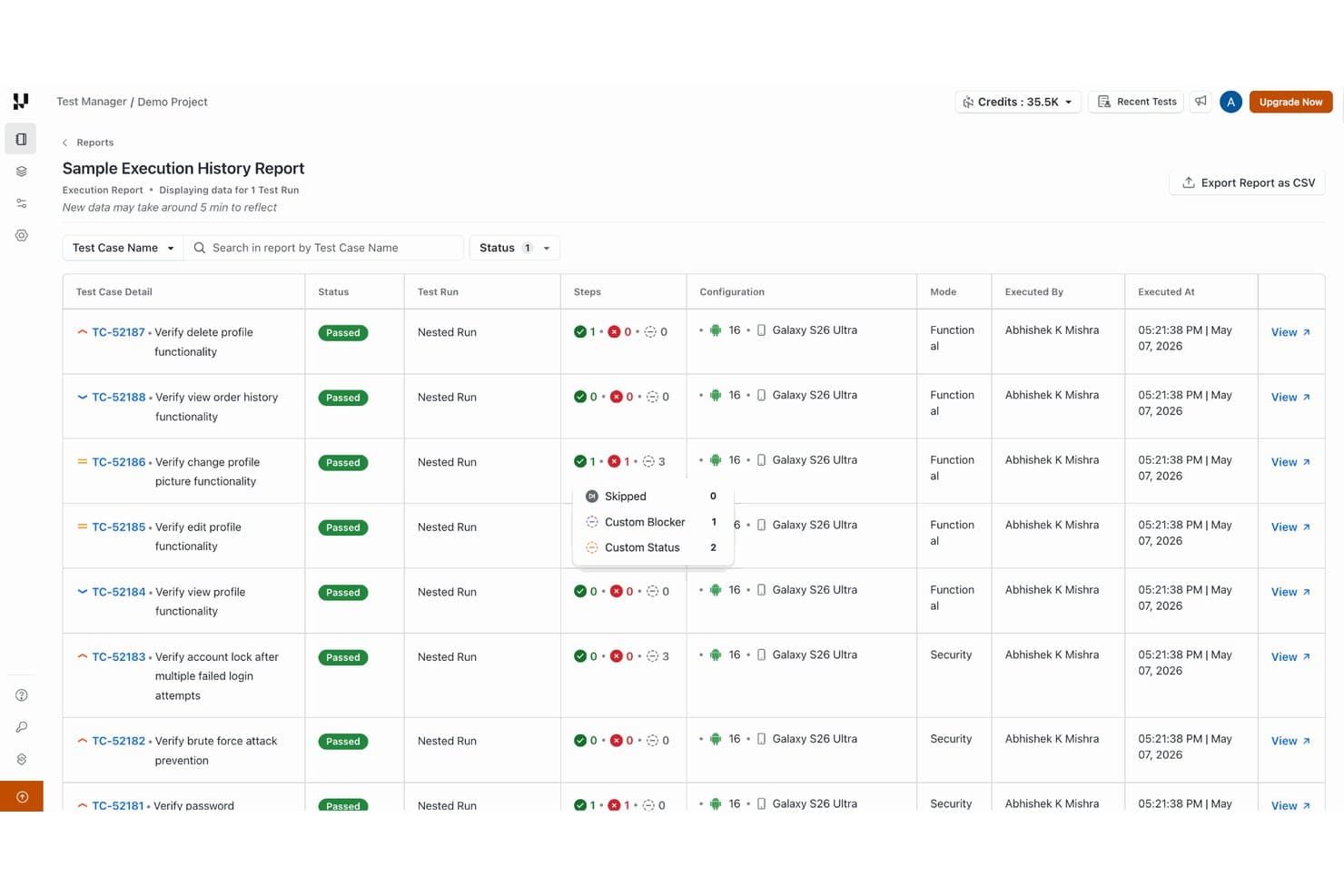
TestMu AI tracks test execution history with step-level status details. TestMu AI is a cloud-based real device testing platform that lets you run manual and automated tests on physical Android and iOS devices, with support for Appium, Espresso, and XCUITest automation, parallel execution, network simulation, and AI-driven test authoring via KaneAI.
Who Is TestMu AI Best For?
TestMu AI is a strong fit for mobile QA engineers and developers who need to test hardware-dependent app flows—like biometrics, SIM/SMS, GPS, and camera injection—on real physical devices.
Why I Picked TestMu AI
TestMu AI earns its spot on my shortlist because of how well it handles hardware-dependent app flows that most cloud testing platforms simply can't replicate. I picked it specifically for teams testing things like biometric prompts, SIM-based OTP flows, and camera injection, where you need a real physical device, not an emulator. The platform lets you inject images into the device camera for QR and barcode testing, simulate GPS coordinates across 150+ countries, and trigger fingerprint or Face ID pass/fail scenarios in a single session.
TestMu AI Key Features
- Parallel test execution: Run test suites simultaneously across multiple real Android and iOS device and OS combinations in a single session.
- Appium performance profiling: Capture CPU, memory, battery drain, frame rate, ANR counts, and app startup times during Appium runs on real devices.
- CI/CD pipeline integration: Connect real-device test runs to Jenkins, GitHub Actions, GitLab CI, CircleCI, and Azure Pipelines via HyperExecute CLI and REST APIs.
- KaneAI natural-language test authoring: Write mobile app tests in plain English and have KaneAI generate and export runnable Appium test steps for real-device execution.
TestMu AI Integrations
TestMu AI documents 120+ integrations, including Appium, Espresso, XCUITest, Jenkins, GitHub Actions, GitLab CI, CircleCI, Azure Pipelines, Jira, and Slack. It also supports REST APIs, HyperExecute CLI, and webhooks for custom CI/CD workflows.
Pros and Cons
Pros:
- Session recordings help reproduce Android bugs
- Parallel runs shorten regression cycles
- Tests Android builds across real devices
Cons:
- Lag and dropped sessions disrupt test runs
- Some devices unavailable when sessions launch
Learn more about TestMu AI: Best for scriptless automation workflow
- Free trial available
- From $199/month/year (minimum of 4 seats)
Visit WebsiteCustomer Rating:4.9/5
TestGrid offers a test case dashboard with testing steps and conditions. TestGrid is an android testing platform that offers cloud-based device testing, scriptless automation, AI-driven test case generation, smart bug reporting, test analytics, and built-in CI/CD pipeline integration.
Who Is TestGrid Best For?
TestGrid is a strong fit for QA teams and developers in mid-to-large organizations that need end-to-end android testing across real devices without heavy scripting overhead.
Why I Picked TestGrid
I've included TestGrid in my top picks because its scriptless automation workflow lets my team build and run Android test cases without writing a single line of code. I particularly like the drag-and-drop test recorder, which captures actions directly on real devices and converts them into reusable test steps. The AI-assisted test case generation also cuts down the time I'd normally spend on manual test authoring significantly.
TestGrid Key Features
- Real device testing: Run Android tests on actual physical devices in the cloud, not just emulators, for accurate results across phone and tablet form factors.
- Auto Heal: AI-driven self-healing automatically updates broken test steps when UI elements change, reducing manual test maintenance.
- Parallel sessions: Execute multiple test sessions simultaneously across different Android devices to cut overall test run time.
- Performance monitoring: Track CPU, memory, battery, and network activity on Android devices during test execution to catch resource-related issues.
TestGrid Integrations
TestGrid offers native integrations with Jira, GitHub, GitLab, Slack, Microsoft Teams, Azure DevOps, and CircleCI. An API is available for custom integrations.
Pros and Cons
Pros:
- Smart bug report bundles with session logs
- Parallel test execution across device fleet
- Real device cloud for Android testing
Cons:
- Reporting dashboards lack custom visualization
- Test data export options are limited
Learn more about TestGrid: Best for real-time performance monitoring
- Free plan + free demo available
- From $10/user/month
Visit WebsiteCustomer Rating:4.3/5
The software allows you to monitor and manage multiple applications and tools in one place. New Relic is an observability platform for developers, offering monitoring and insights into app performance and infrastructure. It serves software developers and IT teams, focusing on end-to-end monitoring and real-time data analysis.
Why I picked New Relic: It excels in real-time performance monitoring, providing insights into application behavior. The platform offers comprehensive monitoring, enabling your team to troubleshoot efficiently. Its integration with numerous tools ensures flexibility in your workflow. Pay-as-you-go pricing allows you to manage costs effectively.
Standout features & integrations:
Features include real-time data analysis, comprehensive monitoring, and a flexible pricing model. The platform allows your team to efficiently troubleshoot issues and optimize performance.
Integrations include AWS, Azure, Google Cloud Platform, Kubernetes, Docker, Slack, PagerDuty, Jira, GitHub, and Microsoft Teams.
Pros and Cons
Pros:
- Integrates easily with popular dev tools
- Wide range of monitoring capabilities
- AI-powered anomaly detection and intelligent alerting
Cons:
- Added complexity from reliance on agents installed on application servers
- Has a bit of a learning curve
Learn more about New Relic: Best for codeless test creation
- Free demo available
- Pricing upon request
Visit WebsiteCustomer Rating:4.4/5
Testsigma allows you to execute regression testing with organized results within a single dashboard. Testsigma is an automated testing platform designed for both technical and non-technical users aiming to simplify the testing process. It serves QA teams and developers by offering codeless test creation and execution, making testing accessible to a broader range of users.
Why I picked Testsigma: It enables codeless test creation, which is a significant advantage for teams without extensive coding skills. The platform supports natural language processing, allowing you to write tests in plain English. Its cloud-based architecture ensures scalability and flexibility for different project sizes. Testsigma’s real-time test execution and reporting enhance productivity, helping your team stay on track.
Standout features & integrations:
Features include natural language processing for test creation, real-time test execution, and cloud-based scalability. The platform also offers detailed reporting to keep your team informed on test progress.
Integrations include Jira, Jenkins, GitHub, Slack, Trello, Bamboo, Bitbucket, TestRail, Zapier, and Asana.
Pros and Cons
Pros:
- Intuitive user interface
- No coding experience required
- Cross-browser and platform capabilities
Cons:
- Some features have a learning curve
- Limited programming language support
Learn more about Testsigma: Best for AI-driven test automation
- Free trial + free demo available
- Pricing upon request
Visit WebsiteCustomer Rating:4.3/5
Author, configure, and customize stable tests fast. Tricentis Testim Mobile is a cloud-based testing solution for iOS and Android applications. It's designed for developers and QA teams looking to automate testing for native, hybrid, and cross-platform apps. It provides automated testing capabilities to enhance app stability and reduce maintenance.
Why I picked Tricentis Testim Mobile: Its AI-driven automation helps detect app elements efficiently, making it stand out in the market. The Virtual Mobile Grid allows seamless test execution, which is key for scalability. Easy test and application management simplify workflows for your team. Quick diagnostics for failures mean you can address issues faster.
Standout features & integrations:
Features include automated testing for both iOS and Android apps, seamless test execution on a Virtual Mobile Grid, and quick diagnostics for failures. You can also manage tests and applications with ease.
Integrations include Jira, Jenkins, GitHub, GitLab, Bitbucket, Slack, Microsoft Teams, TestRail, BrowserStack, and Sauce Labs.
Pros and Cons
Pros:
- Supports cross-platform testing
- Quick failure diagnostics
- AI-driven test automation
Cons:
- Can be complex for beginners
- Requires internet for cloud access
Learn more about Tricentis Testim Mobile: Best for real device testing
- Free trial + free demo available
- From $83/month
Visit WebsiteCustomer Rating:4.3/5
Choose which devices you wish to test within the extensive Kobiton device lab. Kobiton is a mobile testing platform that provides real device access for testing apps, primarily targeting QA teams and developers. It focuses on delivering accurate testing results by allowing users to test on actual devices rather than emulators.
Why I picked Kobiton: It prioritizes real device testing, which is crucial for accurate results. With Kobiton, your team can access a wide range of devices for thorough testing. The platform supports manual and automated testing, catering to different needs. Its user-friendly interface simplifies the testing process, making it accessible to your entire team.
Standout features & integrations:
Features include real-time device access for testing, support for both manual and automated testing, and a wide range of devices available for testing. The platform's intuitive interface makes testing straightforward and efficient.
Integrations include Jira, Jenkins, GitHub, Bitbucket, Slack, Azure DevOps, Bamboo, CircleCI, Travis CI, and TeamCity.
Pros and Cons
Pros:
- Provides integrations with DevOps and project management platforms
- Supports team collaboration
- Supports Appium testing framework
Cons:
- Some devices may be unavailable
- Complicated to configure
Learn more about Kobiton:

Locate and identify your elements by ID, position and text. Robotium facilitates automated UI testing of Android applications, offering a straightforward way to write functional and system tests.
Why I picked Robotium: It offers a simple setup for early-stage testing, which is ideal for developers starting app projects. Robotium supports both native and hybrid applications, providing flexibility in testing. Its ability to handle multiple Android activities makes it versatile. The open-source nature allows your team to customize and extend functionalities as needed.
Standout features & integrations:
Features include support for native and hybrid applications, the ability to handle multiple Android activities, and an open-source framework for customization. It also offers straightforward setup and execution for early-stage testing.
Integrations include Android Studio, Eclipse, Maven, Gradle, Jenkins, GitHub, Bitbucket, Travis CI, CircleCI, and Bamboo.
Pros and Cons
Pros:
- Supports complex user interfaces
- Supports multiple programming languages
- Supports all Android versions
Cons:
- Not ideal for complex tests
- Limited documentation and tutorials
Learn more about Robotium: Best for integrated development environment
- Free plan available
- Free plan available

Android Studio allows you to take a screenshot using its emulator feature. Android Studio is an integrated development environment (IDE) designed for Android app development, catering to developers who need a comprehensive toolset for app creation.
Why I picked Android Studio: It offers a complete development environment, which is crucial for developers working on Android apps. The IDE includes a code editor, a visual layout editor, and various debugging tools. Its support for multiple programming languages enhances versatility. The built-in emulator allows you to test apps in a virtual environment efficiently.
Standout features & integrations:
Features include a visual layout editor for building app interfaces, a flexible build system for customizing builds, and a powerful code editor for efficient coding. The built-in emulator provides a virtual testing environment to streamline app testing.
Integrations include Firebase, GitHub, Bitbucket, Google Cloud Platform, Jenkins, Gradle, Maven, Slack, Jira, and Trello.
Pros and Cons
Pros:
- Flexible build system
- Supports multiple languages
- Built-in emulator
Cons:
- Not ideal for beginners
- High system requirements
Learn more about Android Studio:

Calabash allows you to write one test case and execute it across multiple devices. Calabash is an open-source testing framework tailored for developers and QA teams focusing on behavior-driven development (BDD) for Android apps.
Why I picked Calabash: It supports behavior-driven development, which allows your team to write tests in a natural language style. Calabash supports a wide range of Android devices, making it versatile for testing. Its integration with Cucumber enhances the BDD approach, allowing tests to be more descriptive. The open-source nature provides flexibility for customizations to suit your specific needs.
Standout features & integrations:
Features include support for writing tests in natural language, wide device compatibility, and integration with Cucumber for BDD. The framework also offers flexibility for customization, aligning with your team’s specific testing requirements.
Integrations include Cucumber, Ruby, Jenkins, GitHub, Bitbucket, Travis CI, CircleCI, Bamboo, Eclipse, and IntelliJ IDEA.
Pros and Cons
Pros:
- Strong community support
- Easy to use
- Comprehensive test coverage
Cons:
- Not ideal for complex apps
- Maintenance required for test scripts
Learn more about Calabash:

Automate mobile tests on real Android devices in the cloud. Detox is an end-to-end testing framework designed for React Native applications. It provides automated testing capabilities to ensure that applications behave as expected across different scenarios.
Why I picked Detox: It offers specialized end-to-end testing for React Native, which is crucial for developers working in this environment. Detox synchronizes with the app's lifecycle, ensuring tests are executed at the right moments. Its ability to run tests in parallel speeds up the testing process significantly. The framework's open-source nature allows you to customize tests to fit your specific needs.
Standout features & integrations:
Features include synchronization with the app's lifecycle, parallel test execution, and the ability to customize tests. Detox also provides detailed logs and reports to help your team identify issues quickly.
Integrations include React Native, Jest, Mocha, Jasmine, Travis CI, CircleCI, Jenkins, GitHub, Bitbucket, and GitLab.
Pros and Cons
Pros:
- Allows tests on real devices
- Faster testing process
- Customizable test cases
Cons:
- Setup can be complex
- Limited support for web apps
Learn more about Detox:
Alte instrumente de testare Android
Iată câteva opțiuni suplimentare de instrumente de testare Android care nu au fost incluse în selecția mea scurtă, dar merită totuși verificate:
- 11Autify AximoBest for autonomous test execution
- 12SelendroidBest for emulating diverse devices
- 13MobotBest for automated physical testing
- 14BrowserStackBest for cloud-based browser testing
- 15Katalon StudioBest for all-in-one test automation
- 16testRigorBest for no-code test automation
- 17AppiumBest for open-source mobile automation
- 18RanorexBest for test automation across multiple operating systems and platforms
- 19Rainforest QABest for on-demand human testing
- 20MonkeyRunnerBest for automated functional testing
- 21EspressoBest for UI testing on Android
- 22MochaBest for flexible JavaScript testing
- 23WaldoBest for mobile emulator testing
How I Evaluate Android Testing Tools
I split my evaluation into two layers: the baseline Android capabilities every tool must have to qualify, and the differentiators that matter most when teams run parallel suites across real devices.
Core Functionality (Table Stakes For This List)
When I'm selecting tools for my list, I rank each one on a scale from 0 (does not offer the functionality) to 5 (excels in this area) for each core functionality listed below. Then, I calculate the tool's total score into a percentage. Each tool needs to achieve a minimum total score of 65% to be considered for inclusion.
- Android Device Coverage: I evaluate how many real devices, emulators, and OS versions a tool offers, paying close attention to OEM variety like Samsung, Pixel, and Xiaomi handsets running both current and older Android releases.
- Automation Framework Support: Each tool should support major Android frameworks like Espresso, Appium, or UI Automator so teams can write tests in languages and patterns they already know.
- Parallel Test Execution: I look at how many concurrent sessions a tool can run, since cutting a 300-test suite from sequential to parallel across dozens of devices is what separates a usable tool from a bottleneck.
- CI/CD Pipeline Integration: The tool should connect to platforms like Jenkins, GitHub Actions, or Bitrise through native plugins or a CLI, so tests trigger automatically on every commit or pull request.
- Debugging & Reporting: I check whether a tool provides crash logs, video playback, screenshots, and device-level metrics after each run, since pinpointing a flaky test on a specific Galaxy device requires that level of detail.
- APK/AAB Handling: The tool should accept both APK and AAB uploads with instrumentation support, making it straightforward to push new builds, manage versioning, and kick off tests without manual setup.
Once I have a list of tools that meet the criteria, I consider what sets each platform apart.
Differentiating Factors (What Sets Vendors Apart)
Here's how I compare and contrast different vendors:
Standout Features
Self-healing tests are a big differentiator. When Android UI elements shift between releases, tools that auto-update locators save hours of maintenance. I also evaluate network simulation capabilities—testing how an app handles 3G throttling or intermittent connectivity reveals issues that clean Wi-Fi runs never surface. Visual regression and accessibility audits round out my evaluation, especially for teams shipping consumer apps where a misaligned button or missing TalkBack label directly impacts user experience.
Beyond Features
Pricing structure matters a lot here. Per-device-minute billing can spiral fast during regression cycles, so I check whether a vendor's model fits the team's actual test volume. Security and compliance posture is another key factor—I look for SOC 2 certification and device-wiping protocols between sessions, especially when teams upload pre-release builds containing proprietary code. Ecosystem fit also weighs heavily. A tool that connects to Android Studio, Jira, and your observability stack (like Firebase or Datadog) keeps results flowing where your team already works.
Cum alegi instrumentele de testare Android
Este ușor să te pierzi în liste lungi de funcții și structuri complexe de prețuri. Pentru a te ajuta să rămâi concentrat în timp ce parcurgi procesul tău unic de selectare a software-ului, iată o listă de verificare cu factorii de care trebuie să ții cont:
| Factor | Ce trebuie luat în considerare |
| Scalabilitate | Asigură-te că instrumentul poate evolua odată cu nevoile tale. Caută soluții care pot gestiona volume mai mari de teste și pot oferi suport pentru dispozitive suplimentare pe măsură ce echipa ta se extinde. |
| Integrări | Verifică compatibilitatea cu stiva ta tehnologică actuală. Instrumentul ar trebui să se integreze fără probleme cu fluxurile CI/CD, sistemele de control al versiunilor și instrumentele de gestionare a proiectelor. |
| Posibilități de personalizare | Ia în considerare cât de mult poți adapta instrumentul pentru a se potrivi fluxurilor tale de lucru specifice. Acest lucru include configurarea unor rapoarte personalizate și ajustarea parametrilor de testare. |
| Ușurință în utilizare | Evaluează curba de învățare. Instrumentul ar trebui să ofere o interfață intuitivă și o navigare simplă, minimizând timpul necesar pentru instruire. |
| Buget | Asigură-te că prețul instrumentului se încadrează în limitele tale financiare. Caută prețuri transparente și verifică dacă funcțiile de care ai nevoie sunt incluse în planul ales. |
| Măsuri de securitate | Verifică respectarea de către instrument a standardelor de protecție a datelor. Acesta ar trebui să ofere gestionarea securizată a datelor și funcții de confidențialitate pentru a proteja informațiile sensibile. |
| Asistență | Ia în considerare nivelul de asistență pentru clienți disponibil. O asistență promptă și competentă poate economisi timp și poate reduce frustrările echipei tale. |
| Performanță | Evaluează modul în care funcționează instrumentul în diferite condiții. Acesta ar trebui să ofere rezultate fiabile fără încetiniri sau erori semnificative în perioadele de utilizare intensă. |
Tendințe în instrumentele de testare Android
În cercetarea mea, am consultat nenumărate actualizări de produse, comunicate de presă și jurnale de lansare de la diferiți furnizori de instrumente de testare Android. Iată câteva dintre tendințele emergente pe care le urmăresc:
- Testare bazată pe inteligență artificială: Inteligența artificială este utilizată pentru a îmbunătăți precizia și eficiența testării. Instrumentele folosesc învățarea automată pentru a identifica tipare și a anticipa probleme potențiale, reducând timpul necesar creării manuale a testelor. Analizele bazate pe inteligență artificială oferă informații mai detaliate despre rezultatele testelor, ajutând echipele să ia decizii informate.
- Testare multiplatformă: Tot mai multe instrumente permit testarea pe mai multe platforme folosind un singur script. Această funcție este esențială pentru echipele care dezvoltă aplicații atât pentru Android, cât și pentru iOS, deoarece economisește timp și asigură consecvența. Instrumente precum Appium sunt lideri în acest domeniu.
- Colaborare în timp real: Instrumentele oferă acum funcții care permit mai multor membri ai echipei să lucreze simultan la teste. Acest lucru crește productivitatea și asigură faptul că toată lumea este la curent cu cele mai recente modificări. Platformele bazate pe cloud sunt deosebit de bine poziționate în această tendință.
- Tablouri de bord îmbunătățite pentru raportare: Furnizorii își îmbunătățesc tablourile de bord pentru raportare, oferind vizualizări de date mai personalizabile și interactive. Aceste tablouri de bord ajută echipele să identifice rapid tendințele și problemele, fără a analiza datele brute. Această tendință este deosebit de utilă pentru managerii care trebuie să prezinte rezultatele părților interesate.
- Integrarea testării continue: Testarea continuă devine o practică standard, instrumentele integrându-se mai strâns în fluxurile CI/CD. Acest lucru asigură faptul că testarea face parte din fiecare etapă a procesului de dezvoltare, identificând problemele înainte ca acestea să ajungă în producție. Instrumente precum Jenkins sunt adesea utilizate împreună cu soluțiile de testare pentru a facilita această integrare.
Ce sunt instrumentele de testare Android?
Instrumentele de testare Android sunt soluții software concepute pentru a automatiza și gestiona testarea aplicațiilor Android. Dezvoltatorii și echipele de asigurare a calității folosesc de obicei aceste instrumente pentru a garanta funcționalitatea, performanța și experiența utilizatorilor aplicațiilor.
Funcții precum testarea automată, compatibilitatea multiplatformă și instrumentele de raportare a blocărilor aplicațiilor mobile susțin procese de testare eficiente și ajută echipele să detecteze problemele din timp. Aceste instrumente oferă o valoare considerabilă prin reducerea efortului manual, accelerarea ciclurilor de dezvoltare și asigurarea unor aplicații de înaltă calitate.
Funcțiile instrumentelor de testare Android
Atunci când selectați instrumente de testare Android, urmăriți următoarele funcții esențiale:
- Testare automată: Automatizează testele repetitive pentru a economisi timp și a reduce erorile umane.
- Compatibilitate multiplatformă: Permite testarea pe diferite sisteme de operare cu un singur script, asigurând consecvența.
- Raportare în timp real: Oferă feedback imediat cu privire la rezultatele testelor, ajutând echipele să identifice și să remedieze rapid problemele.
- Executarea testelor în paralel: Rulează mai multe teste în același timp, accelerând procesul de testare.
- Crearea testelor fără cod: Permite utilizatorilor fără cunoștințe tehnice să creeze teste folosind o interfață vizuală, extinzând accesibilitatea.
- Analize bazate pe inteligență artificială: Utilizează învățarea automată pentru a analiza rezultatele testelor, oferind informații mai detaliate pentru luarea deciziilor.
- Compatibilitate cu dezvoltarea bazată pe comportament: Facilitează scrierea testelor în limbaj natural, aliniindu-se cerințelor de afaceri.
- Integrare cu fluxurile CI/CD: Asigură faptul că testarea face parte din ciclul de dezvoltare, identificând problemele din timp.
- Tablouri de bord personalizabile: Permite utilizatorilor să adapteze vizualizările de date pentru o analiză și comunicare mai eficiente.
- Testare pe dispozitive reale: Testează aplicațiile pe dispozitive reale pentru a garanta performanța și funcționalitatea în condiții reale.
Beneficiile instrumentelor de testare Android
Implementarea instrumentelor de testare Android oferă mai multe beneficii pentru echipa și compania dumneavoastră. Iată câteva dintre acestea:
- Eficiență îmbunătățită: Testarea automată reduce volumul de muncă manuală, permițând echipei să se concentreze asupra sarcinilor mai strategice.
- Cicluri de dezvoltare mai rapide: Funcții precum executarea testelor în paralel accelerează procesul de testare, ajutându-vă să lansați actualizările mai rapid.
- Calitate superioară a aplicațiilor: Testarea pe dispozitive reale asigură funcționarea corespunzătoare a aplicației în condiții reale, ceea ce duce la o satisfacție mai mare a utilizatorilor.
- Economii de costuri: Prin identificarea timpurie a problemelor datorită integrării în fluxurile CI/CD, evitați remedierile costisitoare după lansare.
- Colaborare îmbunătățită: Raportarea în timp real și tablourile de bord personalizabile mențin pe toată lumea informată și aliniată cu privire la progresul testării.
- Accesibilitate extinsă: Crearea testelor fără cod permite membrilor echipei fără cunoștințe tehnice să participe la procesul de testare.
- Informații mai detaliate: Analizele bazate pe inteligență artificială oferă date valoroase care ajută echipa să ia decizii informate și să îmbunătățească performanța aplicației.
Costurile și prețurile instrumentelor de testare Android
Selectarea instrumentelor de testare Android necesită înțelegerea diferitelor modele și planuri de preț disponibile. Costurile variază în funcție de funcții, dimensiunea echipei, suplimente și alți factori. Tabelul de mai jos rezumă planurile obișnuite, prețurile medii ale acestora și funcțiile tipice incluse în soluțiile de testare Android:
Tabel comparativ al planurilor pentru instrumentele de testare Android
| Tip de plan | Preț mediu | Funcții comune |
| Plan gratuit | $0 | Rulări de testare limitate, raportare de bază și asistență din partea comunității. |
| Plan personal | $10-$30 /utilizator /lună | Instrumente de testare automată, acces la emulatoare și analize de bază. |
| Plan pentru companii | $30-$60 /utilizator /lună | Testare pe mai multe platforme, acces la dispozitive reale și asistență prioritară. |
| Plan pentru întreprinderi | $60-$100 /utilizator /lună | Integrări personalizate, analize avansate și gestionarea dedicată a contului. |
Întrebări frecvente despre instrumentele de testare Android
Iată câteva răspunsuri la întrebările frecvente despre instrumentele de testare Android:
Ce instrument este utilizat pentru testarea aplicațiilor Android?
Există mai multe instrumente disponibile pentru testarea aplicațiilor Android, fiecare având propriile avantaje. De exemplu, Selendroid este popular pentru automatizarea testării interfeței utilizatorului atât pe emulatoare, cât și pe dispozitive reale. Este similar cu Selenium și oferă funcții precum redarea și înregistrarea. Alegerea ar trebui să depindă de cerințele specifice de testare și de infrastructura existentă.
Care sunt principalele tipuri de testare care ar trebui efectuate asupra aplicațiilor Android?
Aplicațiile Android sunt supuse, de obicei, mai multor tipuri de testare pentru a asigura calitatea. Acestea includ testarea unitară, testarea integrării, testarea funcțională, testarea interfeței utilizatorului, testarea performanței și testarea securității. Fiecare tip vizează aspecte diferite ale aplicației, asigurând funcționarea corectă și sigură a acesteia în diferite scenarii.
Ce este strategia de testare Android?
O strategie eficientă de testare Android presupune utilizarea infrastructurii și a instrumentelor potrivite pentru rularea continuă a testelor. Aceasta include teste unitare și teste de componente care rulează într-un sistem de integrare continuă (CI) pentru fiecare trimitere nouă de cod. Acest lucru ajută la menținerea calității codului și la identificarea timpurie a problemelor în procesul de dezvoltare.
Cum se automatizează testarea în Android?
Pentru a automatiza testarea în Android, începe prin definirea obiectivelor automatizării și planificarea cazurilor de testare. Alege un cadru de automatizare adecvat nevoilor tale, precum Appium sau Espresso. Configurează mediul de testare pentru a rula eficient testele automatizate și pentru a identifica din timp erorile.
De ce sunt importante testele pe dispozitive reale în testarea Android?
Testele pe dispozitive reale sunt esențiale deoarece oferă rezultate precise, care reflectă experiențele utilizatorilor din lumea reală. Emulatoarele pot omite anumite probleme care apar doar pe dispozitive reale. Testarea pe dispozitive reale contribuie la asigurarea unei funcționări bune a aplicației în condiții reale, ceea ce este esențial pentru satisfacția utilizatorilor.
Cum pot asigura securitatea procesului meu de testare Android?
Pentru a asigura securitatea procesului de testare Android, utilizează instrumente care respectă standardele de protecție a datelor. Securizează mediul de testare prin restricționarea accesului și criptarea datelor sensibile. Actualizează periodic instrumentele și cadrele de testare pentru a te proteja împotriva vulnerabilităților.