

Cel mai bun software iPaaS ajută echipele să conecteze aplicații cloud, să automatizeze fluxurile de date și să mențină sincronizarea sistemelor critice fără a necesita un efort manual constant. Oferind integrări fiabile, aceste platforme reduc erorile, accelerează fluxurile de lucru și facilitează partajarea datelor între departamente și instrumente.
Multe organizații recurg la iPaaS după ce se confruntă cu probleme precum API-uri care nu se sincronizează în mod fiabil, ore petrecute pentru transferul manual al datelor între platforme sau pierderea informațiilor despre clienți deoarece acestea sunt răspândite în sisteme deconectate. Aceste lacune nu doar încetinesc luarea deciziilor, ci creează și muncă duplicată și împiedică echipele să obțină o imagine completă asupra operațiunilor lor.
Am lucrat cu echipe SaaS și întreprinderi mari care au migrat de la integrări fragile, create punctual, la soluții iPaaS centralizate, am testat aceste platforme în medii de producție active și am evaluat cât de bine gestionează fluxurile de lucru complexe din instrumentele de marketing, asistență și dezvoltare de produse. Aceste experiențe au clarificat care platforme oferă automatizare fiabilă și care nu se ridică la nivelul așteptărilor.
În acest ghid, veți afla ce instrumente iPaaS simplifică într-adevăr integrările, reduc volumul de muncă operațional și oferă echipei consistența datelor necesară pentru a lua decizii mai rapide și mai bine fundamentate.
Why Trust Our Software Recommendations
6,700+
Reviews
20
Industry experts
16+
Evaluation factors
14
Years
Our team has been testing and reviewing software since 2012. As tech leaders ourselves, we know how difficult—and important—it is to choose the right software.
For this guide, we evaluated tools using hands-on testing and independent research, scoring tools using our selection criteria.
Our reviews reflect our human editorial judgment, not a sales pitch.
Expert reviewers:
- Paulo Gardini MiguelTech Director
 Tim FisherVP of AI
 Gabriel RosasTech Lead & Software Architect
 Christhian GruhnTech Lead & Platform Architect

Tabel comparativ pentru software iPaaS
Acest tabel comparativ rezumă detaliile de preț pentru selecțiile mele de top de software iPaaS:
Sorted by: Default
| Tool | Starting Price | Website | |
|---|---|---|---|
Best for scheduled database-to-app updates | 4.9 out of 5 | $79/month Free plan + free demo available | Website |
Best for small businesses | 4.7 out of 5 | $19.99/month Free plan + 14-day trial + demo available | Book Demo |
Best for workflow automation | 4.7 out of 5 | $75/month Free plan + free demo available | Website |
Best for user-friendly interface | 4.7 out of 5 | $19.99/month Free plan + 14-day free trial available | Website |
Best for enterprise solutions | 4.5 out of 5 | Pricing upon request 30-day free trial + free demo available | Website |
Best for hybrid cloud environments | 4.4 out of 5 | $99/month 30-day free trial | Website |
Best for data integration | 4.2 out of 5 | Pricing upon request Free trial available | Website |
Best for Microsoft ecosystem users | Not rated | Pricing upon request Free trial available | Website |
Best for AI-driven integrations | Not rated | $200/month 30-day free trial + free demo available | Website |
Best for speed of deployment | Not rated | Pricing upon request Free demo available | Website |


Recenzie software iPaaS
Mai jos sunt rezumatele mele detaliate ale celor mai bune software-uri iPaaS care au ajuns pe lista scurtă. Recenziile mele oferă o privire detaliată asupra funcțiilor principale, avantajelor și dezavantajelor, integrărilor și cazurilor de utilizare ideale ale fiecărui instrument, pentru a vă ajuta să îl găsiți pe cel mai potrivit pentru dumneavoastră.
 Best for scheduled database-to-app updates
- Free plan + free demo available
- From $79/month (billed annually)
Visit WebsiteCustomer Rating:4.9/5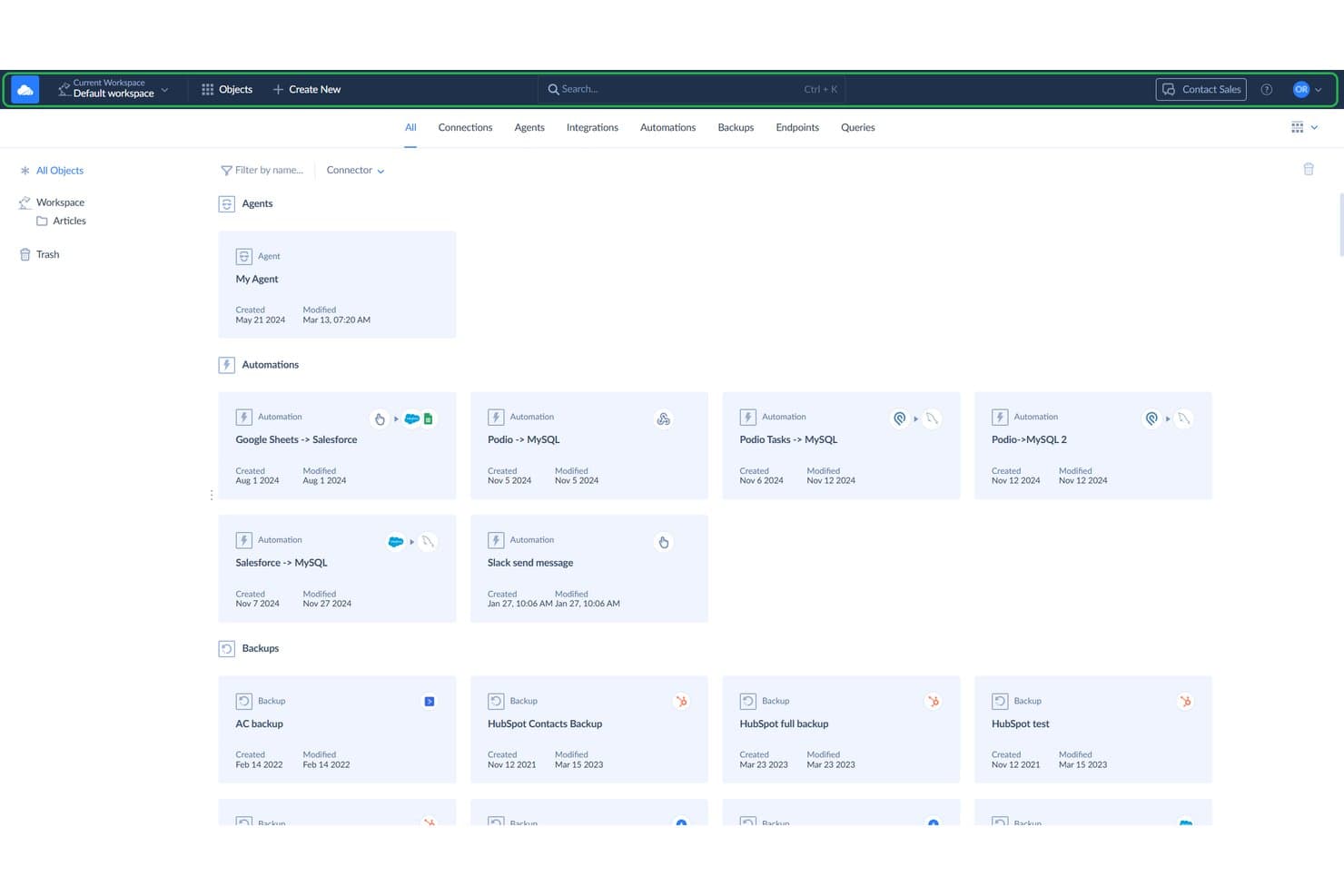
Skyvia organizes automations, agents, and backups in one workspace. Skyvia is a no-code data integration platform that covers ETL/ELT imports, data export, replication, and bidirectional synchronization across 200+ connectors spanning databases, cloud apps, and storage systems.
Who Is Skyvia Best For?
Skyvia suits IT and operations teams that need to automate recurring data loads between databases and cloud apps without writing or maintaining custom scripts.
Why I Picked Skyvia
I picked Skyvia as one of the best because its scheduling engine is built specifically for recurring, database-to-app data loads that would otherwise require custom scripts and manual maintenance. I like how it handles nightly upserts from MySQL to Salesforce or similar workflows, letting you configure insert, update, delete, or upsert operations with batch-size controls and expression-based transformations in a single job. Its per-record error logging and email alerts mean I can trust that a failed run won't go unnoticed.
Skyvia Key Features
- Bidirectional data synchronization: Sync two data sources in both directions simultaneously, with field-level mapping, expression support, and lookup configuration to keep records aligned across systems.
- Data replication with schema management: Replicate cloud app and database records to a data warehouse, with controls for incremental change tracking, nested data flattening, and sensitive field hashing or exclusion.
- Visual data flow pipelines: Build multistage data pipelines in a visual diagram that combines multiple sources, loads to multiple destinations, and applies transformations across each stage.
- Export file format and compression options: Export integrations produce CSV files with optional ZIP or GZIP compression; JSON, Avro, and Parquet files are written through the File Target component in Data Flow.
Skyvia Integrations
Skyvia offers 200+ native integrations, including Salesforce, HubSpot, NetSuite, MySQL, PostgreSQL, Google BigQuery, Snowflake, and Amazon S3. It connects to on-premises databases through Skyvia Agent and provides an API for triggering integrations and managing replication.
Pros and Cons
Pros:
- Visual pipelines coordinate multistep data flows
- Per-record logs flag failed rows
- Scheduled batch jobs replace maintained scripts
Cons:
- Scheduled runs aren’t true event-driven processing
- No custom API publishing or lifecycle management
Learn more about Skyvia: Best for small businesses
- Free plan + 14-day trial + demo available
- From $19.99/month
Visit WebsiteCustomer Rating:4.7/5
Zapier has an extensive collection of integrations. Zapier is a no-code automation platform for small businesses and individuals looking to connect their apps and automate workflows. It helps users automate repetitive tasks by creating "Zaps" that link over 8,000 applications, saving time and reducing manual effort.
Why I picked Zapier: Zapier is ideal for small businesses due to its user-friendly interface and extensive app connectivity. It allows you to automate tasks without any coding skills, making it accessible for non-technical users. Key features include customizable workflows, multi-step Zaps, and the ability to set triggers and actions for various apps. Small teams can quickly set up automations to improve productivity and operational efficiency.
Standout features & integrations:
Features include a user-friendly drag-and-drop interface that lets you build workflows without coding. You can create multi-step Zaps to automate complex processes and set filters to control when Zaps run. Zapier also offers scheduling to automate tasks at specific times.
Integrations include Salesforce, Google Sheets, Slack, Trello, Mailchimp, HubSpot, Asana, Shopify, QuickBooks, and Microsoft Teams.
Pros and Cons
Pros:
- Flexible workflow customization
- Easy to set up automations
- Wide range of app connections
Cons:
- Limited advanced features in the free plan
- Higher cost for premium features
Learn more about Zapier: Best for workflow automation
- Free plan + free demo available
- From $75/month
Visit WebsiteCustomer Rating:4.7/5
Workato can provide embedded automation customization. Workato is an integration and automation platform for businesses seeking to automate workflows across various applications. It caters to teams looking to enhance productivity by connecting systems and automating repetitive tasks.
Why I picked Workato: It excels in workflow automation, offering your team the ability to automate complex processes easily. The platform provides pre-built automation recipes, allowing you to set up workflows quickly without coding. Workato's ability to handle both simple and complex automations makes it versatile for different business needs. Its user-friendly interface ensures that even non-technical members of your team can create and manage workflows effectively.
Standout features & integrations:
Features include an intuitive drag-and-drop interface that simplifies the creation of workflows. The platform offers machine learning capabilities to optimize automation processes. You can also leverage community-shared recipes to accelerate your automation projects.
Integrations include Salesforce, Slack, ServiceNow, NetSuite, Marketo, HubSpot, Zendesk, QuickBooks, Dropbox, and Microsoft Teams.
Pros and Cons
Pros:
- Intuitive interface for non-tech users
- Community-shared resources
- Machine learning optimization
Cons:
- Advanced features need technical skills
- Limited support for niche applications
Learn more about Workato: Best for user-friendly interface
- Free plan + 14-day free trial available
- From $19.99/month (billed annually)
Visit WebsiteCustomer Rating:4.7/5
Integrately is incredibly simple and has a good amount of pre-built templates. Integrately is an integration platform aimed at businesses and individuals looking to automate workflows without complexity. It’s designed for users who need straightforward and quick automation solutions to connect their apps and services.
Why I picked Integrately: It offers a user-friendly interface that simplifies automation for everyone, especially those without technical skills. You can set up workflows in just a few clicks, making it accessible for small teams and solo entrepreneurs. The platform provides pre-built automation scenarios, so you don’t have to start from scratch. With its focus on ease of use, Integrately helps you save time and effort in managing your tasks.
Standout features & integrations:
Features include a simple setup process that allows you to create automations in a few clicks. The platform offers pre-built automation scenarios to get you started quickly. It also provides real-time monitoring to keep track of your automation performance.
Integrations include Salesforce, Slack, Trello, Google Sheets, Shopify, Mailchimp, HubSpot, QuickBooks, Microsoft Teams, and Asana.
Pros and Cons
Pros:
- Pre-built scenarios available
- Real-time monitoring for performance
- Quick automation deployment
Cons:
- May lack advanced features
- Not suited for complex workflows
Learn more about Integrately: Best for enterprise solutions
- 30-day free trial + free demo available
- Pricing upon request
Visit WebsiteCustomer Rating:4.5/5
Use MuleSoft’s AnyPoint Studio UI to support large data volumes. MuleSoft Anypoint is an integration platform designed for enterprises needing to connect applications, data, and devices. It enables large organizations to build and manage APIs and integrations at scale, offering flexibility and control over complex environments.
Why I picked MuleSoft Anypoint: It caters to enterprise solutions with its API-led connectivity approach, which is ideal for large-scale operations. The platform offers a unified solution for API management, design, and deployment. With features like API gateways and developer portals, your team can efficiently manage and monitor integrations. Its scalability ensures that as your business grows, your integration capabilities can expand without a hitch.
Standout features & integrations:
Features include a unified platform for API management, which simplifies the process of creating, publishing, and managing APIs. The platform offers a drag-and-drop interface for designing integrations, making it accessible even for those with limited coding experience. It also provides analytics to monitor API performance and usage, helping you optimize your operations.
Integrations include Salesforce, SAP, Workday, ServiceNow, Microsoft Dynamics 365, AWS, Google Cloud, Oracle, NetSuite, and Jira.
Pros and Cons
Pros:
- Developer-friendly design environment
- Strong API management capabilities
- Supports complex integration scenarios
Cons:
- Higher cost for small businesses
- Steep learning curve for beginners
Learn more about MuleSoft Anypoint:

Make development easier with Boomi’s master data hub user interface. Boomi is an integration platform as a service (iPaaS) that caters to businesses operating in hybrid cloud environments. It helps organizations connect applications, data, and people to enhance operational efficiency and data management.
Why I picked Boomi: It excels in hybrid cloud environments, offering you the flexibility to integrate both on-premise and cloud-based applications. Boomi provides a visual interface that simplifies the creation of complex integrations. With its pre-built connectors and templates, your team can accelerate the deployment process. The platform's real-time data synchronization ensures your data is always current and accessible.
Standout features & integrations:
Features include a drag-and-drop interface that makes it easy to design and manage integrations. The platform offers real-time data processing to keep your operations up-to-date. Boomi also provides extensive monitoring and analytics tools to help you optimize your integration processes.
Integrations include Salesforce, SAP, NetSuite, Oracle, Microsoft Dynamics 365, Workday, Amazon Web Services, Google Cloud, Slack, and Zendesk.
Pros and Cons
Pros:
- Strong support for hybrid environments
- Extensive monitoring and analytics
- Drag-and-drop integration design
Cons:
- High resource usage for large deployments
- Potential delays in support response


Talend is open-source and offers an intuitive graphical interface for data transformations. Talend is a data integration platform tailored for businesses that need to consolidate and manage large volumes of data. It serves organizations looking to improve their data quality and streamline data management processes.
Why I picked Talend: Talend excels in data integration with its ability to handle diverse data sources and formats. It offers a rich set of tools for data cleansing, transformation, and loading, making it perfect for businesses focused on data quality. With its open-source roots, the platform provides flexibility and extensive customization options. Talend's strong focus on data governance ensures that your data remains accurate and reliable.
Standout features & integrations:
Features include a comprehensive suite of data quality tools that help you cleanse and standardize data. The platform's drag-and-drop interface simplifies the process of designing data workflows. It also offers real-time data processing to keep your data up-to-date.
Integrations include Salesforce, SAP, AWS, Google Cloud, Microsoft Azure, Snowflake, Oracle, Hadoop, MongoDB, and Marketo.
Pros and Cons
Pros:
- Real-time data processing capabilities
- Extensive customization options
- Strong data governance features
Cons:
- Learning curve for advanced features
- Performance issues with large datasets
Learn more about Talend:

Azure Logic integrates seamlessly with other Microsoft products. Azure Logic is an integration platform for businesses operating within the Microsoft ecosystem. It helps organizations automate workflows and processes by connecting various applications and services.
Why I picked Azure Logic: It integrates seamlessly with Microsoft products, making it ideal for users already invested in the Microsoft environment. The platform offers pre-built connectors for quick setup and deployment. Its scalability allows your team to handle large-scale integrations efficiently. With its pay-as-you-go pricing model, you can control costs based on your usage.
Standout features & integrations:
Features include a visual designer that simplifies workflow creation, allowing you to drag and drop elements to build processes. The platform provides a pay-as-you-go pricing model, which helps you manage costs effectively. It also supports event-driven triggers to automate tasks based on specific conditions.
Integrations include Microsoft 365, Dynamics 365, SharePoint, Salesforce, SAP, SQL Server, Dropbox, Twitter, Google Drive, and GitHub.
Pros and Cons
Pros:
- Visual designer for easy workflow creation
- Scalable for large deployments
- Pay-as-you-go pricing model
Cons:
- Limited support for non-Microsoft services
- Complex for beginners
Learn more about Azure Logic: Best for AI-driven integrations
- 30-day free trial + free demo available
- From $200/month (billed annually)

IBM App Connect has a wide range of integration methods. IBM App Connect is an integration platform tailored for businesses looking to leverage AI in their integration processes. It serves enterprises that need to connect applications and automate workflows with intelligent insights.
Why I picked IBM App Connect: It excels in AI-driven integrations, providing your team with smart automation capabilities. The platform enables you to connect apps and data with AI-assisted mapping and recommendations. With its intuitive interface, setting up complex workflows becomes straightforward. IBM App Connect's ability to handle large volumes of data efficiently is a major advantage for enterprises.
Standout features & integrations:
Features include an AI-assisted mapping tool that simplifies the process of connecting different data sources. The platform offers real-time monitoring and alerts to keep you informed of any issues. It also provides a visual flow editor, allowing you to design integrations with ease.
Integrations include Salesforce, SAP, Oracle, Microsoft Dynamics 365, Google Cloud, Amazon Web Services, Slack, Dropbox, Box, and IBM Watson.
Pros and Cons
Pros:
- Supports intelligent automation
- Visual flow editor for design
- Efficient handling of large data volumes
Cons:
- Requires advanced technical skills
- Limited customization for specific needs
Learn more about IBM App Connect:

Jitterbit has an easy-to-use app user dashboard. Jitterbit Harmony is an integration platform designed for businesses that need rapid deployment and agile integration solutions. It serves companies looking to quickly connect applications and data across various systems.
Why I picked Jitterbit Harmony: It excels in speed of deployment, making it ideal for teams that need quick solutions. The platform offers an intuitive design, allowing your team to set up integrations without extensive training. With its pre-built templates, you can accelerate your integration projects. Jitterbit's real-time data synchronization ensures your data remains current and accessible.
Standout features & integrations:
Features include an easy-to-use graphical interface that simplifies the creation of integrations. The platform provides pre-built templates that save you time when setting up new connections. It also supports real-time data synchronization to ensure your data is always up-to-date.
Integrations include Salesforce, SAP, NetSuite, ServiceNow, Microsoft Dynamics 365, Oracle, Workday, Amazon Web Services, Google Cloud, and Slack.
Pros and Cons
Pros:
- Fast deployment for new users
- Pre-built templates available
- Real-time data synchronization
Cons:
- Limited customization options
- Requires internet for optimal performance
Learn more about Jitterbit Harmony:
Alte software-uri iPaaS
Iată câteva opțiuni suplimentare de software iPaaS care nu au ajuns pe lista mea scurtă, dar care merită totuși analizate:
- 11CeligoBest for ecommerce integrations
- 12AppypieBest for non-tech users
- 13HightouchBest for data activation
- 14HubSpot Operations HubBest for marketing workflows
- 15SnapLogicBest for data integration
- 16TinesBest for security automation
- 17SAP Integration SuiteBest for enterprise-grade applications
- 18StarfishETLBest for CRM integrations
How I Evaluate iPaaS Software
Whether you're syncing Salesforce to NetSuite or building event-driven flows, I look at two things: the baseline every iPaaS must cover and the differentiators that separate the best from the rest.
Core Functionality (Table Stakes For This List)
When I'm selecting tools for my list, I rank each one on a scale from 0 (does not offer the functionality) to 5 (excels in this area) for each core functionality listed below. Then, I calculate the tool's total score into a percentage. Each tool needs to achieve a minimum total score of 75% to be considered for inclusion.
- Pre-Built Connectors Library: I check the breadth and depth of out-of-the-box connectors, especially for widely used systems like Salesforce, SAP, Workday, and major databases.
- Visual Integration Builder: The drag-and-drop flow designer matters a lot—I evaluate whether it supports conditional logic, loops, and reusable components.
- API Management Capabilities: I look for full API lifecycle support, including publishing, versioning, and policy enforcement, not just the ability to expose endpoints.
- Data Transformation & Mapping: Complex format conversions come up constantly, so I check how each platform handles mapping between JSON, XML, EDI, and CSV sources.
- Hybrid Deployment & Connectivity: Connecting cloud apps to on-premise ERPs or legacy databases is a core iPaaS use case—I evaluate agent/gateway options and protocol support.
- Monitoring & Governance Controls: Real-time dashboards, error alerting, RBAC, and audit logging all factor in, since integration failures can cascade across entire workflows.
Once I have a list of tools that meet this criteria, I consider what sets each platform apart.
Differentiating Factors (What Sets Vendors Apart)
Here's how I compare and contrast different vendors:
Standout Features
AI-assisted integration is a big differentiator right now—I look for platforms that auto-suggest field mappings or generate flows from natural language prompts, which cuts build time significantly. Event-driven architecture also matters when teams need real-time triggers over batch syncing, like processing webhook events from payment providers. I evaluate pre-built process templates too, since ready-made recipes for common patterns like Order-to-Cash or employee onboarding can save weeks of development.
Beyond Features
Pricing model transparency is something I always evaluate, since iPaaS costs can balloon quickly depending on whether billing is per connector, per task, or per environment. Compliance and security certifications matter just as much—if your integrations touch healthcare or financial data, I check for SOC 2 Type II, HIPAA, and GDPR adherence. I also consider the developer ecosystem, including documentation quality, CI/CD tooling, and whether there's a marketplace of community-built connectors that extends the platform's reach.
Cum să alegi software iPaaS
Este ușor să vă pierdeți în liste lungi de funcții și structuri complexe de prețuri. Pentru a vă ajuta să rămâneți concentrat pe parcursul procesului unic de selecție a software-ului, iată o listă de factori de care trebuie să țineți cont:
| Factor | Aspecte de luat în considerare |
| Scalabilitate | Asigurați-vă că soluția poate evolua odată cu nevoile afacerii dumneavoastră. Căutați platforme care gestionează eficient volume mai mari de date și utilizatori. |
| Integrări | Verificați dacă software-ul este compatibil cu aplicațiile esențiale utilizate de echipa dumneavoastră. O gamă largă de integrări native reprezintă un avantaj. |
| Posibilitate de personalizare | Verificați dacă platforma permite personalizarea fluxurilor de lucru și a integrărilor pentru a răspunde nevoilor dumneavoastră. |
| Ușurință în utilizare | Asigurați-vă că platforma este ușor de utilizat. O curbă de învățare abruptă poate încetini productivitatea echipei dumneavoastră. |
| Buget | Țineți cont de limitele bugetului dumneavoastră. Comparați costurile cu funcțiile și beneficiile pentru a vă asigura că obțineți un raport bun între calitate și preț. |
| Măsuri de protecție a securității | Verificați dacă platforma respectă standardele industriei și vă protejează datele. Căutați criptare și actualizări regulate de securitate. |
| Asistență | Evaluați nivelul de asistență pentru clienți disponibil. Asistența non-stop și o bază de cunoștințe cuprinzătoare pot fi resurse valoroase. |
| Performanță | Căutați platforme cu disponibilitate ridicată și viteze mari de procesare pentru a vă menține operațiunile în desfășurare fără probleme. |
Ce este software-ul iPaaS?
Software-ul iPaaS este o platformă de integrare bazată pe cloud care conectează diferite aplicații și surse de date. Profesioniștii IT și analiștii de afaceri folosesc de obicei aceste instrumente pentru a automatiza fluxurile de lucru și a îmbunătăți fluxul de date între sisteme.
Interfețele de tip glisare și plasare, conectorii preconfigurați și capacitățile de procesare a datelor în timp real contribuie la ușurința în utilizare și eficiență. În general, instrumentele iPaaS simplifică conectarea și gestionarea mai multor aplicații într-un mediu de afaceri, completând software-ul desktop și software-ul MBaaS.
Caracteristicile software-ului iPaaS
Atunci când alegeți un software iPaaS, urmăriți următoarele caracteristici esențiale:
- Scalabilitate: Permite platformei să se dezvolte odată cu afacerea dvs., gestionând eficient volumele crescute de date și utilizatori.
- Personalizare: Oferă fluxuri de lucru și câmpuri adaptate pentru a corespunde nevoilor și proceselor specifice ale afacerii dvs.
- Ușurință în utilizare: Oferă o interfață intuitivă care reduce curba de învățare și crește productivitatea echipei dvs.
- Măsuri de securitate: Vă protejează datele prin criptare și respectă standardele din industrie, oferindu-vă liniște sufletească.
- Integrări: Conectează o gamă largă de aplicații și platforme de integrare SaaS, asigurând un flux de date și o comunicare fluide.
- Procesarea datelor în timp real: Menține datele actualizate și accesibile, ceea ce este esențial pentru luarea promptă a deciziilor.
- Interfață de tip glisare și plasare: Simplifică crearea fluxurilor de lucru, făcând automatizarea accesibilă chiar și utilizatorilor fără cunoștințe tehnice.
- Conectori preconfigurați: Economisesc timp oferind soluții gata de utilizare pentru conectarea aplicațiilor populare.
- Monitorizare și analiză: Oferă informații despre performanța integrărilor, ajutându-vă să optimizați procesele și să rezolvați rapid problemele.
- Gestionarea API-urilor: Facilitează crearea, publicarea și gestionarea API-urilor, îmbunătățind conectivitatea și capacitățile de integrare.
Beneficiile software-ului iPaaS
Implementarea unui software iPaaS oferă mai multe beneficii pentru echipa și afacerea dvs. Iată câteva dintre acestea:
- Eficiență îmbunătățită: Automatizează sarcinile repetitive, eliberând timpul echipei dvs. pentru a se concentra pe activități mai strategice.
- Conectivitate îmbunătățită: Integrează diverse aplicații și surse de date, asigurând comunicarea și fluxul de date fluide între sisteme.
- Scalabilitate: Se dezvoltă odată cu afacerea dvs., adaptându-se la cerințele crescute privind datele și utilizatorii fără a compromite performanța.
- Economii de costuri: Reduce necesitatea dezvoltării și mentenanței personalizate, diminuând costurile operaționale în timp.
- Acuratețea datelor: Oferă procesarea datelor în timp real, asigurând accesul permanent al echipei dvs. la cele mai actuale informații pentru luarea deciziilor.
- Design ușor de utilizat: Funcții precum interfețele de tip glisare și plasare facilitează crearea și gestionarea fluxurilor de lucru de către utilizatorii fără cunoștințe tehnice.
- Conformitate în materie de securitate: Protejează datele sensibile prin măsuri de securitate conforme cu standardele din industrie, oferind afacerii dvs. liniște sufletească.
Costurile și prețurile software-ului iPaaS
Alegerea unui software iPaaS necesită înțelegerea diferitelor modele și planuri de tarifare disponibile. Costurile variază în funcție de caracteristici, dimensiunea echipei, suplimente și alți factori. Tabelul de mai jos rezumă planurile comune, prețurile medii ale acestora și caracteristicile incluse de obicei în soluțiile software iPaaS:
Tabel comparativ al planurilor pentru software-ul iPaaS
| Tipul planului | Preț mediu | Caracteristici comune |
| Plan gratuit | $0 | Integrări de bază, fluxuri de lucru limitate și asistență din partea comunității. |
| Plan personal | $5-$25 /user /month | Mai multe integrări, mai multe fluxuri de lucru și analize de bază. |
| Plan pentru afaceri | $30-$100 /user /month | Integrări avansate, fluxuri de lucru nelimitate și asistență îmbunătățită. |
| Plan pentru întreprinderi | $100+ /user /month | Integrări personalizate, asistență dedicată și funcții avansate de securitate. |
Întrebări frecvente despre software-ul iPaaS
Iată câteva răspunsuri la întrebările frecvente despre software-ul iPaaS:
Cum funcționează un iPaaS?
Un iPaaS interconectează datele și aplicațiile, stabilind fluxuri de integrare care automatizează anumite procese de afaceri pentru eficiență. Puteți utiliza aceste fluxuri pentru integrarea angajaților, gestionarea procesării comenzilor sau simplificarea cererilor de credit. Această automatizare reduce efortul manual și accelerează operațiunile.
Care sunt dezavantajele unui iPaaS?
Cu un iPaaS, este posibil să aveți un control limitat asupra stivei tehnologice de bază, ceea ce poate restricționa personalizarea sau optimizarea pentru nevoile dvs. specifice. Acest lucru poate fi o provocare dacă afacerea dvs. necesită soluții adaptate în mare măsură. În plus, dependența de infrastructura terților poate genera preocupări legate de securitatea datelor și conformitate.
Care este diferența dintre iPaaS și PaaS?
iPaaS se concentrează pe integrarea aplicațiilor, dispozitivelor și sistemelor, în timp ce PaaS oferă o platformă pentru crearea, rularea și gestionarea aplicațiilor. iPaaS se referă la conectarea sistemelor existente, în timp ce PaaS se referă la crearea de aplicații noi. Înțelegerea acestor diferențe vă ajută să alegeți soluția potrivită pentru nevoile dvs.
Care este diferența dintre iPaaS și iPaaS încorporat?
iPaaS încorporat vă permite să creați integrări destinate clienților, în timp ce iPaaS facilitează integrările interne. Acestea se adresează unor echipe și cazuri de utilizare diferite, iPaaS-ul încorporat fiind utilizat adesea de echipele de produs pentru a îmbunătăți experiențele clienților. Identificarea soluției potrivite pentru nevoile afacerii dvs. vă poate optimiza strategia de integrare.
Cât de sigură este o platformă iPaaS?
Securitatea platformelor iPaaS implică criptarea datelor, conformitatea cu standardele din industrie și actualizări periodice de securitate. Este important să evaluați măsurile de securitate ale oricărui furnizor iPaaS pentru a vă asigura că îndeplinesc cerințele organizației dvs. Acest lucru asigură protecția datelor și consolidează încrederea părților interesate.
Poate iPaaS să gestioneze procesarea datelor în timp real?
Da, multe soluții iPaaS acceptă procesarea datelor în timp real, menținând datele actualizate și accesibile pentru luarea deciziilor. Această capacitate este esențială pentru companiile care se bazează pe informații furnizate la timp pentru a-și orienta operațiunile și strategia. Procesarea în timp real poate îmbunătăți capacitatea de reacție și eficiența operațională.