

Programele de viziune computerizată vă oferă instrumentele necesare pentru a extrage, analiza și interpreta informații din imagini sau videoclipuri folosind inteligența artificială. Dacă sunteți în căutarea celui mai bun mod de a automatiza sarcinile care implică date vizuale sau de a implementa viziunea artificială ca începător în proiectele dumneavoastră, este esențial să alegeți o soluție potrivită pentru fluxurile de lucru și capabilă să gestioneze nevoile dumneavoastră de extindere.
În acest ghid, veți găsi o prezentare concentrată a platformelor cu numeroase funcții pentru etichetarea, antrenarea, implementarea și gestionarea modelelor de viziune computerizată, astfel încât să puteți avansa rapid și să luați decizii informate.
Why Trust Our Software Recommendations
6,700+
Reviews
20
Industry experts
16+
Evaluation factors
14
Years
Our team has been testing and reviewing software since 2012. As tech leaders ourselves, we know how difficult—and important—it is to choose the right software.
For this guide, we evaluated tools using hands-on testing and independent research, scoring tools using our selection criteria.
Our reviews reflect our human editorial judgment, not a sales pitch.
Expert reviewers:
- Paulo Gardini MiguelTech Director
 Tim FisherVP of AI
 Gabriel RosasTech Lead & Software Architect
 Christhian GruhnTech Lead & Platform Architect

Tabel comparativ al programelor de viziune computerizată
Acest tabel comparativ sintetizează detaliile de preț pentru selecțiile mele de top de programe de viziune computerizată:
Sorted by: Default
| Tool | Starting Price | Website | |
|---|---|---|---|
Best for managing large annotation teams | 4.9 out of 5 | Pricing upon request Free demo available | Website |
Best for cloud-native image and video analysis | Not rated | $0.001/image 12-month free tier available | Website |
Best for industry-specific visual recognition | 4.0 out of 5 | Pricing upon request Free demo available | Website |
Best for integrated image and video annotation | Not rated | Pricing upon request Free demo available | Website |
Best for building end-to-end AI vision pipelines | Not rated | $30/month Free plan + free demo available | Website |
Best for rapid model deployment on custom datasets | 4.8 out of 5 | $99/month Free plan + free trial + free demo available | Book Demo |
Best for automated data annotation at scale | 4.8 out of 5 | Pricing upon request Free demo available | Website |
Best for advanced data labeling workflows | 4.5 out of 5 | Pricing upon request Free trial available | Website |
Best for scalable AI model lifecycle management | 4.3 out of 5 | Pricing upon request 14-day free trial available | Website |
Best for enterprise-grade annotation services | Not rated | Pricing upon request Free demo available | Website |


Recenzii ale celor mai bune programe de viziune computerizată
Mai jos sunt prezentate rezumatele mele detaliate ale celor mai bune programe de viziune computerizată care au ajuns pe lista mea scurtă. Recenziile mele oferă o analiză detaliată a funcțiilor, a celor mai potrivite cazuri de utilizare și a integrărilor fiecărei platforme, pentru a vă ajuta să o găsiți pe cea mai bună pentru dumneavoastră.
 Best for managing large annotation teams
- Free demo available
- Pricing upon request
Visit WebsiteCustomer Rating:4.9/5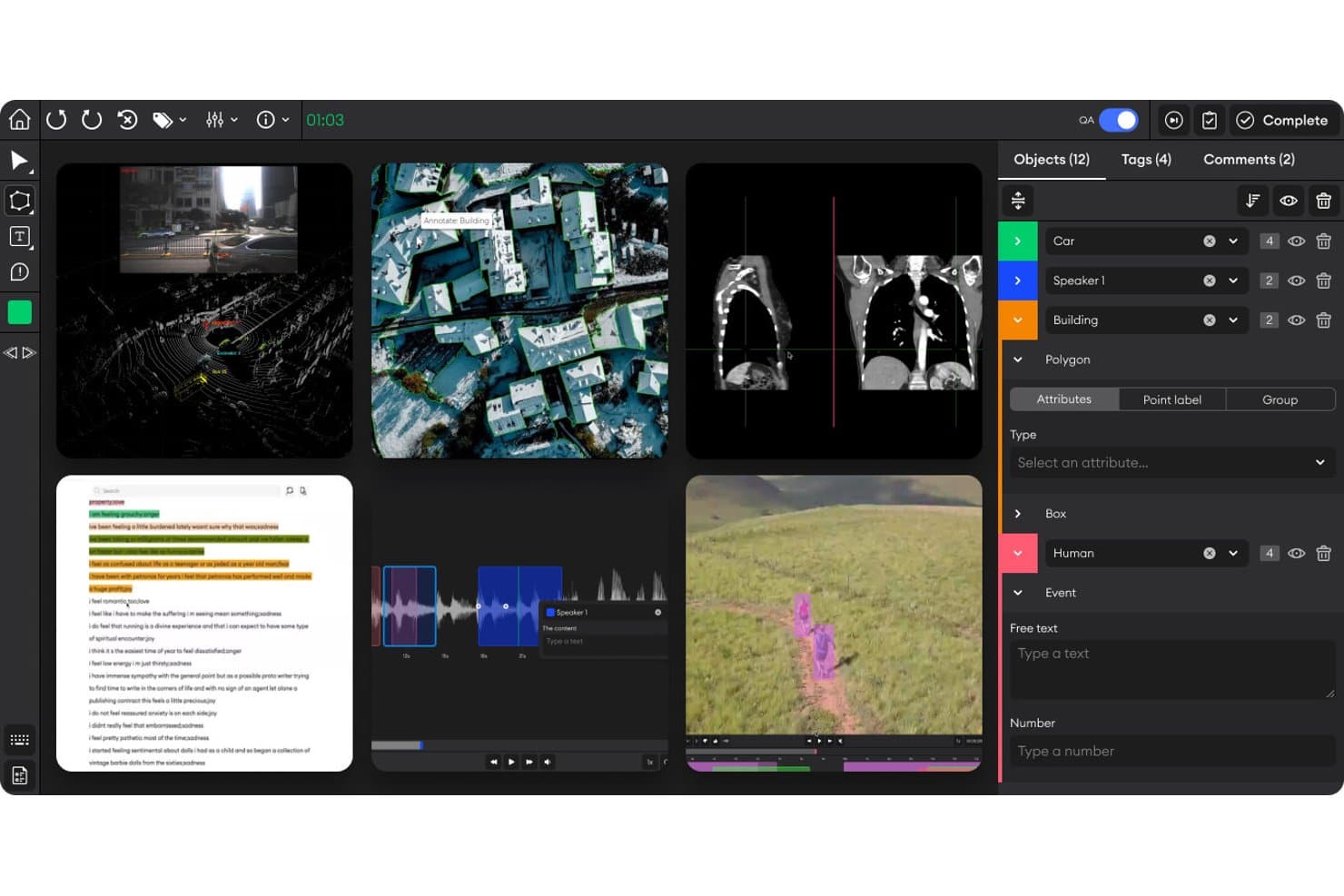
SuperAnnotate offers a multi-modal annotation workspace supporting images, medical scans, LiDAR, audio, and video with object labeling, polygon tools, and attribute panels. SuperAnnotate is an annotation project management platform designed for computer vision teams, offering advanced tools for image, video, text, and audio data labeling, collaboration, and quality assurance workflows.
Who Is SuperAnnotate Best For?
Annotation managers and data science leads at companies coordinating large, distributed teams for computer vision data labeling projects.
Why I Picked SuperAnnotate
I picked SuperAnnotate as one of the best because my team relies on its advanced annotation management tools to coordinate large teams, apply QA workflows across image and video data, and track project progress at scale. Its collaboration features let us handle complex data pipelines smoothly.
SuperAnnotate Key Features
- Multimodal annotation support: Label image, video, text, and audio data in unified projects.
- Python SDK and API: Automate data import, export, and integration into custom ML pipelines.
- Advanced label taxonomy configuration: Create complex, hierarchical labeling structures tailored to each project.
- Integrated vendor and workforce management: Organize tasks across internal teams and external annotation vendors.
SuperAnnotate Integrations
SuperAnnotate offers native integrations with AWS S3, GCP, Nvidia, Databricks, Snowflake, and IBM Cloud. A Python SDK and REST API are available for custom integrations into existing machine learning pipelines.
Pros and Cons
Pros:
- Vendor and workforce management included
- Advanced collaboration and QA workflows
- Multimodal annotation on a single platform
Cons:
- Reporting limited to annotation-focused metrics
- No built-in model training capability
Learn more about SuperAnnotate: Best for cloud-native image and video analysis
- 12-month free tier available
- From $0.001/image
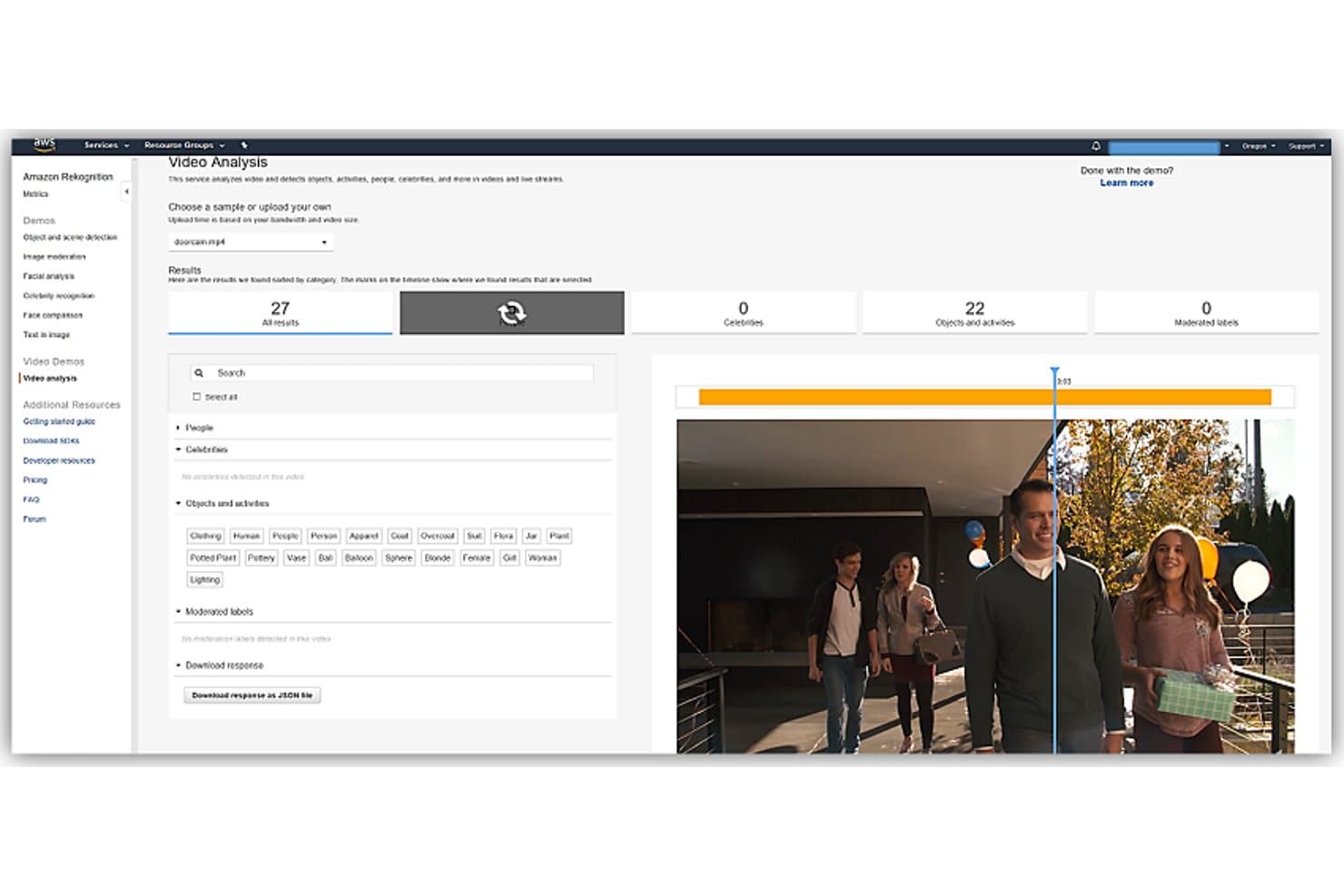
Amazon Rekognition offers a video analysis demo that detects objects, activities, people, and celebrities in video streams with 27 total results. Amazon Rekognition is a cloud-based computer vision platform that provides image and video analysis, object and facial detection, content moderation, scene labeling, and support for building custom vision models.
Who Is Amazon Rekognition Best For?
Teams managing high-volume image or video analysis on AWS infrastructure or building scalable, cloud-native computer vision workflows.
Why I Picked Amazon Rekognition
I picked Amazon Rekognition as one of the best because I can analyze massive image and video datasets directly in the cloud. I rely on its real-time video stream analysis and custom image classification to automate content moderation and facial recognition for high-scale projects.
Amazon Rekognition Key Features
- Face comparison and search: Match faces in images or video against collections at scale.
- Text detection (OCR): Identify and extract text from images in multiple scripts and formats.
- Image moderation: Detect explicit, suggestive, or unsafe image content using pre-trained classifiers.
- Celebrity recognition: Automatically tag known public figures in photos and videos.
Amazon Rekognition Integrations
Amazon Rekognition offers native integrations across the AWS ecosystem, including S3, Lambda, Kinesis, SageMaker Ground Truth, SNS, and SQS. An API is available for custom integrations.
Pros and Cons
Pros:
- Scales for high-volume processing in cloud
- Real-time video and image analysis capabilities
- Pre-trained models for common image tasks
Cons:
- Lacks pixel-level segmentation features
- No offline or on-premises deployment option
Learn more about Amazon Rekognition: Best for industry-specific visual recognition
- Free demo available
- Pricing upon request
Visit WebsiteCustomer Rating:4/5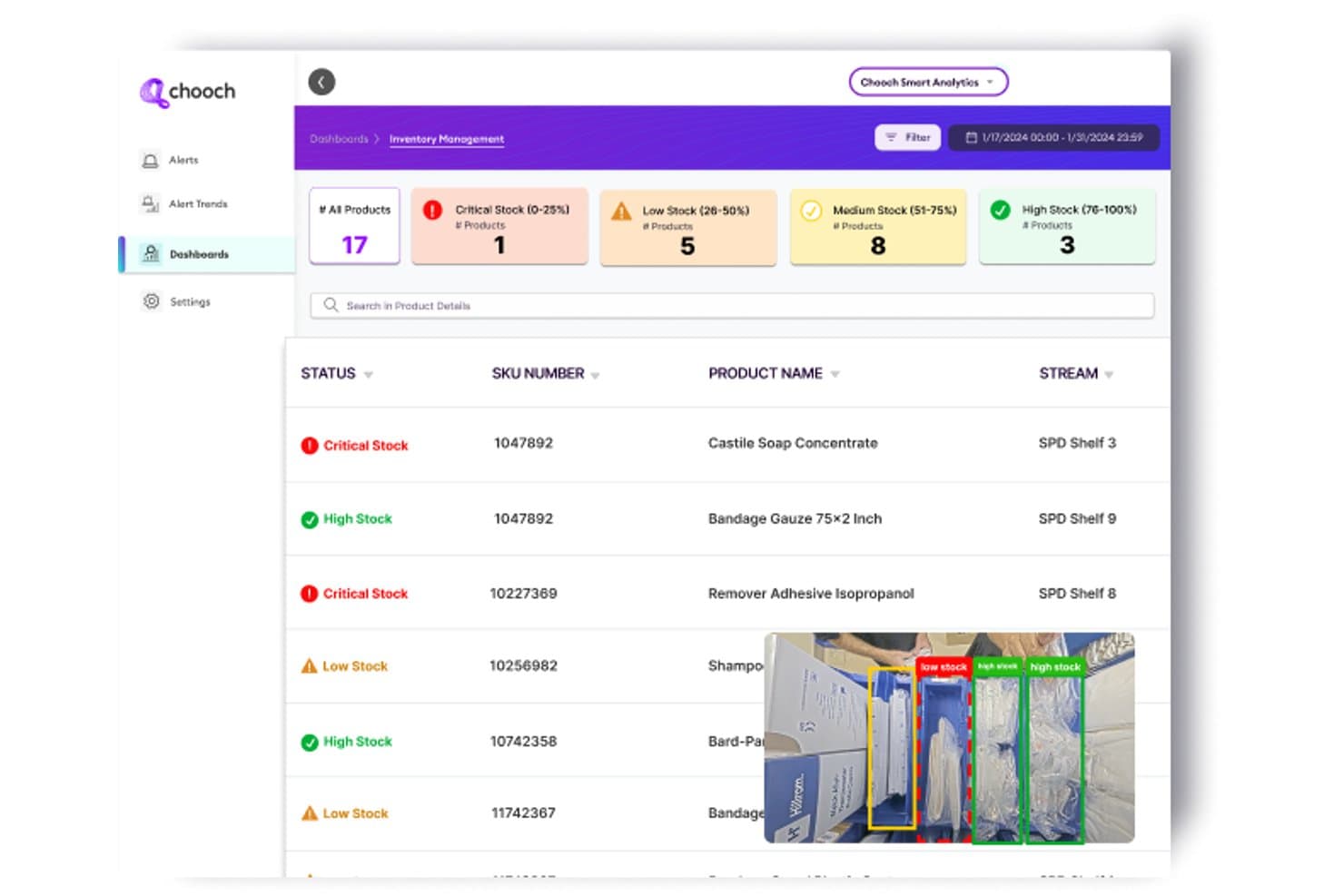
Chooch AI offers an inventory management dashboard with real-time computer vision stock level detection, categorizing products by critical, low, medium, and high stock status. Chooch AI is a computer vision platform designed for organizations that need custom training, rapid annotation, and scalable model deployment across cloud, edge, and on-prem environments.
Who Is Chooch AI Best For?
Chooch AI suits ML engineers and IT teams in manufacturing, healthcare, or industrial sectors who need tailored visual recognition for complex environments.
Why I Picked Chooch AI
I picked Chooch AI as one of the best because it gives me pre-built visual recognition models tailored for healthcare, manufacturing, and public safety. My team deploys these models on edge devices for real-time detection in industrial use cases.
Chooch AI Key Features
- Smart Annotation: Automatically labels objects in images and video with bounding boxes and polygons.
- Continuous learning: Allows retraining of deployed models with new data to improve accuracy.
- Edge deployment: Runs vision models on devices like Nvidia Jetson for low-latency processing.
- Integrated API and SDK: Provides REST API and SDKs for accessing and integrating computer vision capabilities in applications.
Chooch AI Integrations
Native integrations are not publicly listed. Chooch AI provides an API and SDKs for building custom integrations.
Pros and Cons
Pros:
- Custom AI model training for unique datasets
- Supports deployment on edge, cloud, on-prem
- Industry-ready visual recognition models available
Cons:
- Advanced 3D or temporal analysis limited
- Few public third-party user reviews
Learn more about Chooch AI:
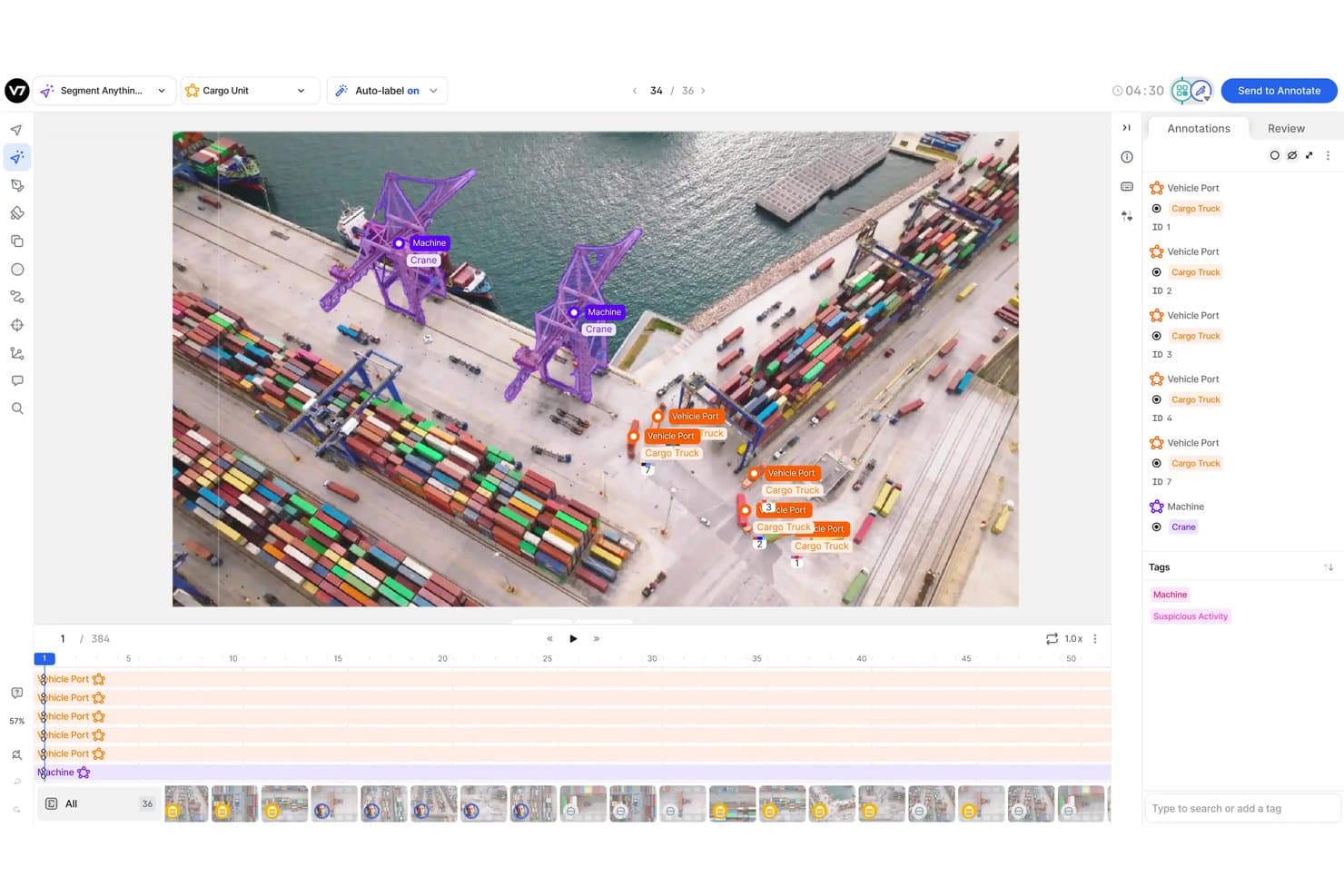
V7 offers an AI-powered annotation workspace for labeling cargo port footage with object segmentation, auto-labeling, and multi-class tagging tools. V7 is a computer vision platform designed for teams who need advanced tools for labeling, annotating, and managing large volumes of images and videos.
Who Is V7 Best For?
Ideal for machine learning and data science teams in industries like healthcare, automotive, or manufacturing that require detailed image and video annotation workflows.
Why I Picked V7
I picked V7 as one of the best because I can manage complex image and video annotation projects in a single workspace. I use integrated tools like auto-labeling with segmentation models and video object tracking, all tied into a review and QA workflow.
V7 Key Features
- Consensus and QA workflows: Assign annotation tasks and manage multi-level review processes for quality control.
- Dataset versioning: Track changes and maintain different versions of annotated datasets for audit and reproducibility.
- DICOM and medical imagery support: Annotate and manage specialized medical formats like DICOM and NifTI directly in the platform.
- Python SDK and REST API: Integrate dataset management and annotation pipelines into your custom ML or automation workflows.
V7 Integrations
V7 provides native integrations with AWS and Google Cloud, and offers an API for building custom integrations.
Pros and Cons
Pros:
- Customizable QA and consensus review workflows
- Built-in video object and frame annotation
- Supports medical formats like DICOM and NifTI
Cons:
- Limited support for 3D and lidar annotation
- No built-in model training feature
Learn more about V7: Best for building end-to-end AI vision pipelines
- Free plan + free demo available
- From $30/month
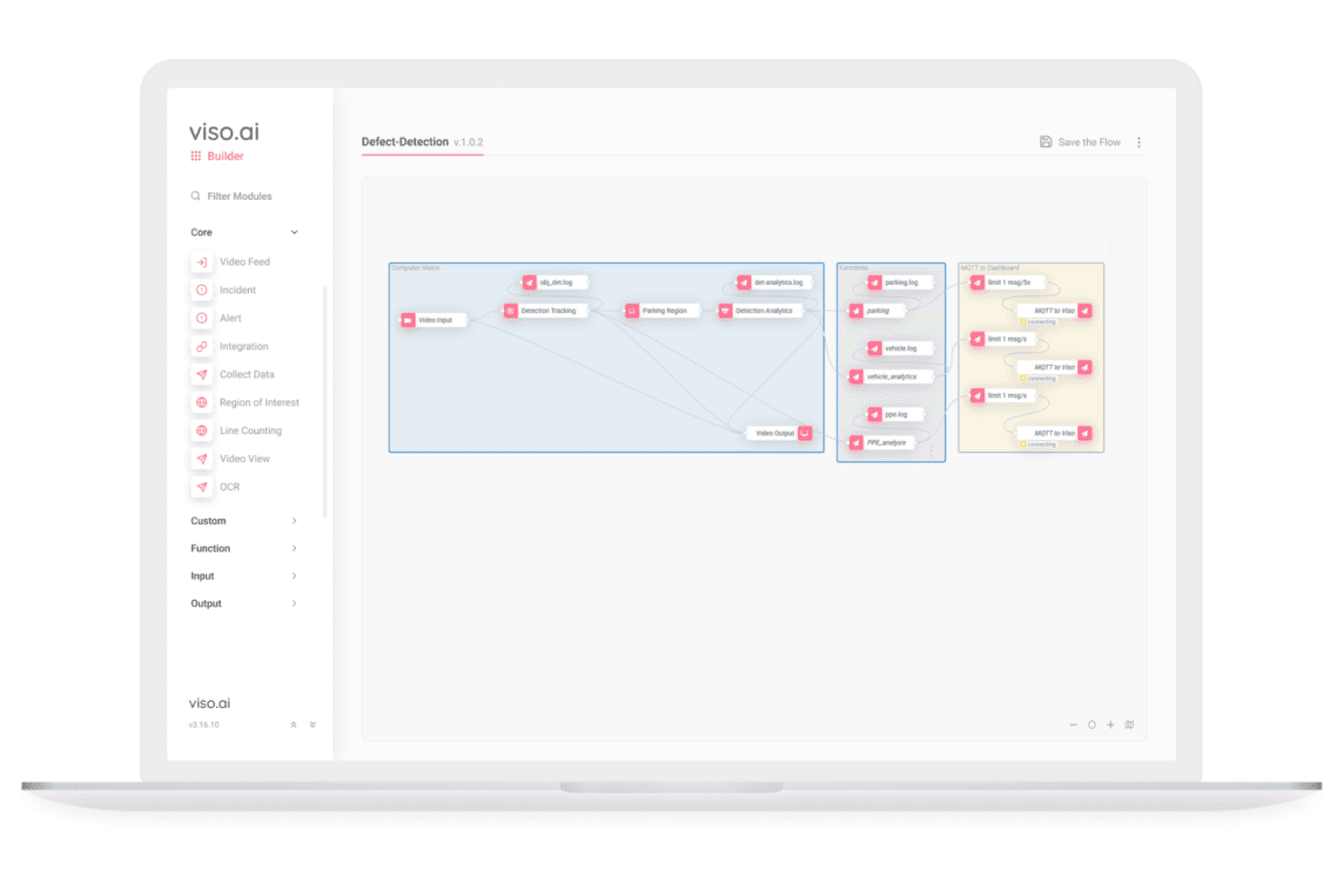
Viso Suite lets users build end-to-end AI vision pipelines visually. Viso Suite is an end-to-end computer vision platform for building, training, deploying, and managing AI vision pipelines at scale across edge, on-premises, and cloud environments.
Who Is Viso Suite Best For?
Enterprises and IT teams deploying large-scale visual AI workflows across multiple sites, industries, and edge or hybrid infrastructure environments.
Why I Picked Viso Suite
I picked Viso Suite as one of the best because I can design, deploy, and manage entire AI vision pipelines from data collection to real-time inference in a unified environment. The no-code workflow builder and support for edge, cloud, and on-prem deployment make large-scale projects practical.
Viso Suite Key Features
- Advanced object detection models: Choose from a library of state-of-the-art models for complex visual recognition tasks.
- Collaborative annotation workflows: Multiple users can label and review datasets within built-in QA tools.
- Real-time video stream processing: Analyze and track visual data from thousands of live cameras simultaneously.
- Granular role-based access control: Manage security and user permissions for projects at the workspace and deployment level.
Viso Suite Integrations
Viso Suite offers native integrations with IP camera systems, Google Cloud Platform, Azure, and AWS, and provides an API for custom integrations.
Pros and Cons
Pros:
- Supports complex multi-camera video analytics
- Built-in collaborative data annotation workflow
- Scales to thousands of edge or cloud devices
Cons:
- Annotation tools focus on 2D data only
- Little third-party review or community support
Learn more about Viso Suite: Best for rapid model deployment on custom datasets
- Free plan + free trial + free demo available
- From $99/month
Visit WebsiteCustomer Rating:4.8/5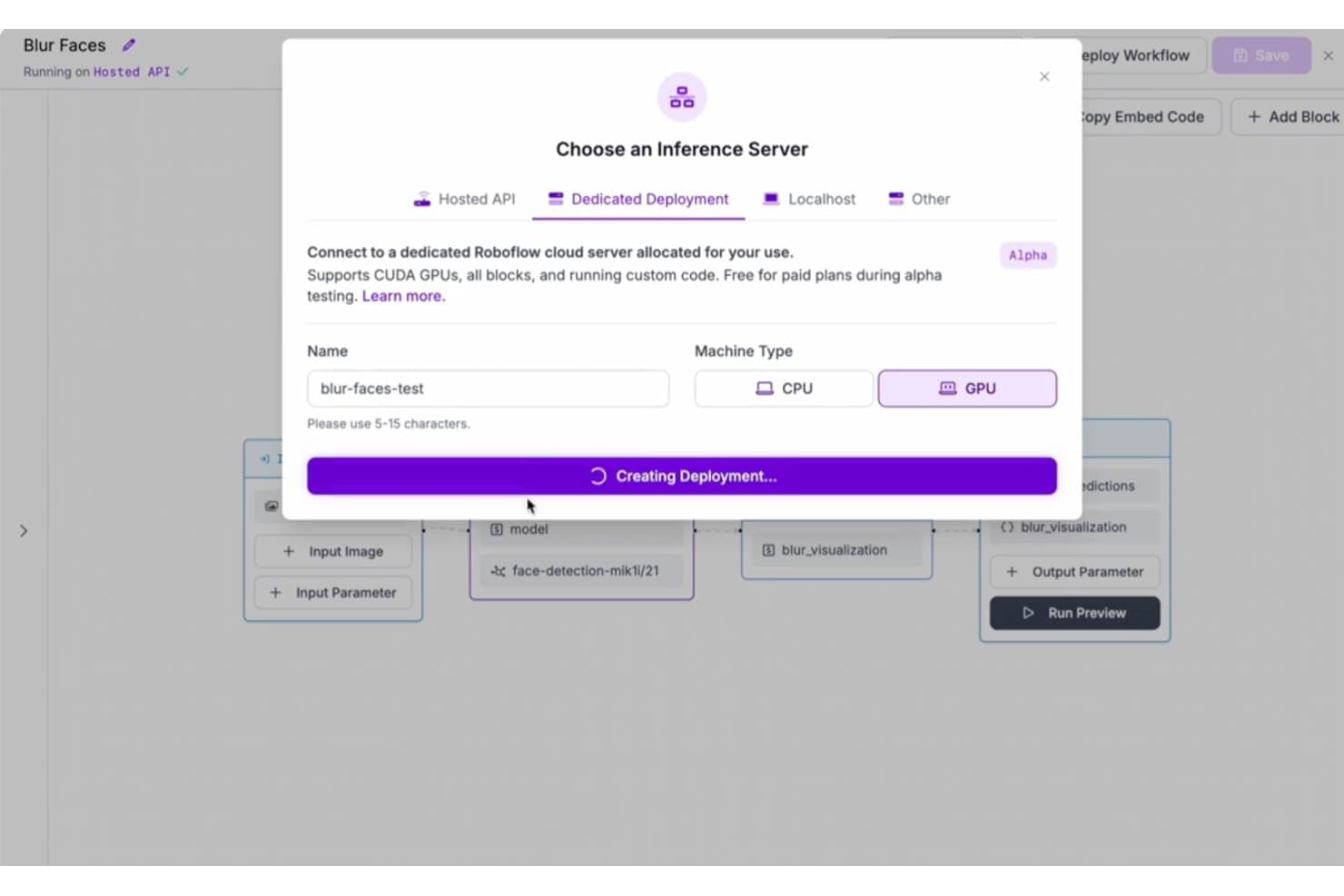
Roboflow offers a Dedicated Deployment option with GPU support for running computer vision workflows on dedicated cloud servers. Roboflow is a computer vision platform for building, annotating, training, and deploying custom image classification and object detection models using your own datasets.
Who Is Roboflow Best For?
ML engineers and developers at startups or enterprises who need to deploy and iterate on custom computer vision models quickly.
Why I Picked Roboflow
I picked Roboflow as one of the best because I can upload my own datasets, annotate them, and deploy custom computer vision models in minutes. My team uses its model training pipeline and one-click deployment tools to optimize rapid iteration.
Roboflow Key Features
- Pre-built model library: Choose from a collection of public computer vision models ready to deploy or fine-tune.
- API and SDK access: Connect models directly to your applications using REST APIs and supported SDKs.
- Collaborative annotation workspace: Assign annotation tasks, review progress, and manage datasets with team members in a unified platform.
- Support for multiple export formats: Export datasets and models to formats compatible with TensorFlow, PyTorch, YOLO, and more.
Roboflow Integrations
Roboflow offers native integrations with HuggingFace, Google Cloud Vision, Supervisely, SuperAnnotate, OBS, IBM Cloud, LabelMe, YOLOv8, and more. Zapier is supported, and an API is available for custom integrations.
Pros and Cons
Pros:
- Supports export to major AI model formats
- Built-in collaborative data annotation workspace
- Fast deployment of custom vision models
Cons:
- Advanced video analytics features are limited
- Lacks native support for 3D annotation
Learn more about Roboflow: Best for automated data annotation at scale
- Free demo available
- Pricing upon request
Visit WebsiteCustomer Rating:4.8/5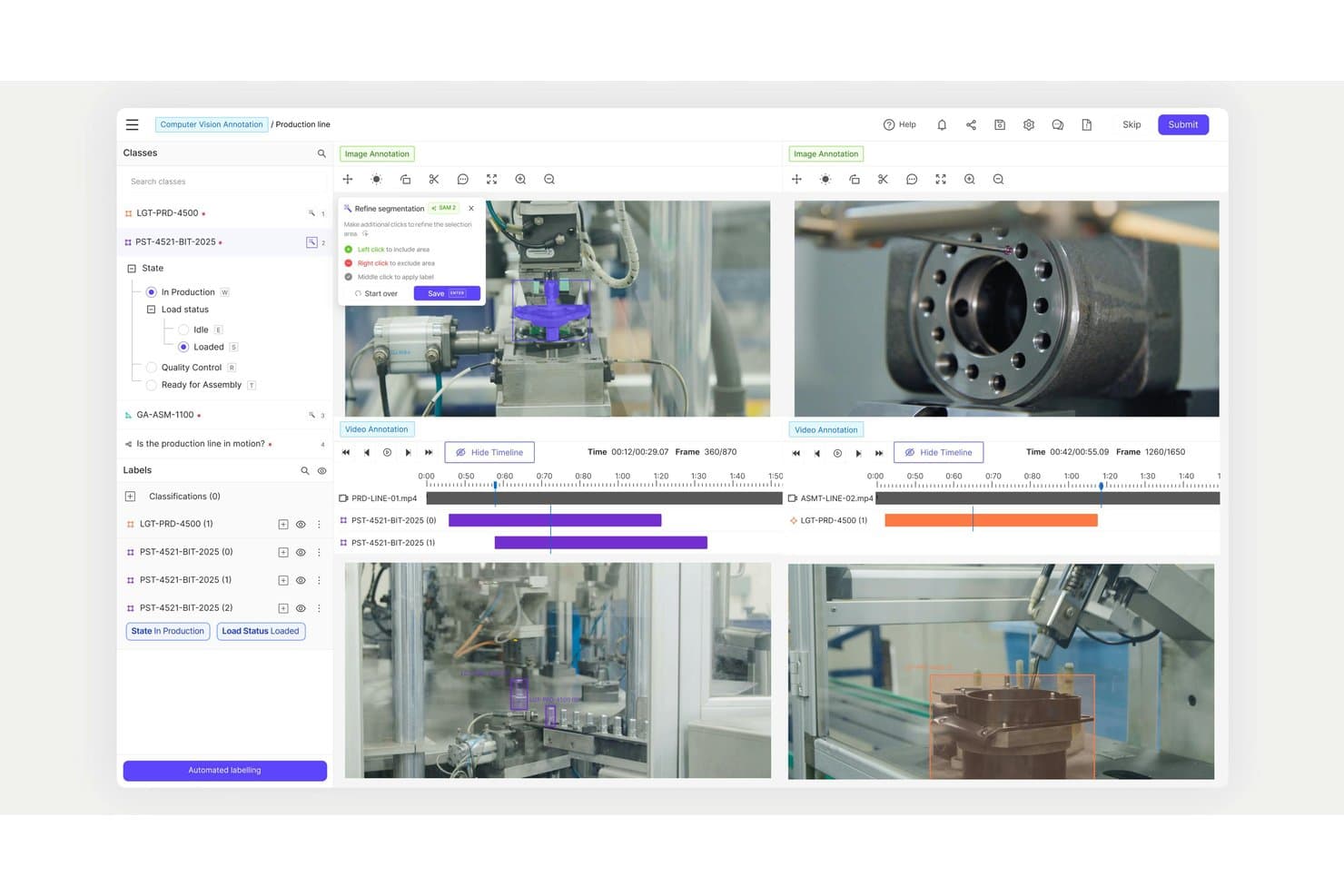
Encord offers a multi-video annotation workspace with timeline controls, segmentation refinement tools, and classification labels for production line computer vision tasks. Encord is a data-centric computer vision software platform that provides large-scale image, video, and multimodal annotation tools alongside integrated automated labeling, quality assurance workflows, and workflow management designed for enterprise AI teams.
Who Is Encord Best For?
Enterprise data science teams and ML engineers in regulated industries who need large-scale, automated annotation for complex computer vision projects.
Why I Picked Encord
I picked Encord as one of the best because I can automate annotation for huge datasets using AI-driven labeling workflows, deploy advanced tools for images, video, and 3D, and rely on integrated QA processes to handle complex, scaled-up computer vision tasks.
Encord Key Features
- Multimodal annotation tools: Annotate images, videos, LiDAR, and text data in one platform.
- Built-in active learning: Use model-in-the-loop capabilities to identify and prioritize edge cases.
- Collaborative project workspaces: Support simultaneous annotation and review across large teams.
- Role-based access control: Set roles and permissions for teams to maintain security and compliance.
Encord Integrations
Encord offers native integrations with AWS S3, Google Cloud Storage, and Azure Blob Storage. An API is available for custom integrations.
Pros and Cons
Pros:
- Supports video, 3D, and multimodal labeling
- Advanced QA and audit trail workflows
- Automated annotation for high-volume image datasets
Cons:
- Annotation interface can lag with huge datasets
- No built-in model training pipeline
Learn more about Encord: Best for advanced data labeling workflows
- Free trial available
- Pricing upon request
Visit WebsiteCustomer Rating:4.5/5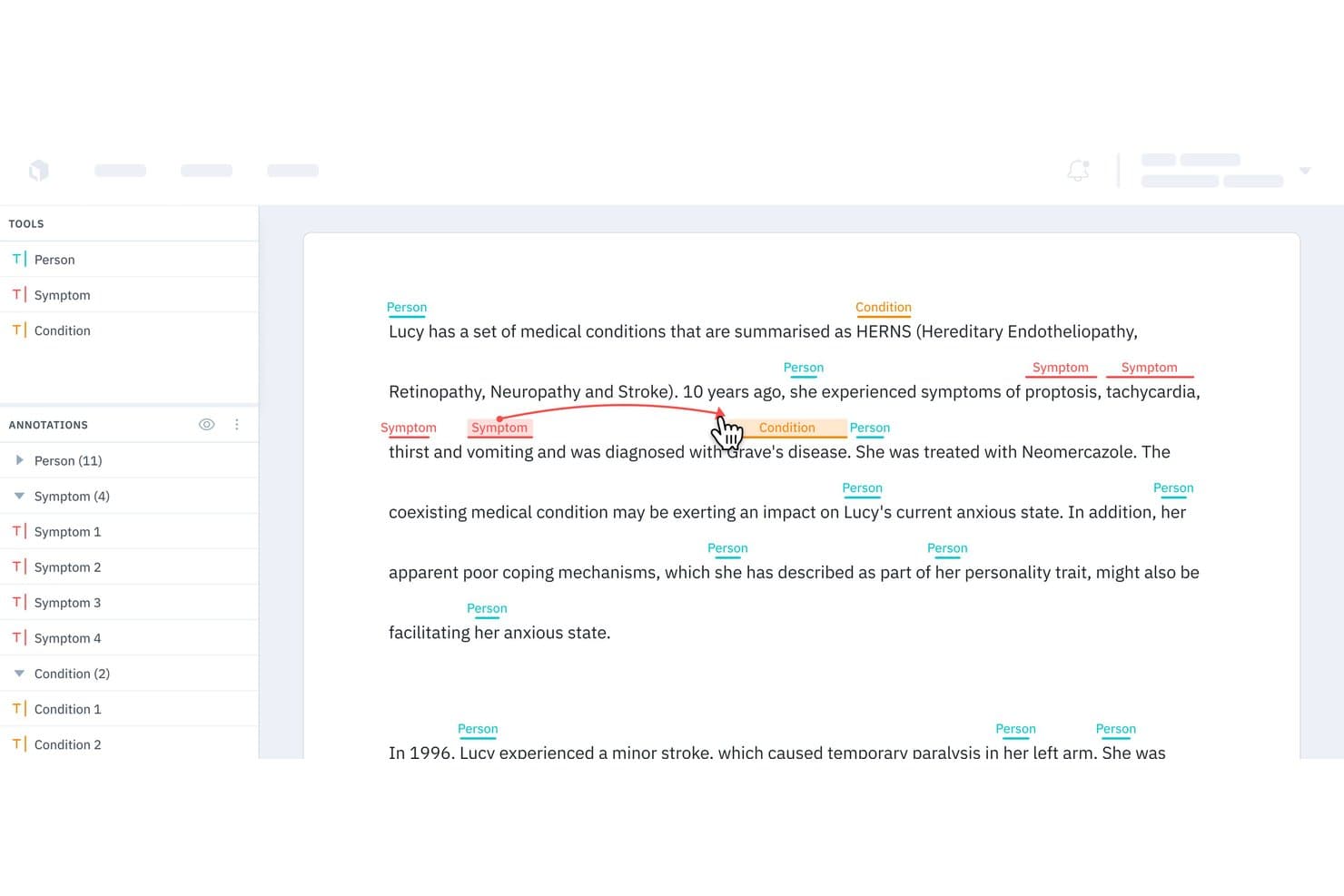
Labelbox offers a named entity recognition (NER) annotation interface that allows users to label medical text with tags like Person, Symptom, and Condition, with relationship linking between entities. Labelbox is a computer vision data labeling platform that gives your team advanced tools to annotate, manage, and quality-control large image, video, and 3D datasets for machine learning workflows.
Who Is Labelbox Best For?
Labelbox is a strong fit for data science teams and ML engineers at mid-sized to enterprise organizations managing large-scale computer vision projects.
Why I Picked Labelbox
I picked Labelbox as a high-performance tool because I rely on its advanced data labeling workflows for large-scale image, video, and 3D annotation projects. My team uses its auto-labeling and review features to speed up QA and handle collaboration across complex datasets.
Labelbox Key Features
- Label editor customization: Build tailored annotation interfaces for unique computer vision data types.
- Ontology management: Define hierarchical label structures to match your project’s requirements.
- Model-assisted labeling: Integrate your models to generate pre-labels and incorporate active learning strategies.
- Python SDK and API: Access automation and integration options for large-scale data and workflow management.
Labelbox Integrations
Labelbox offers native integrations with Google Cloud Storage, Amazon S3, Snowflake, MySQL, Kafka, Looker, Redshift, MotherDuck, and more. An API is available for custom integrations.
Pros and Cons
Pros:
- Advanced automation for quality assurance workflows
- Supports image, video, and 3D labeling
- Handles large-scale data annotation projects
Cons:
- Occasional platform slowdowns on massive datasets
- No built-in computer vision model training
Learn more about Labelbox: Best for scalable AI model lifecycle management
- 14-day free trial available
- Pricing upon request
Visit WebsiteCustomer Rating:4.3/5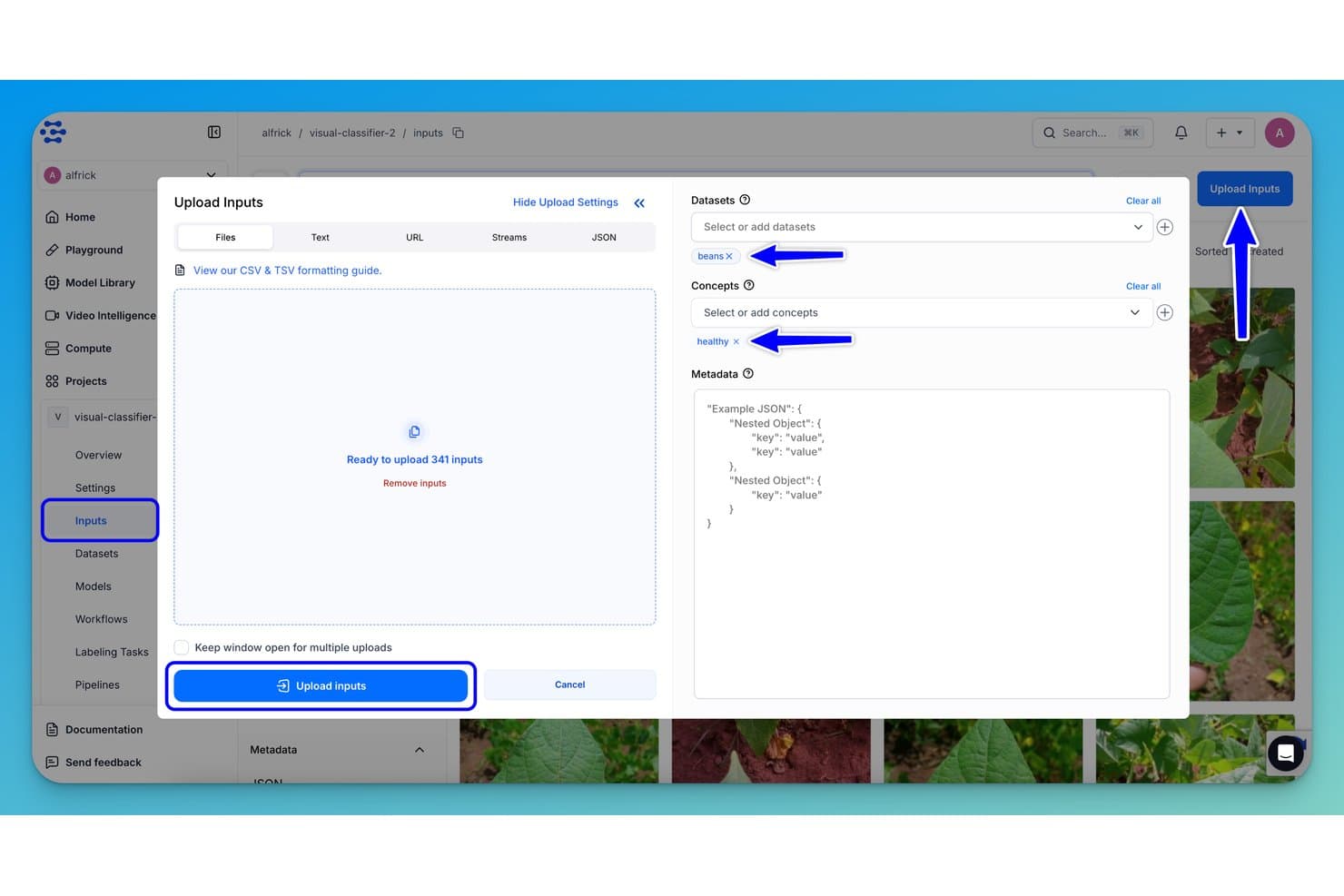
Clarifai offers an Upload Inputs dialog where users can assign datasets and concepts like 'beans' and 'healthy' before bulk uploading 341 images for model training. Clarifai is an enterprise computer vision platform for developing, training, and deploying image and video recognition models at scale, with extensive tools for custom model management, data annotation, and real-time visual analysis.
Who Is Clarifai Best For?
Enterprises and teams with dedicated machine learning engineers or data scientists working on large-scale computer vision projects.
Why I Picked Clarifai
I picked Clarifai as one of the best because I can manage every stage of my AI model pipeline, from dataset annotation to deployment, in one system. I rely on its advanced MLOps, powerful video analysis, and smooth edge deployment options.
Clarifai Key Features
- Pre-trained model library: Access a wide selection of ready-to-use computer vision models for rapid deployment.
- Collaborative data annotation tools: Enable teams to label and manage large image and video datasets in a shared workspace.
- API and SDK integrations: Connect models and workflows to your applications using REST APIs and multiple programming SDKs.
- Customizable workflow pipelines: Design and manage end-to-end vision processing pipelines tailored to complex project needs.
Clarifai Integrations
Clarifai offers native integrations with Snowflake and Amazon S3, and provides an API and SDKs for custom apps integrations in Python, Java, and Node.js.
Pros and Cons
Pros:
- On-premises, cloud, and edge deployment options
- Fast annotation and collaboration workflow tools
- Pre-trained models for many image tasks
Cons:
- Limited published benchmarks for some models
- Complex automation setup for advanced pipelines
Learn more about Clarifai:
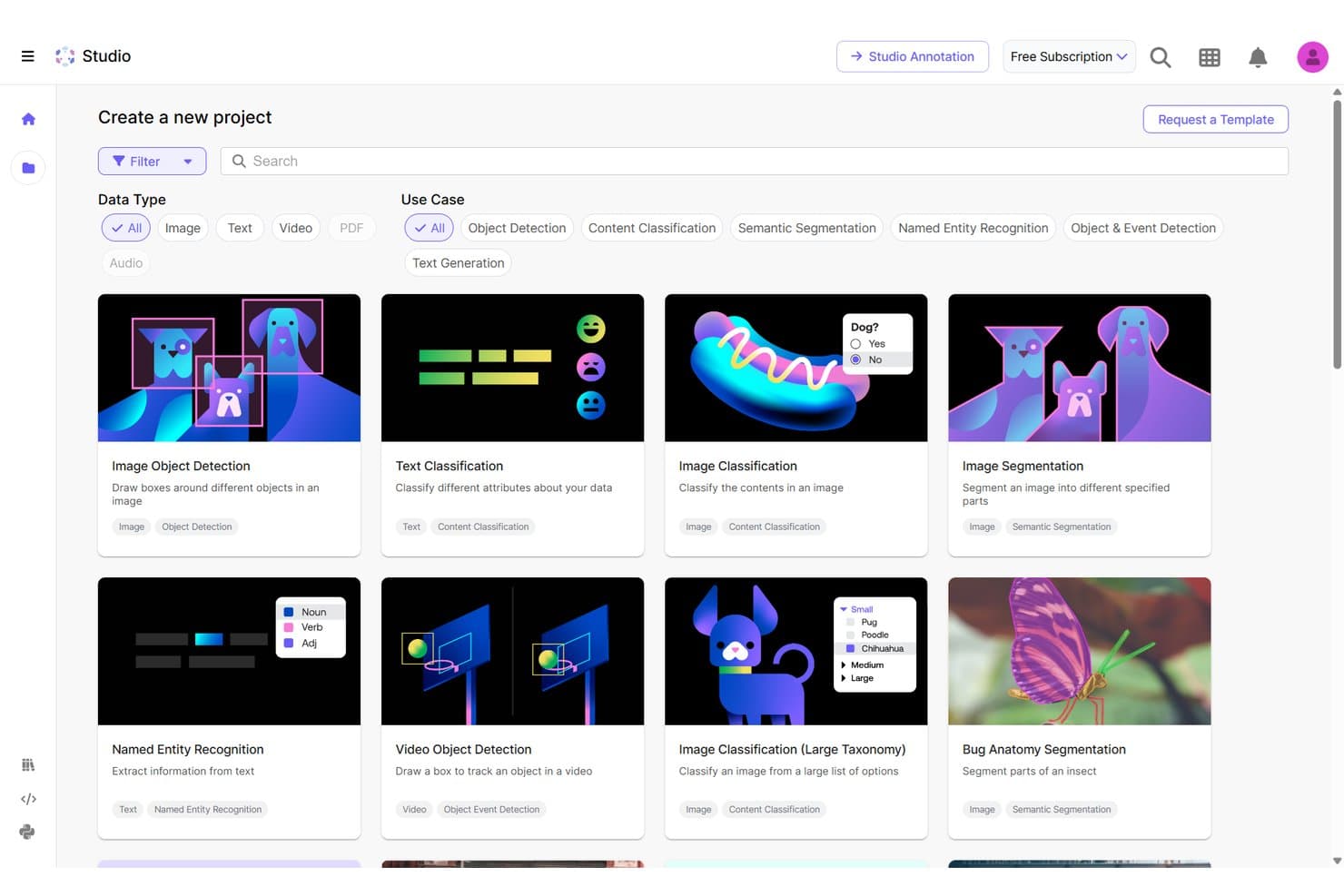
Scale AI offers a project template gallery with computer vision options like Image Object Detection, Image Classification, and Image Segmentation for training data labeling. Scale AI is an enterprise-focused computer vision software platform offering extensive annotation, dataset management, and scalable APIs for image, video, and 3D data workflows.
Who Is Scale AI Best For?
Scale AI suits large enterprises and advanced AI teams managing demanding computer vision projects and complex, high-volume data annotation workflows.
Why I Picked Scale AI
I picked Scale AI as one of the best because I rely on its enterprise-grade annotation services for large, complex computer vision datasets. My team uses its advanced annotation workflows, fast QA processes, and support for video and 3D data for demanding vision projects.
Scale AI Key Features
- Multi-modality data support: Annotate images, videos, LiDAR, and text data optimized for language models within a unified platform.
- API-driven integration: Connect data pipelines through REST APIs for optimized dataset management and automation.
- Real-time collaboration tools: Enable multiple users to review, comment, and adjust visual labels simultaneously.
- Secure data environment: Protect sensitive information with enterprise-grade access controls and privacy safeguards.
Scale AI Integrations
Native integrations are not publicly listed. Scale AI provides an API for custom integrations.
Pros and Cons
Pros:
- Supports 2D, 3D, and video annotation
- Advanced quality control on labeled datasets
- High-volume annotation for complex data types
Cons:
- No clear documentation of native third-party integrations
- Limited suitability for small team projects
Learn more about Scale AI:
Alte programe de viziune computerizată
Iată câteva opțiuni suplimentare de programe de viziune computerizată care nu au ajuns pe lista mea scurtă, dar merită totuși analizate:
- 11SuperviselyBest for no-code project configuration
- 12CVATBest for open-source annotation customization
- 13Vertex AIBest for integrating with Google Cloud
- 14DataLoopBest for automated data pipeline management
- 15Azure AI Custom VisionBest for rapid custom model training via API
- 16UltralyticsBest for pretrained YOLO model support
- 17Hive AIBest for large-scale content moderation
- 18OpenCVBest for open-source algorithm libraries
- 19Milestone SystemsBest for forensic video investigation
How I Evaluate Computer Vision Software
I split my evaluation into baseline requirements—like annotation tooling and API deployment—and differentiators like edge support and MLOps maturity.
Core Functionality (Table Stakes For This List)
When I'm selecting tools for my list, I rank each one on a scale from 0 (does not offer the functionality) to 5 (excels in this area) for each core functionality listed below. Then, I calculate the tool's total score into a percentage. Each tool needs to achieve a minimum total score of 75% to be considered for inclusion.
- Image Recognition & Classification: I evaluate how well a platform classifies objects, scenes, and attributes in static images, from pre-trained general models to custom classifiers trained on domain-specific data like retail product catalogs or medical scans.
- Object Detection & Segmentation: I look for support beyond basic bounding boxes, checking whether the tool handles instance segmentation, semantic segmentation, or pose estimation for use cases like warehouse inventory counting or defect inspection on production lines.
- Model Training & Customization: The ability to fine-tune or train models on your own labeled datasets matters here. I check for AutoML options, architecture flexibility, hyperparameter tuning, and experiment tracking so teams can iterate without starting from scratch.
- Video Analysis Capabilities: I consider whether the platform can process live video streams with multi-object tracking and event detection, not just frame-by-frame image analysis. Real-time surveillance feeds and manufacturing line monitoring are where this really gets tested.
- Data Annotation & Labeling: Strong annotation tooling with collaboration features, QA review workflows, and AI-assisted auto-labeling saves enormous time. I look at how each platform handles labeling for both images and video, including support for polygon, keypoint, and 3D annotation types.
- Deployment & API Integration: I check whether models can be deployed across cloud, on-prem, and edge environments via REST APIs, SDKs, or containerized runtimes. Platforms that support exports to formats like ONNX or TensorRT give your team more flexibility when targeting specific hardware.
Once I have a list of tools that meet the criteria, I consider what sets each platform apart.
Differentiating Factors (What Sets Vendors Apart)
Here's how I compare and contrast different vendors:
Standout Features
Edge deployment support is a major differentiator—I check whether a platform can push models to devices like NVIDIA Jetson boards or industrial cameras for real-time inference without relying on cloud connectivity. MLOps tooling matters just as much once models hit production. Drift detection and automated retraining pipelines keep accuracy from degrading as real-world conditions shift. I also look at pre-trained model libraries, since a strong catalog of ready-to-use models for tasks like OCR or pose estimation lets teams validate use cases before investing in custom training.
Beyond Features
Compliance and security weigh heavily in my evaluation, especially for platforms handling facial recognition or biometric data. I check for certifications like SOC 2 and HIPAA, plus built-in privacy features like PII blurring and audit logs. Deployment flexibility also matters—a platform that supports cloud, on-prem, and hybrid options gives your team room to meet data residency requirements without rearchitecting later. Pricing transparency is another factor I consider closely, since costs can spiral when training compute, storage, and per-inference fees are all billed separately.
Cum să alegeți un program de viziune computerizată
Este ușor să vă pierdeți în liste lungi de funcții și structuri complexe de prețuri. Pentru a vă menține concentrarea în timp ce parcurgeți procesul unic de selectare a programului, iată o listă de factori de care trebuie să țineți cont:
| Factor | Ce trebuie luat în considerare |
|---|---|
| FactorScalabilitate | Ce trebuie luat în considerareVa putea platforma să gestioneze creșterea volumului de date, modele suplimentare sau locații noi fără scăderea performanței? |
| FactorIntegrări | Ce trebuie luat în considerarePuteți conecta instrumentul la sistemele actuale, spațiul de stocare în cloud, dispozitivele IoT sau fluxurile de date fără dezvoltare personalizată? |
| FactorPosibilitate de personalizare | Ce trebuie luat în considerareVă permite să adaptați fluxurile de lucru ale modelelor sau interfețele de adnotare pentru a corespunde proiectelor, mediilor sau tipurilor de date unice ale echipei dumneavoastră? |
| FactorUșurință în utilizare | Ce trebuie luat în considerareVor putea membrii tehnici și non-tehnici ai echipei să opereze platforma eficient sau utilizarea va necesita cunoștințe aprofundate de învățare automată? |
| FactorImplementare și configurare | Ce trebuie luat în considerareCe resurse, documentație sau asistență sunt oferite pentru a vă activa modelele și datele în noul sistem fără întârzieri îndelungate? |
| FactorCost | Ce trebuie luat în considerareSunt clare toate costurile — inclusiv resursele de calcul necesare pentru antrenare, stocarea datelor, utilizarea API-ului și adnotarea? Fiți atenți la costurile ascunse și taxele pentru depășirea limitelor. |
| FactorMăsuri de securitate | Ce trebuie luat în considerareOferă instrumentul acces bazat pe roluri, criptarea datelor și jurnale de audit pentru a vă proteja seturile de date și proprietatea intelectuală asociată modelelor împotriva amenințărilor interne și externe? |
| FactorCerințe de conformitate | Ce trebuie luat în considerareRespectă programul cerințele privind confidențialitatea datelor și standardele din industrie (GDPR, HIPAA etc.) relevante pentru sectorul sau regiunea dumneavoastră? |
Ce este un program de viziune computerizată?
Programele de viziune computerizată reprezintă o categorie de instrumente care folosesc inteligența artificială pentru a detecta, analiza și interpreta imagini sau videoclipuri. Aceste platforme permit echipelor să automatizeze sarcini precum etichetarea imaginilor, detectarea obiectelor și analiza videoclipurilor. Prin sprijinirea antrenării și implementării modelelor, precum și a integrării cu alte sisteme, programele de viziune computerizată ajută companiile să valorifice informațiile și să automatizeze procesele bazate pe date vizuale într-o gamă largă de aplicații de viziune computerizată.
Funcții
Atunci când selectați un program de viziune computerizată, urmăriți următoarele funcții esențiale:
- Clasificarea imaginilor: Atribuie etichete sau categorii imaginilor, permițând organizarea și sortarea automată a seturilor mari de date prin recunoașterea elementelor sau tiparelor-cheie.
- Detectarea obiectelor: Localizează și identifică obiecte în imagini sau cadre video, sprijinind cazuri de utilizare precum asigurarea calității, urmărirea inventarului sau siguranța auto.
- Segmentarea: Împarte imaginile în regiuni sau obiecte distincte, permițând analiza, măsurarea sau izolarea precisă a unor zone precum scanările medicale sau mediile cartografiate.
- Procesarea video: Analizează și extrage informații din fluxuri sau fișiere video, permițând detectarea în timp real, urmărirea evenimentelor și analiza mișcării pentru supraveghere sau monitorizare.
- Instrumente de adnotare a datelor: Oferă interfețe pentru etichetarea manuală a imaginilor sau cadrelor, sprijinind acuratețea modelelor prin asigurarea etichetării corecte a datelor pentru antrenare.
- Procesarea pe loturi: Gestionează volume mari de imagini sau videoclipuri într-un singur flux de lucru, economisind timp și efort în timpul antrenării, validării sau reprocesării modelelor.
- Integrarea API: Permite software-ului să se conecteze la alte platforme, permițând fluxuri automate de procesare și integrarea capabilităților de viziune în propriile aplicații.
- Acces bazat pe roluri: Vă permite să gestionați permisiunile pentru grupurile de utilizatori, asigurându-vă că membrii potriviți ai echipei pot adnota date, revizui rezultate sau implementa modele în siguranță.
- Raportare și vizualizare: Oferă tablouri de bord sau instrumente de analiză pentru vizualizarea rezultatelor, urmărirea îmbunătățirilor și comunicarea clară a constatărilor către echipe sau părți interesate.
- Compatibilitatea hardware: Acceptă diverse GPU-uri, CPU-uri sau acceleratoare specializate, facilitând implementarea și extinderea în întreaga infrastructură.
Funcții AI comune ale software-ului de viziune computerizată
Pe lângă funcțiile standard ale software-ului de viziune computerizată enumerate mai sus, multe dintre aceste soluții integrează inteligența artificială prin funcții precum:
- Etichetarea automată: Utilizează inteligența artificială pentru a genera automat adnotări pentru imagini sau cadre video, accelerând considerabil pregătirea seturilor de date și reducând efortul manual.
- Detectarea anomaliilor: Utilizează învățarea automată pentru a identifica tipare neobișnuite sau defecte în imagini ori videoclipuri, sprijinind aplicații precum controlul calității sau monitorizarea securității.
- Recunoașterea facială: Utilizează învățarea profundă pentru a detecta și compara fețe în imagini sau videoclipuri, permițând verificarea identității, controlul accesului sau analiza clienților.
- Estimarea poziției: Utilizează modele de inteligență artificială pentru a determina poziția și orientarea obiectelor sau persoanelor, sprijinind aplicații din analiza sportivă, robotică sau evaluarea ergonomică.
- Înțelegerea scenei: Aplică inteligența artificială pentru a interpreta medii complexe, recunoscând relațiile dintre obiecte și anticipând contextul pentru sarcini precum navigarea autonomă sau analiza comerțului cu amănuntul.
- Învățarea activă: Integrează inteligența artificială pentru a sugera ce mostre de date ar trebui etichetate în continuare, optimizând fluxurile de lucru pentru adnotare și îmbunătățind performanța modelelor cu mai puține date etichetate.
Beneficii
Implementarea software-ului de viziune computerizată oferă mai multe beneficii pentru echipa și compania dumneavoastră. Iată câteva dintre acestea:
- Luarea mai rapidă a deciziilor: Analiza automată a imaginilor și fluxurilor video oferă informații în timp real pentru aplicații precum controlul calității sau monitorizarea securității.
- Productivitate crescută: Automatizarea fluxurilor de lucru și instrumentele de adnotare bazate pe inteligență artificială ajută echipa să proceseze mai multe date cu mai puțin efort manual.
- Operațiuni scalabile: Opțiunile de implementare în cloud, local și la periferie vă permit să treceți de la proiecte pilot la producție la scară largă fără refaceri majore.
- Acuratețe îmbunătățită: Antrenarea personalizabilă a modelelor și fluxurile de lucru pentru învățare activă îmbunătățesc continuu rezultatele detectării, clasificării și segmentării.
- Securitate sporită a datelor: Accesul bazat pe roluri, înregistrarea jurnalelor de audit și funcțiile de conformitate protejează datele vizuale sensibile și respectă cerințele de confidențialitate.
- Integrări mai simple: Accesul API și SDK-urile conectează modelele la sistemele de afaceri existente pentru un flux fluid al datelor și fluxuri de lucru personalizate.
- Informații utile pentru acțiune: Tablourile de bord și vizualizările pentru raportare transformă datele vizuale complexe în constatări clare și relevante pentru afaceri, pentru o planificare strategică mai bună.
Costuri și prețuri
Selectarea software-ului de viziune computerizată necesită înțelegerea diferitelor modele și planuri de preț disponibile. Costurile variază în funcție de funcții, dimensiunea echipei, suplimente și alți factori. Tabelul de mai jos prezintă planurile comune, prețurile medii ale acestora și funcțiile incluse de obicei în soluțiile software de viziune computerizată:
Tabel comparativ al planurilor pentru software-ul de viziune computerizată
| Tipul planului | Preț mediu | Funcții comune |
|---|---|---|
| Tipul planuluiPlan gratuit | Preț mediu$0 | Funcții comuneSeturi de date limitate, procesare de bază a imaginilor, instrumente esențiale de adnotare și asistență din partea comunității. |
| Tipul planuluiPlan personal | Preț mediu$25-$100/utilizator/lună | Funcții comuneAcces pentru un singur utilizator, procesare pe loturi, modele de bază de viziune computerizată, export de date și asistență prin e-mail. |
| Tipul planuluiPlan pentru companii | Preț mediu$100-$500/utilizator/lună | Funcții comuneColaborare între mai mulți utilizatori, personalizare avansată a modelelor, acces API, opțiuni de integrare și asistență prioritară. |
| Tipul planuluiPlan pentru întreprinderi | Preț mediu$500+/utilizator/lună | Funcții comuneImplementare personalizată, acces bazat pe roluri, funcții de conformitate, integrare inițială dedicată, SLA-uri personalizate și asistență completă. |
Întrebări frecvente despre software-ul de viziune computerizată
Iată câteva răspunsuri la întrebările frecvente despre software-ul de viziune computerizată:
Ce industrii utilizează software de viziune computerizată?
Veți întâlni software de viziune computerizată în producție, sănătate, comerț cu amănuntul, securitate, logistică și agricultură — practic oriunde organizațiile doresc să extragă valoare din date vizuale pentru inspecție, automatizare sau analiză.
Pot utilizatorii fără cunoștințe tehnice să lucreze cu platforme de viziune computerizată?
Da, multe platforme oferă acum interfețe cu cod redus, fluxuri de lucru ghidate și modele preantrenate, astfel încât experții din domeniu și operatorii să poată eticheta date și utiliza modele de bază fără cunoștințe aprofundate de învățare automată.
Cum protejează software-ul de viziune computerizată datele sensibile?
Majoritatea platformelor oferă funcții precum criptarea datelor, accesul bazat pe roluri, jurnalele de audit și opțiuni de procesare pe dispozitiv pentru a proteja imaginile sau videoclipurile sensibile și pentru a vă ajuta să respectați cerințele de conformitate.
Este posibilă integrarea software-ului de viziune computerizată cu sistemele de afaceri existente?
Da, accesul prin API și SDK-urile sunt obișnuite, ceea ce facilitează conectarea la platforme ERP, MES, VMS sau de stocare în cloud și integrarea rezultatelor viziunii în propriile fluxuri de lucru.
Ce ar trebui să știu despre extinderea unei soluții de viziune computerizată?
Verificați dacă soluția poate gestiona volume de date în creștere, mai mulți utilizatori și implementări în cloud, la sediu sau pe dispozitive edge, fără probleme de performanță sau reconfigurări complexe.