

Cele mai bune instrumente de programare în pereche îi ajută pe dezvoltatori să colaboreze în timp real, să partajeze instantaneu contextul și să mențină o calitate ridicată a codului fără să-și întrerupă fluxul de lucru. Acestea facilitează examinarea codului împreună, remedierea rapidă a erorilor și menținerea proiectelor în desfășurare atunci când se lucrează de la distanță sau în fusuri orare diferite.
Echipele încep adesea să caute soluții mai bune atunci când examinările codului se prelungesc, feedbackul se pierde în fire nesfârșite de comentarii sau trecerea între instrumente le perturbă concentrarea. Fără un spațiu de lucru comun, chiar și sesiunile simple de depanare se pot transforma în discuții lente și fragmentate.
Am lucrat cu echipe de inginerie care foloseau aceste instrumente în medii de producție active, testând cât de bine gestionează editarea partajată, controlul versiunilor și comunicarea între echipe distribuite. Această experiență mi-a arătat ce platforme fac cu adevărat programarea în pereche productivă, în loc să o transforme într-o experiență frustrantă.
În acest ghid, vei afla care instrumente de programare în pereche oferă cea mai bună experiență de colaborare în timp real, reduc schimbarea contextului și îți ajută echipa să scrie împreună cod mai curat și mai ușor de întreținut.
Why Trust Our Software Recommendations
6,700+
Reviews
20
Industry experts
16+
Evaluation factors
14
Years
Our team has been testing and reviewing software since 2012. As tech leaders ourselves, we know how difficult—and important—it is to choose the right software.
For this guide, we evaluated tools using hands-on testing and independent research, scoring tools using our selection criteria.
Our reviews reflect our human editorial judgment, not a sales pitch.
Expert reviewers:
- Paulo Gardini MiguelTech Director
 Tim FisherVP of AI
 Gabriel RosasTech Lead & Software Architect
 Christhian GruhnTech Lead & Platform Architect

Tabel comparativ: instrumente de programare în pereche
Acest tabel comparativ sintetizează detaliile de preț pentru selecția mea de top de instrumente de programare în pereche.
Score legend (out of 5)
- Excellent4.5–5
- Good4–4.4
- Average3–3.9
- Below average2–2.9
- Poor1–1.9
Sorted by: Default
| Tool | Starting Price | Website | |||||||
|---|---|---|---|---|---|---|---|---|---|
Best for GitHub-native cloud pairing environments | 3.5 out of 5 | 3 | 4 | 5 | 4 | 4 | 1 | $4/user/month Free plan + 30-day free trial available | Website |
Best for web-based pair programming with Classroom Mode | Not rated | 5 | 3 | 4 | 3 | 4 | Not rated | $170/workspace/month Free plan available | Website |
Best for technical interview live coding sessions | 3.8 out of 5 | 4 | 4 | 4 | 3 | 3 | 5 | $80/month 14-day free trial + free demo available | Website |
Best for open-source, self-hosted pairing | 3.5 out of 5 | 3 | 4 | 3 | 3 | 4 | 4 | $15/user/month 14-day free trial | Website |
Best for AI fluency assessment in interviews | 3.5 out of 5 | 3 | 2 | 5 | 2 | 4 | 5 | $79/month Free trial + free demo available | Website |
Best for zero-setup mentoring and onboarding | 4.3 out of 5 | 5 | 5 | 5 | 4 | 5 | 2 | $20/month Free plan available | Website |
Best for cross-IDE pair programming sessions | 4.0 out of 5 | 4 | 5 | 5 | 5 | 4 | 1 | Pricing upon request 30-day free trial + free demo available | Website |
Best for shared debugging in VS Code teams | 3.8 out of 5 | 4 | 5 | 4 | 3 | 5 | 2 | $45/user/month Free plan available | Website |
Best for in-IDE voice and video calling | 4.0 out of 5 | 4 | 3 | 3 | 5 | 4 | 5 | $6/month Free plan available | Website |
Best for macOS-based pair programming | 4.0 out of 5 | 3 | 3 | 5 | 4 | 5 | 4 | $30/user/month 14-day free trial | Website |


Recenzii ale celor mai bune instrumente de programare în pereche
Mai jos sunt rezumatele mele detaliate ale celor mai bune instrumente de programare în pereche care au ajuns pe lista mea scurtă. Recenziile mele oferă o privire detaliată asupra funcțiilor principale, avantajelor & dezavantajelor, integrărilor și cazurilor de utilizare ideale ale fiecărui instrument, pentru a te ajuta să-l găsești pe cel mai potrivit pentru tine.
 Best for GitHub-native cloud pairing environments
- Free plan + 30-day free trial available
- From $4/user/month

GitHub Codespaces provides a full VS Code editor in the browser for pair programming. GitHub Codespaces is a cloud-hosted development environment platform that spins up fully pre-configured coding workspaces directly from any GitHub repository, supporting real-time collaborative editing via VS Code Live Share, shared terminals, and AI-assisted coding through GitHub Copilot.
Who Is GitHub Codespaces Best For?
GitHub Codespaces is a strong fit for development teams already working within the GitHub ecosystem who need instant, reproducible cloud environments for onboarding, mentoring, and collaborative code review.
Why I Picked GitHub Codespaces
GitHub Codespaces earns its spot on my shortlist because it's the strongest option I've found for teams already living inside GitHub who want a cloud-native pairing setup without local environment headaches. I love how
devcontainer.jsonlets you version-control the entire environment, so every collaborator, including new hires, opens an identical, pre-configured workspace from a single link. Pair that with GitHub Copilot pre-installed and VS Code Live Share for shared terminals and joint debugging, and you get a genuinely capable pairing setup built around the GitHub workflow.GitHub Codespaces Key Features
- Pull request environment launch: Open a fully configured Codespace directly from any pull request, letting you investigate and test changes in context during code review.
- Port forwarding: Share a running local server or web app with collaborators by forwarding ports from your Codespace, with visibility controls set to private, org-wide, or public.
- Prebuild configuration: Set up prebuilt Codespaces via GitHub Actions to reduce environment startup time for frequently used branches.
- Read-only Live Share mode: Invite collaborators into your Codespace session with read-only access, useful for walkthroughs, demos, or guided mentoring without risking accidental edits.
GitHub Codespaces Integrations
GitHub Codespaces integrates with VS Code Live Share, GitHub Copilot, GitHub Actions, Docker and Dev Containers, GitHub Pull Requests, JetBrains Gateway, and JupyterLab. Its GitHub-native workflow connects repositories, branches, commits, and pull requests directly to cloud development environments.
Pros and Cons
Pros:
- AI coding assistant embedded for pair sessions
- Reproducible workspaces using devcontainer version control
- Opens instant, pre-configured GitHub cloud environments
Cons:
- No native chat or voice tools included
- Real-time co-editing depends on Live Share
Learn more about GitHub Codespaces: Best for web-based pair programming with Classroom Mode
- Free plan available
- From $170/workspace/month

CodeSandbox Live enables real-time collaborative code editing with live cursors. CodeSandbox Live is a browser-based collaborative coding environment that offers real-time co-editing, shared terminals, live previews, and Classroom Mode for structured, permission-controlled pair programming sessions.
Who Is CodeSandbox Live Best For?
CodeSandbox Live is a strong fit for web developers and coding instructors who need instant, browser-based collaborative environments without any local setup.
Why I Picked CodeSandbox Live
CodeSandbox Live earns its spot on my shortlist because Classroom Mode is genuinely unlike what most pair programming tools offer: the host controls exactly who can edit while 30+ participants observe the same live sandbox in real time. I've used this setup for technical onboarding sessions where a senior developer walks through a React component while junior teammates watch without accidentally breaking anything. The zero-install guest join and shared terminals round out a workflow that's hard to beat for browser-based web development pairing.
CodeSandbox Live Key Features
- Operational transform conflict resolution: Multiple users can edit the same file simultaneously, with OT-based sync automatically resolving conflicts across all sessions in real time.
- Shared live terminal: Any terminal spawned during a session is instantly visible to all branch collaborators, enabling real-time command execution and server output without extra configuration.
- MicroVM cloud environments: Isolated virtual machine environments spin up in under three seconds and restore from snapshots in under two, giving every collaborator an identical, reproducible workspace.
- GitHub repository integration: Teams can import existing repositories, create branches, and link cloud environments directly to PRs, keeping pair sessions connected to their existing Git workflow.
CodeSandbox Live Integrations
CodeSandbox Live offers native GitHub integration, plus integrations with Storybook and Together AI through the CodeSandbox SDK. Sandpack supports embedded interactive sandboxes, while the SDK enables custom AI-agent and code-execution workflows.
Pros and Cons
Pros:
- Instant browser-based onboarding with no install
- Real-time shared terminals for all collaborators
- Classroom Mode locks editing for observers
Cons:
- No JetBrains or native VS Code support
- No built-in voice or text chat
Learn more about CodeSandbox SDK: Best for technical interview live coding sessions
- 14-day free trial + free demo available
- From $80/month (billed annually)

CoderPad supports real-time collaborative coding with multi-file editing. CoderPad is a browser-based collaborative coding platform built specifically for technical interviews, offering a shared IDE, real-time co-editing, built-in audio/video, an AI pairing assistant, session recording, and a digital whiteboard—all without any local setup.
Who Is CoderPad Best For?
CoderPad is a strong fit for hiring teams and engineering managers who run high-volume technical interviews and need a structured, repeatable live coding environment.
Why I Picked CoderPad
CoderPad earns its spot as one of the best on my shortlist because no other tool is as purpose-built for technical interview live coding sessions. I love that it combines a shared, VS Code-style browser IDE with native audio/video and a built-in whiteboard, so there's nothing external to set up or switch between mid-session. Session recording with full code playback is a feature I find genuinely useful, letting hiring teams revisit a candidate's problem-solving process after the fact.
CoderPad Key Features
- AI Assist panel: An embedded AI tool supporting multiple LLMs—including GPT-5, Claude Sonnet 4, and Gemini 2.5 Pro—with Ask, Edit, and Plan modes accessible to both participants during a session.
- Question library: A curated bank of 400+ to 4,000+ ready-made coding questions, depending on your plan, with options for custom questions and gamified assessments.
- Drawing mode: A built-in digital whiteboard for sketching system architectures, data flows, and logic diagrams alongside the live coding environment.
- Take-home projects: Asynchronous coding assessments with automated test case scoring, letting you evaluate candidates outside of a live session.
CoderPad Integrations
CoderPad offers integrations with GitHub, Slack, Microsoft Teams, Google Calendar, Greenhouse, Lever, and Workday. Enterprise plans include API access for custom integrations.
Pros and Cons
Pros:
- Integrated audio, video, and digital whiteboard
- Session recording enables detailed interview review
- AI Assist supports multiple leading language models
Cons:
- No support for local IDE integration
- Limited debugging beyond basic code execution
Learn more about CoderPad:
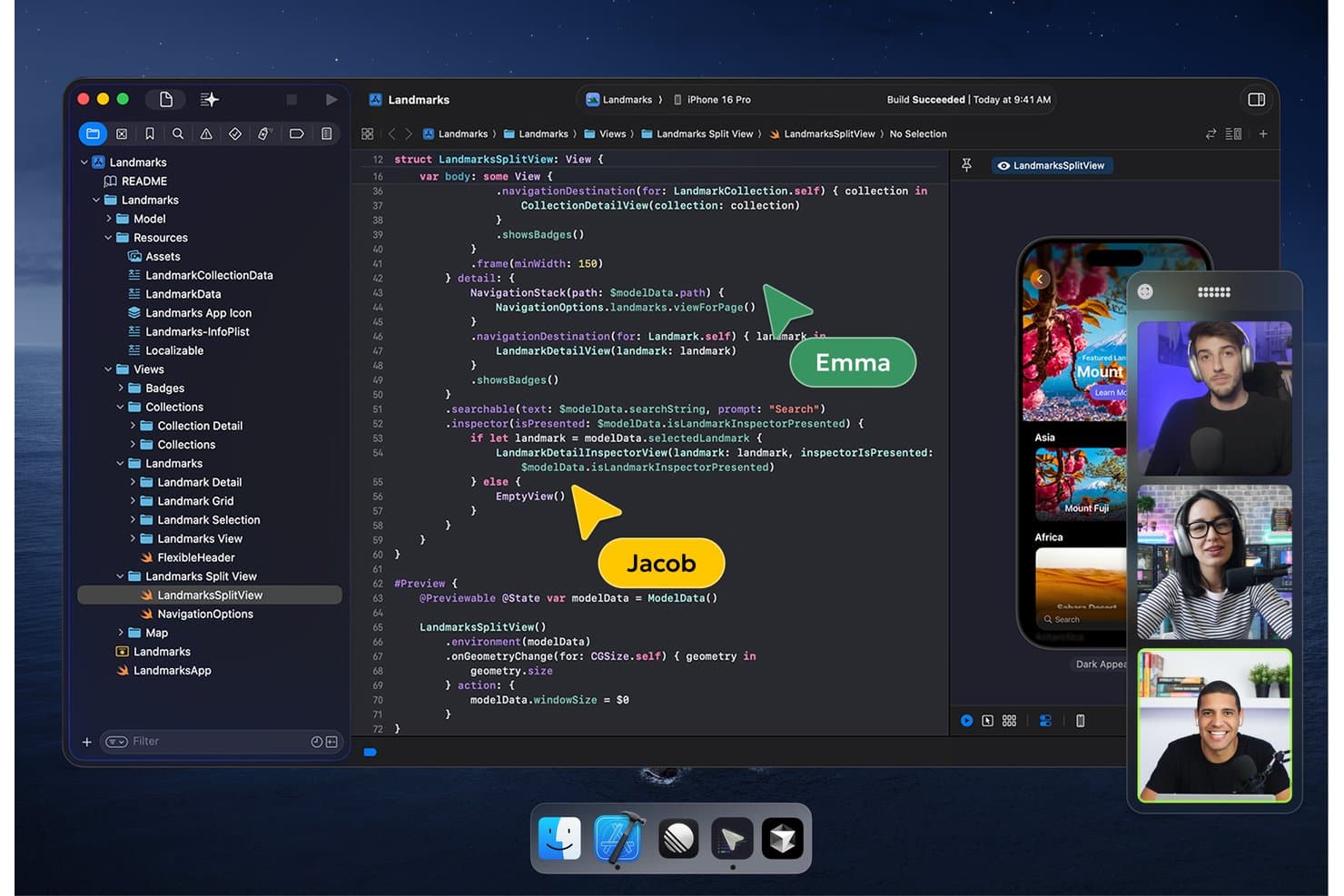
Hopp lets users pair program in real time via shared Xcode sessions. Hopp is an open-source pair programming tool that delivers 4K screen sharing with shared mouse and keyboard control, built-in voice with noise cancellation, and application-agnostic collaboration across any IDE, terminal, or dashboard.
Who Is Hopp Best For?
Hopp is a strong fit for security-conscious engineering teams that want full control over their collaboration infrastructure through self-hosting.
Why I Picked Hopp
Hopp earns its spot on my shortlist because it's the only dedicated pair programming tool I've found that's fully open-source (AGPL-3.0) and self-hostable, which matters a lot if your team has strict data residency or security requirements. I like that its screen-sharing model is application-agnostic: you can share a terminal, a Grafana dashboard, or an AWS console with full shared mouse and keyboard control, not just an IDE window. That 4K streaming at sub-100ms latency makes it feel genuinely interactive, not like a laggy video call.
Hopp Key Features
- Screen annotations: Draw directly on the shared screen to highlight code, point to specific lines, or mark up a terminal output during a session.
- Mob programming rooms: Host up to 10 participants in a single room, supporting code reviews, onboarding sessions, and group debugging beyond standard 1:1 pairing.
- Mid-session control toggle: The sharer can grant or revoke remote mouse and keyboard control at any point during an active session without ending the call.
- Browser-based guest access: Guests can join a Hopp room via their browser in view-only mode without installing the desktop client.
Hopp Integrations
Hopp offers a native Slack integration for launching pair programming sessions. It also supports sign-in with Google and GitHub, while LiveKit provides its underlying audio and video infrastructure.
Pros and Cons
Pros:
- Sub-100ms 4K streaming latency focus
- Shares any app, not just IDEs
- Fully open-source and self-hostable option
Cons:
- No session recording or playback support
- No built-in text or chat feature
Learn more about Hopp: Best for AI fluency assessment in interviews
- Free trial + free demo available
- From $79/month (billed annually)

HackerRank lets users code and test solutions live during pair sessions. HackerRank Interview is a browser-based technical interview platform that pairs a shared live coding environment with an AI-integrated workspace, real-code repository sessions, built-in whiteboarding, and session recording tools.
Who Is HackerRank Best For?
HackerRank Interview is a strong fit for engineering hiring teams that want to evaluate how candidates work alongside AI tools in a realistic coding environment.
Why I Picked HackerRank
I picked HackerRank as one of the best because it's the only platform I've seen that makes AI fluency a measurable part of a live coding session. Candidates work inside a real repository using frontier models like Claude Sonnet 5 or GPT-5.6, while I watch their prompts, reasoning, and corrections unfold in real time. The ADE pairs that with a shared terminal and diff view, so I can assess how someone actually navigates and validates AI-generated code under realistic conditions.
HackerRank Key Features
- Session recording and playback: Captures every keystroke and action in the shared coding session, with a full activity timeline you can replay after the interview.
- Built-in whiteboard: A native infinite-canvas drawing tool lets you run system design discussions alongside live coding without switching tools.
- Observer mode: Lets additional reviewers monitor a live session in real time without disrupting the candidate or interviewer.
- Cloud-hosted repository workspace: Candidates work inside pre-configured, multi-file codebases with a shared terminal and live app preview, all running in the browser.
HackerRank Integrations
HackerRank Interview offers native integrations with Slack, Zoom, Cisco Webex, Google Calendar, Microsoft Outlook, Greenhouse, Lever, and Workday. It also supports SAML 2.0 and SCIM 2.0 for enterprise identity management.
Pros and Cons
Pros:
- Built-in whiteboard for system design interviews
- Session recording with keystroke-level playback
- AI fluency assessment in live coding sessions
Cons:
- Designed mainly for technical hiring, not team pairing
- No support for VS Code or JetBrains plugins
Learn more about HackerRank: Best for zero-setup mentoring and onboarding
- Free plan available
- From $20/month
Visit WebsiteCustomer Rating:4.4/5
Replit's AI chat helps users generate full HTML pages collaboratively. Replit is a browser-based cloud IDE and pair programming platform that combines real-time multiplayer editing, AI-assisted code generation, a shared terminal, and built-in whiteboarding in a zero-install environment.
Who Is Replit Best For?
Replit is a great fit for engineering teams that frequently onboard junior developers or run mentoring sessions and want a zero-setup environment everyone can join from a browser.
Why I Picked Replit
Replit earns its spot on my shortlist because no other pair programming tool gets a new developer into a shared, working environment faster. I love Observation Mode specifically: a senior dev can open a session and a junior can follow their cursor across files in real time, watching every edit and switch without any setup. Filetree Presence shows exactly which files each teammate is in, so mentoring stays organized from the first session.
Replit Key Features
- Multiplayer editing: Multiple collaborators can edit the same codebase simultaneously, with live named cursors showing each participant's position in real time.
- Built-in whiteboarding: Excalidraw-powered
.drawfiles let your team sketch diagrams and architecture directly alongside live code in the shared workspace. - Visual Git pane: A built-in interface handles branching, commits, push/pull, and pull request workflows across GitHub, GitLab, and Bitbucket without leaving the editor.
- In-editor text chat: Collaborators can communicate directly inside the coding environment without switching to an external messaging tool.
Replit Integrations
Replit offers 30+ native integrations, including GitHub, GitLab, Bitbucket, Jira, Linear, Slack, Discord, Zoom, and Figma. It also supports custom connectors through MCP.
Pros and Cons
Pros:
- Cloud IDE with built-in multiplayer editing
- Real-time observation mode for live mentoring
- Zero-setup collaborative environment for instant onboarding
Cons:
- Limited to browser-based development only
- No native voice or video chat
Learn more about Replit: Best for cross-IDE pair programming sessions
- 30-day free trial + free demo available
- Pricing upon request
Visit WebsiteCustomer Rating:4.4/5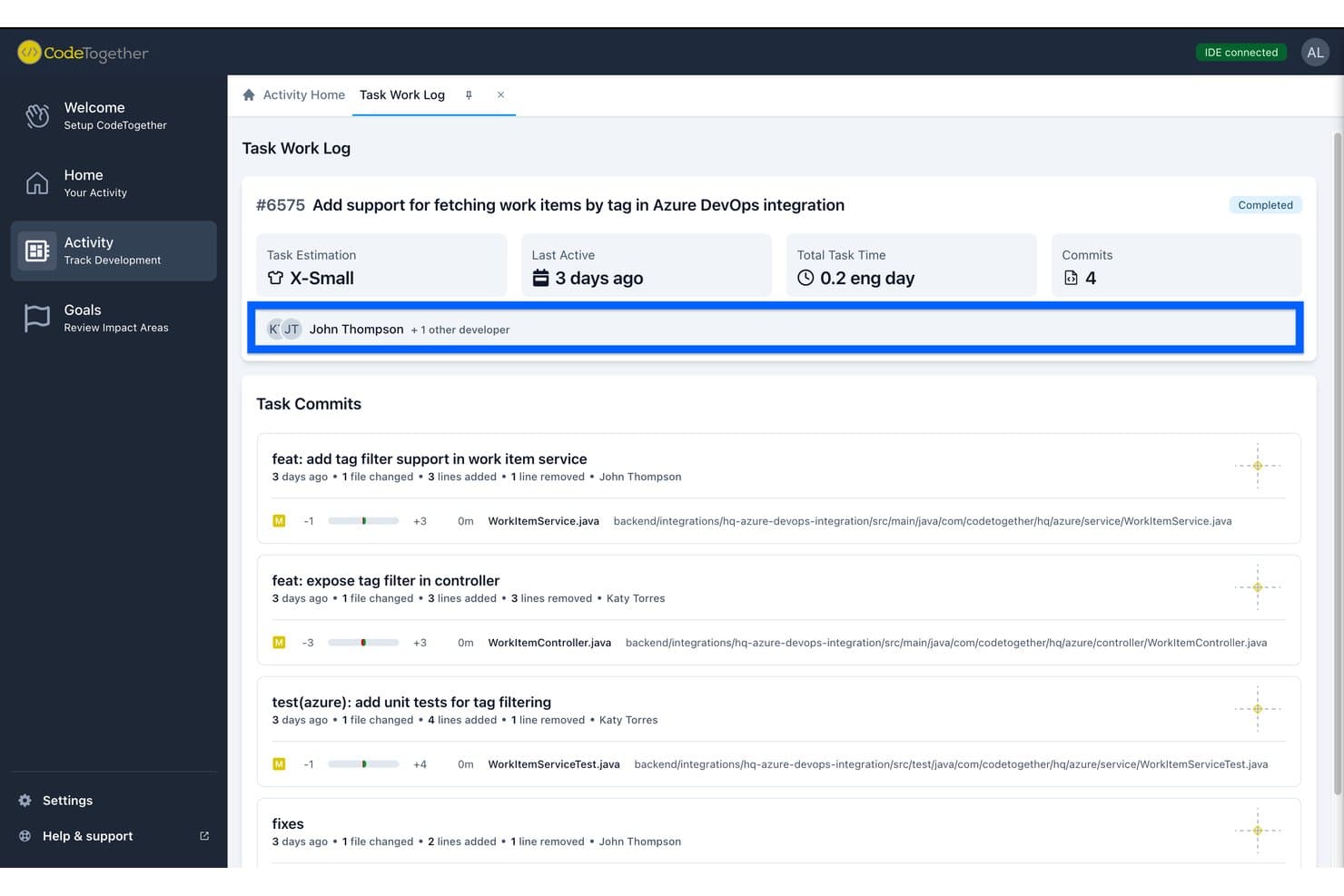
CodeTogether tracks commits and contributors per task in one view. CodeTogether is a pair programming tool that supports real-time co-editing, shared terminals, and cross-IDE sessions across JetBrains IDEs, VS Code, Eclipse, and browser-based guest access.
Who Is CodeTogether Best For?
CodeTogether is a strong fit for development teams that work across mixed IDE environments—especially those pairing JetBrains users with VS Code or Eclipse users in the same session.
Why I Picked CodeTogether
CodeTogether earns its spot on my shortlist because cross-IDE pairing is genuinely rare, and it's the only tool I've found that lets an IntelliJ user and a VS Code user collaborate in the same live session without either person switching editors. I like that each participant keeps their own keybindings and theme, so there's no negotiating whose setup everyone else has to tolerate. The browser-based guest joining is a practical bonus: I've used it to pull in an external reviewer mid-session with nothing more than a link.
CodeTogether Key Features
- Explicit driver mode: Locks the driver role to one participant, requiring them to actively hand off control before anyone else can edit.
- Session access controls: Hosts can restrict file visibility, editing permissions, terminal write access, and remote test execution per participant.
- Shared terminal with write access: Guests can view the host's terminal and request write access, enabling collaborative command execution within the session.
- On-premises and air-gapped deployment: Self-hosted deployment is available for teams with strict data residency or compliance requirements.
CodeTogether Integrations
CodeTogether documents integrations with GitHub, GitLab, Bitbucket, Jira, GitHub Issues, GitHub Copilot, Cursor, Claude Code, and OpenAI Codex. An open API supports custom integrations.
Pros and Cons
Pros:
- Hosts control editing and terminal permissions precisely
- Browser-based joining needs no software install
- Cross-IDE collaboration works across JetBrains, VS Code, Eclipse
Cons:
- Performance slows on large or complex codebases
- Built-in audio and video are deprecated
Learn more about CodeTogether: Best for shared debugging in VS Code teams
- Free plan available
- From $45/user/month (billed annually)

Microsoft Visual Studio Live Share shows multiple cursors and participant activity in real time. Microsoft Visual Studio Live Share is a real-time code collaboration extension for VS Code and Visual Studio that lets multiple developers co-edit, co-debug, share terminals, and forward local ports—all without guests needing to clone a repo or configure a local environment.
Who Is Microsoft Visual Studio Live Share Best For?
VS Code and Visual Studio teams who need deep, shared debugging sessions will get the most out of Live Share.
Why I Picked Microsoft Visual Studio Live Share
Visual Studio Live Share earns its spot on my shortlist because shared debugging in VS Code is where it genuinely has no equal. When my team hits a tricky bug, guests can independently inspect local variables, hover over values, and walk the call stack without interrupting the host's execution flow—that's a level of co-debugging depth you won't get from screen sharing. I also rely on shared terminal access, where hosts can open read/write terminal instances so guests can run commands directly in the same environment, no repo cloning or environment setup required.
Microsoft Visual Studio Live Share Key Features
- Follow mode: Participants can toggle to follow another collaborator's navigation in real time, with the option to detach and explore the codebase independently at any point.
- Read-only session mode: Hosts can lock the session so guests can navigate, inspect variables, and track cursors without making any edits to the codebase.
- File exclusions via .vsls.json: Hosts can block or hide sensitive files—like API keys or certificates—from guest access using glob patterns in a configuration file.
- Browser-based guest join: Guests can join a Live Share session directly through vscode.dev without installing VS Code or any local dependencies.
Microsoft Visual Studio Live Share Integrations
Microsoft Visual Studio Live Share supports shared debugging with Azure Dev Spaces, Azure App Service, and Azure Functions, plus authentication through GitHub and Microsoft accounts. It has no native CI/CD, Jira, or pull request integrations.
Pros and Cons
Pros:
- End-to-end encrypted sessions for privacy
- Zero setup for joining via browser link
- Guests co-debug independently without interrupting host
Cons:
- Built-in voice and audio now deprecated
- No support for JetBrains or Vim editors
Learn more about Microsoft Visual Studio Live Share:
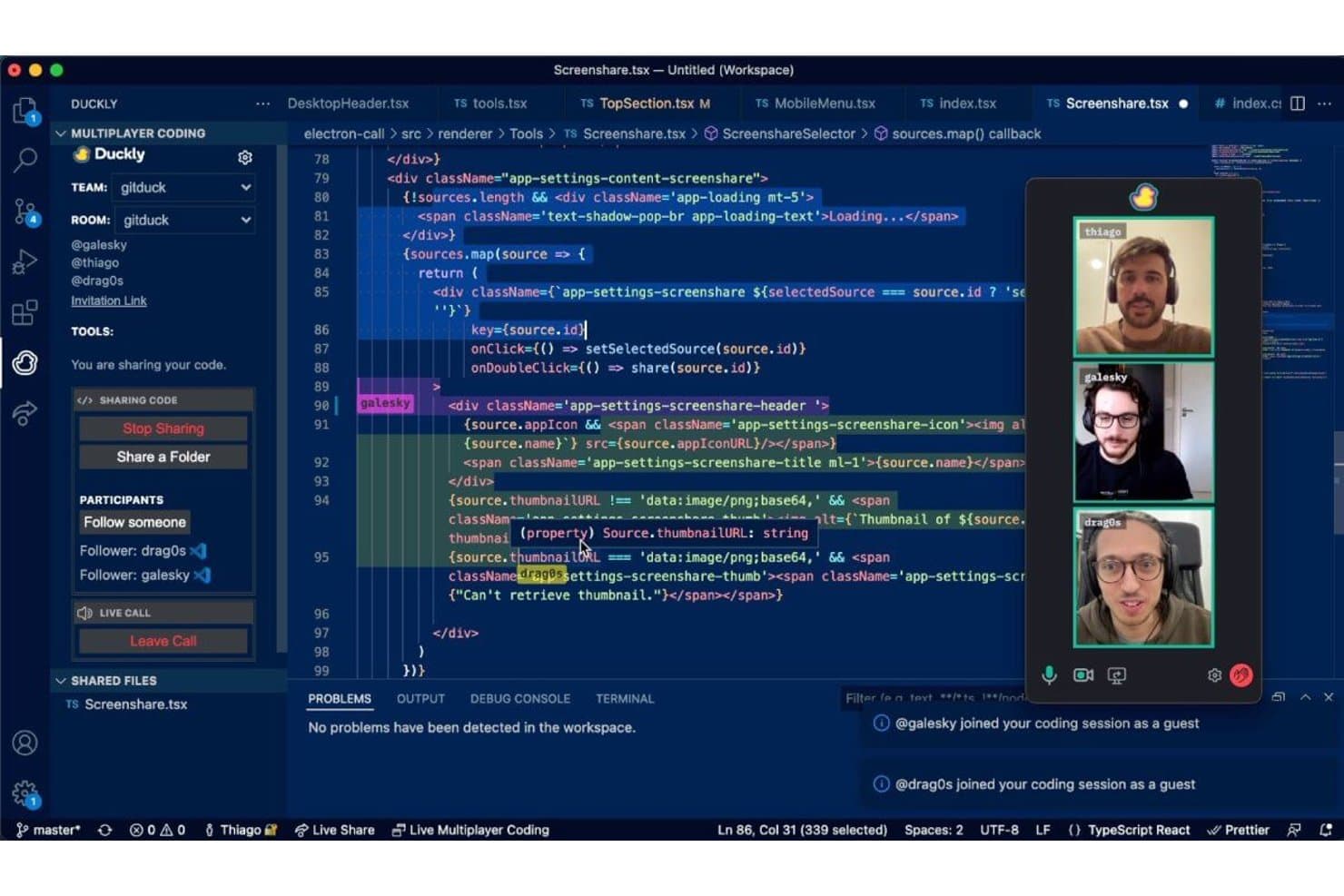
Duckly enables real-time multiplayer coding with live video calls. Duckly is a pair programming plugin for VS Code and JetBrains IDEs that enables real-time cross-IDE code co-editing, shared terminal access, local server sharing, and built-in voice, video, and screen sharing directly inside the development environment.
Who Is Duckly Best For?
Duckly is a strong fit for remote development teams whose members work across different IDEs and need voice and video collaboration built directly into their coding environment.
Why I Picked Duckly
Duckly earns its spot on my shortlist because of something I genuinely haven't seen done as well elsewhere: voice and video calling built directly inside the IDE. There's no alt-tabbing to Zoom mid-session — you talk, share your screen, and co-edit code all without leaving VS Code or IntelliJ. I also rate its cross-IDE pairing highly, since a developer on WebStorm can pair with someone on VS Code in real time, which removes a friction point most tools ignore entirely.
Duckly Key Features
- Cross-IDE co-editing: Pair program in real time across VS Code and JetBrains IDEs simultaneously, with no requirement to standardize on a single editor.
- Shared terminal access: Share a live terminal session with teammates in read-only or write mode, giving the host control over guest permissions.
- Local server sharing: Expose your local development server to collaborators so they can preview your running application in real time.
- Chrome co-browsing extension: Interact with live websites or localhost apps together using Duckly's Chrome extension, going beyond passive screen sharing.
Duckly Integrations
Duckly offers native plugins for VS Code, VSCodium, and JetBrains IDEs, plus a Chrome extension for co-browsing. It also supports terminal sharing through npm and video calls through Daily.co. No Git, CI/CD, issue tracker, or API integrations are documented.
Pros and Cons
Pros:
- Shared terminal with read or write access
- Real-time cross-IDE code collaboration supported
- Native voice and video calling in IDE
Cons:
- No session recording or playback functionality
- No AI assistant or code suggestions available
Learn more about Duckly:

Tuple integrates seamlessly into a developer's workflow during pair programming sessions. Tuple is a native pair programming tool that combines ultra-low-latency screen sharing, full remote control, built-in audio and video, and a programmable Triggers API—all without requiring an IDE plugin.
Who Is Tuple Best For?
Tuple is the right fit for engineering teams on macOS who pair-program regularly and need the lowest-latency remote collaboration experience available.
Why I Picked Tuple
Tuple earns its spot on my shortlist because it's the only pair programming tool I've seen built from the ground up specifically for macOS developers who care about session quality. Its native C++ engine streams screen content at up to 5K resolution, so even small code fonts stay readable during long pairing sessions. I also love the Triggers API, which lets you wire up shell scripts to call lifecycle events so things like Git co-author attribution happen automatically the moment a teammate joins.
Tuple Key Features
- Session capture with on-device transcription: Tuple records your pairing sessions locally and transcribes audio using Whisper, keeping all data on your machine.
- Up to 10 participants per session: Tuple supports mob programming, code reviews, and onboarding sessions with up to 10 people in a single call.
- App Veil: Hosts can hide specific applications from participants during screen sharing to protect sensitive content.
- Personal rooms with door controls: Each user gets a persistent room with lock/unlock controls so teammates can drop in or request access on demand.
Tuple Integrations
Tuple offers native integrations with Slack, Google Calendar, and Apple Calendar. Its Triggers API, CLI, and MCP server connect Git, Docker, 1Password, Linear, and AI agents such as Claude Code and Cursor; Raycast support is community-built.
Pros and Cons
Pros:
- Local session capture with on-device transcription
- IDE-agnostic; works with any local editor
- Ultra-low-latency screen sharing feels like in-person
Cons:
- Native app required; no browser client available
- No true multi-cursor co-editing support
Learn more about Tuple:
Alte instrumente de programare în pereche
Iată câteva opțiuni suplimentare de instrumente de programare în pereche care nu au ajuns pe lista mea scurtă, dar merită totuși analizate:
- 11DrovioBest for any-IDE pairing with on-prem security
- 12PopBest for multiplayer desktop control in remote pairing
- 13CodeanywhereBest for any-device, zero-install cloud coding
- 14SarosBest for Eclipse IDE users
- 15GitLiveBest for preemptive merge conflict detection
How I Evaluate Pair Programming Tools
I look at these tools in two layers: core features like real-time co-editing and shared terminals that every viable option needs, and differentiators that set the best apart.
Core Functionality (Table Stakes For This List)
When I'm selecting tools for my list, I rank each one on a scale from 0 (does not offer the functionality) to 5 (excels in this area) for each core functionality listed below. Then, I calculate the tool's total score into a percentage. Each tool needs to achieve a minimum total score of 65% to be considered for inclusion.
- Real-Time Co-Editing: I evaluate how smoothly two or more developers can type in the same file simultaneously, checking for sync lag that disrupts a driver-navigator flow.
- Shared IDE Environment: Each tool should let collaborators work inside the same project context, including file trees, extensions, and language support relevant to the session.
- Multi-Cursor Tracking: I look for visible, labeled cursors and selections for every participant so pairs can follow each other's navigation without constant verbal cues.
- Integrated Communication: Built-in voice, video, or chat matters because switching to a separate call app mid-session breaks focus—tools like VS Code Live Share and CodeTogether handle this differently.
- Shared Terminal & Debugging: I check whether both developers can run commands, set breakpoints, and inspect variables together, which is where most pairing sessions get real work done.
- Session Access Control: The tool should offer invite-based access with clear host and guest permissions so you can safely pair with contractors or interviewees without exposing your full environment.
Once I have a list of tools that meet this criteria, I consider what sets each platform apart.
Differentiating Factors (What Sets Vendors Apart)
Here's how I compare and contrast different vendors:
Standout Features
Cloud dev environments are a major differentiator. Tools like Gitpod and GitHub Codespaces let a guest spin up a ready-to-go workspace without cloning repos or installing dependencies locally. I also evaluate session recording and playback, which is invaluable when a senior developer walks a new hire through a codebase and wants to revisit the session later. AI pairing assistants add another layer, offering real-time code suggestions that keep momentum when your human pair steps away to handle something else.
Beyond Features
I check how well a tool fits into existing toolchains—whether it plugs into JetBrains, VS Code, or Neovim and connects to GitHub, GitLab, or Bitbucket without friction. Security and compliance posture matters too, especially for enterprise teams sharing proprietary code with external contractors. I look for end-to-end encryption, SSO, and audit logging. Onboarding friction is another big one. If a guest has to create an account, install plugins, and configure settings before joining a session, you'll lose half the value of pairing in the first place.
Cum să alegi un instrument de programare în pereche
Este ușor să te pierzi în liste lungi de funcții și structuri complexe de prețuri. Pentru a te ajuta să rămâi concentrat în timp ce parcurgi procesul tău unic de selectare a software-ului, iată o listă de verificare cu factori de care trebuie să ții cont:
| Factor | Ce trebuie avut în vedere |
| Scalabilitate | Se va adapta instrumentul la creșterea echipei tale? Verifică dacă poate gestiona mai mulți utilizatori sau proiecte pe măsură ce echipa se extinde, fără scăderea performanței. |
| Integrări | Funcționează cu instrumentele tale existente? Verifică dacă se integrează cu mediile de dezvoltare integrate, sistemele de control al versiunilor și platformele de comunicare folosite de echipa ta. |
| Posibilități de personalizare | Poți adapta instrumentul pentru a se potrivi fluxurilor tale de lucru? Caută opțiuni de personalizare a setărilor, permisiunilor și interfețelor pentru a corespunde proceselor echipei tale. |
| Ușurință în utilizare | Este intuitiv pentru toți membrii echipei? Asigură-te că are o interfață ușor de utilizat, care reduce curba de învățare, în special pentru utilizatorii mai puțin familiarizați cu tehnologia. |
| Implementare și integrare inițială | Cât de repede poți începe? Evaluează timpul de configurare și resursele necesare, inclusiv materialele de instruire sau asistența pentru integrarea inițială a echipei. |
| Cost | Se încadrează în bugetul tău? Compară planurile tarifare, luând în considerare atât costurile inițiale, cât și cheltuielile pe termen lung, cum ar fi reînnoirile abonamentelor sau modulele suplimentare. |
| Măsuri de securitate | Sunt proiectele tale protejate? Verifică existența criptării, a controalelor de acces și a conformității cu standardele de securitate pentru a-ți proteja datele și codul. |
Ce sunt instrumentele de programare în pereche?
Instrumentele de programare în pereche sunt aplicații care permit unui număr de doi sau mai mulți dezvoltatori să lucreze împreună, în timp real, asupra aceleiași baze de cod, din locații diferite. Inginerii software, testerii QA și coordonatorii tehnici folosesc aceste instrumente pentru a examina codul, a remedia erori și a partaja rapid contextul, fără să fie nevoie să se afle în același spațiu de lucru.
Editoarele partajate, depanarea în timp real și funcțiile de comunicare integrate contribuie la rezolvarea mai rapidă a problemelor, la o calitate mai bună a codului și la o colaborare mai fluidă. În general, instrumentele de programare în pereche facilitează scrierea, testarea și îmbunătățirea eficientă a codului împreună de către echipe.
Funcțiile instrumentelor de programare în pereche
La selectarea instrumentelor pentru programarea în pereche, urmăriți următoarele caracteristici esențiale:
- Colaborarea în timp real asupra codului: Permite mai multor dezvoltatori să lucreze simultan la aceeași bază de cod, îmbunătățind lucrul în echipă și productivitatea.
- Comunicare integrată: Include funcții de chat, voce sau video pentru a facilita comunicarea și feedbackul instantaneu în timpul sesiunilor de programare.
- Compatibilitate între mediile de dezvoltare: Permite colaborarea între diferite medii de dezvoltare integrate, precum Eclipse sau IDE-uri Golang, fiind astfel versatil pentru echipe diverse.
- Înregistrarea sesiunilor: Captează sesiunile de programare pentru examinare ulterioară, contribuind la instruire și la procesele de revizuire a codului.
- Permisiuni de utilizator personalizabile: Vă permit să controlați nivelurile de acces, asigurând securitatea și o colaborare adecvată.
- Instrumente de depanare încorporate: Oferă instrumente pentru identificarea și remedierea problemelor codului în timp real, îmbunătățind calitatea și eficiența codului.
- Partajarea codului în timp real: Le permite dezvoltatorilor să își partajeze instantaneu modificările codului, menținând toți membrii echipei la curent.
- Conexiune securizată: Oferă criptare și controale de acces pentru a vă proteja codul și datele în timpul colaborării.
- Ușurință în utilizare: Include o interfață intuitivă care reduce curba de învățare, fiind accesibilă tuturor membrilor echipei.
- Scalabilitate: Acceptă echipe și proiecte în creștere, permițând extinderea fără probleme, fără pierderi de performanță.
Beneficiile instrumentelor pentru programarea în pereche
Implementarea instrumentelor pentru programarea în pereche oferă mai multe beneficii pentru echipa și afacerea dumneavoastră. Iată câteva dintre acestea:
- Colaborare îmbunătățită: Instrumentele de colaborare asupra codului în timp real, cu funcții de editare și comunicare integrată, ajută echipa să lucreze mai eficient împreună, reducând neînțelegerile.
- Calitate îmbunătățită a codului: Instrumentele de depanare partajate le permit dezvoltatorilor să identifice și să remedieze problemele mai rapid, rezultând un cod mai curat și mai fiabil.
- Integrare mai rapidă: Membrii noi ai echipei pot învăța de la dezvoltatori cu experiență prin sesiuni de programare în timp real, accelerându-și integrarea și productivitatea.
- Productivitate crescută: Funcții precum partajarea codului în timp real și permisiunile de utilizator personalizabile eficientizează fluxurile de lucru, ajutând echipa să obțină mai multe rezultate într-un timp mai scurt.
- Securitate mai bună: Conexiunile securizate și controalele de acces vă protejează proiectele, asigurând confidențialitatea codului și a datelor sensibile.
- Flexibilitate în alegerea instrumentelor: Compatibilitatea între mediile de dezvoltare le permite dezvoltatorilor să utilizeze mediile preferate, făcând colaborarea mai fluentă și mai incluzivă.
- Scalabilitate: Capacitatea de a gestiona echipe și proiecte în creștere asigură faptul că instrumentele vă pot susține afacerea pe măsură ce aceasta se extinde.
Costurile și prețurile instrumentelor pentru programarea în pereche
Selectarea instrumentelor pentru programarea în pereche necesită înțelegerea diferitelor modele și planuri de tarifare disponibile. Costurile variază în funcție de caracteristici, dimensiunea echipei, suplimente și alți factori. Tabelul de mai jos rezumă planurile comune, prețurile lor medii și caracteristicile incluse de obicei în soluțiile pentru programarea în pereche:
Tabel comparativ al planurilor pentru instrumentele de programare în pereche
| Tipul planului | Preț mediu | Caracteristici comune |
| Plan gratuit | $0 | Editare de bază a codului, sesiuni de colaborare limitate și asistență din partea comunității. |
| Plan personal | $5-$25 /utilizator /lună | Funcții îmbunătățite de colaborare, partajarea codului în timp real și asistență de bază. |
| Plan pentru afaceri | $25-$50 /utilizator /lună | Funcții avansate de securitate, opțiuni de integrare și asistență prioritară. |
| Plan pentru întreprinderi | $50-$100 /utilizator /lună | Soluții personalizabile, gestionarea dedicată a contului și instrumente complete de securitate și conformitate. |
Întrebări frecvente despre instrumentele pentru programare în perechi
Iată câteva răspunsuri la întrebările frecvente despre instrumentele pentru programare în perechi:
Care sunt dezavantajele programării în perechi?
Deși programarea în perechi poate îmbunătăți colaborarea, poate părea o risipă de resurse, deoarece două persoane lucrează la aceeași sarcină. Nu reduce neapărat la jumătate durata proiectului. De asemenea, colaborarea constantă poate duce la oboseală, așa că este important să gestionați sesiunile cu atenție.
Cum se poate face programarea în perechi în mod eficient?
Programarea eficientă în perechi presupune alegerea partenerului potrivit și stabilirea unor obiective clare. Alternați periodic rolurile pentru a menține implicarea echilibrată. Asigurați-vă că comunicați eficient și adoptați tehnici precum tehnica Pomodoro pentru a vă menține concentrarea și productivitatea.
Când nu ar trebui folosită programarea în perechi?
Evitați programarea în perechi dacă aceasta duce la epuizare sau dacă membrii echipei nu beneficiază de pe urma colaborării. Dacă observați că o persoană devine frustrată sau obosită, poate fi momentul să schimbați rolurile sau să luați o pauză. Programarea în perechi nu este întotdeauna necesară pentru sarcinile de rutină.
Cum gestionați conflictele în timpul programării în perechi?
Conflictele pot apărea din cauza opiniilor sau stilurilor de programare diferite. Abordați-le încurajând comunicarea deschisă și respectul reciproc. Stabiliți reguli de bază la începutul unei sesiuni, iar dacă conflictele persistă, luați în considerare schimbarea perechilor pentru a vedea dacă o dinamică diferită funcționează mai bine.
Poate funcționa programarea în perechi pentru echipele la distanță?
Da, programarea în perechi poate funcționa pentru echipele la distanță dacă sunt utilizate instrumentele potrivite. Folosiți software care acceptă colaborarea și comunicarea în timp real, precum funcțiile video și de chat. Asigurați-vă că conexiunea la internet este stabilă pentru a evita întreruperile în timpul sesiunilor de programare.
Cum influențează programarea în perechi calitatea codului?
Programarea în perechi poate îmbunătăți calitatea codului prin combinarea abilităților și perspectivelor a doi dezvoltatori. Aceasta permite oferirea imediată de feedback și reduce probabilitatea apariției erorilor. Totuși, pentru a fi eficientă, este necesar ca ambii participanți să rămână concentrați și implicați.