

Cele mai bune instrumente DevOps pentru baze de date ajută echipele să automatizeze modificările bazelor de date, să gestioneze controlul versiunilor și să mențină consecvența între mediile de dezvoltare și producție. Aceste instrumente facilitează gestionarea actualizărilor de schemă, reduc erorile de implementare și mențin fiabilitatea în cadrul unor fluxuri de date complexe.
Multe echipe încep să caute aceste instrumente atunci când actualizările manuale ale bazelor de date generează conflicte, scripturile de migrare eșuează în producție sau colaborarea dintre dezvoltatori și administratorii bazelor de date devine un blocaj. Probleme precum ciclurile lente de lansare, mediile inconsecvente și vizibilitatea redusă asupra modificărilor de schemă pot opri rapid progresul.
Am lucrat cu echipe de inginerie și DevOps care implementau automatizarea bazelor de date în configurații cloud și locale, testând instrumente din perspectiva scalabilității, fiabilității revenirii și integrării CI/CD.
În acest ghid, vei afla care instrumente DevOps pentru baze de date simplifică efectiv gestionarea versiunilor, reduc la minimum riscurile de implementare și ajută echipa să lanseze cu încredere modificările bazelor de date.
Why Trust Our Software Recommendations
6,700+
Reviews
20
Industry experts
16+
Evaluation factors
14
Years
Our team has been testing and reviewing software since 2012. As tech leaders ourselves, we know how difficult—and important—it is to choose the right software.
For this guide, we evaluated tools using hands-on testing and independent research, scoring tools using our selection criteria.
Our reviews reflect our human editorial judgment, not a sales pitch.
Expert reviewers:
- Paulo Gardini MiguelTech Director
 Tim FisherVP of AI
 Gabriel RosasTech Lead & Software Architect
 Christhian GruhnTech Lead & Platform Architect

Tabel comparativ al instrumentelor DevOps pentru baze de date
Acest tabel comparativ sintetizează detaliile de preț pentru principalele mele selecții de instrumente DevOps pentru baze de date:
Score legend (out of 5)
- Excellent4.5–5
- Good4–4.4
- Average3–3.9
- Below average2–2.9
- Poor1–1.9
Sorted by: Default
| Tool | Starting Price | Website | |||||||
|---|---|---|---|---|---|---|---|---|---|
Best for on-premises enterprise CI/CD pipelines | 3.5 out of 5 | 4 | 3 | 5 | 4 | 3 | 2 | $6/user/month Free trial available | Website |
Best for SQL Server team DevOps workflows | 3.5 out of 5 | 5 | 4 | 4 | 3 | 3 | 2 | $1,410/user/year 14-day free trial | Website |
Best for database governance in regulated teams | 4.7 out of 5 | 5 | 5 | 4 | 5 | 4 | 5 | $20/user/month Free plan + free trial available | Website |
Best for SQL Server DevOps pipelines | 3.8 out of 5 | 5 | 5 | 4 | 4 | 3 | 2 | Pricing upon request Free trial available | Website |
Best for test data masking in DevOps pipelines | 3.2 out of 5 | 1 | 1 | 5 | 5 | 2 | 5 | $36,000 per TB annually Free demo available | Website |
Best for SOX and HIPAA audit trail enforcement | 4.8 out of 5 | 5 | 5 | 5 | 5 | 4 | 5 | Pricing upon request Free demo available | Website |
Best for migration-based version control | 4.5 out of 5 | 5 | 5 | 5 | 4 | 4 | 4 | Pricing upon request Free trial available | Website |
Best for database change automation | 5.0 out of 5 | 5 | 5 | 5 | 5 | 5 | 5 | Pricing upon request 30-day free trial | Website |
Best for AI-native database change authoring | 5.0 out of 5 | 5 | 5 | 5 | 5 | 5 | 5 | Pricing upon request Free plan available | Website |
Best for SQL Server schema comparison | 3.3 out of 5 | 4 | 5 | 4 | 2 | 3 | 2 | $249.95/month Free plan + free demo available | Website |


Recenzii ale celor mai bune instrumente DevOps pentru baze de date
Mai jos sunt rezumatele mele detaliate ale celor mai bune instrumente DevOps pentru baze de date care au ajuns pe lista mea scurtă. Recenziile mele oferă o privire detaliată asupra funcțiilor esențiale, avantajelor și dezavantajelor, integrărilor și cazurilor de utilizare ideale ale fiecărui instrument, pentru a te ajuta să îl găsești pe cel mai potrivit.
 Best for on-premises enterprise CI/CD pipelines
- Free trial available
- From $6/user/month
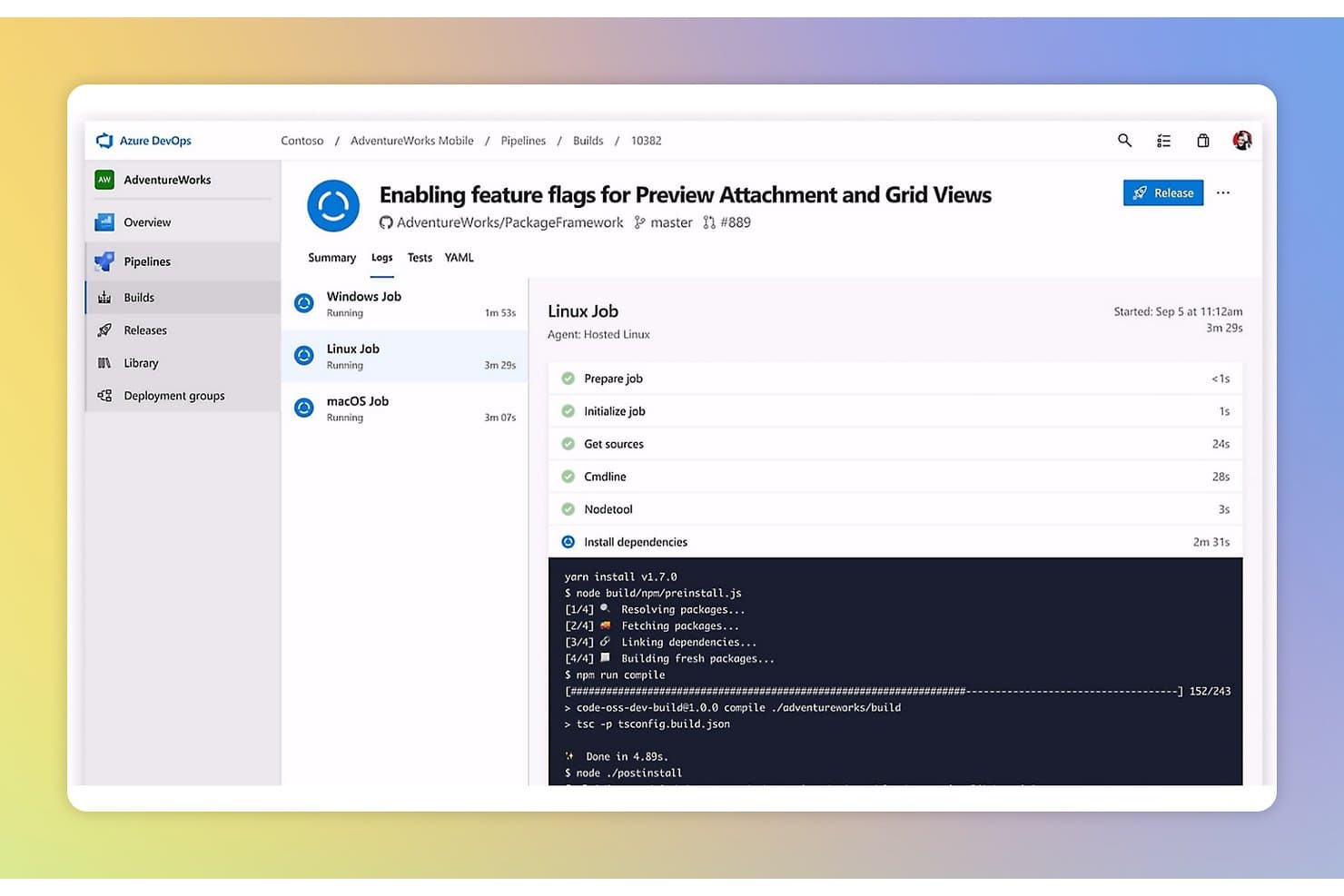
Azure DevOps Server tracks multi-platform CI build logs in real time. Azure DevOps Server is a self-hosted DevOps platform from Microsoft that combines Git-based version control, CI/CD pipelines, and release management with native SQL Server schema deployment tooling via DACPAC and Azure Pipelines.
Who Is Azure DevOps Server Best For?
Azure DevOps Server is a strong fit for enterprise teams in regulated industries that need a self-hosted CI/CD platform with native SQL Server integration and strict data sovereignty requirements.
Why I Picked Azure DevOps Server
I picked Azure DevOps Server as one of the best because it's the only tool on this list built specifically for enterprises that can't move their CI/CD infrastructure to the cloud. Running SQL Server pipelines on-premises through Azure Pipelines with native
SqlAzureDacpacDeployment@1tasks means your DACPAC-based schema changes deploy through the same approval gates, branch policies, and RBAC controls that govern your application code. I also like that SqlPackage schema comparison runs directly in the pipeline, flagging drift before a single change touches production.Azure DevOps Server Key Features
- Branch policies: Enforce required reviewers, build validation, and comment resolution before database code changes merge into protected branches.
- tSQLt pipeline integration: Run T-SQL unit tests automatically within Azure Pipelines to validate database logic before any deployment executes.
- Self-hosted agent support: Deploy pipeline agents inside your private network to reach on-premises SQL Server instances without exposing them to external traffic.
- Azure Key Vault integration: Store and retrieve SQL credentials and connection strings directly within pipelines using native secrets management.
Azure DevOps Server Integrations
Azure DevOps Server offers native integrations across the Microsoft ecosystem, including Azure SQL Database, Visual Studio, and Microsoft Entra ID. It supports GitHub, Bitbucket, GitLab, Jenkins, Terraform, Jira, and ServiceNow through service connections or Marketplace integrations.
Pros and Cons
Pros:
- Supports shift-left T-SQL testing in pipelines
- Deep integration with Microsoft databases and tools
- Runs entirely on-premises for full control
Cons:
- No automated rollback for failed deployments
- Native support limited to SQL Server
Learn more about Azure DevOps Server: Best for SQL Server team DevOps workflows
- 14-day free trial
- From $1,410/user/year (billed annually)

SQL Toolbelt Essentials lets users search for objects across databases instantly. SQL Toolbelt Essentials is an 11-tool bundle for SQL Server teams that covers the full database development lifecycle, combining schema comparison, version control, AI-assisted coding, unit testing, and automated documentation in a single SSMS-native package.
Who Is SQL Toolbelt Essentials Best For?
SQL Toolbelt Essentials is built for SQL Server–focused database teams that need version control, schema comparison, and unit testing inside a single SSMS-native bundle.
Why I Picked SQL Toolbelt Essentials
SQL Toolbelt Essentials earns its spot on my shortlist because it's the most complete SQL Server DevOps bundle I've seen, covering schema comparison, version control, unit testing, and AI-assisted coding in a single SSMS-native package. I particularly like how SQL Source Control turns version control into a byproduct of normal development, automatically tracking every schema change without extra manual steps. SQL Compare Pro adds dependency-aware deployment scripts with data loss warnings, which is exactly what SQL Server release managers need before pushing changes to production.
SQL Toolbelt Essentials Key Features
- SQL Dependency Tracker: Visually maps relationships between SQL Server objects so you can assess the impact of a change before you make it.
- SQL Test with tSQLt integration: Runs unit tests against T-SQL code directly inside SSMS, catching logic errors before they reach deployment.
- SQL Multi Script: Executes T-SQL scripts across multiple servers and databases simultaneously from a single interface.
- SQL Doc: Auto-generates database documentation on a schedule, keeping your schema docs current without manual effort.
SQL Toolbelt Essentials Integrations
SQL Toolbelt Essentials has native Git integration through SQL Source Control, including GitHub, GitLab, Azure Repos, and Bitbucket. It supports CI/CD integrations with Azure DevOps, Jenkins, GitHub Actions, and GitLab CI through its extension, CLI, or PowerShell workflows.
Pros and Cons
Pros:
- AI-assisted SQL coding and code review
- Dependency impact analysis before deployments
- Version control built into SSMS workflow
Cons:
- Full automation requires extra add-on products
- Only supports Microsoft SQL Server engines
Learn more about SQL Toolbelt Essentials : Best for database governance in regulated teams
- Free plan + free trial available
- From $20/user/month

Bytebase integrates SQL review and auto-deploy into a GitHub CI/CD pipeline. Bytebase is a database DevOps platform that covers schema migration, version control, SQL review, access control, and audit logging across 24 database engines.
Who Is Bytebase Best For?
Bytebase is a strong fit for teams in regulated industries—finance, healthcare, and SaaS—where database changes need documented approval chains, audit trails, and compliance-ready access controls.
Why I Picked Bytebase
Bytebase earns its spot on my shortlist because it's built specifically for teams where a schema change going wrong isn't just a bug—it's a compliance incident. I love that it combines immutable audit logs, risk-based approval workflows, and dynamic data masking into one governed pipeline, so finance or healthcare teams aren't stitching together separate tools to meet SOC 2 or HIPAA requirements. The policy-as-code support via Terraform means access rules and approval flows live in Git alongside application code, not in someone's head.
Bytebase Key Features
- Batch schema changes: Apply a single schema change across hundreds of tenant databases simultaneously through a coordinated, tracked workflow.
- Web-based SQL editor: Query any connected database through a governed browser interface with built-in masking, query history, and saved scripts.
- MCP server for AI agents: Connect AI agents and developer IDEs to submit database changes through the same approval and audit pipeline as human engineers.
- Schema drift detection: Automatically identify unauthorized or untracked schema changes and alert your team before they cause environment inconsistencies.
Bytebase Integrations
Bytebase offers native integrations with GitHub, GitLab, Bitbucket, Azure DevOps, Slack, Microsoft Teams, and more. RESTful and gRPC APIs support custom integrations and CI/CD workflows.
Pros and Cons
Pros:
- Dynamic data masking tied to user roles
- Automated schema drift detection and reporting
- Policy-as-code for unified governance workflows
Cons:
- No native ephemeral database provisioning
- Advanced governance features require enterprise upgrade
Learn more about Bytebase:

ApexSQL lets users build and manage CI/CD pipelines for database DevOps. ApexSQL is a SQL Server DevOps toolkit that covers database version control, CI/CD pipeline integration, automated schema migration, shift-left testing, and database documentation in a single suite.
Who Is ApexSQL Best For?
ApexSQL is a strong fit for DBAs and DevOps engineers managing SQL Server environments who need a single suite to handle version control, pipeline automation, and shift-left testing.
Why I Picked ApexSQL
ApexSQL earns its spot on my shortlist because it's the most purpose-built SQL Server DevOps suite I've come across, covering the full pipeline from source control to post-deploy verification in one toolkit. I particularly like how ApexSQL Enforce applies 100-plus static analysis rules as a pipeline gate, failing builds before bad code ever reaches staging. Pair that with native tSQLt unit testing inside SSMS, and shift-left testing becomes a practical reality rather than a goal.
ApexSQL Key Features
- Ephemeral database provisioning: Spin up disposable, isolated database environments during pipeline execution to support branch-level testing workflows.
- Synthetic test data generation: ApexSQL Generate produces millions of rows of randomized, referentially intact test data exportable in SQL, CSV, JSON, XML, and Excel formats.
- Automated database documentation: ApexSQL Doc generates database documentation in multiple formats, including HTML, PDF, and Markdown, covering databases, SSAS, and SSIS packages.
- Open-source PowerShell cmdlet library: A publicly available PowerShell library on GitHub lets your team inspect, modify, and extend pipeline logic for custom automation workflows.
ApexSQL Integrations
ApexSQL offers documented integrations with Git, SVN, Mercurial, Perforce, TFS/Azure Repos, Azure DevOps Server, Jenkins, Bamboo, and TeamCity. It also provides Octopus Deploy templates, an Atlassian Marketplace plugin for Bamboo, and open-source PowerShell cmdlets for custom CI/CD workflows.
Pros and Cons
Pros:
- Includes built-in test data generation
- Enforces 100-plus static SQL code rules
- Deep SQL Server Management Studio integration
Cons:
- Lacks always-on drift detection between runs
- Only supports Microsoft SQL Server databases
Learn more about ApexSQL: Best for test data masking in DevOps pipelines
- Free demo available
- From $36,000 per TB annually (billed annually)
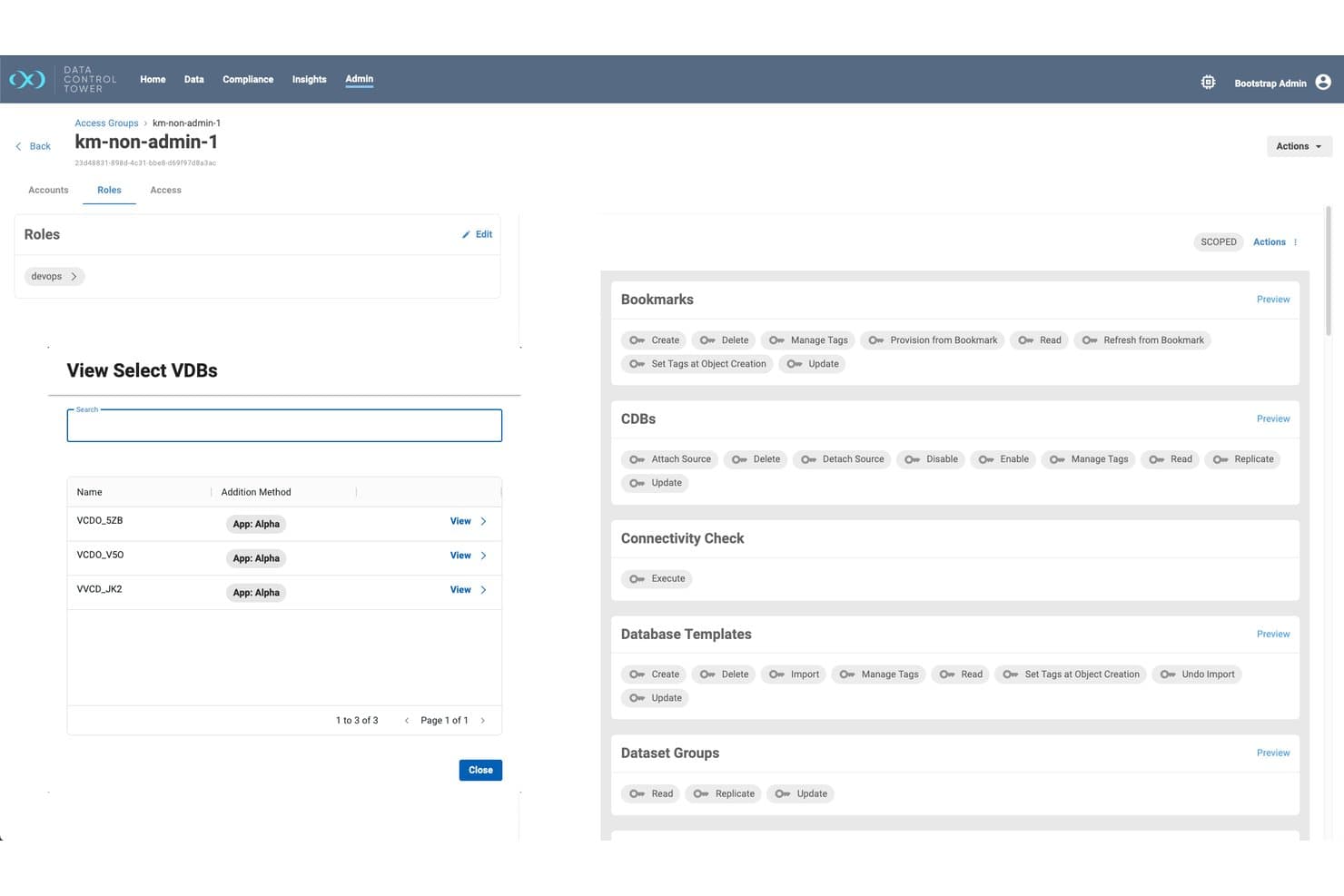
Perforce Delphix manages role-based access controls for database VDBs. Perforce Delphix is a test data management and data virtualization platform that automates the provisioning, masking, and governance of non-production database environments across DevOps pipelines.
Who Is Perforce Delphix Best For?
Perforce Delphix is a strong fit for DevOps and platform engineering teams in regulated industries that need automated test data masking and on-demand, production-like database environments in CI/CD pipelines.
Why I Picked Perforce Delphix
I picked Perforce Delphix as one of the best because its automated test data masking is genuinely hard to replicate with general-purpose DevOps tooling. When a pipeline spins up a virtual database clone, Delphix simultaneously discovers and obfuscates PII, PHI, and PCI-scope fields across all related tables, keeping referential integrity intact. That means your test environments get production-like data without ever exposing real customer records, which is exactly the kind of shift-left compliance enforcement regulated teams need baked into their CI/CD workflows.
Perforce Delphix Key Features
- Self-service virtual database provisioning: Developers and testers can spin up on-demand, production-like database clones via API, CLI, or UI without waiting on a DBA.
- Dataset versioning with bookmark and rewind: Teams can capture named data states, branch environments, and roll back to any prior checkpoint during testing or pipeline runs.
- AI-powered synthetic data generation: Generates realistic, scenario-specific datasets for edge-case testing and AI/ML model training when production data can't be used.
- Data Control Tower governance dashboard: Provides centralized RBAC, policy-driven masking automation, and a sensitive data vulnerability heatmap across hybrid cloud environments.
Perforce Delphix Integrations
Perforce Delphix offers integrations with Jenkins, Azure DevOps, GitHub, Terraform, Puppet, ServiceNow, BlazeMeter, and Liquibase. Its REST APIs, CLI, and Data Control Tower Toolkit support custom CI/CD data provisioning workflows.
Pros and Cons
Pros:
- AI-powered synthetic data generation
- Self-service virtual database environment provisioning
- Automated masking for sensitive test data
Cons:
- Database migration relies on third-party tools
- No native schema version control features
Learn more about Perforce Delphix: Best for SOX and HIPAA audit trail enforcement
- Free demo available
- Pricing upon request
Visit WebsiteCustomer Rating:4.5/5
DBmaestro automates database version control, deployment, and security. DBmaestro is a database DevOps platform that combines version control, CI/CD pipeline integration, automated schema migration, drift detection, and compliance enforcement across relational, cloud, and NoSQL databases.
Who Is DBmaestro Best For?
DBmaestro is a strong fit for regulated enterprises—think financial services and healthcare—where SOX and HIPAA compliance demands an airtight, auditable trail of every database change.
Why I Picked DBmaestro
DBmaestro earns its spot on my shortlist because no other tool I've evaluated treats compliance as a first-class feature rather than an afterthought. Its segregation of duties enforcement means no single user can approve, deploy, and audit their own database change, which is exactly what SOX and HIPAA auditors look for. Immutable audit trails log every change with full context, cutting evidence collection from weeks to hours when audit season hits.
DBmaestro Key Features
- Multi-database platform support: Connects to relational, cloud-native, and NoSQL databases including Oracle, SQL Server, PostgreSQL, Snowflake, Databricks, and MongoDB from a single platform.
- DryRun deployment simulation: Runs a full simulation of a deployment before execution, giving developers a CI feedback loop to catch issues before they reach production.
- DORA-aligned observability dashboard: Tracks deployment frequency, lead time, change failure rate, and MTTR across database release pipelines in a dedicated Release Cockpit View.
- DBmaestro Genie for root cause analysis: An AI assistant that correlates audit trails, deployment history, and schema change records to surface root cause insights and remediation steps after pipeline failures.
DBmaestro Integrations
DBmaestro offers native integrations with Jenkins, Azure DevOps, GitLab, GitHub Actions, Jira, ServiceNow, CyberArk Vault, AWS Secrets Manager, and Azure Key Vault. It also supports OIDC, Microsoft Entra, LDAP, and Active Directory for identity management.
Pros and Cons
Pros:
- Automated rollback with certified backout plans
- Immutable audit trail for all database changes
- Built-in SOX and HIPAA compliance enforcement
Cons:
- Some DBAs report restricted environment control
- Thin public review volume compared to peers
Learn more about DBmaestro: Best for migration-based version control
- Free trial available
- Pricing upon request
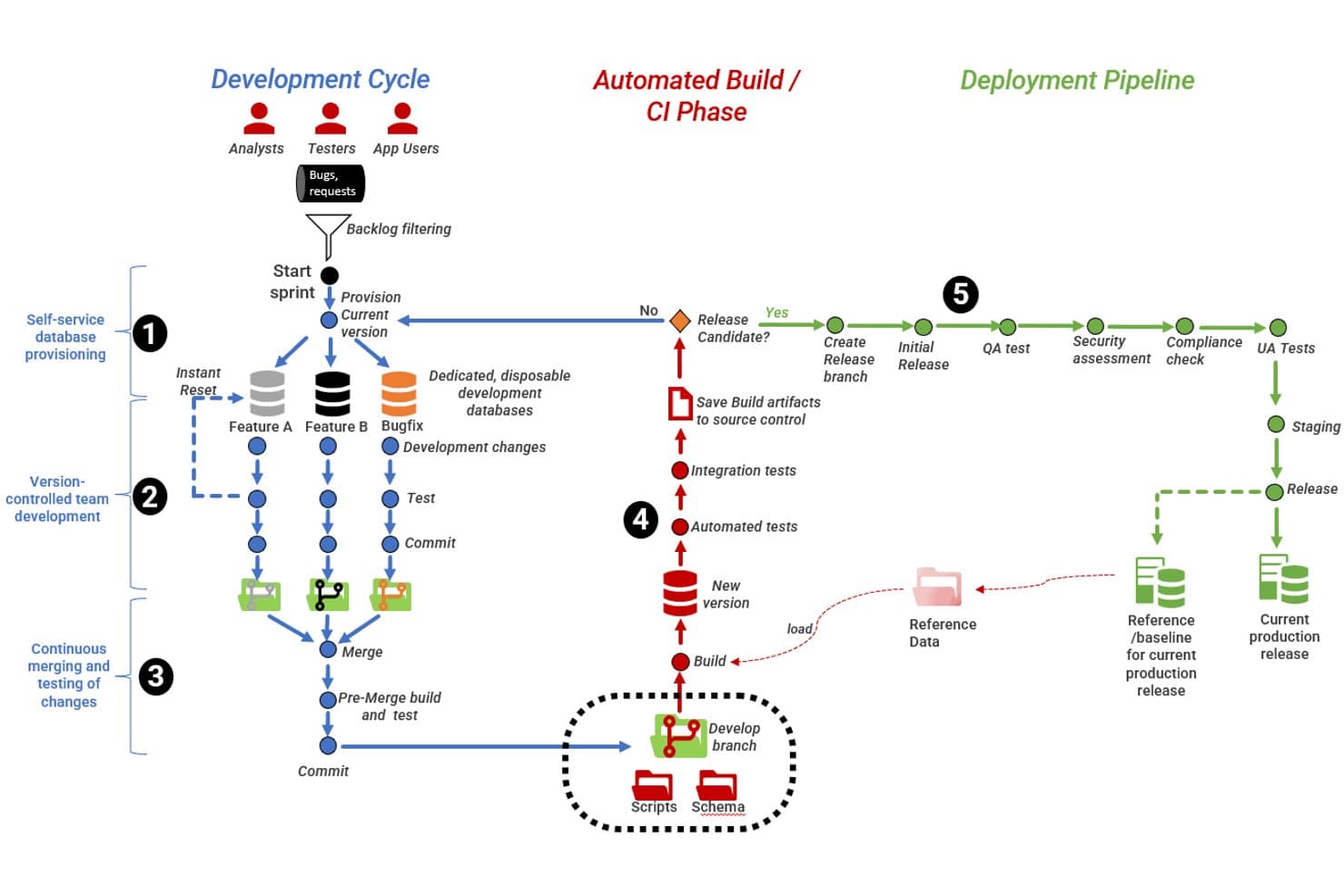
Flyway supports end-to-end database DevOps across dev, CI, and deployment pipelines. Flyway is a database DevOps tool that manages schema changes through versioned SQL migration scripts, with support for 60+ relational database platforms, CI/CD pipeline integrations, drift detection, and policy-based change governance.
Who Is Flyway Best For?
Flyway is a strong fit for DevOps and platform engineering teams that manage relational database schemas across multiple environments and need migration scripts to live alongside application code in version control.
Why I Picked Flyway
Flyway earns its spot as one of the best on my shortlist because it's the tool I trust most when migration-based version control is the priority. Every schema change lives as a versioned SQL script (think
V1__,V2__) stored directly in your application repo, and a schema history table in the target database tracks exactly what's been applied. I also like that the Enterprise edition's checksum validation catches unauthorized out-of-band changes before they cause drift, and the Autopilot feature auto-generates deployment and rollback scripts by comparing current versus desired state.Flyway Key Features
- Policy-as-code enforcement: Flyway automatically runs code policy checks on every migration script through your CI/CD pipeline, flagging destructive changes, missing dependencies, and security modifications before they reach production.
- Flyway MCP Server: Connects AI coding assistants like GitHub Copilot, Cursor, and Claude Code into the Flyway migration workflow so AI-generated schema changes are version-controlled and policy-checked.
- Dry-run deployments: Generates a detailed report of exactly what Flyway would apply before any changes execute, giving you a pre-deployment review artifact for compliance sign-off.
- Cluster-safe migration execution: Flyway coordinates migration runs across multiple nodes in a cluster environment, preventing conflicts when several instances start simultaneously.
Flyway Integrations
Flyway offers native integrations with GitHub Actions, Azure DevOps, Jenkins, GitLab CI/CD, Octopus Deploy, AWS CodeCatalyst, AWS CodeBuild, and AWS CodeDeploy. Its CLI, Java API, Maven, and Gradle support custom CI/CD workflows.
Pros and Cons
Pros:
- Policy-as-code enforces strong change governance
- Cluster-safe migration execution for high availability
- Checksum validation prevents unauthorized schema drift
Cons:
- No support for NoSQL database migrations
- Rollback automation limited to paid edition
Learn more about Flyway:
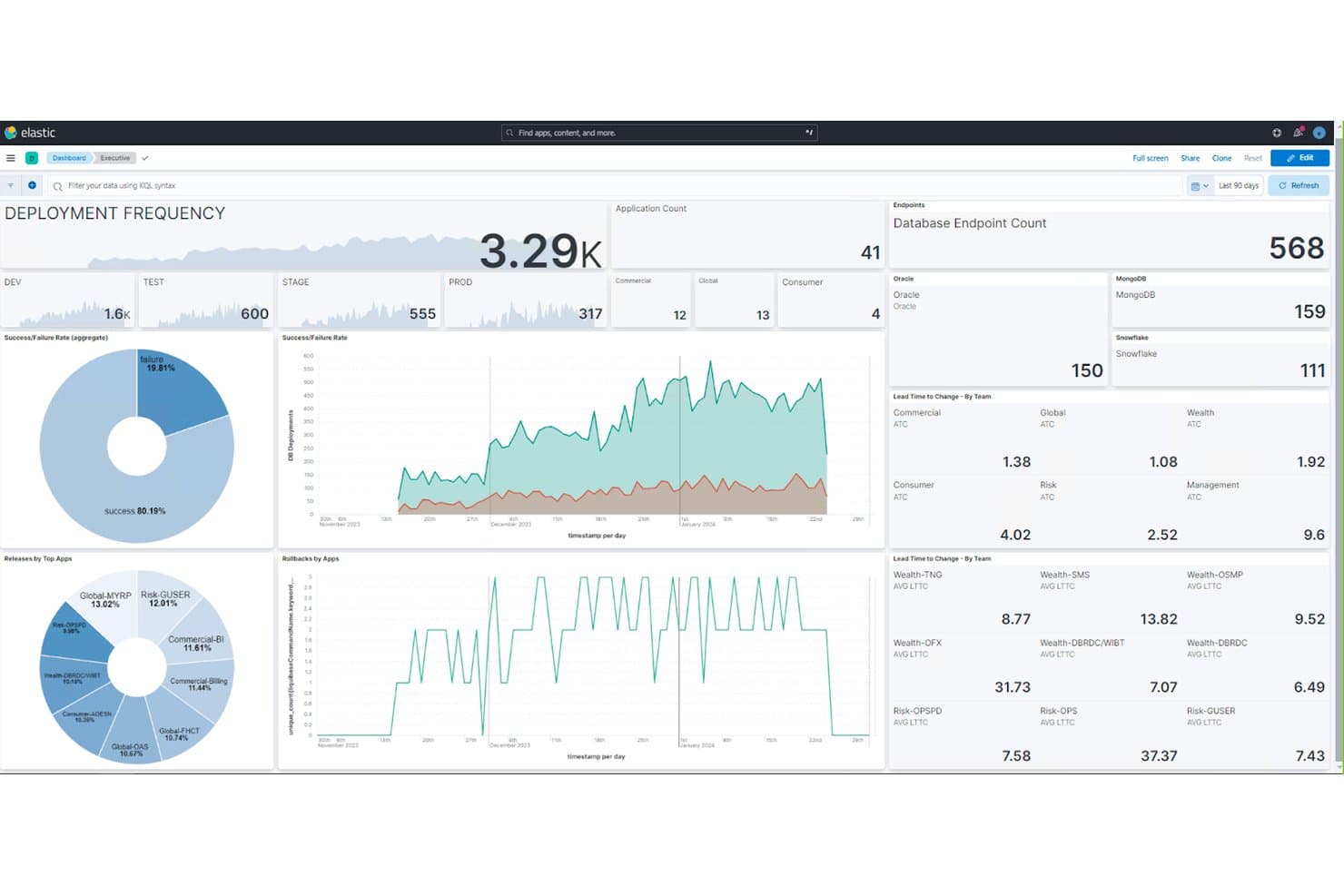
Liquibase tracks deployment frequency and database endpoint metrics across teams. Liquibase is a database DevOps tool that combines version-controlled schema migrations, automated drift detection, CI/CD pipeline integration, and governance policy checks across 65+ database engines.
Who Is Liquibase Best For?
Liquibase is a strong fit for DevOps and platform engineering teams managing schema changes across multiple database engines in regulated or high-deployment-frequency environments.
Why I Picked Liquibase
Liquibase earns its spot on my shortlist because no other tool comes close to its breadth of database change automation across 65+ engines, from PostgreSQL and Oracle to Snowflake and MongoDB. I'm particularly impressed by its AI Changelog Generator, which converts plain-language descriptions into validated, production-ready XML changelogs before they ever touch a pipeline. Pair that with targeted changeset-level rollback and automated drift detection with risk scoring, and you get a tool built for teams where a bad schema change carries real consequences.
Liquibase Key Features
- Policy checks: Automated pre-deployment rules that block risky patterns like destructive DDL, missing rollback logic, or naming convention violations before changes reach production.
- Flow files: Reusable pipeline templates that standardize end-to-end database change workflows across CI/CD environments without manual scripting.
- Multi-format changelog support: Teams can define and manage schema changes in SQL, XML, YAML, or JSON, stored directly alongside application code in source control.
- VS Code extension: A developer IDE integration that lets engineers author changelogs, run policy checks, and review audit trails without leaving their coding environment.
Liquibase Integrations
Liquibase integrates with Jenkins, GitHub Actions, GitLab CI/CD, Azure Pipelines, Harness, ServiceNow, Kubernetes, Docker, and VS Code. It also supports Maven and Gradle for database changes within application build workflows.
Pros and Cons
Pros:
- AI-powered changelog generation available
- Automated drift detection with risk scoring
- Supports over 65 database engines
Cons:
- Secure edition pricing is quote-only
- Advanced rollback often requires manual scripting
Learn more about Liquibase: Best for AI-native database change authoring
- Free plan available
- Pricing upon request

Harness Database DevOps visualizes database migration pipeline steps end-to-end. Harness Database DevOps is a pipeline-native database DevOps module that orchestrates schema migrations, version control, drift detection, rollback automation, and governance across 15+ database engines within CI/CD workflows.
Who Is Harness Database DevOps Best For?
Harness Database DevOps is a strong fit for enterprise teams managing heterogeneous database estates who need AI-assisted migration authoring and governance built directly into their CI/CD pipelines.
Why I Picked Harness Database DevOps
Harness Database DevOps earns its spot on my shortlist because its AI-assisted migration authoring genuinely sets it apart. I can describe a schema change in plain English and the tool generates a compliant SQL migration script, a rollback script, and a Git commit automatically, with governance policies checked before anything touches production. It also supports Model Context Protocol, so my team can trigger that same workflow directly from Claude Desktop or Cursor.
Harness Database DevOps Key Features
- OPA policy-as-code enforcement: Governance policies written in Rego are automatically evaluated at pre-migration and pre-production pipeline steps, blocking destructive or non-compliant changes before they reach production.
- Schema drift detection: A unified environment dashboard identifies when actual schema state diverges from the expected state, surfacing root-cause context and timestamps per environment.
- Dual migration framework support: Flyway and Liquibase run side-by-side within unified pipelines, so teams aren't forced to standardize on a single migration toolchain.
- Automatic rollback script generation: Rollback scripts are generated for every migration at authoring time, with restore points tagged automatically after each successful deployment.
Harness Database DevOps Integrations
Harness Database DevOps offers native integrations with Jenkins, Azure DevOps, JFrog, GitHub, GitLab, Bitbucket, and Jira. It also supports API access for custom integrations.
Pros and Cons
Pros:
- Built-in OPA policy enforcement for migrations
- Supports both Liquibase and Flyway together
- AI generates compliant SQL and rollback scripts
Cons:
- On-premises deployment requires Enterprise plan
- MongoDB governance features are limited initially
Learn more about Harness Database DevOps: Best for SQL Server schema comparison
- Free plan + free demo available
- From $249.95/month
Visit WebsiteCustomer Rating:4.7/5
dbForge Studio for SQL Server automates database refresh steps in a DevOps workflow. dbForge Studio for SQL Server is a Windows-based IDE for SQL Server development and administration that bundles schema comparison, source control, CI/CD pipeline integration, unit testing, and DevOps automation into a single tool.
Who Is dbForge Studio for SQL Server Best For?
dbForge Studio for SQL Server is a strong fit for SQL Server DBAs and developers who want schema comparison, source control, and CI/CD automation in a single Windows-based tool.
Why I Picked dbForge Studio for SQL Server
I've included dbForge Studio for SQL Server in my top picks because its Schema Compare feature is genuinely best-in-class for SQL Server environments. It compares databases against live instances, backups, snapshots, or source control versions, generates dependency-aware sync scripts, and flags data loss risks before you deploy. I also like that it supports both state-based and migration-based models, so you can fit it into the deployment workflow your team already uses.
dbForge Studio for SQL Server Key Features
- Source control integration: Connects to Git, SVN, Azure DevOps, Perforce, Mercurial, and SourceGear Vault to version-control schema objects and static data side by side.
- tSQLt unit testing: Runs tSQLt-based unit tests directly within the IDE and automates them through PowerShell cmdlets in your CI/CD pipeline.
- DevOps pipeline automation: Provides native plugins for Jenkins, TeamCity, Azure DevOps, and Bamboo, plus a PowerShell cmdlets module for broader CI/CD platform support.
- AI Assistant: Generates SQL from natural language input, explains query logic clause by clause, and surfaces optimization suggestions within the editor.
dbForge Studio for SQL Server Integrations
Native integrations include Jenkins, TeamCity, Azure DevOps, Bamboo, Git, Subversion, Perforce, and Mercurial. PowerShell cmdlets, NuGet packages, and CLI automation support custom CI/CD workflows.
Pros and Cons
Pros:
- Granular rollback per object or environment
- Native PowerShell automation for CI/CD workflows
- Schema comparison handles dependencies and data loss
Cons:
- Continuous drift detection not available
- No support for non-SQL Server engines
Learn more about dbForge Studio for SQL Server:
Alte instrumente DevOps pentru baze de date
Iată câteva instrumente DevOps suplimentare pentru baze de date care nu au ajuns pe lista mea scurtă, dar merită totuși analizate.
- 11Octopus DeployBest for CD orchestration across database tool stacks
- 12AtlasBest for declarative, IaC-style schema migrations
- 13DB Change ManagerBest for cross-RDBMS schema drift detection
How I Evaluate Database DevOps Tools
I look at database DevOps tools in two layers: baseline must-haves—schema versioning, CI/CD integration, automated migrations—and the differentiators that set the best options apart.
Core Functionality (Table Stakes For This List)
When I'm selecting tools for my list, I rank each one on a scale from 0 (does not offer the functionality) to 5 (excels in this area) for each core functionality listed below. Then, I calculate the tool's total score into a percentage. Each tool needs to achieve a minimum total score of 65% to be considered for inclusion.
- Database Version Control: I check whether schema objects, stored procedures, and static data can be versioned in Git with proper branching and merge conflict resolution.
- CI/CD Pipeline Integration: Each tool should connect with platforms like Jenkins, GitHub Actions, or Azure DevOps so database deployments run inside existing pipelines.
- Automated Schema Migration: I evaluate how well the tool generates and deploys change scripts across environments—especially when handling dependency chains between tables, views, and functions.
- Multi-Database Engine Support: Whether your stack runs PostgreSQL, SQL Server, Oracle, or a managed cloud database, I look at the breadth of supported engines and how consistent the experience is across them.
- Rollback & Drift Detection: I look for the ability to detect unauthorized or out-of-process changes in production and roll back failed deployments without manual scripting.
- Governance & Audit Logging: Approval workflows, role-based access, and immutable audit trails matter—especially for teams working under SOX, PCI-DSS, or similar compliance requirements.
Once I have a list of tools that meet this criteria, I consider what sets each platform apart.
Differentiating Factors (What Sets Vendors Apart)
Here's how I compare and contrast different vendors:
Standout Features
Shift-left testing is a major differentiator. Tools that include static analysis or unit testing frameworks let teams catch issues in schema changes before they ever reach staging. I also evaluate ephemeral database provisioning, where teams can spin up disposable, production-like clones tied to feature branches or pull requests. This accelerates code review and reduces environment bottlenecks. Sensitive data masking matters too—especially when teams need realistic test data without exposing personally identifiable information in lower environments.
Beyond Features
Ecosystem fit is something I weigh heavily. A database DevOps tool needs to slot into your existing stack—Git providers, CI/CD platforms, and ITSM tools like Jira or ServiceNow. Compliance readiness also matters. I check for certifications like SOC 2 and ISO 27001, along with secure credential handling and segregation of duties. Time-to-value varies widely across vendors, so I look at documentation quality, prebuilt templates, and whether there's a clear migration path from manual database change processes.
Cum să alegi instrumentele DevOps pentru baze de date
Este ușor să te împotmolești în liste lungi de funcții și structuri complexe de prețuri. Iată o listă de verificare cu factori de care trebuie să ții cont, pentru a rămâne concentrat în timp ce parcurgi procesul tău unic de selectare a software-ului.
| Factor | Aspecte de luat în considerare |
| Scalabilitate | Asigură-te că instrumentul poate crește odată cu nevoile tale. Caută opțiuni care gestionează volume mai mari de date și un număr crescut de utilizatori fără a compromite performanța. |
| Integrări | Pentru a eficientiza fluxurile de lucru, verifică dacă instrumentul se integrează cu stiva ta tehnologică existentă, precum platformele CI/CD, serviciile cloud și alte programe pentru baze de date desktop. |
| Posibilități de personalizare | Analizează cât de mult poți adapta instrumentul pentru a corespunde proceselor tale. Caută funcții care îți permit să ajustezi fluxurile de lucru sau să adaugi cu ușurință scripturi personalizate. |
| Ușurință în utilizare | Evaluează interfața și navigarea. Instrumentele ar trebui să aibă designuri intuitive care reduc timpul de instruire și cresc productivitatea echipei tale. |
| Buget | Corelează costul instrumentului cu constrângerile tale financiare. Ia în considerare taxele de abonament, costurile ascunse și dacă sunt disponibile planuri care se încadrează în bugetul tău. |
| Măsuri de securitate | Caută funcții de securitate solide pentru a-ți proteja datele. Asigură-te că instrumentul oferă criptare, controale de acces și conformitate cu reglementările. |
| Asistență | Evaluează disponibilitatea și calitatea asistenței pentru clienți. Verifică dacă sunt oferite servicii de asistență non-stop, reprezentanți dedicați sau resurse online complete. |
| Monitorizarea performanței | Asigură-te că instrumentul oferă funcții pentru monitorizarea și optimizarea performanței bazei de date, ajutând echipa să identifice și să rezolve prompt problemele. |
Tendințe
În cercetarea mea, am consultat nenumărate actualizări de produse, comunicate de presă și jurnale de lansare pentru diferite instrumente DevOps pentru baze de date. Iată câteva dintre tendințele emergente pe care le urmăresc.
- Informații bazate pe inteligență artificială: Tot mai multe instrumente folosesc inteligența artificială pentru analize predictive și detectarea anomaliilor din bazele de date. Acest lucru ajută echipa să identifice din timp problemele potențiale și să optimizeze performanța. Furnizori precum Flyway integrează învățarea automată pentru a face recomandări mai inteligente.
- Baze de date cu autoreparare: Unele instrumente de proiectare a bazelor de date oferă acum funcții de autoreparare, corectând automat erorile obișnuite ale bazelor de date fără intervenție manuală. Această funcție devine tot mai populară deoarece reduce timpul de nefuncționare pentru utilizatori și efortul de întreținere.
- Funcții de securitate îmbunătățite: Se pune tot mai mult accent pe funcții de securitate avansate, precum mascarea dinamică a datelor și detectarea amenințărilor în timp real. Aceste funcții ajută la protejarea datelor sensibile și la respectarea reglementărilor, aspect esențial pentru multe companii.
- Instrumente de colaborare îmbunătățite: Multe instrumente DevOps adaugă funcții de colaborare mai bune, precum tablouri de bord partajate și actualizări în timp real. Acestea ajută echipa să lucreze mai eficient, chiar și atunci când membrii lucrează de la distanță sau sunt distribuiți, menținându-i pe toți la curent.
- Compatibilitate cu mai multe platforme cloud: Pe măsură ce companiile adoptă strategii multi-cloud, instrumentele DevOps pentru baze de date se adaptează pentru a accepta mai multe medii cloud. Această tendință este esențială pentru echipele care au nevoie de flexibilitate și doresc să evite dependența de un singur furnizor, produse precum DbVisualizer oferind funcții de compatibilitate cu mai multe platforme cloud.
Ce sunt instrumentele DevOps pentru baze de date?
Instrumentele DevOps pentru baze de date sunt soluții software care automatizează și gestionează modificările bazelor de date în cadrul procesului DevOps. Administratorii bazelor de date, dezvoltatorii și profesioniștii din operațiunile IT folosesc aceste instrumente pentru a îmbunătăți colaborarea și eficiența.
Controlul versiunilor, implementările automatizate și funcțiile de securitate ajută la gestionarea modificărilor bazelor de date, la reducerea erorilor și la menținerea conformității. Instrumentele de calitate pentru testarea bazelor de date sunt esențiale pentru a garanta funcționarea fiabilă a acestor procese. Aceste instrumente oferă o valoare semnificativă prin îmbunătățirea vitezei și fiabilității actualizărilor și operațiunilor bazelor de date.
Funcții
Atunci când selectați instrumente DevOps pentru baze de date, inclusiv instrumente de monitorizare a bazelor de date, urmăriți următoarele funcții esențiale.
- Controlul versiunilor: Urmărește modificările bazei de date în timp, permițând echipei să gestioneze eficient actualizările și să anuleze erorile.
- Implementări automatizate: Simplifică procesul de implementare prin automatizarea sarcinilor repetitive, reducând erorile umane și economisind timp.
- Măsuri de protecție a securității: Protejează datele sensibile prin funcții precum criptarea și controalele de acces, asigurând conformitatea cu reglementările.
- Suport pentru mai multe clouduri: Oferă flexibilitate permițând bazelor de date să funcționeze în mai multe medii cloud, prevenind dependența de un singur furnizor.
- Monitorizare în timp real: Urmărește performanța și starea bazelor de date, permițând detectarea și rezolvarea rapidă a potențialelor probleme.
- Instrumente de colaborare: Îmbunătățesc munca în echipă prin tablouri de bord partajate și actualizări în timp real, asigurându-se că toți rămân informați.
- Capacități de autoreparare: Remediază automat erorile frecvente ale bazelor de date, reducând perioadele de nefuncționare și eforturile de întreținere.
- Analiză predictivă: Utilizează inteligența artificială pentru a prognoza și detecta anomalii, optimizând performanța bazelor de date înainte să apară problemele.
- Compararea schemelor: Identifică diferențele dintre schemele bazelor de date, ajutând la menținerea consecvenței între medii.
- Mascărea datelor: Protejează informațiile sensibile prin ascunderea datelor, contribuind la menținerea confidențialității în timpul testării și dezvoltării.
- Automatizarea bazelor de date: Accelerează fluxurile de lucru prin automatizarea sarcinilor de rutină pentru gestionarea bazelor de date, îmbunătățind eficiența pentru administratorii bazelor de date și echipele de dezvoltare.
- Controlul sursei: Se integrează cu sistemele de control al versiunilor pentru a gestiona modificările bazelor de date împreună cu codul aplicației, asigurând consecvența între implementări.
- Jurnal de audit: Urmărește toate modificările bazelor de date și activitatea utilizatorilor, oferind responsabilizare și contribuind la respectarea reglementărilor din industrie.
- Furnizare: Simplifică configurarea și setarea bazelor de date pentru mediile de dezvoltare și testare a aplicațiilor, reducând întârzierile.
- Alerte: Transmite notificări la timp despre probleme de performanță sau potențiale blocaje, permițând gestionarea proactivă a bazelor de date.
- Revizuiri de cod: Facilitează revizuirile colegiale ale codului bazelor de date pentru menținerea calității și identificarea erorilor înainte de implementare.
- Integrarea fluxului de lucru DevOps: Aliniază modificările bazelor de date cu dezvoltarea software și cu instrumentele DevOps pentru Salesforce, precum și cu alte sisteme CRM, asigurând colaborarea fluidă între echipele de dezvoltare și operațiuni.
- Instrumente de validare: Verifică modificările bazelor de date pentru a detecta erori sau neconcordanțe, protejând împotriva problemelor de implementare.
- Gestionarea ciclului de viață: Susține modificările bazelor de date în toate fazele ciclului de viață DevOps, asigurând trasabilitatea și tranzițiile fără probleme.
- Colaborarea cu operațiunile: Îmbunătățește comunicarea și coordonarea dintre echipele responsabile de baze de date și operațiuni pentru implementare și monitorizare fără întreruperi.
- Gestionarea codului bazelor de date: Simplifică editarea, testarea și implementarea codului bazelor de date, aliniindu-l la practicile moderne de dezvoltare software.
- Suport pentru strategia DevOps: Aliniază practicile bazelor de date la strategiile DevOps mai ample, promovând fluxuri de lucru agile și eficiente.
- Compatibilitate cu bazele de date Oracle: Oferă instrumente adaptate pentru gestionarea bazelor de date Oracle, asigurând performanță optimizată și conformitate.
- Identificarea blocajelor: Localizează blocajele de performanță din bazele de date, ajutând echipele să rezolve rapid problemele pentru a menține operațiunile fluide.
- Suport pentru ingineria datelor: Se integrează perfect în fluxurile de lucru pentru ingineria datelor, permițând soluții de baze de date scalabile și eficiente.
Beneficii
Implementarea instrumentelor DevOps pentru baze de date oferă mai multe beneficii pentru echipa și afacerea dumneavoastră. Iată câteva dintre acestea.
- Eficiență sporită: Automatizarea implementărilor și a gestionării modificărilor accelerează procesele și reduce efortul manual.
- Colaborare îmbunătățită: Tablourile de bord partajate și actualizările în timp real mențin echipa conectată și informată, îmbunătățind munca în echipă.
- Securitate îmbunătățită a datelor: Funcții precum mascarea datelor și controalele de acces protejează informațiile sensibile, asigurând conformitatea.
- Perioade de nefuncționare reduse: Capacitățile de autoreparare și monitorizarea în timp real ajută la prevenirea și rezolvarea rapidă a problemelor.
- Scalabilitate: Suportul pentru mai multe clouduri și opțiunile flexibile de integrare permit sistemelor să se dezvolte odată cu nevoile afacerii.
- Performanță mai bună: Analiza predictivă și monitorizarea permit optimizarea proactivă a sistemelor de baze de date.
- Mediile consecvente: Controlul versiunilor și compararea schemelor asigură uniformitatea între mediile de dezvoltare, testare și producție.
Costuri și prețuri
Selectarea instrumentelor DevOps pentru baze de date necesită înțelegerea diferitelor modele și planuri de preț disponibile. Costurile variază în funcție de caracteristici, dimensiunea echipei, suplimente și alți factori. Tabelul de mai jos sintetizează planurile standard, prețurile medii și funcțiile obișnuite ale soluțiilor cu instrumente DevOps pentru baze de date.
Tabel comparativ al planurilor pentru instrumentele DevOps pentru baze de date
| Tipul planului | Preț mediu | Funcții comune |
| Plan gratuit | $0 | Control de bază al versiunilor, suport limitat pentru baze de date și asistență din partea comunității. |
| Plan personal | $5-$25/ utilizator/lună | Controlul versiunilor, automatizare de bază și suport pentru o singură bază de date. |
| Plan pentru companii | $30-$75/ utilizator/lună | Suport pentru mai multe baze de date, funcții de securitate îmbunătățite și monitorizarea performanței. |
| Plan pentru întreprinderi | $100-$20/ utilizator/lună | Analiză avansată, suport pentru mai multe clouduri și asistență dedicată pentru clienți. |
Întrebări frecvente despre instrumentele DevOps pentru baze de date
Iată câteva răspunsuri la întrebările frecvente despre instrumentele DevOps pentru baze de date.
Ce bază de date este cea mai potrivită pentru inginerii DevOps?
Cea mai potrivită bază de date pentru inginerii DevOps depinde adesea de cerințele specifice ale proiectelor dumneavoastră. Printre opțiunile populare se numără SQL Server, MySQL, Oracle și PostgreSQL, datorită versatilității și compatibilității lor cu mediile DevOps. Fiecare oferă funcții unice, așadar luați în considerare familiaritatea echipei dumneavoastră cu acestea și nevoile proiectului atunci când faceți alegerea.
Este utilizat SQL în instrumentele DevOps pentru baze de date?
Da, SQL este utilizat pe scară largă în DevOps pentru automatizarea implementărilor bazelor de date și asigurarea integrității datelor în fluxurile CI/CD. Acesta ajută echipele să gestioneze eficient modificările bazelor de date și sprijină luarea deciziilor bazate pe date. Cunoașterea SQL poate îmbunătăți fără probleme capacitatea echipei dumneavoastră de a integra bazele de date cu practicile DevOps.
Cum gestionez modificările în instrumentele DevOps pentru baze de date?
Gestionarea modificărilor bazelor de date în DevOps presupune utilizarea sistemelor de control al versiunilor și a instrumentelor de implementare automatizată. Aceste instrumente ajută la urmărirea modificărilor, facilitează revenirea la versiuni anterioare și asigură consecvența între medii. Integrarea acestor practici în fluxul dumneavoastră de lucru poate îmbunătăți eficiența și reduce erorile.
Ce măsuri de securitate ar trebui să existe pentru instrumentele DevOps pentru baze de date?
Măsurile de securitate pentru instrumentele DevOps pentru baze de date ar trebui să includă criptarea, controale de acces și audituri regulate. Implementarea acestor măsuri de protecție ajută la protejarea datelor sensibile și asigură respectarea reglementărilor din industrie. Integrarea practicilor de securitate în fluxul DevOps pentru o protecție completă este esențială.
Cum sprijină instrumentele DevOps pentru baze de date integrarea continuă?
Instrumentele DevOps pentru baze de date sprijină integrarea continuă prin automatizarea actualizărilor bazelor de date și asigurarea alinierii acestora cu modificările aplicației. Acestea permit testarea și implementarea rapidă, menținând integritatea datelor pe tot parcursul procesului. Utilizarea acestor instrumente ajută la menținerea unui ciclu de dezvoltare eficient și fără erori.