

Instrumentele pentru productivitatea dezvoltatorilor sunt platforme software și utilitare care vă ajută să automatizați sarcini, să gestionați codul și să rămâneți concentrați asupra lucrurilor importante — crearea și întreținerea unor sisteme excelente. Pe măsură ce stiva tehnologică se extinde constant și aveți tot mai multe de făcut în fiecare zi, găsirea instrumentelor potrivite înseamnă să petreceți mai puțin timp cu activitățile repetitive și mai mult timp rezolvând efectiv probleme.
Această listă evidențiază opțiunile esențiale pe care trebuie să le cunoașteți pentru 2026, astfel încât să treceți de zgomotul de fond, să identificați lacunele din fluxul de lucru și să alegeți instrumente care corespund provocărilor reale ale echipei. Vă puteți aștepta la o combinație de automatizare inteligentă, integrări utile și funcții care vă ajută să lucrați așa cum doriți.
Why Trust Our Software Recommendations
6,700+
Reviews
20
Industry experts
16+
Evaluation factors
14
Years
Our team has been testing and reviewing software since 2012. As tech leaders ourselves, we know how difficult—and important—it is to choose the right software.
For this guide, we evaluated tools using hands-on testing and independent research, scoring tools using our selection criteria.
Our reviews reflect our human editorial judgment, not a sales pitch.
Expert reviewers:
- Paulo Gardini MiguelTech Director
 Tim FisherVP of AI
 Gabriel RosasTech Lead & Software Architect
 Christhian GruhnTech Lead & Platform Architect

Tabel comparativ al instrumentelor pentru productivitatea dezvoltatorilor
Acest tabel comparativ rezumă detaliile privind prețurile pentru selecțiile mele de top de instrumente pentru productivitatea dezvoltatorilor:
Sorted by: Default
| Tool | Starting Price | Website | |
|---|---|---|---|
Best AI-powered coding assistant for IDEs | 4.8 out of 5 | $10/user/month Free plan available | Website |
Best comprehensive suite of developer IDEs | 4.5 out of 5 | $19.90/user/month 30-day free trial available | Website |
Best for on-prem enterprise AI coding | 4.6 out of 5 | $39/user/month Free demo available | Website |
Best for multi-file codebase editing | 5.0 out of 5 | $8/month Free plan available | Website |
Best multi-agent AI code review with customizable rules | Not rated | $30/seat/month 14-day free trial available | Website |
Best for internal microservice cataloging | Not rated | $30/user/month Free plan + free demo available | Website |
Best for qualitative developer sentiment data | Not rated | Pricing upon request Free demo available | Website |
Best sprint and flow metrics for engineers | Not rated | $45/developer/month 14-day free trial + free plan + free demo available | Website |
Best for custom developer workflows | Not rated | $8/month Free trial + free plan available | Website |
Best for AI agents in interactive CLI apps | Not rated | $20/month Free plan + free demo available | Website |


Recenzii ale celor mai bune instrumente pentru productivitatea dezvoltatorilor
Mai jos sunt prezentate rezumatele mele detaliate ale celor mai bune instrumente pentru productivitatea dezvoltatorilor care au ajuns pe lista mea scurtă. Recenziile mele oferă o privire detaliată asupra funcțiilor, celor mai bune cazuri de utilizare și integrărilor fiecărui instrument, pentru a vă ajuta să îl găsiți pe cel mai potrivit pentru dumneavoastră.
 Best AI-powered coding assistant for IDEs
- Free plan available
- From $10/user/month
Visit WebsiteCustomer Rating:4.8/5
GitHub Copilot provides AI coding guidance directly within the IDE. GitHub Copilot is an AI coding assistant that integrates directly into your IDE to deliver real-time code suggestions, inline completions, and natural language-to-code generation across dozens of programming languages.
Who Is GitHub Copilot Best For?
GitHub Copilot is a strong fit for individual developers and engineering teams who work heavily in IDEs like VS Code, JetBrains, or Neovim.
Why I Picked GitHub Copilot
I picked GitHub Copilot as one of the best because it lives inside the IDEs your team already uses, meaning there's no context switching or new UI to learn. What I like most is the agent mode, which lets you assign tasks directly in your editor and have Copilot plan and execute multi-step changes across your workspace. On top of that, the AI-powered code review feature can run on all pull requests, not just from licensed users, so your whole team gets consistent review coverage without buying additional seats. It's the native GitHub integration that really sets it apart from other coding assistants.
GitHub Copilot Key Features
- Multi-model support: Switch between leading LLMs from Anthropic, Google, and OpenAI to balance speed, accuracy, and cost based on the task at hand.
- Copilot CLI: Use natural language in your terminal to plan, build, and execute complex workflows, pulling in your GitHub context to inform each step.
- Copilot Spaces: Create a shared knowledge source that pulls from your docs and repositories, so teams stay consistent across projects and onboarding.
- Vulnerable code scanning: Automatically scans suggestions for insecure patterns, including hardcoded credentials, SQL injection risks, and path traversal issues.
GitHub Copilot Integrations
Integrations include Render, LovableBot, OpenCode, Linear Code, CodeRabbit, Google Cloud Build, Qlty Cloud, Codacy, CircleCI, and Zenhub.
Pros and Cons
Pros:
- Let you switch between multiple LLM providers
- Excels at generating boilerplate and scaffolding code
- Supports dozens of languages and polyglot stacks
Cons:
- Premium model access is rate-limited on lower tiers
- Suggestion accuracy drops in larger codebases
Learn more about GitHub Copilot: Best comprehensive suite of developer IDEs
- 30-day free trial available
- From $19.90/user/month
Visit WebsiteCustomer Rating:4.5/5
JetBrains IDE provides coding, refactoring, and project management tools. Across a family of language-specific IDEs, JetBrains covers everything from code analysis and refactoring to integrated debugging, database tooling, and version control for languages like Java, Python, Go, JavaScript, and .NET.
Who Is JetBrains Best For?
JetBrains is a strong fit for engineering teams at mid-size to large organizations that need to standardize developer tooling across multiple programming languages and tech stacks.
Why I Picked JetBrains
I've included JetBrains in my top picks because the suite covers more languages with genuinely native tooling than any single competitor. Where most editors rely on plugins to add language support, each JetBrains IDE is built from the ground up for its language, so refactoring a Kotlin data class or tracing a Python async call actually works correctly. I also use Code With Me for real-time pair programming sessions directly inside the IDE, without needing a separate tool.
JetBrains Key Features
- Built-in visual debugger: Set breakpoints, inspect variables, and step through code without leaving the IDE or switching to an external tool.
- Database tools: Browse schemas, run queries, and inspect query execution plans directly inside the IDE using the built-in database console.
- AI Assistant: Generates, explains, and reviews code inline using a built-in chat and completion engine trained on your codebase context.
- Remote development: Connect to and develop on remote servers or containers with full IDE functionality over SSH.
JetBrains Integrations
Integrations include Docker, GitHub, GitLab, Amazon CodeCatalyst, Google Cloud Workstations, GitHub Codespaces, Gitpod, Coder, MySQL, and PostgreSQL.
Pros and Cons
Pros:
- Refactoring works reliably across large codebases
- Built-in database tools across all IDEs
- Language-specific IDEs with deep code intelligence
Cons:
- Separate licenses needed per IDE product
- Separate licenses needed per product
Learn more about JetBrains: Best for on-prem enterprise AI coding
- Free demo available
- From $39/user/month (billed annually)
Visit WebsiteCustomer Rating:4.6/5
Tabnine assists with code updates and issue resolution in enterprise apps. Tabnine is an AI code completion and chat platform that delivers inline suggestions, multi-file code generation, and codebase-aware assistance directly inside your IDE.
Who Is Tabnine Best For?
Tabnine is built for software engineers at large enterprises who need AI coding assistance without routing proprietary code through third-party cloud infrastructure.
Why I Picked Tabnine
I picked Tabnine as one of the best because it runs AI models entirely on your own servers, with no code sent to an external cloud. My team uses Tabnine's self-hosted deployment to train a private model directly on our internal repositories, so completions reflect our actual coding patterns and conventions. I also like that it supports air-gapped environments, which disqualifies most competing AI coding tools from consideration in regulated or high-security contexts.
Tabnine Key Features
- AI chat assistant: Ask coding questions, get explanations, and generate code snippets directly inside your IDE without switching tabs.
- Test generation: Automatically generate unit tests for existing functions based on the surrounding code context.
- Code explanation: Highlight any block of code and get a plain-language breakdown of what it does and how it works.
- Multi-file context: Tabnine reads across multiple open files to generate suggestions that align with your broader project structure.
Tabnine Integrations
Integrations include Jira Cloud, Jira Data Center, Bitbucket, GitHub, Gitlab, Perforce P4, and Docker.
Pros and Cons
Pros:
- Supports bring-your-own LLM models
- Context Engine learns your team's codebase
- Deploys in fully air-gapped environments
Cons:
- Setup requires specialized engineer support
- Requires dedicated server for deployment
Learn more about Tabnine: Best for multi-file codebase editing
- Free plan available
- From $8/month
Visit WebsiteCustomer Rating:5/5
Cursor uses AI agents to make targeted code changes across project files. Cursor is an AI-native code editor, built on VS Code, that embeds chat, inline editing, and codebase-aware AI assistance directly into the editing environment.
Who Is Cursor Best For?
Cursor is a strong fit for software engineers who spend most of their day navigating and refactoring large, interconnected codebases.
Why I Picked Cursor
Cursor earns its spot as one of the best on my shortlist because of how it handles multi-file editing through its Agent mode. I've used it to describe a refactor once in natural language and watch it propagate that change across a dozen files simultaneously, keeping imports, references, and logic consistent throughout. What I find particularly useful is its codebase indexing, which means Cursor already understands file dependencies before making a single edit.
Cursor Key Features
- Cursor Tab: A specialized autocomplete model that predicts your next edit, not just your next word, adapting to your recent changes and intended direction.
- Cmd+K inline editing: Trigger targeted, in-place code edits directly in your editor by describing a change in natural language, without opening a separate chat pane.
- Multi-model selection: Switch between models from OpenAI, Anthropic, Google, xAI, and Cursor's own models to match the task at hand.
- Cursor Rules: Define persistent, project-level instructions that shape how the AI behaves across every interaction in your codebase.
Cursor Integrations
Integrations include Datadog, Slack, Figma, Linear, HeyGen, Twilio, Azure, Grafana Cloud, Mixpanel, and Shopify.
Pros and Cons
Pros:
- Predicts multi-line edits beyond autocomplete
- VS Code fork preserves existing workflow
- Applies edits across multiple files
Cons:
- Context limits can restrict larger projects
- No self-hosted or offline AI option
Learn more about Cursor: Best multi-agent AI code review with customizable rules
- 14-day free trial available
- From $30/seat/month

Greptile analyzes pull requests and recommends code improvements. Greptile is an AI code review tool that uses a swarm of parallel agents to analyze pull requests with full codebase context, flagging logic bugs, security risks, and style violations across multi-file changes.
Who Is Greptile Best For?
Greptile is a strong fit for engineering teams at fast-scaling startups and mid-size companies where maintaining consistent code quality across a growing codebase is a daily challenge.
Why I Picked Greptile
I picked Greptile as one of the best because its multi-agent approach runs several specialized AI reviewers in parallel on each PR, covering security, logic, and style at the same time. What I find most useful is the customizable rules engine, where I can codify my team's specific conventions and have them enforced automatically on every PR. Unlike generic AI review tools, Greptile indexes the full codebase before reviewing, so its feedback reflects real project context rather than just the diff.
Greptile Key Features
- PR learning loop: Greptile reads your team's existing PR comments to absorb coding standards and apply them to future reviews automatically.
- TREX autonomous testing: An agent that writes and runs tests for every PR inside a sandbox to surface bugs and missed edge cases before merge.
- Self-hosted deployment: Host Greptile in your own air-gapped AWS environment using your own LLM providers, with SSO and audit logs included.
- One-click IDE fix routing: Send flagged issue context directly to Cursor, Claude Code, Codex, or Devin from within the review to resolve it without context switching.
Greptile Integrations
Integrations include GitHub, GitLab, Jira, Claude Code, Codex, Conductor, Cursor, Devin, and GitHub Enterprise Server.
Pros and Cons
Pros:
- Learns team conventions from PR comments
- Indexes the full codebase for cross-file context
- High 82% bug catch rate in benchmarks
Cons:
- Limited to GitHub and GitLab only
- Lacks standalone code generation capabilities
Learn more about Greptile: 6Best for internal microservice cataloging
Port
- Free plan + free demo available
- From $30/user/month (billed annually)

Port offers a centralized catalogue for tracking services and ownership. Port is an internal developer portal platform that combines a software catalogue, self-service actions, scorecards, and AI-assisted automation to give engineering teams a unified view of their infrastructure and services.
Who Is Port Best For?
Port is a strong fit for platform engineering and DevOps teams at mid-to-large companies managing complex, distributed microservice architectures.
Why I Picked Port
Port earns its spot on my shortlist because of how it handles internal microservice cataloging at scale. I use blueprints to define custom data models for every service, mapping ownership, dependencies, SLAs, and runtime metadata in one place. When a new microservice gets added, Port's catalogue reflects it automatically through Git and CI/CD sync. Scorecards then let me track which services meet defined standards without any manual auditing.
Port Key Features
- Self-service actions: Trigger predefined DevOps workflows, like provisioning or deployments, directly from the portal without leaving Port.
- Dependency mapping: Visualize relationships between services, infrastructure components, and teams in a connected graph.
- Software templates: Scaffold new services using predefined templates that automatically register them in the catalogue.
- Audit log: Track every action taken in Port, including who triggered a workflow and when.
Port Integrations
Integrations include ArgoCD, Jenkins, Kubernetes Exporter, Wiz, FluxCD, CircleCI, Google Cloud Build, JFrog, Trivy Operator, and Codecov.
Pros and Cons
Pros:
- Role-specific dashboards per team or persona
- Self-service actions reduce DevOps ticket volume
- Blueprints model any software architecture flexibly
Cons:
- Limited out-of-the-box scorecard rules
- Custom scorecards need manual creation
Learn more about Port:

DX combines developer feedback with sentiment and workflow insights. DX is an engineering productivity platform that combines DORA metrics, SPACE framework tracking, developer sentiment surveys, and AI-powered output measurement to give engineering leaders a unified view of team performance.
Who Is DX Best For?
DX is a natural fit for engineering organizations scaling past 50 developers, where anecdotal feedback no longer cuts it for performance and tooling decisions.
Why I Picked DX
I picked DX as one of the best because its DevSat surveys go beyond a score by capturing open-text responses that reveal exactly where friction lives in your developer workflow. I like that you can target surveys at specific teams or cohorts, so feedback on your CI pipeline doesn't get buried in org-wide averages. DX also benchmarks your sentiment data against industry peers, which makes it easier to separate a real problem from normal noise.
DX Key Features
- TrueThroughput: Measures engineering output by applying AI-weighted scoring to commits and PRs, including AI-generated code contributions.
- Engineering allocation: Uses AI to automatically categorize how developer time is distributed across projects and teams.
- Sprint analytics: Tracks sprint completion rates and predictability, with the ability to tie results to business impact.
- Team dashboards: Give managers configurable, team-level dashboards with proactive AI-powered risk detection and alerts.
DX Integrations
Integrations include Asana, AWS, Azure DevOps, Bitbucket, Datadog, GitHub, GitLab, Jira, Kubernetes, and PagerDuty.
Pros and Cons
Pros:
- DXI score segments by team, role, seniority
- AI-driven SQL builder for custom reports
- Founded by DORA and SPACE researchers
Cons:
- Can slow down with large datasets
- Requires developer participation to work
Learn more about DX: Best sprint and flow metrics for engineers
- 14-day free trial + free plan + free demo available
- From $45/developer/month (billed annually)

Swarmia tracks sprint progress, scope changes, and team delivery metrics. Covering sprint health, flow efficiency, engineering investment balance, and team working agreements, Swarmia is a developer productivity platform designed specifically for software engineering teams.
Who Is Swarmia Best For?
Swarmia is a strong fit for engineering managers and VPs of engineering who need data to run sprint retrospectives, track team health, and make resourcing decisions.
Why I Picked Swarmia
I picked Swarmia as one of the best because its sprint and flow metrics go deeper than most tools in this space. I especially like the sprint health view, which breaks down scope changes, unplanned work, and carry-over issues in a single view per sprint. The cycle time breakdown, showing exactly where PRs stall across coding, review, and merge stages, gives my team a precise place to act rather than a vague trend line.
Swarmia Key Features
- DORA metrics dashboard: Track deployment frequency, lead time for changes, change failure rate, and mean time to recovery across your engineering teams.
- Engineering investment tracking: See how team time is split across product areas, maintenance, and tech debt to inform planning conversations.
- AI coding tool adoption tracking: Monitor how developers are using tools like GitHub Copilot and Cursor AI, including acceptance rates and active usage.
- Working agreements: Set numeric targets for team behaviours like WIP limits or review response times, with automatic Slack alerts when targets are missed.
Swarmia Integrations
Integrations include GitHub, GitLab Cloud, Jira Software Cloud, Linear, Slack, Microsoft Teams, Okta, Workday, BambooHR, and HiBob.
Pros and Cons
Pros:
- Slack nudges surface pending code reviews
- Measures AI coding assistant adoption over time
- Tracks story velocity and investment balance
Cons:
- No separation between dev and QA metrics
- Cannot set custom team-specific metric targets
Learn more about Swarmia: Best for custom developer workflows
- Free trial + free plan available
- From $8/month (billed annually)

Raycast lets users customize commands, shortcuts, apps, and scripts. Raycast is a macOS launcher and command center that lets developers search files, run scripts, manage windows, and trigger custom workflows all from a single keyboard shortcut.
Who Is Raycast Best For?
Raycast is a strong fit for individual developers and engineering teams on macOS who rely heavily on keyboard-driven workflows.
Why I Picked Raycast
Raycast earns its spot on my shortlist because the depth of customization goes well beyond a typical launcher. I can assign dedicated hotkeys to specific GitHub repos, trigger CLI commands, or run shell scripts directly from the command bar. The Script Commands feature lets my team wire in internal tooling without building a full extension, which keeps our setup lean and adaptable to how we actually work.
Raycast Key Features
- Clipboard history: Stores and makes your full clipboard history searchable, so you can retrieve any previously copied text, code, or link instantly.
- Snippet expansion: Lets you define short text triggers that expand into full code blocks, commands, or boilerplate on any app.
- Window management: Snap, resize, and arrange windows across your screen using keyboard shortcuts, no third-party tool needed.
- Built-in AI commands: Run AI prompts directly from the launcher without switching to a browser or separate app.
Raycast Integrations
Integrations include Google Chrome, Linear, Spotify Player, Google Translate, Visual Studio Code, Slack, Notion, and 1Password.
Pros and Cons
Pros:
- Now available on both macOS and Windows
- Custom extensions built with React and npm
- Supports bring-your-own AI API keys
Cons:
- Theme customization is locked behind paid plan
- High CPU and RAM usage
Learn more about Raycast: Best for AI agents in interactive CLI apps
- Free plan + free demo available
- From $20/month
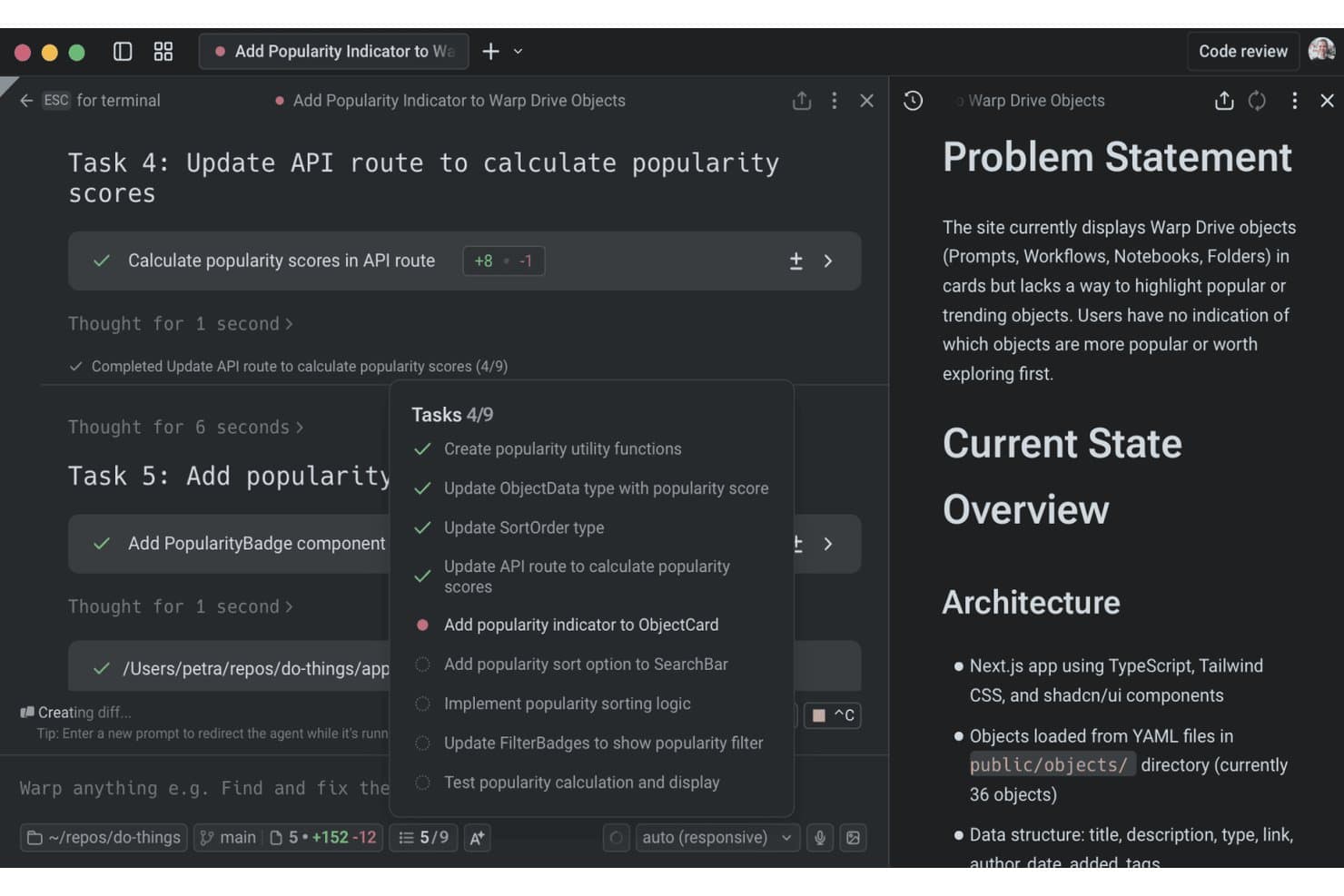
Warp Terminal tracks AI coding tasks with a step-by-step progress panel. Warp Terminal is an open-source, AI-native terminal that combines agentic coding, natural-language command assistance, reusable shared workflows, and multi-agent orchestration in a single developer environment.
Who Is Warp Terminal Best For?
Warp Terminal is a strong fit for individual developers and small engineering teams who want an AI-native terminal with agentic coding, natural-language command help, and shared workflows built in.
Why I Picked Warp Terminal
I've included Warp Terminal in my top picks because it's the only genuinely open-source, AI-native terminal that lets you run agentic coding tasks, natural-language command lookups, and multi-agent orchestration without leaving the command line. I love that Warp Agent can take a plain-language prompt, write the code, execute the commands, and iterate until the task is done. Shared session links mean teammates can follow an agent's work in real time and steer it mid-run.
Warp Terminal Key Features
- Model Context Protocol (MCP) connections: Connect Warp AI to external tools, databases, APIs, and internal services to give agents real-time context from your existing stack.
- Inline diff review and commenting: Review agent-generated code changes directly in the terminal, leave inline comments, and send feedback for the agent to address.
- SAML-based SSO and role-based access control: Enforce team authentication through your identity provider and control permissions at the role level across users and agent behaviors.
- Multi-agent orchestration: Run supervisor, fan-out, critic, and DAG-style workflows that coordinate multiple agents across local and cloud execution environments.
Warp Terminal Integrations
Warp Terminal offers native integrations with Slack, Linear, GitHub, and GitHub Actions for triggering and guiding agents with workplace and repository context. It also supports MCP connections plus API and SDK access for custom integrations.
Pros and Cons
Pros:
- Shared workflows reinforce consistent terminal practices
- AI explanations reduce command-recall friction
- Searchable command blocks preserve useful output
Cons:
- Missing tmux compatibility may block migration
- Agent credits can drain unpredictably
Learn more about Warp Terminal:
Alte instrumente pentru productivitatea dezvoltatorilor
Iată câteva opțiuni suplimentare de instrumente pentru productivitatea dezvoltatorilor care nu au ajuns pe lista mea scurtă, dar care merită totuși verificate:
- 11ClickUpBest for cross-department task tracking
- 12SentryBest for real-time application stack tracing
- 13DockerBest for secure containerized development
- 14SnykBest for real-time IDE vulnerability scanning
- 15LinearBest for AI-driven product operations
- 16LinearBBest for workflow automation across the SDLC
- 17JiraBest for managing enterprise sprint backlogs
- 18Visual Studio CodeBest extensible editor for any code language
- 19Devin Desktop (formerly Windsuf)Best for centralized agent task control
- 20JellyfishBest for AI adoption tracking
How I Evaluate Developer Productivity Tools
I split my evaluation into two layers: the baseline every tool must clear to qualify—things like IDE integration and code assistance—and the differentiators that separate the best options from the rest.
Core Functionality (Table Stakes For This List)
When I'm selecting tools for my list, I rank each one on a scale from 0 (does not offer the functionality) to 5 (excels in this area) for each core functionality listed below. Then, I calculate the tool's total score into a percentage. Each tool needs to achieve a minimum total score of 75% to be considered for inclusion.
- Code Assistance & Automation: I evaluate whether a tool helps developers write, generate, or review code faster—like inline AI completions that suggest entire functions as you type in VS Code or JetBrains.
- Developer Workflow Integration: Each tool should connect to the environments developers already use, so I check for native support across major IDEs, Git providers, CI/CD pipelines, and issue trackers.
- Productivity Metrics & Insights: I look for engineering-specific analytics such as DORA metrics, cycle time breakdowns, or PR throughput dashboards that help managers spot bottlenecks across sprints.
- Collaboration Features: Whether it's async code review with threaded comments or live pair programming sessions, I evaluate how well the tool supports team-based development work.
- Task & Context Management: Good tools reduce context switching, so I look at how well they surface relevant tickets, branches, and PR context without forcing developers to jump between apps.
- Environment & Toolchain Standardization: I check whether the tool offers reproducible dev environments—like preconfigured containers or workspace templates that get new team members coding on day one.
Once I have a list of tools that meet this criteria, I consider what sets each platform apart.
Differentiating Factors (What Sets Vendors Apart)
Here's how I compare and contrast different vendors:
Standout Features
AI agent capabilities are a major differentiator. I look for tools where an agent can pick up an issue, write a fix, and open a PR autonomously—not just autocomplete a line. Security vulnerability detection also matters, especially when it flags insecure patterns inline as you code rather than requiring a separate scan step. For teams working on proprietary codebases, I evaluate whether a tool supports custom or self-hosted models so suggestions actually reflect internal patterns and conventions.
Beyond Features
Security and compliance posture weigh heavily in my evaluation. I check whether a vendor holds SOC 2 Type II certification and offers guarantees that your code isn't used to train shared models—a real concern for any team handling proprietary logic. Deployment flexibility also matters; teams in regulated industries often need self-hosted or air-gapped options, not just cloud SaaS. I also consider pricing structure, specifically whether per-seat costs stay predictable as your engineering org scales from a dozen developers to several hundred.
Cum să alegeți instrumentele pentru productivitatea dezvoltatorilor
Este ușor să vă pierdeți în liste lungi de funcții și structuri complexe de prețuri. Pentru a vă ajuta să rămâneți concentrați în timp ce parcurgeți procesul unic de selectare a software-ului, iată o listă de verificare a factorilor de care trebuie să țineți cont:
| Factor | Ce trebuie avut în vedere |
|---|---|
| FactorScalabilitate | Ce trebuie avut în vederePoate instrumentul să susțină creșterea echipei dumneavoastră, inclusiv creșterile bruște ale numărului de utilizatori sau proiecte? Căutați limite privind utilizatorii, proiectele sau integrările și verificați cât de ușor puteți trece la planuri superioare. |
| FactorIntegrări | Ce trebuie avut în vedereFuncționează instrumentul cu depozitele de cod, aplicațiile de mesagerie, fluxurile CI/CD și celelalte platforme din stiva dumneavoastră? Evaluați integrările native și conectorii disponibili. |
| FactorPosibilitatea de personalizare | Ce trebuie avut în vederePuteți adapta fluxurile de lucru, câmpurile, tablourile de bord și permisiunile pentru a se potrivi proceselor dumneavoastră, nu invers? |
| FactorUșurință în utilizare | Ce trebuie avut în vedereCât de repede pot începe utilizatorii noi să lucreze fără instruire continuă? Luați în considerare interfața, calitatea documentației și disponibilitatea tururilor de prezentare a produsului. |
| FactorImplementare și integrare inițială | Ce trebuie avut în vedereCât timp va dura implementarea și migrarea echipelor și datelor dumneavoastră? Căutați opțiuni de migrare acceptate, resurse pentru integrarea inițială și asistență în timp real pe durata lansării. |
| FactorCost | Ce trebuie avut în vedereCheltuielile totale lunare sau anuale se vor încadra în bugetul dumneavoastră pe măsură ce adăugați echipe sau integrări? Fiți atent la costurile suplimentare per utilizator, per funcție sau pe baza integrărilor. |
| FactorMăsuri de securitate | Ce trebuie avut în vederePlatforma acceptă SSO, criptarea datelor, jurnale de audit și controale de acces? Luați în considerare cerințele de reglementare și sensibilitatea codului și datelor despre proiecte. |
| FactorDisponibilitatea asistenței | Ce trebuie avut în vedereCe ore de asistență, canale și timpi de răspuns garantează furnizorul? Verificați opțiunile pentru ajutor urgent, întrebări despre integrarea inițială și asistență tehnică pe termen lung. |
Ce sunt instrumentele pentru productivitatea dezvoltatorilor?
Instrumentele pentru productivitatea dezvoltatorilor sunt platforme software care îi ajută pe dezvoltatori să gestioneze sarcini, să automatizeze fluxuri de lucru și să coordoneze comunicarea echipei pe parcursul ciclului de viață al dezvoltării software. Aceste instrumente centralizează elementele de lucru, actualizările codului și documentația proiectului, facilitând colaborarea între echipe, reducând la minimum sarcinile manuale și asigurând livrarea consecventă a software-ului. Prin unificarea acestor procese, echipele pot gestiona mai bine complexitatea și pot susține dezvoltarea continuă.
Funcțiile instrumentelor pentru productivitatea dezvoltatorilor
Atunci când selectați instrumente pentru productivitatea dezvoltatorilor, urmăriți următoarele funcții esențiale:
- Gestionarea sarcinilor: Vă permite să creați, să atribuiți și să prioritizați elemente de lucru, astfel încât echipele să poată urmări clar progresul proiectului și termenele-limită viitoare.
- Integrarea controlului versiunilor: Se conectează direct la depozitele de cod, permițând dezvoltatorilor să examineze, să îmbine și să anuleze modificările de cod din spațiul lor de lucru.
- Centru de documentație: Centralizează notițele proiectului, ghidurile tehnice și materialele de integrare, facilitând partajarea și actualizarea informațiilor de referință.
- Automatizarea fluxurilor de lucru: Vă permite să configurați acțiuni automatizate pentru sarcini repetitive, precum implementări, notificări sau tranziții ale problemelor, reducând efortul manual.
- Instrumente de colaborare: Oferă fire de comentarii, discuții și partajare de fișiere pentru a sprijini lucrul în echipă în timp real, asociat cu sarcini sau proiecte specifice.
- Tablou de bord și raportare: Prezintă imagini de ansamblu vizuale ale sarcinilor active, lucrărilor finalizate și activității echipei, ajutând coordonatorii să monitorizeze progresul și să identifice blocajele.
- Controale de acces bazate pe roluri: Vă oferă un control detaliat asupra persoanelor care pot vizualiza, edita sau gestiona diferite proiecte, protejând datele sensibile și proprietatea intelectuală.
- Notificări personalizabile: Vă permit să adaptați alertele astfel încât utilizatorii să primească actualizări relevante despre atribuiri, mențiuni sau etapele importante ale proiectului, fără zgomot informațional.
- Piață de integrări: Oferă conectori predefiniți pentru sincronizarea cu alte instrumente și platforme, sprijinind un flux de lucru unificat în întregul dumneavoastră mediu.
- Căutare și filtrare: Permite căutarea și filtrarea rapidă a tichetelor, documentelor sau conversațiilor după cuvinte-cheie, metadate sau stare, pentru a accelera sarcinile de zi cu zi.
Funcții AI ale instrumentelor uzuale pentru productivitatea dezvoltatorilor
Pe lângă funcțiile standard ale instrumentelor pentru productivitatea dezvoltatorilor enumerate mai sus, multe dintre aceste soluții integrează inteligența artificială prin funcții precum:
- Generarea automată a codului: Utilizează inteligența artificială, precum modelele lingvistice de mari dimensiuni ca ChatGPT, pentru a sugera sau crea fragmente de cod pe baza contextului proiectului și a intenției dezvoltatorului, accelerând procesul de programare și ajutând noii membri ai echipei să se familiarizeze rapid cu acesta.
- Trierea inteligentă a problemelor: Analizează automat problemele sau rapoartele de erori primite, atribuindu-le niveluri de prioritate și direcționându-le către membrul corespunzător al echipei, reducând sortarea manuală și îmbunătățind promptitudinea.
- Detectarea proactivă a anomaliilor: Monitorizează bazele de cod pentru a identifica tipare neobișnuite sau probleme potențiale, alertând echipele cu privire la riscuri sau regresii înainte ca acestea să ajungă în mediile de producție.
- Interogări în limbaj natural: Le permit dezvoltatorilor să pună întrebări sau să caute în documentație folosind limbaj obișnuit, returnând rezultate relevante și reducând timpul petrecut pentru găsirea informațiilor.
- Generarea inteligentă a testelor: Generează teste unitare și de integrare adaptate modificărilor curente ale codului, ajutând echipa să mențină acoperirea și să identifice defectele mai devreme în ciclul de dezvoltare.
Beneficiile instrumentelor pentru productivitatea dezvoltatorilor
Implementarea instrumentelor pentru productivitatea dezvoltatorilor oferă mai multe beneficii pentru echipa și compania dumneavoastră. Iată câteva dintre acestea:
- Livrarea accelerată a proiectelor: Funcții precum gestionarea sarcinilor, automatizarea fluxurilor de lucru și colaborarea în timp real ajută echipele să treacă mai rapid de la planificare la lansare.
- Calitate îmbunătățită a codului: Documentația centralizată, examinările integrate ale codului și instrumentele de control al versiunilor contribuie la menținerea unor standarde ridicate de programare și la reducerea erorilor.
- Transparență mai bună a fluxului de lucru: Tablourile de bord și rapoartele îi mențin pe toți la curent cu starea proiectului, termenele-limită viitoare și responsabilitatea pentru sarcini.
- Reducerea volumului de muncă manuală: Automatizarea proceselor repetitive prin GitHub Actions și notificările personalizabile oferă echipei mai mult timp pentru a se concentra asupra sarcinilor de inginerie.
- Integrare simplificată: Centrele de documentație și interfețele intuitive îi ajută pe noii angajați să se familiarizeze rapid cu activitatea, fără sesiuni de instruire îndelungate.
- Controale de securitate îmbunătățite: Accesul bazat pe roluri, jurnalele de audit și setările de permisiuni protejează codul sensibil și restricționează vizibilitatea proiectelor.
- Scalabilitate flexibilă: Piețele de integrări și fluxurile de lucru personalizabile permit instrumentelor să se extindă și să evolueze odată cu nevoile în schimbare ale companiei.
Costurile și prețurile instrumentelor pentru productivitatea dezvoltatorilor
Selectarea instrumentelor pentru productivitatea dezvoltatorilor necesită înțelegerea diferitelor modele și planuri de preț disponibile. Costurile variază în funcție de funcții, dimensiunea echipei, suplimente și alți factori. Tabelul de mai jos rezumă planurile uzuale, prețurile medii ale acestora și funcțiile incluse de obicei în soluțiile pentru productivitatea dezvoltatorilor:
Tabel comparativ al planurilor pentru instrumentele destinate productivității dezvoltatorilor
| Tipul planului | Preț mediu | Funcții uzuale |
|---|---|---|
| Tipul planuluiPlan gratuit | Preț mediu$0 | Funcții uzualeGestionarea de bază a sarcinilor, spațiu de stocare limitat, integrări esențiale și asistență din partea comunității. |
| Tipul planuluiPlan personal | Preț mediu$5-$12/utilizator/lună | Funcții uzualeConturi individuale, personalizare îmbunătățită, raportare simplă și asistență prioritară prin e-mail. |
| Tipul planuluiPlan pentru companii | Preț mediu$12-$28/utilizator/lună | Funcții uzualeAcces pentru mai mulți utilizatori, automatizarea fluxurilor de lucru, integrări avansate, analize detaliate și controale administrative. |
| Tipul planuluiPlan pentru întreprinderi | Preț mediu$28-$60/utilizator/lună | Funcții uzualeSSO și securitate avansată, integrare personalizată, gestionarea dedicată a contului, permisiuni avansate și asistență susținută de SLA. |
Întrebări frecvente despre instrumentele de productivitate pentru dezvoltatori
Iată câteva răspunsuri la întrebările frecvente despre instrumentele de productivitate pentru dezvoltatori:
Instrumentele de productivitate pentru dezvoltatori necesită o configurare complexă?
Nu, majoritatea instrumentelor de dezvoltare sunt concepute pentru implementare rapidă și oferă un proces de inițiere pas cu pas pentru începători. De obicei, puteți configura funcțiile de bază și integrările în câteva ore pentru a echilibra experiența dezvoltatorilor, însă gestionarea proiectelor complexe sau a migrărilor la scară largă poate dura mai mult.
Se pot integra aceste instrumente cu sistemele existente?
Da, majoritatea soluțiilor oferă integrări predefinite pentru depozite de cod, platforme CI/CD, instrumente de comunicare și sisteme de urmărire a problemelor, pentru a sprijini echipele de dezvoltare. Verificați întotdeauna compatibilitatea în întregul ecosistem și în mediile de dezvoltare importante înainte de a lua o decizie.
Cum determin planul potrivit pentru echipa mea?
Începeți prin evaluarea numărului de utilizatori, a necesităților de securitate și a funcțiilor noi esențiale pentru procesul de dezvoltare. Planurile gratuite sau personale sunt potrivite pentru echipele mici, în timp ce planurile pentru companii și întreprinderi se potrivesc organizațiilor în creștere sau reglementate, axate pe colaborarea în echipă.
Sunt instrumentele de productivitate pentru dezvoltatori sigure pentru proiecte sensibile?
Da, multe instrumente includ funcții de securitate de înaltă calitate, precum criptarea, SSO, jurnalele de audit și permisiunile granulare, pentru a proteja fluxurile de lucru automatizate. Consultați documentația de securitate a furnizorului pentru a confirma că aceasta corespunde cerințelor dumneavoastră de conformitate și elimină potențialele blocaje.
Ce opțiuni de asistență sunt disponibile dacă echipa mea întâmpină probleme?
Majoritatea furnizorilor oferă baze de cunoștințe, asistență prin e-mail și conversații în timp real pentru depanarea implementărilor multiplatformă sau a testării automatizate. Planurile pentru întreprinderi oferă de obicei timpi de răspuns mai rapizi, asistență telefonică și manageri de cont dedicați pentru situații urgente sau pentru implementarea instrumentelor AI avansate.