

Ao navegar pelo universo do software de gestão de código-fonte, tenho lidado com as exigências dos sistemas Windows e Mac. Como alguém profundamente envolvido em equipas de desenvolvimento de software, compreendo a necessidade de ferramentas eficientes de acompanhamento de erros, controlo de acessos e colaboração robusta — quer prefira a linha de comandos ou uma interface gráfica.
Com ferramentas como as opções de software de código aberto e o Team Foundation Server, as equipas podem gerir meticulosamente os diretórios, garantindo que os projetos de desenvolvimento avancem sem problemas. E acredite em mim: é a diferença entre estar constantemente a apagar fogos e conduzir tranquilamente os projetos de software rumo ao sucesso.
Why Trust Our Software Recommendations
6,700+
Reviews
20
Industry experts
16+
Evaluation factors
14
Years
Our team has been testing and reviewing software since 2012. As tech leaders ourselves, we know how difficult—and important—it is to choose the right software.
For this guide, we evaluated tools using hands-on testing and independent research, scoring tools using our selection criteria.
Our reviews reflect our human editorial judgment, not a sales pitch.
Expert reviewers:
- Paulo Gardini MiguelTech Director
 Tim FisherVP of AI
 Gabriel RosasTech Lead & Software Architect
 Christhian GruhnTech Lead & Platform Architect

Tabela de comparação: software de gestão de código-fonte
Esta tabela de comparação resume os detalhes dos preços das minhas principais escolhas de software de gestão de código-fonte.
| Tool | Best For | Trial Info | Price | ||
|---|---|---|---|---|---|
| 1 | Best for migrating legacy SVN repos to Git | Free plan + 30-day trial + demo available | From $75/user/year (billed annually) | Website | |
| 2 | Best for cloud-based version control | 14-day free trial + free demo available | From $12.50/user/month | Website | |
| 3 | Best for self-hosted Git on minimal infrastructure | Free plan + 30-day trial available | From $19/user/month (billed annually) | Website | |
| 4 | Best for scalability in large enterprises | Free plan available | Pricing upon request | Website | |
| 5 | Best for multi-repo code reviews across VCS types | Not available | Pricing upon request | Website | |
| 6 | Best for AI-native code review at scale | Free plan available | From $4/user/month | Website | |
| 7 | Best for Jira software integration | Free plan available | From $3.65/user/month | Website | |
| 8 | Best for end-to-end DevOps in Microsoft stack | Free plan available | From $6/user/month | Website | |
| 9 | Best for combined CI/CD and code management | Free plan available | From $29/user/month (billed annually) | Website | |
| 10 | Best for Git and TFVC in one hosted repo | Free plan available | From $6.00/user/month | Website |


Avaliações do melhor software de gestão de código-fonte
Abaixo encontram-se os meus resumos detalhados do melhor software de gestão de código-fonte que entrou na minha seleção. As minhas avaliações apresentam uma análise detalhada das principais funcionalidades, vantagens & desvantagens, integrações e casos de utilização ideais de cada ferramenta, para o ajudar a encontrar a melhor opção para si.
 Best for migrating legacy SVN repos to Git
- Free plan + 30-day trial + demo available
- From $75/user/year (billed annually)
Visit WebsiteCustomer Rating:4.8/5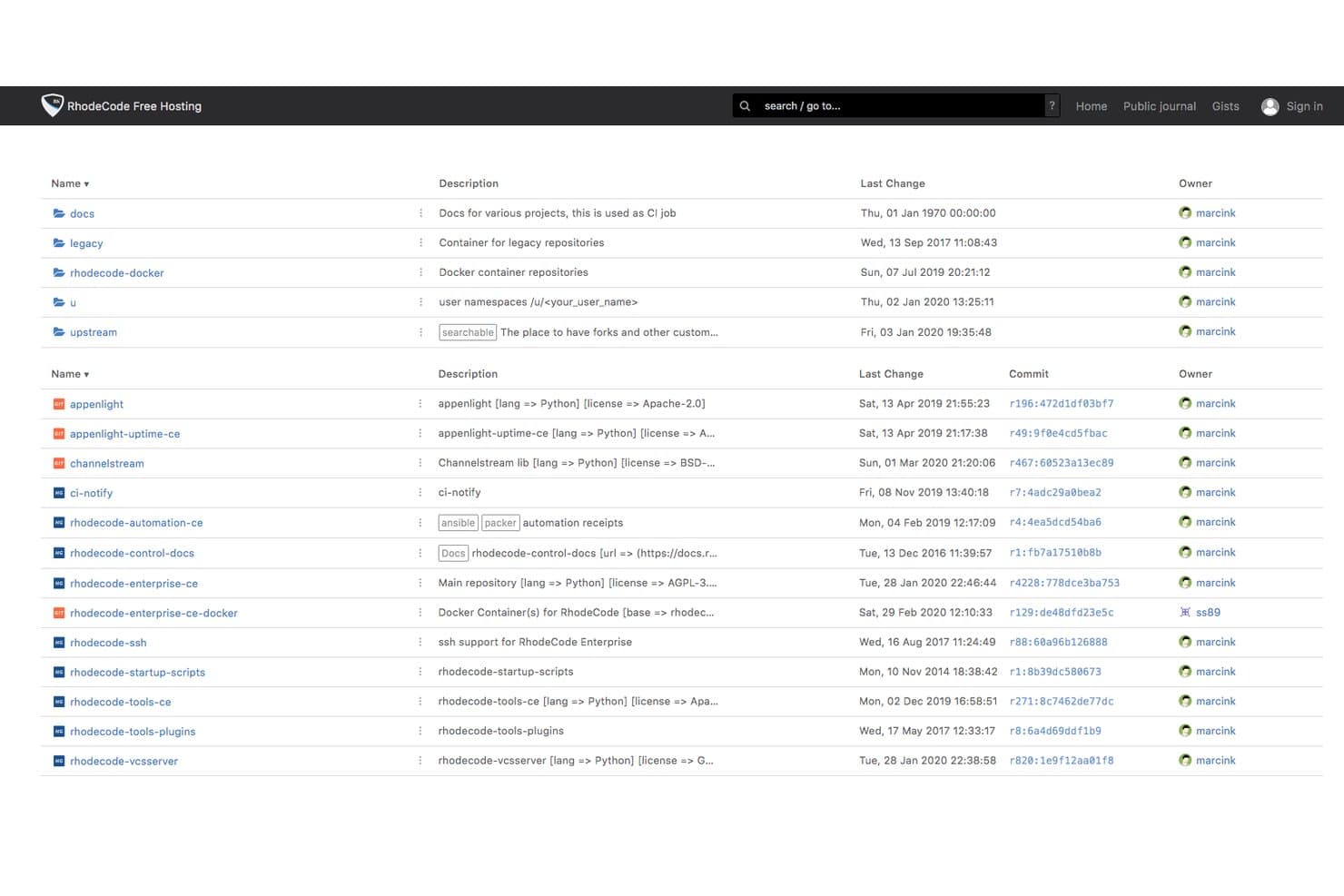
RhodeCode organizes repositories and groups with ownership and commit details. RhodeCode is a self-hosted source code management platform that supports Git, Mercurial, and SVN under a single interface, with code review, branch permissions, access control, and AI-assisted review built in.
Who Is RhodeCode Best For?
RhodeCode is a strong fit for enterprises in regulated industries—banking, defense, fintech—that need self-hosted version control with strict access controls and legacy SVN infrastructure to migrate.
Why I Picked RhodeCode
RhodeCode earns its spot on my shortlist because it's the only SCM platform I've found that lets you run Git, Mercurial, and SVN side by side under one interface, which makes it genuinely practical for teams still tied to legacy SVN infrastructure. I particularly like its dual-sync migration feature: your SVN repo and a Git repo stay in sync simultaneously, so you can cut over gradually without a risky big-bang migration. Branch permissions and audit logs stay intact throughout the process, which matters when you're operating in banking or defense environments.
RhodeCode Key Features
- AI-assisted code review: Assign an AI reviewer to pull requests; it analyzes diffs and posts contextual comments using ChatGPT, Gemini, Claude, or your own internal model.
- Smart Reviewer assignment: Automatically suggests the right reviewers for each pull request based on the files and changes included.
- Full-text code search: Search across all repositories, comments, gists, and files using Elasticsearch in the Enterprise Edition.
- Audit logs with export: Every user action is logged with IP address and data changes, with export support for third-party compliance systems.
RhodeCode Integrations
RhodeCode offers documented integrations with Jenkins, TeamCity, Travis CI, JIRA, Slack, and Confluence. JSON-RPC and REST APIs, webhooks, and RhodeCode Extensions support custom CI/CD and developer-tool connections.
Pros and Cons
Pros:
- Advanced branch and access controls
- Enables gradual SVN-to-Git migration workflows
- Supports Git, Mercurial, and SVN together
Cons:
- Fewer marketplace integrations than competitors
- No built-in continuous integration
Learn more about RhodeCode: Best for cloud-based version control
- 14-day free trial + free demo available
- From $12.50/user/month
Visit WebsiteCustomer Rating:4.2/5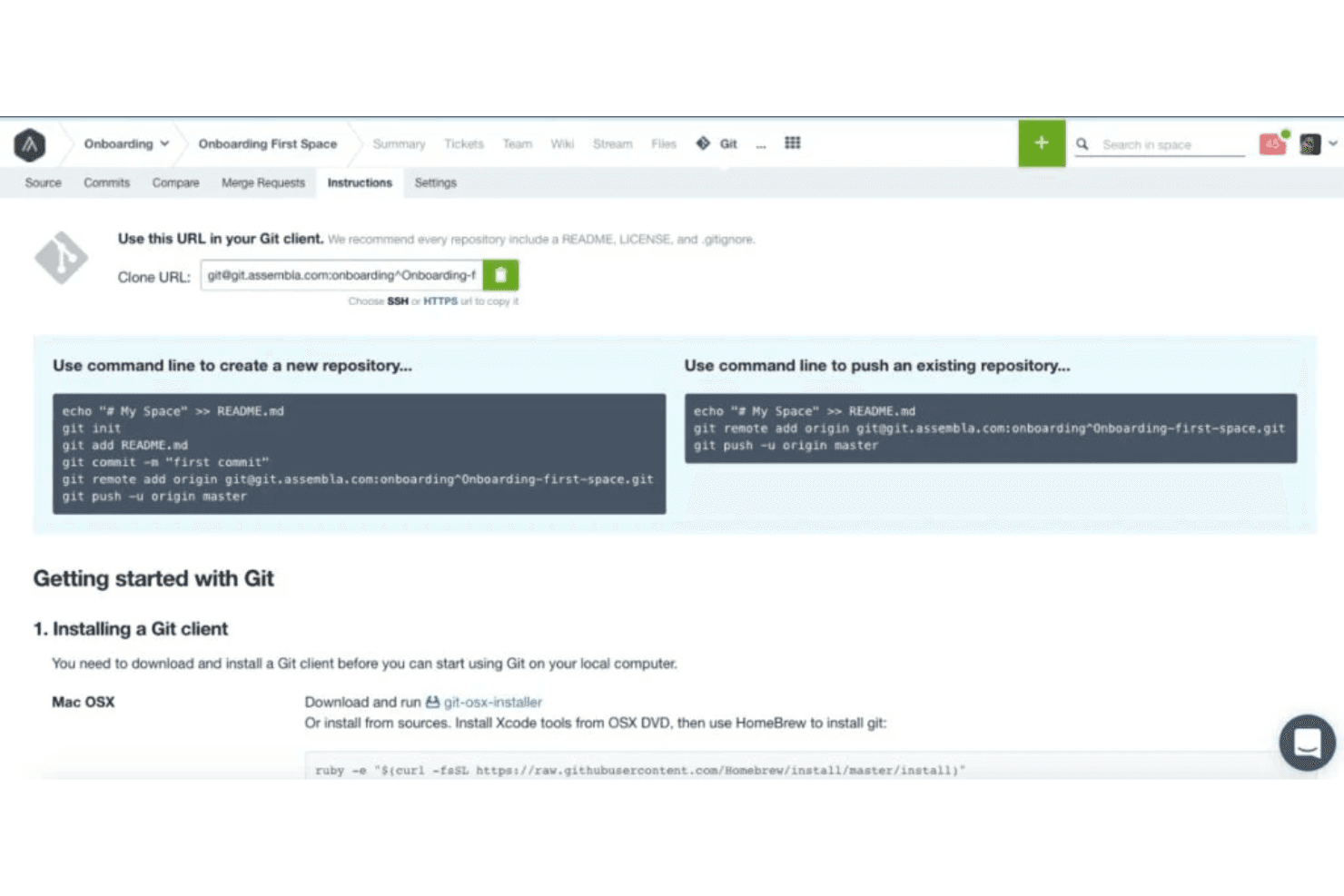
Assembla's Git, SVN, and Perforce repositories provide easy setup instructions, code view and search in the browser, commit history, and merge request code review workflows. Assembla is a cloud-based source code management platform that natively hosts Git, SVN, and Perforce repositories in a single managed environment, with built-in code review, branching, and integrated project management tools.
Who Is Assembla Best For?
Assembla is a strong fit for engineering teams managing mixed-VCS environments—particularly those still running SVN or Perforce alongside Git—who want fully managed cloud hosting without the overhead of maintaining their own infrastructure.
Why I Picked Assembla
Assembla earns its spot on my shortlist because it's the only cloud-hosted SCM platform I know of that natively runs Git, SVN, and Perforce side by side in a single managed environment. I find this especially valuable for teams that still have active SVN or Perforce codebases and can't afford a full migration. Assembla even supports pull requests for SVN, which isn't something you get out of the box anywhere else.
Assembla Key Features
- Branch protection: Enforces required code reviews before any merge can complete, preventing unreviewed code from reaching protected branches.
- SAML 2.0 SSO: Included across all plans, letting teams connect their existing identity provider without upgrading to an enterprise tier.
- 60-day audit logs: Captures access events, code changes, merges, and admin actions with full detail for compliance and governance needs.
- Agile project management: Bundles sprint planning, Kanban cardwalls, burndown charts, and time tracking directly alongside your repositories.
Assembla Integrations
Assembla integrates with Jenkins, Travis CI, GitHub Actions, Jira, Slack, and TestRail. It also provides REST API access, webhooks, and Zapier connectivity for custom workflows.
Pros and Cons
Pros:
- Built-in Agile project management tools
- Branch protection and RBAC in all plans
- Runs Git, SVN, and Perforce together
Cons:
- No permanent free plan available
- No built-in CI/CD pipeline
Learn more about Assembla: Best for self-hosted Git on minimal infrastructure
- Free plan + 30-day trial available
- From $19/user/month (billed annually)
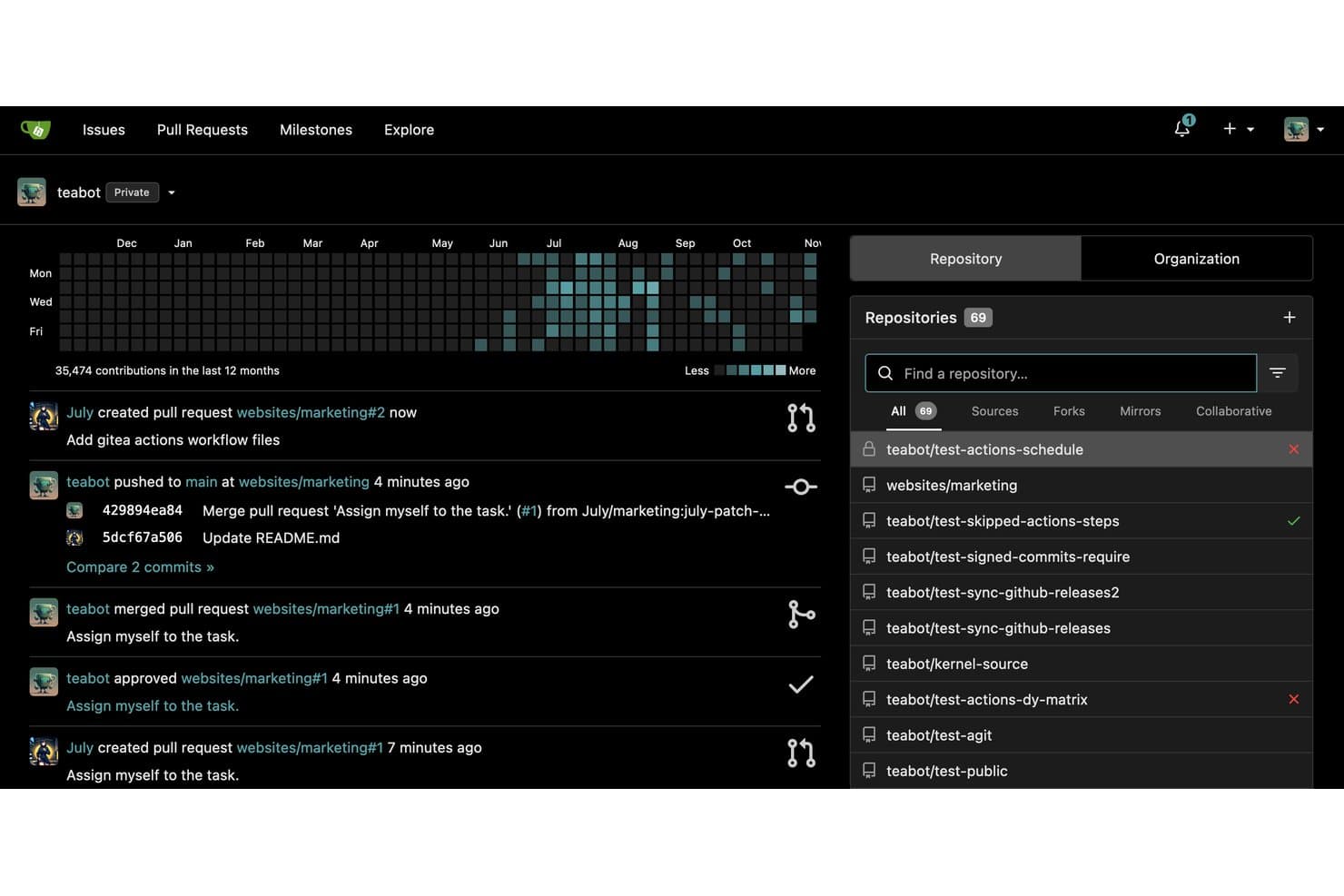
Gitea tracks contributions and pull request activity across repositories. Gitea is an open-source, self-hosted source code management platform that covers Git repository hosting, pull request workflows, code review, branch management, built-in CI/CD via Gitea Actions, and a package registry supporting over 20 artifact types.
Who Is Gitea Best For?
Gitea is a great fit for DevOps and platform engineering teams that need a full-featured Git platform but want to keep infrastructure overhead minimal.
Why I Picked Gitea
Gitea earns its spot on my shortlist because it's the only self-hosted Git platform I know of that runs comfortably on a Raspberry Pi while still delivering a full SCM feature set. I particularly like that Gitea Actions is directly compatible with GitHub Actions syntax, so your existing CI/CD workflows migrate without rewriting. Branch protection, merge queues, and a built-in package registry covering 20+ artifact types round out a platform that punches well above its infrastructure footprint.
Gitea Key Features
- Pull request and AGit workflow support: Gitea lets reviewers leave inline comments and require approvals before merging, with both standard PR and AGit workflows available.
- Built-in package registry: Gitea hosts over 20 artifact types—including Docker, npm, Maven, PyPI, and Helm—directly alongside your repositories.
- Repository mirroring: Push and pull mirroring keeps your repos in sync with external Git services automatically.
- Role-based access control: Gitea enforces granular permissions at the repository and branch level, with AD/LDAP and OAuth 2.0 integration for identity management.
Gitea Integrations
Gitea supports integrations with Jenkins, Drone, Woodpecker, Argo CD, Slack, Discord, Microsoft Teams, and Lark. It also provides Gitea Actions, webhooks, Git hooks, a REST API, and the Tea CLI for custom connectivity.
Pros and Cons
Pros:
- Fully open source with MIT license
- Compatible with GitHub Actions workflows
- Runs smoothly on minimal hardware
Cons:
- SAML SSO requires enterprise upgrade
- No built-in AI code suggestions
Learn more about Gitea: Best for scalability in large enterprises
- Free plan available
- Pricing upon request
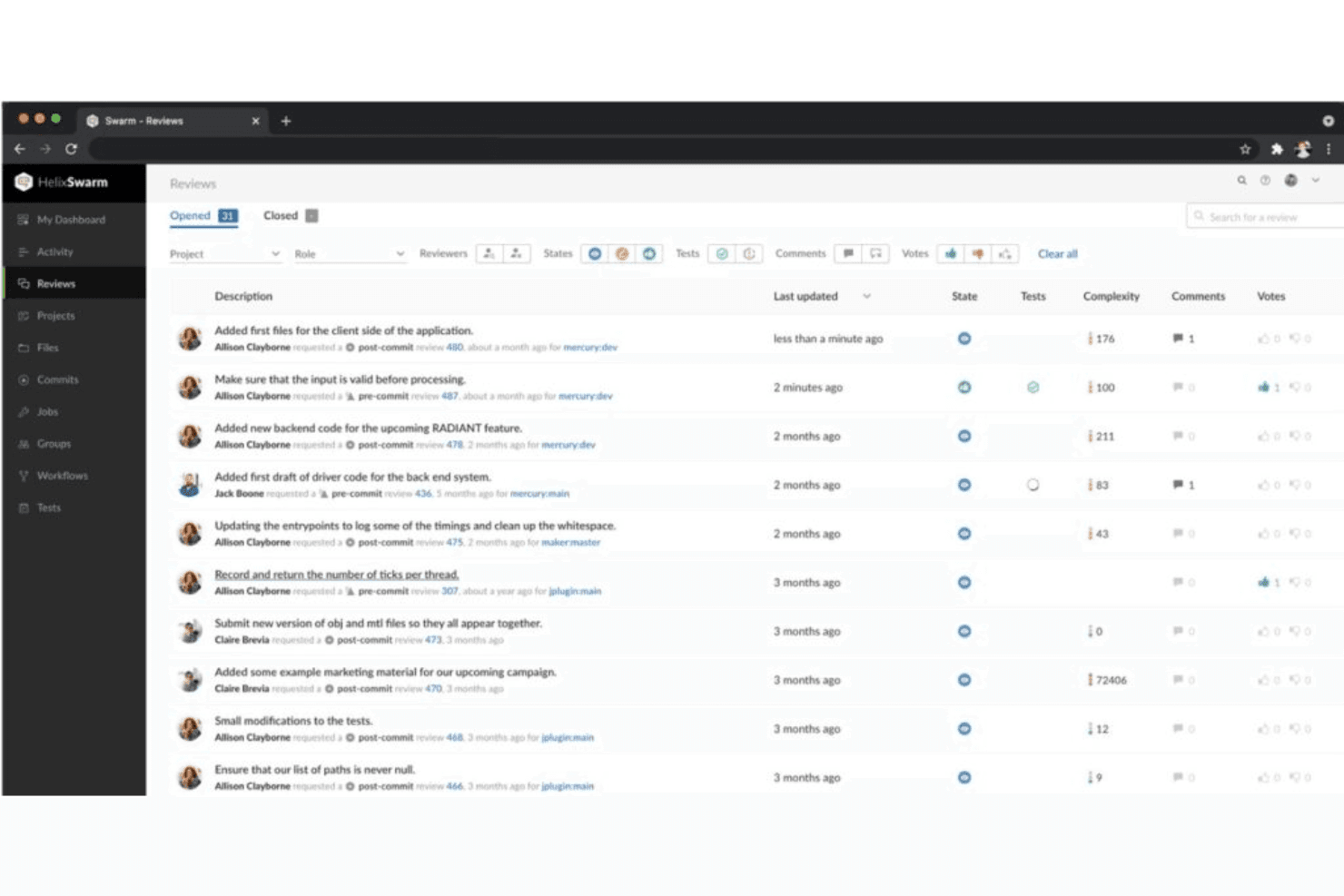
This is a view from the Perforce Helix swarm code review page, it allows users to review more, no matter their team's size. Perforce Helix Core is a centralized source code management system built for large-scale environments, offering changelist-based version control, structured branching via Perforce Streams, binary file versioning, and code review through Helix Swarm.
Who Is Perforce Helix Core Best For?
Perforce Helix Core is the go-to choice for large enterprises managing massive codebases, binary assets, or mixed teams of developers and artists across game, automotive, and semiconductor industries.
Why I Picked Perforce Helix Core
Perforce Helix Core earns its spot on my shortlist because no other source code management tool handles petabyte-scale repositories with the same reliability. I'm particularly impressed by Perforce Streams, which enforces structured branching policies across massive codebases so teams don't drift into merge chaos at scale. Pair that with file-level access control and exclusive file locking for binary assets, and you get a level of precision that Git-native platforms simply can't match.
Perforce Helix Core Key Features
- Changelist-based atomic commits: Groups all related file changes into a single, numbered snapshot that either succeeds or fails as a unit.
- Helix Swarm code review: A web-based review tool supporting inline comments, voting, threaded discussions, and pre-commit review workflows.
- P4 Git Connector: Bridges Git-based repositories from GitHub, GitLab, and Bitbucket directly into a centralized Helix Core server.
- Global distributed topology: Proxy servers, forwarding replicas, and edge servers let distributed teams sync and submit at high speed without transferring full repository data.
Perforce Helix Core Integrations
Perforce Helix Core offers native integrations with Jenkins, TeamCity, Unreal Engine, Unity, Visual Studio, JetBrains IDEs, Eclipse, Jira, and Slack. Its REST API, CLI, and webhooks support custom CI/CD workflows and automation.
Pros and Cons
Pros:
- Provides structured branching with Perforce Streams
- Offers file-level access control and locking
- Handles petabyte-scale code and binary files
Cons:
- Centralized model limits offline commit options
- Steeper onboarding for teams new to P4
Learn more about Perforce Helix Core: Best for multi-repo code reviews across VCS types
- Not available
- Pricing upon request
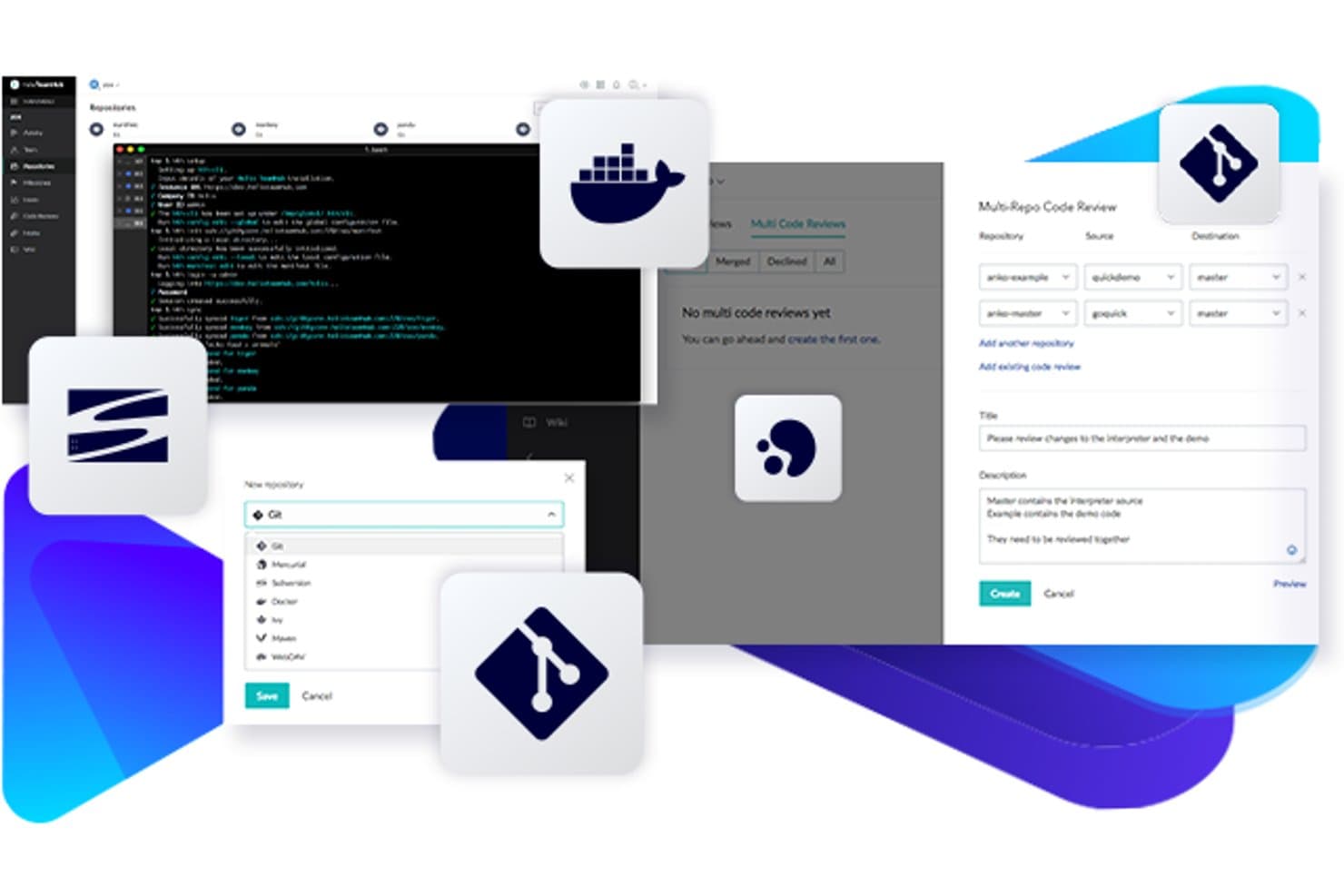
Perforce Helix TeamHub supports Git, Docker, and multi-repo code reviews in one place. Perforce Helix TeamHub is a source code management platform that natively hosts Git, Mercurial, and SVN repositories alongside artifact repos, Docker registries, and binary files—all within a single interface.
Who Is Perforce Helix TeamHub Best For?
Helix TeamHub is a strong fit for engineering teams in game development, media, or regulated industries that need to manage Git, Mercurial, and SVN repositories in a single environment.
Why I Picked Perforce Helix TeamHub
I've included Helix TeamHub in my top picks because it's one of the only platforms that lets you review code changes spanning multiple repositories in a single code review session—something teams working across a complex, multi-repo codebase will immediately appreciate. Its multi-repo code review (MRCR) capability, available on the Enterprise plan, means you're not stitching together separate reviews when a feature touches six repos at once. It also natively hosts Git, Mercurial, and SVN side by side, which is genuinely useful if your team is mid-migration from SVN or Mercurial and can't cut over cleanly.
Perforce Helix TeamHub Key Features
- Native SVN, Git, and Mercurial hosting: Host all three VCS types within the same project environment, without needing separate platforms for each.
- Granular repo and branch-level authorization: Assign access using five distinct roles and ten privilege levels at both the repository and branch level.
- Built-in Kanban boards and issue tracking: Manage tasks, milestones, and issues directly alongside your repositories without adding a separate project management tool.
- Code search across repositories: Search Git and Mercurial repos by file name, commit message, or project on any plan tier.
Perforce Helix TeamHub Integrations
Perforce Helix TeamHub offers native integrations with Jenkins, Jira, Slack, and Perforce P4 through P4 Git Connector. Generic webhooks, its REST API, and hth-cli support custom CI/CD and multi-repository automation.
Pros and Cons
Pros:
- Offers granular branch-level access controls
- Enables multi-repo code reviews in one workflow
- Supports Git, Mercurial, and SVN side by side
Cons:
- Multi-repo reviews require highest plan tier
- No built-in CI/CD pipeline engine
Learn more about Perforce Helix TeamHub: Best for AI-native code review at scale
- Free plan available
- From $4/user/month
Visit WebsiteCustomer Rating:4.8/5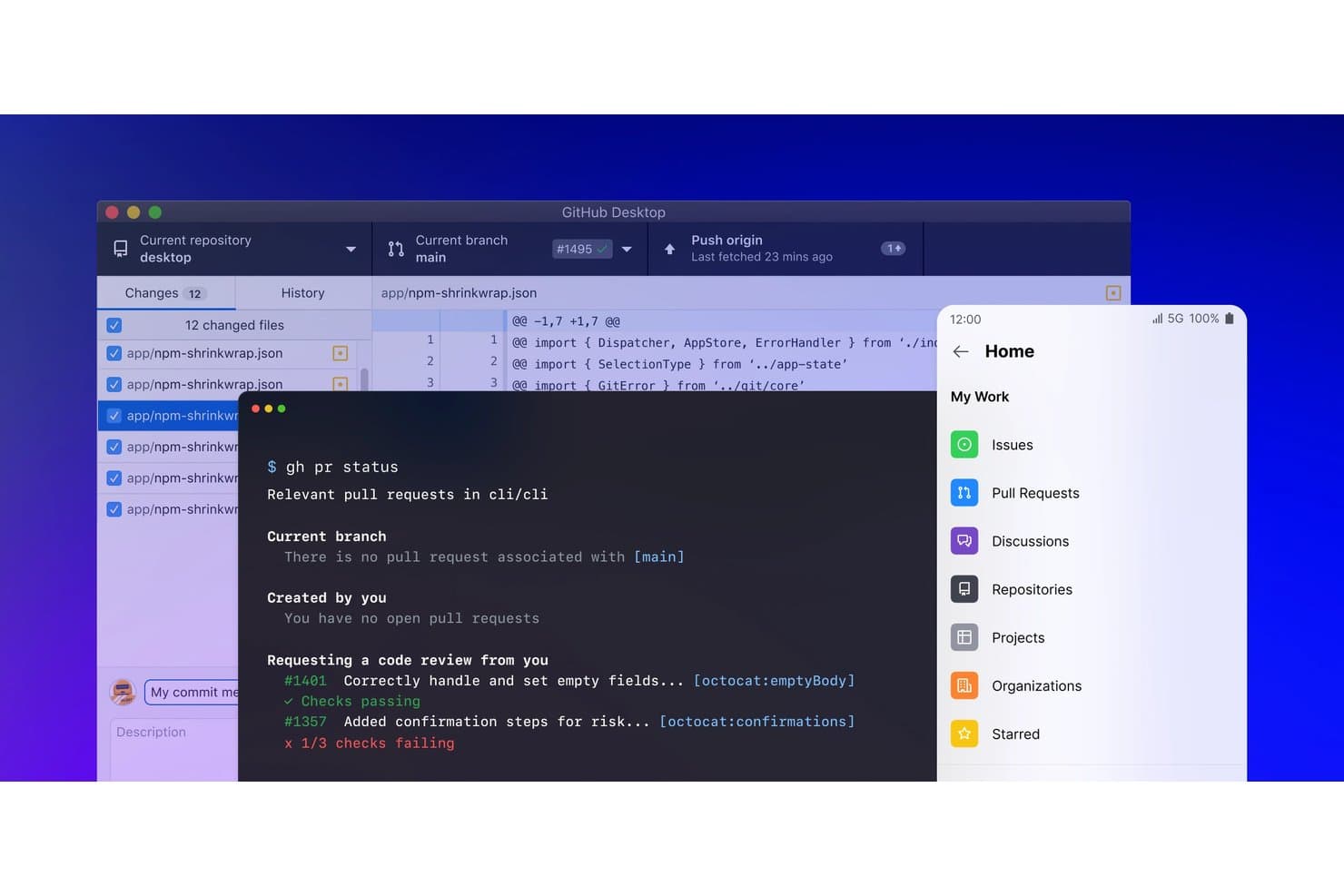
GitHub unifies Desktop, CLI, and mobile tools for streamlined code management. GitHub is a Git-based source code management platform that combines repository hosting, branching and pull request workflows, code review, CI/CD via GitHub Actions, and AI-assisted development through GitHub Copilot.
Who Is GitHub Best For?
GitHub is a strong fit for engineering teams at any scale that want AI-assisted code review, security scanning, and CI/CD in one tightly integrated platform.
Why I Picked GitHub
GitHub earns its spot on my shortlist because no other platform pairs AI-native code review with the scale that large engineering teams actually need. Copilot code review automatically generates inline suggestions on every PR, and Copilot Autofix resolves roughly 90% of CodeQL-detected security alerts before they ever reach a human reviewer. I'm also a fan of how merge queues and branch protection rulesets work together to keep high-velocity, multi-team codebases from becoming a merging nightmare.
GitHub Key Features
- Cross-repository code search: Search across all your repositories simultaneously using regex, boolean operators, and symbol-level indexing in over 10 programming languages.
- Merge queues: Automatically batch and validate pull requests before merging to keep your main branch stable in high-velocity, multi-team codebases.
- Enterprise Managed Users (EMU): Provision and manage the full developer account lifecycle directly through your identity provider, giving you tight control over who can access what.
- GitHub Codespaces: Launch a fully configured, cloud-hosted development environment from any repository in seconds, without any local setup required.
GitHub Integrations
GitHub Actions is native, while Marketplace integrations include Jira, Slack, Microsoft Teams, Jenkins, CircleCI, Azure Pipelines, AWS, Azure, and Google Cloud. REST and GraphQL APIs, webhooks, and GitHub CLI support custom integrations.
Pros and Cons
Pros:
- Native code security scanning with autofix
- Scales to massive monorepo codebases easily
- Copilot AI suggests inline fixes on PRs
Cons:
- Authentication and PAT management can be complex
- Advanced security requires a paid add-on
 Best for Jira software integration
- Free plan available
- From $3.65/user/month
Visit WebsiteCustomer Rating:4.5/5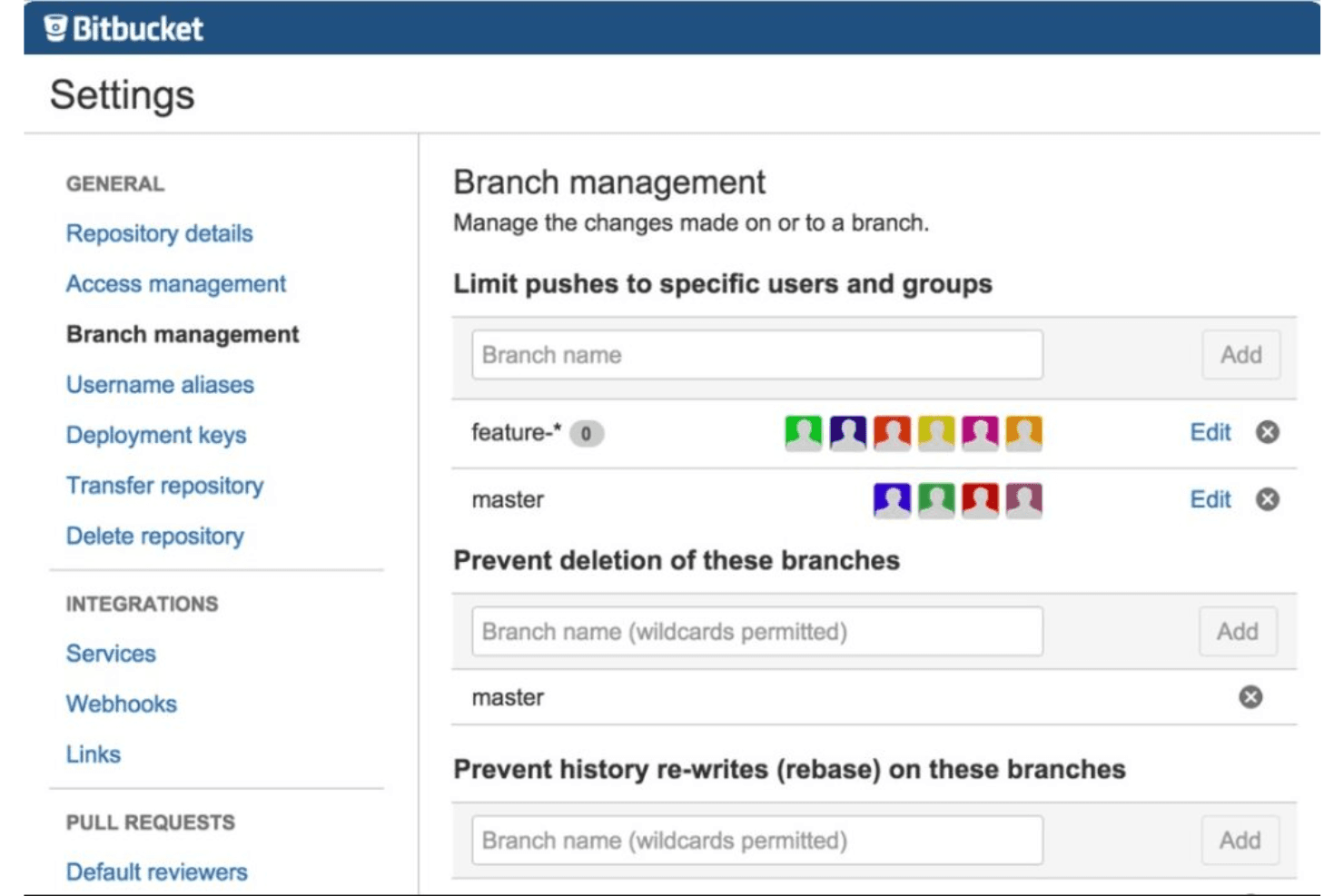
Here is a screenshot from Bitbucket's branch management tab. Bitbucket is a Git-based source code management platform from Atlassian that gives teams full version control, built-in CI/CD via Bitbucket Pipelines, pull request workflows, code review tooling, and deep integration across the Atlassian ecosystem.
Who Is Bitbucket Best For?
Bitbucket is a strong fit for engineering teams already using Jira who want their version control, CI/CD, and issue tracking connected under one Atlassian ecosystem.
Why I Picked Bitbucket
Bitbucket earns its spot on my list because the Jira integration goes far deeper than a simple link. I can see Jira issue statuses directly inside a pull request view, and every changed code line traces back to its originating ticket, giving my team genuine end-to-end visibility from sprint planning to deployment. On top of that, AI-generated PR descriptions and automated deployment summaries (with linked Jira issues) cut the documentation overhead I used to dread after every release.
Bitbucket Key Features
- Branch permissions: Control who can push, merge, or delete specific branches at the repository or branch-pattern level.
- Bitbucket Pipelines: A native YAML-configured CI/CD tool with hosted and self-hosted runners, parent/child pipelines, and dynamic steps.
- Built-in security scanning: Detect exposed secrets, vulnerable dependencies, and IaC misconfigurations directly within the Premium plan.
- Draft pull requests: Open a PR in draft state to signal work in progress before requesting formal review from teammates.
Bitbucket Integrations
Bitbucket offers native integrations with Jira Software, Jira Service Management, Confluence, and Snyk, plus integrations with Jenkins, Datadog, Slack, AWS, Azure, and Google Cloud. Its REST API, webhooks, and Marketplace support custom connectivity.
Pros and Cons
Pros:
- Centralized enforcement of CI/CD and branch policies
- AI-powered code reviews and release notes
- Deep Jira issue status linking in PRs
Cons:
- Performance issues with very large repositories
- SAML SSO requires separate Atlassian Guard subscription
Learn more about Bitbucket: Best for end-to-end DevOps in Microsoft stack
- Free plan available
- From $6/user/month
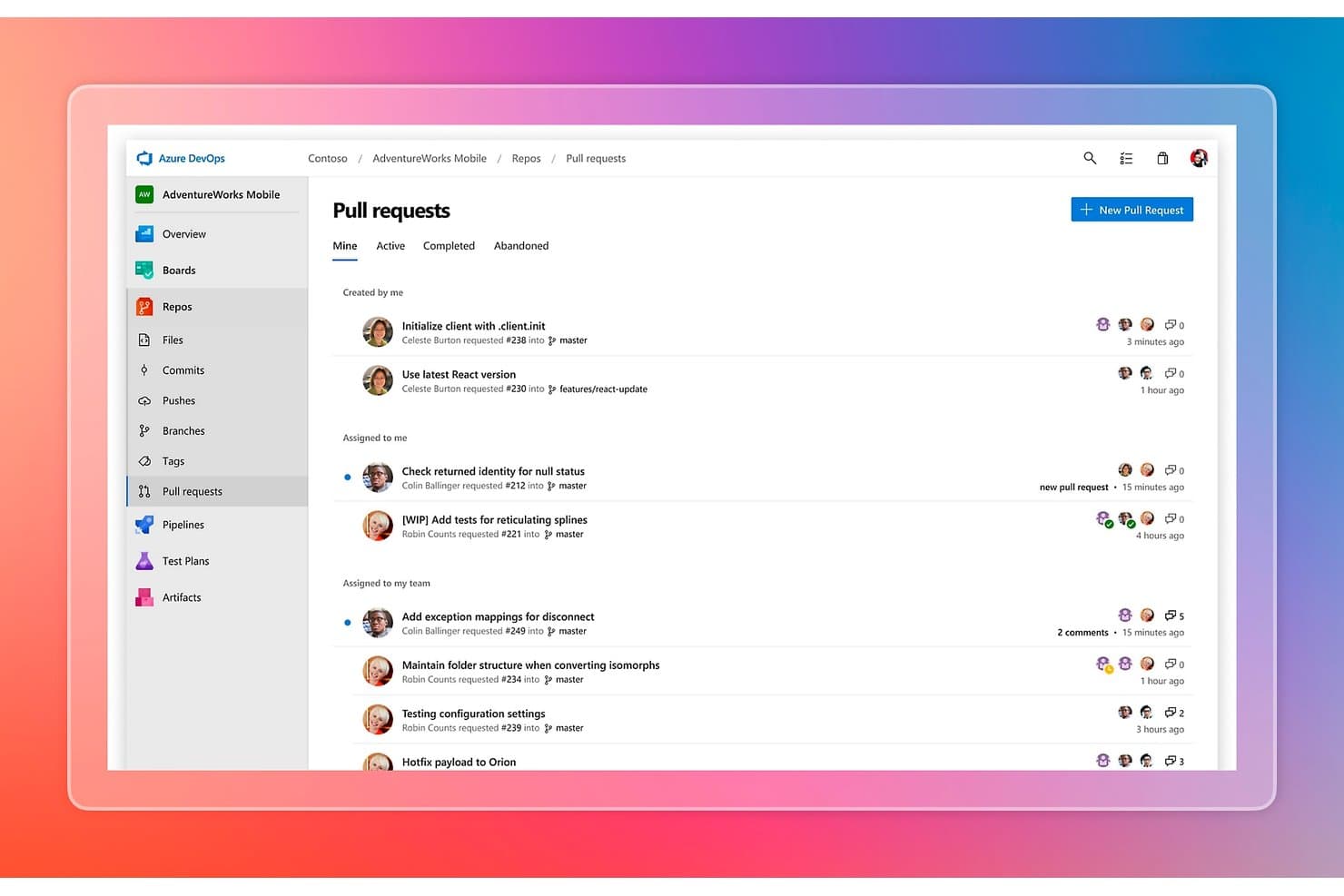
Azure DevOps organizes pull requests by status, assignee, and team. Azure DevOps is a source code management platform from Microsoft that combines Git and TFVC repository hosting, branch policies, pull request workflows, CI/CD pipelines, package management, and integrated project tracking in a single suite.
Who Is Azure DevOps Best For?
Azure DevOps is the right fit for engineering teams already running in the Microsoft ecosystem who need a single platform covering source control, CI/CD, and project tracking without stitching together separate tools.
Why I Picked Azure DevOps
Azure DevOps earns its spot on my shortlist because it covers the entire software delivery lifecycle in one place, which is rare and genuinely useful for Microsoft-stack teams. I particularly like how Azure Repos pairs Git hosting with branch policies that enforce reviewer requirements, build validation, and merge strategy rules before any code touches
main. On top of that, Azure Pipelines connects directly to those repos with YAML-based, multi-stage CI/CD, so my team goes from commit to deployment without leaving the platform.Azure DevOps Key Features
- Dual version control support: Azure Repos hosts both Git and TFVC repositories, letting teams on legacy centralized workflows migrate to Git at their own pace.
- GitHub Advanced Security add-on: Adds CodeQL static analysis, secret scanning with push protection, and dependency vulnerability detection directly within the Azure DevOps workflow.
- Azure Boards integration: Work items, epics, and bugs link directly to commits and pull requests, giving teams full traceability from planning through deployment.
- Azure Artifacts package management: Hosts NuGet, npm, Maven, Python, and Universal Packages in feeds that connect natively to your CI/CD pipelines.
Azure DevOps Integrations
Azure DevOps has native integrations across the Microsoft ecosystem, including Azure, Visual Studio, VS Code, Microsoft Teams, Microsoft 365, GitHub, and Microsoft Entra ID. Marketplace integrations include Jira, Slack, Jenkins, and SonarQube, with REST API, CLI, service hooks, and webhooks for custom CI/CD connectivity.
Pros and Cons
Pros:
- Enterprise-grade security features and audit logging
- Supports both Git and TFVC repositories
- Deep integration with Microsoft developer tools
Cons:
- AI code review still in limited preview
- Native DORA metrics dashboard not available
Learn more about Azure DevOps: Best for combined CI/CD and code management
- Free plan available
- From $29/user/month (billed annually)
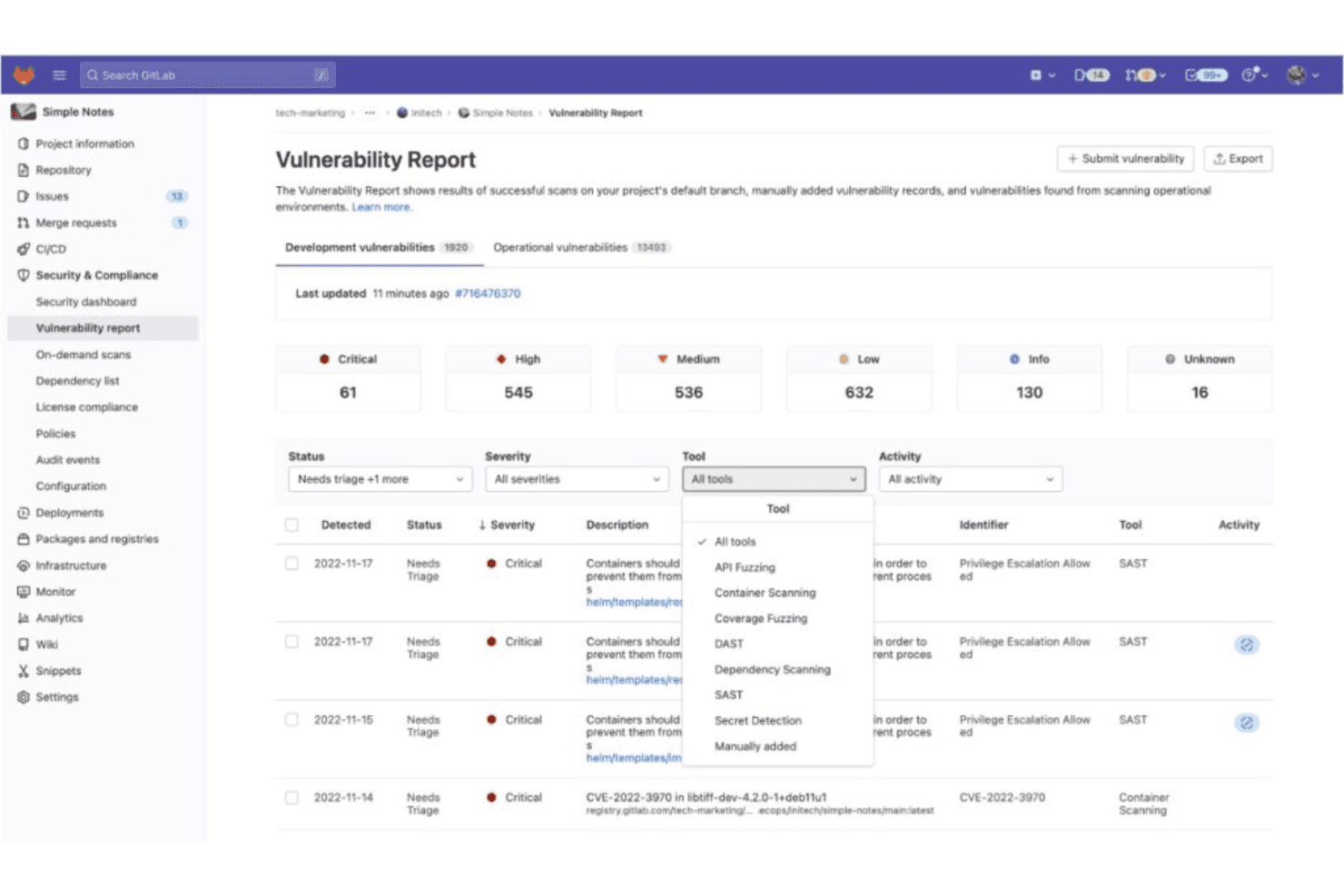
This is a view from GitLab's vulnerability report dashboard and it enables security teams with detailed scan reports. GitLab is a DevSecOps platform that covers Git-based source code management, native CI/CD pipelines, security scanning, and developer analytics in a single application.
Who Is GitLab Best For?
GitLab is a strong fit for DevOps and platform engineering teams that want CI/CD and source code management in one place, without stitching together separate tools.
Why I Picked GitLab
GitLab earns its spot on my shortlist because CI/CD isn't bolted on as an afterthought—it's native to the platform. I love that your
.gitlab-ci.ymlpipeline runs directly alongside your merge requests, surfacing SAST findings and code quality results inline before anything merges. Merge Trains are especially useful when multiple teams are committing fast, keeping the main branch green automatically without manual coordination.GitLab Key Features
- CODEOWNERS file: Automatically assigns required reviewers to merge requests based on file ownership rules defined in a single configuration file.
- Value Stream Analytics: Tracks median time spent at each stage of your development workflow, from issue creation through to production deployment.
- Merge Trains: Queues merge requests sequentially to verify each one against an up-to-date main branch before it lands, keeping your pipeline green automatically.
- CI/CD Catalog: A shared, versioned library of reusable pipeline components that teams can adopt and standardize across projects without duplicating configuration.
GitLab Integrations
GitLab integrates with Jira, Slack, Jenkins, VS Code, JetBrains IDEs, AWS, Google Cloud, and Microsoft Azure. REST and GraphQL APIs, webhooks, and the GitLab CLI support custom integrations and CI/CD workflows.
Pros and Cons
Pros:
- Deep built-in security scanning in pipelines
- Merge Trains keep main branch always green
- Native CI/CD integrates directly with code
Cons:
- Interface complexity can slow onboarding
- Free plan limits team size and features
Learn more about GitLab: Best for Git and TFVC in one hosted repo
- Free plan available
- From $6.00/user/month
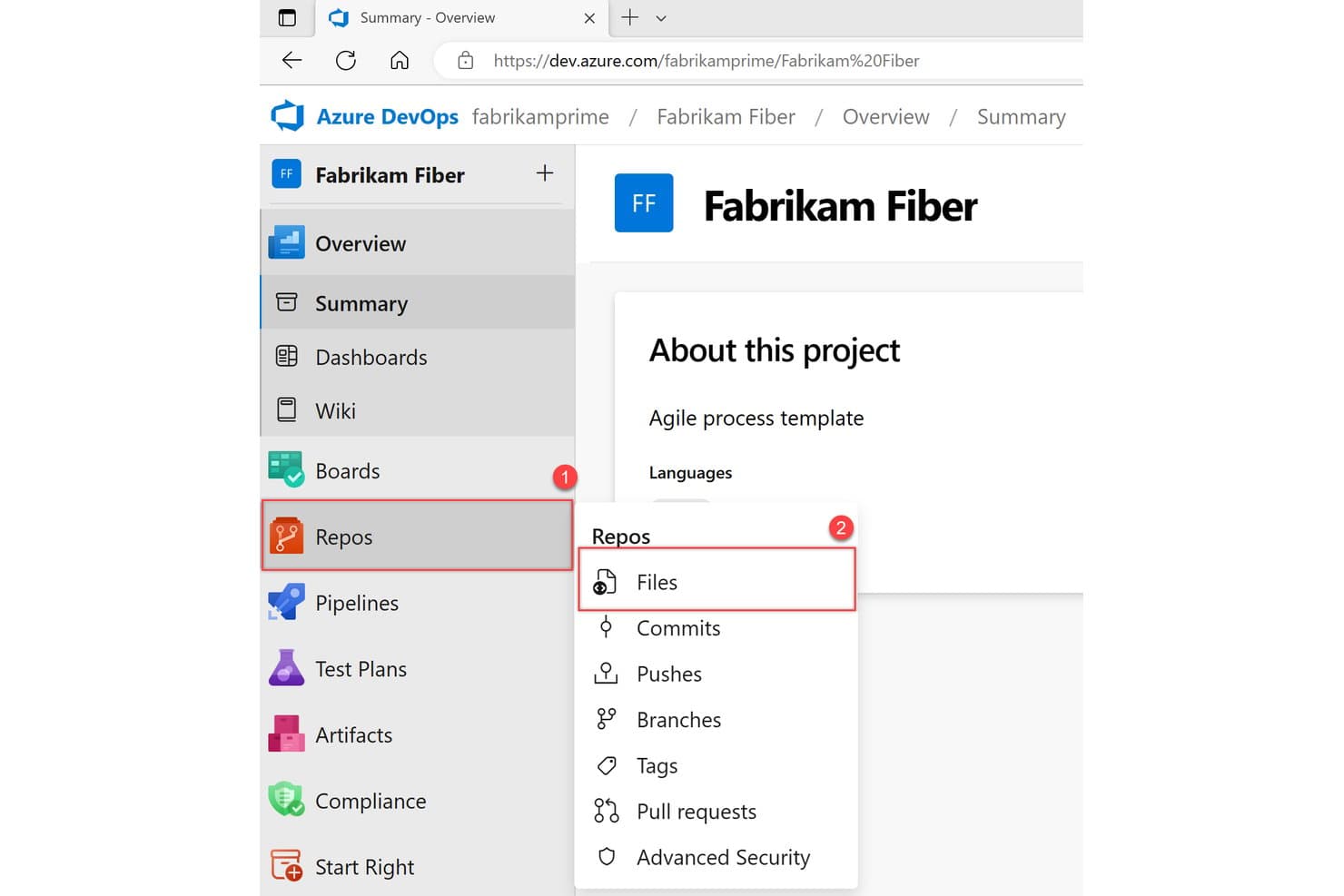
Azure Repos organizes code files, commits, branches, and pull requests in one place. Azure Repos is Microsoft's source code management solution within Azure DevOps that supports Git and TFVC version control, repository hosting, branch policies, pull request workflows, and CI/CD integration via Azure Pipelines.
Who Is Azure Repos Best For?
Azure Repos is a strong fit for enterprise teams already running on the Microsoft stack who need a single platform to manage both modern Git workflows and legacy TFVC repositories without migrating away from centralized version control.
Why I Picked Azure Repos
Azure Repos earns its spot on my list because it's the only major hosted platform that supports both Git and TFVC in a single repository service, which matters when your org is still running legacy centralized workflows alongside modern distributed ones. I especially like how branch policies let you enforce build validation and required reviewer counts at the branch level, so code quality gates are baked into the PR process rather than left to convention. The Copilot Code Review feature (now in public preview) adds automated code analysis directly on PR creation, which I find genuinely useful for catching issues before human reviewers even open the diff.
Azure Repos Key Features
- GitHub Advanced Security integration: Adds secret scanning, dependency scanning, and CodeQL static analysis directly into your repository workflow with PR annotations and merge-blocking status checks.
- Git LFS support: Handles large binary files within Git repositories, keeping repo performance intact for teams working with assets or large data files.
- Cross-repository code search: A free marketplace extension lets you search across all projects and repos simultaneously, with filtering by branch, file path, and code type.
- Azure DevOps Server (on-premises) deployment: Lets your team run the full Azure Repos experience on your own infrastructure for data sovereignty or air-gapped environment requirements.
Azure Repos Integrations
Azure Repos offers native integrations across the Microsoft ecosystem, including Azure Pipelines, Azure Boards, Azure Artifacts, Visual Studio, Visual Studio Code, and Microsoft Entra ID. Marketplace integrations include Jenkins, Terraform, Jira, Slack, and Microsoft Teams, with REST API, CLI, and webhooks for custom connectivity.
Pros and Cons
Pros:
- Built-in AI-assisted code review preview
- Highly configurable branch policies for quality gates
- Supports both Git and TFVC version control
Cons:
- Lacks native dashboard for DORA metrics
- Security scanning unavailable for on-premises installs
Learn more about Azure Repos:
Outro software de gestão de código-fonte
Abaixo encontra-se uma lista de software adicional de gestão de código-fonte que incluí na minha seleção, mas que não chegou aos 10 primeiros. Vale definitivamente a pena analisá-lo.
- 11PerforceBest for large binary file version control
- 12GerritBest for enforced server-side code review gates
- 13BacklogBest for code and project tracking in one tool
- 14Unity Version ControlBest for game dev teams mixing art and code assets
- 15GitKrakenGood for a visually appealing Git GUI
- 16Plastic SCMBest for visual versioning and distributed teams
- 17ForgejoBest for self-hosted Git with zero licensing cost
How I Evaluate Source Code Management Software
I split my evaluation into baseline criteria every SCM tool must meet—like Git hosting and PR workflows—and differentiators like AI-assisted review, security scanning, and deployment flexibility.
Core Functionality (Table Stakes For This List)
When I'm selecting tools for my list, I rank each one on a scale from 0 (does not offer the functionality) to 5 (excels in this area) for each core functionality listed below. Then, I calculate the tool's total score into a percentage. Each tool needs to achieve a minimum total score of 75% to be considered for inclusion.
- Code Search & Navigation: I value platforms with advanced code search capabilities, including symbol-level indexing and cross-repo search, enabling developers to quickly find and understand code.
- AI-Assisted Development: I look for built-in AI features like code completion, PR summarization, and automated review suggestions to enhance productivity and speed up development cycles.
- Security Scanning: I check for native security tools such as SAST, secret scanning, and dependency vulnerability alerts integrated directly into the repository workflow.
- Issue & Project Tracking: I prefer integrated issue tracking and project management tools that are connected to commits and pull requests for seamless traceability.
- Developer Insights & Analytics: I rely on platforms offering metrics like DORA, contributor activity, cycle time, and code quality dashboards to monitor and improve team performance.
Once I have a list of tools that meet the criteria, I consider what sets each platform apart.
Differentiating Factors (What Sets Vendors Apart)
Here's how I compare and contrast different vendors:
Standout Features
Built-in security scanning is a major differentiator—I look for native secret detection, dependency alerts, and SAST that flag vulnerabilities right in the PR workflow. AI-assisted features are also worth evaluating, since automated PR summaries and code suggestions can meaningfully reduce review cycles for busy teams. For engineering managers, I check whether platforms offer developer insights like DORA metrics and cycle time dashboards that surface real data on team throughput.
Beyond Features
Deployment flexibility matters a lot—some teams need cloud-hosted SaaS, while others in regulated industries require self-managed or air-gapped installations. I also evaluate compliance posture, checking for SOC 2, ISO 27001, or FedRAMP attestations depending on the organization's requirements. Pricing structure is another factor I weigh carefully, since per-user costs, including CI/CD minutes and storage limits, can make a platform affordable at 10 users but expensive at 200.
Como escolher software de gestão de código-fonte
É fácil ficar atolado em listas longas de funcionalidades e estruturas de preços complexas. Para o ajudar a manter-se concentrado enquanto percorre o seu processo único de seleção de software, apresentamos uma lista de verificação dos fatores a ter em conta:
| Fator | O que considerar |
|---|---|
| FatorEscalabilidade | O que considerarO software consegue crescer com a sua equipa? Procure opções que suportem o aumento do número de utilizadores e projetos sem problemas. Evite ferramentas que possam limitar o crescimento futuro. |
| FatorIntegrações | O que considerarFunciona bem com as suas ferramentas atuais? Verifique se se integra com o seu ambiente de desenvolvimento, pipelines de CI/CD e outras ferramentas essenciais. |
| FatorPersonalização | O que considerarPode adaptá-lo ao fluxo de trabalho da sua equipa? Certifique-se de que o software permite a personalização de fluxos de trabalho, permissões e notificações. |
| FatorFacilidade de utilização | O que considerarÉ fácil de utilizar? Avalie a interface e a navegação. Uma ferramenta difícil de utilizar pode tornar a sua equipa mais lenta. |
| FatorImplementação e integração inicial | O que considerarCom que rapidez pode começar? Tenha em consideração o tempo e os recursos necessários para a configuração e a formação. Procure plataformas com um forte suporte à integração inicial. |
| FatorCusto | O que considerarEnquadra-se no seu orçamento? Compare os modelos de preços e considere o custo total de propriedade, incluindo eventuais taxas ocultas ou poupanças a longo prazo. |
| FatorMedidas de segurança | O que considerarO seu código está seguro? Avalie as medidas de segurança do software, como a encriptação e os controlos de acesso, para proteger o seu código-fonte. |
| FatorDisponibilidade do suporte | O que considerarPode obter ajuda quando precisa? Verifique se o fornecedor oferece suporte 24 horas por dia, 7 dias por semana, e vários canais, como chat, e-mail ou telefone. |
O que é software de gestão de código-fonte?
O software de gestão do código-fonte, frequentemente designado por software de controlo de versões, organiza e acompanha as modificações ao código de programação. Os programadores utilizam estas ferramentas para colaborar em projetos, garantindo que as alterações ao código feitas por vários membros da equipa não entram em conflito. Para além da colaboração, estas plataformas também mantêm um histórico das versões do código, permitindo às equipas reverter para estados anteriores, se necessário, combinar alterações de diferentes origens e garantir que a base de código final permanece consistente e sem erros.
O principal objetivo é aumentar a eficiência, reduzir os riscos de substituição acidental e facilitar o trabalho simultâneo em projetos de grande dimensão. Um sistema de controlo de revisões não só permite às equipas de desenvolvimento acompanhar as alterações e gerir dependências, como também protege as versões anteriores dos projetos de software. Quer se trate de estabelecer permissões precisas, gerir dependências ou utilizar funcionalidades avançadas de software de código aberto, o sistema de gestão do código-fonte adequado transforma tarefas complexas em processos intuitivos.
Funcionalidades
Ao selecionar software de gestão do código-fonte, procure as seguintes funcionalidades essenciais:
- Controlo de versões: acompanha as alterações ao código ao longo do tempo, permitindo que vários programadores trabalhem simultaneamente sem substituírem o trabalho uns dos outros.
- Gestão de ramificações: permite aos programadores criar ramificações de código separadas para novas funcionalidades ou correções de erros, facilitando o desenvolvimento e os testes organizados.
- Combinação de código: combina alterações ao código provenientes de diferentes ramificações, garantindo um produto final coerente e resolvendo conflitos.
- Controlo de acesso: gere quem pode visualizar ou modificar o código, mantendo a segurança e a integridade da equipa de desenvolvimento.
- Acompanhamento do histórico do código: fornece um registo detalhado de todas as alterações ao código, ajudando os programadores a compreender a evolução da base de código.
- Suporte para integrações: liga-se a outras ferramentas de desenvolvimento, como pipelines de CI/CD, para proporcionar um fluxo de trabalho mais simples.
- Personalização: permite às equipas adaptar a ferramenta aos seus fluxos de trabalho específicos, aumentando a produtividade e a eficiência.
- Interface fácil de utilizar: simplifica a navegação e reduz a curva de aprendizagem, permitindo uma adoção mais rápida pela equipa.
- Medidas de segurança: protege o código com funcionalidades como encriptação e controlos de acesso, evitando acessos não autorizados.
- Recursos de integração: disponibiliza materiais de formação e apoio para ajudar os novos utilizadores a adquirir rapidamente os conhecimentos necessários e a trabalhar de forma eficaz.
Benefícios
A implementação de software de gestão do código-fonte proporciona vários benefícios à sua equipa e à sua empresa. Eis alguns dos que pode esperar:
- Melhoria da colaboração: permite que vários programadores trabalhem no mesmo projeto sem conflitos, graças ao controlo de versões e à gestão de ramificações.
- Integridade do código: mantém uma base de código fiável ao acompanhar as alterações e disponibilizar um histórico detalhado, garantindo que nada é perdido ou substituído.
- Segurança reforçada: protege o seu código com controlos de acesso e encriptação, reduzindo o risco de acessos não autorizados.
- Desenvolvimento eficiente: simplifica o processo de desenvolvimento ao integrar-se com outras ferramentas e disponibilizar funcionalidades como a combinação de código.
- Integração mais rápida: ajuda os novos membros da equipa a adquirir rapidamente os conhecimentos necessários através de materiais de formação e de uma interface fácil de utilizar.
- Adaptação personalizada do fluxo de trabalho: permite a personalização para responder às necessidades específicas da sua equipa, aumentando a produtividade e a eficiência.
- Perspetiva histórica: oferece informações valiosas sobre a evolução do código, ajudando a compreender decisões anteriores e a melhorar o desenvolvimento futuro.
Custos e preços
A seleção de software de gestão do código-fonte requer uma compreensão dos vários modelos de preços e planos disponíveis. Os custos variam consoante as funcionalidades, a dimensão da equipa, os complementos, entre outros fatores. A tabela abaixo resume os planos comuns, os respetivos preços médios e as funcionalidades normalmente incluídas nas soluções de software de gestão do código-fonte:
Tabela de comparação de planos de software de gestão do código-fonte
| Tipo de plano | Preço médio | Funcionalidades comuns |
|---|---|---|
| Tipo de planoPlano gratuito | Preço médio$0 | Funcionalidades comunsControlo de versões básico, armazenamento limitado e gestão de ramificações básica. |
| Tipo de planoPlano pessoal | Preço médio$5-$25/utilizador/mês | Funcionalidades comunsControlo de versões avançado, mais armazenamento e suporte básico. |
| Tipo de planoPlano empresarial | Preço médio$25-$50/utilizador/mês | Funcionalidades comunsSegurança reforçada, integrações, suporte prioritário e mais armazenamento. |
| Tipo de planoPlano empresarial de grande dimensão | Preço médio$50-$100/utilizador/mês | Funcionalidades comunsFuncionalidades personalizáveis, suporte dedicado, análise avançada e armazenamento ilimitado. |
Perguntas frequentes sobre software de gestão do código-fonte
Eis algumas respostas a perguntas comuns sobre software de gestão do código-fonte:
Como pode a gestão do código-fonte melhorar a capacidade de vários programadores trabalharem em conjunto numa parte do código?
O SCM permite que os programadores trabalhem no código em paralelo, evitando a substituição de alterações. Gere a fusão do código, acompanha as alterações e facilita a correção de erros e os lançamentos. Esta capacidade garante um trabalho de equipa eficiente e mantém o processo de desenvolvimento organizado e livre de conflitos.
Qual é a finalidade da gestão do código-fonte no DevOps?
O SCM no DevOps facilita a colaboração rápida nos fluxos de trabalho. Permite que as equipas trabalhem de forma eficiente, gerem as alterações ao código e integrem sem problemas outras ferramentas de DevOps. Esta integração ajuda a manter práticas de desenvolvimento consistentes e apoia a entrega contínua.
Quais são as ferramentas de SCM mais baratas e mais caras?
Isto pode variar consoante as novas ferramentas de SCM que entram no mercado e as ferramentas existentes que ajustam os seus preços. No entanto, aquando da minha última atualização, ferramentas como o Git e o Mercurial SCM tinham versões gratuitas. No extremo mais caro, as soluções empresariais de fornecedores como o IBM Rational ClearCase podem ter preços elevados, exigindo frequentemente um orçamento para determinar o preço exato.
Existem opções gratuitas disponíveis?
Sim, várias ferramentas de SCM disponibilizam versões gratuitas. O Git, por exemplo, é de código aberto e gratuito. Da mesma forma, o Mercurial SCM também é gratuito. No entanto, é importante salientar que, embora a funcionalidade principal possa ser gratuita, algumas funcionalidades ou integrações adicionais podem ter um custo.
Quais são os desafios comuns da implementação de software de gestão do código-fonte?
Os desafios podem incluir a gestão de integrações complexas, a garantia da segurança dos dados e a gestão da curva de aprendizagem para novos utilizadores. É importante ter um plano de integração claro e recursos de formação para resolver estas questões e garantir uma transição tranquila para a sua equipa.