

Navegar pela vasta extensão da Internet é como manobrar através de um icebergue: o que vê na Internet de superfície através dos motores de pesquisa comuns é apenas a ponta. Sob a superfície encontram-se a Internet profunda e a darknet, onde cibercriminosos e piratas informáticos se envolvem em atividades ilegais. Estes agentes de ameaça exploram o anonimato destes espaços para comercializar informações pessoais identificáveis (PII) e dados sensíveis, bem como para lançar várias formas de ciberataques, como malware, ransomware e burlas.
Why Trust Our Software Recommendations
6,700+
Reviews
20
Industry experts
16+
Evaluation factors
14
Years
Our team has been testing and reviewing software since 2012. As tech leaders ourselves, we know how difficult—and important—it is to choose the right software.
For this guide, we evaluated tools using hands-on testing and independent research, scoring tools using our selection criteria.
Our reviews reflect our human editorial judgment, not a sales pitch.
Expert reviewers:
- Paulo Gardini MiguelTech Director
 Tim FisherVP of AI
 Gabriel RosasTech Lead & Software Architect
 Christhian GruhnTech Lead & Platform Architect

Tabela comparativa de ferramentas de monitorização da dark web
Esta tabela comparativa resume os detalhes de preços das minhas principais escolhas de ferramentas de monitorização da dark web:
| Tool | Best For | Trial Info | Price | ||
|---|---|---|---|---|---|
| 1 | Best for AI-powered preemptive threat takedowns | Free demo available | Pricing upon request | Website | |
| 2 | Best for real-time breach alerts | Pricing upon request | Website | ||
| 3 | Best for 24/7 dark web monitoring | Free demo available | Pricing upon request | Website | |
| 4 | Best for linking leaked data to brand scams | Free demo available | Pricing upon request | Website | |
| 5 | Best for individual users requiring password management and dark web scans | 30-day free trial + free plan available | From $3/user/month (billed annually) | Website | |
| 6 | Best for enterprise-level credential exposure detection | Pricing upon request | Website | ||
| 7 | best-dark-web-monitoring-tools | Free demo available | Pricing upon request | Website | |
| 8 | Best for real-time threat intelligence capabilities | Pricing upon request | Website | ||
| 9 | Best for its data visualization and dark web analysis | $35/user/month (billed annually) | Website | ||
| 10 | Best for identity theft protection and multi-device support | From $2.50/user/month (billed annually) | Website |


Análises das melhores ferramentas de monitorização da dark web
Abaixo encontram-se os meus resumos detalhados das melhores ferramentas de monitorização da dark web que entraram na minha seleção. As minhas análises oferecem uma visão detalhada das principais funcionalidades, vantagens e desvantagens, integrações e casos de utilização ideais de cada ferramenta, para o ajudar a encontrar a melhor opção para si.
 Best for AI-powered preemptive threat takedowns
- Free demo available
- Pricing upon request
Visit WebsiteCustomer Rating:5/5
Netcraft offers a Deep & Dark Web monitoring dashboard that displays data scanned, results found, and intelligence findings for a monitored bank entity. Netcraft is a threat detection and takedown platform that monitors dark web forums, marketplaces, and encrypted messaging channels for exposed credentials, brand mentions, and financial data.
Who Is Netcraft Best For?
Netcraft suits enterprise security teams and financial institutions that need automated, large-scale threat takedowns alongside dark web monitoring.
Why I Picked Netcraft
Netcraft earns its spot because of its Verified Attack Indicators, which let my team disrupt threats before attacks go live. I particularly like that dark web findings, such as exposed credentials found in automated vending cart logs, can trigger takedown requests directly from the platform. In practice, Netcraft's median phishing takedown time is 33 minutes, the fastest I've seen in this category.
Netcraft Key Features
- Dark web source coverage: Monitors forums, marketplaces, automated vending carts, and encrypted messaging apps like Telegram and Discord.
- Brand and executive monitoring: Tracks mentions of domains, brands, product names, and executive identities on illicit sources.
- Comprehensive credential detection: Finds exposed credentials, API keys, and personal data from a wide range of breach dumps.
- SIEM and SOAR integrations: Offers native connectors for Splunk, Microsoft Sentinel, Cortex XSOAR, and more.
Netcraft Integrations
Netcraft offers native integrations with Splunk, Microsoft Sentinel, Cortex XSOAR, ThreatConnect, and Slack. An API is also available for custom integrations.
Pros and Cons
Pros:
- Covers Telegram and Discord monitoring natively
- AI detects threats before attacks launch
- Fastest phishing takedowns in the category
Cons:
- Primarily focused on brand and phishing threats
- Limited self-service options for lean teams
Learn more about Netcraft:

NordStellar showcases digital executive protection with a focus on securing communication channels. NordStellar is a threat exposure management platform focused on dark web monitoring and proactive threat detection. Designed to enhance your organization's security posture, it offers crucial tools to help you stay ahead of potential cybersecurity threats.
Why I Picked NordStellar: I picked NordStellar for its real-time data breach monitoring, which delivers instant alerts so you can respond quickly to threats. It also tracks company-related keywords on dark web forums, offering insights into potential risks, while its brand protection feature prevents unauthorized use of your name. With attack surface management that detects vulnerabilities early, NordStellar provides strong, proactive security for your organization.
Standout Features & Integrations:
Features include tracking of company-related keywords on dark web forums, providing insights into potential threats or unauthorized activities involving your brand. The platform aggregates threat intelligence from over 36,000 sources, giving you a comprehensive view of potential risks. Additionally, it offers risk-based prioritization, helping you focus on the most critical threats first
Integrations include Splunk, QRadar, Datadog, Fortinet, Sentinel, Elastic, Cortex, and more.
Pros and Cons
Pros:
- Integrates with major SIEM platforms
- Tracks keywords across dark web
- Real-time alerts detect breached data
Cons:
- Advanced features in higher tiers
- Pricing requires custom quote requests
Learn more about NordStellar: Best for 24/7 dark web monitoring
- Free demo available
- Pricing upon request
Visit WebsiteCustomer Rating:4.2/5
ManageEngine Log360's incident workbench provides alerts when it detects compromised data on the dark web. ManageEngine Log360 is a comprehensive Security Information and Event Management (SIEM) solution designed to protect organizations from threats across on-premises, cloud, and hybrid environments.
Why I Picked ManageEngine Log360: It provides real-time threat intelligence and 24/7 monitoring for leaked sensitive information through its partnership with Constella Intelligence. The system continuously scans the dark web for any mention of an organization's sensitive information, such as domain names, employee credentials, and other personally identifiable information (PII). This proactive approach helps in identifying and mitigating threats before they can cause significant damage.
Standout Features & Integrations:
Standout features include instant alerts whenever leaked credentials or critical information are found on the dark web, an Incident Workbench that offers contextual data analysis, enabling effective threat hunting and swift responses to credential leaks, and advanced analytics and monitoring capabilities that provide comprehensive security visibility.
The tool integrates with Microsoft Exchange, Amazon Web Services (AWS), Microsoft Entra ID, Microsoft Azure, and Active Directory.
Pros and Cons
Pros:
- Excellent visibility across systems
- Effective for auditing all IT levels in an organization
- Provides real-time monitoring and alerting
Cons:
- Initial setup can be complex
- Potential performance issues with large data volumes
Learn more about ManageEngine Log360: Best for linking leaked data to brand scams
- Free demo available
- Pricing upon request
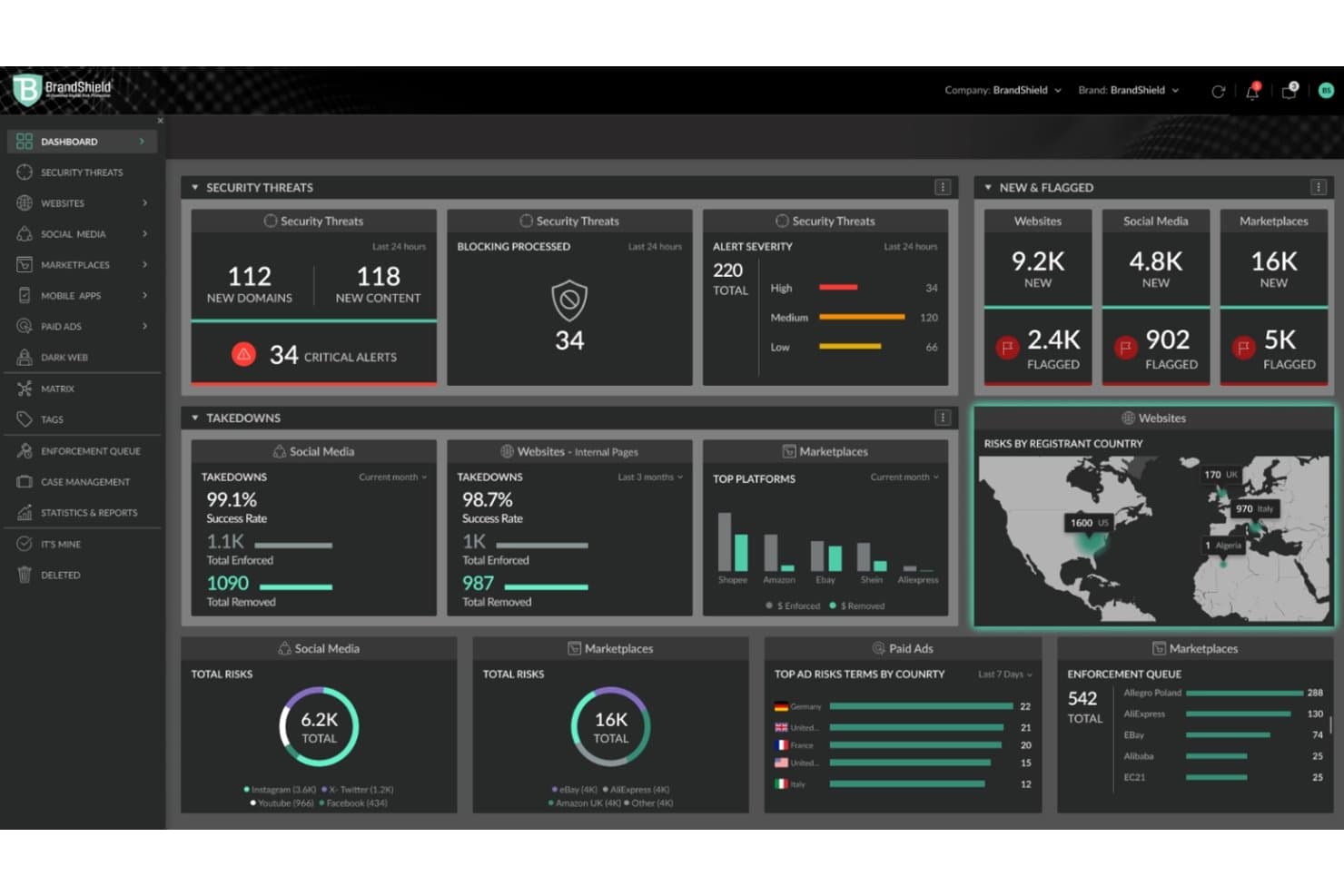
BrandShield tracks threats, takedowns, and flagged risks in one dashboard. BrandShield is a digital threat monitoring platform that scans criminal forums, dark web marketplaces, and encrypted channels for exposed credentials, leaked data, and brand-related criminal activity.
Who Is BrandShield Best For?
BrandShield is a strong fit for security and brand protection teams that need to connect dark web threat signals directly to active phishing, impersonation, and fraud campaigns targeting their organization.
Why I Picked BrandShield
BrandShield earns its spot on my shortlist because it doesn't treat dark web findings as isolated alerts. What I find most useful is how it connects a leaked employee credential to a lookalike domain, fake login page, and impersonation account as one coordinated investigation, not four separate tickets. Its SOC analysts and Threat Hunters validate AI-flagged signals and assess real-world impact before escalating, so your team isn't chasing noise. That linkage between leaked data and active brand scams is where BrandShield genuinely stands apart.
BrandShield Key Features
- Criminal forum and marketplace scanning: Monitors underground forums, encrypted messaging channels, and invite-only dark web communities for organization-linked data.
- AI.ClusterX™ threat clustering: Groups related domains, accounts, and scam assets into connected attack networks so you can prioritize by campaign, not individual alerts.
- 24/7 incident response team: A dedicated SOC team reviews threats continuously and begins escalation within minutes of identifying high-risk activity.
- Social engineering case management: Logs each detected threat, enforcement action, and resolution to support internal escalation and legal documentation.
BrandShield Integrations
Native integrations are not clearly documented, and BrandShield’s customer-facing API availability is not stated.
Pros and Cons
Pros:
- Analysts validate and prioritize threat signals
- Links leaked credentials to phishing campaigns
- Reviewers praise responsive enforcement and reporting
Cons:
- Monitored underground sources aren’t named
- No searchable historical breach database
Learn more about BrandShield Ltd.: Best for individual users requiring password management and dark web scans
- 30-day free trial + free plan available
- From $3/user/month (billed annually)
Visit WebsiteCustomer Rating:4.6/5
This image is a demo screenshot of how to enable dark web alerts with LastPass. Its security dashboard allows for continuous dark web scanning and monitoring of email addresses in a database of breached credentials. LastPass is a password management tool that offers additional features for dark web scanning, making it a comprehensive option for individual users who need both.
Why I Picked LastPass: I picked LastPass for its combination of password management and dark web scanning features. When I compared it to similar offerings, I found LastPass provides a broader range of features catering to individual users. I consider it best for individual users requiring password management and dark web scans.
Standout Features & Integrations:
LastPass provides features like secure password storage, password sharing, and dark web scans for leaked credentials.
The tool integrates with browsers for easy password retrieval and can also integrate with other single sign-on solutions.
Pros and Cons
Pros:
- Affordable pricing
- Easy-to-use browser integrations
- Offers both password management and dark web scans
Cons:
- Some users may find the interface less intuitive than competitors’
- Billed annually, not monthly
- Limited scalability for large organizations
Learn more about LastPass:

Here is the screenshot from SpyCloud showing the automated remediation of malware exposure reports. It prevents account takeover, and enhances password health in a single click. SpyCloud specializes in enterprise-level credential exposure detection to protect against account takeover and fraud. Its services are geared towards large enterprises that are at high risk of credential attacks.
Why I Picked SpyCloud: I picked SpyCloud because of its robust capabilities in credential exposure detection specifically designed for enterprise-level operations. The tool excels at identifying exposed credentials in real time, making it best for enterprise-level credential exposure detection.
Standout Features & Integrations:
SpyCloud offers automated remediation and real-time alerts among its standout features. Its data feeds can be integrated with SIEM systems, making it an excellent addition to enterprise-level cybersecurity efforts.
Pros and Cons
Pros:
- Easily integrates with SIEM systems
- Automated remediation and real-time alerts
- Specializes in enterprise-level credential exposure detection
Cons:
- Could be overkill for organizations with basic security needs
- Geared towards large enterprises, not suitable for smaller operations
- Pricing information not readily available
Learn more about SpyCloud:

The dashboard offers a quick visual representation of your risk and metrics indicating the ZeroFox Platform's effectiveness in safeguarding your assets from malicious social media activity. ZeroFox specializes in digital risk protection, focusing on brand protection and tracking digital footprints across various online platforms. Its capabilities make it especially useful for businesses that are concerned about brand reputation and exposure online.
Why I Picked ZeroFox: I chose ZeroFox because it offers unique features aimed specifically at brand protection and tracking digital footprints. This specialization gives it an edge in addressing issues that companies concerned about brand safety face. I believe it's best for brand protection and digital footprint tracking due to its robust set of features in these areas.
Standout Features & Integrations:
ZeroFox provides features like real-time alerts for brand impersonation, data leak tracking, and customer engagement protection.
For integrations, ZeroFox supports various social media platforms and CRM solutions, allowing businesses to centralize their brand protection initiatives.
Pros and Cons
Pros:
- Wide range of integrations including social media platforms
- Offers robust digital footprint tracking
- Specializes in brand protection
Cons:
- May not offer broader cybersecurity features found in comprehensive platforms
- Pricing may be steep for some organizations
- The minimum 10-seat requirement could be limiting for small businesses
Learn more about ZeroFox:

Here's a device screenshot sample dashboard in Cyberint displaying the 'alert' results. Cyberint specializes in providing real-time threat intelligence capabilities to safeguard against cyber threats. The platform provides comprehensive insights and analytics to identify and tackle cybersecurity threats as they occur.
Why I Picked Cyberint: I selected Cyberint for its exceptional focus on real-time threat intelligence capabilities. The platform excels in providing timely and actionable insights, making it stand out for businesses that require up-to-the-minute threat data. It's best for organizations looking for real-time threat intelligence capabilities.
Standout Features & Integrations:
Cyberint offers real-time threat intelligence feeds, incident response capabilities, and digital risk protection. These features make it highly effective for proactively tackling cyber threats.
For integrations, Cyberint works well with various SIEM solutions and threat intelligence platforms, enhancing its value as a real-time threat intelligence solution.
Pros and Cons
Pros:
- Integrations with SIEM solutions
- Offers incident response capabilities
- Focuses on real-time threat intelligence
Cons:
- Requires a team with expertise in threat intelligence to fully leverage its capabilities
- May be too specialized for small businesses
- Pricing information is not transparent
Learn more about Cyberint: Best for its data visualization and dark web analysis
- $35/user/month (billed annually)

The Webz.io dashboard provides a comprehensive view of your usage data, queries, subscription plan details, and other relevant information. Webz.io offers cybersecurity solutions that focus on data visualization and dark web analysis. This tool is particularly effective for organizations that need insights into the hidden parts of the internet.
Why I Picked Webz.io: I picked Webz.io because of its strength in data visualization and dark web analysis. In comparing it to other options, I found that its features provide a compelling reason for organizations seeking these specific capabilities. It's best for its data visualization and dark web analysis.
Standout Features & Integrations:
Webz.io offers features like dark web monitoring, data visualizations for easier comprehension of threats, and real-time analytics.
As for integrations, Webz.io can be integrated with various threat intelligence platforms and SIEM solutions to provide a comprehensive cybersecurity landscape.
Pros and Cons
Pros:
- Offers real-time analytics for immediate insights
- Integrates with various threat intelligence platforms
- Specializes in data visualization and dark web analysis
Cons:
- Pricing could be prohibitive for smaller organizations
- May not be suitable for organizations without a need for dark web analysis
- Billed annually, making it a longer-term commitment
Learn more about Webz.io: Best for identity theft protection and multi-device support
- From $2.50/user/month (billed annually)

Here's what the dashboard of the LogMeOnce password manager looks like. It allows businesses of all sizes to securely manage login credentials. LogMeOnce is a cybersecurity tool designed to safeguard your digital identity by focusing on identity theft protection. It also offers robust multi-device support, which makes it versatile for users who frequently switch between different platforms.
Why I Picked LogMeOnce: I selected LogMeOnce for this list due to its dual focus on identity theft protection and multi-device support. These two capabilities make it distinct in the crowded cybersecurity marketplace. It excels at protecting your digital identity across a variety of platforms, which is why it's best for identity theft protection and multi-device support.
Standout Features & Integrations:
One of the most crucial features of LogMeOnce is its Passwordless PhotoLogin, which allows you to gain access to your account without requiring a master password. Another compelling feature is the Anti-Theft system, which offers a range of functionalities from remote lock to data wipe.
For integrations, LogMeOnce provides out-of-the-box compatibility with Active Directory, LDAP, and a variety of SSO solutions, making it easier for enterprises to adopt it into their existing infrastructure.
Pros and Cons
Pros:
- Out-of-the-box integrations with enterprise solutions
- Extensive multi-device support
- Robust identity theft protection features
Cons:
- Limited customer support outside business hours
- Can be overwhelming for users unfamiliar with cybersecurity tools
- Requires annual commitment for the most cost-effective plan
Learn more about LogMeOnce:
Outras ferramentas de monitorização da dark web
Eis algumas opções adicionais de ferramentas de monitorização da dark web que não entraram na minha seleção, mas que ainda vale a pena conhecer:
- 11ImmuniWebBest for compliance-driven organizations needing GDPR and HIPAA audits
- 12Progress WhatsUp GoldBest for network administrators seeking extended dark web monitoring
- 13ID AgentBest for MSPs and resellers focusing on small businesses
- 14DarkIQBest for offering flexible alert configurations
- 15flareBest for scalability, ideal for startups
- 16CYRISMABest for integrating with existing security stacks
- 17PhishLabsbest-dark-web-monitoring-tools
- 18Flashpoint Intelligence Platformbest-dark-web-monitoring-tools
- 19uBreachbest-dark-web-monitoring-tools
- 20InsecureWebbest-dark-web-monitoring-tools
- 21Onticbest-dark-web-monitoring-tools
- 22Defendify All-In-One Cybersecurity Solutionbest-dark-web-monitoring-tools
- 23Recorded Futurebest-dark-web-monitoring-tools
- 24Constella Intelligence APIbest-dark-web-monitoring-tools
- 25DarkOwlbest-dark-web-monitoring-tools
How I Evaluate Dark Web Monitoring Tools
I split my evaluation into two layers: baseline requirements every tool must clear—like real dark web crawling and credential alert delivery—and the differentiators that set the best options apart.
Core Functionality (Table Stakes For This List)
When I'm selecting tools for my list, I rank each one on a scale from 0 (does not offer the functionality) to 5 (excels in this area) for each core functionality listed below. Then, I calculate the tool's total score into a percentage. Each tool needs to achieve a minimum total score of 65% to be considered for inclusion.
- Dark Web Source Coverage: I evaluate the breadth of sources each tool crawls, from Tor marketplaces and paste sites to closed criminal forums and encrypted channels like Telegram.
- Credential & PII Detection: Each tool should surface exposed corporate credentials and customer PII from breach dumps, combolists, and listings across illicit marketplaces.
- Real-Time Alert Delivery: I check whether alerts fire in real time across multiple channels, since a 48-hour delay on a leaked admin credential can mean the difference between a reset and a breach.
- Asset & Keyword Configuration: The tool should let you define monitored assets like domains, IP ranges, executive names, and custom keywords rather than locking you into rigid templates.
- Threat Context & Reporting: Raw hits aren't useful without context. I look for enrichment like threat actor attribution, severity scoring, and reports you can hand to leadership or compliance teams.
- Remediation & Integration Workflows: I evaluate whether the tool connects to platforms like Splunk, ServiceNow, or Cortex XSOAR and supports actions like forced password resets or takedown requests.
Once I have a list of tools that meet this criteria, I consider what sets each platform apart.
Differentiating Factors (What Sets Vendors Apart)
Here's how I compare and contrast different vendors:
Standout Features
Tools that go beyond automated crawling with human analyst engagement in closed forums give you intelligence you'd never get from a crawler alone. I also look for automated takedown services—when a phishing domain spoofing your brand goes live, initiating removal directly from the platform saves hours of manual coordination. Attack surface correlation is another differentiator worth evaluating, since linking a leaked credential to an exposed RDP port turns a finding into an actionable priority.
Beyond Features
Whether a tool offers managed services or self-service matters depending on your team. A two-person security team benefits from vendor analysts triaging alerts, while a mature SOC wants raw data access and API flexibility. I also evaluate compliance alignment—if you're preparing for a cyber insurance renewal or audit, the tool should generate evidence mapped to frameworks like SOC 2 or PCI-DSS. Pricing transparency is worth checking too, especially for MSPs who need multi-tenant support without unpredictable per-client costs.
Como escolher uma ferramenta de monitorização da dark web
É fácil perder-se em longas listas de funcionalidades e estruturas de preços complexas. Para o ajudar a manter-se concentrado enquanto conduz o seu processo específico de seleção de software, eis uma lista de verificação dos fatores a ter em conta:
| Fator | O que deve considerar |
|---|---|
| FatorEscalabilidade | O que deve considerarA ferramenta pode crescer de acordo com as suas necessidades? Procure opções que permitam gerir um volume crescente de dados e utilizadores sem custos ou complexidade adicionais. |
| FatorIntegrações | O que deve considerarÉ compatível com os seus sistemas atuais? Verifique a compatibilidade com o seu software de segurança e as suas plataformas de dados para garantir operações sem problemas. |
| FatorPersonalização | O que deve considerarPode adaptá-la aos seus fluxos de trabalho? Procure definições flexíveis que lhe permitam ajustar os alertas e os relatórios às suas necessidades específicas. |
| FatorFacilidade de utilização | O que deve considerarA interface é intuitiva? Certifique-se de que a sua equipa consegue navegar sem precisar de ajuda constante, poupando tempo e reduzindo erros. |
| FatorImplementação e integração inicial | O que deve considerarCom que rapidez pode começar? Avalie a curva de aprendizagem e a disponibilidade de recursos de apoio, como tutoriais e guias. |
| FatorCusto | O que deve considerarEnquadra-se no seu orçamento? Tenha em consideração os custos iniciais e as taxas recorrentes. Procure custos ocultos associados a funcionalidades ou à adição de utilizadores. |
| FatorMedidas de segurança | O que deve considerarResponde às suas necessidades de segurança? Avalie as normas de encriptação e as práticas de tratamento de dados para proteger informações sensíveis contra ameaças. |
| FatorRequisitos de conformidade | O que deve considerarEstá em conformidade com os regulamentos aplicáveis ao seu setor? Verifique a conformidade com normas como o RGPD ou a HIPAA para evitar problemas legais. |
O que são ferramentas de monitorização da dark web?
As ferramentas de monitorização da rede obscura são soluções de software que acompanham e alertam os utilizadores relativamente à exposição de informações sensíveis na rede obscura. Os profissionais de cibersegurança e as equipas de TI utilizam geralmente estas ferramentas para proteger as suas organizações contra violações de dados e roubo de identidade. A monitorização de fóruns da rede obscura, o envio de alertas aos utilizadores sobre violações e o acompanhamento de credenciais comprometidas ajudam a identificar ameaças numa fase inicial e a manter os dados seguros. Depois de detetadas as ameaças, o software de perícia digital pode ajudar a investigar toda a extensão de potenciais violações. De um modo geral, estas ferramentas proporcionam uma proteção essencial contra a exposição não autorizada de dados.
Funcionalidades
Ao selecionar ferramentas de monitorização da rede obscura, procure as seguintes funcionalidades principais:
- Pesquisa da rede obscura: Monitoriza fóruns e mercados da rede obscura para identificar dados divulgados.
- Notificações de alerta: Envia alertas em tempo real para o informar sobre potenciais violações ou ameaças.
- Acompanhamento de credenciais: Mantém o controlo das credenciais comprometidas para impedir o acesso não autorizado.
- Relatórios e análise: Fornece relatórios detalhados sobre as conclusões para ajudar a avaliar os riscos e a tomar medidas.
- Capacidades de integração: Liga-se aos sistemas de segurança existentes para uma estratégia de defesa unificada.
- Definições personalizáveis: Permite aos utilizadores adaptar os alertas e relatórios às suas necessidades específicas.
- Deteção de ameaças baseada em IA: Utiliza inteligência artificial para identificar ameaças com maior precisão.
- Suporte multilingue: Disponibiliza opções linguísticas para responder às necessidades de diferentes grupos de utilizadores.
- Análise de dados históricos: Examina dados anteriores para detetar tendências e antecipar ameaças futuras.
Vantagens
A implementação de ferramentas de monitorização da rede obscura proporciona várias vantagens para a sua equipa e para a sua empresa. Eis algumas das que pode esperar:
- Deteção precoce de ameaças: Identifique potenciais ameaças numa fase inicial através da pesquisa da rede obscura e das notificações de alerta.
- Proteção de dados: Proteja informações sensíveis acompanhando credenciais comprometidas e impedindo o acesso não autorizado.
- Avaliação de riscos: Utilize os relatórios e a análise para avaliar os riscos e tomar medidas informadas.
- Integração de segurança melhorada: Reforce a sua postura de segurança global integrando estas ferramentas nos sistemas existentes.
- Adaptação personalizada: Adapte os alertas e relatórios às suas necessidades específicas com definições personalizáveis.
- Antecipação de tendências: Preveja ameaças futuras através da análise de dados históricos em busca de padrões.
- Alcance global: Responda às necessidades de equipas diversificadas com suporte multilingue.
Custos e preços
A seleção de ferramentas de monitorização da rede obscura exige uma compreensão dos vários modelos de preços e planos disponíveis. Os custos variam consoante as funcionalidades, a dimensão da equipa, os complementos e outros fatores. A tabela abaixo resume os planos comuns, os respetivos preços médios e as funcionalidades normalmente incluídas nas soluções de ferramentas de monitorização da rede obscura:
Tabela de comparação de planos para ferramentas de monitorização da rede obscura
| Tipo de plano | Preço médio | Funcionalidades comuns |
|---|---|---|
| Tipo de planoPlano gratuito | Preço médio$0 | Funcionalidades comunsMonitorização básica, alertas limitados e suporte da comunidade. |
| Tipo de planoPlano pessoal | Preço médio$5-$25/utilizador/mês | Funcionalidades comunsPesquisa da rede obscura, notificações de alerta e relatórios básicos. |
| Tipo de planoPlano empresarial | Preço médio$30-$60/utilizador/mês | Funcionalidades comunsAnálise avançada, capacidades de integração e definições personalizáveis. |
| Tipo de planoPlano empresarial de grande escala | Preço médio$70-$120/utilizador/mês | Funcionalidades comunsDeteção de ameaças baseada em IA, suporte multilingue, análise de dados históricos e suporte premium. |
Perguntas frequentes sobre ferramentas de monitorização da dark web
Aqui estão algumas respostas a perguntas comuns sobre ferramentas de monitorização da dark web:
O meu SSN pode ser removido da dark web?
É quase impossível remover o seu SSN ou outras informações pessoais da dark web. Estes sites têm pouca responsabilidade legal e os dados podem estar espalhados por várias localizações, o que dificulta o seu rastreio. É crucial monitorizar e proteger os seus dados de forma proativa.
É boa ideia ativar a monitorização da dark web?
Ativar a monitorização da dark web é uma decisão inteligente. Ajuda a prevenir ou minimizar os danos causados por ciberataques, acompanhando os dados sensíveis da sua organização e notificando-o caso sejam encontrados na dark web, permitindo uma ação atempada.
O que devo fazer se os meus dados forem encontrados na dark web?
Se os seus dados forem encontrados na dark web, aja rapidamente. Altere as palavras-passe comprometidas, informe as partes afetadas e monitorize as contas para detetar atividades suspeitas. Considere utilizar serviços de proteção contra roubo de identidade para obter segurança adicional.
Com que frequência deve ser realizada a monitorização da dark web?
A monitorização contínua é ideal para se manter à frente das ameaças. Muitas ferramentas oferecem análise e alertas em tempo real, garantindo que é informado de quaisquer violações de dados à medida que ocorrem. A monitorização regular ajuda a manter a sua postura de segurança e a responder prontamente às ameaças.
A monitorização da dark web é legítima?
A monitorização da dark web é geralmente legítima, mas a eficácia pode variar. Alguns sites da dark web bloqueiam bots de monitorização ou ocultam informações atrás de sistemas de pagamento. É importante escolher ferramentas de confiança que consigam ultrapassar estes desafios de forma eficaz. critérios de seleção
Estas ferramentas podem integrar-se na minha infraestrutura de segurança existente?
Muitas destas ferramentas disponibilizam integrações através de API que permitem incorporá-las na sua estrutura de cibersegurança existente, simplificando assim a deteção e a resposta a ameaças.