

As melhores ferramentas de teste para Android ajudam as equipas a detetar erros numa fase inicial, garantir a estabilidade das aplicações em vários dispositivos e manter um desempenho consistente antes do lançamento. Estas ferramentas simplificam os testes repetitivos, verificam a compatibilidade entre versões do sistema operativo e ajudam as equipas a lançar atualizações mais rapidamente e com menos regressões.
As equipas começam frequentemente a procurar melhores ferramentas de teste quando o controlo de qualidade manual se torna demasiado lento, os testes em emuladores não correspondem aos resultados do mundo real ou a depuração de ambientes Android fragmentados consome demasiado tempo de desenvolvimento. Problemas como compilações inconsistentes, pouca visibilidade dos testes e ciclos de feedback lentos podem rapidamente comprometer os calendários de entrega.
Trabalhei com equipas de desenvolvimento e de controlo de qualidade na implementação de testes automatizados para Android em pipelines de CI/CD em produção, avaliando ferramentas com base na fiabilidade no mundo real, na integração e na precisão dos relatórios.
Neste guia, ficará a saber quais são as ferramentas de teste para Android que realmente ajudam a melhorar a qualidade das aplicações, reduzir os ciclos de testes e facilitar a manutenção de um desempenho consistente em vários dispositivos.
Why Trust Our Software Recommendations
6,700+
Reviews
20
Industry experts
16+
Evaluation factors
14
Years
Our team has been testing and reviewing software since 2012. As tech leaders ourselves, we know how difficult—and important—it is to choose the right software.
For this guide, we evaluated tools using hands-on testing and independent research, scoring tools using our selection criteria.
Our reviews reflect our human editorial judgment, not a sales pitch.
Expert reviewers:
- Paulo Gardini MiguelTech Director
 Tim FisherVP of AI
 Gabriel RosasTech Lead & Software Architect
 Christhian GruhnTech Lead & Platform Architect

Tabela comparativa de ferramentas de teste para Android
Esta tabela comparativa resume os detalhes de preços das minhas principais escolhas de ferramentas de teste para Android.
| Tool | Best For | Trial Info | Price | ||
|---|---|---|---|---|---|
| 1 | Best for testing hardware-dependent app flows | Free plan + free demo available | From $17/month (billed annually) | Website | |
| 2 | Best for scriptless automation workflow | Free trial available | From $199/month/year (minimum of 4 seats) | Website | |
| 3 | Best for real-time performance monitoring | Free plan available | From $10/user/month | Website | |
| 4 | Best for codeless test creation | Free demo available | Pricing upon request | Website | |
| 5 | Best for AI-driven test automation | Free trial + free demo available | Pricing upon request | Website | |
| 6 | Best for real device testing | Free trial + free demo available | From $83/month | Website | |
| 7 | Best for early-stage app testing | Free to use | Website | ||
| 8 | Best for integrated development environment | Free plan available | Free plan available | Website | |
| 9 | Best for behavior-driven development | Free to use | Website | ||
| 10 | Best for end-to-end testing on React Native | Free to use | Website |


Análises das melhores ferramentas de teste para Android
Abaixo encontrará os meus resumos detalhados das melhores ferramentas de teste para Android que entraram na minha seleção. As minhas análises apresentam uma visão detalhada das principais funcionalidades, vantagens e desvantagens, integrações e casos de utilização ideais de cada ferramenta, para o ajudar a encontrar a melhor opção para si.
 Best for testing hardware-dependent app flows
- Free plan + free demo available
- From $17/month (billed annually)
Visit WebsiteCustomer Rating:4.9/5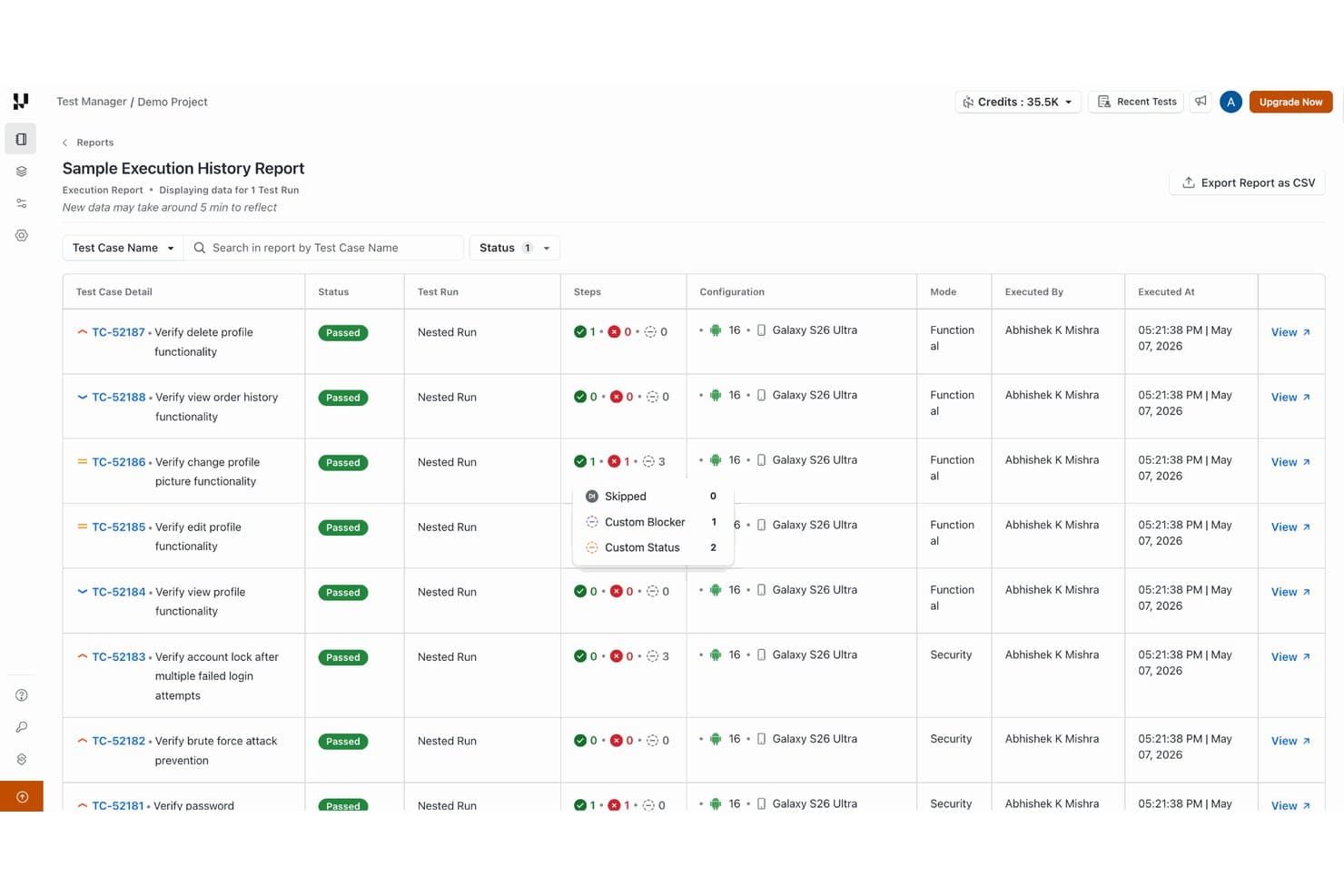
TestMu AI tracks test execution history with step-level status details. TestMu AI is a cloud-based real device testing platform that lets you run manual and automated tests on physical Android and iOS devices, with support for Appium, Espresso, and XCUITest automation, parallel execution, network simulation, and AI-driven test authoring via KaneAI.
Who Is TestMu AI Best For?
TestMu AI is a strong fit for mobile QA engineers and developers who need to test hardware-dependent app flows—like biometrics, SIM/SMS, GPS, and camera injection—on real physical devices.
Why I Picked TestMu AI
TestMu AI earns its spot on my shortlist because of how well it handles hardware-dependent app flows that most cloud testing platforms simply can't replicate. I picked it specifically for teams testing things like biometric prompts, SIM-based OTP flows, and camera injection, where you need a real physical device, not an emulator. The platform lets you inject images into the device camera for QR and barcode testing, simulate GPS coordinates across 150+ countries, and trigger fingerprint or Face ID pass/fail scenarios in a single session.
TestMu AI Key Features
- Parallel test execution: Run test suites simultaneously across multiple real Android and iOS device and OS combinations in a single session.
- Appium performance profiling: Capture CPU, memory, battery drain, frame rate, ANR counts, and app startup times during Appium runs on real devices.
- CI/CD pipeline integration: Connect real-device test runs to Jenkins, GitHub Actions, GitLab CI, CircleCI, and Azure Pipelines via HyperExecute CLI and REST APIs.
- KaneAI natural-language test authoring: Write mobile app tests in plain English and have KaneAI generate and export runnable Appium test steps for real-device execution.
TestMu AI Integrations
TestMu AI documents 120+ integrations, including Appium, Espresso, XCUITest, Jenkins, GitHub Actions, GitLab CI, CircleCI, Azure Pipelines, Jira, and Slack. It also supports REST APIs, HyperExecute CLI, and webhooks for custom CI/CD workflows.
Pros and Cons
Pros:
- Session recordings help reproduce Android bugs
- Parallel runs shorten regression cycles
- Tests Android builds across real devices
Cons:
- Lag and dropped sessions disrupt test runs
- Some devices unavailable when sessions launch
Learn more about TestMu AI: Best for scriptless automation workflow
- Free trial available
- From $199/month/year (minimum of 4 seats)
Visit WebsiteCustomer Rating:4.9/5
TestGrid offers a test case dashboard with testing steps and conditions. TestGrid is an android testing platform that offers cloud-based device testing, scriptless automation, AI-driven test case generation, smart bug reporting, test analytics, and built-in CI/CD pipeline integration.
Who Is TestGrid Best For?
TestGrid is a strong fit for QA teams and developers in mid-to-large organizations that need end-to-end android testing across real devices without heavy scripting overhead.
Why I Picked TestGrid
I've included TestGrid in my top picks because its scriptless automation workflow lets my team build and run Android test cases without writing a single line of code. I particularly like the drag-and-drop test recorder, which captures actions directly on real devices and converts them into reusable test steps. The AI-assisted test case generation also cuts down the time I'd normally spend on manual test authoring significantly.
TestGrid Key Features
- Real device testing: Run Android tests on actual physical devices in the cloud, not just emulators, for accurate results across phone and tablet form factors.
- Auto Heal: AI-driven self-healing automatically updates broken test steps when UI elements change, reducing manual test maintenance.
- Parallel sessions: Execute multiple test sessions simultaneously across different Android devices to cut overall test run time.
- Performance monitoring: Track CPU, memory, battery, and network activity on Android devices during test execution to catch resource-related issues.
TestGrid Integrations
TestGrid offers native integrations with Jira, GitHub, GitLab, Slack, Microsoft Teams, Azure DevOps, and CircleCI. An API is available for custom integrations.
Pros and Cons
Pros:
- Smart bug report bundles with session logs
- Parallel test execution across device fleet
- Real device cloud for Android testing
Cons:
- Reporting dashboards lack custom visualization
- Test data export options are limited
Learn more about TestGrid: Best for real-time performance monitoring
- Free plan available
- From $10/user/month
Visit WebsiteCustomer Rating:4.3/5
The software allows you to monitor and manage multiple applications and tools in one place. New Relic is an observability platform for developers, offering monitoring and insights into app performance and infrastructure. It serves software developers and IT teams, focusing on end-to-end monitoring and real-time data analysis.
Why I picked New Relic: It excels in real-time performance monitoring, providing insights into application behavior. The platform offers comprehensive monitoring, enabling your team to troubleshoot efficiently. Its integration with numerous tools ensures flexibility in your workflow. Pay-as-you-go pricing allows you to manage costs effectively.
Standout features & integrations:
Features include real-time data analysis, comprehensive monitoring, and a flexible pricing model. The platform allows your team to efficiently troubleshoot issues and optimize performance.
Integrations include AWS, Azure, Google Cloud Platform, Kubernetes, Docker, Slack, PagerDuty, Jira, GitHub, and Microsoft Teams.
Pros and Cons
Pros:
- Integrates easily with popular dev tools
- Wide range of monitoring capabilities
- AI-powered anomaly detection and intelligent alerting
Cons:
- Added complexity from reliance on agents installed on application servers
- Has a bit of a learning curve
Learn more about New Relic: Best for codeless test creation
- Free demo available
- Pricing upon request
Visit WebsiteCustomer Rating:4.4/5
Testsigma allows you to execute regression testing with organized results within a single dashboard. Testsigma is an automated testing platform designed for both technical and non-technical users aiming to simplify the testing process. It serves QA teams and developers by offering codeless test creation and execution, making testing accessible to a broader range of users.
Why I picked Testsigma: It enables codeless test creation, which is a significant advantage for teams without extensive coding skills. The platform supports natural language processing, allowing you to write tests in plain English. Its cloud-based architecture ensures scalability and flexibility for different project sizes. Testsigma’s real-time test execution and reporting enhance productivity, helping your team stay on track.
Standout features & integrations:
Features include natural language processing for test creation, real-time test execution, and cloud-based scalability. The platform also offers detailed reporting to keep your team informed on test progress.
Integrations include Jira, Jenkins, GitHub, Slack, Trello, Bamboo, Bitbucket, TestRail, Zapier, and Asana.
Pros and Cons
Pros:
- Cross-browser and platform capabilities
- No coding experience required
- Intuitive user interface
Cons:
- Some features have a learning curve
- Limited programming language support
Learn more about Testsigma: Best for AI-driven test automation
- Free trial + free demo available
- Pricing upon request
Visit WebsiteCustomer Rating:4.3/5
Author, configure, and customize stable tests fast. Tricentis Testim Mobile is a cloud-based testing solution for iOS and Android applications. It's designed for developers and QA teams looking to automate testing for native, hybrid, and cross-platform apps. It provides automated testing capabilities to enhance app stability and reduce maintenance.
Why I picked Tricentis Testim Mobile: Its AI-driven automation helps detect app elements efficiently, making it stand out in the market. The Virtual Mobile Grid allows seamless test execution, which is key for scalability. Easy test and application management simplify workflows for your team. Quick diagnostics for failures mean you can address issues faster.
Standout features & integrations:
Features include automated testing for both iOS and Android apps, seamless test execution on a Virtual Mobile Grid, and quick diagnostics for failures. You can also manage tests and applications with ease.
Integrations include Jira, Jenkins, GitHub, GitLab, Bitbucket, Slack, Microsoft Teams, TestRail, BrowserStack, and Sauce Labs.
Pros and Cons
Pros:
- Supports cross-platform testing
- Quick failure diagnostics
- AI-driven test automation
Cons:
- Can be complex for beginners
- Requires internet for cloud access
Learn more about Tricentis Testim Mobile: Best for real device testing
- Free trial + free demo available
- From $83/month
Visit WebsiteCustomer Rating:4.3/5
Choose which devices you wish to test within the extensive Kobiton device lab. Kobiton is a mobile testing platform that provides real device access for testing apps, primarily targeting QA teams and developers. It focuses on delivering accurate testing results by allowing users to test on actual devices rather than emulators.
Why I picked Kobiton: It prioritizes real device testing, which is crucial for accurate results. With Kobiton, your team can access a wide range of devices for thorough testing. The platform supports manual and automated testing, catering to different needs. Its user-friendly interface simplifies the testing process, making it accessible to your entire team.
Standout features & integrations:
Features include real-time device access for testing, support for both manual and automated testing, and a wide range of devices available for testing. The platform's intuitive interface makes testing straightforward and efficient.
Integrations include Jira, Jenkins, GitHub, Bitbucket, Slack, Azure DevOps, Bamboo, CircleCI, Travis CI, and TeamCity.
Pros and Cons
Pros:
- Supports Appium testing framework
- Supports team collaboration
- Provides integrations with DevOps and project management platforms
Cons:
- Some devices may be unavailable
- Complicated to configure
Learn more about Kobiton:

Locate and identify your elements by ID, position and text. Robotium facilitates automated UI testing of Android applications, offering a straightforward way to write functional and system tests.
Why I picked Robotium: It offers a simple setup for early-stage testing, which is ideal for developers starting app projects. Robotium supports both native and hybrid applications, providing flexibility in testing. Its ability to handle multiple Android activities makes it versatile. The open-source nature allows your team to customize and extend functionalities as needed.
Standout features & integrations:
Features include support for native and hybrid applications, the ability to handle multiple Android activities, and an open-source framework for customization. It also offers straightforward setup and execution for early-stage testing.
Integrations include Android Studio, Eclipse, Maven, Gradle, Jenkins, GitHub, Bitbucket, Travis CI, CircleCI, and Bamboo.
Pros and Cons
Pros:
- Supports all Android versions
- Supports multiple programming languages
- Supports complex user interfaces
Cons:
- Not ideal for complex tests
- Limited documentation and tutorials
Learn more about Robotium: Best for integrated development environment
- Free plan available
- Free plan available

Android Studio allows you to take a screenshot using its emulator feature. Android Studio is an integrated development environment (IDE) designed for Android app development, catering to developers who need a comprehensive toolset for app creation.
Why I picked Android Studio: It offers a complete development environment, which is crucial for developers working on Android apps. The IDE includes a code editor, a visual layout editor, and various debugging tools. Its support for multiple programming languages enhances versatility. The built-in emulator allows you to test apps in a virtual environment efficiently.
Standout features & integrations:
Features include a visual layout editor for building app interfaces, a flexible build system for customizing builds, and a powerful code editor for efficient coding. The built-in emulator provides a virtual testing environment to streamline app testing.
Integrations include Firebase, GitHub, Bitbucket, Google Cloud Platform, Jenkins, Gradle, Maven, Slack, Jira, and Trello.
Pros and Cons
Pros:
- Flexible build system
- Supports multiple languages
- Built-in emulator
Cons:
- Not ideal for beginners
- High system requirements
Learn more about Android Studio:

Calabash allows you to write one test case and execute it across multiple devices. Calabash is an open-source testing framework tailored for developers and QA teams focusing on behavior-driven development (BDD) for Android apps.
Why I picked Calabash: It supports behavior-driven development, which allows your team to write tests in a natural language style. Calabash supports a wide range of Android devices, making it versatile for testing. Its integration with Cucumber enhances the BDD approach, allowing tests to be more descriptive. The open-source nature provides flexibility for customizations to suit your specific needs.
Standout features & integrations:
Features include support for writing tests in natural language, wide device compatibility, and integration with Cucumber for BDD. The framework also offers flexibility for customization, aligning with your team’s specific testing requirements.
Integrations include Cucumber, Ruby, Jenkins, GitHub, Bitbucket, Travis CI, CircleCI, Bamboo, Eclipse, and IntelliJ IDEA.
Pros and Cons
Pros:
- Comprehensive test coverage
- Easy to use
- Strong community support
Cons:
- Not ideal for complex apps
- Maintenance required for test scripts
Learn more about Calabash:

Automate mobile tests on real Android devices in the cloud. Detox is an end-to-end testing framework designed for React Native applications. It provides automated testing capabilities to ensure that applications behave as expected across different scenarios.
Why I picked Detox: It offers specialized end-to-end testing for React Native, which is crucial for developers working in this environment. Detox synchronizes with the app's lifecycle, ensuring tests are executed at the right moments. Its ability to run tests in parallel speeds up the testing process significantly. The framework's open-source nature allows you to customize tests to fit your specific needs.
Standout features & integrations:
Features include synchronization with the app's lifecycle, parallel test execution, and the ability to customize tests. Detox also provides detailed logs and reports to help your team identify issues quickly.
Integrations include React Native, Jest, Mocha, Jasmine, Travis CI, CircleCI, Jenkins, GitHub, Bitbucket, and GitLab.
Pros and Cons
Pros:
- Customizable test cases
- Faster testing process
- Allows tests on real devices
Cons:
- Setup can be complex
- Limited support for web apps
Learn more about Detox:
Outras ferramentas de teste para Android
Eis algumas opções adicionais de ferramentas de teste para Android que não entraram na minha seleção, mas que vale a pena conhecer:
- 11Autify AximoBest for autonomous test execution
- 12SelendroidBest for emulating diverse devices
- 13MobotBest for automated physical testing
- 14BrowserStackBest for cloud-based browser testing
- 15Katalon StudioBest for all-in-one test automation
- 16testRigorBest for no-code test automation
- 17AppiumBest for open-source mobile automation
- 18RanorexBest for test automation across multiple operating systems and platforms
- 19Rainforest QABest for on-demand human testing
- 20MonkeyRunnerBest for automated functional testing
- 21EspressoBest for UI testing on Android
- 22MochaBest for flexible JavaScript testing
- 23WaldoBest for mobile emulator testing
How I Evaluate Android Testing Tools
I split my evaluation into two layers: the baseline Android capabilities every tool must have to qualify, and the differentiators that matter most when teams run parallel suites across real devices.
Core Functionality (Table Stakes For This List)
When I'm selecting tools for my list, I rank each one on a scale from 0 (does not offer the functionality) to 5 (excels in this area) for each core functionality listed below. Then, I calculate the tool's total score into a percentage. Each tool needs to achieve a minimum total score of 65% to be considered for inclusion.
- Android Device Coverage: I evaluate how many real devices, emulators, and OS versions a tool offers, paying close attention to OEM variety like Samsung, Pixel, and Xiaomi handsets running both current and older Android releases.
- Automation Framework Support: Each tool should support major Android frameworks like Espresso, Appium, or UI Automator so teams can write tests in languages and patterns they already know.
- Parallel Test Execution: I look at how many concurrent sessions a tool can run, since cutting a 300-test suite from sequential to parallel across dozens of devices is what separates a usable tool from a bottleneck.
- CI/CD Pipeline Integration: The tool should connect to platforms like Jenkins, GitHub Actions, or Bitrise through native plugins or a CLI, so tests trigger automatically on every commit or pull request.
- Debugging & Reporting: I check whether a tool provides crash logs, video playback, screenshots, and device-level metrics after each run, since pinpointing a flaky test on a specific Galaxy device requires that level of detail.
- APK/AAB Handling: The tool should accept both APK and AAB uploads with instrumentation support, making it straightforward to push new builds, manage versioning, and kick off tests without manual setup.
Once I have a list of tools that meet the criteria, I consider what sets each platform apart.
Differentiating Factors (What Sets Vendors Apart)
Here's how I compare and contrast different vendors:
Standout Features
Self-healing tests are a big differentiator. When Android UI elements shift between releases, tools that auto-update locators save hours of maintenance. I also evaluate network simulation capabilities—testing how an app handles 3G throttling or intermittent connectivity reveals issues that clean Wi-Fi runs never surface. Visual regression and accessibility audits round out my evaluation, especially for teams shipping consumer apps where a misaligned button or missing TalkBack label directly impacts user experience.
Beyond Features
Pricing structure matters a lot here. Per-device-minute billing can spiral fast during regression cycles, so I check whether a vendor's model fits the team's actual test volume. Security and compliance posture is another key factor—I look for SOC 2 certification and device-wiping protocols between sessions, especially when teams upload pre-release builds containing proprietary code. Ecosystem fit also weighs heavily. A tool that connects to Android Studio, Jira, and your observability stack (like Firebase or Datadog) keeps results flowing where your team already works.
Como escolher ferramentas de teste para Android
É fácil ficar atolado em longas listas de funcionalidades e estruturas de preços complexas. Para o ajudar a manter-se concentrado enquanto percorre o seu processo único de seleção de software, eis uma lista de verificação dos fatores a ter em conta:
| Fator | O que considerar |
| Escalabilidade | Certifique-se de que a ferramenta consegue acompanhar o crescimento das suas necessidades. Procure soluções capazes de lidar com cargas de testes maiores e de suportar dispositivos adicionais à medida que a sua equipa cresce. |
| Integrações | Verifique a compatibilidade com a sua atual pilha tecnológica. A ferramenta deve integrar-se facilmente com pipelines de CI/CD, sistemas de controlo de versões e ferramentas de gestão de projetos. |
| Personalização | Considere até que ponto pode adaptar a ferramenta para se adequar aos seus fluxos de trabalho específicos. Isto inclui definir relatórios personalizados e ajustar os parâmetros de teste. |
| Facilidade de utilização | Avalie a curva de aprendizagem. A ferramenta deve disponibilizar uma interface intuitiva e uma navegação simples, minimizando o tempo necessário para a formação. |
| Orçamento | Alinhe o custo da ferramenta com as suas limitações financeiras. Procure preços transparentes e certifique-se de que as funcionalidades de que necessita estão incluídas no plano escolhido. |
| Medidas de segurança | Verifique a conformidade da ferramenta com as normas de proteção de dados. Esta deve disponibilizar um tratamento seguro dos dados e funcionalidades de privacidade para proteger as suas informações sensíveis. |
| Suporte | Considere o nível de suporte ao cliente disponível. Um suporte rápido e especializado pode poupar tempo e frustração à sua equipa. |
| Desempenho | Avalie o desempenho da ferramenta em várias condições. Esta deve fornecer resultados fiáveis sem reduções significativas de velocidade ou falhas durante os períodos de utilização máxima. |
Tendências nas ferramentas de teste do Android
Na minha pesquisa, consultei inúmeras atualizações de produtos, comunicados de imprensa e registos de versões de diferentes fornecedores de ferramentas de teste do Android. Eis algumas das tendências emergentes que tenho acompanhado:
- Testes baseados em IA: A IA está a ser utilizada para melhorar a precisão e a eficiência dos testes. As ferramentas utilizam a aprendizagem automática para identificar padrões e prever potenciais problemas, reduzindo o tempo necessário para criar testes manualmente. A análise orientada por IA fornece informações mais aprofundadas sobre os resultados dos testes, ajudando as equipas a tomar decisões informadas.
- Testes multiplataforma: Um número crescente de ferramentas permite testar várias plataformas com um único script. Esta funcionalidade é essencial para as equipas que desenvolvem aplicações para Android e iOS, uma vez que poupa tempo e garante a consistência. Fornecedores como o Appium estão na vanguarda nesta área.
- Colaboração em tempo real: As ferramentas disponibilizam agora funcionalidades que permitem a vários membros da equipa trabalhar simultaneamente nos testes. Isto aumenta a produtividade e garante que todos se mantêm atualizados relativamente às alterações mais recentes. As plataformas baseadas na nuvem destacam-se particularmente nesta tendência.
- Painéis de relatórios melhorados: Os fornecedores estão a melhorar os seus painéis de relatórios para disponibilizar visualizações de dados mais personalizáveis e interativas. Estes painéis ajudam as equipas a identificar rapidamente tendências e problemas sem terem de analisar dados brutos. Esta tendência é particularmente útil para os gestores que precisam de apresentar conclusões às partes interessadas.
- Integração de testes contínuos: Os testes contínuos estão a tornar-se uma prática padrão, com as ferramentas a integrarem-se cada vez mais estreitamente nos pipelines de CI/CD. Isto garante que os testes fazem parte de todas as fases do processo de desenvolvimento, detetando problemas antes de estes chegarem à produção. Ferramentas como o Jenkins são frequentemente utilizadas em conjunto com soluções de teste para facilitar esta integração.
O que são as ferramentas de teste do Android?
As ferramentas de teste do Android são soluções de software concebidas para automatizar e gerir os testes de aplicações Android. Os programadores e as equipas de garantia da qualidade utilizam normalmente estas ferramentas para garantir a funcionalidade, o desempenho e a experiência do utilizador das aplicações.
Funcionalidades como testes automatizados, compatibilidade multiplataforma e ferramentas de comunicação de falhas móveis apoiam processos de teste eficientes e ajudam as equipas a detetar problemas numa fase inicial. Estas ferramentas proporcionam um valor imenso ao reduzirem o esforço manual, acelerarem os ciclos de desenvolvimento e garantirem aplicações de elevada qualidade.
Funcionalidades das ferramentas de teste do Android
Ao selecionar ferramentas de teste do Android, esteja atento às seguintes funcionalidades essenciais:
- Testes automatizados: Automatiza testes repetitivos para poupar tempo e reduzir o erro humano.
- Compatibilidade multiplataforma: Permite testar em diferentes sistemas operativos com um único guião, garantindo a consistência.
- Relatórios em tempo real: Fornece retorno imediato sobre os resultados dos testes, ajudando as equipas a identificar e resolver rapidamente os problemas.
- Execução paralela de testes: Executa vários testes ao mesmo tempo, acelerando o processo de testes.
- Criação de testes sem código: Permite que utilizadores sem conhecimentos técnicos criem testes através de uma interface visual, alargando a acessibilidade.
- Análise baseada em IA: Utiliza aprendizagem automática para analisar os resultados dos testes, fornecendo informações mais aprofundadas para a tomada de decisões.
- Suporte ao desenvolvimento orientado pelo comportamento: Facilita a escrita de testes em linguagem natural, alinhando-os com os requisitos empresariais.
- Integração com processos de CI/CD: Garante que os testes fazem parte do ciclo de desenvolvimento, detetando os problemas numa fase inicial.
- Painéis personalizáveis: Permite aos utilizadores adaptar as visualizações de dados para uma melhor análise e comunicação.
- Testes em dispositivos reais: Testa aplicações em dispositivos reais para garantir o desempenho e a funcionalidade em condições do mundo real.
Benefícios das ferramentas de testes Android
A implementação de ferramentas de testes Android proporciona vários benefícios à sua equipa e à sua empresa. Eis alguns dos benefícios que pode esperar:
- Maior eficiência: Os testes automatizados reduzem a carga de trabalho manual, permitindo que a sua equipa se concentre em tarefas mais estratégicas.
- Ciclos de desenvolvimento mais rápidos: Funcionalidades como a execução paralela de testes aceleram o processo de testes, ajudando a lançar atualizações mais rapidamente.
- Maior qualidade das aplicações: Os testes em dispositivos reais garantem que a sua aplicação funciona bem em condições do mundo real, resultando numa maior satisfação dos utilizadores.
- Redução de custos: Ao detetar os problemas numa fase inicial através da integração com processos de CI/CD, evita correções dispendiosas após o lançamento.
- Colaboração reforçada: Os relatórios em tempo real e os painéis personalizáveis mantêm todos informados e alinhados quanto ao progresso dos testes.
- Maior acessibilidade: A criação de testes sem código permite que os membros da equipa sem conhecimentos técnicos participem no processo de testes.
- Informações mais aprofundadas: A análise baseada em IA fornece dados valiosos que ajudam a sua equipa a tomar decisões fundamentadas e a melhorar o desempenho da aplicação.
Custos e preços das ferramentas de testes Android
A seleção de ferramentas de testes Android requer uma compreensão dos vários modelos de preços e planos disponíveis. Os custos variam consoante as funcionalidades, o tamanho da equipa, os complementos e outros fatores. A tabela abaixo resume os planos comuns, os respetivos preços médios e as funcionalidades normalmente incluídas nas soluções de ferramentas de testes Android:
Tabela de comparação de planos para ferramentas de testes Android
| Tipo de plano | Preço médio | Funcionalidades comuns |
| Plano gratuito | $0 | Execuções de testes limitadas, relatórios básicos e apoio da comunidade. |
| Plano pessoal | $10-$30 /utilizador /mês | Ferramentas de testes automatizados, acesso a emuladores e análise básica. |
| Plano empresarial | $30-$60 /utilizador /mês | Testes multiplataforma, acesso a dispositivos reais e apoio prioritário. |
| Plano empresarial avançado | $60-$100 /utilizador /mês | Integrações personalizadas, análise avançada e gestão de conta dedicada. |
Perguntas frequentes sobre ferramentas de teste do Android
Eis algumas respostas a perguntas comuns sobre ferramentas de teste do Android:
Que ferramenta é utilizada para testar aplicações Android?
Existem várias ferramentas disponíveis para testar aplicações Android, cada uma com os seus próprios pontos fortes. Por exemplo, o Selendroid é popular para automatizar testes da interface do utilizador em emuladores e dispositivos reais. É semelhante ao Selenium, oferecendo funcionalidades como reprodução e gravação. A sua escolha deve depender dos seus requisitos específicos de teste e da infraestrutura existente.
Quais são os principais tipos de testes que devem ser realizados em aplicações Android?
As aplicações Android são normalmente submetidas a vários tipos de testes para garantir a qualidade. Estes incluem testes unitários, testes de integração, testes funcionais, testes da interface do utilizador, testes de desempenho e testes de segurança. Cada tipo visa diferentes aspetos da aplicação, garantindo que esta funciona corretamente e de forma segura em diferentes cenários.
Em que consiste a estratégia de testes do Android?
Uma estratégia eficaz de testes do Android envolve a utilização da infraestrutura e das ferramentas adequadas para executar testes continuamente. Inclui testes unitários e de componentes executados num sistema de Integração Contínua (CI) a cada nova submissão de código. Isto ajuda a manter a qualidade do código e a detetar problemas numa fase inicial do processo de desenvolvimento.
Como automatizar os testes no Android?
Para automatizar os testes no Android, comece por definir os seus objetivos de automatização e planear os seus casos de teste. Escolha uma estrutura de automatização adequada às suas necessidades, como o Appium ou o Espresso. Configure o seu ambiente de teste para executar testes automatizados de forma eficiente e identificar erros numa fase inicial.
Porque são importantes os testes em dispositivos reais nos testes do Android?
Os testes em dispositivos reais são cruciais porque fornecem resultados precisos que refletem as experiências dos utilizadores no mundo real. Os emuladores podem não detetar determinados problemas que só surgem em dispositivos reais. Testar em dispositivos reais ajuda a garantir que a sua aplicação tem um bom desempenho em condições reais, o que é essencial para a satisfação dos utilizadores.
Como posso garantir a segurança do meu processo de testes do Android?
Para garantir a segurança do seu processo de testes do Android, utilize ferramentas que cumpram as normas de proteção de dados. Proteja o seu ambiente de teste restringindo o acesso e encriptando os dados sensíveis. Atualize regularmente as suas ferramentas e estruturas de teste para se proteger contra vulnerabilidades.