

As ferramentas de teste de acessibilidade com IA utilizam verificações assistidas por IA para encontrar e ajudar a dar prioridade às barreiras existentes nos produtos digitais. Para a sua equipa, a opção certa depende do local onde as verificações se integram no seu fluxo de trabalho — desde o design e a revisão de código até aos fluxos de utilizador dinâmicos, aos testes com leitores de ecrã e à monitorização contínua. Este guia compara ferramentas para sites, aplicações e PDFs, para que possa escolher uma abordagem que apoie correções repetíveis em conjunto com testes realizados por pessoas.
Why Trust Our Software Recommendations
6,700+
Reviews
20
Industry experts
16+
Evaluation factors
14
Years
Our team has been testing and reviewing software since 2012. As tech leaders ourselves, we know how difficult—and important—it is to choose the right software.
For this guide, we evaluated tools using hands-on testing and independent research, scoring tools using our selection criteria.
Our reviews reflect our human editorial judgment, not a sales pitch.
Expert reviewers:
- Paulo Gardini MiguelTech Director
 Tim FisherVP of AI
 Gabriel RosasTech Lead & Software Architect
 Christhian GruhnTech Lead & Platform Architect

Tabela de comparação: ferramentas de teste de acessibilidade com IA
Compare os preços e as especificações lado a lado das ferramentas de teste de acessibilidade com IA que entraram na minha lista restrita.
Score legend (out of 5)
- Excellent4.5–5
- Good4–4.4
- Average3–3.9
- Below average2–2.9
- Poor1–1.9
Sorted by: Default
| Tool | Starting Price | Website | |||||||
|---|---|---|---|---|---|---|---|---|---|
Best for legal-facing compliance monitoring | 3.3 out of 5 | 4 | 4 | 4 | 3 | 2 | 3 | $29/month Free demo + 14-day free trial available | Website |
Best for accessibility fixes in code review | 3.8 out of 5 | 2 | 5 | 4 | 3 | 5 | 4 | $59/month Free demo + 7-day free trial available | Website |
Best for accessibility across sites, apps and PDFs | 3.8 out of 5 | 3 | 4 | 5 | 4 | 3 | 4 | Pricing upon request Free demo available | Website |
Best for AI checks with real screen readers | 3.8 out of 5 | 3 | 4 | 4 | 4 | 4 | 4 | $29/month Free trial available | Website |
Best for expert-led accessibility programs | 4.2 out of 5 | 5 | 4 | 5 | 3 | 4 | 4 | Pricing upon request Free demo available | Website |
Best for accessibility in web governance | 3.7 out of 5 | 4 | 4 | 5 | 3 | 2 | 4 | Pricing upon request Free demo available | Website |
Best for AI-guided portfolio remediation | 3.7 out of 5 | 4 | 4 | 5 | 3 | 2 | 4 | Pricing upon request Not available | Website |
Best for spotting design issues before code | 3.7 out of 5 | 3 | 4 | 4 | 3 | 4 | 4 | $21/month Free plan + Free demo available | Website |
Best for AI-assisted scan-history reviews | 3.3 out of 5 | 4 | 3 | 5 | 2 | 2 | 4 | Pricing upon request Free demo + 14-day free trial available | Website |
Best for finding barriers in dynamic user flows | 3.8 out of 5 | 3 | 4 | 4 | 4 | 4 | 4 | Pricing upon request Free demo available | Website |


Avaliações de ferramentas de teste de acessibilidade com IA
Apresento abaixo as minhas avaliações das melhores ferramentas de teste de acessibilidade com IA da minha lista restrita. Cada síntese aborda as principais funcionalidades e casos de utilização para ajudar a escolher a ferramenta certa.
 Best for legal-facing compliance monitoring
- Free demo + 14-day free trial available
- From $29/month
Visit WebsiteCustomer Rating:5/5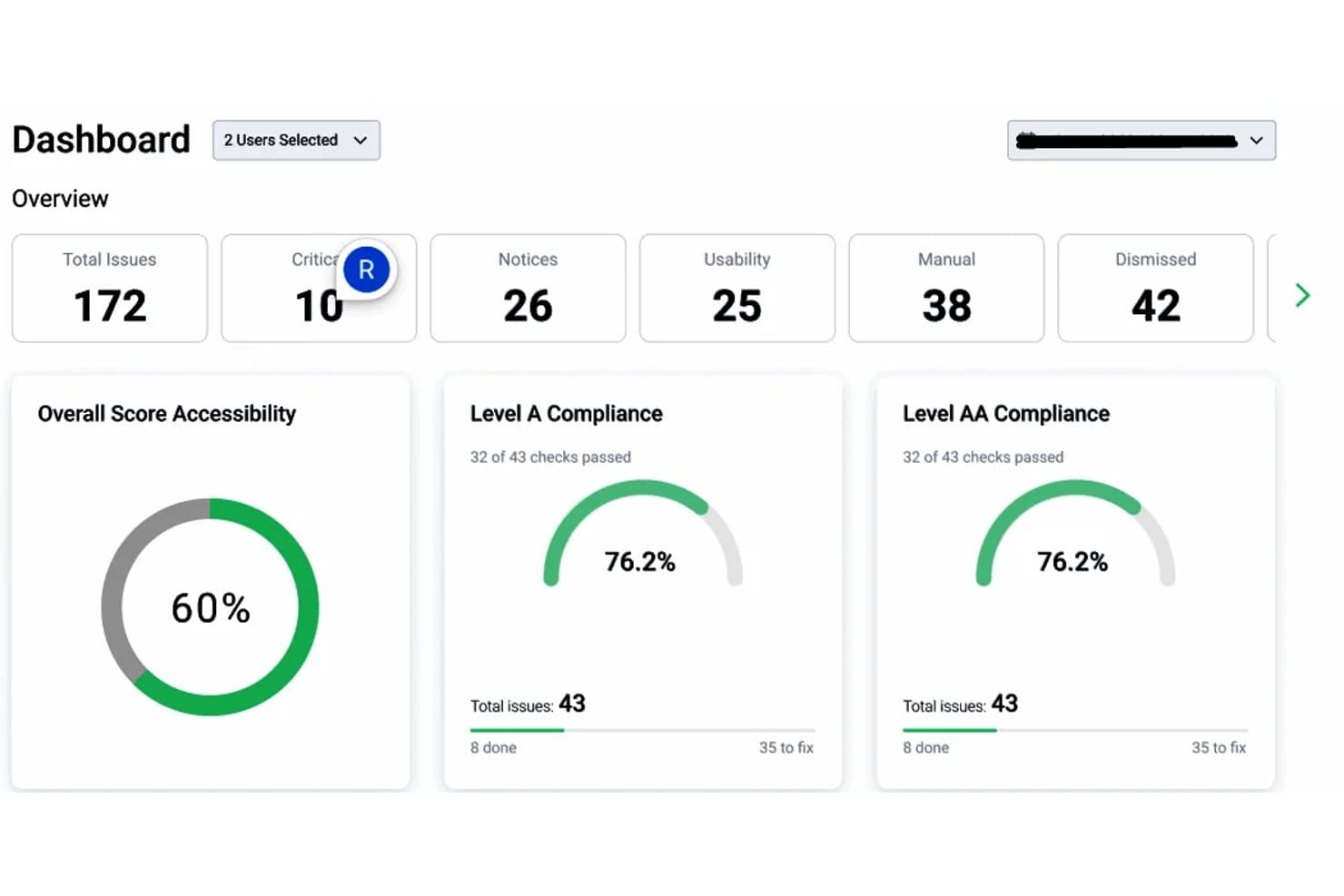
Equally AI dashboard summarizing accessibility issues and WCAG Level A and AA compliance scores. Equally AI is an AI-powered web accessibility platform that offers automated website scanning, an accessibility widget, AI-assisted code remediation through Flowy, and accessibility reporting to support WCAG compliance and related regulatory requirements.
Who Is Equally AI Best For?
Equally AI is a strong fit for website compliance teams that need automated accessibility monitoring, remediation guidance, and audit reports to support WCAG compliance reviews.
Why I Picked Equally AI
I picked Equally AI because its Flowy platform combines accessibility scanning with AI-generated, code-level remediation suggestions. I particularly like that Flowy provides recommendations for ARIA labels, roles, and image alt text, giving developers specific issues to review and address. It also supports downloadable audit reports in CSV and PDF formats, progress tracking, and configurable notifications for accessibility targets such as WCAG 2.1 AA.
Equally AI Key Features
- Accessibility profiles: Offer preconfigured widget profiles for vision, cognitive, seizure-safe, ADHD, and dyslexia needs.
- 24-hour accessibility monitoring: Scan updated website content every 24 hours to identify accessibility issues and apply supported widget remediation.
- Flowy progress tracking: Track accessibility improvements through graphs and review progress to plan follow-up remediation.
- Expert accessibility audits: Assess website source code and structure through manual testing and receive reports with recommendations for code-level fixes.
Equally AI Integrations
Equally AI supports Jira for linking accessibility remediation tasks to project boards through Flowy. It also provides installation guides for WordPress, Shopify, Wix, Squarespace, Drupal, Webflow, WooCommerce, and Google Tag Manager.
Pros and Cons
Pros:
- Expert audits provide code-level recommendations
- AI suggests ARIA and alt-text fixes
- Daily scans flag accessibility issues
Cons:
- Widget excludes PDF and video remediation
- Automated fixes require manual validation
Learn more about Equally AI: Best for accessibility fixes in code review
- Free demo + 7-day free trial available
- From $59/month
Visit WebsiteCustomer Rating:4.8/5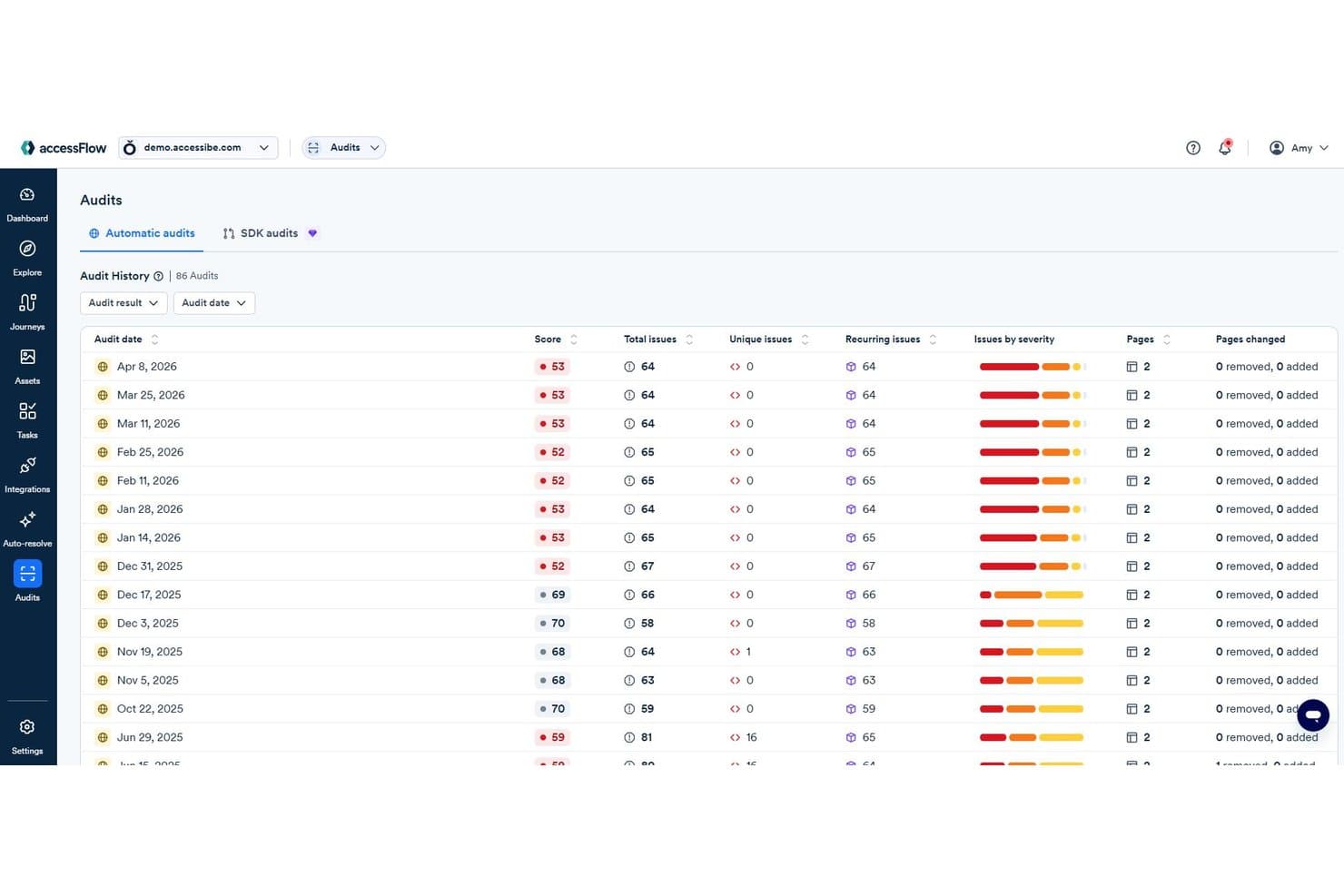
accessFlow audit history tracks accessibility scores and recurring issues over time. accessFlow by accessiBe is an AI-powered web accessibility testing platform that audits websites and web applications, evaluates user journeys, and provides WCAG-based remediation guidance. It also offers code-level accessibility reviews and suggested fixes for development teams.
Who Is accessiBe Best For?
accessFlow is a strong fit for front-end developers and QA engineers who need code-level accessibility testing, WCAG issue tracking, and remediation guidance throughout development.
Why I Picked accessiBe
I picked accessiBe as one of the best because accessFlow's Code Agent brings accessibility reviews into the development process.It analyzes pull requests for accessibility issues and provides code-specific explanations and suggested fixes for developers to review. I also like its repository scanning capability, which identifies existing accessibility issues and creates pull requests with proposed fixes. These capabilities make accessFlow worth considering for teams that want to address accessibility issues within their codebase rather than relying only on website audits.
accessiBe Key Features
- Journey recordings: Record or manually configure user flows, such as checkouts and logins, to identify accessibility issues at individual steps.
- AI-based auditing and monitoring: Run website accessibility audits, prioritize WCAG issues by severity, and track findings across audit cycles.
- AI-powered alt text generation: Generate suggested image descriptions for missing alt text within the issue remediation process.
- Accessibility issue remediation: Review WCAG references, source code, and suggested fixes, then verify corrections through follow-up audits.
accessiBe Integrations
accessiBe's accessFlow offers integrations with GitHub, Jira Cloud, ClickUp, Asana, Linear, Azure Boards, and ServiceNow. Its SDK supports accessibility testing in CI/CD environments, including Jenkins, CircleCI, and GitLab CI. It also provides an MCP server for connecting compatible AI coding tools, including GitHub Copilot in Visual Studio Code and Cursor.
Pros and Cons
Pros:
- Developers review suggested fixes before merging
- Journey recordings surface multi-step failures
- Code-specific accessibility fixes for developers
Cons:
- Code Agent supports limited frameworks
- Automated audits require supplementary manual testing
Learn more about accessiBe: Best for accessibility across sites, apps and PDFs
- Free demo available
- Pricing upon request
Visit WebsiteCustomer Rating:4.6/5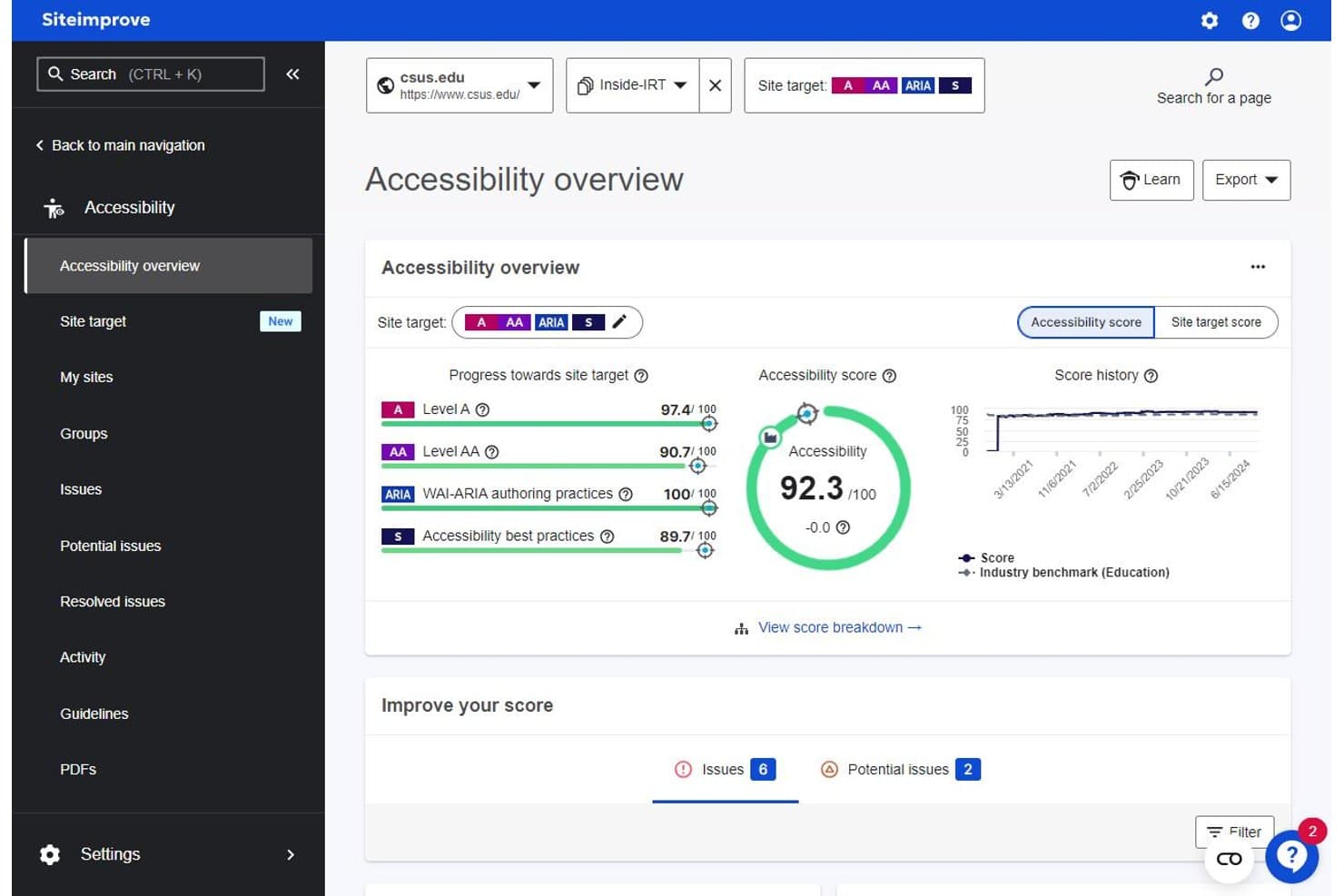
Siteimprove tracks accessibility scores, site targets, and issue counts. Siteimprove is an AI-powered accessibility testing platform that monitors websites, authenticated content, mobile apps, and PDFs for accessibility issues. It supports WCAG-based testing, regulatory compliance tracking, and AI-assisted remediation across web and PDF content.
Who Is Siteimprove Best For?
Siteimprove is a strong fit for compliance-focused teams managing accessibility across large, multi-site digital portfolios that include both web content and documents like PDFs.
Why I Picked Siteimprove
I picked Siteimprove because it supports accessibility testing across websites, authenticated content, mobile apps, and PDFs. I particularly like its PDF Remediation Agent, which addresses accessibility issues in PDFs and generates alternative text suggestions for images. Its CMS Remediation Agent also lets teams review and approve suggested accessibility fixes before applying changes to website content. These capabilities make Siteimprove a strong option for organizations managing accessibility across different types of digital content.
Siteimprove Key Features
- Accessibility Code Checker: Runs automated accessibility checks during development and provides issue guidance before deployment.
- Dynamic Content Checker: Captures snapshots of dynamic page states, including forms and authenticated content, for accessibility testing.
- Mobile accessibility testing: Tests native Android and iOS apps against platform-specific accessibility rules, with issue reports and remediation guidance.
- Figma plugin: Checks designs for color contrast, touch target size, and text readability issues before development.
Siteimprove Integrations
Siteimprove offers 40+ integrations, including WordPress, Drupal, and Figma. Its MCP Server supports AI-assisted development environments such as VS Code, Claude Code, and Lovable. The Accessibility Code Checker also supports Selenium, Playwright, Puppeteer, and Cypress, while its REST API enables custom integrations.
Pros and Cons
Pros:
- Supports code-level and CMS remediation
- Provides detailed accessibility issue guidance
- Covers websites, mobile apps, and PDFs
Cons:
- Dynamic Content Checker requires an add-on
- Automated findings still need manual verification
Learn more about Siteimprove: Best for AI checks with real screen readers
- Free trial available
- From $29/month (billed annually)
Visit WebsiteCustomer Rating:4.5/5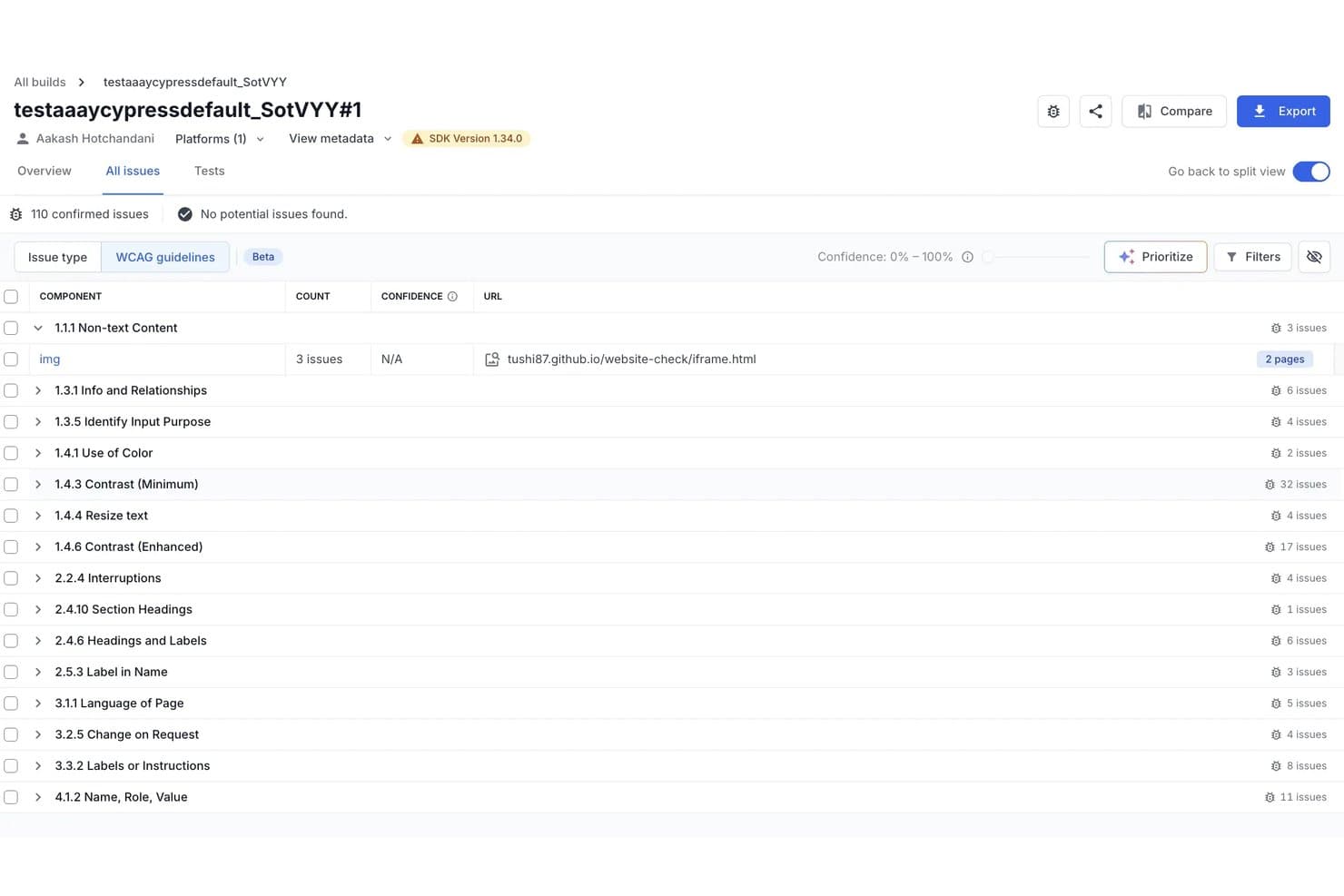
BrowserStack accessibility summary with scores, issue severity counts, and WCAG conformance results. BrowserStack is an AI-powered accessibility testing platform that combines automated WCAG scanning, real-device screen reader testing, and contextual issue detection and remediation for websites and web applications. It also supports PDF accessibility scans and automated testing workflows.
Who Is BrowserStack Best For?
BrowserStack Accessibility Testing is a strong fit for QA engineers and front-end developers who need automated accessibility checks within development workflows and screen reader testing on real devices.
Why I Picked BrowserStack
I picked BrowserStack because it combines AI-powered accessibility detection with real-device screen reader testing and automated WCAG checks. Its Spectra Rule Engine covers more than 40 WCAG success criteria, including focus visibility, non-text contrast, and reflow. I also like how its A11y Issue Detection Agent evaluates contextual issues, such as inaccurate alternative text and accessibility labels, while the A11y Issue Remediation Agent provides code snippets and guidance for addressing identified violations. This combination makes BrowserStack worth considering for teams that need both automated checks and hands-on accessibility validation.
BrowserStack Key Features
- Scheduled website scanning: Schedule daily or weekly accessibility scans across websites, PDF files, and authenticated pages, with historical reports tracking detected issues.
- CI/CD accessibility testing: Enable automated WCAG checks through the BrowserStack SDK, with scans triggered by DOM changes and reports tracking issues across test builds.
- Assisted accessibility tests: Review headings, landmarks, lists, forms, tables, modals, and keyboard navigation through guided checks across eight testing categories.
- Figma design monitoring: Scan Figma design files for accessibility issues and schedule recurring checks to identify violations introduced by design changes.
BrowserStack Integrations
BrowserStack Accessibility Testing supports Jira and Azure DevOps for reporting accessibility issues. BrowserStack also lists Jenkins and CircleCI among its broader testing integrations. Availability depends on the BrowserStack product and testing workflow.
Pros and Cons
Pros:
- CI checks fit existing accessibility test workflows
- Contextual AI flags contrast and alt-text issues
- Real-device screen readers support manual testing
Cons:
- AI remediation suggestions require manual review
- Automated scans still need human verification
Learn more about BrowserStack: Best for expert-led accessibility programs
- Free demo available
- Pricing upon request
Visit WebsiteCustomer Rating:4.5/5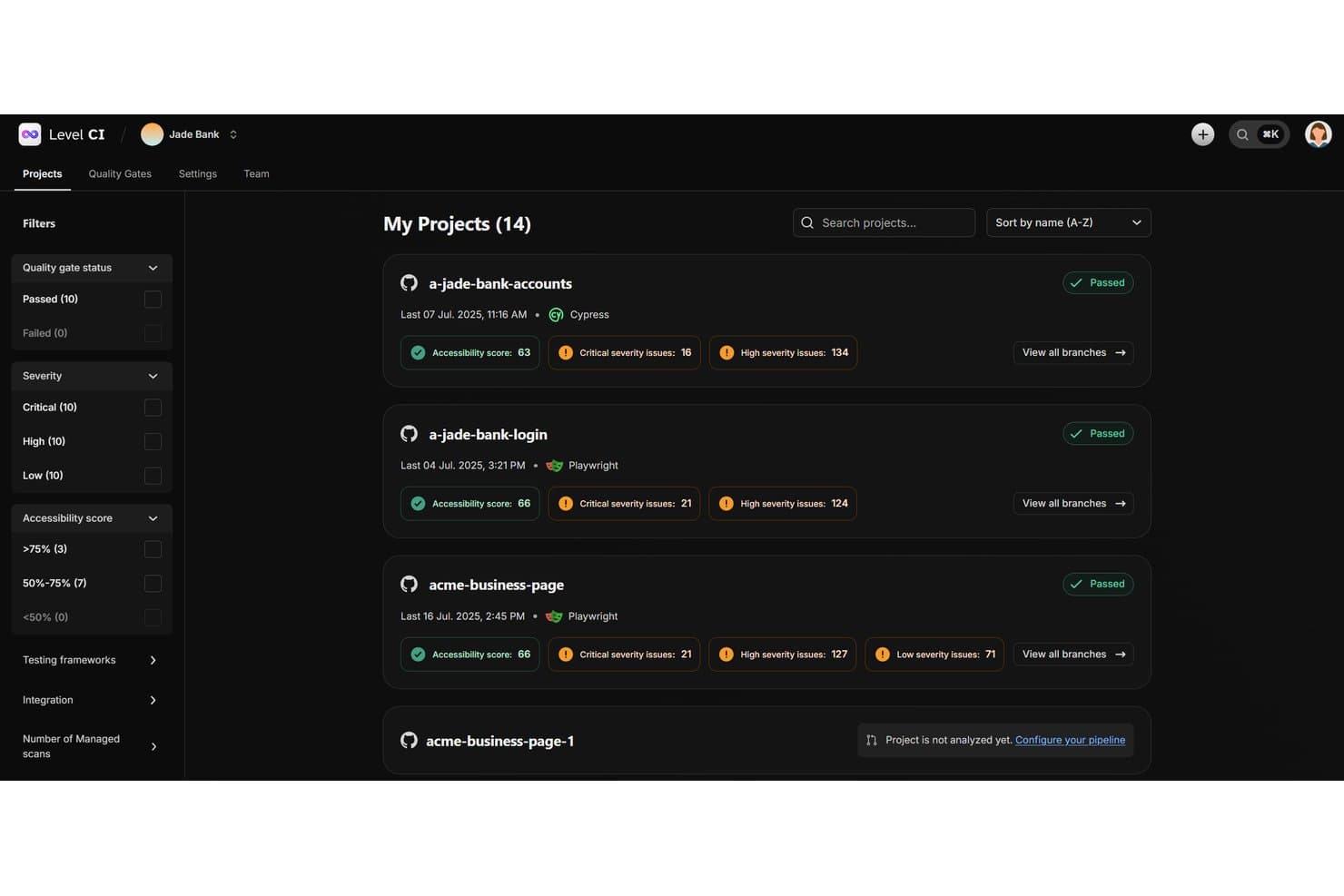
Level CI project overview featuring quality gate status, accessibility scores, and issue severity counts per project. Level Access is an AI-supported digital accessibility testing platform that combines automated scanning, expert-led manual evaluations, continuous monitoring, accessibility conformance reporting, and remediation tracking for web and mobile applications.
Who Is Level Access Best For?
Level Access is a strong fit for large organizations running structured accessibility programs that need both automated scanning and expert-led manual evaluation under one platform.
Why I Picked Level Access
I picked Level Access because it combines automated accessibility testing with structured expert-led manual evaluations. I particularly like Test Accelerator, which provides guided testing workflows for internal teams to assess accessibility issues and record findings. Its VPAT/ACR services also support conformance reporting against applicable standards, including WCAG, Section 508, and EN 301 549. For organizations managing formal accessibility evaluations, the combination of manual testing and standards-based reporting is particularly relevant.
Level Access Key Features
- Continuous monitoring: Tracks website accessibility scores, recurring findings, and remediation progress through scheduled scans, with AI-generated summaries of changes between scans.
- Level CI: Runs automated accessibility checks during development, with configurable quality gates based on issue severity and defined thresholds.
- Mobile app testing: Supports accessibility testing for native iOS and Android apps through manual evaluations, on-device testing, and mobile testing SDKs.
- Academy training: Provides self-paced accessibility courses, role-based learning paths, and learning progress tracking, with separate live training options.
Level Access Integrations
Level Access supports integrations with Jira, Asana, GitHub, GitLab, Bitbucket, and Azure DevOps. Its test automation integrations support Cypress, Mocha, Cucumber, Jest, Playwright, Puppeteer, Selenium Java, and WebdriverIO. Level Access also provides API-based options for custom workflows.
Pros and Cons
Pros:
- AI-supported monitoring summarizes scan changes
- Reports explain issues and remediation priorities
- Automated scans pair with expert manual audits
Cons:
- On-device testing requires eligible packages
- Scheduled monitoring excludes mobile apps
Learn more about Level Access: Best for accessibility in web governance
- Free demo available
- Pricing upon request
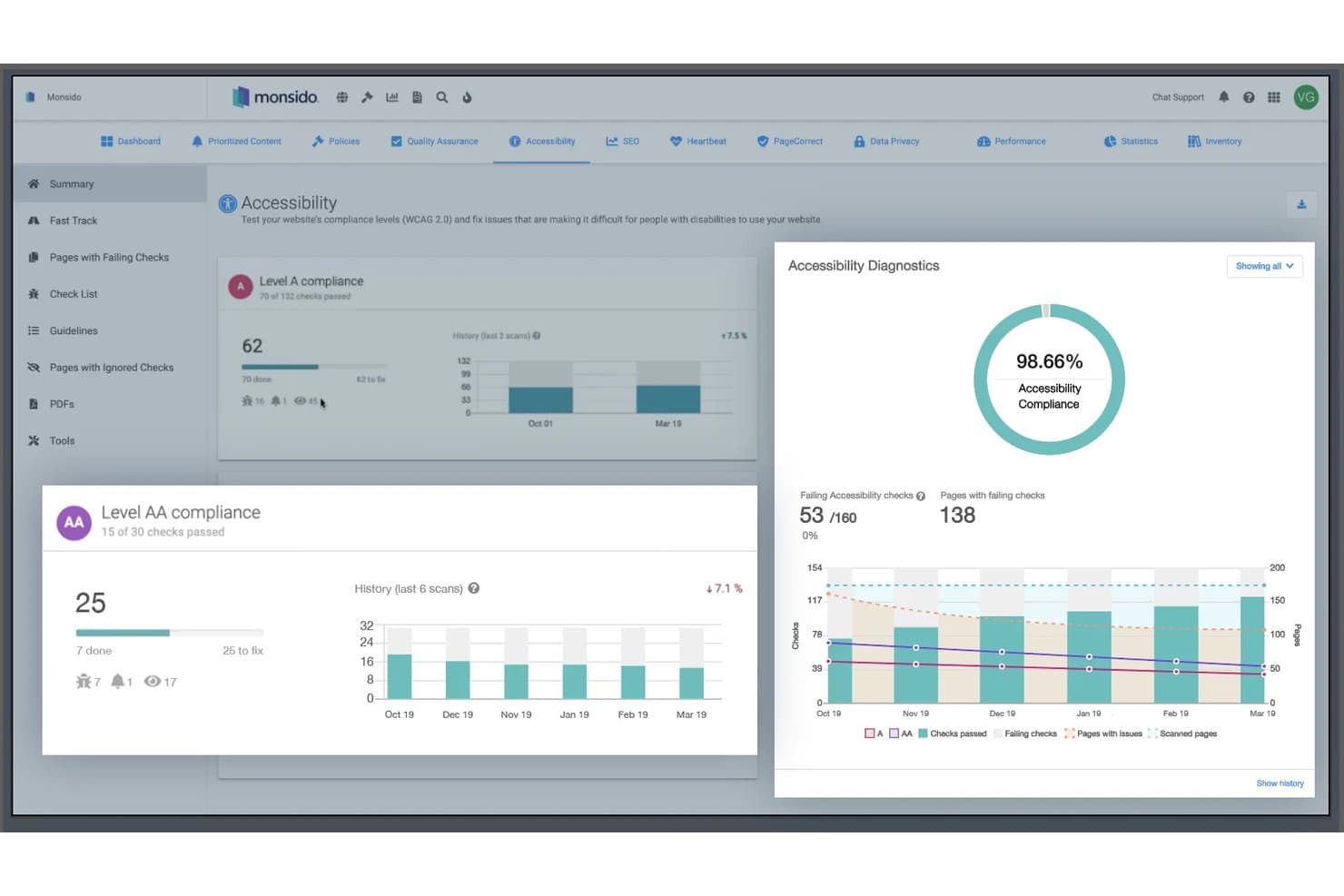
Monsido tracks accessibility compliance scores and scan history. Monsido is a web governance and accessibility testing platform that scans websites for accessibility issues, monitors content quality, and provides compliance reporting and remediation guidance across multiple websites.
Who Is Monsido Best For?
Monsido is a strong fit for web governance and accessibility teams managing multiple websites that need recurring accessibility scans, content quality checks, and compliance reporting.
Why I Picked Monsido
I picked Monsido as one of the best because it combines accessibility testing with broader website governance capabilities, including content quality checks and compliance monitoring. I particularly like its recurring accessibility scans and reporting tools, which help teams identify issues across multiple websites and track remediation progress. Its AI Remediation Companion also provides page-specific fix suggestions tailored to developers, content authors, and designers, making it useful for teams with different accessibility responsibilities.
Monsido Key Features
- PDF accessibility scanning: Identifies inaccessible PDF files and supports remediation through a dedicated PDF accessibility service.
- Automated accessibility checks: Identifies accessibility errors and provides guidance for issues that require manual review or remediation.
- Scheduled website scanning: Supports weekly and on-demand scans to identify accessibility issues and monitor changes over time.
- Cookie consent manager: Offers an add-on for managing cookie preferences, consent records, and GDPR and CCPA-related consent requirements.
Monsido Integrations
Monsido supports CMS integrations with Drupal, WordPress, and Joomla. It also provides an API for custom integrations and an MCP server for connecting with Claude and other MCP-compatible AI agents.
Pros and Cons
Pros:
- Role-specific AI guidance directs remediation
- PDF accessibility scanning supports remediation
- Continuous scans track large site portfolios
Cons:
- Some remediation features require add-ons
- Assisted checks still require human review
Learn more about Monsido:
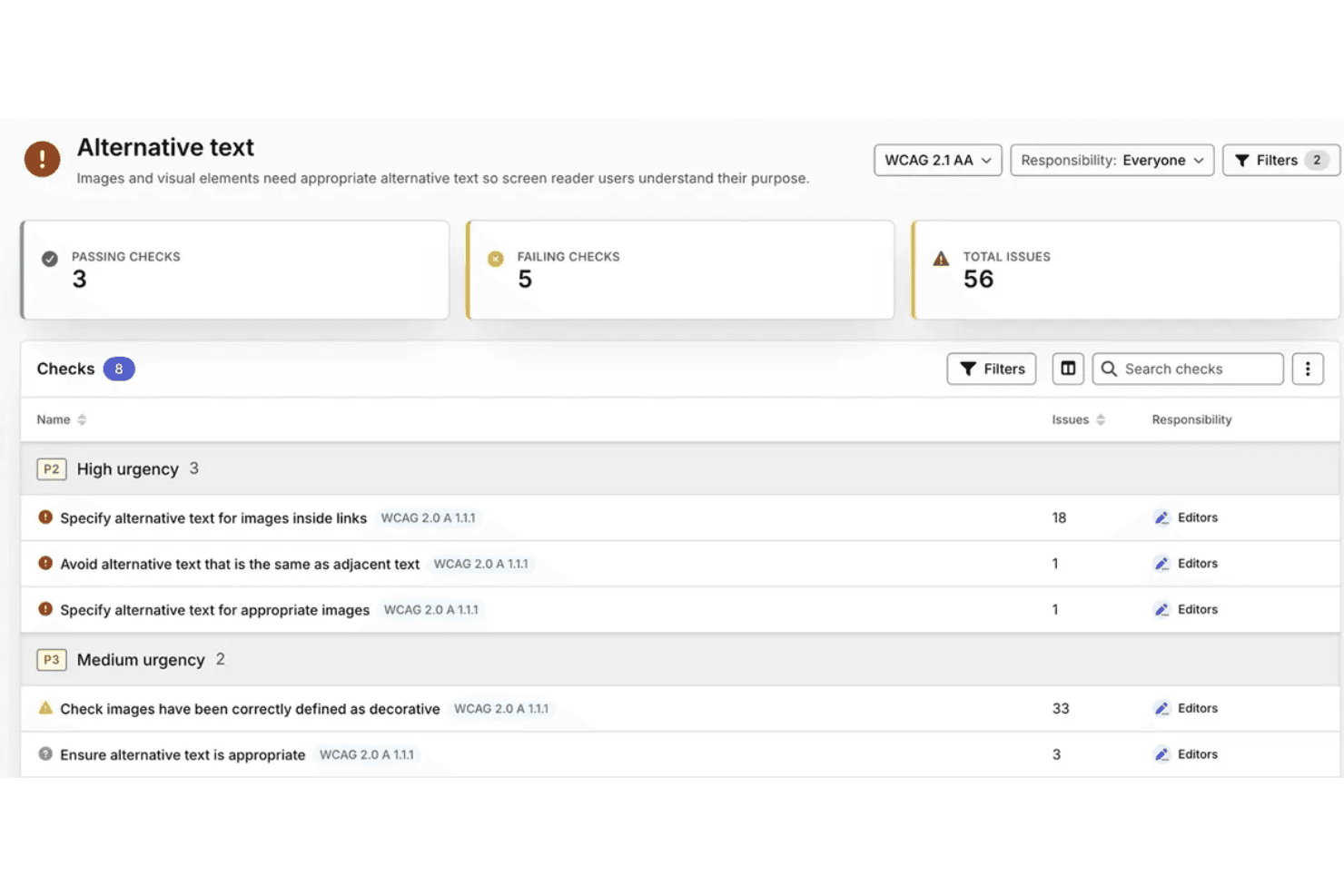
Silktide identifies alternative text issues by WCAG criteria and urgency. Silktide is an AI-powered accessibility testing platform that evaluates websites against WCAG 2.2 and PDFs against PDF/UA-1, with automated scans, expert-led manual evaluations, AI-assisted issue analysis, and accessibility reporting across multiple websites.
Who Is Silktide Best For?
Silktide is a strong fit for web accessibility specialists and compliance teams managing large website portfolios and PDF collections that require ongoing WCAG 2.2 testing and remediation tracking.
Why I Picked Silktide
I picked Silktide because its AI-assisted accessibility analysis goes beyond identifying individual WCAG issues. Its AI optimizer reviews accessibility findings and generates recommendations based on site priorities, while its Inspector provides contextual guidance to help teams understand and address specific issues. I also like how Silktide combines automated accessibility checks with expert-led manual evaluations, giving teams options for reviewing issues that require human judgment.
Silktide Key Features
- PDF accessibility testing: Evaluates PDFs against 136 PDF/UA-1 conditions, including 87 that are machine-testable.
- Compliance checks: Evaluates websites against applicable accessibility regulations and configurable organizational policies.
- Uptime monitoring: Checks selected webpages every five minutes and sends email or text alerts when it detects downtime.
- Task assignment and management: Converts findings into assigned tasks with supporting evidence, priorities, effort estimates, and customizable statuses.
Silktide Integrations
Silktide offers integrations with Jira and Linear for task management, and Slack and Microsoft Teams for notifications. It also supports API-based connections for custom workflows, depending on the account configuration and available API access.
Pros and Cons
Pros:
- Portfolio reporting tracks accessibility progress
- Contextual guidance explains accessibility issues
- AI reports prioritize accessibility findings
Cons:
- AI optimizer availability varies by plan
- Annual testing remains necessary for conformance
Learn more about Silktide: Best for spotting design issues before code
- Free plan + Free demo available
- From $21/month (billed annually)
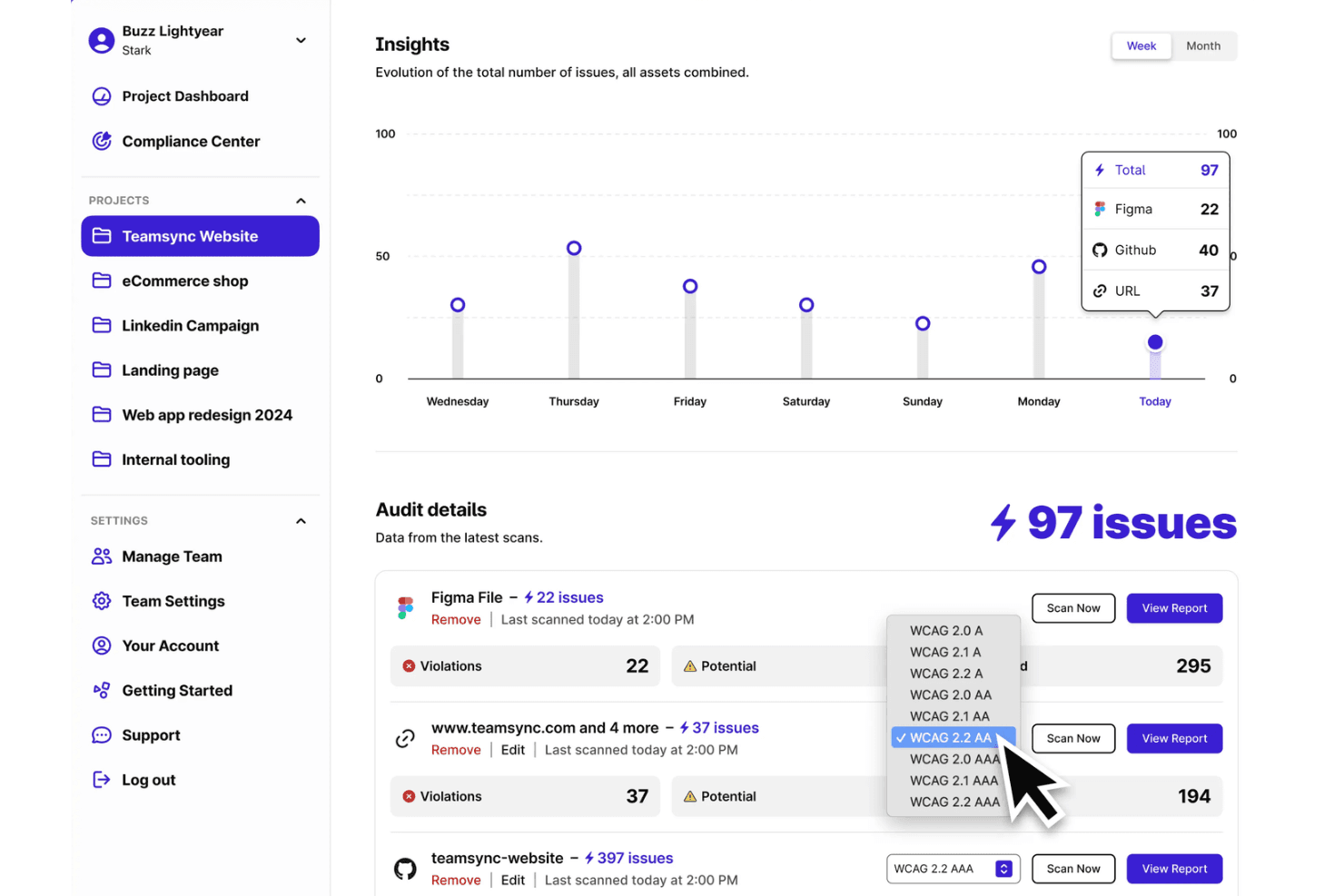
Stark Insights tracks accessibility issues across Figma, GitHub, and URLs. Stark is an AI-powered accessibility testing platform that supports design reviews, code testing, and live product monitoring. It combines automated WCAG checks, AI-assisted issue detection through Sidekick, and accessibility compliance reporting.
Who Is Stark Best For?
Stark is best for design and development teams that need to identify accessibility issues during design reviews and continue testing throughout product development.
Why I Picked Stark
I picked Stark because it brings AI-assisted accessibility testing into the design process, before development begins. Its Sidekick AI scans design files for contrast, typography, heading, and alt-text issues, then provides suggested corrections, including three alternative alt-text suggestions. I also like Stark's focus-order and landmark annotations, which help designers communicate accessibility requirements to developers during handoff.
Stark Key Features
- Compliance Center: Tracks accessibility controls, supporting evidence, and compliance progress against defined frameworks.
- CI/CD testing: Runs automated accessibility checks within development pipelines to identify issues during code changes.
- Draft VPAT report generation: Generates draft VPAT reports from accessibility assessment data for review and verification.
- Vision Simulator: Simulates different vision conditions to help designers evaluate visual accessibility.
Stark Integrations
Stark integrates with Figma, Sketch, GitHub, GitLab, Bitbucket, Azure DevOps, Jira, Asana, Trello, Linear, ClickUp, Pivotal Tracker, Slack, and Microsoft Teams. It also supports CI/CD testing through Puppeteer, Playwright, and Cypress, with API keys available for configuring scans.
Pros and Cons
Pros:
- Suggests alt text, headings, and contrast fixes
- Adds focus-order and landmark handoff annotations
- Finds contrast issues before code exists
Cons:
- Design scans cannot test keyboard interactions
- Automated checks require manual verification
Learn more about Stark: Best for AI-assisted scan-history reviews
- Free demo + 14-day free trial available
- Pricing upon request
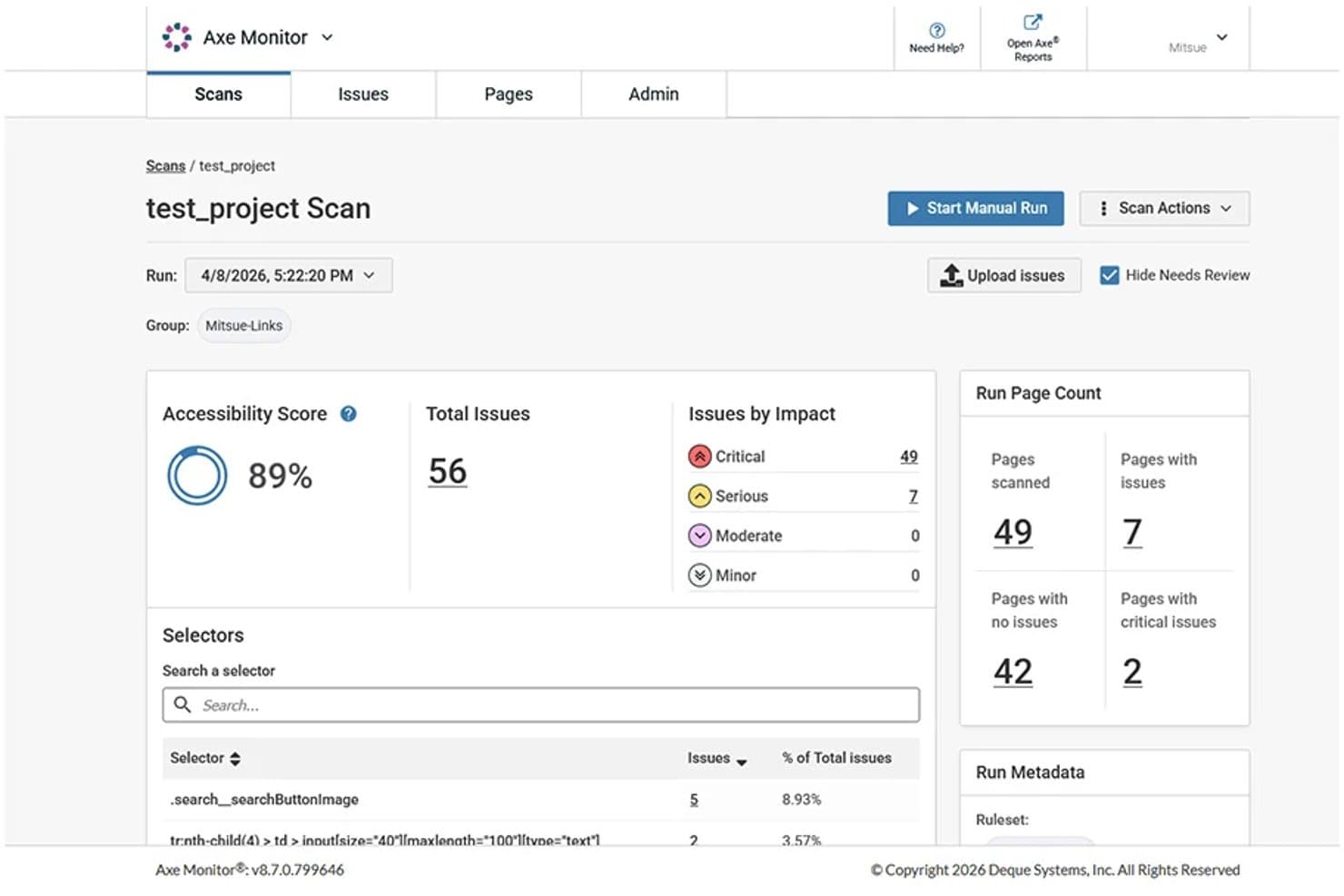
axe Monitor scan summary with accessibility scores and issue severity counts. axe Monitor is an automated accessibility monitoring tool from Deque that scans websites and PDFs at scale, tracks accessibility issues across scan runs, and provides prioritized findings, reports, and analytics.
Who Is axe Monitor Best For?
axe Monitor is a strong fit for accessibility specialists and compliance teams managing ongoing monitoring programs across large website portfolios.
Why I Picked axe Monitor
I picked axe Monitor because its MCP server adds AI-assisted analysis to ongoing accessibility monitoring. I like that it lets me review scan results through an AI assistant, compare findings across scan runs, and identify components that may need attention based on issue severity and frequency. Its component-level recommendations give accessibility teams a starting point for planning remediation across large website portfolios.
axe Monitor Key Features
- Website and PDF scanning: Scan websites and PDFs at scale to identify accessibility issues, scores, and progress over time.
- Historical scan records: Compare recent scan runs to identify changes in accessibility scores, issue counts, and recurring problems.
- Jira ticket creation: Create individual or grouped issue tickets using predefined field-mapping templates.
- Custom reports and analytics: Generate and share accessibility reports with issue trends, scores, and remediation progress.
axe Monitor Integrations
axe Monitor integrates with Jira to create individual or grouped accessibility issue tickets using configurable field-mapping templates. It also provides a REST API for accessing scan results, page details, and accessibility issue data through custom integrations.
Pros and Cons
Pros:
- AI-assisted remediation planning supports team workflows
- Severity-ranked reports clarify remediation priorities
- Historical scan comparisons surface recurring issues
Cons:
- Only three recent scan runs retained
- Some findings require manual verification
Learn more about axe Monitor:
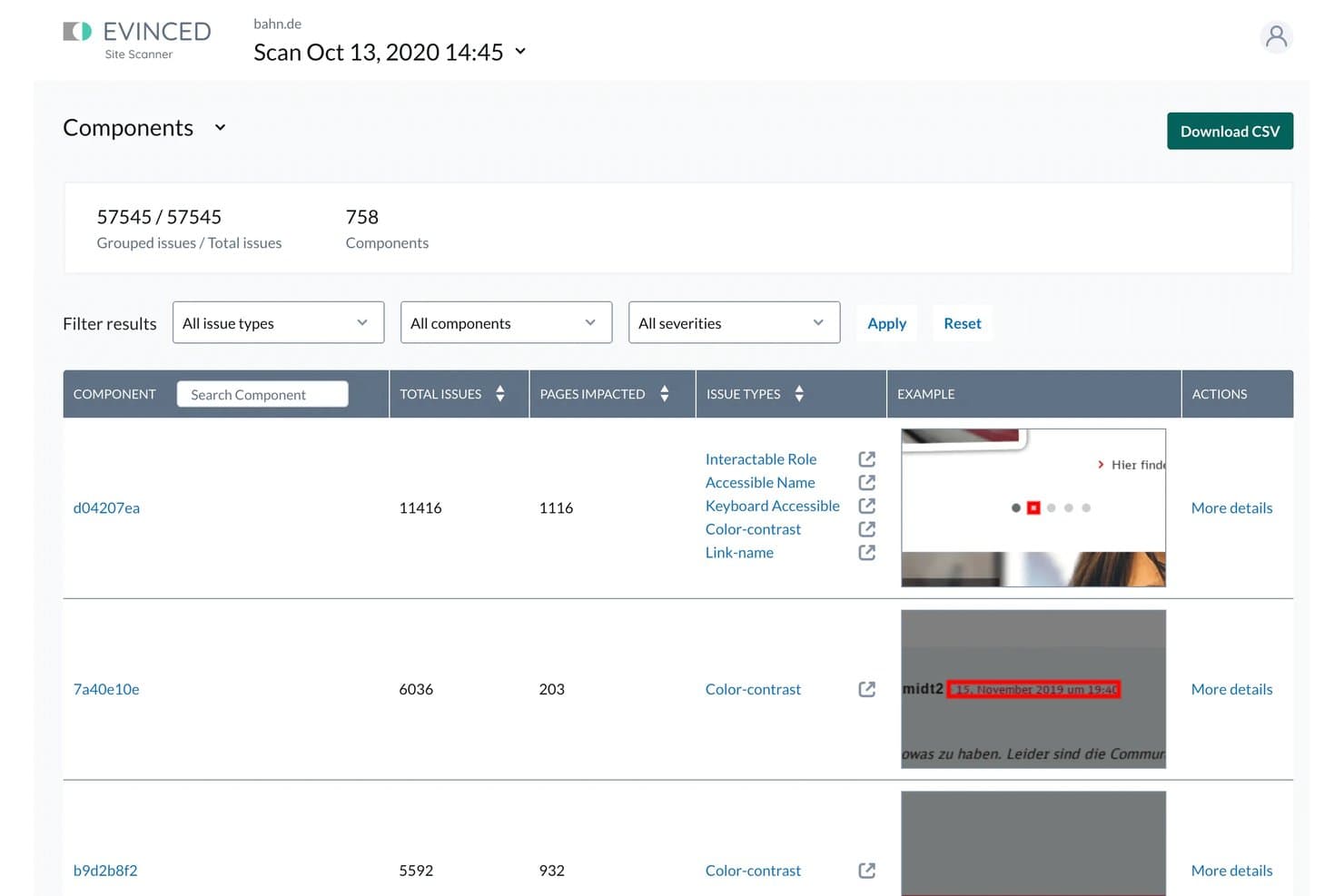
Evinced tracks component-level findings and new versus existing issues. Evinced is an AI-powered accessibility testing platform that combines visual analysis and DOM inspection to identify accessibility issues across websites and mobile apps, including dynamic user flows and reusable components.
Who Is Evinced Best For?
Evinced is best for QA engineers and accessibility specialists testing dynamic, component-driven web and mobile applications through automated testing workflows.
Why I Picked Evinced
I picked Evinced because it combines visual accessibility analysis with continuous DOM monitoring to identify issues as users interact with dynamic web applications. I particularly like its component analysis, which groups recurring accessibility findings by shared code patterns, helping teams identify affected components. Its issue tracking also distinguishes new findings from recurring issues across scans, providing useful context for accessibility remediation.
Evinced Key Features
- Continuous DOM monitoring: Detects accessibility issues as page content and elements change during automated tests.
- Component analysis: Groups recurring accessibility findings by shared code patterns to identify affected components.
- Issue tracking across scans: Assigns unique IDs to findings to distinguish new issues from recurring ones.
- Resolution tracking: Tracks resolved issues and resolution times by severity, issue type, and component.
Evinced Integrations
Evinced supports integrations with Jira, Azure DevOps, Selenium, Cypress, WebdriverIO, Playwright, TestCafe, XCUITest, Espresso, and Appium. It also supports CI workflows with Jenkins and CircleCI, with reporting formats including JSON, JUnit, and CSV.
Pros and Cons
Pros:
- Reports include screenshots and suggested fixes
- Groups recurring issues by component
- Maps barriers across dynamic user flows
Cons:
- JSDOM tests cannot evaluate visual accessibility
- Site Scanner defaults to 1,500 pages
Learn more about Evinced:
Outras ferramentas de teste de acessibilidade com IA
Eis algumas opções adicionais que não entraram na minha lista principal, mas que vale a pena conhecer:
- 11TestMu AIBest for accessibility checks in QA workflows
- 12UserWayBest for recurring scans of large websites
- 13AudioEyeBest for accessibility feedback from visitors
- 14ARC Platform by TPGiBest for accessibility checks in CI pipelines
How I Evaluate AI Accessibility Testing Tools
To make this list, AI should handle accessibility work, like detecting dynamic barriers and suggesting fixes. From there, I evaluate three things. Core functionality carries most weight: scanning sites against WCAG and tracking issues. Then I weigh standout features, like a human testing panel, and beyond-feature factors, like AI validation transparency.
Core Functionality (Table Stakes For This List)
When I'm selecting tools for my list, I score each one on a scale from 0 (does not offer the functionality) to 5 (excels in this area) for each core functionality listed below. I then convert the total into a percentage to help assess each tool's overall fit, with extra weight on any functionalities I’ve deemed essential.
- Automated Scanning (Essential): I look for reliable scans across multi-page sites and apps, including dynamic pages and common WCAG checks.
- AI Issue Detection (Essential): I evaluate whether AI can flag visual, structural, or dynamic barriers that static rules might miss, such as misleading ARIA use.
- Remediation Guidance: I check whether findings include prioritized, actionable fixes, such as code-level suggestions for a keyboard navigation barrier.
- Compliance Reporting: I assess whether reports map findings to standards such as WCAG and support audit reviews and stakeholder decisions.
- Developer Workflow Integration: I look for ways to run checks during development, such as through CI/CD, browser tools, or APIs.
- Continuous Monitoring: I consider scheduled scans, alerts, and issue history that help teams track changes across sites and product portfolios.
Once I have a list of tools that meet the criteria, I consider what sets each platform apart.
Differentiating Factors (What Sets Vendors Apart)
Here's how I compare and contrast different vendors:
Standout Features
I look for a human testing panel—access to testers with disabilities who validate what automated scans flag. Tools like Level Access and Evinced offer this, and it matters because AI catches roughly 30–50% of WCAG issues. Real screen-reader and keyboard-only feedback closes that gap. I also evaluate multi-framework component scanning, which lets teams test React, Angular, or Vue components in isolation rather than waiting for full-page builds. Beyond detection, I check whether a tool offers legal risk scoring that estimates compliance urgency so teams fix high-exposure barriers first.
Beyond Features
I evaluate whether vendors disclose how their AI models are trained and validated against WCAG success criteria. That transparency directly affects how much trust your team can place in flagged issues, especially when findings feed into compliance documentation. I also check for overlay-only approaches—some tools market AI-powered widgets that layer adjustments on a page without fixing underlying code, and these have been cited in accessibility lawsuits despite being active. Finally, I look at how well a platform scales across portfolios: role-based access for developers, QA, and legal teams matters when you're managing dozens of sites across business units.
Como escolher ferramentas de teste de acessibilidade com IA
Escolha uma ferramenta com base no local onde a sua equipa precisa de obter evidências: fluxos dinâmicos, alterações ao código, cobertura de portefólio ou validação por pessoas. A avaliação certa deve mostrar como as conclusões se transformam em correções acompanhadas, e não apenas em resultados de análises.
| Se a sua prioridade for | Procure |
|---|---|
| Se a sua prioridade forEncontrar barreiras em fluxos de utilizador em mudança | ProcureCobertura de estados interativos, não apenas de páginas estáticas |
| Se a sua prioridade forGerir muitos sites, aplicações e PDFs | ProcureRastreamento de problemas ao nível do portefólio nesses tipos de ativos |
| Se a sua prioridade forEncaminhar conclusões para o desenvolvimento | ProcureProblemas reproduzíveis com orientações de correção ao nível do código |
| Se a sua prioridade forGanhar confiança nas conclusões da IA | ProcureMétodos de validação divulgados e opções para testes realizados por pessoas |
Como avaliar a sua lista restrita
- Faça um teste definido: Teste um fluxo dinâmico, como abrir um menu e preencher um formulário, e compare depois as conclusões com uma revisão manual utilizando o teclado.
- Peça o documento de validação: Solicite informações detalhadas, por escrito, sobre a forma como as conclusões da IA são testadas face aos critérios das WCAG, incluindo as limitações conhecidas.
- Siga uma conclusão até um pedido: Utilize o resultado de um teste para criar um pedido para um programador; verifique se inclui o estado afetado, as evidências e um problema reproduzível.
- Teste a cobertura do portefólio: Envie um site, um ecrã de aplicação e um PDF de exemplo e, em seguida, peça uma exportação que mostre como os problemas são agrupados e acompanhados.
- Defina o critério de decisão: Dê preferência à validação orientada por especialistas quando o seu objetivo principal for obter feedback de pessoas sobre fluxos reais; dê preferência à monitorização automatizada abrangente quando a cobertura de muitos ativos for mais importante.
O que são ferramentas de teste de acessibilidade com IA?
As ferramentas de teste de acessibilidade com IA são programas que utilizam verificações assistidas por IA para identificar e dar prioridade às barreiras que podem impedir as pessoas com deficiência de utilizar produtos digitais. Podem analisar sites, aplicações e documentos à procura de problemas como estruturas de página ou elementos interativos inacessíveis. As suas conclusões ajudam as equipas a planear correções, mas os testes manuais com tecnologias de apoio e com pessoas com deficiência continuam a ser importantes.
Funcionalidades
Eis as principais funcionalidades que procuro nas ferramentas de teste de acessibilidade com IA:
- Digitalização automatizada: Verifica websites, aplicações ou conteúdos digitais compatíveis face às regras de acessibilidade, incluindo os critérios de sucesso relevantes das WCAG. A digitalização de várias páginas ajuda a detetar potenciais problemas em diferentes secções de um website.
- Testes de estados dinâmicos: Avalia elementos e estados interativos, incluindo menus expandidos, erros de validação de formulários e caixas de diálogo modais. As capacidades de teste variam consoante a ferramenta e podem exigir interações configuradas.
- Deteção de problemas com IA: Utiliza análise assistida por IA para identificar potenciais barreiras à acessibilidade para além das regras predefinidas, incluindo problemas contextuais relacionados com a estrutura da página e as etiquetas dos elementos. As conclusões podem exigir verificação manual.
- Orientações para a correção: Fornece descrições dos problemas, elementos afetados e correções sugeridas. Algumas ferramentas incluem recomendações ao nível do código para resolver as barreiras à acessibilidade identificadas.
- Relatórios baseados em normas: Associa os problemas detetados aos critérios de sucesso relevantes das WCAG ou a outras normas de acessibilidade suportadas. Os relatórios podem incluir classificações de gravidade, páginas afetadas e o estado dos problemas.
- Suporte ao fluxo de trabalho dos programadores: Disponibiliza extensões de navegador, APIs ou integrações CI/CD para executar verificações de acessibilidade durante o desenvolvimento. As capacidades disponíveis dependem da ferramenta.
- Monitorização contínua: Suporta digitalizações recorrentes de acessibilidade, alertas de problemas e acompanhamento histórico. Algumas ferramentas também acompanham problemas identificados anteriormente em digitalizações subsequentes.
Benefícios
Na minha experiência, as ferramentas de teste de acessibilidade com IA oferecem vários benefícios, incluindo:
- Redução das verificações manuais: As avaliações automatizadas podem realizar verificações de acessibilidade repetíveis em várias páginas, permitindo que as equipas concentrem as revisões manuais nos problemas que exigem avaliação humana.
- Maior visibilidade das barreiras à acessibilidade: Os testes realizados em diferentes páginas e estados interativos podem ajudar as equipas a identificar potenciais barreiras que, de outro modo, poderiam passar despercebidas.
- Decisões de correção mais informadas: As descrições dos problemas, as classificações de gravidade e as correções sugeridas fornecem aos programadores contexto adicional ao avaliarem problemas de acessibilidade.
- Preparação de auditorias mais consistente: As conclusões associadas a normas e os registos históricos fornecem informação de apoio para as revisões de acessibilidade, embora os relatórios automatizados, por si só, não possam comprovar a conformidade total.
- Feedback mais atempado durante o desenvolvimento: As verificações de acessibilidade realizadas durante a programação e os testes podem identificar potenciais problemas antes do lançamento, consoante o processo de desenvolvimento da equipa.
- Melhor acompanhamento dos problemas recorrentes: Os resultados históricos das digitalizações ajudam as equipas a comparar as conclusões ao longo do tempo e a identificar barreiras que possam ter reaparecido após alterações.
Preços
Os preços variam consoante o volume de digitalizações, os utilizadores, as funcionalidades e o suporte. Apresentamos de seguida intervalos de preços indicativos e funcionalidades que normalmente encontrará nas ferramentas de teste de acessibilidade com IA.
Tabela de comparação de planos para ferramentas de teste de acessibilidade com IA
| Tipo de plano | Preço médio | Funcionalidades comuns |
|---|---|---|
| Tipo de planoPlano gratuito | Preço médio$0 | Funcionalidades comunsDigitalizações básicas de páginas, verificações automatizadas limitadas e ferramentas de teste individuais. |
| Tipo de planoPlano pessoal | Preço médio$10-$50/utilizador/mês | Funcionalidades comunsDigitalizações baseadas no navegador, explicações dos problemas, orientações WCAG e relatórios pessoais. |
| Tipo de planoPlano empresarial | Preço médio$50-$500/mês | Funcionalidades comunsDigitalizações de várias páginas, monitorização programada, relatórios de equipa e integrações com o fluxo de trabalho dos programadores. |
| Tipo de planoPlano empresarial de grande escala | Preço médio$500-$2,000+/mês ou preço personalizado | Funcionalidades comunsMonitorização ao nível do portefólio, acesso baseado em funções, relatórios avançados e suporte dedicado. |
Estes intervalos são indicativos e não normalizados. Os fornecedores podem cobrar por utilizador, domínio,
Perguntas frequentes
Aqui encontrará respostas a perguntas comuns sobre ferramentas de teste de acessibilidade com IA:
As ferramentas de teste de acessibilidade com IA podem garantir a conformidade com as WCAG?
Não. As ferramentas de teste de acessibilidade com IA podem assinalar possíveis barreiras, mas não podem garantir a conformidade de um website ou de uma aplicação com as WCAG. A conformidade exige o cumprimento de todos os critérios de sucesso aplicáveis em todas as páginas, estados e percursos de utilizador relevantes. Os testes automatizados também podem não detetar barreiras que exigem avaliação humana ou testes com tecnologias de apoio. Utilize os resultados das análises como parte de uma avaliação de acessibilidade mais abrangente, incluindo testes manuais com teclado e leitores de ecrã. Antes de confiar nas pontuações de acessibilidade, pergunte aos fornecedores sobre os respetivos métodos de teste, as versões das WCAG suportadas e as limitações da validação.
Como deve lidar com conclusões de acessibilidade que a ferramenta assinala incorretamente?
Trate cada alerta como um potencial problema que requer verificação. Reproduza a conclusão no mesmo estado da página e no mesmo contexto do navegador e, em seguida, compare-a com o critério de sucesso relevante das WCAG. Se a conclusão estiver incorreta, registe o motivo e as provas que o sustentam. Limite as exceções ao elemento ou à regra afetados, uma vez que a supressão abrangente pode ocultar outros problemas de acessibilidade. Volte a testar depois de efetuar alterações ao código e verifique se as conclusões dispensadas continuam disponíveis nos relatórios e no histórico de problemas.
Quando deve executar análises de acessibilidade durante o desenvolvimento?
Execute análises de acessibilidade em diferentes fases do desenvolvimento. Inclua verificações automatizadas em pedidos de incorporação ou compilações para identificar potenciais problemas durante as revisões de código. Teste os percursos de utilizador importantes antes do lançamento, sobretudo após alterações à navegação, aos formulários, à autenticação ou aos componentes partilhados. Agende análises em produção para monitorizar possíveis regressões após atualizações ou implementações. Atribua a responsabilidade pela revisão das conclusões e complemente as verificações automatizadas com testes manuais com teclado e tecnologias de apoio. Defina a frequência das análises com base nos calendários de lançamento e na frequência das alterações ao website.