

Equally AI Review: Pros, Cons, Features and Pricing
Equally AI excels in accessibility solutions, offering user-friendly tools that empower your team to make digital content more inclusive.

We review tools independently, and commissions help fund our testing. See our transparency policy, our methodology, or suggest a tool.
Equally AI is an AI platform for web accessibility compliance, built to help teams automatically detect and remediate WCAG and ADA violations across their digital properties. It's worth considering if your organization needs to maintain accessibility standards without leaning entirely on manual audits. Where Equally AI has an edge over accessiBe is in pairing AI-driven remediation with expert manual review, giving you a more defensible compliance posture than widget-only solutions typically provide.
Equally AI Evaluation Summary
5/5
- From $45 /month
- Free trial available
Why Trust Our Software Recommendations
6,700+
Reviews
20
Industry experts
16+
Evaluation factors
14
Years
Our team has been testing and reviewing software since 2012. As tech leaders ourselves, we know how difficult—and important—it is to choose the right software.
For this guide, we evaluated tools using hands-on testing and independent research, scoring tools using our selection criteria.
Our reviews reflect our human editorial judgment, not a sales pitch.
Expert reviewers:
- Paulo Gardini MiguelTech Director
 Tim FisherVP of AI
 Gabriel RosasTech Lead & Software Architect
 Christhian GruhnTech Lead & Platform Architect

Equally AI Overview
In my opinion, Equally AI offers a solid solution for businesses focused on web accessibility. Its user-friendly interface, focus on user experience, and effective core features make it a strong contender in the AI software market. Compared to other solutions, it excels in ease of use and standout features like accessibility compliance, supplemented by accessibility testing capabilities. These strengths also support teams conducting accessibility audits or using automated scans to monitor site health.
However, Equally AI may not be the best choice for teams needing extensive customization or integration with other complex systems. I think it's best suited for medium-sized businesses or educational institutions that want to ensure accessibility without diving into complicated setups.
Pros
- You can easily ensure web accessibility compliance.
- It offers a user-friendly interface that simplifies tasks and supports a smooth user experience, as well as helpful features for screen reader compatibility.
- Your team benefits from standout accessibility features, including tools that help reinforce your accessibility statement.
Cons
- Customization options might not meet your specific needs.
- It may not integrate well with other complex systems.
- Advanced users might find the features too basic.
Is Equally AI Right For Your Needs?
Who Would be a Good Fit for Equally AI?
Equally AI is a good fit for medium-sized businesses and educational institutions focused on web accessibility. If your team needs to ensure compliance without diving into complex setups, this software makes it easy with its user-friendly interface. It offers standout accessibility features that help your team maintain compliance effortlessly. Equally AI is perfect for industries where accessibility is crucial and maintaining an updated accessibility statement is required. This is especially true when combined with automated scans or periodic accessibility audits.
- E-commerce PlatformsEqually AI helps your team ensure that your online store is accessible to all customers while improving overall user experience and supporting screen reader usability.
- Educational InstitutionsIt supports your institution in making online learning materials accessible to students with disabilities and impairments.
- Healthcare ProvidersEqually AI ensures your patient portals and websites meet accessibility standards, improving patient experience.
- Government AgenciesIt assists your agency in maintaining compliance with accessibility laws and regulations on public websites.
- NonprofitsYour organization can use Equally AI to make digital content accessible, aligning with your mission to serve all communities, while adopting cost-effective accessibility practices.
- Small BusinessesEqually AI simplifies web accessibility for your team, ensuring compliance without requiring extensive technical expertise.
Who Would be a Bad Fit for Equally AI?
Equally AI is not ideal for large enterprises needing extensive customization and complex integrations. If your team relies on highly tailored solutions or requires seamless integration with multiple other systems, Equally AI might fall short. Its focus on accessibility features means it may lack the flexibility or depth of customization that large corporations often demand.
- Large CorporationsYour corporation might find Equally AI lacking in customization options and integration capabilities needed for complex systems.
- Tech StartupsIf your startup requires advanced features for rapid scaling and integration, Equally AI may not meet your needs.
- Financial ServicesYour team's need for intricate data handling and security features might not align with Equally AI's primary focus on accessibility.
- Media CompaniesEqually AI might not provide the advanced media management features your company needs for diverse content types.
- Manufacturing FirmsYour firm may need more specialized software to handle specific industry standards beyond accessibility.
- Software Development TeamsIf your team requires deep customization and integration with development tools, Equally AI might not offer the flexibility you need.
Our Review Methodology
How We Test & Score Tools
We’ve spent years building, refining, and improving our software testing and scoring system. The rubric is designed to capture the nuances of software selection and what makes a tool effective, focusing on critical aspects of the decision-making process.
Below, you can see exactly how our testing and scoring works across seven criteria. It allows us to provide an unbiased evaluation of the software based on core functionality, standout features, ease of use, onboarding, customer support, integrations, customer reviews, and value for money.
Core Functionality (25% of final scoring)
The starting point of our evaluation is always the core functionality of the tool. Does it have the basic features and functions that a user would expect to see? Are any of those core features locked to higher-tiered pricing plans? At its core, we expect a tool to stand up against the baseline capabilities of its competitors.
Standout Features (25% of final scoring)
Next, we evaluate uncommon standout features that go above and beyond the core functionality typically found in tools of its kind. A high score reflects specialized or unique features that make the product faster, more efficient, or offer additional value to the user.
We also evaluate how easy it is to integrate with other tools typically found in the tech stack to expand the functionality and utility of the software. Tools offering plentiful native integrations, 3rd party connections, and API access to build custom integrations score best.
Ease of Use (10% of final scoring)
We consider how quick and easy it is to execute the tasks defined in the core functionality using the tool. High scoring software is well designed, intuitive to use, offers mobile apps, provides templates, and makes relatively complex tasks seem simple.
Onboarding (10% of final scoring)
We know how important rapid team adoption is for a new platform, so we evaluate how easy it is to learn and use a tool with minimal training. We evaluate how quickly a team member can get set up and start using the tool with no experience. High scoring solutions indicate little or no support is required.
Customer Support (10% of final scoring)
We review how quick and easy it is to get unstuck and find help by phone, live chat, or knowledge base. Tools and companies that provide real-time support score best, while chatbots score worst.
Customer Reviews (10% of final scoring)
Beyond our own testing and evaluation, we consider the net promoter score from current and past customers. We review their likelihood, given the option, to choose the tool again for the core functionality. A high scoring software reflects a high net promoter score from current or past customers.
Value for Money (10% of final scoring)
Lastly, in consideration of all the other criteria, we review the average price of entry level plans against the core features and consider the value of the other evaluation criteria. Software that delivers more, for less, will score higher.
Core Features
Accessibility Compliance Checker: This tool helps your team ensure your website meets global accessibility standards. It automates the checking process, saving time and reducing manual errors, especially when used alongside automated scans.
Automated Remediation: Equally AI automatically fixes accessibility issues on your website. Your team can focus on other tasks while it handles compliance in the background.
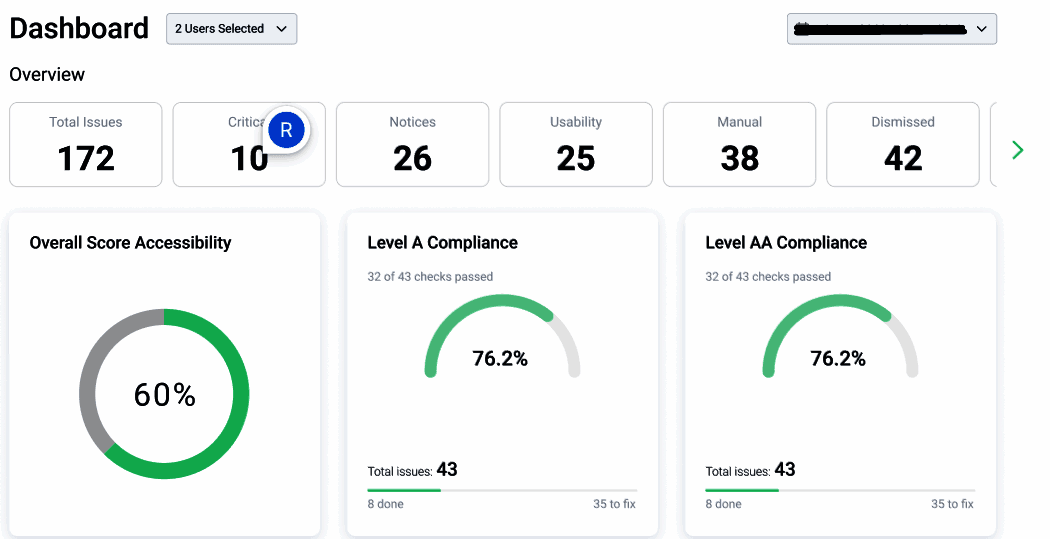
User-Friendly Dashboard: The dashboard lets you easily monitor and manage accessibility efforts. It provides clear insights, making it simple for your team to track progress and optimize accessibility workflows.
Real-Time Monitoring: This feature tracks your website's accessibility status continuously. Your team gets alerts if new issues arise, ensuring prompt action.
Customizable Reports: Equally AI generates reports tailored to your needs, highlighting key accessibility metrics. These reports help your team understand areas of improvement and success.
Guided Remediation: Equally AI offers step-by-step guidance for resolving complex accessibility issues. Your team benefits from clear instructions, making the process straightforward.

Ease of Use
Equally AI is easy for your team to navigate, thanks to its intuitive interface and clear dashboard. The automated features reduce the manual workload, making it accessible even for those without deep technical skills. User reviews highlight its simplicity in managing accessibility tasks, which means your team can quickly adapt and maintain compliance without hassle. The step-by-step guidance further enhances usability, ensuring your team can address any challenges confidently.
Integrations
Equally AI integrates with WordPress, Wix, Squarespace, Weebly, Shopify, Drupal, Magento, Webflow, Duda, and HubSpot.
Equally AI also has an API and connects with third-party integration tools, allowing for enhanced customization and connectivity.

Equally AI Specs
- 2-Factor Authentication: No
- Access Management: No
- API: Yes
- Approval Workflows: No
- Audit Management: Yes
- Balance Sheet: No
- Billing/Invoicing: No
- Budgeting: No
- Calendar Management: No
- Compliance Tracking: No
- CRM Integration: Yes
- Dashboard: Yes
- Data Export: Yes
- Data Import: Yes
- Data Visualization: Yes
- Document Management: No
- Employee Training: No
- Expense Tracking: No
- External Integrations: Yes
- Forecasting: No
- History/Version Control: No
- Incident Management: No
- Multi-Currency: No
- Multi-User: Yes
- Notifications: Yes
- P&L: No
- Policy Management: No
- Real-time Alerts: No
- Regulatory Alerts: No
- Risk Assessment: Yes
- Scheduling: Yes
- Tax Management: No
- Workflow Management: No