

Trabalhar num ambiente ágil significa que as coisas avançam rapidamente, e manter os requisitos organizados pode parecer, por si só, um trabalho a tempo inteiro. Já vi projetos complexos desviarem-se rapidamente do rumo quando as equipas não têm o sistema adequado para registar alterações, acompanhar o trabalho e manter todos alinhados.
Com base na minha experiência a avaliar software, descobri que escolher a ferramenta certa pode determinar o sucesso ou o fracasso do seu projeto. É por isso que procuro apresentar-lhe uma análise equilibrada e bem fundamentada das principais ferramentas de gestão de requisitos ágeis disponíveis. Descobrirá ferramentas que respondem a várias necessidades de projeto, desde a colaboração entre equipas até aos requisitos de conformidade.
Continue a ler para encontrar a opção ideal para a sua equipa e aliviar as dificuldades comuns da gestão de projetos ágeis.
Why Trust Our Software Recommendations
6,700+
Reviews
20
Industry experts
16+
Evaluation factors
14
Years
Our team has been testing and reviewing software since 2012. As tech leaders ourselves, we know how difficult—and important—it is to choose the right software.
For this guide, we evaluated tools using hands-on testing and independent research, scoring tools using our selection criteria.
Our reviews reflect our human editorial judgment, not a sales pitch.
Expert reviewers:
- Paulo Gardini MiguelTech Director
 Tim FisherVP of AI
 Gabriel RosasTech Lead & Software Architect
 Christhian GruhnTech Lead & Platform Architect

Tabela comparativa das ferramentas de gestão de requisitos ágeis
Esta tabela comparativa resume os detalhes de preços das minhas principais escolhas de ferramentas de gestão de requisitos ágeis:
| Tool | Best For | Trial Info | Price | ||
|---|---|---|---|---|---|
| 1 | Best for hardware engineering requirements traceability | 30-day free trial + free demo available | From $995/year (billed annually) | Website | |
| 2 | Best for Git-based backlog and requirements | 30-day free trial and free plan available | From $35/month | Website | |
| 3 | Best for strategic backlog prioritization | Free plan available | From $7/user/month | Website | |
| 4 | Best for Jira-linked requirements documentation | Free plan + 7-day trial available | From $5.78/user/month (billed annually) | Website | |
| 5 | Best for regulated requirements reviews and audits | Free 30-day trial available + free demo available | Pricing upon request | Website | |
| 6 | Best for lightweight database-driven requirements | Free plan + trial available | From $10/user/month | Website | |
| 7 | Best for linking requirements to test and defects | Free 30-day trial available | From $41.20/user/month (billed annually) | Website | |
| 8 | Best for AI-assisted requirements and testing | Free 30-day trial available | From $5/month (billed annually) | Website | |
| 9 | Best for model-based engineering traceability | Free demo available | Pricing upon request | Website | |
| 10 | Best for Azure DevOps requirements traceability | Free 30 days trial available | Pricing upon request | Website |


Análises das melhores ferramentas de gestão de requisitos ágeis
Seguem-se os meus resumos detalhados das melhores ferramentas de gestão de requisitos ágeis que entraram na minha lista restrita. As minhas análises apresentam uma visão detalhada das principais funcionalidades, vantagens e desvantagens, integrações e casos de utilização ideais de cada ferramenta, para o ajudar a encontrar a melhor opção para si.
 Best for hardware engineering requirements traceability
- 30-day free trial + free demo available
- From $995/year (billed annually)
Visit WebsiteCustomer Rating:4.6/5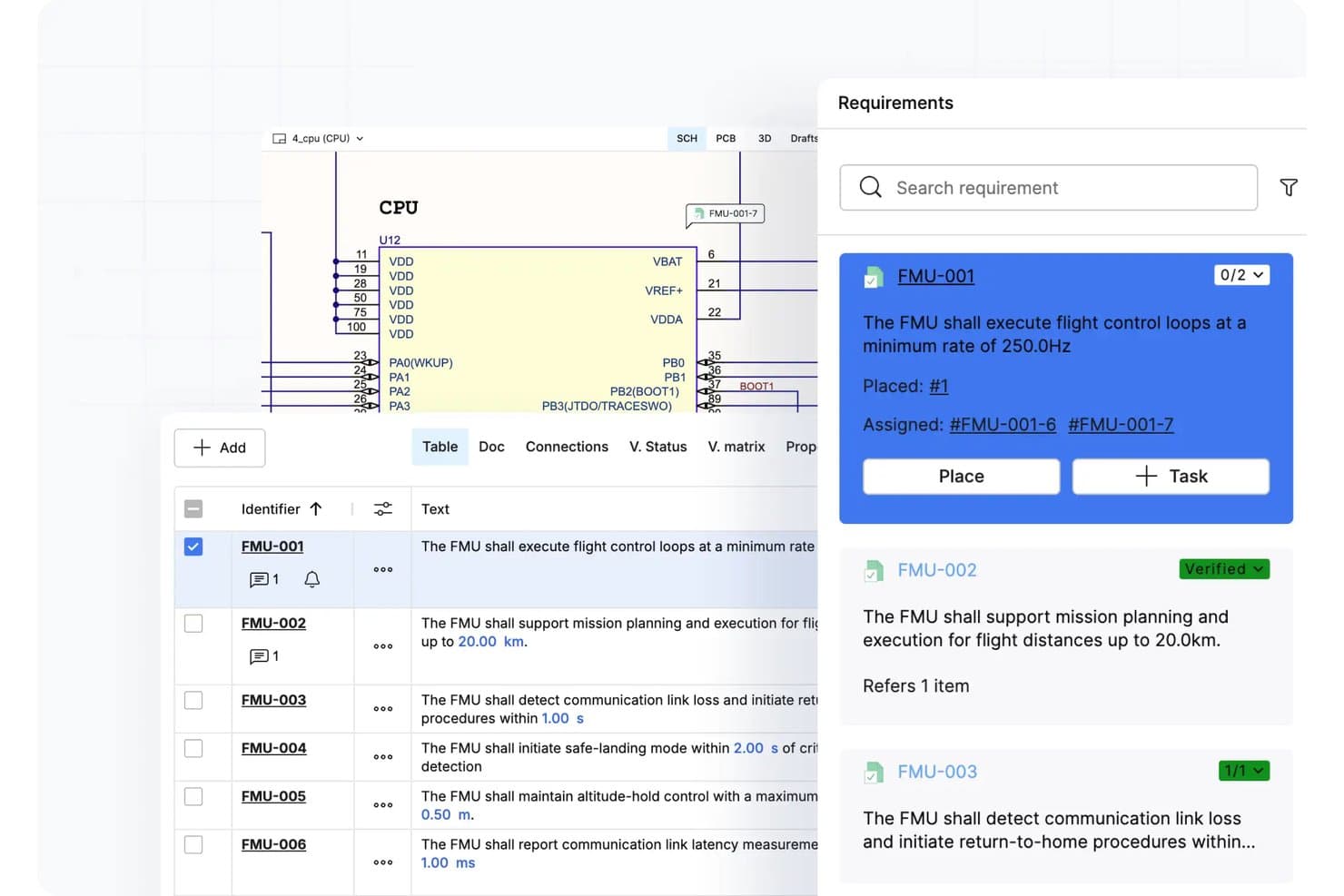
Requirements Portal links schematic components directly to tracked requirements. Requirements Portal is Altium's requirements management tool for hardware and systems engineering teams, offering structured requirements capture, design-linked traceability, verification tracking, and AI-assisted review workflows.
Who Is Requirements Portal Best For?
Requirements Portal is a strong fit for hardware and systems engineering teams that need to link requirements directly to PCB designs, schematics, and verification activities.
Why I Picked Requirements Portal
I've included Requirements Portal in my top picks because it's the strongest option I've found for hardware engineering teams that need requirements tied directly to physical design artifacts. I like how it links requirements to schematics, PCB layouts, and BOM components, so when a requirement changes, you can immediately see what's affected in the design. Its Connections Graph then maps those relationships visually, showing verification status at a glance across the full requirements set.
Requirements Portal Key Features
- AI Engineering Assistant: Uses AI to draft, improve, and flag issues in requirements, with all proposed changes held for human review before being applied.
- Formal review workflow: Assigns reviewers and approvers to requirements, collects ratings, and closes reviews with a recorded timestamp and approver identity.
- Requirement import: Pulls existing requirements from PDF, DOCX, XLSX, or CSV files and maps fields directly into structured specifications.
- Insights dashboard: Displays charts for requirement state, verification status, and AI-assisted quality assessments scoped to a specification or project.
Requirements Portal Integrations
Requirements Portal offers native integration with Altium Designer for viewing requirements alongside schematics and PCB layouts. Its REST and Python APIs support custom connections.
Pros and Cons
Pros:
- Small teams report quicker design iterations
- Formal reviews capture ratings and approvals
- Links requirements to design and verification
Cons:
- No sprint planning, capacity, or velocity tracking
- No epic, story, or sprint workflows
Learn more about Requirements Portal: Best for Git-based backlog and requirements
- 30-day free trial and free plan available
- From $35/month
Visit WebsiteCustomer Rating:4.5/5
Backlog combines tasks, issues, and features for unified team tracking. Backlog is a project management tool designed to help teams plan, track, and deliver their work by combining tasks, bugs, and features in one environment. It's used by product, development, and design teams that need to manage their backlog items, track issues, and visualize progress.
Why I picked Backlog: It provides one workspace where your team can handle tasks and requirements without bouncing between different tools. You can build backlog items, link them to issues or pull requests, and monitor progress through Gantt or Kanban views to keep work on track. It also includes custom workflows and issue types so you can shape the process around how your team operates.
Standout Features and Integrations:
Features include version control, which helps track changes and updates. The tool's task management capabilities allow your team to organize and prioritize effectively. You'll also find its collaboration tools useful for keeping everyone connected and informed.
Integrations include Jira, Redmine, Jenkins, Git, Slack, Google Drive, Dropbox, Microsoft Teams, and more.
Pros and Cons
Pros:
- All-in-one workspace
- User-friendly
- Git and backlog integration
Cons:
- Weak reporting & analytics
- Limited compliance feature
Learn more about Backlog: Best for strategic backlog prioritization
- Free plan available
- From $7/user/month
Visit WebsiteCustomer Rating:4.6/5
Hygger helps teams organize backlogs, plan work, and track delivery. Hygger is a work-management platform that helps teams collect ideas, structure their backlog, and track the development process. It's suited for product, design, and engineering groups who want a clearer view into what to build next and how to get there.
Why I picked Hygger: You'll benefit from the way your team can score backlog items based on impact and effort instead of relying on urgency alone. You can organize work on Kanban boards, use RICE or ICE to rank features, and move chosen items into development boards so nothing slips through. It gives you linked items, status tracking, and several backlog views to keep planning and delivery aligned.
Standout Features and Integrations:
Features include the value/effort prioritization matrix, so your team can rank backlog items with clarity. You'll find custom prioritization criteria where you can define your own factors and weight them to match your context. The two-dimensional Kanban board with swimlanes and labels gives you a flexible view of backlog items across stages.
Integrations include Slack, GitHub, GitLab, Google Drive, Dropbox, Jira, and more.
Pros and Cons
Pros:
- Simple visual boards
- Kanban visualization
- Backlog prioritization frameworks
Cons:
- Limited test management
- Not a formal requirements management tool
Learn more about Hygger: Best for Jira-linked requirements documentation
- Free plan + 7-day trial available
- From $5.78/user/month (billed annually)
Visit WebsiteCustomer Rating:4.3/5
Confluence helps teams create, organize, and share work across projects. Confluence is a cloud-based workspace designed to help teams create, organize, and share content across projects and knowledge areas. It's used by teams that need to capture information, work together, and keep everyone on the same page, such as product development and marketing.
Why I picked Confluence: It creates a flexible space for documenting ideas, requirements, decisions, and shared knowledge, preventing information from getting scattered. You can work together on pages, add diagrams or whiteboards, build structured databases, and link everything to your task or issue trackers. You also receive templates, permissions, and audit logs to maintain organized and accountable content.
Standout Features and Integrations:
Features include real-time collaborative editing so your team can work on documents together at the same time, automated rule runs that reduce manual document work and help you keep content fresh, structured page trees, and databases to organize and reuse information across your projects.
Integrations include Jira, Trello, Slack, Microsoft Teams, Google Drive, Bitbucket, and more.
Pros and Cons
Pros:
- Real-time editing capabilities
- Customizable templates
- Strong documentation structure
Cons:
- Limited traceability
- Risk of content sprawl
 Best for regulated requirements reviews and audits
- Free 30-day trial available + free demo available
- Pricing upon request

Jama Connect aligns requirements with test and risk workflows. Jama Connect is a development platform that helps teams author, manage, trace, and verify requirements alongside test and risk data. Its ecosystem is built for organizations working on complex systems and products, supporting workflows across engineering, testing, and compliance.
Why I picked Jama Connect: It gives your team a clean view of how requirements, tests, and risks connect across the project. You get live traceability, risk-detection dashboards, and baselining tools to track changes and impact. It also offers templates built for regulated work, which helps when you're preparing for audits. If you're handling complex systems and need strong traceability with compliance support, it's a good fit.
Standout Features and Integrations:
Features include end-to-end traceability, impact analysis, and risk management. The tool also supports real-time collaboration and review with stakeholders. You'll find its compliance support for industry standards beneficial for regulated industries.
Integrations include Jira, Microsoft Excel, MATLAB, GitHub, Microsoft Word, Confluence, and more.
Pros and Cons
Pros:
- In-depth review workflow features
- REST API enables integrations and traceability
- Strong compliance support
Cons:
- Large projects can slow reporting and performance
- Can be resource-intensive
Learn more about Jama Connect: Best for lightweight database-driven requirements
- Free plan + trial available
- From $10/user/month

Notion organizes shared documentation and adaptable project structures. Notion is a workspace tool designed for teams to create, collaborate on, and organize content such as notes, tasks, and databases. It's used by project, product, and operations teams that need a shared place for documentation and flexible structures.
Why I picked Notion: It provides one space to capture requirements, ideas, decisions, and shared knowledge without jumping between tools. You can set up pages or databases for your backlog, switch between Kanban and table views, and link tasks or designs so everything stays connected. Templates and custom properties help you shape the workspace around how your team works.
Standout Features and Integrations:
Features include a drag-and-drop editor that simplifies organizing your content. The tool's database functionality supports complex data management and tracking. You'll also appreciate the real-time collaboration feature, which makes teamwork more efficient.
Integrations include Slack, Google Drive, Asana, GitHub, Zapier, and more.
Pros and Cons
Pros:
- Flexible templates
- Combine docs and tasks
- Lightweight requirements management
Cons:
- Limited advanced project management features
- No formal traceability
Learn more about Notion: Best for linking requirements to test and defects
- Free 30-day trial available
- From $41.20/user/month (billed annually)

SpiraTeam links requirements with tests, tasks, bugs, and releases. SpiraTeam is an application lifecycle management platform that helps teams manage requirements, test cases, tasks, bugs, and releases together. It's built for software development environments where requirements and quality are highly interconnected.
Why I picked SpiraTeam: It helps your team keep requirements, tests, and defects connected so you always see how work fits together. You can write user stories, link them to test cases and issues, and track progress across everything in one place. Its dashboards and traceability views show the full path from requirement to release. If you need tighter alignment between requirements and quality in an agile, waterfall, or hybrid setup, it fits well.
Standout Features and Integrations:
Features include a requirements tracing matrix that lets you see status from requirement to test and defect, built-in task and bug tracking so your team uses fewer disconnected tools, and release management charts that help you track deliverables and risk as you move toward iteration end.
Integrations include Jira, GitHub, Azure DevOps, Jenkins, GitLab, TestRail, Microsoft Teams, and more.
Pros and Cons
Pros:
- Detailed reporting capabilities
- Strong defect tracking
- All-in-one ALM suite
Cons:
- Requires training for new users
- Initial setup complexity
Learn more about SpiraTeam: Best for AI-assisted requirements and testing
- Free 30-day trial available
- From $5/month (billed annually)

aqua turns notes and prompts into structured requirements and tests. aqua is a cloud-based platform designed to manage requirements, tests, and defects together with AI assistance. It's used by quality assurance, product, and engineering teams that need to convert input such as notes or voice prompts into structured work items, coordinate test coverage, and handle change tracking.
Why I picked aqua: It offers faster creation of requirements and test assets without the usual manual work. You can turn text, voice, or visuals into structured requirements, link them to test cases automatically, and track coverage through dashboards. Custom fields, templates, and workflow setups help you shape the tool around how your team works.
Standout Features and Integrations:
Features include detailed test case management, which provides complete coverage of your testing scenarios. The tool's defect tracking helps you identify and resolve issues efficiently. You'll also find the reporting features valuable for gaining insights into testing progress and quality metrics.
Integrations include Jenkins, Jira, Azure DevOps, Ranorex, UFT, JMeter, and more.
Pros and Cons
Pros:
- Modern interface
- Requirements-test integration
- AI-assisted test generation
Cons:
- Learning curve for AI features
- Few community resources, tutorials, and third-party support
Learn more about aqua cloud: Best for model-based engineering traceability
- Free demo available
- Pricing upon request

Polarion ALM coordinates requirements, testing, change, and release work. Polarion ALM is a browser-based platform designed to manage development from requirements through testing, change, and release. It serves engineering, quality assurance, and systems teams working in regulated or complex environments. The platform helps coordinate projects, control change, and support audit-readiness.
Why I picked Polarion ALM: Its on-premise deployment lets your team manage product requirements, tests, and releases in one place instead of switching between separate tools. You get LiveDocs for shared specifications, full traceability from requirement to code, and versioning tools that show past project states. It also supports workflows, electronic signatures, and branching when you're dealing with regulatory or audit demands. If you're handling complex work and need strong audit trails, it fits well.
Standout Features and Integrations:
Features include live collaboration via browser-based wikis and threaded discussions across roles, change and configuration management that records who changed what and when for audit readiness, and reuse and branching tools that let you share specifications across product variants while maintaining traceability.
Integrations include Azure DevOps Server, Jira, Git, Simulink, HP QC, ServiceNow, Teamcenter, Salesforce, and more.
Pros and Cons
Pros:
- Unified ALM platform
- ISO/ASPICE standard support
- End-to-end traceability
Cons:
- Limited agility for lightweight projects
- Limited LiveDocs collaboration
Learn more about Polarion ALM: Best for Azure DevOps requirements traceability
- Free 30 days trial available
- Pricing upon request
Visit WebsiteCustomer Rating:4.5/5
Modern Requirements organizes requirements across Azure DevOps workflows. Modern Requirements is a requirements management software built to work inside Azure DevOps. It's designed for teams handling complex development work, including regulated industries, helping them author, manage, trace, and report on requirements. If you're working across development, testing, and release, it brings those processes into one environment.
Why I picked Modern Requirements: It keeps your team aligned because it works directly inside Azure DevOps, so you don't have to jump between tools. You can build living documents, trace requirements through testing and release work, and use versioning and baselines to track changes over time. Its AI assistant also helps you write and refine requirements faster. If you rely on Azure DevOps and need a strong traceability matrix, it fits naturally into your workflow.
Standout Features and Integrations:
Features include authoring tools that let you create requirements, use-case diagrams, and wireframes directly in your project; trace-analysis tools that help you map requirements to tests, documents, and code; and reporting tools that pull information from your work items and output audit-ready documents.
Integrations include Azure DevOps Server, Jira, ServiceNow, GitHub, GitLab, IBM DOORS, and more.
Pros and Cons
Pros:
- Formal DevOps workflow support
- Strong traceability and versioning
- Deep Azure integration
Cons:
- Limited non-Microsoft integrations
- Dependency on Azure DevOps
Learn more about Modern Requirements:
Outras ferramentas de gestão de requisitos ágeis
Eis algumas opções adicionais de ferramentas de gestão de requisitos ágeis que não entraram na minha lista restrita, mas que continuam a valer a pena consultar:
How I Evaluate Agile Requirements Management Tools
I look at these tools in two layers: baseline capabilities like managing a backlog from epic to sprint, and differentiators that determine which tools actually work for your team's scale.
Core Functionality (Table Stakes For This List)
When I'm selecting tools for my list, I rank each one on a scale from 0 (does not offer the functionality) to 5 (excels in this area) for each core functionality listed below. Then, I calculate the tool's total score into a percentage. Each tool needs to achieve a minimum total score of 65% to be considered for inclusion.
- Backlog & Story Management: I evaluate how each tool handles the hierarchy from epics down to stories and acceptance criteria, including whether you can prioritize and estimate items during grooming.
- Requirements Traceability: Each tool should let me link a requirement to its downstream tasks, test cases, and defects so I can trace coverage from a feature request through release.
- Agile Workflow Support: I check for Scrum and Kanban board options, sprint planning capabilities, and agile reporting like burndown charts and velocity tracking across iterations.
- Collaboration & Commenting: Teams need to discuss requirement changes in context, so I look for threaded comments, @mentions, and review workflows that keep feedback tied to items.
- Version Control & Audit History: Regulated teams often need to baseline requirements before a release. I evaluate whether the tool tracks change history with rollback and comparison views.
- Dev Tool Integrations: A tool's value drops fast if it sits outside your pipeline, so I look for native, bi-directional sync with platforms like Jira, Azure DevOps, GitHub, or GitLab.
Once I have a list of tools that meet this criteria, I consider what sets each platform apart.
Differentiating Factors (What Sets Vendors Apart)
Here's how I compare and contrast different vendors:
Standout Features
Visual story mapping is a big differentiator. Tools that let you lay out user journeys spatially make it far easier to plan releases around real workflows instead of flat backlog lists. I also evaluate scaled agile support, especially for enterprise teams running multiple ARTs that need PI planning boards and cross-team dependency views. Stakeholder review portals matter too, since product owners often need executives or customers to approve requirements without adding licensed seats.
Beyond Features
Compliance readiness is a major consideration. Teams building medical devices or automotive software need electronic signatures, baselining, and audit-ready exports that satisfy standards like IEC 62304 or ISO 26262. I also evaluate scalability—whether the tool handles a single Scrum team's backlog as well as a 500-person program with multiple value streams. Deployment options matter here too, since some organizations require self-hosted or private cloud setups with SSO and regional data residency to meet internal security policies.
Como Escolher uma Ferramenta de Gestão de Requisitos Ágeis
É fácil ficar preso a longas listas de funcionalidades e estruturas de preços complexas. Para o ajudar a manter o foco enquanto conduz o seu processo específico de seleção de software, eis uma lista de fatores a ter em conta:
| Fator | O que considerar |
|---|---|
| FatorEscalabilidade | O que considerarA ferramenta acompanhará o crescimento da sua equipa? Considere se consegue suportar mais utilizadores e projetos à medida que expande. Procure exemplos de clientes atuais com um crescimento semelhante. |
| FatorIntegrações | O que considerarConecta-se às suas ferramentas existentes? Confirme se suporta integrações com o seu conjunto tecnológico atual para evitar interrupções nos fluxos de trabalho. |
| FatorPersonalização | O que considerarPode adaptá-la para se adequar aos seus processos? Verifique se a ferramenta permite modificar fluxos de trabalho e painéis de controlo para responder às necessidades da sua equipa. |
| FatorFacilidade de utilização | O que considerarÉ intuitiva para a sua equipa? Considere a curva de aprendizagem e se é necessário algum tipo de formação. As ferramentas com uma interface simples são frequentemente mais rápidas de adotar. |
| FatorImplementação e integração inicial | O que considerarQuanto tempo demorará a configurar? Avalie o tempo e os recursos necessários para a implementação. Procure ferramentas com integração inicial orientada e suporte. |
| FatorCusto | O que considerarPode suportá-la a longo prazo? Compare os planos de preços e verifique se existem custos ocultos. Confirme se a ferramenta se enquadra no seu orçamento sem sacrificar funcionalidades essenciais. |
| FatorMedidas de segurança | O que considerarOs seus dados estão protegidos? Procure ferramentas com medidas de segurança robustas, como encriptação e auditorias regulares, para proteger informações sensíveis. |
| FatorRequisitos de conformidade | O que considerarCumpre as normas do setor? Confirme se a ferramenta está em conformidade com os regulamentos relevantes para a sua área, como o RGPD ou a HIPAA, para evitar problemas legais. |
O que são ferramentas ágeis de gestão de requisitos?
As ferramentas ágeis de gestão de requisitos são soluções de software que ajudam as equipas a gerir e adaptar os requisitos dos seus projetos ao longo do ciclo de vida do desenvolvimento. Estas ferramentas são normalmente utilizadas por gestores de projetos, programadores e analistas de negócio para garantir que os projetos estão alinhados com os objetivos empresariais e as necessidades dos utilizadores.
Funcionalidades como a colaboração em tempo real, o controlo de versões e a gestão do backlog ajudam as equipas a manterem-se organizadas e a responderem às mudanças. De um modo geral, estas ferramentas proporcionam a estrutura e a flexibilidade necessárias para manter os projetos no caminho certo e alinhados com as expectativas dos utilizadores.
Funcionalidades
Ao selecionar ferramentas ágeis de gestão de requisitos, esteja atento às seguintes funcionalidades essenciais:
- Colaboração em tempo real: Permite que vários membros da equipa trabalhem em conjunto simultaneamente, mantendo todos alinhados e informados.
- Controlo de versões: Regista as alterações e mantém um histórico dos requisitos, permitindo reverter para versões anteriores, se necessário.
- Gestão do backlog: Ajuda a definir prioridades para tarefas e histórias de utilizador, mantendo a equipa concentrada no trabalho mais importante.
- Fluxos de trabalho personalizáveis: Permitem que as equipas adaptem os processos às suas necessidades específicas e otimizem a eficiência.
- Relatórios e análise: Fornecem informações sobre o progresso e o desempenho do projeto, ajudando as equipas a tomar decisões informadas.
- Suporte à conformidade: Garante que a ferramenta cumpre as normas e os regulamentos do setor, reduzindo o risco de problemas legais.
- Medidas de segurança: Protegem os dados sensíveis através de encriptação e auditorias regulares, mantendo as suas informações seguras.
- Capacidades de integração: Permitem a ligação às ferramentas existentes no seu conjunto tecnológico, mantendo a continuidade do fluxo de trabalho.
- Integração inicial interativa: Oferece uma configuração orientada e recursos de formação, facilitando um início rápido para as equipas.
- Ferramentas de definição de prioridades de tarefas: Ajudam as equipas a concentrarem-se em tarefas de grande impacto, avaliando o valor em relação ao esforço.
Vantagens
A implementação de ferramentas ágeis de gestão de requisitos proporciona várias vantagens para a sua equipa e para a sua empresa. Eis algumas das que pode esperar:
- Melhoria da colaboração: As funcionalidades de colaboração em tempo real mantêm os membros da equipa alinhados e informados, reduzindo os mal-entendidos.
- Maior adaptabilidade: O controlo de versões e a gestão do backlog ajudam as equipas a responder rapidamente às mudanças e a ajustar as prioridades conforme necessário.
- Melhor tomada de decisões: Os relatórios e a análise fornecem informações sobre o progresso do projeto, ajudando as equipas a tomar decisões informadas.
- Maior segurança: As medidas de segurança protegem os dados sensíveis, proporcionando tranquilidade quanto à segurança das informações.
- Conformidade regulamentar: O suporte à conformidade garante que os seus projetos cumprem as normas do setor, reduzindo o risco de problemas legais.
- Integração inicial eficiente: Os recursos de integração inicial interativa facilitam a rápida adaptação dos novos utilizadores, poupando tempo e esforço.
- Foco otimizado nas tarefas: As ferramentas de definição de prioridades de tarefas ajudam a sua equipa a concentrar-se em tarefas de grande impacto, maximizando a produtividade.
Custos e preços
A seleção de ferramentas de gestão ágil de requisitos exige uma compreensão dos vários modelos de preços e planos disponíveis. Os custos variam consoante as funcionalidades, o tamanho da equipa, os complementos e muito mais. A tabela abaixo resume os planos comuns, os respetivos preços médios e as funcionalidades normalmente incluídas nas soluções de ferramentas de gestão ágil de requisitos:
Tabela de comparação de planos para ferramentas de gestão ágil de requisitos
| Tipo de plano | Preço médio | Funcionalidades comuns |
|---|---|---|
| Tipo de planoPlano gratuito | Preço médio$0 | Funcionalidades comunsGestão básica de tarefas, integrações limitadas e apoio da comunidade. |
| Tipo de planoPlano pessoal | Preço médio$5-$25/utilizador/mês | Funcionalidades comunsGestão de tarefas, ferramentas de colaboração, relatórios básicos e integrações limitadas. |
| Tipo de planoPlano empresarial | Preço médio$10-$150/utilizador/mês | Funcionalidades comunsRelatórios avançados, integrações completas, funcionalidades de segurança melhoradas e apoio prioritário ao cliente. |
| Tipo de planoPlano empresarial personalizado | Preço médio$14-$500/utilizador/mês | Funcionalidades comunsFluxos de trabalho personalizáveis, apoio à conformidade, um gestor de conta dedicado e opções de segurança avançadas. |
Perguntas frequentes sobre ferramentas de gestão ágil de requisitos
Eis algumas respostas a perguntas comuns sobre ferramentas de gestão ágil de requisitos:
Que setores beneficiam mais das ferramentas de gestão ágil de requisitos?
Setores como o desenvolvimento de software, o setor automóvel, a indústria aeroespacial e os cuidados de saúde beneficiam bastante destas ferramentas. Estas ajudam a gerir requisitos em constante mudança e a garantir que os projetos cumprem as normas do setor. Por exemplo, no desenvolvimento de software, facilitam a colaboração e permitem acompanhar as histórias de utilizador e os sprints. Nos setores regulamentados, disponibilizam apoio à conformidade para cumprir os regulamentos necessários.
As ferramentas de gestão ágil de requisitos podem integrar-se com software existente?
Sim, a maioria das ferramentas de gestão ágil de requisitos oferece integrações com software popular, como o Jira, o Slack e o GitHub. Estas integrações ajudam a manter a continuidade do fluxo de trabalho e melhoram a colaboração da equipa. Antes de escolher uma ferramenta, verifique se esta é compatível com o software que a sua equipa já utiliza. Isto permite uma transição mais simples e maximiza a eficácia da ferramenta no seu conjunto tecnológico existente.
Como é que as ferramentas de gestão ágil de requisitos apoiam as equipas remotas?
Estas ferramentas apoiam as equipas remotas ao disponibilizarem funcionalidades de colaboração em tempo real e acesso baseado na nuvem. Os membros da equipa podem trabalhar simultaneamente em projetos a partir de locais diferentes, mantendo todos alinhados. Procure ferramentas que ofereçam acesso móvel e integrações com plataformas de comunicação, como o Zoom ou o Microsoft Teams, para melhorar a colaboração remota.
As ferramentas de gestão ágil de requisitos exigem conhecimentos técnicos para a configuração?
Não, nem todas as ferramentas exigem conhecimentos técnicos para a configuração. Algumas oferecem interfaces intuitivas e um processo de integração orientado para ajudar as equipas a começar rapidamente. No entanto, as ferramentas mais complexas podem precisar de algum apoio informático para a personalização ou integração com outros sistemas. É essencial avaliar as capacidades técnicas da sua equipa e escolher uma ferramenta adequada ao seu nível de conhecimentos, para evitar complicações desnecessárias.