

O software de gestão de palavras-passe mantém as suas contas seguras ao armazenar, gerar e organizar todas as suas palavras-passe num só lugar, para que não tenha de memorizar dezenas de credenciais de acesso únicas nem de se preocupar com falhas de segurança. A ferramenta certa facilita o início de sessão e protege-o contra palavras-passe fracas, reutilizadas ou esquecidas.
Ajudei pessoas e equipas a encontrar gestores de palavras-passe que combinam uma configuração simples com uma segurança robusta. Neste guia, mostrar-lhe-ei exatamente como escolher o melhor software de gestão de palavras-passe para as suas necessidades.
Why Trust Our Software Recommendations
6,700+
Reviews
20
Industry experts
16+
Evaluation factors
14
Years
Our team has been testing and reviewing software since 2012. As tech leaders ourselves, we know how difficult—and important—it is to choose the right software.
For this guide, we evaluated tools using hands-on testing and independent research, scoring tools using our selection criteria.
Our reviews reflect our human editorial judgment, not a sales pitch.
Expert reviewers:
- Paulo Gardini MiguelTech Director
 Tim FisherVP of AI
 Gabriel RosasTech Lead & Software Architect
 Christhian GruhnTech Lead & Platform Architect

Tabela comparativa: software de gestão de palavras-passe
Esta tabela comparativa resume os detalhes de preços das minhas principais escolhas de software de gestão de palavras-passe.
| Tool | Best For | Trial Info | Price | ||
|---|---|---|---|---|---|
| 1 | Best with just-in-time privileged access controls | 14-day free trial | Pricing upon request | Website | |
| 2 | Best for individual users and small businesses | 30-day free trial + free plan available | From $3/user/month (billed annually) | Website | |
| 3 | Best for multi-platform password synchronization | 14-day free trial | From $2.99/month (billed annually) | Website | |
| 4 | Best for a built-in VPN feature | From $4.99/user/month (billed annually) | Website | ||
| 5 | Best for large organizations with complex needs | From $2.96/user/month (min 5 seats, billed annually) | Website | ||
| 6 | Best for a straightforward user interface | From $2.49/user/month (billed annually) | Website | ||
| 7 | Best for organizations valuing open-source software | 7-day free trial + free plan + free demo available | From $3/user/month (billed annually) | Website | |
| 8 | Best for providing advanced two-factor authentication | Free demo available | From $8/client/month | Website | |
| 9 | Best for IT service providers | Pricing upon request | Website | ||
| 10 | Best for integrating with Active Directory | From $5/user/month (min 50 seats) | Website |


Avaliações do melhor software de gestão de palavras-passe
Abaixo encontram-se os meus resumos detalhados do melhor software de gestão de palavras-passe que integrou a minha seleção. As minhas avaliações apresentam uma análise detalhada das principais funcionalidades, vantagens e desvantagens, integrações e casos de utilização ideais de cada ferramenta, para o ajudar a encontrar a melhor opção para si.
 Best with just-in-time privileged access controls
- 14-day free trial
- Pricing upon request
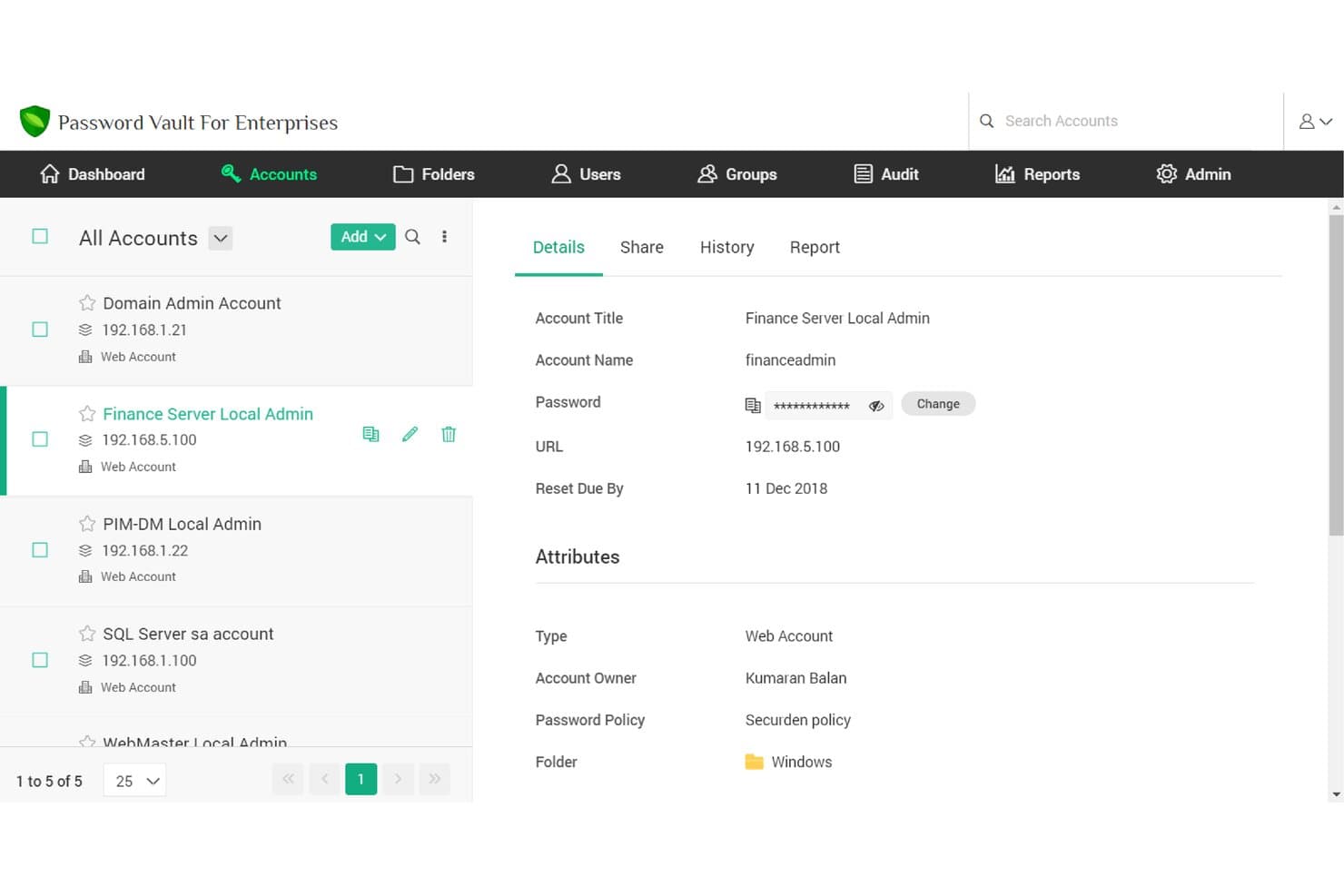
Securden Unified PAM offers a centralized account vault where users can view and manage stored credentials, passwords, and account details with role-based controls. Securden Unified PAM is an enterprise privileged access management platform that combines credential vaulting, session monitoring, secrets management, and endpoint privilege controls in one solution.
Who Is Securden Unified PAM Best For?
It's a strong fit for security-focused IT teams in mid-to-enterprise organizations that need to govern privileged access across complex, multi-system environments.
Why I Picked Securden Unified PAM
I picked Securden Unified PAM because its just-in-time access controls go further than most password managers. Approval-gated sessions automatically revoke access and randomize the underlying credential the moment the time window expires, so users never retain usable passwords after a session ends. I also like that third-party vendor access can be scoped to a specific time window, with full session recording running throughout, which makes post-incident reviews straightforward.
Securden Unified PAM Key Features
- Granular role-based credential sharing: Share sensitive credentials and secrets with specific teams, users, or third parties with full permission controls.
- Comprehensive audit trails and session recording: Capture detailed logs of all privileged activity, including keystrokes and session video playback.
- Directory sync and SSO integration: Connect with Active Directory, LDAP, and SAML identity providers for automated provisioning and authentication.
- Automated credential rotation policies: Enforce password complexity and rotation schedules for privileged accounts, keys, and application secrets.
Securden Unified PAM Integrations
Securden Unified PAM offers native integrations with Okta, OneLogin, Microsoft Entra ID (Azure AD), Google Workspace, Ping Identity, Active Directory, LDAP, ServiceNow, and IBM QRadar. An API is available for custom integrations.
Pros and Cons
Pros:
- Granular vendor access scoping with time limits
- Session recording aids post-incident forensic reviews
- Just-in-time access minimizes standing privilege exposure
Cons:
- No consumer-facing browser autofill experience
- Initial deployment complexity for smaller IT teams
Learn more about Securden Unified PAM: Best for individual users and small businesses
- 30-day free trial + free plan available
- From $3/user/month (billed annually)
Visit WebsiteCustomer Rating:4.6/5
LastPass monitors your accounts and sends an alert if your information is compromised. LastPass is a robust password manager that helps individuals and small businesses manage their online credentials securely. It simplifies password management by creating, storing, and filling in login credentials across multiple sites.
Given its ease of use and cost-effectiveness, it is an excellent choice for individual users and small businesses that need a straightforward solution for password management.
Why I Picked LastPass: In assessing password management solutions, I was drawn to LastPass for its simple yet effective approach to password management. What makes LastPass stand out from the crowd is its user-friendly interface and intuitive features, making it accessible to individual users and small businesses.
I believe LastPass is ideal for this user segment due to its combination of affordability, ease of use, and comprehensive feature set that does not compromise on security.
Standout Features & Integrations:
Key features of LastPass include auto-fill and auto-login, secure password sharing, and multi-factor authentication. These features make it easier for users to navigate the web securely without the burden of remembering numerous passwords. LastPass integrates easily with various browsers and operating systems, offering a smooth user experience across devices.
Pros and Cons
Pros:
- Compatible with various platforms and browsers for easy use
- Offers secure password sharing, which is handy for team collaboration
- User-friendly interface, suitable for individuals and small businesses
Cons:
- Some users might find the setup process a bit complex initially
- Customer support could be more responsive
- The mobile app requires a subscription, which may not be ideal for users looking for a free solution
Learn more about LastPass: Best for multi-platform password synchronization
- 14-day free trial
- From $2.99/month (billed annually)
Visit WebsiteCustomer Rating:4.7/5
1Password vaults organize, share, and control team information access. 1Password offers a secure and user-friendly solution to manage all your passwords across various platforms. It shines in synchronizing your sensitive information across all devices and operating systems, securing your digital life no matter where you are.
Why I Picked 1Password: The multi-platform support and easy synchronization made 1Password stand out in my evaluation. As more people work from different devices and locations, it’s crucial to have a password manager that harmonizes your data across all platforms.
For this reason, 1Password took the crown for being the best for multi-platform password synchronization.
Standout Features & Integrations:
1Password offers end-to-end encryption, auto-fill functionality, and Travel Mode, which allows you to remove sensitive data from your devices when you travel. It integrates with popular browsers for effortless login and form filling, and it's compatible with major operating systems including Windows, macOS, iOS, and Android.
Pros and Cons
Pros:
- Easy synchronization across all platforms
- Travel Mode for data safety during travel
- End-to-end encryption for maximum security
Cons:
- May require initial learning to utilize all features
- No free version available
- Pricing is based on annual billing
Learn more about 1Password: Best for a built-in VPN feature
- From $4.99/user/month (billed annually)
Visit WebsiteCustomer Rating:4.5/5
Here's what reporting dashboard in Dashlane looks like. Dashlane is a robust password manager with an array of additional features, including a built-in VPN for added online security. The tool aids in generating, storing, and auto-filling complex passwords across all your devices, keeping your digital identity secure.
Its built-in VPN sets it apart, adding an extra layer of security, particularly when accessing the internet from public or unsecured networks.
Why I Picked Dashlane: I picked Dashlane for its unique built-in VPN feature. While all password managers secure your login credentials, Dashlane goes a step further to safeguard your overall online activities, making it the best option for users who need a VPN along with password management.
This distinct aspect creates a full-package security tool, differentiating Dashlane from many other password managers.
Standout Features & Integrations:
Beyond password management, Dashlane includes a digital wallet for secure online payments and offers dark web monitoring to alert users if their information appears in compromised databases. The tool's VPN functionality provides an encrypted internet connection, a feature not common in many password managers.
Dashlane integrates well with numerous web browsers like Chrome, Firefox, and Safari, and offers apps for both iOS and Android platforms like Microsoft.
Pros and Cons
Pros:
- Offers a digital wallet for secure online payments
- Provides dark web monitoring
- Includes a built-in VPN for added online security
Cons:
- Free version significantly limits the number of passwords and devices
- The built-in VPN is not as fully-featured as standalone VPN services
- More expensive compared to some other password managers
Learn more about Dashlane: Best for large organizations with complex needs
- From $2.96/user/month (min 5 seats, billed annually)
Visit WebsiteCustomer Rating:3.8/5
This image is a screenshot of the ManageEngine Password Manager Pro website. ManageEngine Password Manager Pro is an enterprise-grade password management solution that enables secure file storage, management, and sharing of passwords and digital identities. It is designed for larger organizations with intricate requirements, allowing for intricate access controls, thorough audit trails, and robust add-ons.
It fits large organizations well because of its scalability and the ability to handle complex hierarchical structures.
Why I Picked ManageEngine Password Manager Pro: I selected ManageEngine Password Manager Pro because of its scalability and extensive feature set catering to complex organizational structures. This tool stood out to me because it's not just a password manager, but a comprehensive privileged access management solution.
It's particularly suitable for large organizations with complex needs due to its extensive customization options, role-based access controls, and robust auditing capabilities.
Standout Features & Integrations:
ManageEngine Password Manager Pro offers a wide array of features such as automated password resets, secure remote access, privileged session management, and detailed audit trails. Its high-level security measures, including two-factor authentication, ensure secure access to sensitive data.
The tool integrates with a range of other platforms, such as Active Directory, LDAP, and a variety of SIEM tools to provide comprehensive security management.
Pros and Cons
Pros:
- Includes detailed audit trails for transparency and accountability
- Provides robust integrations for comprehensive security management
- Offers extensive features suitable for large organizations
Cons:
- The user interface could be more intuitive and user-friendly
- Pricing could be high for organizations with a large number of users
- Can be overwhelming for small businesses or individuals due to its complexity
Learn more about ManageEngine Password Manager Pro: Best for a straightforward user interface
- From $2.49/user/month (billed annually)

Implement company-wide security measures, including password guidelines and multi-factor authentication with NordPass. NordPass is a secure password management tool that operates with a focus on user-friendly design and simplicity. It's developed by the creators of NordVPN, and this attention to straightforward design makes it an excellent choice for those looking for an easy-to-use interface.
Why I Picked NordPass: I chose NordPass for this list because of its clean, intuitive user interface. Compared to some other passkey management tools, NordPass excels in providing a user-friendly experience without sacrificing security.
Given its easy-to-navigate design, I found NordPass to be the best tool for those seeking a straightforward user interface.
Standout Features & Integrations:
NordPass features include password generation, secure passkey sharing, and a built-in OCR scanner to capture information quickly. It's encrypted with the latest security measures (XChaCha20) to keep user information safe.
NordPass also integrates smoothly with various browsers such as Chrome, Firefox, Opera, and Edge, and platforms like iOS and Android, facilitating easy and secure access across devices.
Pros and Cons
Pros:
- Advanced security encryption (XChaCha20)
- Secure password sharing feature
- Clean and straightforward user interface
Cons:
- Annual commitment may not be ideal for all users
- The best features are only available in the paid plan
- Limited advanced features compared to some competitors
Learn more about NordPass: Best for organizations valuing open-source software
- 7-day free trial + free plan + free demo available
- From $3/user/month (billed annually)

Improve user onboarding and account provision/de-provision using Bitwarden Directory Connector or SCIM integration. Bitwarden is an open-source password manager that is designed for both individuals and businesses. It offers secure password storage and sharing, making it ideal for organizations that place a premium on the flexibility and transparency of open-source software.
Why I Picked Bitwarden: I selected Bitwarden for inclusion on this list due to its open-source nature. This characteristic sets it apart from many other password management tools. The transparency provided by open-source software can enhance trust and allow for customizable security solutions, making Bitwarden the best choice for organizations valuing open-source software.
Standout Features & Integrations:
Bitwarden provides end-to-end encryption for secure password management and sharing, as well as features such as a password generator and secure note storage. It offers easy integrations with multiple browsers, including Chrome, Firefox, Safari, and Edge, and mobile platforms like iOS and Android, allowing for secure access across various devices.
Pros and Cons
Pros:
- Wide range of browser and platform integrations
- Offers end-to-end encryption
- Open-source nature provides transparency and flexibility
Cons:
- Lacks some advanced features offered by proprietary password managers
- Requires some technical expertise to fully utilize open-source benefits
- User interface may not be as intuitive as some competitors
Learn more about Bitwarden: Best for providing advanced two-factor authentication
- Free demo available
- From $8/client/month

Here's the secure file and password sharing in Keeper. Keeper is a comprehensive password management solution that takes user security to a higher level. Its commitment to bolstering account security through advanced two-factor authentication makes it ideal for users who prioritize improved security protocols.
Why I Picked Keeper: The decision to include Keeper on this list was largely influenced by its focus on advanced security features. It differentiates itself with robust two-factor authentication, adding an extra layer of security to user accounts.
I am of the opinion that Keeper is the best tool for advanced two-factor authentication due to its uncompromising approach to securing user information.
Standout Features & Integrations:
Keeper offers features like secure record sharing, emergency access, and a strong focus on two-factor authentication, including biometric login. It also provides a secure digital vault for storing sensitive documents. Integration-wise, Keeper works easily with popular platforms like Slack, and it supports SAML 2.0 for secure authentication.
Pros and Cons
Pros:
- Integration with platforms like Slack
- Secure digital vault for storing sensitive documents
- Focuses on advanced two-factor authentication
Cons:
- Its emphasis on security might be overwhelming for users seeking a more straightforward password management tool
- Annual billing may not be suitable for all users
- Lower tiers lack some advanced features
Learn more about Keeper:

With Passportal's comprehensive, exportable reports, nothing will escape your notice. Passportal provides a specialized solution for IT service providers, offering an intuitive password and IT documentation management system. This tool simplifies the task of handling multiple clients' credentials and IT information, making it ideal for IT service providers.
Why I Picked Passportal: Passportal caught my attention due to its specificity in catering to the needs of IT service providers. Its centralized credential management and robust IT documentation features set it apart from other password managers.
I believe Passportal is best for IT service providers because it is designed to manage multiple clients' credentials and IT information efficiently.
Standout Features & Integrations:
Passportal includes features such as automated password resets, secure password sharing, and comprehensive IT documentation. It also provides audit logs to monitor any changes made. Integration-wise, Passportal works well with popular professional service automation (PSA) tools like Autotask and ConnectWise.
Pros and Cons
Pros:
- Integration with popular PSA tools
- Robust IT documentation capabilities
- Centralized management of multiple clients' credentials
Cons:
- Limited usability outside of IT service providers
- May be overwhelming for individual users or small businesses
- Pricing information is not directly available
Learn more about Passportal: Best for integrating with Active Directory
- From $5/user/month (min 50 seats)

Specops Password Security Software safeguards business data by preventing weak passwords. Specops is a comprehensive password security software that excels in Active Directory (AD) integration. This solution streamlines password policies, breach prevention, and secure password resets while synchronizing easily with your AD environment.
Why I Picked Specops Password Security Software: In assessing a plethora of password managers, Specops emerged as unique due to its deep Active Directory integration. This makes it perfect for organizations heavily reliant on AD for their identity and access management.
Consequently, Specops becomes the top pick for those seeking a solution best for integrating with Active Directory.
Standout Features & Integrations:
Specops stands out with features like customizable password policies, password expiration notifications, and secure self-service password reset functionality. Its ability to integrate easily with Active Directory ensures that password policies and changes reflect instantly across the AD environment, making user management more streamlined.
Pros and Cons
Pros:
- Secure self-service password reset
- Customizable password policies
- Deep Active Directory integration
Cons:
- Some features may have a learning curve
- May not be necessary for organizations not to use Active Directory
- Minimum of 50 seats might be high for smaller teams
Learn more about Specops Password Security Software:
Outro software de gestão de palavras-passe
Eis algumas opções adicionais de software de gestão de palavras-passe que não integraram a minha seleção, mas que ainda vale a pena conhecer:
- 11SecurdenBest for centralized control over shared credentials
- 12PassworkBest for teams seeking robust collaboration
- 13Bravura PassBest for extensive customization options
- 14Zoho VaultGood for businesses already using the Zoho suite
- 15OneLoginGood for enterprise-level identity management
- 16Sticky PasswordGood for biometric verification options
- 17EssentialPIMGood for integration with personal information management
- 18ManageEngine ADSelfService PlusGood for Active Directory environments
- 19LogMeOnceGood for users seeking a photo login feature
- 20KeePassGood for users who prefer open-source solutions
- 21EnpassGood for offline password management
- 22True KeyGood for integration with Intel software
- 23RemembearGood for a simple and intuitive user interface
- 24Password BossGood for sharing passwords securely with teams
- 25BIO-key PortalGuard IDaaSGood for identity-as-a-service functionality
How I Evaluate Password Manager Software
I split evaluation into two layers: a baseline every tool must clear—zero-knowledge vaults, admin policy controls, SCIM provisioning—and differentiators that separate the best fits from the rest.
Core Functionality (Table Stakes For This List)
When I'm selecting tools for my list, I rank each one on a scale from 0 (does not offer the functionality) to 5 (excels in this area) for each core functionality listed below. Then, I calculate the tool's total score into a percentage. Each tool needs to achieve a minimum total score of 65% to be considered for inclusion.
- Encrypted Credential Vault: I evaluate the encryption model and whether the vendor maintains a zero-knowledge architecture, meaning even the provider can't access stored passwords, notes, or files.
- Secure Credential Sharing: Teams constantly pass around database credentials and staging environment logins, so I look for role-based sharing with revocation and expiration controls.
- Autofill & Browser Integration: Reliable autofill across major browsers and platforms matters. I check for desktop, mobile, and CLI coverage since IT and dev teams work across varied environments.
- Admin Policy Controls: I look at the admin console for enforceable password strength rules, MFA requirements, and access restrictions like IP allowlisting or device trust policies.
- SSO & Directory Integration: Provisioning users manually at scale is painful. I evaluate SAML SSO support and SCIM directory sync with providers like Okta, Azure AD, and Google Workspace.
- Audit Logs & Reporting: Compliance audits require proof of who accessed what and when. I check for detailed, exportable activity logs and password health dashboards at a minimum.
Once I have a list of tools that meet this criteria, I consider what sets each platform apart.
Differentiating Factors (What Sets Vendors Apart)
Here's how I compare and contrast different vendors:
Standout Features
Secrets management is a major differentiator. Dev and DevOps teams need a vault that handles API keys, SSH keys, and environment variables with CLI or SDK access—not just browser-based passwords. I also evaluate privileged access management features like credential rotation and just-in-time access for admin accounts. For organizations with strict data residency requirements, a self-hosting option can be a deciding factor, letting you deploy the vault on your own infrastructure.
Beyond Features
Security certifications matter here. I check whether a vendor holds SOC 2 Type II or ISO 27001 and whether they publish third-party penetration test results. Developer and DevOps integration is another big factor—tools that offer Terraform providers, CI/CD pipeline support, and REST APIs fit into existing workflows far better than those limited to browser extensions alone. I also evaluate incident response posture, including how account recovery works without breaking zero-knowledge encryption and how transparent the vendor has been about past security events.
Como escolher software de gestão de palavras-passe
É fácil perder-se em listas extensas de funcionalidades e estruturas de preços complexas. Para o ajudar a manter-se concentrado enquanto percorre o seu processo específico de seleção de software, eis uma lista de verificação dos fatores a ter em conta:
| Fator | O que deve considerar |
|---|---|
| FatorEscalabilidade | O que deve considerarA ferramenta pode crescer com a sua equipa? Verifique se permite adicionar mais utilizadores ou gerir um maior volume de dados sem problemas de desempenho. Procure planos de utilizadores flexíveis que acomodem o crescimento. |
| FatorIntegrações | O que deve considerarFunciona com as outras ferramentas que utiliza? Verifique a compatibilidade com plataformas existentes, como o Google Workspace ou o Microsoft 365, para simplificar os fluxos de trabalho e evitar a introdução manual de dados. |
| FatorPersonalização | O que deve considerarPode adaptar a ferramenta às suas necessidades? Procure opções para ajustar definições, permissões e funções de utilizador de modo a corresponderem à estrutura e às políticas de segurança da sua equipa. |
| FatorFacilidade de utilização | O que deve considerarÉ simples de utilizar para todos? Avalie a interface e o design. Certifique-se de que são intuitivos para a sua equipa, minimizando a curva de aprendizagem e reduzindo a necessidade de formação extensiva. |
| FatorImplementação e integração inicial | O que deve considerarCom que rapidez pode começar? Avalie o processo de configuração e integração inicial. Procure recursos como tutoriais, modelos e suporte dedicado para facilitar a transição e garantir uma implementação sem problemas. |
| FatorCusto | O que deve considerarEncaixa-se no seu orçamento? Analise a estrutura de preços, incluindo eventuais taxas ocultas. Compare o custo com as funcionalidades oferecidas e procure descontos na faturação anual ou em planos para vários utilizadores. |
| FatorMedidas de segurança | O que deve considerarAs suas palavras-passe estão seguras? Certifique-se de que a ferramenta utiliza normas de encriptação robustas, disponibiliza autenticação multifator e fornece registos de auditoria para monitorizar o acesso e detetar atividades não autorizadas. |
| FatorRequisitos de conformidade | O que deve considerarCumpre as regulamentações do setor? Verifique se a ferramenta está em conformidade com as normas legais relevantes, como o RGPD ou a HIPAA, sobretudo se a sua equipa trata dados sensíveis. Procure certificações ou documentação que confirmem a conformidade. |
O que é o software de gestão de palavras-passe?
O software de gestão de palavras-passe é uma ferramenta que armazena, gera e organiza todas as suas palavras-passe num único local seguro. Pessoas como administradores de TI, profissionais de segurança e qualquer pessoa cansada de se esquecer dos dados de início de sessão utilizam-no para manter as suas contas seguras sem o stress de memorizar inúmeras palavras-passe. Ajuda-o a criar palavras-passe fortes, preenche-as por si e protege as suas informações, para que não tenha de se preocupar com dados de início de sessão fracos ou reutilizados.
Funcionalidades
Ao selecionar um software de gestão de palavras-passe, procure as seguintes funcionalidades principais:
- Cofre de palavras-passe: Armazena todas as suas palavras-passe de forma segura num único local, facilitando a sua gestão e o acesso quando necessário.
- Preenchimento automático: Preenche automaticamente as credenciais de início de sessão nos sites, poupando-lhe tempo e reduzindo o risco de erros de introdução.
- Gerador de palavras-passe: Cria palavras-passe fortes e únicas para cada conta, reforçando a segurança ao impedir a utilização de palavras-passe fáceis de adivinhar.
- Autenticação multifator: Adiciona uma camada extra de segurança ao exigir etapas de verificação adicionais para além de uma simples palavra-passe.
- Monitorização da web obscura: Alerta-o se as suas credenciais aparecerem em fugas de dados, permitindo-lhe agir rapidamente para proteger as suas contas.
- Controlos de acesso personalizáveis: Permite-lhe definir quem pode aceder a palavras-passe específicas, garantindo que as informações sensíveis só ficam disponíveis para utilizadores autorizados.
- Registo de sessões: Monitoriza e regista as atividades dos utilizadores, disponibilizando um registo de auditoria para fins de segurança e conformidade.
- Início de sessão biométrico: Utiliza o reconhecimento de impressões digitais ou facial para proporcionar um acesso seguro e conveniente às suas contas.
- Relatórios de segurança: Disponibiliza informações sobre a integridade e a segurança das palavras-passe, ajudando-o a identificar pontos fracos e a melhorar a sua postura geral de segurança.
- Capacidades de integração: Liga-se a outras ferramentas e plataformas que utiliza, aumentando a eficiência dos fluxos de trabalho e reduzindo a introdução manual de dados.
Benefícios
A implementação de um software de gestão de palavras-passe proporciona vários benefícios à sua equipa e à sua empresa. Eis alguns dos benefícios que pode esperar:
- Segurança reforçada: Protege as suas contas com palavras-passe fortes e únicas e autenticação multifator, reduzindo o risco de violações.
- Poupança de tempo: Preenche automaticamente os dados de início de sessão para um acesso rápido, eliminando a necessidade de memorizar ou introduzir palavras-passe manualmente.
- Gestão simplificada: Centraliza o armazenamento das palavras-passe num cofre seguro, facilitando a organização e a recuperação das credenciais.
- Conformidade melhorada: Disponibiliza registos de auditoria e registos de atividade para ajudar a cumprir os regulamentos e as normas de segurança.
- Maior produtividade: Integra-se com as ferramentas existentes para simplificar os fluxos de trabalho e reduzir a introdução manual de dados.
- Alertas proativos de ameaças: Monitoriza a web obscura em busca de fugas de dados, permitindo-lhe responder rapidamente a potenciais ameaças.
- Acesso personalizável: Oferece controlo sobre quem pode consultar ou modificar palavras-passe, garantindo que os dados sensíveis só ficam acessíveis a utilizadores autorizados.
Custos e preços
A seleção de um software de gestão de palavras-passe requer uma compreensão dos vários modelos e planos de preços disponíveis. Os custos variam consoante as funcionalidades, a dimensão da equipa, os complementos, entre outros fatores. A tabela abaixo resume os planos comuns, os respetivos preços médios e as funcionalidades normalmente incluídas nas soluções de software de gestão de palavras-passe:
Tabela de comparação de planos de software de gestão de palavras-passe
| Tipo de plano | Preço médio | Funcionalidades comuns |
|---|---|---|
| Tipo de planoPlano gratuito | Preço médio$0 | Funcionalidades comunsArmazenamento básico de palavras-passe, preenchimento automático e geração de palavras-passe. |
| Tipo de planoPlano pessoal | Preço médio$3-$10/utilizador/mês | Funcionalidades comunsCofre seguro de palavras-passe, sincronização entre vários dispositivos e suporte básico. |
| Tipo de planoPlano empresarial | Preço médio$5-$25/utilizador/mês | Funcionalidades comunsPartilha de palavras-passe da equipa, controlos de administração e suporte prioritário. |
| Tipo de planoPlano empresarial de grande dimensão | Preço médio$15-$50/utilizador/mês | Funcionalidades comunsFuncionalidades de segurança avançadas, ferramentas de conformidade, gestor de conta dedicado e integrações personalizadas. |
Perguntas frequentes sobre software de gestão de palavras-passe
Eis algumas respostas a perguntas comuns sobre software de gestão de palavras-passe:
Posso utilizar software de gestão de palavras-passe sem ligação à internet?
Sim, muitos gestores de palavras-passe permitem o acesso sem ligação à internet. Pode consultar as palavras-passe armazenadas mesmo sem uma ligação à internet. No entanto, algumas funcionalidades, como a sincronização entre dispositivos, podem exigir acesso à internet. Se esta funcionalidade for importante para o seu fluxo de trabalho, verifique se a ferramenta que está a considerar permite a utilização sem ligação à internet.
É difícil mudar para um novo gestor de palavras-passe?
Não, a maioria dos gestores de palavras-passe disponibiliza ferramentas de importação. Estas permitem transferir facilmente as palavras-passe do gestor antigo. Procure opções que permitam importar dados de ferramentas populares, como o LastPass ou o Dashlane. Isto pode poupar-lhe tempo e esforço durante a transição e ajudá-lo a manter a segurança.
Como lidam os gestores de palavras-passe com as fugas de dados?
Os gestores de palavras-passe alertam-no se os seus dados forem comprometidos. Monitorizam as fugas de dados e notificam-no se alguma das credenciais armazenadas for afetada. Pode então alterar rapidamente as palavras-passe para proteger as suas contas. Algumas ferramentas oferecem ainda monitorização da web obscura para obter informações adicionais sobre a segurança.
Os gestores de palavras-passe funcionam em vários dispositivos?
Sim, normalmente sincronizam-se entre dispositivos. Isto significa que pode aceder às suas palavras-passe no telemóvel, tablet e computador. Verifique se a ferramenta é compatível com os sistemas operativos que utiliza, como Windows, macOS, iOS e Android. Isto garante uma experiência uniforme em todos os seus dispositivos.