

Encontrar as ferramentas certas de segurança na nuvem pode simplificar significativamente a deteção de ameaças e reforçar a conformidade, quer esteja a proteger dados sensíveis, a proteger ambientes multinuvem ou a automatizar a resposta a incidentes.
Testei e analisei de forma independente várias soluções, com foco no que realmente importa para si e para a sua equipa. Acredito em fornecer uma perspetiva imparcial e bem fundamentada para o ajudar a tomar decisões informadas.
Neste artigo, ficará a conhecer as minhas principais escolhas de ferramentas de segurança na nuvem, cada uma selecionada pelos seus benefícios únicos. Quer esteja preocupado com a proteção de dados ou com a conformidade, encontrará informações que respondem às suas necessidades específicas. Vamos analisar as opções e encontrar a solução mais adequada para a sua organização.
Why Trust Our Software Recommendations
6,700+
Reviews
20
Industry experts
16+
Evaluation factors
14
Years
Our team has been testing and reviewing software since 2012. As tech leaders ourselves, we know how difficult—and important—it is to choose the right software.
For this guide, we evaluated tools using hands-on testing and independent research, scoring tools using our selection criteria.
Our reviews reflect our human editorial judgment, not a sales pitch.
Expert reviewers:
- Paulo Gardini MiguelTech Director
 Tim FisherVP of AI
 Gabriel RosasTech Lead & Software Architect
 Christhian GruhnTech Lead & Platform Architect

Tabela comparativa de ferramentas de segurança na nuvem
Esta tabela comparativa resume os detalhes de preços das minhas principais escolhas de ferramentas de segurança na nuvem.
| Tool | Best For | Trial Info | Price | ||
|---|---|---|---|---|---|
| 1 | Best for comprehensive cloud posture management | Free plan available | From $350/month | Website | |
| 2 | Best for CSPM and identity risk across multi-cloud | 30-day free trial + free demo available | Pricing upon request | Website | |
| 3 | Best for securing global device fleets | Free demo available | From $49/user/month | Website | |
| 4 | Best for zero trust access control | Free plan available | From $5/user/month (billed annually) | Website | |
| 5 | Best for unified SIEM with DLP and CASB | Free demo available | Pricing upon request | Website | |
| 6 | Best for privileged account management | Free trial + free demo available | Pricing upon request | Website | |
| 7 | Best for insight-driven defense | 30-day free trial available | From $795/50 endpoints/year | Website | |
| 8 | Best range of scanning services | Free trial available | From $119/month | Website | |
| 9 | Best for proactive threat detection | 30-day free trial + free demo available | From $338.50/year | Website | |
| 10 | Best for endpoint protection | 15-day free trial available | From $7.99/device/month | Website |


Análises das melhores ferramentas de segurança na nuvem
Apresentamos abaixo os meus resumos detalhados das melhores ferramentas de segurança na nuvem que chegaram à minha seleção. As minhas análises oferecem uma visão detalhada das principais funcionalidades, vantagens & desvantagens, integrações e casos de utilização ideais de cada ferramenta, para o ajudar a encontrar a melhor opção para si.
 Best for comprehensive cloud posture management
- Free plan available
- From $350/month
Visit WebsiteCustomer Rating:4.7/5
Aikido Security provides a unified dashboard to triage and filter issues by type, severity, and scan source. Aikido Security is a comprehensive DevSecOps platform designed to provide full security coverage from code to cloud. It integrates multiple security scanning capabilities, including SAST, DAST, SCA, CSPM, IaC, and container scanning, to identify and manage high-risk vulnerabilities in source code, containers, and cloud environments.
Why I picked Aikido Security: I like its cloud posture management (CSPM), which detects cloud infrastructure risks across major cloud providers. This feature ensures that your cloud environment is continuously monitored for vulnerabilities, misconfigurations, and compliance issues, providing a robust defense against potential security breaches. Additionally, Aikido Security offers Infrastructure as Code (IaC) scanning, which scrutinizes Terraform, CloudFormation, and Kubernetes configurations for security risks.
Aikido Security Standout Features and Integrations:
Features include an innovative approach to detecting attack paths by visualizing potential security vulnerabilities in your cloud infrastructure, enabling preemptive remediation. Its risk prioritization offers actionable insights based on real-time context and potential impact to help teams focus on the most critical threats. Aikido Security integrates with CI/CD pipelines and popular DevOps tools, making it easy to incorporate security checks into development workflows without disrupting productivity.
Integrations include Amazon Web Services (AWS), Google Cloud, Microsoft Azure Cloud, Drata, Vanta, AWS Elastic Container Registry, Docker Hub, Jira, Asana, and GitHub.
Pros and Cons
Pros:
- Provides actionable insights and recommendations
- Helps in compliance tracking and reporting
- User-friendly interface
Cons:
- Does not have endpoint security or intrusion detection capabilities
- Ignores vulnerabilities if no fix is available
Learn more about Aikido Security: Best for CSPM and identity risk across multi-cloud
- 30-day free trial + free demo available
- Pricing upon request
Visit WebsiteCustomer Rating:4.5/5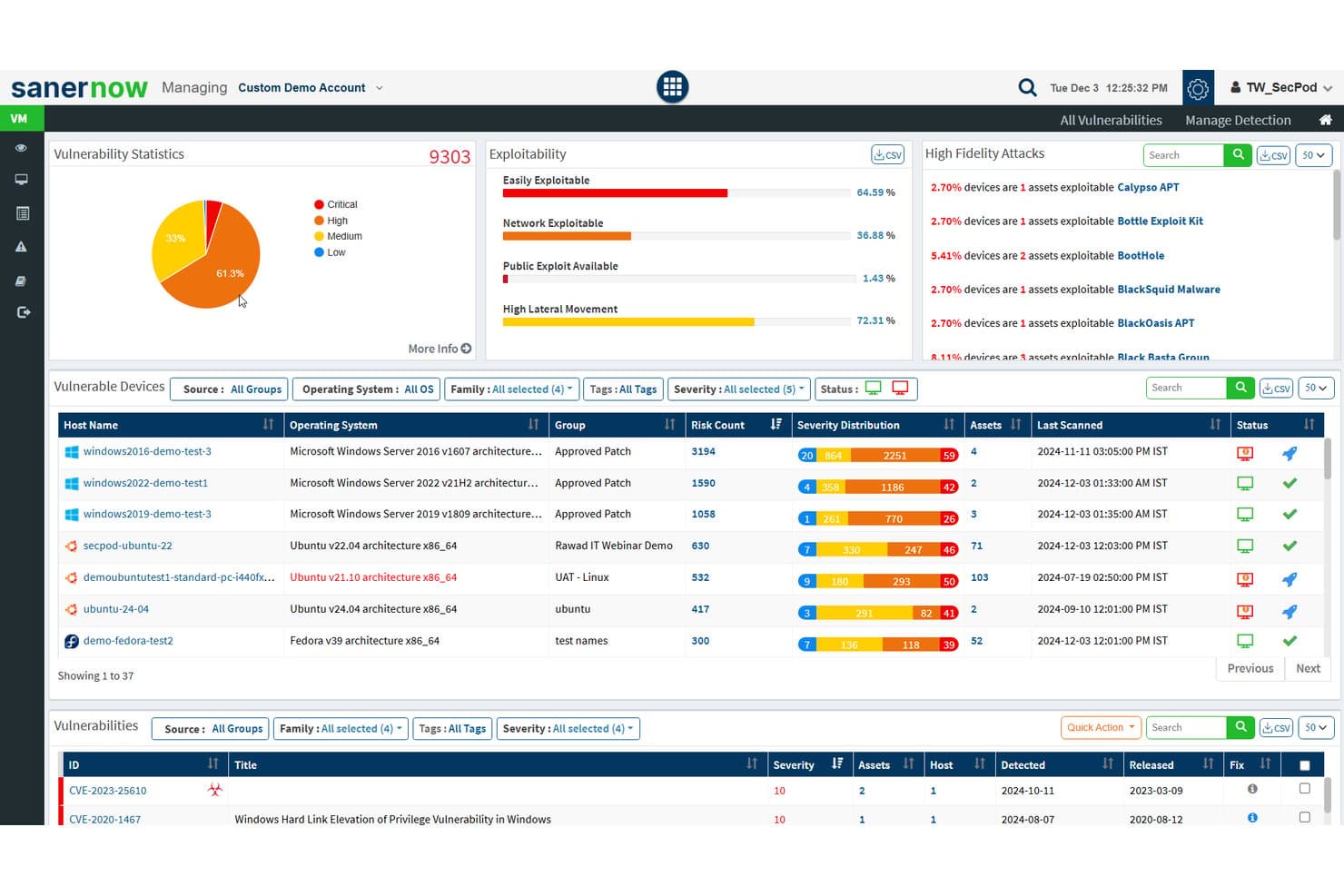
SecPod (Saner Platform) tracks vulnerability stats and exploitability across cloud assets. Saner CNAPP is a cloud-native application protection platform from SecPod that combines cloud posture management, infrastructure entitlement management, anomaly detection, asset exposure, and workload management across AWS, Azure, and GCP.
Who is Saner CNAPP Best For?
Saner CNAPP is a strong fit for security and cloud teams managing sprawling multi-cloud environments where identity risk and misconfiguration are top concerns.
Why I Picked Saner CNAPP
I picked Saner CNAPP as one of the best because its CIEM module goes deeper than most tools on cloud identity risk, mapping how users, roles, groups, and service accounts combine to create excessive or dormant access across AWS, Azure, and GCP. I also like that its CSPM runs more than 1,000 benchmark checks and ties every failed finding directly to a remediation workflow, so your team isn't left manually connecting posture issues to fixes.
Saner CNAPP Key Features
- Anomaly detection with confidence scoring: CSPA flags posture deviations across AWS, Azure, and GCP and groups them into high, medium, and low confidence categories to guide investigation priority.
- Cloud asset exposure inventory: CSAE maintains a centralized resource inventory, highlights publicly accessible assets, and lets teams create watchlists scoped by cloud profile, service type, and region.
- Scheduled and automated remediation: The risk remediation module runs built-in fix rules on daily, weekly, or monthly schedules and tracks task status from pending approval through to completion.
- Multi-tier support options: SecPod offers Basic (9×5), Extended (24×5), and Premium (24×7) support tiers, with the Premium tier covering weekends and public holidays.
Saner CNAPP Integrations
Saner CNAPP integrates with AWS, Microsoft Azure, and Google Cloud Platform (GCP) for cloud posture, identity, and asset visibility. API availability for custom integrations isn’t documented.
Pros and Cons
Pros:
- Links posture findings to remediation workflows
- Maps excessive and dormant cloud permissions
- Prioritizes findings by impact and exploitability
Cons:
- Manual benchmark rules need human verification
- Scan cycles can miss transient changes
Learn more about SecPod (Saner Platform): Best for securing global device fleets
- Free demo available
- From $49/user/month
Visit WebsiteCustomer Rating:4.7/5
Deel’s IT dashboard gives you a global view of device security, equipment tracking, and asset distribution across your entire workforce. Deel offers a suite of cloud-based security tools designed to protect every device in your organization from cyber threats. Its endpoint protection platform safeguards laptops, tablets, and mobile devices across your global workforce.
Why I picked Deel: I picked Deel because it brings cloud security directly into the workforce management ecosystem, combining endpoint protection with device management and access control. Deel’s cloud-native system continuously detects and prevents malware, ransomware, and unauthorized access in real time—without needing heavy manual oversight. Its automated threat response isolates affected devices instantly, minimizing disruption and data exposure.
Deel Standout Features and Integrations:
Features include automated threat detection that adapts to evolving cyber risks in real time, ensuring every endpoint stays protected. The platform’s lightweight architecture enables instant containment of security threats without slowing down devices or workflows. Deel also offers cross-platform coverage, giving your IT team consistent protection and visibility across all operating systems and device types.
Integrations include BambooHR, Personio, NetSuite, Slack, Google Workspace, Zoom, SAP SuccessFactors, Xero, QuickBooks, Workday, Greenhouse, and Lever.
Pros and Cons
Pros:
- Automated containment reduces manual work
- Protects all devices across locations
- Real-time threat detection and response
Cons:
- Lacks broader cloud security tools beyond endpoint management for devices
- Not a full enterprise security suite
Learn more about Deel IT: Best for zero trust access control
- Free plan available
- From $5/user/month (billed annually)
Visit WebsiteCustomer Rating:4.8/5
Twingate offers device visibility for better network management. Twingate is a cloud security solution that replaces traditional VPNs with a Zero Trust Network Access (ZTNA) model. It helps secure remote access to private resources by enforcing least privilege access, device verification, and intelligent traffic controls.
Why I picked Twingate: I picked Twingate because of its strong zero trust implementation, which ensures that users only gain access to the resources they need. By authenticating both user identity and device status, Twingate helps prevent unauthorized lateral movement across networks. I also found its automated access controls valuable, as they can simplify the process of granting or revoking permissions in dynamic work environments. For distributed teams, these capabilities make it easier to maintain security without creating friction for end users.
Twingate standout features and integrations:
Features include intelligent device verification that works through integrations with services like CrowdStrike and Jamf, plus DNS filtering and content filtering to reduce exposure to malicious sites. Its orchestration layer can centralize security without requiring network reconfiguration, while integrations with identity providers like Azure AD and Okta make access management more efficient.
Integrations include CrowdStrike, Intune, Kandji, Jamf, Azure AD, Okta, Google Workspace, OneLogin, KeyCloak, JumpCloud, Virtual Machines, and Kubernetes.
Pros and Cons
Pros:
- Centralized zero trust orchestration
- Strong device verification controls
- Flexible identity provider integrations
Cons:
- Limited advanced analytics
- Learning curve for setup
Learn more about Twingate: Best for unified SIEM with DLP and CASB
- Free demo available
- Pricing upon request
Visit WebsiteCustomer Rating:4.2/5
ManageEngine Log360 offers customizable reporting features for security events, compliance, and operational insights. ManageEngine Log360 is a comprehensive security information and event management (SIEM) solution that provides log management, threat detection, compliance reporting, and real-time security alerts. It aims to enhance visibility into an organization's network, improve security measures, and provide a user-friendly experience.
Why I picked ManageEngine Log360: I picked ManageEngine Log360 because of its ability to provide comprehensive security coverage for cloud environments. Its integration of SIEM capabilities with cloud access security broker (CASB) and data loss prevention (DLP) features ensures robust threat detection and response. Additionally, the software’s machine learning-based anomaly detection, coupled with real-time analytics, offers dynamic and proactive cloud security, making it an ideal choice for protecting cloud assets and data.
ManageEngine Log360 Standout Features and Integrations:
Features include unified log management and SIEM capabilities, enabling real-time threat detection and compliance reporting from a single console. Its integration with popular IT and security tools enhances visibility across hybrid IT environments, simplifying compliance with regulations like GDPR and HIPAA. Additionally, Log360’s automated log correlation and anomaly detection provide actionable insights to swiftly identify and mitigate potential security risks.
Integrations include Microsoft Active Directory, Office 365, Google Workspace, AWS, Azure, Salesforce, Box, ServiceNow, Jira, Slack, IBM QRadar, Splunk, SolarWinds, Palo Alto Networks, Fortinet, Cisco, and Sophos.
Pros and Cons
Pros:
- Compliance with legal regulations
- Incident management console
- Holistic security visibility across on-premises, cloud, and hybrid networks
Cons:
- Logs can be hard to read and understand
- Complex to set up and configure
Learn more about ManageEngine Log360: Best for privileged account management
- Free trial + free demo available
- Pricing upon request

Heimdal offers a comprehensive dashboard for IT asset management. In the realm of cloud security, Heimdal presents a dynamic solution for businesses aiming to protect their digital environments. Tailored for industries such as healthcare, education, and government, it tackles challenges like compliance with standards such as ISO 27001 and GDPR. The tool not only defends against threats like ransomware and phishing but also simplifies security management, making it a valuable asset for IT teams.
Why I Picked Heimdal
I picked Heimdal for its exceptional integration of advanced security measures tailored for cloud environments. Its Extended Detection & Response (XDR) capabilities offer comprehensive threat coverage across endpoints and networks, addressing the need for constant monitoring. Additionally, Heimdal's DNS Security protects against web-based threats, ensuring your network stays secure. These features are appealing to businesses prioritizing compliance and data protection.
Heimdal Key Features
In addition to its standout capabilities, Heimdal offers several other notable features that enhance its cloud security offerings:
- Privileged Account & Session Management: This feature secures access by managing and monitoring privileged accounts, reducing the risk of unauthorized access.
- Patch & Asset Management: Automates the patching process, ensuring systems are up-to-date and compliant with security standards.
- Ransomware Encryption Protection: Provides an additional layer of defence against ransomware attacks, safeguarding critical data and systems.
- Email Security: Protects against email-based threats, such as phishing and malware, by filtering and monitoring communications.
Heimdal Integrations
Native integrations are not currently listed by Heimdal; however, the platform supports API-based custom integrations.
Pros and Cons
Pros:
- Detailed asset and license visibility
- Strong vulnerability and threat detection
- Automates patching across endpoints
Cons:
- Interface requires onboarding time
- No native integrations available
Learn more about Heimdal: Best for insight-driven defense
- 30-day free trial available
- From $795/50 endpoints/year
Visit WebsiteCustomer Rating:4.3/5
Get detailed overviews of system health with ManageEngine Desktop Central. ManageEngine Desktop Central is a comprehensive tool that offers unified endpoint management and cloud security for all devices within an organization, ideal for IT professionals, managed service providers (MSPs), and enterprises of various sizes. Its goal is to assist in managing servers, laptops, desktops, smartphones, and tablets from a centralized location.
Why I picked ManageEngine Desktop Central: The software provides insight-driven defense through its extensive data collection and analytics features, which help IT administrators with actionable intelligence to proactively tackle security threats. A key feature that supports this approach is its real-time system monitoring and alerts. ManageEngine Desktop Central also offers end-to-end visibility and control and data hardening.
ManageEngine Desktop Central Standout Features and Integrations:
Features include endpoint management across devices and operating systems, ensuring seamless administration of desktops, servers, and mobile devices. Its integration with tools like ServiceDesk Plus enables efficient IT operations by connecting ticketing and device management workflows. Additionally, the software provides advanced automation for patch management and configuration enforcement, enhancing security and reducing manual effort.
Integrations include ServiceNow, Jira, Zoho Desk, Zendesk, Jira Service Desk, Microsoft SCCM, IBM BigFix, Slack, Microsoft Teams, Trello, Zapier, ManageEngine ServiceDesk Plus, Microsoft Intune, and more.
Pros and Cons
Pros:
- Active directory management
- Patch management for software updates
- Remote desktop management capabilities
Cons:
- Users can feel overwhelmed with a lot of configurable features
- Some advanced features require additional research
Learn more about ManageEngine Endpoint Central: Best range of scanning services
- Free trial available
- From $119/month
Visit WebsiteCustomer Rating:4.8/5
Intruder provides a dashboard for centralized vulnerability management. Intruder is a cloud security tool designed to help organizations manage vulnerabilities and protect their digital assets. It focuses on continuous vulnerability management and attack surface management, offering a comprehensive approach to identifying and addressing security weaknesses.
Why I picked Intruder: I picked Intruder because of its ability to perform various scanning services, including external, internal, cloud, web application, and API vulnerability scanning. These features allow you to monitor your organization's security posture in real-time, ensuring that critical vulnerabilities are prioritized and addressed promptly. Additionally, Intruder's platform offers exposure management by utilizing multiple scanning engines, which helps identify issues that might be overlooked by other tools.
Intruder Standout Features and Integrations:
Features include the ability to prioritize vulnerabilities based on their potential impact, helping you focus on the most pressing issues. Intruder also provides clear remediation guidance, making it easier for your team to address identified problems. Additionally, the platform offers comprehensive reporting capabilities, allowing you to track your security posture over time and demonstrate compliance with industry standards.
Integrations include AWS, GitLab, GitHub, Jira, Azure, Teams, Slack, Azure DevOps, Cloudflare, Google Cloud, Microsoft Sentinel, and Okta.
Pros and Cons
Pros:
- Prioritization of issues helps focus on critical threats
- Offers detailed reports
- The platform proactively scans for newly disclosed vulnerabilities
Cons:
- Attack surface monitoring limited to Premium plan
- Some may find the customization options for scans limited
Learn more about Intruder: Best for proactive threat detection
- 30-day free trial + free demo available
- From $338.50/year
Visit WebsiteCustomer Rating:4.6/5
ESET PROTECT's proactive threat detection is visible in a single dashboard. ESET PROTECT Complete is a comprehensive cloud-based security solution designed to provide multilayered protection for business endpoints, including computers, laptops, and mobile devices. The solution features cloud sandboxing technology to counteract zero-day threats and includes full disk encryption to enhance data protection.
Why I picked ESET PROTECT Complete: As a cloud security tool, ESET PROTECT offers robust protection specifically designed to address the unique security challenges of cloud computing. Additionally, the platform's cloud-based console enables administrators to manage security across distributed cloud environments seamlessly, enhancing visibility and control over all resources.
ESET PROTECT Complete Standout Features and Integrations:
Features include a unified security management platform with advanced threat detection and response capabilities, enabling IT teams to monitor endpoints, servers, and networks in real time. ESET’s multi-layered security approach includes endpoint protection, data encryption, and cloud sandboxing, ensuring comprehensive defense against known and zero-day threats. Its integration with cloud-native tools and streamlined deployment makes it particularly user-friendly for organizations seeking efficient, scalable cybersecurity solutions.
Integrations include ConnectWise Automate, Microsoft Windows Defender Antivirus, Microsoft Azure, Datto RMM, NinjaOne, Kaseya VSA, and ATERA.
Pros and Cons
Pros:
- Comprehensive reporting tools for in-depth security insights
- Advanced threat detection and response capabilities
- Lightweight system footprint ensures minimal impact on performance
Cons:
- Requires technical knowledge for advanced feature utilization
- Pricing can be high for smaller organizations
Learn more about ESET PROTECT Complete: Best for endpoint protection
- 15-day free trial available
- From $7.99/device/month
Visit WebsiteCustomer Rating:4.6/5
CrowdStrike Falcon’s dashboard features cloud and container workload visibility. CrowdStrike is a smart, lightweight agent that prevents malware attacks while recording and capturing endpoint activity. Its endpoint security solution uses artificial intelligence and deep link analytics to provide extended detection and response for your cloud architecture.
Why I picked CrowdStrike Falcon: I chose CrowdStrike because it delivers next-generation endpoint protection combined with a continuously managed threat detection service. I especially appreciated the capacity for detection and remediation tools to safeguard cloud workloads at all stages, from development to production.
CrowdStrike Falcon Standout Features and Integrations:
Features include AI-powered threat detection that provides real-time insights into endpoint activity to identify and mitigate potential breaches before they occur. Its cloud-native architecture ensures rapid deployment and scalability, making it ideal for organizations of all sizes. Additionally, CrowdStrike Falcon integrates seamlessly with other security tools and offers a unified platform for endpoint detection and response (EDR), threat hunting, and managed security services, delivering protection with minimal overhead.
Integrations are available natively for Splunk, IBM QRadar, ArcSight, AWS, Microsoft Azure, Okta, and ServiceNow.
Pros and Cons
Pros:
- Comprehensive reporting
- Integration with other security tools
- Real-time detection and response
Cons:
- Limited customization
- Potential false positives
Learn more about CrowdStrike Falcon:
Outras ferramentas de segurança na nuvem
Eis algumas opções adicionais de ferramentas de segurança na nuvem que não chegaram à minha seleção, mas que vale a pena conhecer:
- 11CyberarkBest for end-to-end identity security
- 12Astra PentestBest for continuous scanning with expert support
- 13QualysBest for vulnerability management in hybrid environments
- 14ZygonBest for SaaS access security
- 15SplunkBest unified security and observability platform
- 16ZscalerBest zero trust solution
- 17Trend MicroBest for extended detection and response (XDR)
- 18Barracuda CloudGen FirewallBest firewall for cloud and hybrid networks
- 19WizBest for medium to large enterprises
- 20Forcepoint ONEBest for enterprises with a hybrid workforce
- 21RubrikBest for enterprise data backup and recovery
- 22Orca SecurityBest agentless cloud security solution
- 23PenteraBest for automated security validation
- 24CakewalkBest for access management
- 25OPSWAT Security ScoreBest for quick security checks
- 26Rippling ITBest for managing cloud-based devices and applications
- 27Stream SecurityBest for real-time cloud exposure detection
- 28UnderDefenseBest for 24/7 threat detection & response
- 29CloudflareBest for secure network-as-a-service
- 30Perimeter 81Best VPN solution for network infrastructures
How I Evaluate Cloud Security Tools
I split my evaluation into baseline criteria—like multi-cloud CSPM coverage and IAM analysis—and differentiators that separate tools built for enterprise SecOps from those suited to leaner teams.
Core Functionality (Table Stakes For This List)
When I'm selecting tools for my list, I rank each one on a scale from 0 (does not offer the functionality) to 5 (excels in this area) for each core functionality listed below. Then, I calculate the tool's total score into a percentage. Each tool needs to achieve a minimum total score of 75% to be considered for inclusion.
- Cloud Posture Management: I evaluate how well a tool detects misconfigurations like open S3 buckets, overly permissive security groups, and unencrypted storage across cloud accounts.
- Multi-Cloud Coverage: Each tool's support across AWS, Azure, and GCP matters, especially feature parity so teams aren't managing gaps between providers.
- Compliance & Policy Enforcement: I look for built-in frameworks like CIS Benchmarks, SOC 2, and HIPAA, plus the ability to author custom policies for internal standards.
- Workload & Vulnerability Scanning: Coverage across VMs, containers, and Kubernetes clusters is key, including whether a tool can scan running workloads or just images at rest.
- Identity & Entitlement Management: I check whether the tool maps IAM permissions, flags over-privileged service accounts, and recommends least-privilege policies across cloud environments.
- Threat Detection & Response: Real-time alerting on suspicious activity like unusual API calls or lateral movement gets priority, along with remediation workflows or SIEM/SOAR integration.
Once I have a list of tools that meet this criteria, I consider what sets each platform apart.
Differentiating Factors (What Sets Vendors Apart)
Here's how I compare and contrast different vendors:
Standout Features
Attack path analysis is a major differentiator. I look for tools that map how a misconfigured storage bucket combined with an over-privileged role could give an attacker a route to production databases. IaC security scanning also matters because catching a Terraform or CloudFormation misconfig before deployment saves hours of remediation later. I evaluate whether a tool consolidates CSPM, CWPP, and CIEM into a unified CNAPP console, which cuts context-switching and gives security teams correlated risk views instead of siloed alerts.
Beyond Features
Integrations matter a lot here. I check whether a tool connects natively to SIEM/SOAR platforms like Splunk or Sentinel and ticketing systems like Jira, since security findings need to flow into existing incident response workflows. Pricing transparency is another factor I weigh—some vendors charge per workload, others per cloud account, and unpredictable costs as your footprint grows can erode value fast. I also evaluate scalability, specifically whether a platform handles hundreds of cloud accounts with proper RBAC and multi-tenant support for distributed security teams.
Como escolher ferramentas de segurança na nuvem
É fácil perder-se em listas extensas de funcionalidades e estruturas de preços complexas. Para o ajudar a manter o foco enquanto percorre o seu processo específico de seleção de software, eis uma lista de fatores a ter em conta:
| Fator | O que considerar |
|---|---|
| FatorEscalabilidade | O que considerarA ferramenta consegue acompanhar o crescimento da sua equipa e das suas necessidades de dados? Procure opções que suportem cargas de trabalho e utilizadores em expansão sem um aumento significativo dos custos. |
| FatorIntegrações | O que considerarFunciona com as suas ferramentas DevSecOps existentes e plataformas de proteção de cargas de trabalho na nuvem? Verifique a compatibilidade com a sua atual pilha de software para evitar interrupções e garantir operações sem problemas. |
| FatorPersonalização | O que considerarPode adaptar a ferramenta aos seus fluxos de trabalho? Considere ferramentas que ofereçam flexibilidade para ajustar definições e funcionalidades de acordo com as suas necessidades específicas. |
| FatorFacilidade de utilização | O que considerarA ferramenta é fácil de utilizar pela sua equipa? Teste a interface para garantir uma navegação intuitiva e uma adoção rápida por parte de todos os membros da equipa. |
| FatorImplementação e integração inicial | O que considerarO que é necessário para começar? Procure recursos como tutoriais e suporte para facilitar a transição e reduzir o tempo de inatividade durante a configuração. |
| FatorCusto | O que considerarO preço está de acordo com o seu orçamento? Compare planos de subscrição, custos ocultos e o valor a longo prazo para garantir um preço acessível sem sacrificar funcionalidades essenciais. |
| FatorMedidas de segurança | O que considerarEstão implementadas medidas de segurança robustas? Dê prioridade a ferramentas com encriptação, controlos de acesso e atualizações regulares para proteger os seus dados. |
O que são as ferramentas de segurança na nuvem?
As ferramentas de segurança na nuvem são soluções concebidas para proteger dados e aplicações baseados na nuvem contra ameaças e acessos não autorizados. Os profissionais de TI, especialistas em cibersegurança e responsáveis pela conformidade utilizam normalmente estas ferramentas para proteger informações sensíveis e manter a conformidade regulamentar. As funcionalidades de proteção de dados, deteção de ameaças e controlo de acesso ajudam a proteger ambientes, garantir a conformidade e gerir riscos. No geral, estas ferramentas proporcionam segurança essencial e tranquilidade em ambientes de nuvem.
Funcionalidades
Ao selecionar ferramentas de segurança na nuvem, procure as seguintes funcionalidades essenciais:
- Proteção de dados: Protege informações sensíveis contra acessos não autorizados e violações, garantindo a integridade dos dados.
- Deteção de ameaças: Identifica e alerta os utilizadores para potenciais ameaças à segurança em tempo real, incluindo as sinalizadas pelas ferramentas de monitorização da dark web integradas.
- Controlo de acesso: Gere quem pode aceder a dados e aplicações específicos, reduzindo o risco de ameaças internas.
- Gestão da conformidade: Ajuda as organizações a cumprir os regulamentos e padrões do setor, evitando sanções legais.
- Monitorização da segurança: Monitoriza continuamente os ambientes de nuvem em busca de atividades suspeitas, mantendo a postura de segurança.
- Análise de ameaças baseada em IA: Utiliza inteligência artificial para prever e analisar potenciais ameaças, reforçando a proteção.
- Suporte multinuvem: Proporciona segurança em várias plataformas de nuvem, oferecendo flexibilidade e escalabilidade.
- Encriptação avançada: Protege os dados com métodos de encriptação robustos, garantindo a confidencialidade e a segurança.
- Alertas em tempo real: Notifica imediatamente os utilizadores sobre incidentes de segurança, permitindo uma ação rápida para mitigar riscos.
- Painéis personalizáveis: Permite aos utilizadores adaptar a visualização das métricas de segurança, melhorando a monitorização e a tomada de decisões.
Benefícios
A implementação de ferramentas de segurança na nuvem proporciona vários benefícios para a sua equipa e para a sua empresa. Eis alguns dos benefícios que pode esperar:
- Maior segurança dos dados: Protege informações sensíveis contra violações através de funcionalidades como a proteção de dados e a encriptação avançada.
- Conformidade regulamentar: Ajuda a sua empresa a manter-se alinhada com os regulamentos do setor através da gestão da conformidade e de integrações com ferramentas de governação da nuvem.
- Redução do risco de ameaças: Identifica e mitiga rapidamente potenciais ameaças à segurança através da deteção de ameaças e dos alertas em tempo real.
- Controlo de acesso reforçado: Limita os acessos não autorizados através de funcionalidades de controlo de acesso, protegendo os seus dados contra ameaças internas.
- Escalabilidade e flexibilidade: Apoia o crescimento e as mudanças da empresa através do suporte multinuvem, adaptando-se às suas necessidades em evolução.
- Resposta rápida a incidentes: Permite uma ação rápida durante incidentes de segurança através de alertas e monitorização em tempo real.
- Tomada de decisões informada: Os painéis personalizáveis fornecem informações claras sobre as métricas de segurança, ajudando no planeamento estratégico.
Custos & Preços
A seleção de ferramentas de segurança na nuvem exige uma compreensão dos vários modelos de preços e planos disponíveis. Os custos variam consoante as funcionalidades, o tamanho da equipa, os complementos e outros fatores. A tabela abaixo resume os planos comuns, os seus preços médios e as funcionalidades normalmente incluídas nas soluções de ferramentas de segurança na nuvem:
Tabela de comparação de planos para ferramentas de segurança na nuvem
| Tipo de plano | Preço médio | Funcionalidades comuns |
|---|---|---|
| Tipo de planoPlano gratuito | Preço médio$0 | Funcionalidades comunsDeteção básica de ameaças, controlo de acesso limitado e proteção de dados de nível básico. |
| Tipo de planoPlano pessoal | Preço médio$5-$25/utilizador/mês | Funcionalidades comunsProteção de dados melhorada, alertas em tempo real e gestão básica da conformidade. |
| Tipo de planoPlano empresarial | Preço médio$30-$60/utilizador/mês | Funcionalidades comunsDeteção avançada de ameaças, suporte multinuvem e painéis personalizáveis. |
| Tipo de planoPlano empresarial avançado | Preço médio$70-$150/utilizador/mês | Funcionalidades comunsFerramentas abrangentes de conformidade, análise de ameaças baseada em IA e controlo de acesso completo. |
Perguntas frequentes sobre ferramentas de segurança na nuvem
Eis algumas respostas a perguntas comuns sobre ferramentas de segurança na nuvem:
As ferramentas de segurança na nuvem requerem manutenção contínua?
Sim, muitas vezes necessitam de atualizações, afinação de políticas e manutenção das integrações. Algumas plataformas oferecem atualizações automatizadas ou serviços geridos para reduzir o trabalho manual. A carga de manutenção depende do modelo de implementação e da complexidade da configuração.
As ferramentas de segurança na nuvem podem integrar-se com sistemas existentes?
Sim, muitas ferramentas de segurança na nuvem oferecem integrações com sistemas informáticos e software existentes. Isto garante um fluxo de trabalho fluido e a sincronização de dados. Verifique a compatibilidade com os seus sistemas atuais para maximizar a eficiência e evitar interrupções.
Que tipos de ambientes de nuvem são suportados por estas ferramentas?
A maioria das ferramentas foi concebida para funcionar em ambientes de nuvem pública, privada e híbrida. Algumas estão otimizadas para fornecedores específicos, como AWS, Azure ou Google Cloud. A compatibilidade pode depender da forma como a ferramenta é implementada e configurada.
Como detetam as ameaças as ferramentas de segurança na nuvem?
Normalmente, recorrem a sistemas automatizados que analisam registos, atividade de rede e padrões de acesso. Os métodos de deteção podem incluir motores baseados em regras, modelos de aprendizagem automática ou análise comportamental. A lógica de deteção varia entre plataformas, consoante a sua arquitetura.
As ferramentas de segurança na nuvem são específicas de uma plataforma ou multiplataforma?
Algumas são desenvolvidas especificamente para um fornecedor de nuvem, enquanto outras suportam várias plataformas. As ferramentas multiplataforma incluem frequentemente painéis centralizados para uma visibilidade unificada. Os requisitos de implementação e o nível de integração variam consoante a ferramenta.
Quais são os 4 C da segurança na nuvem?
Os quatro C da segurança nativa da nuvem são Nuvem, Cluster, Código e Contentor. Representam diferentes camadas de segurança necessárias para proteger aplicações nativas da nuvem. Tenha em consideração a forma como cada camada interage e contribui para a estratégia geral de segurança do seu ambiente de nuvem.
Como ajudam as ferramentas de segurança na nuvem no cumprimento das normas?
As ferramentas de segurança na nuvem ajudam no cumprimento das normas através de funcionalidades como registos de auditoria, encriptação de dados e controlos de acesso. Ajudam a garantir que a sua organização cumpre os regulamentos do setor. Procure ferramentas alinhadas com as suas necessidades específicas de conformidade para evitar potenciais penalizações.