

Existem aparentemente inúmeras ferramentas de automatização da Web disponíveis, pelo que é difícil perceber qual é a melhor para si. Quer automatizar ações num navegador ou numa aplicação Web, mas precisa de descobrir qual é a ferramenta mais adequada. Eu ajudo! Nesta publicação, simplifico o processo, utilizando a minha experiência com dezenas de diferentes softwares de automatização da Web para lhe apresentar esta lista restrita das melhores ferramentas de automatização da Web.
Why Trust Our Software Recommendations
6,700+
Reviews
20
Industry experts
16+
Evaluation factors
14
Years
Our team has been testing and reviewing software since 2012. As tech leaders ourselves, we know how difficult—and important—it is to choose the right software.
For this guide, we evaluated tools using hands-on testing and independent research, scoring tools using our selection criteria.
Our reviews reflect our human editorial judgment, not a sales pitch.
Expert reviewers:
- Paulo Gardini MiguelTech Director
 Tim FisherVP of AI
 Gabriel RosasTech Lead & Software Architect
 Christhian GruhnTech Lead & Platform Architect

Tabela comparativa de ferramentas de automatização da Web
Esta tabela comparativa resume os detalhes de preços das minhas principais escolhas de ferramentas de automatização da Web:
| Tool | Best For | Trial Info | Price | ||
|---|---|---|---|---|---|
| 1 | Best for packaged app automation for enterprise QA | 14-day free trial | Pricing upon request | Website | |
| 2 | Best for codeless test automation | Free trial available | From $199/month/year (minimum of 4 seats) | Website | |
| 3 | Best for unified test management | Free plan available | From $27/user/month (billed annually) | Website | |
| 4 | Best for end-to-end tests for web applications | 14-day free trial + free plan available | From $99/month (billed annually) | Website | |
| 5 | Best end-to-end testing solution with in-house QA experts for support | Free demo available | From 1¢/AI credit | Website | |
| 6 | Best for automated visual testing | Free trial available | From $29/user/month (billed annually) | Website | |
| 7 | Best for using AI to perform speedy automated UI testing | Free trial available + free demo | Pricing upon request | Website | |
| 8 | Best for AI-driven test maintenance | 14-day free trial + free demo available | Pricing upon request | Website | |
| 9 | Best for self healing tests | 14-day free trial + free demo | From $175/month | Website | |
| 10 | Best for writing stable automated test cases in plain English | Free plan + 14-day free trial + free demo available | Pricing upon request | Website |


Avaliações das melhores ferramentas de automatização da Web
Apresentamos abaixo os meus resumos detalhados das melhores ferramentas de automatização da Web que entraram na minha lista restrita. As minhas avaliações oferecem uma análise detalhada das principais funcionalidades, vantagens & desvantagens, integrações e casos de utilização ideais de cada ferramenta, para o ajudar a encontrar a melhor opção para si.
 Best for packaged app automation for enterprise QA
- 14-day free trial
- Pricing upon request
Visit WebsiteCustomer Rating:4.8/5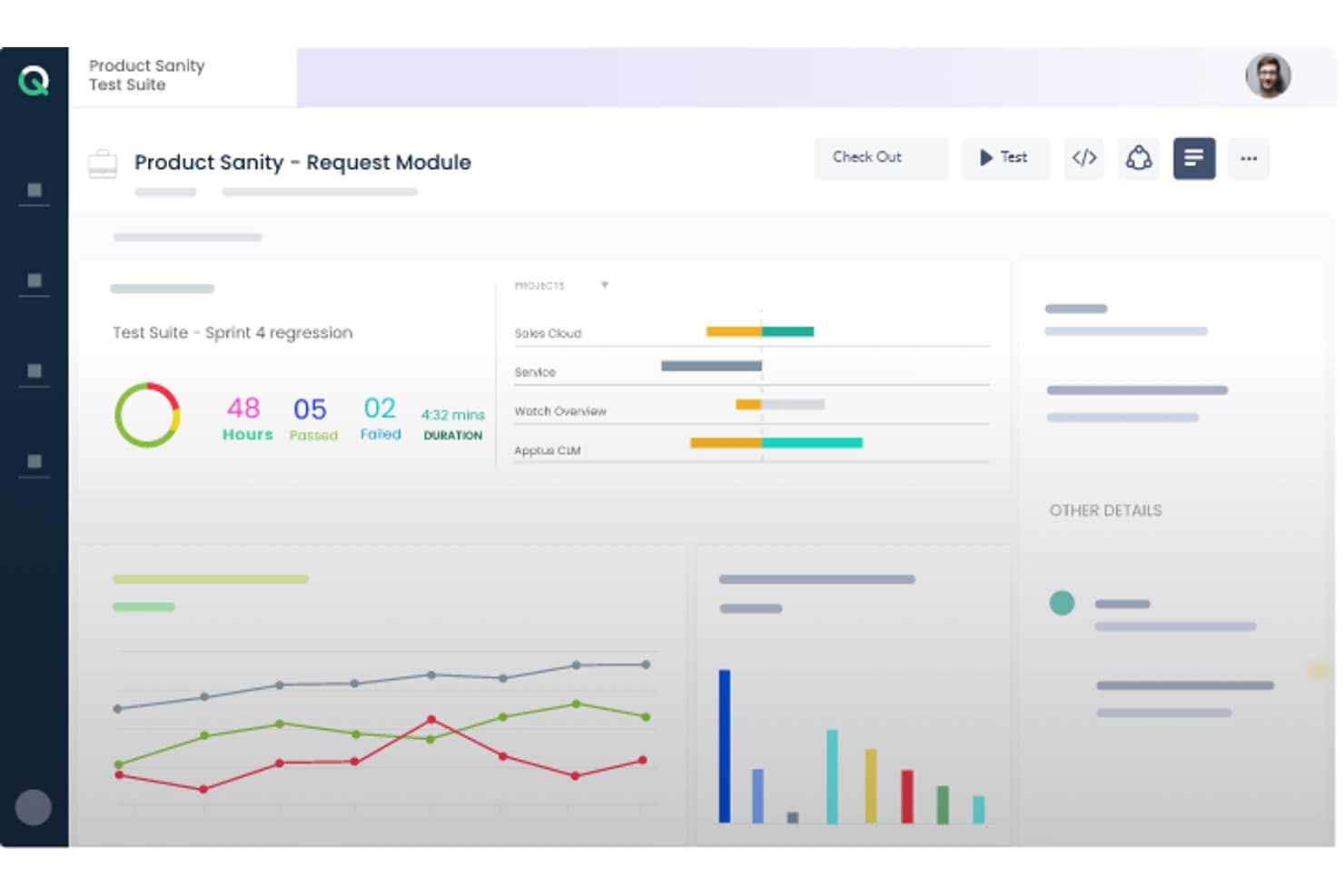
ACCELQ offers a test suite dashboard displaying sprint regression results with pass/fail metrics, project progress bars, and performance charts. ACCELQ is a cloud-native, codeless test automation platform that covers web, API, mobile, desktop, and packaged app testing in a unified environment, with built-in support for ERP systems like Salesforce, SAP, Workday, and ServiceNow.
Who Is ACCELQ Best For?
ACCELQ suits enterprise QA teams managing test automation across complex packaged app environments like Salesforce, SAP, Oracle, or Workday.
Why I Picked ACCELQ
I've included ACCELQ in my top picks because of how it handles packaged app testing out of the box. Its ACCELQ LIVE product ships with pre-built, codeless test assets for Salesforce, SAP, Workday, and ServiceNow, so my team isn't building automation from scratch when validating complex ERP workflows. I also like the locator-free identification engine, which pairs with self-healing automation to keep tests stable even as packaged app interfaces shift between release cycles.
ACCELQ Key Features
- Unified test management: Manage manual, web, API, mobile, desktop, and mainframe tests in a single platform.
- Cloud and on-premise execution: Run automation tests on cloud-hosted agents or deploy on your own infrastructure.
- Multi-level branching and version control: Organize test assets with robust branching, merging, and history tracking capabilities.
- Integrated Slack and Teams notifications: Automatically share test execution alerts and updates in team collaboration channels.
ACCELQ Integrations
ACCELQ offers native integrations with Jenkins, Jira, ClickUp, Bamboo, TeamCity, Slack, and Microsoft Teams, and provides an API for custom integrations.
Pros and Cons
Pros:
- Covers web, mobile, API, mainframe, and desktop
- Locator-free test design improves test stability
- Unique prebuilt automation for packaged ERP apps
Cons:
- Reporting features less advanced than some competitors
- Limited scripting flexibility for code-first users
Learn more about ACCELQ: Best for codeless test automation
- Free trial available
- From $199/month/year (minimum of 4 seats)
Visit WebsiteCustomer Rating:4.9/5
TestGrid automation dashboard showing test case results, including total successes, failures, and stops, with a performance trend graph over time. TestGrid is a versatile testing platform that brings a suite of tools to help you automate your web and mobile app testing. Designed to cater to a wide range of industries, it provides features that ensure your software is delivered efficiently.
I picked TestGrid because of its codeless automation feature that allows you to automate your tests without needing to write any code. This is particularly beneficial for teams that may not have extensive coding expertise. Another compelling reason is its real device testing capability, which ensures that your applications are tested on actual devices, reducing the chances of unexpected bugs when your software goes live. The platform supports cross-browser testing, allowing you to verify that your web applications work consistently across different browsers.
TestGrid's performance testing feature is another reason it stands out. It enables you to test the performance of your applications under various conditions, helping you identify potential bottlenecks before they affect your users. Additionally, the platform supports IoT testing, which is crucial if your application interacts with IoT devices. This ensures that your software performs well in the increasingly connected world we live in.
Features include automated visual testing, which helps you ensure that your application's user interface looks and behaves as expected across different devices and screen sizes. The platform also offers AI-powered testing assistance through CoTester, facilitating the generation and execution of tests. Furthermore, TestGrid provides performance testing capabilities, enabling you to simulate various load conditions to identify and rectify potential performance issues before they impact users.
Integrations include Jira, Slack, Microsoft Teams, Selenium IDE, Katalon, Ranorex, Tosca, WebDriverIO, TestComplete, Jenkins, CircleCI, and Azure Pipelines.
Learn more about TestGrid: Best for unified test management
- Free plan available
- From $27/user/month (billed annually)
Visit WebsiteCustomer Rating:4.8/5
Testomat.io visualizes test results with clear pass/fail/skip metrics and drill-down execution details for each test case. Testomat.io is a test management system that brings together automated and manual testing in one place. It’s designed to help you manage test planning, execution tracking, and reporting in a unified way.
I picked Testomat.io because it lets you import automated tests from your codebase and sync them with manual tests in one central workspace. That means your web automation efforts and manual quality checks live together, making it easier for your team to manage both without toggling between systems.
Also, Testomat.io gives you real‑time reporting with screenshots, videos, and analytics right as tests run. You can see flaky or slowest tests, rerun failures, and monitor test‑run trends—all of which help your web automation stay reliable and focused on fixing actual issues.
Integrations include Playwright, Cypress.io, Webdriver.io, Cucumber, Jest, Codeception, TestCafe, Protractor, CodeceptJS, Mocha, Jira, and Slack.
Learn more about testomat.io: Best for end-to-end tests for web applications
- 14-day free trial + free plan available
- From $99/month (billed annually)
Visit WebsiteCustomer Rating:4.8/5
BugBug lets you monitor key features of your web app by scheduling low-code automated tests. BugBug is an intuitive web automation tool that is designed to be easy to figure out without any preexisting programming knowledge. This test automation solution is used by companies like Brand24, Sellizer, Weglot, and many more.
BugBug bills themselves as being for startups, and their generous freemium plan indeed makes them an appropriate low-cost option for agile teams. They also have a scalable subscription model with custom enterprise pricing for larger companies.
Key features include the ability to create tests right within your browser without any coding; running tests either in your web browser or the cloud; the option to fix tests without re-recording; scheduling daily automated tests; and integration with your CI/CD pipelines.
BugBug integrates with GitHub, Jenkins, Travis CI, GitLab, BitBucket, and hundreds more options using Zapier (a paid plan may be required).
BugBug is free forever if you don’t use cloud features. You can run an unlimited number of tests in your own browser. Only schedule monitoring and CI/CD integration require a subscription, which starts at $99/month.
Learn more about BugBug: Best end-to-end testing solution with in-house QA experts for support
- Free demo available
- From 1¢/AI credit
Visit WebsiteCustomer Rating:4.9/5
QA Wolf offers fully managed end-to-end test coverage. QA Wolf is an end-to-end testing automation solution that comes with an expert team of QA engineers to write, run, and repeat all your critical tests. More than a tool, it is a service that takes the burden of in-house QA work off your shoulders. They are currently used by companies like Gumroad, MainStreet, Mailchimp, Replay, and Padlet.
QA Wolf works with you to build end-to-end tests that will take you to 80% coverage in under four months. During that time, you get full visibility over the progress as they build out your testing plan using Playwrite under the hood. The best part for me? The code they develop is yours, so you can take your code anywhere, even if that means away from QA Wolf.
Key features include end-to-end test coverage, a comprehensive test plan strategy, failure triaging and test maintenance, high-quality bug reports, fast parallel test run infrastructure, and an easy-to-use app for real-time status updates.
QA Wolf integrates with tools like Stripe, Salesforce, email providers, Auth0, SMS, Github, and even more options through their flexible API.
You can schedule a demo to find out more about pricing.
Learn more about QA Wolf: Best for automated visual testing
- Free trial available
- From $29/user/month (billed annually)
Visit WebsiteCustomer Rating:4.5/5
BrowserStack’s visual testing tool can handle asset discovery, screenshot rendering, and visual change detection. BrowserStack’s cloud platform allows QA teams to conduct comprehensive web and mobile testing. QAs can also verify the cross-browser compatibility of applications to deliver a unified end-user experience. With tests for functionality, performance, and visual appeal, BrowserStack helps developers send bug-free products to market faster.
Percy is BrowserStack’s automated visual testing product that development teams can integrate into their existing CI/CD pipeline. Visual testing allows QAs to catch visual regressions before they reach end-users. Percy makes this process easier with its ability to capture screenshots, make pixel-by-pixel comparisons to your UI’s baseline, and notify you of defects.
BrowserStack supports integrations with automation frameworks like Appium and Espresso. Software teams can also connect to popular CI/CD tools like Jenkins and Bamboo.
BrowserStack offers a variety of products with different pricing structures. New users can also sign up for a free trial.
Learn more about BrowserStack: Best for using AI to perform speedy automated UI testing
- Free trial available + free demo
- Pricing upon request
Visit WebsiteCustomer Rating:4.5/5
Testim users can capture screen recordings and tag failures to analyze test patterns. Testim is an end-to-end automation tool for web application testing. Designed for agile teams, Testim enables QAs to scale automation projects and write stable tests faster with the help of AI and machine learning.
Users can author tests in minutes with the help of Testim’s AI-based Smart Locators. These dynamic locators allow QAs to use multiple attributes to identify page elements, reducing the likelihood of a test breaking if an attribute changes.
Testim is fully customizable, making it easy for development teams to connect to CI tools like Jenkins and CircleCi. Tests can also run on any Selenium compatible grid.
Users have access to a free Community plan and Essential and Professional subscriptions. Custom pricing is available upon request.
Learn more about Tricentis Testim: Best for AI-driven test maintenance
- 14-day free trial + free demo available
- Pricing upon request
Visit WebsiteCustomer Rating:4.8/5
Reflect offers a no-code test automation interface for creating tests. Reflect is a web automation tool designed to make automated testing more accessible and efficient. It uses Generative AI to simplify the process, allowing you to create end-to-end tests without needing to write code.
One of the reasons I chose Reflect is its capability to adapt tests automatically with its AI engine. This means you don't have to worry about maintaining your tests when your application changes. Reflect also supports different testing types like visual, API, and data-driven testing, which helps in covering various aspects of your web application comprehensively.
I also like the way Reflect integrates into your existing workflow. With its support for CI/CD and issue tracking tools, you can easily incorporate it into your development pipeline.
Some integrations include Slack, Jira, Linear, Azure DevOps, Bitbucket, CircleCI, GitHub, Jenkins, and Codefresh.
Learn more about Reflect: Best for self healing tests
- 14-day free trial + free demo
- From $175/month
Visit WebsiteCustomer Rating:4.7/5
Endtest offers a comprehensive test automation feature that empowers users to create, execute, and manage automated tests with ease. Endtest is a cloud-based web automation tool that streamlines the software testing process by offering a codeless environment for creating, executing, and managing tests. With its intuitive interface and extensive range of features, Endtest enables users to effortlessly create and run automated tests across web, mobile, and desktop applications.
There are a few standout features that I think really set Endtest apart. The first is the codeless test creation. You can create complex tests without writing a single line of code, which is a huge time-saver. Endtest also provides the capability to record video during test execution, allowing users to visually capture the entire testing process for analysis and documentation purposes.
Endtest's self-healing tests are an advanced automation feature that proactively identifies and resolves issues during test execution. These tests exhibit autonomous anomaly detection and automatic corrective actions, ensuring uninterrupted test flow without human intervention.
Integrations include Jenkins, GitLab, SauceLabs, BrowserStack, Bamboo, Heroku, Bitbucket, TravisCI, CircleCI, TeamCity, Azure DevOps, and other similar apps.
Endtest costs from $175/month (1-5 parallel tests).
Learn more about Endtest: Best for writing stable automated test cases in plain English
- Free plan + 14-day free trial + free demo available
- Pricing upon request
Visit WebsiteCustomer Rating:4.8/5
testRigor supports a variety of plain English commands that testers can record using a Chrome extension. testRigor is a functional UI regression and exploratory testing solution. The system was designed to provide low-maintenance testing and uses AI to autonomously generate tests that reflect the behavior of end-users. QAs can also write tests in plain English, allowing anyone on your team to quickly build and understand test cases.
Tests can be recorded right from your browser with testRigor’s Chrome extension. You can quickly generate a test just by recording yourself using an application. No coding is required, and tests aren’t reliant on XPath, making them stable and easy to maintain.
testRigor offers integrations with TestRail, Git, Azure DevOps, CircleCI, and Jenkins.
Businesses can opt for a free open-source plan or private subscriptions starting at $900/month.
Learn more about testRigor:
Outras ferramentas de automatização da Web
Eis algumas opções adicionais de ferramentas de automatização da Web que não entraram na minha lista restrita, mas que ainda vale a pena conhecer:
- 11Katalon StudioBest specialized IDE interface
- 12New RelicBest for data-driven Engineers
- 13AutifyBest AI-driven test automation built on Playwright
- 14MablBest automation tool for end-to-end API tests
- 15KobitonRun tests on hundreds of real devices in the cloud
- 16CucumberBest web testing tool for technical and business user collaboration
- 17Test CollabBest for automatic browser execution
- 18Parasoft SOAtestBest for automating API security testing using a built-in web app scanner
- 19IBM Rational Functional Tester (RFT)Best for automating functional, regression, and GUI testing
- 20SmartBear ReadyAPIBest entry point for API load and security tests
- 21AppiumBest open-source test automation framework for mobile apps
- 22ChecksumBest with autonomous test generation for every PR
- 23Micro Focus Unified Functional Testing (UFT)Best for cross-browser coverage and cloud-based deployment
- 24Telerik Test StudioBest web automation testing tool that integrates into QA workflows
- 25OwlityBest for autonomous test generation
How I Evaluate Web Automation Tools
I split every evaluation into baseline criteria a tool must clear and differentiators that separate a solid pick from the right pick for your team.
Core Functionality (Table Stakes For This List)
When I'm selecting tools for my list, I rank each one on a scale from 0 (does not offer the functionality) to 5 (excels in this area) for each core functionality listed below. I then calculate the tool's total score into a percentage, using 75% as a benchmark to help assess its overall fit for the list.
- Browser Automation Engine: I check whether a tool can drive Chrome, Firefox, Edge, and Safari with full DOM interaction, JavaScript execution, and shadow DOM access.
- Element Identification & Selectors: Reliable selectors make or break long-lived automations, so I evaluate CSS, XPath, image-based, and self-healing locator support across page redesigns.
- Workflow Building: I look for flexible authoring options—visual designers for business users, scripting SDKs for developers, and recorders that output clean, editable code.
- Scheduling & Headless Execution: Tools need to run unattended on a schedule, in headless mode, and ideally in parallel so teams can trigger regression suites from a CI pipeline overnight.
- Data Handling & Integrations: I evaluate how each tool reads and writes CSV, JSON, and database records, plus whether it connects to apps like Slack, Jira, or cloud storage via APIs.
- Error Handling & Reporting: Detailed logs, failure screenshots, retry logic, and run dashboards are what I look for to judge how quickly your team can diagnose a broken workflow.
Once I have a list of tools that meet the criteria, I consider what sets each platform apart.
Differentiating Factors (What Sets Vendors Apart)
Here's how I compare and contrast different vendors:
Standout Features
AI-powered self-healing is the first thing I evaluate because a single UI redesign can break hundreds of selectors overnight. Tools like Selenium or Playwright leave that repair work to you, while platforms such as Testim and mabl re-map locators automatically. I also check for a cloud browser and device grid, since maintaining local infrastructure for parallel cross-browser runs is a time sink most teams underestimate. Native CI/CD plugins matter just as much—I look for out-of-the-box connectors to Jenkins, GitHub Actions, or GitLab CI so automation fits directly into deployment pipelines without custom glue scripts.
Beyond Features
I look at total cost of ownership first, since open-source options like Selenium and Playwright carry zero license fees but demand infrastructure and maintenance budgets that rival commercial platforms. Skill requirements matter just as much—code-first tools need SDETs fluent in Python or JavaScript, while low-code platforms let business analysts own their own automations. I also check each vendor's native connector library for tools like Jira, ServiceNow, and Datadog, because custom integration work quietly burns sprint cycles.
Como escolher uma ferramenta de automatização da Web
É fácil perder-se em listas extensas de funcionalidades e estruturas de preços complexas. Para o ajudar a manter-se concentrado enquanto analisa o seu processo específico de seleção de software, apresentamos uma lista de verificação dos fatores a ter em conta:
| Fator | O que considerar |
|---|---|
| FatorEscalabilidade | O que considerarA ferramenta consegue acompanhar o seu crescimento? Verifique se suporta cargas de trabalho crescentes sem problemas de desempenho. Procure avaliações de utilizadores e estudos de caso como prova. |
| FatorIntegrações | O que considerarCertifique-se de que se liga às suas aplicações existentes. Verifique a compatibilidade com o seu conjunto tecnológico para evitar interrupções nos fluxos de trabalho. |
| FatorPersonalização | O que considerarPermite adaptar a ferramenta aos seus processos? Procure opções para modificar fluxos de trabalho e painéis de controlo de acordo com as necessidades da sua equipa. |
| FatorFacilidade de utilização | O que considerarÉ fácil de utilizar? Avalie a curva de aprendizagem e o design da interface. Uma ferramenta que seja fácil de adotar pela sua equipa poupará tempo e reduzirá a frustração. |
| FatorImplementação e integração inicial | O que considerarTenha em conta o tempo de configuração e os recursos necessários. Guias de início rápido, materiais de formação e apoio podem facilitar a integração inicial da sua equipa. |
| FatorCusto | O que considerarCompare os planos de preços e as funcionalidades. Determine se a ferramenta se enquadra no seu orçamento sem custos ocultos adicionais. Procure valor, em vez de se focar apenas nos preços baixos. |
| FatorMedidas de segurança | O que considerarVerifique as medidas de proteção de dados. Certifique-se de que a ferramenta cumpre as normas do setor para manter as suas informações seguras. |
| FatorDisponibilidade do apoio | O que considerarAvalie as opções de apoio. Está disponível assistência 24 horas por dia, 7 dias por semana? Tenha em conta os tempos de resposta e o acesso a pessoal especializado quando surgirem problemas. |
Tendências nas ferramentas de automatização da Web
As ferramentas de automatização da Web surgiram como recursos fundamentais para melhorar a eficiência, a fiabilidade e a cobertura dos testes. Uma análise das atualizações recentes de produtos, dos comunicados de imprensa e dos registos de lançamento das principais ferramentas oferece informações valiosas sobre as tendências atuais e as futuras direções das tecnologias de automatização da Web:
Tendências nas ferramentas e tecnologias de automatização da Web
- Ênfase crescente na IA e na aprendizagem automática: ferramentas de automatização de testes baseadas em IA melhoram a criação, a manutenção e a análise de testes, tornando-os mais inteligentes e adaptáveis às alterações na aplicação Web.
- Evidência: capacidades melhoradas para gerar e otimizar automaticamente casos de teste com base nas interações dos utilizadores e nas alterações da aplicação.
- Mudança para a automatização sem código: o aumento das funcionalidades de automatização sem código permite que utilizadores com conhecimentos de programação limitados criem e executem testes, democratizando os testes e alargando o seu alcance nas organizações.
- Evidência: introdução de interfaces intuitivas de arrastar e largar e de modelos pré-criados para a criação de testes.
- Integração avançada com DevOps e pipelines CI/CD: a integração perfeita com ferramentas de CI/CD tornou-se mais sofisticada, permitindo que os testes automatizados sejam executados como parte do processo de integração e entrega contínuas.
- Evidência: plug-ins e APIs que ligam diretamente as ferramentas de automatização Web aos pipelines de CI/CD, facilitando os testes e o feedback em tempo real.
Funcionalidades em rápida evolução
- Colaboração e relatórios em tempo real: as ferramentas oferecem agora funcionalidades que suportam a colaboração em tempo real entre os membros da equipa e fornecem acesso imediato aos resultados e às análises dos testes.
- Evidência: painéis partilhados, atualizações em direto e ferramentas de comunicação integradas que simplificam a colaboração e a tomada de decisões da equipa.
- Testes melhorados entre navegadores e plataformas: a capacidade de testar simultaneamente em vários navegadores e plataformas registou melhorias significativas, garantindo uma cobertura abrangente dos testes.
- Evidência: ambientes de teste baseados na nuvem que oferecem acesso a uma vasta variedade de combinações de navegadores e sistemas operativos.
Funcionalidades novas e invulgares
- Testes em ambientes de realidade virtual e aumentada: algumas ferramentas começam a suportar testes para aplicações Web de RV e RA, respondendo aos desafios únicos destas tecnologias emergentes.
- Evidência: ambientes simulados para aplicações de RV e RA que permitem aos testadores interagir com interfaces 3D e testá-las.
Funcionalidades mais importantes e procuradas
- Escalabilidade e flexibilidade: a procura de ferramentas que possam acompanhar a escala do projeto e oferecer opções de teste flexíveis continua a aumentar, acomodando projetos de todas as dimensões.
- Evidência: soluções baseadas na nuvem que permitem às equipas aumentar ou reduzir os seus esforços de teste com base nas necessidades atuais.
Funcionalidades que estão a perder importância
- Criação manual de scripts de teste: à medida que as capacidades de automatização e de IA avançam, a necessidade de escrever scripts de teste manualmente está a diminuir, com as equipas a preferirem opções automatizadas ou sem código.
- Evidência: uma mudança para scripts gerados por IA e a redução do trabalho de criação manual de scripts.
Para os testadores de software de QA, é crucial manterem-se informados sobre estas tendências para tirarem partido das tecnologias mais recentes, simplificarem os processos de teste, melhorarem a qualidade do software e responderem às exigências aceleradas da entrega de software moderna. O futuro da automatização Web reside no aproveitamento da IA, na adoção da automatização sem código e no reforço da transparência através de ferramentas de criação de relatórios automatizados, assinalando uma mudança significativa na forma como os testes são abordados e executados.
O que são ferramentas de automatização Web?
As ferramentas de automatização Web são programas que automatizam tarefas e processos em navegadores Web ou aplicações Web. Executam ações como navegar por sites, clicar em botões, preencher formulários e extrair dados. Estas ferramentas são utilizadas em vários cenários, incluindo testes automatizados de aplicações Web, extração de dados da Web e automatização de tarefas repetitivas.
Funcionalidades
Ao selecionar ferramentas de automatização Web, tenha em atenção as seguintes funcionalidades essenciais:
- Agendamento de tarefas: Automatiza tarefas repetitivas em intervalos definidos, libertando tempo para trabalhos mais importantes.
- Extração de dados: Recolhe e processa dados de websites, tornando a análise mais rápida e precisa.
- Integração de aplicações: Liga-se a aplicações existentes para aumentar a eficiência dos fluxos de trabalho e reduzir a introdução manual de dados.
- Fluxos de trabalho personalizáveis: Permite aos utilizadores adaptar os processos às necessidades específicas da empresa, garantindo um melhor alinhamento com os objetivos.
- Interface intuitiva: Simplifica a navegação e reduz a curva de aprendizagem, tornando-a acessível a todos os membros da equipa.
- Medidas de segurança: Protege os dados com medidas de segurança padrão do setor, garantindo que as informações permanecem seguras.
- Escalabilidade: Suporta cargas de trabalho crescentes, permitindo a expansão da empresa sem problemas de desempenho.
- Formação e suporte: Disponibiliza recursos como guias e suporte em direto para facilitar a integração e ajudar os utilizadores a maximizar os benefícios da ferramenta.
Benefícios
A implementação de ferramentas de automação da Web proporciona vários benefícios à sua equipa e à sua empresa. Eis alguns dos benefícios que pode esperar:
- Poupança de tempo: A automatização de tarefas repetitivas reduz o tempo despendido em trabalho manual, permitindo à sua equipa concentrar-se em atividades estratégicas.
- Maior precisão: A extração e o processamento de dados reduzem os erros humanos, conduzindo a resultados mais fiáveis.
- Produtividade melhorada: A integração de aplicações e os fluxos de trabalho personalizáveis melhoram a eficiência através da criação de processos mais fluidos.
- Escalabilidade: A capacidade de lidar com cargas de trabalho crescentes garante que as suas ferramentas acompanham o crescimento da empresa sem contratempos.
- Segurança melhorada: As medidas de segurança protegem informações sensíveis, proporcionando-lhe tranquilidade.
- Melhor tomada de decisões: Os recursos de formação e suporte ajudam a sua equipa a tomar decisões informadas sobre como maximizar a utilização das ferramentas.
- Eficiência de custos: A redução do trabalho manual e dos erros pode resultar em poupanças significativas ao longo do tempo.
Custos e preços
A seleção de ferramentas de automação da Web exige uma compreensão dos vários modelos de preços e planos disponíveis. Os custos variam consoante as funcionalidades, o tamanho da equipa, os complementos, entre outros fatores. A tabela abaixo resume os planos comuns, os respetivos preços médios e as funcionalidades normalmente incluídas nas soluções de ferramentas de automação da Web:
Tabela de comparação de planos para ferramentas de automação da Web
| Tipo de plano | Preço médio | Funcionalidades comuns |
|---|---|---|
| Tipo de planoPlano gratuito | Preço médio$0 | Funcionalidades comunsAutomação básica de tarefas, integrações limitadas com aplicações e suporte da comunidade. |
| Tipo de planoPlano pessoal | Preço médio$5-$25/utilizador/mês | Funcionalidades comunsAgendamento de tarefas, extração de dados, várias integrações com aplicações e relatórios básicos. |
| Tipo de planoPlano empresarial | Preço médio$30-$75/utilizador/mês | Funcionalidades comunsPersonalização avançada de fluxos de trabalho, funcionalidades de segurança melhoradas, suporte prioritário e análises detalhadas. |
| Tipo de planoPlano empresarial de grande dimensão | Preço médio$100+/utilizador/mês | Funcionalidades comunsIntegrações ilimitadas, gestão dedicada da conta, suporte para conformidade e soluções personalizadas de integração. |
Perguntas frequentes sobre ferramentas de automação web
Aqui ficam algumas respostas a perguntas frequentes sobre ferramentas de automação web:
Como escolher entre ferramentas de automação web baseadas em código e sem código?
Deve ter em consideração as competências técnicas da sua equipa, a complexidade da aplicação e o nível de controlo em comparação com a conveniência que pretende. As ferramentas baseadas em código oferecem mais flexibilidade e um controlo mais preciso (especialmente para casos extremos), enquanto as ferramentas sem código aceleram a integração e permitem que pessoas que não são programadoras contribuam. Considere também a forma como cada ferramenta gere a manutenção, o controlo de versões, a depuração e as integrações com a infraestrutura existente.
Como é que as ferramentas de automação web escalam quando a aplicação tem muitos microsserviços ou incorporações de terceiros?
Deve procurar ferramentas que permitam a execução em paralelo, executores de testes distribuídos e o isolamento de dependências (por exemplo, através da simulação ou substituição de serviços). Também devem suportar a mudança de contexto (por exemplo, a mudança entre domínios ou iframes). Utilize etiquetas de ambiente para poder executar subconjuntos de testes (de fumo, de regressão) e evitar executar todos os conjuntos de testes de cada vez.
Que riscos ou limitações devo esperar, mesmo com uma boa ferramenta de automação web?
A automação não deteta tudo — problemas na experiência do utilizador ou falhas visuais podem passar despercebidos. Com o tempo, os testes podem tornar-se frágeis à medida que a aplicação evolui. Além disso, as ferramentas podem não suportar totalmente comportamentos pouco comuns dos navegadores ou casos extremos. Por fim, algumas ferramentas de automação podem impor restrições relacionadas com licenciamento, escalabilidade ou dependência de um fornecedor. Certifique-se de que prevê recursos para um investimento contínuo.
Que métricas devo acompanhar para avaliar, na prática, uma ferramenta de automação web?
Analise a taxa de falhas (a frequência com que os testes falham de forma intermitente ou deixam de funcionar), o esforço de manutenção (horas por mês dedicadas à correção de scripts), a velocidade de execução (tempo por execução de teste), a cobertura (percentagem dos percursos críticos automatizados) e o sucesso da integração (a facilidade com que funciona com os seus sistemas de integração contínua/entrega contínua, relatórios e alertas). Meça também o “tempo necessário para integrar um novo utilizador/testador” como métrica de usabilidade.