

Quando entrei no mundo das empresas emergentes, deparei-me com problemas relacionados com a gestão de toda a pilha, preocupações com o tempo de atividade e limitações de largura de banda. Só quando descobri o universo das alternativas ao Heroku é que as coisas começaram a encaixar-se. Uma alternativa ao Heroku é uma ferramenta que facilita o desenvolvimento e a implementação de aplicações de forma mais simples e eficiente.
A verdadeira vantagem desta ferramenta é a sua capacidade de oferecer funcionalidades abrangentes, muitas vezes num generoso plano gratuito, que respondem a uma variedade de necessidades, desde a segurança TLS até à execução de tarefas cron. Ajuda a combater os desafios regulares relacionados com a manutenção de operações sem problemas, a garantia de uma largura de banda robusta e a gestão eficaz de tarefas cron. Acredito que explorar estas alternativas pode proporcionar um alívio semelhante e recomendo que considere as opções que pesquisei e testei.
O que é o Heroku?
O Heroku é uma plataforma de computação na nuvem que ajuda a criar, executar e dimensionar aplicações. Os programadores e as pequenas equipas utilizam-na frequentemente porque permite implementar código e gerir aplicações com facilidade, sem ter de lidar com servidores. A implementação baseada em Git, um painel de controlo simples e as integrações com suplementos ajudam a testar, monitorizar e dimensionar as aplicações. O Heroku facilita a concentração na escrita de código, em vez da gestão da infraestrutura.
Why Trust Our Software Recommendations
6,700+
Reviews
20
Industry experts
16+
Evaluation factors
14
Years
Our team has been testing and reviewing software since 2012. As tech leaders ourselves, we know how difficult—and important—it is to choose the right software.
For this guide, we evaluated tools using hands-on testing and independent research, scoring tools using our selection criteria.
Our reviews reflect our human editorial judgment, not a sales pitch.
Expert reviewers:
- Paulo Gardini MiguelTech Director
 Tim FisherVP of AI
 Gabriel RosasTech Lead & Software Architect
 Christhian GruhnTech Lead & Platform Architect

Tabela de comparação das alternativas ao Heroku
Esta tabela de comparação resume os detalhes de preços das minhas principais alternativas ao Heroku:
| Tool | Best For | Trial Info | Price | ||
|---|---|---|---|---|---|
| 1 | Best for migrating Heroku apps with a dedicated guide | Free plan available | From $4/month | Website | |
| 2 | Best for Kubernetes-powered cloud services | Free demo available | Pricing upon request | Website | |
| 3 | Best for auto-management of apps in multiple languages | Not available | Pricing upon request | Website | |
| 4 | Best for deploying apps across the AWS ecosystem | Free plan available | From $12/month | Website | |
| 5 | Best for Google Cloud-backed app hosting at scale | Free plan available | From $36.50/month | Website | |
| 6 | Best for robust support and expert Rails management | 14-day free trial | Pricing upon request | Website | |
| 7 | Best for real-time global deployment for JAMstack sites | Free plan available | From $20/month | Website | |
| 8 | Best for enterprise-grade cloud capabilities | Free plan available; 30-day free trial | Pricing upon request | Website | |
| 9 | Best for apps deeply tied to the Microsoft ecosystem | Free plan available | From $13.14/month | Website | |
| 10 | Best for advanced security features in edge computing | Not available | Pricing upon request | Website |


Avaliações das melhores alternativas ao Heroku
Apresentamos abaixo os meus resumos detalhados das melhores alternativas ao Heroku que entraram na minha lista. As minhas avaliações oferecem uma análise detalhada das principais funcionalidades, vantagens e desvantagens, integrações e casos de utilização ideais de cada ferramenta, para ajudar a encontrar a melhor opção para si.
 Best for migrating Heroku apps with a dedicated guide
- Free plan available
- From $4/month
Visit WebsiteCustomer Rating:4.5/5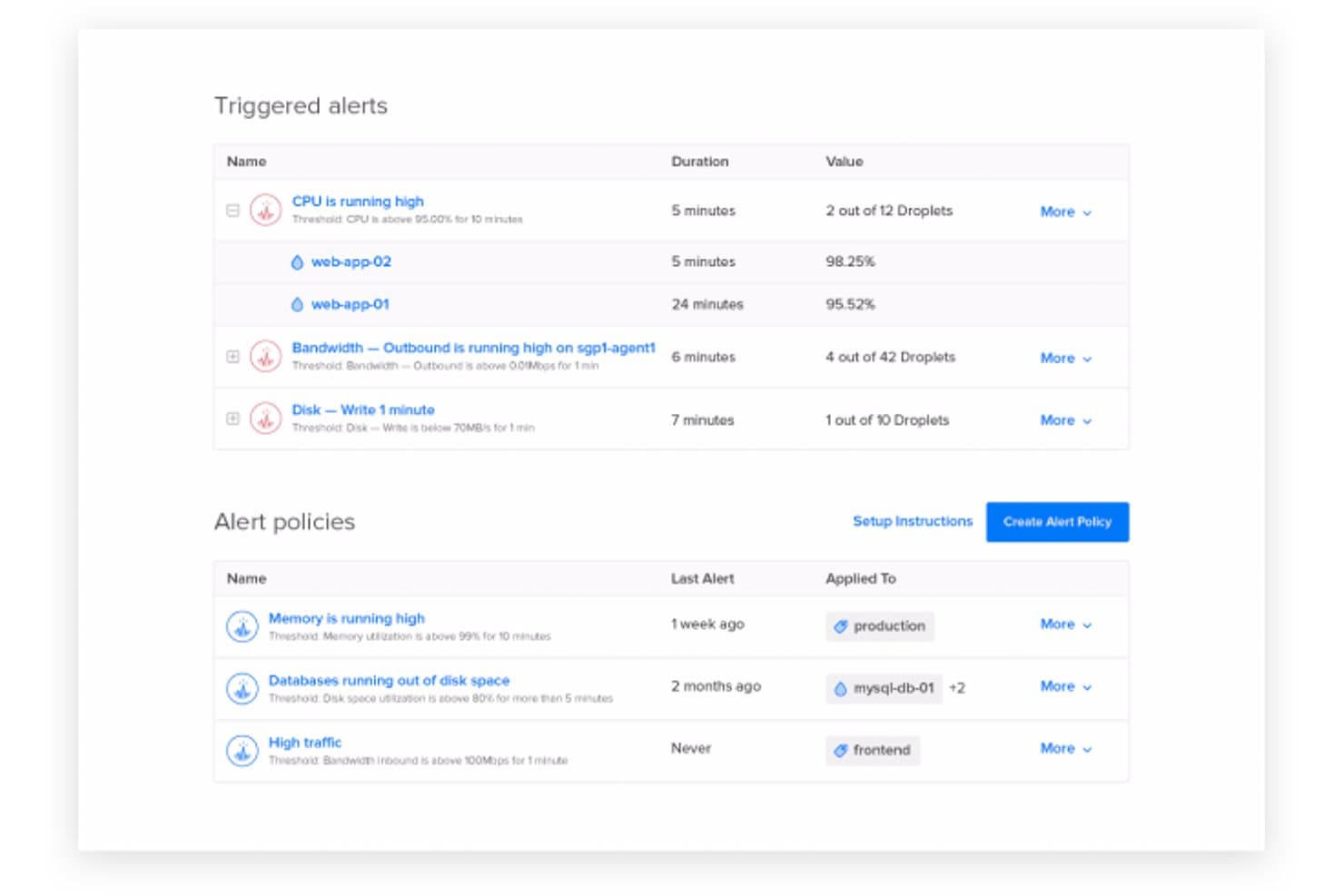
DigitalOcean lets users monitor and manage infrastructure alerts in real time. DigitalOcean gives developers and small IT teams a cloud platform with managed app deployment and infrastructure services, helping them launch applications without taking on every server-management task.
Who Is DigitalOcean Best For?
Small engineering teams and startups that need affordable cloud infrastructure without a large operations staff.
Why I Picked DigitalOcean
I picked DigitalOcean for cost-effective and developer-friendly cloud services, especially when replacing Heroku with App Platform. I like that it deploys apps from GitHub or GitLab using buildpacks or Dockerfiles, and supports web services, static sites, and background workers. That lets me host an API and its job-processing service on the same platform.
DigitalOcean Key Features
- Autoscaling: Adjusts web service instance counts based on resource usage.
- Managed databases: Offers managed PostgreSQL, MySQL, and MongoDB clusters.
- TLS certificates: Provides managed SSL certificates for App Platform apps.
- App metrics and logs: Shows resource metrics and runtime logs in the control panel.
DigitalOcean Integrations
App Platform deploys directly from GitHub, GitLab, and Bitbucket repositories, or from DigitalOcean Container Registry, Docker Hub, and GitHub Container Registry. DigitalOcean provides APIs for custom integrations and a Marketplace with third-party apps and SaaS add-ons.
Pros and Cons
Pros:
- Managed HTTPS and rollback simplify routine deployments
- Autoscaling handles changing web service demand
- Deploys APIs, workers, and static sites together
Cons:
- Runs on DigitalOcean, limiting multi-cloud portability
- Failed builds can produce unhelpful deployment logs
Learn more about DigitalOcean: Best for Kubernetes-powered cloud services
- Free demo available
- Pricing upon request
Visit WebsiteCustomer Rating:4.5/5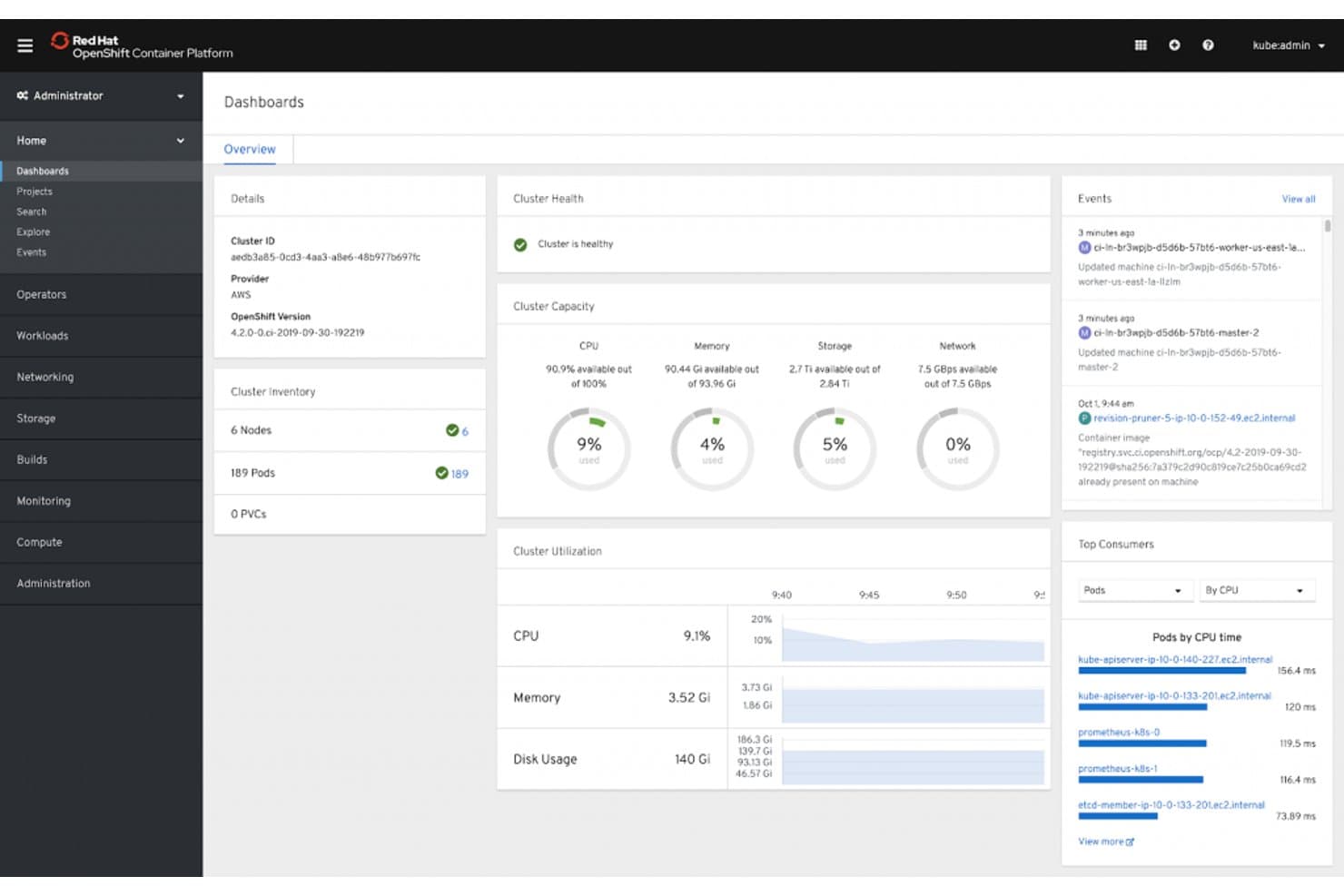
Red Hat OpenShift gives users a real-time cluster health and resource dashboard. Red Hat OpenShift gives development and IT teams a platform for building and running containerized applications across cloud environments, helping organizations standardize deployments and reduce the work of managing Kubernetes infrastructure.
Who Is Red Hat OpenShift Best For?
Platform engineering and infrastructure teams that need to operate Kubernetes-based application platforms across hybrid and cloud environments.
Why I Picked Red Hat OpenShift
I picked Red Hat OpenShift as a Heroku alternative when I need Kubernetes-powered cloud services with more deployment control. Its “Best for Kubernetes-powered cloud services” fit rests on a Kubernetes application platform and Operators that automate application lifecycle tasks. I like that teams can manage services across cloud environments.
Red Hat OpenShift Key Features
- Web console: Manage projects, workloads, and cluster resources through a browser interface.
- Integrated image registry: Store and manage container images within the OpenShift cluster.
- OpenShift Pipelines: Define and run CI/CD workflows with Tekton tasks and pipelines.
- Routes: Expose services outside the cluster with hostname-based access.
Red Hat OpenShift Integrations
OpenShift Pipelines as Code supports integrations with GitHub, GitLab, Bitbucket Server, and Bitbucket Cloud, including GitHub Enterprise. OpenShift also provides an API for custom integrations.
Pros and Cons
Pros:
- Security controls support enterprise workloads
- Automated application deployments reduce release toil
- Consistent deployments across hybrid cloud environments
Cons:
- High operational overhead for smaller application teams
- Cluster installation and configuration take considerable effort
Learn more about Red Hat OpenShift: Best for auto-management of apps in multiple languages
- Not available
- Pricing upon request
Visit WebsiteCustomer Rating:4.7/5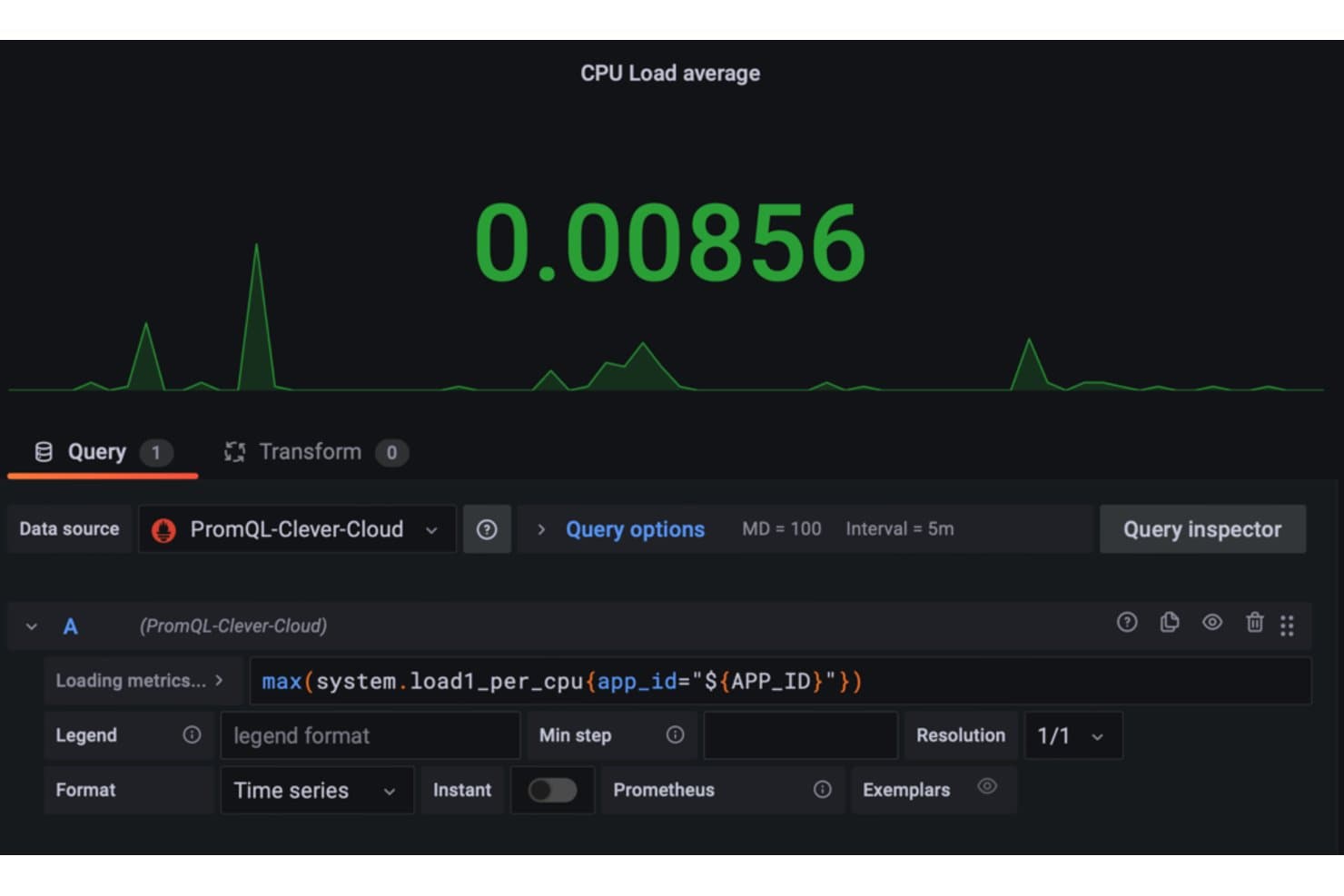
Clever Cloud lets users monitor CPU load average via Grafana dashboards. Clever Cloud is a PaaS for development and infrastructure teams that want to deploy and run applications without managing servers, reducing operational overhead while supporting a range of application stacks.
Who Is Clever Cloud Best For?
Clever Cloud suits DevOps and platform teams that want managed deployment and operations for applications built with different programming languages.
Why I Picked Clever Cloud
I picked Clever Cloud because its managed runtimes cover Java, Node.js, Python, Go, PHP, and Scala. Preconfigured language runtimes and managed deployment support its USP: Best for auto-management of apps in multiple languages. I’d use it to run a mixed-language application portfolio without managing each app’s infrastructure separately.
Clever Cloud Key Features
- Workload-based autoscaling: Adjust application resources as demand changes.
- Log filtering: Review live or past logs by time window and text.
- Metrics dashboards: View CPU, memory, latency, request, and query metrics in Grafana.
- Managed database backups: MySQL and PostgreSQL backups run daily and are retained for seven days.
Clever Cloud Integrations
Clever Cloud documents deployment integrations for GitHub and GitLab, plus CI/CD compatibility with Heptapod, Jenkins, and CircleCI. It also offers a Terraform provider, Clever Tools CLI, and REST API for infrastructure management and custom integrations.
Pros and Cons
Pros:
- Supports diverse application runtimes
- Scales applications vertically and horizontally
- Automated builds reduce server upkeep
Cons:
- Predefined configurations constrain specialized application needs
- Abrupt horizontal scaling can cause latency spikes
Learn more about Clever Cloud: Best for deploying apps across the AWS ecosystem
- Free plan available
- From $12/month
Visit WebsiteCustomer Rating:4.2/5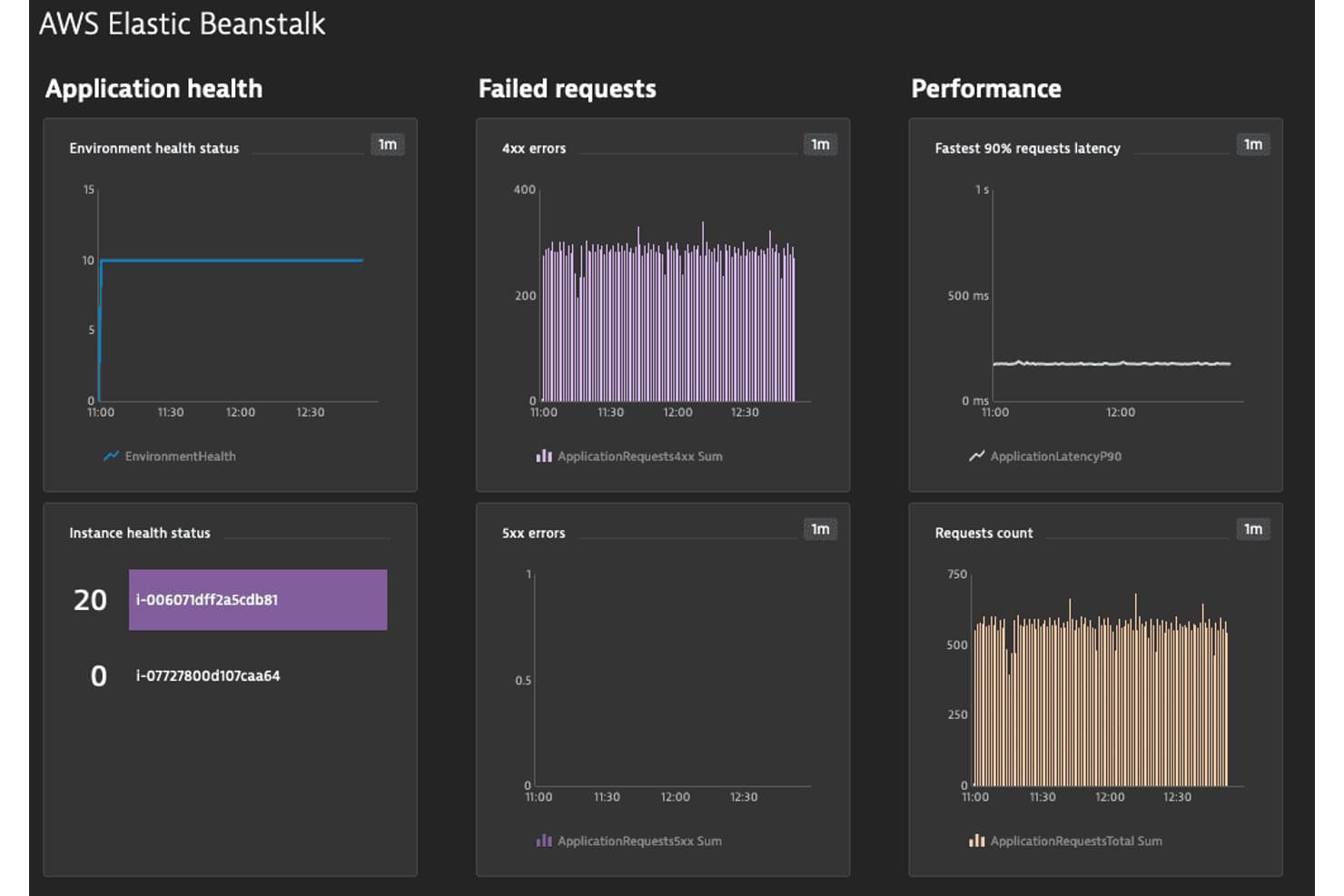
AWS Elastic Beanstalk monitors app health, errors, and performance in real time. AWS Elastic Beanstalk is an AWS application platform for developers and IT teams who want to deploy and run web applications without managing every layer of the supporting infrastructure.
Who Is AWS Elastic Beanstalk Best For?
AWS Elastic Beanstalk suits development and operations teams already working in AWS who want a managed way to deploy web applications while retaining access to underlying resources.
Why I Picked AWS Elastic Beanstalk
I picked AWS Elastic Beanstalk as a Heroku alternative because it’s best for ease of deploying and managing applications in the AWS cloud. I value its managed EC2 instances, load balancing, and environment health monitoring, which help me deploy a web app and track instance status while retaining access to AWS resources.
AWS Elastic Beanstalk Key Features
- Platform support: Deploy applications built with Java, .NET, Node.js, PHP, Python, Ruby, Go, or Docker.
- Application versions: Save application versions and deploy an earlier release when needed.
- Deployment policies: Choose rolling, immutable, or traffic-splitting deployment options.
- Configuration files: Use
.ebextensionsfiles to customize environment settings and resources.
AWS Elastic Beanstalk Integrations
AWS Elastic Beanstalk has a native AWS CodePipeline deploy action and documented integrations with Amazon CloudWatch, Amazon CloudWatch Logs, Amazon EventBridge, Amazon S3, and Amazon RDS. AWS also documents deployment workflows with GitHub Actions, GitLab, Azure DevOps, and Jenkins, and provides an API for custom integrations.
Pros and Cons
Pros:
- Retains EC2 access for deeper control
- Supports legacy apps without containerization
- Automates provisioning, load balancing, and scaling
Cons:
- Deployments can take longer than expected
- Complex configuration can hinder troubleshooting
Learn more about AWS Elastic Beanstalk: Best for Google Cloud-backed app hosting at scale
- Free plan available
- From $36.50/month
Visit WebsiteCustomer Rating:4.1/5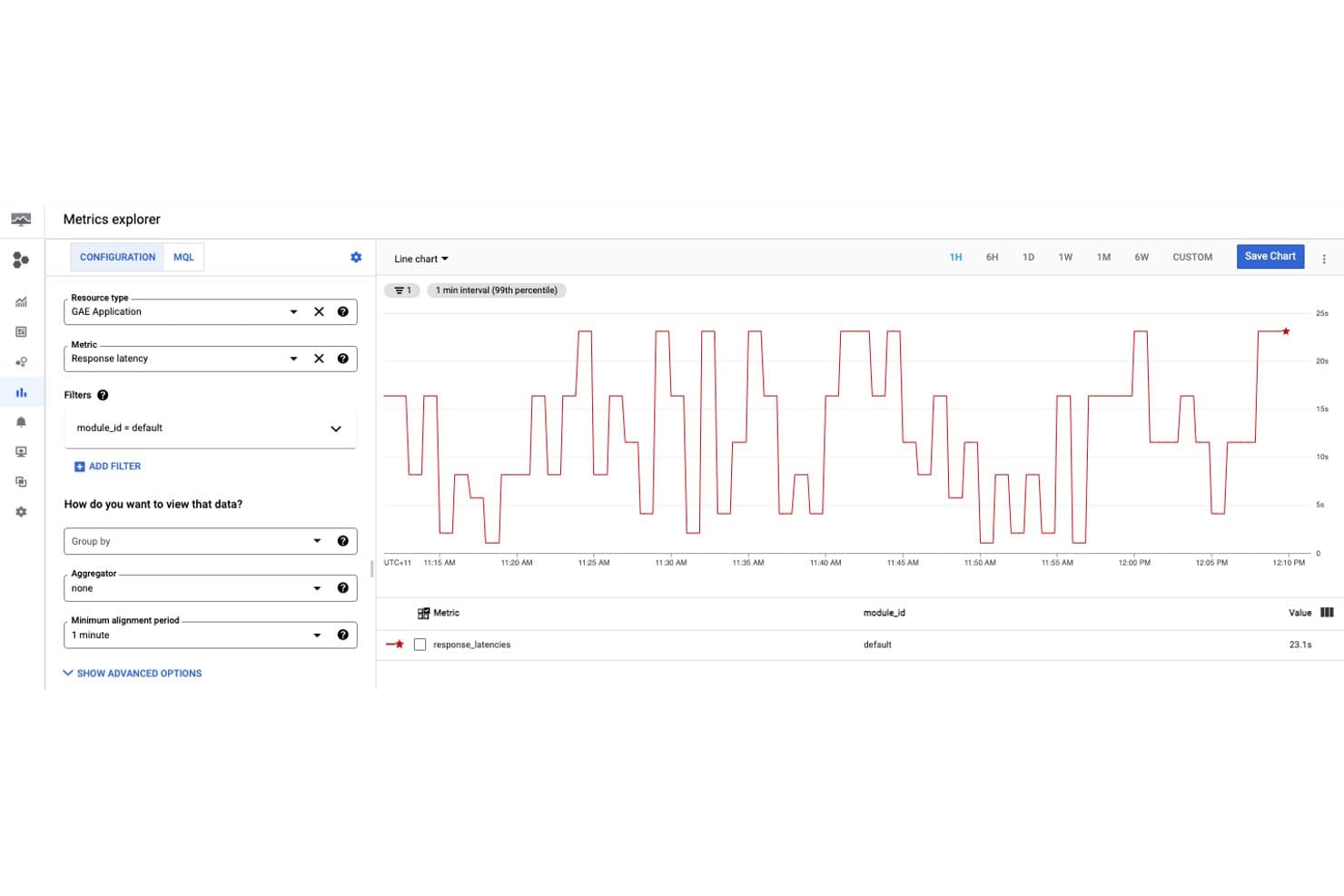
Google App Engine lets users monitor response latency metrics in real time. For teams evaluating Heroku alternatives, Google App Engine is a Google Cloud PaaS for building and deploying web applications without managing the underlying infrastructure.
Who Is Google App Engine Best For?
Google App Engine suits developers and IT teams that want to deploy web apps on Google Cloud without managing server infrastructure.
Why I Picked Google App Engine
I picked Google App Engine because it’s Best for scalable web applications with automatic management. Its managed runtimes and autoscaling can handle customer portal traffic spikes without server provisioning, while traffic splitting lets me test a new version with a small share of requests before a full rollout.
Google App Engine Key Features
- Custom domain mapping: Map your app to a custom domain and configure HTTPS.
- Cloud Logging integration: View application logs in Cloud Logging.
- Cloud SQL connectivity: Connect App Engine services to Cloud SQL instances.
- Standard and flexible environments: Choose an environment based on your runtime and infrastructure requirements.
Google App Engine Integrations
Google App Engine supports connections to Google Cloud services including Cloud SQL, Cloud Logging, Cloud Storage, Pub/Sub, and Firestore through Cloud Client Libraries and documented service integrations. It also provides APIs for custom integrations.
Pros and Cons
Pros:
- Traffic splitting supports cautious releases
- Managed deployments reduce server upkeep
- Automatic scaling absorbs traffic spikes
Cons:
- High-traffic workloads can become costly
- Limited system access constrains tuning
Learn more about Google App Engine: Best for robust support and expert Rails management
- 14-day free trial
- Pricing upon request
Visit WebsiteCustomer Rating:3.8/5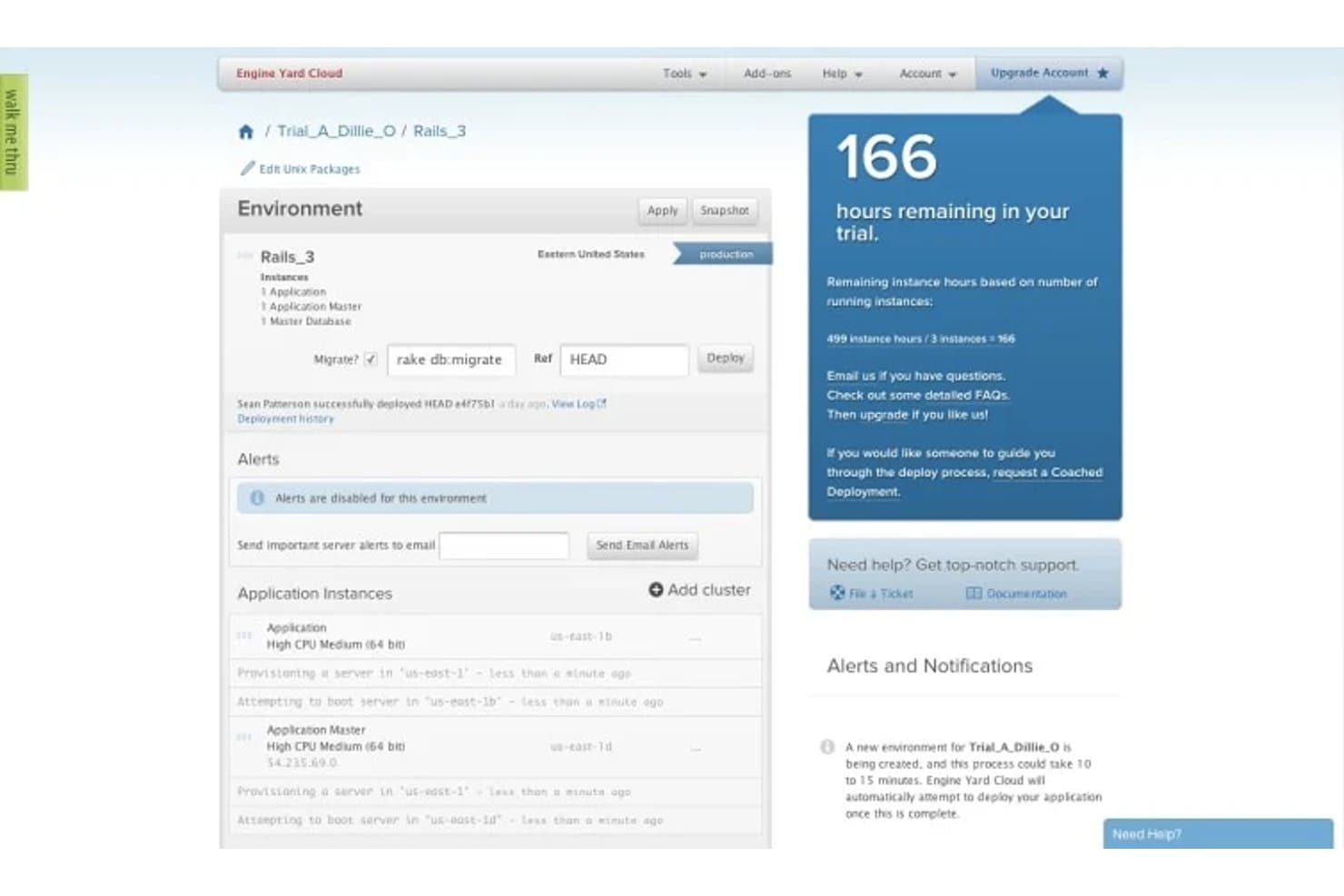
Engine Yard lets users monitor and manage cloud environment deployments in real time. For teams running Ruby on Rails applications, Engine Yard is a PaaS for cloud deployment and infrastructure management that helps reduce server upkeep and keep application operations manageable.
Who Is Engine Yard Best For?
Engine Yard suits engineering teams running Ruby on Rails apps that want expert help managing cloud deployments and infrastructure.
Why I Picked Engine Yard
I picked Engine Yard because “Best for robust support and expert Rails management” captures its focus: 24/7 help from AWS architects and Ruby experts. Managed stack and security updates cut routine upkeep around Rails deployments. I also like its Git-push releases and rollback controls for shipping or reversing production changes.
Engine Yard Key Features
- Autoscaling policies: Scale application pods using CPU, memory, or custom metrics.
- Centralized logging: Aggregate application logs with Elasticsearch, Logstash, and Kibana.
- Grafana dashboards: View per-application CPU, memory, and scaling metrics.
- Private AWS clusters: Run Kubernetes workloads in dedicated AWS accounts and VPCs.
Engine Yard Integrations
Engine Yard supports one-click deployments from GitHub and provides an API for custom integrations. Its PagerDuty integration supports alerting for Premium Support customers, with connections through PagerDuty to services such as New Relic, Pingdom, Splunk, Nagios, and Zendesk.
Pros and Cons
Pros:
- Private AWS clusters isolate workloads from neighbors
- Managed stack updates reduce routine DevOps work
- Users praise reliable hosting and responsive support
Cons:
- Recent reports describe slow human support escalation
- Older reviews flag cluttered, dated dashboard controls
Learn more about Engine Yard: Best for real-time global deployment for JAMstack sites
- Free plan available
- From $20/month
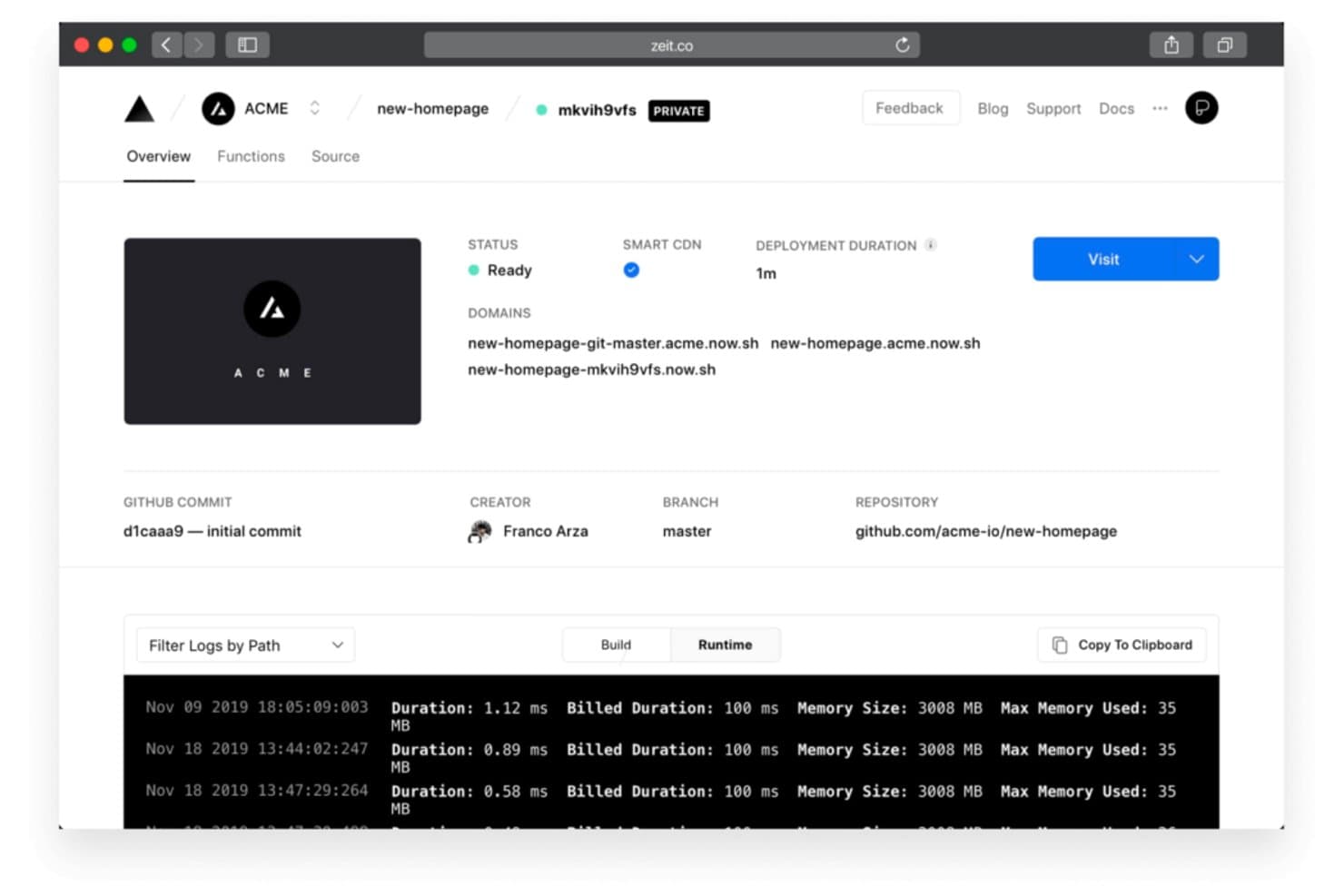
Vercel shows deployment status, domains, and runtime logs at a glance. Vercel is a cloud platform for frontend developers and web teams that combines application builds, previews, and hosting, helping them deploy web projects without managing servers.
Who Is Vercel Best For?
Frontend and DevOps teams building JAMstack sites can use Vercel to deploy globally and manage releases without maintaining servers.
Why I Picked Vercel
I picked Vercel as a Heroku alternative because it’s best for real-time global deployment for JAMstack sites. Its global Edge Network serves deployments close to users, while Git-based preview deployments let you test changes before they reach production. I like this setup for publishing content-heavy sites worldwide without managing servers.
Vercel Key Features
- Vercel Functions: Run server-side code as functions within your project.
- Cron Jobs: Schedule functions to run at set times or intervals.
- Web Analytics: Track page views and visitor activity from your site.
- Environment variables: Set configuration values for different deployment environments.
Vercel Integrations
Vercel supports Git-based deployments with GitHub, GitLab, Bitbucket, Azure DevOps, and Origin, with Origin in public beta. Its Marketplace includes native integrations such as AWS, MongoDB, Neon, Redis, and Sentry, and Vercel provides an API for custom integrations.
Pros and Cons
Pros:
- Global edge delivery keeps sites responsive
- Preview deployments simplify release testing
- Git pushes trigger fast deployments
Cons:
- Cold starts can delay some requests
- Function timeouts constrain long-running backend jobs
Learn more about Vercel: Best for enterprise-grade cloud capabilities
- Free plan available; 30-day free trial
- Pricing upon request
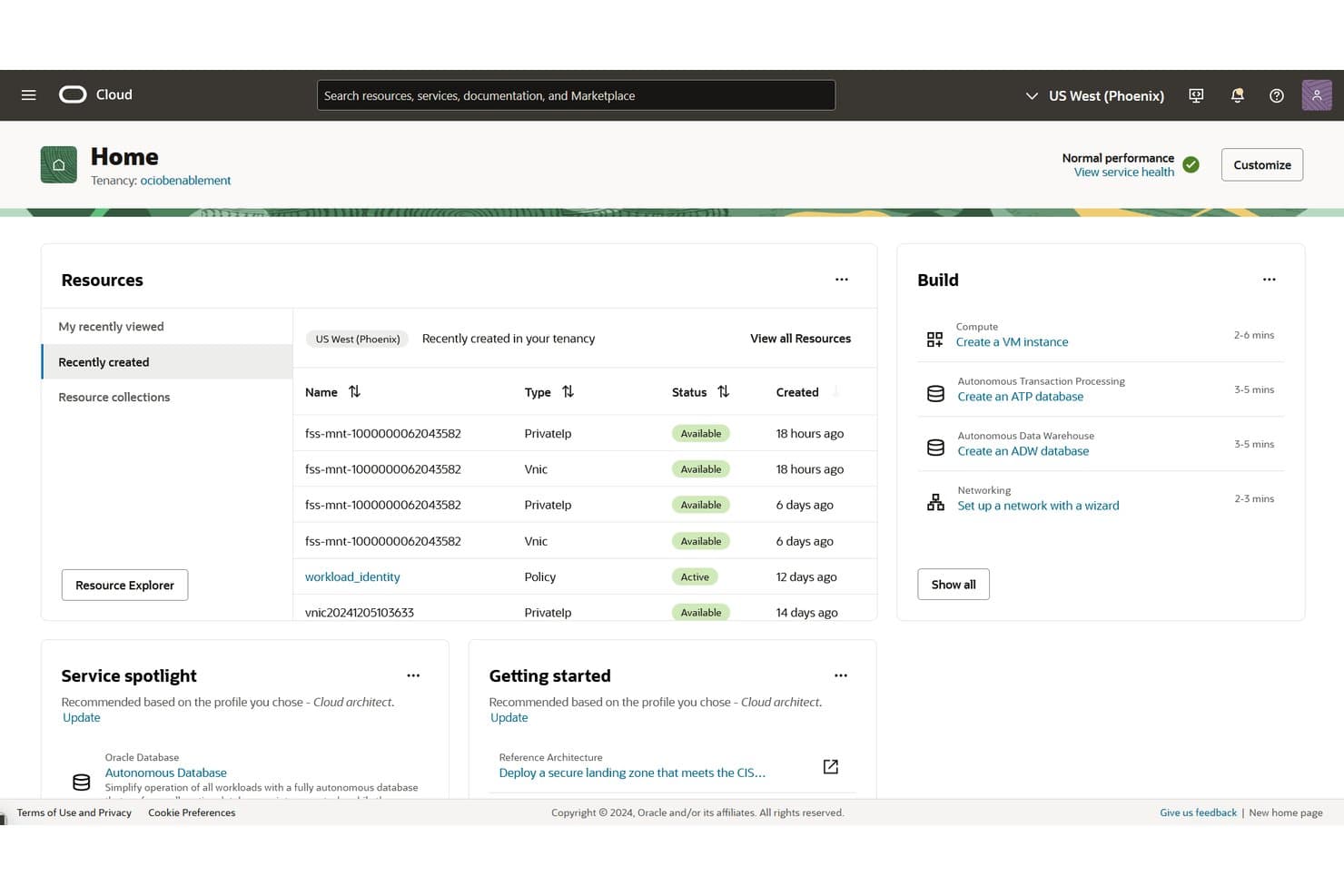
Oracle Cloud Infrastructure (OCI) lets users manage cloud resources from a unified home dashboard. Oracle Cloud Infrastructure (OCI) gives enterprise developers and IT teams cloud services for building and running applications, with infrastructure and database options for workloads across cloud and on-premises environments.
Who Is Oracle Cloud Infrastructure (OCI) Best For?
Oracle Cloud Infrastructure (OCI) suits enterprise IT teams running demanding workloads across cloud and on-premises environments.
Why I Picked Oracle Cloud Infrastructure (OCI)
I picked Oracle Cloud Infrastructure (OCI) (Best for enterprise-grade cloud capabilities) because Dedicated Region Cloud@Customer brings OCI services into your data center. OCI Kubernetes Engine provides managed Kubernetes for application workloads. I’d consider it as a Heroku alternative when apps need to run close to on-premises systems.
Oracle Cloud Infrastructure (OCI) Key Features
- Autonomous Database: Automates database provisioning, tuning, and patching.
- OCI Functions: Runs code as serverless functions in response to events.
- API Gateway: Publishes APIs with access controls and request limits.
- Resource Manager: Uses Terraform configurations to provision and manage cloud resources.
Oracle Cloud Infrastructure (OCI) Integrations
Oracle documents OCI providers and plugins for Terraform, Ansible, Jenkins, Grafana, and Pulumi to support infrastructure provisioning, deployments, and monitoring. OCI also provides APIs for custom integrations.
Pros and Cons
Pros:
- Bare metal options suit demanding workloads
- Dedicated regions bring OCI into your data center
- Reliable performance for Oracle Database workloads
Cons:
- Capacity constraints can delay provisioning
- Console workflows can feel unintuitive
Learn more about Oracle Cloud Infrastructure (OCI): Best for apps deeply tied to the Microsoft ecosystem
- Free plan available
- From $13.14/month
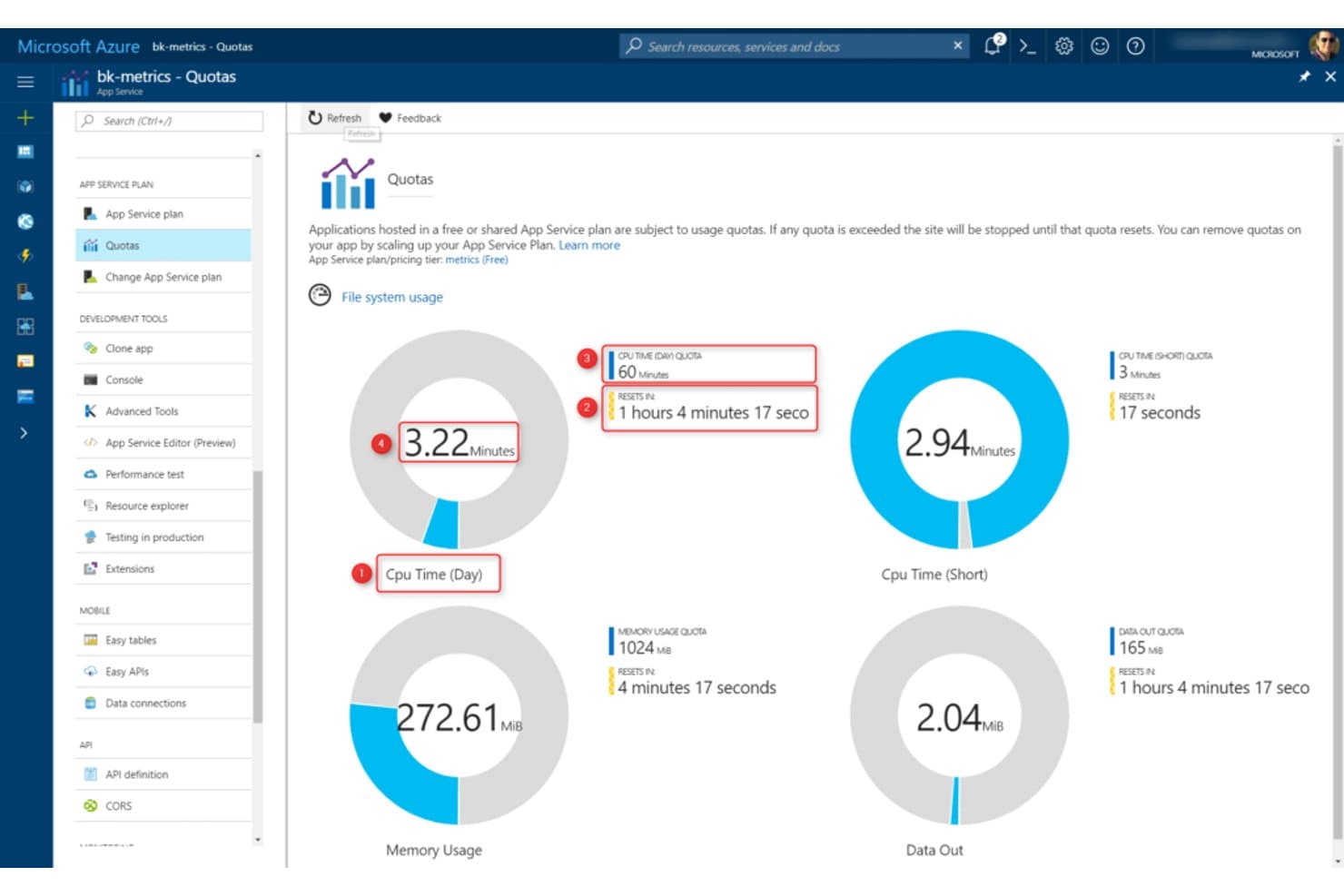
Microsoft Azure App Service monitors CPU, memory, and data quotas in real time. Microsoft Azure App Service is a managed PaaS for teams building web apps and APIs that need to deploy code without managing servers and connect application workloads with Azure services.
Who Is Microsoft Azure App Service Best For?
IT teams hosting Windows-based web apps and APIs on Azure that need managed deployment and scaling.
Why I Picked Microsoft Azure App Service
I picked Microsoft Azure App Service as a Heroku alternative for its fit: Best for comprehensive app hosting and scaling on Windows. I value its managed Windows hosting for .NET apps and deployment slots, which let my team test releases before swapping them into production. Built-in autoscale helps handle traffic spikes without provisioning servers.
Microsoft Azure App Service Key Features
- Built-in authentication: Configure identity providers and authorization without building an authentication system.
- Managed identities: Let apps access supported Azure services without storing credentials.
- Custom domains and TLS: Bind custom hostnames and configure TLS certificates for app endpoints.
- Diagnostics and logging: Review application logs and diagnostic data through the Azure portal.
Microsoft Azure App Service Integrations
Azure App Service supports deployment integrations with GitHub Actions, Azure Pipelines, Bitbucket, and Azure Repos. Managed identities let apps securely access Azure SQL Database, Azure Key Vault, and Azure Storage, and the App Service REST API supports custom management automation.
Pros and Cons
Pros:
- Autoscaling handles changing web workloads
- Managed Windows hosting reduces server maintenance
- Deployment slot swaps support low-downtime releases
Cons:
- Resource-allocation choices can confuse teams
- Tier costs are difficult to forecast
Learn more about Microsoft Azure App Service: Best for advanced security features in edge computing
- Not available
- Pricing upon request
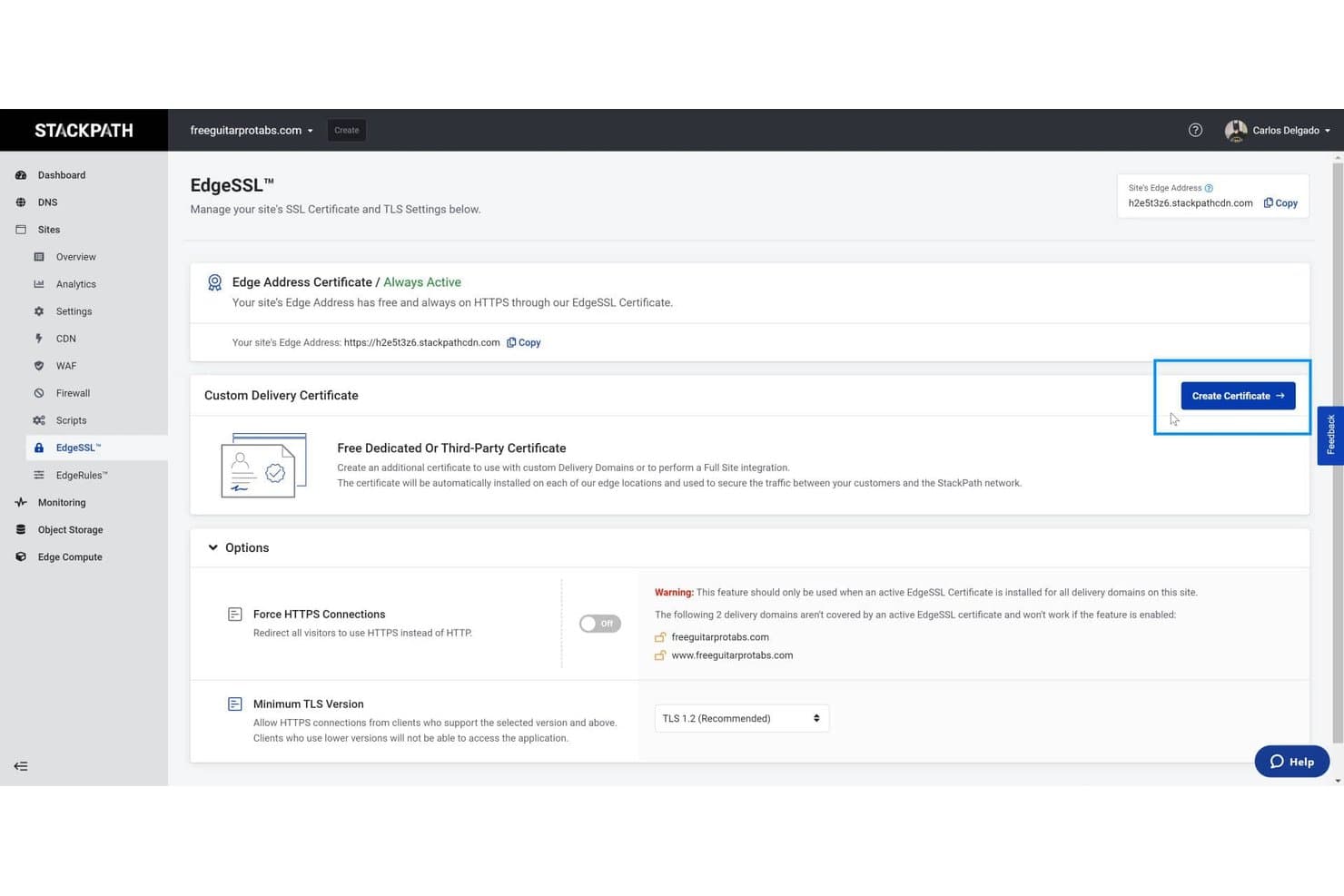
StackPath lets users manage SSL certificates and enforce HTTPS for custom domains. StackPath is an edge cloud platform for developers and infrastructure teams that deploy applications closer to users, helping reduce latency across distributed workloads.
Who Is StackPath Best For?
Security and infrastructure teams protecting distributed edge workloads are a good fit for StackPath’s edge-focused security features.
Why I Picked StackPath
I picked StackPath for its advanced security features in edge computing, which matter when comparing Heroku alternatives for distributed workloads. Its edge security includes a web application firewall and DDoS mitigation, helping screen malicious requests before they reach application infrastructure. That can reduce exposure for apps served from edge locations.
StackPath Key Features
- Edge containers: Deploy container images as instances across StackPath’s edge locations.
- Edge virtual machines: Run workloads on virtual machine instances near users and devices.
- Content delivery network: Cache and deliver website assets through StackPath’s edge network.
- DNS management: Configure DNS records for domains connected to StackPath services.
StackPath Integrations
StackPath doesn’t have a documented catalog of native integrations. It provides a Terraform provider for managing edge resources and API access for custom integrations.
Pros and Cons
Pros:
- Edge security pairs with CDN delivery
- Containers and VMs near end users
- Edge WAF and DDoS mitigation
Cons:
- Static-content delivery cost more than dedicated CDNs
- All StackPath products shut down in 2024
Learn more about StackPath:
Outras alternativas ao Heroku
Eis algumas alternativas adicionais ao Heroku que não entraram na minha lista, mas que ainda vale a pena conhecer:
- 11RenderBest for simplicity and quick setup of cloud environments
- 12Platform.shBest for integrated build and deploy system for app management
- 13WhitecapBest for custom software and mobile app development services
- 14MendixGood for rapid low-code application development
- 15CloudBeesGood for teams looking for robust Jenkins-based CI/CD solutions
- 16FirebaseGood for creating mobile and web applications with a suite of backend tools
- 17IBM Cloud FoundryGood for leveraging open-source cloud application platform
- 18Google Cloud RunGood for running stateless containers in a fully-managed environment
- 19Azure FunctionsGood for executing code snippets in response to events
- 20NetlifyGood for building, deploying, and managing modern web projects
- 21DokkuGood for developers seeking a mini-Heroku in their own environment
- 22ScalingoGood for developers seeking easy application deployment and scaling
- 23Linode Kubernetes Engine (LKE)Good for running containerized applications with Kubernetes
- 24AWS App RunnerGood for building and running containerized applications with ease
- 25Pivotal Cloud FoundryGood for enterprise-grade cloud-native platform deployments
Outras avaliações de software
- Plataformas de desenvolvimento de aplicações na nuvem
- Software PaaS
- Plataformas de desenvolvimento na nuvem
- Fornecedores de serviços na nuvem
How I Evaluate Heroku Alternatives
I evaluate Heroku alternatives in two layers: baseline capabilities every platform must have—like Git-based deploys and managed scaling—and differentiators that determine real-world fit for your team.
Core Functionality (Table Stakes For This List)
When I'm selecting tools for my list, I rank each one on a scale from 0 (does not offer the functionality) to 5 (excels in this area) for each core functionality listed below. Then, I calculate the tool's total score into a percentage. Each tool needs to achieve a minimum total score of 75% to be considered for inclusion.
- Git-Based Deployment Workflow: I check whether a
git pushor connecting a GitHub/GitLab repo triggers an automatic build and deploy, rather than requiring manual uploads or custom scripts. - Managed Runtime & Auto-Scaling: Each platform should handle server provisioning, patching, and scaling app instances up or down based on traffic without requiring you to SSH into boxes or configure load balancers yourself.
- Multi-Language & Framework Support: I look for native support across common stacks like Node.js, Python, Ruby, Go, and Java via buildpacks, Dockerfiles, or similar mechanisms.
- Managed Add-Ons & Databases: Platforms like Render and Railway let you provision Postgres or Redis in a few clicks. I evaluate whether a tool offers similar one-click managed data services or a marketplace.
- Built-In CI/CD & Environments: I look for auto-deploy on commit, branch-based preview environments, and promotion pipelines so your team can review changes before they hit production.
- Application Monitoring & Logging: Real-time log tailing, basic resource metrics, and alerting should be accessible from the dashboard or CLI without needing to bolt on a third-party tool just to see what's happening.
Once I have a list of tools that meet this criteria, I consider what sets each platform apart.
Differentiating Factors (What Sets Vendors Apart)
Here's how I compare and contrast different vendors:
Standout Features
Edge and global deployment matter when your users span multiple continents. I evaluate whether a platform can distribute your app across regions without complex configuration. Infrastructure-as-code support is another factor I weigh, since defining your stack in a Terraform file or YAML manifest means reproducible environments and easier team collaboration. I also check for native background jobs and cron support, which saves you from wiring up a separate queue system just to send emails or process uploads.
Beyond Features
Vendor lock-in is a big one. I check whether a platform supports standard Docker containers and offers clear export paths, since rebuilding an app from scratch because you chose a proprietary runtime is a costly mistake. Pricing transparency also gets close attention—I look for clear usage-based models so your bill doesn't spike after a traffic surge. For teams in regulated industries, I evaluate compliance certifications like SOC 2 and GDPR readiness, along with private networking options that keep sensitive workloads isolated.
Por que procurar uma alternativa ao Heroku?
Embora o Heroku seja uma boa escolha de plataforma de computação na nuvem, existem várias razões pelas quais alguns utilizadores procuram soluções alternativas. Pode estar à procura de uma alternativa ao Heroku porque…
- Já ultrapassou os limites de preços do plano gratuito ou dos escalões inferiores.
- As suas aplicações precisam de mais controlo sobre a infraestrutura.
- Está a deparar-se com problemas de desempenho em aplicações de grande escala.
- Quer um suporte melhor para linguagens de programação específicas.
- Precisa de ferramentas de monitorização e depuração mais avançadas.
- Está preocupado com interrupções do serviço ou com a fiabilidade.
Se alguma destas situações lhe parece familiar, veio ao lugar certo. A minha lista inclui várias opções de plataformas de computação na nuvem mais adequadas para equipas que enfrentam estes desafios com o Heroku e procuram soluções alternativas.
Principais funcionalidades do Heroku
Eis algumas das principais funcionalidades do Heroku, para ajudar a contrastar e comparar o que as soluções alternativas oferecem:
- Implementações baseadas em Git: Pode implementar a sua aplicação enviando código para um repositório remoto Git, o que torna as atualizações rápidas e fáceis.
- Mercado de complementos: A sua equipa pode integrar ferramentas para bases de dados, colocação em cache, registo e muito mais, sem configuração adicional.
- Dynos: São contentores leves que executam as suas aplicações e permitem aumentar ou reduzir rapidamente a escala.
- CLI do Heroku: Esta ferramenta de linha de comandos permite-lhe gerir aplicações, consultar registos e executar comandos a partir do seu terminal.
- Pacotes de compilação: Estes detetam a linguagem da sua aplicação e configuram automaticamente o ambiente, poupando tempo de configuração.
- Registo integrado: Pode consultar e pesquisar os registos de todos os componentes da sua aplicação num único local.
- Painel de métricas da aplicação: Este fornece gráficos sobre tempos de resposta, débito e erros para ajudar a acompanhar o desempenho.
- Colaboração em equipa: Pode convidar membros da equipa, atribuir funções e gerir o acesso a partir de um painel partilhado.
- Dimensionamento automático: Se tiver determinados planos, o Heroku pode dimensionar automaticamente a sua aplicação com base no tráfego.
- Serviços de dados geridos: Tem opções como o Heroku Postgres e o Redis, que são fáceis de associar e utilizar.