

Se considera que o Wrike não está a responder totalmente às necessidades da sua equipa, não está sozinho. Muitos especialistas em tecnologia, tal como você, enfrentam desafios com ferramentas de gestão de projetos que não se adaptam perfeitamente ao seu fluxo de trabalho. Poderá estar à procura de alternativas que ofereçam melhores funcionalidades, escalabilidade ou conformidade com regulamentações específicas.
Trabalho há anos no setor do SaaS, onde testo e analiso software de forma independente. Compreendo a importância de encontrar a ferramenta certa para a sua empresa. Neste artigo, partilharei as minhas análises imparciais das melhores alternativas ao Wrike disponíveis no mercado. Ficará com uma visão clara dos pontos fortes e fracos de cada ferramenta, o que o ajudará a tomar uma decisão informada para a sua equipa.
O que é o Wrike?
O Wrike é um software de gestão de projetos que ajuda os membros das equipas a planear, colaborar e acompanhar o trabalho em tempo real. É habitualmente utilizado por gestores de projetos, profissionais de marketing e equipas criativas que precisam de gerir projetos e fluxos de trabalho complexos. Funcionalidades como a gestão de tarefas, o controlo do tempo e as ferramentas de colaboração ajudam a organizar tarefas, cumprir prazos e melhorar a comunicação da equipa. De um modo geral, o Wrike proporciona uma forma de aumentar a produtividade e a eficiência das equipas.
Tabela de comparação das alternativas ao Wrike
Esta tabela de comparação resume os detalhes dos preços das minhas principais alternativas ao Wrike:
Sorted by: Default
| Tool | Starting Price | Website | |
|---|---|---|---|
Best for enterprise resource capacity planning | 4.5 out of 5 | $10/user/month 14-day free trial | Website |
Best for marketing teams | 4.6 out of 5 | Pricing upon request Not available | Book Demo |
Best for user privacy | 4.3 out of 5 | Pricing upon request Free plan + 15-day trial + demo available | Website |
Best for workflow automation | 4.4 out of 5 | $10.99/user/month Free plan + free trial + free demo available | Website |
Best for data sovereignty | 4.5 out of 5 | €5.95/user/month Free plan available; 14-day free trial available for Enterprise Cloud and on-premises | Website |
Best for client-focused teams | 4.4 out of 5 | $9.99/user/month Free plan + 14-day free trial + free demo available | Website |
Best for enterprise marketing | 4.3 out of 5 | Pricing upon request Not available | Website |
Best for portfolio management | 4.2 out of 5 | Pricing upon request Free demo available | Website |
Best for project execution | 4.6 out of 5 | $9/user/month Free plan + 14-day free trial available | Book Demo |
Best for task management | 4.6 out of 5 | $10/user/month Free plan + free demo available | Book Demo |


Why Trust Our Software Recommendations
6,700+
Reviews
20
Industry experts
16+
Evaluation factors
14
Years
Our team has been testing and reviewing software since 2012. As tech leaders ourselves, we know how difficult—and important—it is to choose the right software.
For this guide, we evaluated tools using hands-on testing and independent research, scoring tools using our selection criteria.
Our reviews reflect our human editorial judgment, not a sales pitch.
Expert reviewers:
- Paulo Gardini MiguelTech Director
 Tim FisherVP of AI
 Gabriel RosasTech Lead & Software Architect
 Christhian GruhnTech Lead & Platform Architect

Análises das melhores alternativas ao Wrike
Seguem-se os meus resumos detalhados das melhores alternativas ao Wrike que entraram na minha lista restrita. As minhas análises apresentam uma visão detalhada das principais funcionalidades, vantagens e desvantagens, integrações e casos de utilização ideais de cada ferramenta, para o ajudar a encontrar a melhor opção para si.
 Best for enterprise resource capacity planning
- 14-day free trial
- From $10/user/month (billed annually)
Visit WebsiteCustomer Rating:4.5/5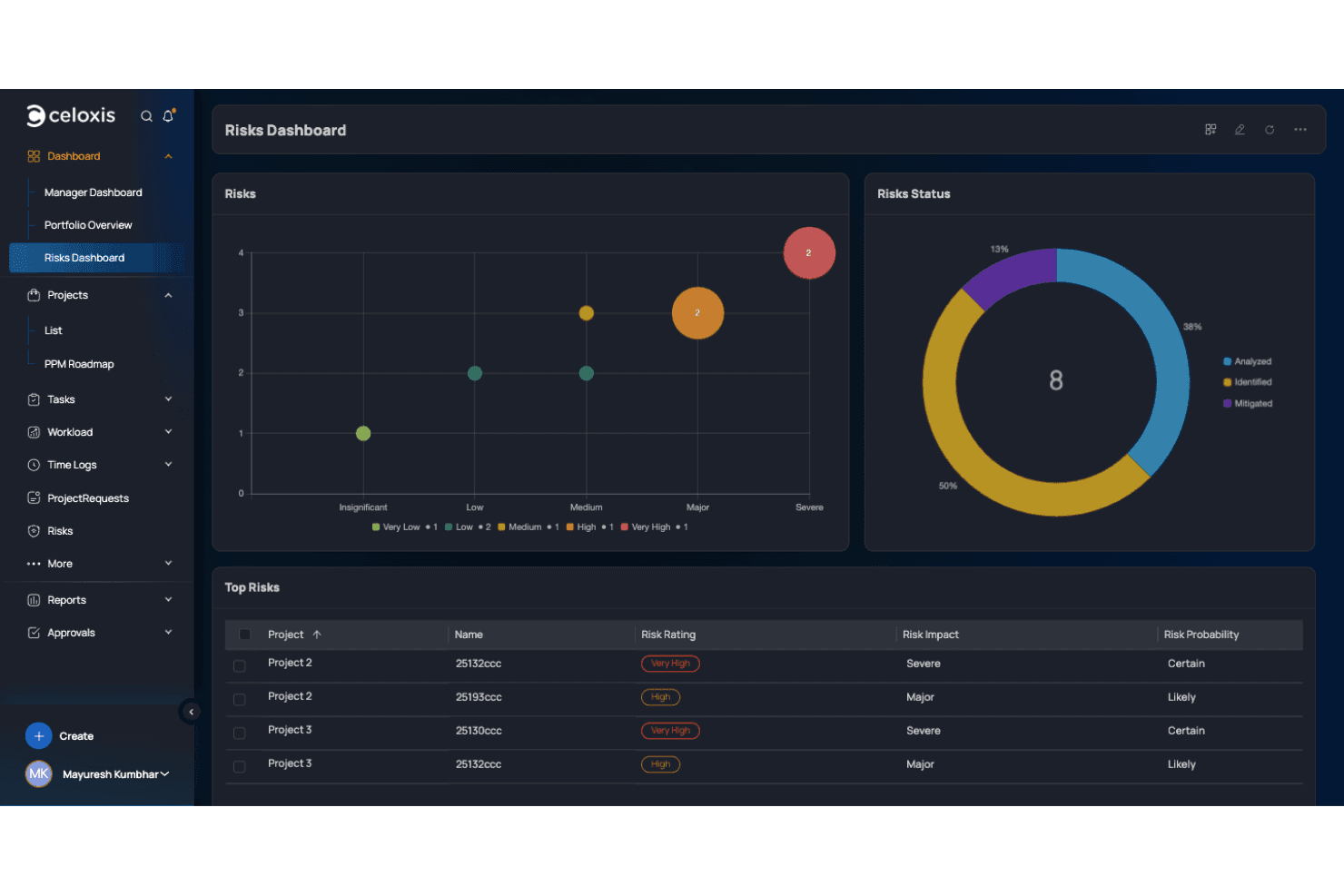
Celoxis centralizes risk tracking with visual charts and priority tables. Celoxis gives growing organizations a way to manage complex projects, resources, and workflows in one platform, making it a solid choice for teams juggling high project volumes or enterprise-scale initiatives.
Who Is Celoxis Best For?
Celoxis fits IT teams in large organizations that need to coordinate high project workloads and allocate resources across multiple departments.
Why Celoxis Is a Good Best Wrike Alternatives Reviewed
I picked Celoxis because it lets my team map resource capacity across departments and adjust project assignments in real time. I like how its interactive Gantt charts give us instant feedback during resource planning. Built-in forecasting reports help us spot workload risks before they impact project delivery.
Celoxis Key Features
- Custom workflow automation: Build automated project workflows to match your team's approval and escalation processes.
- Project financial tracking: Track budgets, costs, profits, and billing in real time within the platform.
- Client portal: Give clients direct access to project status, documents, and updates through a secure portal.
- Integrated time tracking: Log time directly on tasks and projects with built-in timesheet management.
Celoxis Integrations
Celoxis offers native integrations with Jira, Salesforce, Microsoft Project, Outlook, Google Drive, Excel, and Slack. It provides an API for custom integrations.
Pros and Cons
Pros:
- Provides interactive Gantt charts with real-time feedback
- Supports granular financial and billing tracking
- Handles enterprise-scale resource capacity planning
Cons:
- Mobile app lacks advanced project controls
- Reports can require manual configuration
Learn more about Celoxis:

Screendragon's tools help marketing teams manage their workflows. Screendragon is a project management platform designed for creative and marketing teams to control their workflows. It helps users collaborate, plan work, and track projects from start to finish.
Why it's a good Wrike alternative: Screendragon offers specialized features for marketing teams, such as resource management and workflow automation. These features give you better control over your marketing projects. Its strong focus on creative workflows sets it apart from Wrike. With its custom branding capabilities, Screendragon helps your team maintain a consistent brand presence.
Standout Features and Integrations:
Features include customizable templates to fit your team's specific needs. Workflow automation helps reduce manual tasks, saving you time. Resource management helps your team plan their work distribution and allocate their efforts effectively.
Integrations include Adobe Creative Cloud, Microsoft Dynamics 365, Slack, Salesforce, Trello, Google Drive, Box, Flock, SAP, HubSpot, Asana, and more.
Pros and Cons
Pros:
- Workflow automation
- Strong marketing focus
- Customizable templates and branding options
Cons:
- Limited industry applications
- Can be complex for beginners
Learn more about Screendragon: Best for user privacy
- Free plan + 15-day trial + demo available
- Pricing upon request
Visit WebsiteCustomer Rating:4.3/5
Zoho Projects shows dashboards for sprints, work items, budgets, and milestones. oho Projects is a cloud-based project management tool that helps teams plan, track, and collaborate on projects efficiently. It's used by businesses looking to improve productivity and manage their workflows effectively.
Why it's a good Wrike alternative: Zoho Projects offers strong privacy and data protection features, making it ideal for teams that prioritize user privacy. Its task automation helps reduce manual workload, allowing your team to focus on more important tasks. The Gantt chart view provides a clear timeline of project progress. Detailed time tracking assists your team in monitoring productivity and meeting deadlines.
Standout Features and Integrations:
Features include customizable project templates that help your team start projects quickly. The issue tracking feature helps identify and resolve problems efficiently. Zoho Projects also offers a document management system to organize and share files and spreadsheets securely.
Integrations include Zoho CRM, Zoho Desk, Slack, Google Calendar, Microsoft Office 365, Dropbox, GitHub, Zapier, Zendesk, and more.
Pros and Cons
Pros:
- Gantt chart view
- Task automation available
- Strong privacy features
Cons:
- Weak mobile app functionality
- Advanced reporting is limited
Learn more about Zoho Projects: Best for workflow automation
- Free plan + free trial + free demo available
- From $10.99/user/month (billed annually)
Visit WebsiteCustomer Rating:4.4/5
Asana shows completion status, assignees, and progress insights. Asana is a project management tool designed to help teams organize, track, and manage work efficiently. It's used by teams in many industries to improve collaboration and simplify workflows.
Why it's a good Wrike alternative: Asana offers advanced workflow automation features that help your team reduce repetitive tasks. The timeline view allows for better project planning and tracking. Its task dependencies function helps ensure tasks are completed in the right order. Asana's ability to automate workflows makes it a great choice for teams looking to increase productivity.
Standout Features and Integrations:
Features include a calendar view that gives your team an overview of project deadlines and schedules. The goal-setting feature helps align your team with business objectives. Asana also offers a reporting tool to track project progress and performance.
Integrations include Slack, Microsoft Teams, Google Drive, Dropbox, Salesforce, Zoom, Jira Cloud, Outlook, Zendesk, Tableau, Figma, Zapier, and more.
Pros and Cons
Pros:
- Task dependencies feature
- Timeline view for planning
- Clear workload visibility
Cons:
- Reporting depth varies by plan
- Limited native time tracking
Learn more about Asana: Best for data sovereignty
- Free plan available; 14-day free trial available for Enterprise Cloud and on-premises
- From €5.95/user/month (billed annually)
Visit WebsiteCustomer Rating:4.5/5
OpenProject provides Kanban boards for visual task tracking by status. OpenProject is an open-source project management software designed for teams to plan, manage, and track projects collaboratively. It's widely used by organizations that prioritize control and ownership of their data.
Why it's a good Wrike alternative: OpenProject offers data sovereignty, giving your team full control over your project data. Its open-source nature allows for customization to fit your team's specific needs. The platform provides tools for project timelines and task management, which help your team stay on track. With features such as bug tracking and budgeting, OpenProject supports detailed project oversight.
Standout Features and Integrations:
Features include a roadmap functionality that helps your team plan long-term projects and visualize progress. The boards support agile project management methodologies. OpenProject also provides meeting management tools to improve team collaboration.
Integrations include GitHub, GitLab, Nextcloud, Slack, and more.
Pros and Cons
Pros:
- Strong project oversight tools
- Customizable open-source platform
- Full data control
Cons:
- Limited third-party support
- Upgrades and maintenance need manual effort
Learn more about OpenProject: Best for client-focused teams
- Free plan + 14-day free trial + free demo available
- From $9.99/user/month (billed annually)
Visit WebsiteCustomer Rating:4.4/5
Teamwork.com's project health dashboard shows progress, budgets, and more. Teamwork.com is a project management software designed to help teams manage projects, communicate effectively, and deliver client work on time. It's used by teams that prioritize client satisfaction and need to track project progress closely.
Why it's a good Wrike alternative: Teamwork.com offers features tailored for client-focused teams, such as time tracking and billing. Its project management tools help your team deliver projects efficiently and maintain transparency with clients. With built-in collaboration features, your team can communicate effectively and keep clients in the loop. The software's focus on client work makes it ideal for teams looking to improve customer relationships.
Standout Features and Integrations:
Features include task management that allows your team to organize work and set priorities. The project templates feature helps standardize workflows and save time. Teamwork.com also offers detailed reporting tools to measure project performance and outcomes.
Integrations include Slack, HubSpot, Xero, Microsoft Office, Harvest, Clok, Whid, BugHerd, and more.
Pros and Cons
Pros:
- Portfolio-level reporting
- Built-in billing & invoicing
- Native client collaboration
Cons:
- Limited offline access
- Performance dips at scale
Learn more about Teamwork.com:

Adobe Workfront's campaign dashboards show records, timelines, and AI insights. Adobe Workfront is a project management solution tailored for enterprise marketing teams to plan, execute, and deliver campaigns efficiently. It's designed to consolidate operations and improve collaboration across large organizations.
Why it's a good Wrike alternative: Adobe Workfront offers advanced project management capabilities tailored specifically for marketing teams. Its resource management tools help allocate and optimize team efforts effectively. The platform's focus on enterprise-level collaboration makes it ideal for larger teams and sets it apart from Wrike. With integrated approval workflows, your team can ensure deliverables meet quality standards before going live.
Standout Features and Integrations:
Features include customizable dashboards that provide a real-time view of project progress. The scenario planning feature helps your team anticipate potential challenges and adjust plans accordingly. Adobe Workfront also offers analytics tools to measure performance and guide decision-making.
Integrations include Adobe Creative Cloud, Microsoft Teams, Slack, Figma, and more.
Pros and Cons
Pros:
- Scenario planning feature
- Advanced resource management
- Advanced reporting features
Cons:
- Heavy admin maintenance
- Expensive enterprise pricing
Learn more about Adobe Workfront: Best for portfolio management
- Free demo available
- Pricing upon request
Visit WebsiteCustomer Rating:4.2/5
Planview AdaptiveWork tracks costs, schedules, and risks. Planview AdaptiveWork is a project portfolio management tool used by enterprises to align projects with business goals. It's designed to augment decision-making and optimize resource utilization across projects.
Why it's a good Wrike alternative: Planview AdaptiveWork offers portfolio management features that help your team prioritize projects. Its real-time analytics provide insights into project performance and resource allocation. The tool's ability to align projects with strategic objectives differentiates it from Wrike. With adaptive resource management, your team can adjust to changing demands and increase productivity.
Standout Features and Integrations:
Features include scenario planning, which allows your team to evaluate different project outcomes. The risk management feature helps identify and mitigate potential project risks. Planview AdaptiveWork also offers capacity planning to ensure resources are used efficiently.
Integrations include Microsoft Teams, Salesforce, Slack, SAP, Oracle, ServiceNow, Zendesk, and more.
Pros and Cons
Pros:
- Risk management tools
- Adaptive resource management
- Real-time analytics
Cons:
- Licensing costs scale quickly
- Implementation takes months
Learn more about Planview AdaptiveWork: Best for project execution
- Free plan + 14-day free trial available
- From $9/user/month (billed annually)
Visit WebsiteCustomer Rating:4.6/5
monday.com offers a customizable project dashboard with status tracking. monday.com is a work operating system that helps teams manage projects and workflows with ease. It's popular among various industries for its ability to facilitate project planning, tracking, and execution.
Why it's a good Wrike alternative: monday.com offers a user-friendly visual interface. The customizable dashboards allow your team to track progress and performance. Automation features reduce manual work, keeping your team focused on high-priority tasks. Its ease of use and flexibility make it adaptable to different types of projects.
Standout Features and Integrations:
Features include time tracking to monitor how long tasks take and improve your team's efficiency. The timeline view provides a clear picture of project schedules and deadlines. monday.com also offers workload management to help balance tasks across your team.
Integrations include Slack, Gmail, Microsoft Teams, Zoom, Dropbox, Trello, Jira, Mailchimp, HubSpot, Zendesk, and more.
Pros and Cons
Pros:
- Intuitive interface
- Extensive template library
- Customizable dashboards
Cons:
- May need customization for best fit
- Requires training
Learn more about monday AI Workspace: 10Best for task management
ClickUp
- Free plan + free demo available
- From $10/user/month
Visit WebsiteCustomer Rating:4.6/5
ClickUp task lists include assignees, priorities, and workflow stages. ClickUp is a versatile project management tool used by teams of all sizes to collaborate and manage tasks. It offers a wide range of features that cater to various business functions, helping teams stay organized and productive.
Why it's a good Wrike alternative: ClickUp provides an extensive task management system with customizable views, such as lists, boards, and calendars. Its goal-setting features help your team stay aligned with project objectives and due dates. The time-tracking functionality ensures you can monitor progress and productivity. ClickUp's flexibility in task management allows you to create custom workflows, making it a strong alternative for teams seeking more control over their task structures.
Standout Features and Integrations:
Features include a document editor that allows your team to create and collaborate on docs directly within the platform. The mind map feature helps visualize project plans and ideas. ClickUp also offers an automation feature to reduce repetitive tasks and save time.
Integrations include Slack, Google Drive, Microsoft Teams, Outlook, GitHub, Zoom, Dropbox, Zapier, Tableau, Figma, and more.
Pros and Cons
Pros:
- Document collaboration
- Built-in docs & whiteboards
- Goal-setting features
Cons:
- Occasional performance lags
- Overwhelming feature set
Learn more about ClickUp:
Outras alternativas ao Wrike
Eis algumas alternativas adicionais ao Wrike que não entraram na minha lista restrita, mas que vale a pena conhecer:
- 11SmartsheetBest for team collaboration
- 12GoodDayBest for task visualization
- 13KantataBest for professional services
- 14BasecampBest for simple project management
- 15TrelloBest for visual task boards
- 16RavetreeBest for agile project teams
- 17HiboxBest for integrated chat features
- 18AirtableBest for database management
- 19QuireBest for hierarchical task lists
- 20HiveBest for collaboration
- 21Microsoft PlannerBest for Office 365 users
- 22PlakyBest for task organization
- 23MotionBest for time management
- 24NotionBest for all-in-one workspaces
- 25Broadcom ClarityBest for managing portfolios
How I Evaluate Wrike Alternatives
I split my evaluation into baseline criteria—like agile workflows and dev tool integrations—and differentiators that separate the best options for IT and engineering teams.
Core Functionality (Table Stakes For This List)
When I'm selecting tools for my list, I rank each one on a scale from 0 (does not offer the functionality) to 5 (excels in this area) for each core functionality listed below. Then, I calculate the tool's total score into a percentage. Each tool needs to achieve a minimum total score of 65% to be considered for inclusion.
- Agile Project Management: I check whether a tool supports Kanban boards, sprint planning, backlogs, and burndown charts—the building blocks teams need to run Scrum or hybrid workflows.
- Task & Workflow Automation: Each tool should let you build custom workflows with automated triggers, like auto-assigning QA tasks when a dev marks a ticket as ready for review.
- Developer Tool Integrations: I look for native connections to GitHub, GitLab, Bitbucket, CI/CD pipelines, and communication tools like Slack or Microsoft Teams.
- Resource & Capacity Planning: Workload views and capacity forecasting matter when you're balancing engineers across multiple concurrent projects or release cycles.
- Real-Time Collaboration & Reporting: I evaluate shared dashboards, live status updates, and customizable reports that distributed engineering teams rely on for daily standups and stakeholder updates.
- Portfolio & Roadmap Management: Multi-project portfolio views, Gantt charts, and dependency mapping help technical program managers coordinate interconnected initiatives.
Once I have a list of tools that meet this criteria, I consider what sets each platform apart.
Differentiating Factors (What Sets Vendors Apart)
Here's how I compare and contrast different vendors:
Standout Features
AI-powered features are a real differentiator—tools that can auto-generate task summaries or flag at-risk sprints save engineering leads hours of manual reporting. I also look at how flexible a tool's data model is. Custom fields and object types let teams tailor boards to track things like deployment environments or severity levels without workarounds. Built-in time tracking is another plus, especially for IT consulting teams who need to log billable hours against specific projects or clients.
Beyond Features
Security and compliance certifications matter a lot when IT teams handle sensitive data. I check for SOC 2 Type II, ISO 27001, SSO, and SCIM provisioning—these are baseline expectations in enterprise environments. Pricing transparency is another factor I weigh, since many teams leave Wrike over cost. A clear per-user pricing model with a usable free tier makes evaluation easier. I also consider migration support, because switching project management tools mid-sprint without dedicated onboarding can derail delivery timelines.
Por que razão procurar uma alternativa ao Wrike?
Embora o Wrike seja uma boa opção de software de gestão de projetos, há várias razões pelas quais alguns utilizadores procuram soluções alternativas. Poderá estar à procura de uma alternativa ao Wrike porque:
- Precisa de preços mais acessíveis
- A sua equipa precisa de uma personalização mais simples
- Pretende melhores opções de integração
- Precisa de uma interface de utilizador mais simples
- A sua equipa precisa de uma proteção de dados mais robusta
- Precisa de um melhor acesso offline
Se alguma destas situações lhe é familiar, veio ao lugar certo. A minha lista inclui várias opções de software de gestão de projetos mais adequadas para equipas que enfrentam estes desafios com o Wrike e procuram soluções alternativas.
Principais funcionalidades do Wrike
Eis algumas das principais funcionalidades do Wrike, para o ajudar a comparar as ofertas das soluções alternativas:
- Gestão de tarefas: Cria tarefas e subtarefas para organizar os seus projetos e manter a sua equipa no caminho certo.
- Ferramentas de colaboração: Utilize menções com @ e atribua tarefas para facilitar a comunicação e o trabalho em equipa.
- Registo de tempo: Regista o tempo despendido nas tarefas e utiliza temporizadores para gerir eficazmente as horas faturáveis.
- Gestão de recursos: Monitoriza a distribuição da equipa e ajusta as cargas de trabalho através da funcionalidade de arrastar e largar.
- Painéis personalizados: Aceda a informações filtradas e acompanhe o progresso dos projetos.
- Revisão e aprovações: Recolha comentários e obtenha aprovações sobre os materiais dos projetos através de um módulo integrado de revisão.
- Linhas cronológicas dos projetos: Utilize diagramas de Gantt para visualizar as linhas cronológicas e as dependências dos projetos, para um melhor planeamento.
- Formulários de pedido: Recolha informações de utilizadores externos para pedidos de projetos.
- Gestão da carga de trabalho: Permite visualizar e ajustar as cargas de trabalho da equipa para garantir uma distribuição equilibrada das tarefas.