

Det kan være en hodepine for ethvert teknologiteam å administrere brukertilgang. Du må sørge for at alle har de riktige tillatelsene uten at det går på bekostning av sikkerheten. Det er her programvare for brukerprovisjonering kommer inn i bildet. Den hjelper deg med å automatisere og forenkle brukeradministrasjonen, slik at teamet ditt sparer tid og reduserer feil.
Etter å ha testet og vurdert disse verktøyene har jeg funnet noen fremragende alternativer som kan gjøre hverdagen enklere. Jeg har gjort undersøkelsene, så det slipper du. Denne listeartikkelen viser deg den beste tilgjengelige programvaren for brukerprovisjonering, med fokus på funksjoner, fordeler og ulemper.
Du får en upartisk gjennomgang av hvert verktøy, slik at du kan ta det beste valget for teamets behov. La oss dykke ned i verdenen av programvare for brukerprovisjonering og finne det rette alternativet for deg.
Why Trust Our Software Recommendations
6,700+
Reviews
20
Industry experts
16+
Evaluation factors
14
Years
Our team has been testing and reviewing software since 2012. As tech leaders ourselves, we know how difficult—and important—it is to choose the right software.
For this guide, we evaluated tools using hands-on testing and independent research, scoring tools using our selection criteria.
Our reviews reflect our human editorial judgment, not a sales pitch.
Expert reviewers:
- Paulo Gardini MiguelTech Director
 Tim FisherVP of AI
 Gabriel RosasTech Lead & Software Architect
 Christhian GruhnTech Lead & Platform Architect

Sammenligningstabell: Programvare for brukerprovisjonering
Denne sammenligningstabellen oppsummerer prisopplysningene for mine beste utvalgte programmer for brukerprovisjonering.
| Tool | Best For | Trial Info | Price | ||
|---|---|---|---|---|---|
| 1 | Best for automated user provisioning | 14-day free trial | From $8/user/month (billed annually) | Website | |
| 2 | Best for global user provisioning for physical assets | Free demo available | from $5/person/month | Website | |
| 3 | Best for streamlined Active Directory management | 30-day free trial | From $7/user/month (min 5 seats) | Website | |
| 4 | Best for pre-built app and system connectors | 30-day free trial | Pricing upon request | Website | |
| 5 | Best for directory-as-a-service capabilities | 30-day free trial | From $9/user/month (billed annually) | Website | |
| 6 | Best for risk-based authentication | Pricing upon request | Website | ||
| 7 | Best for secure enterprise identity verification | 30-day free trial | From $7.00/user/month | Website | |
| 8 | Best for adaptive workforce authentication | 30-day free trial + free demo available | From $6/user/month (billed annually) | Website | |
| 9 | Best for open-source identity and access management | From $20/user/month (billed annually) | Website | ||
| 10 | Best for SaaS operations management | Free demo available | Pricing upon request | Website |


Vurdering av den beste programvaren for brukerprovisjonering
Nedenfor finner du mine detaljerte sammendrag av den beste programvaren for brukerprovisjonering som kom med på kortlisten. Vurderingene mine gir et detaljert innblikk i de viktigste funksjonene, fordelene & ulempene, integrasjonene og ideelle bruksområdene for hvert verktøy, slik at du kan finne det beste alternativet for deg.
 Best for automated user provisioning
- 14-day free trial
- From $8/user/month (billed annually)
Visit WebsiteCustomer Rating:4.8/5
Rippling IT lets you send user provisioning requests for new employees, including for access to various apps. Rippling IT is a comprehensive platform designed to help businesses manage their IT infrastructure efficiently, with tools for device management, identity and access management, and inventory management. Amy Mortlock, VP of Marketing at ShadowDragon, shared: “The automated device management is impressive. When someone joins, leaves, or changes jobs, Rippling handles device setup, software installation, and security settings automatically—no manual IT work required.”
Why I Picked Rippling IT: It offers automated user provisioning. When you hire a new employee, the system automatically sets up their user accounts across all necessary applications based on predefined roles and departments. For instance, if you onboard a new sales representative, Rippling will create their accounts and grant them access to all sales-designated apps without manual intervention.
Standout features & integrations:
Other features include app-specific configuration, which allows you to set provisioning rules tailored to each application. This means that different roles within your company can have customized access to the tools they need. The platform also offers detailed audit trails and reporting, providing visibility into user activities and aiding in compliance efforts. Some integrations include Slack, Microsoft Teams, Zoom, Asana, Jira, Salesforce, Hubspot, Google Workspace, Microsoft 365, GitHub, Datadog, and Checkr.
Pros and Cons
Pros:
- Remote device lock and wipe capabilities
- Support for onboarding and offboarding employees and their devices
- Customizable workflow automation
Cons:
- Can be complex to set up initially
- Not all features may be necessary for smaller operations
Learn more about Rippling IT: Best for global user provisioning for physical assets
- Free demo available
- from $5/person/month
Visit WebsiteCustomer Rating:4.9/5
Deel offers provisioning of physical assets in over 130 countries, ideal for global workforces. Deel is a global leader in payroll, HR, and IT management, offering a wide range of solutions that empower businesses to manage distributed teams in over 130 countries. With a strong focus on supporting global operations, Deel provides tools for handling everything from equipment delivery to workforce management, ensuring compliance.
Why I Picked Deel: Deel IT automates key workflows, such as onboarding and offboarding, enabling businesses to set up new hires with pre-configured devices, complete with all necessary apps and security settings. The platform’s global reach ensures that the provisioning of physical assets is not limited by geographic barriers—equipment and user accounts can be activated quickly, no matter where your employee is located.
Standout features & integrations:
Other standout features include its 24/7 global support and real-time visibility into all IT assets, enabling businesses to track, update, and manage devices across different regions efficiently. The platform also supports device recovery and reuse, ensuring optimal use of physical resources. Deel integrates with systems like Apple Business Manager, Windows Autopilot, Okta, BambooHR, Rippling, and Workday.
Pros and Cons
Pros:
- Can combine HR and IT asset management in one
- Helps automate asset workflows
- Supports equipment deployment in over 130 countries
Cons:
- Doesn't offer features beyond device management, like network and server management
- May not be ideal for teams with very complex IT asset needs
Learn more about Deel IT: Best for streamlined Active Directory management
- 30-day free trial
- From $7/user/month (min 5 seats)
Visit WebsiteCustomer Rating:4.2/5
A photo focused on the reports tab of the user provisioning software tool ManageEngine ADManager Plus. ManageEngine ADManager Plus provides an extensive platform designed to manage and maintain Active Directory domains efficiently. Focusing on making Active Directory operations more intuitive, it ties directly into our rationale for being the best tool for streamlined Active Directory management.
Why I Picked ManageEngine ADManager Plus: I chose ManageEngine ADManager Plus after comparing various tools for Active Directory management. Its focus on providing a streamlined user experience and rich features made it stand out. When judging its ability to simplify complex AD tasks, it became evident that it truly was the best for those looking for a tool that offers a straightforward approach to Active Directory management.
Standout features & integrations:
ManageEngine ADManager Plus boasts an array of features catering to novice and expert administrators. Its bulk user management capabilities, combined with the detailed reports, make day-to-day operations efficient. Furthermore, it has vital integrations with various apps and on-premises systems, allowing for a more unified IT management experience.
Pros and Cons
Pros:
- Provides a self-service portal for end-users
- Integrated reporting system
- Comprehensive Active Directory management capabilities
Cons:
- Lacks some advanced automation features
- User interface could be more modern
- Steeper learning curve for beginners
Learn more about ManageEngine ADManager Plus: Best for pre-built app and system connectors
- 30-day free trial
- Pricing upon request
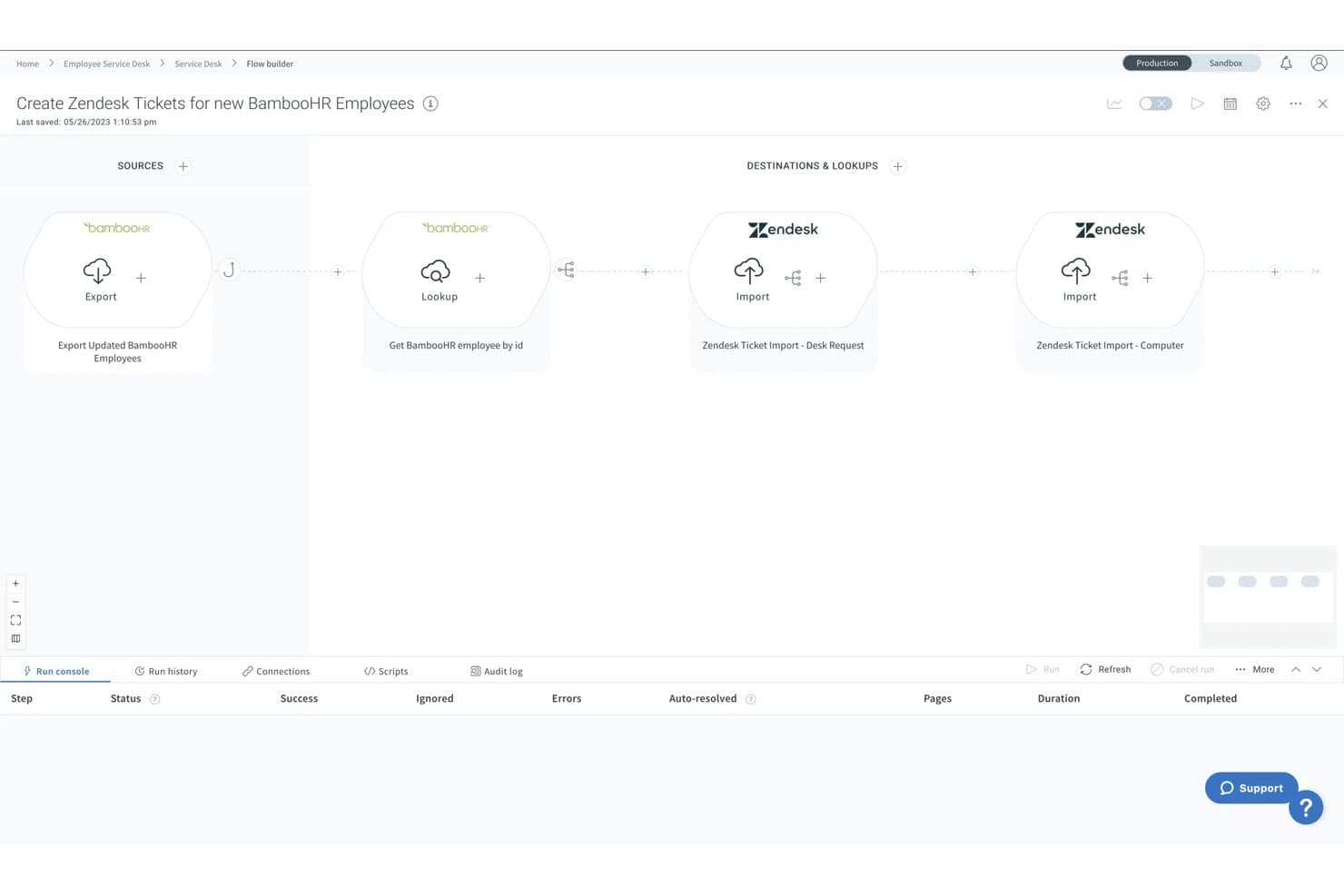
Celigo offers a visual flow builder that automates user provisioning workflows. Celigo is an iPaaS that automates user provisioning and deprovisioning by connecting HRIS platforms, directories, and SaaS applications through pre-built connectors and configurable workflow automation.
Who Is Celigo Best For?
IT teams at mid-market and enterprise organizations managing provisioning across a broad, mixed stack of SaaS, ERP, and HRIS platforms.
Why I Picked Celigo
Celigo earns its spot on my shortlist because of how it handles provisioning to long-tail apps that don't support SCIM. With 1,000+ pre-built connectors, I can extend provisioning to NetSuite, custom ERPs, or niche SaaS apps that a dedicated IAM tool simply can't reach. I also rely on its prebuilt SuccessFactors onboarding/offboarding flows, which automatically deprovision users across all connected apps when someone is marked inactive in HR.
Celigo Key Features
- Audit log and error management dashboard: Tracks all provisioning activity and highlights sync failures with detailed troubleshooting data.
- Role-based user access controls: Assigns granular permissions to Celigo users managing flows and integrations.
- Native SAML and SSO integrations: Supports secure authentication with SAML, Okta, and other identity providers for platform users.
- Custom flow builder with JavaScript editor: Lets IT teams create conditional provisioning workflows and data mappings without leaving the UI.
Celigo Integrations
Celigo offers 1,000+ native integrations, including NetSuite, SAP SuccessFactors, Workday, BambooHR, Okta, ServiceNow, Jira, Zendesk, Salesforce, and Microsoft 365. An API is available for custom integrations.
Pros and Cons
Pros:
- Conditional workflow logic handles complex provisioning
- Prebuilt HR onboarding flows reduce setup time
- Covers provisioning gaps for non-SCIM applications
Cons:
- Error debugging requires technical expertise
- Not purpose-built for identity governance
Learn more about Celigo: Best for directory-as-a-service capabilities
- 30-day free trial
- From $9/user/month (billed annually)
Visit WebsiteCustomer Rating:4.6/5
A screenshot focused on the users tab of the user provisioning software tool JumpCloud. JumpCloud provides a centralized platform to manage user identities across various IT resources. Businesses can achieve unified identity management through their directory-as-a-service capabilities, thus fulfilling complex access requests in today's heterogeneous IT environments.
Why I Picked JumpCloud: In the vast landscape of IT tools, selecting the right one often boils down to specific needs and standout features. When determining the best fit for directory services, JumpCloud immediately surfaced as a top contender due to its robust capabilities in handling user identities. I chose this tool because it effectively blends automated user processes with intricate directory functionalities, marking it as the best for directory-as-a-service capabilities.
Standout features & integrations:
JumpCloud excels in managing and automating user identities, ensuring that access requests are processed efficiently. The platform's comprehensive API further augments its directory functionalities, facilitating intricate integrations and custom workflows. As for integrations, JumpCloud has built partnerships with various IT platforms, allowing businesses to maintain cohesion in identity management across diverse ecosystems.
Pros and Cons
Pros:
- Efficient handling of access requests
- Advanced API for custom integrations and workflows
- Comprehensive management of user identities
Cons:
- Integrations, while vast, may not cover niche industry tools
- Some advanced features could require technical expertise
- Might be overwhelming for smaller organizations
Learn more about JumpCloud:

A screenshot displaying the applications tab of IBM security Verify. IBM Security Verify is a comprehensive access management solution emphasizing risk-based authentication, ensuring users are granted access based on contextual risks. This approach balances security and user convenience, aligning perfectly with the rising demands of modern digital businesses.
Why I Picked IBM Security Verify: In choosing and comparing various tools, IBM Security Verify particularly caught my attention due to its unique approach to authentication. The tool's emphasis on a risk-based method, which is different from traditional authentication strategies, piqued my interest. Hence, I am of the opinion that for organizations looking to pivot towards a more contextual and dynamic authentication system, IBM Security Verify is best for risk-based authentication.
Standout features & integrations:
IBM Security Verify is an account provisioning tool and a complete identity solution. Its risk-based authentication mechanism evaluates numerous parameters before granting access, adding an extra layer of security. Integration-wise, IBM Security Verify is compatible with various enterprise applications and systems, ensuring consistent identity practices regardless of the underlying platform.
Pros and Cons
Pros:
- Wide compatibility with numerous enterprise applications and systems.
- Comprehensive user provisioning tool ensuring efficient account management.
- Advanced risk-based authentication for improved security.
Cons:
- As with many IBM solutions, it may come with a steeper learning curve for some users
- Integration with certain legacy systems might require additional effort
- Might be perceived as complex for smaller organizations
Learn more about IBM Security Verify: Best for secure enterprise identity verification
- 30-day free trial
- From $7.00/user/month

A photo displaying the admin center built for the tool Microsoft Entra ID. Microsoft Entra ID is a tool designed to provide businesses with a robust mechanism for identity verification. As enterprises grow and navigate through complex hybrid environments, a secure and reliable identity verification becomes indispensable. Microsoft Entra ID squarely focuses on this, ensuring that enterprise identities are verified with utmost security.
Why I Picked Microsoft Entra ID: I picked Microsoft Entra ID as my top choice for identity verification tools. It's great for the enterprise sector, especially those in hybrid environments. After comparing it to other options, I found that it excels at providing secure identity verification. This makes it easy for the IT department to handle and authenticate users with confidence.
Standout features & integrations:
Microsoft Entra ID boasts of features that are tailored for today's complex business infrastructures. It's highly adaptive to hybrid environments, ensuring absolute identity verifications across both on-premise and cloud platforms. Furthermore, its deep integration with Microsoft 365 means that businesses can maintain a consistent identity verification method across the suite of Microsoft applications.
Pros and Cons
Pros:
- Deep integration with Microsoft 365 ensures a streamlined experience for the IT department.
- Extensive function in hybrid environments, balancing both on-premise and cloud.
- Tailored for enterprises, addressing specific challenges they face in identity verification.
Cons:
- The complexity may require dedicated IT personnel for setup and maintenance
- Businesses not invested in the Microsoft ecosystem might find some features redundant
- May be perceived as intricate for small businesses without hybrid infrastructures
Learn more about Microsoft Entra ID: Best for adaptive workforce authentication
- 30-day free trial + free demo available
- From $6/user/month (billed annually)

A sample of the mobile and desktop view of the interface for Okta Workforce Identity. Okta Workforce Identity is a renowned tool in the cybersecurity realm that focuses on providing robust identity solutions for the modern workforce. Its main thrust is adaptive authentication, tailoring access requirements based on varying user contexts and scenarios, which is essential for today's diverse and dynamic work environment.
Why I Picked Okta Workforce Identity: I have found that Okta Workforce Identity is a top choice for adaptive authentication. This tool stands out due to its ability to adjust access protocols based on user behavior and context. After comparing various options, I am confident that Okta Workforce Identity is the ideal solution for adaptive workforce authentication. It is particularly useful for businesses with constantly changing dynamics and security requirements.
Standout features & integrations:
Okta Workforce Identity is more than just an authentication tool. It offers advanced compliance reporting features, helping businesses meet their compliance requirements without hassles. Furthermore, Okta integrates with a multitude of enterprise applications, enhancing its adaptability and ensuring consistent identity practices across various platforms.
Pros and Cons
Pros:
- Extensive integrations with a myriad of enterprise tools, making it versatile in diverse IT environments.
- In-depth compliance reporting assists businesses in meeting stringent compliance requirements.
- Comprehensive adaptive authentication caters to varying workforce needs.
Cons:
- As a comprehensive tool, setup and initial configuration might be extensive
- Certain advanced features might require a steeper learning curve
- Might be perceived as overkill for very small businesses
Learn more about Okta Workforce Identity: Best for open-source identity and access management
- From $20/user/month (billed annually)

A photo focused on the different dashboards of the tool WSO2 Identity Server. WSO2 Identity Server offers a comprehensive solution for identity management, ensuring real-time and secure access to applications and services. As an open-source platform, it caters to organizations prioritizing flexibility, customization, and transparency in their identity and access management strategies.
Why I Picked WSO2 Identity Server: After evaluating various tools, I found that the open-source WSO2 Identity Server was the best option for identity and access management. Its transparency and flexibility make it the top choice.
Standout features & integrations:
WSO2 Identity Server prides itself on an efficient provisioning process, ensuring timely and accurate user data management. The platform supports Single Sign-On (SSO) and Multi-Factor Authentication (MFA) mechanisms, reinforcing its commitment to secure access. In integrations, WSO2 connects with a range of enterprise tools, ensuring consistent identity management across diverse business systems.
Pros and Cons
Pros:
- Wide-ranging integrations support uniform identity practices across tools.
- Efficient provisioning process enhances the user data management experience.
- Open-source nature ensures transparency and customization options.
Cons:
- Potential for complexities when integrating with proprietary systems
- Requires dedicated resources for optimal customization and deployment
- Might pose a steeper learning curve for those unfamiliar with open-source platforms
Learn more about WSO2 Identity Server: Best for SaaS operations management
- Free demo available
- Pricing upon request

A screenshot focused on the dashboard of BetterCloud. BetterCloud is a cloud-based platform tailor-made for IT professionals, offering extensive SaaS management tools to ensure efficient and secure operations. Its excellence in overseeing multiple SaaS environments ties in directly with our earlier declaration of its prowess in SaaS operations management.
Why I Picked BetterCloud: When selecting tools for the list, BetterCloud caught my attention because of its unique approach to managing diverse SaaS ecosystems. In comparing various platforms, it became evident that BetterCloud had a distinct edge, especially in centralizing the management of SaaS applications. Given its adeptness in offering granular controls over various SaaS apps, it is best for those keen on robust SaaS operations management.
Standout features & integrations:
BetterCloud flourishes with features such as advanced audit trails, multi-factor authentication, and automated deprovisioning to secure and optimize SaaS applications. Furthermore, it provides crucial integrations with prominent SaaS applications like Slack, Google Workspace, and Dropbox, making the management process coherent and integrated.
Pros and Cons
Pros:
- Efficient deprovisioning of user accounts
- Incorporates multi-factor authentication for added security
- Comprehensive cloud-based SaaS management tools
Cons:
- Pricing structure could be more transparent
- Might be overkill for small businesses
- Can be complex for beginners
Learn more about BetterCloud:
Annen programvare for brukerprovisjonering
Her er noen flere alternativer for programvare for brukerprovisjonering som ikke kom med på kortlisten min, men som likevel er verdt å sjekke ut:
- 11LumosBest for energy-efficient IT solutions
- 12ConductorOneBest for access rights orchestration
- 13GroupID By ImanamiBest for group lifecycle and automation
- 14RipplingBest for integrated HR and IT automation
- 15OneLoginGood for unified access management across devices
- 16HelloIDGood for streamlined identity management
- 17ZluriGood for SaaS application management
- 18UniqkeyGood for advanced password protection in EU
- 19Jamf connectBest for Apple device identity management
- 20SailPointGood for comprehensive identity governance
- 21Auth0Good for customizable identity authentication
- 22CyberArk IdentityGood for secure remote workforce connectivity
- 23CoreviewGood for Microsoft 365 management and insights
- 24FastpathGood for compliance and audit readiness
- 25Opal SecurityGood for API security and policy enforcement
- 26TeleportGood for secure infrastructure access
- 27PingFederateGood for scalable enterprise federation and single sign-on
How I Evaluate User Provisioning Software
I split my evaluation into baseline criteria—like automated lifecycle triggers and SCIM support—and differentiators that set tools apart for complex, multi-app environments.
Core Functionality (Table Stakes For This List)
When I'm selecting tools for my list, I rank each one on a scale from 0 (does not offer the functionality) to 5 (excels in this area) for each core functionality listed below. Then, I calculate the tool's total score into a percentage. Each tool needs to achieve a minimum total score of 65% to be considered for inclusion.
- Automated Account Lifecycle Management: I check whether the tool can trigger create, update, and deprovisioning actions automatically when someone joins, moves teams, or exits the org.
- App & Directory Integrations: The connector catalog matters. I evaluate how many SaaS apps and directories like Active Directory or Google Workspace sync natively out of the box.
- Role-Based Access Control: I look at how roles map to app entitlements, like whether a new sales hire automatically gets CRM and dialer access based on their group assignment.
- HRIS-Driven Provisioning: A solid tool should pull from your HRIS as the source of truth, so a status change in Workday or BambooHR kicks off provisioning workflows.
- SCIM & Standards Support: I evaluate whether each platform supports SCIM 2.0, SAML, and OIDC for interoperable provisioning across standards-compliant applications.
- Audit Logs & Reporting: Every provisioning event should be searchable and exportable. I look for tools that log who got access, when, and who approved it.
Once I have a list of tools that meet the criteria, I consider what sets each platform apart.
Differentiating Factors (What Sets Vendors Apart)
Here's how I compare and contrast different vendors:
Standout Features
Self-service access request portals save IT teams from fielding repetitive tickets every time someone needs a new app. I also look for access certification campaigns, where managers periodically confirm or revoke entitlements to keep your access posture clean between audits. A no-code workflow builder is another differentiator I value, especially for teams that need to design multi-step approval chains or conditional provisioning logic without writing scripts.
Beyond Features
Compliance certifications matter here. I check whether a vendor holds SOC 2 Type II and ISO 27001 at minimum, since provisioning tools handle sensitive identity data across your entire stack. Ecosystem depth is another factor I weigh—tools that plug into your existing SSO, MFA, and SIEM platforms reduce architectural gaps. I also evaluate time to value, especially how quickly you can complete your initial directory sync, map attributes, and go live with your first provisioning workflows.
Slik velger du programvare for brukerprovisjonering
Det er lett å gå seg vill i lange funksjonslister og kompliserte prismodeller. For å hjelpe deg med å holde fokus mens du går gjennom den unike prosessen med å velge programvare, får du her en sjekkliste over faktorer du bør ha i bakhodet:
| Faktor | Hva du bør vurdere |
|---|---|
| FaktorSkalerbarhet | Hva du bør vurdereKan programvaren vokse sammen med organisasjonen din? Ta hensyn til fremtidige behov og om verktøyet kan håndtere flere brukere uten ekstra kostnader eller ytelsesproblemer. |
| FaktorIntegrasjoner | Hva du bør vurdereKobler den seg til de eksisterende systemene dine? Sjekk kompatibiliteten med den nåværende teknologiplattformen din for å unngå kostbare omveier eller begrensninger. |
| FaktorTilpasningsmuligheter | Hva du bør vurdereKan du tilpasse verktøyet til arbeidsflytene dine? Vurder hvor enkelt det er å endre innstillinger og tillatelser slik at de samsvarer med prosessene dine. |
| FaktorBrukervennlighet | Hva du bør vurdereEr grensesnittet intuitivt for teamet ditt? Sørg for at det ikke krever omfattende opplæring eller gjør den daglige driften tregere. |
| FaktorImplementering og innføring | Hva du bør vurdereHvor raskt kan du komme i gang? Se på oppsettsprosessen, nødvendige ressurser og støtte under innføringen for å unngå forsinkelser. |
| FaktorKostnad | Hva du bør vurdereHvordan samsvarer prisen med budsjettet ditt? Sammenlign kostnadene med funksjonene og skalerbarheten. Vær oppmerksom på skjulte gebyrer eller ufleksible prismodeller. |
| FaktorSikkerhetstiltak | Hva du bør vurdereEr tiltak for databeskyttelse på plass? Vurder kryptering, tilgangskontroller og samsvar med bransjestandarder for å beskytte sensitiv informasjon. |
| FaktorTilgjengelig kundestøtte | Hva du bør vurdereHvilken støtte tilbyr leverandøren? Sjekk om det finnes tilgjengelighet døgnet rundt, responstider og kvaliteten på ressurser som veiledninger eller brukerfora, slik at du får hjelp når det oppstår problemer. |
Hva er programvare for brukerklargjøring?
Programvare for brukerklargjøring er et verktøy som hjelper bedrifter med å kontrollere hvem som har tilgang til systemene, appene og dataene deres. Den holder alt organisert ved å sørge for at hver person har riktig tilgang for rollen sin.
I stedet for å legge til eller fjerne brukere manuelt, håndterer programvaren dette automatisk når noen begynner i bedriften, bytter stilling eller slutter. Dette holder tilgangen oppdatert og bidrar til å forhindre feil.
Funksjoner
Når du velger programvare for brukerklargjøring, bør du se etter følgende viktige funksjoner:
- Automatisk oppretting av brukere: Oppretter automatisk nye brukerkontoer, noe som sparer tid og reduserer feil i introduksjonsprosessen.
- Tilgangsadministrasjon: Kontrollerer brukertillatelser og tilgangsnivåer for å ivareta sikkerhet og samsvar.
- Samsvarsrapportering: Genererer rapporter som hjelper organisasjoner med å oppfylle regulatoriske krav og revisjonsbehov.
- Identitetsfederering: Kobler sammen flere identitetssystemer og gir sømløs tilgang på tvers av ulike plattformer.
- Enkel pålogging (SSO): Gjør det mulig for brukere å få tilgang til flere applikasjoner med ett sett påloggingsopplysninger, noe som forenkler påloggingsprosessen.
- Flerfaktorautentisering: Gir et ekstra sikkerhetslag ved å kreve ytterligere bekreftelse utover passord.
- Regelbasert administrasjon: Håndhever regler for brukerkontoer og gruppemedlemskap for å opprettholde en ryddig katalog.
- Revisjonsspor: Sporer brukeraktiviteter og endringer for å gi åpenhet og bidra til feilsøking.
- Tilpassbare arbeidsflyter: Gjør det mulig for organisasjoner å tilpasse programvaren til sine spesifikke prosesser og behov.
- Integrasjonsmuligheter: Kobler seg til eksisterende systemer og applikasjoner for å forbedre funksjonalitet og effektivitet.
Fordeler
Implementering av programvare for brukerklargjøring gir flere fordeler for teamet og virksomheten din. Her er noen av fordelene du kan se frem til:
- Tidsbesparelser: Automatiserer oppsett av brukere og tilgangsadministrasjon, reduserer manuelt arbeid og fremskynder introduksjonsprosessen.
- Forbedret sikkerhet: Funksjoner som flerfaktorautentisering og tilgangskontroller bidrar til å beskytte sensitive data mot uautorisert tilgang.
- Sikret samsvar: Genererer samsvarsrapporter og revisjonsspor, noe som gjør det enklere å oppfylle regulatoriske krav.
- Bedre nøyaktighet: Automatisering reduserer feil i brukerklargjøringen og sikrer riktige tilgangsnivåer og tillatelser.
- Operasjonell effektivitet: Integrasjonsmuligheter gjør at programvaren kan fungere sammen med eksisterende systemer og forbedre den samlede arbeidsflyten.
- Skalerbarhet: Støtter organisasjoner i vekst ved å håndtere et økt antall brukere uten ytterligere administrativ belastning.
- Forenklet administrasjon: Sentraliserer brukeradministrasjonen og gjør det enklere å overvåke og justere brukerroller og tillatelser.
Kostnader og priser
Valg av programvare for brukerklargjøring krever en forståelse av de ulike prismodellene og tilgjengelige abonnementene. Kostnadene varierer basert på funksjoner, teamstørrelse, tillegg og mer. Tabellen nedenfor oppsummerer vanlige abonnementer, gjennomsnittsprisene deres og typiske funksjoner som er inkludert i løsninger for programvare for brukerklargjøring:
Sammenligningstabell for abonnementer for programvare for brukerklargjøring
| Abonnementstype | Gjennomsnittspris | Vanlige funksjoner |
|---|---|---|
| AbonnementstypeGratisabonnement | Gjennomsnittspris$0 | Vanlige funksjonerGrunnleggende brukeradministrasjon, begrensede integrasjoner og brukerstøtte fra fellesskapet. |
| AbonnementstypePersonlig abonnement | Gjennomsnittspris$5-$25/bruker/måned | Vanlige funksjonerBrukerklargjøring, grunnleggende rapportering og brukerstøtte via e-post. |
| AbonnementstypeBedriftsabonnement | Gjennomsnittspris$25-$50/bruker/måned | Vanlige funksjonerAvanserte integrasjoner, samsvarsrapportering og brukerstøtte via telefon. |
| AbonnementstypeEnterprise-abonnement | Gjennomsnittspris$50-$100/bruker/måned | Vanlige funksjonerTilpassede arbeidsflyter, dedikert kundeansvarlig og førsteklasses brukerstøttetjenester. |
Vanlige spørsmål om programvare for brukerklargjøring
Her er noen svar på vanlige spørsmål om programvare for brukerklargjøring:
Hva er forskjellen mellom brukerklargjøring og fjerning av brukertilgang?
Brukerklargjøring innebærer å opprette brukerkontoer og tillatelser når noen blir en del av organisasjonen din. Fjerning av brukertilgang er prosessen med å fjerne tilgangen når personen slutter. Begge deler er avgjørende for å opprettholde sikkerheten. Ved å automatisere disse oppgavene sparer du tid og reduserer feil, slik at brukerne får riktig tilgang når det er nødvendig, og ingen tilgang når den ikke lenger er nødvendig.
Kan programvare for brukerklargjøring integreres med eksisterende IT-systemer?
Ja, det meste av programvaren for brukerklargjøring kan integreres med eksisterende IT-systemer. Dette inkluderer katalogtjenester som Active Directory og skytjenester som Google Workspace. Integrasjon bidrar til å opprettholde konsistens på tvers av plattformer og reduserer behovet for manuelle oppdateringer. Kontroller kompatibiliteten med de nåværende systemene dine før du kjøper, for å unngå problemer.
Hvordan forbedrer programvare for brukerklargjøring sikkerheten?
Programvare for brukerklargjøring forbedrer sikkerheten ved å automatisere tilgangskontroller og sikre samsvar med krav. Den bidrar til å håndheve sikkerhetsregler, som oppdatering av passord og flerfaktorautentisering. Ved å opprettholde nøyaktige brukerdata og tillatelser reduserer den risikoen for uautorisert tilgang. Regelmessige revisjoner og rapporter støtter sikkerhetsarbeidet ytterligere.
Er det nødvendig med opplæring for å bruke programvare for brukerklargjøring?
Ja, det er vanligvis nødvendig med noe opplæring for å bruke programvare for brukerklargjøring effektivt. Omfanget av opplæringen avhenger av hvor komplekst verktøyet er. Mange leverandører tilbyr opplæringsressurser som videoer, webinarer og dokumentasjon. Ved å investere tid i opplæring kan du og teamet ditt utnytte programvarens funksjoner fullt ut, noe som sikrer en smidigere implementering.