

Programvare for sikkerhetssamsvar hjelper teamet ditt med å håndtere regulatoriske krav ved å automatisere innsamling av dokumentasjon, overvåke kontroller og holde revisjonsdokumentasjon klar. Hvis du er lei av å holde oversikt over dusinvis av rammeverk og ligge i forkant av standarder i stadig endring, har du kommet til rett sted. Denne veiledningen hjelper deg med å sammenligne de beste alternativene utviklet for IT-miljøer i rask endring, slik at du kan finne et verktøy som passer behovene dine for samsvar, teamets arbeidsflyter og virksomhetens størrelse.
Why Trust Our Software Recommendations
6,700+
Reviews
20
Industry experts
16+
Evaluation factors
14
Years
Our team has been testing and reviewing software since 2012. As tech leaders ourselves, we know how difficult—and important—it is to choose the right software.
For this guide, we evaluated tools using hands-on testing and independent research, scoring tools using our selection criteria.
Our reviews reflect our human editorial judgment, not a sales pitch.
Expert reviewers:
- Paulo Gardini MiguelTech Director
 Tim FisherVP of AI
 Gabriel RosasTech Lead & Software Architect
 Christhian GruhnTech Lead & Platform Architect

Sammenligningstabell: Programvare for sikkerhetssamsvar
Sammenlign priser og spesifikasjoner side om side for programvaren for sikkerhetssamsvar som kom med på kortlisten min.
| Tool | Best For | Trial Info | Price | ||
|---|---|---|---|---|---|
| 1 | Best for integrated tech risk management | Free demo available | Pricing upon request | Website | |
| 2 | Best for scaling compliance programs | Free demo available | Pricing upon request | Website | |
| 3 | Best for unified audit and evidence portals | Free demo available | Pricing upon request | Website | |
| 4 | Best for configurable workflow automation | Free demo available | Pricing upon request | Website | |
| 5 | Best for cloud-native compliance automation | Free demo available | Pricing upon request | Website | |
| 6 | Best for multi-framework readiness | Free demo + free trial available | Pricing upon request | Website | |
| 7 | Best for customizable risk registers | Free demo available | Pricing upon request | Website | |
| 8 | Best for simplified audit preparation | Free demo available | Pricing upon request | Website | |
| 9 | Best for fast, automated evidence collection | Free demo available | Pricing upon request | Website | |
| 10 | Best for real-time control monitoring | Free demo available | Pricing upon request | Website |


Anmeldelser av programvare for sikkerhetssamsvar
Nedenfor finner du mine detaljerte sammendrag av den beste programvaren for sikkerhetssamsvar som kom med på kortlisten min. Anmeldelsene mine gir et detaljert innblikk i funksjonene, de beste bruksområdene og integrasjonene til hver plattform, slik at du kan finne den som passer best for deg.
 Best for integrated tech risk management
- Free demo available
- Pricing upon request
Visit WebsiteCustomer Rating:4.4/5
OneTrust offers a compliance initiative setup with inventory selection. OneTrust Tech Risk & Compliance is a GRC platform that centralizes compliance automation, control monitoring, risk assessment, and policy management across 55+ security frameworks including SOC 2, ISO 27001, HIPAA, and NIST.
Who Is OneTrust Best For?
OneTrust is a strong fit for enterprise security and GRC teams managing compliance across multiple frameworks, jurisdictions, and business units simultaneously.
Why I Picked OneTrust
OneTrust earns its spot on my shortlist because of how tightly it connects asset inventory, risk scoring, and compliance controls in one place. I particularly like the shared evidence framework, which lets my team collect evidence once and automatically map it across 50+ frameworks simultaneously. The automated risk mapping ties directly to the asset inventory, so when a new system is onboarded, risk exposure updates without any manual intervention.
OneTrust Key Features
- Policy management workflows: Create, update, and track policy versions with built-in approval and attestation workflows.
- Customizable risk register: Log, categorize, and score information security risks in a structured register.
- Auditor collaboration portal: Grant auditors secure, read-only access to compliance evidence and request tracking.
- Pre-built framework library: Access pre-mapped control libraries for SOC 2, ISO 27001, HIPAA, GDPR, NIST, and more.
OneTrust Integrations
OneTrust offers native integrations with AWS, Azure, Google Cloud Platform, ServiceNow, Jira, Okta, Workday, Salesforce, Slack, GitHub, and Microsoft 365. An API is available for custom integrations.
Pros and Cons
Pros:
- Built-in vendor risk assessment questionnaire automation
- Automated risk scoring tied to asset inventory
- Cross-maps controls across 55+ frameworks simultaneously
Cons:
- API throughput is subject to module-level limits
- Broad governance scope adds configuration overhead
Learn more about OneTrust: Best for scaling compliance programs
- Free demo available
- Pricing upon request
Visit WebsiteCustomer Rating:5/5
Scytale centralizes compliance audits, controls, and risk tracking in one dashboard. Scytale is an AI-powered GRC platform that pairs compliance automation with embedded human expert advisory services, covering 80+ frameworks with automated evidence collection, continuous control monitoring, and risk management.
Who Is Scytale Best For?
Scytale fits startups and mid-market security teams pursuing multi-framework certification without a dedicated in-house compliance function.
Why I Picked Scytale
I picked Scytale as one of the best because of how well it handles multi-framework scaling without multiplying your team's workload. When my team adds a new framework like ISO 42001 on top of an existing SOC 2 program, Scytale's cross-mapping automatically surfaces which controls carry over. The Gap Remediator agent then prioritizes what still needs to close, so we're not manually triaging a spreadsheet every time we expand scope.
Scytale Key Features
- Policy management hub: Centralized library with templates, version history, and automated review cycles.
- Vendor risk management: Built-in workflows for assessing, tracking, and storing third-party vendor documentation.
- Auditor collaboration portal: Dedicated interface for secure evidence sharing, request tracking, and audit status updates.
- AI-powered questionnaire automation: Automatically answers security questionnaires using a knowledge base and confidence scoring.
Scytale Integrations
Scytale offers native integrations with AWS, Azure, Google Cloud Platform, Okta, Azure Active Directory, GitHub, GitLab, Jira, Google Workspace, and Slack. An API is available for custom integrations.
Pros and Cons
Pros:
- AI agents speed up gap analysis
- Dedicated compliance advisors included with subscription
- Covers 80+ frameworks with cross-mapped controls
Cons:
- Evidence automation depends on connected system coverage
- Multi-framework programs require careful initial mapping
Learn more about Scytale: Best for unified audit and evidence portals
- Free demo available
- Pricing upon request

Thoropass offers a unified compliance dashboard with framework health tracking. Thoropass is a compliance automation platform that combines automated evidence collection, continuous control monitoring, policy management, and in-platform auditor collaboration across 30+ security frameworks including SOC 2, ISO 27001, HIPAA, and PCI DSS.
Who Is Thoropass Best For?
IT compliance managers and GRC teams at growth-stage companies pursuing their first SOC 2 or ISO 27001 certification will get the most from Thoropass's bundled software-plus-auditor model.
Why I Picked Thoropass
Thoropass earns its spot on my shortlist because the audit portal isn't bolted on as an afterthought: auditors operate inside the same platform where my team manages evidence. First Pass AI pre-screens submitted evidence before it reaches a human auditor, which cuts review cycles without sacrificing accuracy. Evidence requests and fulfillment happen in one place, so my team isn't emailing attachments back and forth with external auditors or reconciling two separate systems during crunch time before a report deadline.
Thoropass Key Features
- Multi-framework control mapping: Map a single control or policy across multiple compliance frameworks to reuse evidence and reduce duplicate work.
- Continuous control monitoring: Track the status of security controls in real time with automated alerts for drift and misconfigurations.
- Risk register module: Maintain a live inventory of risks, with scoring and tracking for remediation linked directly to your compliance workflows.
- Policy management toolkit: Use built-in policy templates, version control, and attestation workflows to align employees with compliance requirements.
Thoropass Integrations
Thoropass offers native integrations with AWS, Azure, Google Cloud Platform, Okta, GitHub, Jira, Slack, BambooHR, and Google Workspace.
Pros and Cons
Pros:
- Covers 30+ frameworks with cross-mapped controls
- AI pre-screens evidence before auditor review
- Auditors collaborate inside the platform directly
Cons:
- Onboarding takes longer for complex tech stacks
- Must use Thoropass partner auditors for reports
Learn more about Thoropass: Best for configurable workflow automation
- Free demo available
- Pricing upon request

LogicGate Risk Cloud centralizes enterprise risks with heat maps and mitigation tracking. LogicGate Risk Cloud is a no-code GRC platform that combines risk management, controls compliance, policy management, internal audit, and third-party risk into a single configurable environment built around automated workflows and a flexible graph database.
Who Is LogicGate Risk Cloud Best For?
It's a strong fit for enterprise GRC and compliance teams that need to manage multiple risk and audit programs across a complex organizational structure.
Why I Picked LogicGate Risk Cloud
I've included LogicGate Risk Cloud in my top picks because its no-code graph database lets my team build and modify compliance workflows without developer support. When a new framework drops, I can run an Automated Gap Analysis to visually map existing controls against new requirements and auto-generate corrective action plans via Spark AI. That level of configurability means my team isn't locked into rigid, predefined templates the way you are with most compliance tools.
LogicGate Risk Cloud Key Features
- Regulatory management application: Lets you manage and map controls to frameworks like SOC 2, ISO 27001, HIPAA, PCI DSS, and GDPR.
- Risk Cloud Quantify: Enables quantitative risk analysis using Monte Carlo simulations and the Open FAIR model.
- Internal audit workspace: Dedicated module for tracking audit requests, managing evidence, and collaborating with external auditors.
- Third-party risk management AI agent: Automates vendor risk assessment workflows and streamlines compliance checks for third-party relationships.
LogicGate Risk Cloud Integrations
LogicGate Risk Cloud offers native integrations with Salesforce, ServiceNow, Jira, Power BI, Workday, Slack, AWS, and Microsoft Teams, and it connects with Zapier. An API is available for custom integrations.
Pros and Cons
Pros:
- Open FAIR quantitative risk scoring built in
- Spark AI flags gaps against new frameworks
- Graph data model links controls across frameworks
Cons:
- Full deployments favor dedicated GRC administrators
- Advanced risk quantification costs extra
Learn more about LogicGate Risk Cloud: Best for cloud-native compliance automation
- Free demo available
- Pricing upon request

Scrut Automation centralizes compliance frameworks and risk monitoring in one dashboard. Scrut Automation is an AI-powered GRC platform that centralizes compliance automation, continuous control monitoring, risk management, and audit preparation across 60+ frameworks from a single interface.
Who Is Scrut Automation Best For?
Scrut Automation is a strong fit for fast-growing, cloud-native companies whose security and GRC teams need to hit compliance milestones without building out a large dedicated compliance function.
Why I Picked Scrut Automation
I picked Scrut Automation as one of the best because of how it handles continuous compliance across cloud-native environments. The agentic Evidence Collector pulls real-time data from AWS, GitHub, and Okta without my team manually chasing screenshots before every audit. On top of that, its Unified Control Framework means implementing one control automatically maps it across every applicable framework, which cuts a significant amount of duplicated work when my team is running SOC 2 and ISO 27001 side by side.
Scrut Automation Key Features
- Automated policy management: Offers a library of auditor-approved templates with version control and employee attestation workflows.
- Risk register with scoring: Tracks compliance and security risks, assigning quantitative and qualitative scores with remediation plans.
- Vendor risk assessment module: Manages third-party risk through automated security questionnaires and integrated vendor inventory.
- Auditor collaboration portal: Provides secure, scoped access for auditors to review evidence, track requests, and monitor audit progress.
Scrut Automation Integrations
Scrut Automation offers native integrations with AWS, Azure, Google Cloud Platform, Okta, GitHub, GitLab, Jira, Google Workspace, and Slack. An API is also available for custom integrations.
Pros and Cons
Pros:
- Dedicated customer success support during onboarding
- Single control maps across multiple frameworks automatically
- Automated evidence collection across 150+ integrations
Cons:
- Broad feature set may overwhelm smaller teams
- Custom frameworks add configuration overhead
Learn more about Scrut Automation: Best for multi-framework readiness
- Free demo + free trial available
- Pricing upon request
Visit WebsiteCustomer Rating:4.8/5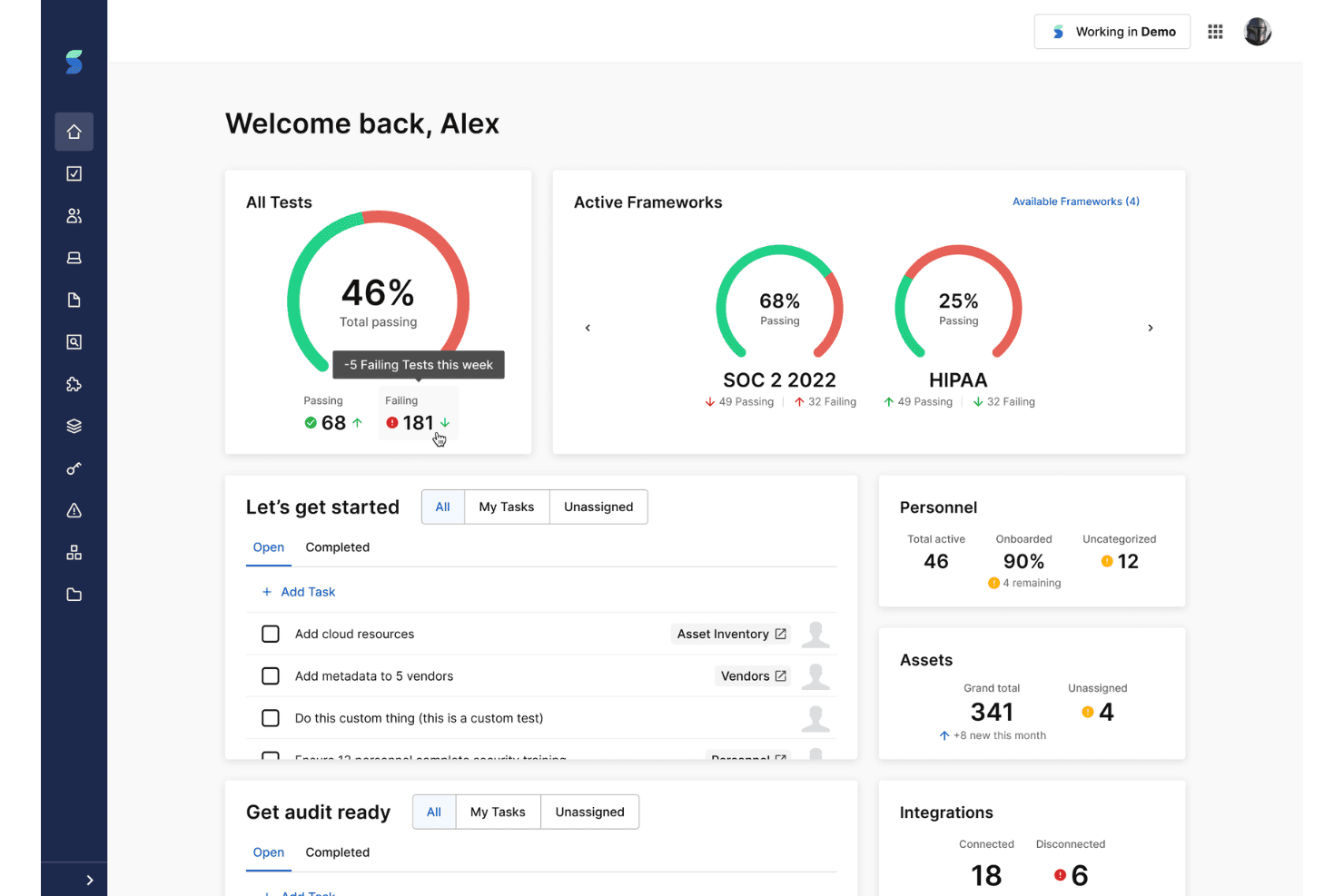
Secureframe tracks compliance readiness across multiple frameworks, with pass rates and audit preparation tasks in one dashboard. Secureframe is a security compliance platform that automates evidence collection, continuous control monitoring, risk management, and policy management across 35+ frameworks including SOC 2, ISO 27001, HIPAA, PCI DSS, and CMMC.
Who Is Secureframe Best For?
Secureframe is a strong fit for security and GRC teams at growth-stage tech companies pursuing multiple compliance certifications simultaneously.
Why I Picked Secureframe
Secureframe earns its spot on my shortlist because of how well it handles running SOC 2, ISO 27001, and CMMC simultaneously. The cross-framework control mapping means you're not duplicating work across certifications. I also like Comply AI for Policies, which generates policy language mapped across all active frameworks at once, rather than forcing you to maintain separate policy sets per program.
Secureframe Key Features
- Risk register and scoring: Catalogue security and compliance risks, assign quantitative and qualitative scores, and track remediation status in one dashboard.
- Auditor collaboration portal: Invite auditors to review evidence, track requests, and manage audit status without exporting sensitive files.
- Policy version control: Manage edits and track changes on policy documents with version history and attestation workflows tied to compliance needs.
- Vendor risk management module: Maintain an inventory of third-party vendors, conduct security assessments, and automate questionnaire distribution.
Secureframe Integrations
Secureframe offers native integrations with AWS, Azure, Google Cloud, Okta, GitHub, Jira, Slack, Google Workspace, Microsoft 365, and Salesforce. An API is available for custom integrations.
Pros and Cons
Pros:
- Real-time control monitoring flags drift instantly
- Comply AI generates policy language automatically
- Covers 35+ compliance frameworks with cross-mapping
Cons:
- Can overwhelm teams new to GRC
- Pricing scales steeply with added frameworks
Learn more about Secureframe: Best for customizable risk registers
- Free demo available
- Pricing upon request
Visit WebsiteCustomer Rating:4.6/5
Hyperproof's dashboard gives a unified view of compliance program health. Hyperproof is a GRC platform that combines compliance management, risk register workflows, policy management, and audit collaboration with cross-framework control mapping across 160+ pre-built frameworks.
Who Is Hyperproof Best For?
Hyperproof suits mid-market to enterprise GRC and security compliance teams managing multiple concurrent frameworks across complex, multi-entity organizations.
Why I Picked Hyperproof
I picked Hyperproof as one of the best because its risk register setup goes further than most GRC platforms I've used. You can run multiple registers simultaneously, each with its own customized scoring scales for likelihood, impact, and risk tolerance. I also like that you can add custom fields to each register, which then surface as filters on dashboards and reports, keeping your risk view organized across different divisions or entities.
Hyperproof Key Features
- Cross-framework control mapping: Map a single control to multiple compliance frameworks to reduce duplicated effort.
- Automated control testing: Set up recurring automated tests for controls with auto-escalation of failed checks.
- Policy management with attestation: Store, version, and distribute policies while tracking employee acknowledgments tied to compliance requirements.
- In-platform auditor workspace: Grant auditors dedicated access to evidence, request tracking, and audit dashboards without exporting files.
Hyperproof Integrations
Hyperproof offers native integrations with AWS, Azure, Okta, Jira, GitHub, and Slack. An API is available for custom integrations.
Pros and Cons
Pros:
- Dedicated auditor workspace reduces evidence export friction
- Runs multiple risk registers with custom scoring
- Supports 160+ pre-built compliance framework templates
Cons:
- Vendor risk workflows need more automation
- Dashboards offer limited tailoring
Learn more about Hyperproof: Best for simplified audit preparation
- Free demo available
- Pricing upon request
Visit WebsiteCustomer Rating:5/5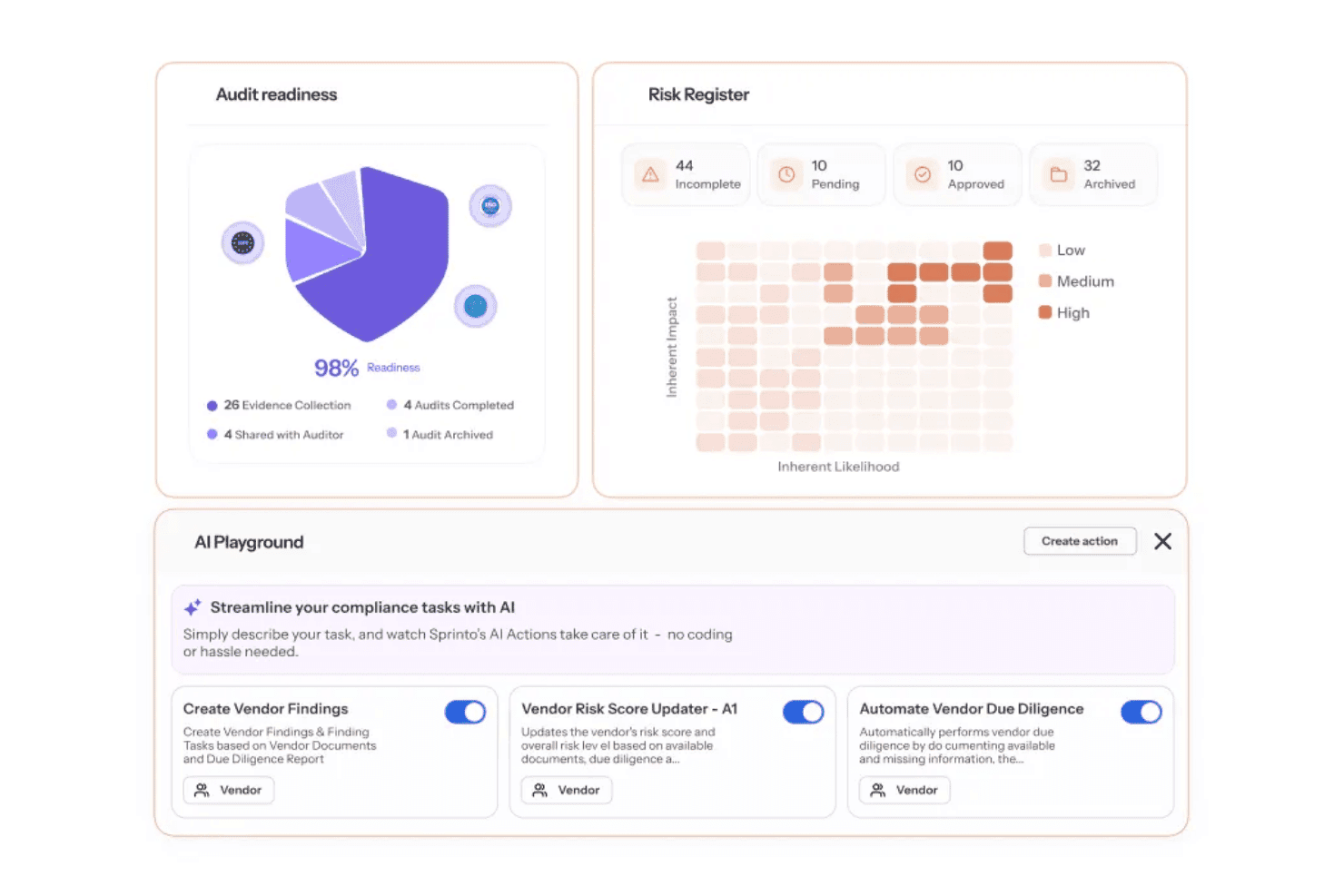
Sprinto centralizes audit readiness, risk tracking, and AI-driven vendor compliance. Sprinto is an autonomous compliance automation platform that continuously monitors security controls, automates evidence collection across 300+ integrations, and manages multi-framework GRC programs including SOC 2, ISO 27001, HIPAA, and PCI DSS.
Who Is Sprinto Best For?
Sprinto is a strong fit for startups and scaling companies working toward their first security certification and looking to get audit-ready without building a compliance program from scratch.
Why I Picked Sprinto
I've included Sprinto in my top picks because it bundles in-house lead auditors with your first certification audit, which is something I don't see from most compliance tools. When I'm preparing for a SOC 2 or ISO 27001 audit, Sprinto's Evidence gap analysis AI flags missing evidence before the auditor ever sees it. The Bring Your Own Auditor feature also lets me share evidence directly through the platform, keeping the back-and-forth contained and organized.
Sprinto Key Features
- Multi-framework cross-mapping: Map a single control to multiple compliance frameworks for streamlined evidence reuse.
- Vendor risk management module: Automate vendor inventory, tiering, and third-party due diligence workflows within your compliance program.
- AI-powered questionnaire response: Auto-respond to security questionnaires and RFPs using policy and evidence data.
- Public trust center: Share real-time compliance status and control details with external stakeholders through a dedicated trust portal.
Sprinto Integrations
Sprinto offers native integrations with AWS, Azure, Google Cloud Platform, Okta, GitHub, GitLab, Jira, Google Workspace, and Slack. An API is available for custom integrations.
Pros and Cons
Pros:
- Flags missing evidence before auditors review
- Continuous control monitoring with real-time alerts
- Bundles in-house auditors for certification audits
Cons:
- Multi-entity management requires Enterprise
- Nonstandard controls require extra configuration
Learn more about Sprinto: Best for fast, automated evidence collection
- Free demo available
- Pricing upon request
Visit WebsiteCustomer Rating:4.6/5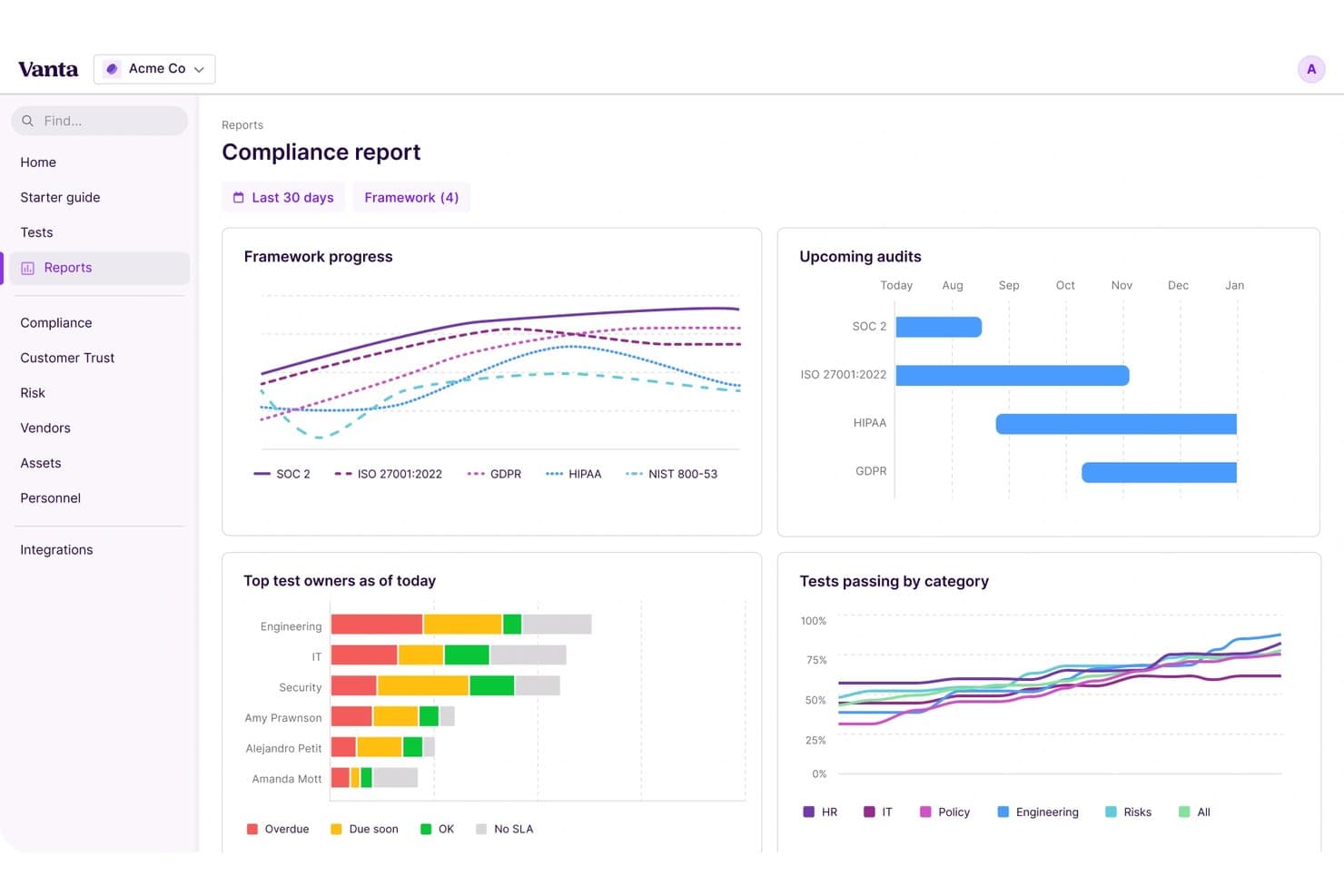
Vanta offers a compliance report dashboard with framework progress tracking. Vanta is an automated security compliance platform built around continuous control monitoring, AI-driven policy management, and evidence collection across 15+ frameworks including SOC 2, ISO 27001, HIPAA, and PCI DSS.
Who Is Vanta Best For?
Vanta is a strong fit for cloud-native startups and growth-stage tech companies working through their first SOC 2 or ISO 27001 audit.
Why I Picked Vanta
Vanta earns its spot on my shortlist because of how aggressively it automates evidence collection. I love that the platform runs 1,400+ pre-built tests hourly across connected systems, so evidence gaps surface before an auditor ever asks. The Vanta AI Agent goes a step further, running real-time evidence checks and flagging failed controls with remediation guidance automatically.
Vanta Key Features
- Multi-framework crosswalking: Map a single control to multiple compliance frameworks for more efficient evidence management.
- Custom risk register: Identify, score, and track remediation of risks with built-in qualitative and quantitative scoring options.
- Policy template library: Access pre-built, framework-specific policy templates with version control and employee attestation workflows.
- Trust Center: Create a public portal to share your real-time compliance status and documentation with prospects and partners.
Vanta Integrations
Vanta offers native integrations with AWS, Azure, Google Cloud Platform, Okta, OneLogin, GitHub, GitLab, Jira, Slack, and Google Workspace. An API is available for custom integrations.
Pros and Cons
Pros:
- Multi-framework crosswalking reduces duplicate evidence collection
- AI flags failed controls automatically
- 1,400+ automated control tests run hourly
Cons:
- Limited custom framework configuration for complex enterprises
- Some controls still require manual evidence uploads

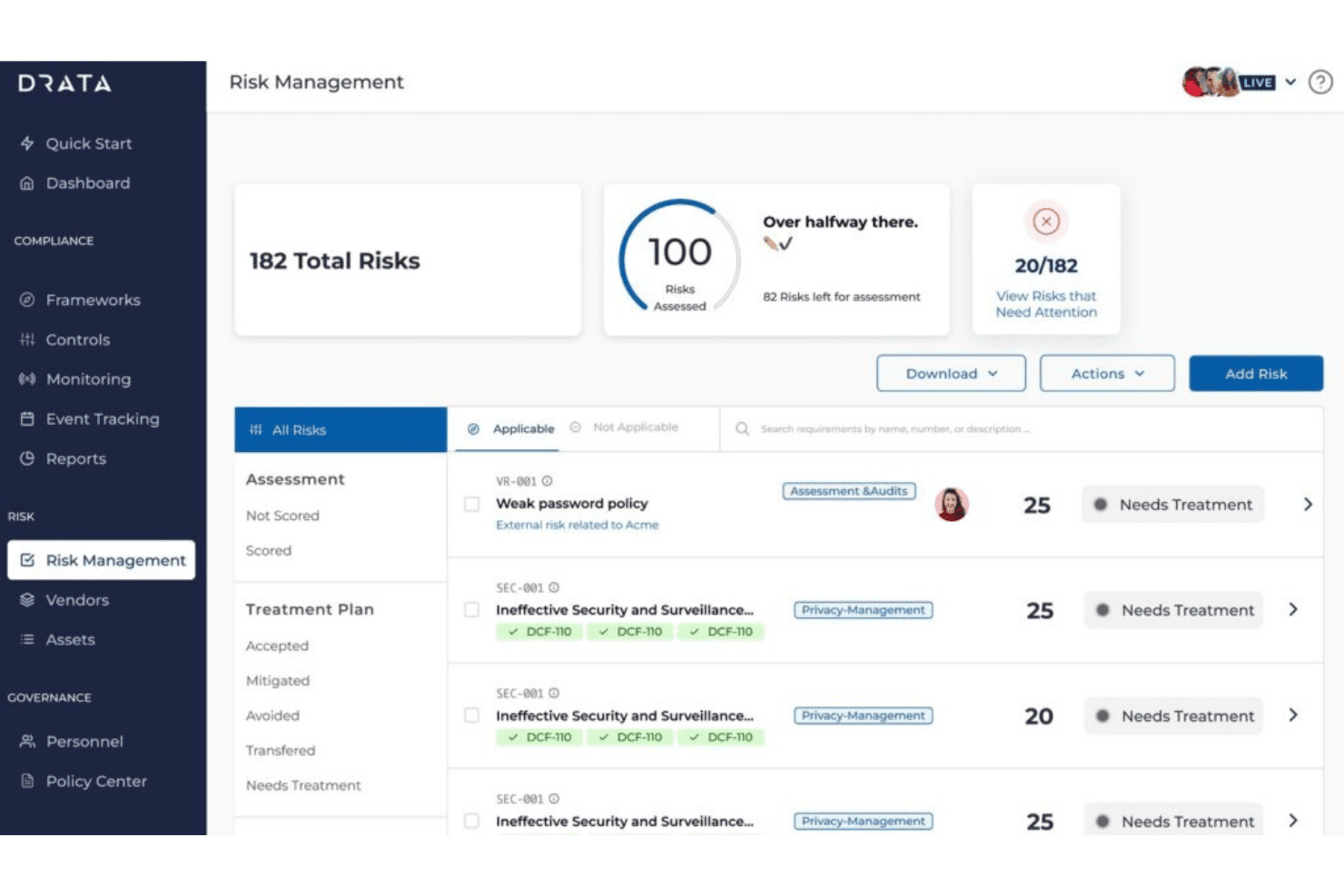
Drata centralizes risk tracking and treatment planning in one dashboard. Drata is an AI-native compliance automation platform that combines continuous control monitoring, automated evidence collection, policy management, risk registers, vendor risk workflows, and auditor collaboration across 20+ security frameworks.
Who Is Drata Best For?
Drata is a strong fit for growth-stage SaaS companies and cloud-native teams where GRC analysts, IT compliance managers, and security engineers share ownership of a multi-framework audit program.
Why I Picked Drata
I picked Drata as one of the best because its Monitoring & Tests module runs automated control checks continuously, not on a fixed schedule. When a control fails, it surfaces a remediation plan immediately rather than waiting for your next audit cycle. I've found that kind of always-on visibility is rare, and the fact that it maintains close to 90% automated evidence coverage across 120+ controls in a single program is what sets it apart when you're running SOC 2 and ISO 27001 at the same time.
Drata Key Features
- Multi-framework crosswalking: Map a single control to multiple compliance frameworks, so evidence collected once applies everywhere it’s relevant.
- Risk management module: Maintain an integrated risk register with scoring, ownership assignment, and remediation tracking for security and compliance risks.
- Vendor risk workflows: Assess, onboard, and manage third-party vendors with centralized tracking and automated security questionnaire distribution.
- Trust Center portal: Share real-time compliance status, documentation, and trust signals with customers and stakeholders in a branded web portal.
Drata Integrations
Drata offers native integrations with AWS, Azure, Google Cloud Platform, Okta, Microsoft 365, Jira, GitHub, GitLab, Slack, Salesforce, and BambooHR, with an API available for custom integrations.
Pros and Cons
Pros:
- Real-time alerts with built-in remediation guidance
- Cross-maps single controls across 20+ frameworks
- Automated evidence collection across 120+ controls
Cons:
- Reporting customization is limited for complex needs
- High alert volume during initial integration setup
Learn more about Drata:
Annen programvare for sikkerhetssamsvar
Her er noen flere alternativer for programvare for sikkerhetssamsvar som ikke kom med på kortlisten min, men som likevel er verdt å se nærmere på:
- 11OptroBest for AI-driven compliance controls
- 12ServiceNow GRCBest for enterprise-wide control oversight
- 13SAI360Best for global compliance framework coverage
- 14ArcherBest for centralized risk & compliance management
- 15MetricStreamBest for enterprise-scale audit orchestration
- 16IBM OpenPagesBest for AI-enabled regulatory reporting
- 17RiskonnectBest for visual compliance dashboarding
- 18LogicManagerBest for automated policy lifecycle management
- 19AnecdotesBest for customizable compliance data pipelines
- 20Diligent One PlatformBest for unified board and compliance governance
How I Evaluate Security Compliance Software
I check these tools in two layers: baseline requirements like SOC 2 evidence automation and real-time control monitoring, then the differentiators that reveal where one platform outperforms another.
Core Functionality (Table Stakes For This List)
When I'm selecting tools for my list, I rank each one on a scale from 0 (does not offer the functionality) to 5 (excels in this area) for each core functionality listed below. I then calculate the tool's total score into a percentage, using 65% as a benchmark to help assess its overall fit for the list.
- Framework Coverage: I look for pre-built control mappings across major standards like SOC 2, ISO 27001, HIPAA, and PCI DSS, plus cross-mapping so one control satisfies multiple frameworks.
- Automated Evidence Collection: Pulling screenshots and exporting logs manually is a time sink. I evaluate how many native integrations a platform offers across cloud, identity, and code repo systems.
- Continuous Control Monitoring: Point-in-time checks miss drift between audits. I look for real-time or near-real-time testing that flags control failures and provides actionable alerts.
- Policy Management: Template libraries, version control, and employee attestation workflows all matter. I check whether policies map directly to framework requirements or exist in isolation.
- Risk Assessment & Management: I evaluate risk register depth, including whether the platform supports both quantitative and qualitative scoring, treatment plans, and remediation tracking.
- Audit Management: Auditor collaboration features like read-only portals, evidence linking, and request tracking reduce back-and-forth. I look for tools that keep everything in one place.
Once I have a list of tools that meet the criteria, I consider what sets each platform apart.
Differentiating Factors (What Sets Vendors Apart)
Here's how I compare and contrast different vendors:
Standout Features
Multi-framework crosswalking is a big differentiator. When one access control maps to SOC 2, ISO 27001, and HIPAA at the same time, you avoid duplicating evidence across audits. I also evaluate vendor risk management modules, specifically whether third-party assessments and questionnaire tracking tie directly into your compliance posture. AI-powered questionnaire response is worth looking at too, since auto-filling SIG or CAIQ responses from past answers saves hours during sales cycles.
Beyond Features
Auditor partnerships matter. I check whether a platform has established relationships with accredited audit firms and offers read-only portals so auditors can pull evidence directly. Tech stack integration depth is equally important—surface-level connectors to AWS or Okta aren't enough if they don't pull granular evidence. I also evaluate pricing transparency, especially how costs scale when you add frameworks. A startup pursuing its first SOC 2 has very different needs than a mid-market team managing four or five certifications.
Slik velger du programvare for sikkerhetssamsvar
Lurer du på hvilken programvare for sikkerhetssamsvar som faktisk vil gjøre den neste revisjonen enklere – og ikke bare love automatisering på papiret?
| Hvis prioriteten din er … | Se etter … |
|---|---|
| Hvis prioriteten din er …Raskest mulig første revisjon | Se etter …Veiledet onboarding kombinert med sjekklister for milepæler |
| Hvis prioriteten din er …Håndtering av flere rammeverk samtidig | Se etter …Kontrollkartlegging på tvers av flere rammeverk og gjenbruk av retningslinjer |
| Hvis prioriteten din er …Redusere manuell innsamling av dokumentasjon | Se etter …Omfattende, innebygde integrasjoner for sky, HRIS og IdP |
| Hvis prioriteten din er …Effektiv håndtering av revisors forespørsler | Se etter …Arbeidsområder for samarbeid med revisorer og skrivebeskyttet tilgang |
| Hvis prioriteten din er …Skalere samsvar i takt med at virksomheten vokser | Se etter …Forutsigbare prismodeller per rammeverk eller bruker |
Slik vurderer du kortlisten din
- Test innhenting av faktisk dokumentasjon: Kjør en integrasjon i prøveperioden og eksporter et dokumentasjonsartefakt fra minst to viktige systemer.
- Gå gjennom arbeidsflyter for retningslinjer fra start til slutt: Be om en demonstrasjon som viser versjonering av retningslinjer og ansattes bekreftelser i praksis.
- Be om dokumentasjon på samarbeid med revisor: Be leverandøren gi deg en revisorpålogging eller et skjermbilde av portalen med eksempler på forespørsler og statusoppdateringer.
- Bekreft integrasjonsdekningen: Send inn en sak med en liste over de kritiske SaaS-, IaaS- og HR-systemene dine, og kontroller svartid og nøyaktighet for støtte til direkte integrasjoner.
- Avveining – automatisering kontra rådgivning: Bestem om du ønsker fullt automatisert samsvar for å oppnå høy hastighet, eller en plattform med tilgang til samsvarsrådgivere for praktisk støtte.
Hva er programvare for sikkerhetssamsvar?
Programvare for sikkerhetssamsvar er en plattform som hjelper IT-, samsvars- og sikkerhetsteam med å automatisere innsamling av bevis, overvåke kontroller og håndtere regulatoriske krav på tvers av flere rammeverk. Med innebygde integrasjoner og forhåndstilordnede kontroller reduserer disse plattformene den manuelle forberedelsen til revisjoner og støtter kontinuerlig overvåking, slik at du kan ligge i forkant av endrede standarder. Dette lar deg sentralisere arbeidsflyter, forberede deg til eksterne revisjoner og oppfylle både løpende samsvarskrav og kravene i nye rammeverk.
Funksjoner i programvare for sikkerhetssamsvar
Når du velger programvare for sikkerhetssamsvar, bør du se etter følgende viktige funksjoner:
- Rammeverkdekning: Støtter flere standarder som SOC 2, ISO 27001, HIPAA og PCI DSS med forhåndsbygde kontrollbiblioteker og tilordning.
- Automatisert innsamling av bevis: Kobler seg til systemer som AWS, Azure, Okta og HRIS-plattformer for automatisk å samle inn revisjonsbevis uten manuelle opplastinger.
- Kontinuerlig kontrollovervåking: Følger effektiviteten til sikkerhetskontroller i sanntid og varsler brukere om feil eller avvik fra policykrav.
- Policyhåndtering: Tilbyr policyer med maler, versjonssporing og arbeidsflytverktøy, slik at ansatte kan bekrefte eller attestere samsvar direkte i plattformen.
- Risikooversikt: Lar brukere identifisere, vurdere og følge opp utbedringen av risikoer knyttet til datasikkerhet, personvern og regulatoriske forpliktelser.
- Revisjonshåndtering: Tilbyr samarbeidsområder for revisorer, sporing av forespørsler og sikker deling av bevis, samtidig som den støtter samsvarsrapportering.
- Leverandørrisikostyring: Sentraliserer risikovurderinger av tredjeparter, automatiserer sikkerhetsspørreskjemaer og hjelper med å overvåke den bredere angrepsflaten.
- Tilgangskontroller: Fastsetter tillatelser og rollebasert tilgangsstyring for å begrense tilgang til sensitive samsvarsdata og støtte tilgangsgjennomganger.
- Rapportering og dashbord: Oppsummerer sikkerhetsstatus, samsvarsstatus, risikotrender og fremdrift i revisjoner for interessenter og samsvarsansvarlige.
- Integrasjonsbibliotek: Inkluderer en katalog med innebygde integrasjoner for systemer for sky, identitet, HR, saksbehandling og sårbarhetshåndtering.
Vanlige AI-funksjoner i programvare for sikkerhetssamsvar
I tillegg til standardfunksjonene i programvare for sikkerhetssamsvar som er nevnt ovenfor, tar mange av disse løsningene i bruk AI med funksjoner som:
- Automatiserte svar på spørreskjemaer: Bruker AI til å analysere tidligere svar og dokumentasjon, og utarbeider deretter svar på sikkerhetsspørreskjemaer som CAIQ eller SIG, noe som sparer timevis med arbeid i leverandørgjennomganger.
- Validering av bevis og avviksdeteksjon: AI gjennomgår innsamlede bevis for uoverensstemmelser, manglende data eller tegn på kontrollavvik, og flagger problemer før revisjoner eller samsvarsbrudd oppstår.
- Anbefalinger for kontrolltilordning: Foreslår optimale tilordninger mellom kontroller og flere rammeverk ved å analysere miljøet og samsvarskravene dine, slik at behovet for manuell kryssreferering reduseres.
- Prediktiv risikovurdering: AI-modeller vurderer historiske hendelser og gjeldende kontrollstatus for å forutsi potensielle samsvarsrisikoer og prioritere utbedringstiltak.
- Policysøk med naturlig språk: Lar brukere søke i policyer og samsvarsdokumentasjon ved hjelp av samtalespråk, noe som gjør det enklere å finne relevante krav eller bevis.
Fordeler med programvare for sikkerhetssamsvar
Implementering av programvare for sikkerhetssamsvar gir flere fordeler for teamet og virksomheten din. Her er noen av fordelene du kan se frem til:
- Redusert tid til revisjonsforberedelser: Automatisert innsamling av bevis og portaler for revisorer minimerer det manuelle arbeidet som kreves for å forberede seg til eksterne vurderinger.
- Innsyn i samsvar i sanntid: Kontinuerlig kontrollovervåking og dashbord lar deg oppdage mangler eller svikt i interne kontroller umiddelbart, i stedet for å vente på planlagte revisjoner.
- Forenklet håndtering av flere rammeverk: Kryssreferering av kontroller på tvers av hvert cybersikkerhetsrammeverk lar deg opprettholde samsvar med SOC 2, ISO 27001, HIPAA og andre standarder fra én enkelt plattform.
- Sentralisert risikosporing: Risikooversikter og dashbord holder oversikt over sikkerhets- og samsvarsrisikoer, status for utbedring og trender på ett sted.
- Effektiv policyhåndtering: Policymaler, versjonsstyring og arbeidsflyter for attestering gjør det raskere og mer oversiktlig å sikre samsvar blant ansatte.
- Skalerer i takt med veksten: Integrasjonsbiblioteker og fleksibel prising lar samsvarsprogrammet utvides etter hvert som du legger til teammedlemmer, rammeverk eller regioner.
- Forbedrede tredjepartsvurderinger: Moduler for leverandørrisikostyring og AI-baserte svar på spørreskjemaer effektiviserer onboarding og oppfølging av leverandører og partnere.
Kostnader og priser for programvare for sikkerhetssamsvar
Valg av programvare for sikkerhetssamsvar krever en forståelse av de ulike prismodellene og planene som er tilgjengelige. Kostnadene varierer basert på funksjoner, teamstørrelse, tillegg og mer. Tabellen nedenfor oppsummerer vanlige planer, gjennomsnittsprisene deres og typiske funksjoner som er inkludert i løsninger for programvare for sikkerhetssamsvar:
Sammenligningstabell for planer for programvare for sikkerhetssamsvar
| Plantype | Gjennomsnittspris | Vanlige funksjoner |
|---|---|---|
| PlantypeGratisplan | Gjennomsnittspris$0 | Vanlige funksjonerGrunnleggende dekning av rammeverk, begrenset opplasting av bevis, én standardintegrasjon og grunnleggende rapportering. |
| PlantypePersonlig plan | Gjennomsnittspris$30–$75/bruker/måned | Vanlige funksjonerGrunnleggende automatisering av samsvar, et lite integrasjonsbibliotek, maler for retningslinjer og støtte for ett enkelt rammeverk. |
| PlantypeForretningsplan | Gjennomsnittspris$120–$300/bruker/måned | Vanlige funksjonerKartlegging på tvers av flere rammeverk, risikoregistre, revisjonsstyring, integrasjoner med innebygd støtte og moduler for leverandørstyring. |
| PlantypeForetaksplan | Gjennomsnittspris$400–$800/bruker/måned | Vanlige funksjonerTilpassede integrasjoner, avansert analyse, dedikert innføring, API-tilgang og støtte døgnet rundt. |
Vanlige spørsmål om programvare for sikkerhetssamsvar
Her er noen svar på vanlige spørsmål om programvare for sikkerhetssamsvar:
Hvordan hjelper programvare for sikkerhetssamsvar med forberedelser til revisjon?
Programvare for sikkerhetssamsvar automatiserer innsamlingen av bevis, sporer forespørsler fra revisorer og sentraliserer dokumentasjonen. Dermed kan teamet ditt bli revisjonsklart raskere, samtidig som den manuelle arbeidsmengden reduseres.
Kan programvare for sikkerhetssamsvar støtte flere samsvarsrammeverk samtidig?
Ja, de fleste løsninger lar deg kartlegge kontroller og retningslinjer på tvers av flere rammeverk som SOC 2, ISO 27001 og HIPAA, slik at du unngår å gjøre samme arbeid flere ganger.
Hvilke integrasjoner er nødvendige i programvare for sikkerhetssamsvar?
Viktige integrasjoner omfatter skyleverandører, verktøy for HR- og identitetsstyring, supportsystemer og kildekodelagre. Dette gjør det enklere å automatisere innsamlingen av samsvarsbevis.
Passer programvare for sikkerhetssamsvar for små bedrifter?
Ja, det finnes innstegsplaner utviklet for oppstartsbedrifter og små team. De dekker grunnleggende samsvarsbehov og gir samtidig rom for vekst etter hvert som kravene utvides.
Hvor ofte oppdateres disse plattformene med nye samsvarsrammeverk?
De fleste leverandører lanserer hyppige oppdateringer for å støtte nye versjoner av rammeverk og nye regelverk. Dette reduserer risikoen for å sakke akterut når samsvarskravene endres.