

Programvare for nettverkstilgangskontroll (NAC) hjelper IT-team med å kontrollere hvilke enheter og brukere som får tilgang til nettverkene deres, basert på identitet, rolle og sikkerhetsstatus.
Mange organisasjoner begynner å se etter en NAC-løsning når de har problemer med å administrere BYOD-enheter, håndheve tilgangsregler konsekvent eller oppdage når ikke-godkjente systemer kobler seg til nettverket. Slike mangler kan skape sikkerhetsrisikoer og gjøre det vanskeligere å opprettholde samsvar med regelverk, særlig i større eller mer dynamiske miljøer.
Jeg har samarbeidet med nettverks- og sikkerhetsteam på tvers av ulike sektorer for å evaluere, ta i bruk og feilsøke NAC-systemer i virkelige miljøer. Denne veiledningen bygger på disse erfaringene for å hjelpe deg med å velge et verktøy som passer miljøet ditt, og som gir teamet ditt mer kontroll uten unødvendig kompleksitet.
Hva er programvare for nettverkstilgangskontroll?
Programvare for nettverkstilgangskontroll er et verktøy som administrerer hvilke brukere og enheter som kan koble seg til et nettverk. Den brukes av IT-administratorer og sikkerhetsteam til å blokkere uautorisert tilgang og håndheve sikkerhetsregler. Funksjoner for identitetskontroll, håndheving av regler og trusseloppdagelse bidrar til å kontrollere tilgang, håndtere risikoer og holde nettverket sikkert. Disse verktøyene gir teamene bedre kontroll over hvem som får tilgang, og hva de kan gjøre etter at de er koblet til.
Why Trust Our Software Recommendations
6,700+
Reviews
20
Industry experts
16+
Evaluation factors
14
Years
Our team has been testing and reviewing software since 2012. As tech leaders ourselves, we know how difficult—and important—it is to choose the right software.
For this guide, we evaluated tools using hands-on testing and independent research, scoring tools using our selection criteria.
Our reviews reflect our human editorial judgment, not a sales pitch.
Expert reviewers:
- Paulo Gardini MiguelTech Director
 Tim FisherVP of AI
 Gabriel RosasTech Lead & Software Architect
 Christhian GruhnTech Lead & Platform Architect

Sammenligningstabell for programvare for nettverkstilgangskontroll
Denne sammenligningstabellen oppsummerer prisdetaljene for mine beste utvalgte programmer for nettverkstilgangskontroll:
| Tool | Best For | Trial Info | Price | ||
|---|---|---|---|---|---|
| 1 | Best for network discovery and monitoring | 30-day free trial + free demo available | From $129/technician/month (billed annually) | Website | |
| 2 | Best for zero trust network access | 14-day free trial + free demo available | From $7/user/month (billed annually) | Website | |
| 3 | Best with 24/7 expert cybersecurity support | 30-day free trial + free demo available | Pricing upon request | Website | |
| 4 | Best for unified access management | 30-day free trial | From $200/user/month | Website | |
| 5 | Best for multi-tenant managed NAC deployments | Free to download, no trial needed | Free, open-source (paid support optional) | Website | |
| 6 | Best for securing industrial IoT networks | 30-day free trial + free demo available | Pricing upon request | Website | |
| 7 | Best for automated IoT device risk mitigation | Demo on request | Custom quote | Website | |
| 8 | Best for automated guest network provisioning | Demo on request | Custom quote (subscription or perpetual) | Website | |
| 9 | Best with automated response workflows for security events | Demo on request | Custom quote | Website | |
| 10 | Best with multilayered file threat prevention | Free trial / demo on request | License-based, annual or multi-year | Website |


Anmeldelser av den beste programvaren for nettverkstilgangskontroll
 Best for network discovery and monitoring
- 30-day free trial + free demo available
- From $129/technician/month (billed annually)
Visit WebsiteCustomer Rating:4.6/5
Atera provides remote monitoring tools for real-time network management. Atera offers a comprehensive IT management platform that goes beyond traditional network access control solutions. It is particularly appealing to IT professionals and managed service providers who need to maintain a secure and efficient network environment. With capabilities such as automated device detection and security alerts, Atera helps you manage network resources and prevent unauthorized access, ensuring smooth and secure operations for your business.
Why I Picked Atera
I picked Atera for its robust Network Discovery tool, which is critical for network access control. This feature uses NMAP technology to automatically detect and catalog devices on your network, allowing you to maintain an up-to-date inventory and block unauthorized devices. Additionally, its centralized dashboard offers detailed device information and alert configurations, enabling proactive monitoring and management of network changes. These capabilities address the need to maintain network security and efficiency, making Atera a strong candidate for those seeking network access control solutions.
Atera Key Features
In addition to its Network Discovery tool, Atera offers several other features that enhance its value as a network management solution.
- Automated Patch Management: This feature ensures all your systems are up-to-date by automatically applying patches, reducing vulnerabilities.
- Remote Monitoring and Management (RMM): Provides comprehensive oversight of all network devices, helping identify and resolve issues remotely.
- Intelligent IT Automations: Automates routine tasks and alerts, freeing up your team to focus on more strategic activities.
- Centralized Dashboard: Offers a single interface for managing all network resources, simplifying oversight and decision-making.
Atera Integrations
Integrations include Splashtop, AnyDesk, TeamViewer, FreshBooks, QuickBooks, Xero, Zapier, Webroot, Acronis, and Bitdefender.
Pros and Cons
Pros:
- Agent data on OS, IP and user activity supports access-level auditing.
- Centralized dashboard simplifies network monitoring and reporting.
- Integrates RMM, helpdesk, and automation in one platform.
Cons:
- Deep NAC policy engines may not be as mature as specialized tools.
- Scalability for very large enterprise NAC deployments may demand extra modules or licence tiers.
 Best for zero trust network access
- 14-day free trial + free demo available
- From $7/user/month (billed annually)
Visit WebsiteCustomer Rating:4.3/5
NordLayer's features, like ThreatBlock and private gateways, are designed to secure business networks. NordLayer is a network security solution designed to help businesses protect their digital assets and manage secure access to company resources. It offers features like Zero Trust Network Access (ZTNA) and a business VPN to ensure that only authorized users can access sensitive information.
Why I Picked NordLayer: I like its use of zero trust network access (ZTNA). This approach ensures that every access request is thoroughly verified, granting permissions only to authenticated users and devices. This minimizes the risk of unauthorized access and potential data breaches, providing your team with a secure environment to operate in. Another feature I like is NordLayer's cloud firewall. Unlike traditional hardware-based firewalls, this cloud-native solution offers scalable and flexible protection without the need for additional hardware.
Standout features & integrations:
Other features include network segmentation, which allows you to divide your network into smaller segments to control access and enhance security. This means you can restrict access to sensitive data, ensuring that only specific team members can reach certain parts of your network. Additionally, NordLayer offers DNS filtering, enabling you to block access to malicious or unwanted websites. Some integrations include Entra ID, Okta, OneLogin, JumpCloud, Google Workspace, Google Cloud, IBM Cloud, and AWS.
Pros and Cons
Pros:
- Provides robust VPN support
- Security measures like AES-256 encryption and multi-factor authentication
- Utilizes a zero-trust framework
Cons:
- Server setup can be complex
- Number of available server locations could be expanded
Learn more about NordLayer: Best with 24/7 expert cybersecurity support
- 30-day free trial + free demo available
- Pricing upon request
Visit WebsiteCustomer Rating:4.8/5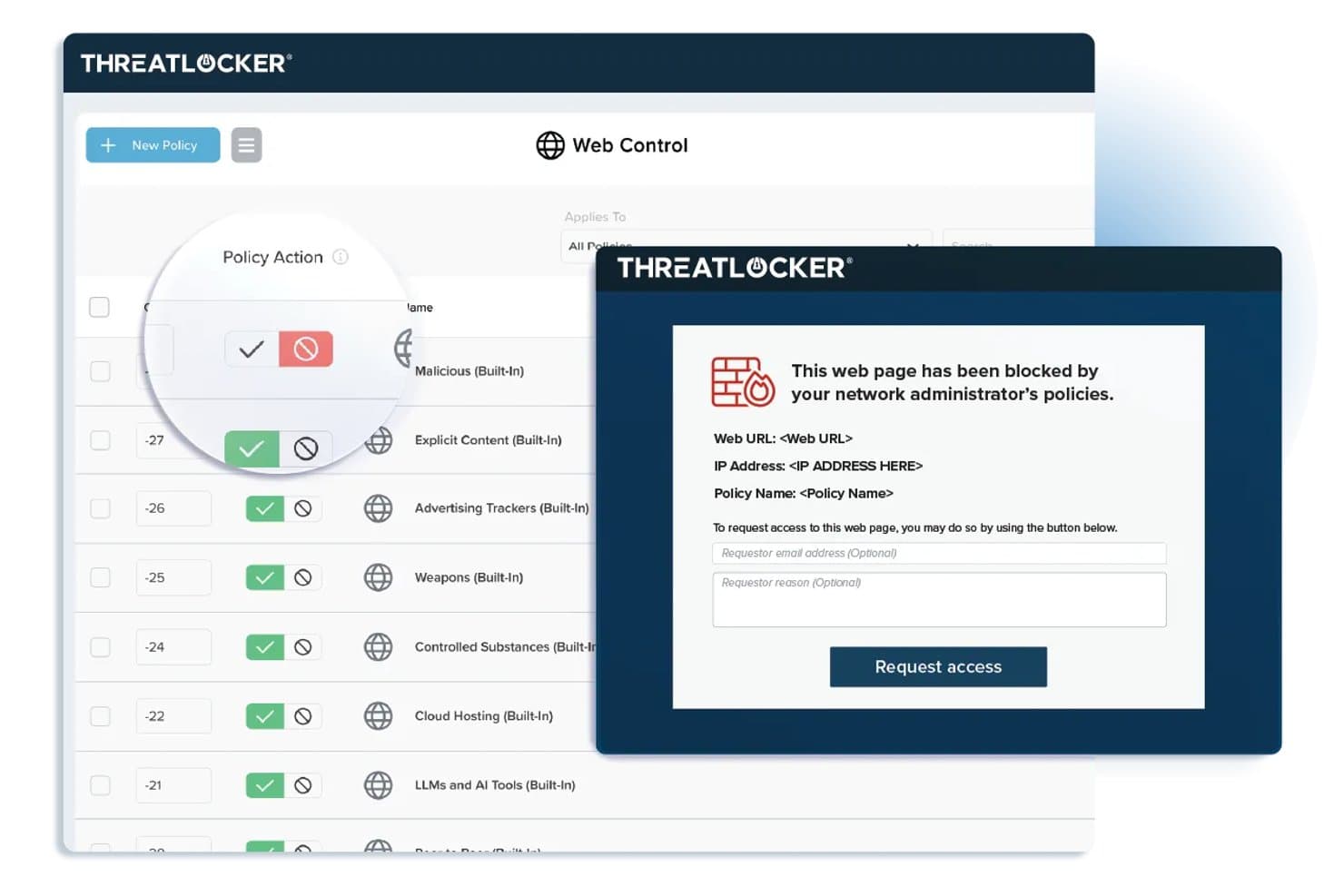
ThreatLocker offers Web Control policies that block restricted websites and display a customizable block page with an access request form for end users. ThreatLocker is a zero trust security platform for network access control that combines application allowlisting, device management, network segmentation, and real-time threat response from a single unified console.
Who Is ThreatLocker Best For?
Organizations with strict zero trust policies that want granular control over applications and device access in Windows-based IT environments.
Why I Picked ThreatLocker
I picked ThreatLocker as one of the best because I can quickly set up granular application-level access controls and block unauthorized executables at the endpoint. I like knowing I have 24/7 expert cybersecurity support when enforcing strict zero trust policies.
ThreatLocker Key Features
- Ringfencing: Isolates applications to prevent lateral movement across the network.
- Network control: Restricts inbound and outbound traffic based on precise group and policy configurations.
- Storage control: Manages access to USB and external storage devices with customizable rules.
- Admin approval workflow: Lets administrators require explicit approval before running new or unknown applications.
ThreatLocker Integrations
ThreatLocker offers native integrations with Microsoft Active Directory and Azure, SSO providers that support SAML, and provides an API for custom integrations.
Pros and Cons
Pros:
- Real-time device and storage control policies
- Granular application allowlisting and ringfencing tools
- 24/7 expert support for threat response
Cons:
- Not designed for IoT or BYOD onboarding
- Lacks agentless device discovery options
Learn more about ThreatLocker: Best for unified access management
- 30-day free trial
- From $200/user/month
Visit WebsiteCustomer Rating:4.4/5
Image 7: Portnox network access control software Portnox is an access control software solution that focuses on providing comprehensive network visibility and control. This tool excels in providing unified access management across various devices and networks, making it ideal for organizations seeking control and security in one platform.
Why I Picked Portnox: I selected Portnox for this list because of its focus on unified access management. The standout element is its ability to provide complete visibility across all connected devices, a capability that's not as prominent in other tools I've considered. For the use case of unified access management, I believe Portnox's strength lies in its ability to offer centralized control across a diverse network.
Standout features & integrations:
Portnox's core feature is its ability to deliver complete network visibility, allowing organizations to control access at all connection points. The tool also offers features like remote access control, risk-based authentication, and network anomaly detection. As for integrations, Portnox can integrate with a variety of enterprise systems, including VPNs, switches, wireless controllers, and mobile device management solutions, allowing for a more streamlined security workflow.
Pros and Cons
Pros:
- Integrates with a wide range of enterprise systems
- Offers centralized control across various networks and devices
- Provides complete network visibility
Cons:
- Lack of transparent pricing could be a barrier for some potential users
- May be complex for small businesses
- Pricing information is not readily available
Learn more about Portnox: Best for multi-tenant managed NAC deployments
- Free to download, no trial needed
- Free, open-source (paid support optional)
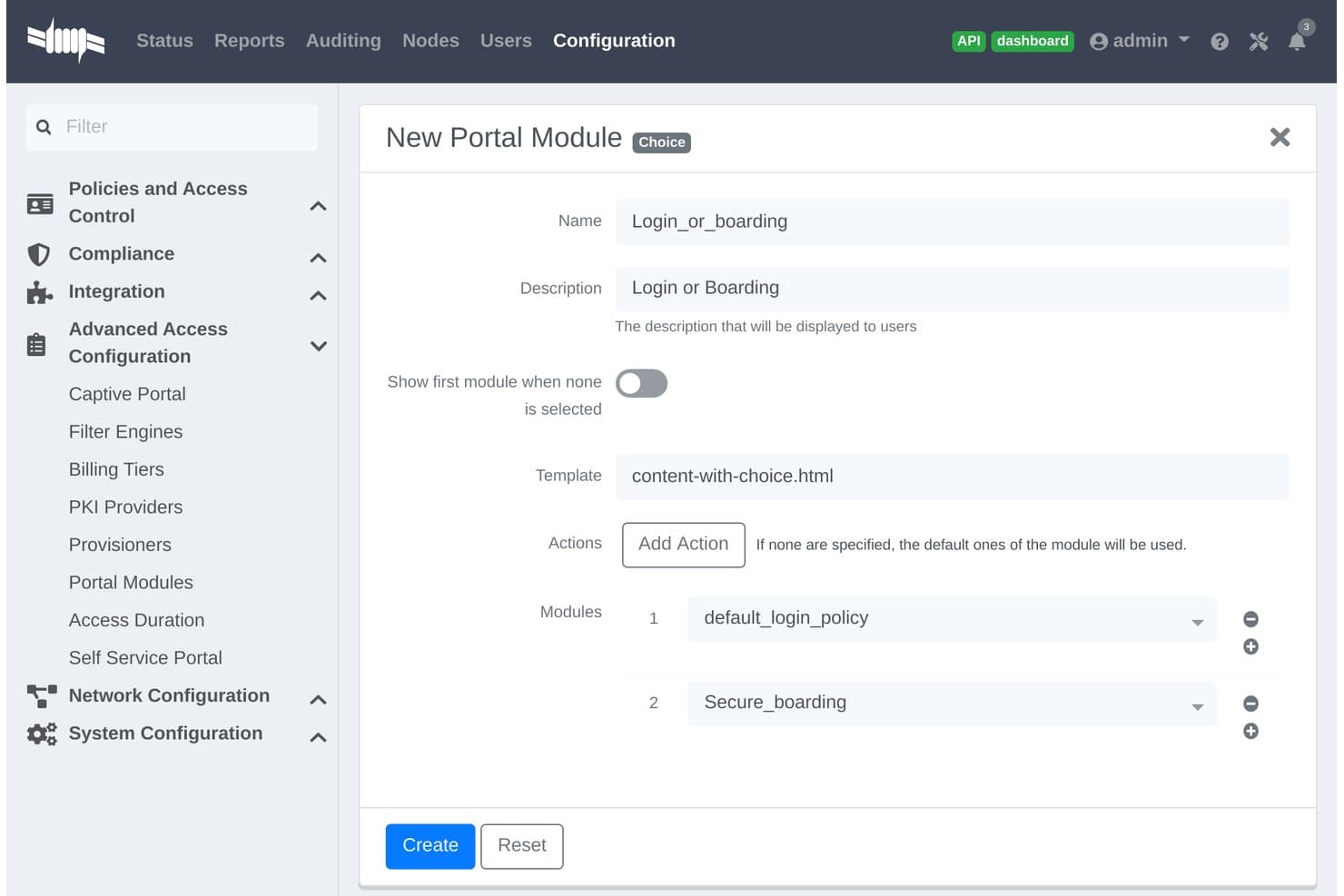
PacketFence offers a Choice-type Portal Module configuration allowing administrators to combine login and boarding modules into a single captive portal flow. PacketFence is an open-source network access control solution designed for organizations managing diverse environments, offering agentless device discovery, authentication, authorization, and policy-based network segmentation.
Who Is PacketFence Best For?
Large organizations, service providers, and campuses that need centralized control across complex, multi-tenant network environments.
Why I Picked PacketFence
I picked PacketFence as one of the best because it is purpose-built for multi-tenant managed NAC deployments. I like having support for agentless device discovery across wired, wireless, and VPN networks, and flexible policy enforcement for enterprise and campus use.
PacketFence Key Features
- Custom captive portal: Lets you build branded web authentication and device registration flows.
- Advanced network device integration: Supports switch, wireless, and firewall vendors like Cisco, Aruba, and Juniper.
- Automated compliance reporting: Exports access logs and events to streamline audit and investigation tasks.
- API-driven extensibility: Connects with third-party systems for automated workflows and custom integrations.
PacketFence Integrations
PacketFence offers native integrations with Cisco, Aruba, Juniper, HP, Ruckus, Extreme Networks, Microsoft Active Directory, LDAP, RADIUS, SAML, and has an API for custom integrations.
Pros and Cons
Pros:
- Scalable to large, distributed network environments
- Multi-tenant control for managed service providers
- Supports agentless network device discovery
Cons:
- Interface is less streamlined than commercial NAC solutions
- Requires strong Linux and networking expertise
Learn more about PacketFence: Best for securing industrial IoT networks
- 30-day free trial + free demo available
- Pricing upon request
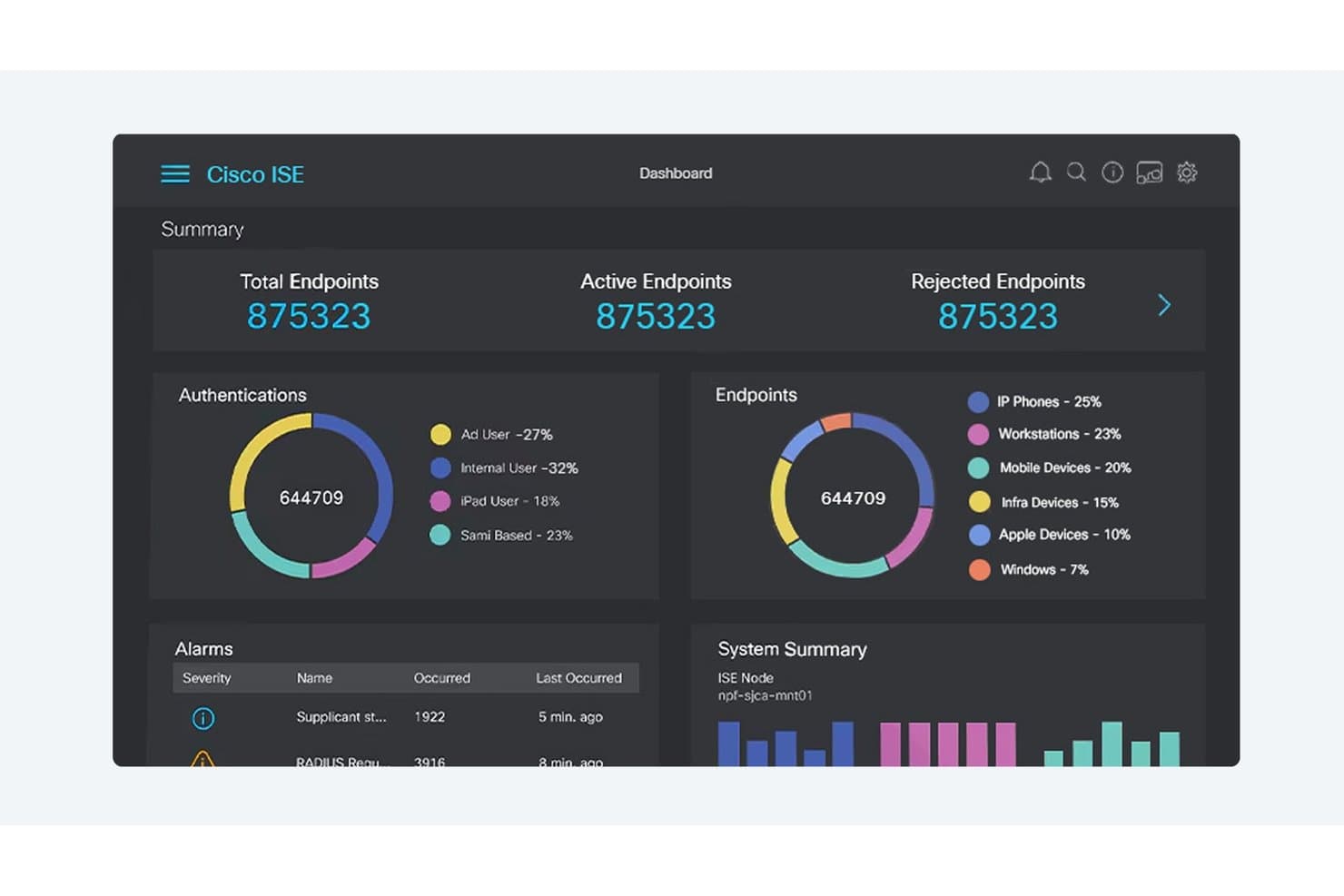
Cisco ISE offers a centralized network access control dashboard displaying endpoint authentication, device classification, alarms, and system health in real time. Cisco is a network access control platform purpose-built for securing complex industrial environments, combining device discovery, dynamic access policies, segmentation, and compliance features designed for IoT and operational networks.
Who Is Cisco Best For?
Industrial network security teams in manufacturing, energy, utilities, and critical infrastructure who need unified visibility and policy control across IT and OT environments.
Why I Picked Cisco
I picked Cisco as one of the best because my team can discover, profile, and control every IoT device on large industrial networks. Its automated segmentation and threat response features help us address the challenges unique to industrial IoT security.
Cisco Key Features
- Integration with SCADA systems: Connects directly with industrial control systems to monitor networked operational devices.
- Dynamic access policy engine: Enables real-time enforcement of access rules based on device identity and posture.
- Custom compliance reporting: Generates automated reports mapped to common regulatory frameworks and industry standards.
- Support for multi-vendor networks: Applies access policies and discovery across both Cisco and third-party network equipment.
Cisco Integrations
Cisco offers native integrations across the Cisco ecosystem, including Cisco ISE, Cisco Cyber Vision, Cisco SecureX, and Cisco DNA Center. It has native integrations with Microsoft Azure and integrates with firewalls from Palo Alto Networks and Fortinet. An API is available for custom integrations.
Pros and Cons
Pros:
- Highly granular role-based policy controls
- Real-time automated segmentation for OT environments
- Deep visibility into industrial network assets
Cons:
- Complex administration for smaller security teams
- Extensive setup required for initial deployment
Learn more about Cisco:
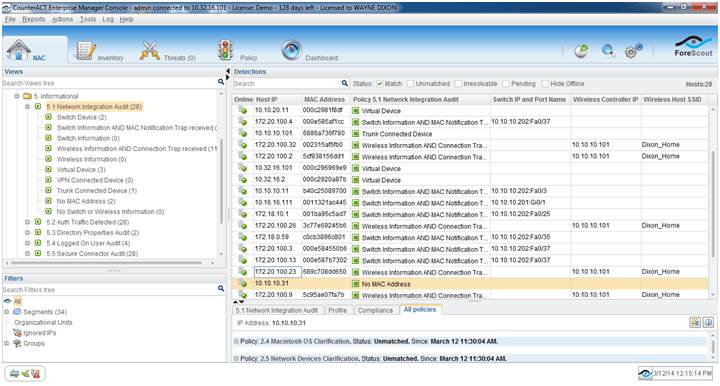
Image 1: Forescout network access control software Forescout is a network access control platform focused on automated device discovery, profiling, policy enforcement, and real-time network segmentation across managed, unmanaged, BYOD, and IoT endpoints.
Who Is Forescout Best For?
Large enterprises in regulated industries that need granular control and visibility over diverse network-connected devices, including IoT and OT endpoints.
Why I Picked Forescout
I picked Forescout as one of the best because I rely on its automated IoT device risk mitigation, real-time device discovery, and agentless profiling. In my experience, it quickly identifies unmanaged devices and lets me enforce granular policies as threats emerge.
Forescout Key Features
- 802.1X authentication support: Uses multiple authentication standards to validate devices across wired and wireless networks.
- Network segmentation orchestration: Integrates with major switches and firewalls to automate VLAN and ACL assignments.
- Continuous device posture assessment: Monitors device compliance status throughout network sessions, not just at connection.
- Comprehensive compliance reporting: Delivers exportable logs, access histories, and audit trails for regulatory audits.
Forescout Integrations
Forescout offers native integrations with Cisco, Aruba, Palo Alto Networks, Fortinet, Splunk, ServiceNow, Okta, Microsoft Defender, CrowdStrike, IBM QRadar, and AWS. An API is available for custom integrations.
Pros and Cons
Pros:
- Real-time risk monitoring and response
- Reliable network segmentation automation
- Unmatched agentless IoT device discovery
Cons:
- Advanced policy workflows need extensive tuning
- Appliance setup requires network downtime
Learn more about Forescout: Best for automated guest network provisioning
- Demo on request
- Custom quote (subscription or perpetual)
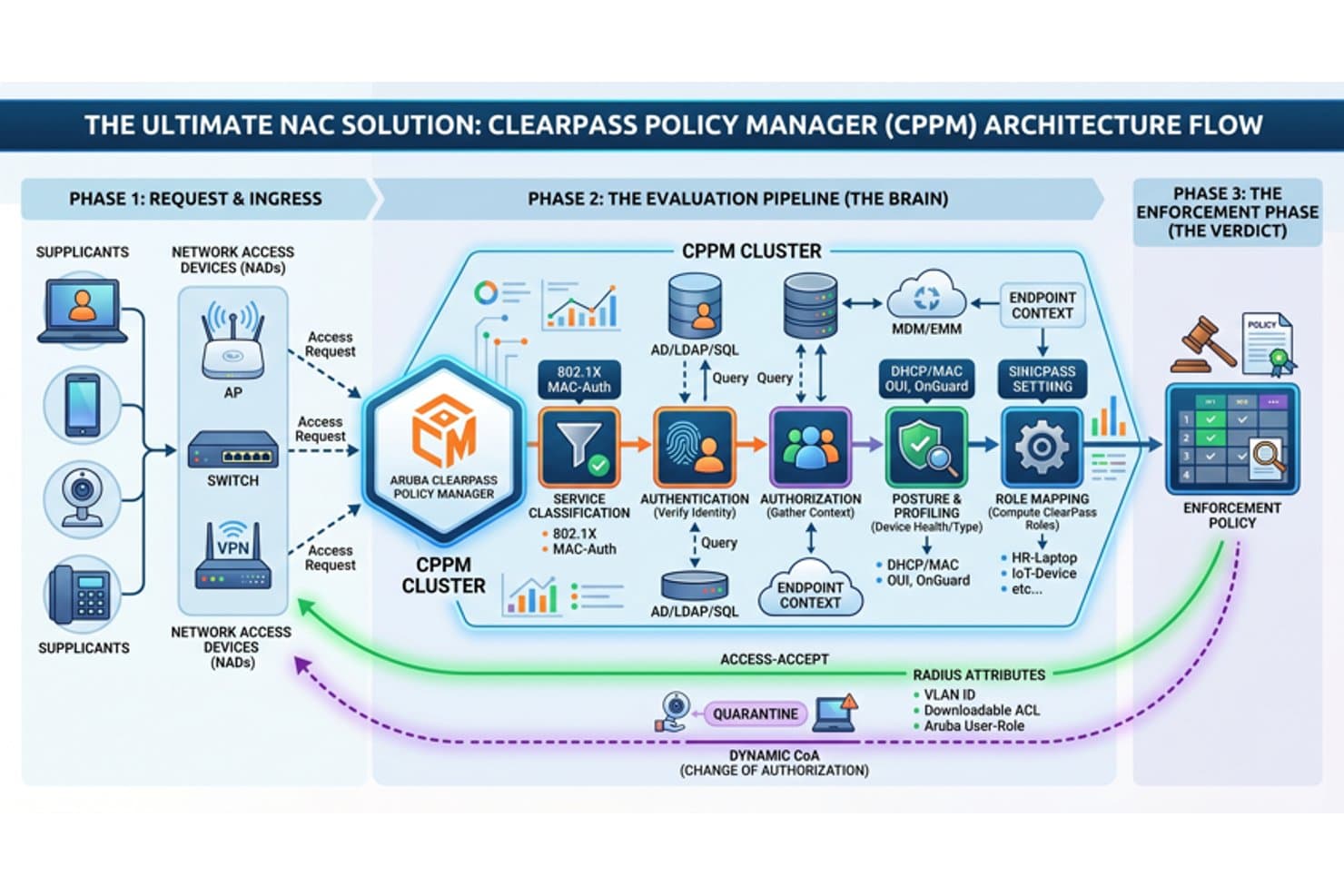
Aruba ClearPass offers a comprehensive NAC architecture flow covering request ingress, evaluation pipeline, and enforcement policy phases for network access control. Aruba Clearpass is a network access control platform that offers automated device identification, role-based authentication, real-time policy enforcement, and integration with identity, security, and compliance systems.
Who Is Aruba Clearpass Best For?
Designed for IT and security teams in medium to large enterprises managing diverse device and guest access across complex network environments.
Why I Picked Aruba Clearpass
I picked Aruba Clearpass as one of the best because I can automate secure guest onboarding, apply granular device policies, and handle custom workflows for visitors and contractors in large, changing environments. Best for automated guest network provisioning.
Aruba Clearpass Key Features
- Real-time device profiling: Identifies and classifies all endpoints including IoT and BYOD devices without an agent.
- 802.1X authentication support: Enables secure, standards-based authentication for wired and wireless connections.
- Role-based policy engine: Assigns policies dynamically based on user role, device type, or posture status.
- Integration with security platforms: Connects with SIEM, EDR, and MDM tools for coordinated threat response and compliance.
Aruba Clearpass Integrations
Aruba Clearpass offers native integrations with Active Directory, Azure AD, Okta, Jamf, MobileIron, ServiceNow, Palo Alto Networks, Cisco ISE, Splunk, and Fortinet. An API is available for custom integrations.
Pros and Cons
Pros:
- Granular role-based access and policy controls
- Real-time device fingerprinting for all endpoints
- Automated guest network provisioning is highly configurable
Cons:
- Reporting dashboards require manual setup
- Initial configuration is complex for small teams
Learn more about Aruba Clearpass: Best with automated response workflows for security events
- Demo on request
- Custom quote
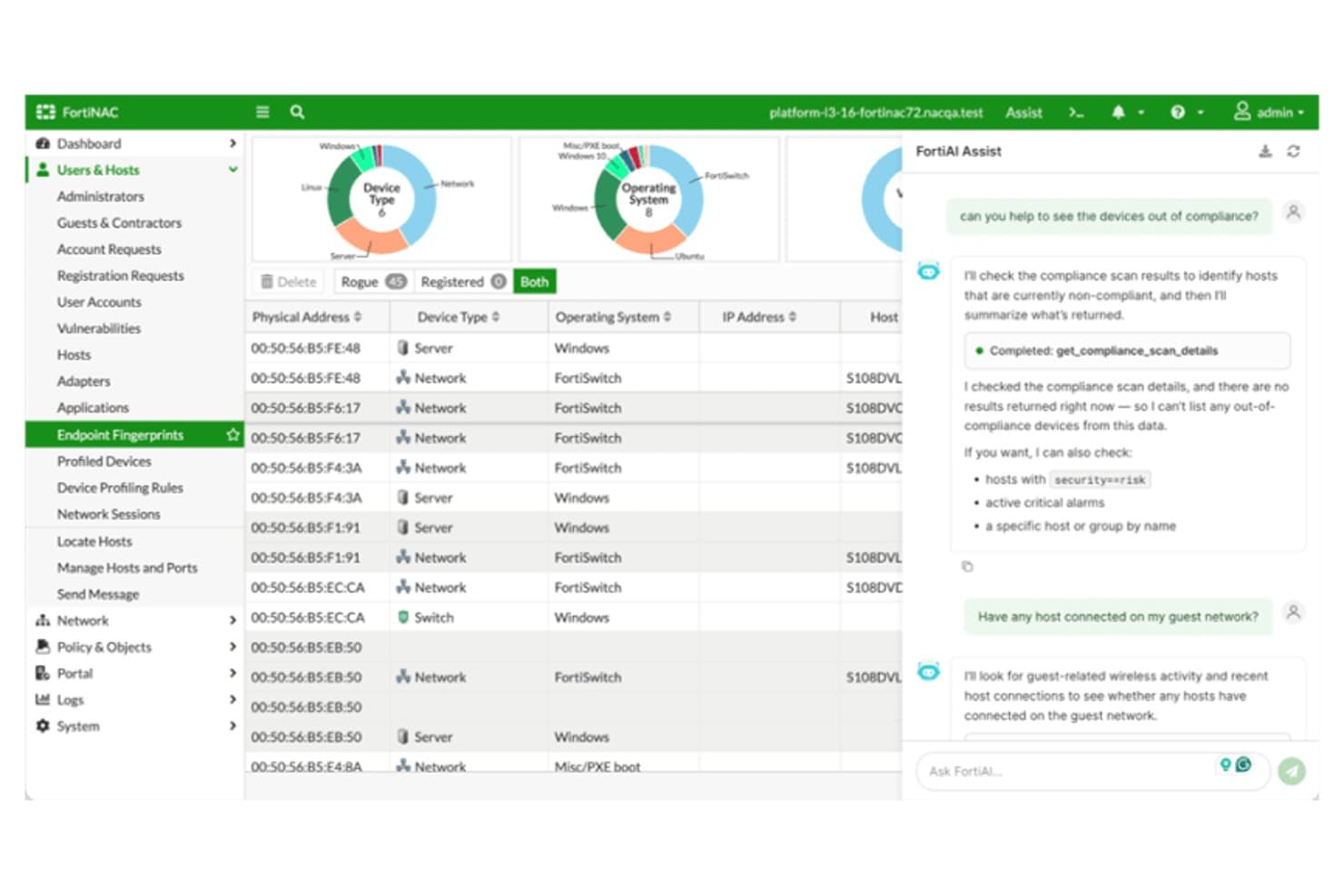
Fortinet FortiNAC offers an AI-assisted interface with device compliance scanning, host management, and real-time network visibility across endpoint fingerprints. Fortinet FortiNAC is a network access control platform designed for organizations that need advanced device discovery, dynamic policy enforcement, continuous endpoint assessment, and integration with multi-vendor environments.
Who Is Fortinet FortiNAC Best For?
Security and IT teams at large enterprises or regulated organizations managing complex, multi-vendor networks with diverse device types.
Why I Picked Fortinet FortiNAC
I picked Fortinet FortiNAC because I rely on its automated response workflows for instantly quarantining risky devices and triggering network policy changes. I use its real-time detection to kick off security event responses without manual intervention.
Fortinet FortiNAC Key Features
- Device profiling engine: Identifies and classifies all devices, including IoT and OT, as they connect to the network.
- Multi-method authentication: Supports 802.1X, MAC authentication, captive portal, and certificate-based access workflows.
- Dynamic segmentation: Assigns devices to appropriate VLANs or network zones based on real-time posture and identity.
- Compliance reporting dashboard: Generates detailed logs and customizable reports to support regulatory audits and investigations.
Fortinet FortiNAC Integrations
Fortinet FortiNAC offers native integrations with Fortinet Security Fabric products such as FortiGate, FortiAnalyzer, and FortiSIEM, as well as Cisco, Aruba, HPE, Extreme Networks, Meraki, Arista, and Ruckus network hardware. An API is available for custom integrations.
Pros and Cons
Pros:
- Automated responses to security events
- Dynamic network segmentation policies
- Advanced device profiling for IoT and OT
Cons:
- Some users report slow technical support
- Interface and workflows require extensive training
Learn more about Fortinet FortiNAC: Best with multilayered file threat prevention
- Free trial / demo on request
- License-based, annual or multi-year
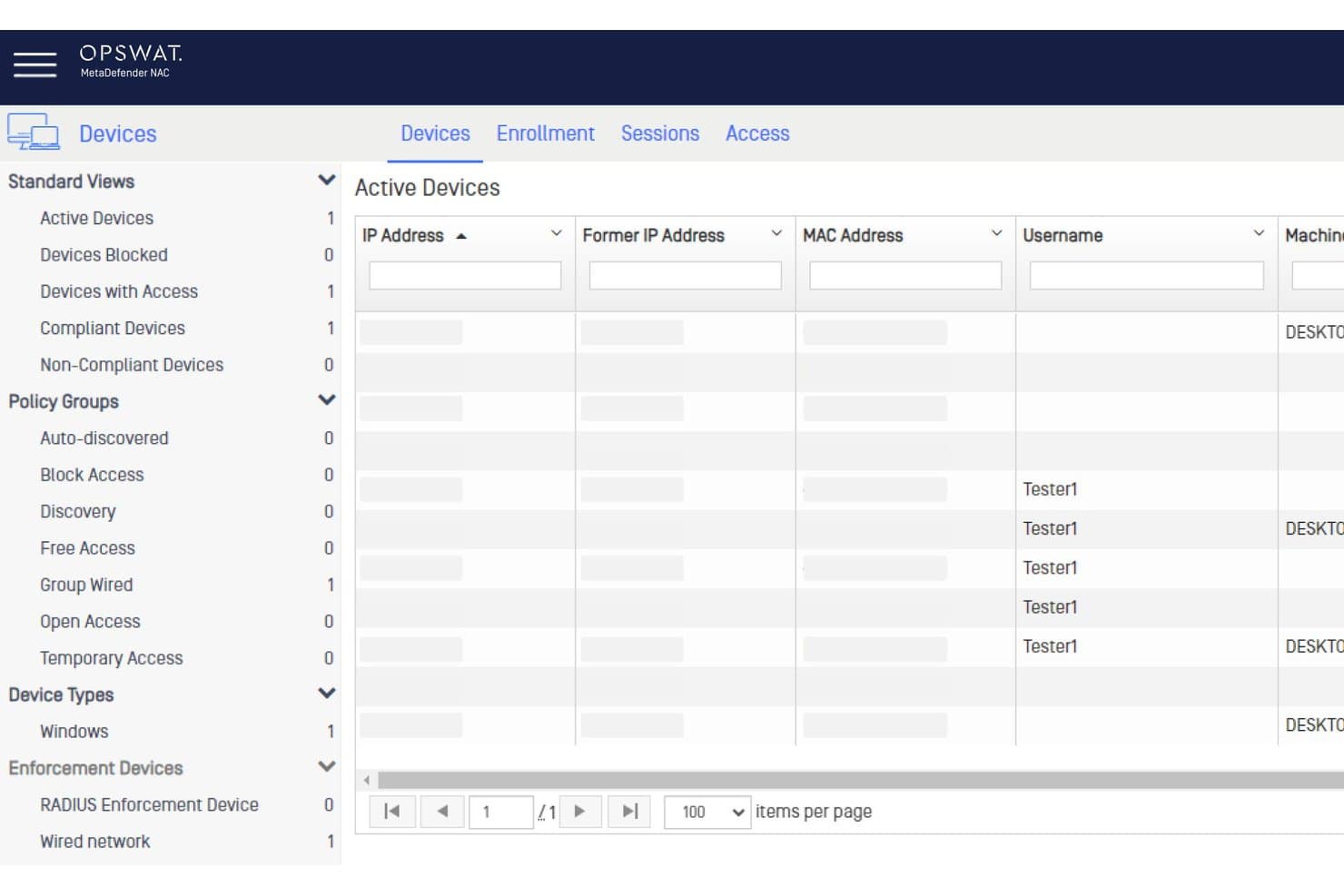
OPSWAT MetaDefender NAC offers an Active Devices dashboard displaying device status, policy groups, and user sessions for network access control. OPSWAT MetaDefender is a security platform that provides advanced content inspection, file scanning, and deep endpoint posture assessment for organizations upgrading their network access control defenses.
Who Is OPSWAT MetaDefender Best For?
Security teams at regulated enterprises and infrastructure operators managing complex file transfers and third-party device access.
Why I Picked OPSWAT MetaDefender
I picked OPSWAT MetaDefender because I rely on its multilayered file threat prevention for controlling file-borne risks at network boundaries. I use its deep content disarm, multi-engine scanning, and vulnerability analysis to stop threats before files reach endpoints.
OPSWAT MetaDefender Key Features
- Endpoint posture checks: Evaluates devices for OS version, security patches, and compliant antivirus.
- SIEM integration: Sends threat intelligence and incident data directly to security information and event management systems.
- Policy-based access controls: Enforces device-centric network access rules based on risk scores and compliance status.
- Agentless device scanning: Inspects unmanaged and BYOD devices without requiring software installation.
OPSWAT MetaDefender Integrations
OPSWAT MetaDefender offers native integrations with Cisco ISE, Forescout, Palo Alto Networks, ServiceNow, and Splunk, and provides an API for custom integrations.
Pros and Cons
Pros:
- Real-time endpoint risk and compliance checks
- Advanced content disarm for file uploads
- Multilayered scanning with 30+ antivirus engines
Cons:
- Complex deployment for smaller IT teams
- Not a dedicated NAC for device discovery
Learn more about OPSWAT MetaDefender:
Annen programvare for nettverkstilgangskontroll
Nedenfor finner du en liste over annen programvare for nettverkstilgangskontroll som jeg tok med på kortlisten, men som ikke kom med blant de ti beste. Det er absolutt verdt å ta en titt på dem.
- 11Cloudflare OneBest with quantum-safe encryption across the stack
- 12NACVIEWBest for real-time network surveillance
- 13TwingateBest for remote workforce security
- 14SilverfortBest with runtime protection for all identities
- 15Auconet BICSBest with unlimited scalability for large enterprises
Andre anmeldelser av programvare for nettverkstilgangskontroll
How I Evaluate Network Access Control Software
I evaluate these tools in two layers: the baseline requirements a NAC platform must cover—like 802.1X enforcement and endpoint posture—and the differentiators that set certain vendors apart.
Core Functionality (Table Stakes For This List)
When I'm selecting tools for my list, I rank each one on a scale from 0 (does not offer the functionality) to 5 (excels in this area) for each core functionality listed below. Then, I calculate the tool's total score into a percentage. Each tool needs to achieve a minimum total score of 65% to be considered for inclusion.
- Device Discovery & Profiling: I check whether the platform can automatically detect and classify managed endpoints, BYOD laptops, IoT sensors, and unmanaged devices across wired and wireless segments.
- Authentication & Authorization: Each tool should support multiple methods like 802.1X, MAC authentication bypass, and captive portals, along with role-based access tied to directory services.
- Policy Enforcement & Segmentation: I look at how the tool assigns VLANs, applies ACLs, or orchestrates microsegmentation based on identity and device context to isolate traffic dynamically.
- Endpoint Posture Assessment: The platform should evaluate device health—patch levels, antivirus status, disk encryption—before and during a session, not just at initial connection.
- Automated Threat Response: I evaluate whether the tool can quarantine or restrict a compromised device in real time, such as moving a flagged endpoint to a remediation VLAN without manual intervention.
- Compliance Reporting & Auditing: Detailed access logs and audit-ready reports matter, especially for teams preparing for PCI-DSS, HIPAA, or NIST assessments where proof of access controls is required.
Once I have a list of tools that meet this criteria, I consider what sets each platform apart.
Differentiating Factors (What Sets Vendors Apart)
Here's how I compare and contrast different vendors:
Standout Features
Multi-vendor network support is a big differentiator—I look at whether the platform works across Cisco, Aruba, Juniper, and Fortinet gear without forcing a single-vendor stack. IoT and OT device intelligence also separates tools quickly. Environments with medical devices or building automation controllers need specialized fingerprinting that goes well beyond standard profiling. Risk-based adaptive policies round this out, where access adjusts dynamically based on real-time threat scoring rather than static rules.
Beyond Features
Ecosystem integrations matter a lot here. I check whether the NAC platform connects with your existing SIEM, EDR, and identity providers so it fits into the security stack rather than sitting alongside it. Licensing structure is another key factor—some vendors charge per device, others per concurrent user, and hidden module fees for guest access or posture can inflate costs fast. I also evaluate deployment flexibility, since teams running hybrid environments need options beyond a single on-premises appliance.
Vanlige spørsmål
Hva er fordelene ved å bruke programvare for nettverkstilgangskontroll?
Det er mange fordeler ved å bruke programvare for nettverkstilgangskontroll, blant annet:
- Forbedret sikkerhet: NAC-programvare forbedrer sikkerheten ved å sikre at bare autoriserte enheter får tilgang til nettverket. Den verifiserer brukere og enheter før nettverkstilgang gis, noe som reduserer risikoen for cybertrusler.
- Håndheving av policyer: Med disse verktøyene kan organisasjoner håndheve policyer på tvers av ulike enheter og applikasjoner, noe som ytterligere styrker nettverkssikkerheten.
- Synlighet og kontroll: NAC-programvare gir en omfattende oversikt over alle tilkoblede enheter og aktivitetene deres, slik at overvåking og kontroll i sanntid blir mulig.
- Automatiserte svar: Programvaren kan automatisere svar på potensielle trusler, for eksempel ved å isolere berørte systemer eller blokkere bestemte enheter, noe som bidrar til rask handling under sikkerhetshendelser.
- Overholdelse av regelverk: NAC-verktøy hjelper organisasjoner med å oppfylle bestemte krav til overholdelse av regelverk for data- og nettverkssikkerhet.
Hvor mye koster verktøy for nettverkstilgangskontroll vanligvis?
Kostnaden for verktøy for nettverkstilgangskontroll kan variere betydelig basert på de spesifikke funksjonene, organisasjonens størrelse og antallet brukere eller enheter som skal administreres. Prismodellene er vanligvis basert på lisenser per bruker eller enhet, og enkelte leverandører tilbyr nivådelte abonnementer med stadig flere funksjoner.
Hva er det typiske prisintervallet for programvare for nettverkstilgangskontroll?
Programvare for nettverkstilgangskontroll kan koste fra rundt $5 per bruker per måned til flere hundre dollar per bruker per måned for mer komplekse bedriftsløsninger.
Hvilken programvare for nettverkstilgangskontroll er billigst og dyrest?
Den rimeligste NAC-programvaren i utvalget vårt er LiteManager, med abonnementer fra $10 per måned. I den dyrere enden av skalaen kan Ciscos løsninger koste flere hundre dollar per bruker per måned, takket være de omfattende funksjonene og helhetlige funksjonaliteten på bedriftsnivå.
Finnes det gratis alternativer for programvare for nettverkstilgangskontroll?
Ja, enkelte verktøy, som PacketFence, tilbyr en gratis versjon med åpen kildekode av programvaren for nettverkstilgangskontroll. Disse gratisversjonene mangler imidlertid ofte de avanserte funksjonene og den støtten som finnes i betalingsløsninger, og de er kanskje ikke egnet for store eller komplekse nettverk.