

Programvare for håndtering av Linux-oppdateringer hjelper deg med å automatisere oppdagelse, distribusjon og sporing av oppdateringer på tvers av Linux-systemene dine. Hvis du ser etter slike løsninger, trenger du sannsynligvis en måte å holde miljøene dine sikre og i samsvar med kravene på uten å legge til endeløst manuelt arbeid. Systemer som ikke er oppdatert, øker sikkerhetsrisikoen og gjør revisjoner til et mareritt, så det er svært viktig å finne riktig verktøy. I denne veiledningen får du en oversikt over de beste tilgjengelige alternativene, lærer hva som skiller dem fra hverandre, og får praktiske detaljer som hjelper deg med å velge verktøyet som passer til teamets infrastruktur.
Hvorfor du kan stole på våre programvareanbefalinger
6,700+
Reviews
20
Industry experts
16+
Evaluation factors
14
Years
Teamet vårt har testet og anmeldt programvare siden 2012. Vi er selv teknologiledere, så vi vet hvor vanskelig og hvor viktig det er å velge riktig programvare.
I denne guiden har vi vurdert verktøyene gjennom praktisk testing og uavhengig research og gitt dem poeng ut fra våre utvelgelseskriterier.
Anmeldelsene våre bygger på vår egen redaksjonelle vurdering. De er ikke et salgsargument.
Ekspertanmeldere:
- Paulo Gardini MiguelTech Director
 Tim FisherVP of AI
 Gabriel RosasTech Lead & Software Architect
 Christhian GruhnTech Lead & Platform Architect

Sammenligningstabell for programvare for håndtering av Linux-oppdateringer
Denne sammenligningstabellen oppsummerer prisdetaljer for mine beste utvalgte programmer for håndtering av Linux-oppdateringer.
| Tool | Best For | Trial Info | Price | ||
|---|---|---|---|---|---|
| 1 | Best for cloud-native remote patching | Free plan + free demo available | Pricing upon request | Website | |
| 2 | Best for policy-based cross-platform updating | 15-day free trial + free demo available | From $1/endpoint/month (billed annually) | Website | |
| 3 | Best for multi-OS patch deployment simplicity | 30-day free trial + free demo | Pricing upon request | Website | |
| 4 | Best for compliance-driven patch automation | 30-day free trial + free demo | Pricing upon request | Website | |
| 5 | Best for real-time vulnerability remediation | 30-day free trial | Pricing upon request | Website | |
| 6 | Best for automated lifecycle management at scale | Free trial | Pricing upon request | Website | |
| 7 | Best for centralized Ubuntu administration | 30-day free trial | From $25/machine/year | Website | |
| 8 | Best for open-source provisioning workflows | Free plan | Free plan | Website | |
| 9 | Best for multi-distribution Linux management | Free demo | Pricing upon request | Website | |
| 10 | Best for open source automation and orchestration | Free plan | Free plan | Website |


Anmeldelser av den beste programvaren for håndtering av Linux-oppdateringer
Nedenfor finner du mine detaljerte sammendrag av den beste programvaren for håndtering av Linux-oppdateringer som kom med på kortlisten. Anmeldelsene mine gir en detaljert gjennomgang av funksjonene, bruksområdene og integrasjonene til hver plattform, slik at du kan finne den beste for deg.
 Best for cloud-native remote patching
- Free plan + free demo available
- Pricing upon request
Visit WebsiteCustomer Rating:4.9/5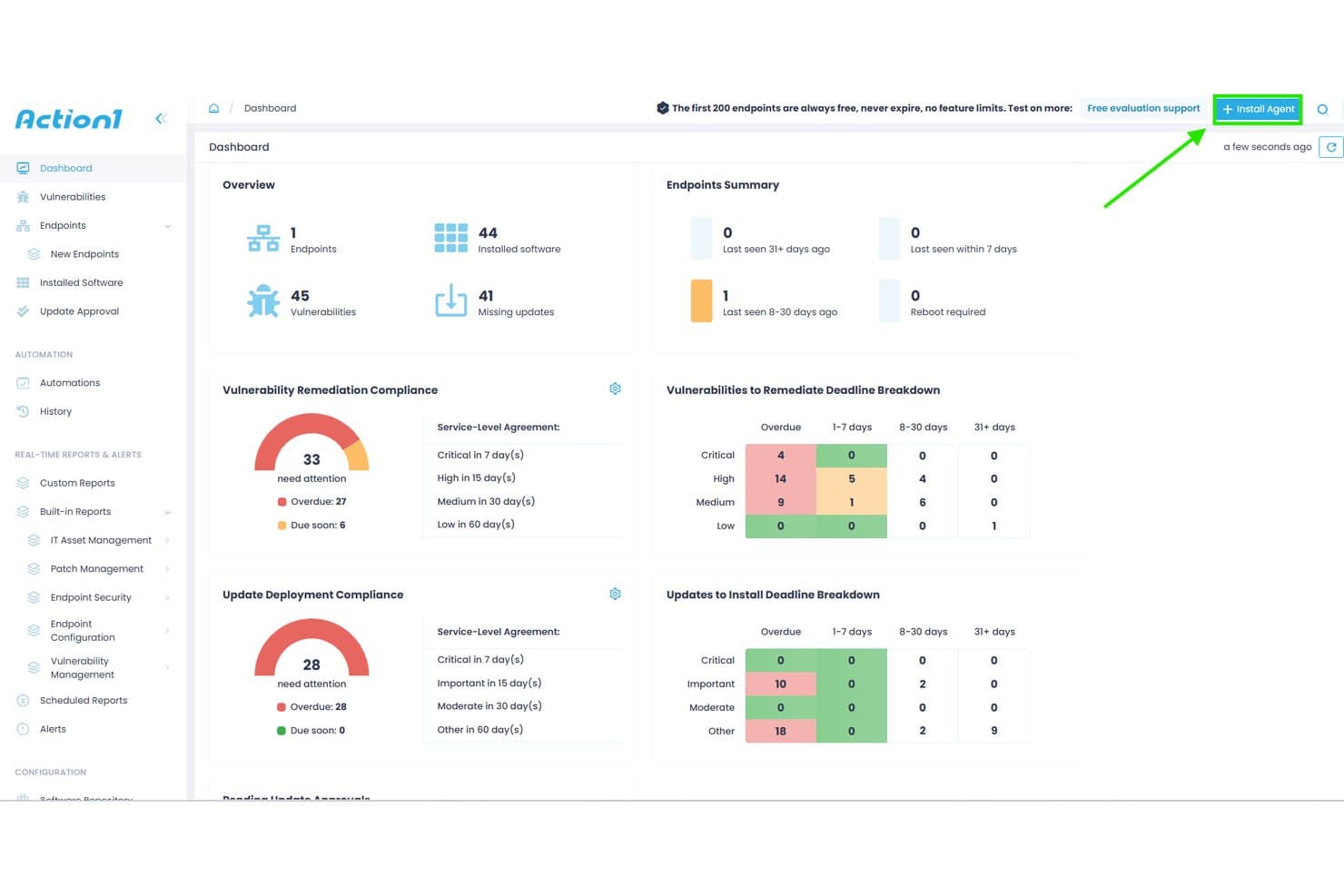
Action1 offers a centralized dashboard displaying vulnerability remediation compliance, update deployment compliance, and endpoint summaries for patch management. Action1 is a cloud-native endpoint management platform that automates OS and third-party patch deployment across Windows, macOS, and Linux systems, with CVE-mapped vulnerability assessment, ring-based staged rollouts, and compliance reporting.
Who Is Action1 Best For?
Action1 is a strong fit for IT teams in small to mid-sized organizations managing mixed-OS environments with distributed or remote endpoints across cloud and on-prem infrastructure.
Why I Picked Action1
I picked Action1 as one of the best because its cloud-native, VPN-less architecture means I can push patches to remote Debian and Ubuntu Linux endpoints without standing up any on-prem infrastructure. What I particularly like is the ring-based staged rollout system, which automatically halts deployment if a patch causes issues mid-rollout. The peer-to-peer patch distribution also handles bandwidth pressure when pushing updates across large, geographically distributed fleets simultaneously.
Action1 Key Features
- Real-time vulnerability assessment: Continuously identifies missing patches and matches vulnerabilities to CVEs on managed Linux endpoints.
- Unified cross-OS console: Manage patching for Linux, Windows, and macOS systems through a single web-based dashboard.
- 100+ audit-ready report templates: Generate compliance and remediation reports exportable in CSV and HTML formats.
- ServiceNow CMDB integration: Enriches ServiceNow CMDB with inventory and operational data from managed Linux endpoints.
Action1 Integrations
Action1 offers native integrations with ServiceNow, Microsoft Entra ID, Okta, Duo, Google, Active Directory, Rapid7, Tenable, CrowdStrike, Microsoft Defender, and provides an API for custom integrations.
Pros and Cons
Pros:
- Automated ring-based patch deployment
- Real-time vulnerability scanning for Linux endpoints
- Cloud-native platform with remote patching
Cons:
- Requires agent installation on every endpoint
- Only supports Debian and Ubuntu Linux
Learn more about Action1: Best for policy-based cross-platform updating
- 15-day free trial + free demo available
- From $1/endpoint/month (billed annually)
Visit WebsiteCustomer Rating:4.7/5
Automox offers a centralized dashboard displaying compliant devices, patch status, outstanding patches by severity, and device troubleshooting insights for Linux and cross-platform patch management. Automox is a cloud-native endpoint management platform that automates OS and third-party patching across Linux, Windows, and macOS systems using policy-driven rules and Bash-scriptable Worklets.
Who Is Automox Best For?
Automox is a strong fit for IT and security teams managing distributed endpoint fleets across mixed operating systems without on-premises patching infrastructure.
Why I Picked Automox
Automox earns its spot on my shortlist because of how its policy engine handles Linux patching across distros at scale. I can build severity-based policies targeting Ubuntu, RHEL, and Debian endpoints separately, so critical patches get prioritized without applying the same blanket rule to every host. When a package falls outside Automox's 580+ natively supported titles, Worklets let me push custom Bash scripts directly from the console without switching tools.
Automox Key Features
- Cross-platform patching console: Manage patching for Linux, Windows, and macOS devices from a single unified dashboard.
- Linux distribution support: Supports a wide range of Linux distros, including RHEL, Ubuntu, Debian, Oracle Linux, Fedora, Rocky, and AlmaLinux.
- Third-party application patching: Offers native patching for hundreds of Linux-compatible third-party software packages.
- Role-based access controls (RBAC): Set granular permissions for users to segment responsibilities and restrict actions within the platform.
Automox Integrations
Automox offers native integrations with Splashtop for remote access and supports vulnerability scanners. An API is available for custom integrations, and custom Bash or PowerShell scripts extend functionality to other tools.
Pros and Cons
Pros:
- Patch scheduling and reboot coordination controls
- Policy-based automation for Linux fleet management
- Wide distro coverage including Rocky and AlmaLinux
Cons:
- Limited out-of-the-box compliance reporting tools
- Reporting options are limited for compliance needs
 Best for multi-OS patch deployment simplicity
- 30-day free trial + free demo
- Pricing upon request
Visit WebsiteCustomer Rating:4.4/5
ManageEngine Patch Manager Plus offers a dedicated Install Linux Patch configuration interface with deployment policy settings and patch listing controls. ManageEngine Patch Manager Plus is a multi-OS patch management platform that automates patch detection, testing, and deployment across Linux, Windows, and macOS endpoints, with dedicated support for eight major Linux distributions.
Who Is ManageEngine Patch Manager Plus Best For?
It's a strong fit for IT administrators and security teams in mid-to-large enterprises that need centralized patch control across heterogeneous server and endpoint fleets.
Why I Picked ManageEngine Patch Manager Plus
ManageEngine Patch Manager Plus earns its spot on my shortlist because it patches eight Linux distros (RHEL, Ubuntu, Debian, SUSE, Oracle Linux, Rocky Linux, CentOS, and Amazon Linux) alongside Windows and macOS from one console. I particularly like the Automated Patch Deployment (APD) feature, which runs the full scan-to-install cycle without per-host intervention. The built-in patch testing and approval workflow also lets my team validate updates before they reach production servers.
ManageEngine Patch Manager Plus Key Features
- Patch rollback: Quickly revert Linux patches if issues arise after deployment.
- Custom deployment templates: Create and reuse specific patch deployment configurations for Linux environments.
- Real-time audit logs: Track every patch event and administrative action for compliance and troubleshooting.
- Bandwidth optimization: Download Linux patches once and distribute them to endpoints using internal servers.
ManageEngine Patch Manager Plus Integrations
ManageEngine Patch Manager Plus offers native integrations with Tenable.io, Tenable.sc, ServiceDesk Plus, and Jira, and provides an API for custom integrations.
Pros and Cons
Pros:
- Automated patch testing and approval workflow
- Centralized console for Linux, Windows, macOS
- Supports eight major Linux distributions
Cons:
- Limited native regulatory compliance mapping
- Initial server configuration is complex
Learn more about ManageEngine Patch Manager Plus: Best for compliance-driven patch automation
- 30-day free trial + free demo
- Pricing upon request

SecPod SanerNow Cyberhygiene Platform offers a Patch Management Status dashboard displaying remediation job details, device host statuses, patch sizes, and overall patch installation results across multiple Windows devices. SecPod SanerNow is a cloud-native cyberhygiene platform that combines patch management, vulnerability detection, and compliance monitoring across 37+ Linux variants, Windows, macOS, and 550+ third-party applications from a single lightweight agent.
Who Is SecPod SanerNow Cyberhygiene Platform Best For?
It's a strong fit for IT security and compliance teams at mid-size to large enterprises operating under regulatory frameworks like HIPAA, PCI, or NIST.
Why I Picked SecPod SanerNow Cyberhygiene Platform
SanerNow earns its spot on my shortlist because of how it maps patch status directly to compliance frameworks like HIPAA, PCI, and NIST in real time. I particularly like that its 190,000+ SCAP-based vulnerability feed auto-maps CVEs to missing Linux patches and layers EPSS exploit probability scores on top of CVSS severity. Pre-tested Linux patches ship within 24 hours of release, so my team isn't waiting on slow vendor cycles when a critical CVE drops.
SecPod SanerNow Cyberhygiene Platform Key Features
- Cloud-native patching console: Manage patch operations from a unified web console for Linux, Windows, macOS, and third-party apps.
- Single lightweight agent: Deploy patches, scan for vulnerabilities, and monitor compliance with one multifunctional agent across all endpoints.
- Policy-driven patch automation: Set custom rules to automate scan frequency, patch approval, and deployment based on business requirements.
- Pre-deployment test area: Isolate and test Linux patches before rolling them out to production systems globally.
SecPod SanerNow Cyberhygiene Platform Integrations
SanerNow offers native integrations with Freshservice, ServiceNow, SymphonyAI Summit, AWS Marketplace, and Azure Marketplace. An API is available for custom integrations.
Pros and Cons
Pros:
- Supports 37+ Linux distributions, including legacy
- Automated Linux patch rollback and staging
- Real-time compliance reporting for Linux endpoints
Cons:
- Public pricing not available on the website
- No native agentless Linux patching option
Learn more about SecPod SanerNow Cyberhygiene Platform: Best for real-time vulnerability remediation
- 30-day free trial
- Pricing upon request
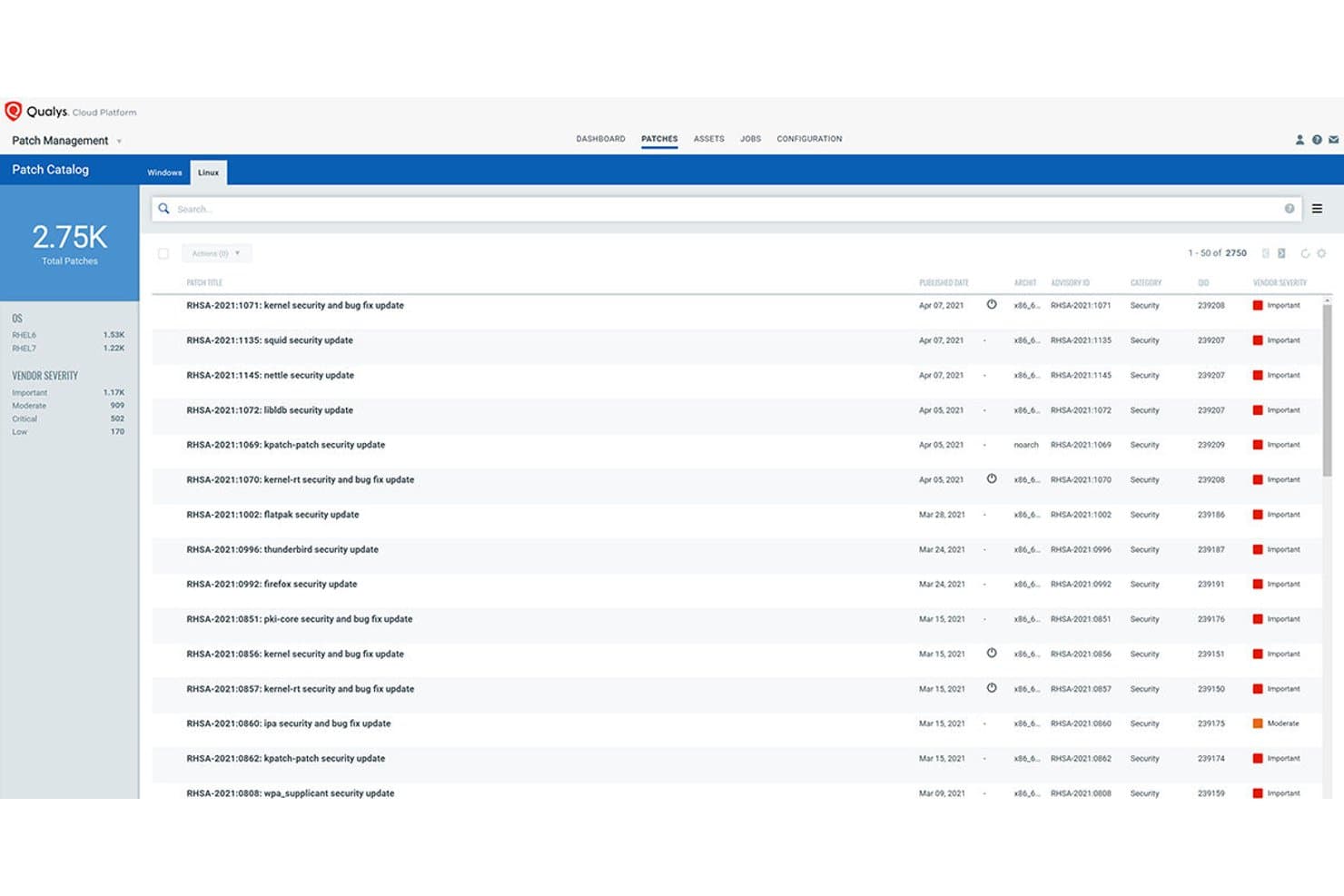
Qualys Patch Management offers a Linux Patch Catalog displaying 2,750 total patches with vendor severity ratings, advisory IDs, and published dates for RHEL systems. Qualys Patch Management is a cloud-native patch management solution that integrates directly with vulnerability detection to identify, prioritize, and deploy patches across Linux and Windows systems through a single lightweight agent.
Who Is Qualys Patch Management Best For?
It's a strong fit for security-focused IT and infrastructure teams in mid-to-large enterprises that need to tie patch deployment directly to vulnerability risk data.
Why I Picked Qualys Patch Management
I picked Qualys Patch Management as one of the best because its VMDR integration is unlike anything else in this category. When a new CVE drops, the platform automatically maps it to the relevant patch, scores it using TruRisk, and flags whether it's tied to active ransomware campaigns. From there, Zero-Touch Patch Jobs can trigger deployment across Linux fleets without manual intervention.
Qualys Patch Management Key Features
- Multi-distro Linux patching: Supports patch deployment for RHEL, CentOS, Ubuntu, Debian, SUSE, Oracle Linux, Rocky Linux, Alma Linux, and Amazon Linux.
- Pre- and post-patch scripting: Lets you configure custom scripts to run automatically before and after patch jobs.
- Yum repository management: Integrates with internal Yum repositories to manage patch staging and dependency handling for Linux systems.
- Patch compliance dashboards: Offers real-time dashboards for tracking patch status and compliance posture across all managed Linux endpoints.
Qualys Patch Management Integrations
Qualys Patch Management offers native integration with the broader Qualys Cloud Platform, including VMDR and Global AssetView. An API is available for custom integrations, and native integrations with Splunk and ServiceNow are also supported.
Pros and Cons
Pros:
- Provides risk-based patch prioritization scoring
- Supports multi-distro Linux patch orchestration
- Maps real-time CVEs directly to patches
Cons:
- Limited air-gapped or agentless deployment options
- Requires installation of Qualys Cloud Agent
Learn more about Qualys Patch Management: Best for automated lifecycle management at scale
- Free trial
- Pricing upon request

Red Hat Satellite offers a Red Hat Repositories interface where admins can browse, filter, and enable recommended RPM repositories for RHEL 8 x86_64 patch management. Red Hat Satellite is an infrastructure management platform built for RHEL environments that centralizes patch deployment, CVE remediation, compliance enforcement, and system provisioning across physical, virtual, and cloud infrastructure.
Who Is Red Hat Satellite Best For?
Red Hat Satellite is a strong fit for large enterprises managing 1,000 or more RHEL systems with dedicated infrastructure staff to maintain the platform.
Why I Picked Red Hat Satellite
Red Hat Satellite earns its spot on my shortlist because of how it structures patching across lifecycle environments. I can curate distinct Content Views for Dev, QA, and Production, promoting a tested patch set through each stage before it touches production servers. The CVE prioritization engine, powered by Red Hat Insights, also ranks vulnerabilities by actual risk to your environment rather than generic severity scores alone.
Red Hat Satellite Key Features
- Centralized security hub: Issue and manage patches from a single interface across large RHEL environments.
- OpenSCAP integration: Scan and remediate servers for compliance using industry-standard security protocols.
- Unified provisioning workflows: Provision bare-metal and virtual hosts with automated integration for DNS, DHCP, and identity.
- Agent-based and agentless execution: Manage endpoints with both lightweight agents and remote SSH-based workflows.
Red Hat Satellite Integrations
Red Hat Satellite offers native integrations with Red Hat Ansible Automation Platform, OpenSCAP, Red Hat Insights, VMware vSphere, and DNS, DHCP, and identity services. An API is available for custom integrations.
Pros and Cons
Pros:
- Offers air-gapped and disconnected mode support
- Granular patch promotion across staged environments
- Tailored for large RHEL and CentOS environments
Cons:
- Limited native support for Debian distributions
- Native support limited to Red Hat-based distros
Learn more about Red Hat Satellite: Best for centralized Ubuntu administration
- 30-day free trial
- From $25/machine/year

Ubuntu Landscape offers a centralized patch management dashboard displaying upgrade statuses, security updates, and instance health across thousands of Linux machines. Canonical Landscape is Ubuntu's native systems management platform, built by Canonical, that centralizes patch deployment, compliance reporting, and repository management across Ubuntu desktops, servers, cloud instances, and airgapped environments.
Who Is Canonical Landscape Best For?
Canonical Landscape suits IT teams that have standardized on Ubuntu across their server and desktop fleets, particularly in regulated industries needing built-in compliance reporting.
Why I Picked Canonical Landscape
I picked Canonical Landscape as one of the best because no other tool patches Ubuntu fleets with the same depth of native integration. I particularly like how policy-based patch rules apply across up to 40,000 machines from a single instance, and Livepatch handles critical kernel CVEs without scheduling a reboot. The built-in compliance reporting maps directly to frameworks like DISA-STIG, PCI-DSS, and CIS Benchmark out of the box.
Canonical Landscape Key Features
- Custom profiles: Manage different Ubuntu machine classes with tailored update and patch policies.
- Scriptable API: Automate patching tasks and integrate systems using a REST API.
- APT repository mirroring: Mirror and manage both internal and external software repositories securely.
- Dynamic search groups: Create real-time asset groups for targeted patching or compliance actions.
Canonical Landscape Integrations
Canonical Landscape offers native integrations with Canonical Livepatch, Ubuntu Pro, Azure Active Directory, Google, Okta, and IBM for identity management, and supports API access for custom integrations.
Pros and Cons
Pros:
- Handles airgapped and public cloud environments
- Automated compliance reports for major standards
- Deep Ubuntu CVE and security patching integration
Cons:
- Lacks granular patch rollback capabilities
- No support for non-Ubuntu distributions
Learn more about Ubuntu Landscape:

Foreman offers a centralized monitoring dashboard displaying host configuration status, run distribution, task status, and a configuration sync chart for Linux patch management. Foreman is an open-source lifecycle management platform that handles provisioning, configuration, and patch management for Linux servers across bare-metal, virtual, and cloud environments through its Katello plugin.
Who Is Foreman Best For?
Foreman suits Linux system administrators and infrastructure teams managing large server fleets who have the in-house sysadmin expertise to configure and maintain an open-source toolchain.
Why I Picked Foreman
I picked Foreman as one of the best because its Katello plugin gives you a structured, promotion-based patching workflow that's rare in the open-source space. I can define content views that freeze a snapshot of packages, then promote them through lifecycle environments (Dev, QA, Production) before anything touches a live server. The remote execution plugin handles the actual patching via SSH across host groups, with scheduling and concurrency controls that prevent a single job from overwhelming production systems.
Foreman Key Features
- OpenSCAP compliance scanning: Integrates with OpenSCAP to automate system compliance and vulnerability assessments.
- Discovery plugin: Automatically detects and registers new hardware on the network for rapid onboarding.
- Multi-distro repository management: Supports hosting and syncing package repositories for RHEL, CentOS, Debian, Ubuntu, and more.
- Role-based access control: Provides granular permissions management with user, role, and organization-level access settings.
Foreman Integrations
Foreman has native integrations with Ansible, Puppet, Chef, Salt, VMware vCenter, oVirt, Amazon EC2, Google Compute Engine, OpenStack, and FreeIPA, and provides a RESTful API for custom integrations.
Pros and Cons
Pros:
- OpenSCAP compliance and CVE reporting
- Supports RHEL, CentOS, Debian, Ubuntu, Fedora
- Lifecycle-based promotion for patch workflows
Cons:
- No native Windows patch management support
- Requires strong Linux sysadmin knowledge
Learn more about Foreman: Best for multi-distribution Linux management
- Free demo
- Pricing upon request
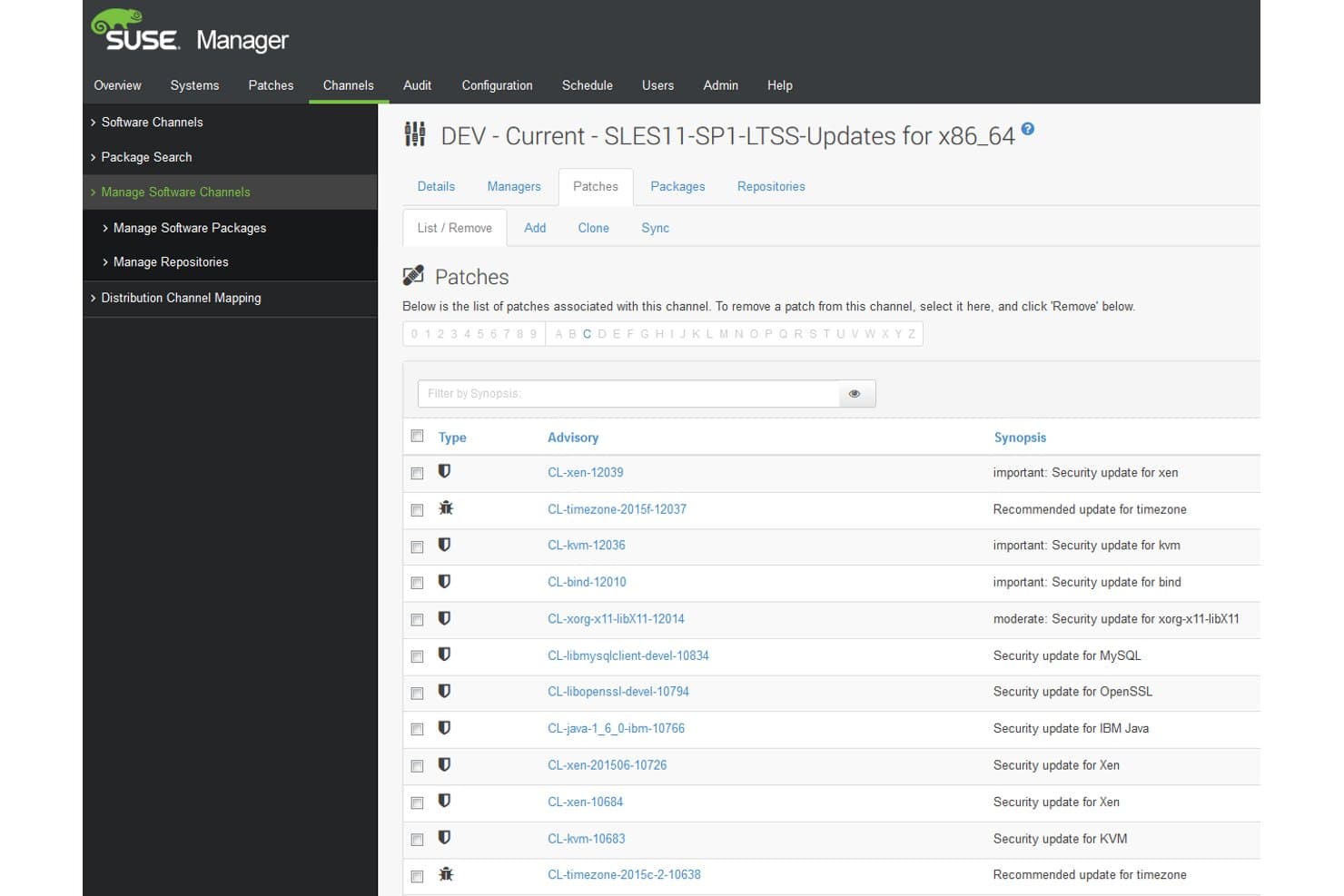
SUSE Multi-Linux Manager offers a detailed patch management interface listing security and recommended updates with advisory codes, types, and synopses for a specific software channel. SUSE Multi-Linux Manager is an open-source Linux patch management platform that centralizes patch deployment, CVE remediation, configuration management, and OpenSCAP-based compliance auditing across 16+ Linux distributions from a single console.
Who Is SUSE Multi-Linux Manager Best For?
It's a strong fit for enterprise IT and infrastructure teams managing large, mixed-distro Linux environments across on-prem, cloud, and hybrid infrastructure.
Why I Picked SUSE Multi-Linux Manager
SUSE Multi-Linux Manager earns its spot on my shortlist because it handles multi-distro patching at a scale I haven't seen matched elsewhere. My team can manage RHEL, Ubuntu, Debian, Oracle Linux, and 12+ other distributions from a single console, without maintaining separate toolchains per distro. I also rely on the Content Lifecycle Management feature to stage patches through dev and test environments before pushing them to production systems.
SUSE Multi-Linux Manager Key Features
- OpenSCAP-based compliance auditing: Run automated security scans using OpenSCAP and apply remediation scripts or Ansible playbooks for compliance standards.
- Salt and Ansible integration: Manage configuration and automation across systems using both SaltStack and native Ansible playbooks.
- Containerized architecture: Deploy the management server and proxies as containers for quick redeployment and reliability.
- Cloud marketplace availability: Access and deploy SUSE Multi-Linux Manager through AWS, Azure, Google Cloud, and Oracle Cloud marketplaces.
SUSE Multi-Linux Manager Integrations
SUSE Multi-Linux Manager offers native integrations with Ansible, SaltStack, OpenSCAP, SCAP Security Guide, and is available in the AWS, Azure, Google Cloud, and Oracle Cloud marketplaces. An API is available for custom integrations.
Pros and Cons
Pros:
- Multi-stage patch lifecycle and approvals
- Automated OpenSCAP compliance auditing available
- Supports 16+ Linux distributions natively
Cons:
- Requires high system resources for deployment
- No native iOS or Android mobile app
Learn more about SUSE Multi-Linux Manager:
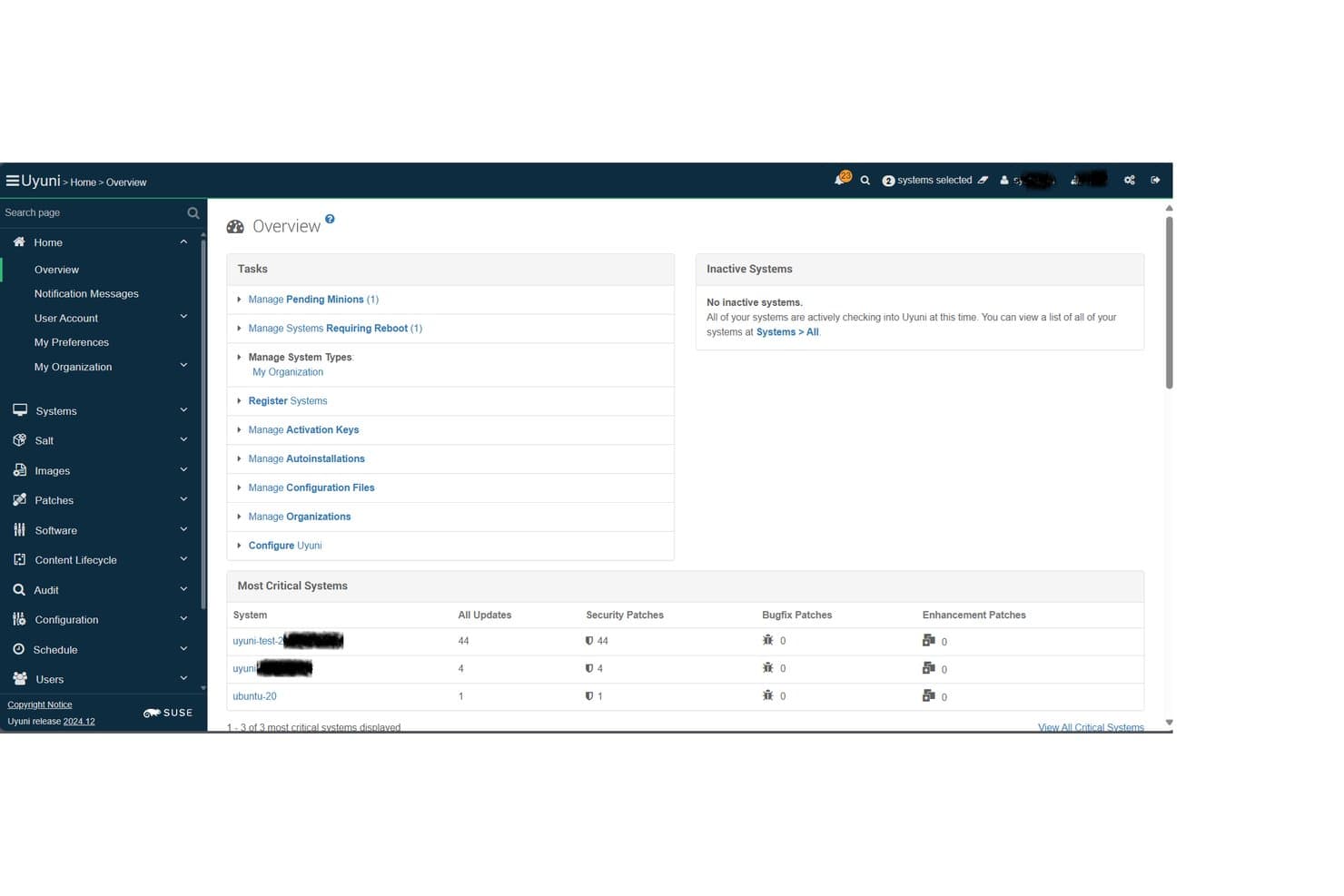
Uyuni offers a centralized Overview dashboard displaying critical system patch counts, pending minions, and security updates across managed Linux systems. Uyuni is an open-source Linux infrastructure management platform built on Salt that combines multi-distro patch management, compliance auditing, provisioning, and configuration management across physical, virtual, cloud, and container environments.
Who Is Uyuni Best For?
Uyuni is a strong fit for Linux system administrators and infrastructure teams managing large, mixed-distro server fleets who need enterprise-grade patch control without a commercial license.
Why I Picked Uyuni
I picked Uyuni as one of the best because its Salt-based orchestration engine sets it apart from every other open-source option in this space. The Uyuni Server runs as a full Salt Master, so my team can execute patch actions across thousands of Linux nodes simultaneously without per-host manual intervention. I also rely on its content lifecycle management to stage patches through dev, test, and production channels before anything reaches live systems.
Uyuni Key Features
- Multi-distro client support: Manage and patch a wide variety of Linux distributions, including SUSE, Red Hat, Ubuntu, Debian, AlmaLinux, Rocky Linux, and more.
- Compliance auditing and reporting: Track hardware and software changes, audit compliance status, and generate detailed reports for your Linux environments.
- Drift detection: Identify and alert on systems that deviate from defined hardened baselines or security templates.
- Visualization and grouping: Organize servers using tags and view their relationships with graphical dashboards for easier system oversight.
Uyuni Integrations
Uyuni offers native integrations with Salt (SaltStack) for configuration management and Cobbler for provisioning. It supports a range of Linux distributions as managed clients and provides an API for custom integrations.
Pros and Cons
Pros:
- Open source with no vendor lock-in
- Salt-based bulk automation for patch tasks
- Supports many enterprise and community Linux distros
Cons:
- No built-in PCI or HIPAA compliance templates
- Steep operational setup for new users
Learn more about Uyuni:
Annen programvare for håndtering av Linux-oppdateringer
Her er noen flere alternativer for programvare for håndtering av Linux-oppdateringer som ikke kom med på kortlisten min, men som fortsatt er verdt å se nærmere på:
- 11Ivanti Neurons for Patch ManagementBest for predictive patching with risk insights
- 12AWS Systems Manager Patch ManagerBest for managing patching within AWS environments
- 13Red Hat Ansible Automation PlatformBest for playbook-driven update routines
- 14TaniumBest for real-time endpoint patch deployment
- 15Heimdal SecurityBest for integrated threat and update control
- 16Progress ChefBest for infrastructure as code patch automation
- 17Puppet EnterpriseBest for codified patch policy management
- 18NinjaOneBest for intuitive multi-site patch workflows
- 19HCL BigFixBest for scalable enterprise patch enforcement
- 20Jetpatch Patch ManagementBest for agent-based patch orchestration
How I Evaluate Linux Patch Management Software
I split my evaluation into two layers: the baseline requirements a tool must meet—like multi-distro support and CVE mapping—and the differentiators that separate good tools from great ones.
Core Functionality (Table Stakes for This List)
When I'm selecting tools for my list, I rank each one on a scale from 0 (does not offer the functionality) to 5 (excels in this area) for each core functionality listed below. Then, I calculate the tool's total score as a percentage. Each tool needs to achieve a minimum total score of 65% to be considered for inclusion.
- Multi-Distro Support: I check whether a tool can patch across the distributions your fleet actually runs—RHEL, Ubuntu, Debian, SUSE, and Oracle Linux at a minimum.
- Automated Patch Deployment: The tool should handle detection, download, and installation without you SSH-ing into each host manually or stitching together cron jobs and scripts.
- CVE Remediation: I evaluate how well the platform maps missing patches to specific CVEs and whether it lets you prioritize by severity so you fix the urgent ones first.
- Scheduling & Maintenance Windows: Good tools let you define patch windows, stagger rollouts across server groups, and orchestrate reboots so production traffic isn't interrupted.
- Compliance Reporting: I look for audit trails and dashboards that show patch status across your fleet—the kind of evidence auditors ask for during PCI or SOC 2 reviews.
- Agent or Agentless Coverage: Whether a platform uses lightweight agents, agentless SSH connections, or both, it should cover on-prem servers, cloud instances, and hybrid setups.
Once I have a list of tools that meet the criteria, I consider what sets each platform apart.
Differentiating Factors (What Sets Vendors Apart)
Here's how I compare and contrast different vendors:
Standout Features
Live kernel patching is a big differentiator. If a tool supports kpatch or KernelCare, your team can apply kernel updates on production servers without scheduling a reboot. I also evaluate third-party package patching, since most Linux fleets run Apache, NGINX, Docker, or MySQL alongside the OS. Unpatched third-party packages create real gaps. Automated rollback is another separator—snapshot-based or transactional rollbacks let you recover when a patch breaks something in staging or production.
Beyond Features
Deployment model matters a lot. Some teams need air-gapped or disconnected installs for regulated environments, while others want SaaS with zero infrastructure overhead. I evaluate whether a platform fits into existing toolchains—integrations with Jira or ServiceNow for change management, and with scanners like Tenable or Rapid7 for vulnerability context. Scalability across hybrid setups is another factor I check, especially bandwidth-efficient patch distribution for fleets spread across cloud regions and on-prem data centers.
Slik velger du programvare for håndtering av Linux-oppdateringer
Det er lett å gå seg vill i lange funksjonslister og komplekse prismodeller. For å hjelpe deg med å holde fokus mens du går gjennom den unike prosessen med å velge programvare, har vi laget en sjekkliste over faktorer du bør ha i tankene:
| Faktor | Hva du bør vurdere |
|---|---|
| FaktorSkalerbarhet | Hva du bør vurdereVil programvaren håndtere det nåværende og forventede antallet servere? Spør om vekstbegrensninger, gruppering av noder og muligheten til å installere oppdateringer i hybride miljøer. |
| FaktorIntegrasjoner | Hva du bør vurdereFungerer verktøyet med systemene dine for saksbehandling, SIEM eller sårbarhetsskanning? Kontroller at det er kompatibelt med de viktigste plattformene i overvåkings- og driftsmiljøet ditt. |
| FaktorTilpasningsmuligheter | Hva du bør vurdereKan du finjustere arbeidsflytene for oppdateringer slik at de passer til vedlikeholdsvinduene, endringskontrollene eller godkjenningsprosessene dine? Se etter fleksible retningslinjer, ikke en løsning som passer likt for alle. |
| FaktorBrukervennlighet | Hva du bør vurdereEr brukergrensesnittet oversiktlig? Kan nye administratorer komme raskt i gang? Vær oppmerksom på komplekse arbeidsflyter som forsinker oppdateringssykluser eller fører til feil i produksjon. |
| FaktorImplementering og innføring | Hva du bør vurdereHvor mye tid og intern kompetanse vil oppsettet kreve? Undersøk tilgjengelig dokumentasjon, dedikert støtte ved innføring og migreringsverktøy for store miljøer. |
| FaktorKostnad | Hva du bør vurdereHvilken prismodell brukes – per node, per nettsted eller abonnement? Ta hensyn til løpende lisenskostnader, minimumsforpliktelser og totalkostnaden ved full distribusjon i ønsket skala. |
| FaktorSikkerhetstiltak | Hva du bør vurdereHvilke innebygde kontroller for autentisering, kryptering og tilgang finnes? Bekreft at verktøyet oppfyller organisasjonens krav til sikkerhet og revisjon. |
| FaktorEtterlevelseskrav | Hva du bør vurdereStøtter programvaren kravene til etterlevelse som gjelder for deg (PCI, HIPAA, SOC 2)? Spør om maler for etterlevelsesrapporter, revisjonsspor for oppdateringer og dokumentasjon til eksterne revisjoner. |
Hva er programvare for håndtering av Linux-oppdateringer?
Programvare for oppdateringshåndtering av Linux automatiserer prosessen med å identifisere, distribuere og spore oppdateringer og sikkerhetsoppdateringer på tvers av Linux-systemer. Disse verktøyene hjelper teamet ditt med å opprettholde enhetlig sikkerhet, håndtere sårbarheter og oppfylle krav til samsvar på tvers av ulike Linux-distribusjoner fra et sentralisert dashbord. Programvare for oppdateringshåndtering er utviklet for å passe inn i ulike infrastrukturer, fra lokale servere til skybaserte og hybride oppsett.
Funksjoner i programvare for oppdateringshåndtering av Linux
Når du velger programvare for oppdateringshåndtering av Linux, bør du se etter følgende viktige funksjoner:
- Støtte for flere distribusjoner: Håndter oppdateringer på tvers av flere store Linux-distribusjoner fra det samme dashbordet, slik at arbeidsmengden reduseres for team som arbeider i blandede miljøer.
- Automatisert distribusjon av oppdateringer: Identifiser, last ned og installer oppdateringer raskt uten manuell inngripen, slik at systemene holdes oppdaterte og sikre.
- Prioritering av CVE-er: Knytt oppdateringer til bestemte CVE-er og prioriter utrullingen basert på alvorlighetsgraden til sårbarheten for bedre sikkerhet og samsvar.
- Planlegging av vedlikeholdsvinduer: Angi tilpassbare vedlikeholdsvinduer for oppdatering og automatiserte omstarter for å minimere påvirkningen på produksjonsarbeidsbelastninger.
- Rapportering av samsvar for oppdateringer: Generer dashbord og rapporter som viser status, historikk og revisjonsspor for interne gjennomganger eller kontroller av forskriftsmessig samsvar.
- Oppdatering av tredjepartspakker: Oppdater pakker som ikke tilhører operativsystemet, for eksempel NGINX-, PostgreSQL- eller Docker-depoter, sammen med vanlige systemoppdateringer.
- Mulighet for tilbakerulling: Gjenopprett tidligere systemtilstander hvis en oppdatering forårsaker problemer, ved hjelp av funksjoner for øyeblikksbildebasert eller transaksjonsbasert tilbakerulling.
- Agentbasert eller agentløs dekning: Velg agentbasert distribusjon for bedre kontroll eller agentløse metoder (SSH) for rask dekning av distribuerte verter.
- API-integrasjoner: Koble til ITSM-, overvåkings- eller automatiseringsverktøy for å synkronisere arbeidsflyter, utløse varsler eller automatisere prosesser for godkjenning av oppdateringer.
- Rollebasert tilgangskontroll (RBAC): Definer detaljerte tillatelser for teammedlemmer og begrens hvem som kan planlegge, godkjenne eller distribuere oppdateringer på tvers av systemer.
Fordeler med programvare for oppdateringshåndtering av Linux
Implementering av programvare for oppdateringshåndtering av Linux gir flere fordeler for teamet og virksomheten din. Her er noen av fordelene du kan se frem til:
- Forbedret sikkerhetsnivå: Automatisert oppdagelse av sårbarheter og oppdatering gjør det enklere å lukke sikkerhetshull raskt før angripere utnytter kjente CVE-er.
- Konsekvent samsvar: Innebygd rapportering og revisjonsspor gjør det enklere å dokumentere samsvar med regelverk og rammeverk som PCI, HIPAA eller SOC 2.
- Mindre manuelt arbeid: Automatisering og planlegging eliminerer behovet for tidkrevende og gjentakende oppgaver med oppdateringer på tvers av store serverparker.
- Minimert nedetid: Kontroll over vedlikeholdsvinduer og funksjoner for direkte oppdatering av kjernen gjør det mulig for teamet å oppdatere kritiske systemer med liten eller ingen driftsforstyrrelse.
- Bred miljødekning: Håndter oppdateringer sentralt på tvers av skybaserte, lokale og hybride oppsett, med støtte for flere Linux-distribusjoner og endepunkter.
- Raskere hendelsesrespons: Integrert CVE-tilordning og prioritering muliggjør raskere utbedring når nye sårbarheter oppdages.
- Detaljert kontroll og oversikt: Rollebasert tilgang og detaljerte dashbord hjelper deg med å administrere tillatelser, følge fremdriften og holde interessenter informert.
Kostnader og priser for programvare for oppdateringshåndtering av Linux
Valg av programvare for oppdateringshåndtering av Linux krever en forståelse av de ulike prismodellene og abonnementene som er tilgjengelige. Kostnadene varierer basert på funksjoner, teamstørrelse, tillegg og mer. Tabellen nedenfor oppsummerer vanlige abonnementer, gjennomsnittsprisene deres og typiske funksjoner som er inkludert i løsninger for programvare for oppdateringshåndtering av Linux:
Sammenligningstabell for abonnementer på programvare for oppdateringshåndtering av Linux
| Abonnementstype | Gjennomsnittspris | Vanlige funksjoner |
|---|---|---|
| AbonnementstypeGratisabonnement | Gjennomsnittspris$0 | Vanlige funksjonerGrunnleggende oppdatering for et begrenset antall verter, manuelle oppdateringer og brukerstøtte fra fellesskapet. |
| AbonnementstypePersonlig abonnement | Gjennomsnittspris$5-$15/server/måned | Vanlige funksjonerAutomatisert oppdatering, støtte for flere Linux-distribusjoner, grunnleggende samsvarsrapporter og e-postvarsler. |
| AbonnementstypeBedriftsabonnement | Gjennomsnittspris$20-$40/server/måned | Vanlige funksjonerAvansert planlegging, oppdatering av tredjepartspakker, prioritering av CVE-er, API-tilgang og standard brukerstøtte. |
| AbonnementstypeVirksomhetsabonnement | Gjennomsnittspris$50-$100/server/måned | Vanlige funksjonerRollebasert tilgangskontroll, verktøy for samsvarsrevisjon, direkte oppdatering av kjernen, førsteklasses brukerstøtte døgnet rundt og integrasjoner med ITSM-verktøy. |
Vanlige spørsmål om Linux-patchadministrasjonsprogramvare
Her er noen svar på vanlige spørsmål om Linux-patchadministrasjonsprogramvare:
Hvordan bidrar Linux-patchadministrasjonsprogramvare til sikkerheten?
Linux-patchadministrasjonsprogramvare automatiserer identifisering og installasjon av sikkerhetsoppdateringer på tvers av IT-infrastrukturen din, og styrker den generelle sikkerheten for endepunkter og sårbarhetshåndteringen. Ved å erstatte manuell oppdatering med automatiserte sikkerhetsrettinger reduseres eksponeringen, noe som beskytter systemene mot datainnbrudd og samtidig gjør det mulig for teamet ditt å distribuere presserende sikkerhetsoppdateringer og reagere raskt på nye CVE-er.
Kan jeg administrere flere Linux-distribusjoner fra ett verktøy?
Ja, disse plattformene støtter distribusjoner som Ubuntu, Red Hat Enterprise Linux, Debian, SUSE og Oracle Linux ved hjelp av innebygde pakkebehandlere som dnf eller zypper. Mange verktøy fungerer som en RMM-løsning eller en løsning for enhetlig endepunktadministrasjon, slik at du kan styre distribusjonspolicyer, planlegge regler for oppdateringspolicyer og administrere oppdateringer på tvers av miljøer fra én enkelt skjerm.
Hvilke rapporteringsfunksjoner bør jeg forvente?
Du bør forvente oversikter over samsvar, revisjonslogger og tilpassbare rapporter som viser samsvar med oppdateringskrav på tvers av enhetsparken. Disse funksjonene hjelper deg med å forberede en sikkerhetsrevisjon, følge opp den overordnede ressursforvaltningen, oppfylle regulatoriske krav og gi ledelsen og sikkerhetsteamene full åpenhet.
Er agentløs oppdatering mulig med disse verktøyene?
Ja, mange løsninger tilbyr agentløs oppdatering gjennom SSH-tilkoblinger og ekstern tilgang, noe som forenkler distribusjonen og gjør det unødvendig å bruke egendefinerte skript. Installering av lokale agenter kan imidlertid gi bedre innsyn i systemet, bedre tilpasning til PSA-plattformen og mer fleksibel automatisering på tvers av komplekse nettverksmiljøer.
Hva slags støtte tilbyr leverandører vanligvis?
Leverandører tilbyr ofte flere støttenivåer, fra brukerfora og dokumentasjon med kostnadsfrie abonnementer til døgnåpen premiumstøtte og dedikerte kundesuksessansvarlige for bedriftskunder. Bekreft alltid tilgjengelige kanaler og svartider før du inngår en avtale.