

I dagens digitale landskap er det viktigere enn noen gang å beskytte dataene og systemene dine. Cybersikkerhetstruslene utvikler seg, noe som gjør det vanskelig å holde tritt. Du trenger pålitelige løsninger som beskytter uten å komplisere arbeidsflyten din.
Jeg har brukt mange år på å teste og vurdere programvare, og jeg vet hva som fungerer. Etter min erfaring kan de riktige cybersikkerhetsverktøyene utgjøre en stor forskjell for effektiviteten og tryggheten i teamet ditt.
I denne artikkelen deler jeg mine beste anbefalinger for cybersikkerhetsløsninger. Du får en objektiv gjennomgang av hvert alternativ, med fokus på det som virkelig betyr noe: effektivitet, brukervennlighet og verdi. La oss finne den løsningen som passer best for dine behov.
Hvorfor du kan stole på våre programvareanbefalinger
6,700+
Reviews
20
Industry experts
16+
Evaluation factors
14
Years
Teamet vårt har testet og anmeldt programvare siden 2012. Vi er selv teknologiledere, så vi vet hvor vanskelig og hvor viktig det er å velge riktig programvare.
I denne guiden har vi vurdert verktøyene gjennom praktisk testing og uavhengig research og gitt dem poeng ut fra våre utvelgelseskriterier.
Anmeldelsene våre bygger på vår egen redaksjonelle vurdering. De er ikke et salgsargument.
Ekspertanmeldere:
- Paulo Gardini MiguelTech Director
 Tim FisherVP of AI
 Gabriel RosasTech Lead & Software Architect
 Christhian GruhnTech Lead & Platform Architect

Sammenligningstabell: cybersikkerhetsløsninger
Sammenlign priser og spesifikasjoner side om side for cybersikkerhetsløsningene som kom med på listen min.
| Tool | Best For | Trial Info | Price | ||
|---|---|---|---|---|---|
| 1 | Best for developer-led vulnerability fixes | Free plan available | From $350/month | Website | |
| 2 | Best for DDoS protection | 30-day free trial + free demo available | Pricing upon request | Website | |
| 3 | Best for AI-powered ransomware detection | Free demo available | From $179.99/endpoint (billed annually) | Website | |
| 4 | Best for unified EDR and threat intelligence | 15-day free trial available | From $7.99/device/month | Website | |
| 5 | Best for compliance testing | 30-day free trial + free demo available | From $149/month (billed annually) | Website | |
| 6 | Best for integrated security controls | Free demo available | Pricing upon request | Website | |
| 7 | Best for API attack protection | 30-day free trial available | Pricing upon request | Website | |
| 8 | Best for zero-trust application control | 30-day free trial + free demo available | Pricing upon request | Website | |
| 9 | Best for government solutions | Not available | Pricing upon request | Website | |
| 10 | Best for global DDoS and attack surface defense | Free trial + free demo available | Pricing upon request | Website |


Anmeldelser av de beste cybersikkerhetsløsningene
Nedenfor finner du mine detaljerte sammendrag av de beste cybersikkerhetsløsningene som kom med på listen min. Anmeldelsene mine gir en detaljert gjennomgang av de viktigste funksjonene, fordelene og ulempene, integrasjonene og ideelle bruksområdene for hvert verktøy, slik at du kan finne det som passer best for deg.
 Best for developer-led vulnerability fixes
- Free plan available
- From $350/month
Visit WebsiteCustomer Rating:4.3/5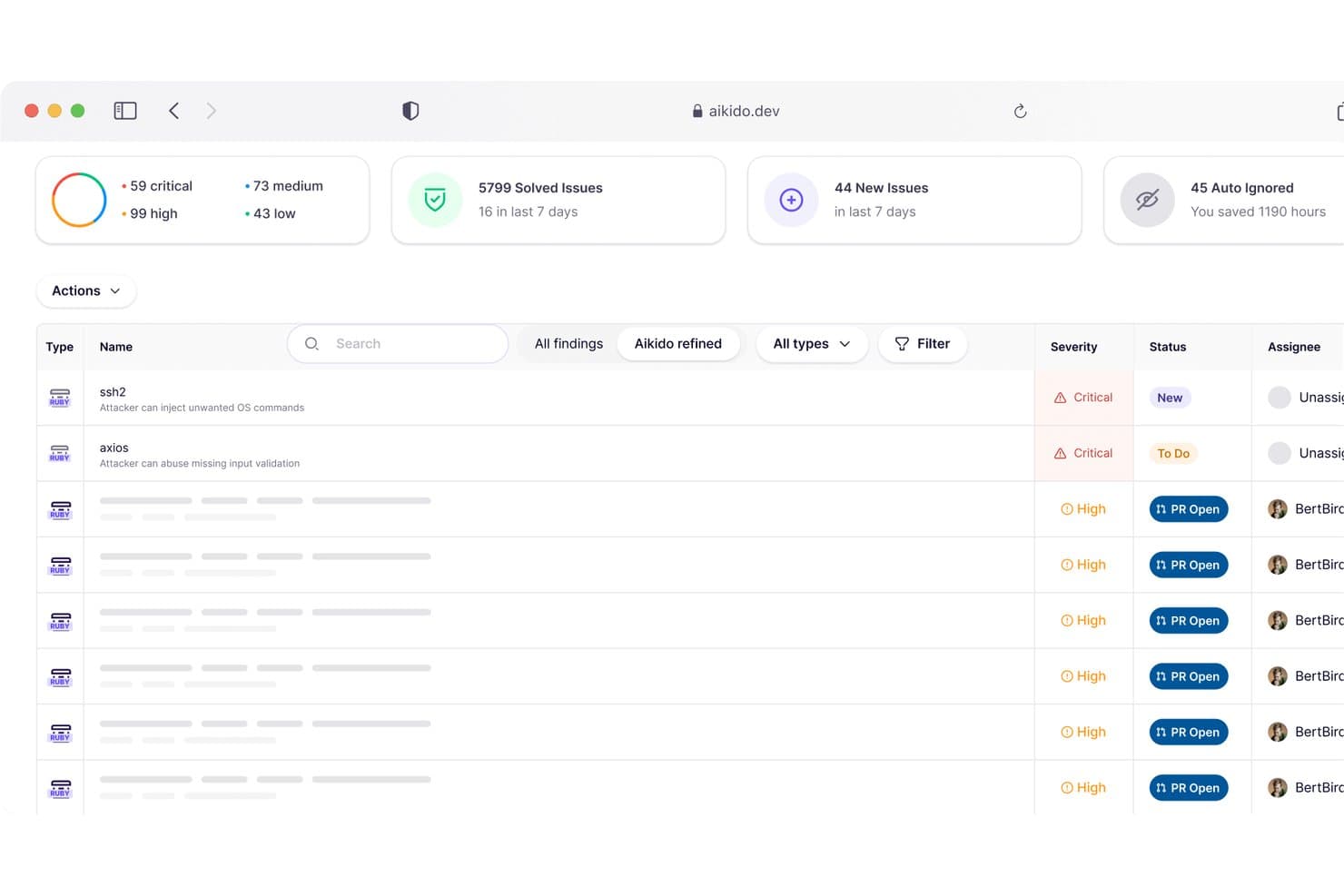
Aikido Security centralizes vulnerability findings by severity and status. Aikido Security is an application security platform that unifies code, cloud, and runtime protection—covering dependency scanning, SAST, secrets detection, container scanning, CSPM, and runtime threat blocking in a single system.
Who Is Aikido Security Best For?
Aikido Security is a strong fit for development-focused engineering teams that need to find and fix vulnerabilities across code, cloud, and containers without managing a stack of separate tools.
Why I Picked Aikido Security
I picked Aikido Security as one of the best because it closes the gap between finding a vulnerability and actually fixing it—something most security tools leave to the developer to figure out. I love that its reachability analysis filters out CVEs that can't actually be triggered in your codebase, so your team spends time on real risk, not noise. Its AutoFix feature goes further by generating pull requests with the dependency upgrades already written, which means a developer can remediate a confirmed issue without ever leaving their workflow.
Aikido Security Key Features
- CISA KEV and EPSS integration: Syncs exploit intelligence data daily to automatically adjust vulnerability severity scores based on known exploited CVEs and exploit prediction scoring.
- Runtime threat blocking (Zen): Instruments your application at runtime to stop risky operations mid-execution, with controls for bot blocking, Tor traffic, geographic restrictions, and user-aware rate limiting.
- Multi-framework compliance reporting: Generates audit-ready reports mapped to ISO 27001, SOC 2, PCI DSS, HIPAA, NIST 800-53, DORA, NIS2, and several other frameworks.
- Attack surface monitoring: Scans internet-facing assets for exposed subdomains, open ports, TLS issues, DNS takeover risks, and email-spoofing vulnerabilities.
Aikido Security Integrations
Aikido Security offers native integrations with GitHub, GitLab, Azure DevOps, AWS, Google Cloud, Jira, Linear, Slack, Microsoft Teams, Drata, and Vanta. It also supports REST APIs and webhooks, plus a Datadog SIEM connector available by request.
Pros and Cons
Pros:
- One dashboard unifies code, cloud, runtime
- Reachability prioritizes vulnerabilities by actual use
- Reviewers praise actionable, lower-noise findings
Cons:
- Device protection misses existing malware
- No documented automated incident playbooks
Learn more about Aikido Security: Best for DDoS protection
- 30-day free trial + free demo available
- Pricing upon request
Visit WebsiteCustomer Rating:4.7/5
Radware delivers DDoS defense to keep networks and applications available. Radware is a cybersecurity solution specializing in DDoS protection, catering mainly to large enterprises and service providers. It offers advanced threat detection and mitigation to protect networks and applications. Radware's main functions include safeguarding against cyberattacks and ensuring service availability.
Why I picked Radware: Its exceptional DDoS protection capabilities make it ideal for organizations facing frequent cyber threats. Radware's real-time threat intelligence helps identify and mitigate attacks quickly. The hybrid DDoS protection combines on-premise devices with cloud-based mitigation for full coverage. Its ability to maintain service availability during attacks ensures your operations remain uninterrupted.
Standout Features and Integrations:
Features include AI-powered behavioral detection to distinguish legitimate from malicious traffic, automated attack mitigation to respond quickly to threats, and advanced protection against SSL attacks to secure communications and infrastructure.
Integrations include AWS, Microsoft Azure, Google Cloud, Splunk, and more.
Pros and Cons
Pros:
- Effective bot management
- Hybrid DDoS protection solutions
- Real-time threat intelligence
Cons:
- Policy tuning requires expertise
- UI reporting depth can feel fragmented
Learn more about Radware: Best for AI-powered ransomware detection
- Free demo available
- From $179.99/endpoint (billed annually)
Visit WebsiteCustomer Rating:4.7/5
SentinelOne delivers AI-driven endpoint protection with threat defense. SentinelOne is an AI-driven cybersecurity platform delivering extended detection and response (XDR) across endpoints, primarily serving large enterprises in sectors such as finance, health care, and education. It includes built-in antivirus capabilities and advanced malware protection.
Why I picked SentinelOne: It offers AI-powered threat management by detecting malware, ransomware, zero-day attacks, and insider threats. The Singularity platform integrates various security functions and generative AI to automate security processes, helping to improve your team's efficiency by reducing manual tasks.
Standout Features and Integrations:
Features include a cloud-native application protection platform for complete security, automated incident response to minimize manual intervention, and advanced threat intelligence for insights into potential cyber threats.
Integrations include AWS, IBM QRadar, Palo Alto Networks, Microsoft Azure, Google Cloud, Slack, and more.
Pros and Cons
Pros:
- Generative AI operations
- Strong ransomware protection
- Detects and blocks malware threats
Cons:
- Rollback features require careful policy setup
- Complex initial setup
Learn more about SentinelOne: Best for unified EDR and threat intelligence
- 15-day free trial available
- From $7.99/device/month
Visit WebsiteCustomer Rating:4.6/5
CrowdStrike Falcon helps you monitor and secure cloud and container workloads with centralized visibility across multi-cloud environments. CrowdStrike Falcon delivers endpoint security through a single lightweight agent, unifying next-gen antivirus, EDR, threat hunting, and cloud workload protection on one platform.
Who Is CrowdStrike Falcon Best For?
CrowdStrike Falcon is a strong fit for mid-to-large enterprises with security operations teams that need centralized visibility across a distributed, multi-platform environment.
Why I Picked CrowdStrike Falcon
I've included CrowdStrike Falcon in my top picks because it's one of the few endpoint security platforms that genuinely unifies EDR and threat intelligence in a single agent, rather than bolting them together. Falcon Insight XDR correlates endpoint telemetry with adversary intelligence from CrowdStrike's Counter Adversary Operations team, so detections come with real context: who the attacker is, what their known tactics are, and what they're likely to do next. I also like how Falcon's indicators of attack (IOAs) go beyond signature matching to catch malware-free intrusions, including the kind of living-off-the-land techniques that show up in 82% of {{year}} detections according to CrowdStrike's own threat data.
CrowdStrike Falcon Key Features
- Falcon Prevent: A next-generation antivirus (NGAV) module that blocks malware, ransomware, and fileless attacks using AI-based detection models trained on trillions of events.
- Falcon OverWatch: A managed threat hunting service that runs 24/7 searches across your environment to surface hidden intrusions that automated detections miss.
- Falcon Identity Protection: Monitors identity-based threats in real time, detecting credential-based attacks, privilege escalation, and lateral movement across Active Directory and Azure AD.
- Falcon Spotlight: An agent-based vulnerability management module that surfaces exploitable CVEs on your endpoints without requiring separate scanning infrastructure.
CrowdStrike Falcon Integrations
CrowdStrike Falcon offers 460+ marketplace integrations from over 240 partners, including Splunk, ServiceNow, Okta, Zscaler, Palo Alto Networks, AWS, Google Cloud, and tools across the Microsoft ecosystem like Microsoft 365, Azure, and Microsoft Entra ID. An API is available for custom integrations.
Pros and Cons
Pros:
- MITRE ATT&CK detection with no false positives
- Strong cross-platform coverage across Linux, Windows, macOS
- Full process chain tracing for root cause
Cons:
- Lacks deep content inspection for DLP
- Limited functionality on air-gapped or offline networks
Learn more about CrowdStrike Falcon: Best for compliance testing
- 30-day free trial + free demo available
- From $149/month (billed annually)
Visit WebsiteCustomer Rating:4.6/5
Astra finds vulnerabilities and gives clear steps to fix security risks. Astra is a cybersecurity tool designed for penetration testing and vulnerability assessment, mainly used by businesses needing to meet compliance standards. It helps identify security weaknesses and ensure that applications and networks are secure. Astra’s primary functions include detecting vulnerabilities and providing actionable insights for remediation.
Why I picked Astra: Its focus on compliance testing makes it ideal for businesses needing to adhere to regulatory standards. Astra provides detailed vulnerability reports that help you understand and address security gaps.
Standout Features and Integrations:
Features include continuous vulnerability scanning to keep your systems secure, detailed reporting to identify and address issues, and an intuitive dashboard for easy management of security tasks.
Integrations include Slack, Jira, GitHub, Bitbucket, GitLab, and more.
Pros and Cons
Pros:
- Actionable remediation insights
- Intuitive management dashboard
- Effective compliance testing
Cons:
- SMB budgets may find pricing restrictive
- Pentest scheduling may delay urgent scans
Learn more about Astra:

Fortinet offers threat management, secure networking, and endpoint protection. Fortinet is a cybersecurity solution that provides integrated security services through its Fortinet Security Fabric, catering to enterprises, service providers, and mid-sized organizations. It focuses on protecting networks, applications, and data with its broad suite of security products. Fortinet’s key functions include threat protection, secure networking, and endpoint security.
Why I picked Fortinet: Its integrated security approach makes it ideal for businesses needing a unified strategy. Fortinet's Security Fabric architecture connects different security tools to amplify threat visibility and operational coordination. The FortiGate firewalls offer advanced threat protection and secure networking. This thorough coverage helps your team efficiently manage security across the entire network.
Standout Features and Integrations:
Features include advanced firewalls to block malicious activities, secure SD-WAN for optimized network connectivity, and endpoint protection to safeguard devices on your network.
Integrations include AWS, Microsoft, Google Cloud, IBM, Splunk, ServiceNow, and more.
Pros and Cons
Pros:
- Extensive endpoint protection
- Efficient network management
- Unified security platform
Cons:
- Hardware dependency for full capabilities
- Complex licensing structure
Learn more about Fortinet:

Imperva protects applications and data from external threats. Imperva is a cybersecurity solution designed to protect applications and data in cloud environments from external threats. It is widely used by cybersecurity companies and security teams needing to protect their digital assets. Imperva is frequently recognized in Gartner reports for its leadership in application and data security.
Why I picked Imperva: It delivers real-world protection for sensitive data through its web application firewall (WAF), distributed denial of service (DDoS) mitigation, and API security. Imperva’s key functionalities protect data across cloud and hybrid environments. Its platform integrates well with SIEM tools for centralized monitoring and threat response.
Standout Features and Integrations:
Features include advanced threat analytics for real-time insights into potential risks, a user behavior analytics tool to detect insider threats, and automated security incident responses to reduce manual intervention.
Integrations include AWS, Microsoft Azure, Google Cloud, Splunk, CrowdStrike, IBM, and more.
Pros and Cons
Pros:
- Automated incident response
- Real-time threat insights
- Effective DDoS mitigation
Cons:
- High cost for small businesses
- Limited customization options
Learn more about Imperva: Best for zero-trust application control
- 30-day free trial + free demo available
- Pricing upon request

ThreatLocker ensures only approved applications run for stronger security. ThreatLocker is a cybersecurity solution focused on application control and endpoint protection, catering mainly to businesses of all sizes, including small and medium-sized organizations. It helps manage application permissions and prevent unauthorized software from running. The key function is to improve security by ensuring only approved applications can execute.
Why I picked ThreatLocker: It excels in application control, making it ideal for businesses needing strict software usage policies. Its policy-driven approach allows you to define what applications are permitted. The ringfencing feature isolates applications, reducing the risk of data breaches. This tool's simplicity and focus on application control make it an asset for maintaining a secure environment.
Standout Features and Integrations:
Features include storage control to manage access to data, audit logs for tracking application activity, and a simple interface that makes managing permissions straightforward.
Integrations include ConnectWise Manage, ConnectWise Automate, Datto SaaS Protection, and more.
Pros and Cons
Pros:
- Detects insider threats
- Protects against zero-day exploits
- Granular security controls
Cons:
- Can be restrictive
- Requires policy setup
Learn more about ThreatLocker:

Carahsoft links public sector teams to IT tools for safe, compliant operations. Carahsoft is an IT solutions provider and distributor, primarily serving government agencies and educational institutions. It offers a wide range of cybersecurity products that support secure operations and compliance with government standards. The platform connects public sector organizations with leading software vendors through established government contract vehicles.
Why I picked Carahsoft: Its focus on government solutions supports compliance with stringent regulations. Carahsoft provides access to a variety of cybersecurity tools tailored for public sector needs. The ability to bundle software solutions adds value for teams managing complex IT environments.
Standout Features and Integrations:
Features include a broad marketplace for easy procurement, tailored solutions for government compliance, and bundled offerings that combine multiple software tools for more efficient operations.
Integrations are not publicly listed.
Pros and Cons
Pros:
- Strong partner ecosystem
- Offers bundled solutions
- Simplifies procurement processes
Cons:
- High dependency on partnerships
- Limited to public sector
Learn more about Carahsoft: Best for global DDoS and attack surface defense
- Free trial + free demo available
- Pricing upon request

Akamai Security provides global coverage to secure and optimize digital assets. Akamai Security is a cybersecurity solution tailored for businesses needing extensive global coverage. It serves enterprises that need protection and performance at internet scale. Akamai Security offers content delivery, cloud security, and application performance services.
Why I picked Akamai Security: Its massive ecosystem is unmatched, making it ideal for businesses operating in multiple countries. Akamai Security's content delivery network ensures fast and reliable access to your digital assets, and the application performance services optimize the user experience. For teams needing a broad international presence, Akamai Security provides the necessary infrastructure.
Standout Features and Integrations:
Features include cloud security services, SIEM integrations, bot protection, advanced web application security, and automated threat mitigation for global environments.
Integrations are not publicly listed.
Pros and Cons
Pros:
- Protects cloud workloads
- Secures applications and APIs
- Extensive global network
Cons:
- Debugging false positives can be time-intensive
- Complex configuration
Learn more about Akamai Security:
Andre cybersikkerhetsløsninger
Her er noen flere alternativer for cybersikkerhetsløsninger som ikke kom med på listen min, men som likevel er verdt å undersøke:
- 11ARIA CybersecurityBest managed SOC for small teams
- 12HoneywellBest for securing industrial IoT environments
- 13Cisco SecurityBest for enterprise network security
- 14NordLayerBest for remote access to cloud apps
- 15Palo Alto NetworksBest for cloud workload threat protection
- 16SophosBest for endpoint malware and ransomware defense
- 17Miratech PrevalentBest for third-party cyber risk management
How I Evaluate Cybersecurity Solutions
Whether I'm evaluating threat detection coverage for a SOC team or compliance reporting for a CISO, I split my approach into core requirements and the differentiators that actually separate vendors.
Core Functionality (Table Stakes For This List)
When I'm selecting tools for my list, I rank each one on a scale from 0 (does not offer the functionality) to 5 (excels in this area) for each core functionality listed below. Then, I calculate the tool's total score into a percentage. Each tool needs to achieve a minimum total score of 75% to be considered for inclusion.
- Threat Detection & Response: I evaluate whether a platform can surface real threats in real time and give analysts clear paths to contain them, from isolating a compromised endpoint to blocking lateral movement.
- Vulnerability & Risk Management: Each tool should scan and prioritize weaknesses across assets, so your team can patch an exploitable CVE on a public-facing server before it becomes an incident.
- Access & Identity Controls: I look for MFA, RBAC, and SSO support at a minimum, and I check how well the platform enforces least-privilege policies across user accounts and service credentials.
- Data Protection & Encryption: Encryption at rest and in transit is the baseline, but I also consider whether a tool offers DLP or classification to prevent sensitive records from leaving the environment.
- Compliance & Audit Reporting: The platform should map controls to frameworks like PCI-DSS, HIPAA, or SOC 2 and generate audit-ready reports without requiring your team to build them from scratch.
- Centralized Security Visibility: I check whether the tool aggregates logs and alerts from endpoints, cloud workloads, and network devices into a single pane, making cross-source correlation practical for a lean SOC team.
Once I have a list of tools that meet this criteria, I consider what sets each platform apart.
Differentiating Factors (What Sets Vendors Apart)
Here's how I compare and contrast different vendors:
Standout Features
AI-driven threat intelligence separates strong platforms from average ones—I evaluate how well a tool correlates global threat feeds with your environment's telemetry to surface emerging attack patterns. SOAR capabilities matter just as much, since automated playbooks that handle initial triage and containment free analysts to focus on complex investigations. Attack surface management is another differentiator I look for, especially for teams with sprawling infrastructure where unknown exposed assets can become blind spots.
Beyond Features
Integration ecosystem is one of the first things I check—your security stack needs to connect with SIEM, ITSM, and identity providers like Okta or Azure AD without custom workarounds. Deployment model matters too, since some teams need air-gapped or on-premise options that a SaaS-only vendor can't deliver. I also evaluate vendor support tiers, particularly whether a provider offers MDR services or incident response retainers for teams that lack 24/7 SOC coverage in-house.
Slik velger du en cybersikkerhetsløsning
Det er lett å gå seg vill i lange funksjonslister og komplekse prismodeller. For å hjelpe deg med å holde fokus mens du går gjennom den unike prosessen din for valg av programvare, har jeg laget en sjekkliste over faktorer du bør ha i tankene:
| Faktor | Hva du bør vurdere |
|---|---|
| FaktorSkalerbarhet | Hva du bør vurdereKan løsningen vokse med virksomheten din? Ta hensyn til fremtidige behov og om verktøyet kan håndtere økte datamengder eller flere brukere uten redusert ytelse. |
| FaktorIntegrasjoner | Hva du bør vurdereKan den kobles til de eksisterende systemene dine? Kontroller at den er kompatibel med den nåværende programvarestakken din for å unngå forstyrrelser i arbeidsflyten. |
| FaktorTilpasningsmuligheter | Hva du bør vurdereKan du tilpasse verktøyet til dine spesifikke behov? Se etter alternativer som lar deg gjøre justeringer for å passe til de unike prosessene og preferansene dine. |
| FaktorBrukervennlighet | Hva du bør vurdereEr verktøyet intuitivt for teamet ditt? Et brukervennlig grensesnitt reduserer opplæringstiden og øker adopsjonsraten. |
| FaktorImplementering og opplæring | Hva du bør vurdereHvor raskt kan teamet ditt begynne å bruke det effektivt? Vurder ressursene som tilbys for oppsettet, inkludert veiledninger, støtte og dokumentasjon. |
| FaktorKostnad | Hva du bør vurdereEr prisen i tråd med budsjettet ditt? Ta hensyn til de totale eierkostnadene, inkludert eventuelle skjulte gebyrer eller kostnader utover den opprinnelige prisen. |
| FaktorSikkerhetstiltak | Hva du bør vurdereFinnes det sterke tiltak for å beskytte dataene dine? Se etter kryptering, tilgangskontroller og regelmessige sikkerhetsoppdateringer for å sikre dataintegritet og trygghet. |
| FaktorOverholdelse av krav | Hva du bør vurdereOppfyller den bransjeregelverket? Sørg for at løsningen støtter overholdelse av standarder som er relevante for bransjen din, for eksempel GDPR eller HIPAA, for å unngå juridiske problemer. |
Hva er cybersikkerhetsløsninger?
Cybersikkerhetsløsninger er verktøy utviklet for å beskytte systemer, nettverk og data mot cybertrusler og uautorisert tilgang. IT-fagfolk, sikkerhetsanalytikere og nettverksadministratorer bruker vanligvis disse verktøyene for å beskytte sensitiv informasjon og bidra til å sikre virksomhetens kontinuitet. Funksjoner som trusseloppdagelse, datakryptering og tilgangskontroll støtter forebygging av trusler og opprettholder dataintegriteten. Alt i alt gir disse verktøyene viktig beskyttelse og trygghet for virksomheter som opererer i det digitale rommet.
Funksjoner
Når du velger cybersikkerhetsløsninger, bør du se etter følgende viktige funksjoner:
- Trusseloppdagelse: Identifiserer potensielle trusler i sanntid for å forhindre datainnbrudd og angrep.
- Datakryptering: Sikrer sensitiv informasjon ved å konvertere den til kode som er uleselig for uautoriserte brukere.
- Tilgangskontroll: Administrerer hvem som kan få tilgang til systemene og dataene dine, slik at bare autoriserte brukere får tilgang.
- Sårbarhetsskanning: Oppdager svakheter i systemet ditt som kan utnyttes av angripere.
- Hendelsesrespons: Tilbyr verktøy og protokoller for rask respons på sikkerhetsbrudd og begrensning av skader.
- Støtte for samsvar: Bidrar til å oppfylle bransjeregler og standarder, noe som reduserer risikoen for juridiske problemer.
- Nettverksovervåking: Holder øye med nettverkstrafikken for å oppdage uvanlige mønstre og potensielle trusler.
- Automatiske oppdateringer: Sørger for at programvaren alltid er oppdatert med de nyeste sikkerhetsoppdateringene og forbedringene.
- Analyse av brukeradferd: Analyserer brukerhandlinger for å identifisere unormal atferd som kan indikere en sikkerhetstrussel.
- Rapportering og dashbord: Gir tydelig, visuell innsikt i sikkerhetsnivået ditt og områder som trenger oppmerksomhet.
Fordeler
Implementering av cybersikkerhetsløsninger gir flere fordeler for teamet og virksomheten din. Her er noen av fordelene du kan se frem til:
- Databeskyttelse: Beskytter sensitiv informasjon mot datainnbrudd gjennom kryptering og sterk tilgangskontroll.
- Overholdelse av regelverk: Bidrar til å sikre at virksomheten oppfyller bransjestandarder og regelverk, slik at juridiske straffer unngås.
- Forebygging av trusler: Identifiserer og reduserer risikoer før de utvikler seg til alvorlige problemer, slik at systemene forblir sikre.
- Driftskontinuitet: Støtter uavbrutt drift under cyberinntrengninger gjennom effektive funksjoner for hendelsesrespons.
- Økt tillit: Skaper tillit hos kunder og partnere ved å demonstrere et tydelig sikkerhetsengasjement.
- Ressurseffektivitet: Automatiserer mange sikkerhetsoppgaver, slik at teamet ditt får mer tid til å fokusere på andre prioriteringer.
- Økt oversikt: Gir tydelig innsikt i sikkerhetsnivået ditt gjennom omfattende rapportering og analyse.
Kostnader og priser
Ved valg av cybersikkerhetsløsninger er det nødvendig å forstå de ulike prismodellene og abonnementene som er tilgjengelige. Kostnadene varierer basert på funksjoner, teamstørrelse, tillegg og mer. Tabellen nedenfor oppsummerer vanlige abonnementer, gjennomsnittsprisene deres og typiske funksjoner som er inkludert i cybersikkerhetsløsninger:
Sammenligningstabell for abonnementer for cybersikkerhetsløsninger
| Abonnementstype | Gjennomsnittspris | Vanlige funksjoner |
|---|---|---|
| AbonnementstypeGratisabonnement | Gjennomsnittspris$0 | Vanlige funksjonerGrunnleggende trusseloppdagelse, begrenset datakryptering og grunnleggende tilgangskontroll for brukere. |
| AbonnementstypePersonlig abonnement | Gjennomsnittspris$5-$25/bruker/måned | Vanlige funksjonerForbedret trusseloppdagelse, avansert datakryptering og tilpassbar tilgangskontroll for brukere. |
| AbonnementstypeBedriftsabonnement | Gjennomsnittspris$30-$75/bruker/måned | Vanlige funksjonerFullstendig trusseloppdagelse, detaljert støtte for samsvar og detaljert rapportering og analyse. |
| AbonnementstypeVirksomhetsabonnement | Gjennomsnittspris$80-$150/bruker/måned | Vanlige funksjonerOmfattende trusseloppdagelse, automatisert hendelsesrespons og full integrasjonsstøtte. |
Vanlige spørsmål om cybersikkerhetsløsninger
Her er noen svar på vanlige spørsmål om cybersikkerhetsløsninger:
Hvordan måler jeg hvor effektiv en cybersikkerhetsløsning er?
Begynn med å følge med på viktige måltall som oppdagelsesgrad, falske positiver, responstid og antall blokkerte trusler. Gå regelmessig gjennom hendelsesloggene, og test forsvaret med simulerte angrep. Sammenlign resultatene med sikkerhetsmålene dine for å se om løsningen oppfyller kravene dine. Innhent tilbakemeldinger fra IT-teamet om brukervennlighet og ytelse for å få et helhetlig grunnlag for vurderingen.
Hvor ofte bør jeg oppdatere eller revurdere cybersikkerhetsløsningen min?
Du bør gjennomgå cybersikkerhetsløsningen din hver sjette til tolvte måned. Større systemendringer, nye trusler eller oppdateringer av samsvarskrav kan gjøre det nødvendig med hyppigere gjennomganger. Planlegg regelmessig penetrasjonstesting og revisjoner, og juster oppsettet basert på funnene. Hold deg oppdatert på trusselbildet, slik at du raskt kan tilpasse deg nye risikoer.
Kan cybersikkerhetsløsninger bidra til å redusere tiden det tar å håndtere hendelser?
Ja, mange cybersikkerhetsløsninger automatiserer oppdagelse og varsling, slik at du kan reagere raskere på trusler. Sanntidsdashbord, automatiserte arbeidsflyter og integrasjoner med verktøyene dine for hendelseshåndtering bidrar til å redusere responstiden betydelig. Ved å samle trusselinformasjon på ett sted gjør disse plattformene det enklere for teamet å handle raskt og begrense skadeomfanget.
Hvordan sikrer jeg at teamet mitt får mest mulig ut av cybersikkerhetsverktøyene våre?
Opplær de ansatte i verktøyene, og etabler tydelige prosesser for overvåking og håndtering. Oppmuntre til regelmessige øvelser og kunnskapsdeling. Bruk rapporteringsfunksjonene til å avdekke ytelsesgap, og juster fremgangsmåten etter behov. Sørg for at dere bruker alle relevante funksjoner, og gjennomgå verktøybruken regelmessig for å få maksimalt utbytte av investeringen.