

Administrert PKI-programvare hjelper deg med å utstede, spore og fornye digitale sertifikater, slik at teamet ditt kan sikre systemer uten stadig å måtte håndtere utløpsdatoer, mangler i samsvar eller manuell nøkkelhåndtering.
Mange team tar i bruk disse verktøyene etter å ha brukt for mye tid på å følge opp sertifikater som utløper, håndtere interne prosesser eller bekymre seg for at noe skal falle mellom stolene under revisjoner. Det er ikke det at offentlig nøkkelinfrastruktur er nytt, men at det raskt kan bli uoverkommelig å administrere den i stor skala uten dedikerte verktøy.
Jeg har samarbeidet med organisasjoner om å velge ut og implementere PKI-verktøy som reduserer risiko, oppfyller policykrav og gjør sertifikatadministrasjon mindre belastende for team som allerede har mye å gjøre. Denne veiledningen bygger på den erfaringen og skal hjelpe deg med å velge en løsning som passer miljøet ditt, slik at du får mer tid til å fokusere på andre prioriteringer.
Why Trust Our Software Recommendations
6,700+
Reviews
20
Industry experts
16+
Evaluation factors
14
Years
Our team has been testing and reviewing software since 2012. As tech leaders ourselves, we know how difficult—and important—it is to choose the right software.
For this guide, we evaluated tools using hands-on testing and independent research, scoring tools using our selection criteria.
Our reviews reflect our human editorial judgment, not a sales pitch.
Expert reviewers:
- Paulo Gardini MiguelTech Director
 Tim FisherVP of AI
 Gabriel RosasTech Lead & Software Architect
 Christhian GruhnTech Lead & Platform Architect

Sammenligningstabell for PKI-programvare
Denne sammenligningstabellen oppsummerer prisopplysningene for mine beste utvalg av PKI-programvare:
| Tool | Best For | Trial Info | Price | ||
|---|---|---|---|---|---|
| 1 | Best for automated security management | Pricing upon request | Website | ||
| 2 | Best for certificate lifecycle tasks | Pricing upon request | Website | ||
| 3 | Best for Windows-based PKI setups | From $972/user (billed annually) | Website | ||
| 4 | Best for enterprise certificate issuance | Pricing upon request | Website | ||
| 5 | Best for zero-touch certificate renewal | Pricing upon request | Website | ||
| 6 | Best for protocol and hardware support | Pricing upon request | Website | ||
| 7 | Best for flexible PKI deployment | Pricing upon request | Website | ||
| 8 | Best open-source PKI solution | Open source project and Available for free | Website | ||
| 9 | Best for large-scale encryption coverage | From $12/user/month (billed annually) | Website | ||
| 10 | Best for complex certificate management | Free demo available | Pricing upon request | Website |


Anmeldelser av den beste PKI-programvaren
Nedenfor finner du mine detaljerte sammendrag av den beste PKI-programvaren som kom med på utvalgslisten. Anmeldelsene mine gir en detaljert gjennomgang av de viktigste funksjonene, fordeler & ulemper, integrasjoner og ideelle bruksområder for hvert verktøy, slik at du kan finne det som passer best for deg.


Here is an example of writing a secret to HashiCorp Vault. Secrets are always encrypted and written to the backend storage. HashiCorp Vault takes charge of your digital security, providing a comprehensive suite for identity-based access and safeguarding sensitive data across various systems. The tool impressively automates the management of secrets, encryption keys, and certificates.
Why I Picked HashiCorp Vault:
I chose HashiCorp Vault due to its commitment to security automation. In the dynamic landscape of digital security, Vault excels at streamlining the process and reducing manual oversight. The tool's remarkable focus on automation provides a formidable shield for sensitive data.
Hence, I believe HashiCorp Vault truly stands out as the best choice for businesses needing to handle automated security management.
Standout Features and Integrations:
Vault’s dynamic secrets feature reduces the risk of unwanted data exposure by creating secrets on demand that get revoked after use. Its encryption as a service module allows users to encrypt data without dealing with the complexities of key management.
As for integrations, Vault plugs into your existing infrastructure seamlessly. It works well with popular platforms like AWS, Google Cloud, and Azure, providing extensive coverage.
Pros and Cons
Pros:
- Dynamic secrets ensure maximum data safety
- Wide array of integrations for versatile deployment
- Robust and flexible key and secrets management
Cons:
- Pricing structure is not transparently listed
- Detailed documentation may be overwhelming
- Steep learning curve for new users
Learn more about HashiCorp Vault:

Here is a screenshot of Digicert's dashboard for certificate inspectors. DigiCert PKI Platform provides scalable and reliable high-assurance certificate solutions. It shines in lifecycle management by simplifying and automating the processes of issuing, renewing, and managing digital certificates, making it the best choice for these tasks.
Why I Picked DigiCert PKI Platform:
I chose the DigiCert PKI Platform due to its comprehensive approach to certificate lifecycle management, which makes it stand out among other tools. Its automation of intricate certificate-related processes supports why it's the best for lifecycle management, ensuring certificate operations remain efficient and streamlined.
Standout Features and Integrations:
The platform's notable features include automated certificate issuance and renewal, intuitive UI for easy management, and robust APIs for integration. DigiCert PKI Platform also offers key integrations with widely used systems like Microsoft Active Directory, Microsoft Autoenrollment, and other IT infrastructure components, extending its certificate lifecycle management capabilities into these environments.
Pros and Cons
Pros:
- Offers a user-friendly management interface
- Robust APIs enable integration with various systems
- Streamlines certificate issuance and renewal processes
Cons:
- Setup and configuration can be time-consuming
- Some users may find the platform’s extensive features overwhelming
- Pricing structure can be complex and is not directly available
Learn more about DigiCert PKI Platform: Best for Windows-based PKI setups
- From $972/user (billed annually)

Take a look at Microsoft Active Directory Certificate Services with its certificate templates console. The screenshot shows the duplicate template feature. Microsoft Active Directory Certificate Services (AD CS) is a role in Windows Server that allows the creation of a fully functional public key infrastructure (PKI). Being tightly integrated with the Microsoft ecosystem, it becomes the go-to PKI solution for Windows-centric environments.
Why I Picked Microsoft Active Directory Certificate Services (AD CS):
In the process of selecting PKI tools, AD CS caught my attention due to its seamless integration within the Microsoft ecosystem. This integration, I believe, positions it as the best choice for Windows-centric environments, where it can provide a streamlined and native PKI solution.
Standout Features and Integrations:
AD CS features include the ability to customize certificate contents and extensions, and it supports automated certificate issuance through templates. Its biggest strength is its integration with Microsoft Active Directory, allowing for simple deployment and management of certificates within a Windows environment.
Pros and Cons
Pros:
- Automated certificate issuance through templates
- Customizable certificate contents and extensions
- Seamless integration within the Microsoft ecosystem
Cons:
- Requires a Windows Server license, which can be pricey for smaller organizations
- Can be complex to set up without a good understanding of PKI principles
- Limited to Windows environments
Learn more about Microsoft Active Directory Certificate Services (AD CS):

Here is an example image for managed SSL home screen in GlobalSign’s certificate management platform. GlobalSign PKI is a platform designed to secure organizations' digital identities at scale. It excels in issuing large volumes of certificates and automated enrollment, making it a top choice for businesses seeking robust, enterprise-level protection.
Why I Picked GlobalSign PKI:
When selecting tools for this list, I evaluated each based on their distinctive qualities. GlobalSign PKI emerged due to its capacity to handle high-volume issuance and automated enrollment, which are critical in enterprise-level protection. This robust capability justifies why I believe it is the best for businesses that require extensive protection.
Standout Features and Integrations:
GlobalSign PKI has a robust set of features, including certificate lifecycle management, automated enrollment, and support for multiple certificate types. It offers integrations with Microsoft Active Directory and other IT infrastructure systems, ensuring wide coverage of protection across different organizational applications.
Pros and Cons
Pros:
- Offers automated enrollment for ease of use
- Handles high-volume certificate issuance efficiently
- Provides extensive enterprise-level protection
Cons:
- The platform may have a steep learning curve for those new to PKI solutions
- Some customers have reported slow customer service response times
- Lack of transparent pricing can be challenging for potential users
Learn more about GlobalSign PKI:

Here is a screenshot of Venafi's dashboard. Venafi is a distinguished PKI platform that centralizes and automates the lifecycle of digital certificates. Because of its automation features, particularly zero-touch issuance, and renewal of certificates, Venafi is best suited for those who seek streamlined certificate management.
Why I Picked Venafi:
When I was determining which PKI platform to include on this list, Venafi stood out due to its advanced automation capabilities. Its feature of zero-touch issuance and renewal of certificates distinguishes it from the crowd, leading to my decision that it is best for automation.
Standout Features and Integrations:
Venafi stands out with its advanced automation for the lifecycle of certificates, including issuance, renewal, and revocation. In addition to this, it integrates with leading IT systems like cloud providers, DevOps tools, and more, making it a highly adaptable platform.
Pros and Cons
Pros:
- Provides visibility into all machine identities and their associated risks
- Integrates with leading IT systems
- Advanced automation of certificate lifecycle
Cons:
- Customer support may be slow during off-peak hours
- Can be complex to set up and manage without adequate training
- Pricing is not transparent and requires a custom quote
Learn more about Venafi: Best for protocol and hardware support
- Pricing upon request

Here is a screenshot of the EJBCA web dashboard. EJBCA is a robust, platform-agnostic PKI solution, designed to enable seamless issuance and management of digital certificates. Given its ability to support all major protocols and hardware, EJBCA is best for interoperability in diverse IT environments.
Why I Picked EJBCA:
I selected EJBCA for this list because it stands apart with its broad interoperability. Its compatibility with major protocols and hardware sets it apart and makes it an ideal choice for diverse IT ecosystems. Therefore, I judged it to be the best for interoperability.
Standout Features and Integrations:
EJBCA boasts a rich feature set, including extensive certificate life cycle management, flexible integrations, and support for hardware security modules. It integrates with a variety of platforms and devices, reinforcing its standing as a versatile, interoperable PKI solution.
Pros and Cons
Pros:
- Extensive platform and device integrations
- Robust certificate life cycle management
- High interoperability with major protocols and hardware
Cons:
- Community support may not be as responsive or comprehensive as Enterprise support
- May be complex to set up for those unfamiliar with Java-based applications
- Enterprise version pricing is not publicly available
Learn more about EJBCA (Enterprise JavaBeans Certificate Authority):

Here is a sample image of the PrimeKey EJBCA dashboard on Graylog. PrimeKey EJBCA® Enterprise serves as a robust Certificate Authority, ensuring secure and flexible management of digital identities. The software is tailored to meet the needs of organizations of all scales, providing a range of customizable options to match the complexity of varying IT environments.
Why I Picked PrimeKey EJBCA® Enterprise:
I selected PrimeKey EJBCA® Enterprise for its adaptability. In a tech landscape teeming with varying needs and use cases, this PKI solution's customizable nature offers a clear advantage. Its ability to mold itself to the unique requirements of an organization makes it the best for those seeking a flexible deployment option.
Standout Features and Integrations:
PrimeKey EJBCA® Enterprise shines with its powerful certificate management system and adaptable workflows. It supports multiple Certificate Authority (CA) hierarchies and a wide array of certificate profiles. On the integration front, it syncs well with HSMs from vendors like Thales and Utimaco, and it offers a REST API for seamless integration with existing IT infrastructure.
Pros and Cons
Pros:
- Robust integration options, including REST API
- Comprehensive certificate and workflow management
- Versatile and customizable to suit unique requirements
Cons:
- Transparent pricing information is not available
- Support might be required for initial setup
- Can be complex for novice users
Learn more about PrimeKey EJBCA® Enterprise:

OpenXPKI's web frontend allows access to the workflow catalog, allowing users to instantiate new workflows and work on existing workflow instances. OpenXPKI is a powerful open-source PKI solution designed for flexibility and security. The tool brings to the table a scalable and enterprise-ready architecture that allows you to mold a security solution that aligns with your unique needs.
Why I Picked OpenXPKI:
OpenXPKI caught my attention for its open-source nature. This factor not only makes it a cost-effective option but also enables extensive customization and scalability. It's the diversity in design and adaptability that sets OpenXPKI apart, earning it the title of the best open-source solution for tailoring security architecture.
Standout Features and Integrations:
OpenXPKI offers a feature-rich environment with customizable workflows, support for multiple CA hierarchies, and sophisticated token handling. The tool also provides an extensive API for integration and automation, and it plays well with a range of databases including MySQL, Oracle, and PostgreSQL.
Pros and Cons
Pros:
- Solid API for integrations and automation
- Extensive customization and scalability options
- Open-source and free to use
Cons:
- Absence of dedicated customer support
- Requires more setup compared to commercial PKI solutions
- The learning curve may be steep for beginners
Learn more about OpenXPKI:

The KeyTalk client app enables native secure email encryption, as well as access to Cloud, Hybrid, and Local network environments, which have been protected using enforced client certificate authentication. KeyTalk serves as an effective PKI solution designed to secure and automate the management of your digital certificates across multiple devices. KeyTalk's strength lies in its scalability, making it ideal for organizations dealing with a large number of devices, hence being the best for scalable security.
Why I Picked KeyTalk:
I chose KeyTalk because of its impressive ability to scale and manage certificate lifecycles across countless devices, setting it apart from other PKI solutions on the list. In terms of securing numerous devices, I believe KeyTalk comes out on top, hence I deem it the best for scalable security.
Standout Features and Integrations:
KeyTalk's foremost features include automatic certificate renewal, revocation, and installation across various devices. It also excels in supporting different certificate types like SSL/TLS, code signing, and user certificates. Notably, KeyTalk integrates with a broad range of server systems, software applications, and network components, amplifying its usability across diverse IT infrastructures.
Pros and Cons
Pros:
- Extensive system and application integrations
- Broad range of certificate support
- Exceptional scalability for device management
Cons:
- Premium price point may not fit all budgets
- Interface might be challenging for novice users
- Could be overkill for smaller businesses
Learn more about KeyTalk: Best for complex certificate management
- Free demo available
- Pricing upon request
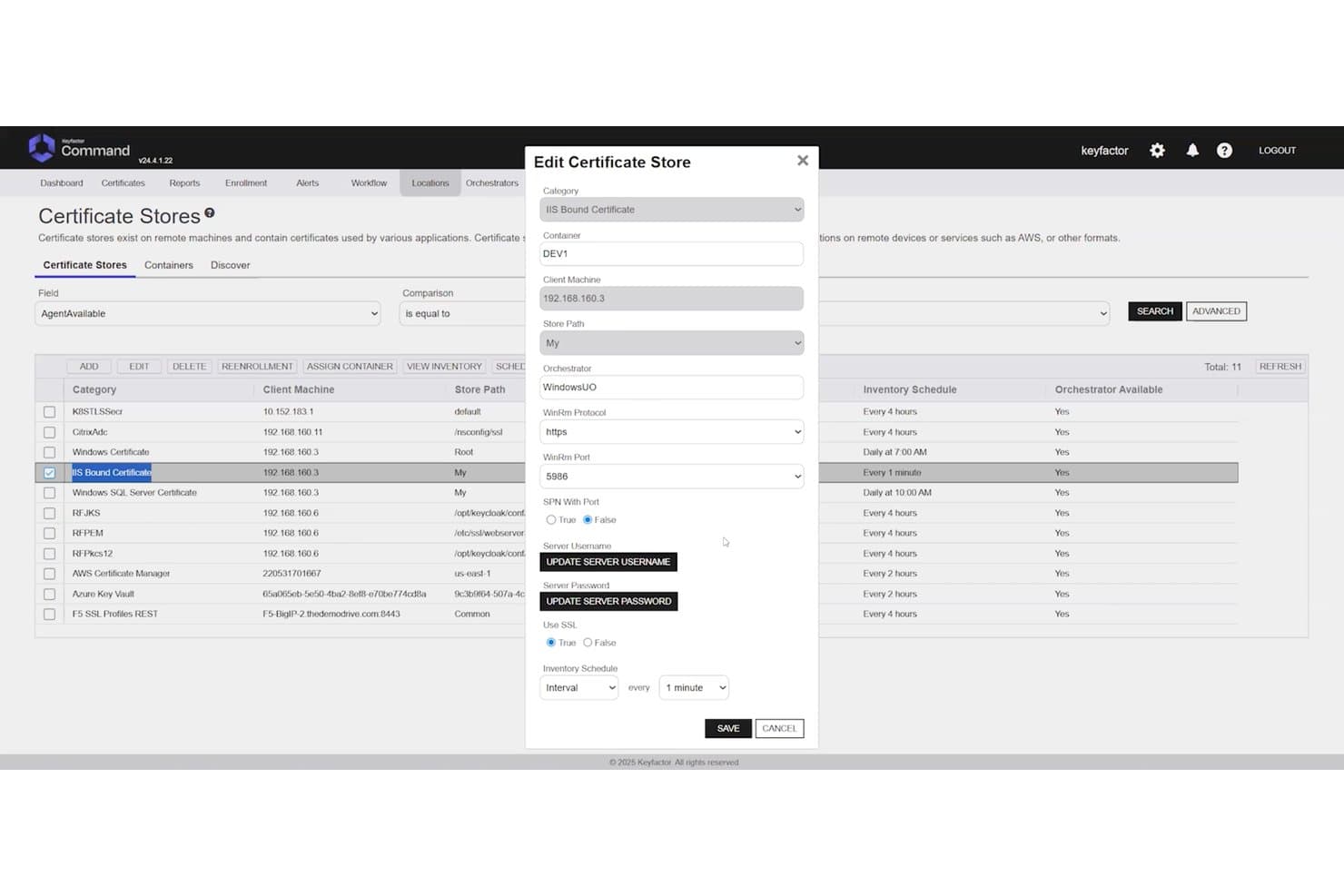
Keyfactor Command lets users configure IIS certificate stores with detailed settings. Keyfactor Command is a CA-agnostic PKI platform that centralizes certificate lifecycle management, cryptographic key management, and automated discovery across multi-cloud, on-premises, and hybrid environments.
Who Is Keyfactor Command Best For?
Keyfactor Command is a strong fit for enterprise PKI and security teams managing large, multi-CA environments with complex compliance and automation requirements.
Why I Picked Keyfactor Command
Keyfactor Command earns its spot on my shortlist because no other platform handles multi-CA complexity at this scale. I'm particularly impressed by its CA-agnostic architecture, which lets you manage certificates across any combination of public and private CAs without locking into a single issuer. When a CA compromise hits, bulk re-issuance across your entire inventory is a genuinely fast response, not a days-long scramble. Its post-quantum readiness, including PQC certificate inventory and custom OID support, makes it the right long-term bet for enterprises managing hundreds of millions of certificates.
Keyfactor Command Key Features
- Network-wide certificate discovery: Agentless scanning across IP ranges, subnets, key stores, cloud environments, and code repositories to surface unmanaged and rogue certificates.
- RBAC with identity provider integration: Role-based access controls tie directly to Active Directory and external identity providers, with workflow-driven enrollment and approval gates.
- HSM integration: Native support for Thales Luna, AWS CloudHSM, and Azure Key Vault, with FIPS 140-2 validated module support for secure key storage.
- Self-service DevOps automation UI: A dedicated interface lets DevOps teams request and manage certificates independently, with native cert-manager and CI/CD pipeline support.
Keyfactor Command Integrations
Keyfactor Command offers 100+ pre-built integrations, including Thales Luna HSM, AWS CloudHSM, Azure Key Vault, Active Directory, and cert-manager. It also provides REST APIs and SDKs for custom integrations and supports CI/CD workflows.
Pros and Cons
Pros:
- Supports granular policy and audit controls
- Automates bulk renewal and reissuance
- Handles multi-CA certificate estates
Cons:
- Interface feels dated to some reviewers
- Setup can confuse new administrators
Learn more about Keyfactor Command:
Annen PKI-programvare
Her er noen flere alternativer innen PKI-programvare som ikke kom med på utvalgslisten, men som likevel er verdt å undersøke: Jeg fant ikke spesifikk informasjon om leverandører av PKI-programvare.
- 11GoDaddy PKI PlatformBest for brand-backed reliability
- 12KeycloakBest for multi-protocol integration
- 13Ubisecure Certificate AuthorityBest for digital identity control
- 14Dogtag Certificate SystemBest for open-source enterprise PKI
- 15FreeIPABest for Linux-based identity services
- 16GlobalSign IoT Identity PlatformBest for identity at IoT scale
- 17GnuPGBest for free OpenPGP-compliant encryption
- 18OpenCA PKIBest for flexible academic PKI setups
- 19OpenSSLBest for open-source cryptography tools
- 20RSA Certificate ManagerBest for large certificate operations
- 21SectonaBest for controlling privileged account access
- 22SecureW2Best for secure Wi-Fi onboarding
- 23SafeNet Trusted AccessBest for smart access and authentication
How I Evaluate PKI Software
I split my evaluation into two layers: baseline requirements like CA hierarchy support and CLM automation, then differentiators that determine the best fit for your specific environment.
Core Functionality (Table Stakes For This List)
When I'm selecting tools for my list, I rank each one on a scale from 0 (does not offer the functionality) to 5 (excels in this area) for each core functionality listed below. Then, I calculate the tool's total score into a percentage. Each tool needs to achieve a minimum total score of 65% to be considered for inclusion.
- Certificate Lifecycle Management: I evaluate how each platform handles issuance, renewal, discovery, and revocation—especially automated renewal workflows that prevent the kind of outages caused by expired certificates.
- Certificate Authority Management: I look for the ability to stand up private CA hierarchies and integrate with public CAs, since most enterprise environments need both internal and publicly trusted certificates.
- Cryptographic Key Management: Secure key generation, storage, and HSM integration matter here. I check whether the platform supports dedicated HSM appliances or cloud-based HSM services for key protection.
- Standards & Protocol Support: Each tool should support core PKI standards like x.509, SCEP, ACME, and OCSP/CRL. Broader protocol coverage means fewer workarounds when enrolling diverse endpoint types.
- Automation & API Access: REST APIs and pre-built integrations with DevOps tooling like Kubernetes and Terraform are what I look for, since manual provisioning doesn't scale in CI/CD-driven environments.
- Policy Enforcement & Compliance: I evaluate RBAC granularity, audit logging depth, and built-in policy templates that help teams enforce key length minimums, algorithm restrictions, and validity periods.
Once I have a list of tools that meet this criteria, I consider what sets each platform apart.
Differentiating Factors (What Sets Vendors Apart)
Here's how I compare and contrast different vendors:
Standout Features
Post-quantum readiness is top of mind for me. Platforms that already support crypto-agile algorithms give your team a head start before migration deadlines hit. I also evaluate multi-cloud CA orchestration—teams running workloads across AWS, Azure, and on-prem shouldn't need separate consoles for each CA. DevOps-native workflows round out the picture. Native cert-manager and Terraform integrations let engineers request certificates inside their existing pipelines instead of filing tickets.
Beyond Features
Deployment flexibility matters a lot here. Some teams need SaaS for speed, while others require air-gapped or on-prem installations to meet data sovereignty rules. I also look closely at vendor-held compliance certifications like WebTrust, Common Criteria, and SOC 2 Type II—these save your team months of audit prep. Ecosystem fit is another key factor. Connectors to identity providers like Entra ID, HSM vendors like Thales, and SIEM platforms determine how cleanly PKI plugs into your existing stack.
Slik velger du PKI-programvare
Det er lett å gå seg vill i lange funksjonslister og komplekse prismodeller. For å hjelpe deg med å holde fokus mens du går gjennom den unike prosessen med å velge programvare, har vi laget en sjekkliste over faktorer du bør ha i tankene:
| Faktor | Hva du bør vurdere |
|---|---|
| FaktorSkalerbarhet | Hva du bør vurdereKan programvaren vokse sammen med organisasjonen din? Vurder fremtidige behov og om verktøyet kan håndtere økt sertifikatvolum uten ytelsesproblemer. |
| FaktorIntegrasjoner | Hva du bør vurdereFungerer det med de eksisterende systemene dine? Kontroller kompatibiliteten med den nåværende IT-infrastrukturen og eventuelle tredjepartsprogrammer du er avhengig av. |
| FaktorTilpasningsmuligheter | Hva du bør vurdereKan du tilpasse programvaren slik at den passer til prosessene dine? Se etter alternativer for å tilpasse arbeidsflyter, retningslinjer og brukertillatelser etter teamets behov. |
| FaktorBrukervennlighet | Hva du bør vurdereEr grensesnittet brukervennlig? Et verktøy som er vanskelig å bruke, kan hemme produktiviteten. Se etter intuitiv navigering og tydelige instruksjoner. |
| FaktorImplementering og innføring | Hva du bør vurdereHvor lang tid tar det å komme i gang? Vurder tiden og ressursene som kreves for oppsettet, og om leverandøren tilbyr tilstrekkelig støtte ved oppstart. |
| FaktorKostnad | Hva du bør vurderePasser prisen inn i budsjettet ditt? Vurder ikke bare de innledende kostnadene, men også eventuelle skjulte gebyrer eller langsiktige utgifter som kan oppstå. |
| FaktorSikkerhetstiltak | Hva du bør vurdereFinnes det sterke sikkerhetstiltak? Sørg for at programvaren overholder bransjestandarder og tilbyr funksjoner som kryptering og tilgangskontroller. |
| FaktorEtterlevelseskrav | Hva du bør vurdereOppfyller det regulatoriske behov? Kontroller om programvaren støtter etterlevelse av personvernregler som er relevante for bransjen din. |
Hva er PKI-programvare?
PKI-programvare er et verktøy som hjelper med å administrere digitale sertifikater og krypteringsnøkler for å holde data og systemer sikre. Det brukes hovedsakelig av IT-team, sikkerhetseksperter og systemadministratorer som trenger å beskytte interne systemer, brukeridentiteter og nettbasert kommunikasjon.
Funksjoner som utstedelse av sertifikater, sporing av fornyelser og lagring av nøkler bidrar til bedre organisering, mindre manuelt arbeid og færre utløpte eller feiladministrerte sertifikater. Disse verktøyene gjør det enklere å håndtere kryptering uten å legge ekstra belastning på arbeidsflyten.
Funksjoner
Når du velger PKI-programvare, bør du se etter følgende viktige funksjoner:
- Sertifikatadministrasjon: Automatiserer utstedelse, fornyelse og tilbakekalling av digitale sertifikater, noe som sparer tid og reduserer feil.
- Kryptering: Beskytter sensitive data ved å konvertere dem til et sikkert format som bare autoriserte brukere kan få tilgang til.
- Brukerautentisering: Sikrer at bare autoriserte personer får tilgang til systemer og data ved å bekrefte brukeridentiteter.
- Støtte for etterlevelse: Hjelper organisasjoner med å overholde bransjeregler og -standarder, og reduserer risikoen for bøter ved manglende etterlevelse.
- Integrasjonsmuligheter: Fungerer sømløst med eksisterende IT-infrastruktur og tredjepartsprogrammer for å opprettholde kontinuitet i arbeidsflyten.
- Tilpassbare retningslinjer: Gjør det mulig å opprette skreddersydde sikkerhetsretningslinjer som dekker spesifikke organisatoriske behov og krav.
- Skalerbarhet: Håndterer økende sertifikatvolum og organisatoriske endringer uten at det går ut over ytelsen.
- Tilgangskontroller: Gir detaljert kontroll over hvem som kan få tilgang til bestemte data eller systemer, og styrker den generelle sikkerheten.
- Revisjonslogging: Registrerer systemaktiviteter for overvåking og analyse av sikkerhetshendelser, og bidrar til kriminaltekniske undersøkelser.
- Brukervennlig grensesnitt: Tilbyr intuitiv navigering og tydelige instruksjoner, slik at det blir enklere for brukerne å administrere og betjene programvaren.
Fordeler
Implementering av PKI-programvare gir flere fordeler for teamet og virksomheten din. Her er noen av fordelene du kan se frem til:
- Forbedret sikkerhet: Krypterer data og sikrer at bare autoriserte brukere får tilgang, slik at sensitiv informasjon beskyttes.
- Regulatorisk etterlevelse: Støtter overholdelse av bransjestandarder og -forskrifter, og reduserer risikoen for bøter ved manglende etterlevelse.
- Operasjonell effektivitet: Automatiserer oppgaver for sertifikatadministrasjon, sparer tid og minimerer risikoen for manuelle feil.
- Skalerbarhet: Vokser sammen med organisasjonen din og håndterer flere brukere og sertifikater uten behov for omfattende endringer.
- Økt tillit: Bekrefter brukeridentiteter og krypterer kommunikasjon, noe som bygger tillit hos kunder og partnere.
- Kostnadsbesparelser: Reduserer behovet for manuelle prosesser og potensielle sikkerhetsbrudd, og sparer penger på lang sikt.
- Revisjonsberedskap: Gir detaljerte logger og rapporter for sikkerhetsrevisjoner, slik at det blir enklere å identifisere og håndtere sårbarheter.
Kostnader og priser
Når du skal velge PKI-programvare, må du forstå de ulike prismodellene og abonnementene som er tilgjengelige. Kostnadene varierer basert på funksjoner, teamstørrelse, tillegg og mer. Tabellen nedenfor oppsummerer vanlige abonnementer, gjennomsnittsprisene deres og typiske funksjoner som er inkludert i PKI-programvareløsninger:
Sammenligningstabell for PKI-programvare
| Plantype | Gjennomsnittspris | Vanlige funksjoner |
|---|---|---|
| PlantypeGratisplan | Gjennomsnittspris$0 | Vanlige funksjonerGrunnleggende sertifikatadministrasjon, begrenset brukerstøtte og minimale krypteringsalternativer. |
| PlantypePersonlig plan | Gjennomsnittspris$10-$30 per bruker/måned | Vanlige funksjonerForbedret kryptering, brukerautentisering og støtte for samsvar. |
| PlantypeForretningsplan | Gjennomsnittspris$40-$80 per bruker/måned | Vanlige funksjonerAvansert administrasjon av sertifikaters livssyklus, integrasjonsmuligheter og skalerbarhet. |
| PlantypeVirksomhetsplan | Gjennomsnittspris$100-$200 per bruker/måned | Vanlige funksjonerTilpassbare retningslinjer, omfattende brukerstøtte og omfattende revisjonslogging. |
Vanlige spørsmål om PKI-programvare
Her er noen svar på vanlige spørsmål om PKI-programvare:
Hvordan administrerer du digitale sertifikater?
Administrasjon av digitale sertifikater innebærer å utstede, fornye og tilbakekalle sertifikater etter behov. Du trenger et system som automatiserer disse oppgavene for å redusere feil og spare tid. PKI-programvare inkluderer ofte verktøy for å spore sertifikatstatus og varsle deg om kommende utløpsdatoer.
Hva er rollen til en sertifiseringsinstans?
En sertifiseringsinstans (CA) er en betrodd enhet som utsteder digitale sertifikater. Disse sertifikatene bekrefter identiteten til sertifikatinnehaveren. Når du velger PKI-programvare, må du sørge for at den støtter integrasjon med etablerte sertifiseringsinstanser eller lar deg opprette din egen.
Hvordan forbedrer PKI-programvare sikkerheten?
PKI-programvare forbedrer sikkerheten ved å kryptere data og bekrefte identiteter. Den bruker offentlige og private nøkler til å sikre kommunikasjon. Når du vurderer alternativer, bør du se på hvor effektivt programvaren administrerer nøkler, og om den støtter flerfaktorautentisering.
Er PKI-programvareverktøy vanskelige å bruke?
Vanskelighetsgraden kan variere avhengig av verktøyet. Noe PKI-programvare har en bratt læringskurve på grunn av de omfattende funksjonene og mulighetene. De fleste moderne PKI-verktøy prioriterer imidlertid brukeropplevelsen og tilbyr intuitive grensesnitt og omfattende brukerstøtte for å hjelpe brukerne med å komme i gang og med videre bruk.
Kan PKI-programvare integreres med eksisterende systemer?
Integrasjon er avgjørende for en smidig arbeidsflyt. Det meste av PKI-programvaren kan kobles til IT-infrastruktur og tredjepartsapplikasjoner. Kontroller kompatibiliteten med de nåværende systemene dine for å unngå forstyrrelser og sikre sømløs drift.
Hvordan håndterer PKI-programvare skalerbarhet?
Skalerbarhet sikrer at programvaren vokser i takt med behovene dine. Enten du utvider teamet eller øker bruken av sertifikater, bør programvaren kunne håndtere flere brukere og mer data uten ytelsesproblemer. Ta hensyn til fremtidige planer når du vurderer skaleringsalternativer.