

Å finne de riktige verktøyene for skysikkerhet kan effektivisere trusseloppdagelse betydelig og styrke samsvaret, enten du beskytter sensitive data, sikrer miljøer med flere skyleverandører eller automatiserer hendelsesrespons.
Jeg har testet og vurdert ulike løsninger uavhengig, med fokus på det som virkelig betyr noe for deg og teamet ditt. Jeg mener det er viktig å gi et objektivt og grundig undersøkt perspektiv som hjelper deg med å ta velinformerte beslutninger.
I denne artikkelen får du vite hvilke verktøy for skysikkerhet jeg anbefaler, og hvert av dem er valgt ut på grunn av sine unike fordeler. Enten du er opptatt av databeskyttelse eller samsvar, finner du innsikt som dekker dine spesifikke behov. La oss se nærmere på alternativene og finne den beste løsningen for organisasjonen din.
Why Trust Our Software Recommendations
6,700+
Reviews
20
Industry experts
16+
Evaluation factors
14
Years
Our team has been testing and reviewing software since 2012. As tech leaders ourselves, we know how difficult—and important—it is to choose the right software.
For this guide, we evaluated tools using hands-on testing and independent research, scoring tools using our selection criteria.
Our reviews reflect our human editorial judgment, not a sales pitch.
Expert reviewers:
- Paulo Gardini MiguelTech Director
 Tim FisherVP of AI
 Gabriel RosasTech Lead & Software Architect
 Christhian GruhnTech Lead & Platform Architect

Sammenligningstabell for verktøy for skysikkerhet
Denne sammenligningstabellen oppsummerer prisopplysningene for mine beste utvalgte verktøy for skysikkerhet.
| Tool | Best For | Trial Info | Price | ||
|---|---|---|---|---|---|
| 1 | Best for CSPM and identity risk across multi-cloud | 30-day free trial + free demo available | Pricing upon request | Website | |
| 2 | Best for securing global device fleets | Free demo available | from $5/person/month | Website | |
| 3 | Best for zero trust access control | Free plan available | From $5/user/month (billed annually) | Website | |
| 4 | Best for unified SIEM with DLP and CASB | Free demo available | Pricing upon request | Website | |
| 5 | Best for comprehensive cloud posture management | Free plan available | From $350/month | Website | |
| 6 | Best for privileged account management | Free trial + free demo available | Pricing upon request | Website | |
| 7 | Best for insight-driven defense | 30-day free trial available | From $795/50 endpoints/year | Website | |
| 8 | Best range of scanning services | 14-day free trial + free demo available | From $149/month | Website | |
| 9 | Best for proactive threat detection | 30-day free trial + free demo available | From $338.50/year | Website | |
| 10 | Best for endpoint protection | Free demo available | Pricing upon request | Website |


Vurderinger av de beste verktøyene for skysikkerhet
Nedenfor finner du mine detaljerte sammendrag av de beste verktøyene for skysikkerhet som kom med på kortlisten. Vurderingene mine gir en detaljert gjennomgang av de viktigste funksjonene, fordelene & ulempene, integrasjonene og ideelle bruksområdene for hvert verktøy, slik at du kan finne det beste alternativet for deg.
 Best for CSPM and identity risk across multi-cloud
- 30-day free trial + free demo available
- Pricing upon request
Visit WebsiteCustomer Rating:4.5/5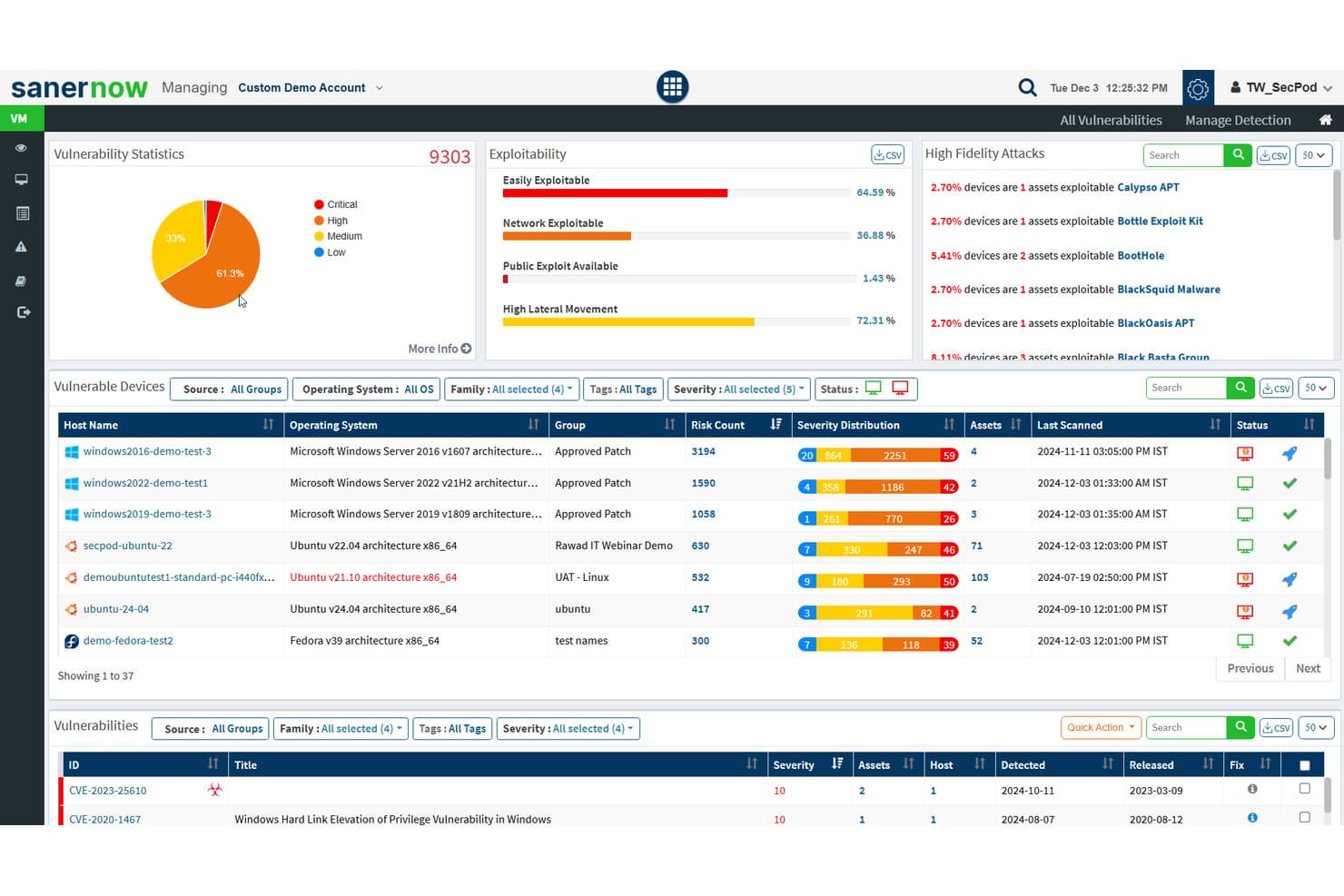
SecPod (Saner Platform) tracks vulnerability stats and exploitability across cloud assets. Saner Cloud is a cloud-native application protection platform from SecPod that unifies cloud posture management, infrastructure entitlement management, anomaly detection, and asset exposure across AWS, Azure, and GCP.
Who Is SecPod (Saner Platform) Best For?
Saner Cloud suits security and compliance teams managing identities, permissions, and posture across AWS, Azure, and GCP in multi-cloud environments.
Why I Picked SecPod (Saner Platform)
I picked Saner Cloud as one of the best because its CIEM capability goes beyond flagging broad permissions—it maps exactly how identities, roles, and policies combine to grant access across AWS, Azure, and GCP, then surfaces dormant accounts, orphaned bindings, and your top 10 most privileged users with evidence to explain why each assignment is risky. Paired with CSPM checks across 1,000+ rules, risk prioritization aligned to CISA's SSVC model keeps your team focused on what's exploitable, not just what's misconfigured.
SecPod (Saner Platform) Key Features
- Anomaly detection with confidence scoring: Saner Cloud Security Posture Anomaly groups detected posture deviations into high, medium, and low confidence categories across AWS, Azure, and GCP.
- Automated remediation scheduling: Teams can configure remediation rules to run automatically after scans or on daily, weekly, or monthly schedules with status tracking.
- Cloud asset exposure inventory: Saner Cloud maintains a centralized asset inventory that flags publicly accessible resources and tracks deprecated or unsupported cloud assets.
- CISA SSVC-aligned risk prioritization: Findings are prioritized using CISA's SSVC decision factors—exploitability, automation, technical impact, and resource criticality—to surface what needs immediate attention.
SecPod (Saner Platform) Integrations
SecPod (Saner Platform) integrates with Amazon Web Services (AWS), Microsoft Azure, and Google Cloud Platform (GCP) for cloud posture, identity, and asset data. Native integration count and API availability aren’t documented.
Pros and Cons
Pros:
- Reviewers report quick initial onboarding
- Maps identity permissions across three clouds
- Ranks cloud risks by impact and exploitability
Cons:
- Hybrid and on-premises coverage remains undocumented
- Scan-based alerts can miss transient changes
Learn more about SecPod (Saner Platform): Best for securing global device fleets
- Free demo available
- from $5/person/month
Visit WebsiteCustomer Rating:4.9/5
Deel’s IT dashboard gives you a global view of device security, equipment tracking, and asset distribution across your entire workforce. Deel offers a suite of cloud-based security tools designed to protect every device in your organization from cyber threats. Its endpoint protection platform safeguards laptops, tablets, and mobile devices across your global workforce.
Why I picked Deel: I picked Deel because it brings cloud security directly into the workforce management ecosystem, combining endpoint protection with device management and access control. Deel’s cloud-native system continuously detects and prevents malware, ransomware, and unauthorized access in real time—without needing heavy manual oversight. Its automated threat response isolates affected devices instantly, minimizing disruption and data exposure.
Deel Standout Features and Integrations:
Features include automated threat detection that adapts to evolving cyber risks in real time, ensuring every endpoint stays protected. The platform’s lightweight architecture enables instant containment of security threats without slowing down devices or workflows. Deel also offers cross-platform coverage, giving your IT team consistent protection and visibility across all operating systems and device types.
Integrations include BambooHR, Personio, NetSuite, Slack, Google Workspace, Zoom, SAP SuccessFactors, Xero, QuickBooks, Workday, Greenhouse, and Lever.
Pros and Cons
Pros:
- Automated containment reduces manual work
- Protects all devices across locations
- Real-time threat detection and response
Cons:
- Lacks broader cloud security tools beyond endpoint management for devices
- Not a full enterprise security suite
Learn more about Deel IT: Best for zero trust access control
- Free plan available
- From $5/user/month (billed annually)
Visit WebsiteCustomer Rating:4.8/5
Twingate offers device visibility for better network management. Twingate is a cloud security solution that replaces traditional VPNs with a Zero Trust Network Access (ZTNA) model. It helps secure remote access to private resources by enforcing least privilege access, device verification, and intelligent traffic controls.
Why I picked Twingate: I picked Twingate because of its strong zero trust implementation, which ensures that users only gain access to the resources they need. By authenticating both user identity and device status, Twingate helps prevent unauthorized lateral movement across networks. I also found its automated access controls valuable, as they can simplify the process of granting or revoking permissions in dynamic work environments. For distributed teams, these capabilities make it easier to maintain security without creating friction for end users.
Twingate standout features and integrations:
Features include intelligent device verification that works through integrations with services like CrowdStrike and Jamf, plus DNS filtering and content filtering to reduce exposure to malicious sites. Its orchestration layer can centralize security without requiring network reconfiguration, while integrations with identity providers like Azure AD and Okta make access management more efficient.
Integrations include CrowdStrike, Intune, Kandji, Jamf, Azure AD, Okta, Google Workspace, OneLogin, KeyCloak, JumpCloud, Virtual Machines, and Kubernetes.
Pros and Cons
Pros:
- Centralized zero trust orchestration
- Strong device verification controls
- Flexible identity provider integrations
Cons:
- Limited advanced analytics
- Learning curve for setup
Learn more about Twingate: Best for unified SIEM with DLP and CASB
- Free demo available
- Pricing upon request
Visit WebsiteCustomer Rating:4.2/5
ManageEngine Log360 offers customizable reporting features for security events, compliance, and operational insights. ManageEngine Log360 is a comprehensive security information and event management (SIEM) solution that provides log management, threat detection, compliance reporting, and real-time security alerts. It aims to enhance visibility into an organization's network, improve security measures, and provide a user-friendly experience.
Why I picked ManageEngine Log360: I picked ManageEngine Log360 because of its ability to provide comprehensive security coverage for cloud environments. Its integration of SIEM capabilities with cloud access security broker (CASB) and data loss prevention (DLP) features ensures robust threat detection and response. Additionally, the software’s machine learning-based anomaly detection, coupled with real-time analytics, offers dynamic and proactive cloud security, making it an ideal choice for protecting cloud assets and data.
ManageEngine Log360 Standout Features and Integrations:
Features include unified log management and SIEM capabilities, enabling real-time threat detection and compliance reporting from a single console. Its integration with popular IT and security tools enhances visibility across hybrid IT environments, simplifying compliance with regulations like GDPR and HIPAA. Additionally, Log360’s automated log correlation and anomaly detection provide actionable insights to swiftly identify and mitigate potential security risks.
Integrations include Microsoft Active Directory, Office 365, Google Workspace, AWS, Azure, Salesforce, Box, ServiceNow, Jira, Slack, IBM QRadar, Splunk, SolarWinds, Palo Alto Networks, Fortinet, Cisco, and Sophos.
Pros and Cons
Pros:
- Compliance with legal regulations
- Incident management console
- Holistic security visibility across on-premises, cloud, and hybrid networks
Cons:
- Logs can be hard to read and understand
- Complex to set up and configure
Learn more about ManageEngine Log360: Best for comprehensive cloud posture management
- Free plan available
- From $350/month
Visit WebsiteCustomer Rating:4.7/5
Aikido Security provides a unified dashboard to triage and filter issues by type, severity, and scan source. Aikido Security is a comprehensive DevSecOps platform designed to provide full security coverage from code to cloud. It integrates multiple security scanning capabilities, including SAST, DAST, SCA, CSPM, IaC, and container scanning, to identify and manage high-risk vulnerabilities in source code, containers, and cloud environments.
Why I picked Aikido Security: I like its cloud posture management (CSPM), which detects cloud infrastructure risks across major cloud providers. This feature ensures that your cloud environment is continuously monitored for vulnerabilities, misconfigurations, and compliance issues, providing a robust defense against potential security breaches. Additionally, Aikido Security offers Infrastructure as Code (IaC) scanning, which scrutinizes Terraform, CloudFormation, and Kubernetes configurations for security risks.
Aikido Security Standout Features and Integrations:
Features include an innovative approach to detecting attack paths by visualizing potential security vulnerabilities in your cloud infrastructure, enabling preemptive remediation. Its risk prioritization offers actionable insights based on real-time context and potential impact to help teams focus on the most critical threats. Aikido Security integrates with CI/CD pipelines and popular DevOps tools, making it easy to incorporate security checks into development workflows without disrupting productivity.
Integrations include Amazon Web Services (AWS), Google Cloud, Microsoft Azure Cloud, Drata, Vanta, AWS Elastic Container Registry, Docker Hub, Jira, Asana, and GitHub.
Pros and Cons
Pros:
- Provides actionable insights and recommendations
- Helps in compliance tracking and reporting
- User-friendly interface
Cons:
- Does not have endpoint security or intrusion detection capabilities
- Ignores vulnerabilities if no fix is available
Learn more about Aikido Security: Best for privileged account management
- Free trial + free demo available
- Pricing upon request

Heimdal offers a comprehensive dashboard for IT asset management. In the realm of cloud security, Heimdal presents a dynamic solution for businesses aiming to protect their digital environments. Tailored for industries such as healthcare, education, and government, it tackles challenges like compliance with standards such as ISO 27001 and GDPR. The tool not only defends against threats like ransomware and phishing but also simplifies security management, making it a valuable asset for IT teams.
Why I Picked Heimdal
I picked Heimdal for its exceptional integration of advanced security measures tailored for cloud environments. Its Extended Detection & Response (XDR) capabilities offer comprehensive threat coverage across endpoints and networks, addressing the need for constant monitoring. Additionally, Heimdal's DNS Security protects against web-based threats, ensuring your network stays secure. These features are appealing to businesses prioritizing compliance and data protection.
Heimdal Key Features
In addition to its standout capabilities, Heimdal offers several other notable features that enhance its cloud security offerings:
- Privileged Account & Session Management: This feature secures access by managing and monitoring privileged accounts, reducing the risk of unauthorized access.
- Patch & Asset Management: Automates the patching process, ensuring systems are up-to-date and compliant with security standards.
- Ransomware Encryption Protection: Provides an additional layer of defence against ransomware attacks, safeguarding critical data and systems.
- Email Security: Protects against email-based threats, such as phishing and malware, by filtering and monitoring communications.
Heimdal Integrations
Native integrations are not currently listed by Heimdal; however, the platform supports API-based custom integrations.
Pros and Cons
Pros:
- Detailed asset and license visibility
- Strong vulnerability and threat detection
- Automates patching across endpoints
Cons:
- Interface requires onboarding time
- No native integrations available
Learn more about Heimdal: Best for insight-driven defense
- 30-day free trial available
- From $795/50 endpoints/year
Visit WebsiteCustomer Rating:4.3/5
Get detailed overviews of system health with ManageEngine Desktop Central. ManageEngine Desktop Central is a comprehensive tool that offers unified endpoint management and cloud security for all devices within an organization, ideal for IT professionals, managed service providers (MSPs), and enterprises of various sizes. Its goal is to assist in managing servers, laptops, desktops, smartphones, and tablets from a centralized location.
Why I picked ManageEngine Desktop Central: The software provides insight-driven defense through its extensive data collection and analytics features, which help IT administrators with actionable intelligence to proactively tackle security threats. A key feature that supports this approach is its real-time system monitoring and alerts. ManageEngine Desktop Central also offers end-to-end visibility and control and data hardening.
ManageEngine Desktop Central Standout Features and Integrations:
Features include endpoint management across devices and operating systems, ensuring seamless administration of desktops, servers, and mobile devices. Its integration with tools like ServiceDesk Plus enables efficient IT operations by connecting ticketing and device management workflows. Additionally, the software provides advanced automation for patch management and configuration enforcement, enhancing security and reducing manual effort.
Integrations include ServiceNow, Jira, Zoho Desk, Zendesk, Jira Service Desk, Microsoft SCCM, IBM BigFix, Slack, Microsoft Teams, Trello, Zapier, ManageEngine ServiceDesk Plus, Microsoft Intune, and more.
Pros and Cons
Pros:
- Active directory management
- Patch management for software updates
- Remote desktop management capabilities
Cons:
- Users can feel overwhelmed with a lot of configurable features
- Some advanced features require additional research
Learn more about ManageEngine Endpoint Central: Best range of scanning services
- 14-day free trial + free demo available
- From $149/month
Visit WebsiteCustomer Rating:4.8/5
Intruder provides a dashboard for centralized vulnerability management. Intruder is a cloud security tool designed to help organizations manage vulnerabilities and protect their digital assets. It focuses on continuous vulnerability management and attack surface management, offering a comprehensive approach to identifying and addressing security weaknesses.
Why I picked Intruder: I picked Intruder because of its ability to perform various scanning services, including external, internal, cloud, web application, and API vulnerability scanning. These features allow you to monitor your organization's security posture in real-time, ensuring that critical vulnerabilities are prioritized and addressed promptly. Additionally, Intruder's platform offers exposure management by utilizing multiple scanning engines, which helps identify issues that might be overlooked by other tools.
Intruder Standout Features and Integrations:
Features include the ability to prioritize vulnerabilities based on their potential impact, helping you focus on the most pressing issues. Intruder also provides clear remediation guidance, making it easier for your team to address identified problems. Additionally, the platform offers comprehensive reporting capabilities, allowing you to track your security posture over time and demonstrate compliance with industry standards.
Integrations include AWS, GitLab, GitHub, Jira, Azure, Teams, Slack, Azure DevOps, Cloudflare, Google Cloud, Microsoft Sentinel, and Okta.
Pros and Cons
Pros:
- Prioritization of issues helps focus on critical threats
- Offers detailed reports
- The platform proactively scans for newly disclosed vulnerabilities
Cons:
- Attack surface monitoring limited to Premium plan
- Some may find the customization options for scans limited
Learn more about Intruder: Best for proactive threat detection
- 30-day free trial + free demo available
- From $338.50/year
Visit WebsiteCustomer Rating:4.6/5
ESET PROTECT's proactive threat detection is visible in a single dashboard. ESET PROTECT Complete is a comprehensive cloud-based security solution designed to provide multilayered protection for business endpoints, including computers, laptops, and mobile devices. The solution features cloud sandboxing technology to counteract zero-day threats and includes full disk encryption to enhance data protection.
Why I picked ESET PROTECT Complete: As a cloud security tool, ESET PROTECT offers robust protection specifically designed to address the unique security challenges of cloud computing. Additionally, the platform's cloud-based console enables administrators to manage security across distributed cloud environments seamlessly, enhancing visibility and control over all resources.
ESET PROTECT Complete Standout Features and Integrations:
Features include a unified security management platform with advanced threat detection and response capabilities, enabling IT teams to monitor endpoints, servers, and networks in real time. ESET’s multi-layered security approach includes endpoint protection, data encryption, and cloud sandboxing, ensuring comprehensive defense against known and zero-day threats. Its integration with cloud-native tools and streamlined deployment makes it particularly user-friendly for organizations seeking efficient, scalable cybersecurity solutions.
Integrations include ConnectWise Automate, Microsoft Windows Defender Antivirus, Microsoft Azure, Datto RMM, NinjaOne, Kaseya VSA, and ATERA.
Pros and Cons
Pros:
- Comprehensive reporting tools for in-depth security insights
- Advanced threat detection and response capabilities
- Lightweight system footprint ensures minimal impact on performance
Cons:
- Requires technical knowledge for advanced feature utilization
- Pricing can be high for smaller organizations
Learn more about ESET PROTECT Complete: Best for endpoint protection
- Free demo available
- Pricing upon request
Visit WebsiteCustomer Rating:4.6/5
CrowdStrike Falcon’s dashboard features cloud and container workload visibility. CrowdStrike is a smart, lightweight agent that prevents malware attacks while recording and capturing endpoint activity. Its endpoint security solution uses artificial intelligence and deep link analytics to provide extended detection and response for your cloud architecture.
Why I picked CrowdStrike Falcon: I chose CrowdStrike because it delivers next-generation endpoint protection combined with a continuously managed threat detection service. I especially appreciated the capacity for detection and remediation tools to safeguard cloud workloads at all stages, from development to production.
CrowdStrike Falcon Standout Features and Integrations:
Features include AI-powered threat detection that provides real-time insights into endpoint activity to identify and mitigate potential breaches before they occur. Its cloud-native architecture ensures rapid deployment and scalability, making it ideal for organizations of all sizes. Additionally, CrowdStrike Falcon integrates seamlessly with other security tools and offers a unified platform for endpoint detection and response (EDR), threat hunting, and managed security services, delivering protection with minimal overhead.
Integrations are available natively for Splunk, IBM QRadar, ArcSight, AWS, Microsoft Azure, Okta, and ServiceNow.
Pros and Cons
Pros:
- Comprehensive reporting
- Integration with other security tools
- Real-time detection and response
Cons:
- Limited customization
- Potential false positives
Learn more about CrowdStrike Falcon:
Andre verktøy for skysikkerhet
Her er noen flere alternativer for verktøy for skysikkerhet som ikke kom med på kortlisten min, men som likevel er verdt å undersøke:
- 11CyberarkBest for end-to-end identity security
- 12Astra PentestBest for continuous scanning with expert support
- 13QualysBest for vulnerability management in hybrid environments
- 14ZygonBest for SaaS access security
- 15SplunkBest unified security and observability platform
- 16ZscalerBest zero trust solution
- 17Trend MicroBest for extended detection and response (XDR)
- 18Barracuda CloudGen FirewallBest firewall for cloud and hybrid networks
- 19WizBest for medium to large enterprises
- 20Forcepoint ONEBest for enterprises with a hybrid workforce
- 21RubrikBest for enterprise data backup and recovery
- 22Orca SecurityBest agentless cloud security solution
- 23PenteraBest for automated security validation
- 24CakewalkBest for access management
- 25OPSWAT Security ScoreBest for quick security checks
- 26Rippling ITBest for managing cloud-based devices and applications
- 27Stream SecurityBest for real-time cloud exposure detection
- 28UnderDefenseBest for 24/7 threat detection & response
- 29CloudflareBest for secure network-as-a-service
- 30Perimeter 81Best VPN solution for network infrastructures
How I Evaluate Cloud Security Tools
I split my evaluation into baseline criteria—like multi-cloud CSPM coverage and IAM analysis—and differentiators that separate tools built for enterprise SecOps from those suited to leaner teams.
Core Functionality (Table Stakes For This List)
When I'm selecting tools for my list, I rank each one on a scale from 0 (does not offer the functionality) to 5 (excels in this area) for each core functionality listed below. Then, I calculate the tool's total score into a percentage. Each tool needs to achieve a minimum total score of 75% to be considered for inclusion.
- Cloud Posture Management: I evaluate how well a tool detects misconfigurations like open S3 buckets, overly permissive security groups, and unencrypted storage across cloud accounts.
- Multi-Cloud Coverage: Each tool's support across AWS, Azure, and GCP matters, especially feature parity so teams aren't managing gaps between providers.
- Compliance & Policy Enforcement: I look for built-in frameworks like CIS Benchmarks, SOC 2, and HIPAA, plus the ability to author custom policies for internal standards.
- Workload & Vulnerability Scanning: Coverage across VMs, containers, and Kubernetes clusters is key, including whether a tool can scan running workloads or just images at rest.
- Identity & Entitlement Management: I check whether the tool maps IAM permissions, flags over-privileged service accounts, and recommends least-privilege policies across cloud environments.
- Threat Detection & Response: Real-time alerting on suspicious activity like unusual API calls or lateral movement gets priority, along with remediation workflows or SIEM/SOAR integration.
Once I have a list of tools that meet this criteria, I consider what sets each platform apart.
Differentiating Factors (What Sets Vendors Apart)
Here's how I compare and contrast different vendors:
Standout Features
Attack path analysis is a major differentiator. I look for tools that map how a misconfigured storage bucket combined with an over-privileged role could give an attacker a route to production databases. IaC security scanning also matters because catching a Terraform or CloudFormation misconfig before deployment saves hours of remediation later. I evaluate whether a tool consolidates CSPM, CWPP, and CIEM into a unified CNAPP console, which cuts context-switching and gives security teams correlated risk views instead of siloed alerts.
Beyond Features
Integrations matter a lot here. I check whether a tool connects natively to SIEM/SOAR platforms like Splunk or Sentinel and ticketing systems like Jira, since security findings need to flow into existing incident response workflows. Pricing transparency is another factor I weigh—some vendors charge per workload, others per cloud account, and unpredictable costs as your footprint grows can erode value fast. I also evaluate scalability, specifically whether a platform handles hundreds of cloud accounts with proper RBAC and multi-tenant support for distributed security teams.
Slik velger du verktøy for skysikkerhet
Det er lett å gå seg vill i lange funksjonslister og komplekse prismodeller. For å hjelpe deg med å holde fokus mens du arbeider deg gjennom den unike prosessen med å velge programvare, får du her en sjekkliste over faktorer du bør ha i mente:
| Faktor | Hva du bør vurdere |
|---|---|
| FaktorSkalerbarhet | Hva du bør vurdereKan verktøyet vokse i takt med teamets og dataenes behov? Se etter alternativer som støtter økende arbeidsmengder og flere brukere uten en betydelig kostnadsøkning. |
| FaktorIntegrasjoner | Hva du bør vurdereFungerer det med dine eksisterende DevSecOps-verktøy og plattformer for beskyttelse av skyarbeidsbelastninger? Kontroller at det er kompatibelt med den nåværende programvarestakken din for å unngå avbrudd og sikre problemfri drift. |
| FaktorTilpasningsmuligheter | Hva du bør vurdereKan du tilpasse verktøyet til arbeidsflytene dine? Vurder verktøy som gir fleksibilitet til å justere innstillinger og funksjoner etter dine spesifikke behov. |
| FaktorBrukervennlighet | Hva du bør vurdereEr verktøyet brukervennlig for teamet ditt? Test grensesnittet for intuitiv navigering for å sikre rask innføring blant alle teammedlemmene. |
| FaktorImplementering og opplæring | Hva du bør vurdereHva kreves for å komme i gang? Se etter ressurser som veiledninger og brukerstøtte for å gjøre overgangen enklere og redusere nedetid under konfigureringen. |
| FaktorKostnad | Hva du bør vurderePasser prisene inn i budsjettet ditt? Sammenlign abonnementsplaner, skjulte gebyrer og langsiktig verdi for å sikre at løsningen er overkommelig uten at viktige funksjoner ofres. |
| FaktorSikkerhetstiltak | Hva du bør vurdereEr det innført sterke sikkerhetstiltak? Prioriter verktøy med kryptering, tilgangskontroller og regelmessige oppdateringer for å beskytte dataene dine. |
Hva er verktøy for skysikkerhet?
Verktøy for skysikkerhet er løsninger som er utviklet for å beskytte skybaserte data og applikasjoner mot trusler og uautorisert tilgang. IT-fagfolk, cybersikkerhetseksperter og samsvarsansvarlige bruker vanligvis disse verktøyene til å beskytte sensitiv informasjon og opprettholde samsvar med regelverk. Funksjoner for databeskyttelse, trusseldeteksjon og tilgangskontroll bidrar til å sikre miljøer, sørge for samsvar og håndtere risikoer. Samlet sett gir disse verktøyene viktig sikkerhet og trygghet i skymiljøer.
Funksjoner
Når du velger verktøy for skysikkerhet, bør du se etter følgende viktige funksjoner:
- Databeskyttelse: Beskytter sensitiv informasjon mot uautorisert tilgang og datainnbrudd, og sikrer dataintegriteten.
- Trusseldeteksjon: Identifiserer og varsler brukere om potensielle sikkerhetstrusler i sanntid, inkludert trusler som oppdages av integrerte verktøy for overvåking av det mørke nettet.
- Tilgangskontroll: Administrerer hvem som kan få tilgang til bestemte data og applikasjoner, og reduserer risikoen for interne trusler.
- Samsvarsadministrasjon: Hjelper organisasjoner med å overholde bransjeregler og standarder, slik at de unngår juridiske straffer.
- Sikkerhetsovervåking: Overvåker kontinuerlig skymiljøer for mistenkelig aktivitet og opprettholder sikkerhetsnivået.
- AI-drevet trusselanalyse: Bruker kunstig intelligens til å forutsi og analysere potensielle trusler, noe som styrker beskyttelsen.
- Støtte for flere skyer: Gir sikkerhet på tvers av flere skyplattformer og tilbyr fleksibilitet og skalerbarhet.
- Avansert kryptering: Beskytter data med sterke krypteringsmetoder og sikrer konfidensialitet og sikkerhet.
- Sanntidsvarsler: Varsler brukere umiddelbart om sikkerhetshendelser, slik at de raskt kan iverksette tiltak for å redusere risikoen.
- Tilpassbare dashbord: Lar brukere tilpasse visningen av sikkerhetsmålinger, noe som forbedrer overvåkingen og beslutningstakingen.
Fordeler
Implementering av verktøy for skysikkerhet gir flere fordeler for teamet og virksomheten din. Her er noen av fordelene du kan se frem til:
- Forbedret datasikkerhet: Beskytter sensitiv informasjon mot datainnbrudd med funksjoner som databeskyttelse og avansert kryptering.
- Samsvar med regelverk: Hjelper virksomheten din med å overholde bransjeregler gjennom samsvarsadministrasjon og integrasjoner med verktøy for skystyring.
- Redusert risiko for trusler: Identifiserer og reduserer potensielle sikkerhetstrusler raskt med trusseldeteksjon og sanntidsvarsler.
- Forbedret tilgangskontroll: Begrenser uautorisert tilgang med funksjoner for tilgangskontroll og beskytter dataene dine mot interne trusler.
- Skalerbarhet og fleksibilitet: Støtter virksomhetens vekst og endringer med støtte for flere skyer, og tilpasser seg behovene dine i utvikling.
- Rask respons på hendelser: Muliggjør raske tiltak under sikkerhetshendelser gjennom sanntidsvarsler og overvåking.
- Informerte beslutninger: Tilpassbare dashbord gir tydelig innsikt i sikkerhetsmålinger og bidrar til strategisk planlegging.
Kostnader & priser
Valg av verktøy for skysikkerhet krever en forståelse av de ulike prismodellene og abonnementene som er tilgjengelige. Kostnadene varierer basert på funksjoner, teamstørrelse, tillegg og mer. Tabellen nedenfor oppsummerer vanlige abonnementer, gjennomsnittsprisene deres og typiske funksjoner som inngår i løsninger for verktøy for skysikkerhet:
Sammenligningstabell for verktøy for skysikkerhet
| Abonnementstype | Gjennomsnittspris | Vanlige funksjoner |
|---|---|---|
| AbonnementstypeGratisabonnement | Gjennomsnittspris$0 | Vanlige funksjonerGrunnleggende trusseldeteksjon, begrenset tilgangskontroll og grunnleggende databeskyttelse. |
| AbonnementstypePersonlig abonnement | Gjennomsnittspris$5-$25/bruker/måned | Vanlige funksjonerForbedret databeskyttelse, sanntidsvarsler og grunnleggende samsvarsadministrasjon. |
| AbonnementstypeBedriftsabonnement | Gjennomsnittspris$30-$60/bruker/måned | Vanlige funksjonerAvansert trusseldeteksjon, støtte for flere skyer og tilpassbare dashbord. |
| AbonnementstypeStorselskapsabonnement | Gjennomsnittspris$70-$150/bruker/måned | Vanlige funksjonerOmfattende samsvarsverktøy, AI-drevet trusselanalyse og full tilgangskontroll. |
Vanlige spørsmål om verktøy for skysikkerhet
Her er noen svar på vanlige spørsmål om verktøy for skysikkerhet:
Krever verktøy for skysikkerhet løpende vedlikehold?
Ja, de trenger ofte oppdateringer, justering av retningslinjer og vedlikehold av integrasjoner. Noen plattformer tilbyr automatiske oppdateringer eller administrerte tjenester for å redusere manuelt arbeid. Vedlikeholdsbehovet avhenger av distribusjonsmodellen og kompleksiteten i oppsettet.
Kan verktøy for skysikkerhet integreres med eksisterende systemer?
Ja, mange verktøy for skysikkerhet tilbyr integrasjoner med eksisterende IT-systemer og programvare. Dette sikrer en smidig arbeidsflyt og datasynkronisering. Kontroller at de er kompatible med de nåværende systemene dine for å maksimere effektiviteten og unngå avbrudd.
Hvilke typer skymiljøer støtter disse verktøyene?
De fleste verktøy er utviklet for å fungere på tvers av offentlige, private og hybride skymiljøer. Noen er optimalisert for bestemte leverandører som AWS, Azure eller Google Cloud. Kompatibiliteten kan avhenge av hvordan verktøyet distribueres og konfigureres.
Hvordan oppdager verktøy for skysikkerhet trusler?
De baserer seg vanligvis på automatiserte systemer som analyserer logger, nettverksaktivitet og tilgangsmønstre. Deteksjonsmetodene kan omfatte regelbaserte motorer, maskinlæringsmodeller eller atferdsanalyse. Deteksjonslogikken varierer mellom plattformene basert på arkitekturen deres.
Er verktøy for skysikkerhet plattformspesifikke eller plattformuavhengige?
Noen er utviklet spesielt for én skyleverandør, mens andre støtter flere plattformer. Plattformuavhengige verktøy har ofte sentraliserte kontrollpaneler som gir samlet oversikt. Kravene til distribusjon og graden av integrasjon varierer fra verktøy til verktøy.
Hva er de fire C-ene innen skysikkerhet?
De fire C-ene i skybasert sikkerhet er sky, klynge, kode og container. De representerer ulike sikkerhetslag som trengs for å beskytte skybaserte applikasjoner. Tenk over hvordan hvert lag samhandler med og støtter det overordnede sikkerhetsarbeidet i skymiljøet ditt.
Hvordan bidrar verktøy for skysikkerhet til samsvar med regelverk?
Verktøy for skysikkerhet bidrar til samsvar med regelverk ved å tilby funksjoner som revisjonslogger, datakryptering og tilgangskontroller. De bidrar til å sikre at organisasjonen din oppfyller bransjereguleringer. Se etter verktøy som er tilpasset de spesifikke kravene til samsvar med regelverk, slik at du unngår mulige straffer.