

Det kan føles overveldende å administrere containersikkerhet. Du må håndtere samsvar, databeskyttelse og den konstante trusselen om sikkerhetsbrudd. Det er ikke enkelt, og jeg forstår det. Derfor har jeg testet og vurdert de beste sikkerhetsløsningene for containere for deg.
Etter min erfaring kan riktig verktøy utgjøre en betydelig forskjell. Disse løsningene bidrar til å beskytte infrastrukturen din og gir deg trygghet. Jeg skal gå gjennom mine beste anbefalinger, med fokus på deres unike fordeler og hvordan de kan dekke behovene til teamet ditt.
Forvent en detaljert og objektiv vurdering som skiller fakta fra støyen. La oss finne verktøyet som best løser utfordringene dine og støtter utviklingsmålene dine.
Why Trust Our Software Recommendations
6,700+
Reviews
20
Industry experts
16+
Evaluation factors
14
Years
Our team has been testing and reviewing software since 2012. As tech leaders ourselves, we know how difficult—and important—it is to choose the right software.
For this guide, we evaluated tools using hands-on testing and independent research, scoring tools using our selection criteria.
Our reviews reflect our human editorial judgment, not a sales pitch.
Expert reviewers:
- Paulo Gardini MiguelTech Director
 Tim FisherVP of AI
 Gabriel RosasTech Lead & Software Architect
 Christhian GruhnTech Lead & Platform Architect

Sammenligningstabell for sikkerhetsløsninger for containere
Denne sammenligningstabellen oppsummerer prisdetaljene for mine beste utvalgte sikkerhetsløsninger for containere:
| Tool | Best For | Trial Info | Price | ||
|---|---|---|---|---|---|
| 1 | Best for Kubernetes posture and compliance auditing | 30-day free trial + free demo available | Pricing upon request | Website | |
| 2 | Best for auto-fixing container vulnerabilities | Free plan available | From $350/month | Website | |
| 3 | Best for Azure-native container attack path analysis | 30-day free trial | From $15/user/month (billed annually) | Website | |
| 4 | Best for full-stack container risk assessment | 14-day free trial | Pricing upon request | Website | |
| 5 | Best for vulnerability and compliance scanning | 7-day free trial | Pricing upon request. | Website | |
| 6 | Best for comprehensive cloud-native security | 30-day free trial | Pricing upon request | Website | |
| 7 | Best for runtime drift prevention in containers | Free trial available | Pricing upon request | Website | |
| 8 | Best for container visibility and forensics | Free demo available | Pricing upon request | Website | |
| 9 | Best for runtime-driven vulnerability prioritization | Free demo available | Pricing upon request | Website | |
| 10 | Best for Kubernetes-native supply chain security | 60-day free trial | Pricing upon request | Website |


Vurderinger av de beste sikkerhetsløsningene for containere
Nedenfor finner du mine detaljerte sammendrag av de beste sikkerhetsløsningene for containere som kom med på kortlisten min. Vurderingene mine gir et detaljert innblikk i de viktigste funksjonene, fordelene & ulempene, integrasjonene og ideelle bruksområdene for hvert verktøy, slik at du kan finne det som passer best for deg.
 Best for Kubernetes posture and compliance auditing
- 30-day free trial + free demo available
- Pricing upon request
Visit WebsiteCustomer Rating:4.5/5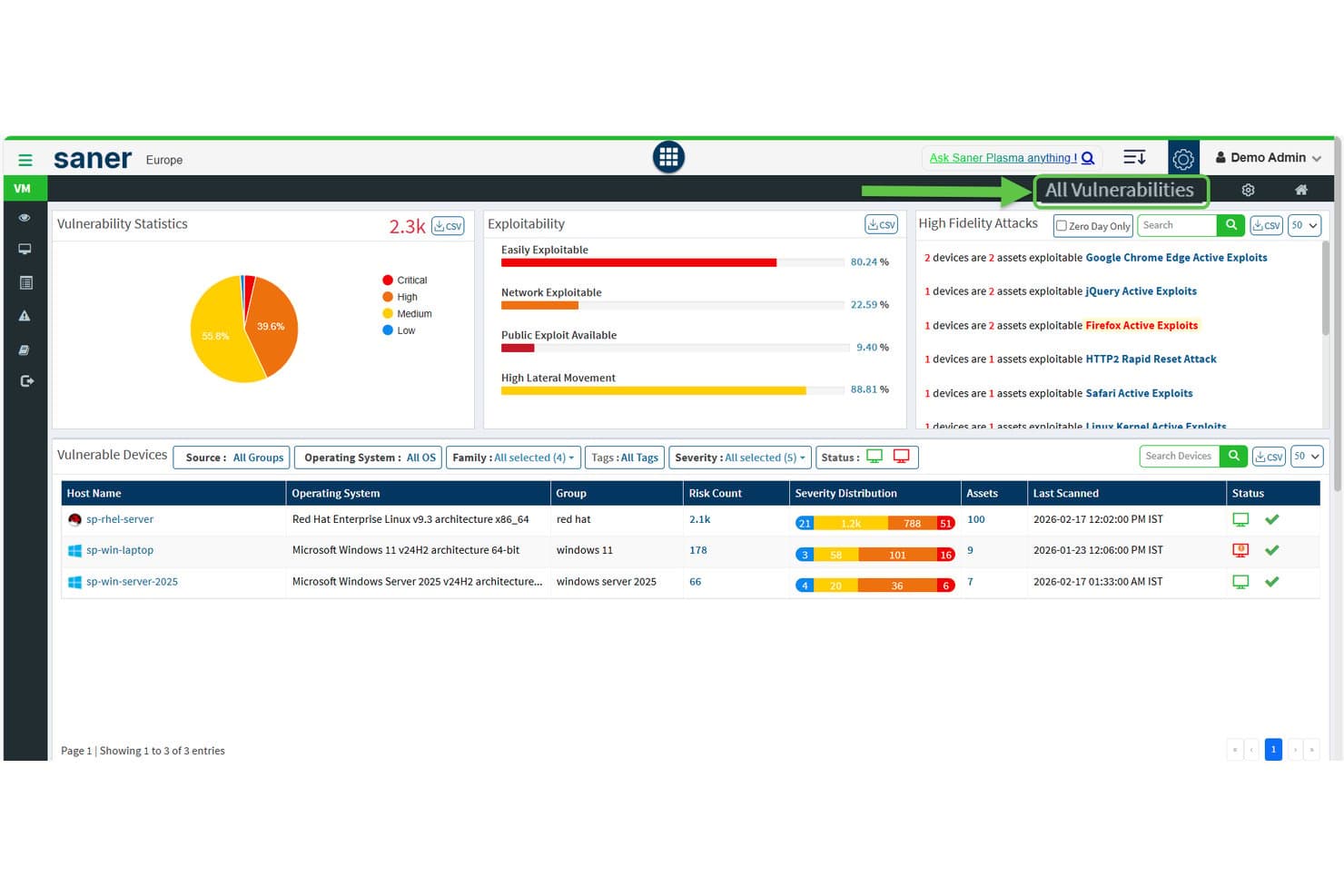
SecPod (Saner Platform) surfaces vulnerability stats and exploitability across devices. Saner COSP (Container Orchestration Security Platform) is SecPod's Kubernetes security module within its broader CNAPP, covering cluster posture management, asset exposure, RBAC entitlements analysis, compliance auditing, and anomaly detection across EKS, AKS, GKE, and on-prem clusters.
Who Is SecPod Best For?
SecPod's Saner COSP is a strong fit for cloud security architects and security leaders managing multi-cluster Kubernetes environments who prioritize configuration posture, RBAC auditing, and compliance reporting over runtime or pre-deployment image scanning.
Why I Picked SecPod (Saner Platform)
I picked SecPod as one of the best because its Saner COSP module goes deeper on Kubernetes posture and compliance auditing than most tools I've evaluated. I particularly like how COSP maps RBAC entitlements across users, service accounts, and cluster roles, flagging wildcard permissions and roles unused for 30 days. Its posture management checks clusters against CIS, NIST 800-53, PCI DSS, and HIPAA simultaneously, with custom benchmarks per namespace.
SecPod (Saner Platform) Key Features
- Asset exposure mapping: Discovers and tracks namespaces, pods, services, ingress, config maps, and secrets, flagging internet-exposed resources and open ports across clusters.
- Container orchestration hygiene score: Aggregates exposure, configuration, access control, and workload security results into a single score you can compare across clusters and namespaces over time.
- SSVC-based risk prioritization: Uses a CISA SSVC decision tree to rank findings by exploitability, mission impact, and automation potential, with results mapped to MITRE ATT&CK.
- Automated remediation rules: Lets you configure scheduled or trigger-based fixes for detected issues, with rollback support if an applied fix needs to be reversed.
SecPod (Saner Platform) Integrations
Integrations include Amazon EKS, Microsoft AKS, Google GKE, self-managed Kubernetes, Freshservice, AWS, Azure, and Google Cloud. REST and report APIs support custom connections, while Okta, Azure AD, Auth0, PingID, and PingFederate provide identity integrations.
Pros and Cons
Pros:
- Automated remediation includes rollback support
- Multi-framework compliance reporting with custom benchmarks
- Deep Kubernetes exposure and RBAC analysis
Cons:
- No real-time in-container threat detection
- No pre-deployment container image scanning
Learn more about SecPod (Saner Platform): Best for auto-fixing container vulnerabilities
- Free plan available
- From $350/month
Visit WebsiteCustomer Rating:4.7/5
Aikido Security provides a unified dashboard to triage and filter issues by type, severity, and scan source. Aikido Security is a developer-native application security platform that combines container image scanning, SAST, SCA, secrets detection, CSPM, and in-app runtime protection across cloud and CI/CD environments.
Who Is Aikido Security Best For?
Aikido Security is a strong fit for DevSecOps teams that want to catch and fix container vulnerabilities before deployment, without adding agent overhead or complex tooling.
Why I Picked Aikido Security
I picked Aikido Security as one of the best because no other tool on this list handles base image vulnerability fixes the way it does. Instead of just flagging a vulnerable base image, it generates three to five ready-to-merge Dockerfile variants, each annotated with exactly which CVEs get fixed or introduced. Pair that with its library of 2,000+ zero-CVE hardened base images, and your team can swap out a risky base image without guessing at tradeoffs.
Aikido Security Key Features
- Reachability analysis: Confirms whether vulnerable functions in dependencies are actually called in your codebase, cutting false positives by up to 95%.
- SBOM generation: Exports software bills of materials in CycloneDX, SPDX, and CSV formats with VEX exploitability analysis, accessible via API for automated workflows.
- CI/CD pipeline gating: Blocks deployments based on configurable severity thresholds across GitHub Actions, GitLab CI/CD, Jenkins, Azure Pipelines, CircleCI, and Bitbucket Pipelines.
- Aikido Intel threat feed: A proprietary real-time feed that detects undisclosed vulnerabilities and malware in open-source ecosystems within 8 minutes of release.
Aikido Security Integrations
Aikido Security offers native integrations with GitHub, GitLab, Bitbucket, Azure Repos, six CI/CD platforms, and 12+ container registries, including Amazon ECR, Harbor, JFrog, and Docker Hub. It also connects with AWS, Azure, GCP, Jira, and Vanta, with API access for custom workflows.
Pros and Cons
Pros:
- Provides 2,000+ zero-CVE base images
- Reduces false positives with reachability analysis
- Auto-generates secure Dockerfile fixes for images
Cons:
- Lacks Kubernetes-native admission control integration
- No eBPF-based container runtime detection
Learn more about Aikido Security: Best for Azure-native container attack path analysis
- 30-day free trial
- From $15/user/month (billed annually)

Microsoft Defender for Cloud filters vulnerability recommendations by Container resource type. Microsoft Defender for Cloud is a cloud-native application protection platform (CNAPP) that covers container image scanning, runtime threat detection, Kubernetes posture management, CI/CD pipeline security, and policy enforcement across Azure, AWS, and GCP environments.
Who Is Microsoft Defender for Cloud Best For?
It's a strong fit for Azure-native security teams that need to trace container attack paths across cloud resources without bolting on a separate CNAPP.
Why I Picked Microsoft Defender for Cloud
I picked Microsoft Defender for Cloud because its Cloud Security Graph does something I haven't seen matched in Azure-native environments: it traces exploitable attack paths from a publicly exposed container all the way through misconfigured RBAC, lateral network paths, and over-permissioned identities to critical cloud assets. That context-aware prioritization means I'm not chasing raw CVE counts but fixing the paths that are actually exploitable. I also like that Kubernetes Gated Deployment blocks non-compliant images at deploy time across AKS, EKS, and GKE, turning posture findings into enforced policy rather than just recommendations.
Microsoft Defender for Cloud Key Features
- Multi-registry image scanning: Agentless vulnerability assessment scans container images across ACR, ECR, GAR, GCR, Docker Hub, and JFrog Artifactory with daily rescans covering OS and language packages.
- MITRE ATT&CK-mapped threat detection: Over 60 built-in analytics tied to the MITRE ATT&CK for Containers framework detect suspicious activity at the cluster, node, and workload levels.
- Defender CLI CI/CD integration: A command-line tool embeds image scanning into 11+ CI/CD platforms, including GitHub Actions, Jenkins, and GitLab, with SARIF-based pass/fail gating.
- Reachability-based SCA via Endor Labs: An integration with Endor Labs identifies which vulnerabilities in container dependencies are actually reachable at runtime, reducing noise in remediation queues.
Microsoft Defender for Cloud Integrations
Microsoft Defender for Cloud offers native integrations with AKS, Amazon EKS, Google GKE, Azure Container Registry, Amazon ECR, GitHub Actions, Jenkins, GitLab, Microsoft Defender XDR, and Microsoft Sentinel. It supports 12 documented CI/CD integrations, plus GitHub Advanced Security, Endor Labs, and Azure Arc.
Pros and Cons
Pros:
- Kubernetes gated deployment for policy enforcement
- Agentless image scanning across major registries
- Attack path analysis from container to cloud
Cons:
- UI complexity reported by enterprise users
- Multi-cloud features lag behind Azure parity
Learn more about Microsoft Defender for Cloud:

Wiz organizes container images by lifecycle, severity, and vulnerability counts. Wiz is a cloud-native application protection platform (CNAPP) that combines agentless image scanning, Kubernetes security posture management, runtime threat detection, CI/CD pipeline integration, and attack path analysis into a single unified platform.
Who Is Wiz Best For?
Wiz is a strong fit for enterprise security teams managing multi-cloud environments who need a single platform to assess and prioritize container risk across the full stack—from code to runtime.
Why I Picked Wiz
Wiz earns its spot on my shortlist because no other platform correlates container risk across the full stack the way its Security Graph does. Instead of surfacing thousands of raw CVEs, it maps relationships between vulnerabilities, misconfigurations, exposed secrets, and network exposure to identify genuinely exploitable attack paths. I also like how its KSPM covers EKS, AKS, and GKE with CIS-certified agentless assessments, tracing lateral movement from Kubernetes clusters into underlying cloud layers.
Wiz Key Features
- Wiz Defend runtime sensor: An eBPF-based sensor that monitors syscalls, process activity, and network flows across containerized workloads with under 2% CPU overhead.
- Wiz Admission Controller: A Kubernetes-native webhook that blocks non-compliant or unsigned container images from deploying based on centrally defined security policies.
- SBOM generation: Agentless, continuous software bill of materials creation across registries, CI/CD pipelines, and runtime environments with full package-level visibility.
- Wiz Workflows: Python-based custom playbooks that automate remediation actions such as revoking cloud roles, rotating credentials, and blocking storage bucket access.
Wiz Integrations
Wiz offers native integrations with GitHub Actions, Jenkins, GitLab CI/CD, Azure DevOps, Amazon ECR, Google Artifact Registry, Azure Container Registry, Docker Hub, Jira, and ServiceNow. It also connects with Splunk, Microsoft Sentinel, Cosign, and Notary.
Pros and Cons
Pros:
- CIS-certified posture for all major Kubernetes
- Security graph pinpoints true attack paths
- Agentless setup finds risks within hours
Cons:
- Some event search workflows feel clunky
- Runtime threat detection is relatively new
Learn more about Wiz: Best for vulnerability and compliance scanning
- 7-day free trial
- Pricing upon request.

Qualys Container Security tracks images, containers, and host vulnerabilities by severity. Qualys Container Security (CS) is a container security platform that covers image vulnerability scanning, runtime threat detection, Kubernetes security posture management, and compliance auditing across the full container lifecycle—from CI/CD pipelines to production.
Who Is Qualys Container Security (CS) Best For?
Qualys Container Security is a strong fit for security teams in regulated industries that need to consolidate vulnerability scanning, compliance auditing, and runtime threat detection under a single platform.
Why I Picked Qualys Container Security (CS)
I've included Qualys Container Security in my top picks because its TruRisk scoring goes beyond raw CVSS to factor in real-world exploitability signals like CISA KEV data and ransomware activity, so your team focuses on vulnerabilities that actually matter. The CIS Docker Benchmark v1.7.0 and Kubernetes compliance controls are continuously enforced, not just checked on demand. I also like that SBOM exports in SPDX and CycloneDX formats come built in, which matters when you need supply chain transparency fast.
Qualys Container Security (CS) Key Features
- Kubernetes Admission Controller: Intercepts Kubernetes API requests and evaluates organizational security policies before workloads are deployed to the cluster.
- QScanner CLI: A zero-install command-line tool that scans local and remote container images and outputs findings in JSON, SARIF, or SBOM formats for pipeline integration.
- eBPF-based Container Runtime Sensor: Monitors container processes, file activity, system calls, and network flows at the kernel level without requiring a sidecar or privileged container.
- Attack Path Analysis: Correlates container vulnerabilities, cloud misconfigurations, and excessive permissions to visualize exploitable paths across containers, nodes, and cloud resources.
Qualys Container Security (CS) Integrations
Qualys Container Security offers native integrations with GitLab CI/CD and Azure DevOps, plus Jenkins support and registry integrations for Amazon ECR, Azure Container Registry, GitHub Container Registry, JFrog Artifactory, and Harbor. QScanner and APIs support custom CI/CD workflows.
Pros and Cons
Pros:
- SBOM generation supports software supply chain transparency
- eBPF runtime protection covers kernel-level attacks
- TruRisk scoring highlights truly exploitable vulnerabilities
Cons:
- Remediation actions require manual team intervention
- Licensing model is complex to interpret
Learn more about Qualys Container Security (CS): Best for comprehensive cloud-native security
- 30-day free trial
- Pricing upon request

Prisma Cloud tracks container image vulnerabilities across the full pipeline. Prisma Cloud is a cloud-native application protection platform (CNAPP) from Palo Alto Networks that combines container image scanning, runtime threat detection, Kubernetes security posture management, CI/CD pipeline integration, and compliance auditing across multi-cloud environments.
Who Is Prisma Cloud Best For?
Prisma Cloud is a strong fit for enterprise security teams managing multi-cloud environments who need a single platform to cover the full container lifecycle—from code to runtime.
Why I Picked Prisma Cloud
Prisma Cloud earns its spot on my shortlist because it covers more of the container security lifecycle in one platform than anything else I've evaluated. I particularly like the dual agentless and agent-based architecture: you can get immediate visibility across a multi-cloud environment without touching a single node, then layer in Defender agents for deep runtime enforcement where it counts. The attack path analysis is what really sets it apart, correlating CVEs, IAM misconfigurations, and network exposure into a visual graph so you're fixing the risks that are actually exploitable.
Prisma Cloud Key Features
- Image Analysis Sandbox: Dynamically executes container images in an isolated environment to detect malware or cryptominer activity before images reach production.
- Compliance framework coverage: Runs 400+ out-of-the-box checks against frameworks including CIS, NIST SP 800-190, PCI DSS, HIPAA, FedRAMP High, and DISA STIG.
- Software Bill of Materials generation: Automatically produces SBOMs as part of the supply chain security module to give teams full visibility into open source dependencies.
- Behavioral baselining: Profiles normal container process, filesystem, and network activity during an initial learning period, then flags or blocks deviations in real time.
Prisma Cloud Integrations
Prisma Cloud offers native integrations with Jenkins, GitHub Actions, CircleCI, AWS CodeBuild, Azure DevOps, Google Cloud Build, Docker Hub, Amazon ECR, Google Container Registry, and Azure Container Registry.
Pros and Cons
Pros:
- 400 plus compliance checks for regulations
- Dual agentless and agent-based deployment options
- Attack path analysis visualizes real exploit scenarios
Cons:
- Complex configuration for multi-cloud environments
- High alert volume can overwhelm small teams
Learn more about Prisma Cloud: Best for runtime drift prevention in containers
- Free trial available
- Pricing upon request

The Aqua workloads explorer provides a topology view for Kubernetes cluster security. Aqua Security is a container security platform built around eBPF-based runtime protection, image vulnerability scanning, Kubernetes security posture management, and software supply chain security across multi-cloud and hybrid environments.
Who Is Aqua Security Best For?
Aqua Security is a strong fit for security and platform engineering teams running containerized workloads at scale who need runtime threat detection alongside supply chain security.
Why I Picked Aqua Security
Aqua Security earns its spot on my shortlist because its eBPF-based drift prevention is genuinely best-in-class: when a container deviates from its known-good state at runtime, Aqua blocks the unauthorized process or file change without terminating the workload. I also like the Dynamic Threat Analysis sandbox, which catches fileless malware and zero-day threats that static scanning misses entirely. Its patented vulnerability shielding blocks exploitation of unpatched components at runtime, buying your team time without requiring a code change.
Aqua Security Key Features
- Dynamic Threat Analysis sandbox: Runs container images in a secure virtual sandbox to detect fileless malware, zero-day attacks, and supply chain threats that static scanning misses.
- Kubernetes Risk Explorer: Provides an interactive, real-time map of running clusters that surfaces and rates security risks across namespaces, nodes, containers, and network connections.
- Software supply chain security module: Scans all source repositories for vulnerabilities, IaC misconfigurations, secrets, and license issues while generating digitally signed SBOMs at every stage of the build pipeline.
- CI/CD Assurance Policies: Enforces pass/fail security gates across Jenkins, GitHub Actions, GitLab CI, and other platforms to block non-compliant images from advancing to deployment.
Aqua Security Integrations
Aqua Security offers native integrations across 8+ CI/CD platforms and 10+ container registries, including Jenkins, GitLab CI, GitHub Actions, Azure DevOps, Amazon ECR, JFrog Artifactory, Harbor, Red Hat Quay, Docker Hub, and Sonatype Nexus Repository. It also supports Terraform and AWS CloudFormation.
Pros and Cons
Pros:
- Dynamic sandbox detects fileless container malware
- FedRAMP High approval supports regulated environments
- Drift prevention blocks unauthorized container changes
Cons:
- UI navigation frustrates new administrators
- Pricing not transparent without vendor contact
Learn more about Aqua Security: Best for container visibility and forensics
- Free demo available
- Pricing upon request

Sysdig reveals package vulnerabilities across container image layers. Sysdig is a cloud-native application protection platform (CNAPP) that combines runtime threat detection, image vulnerability scanning, Kubernetes security posture management, and forensic investigation capabilities built on the open-source Falco engine.
Who Is Sysdig Best For?
Sysdig is a strong fit for security and platform engineering teams running containerized workloads at scale who need deep runtime visibility and the ability to investigate incidents after they happen.
Why I Picked Sysdig
Sysdig earns its spot on my shortlist because it's the only vendor here that created Falco, the CNCF-graduated runtime detection engine now running inside 60% of Fortune 500 environments. That foundation gives it unmatched container visibility: eBPF-based syscall capture lets you see exactly which processes ran, which files were touched, and which connections were made inside a container, in real time. When an incident happens, Sysdig's forensic reconstruction lets you replay the full attack timeline rather than piecing it together from incomplete logs.
Sysdig Key Features
- Sysdig Sage: An AI assistant that answers security questions in plain language and auto-generates remediation tickets with full contextual detail.
- Cloud Attack Graph: Visualizes exploitable attack paths by correlating vulnerabilities, misconfigurations, exposed secrets, and excessive permissions across your environment.
- Software supply chain security: Validates image provenance and supports Sigstore/Cosign image signing verification to detect tampering across the build-to-deploy chain.
- Continuous compliance monitoring: Automatically checks your environment against frameworks like FedRAMP, PCI-DSS, HIPAA, and CIS Benchmarks, with on-demand audit-ready PDF reports.
Sysdig Integrations
Sysdig offers documented integrations with GitHub Actions, GitLab CI, Jenkins, CircleCI, Argo CD, AWS ECR, Google GCR, Azure ACR, Harbor, and JFrog Artifactory. It also connects with Splunk, Jira, ServiceNow, Slack, PagerDuty, and Open Policy Agent.
Pros and Cons
Pros:
- Real-time forensics with reconstructable attack timelines
- Correlates risk paths with Cloud Attack Graph
- Deepest runtime visibility with Falco syscall capture
Cons:
- No free trial for Sysdig Secure
- Initial setup and tuning is complex
Learn more about Sysdig: Best for runtime-driven vulnerability prioritization
- Free demo available
- Pricing upon request

Sysdig Secure surfaces package vulnerabilities across container image layers. Sysdig Secure is a CNAPP and container security platform built on eBPF-based runtime detection that spans image vulnerability scanning, Kubernetes posture management, cloud detection and response, compliance auditing, and CI/CD pipeline security.
Who Is Sysdig Secure Best For?
Sysdig Secure is a strong fit for enterprise security and platform engineering teams running large-scale Kubernetes environments who need runtime context to cut through vulnerability noise.
Why I Picked Sysdig Secure
Sysdig Secure earns its spot on my shortlist because it's built on Falco, the CNCF-graduated runtime engine that detects threats at the kernel level using eBPF, giving it visibility that no static scanner can replicate. What I find most compelling is its in-use package prioritization: runtime context filters out vulnerabilities tied to packages not actually loaded in memory, cutting noise by up to 99.8% so your team works a real list, not a theoretical one. The CVE360 graph then layers in exploitability data and asset criticality to make prioritization genuinely actionable.
Sysdig Secure Key Features
- Falco-based runtime engine: Detects threats at the kernel level using eBPF instrumentation, capturing Linux syscalls across containers and hosts in real time.
- Cloud Attack Graph: Correlates vulnerabilities, misconfigurations, exposed secrets, and excessive permissions to map exploitable attack paths across your cloud environment.
- Sysdig Sage GenAI assistant: Answers security questions in plain language and walks your team through step-by-step remediation, including exact commands and base-image upgrade paths.
- Compliance module: Continuously audits Kubernetes and cloud configurations against frameworks like FedRAMP, PCI DSS 4.0, HIPAA, DISA STIGs, and CIS Benchmarks, with scheduled PDF and CSV report generation.
Sysdig Secure Integrations
Sysdig Secure offers native integrations with GitHub Actions, GitLab, Jenkins, Azure Pipelines, Amazon ECR, Azure Container Registry, Docker Hub, Quay, Splunk, and ServiceNow. It also supports Backstage and an API for custom security workflows.
Pros and Cons
Pros:
- Covers compliance for regulated industries
- Kernel-level detection with Falco eBPF engine
- Filters out vulnerabilities not in memory
Cons:
- Dashboard reporting features are limited
- Initial configuration is technically demanding
Learn more about Sysdig Secure: Best for Kubernetes-native supply chain security
- 60-day free trial
- Pricing upon request
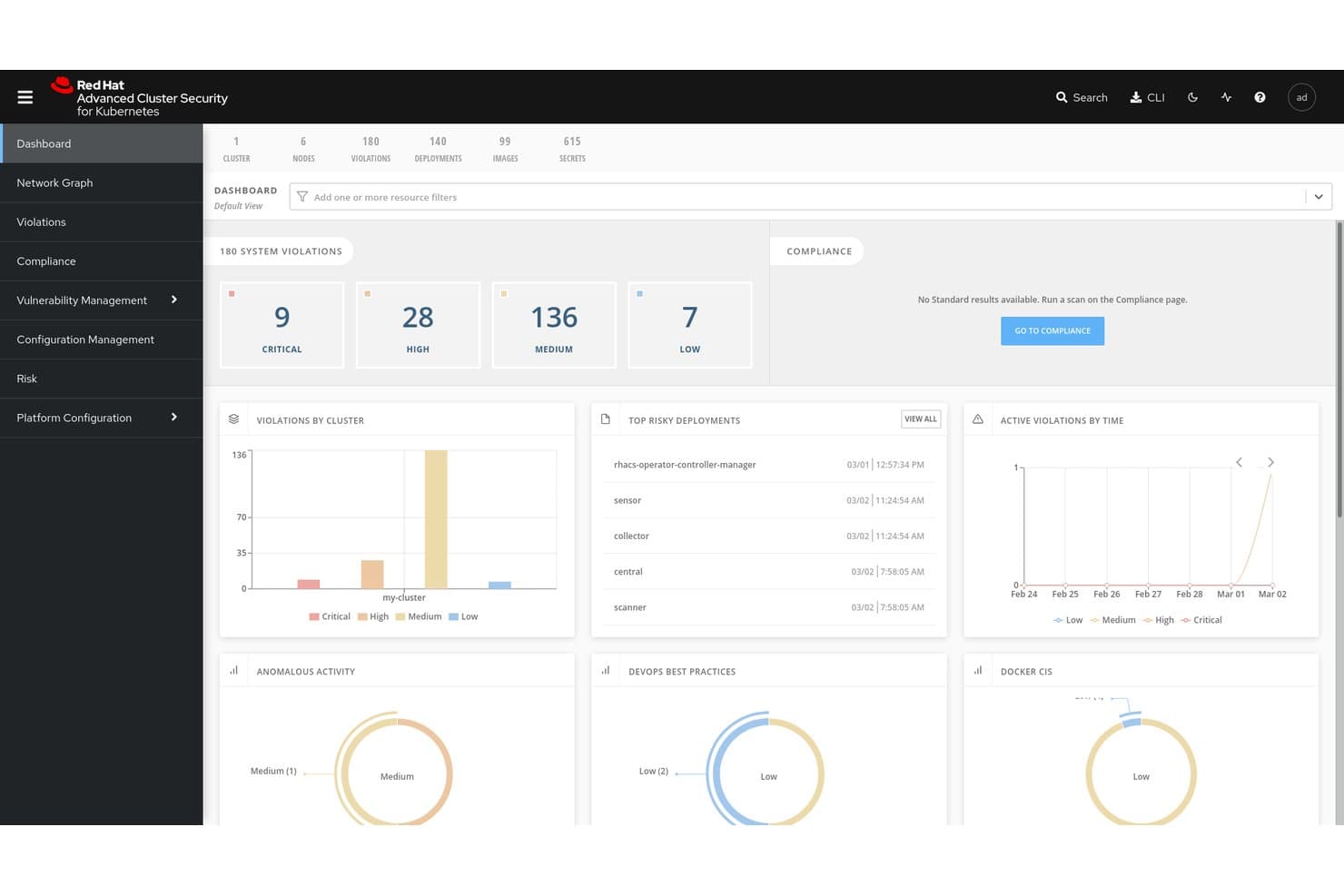
Red Hat Advanced Cluster Security for Kubernetes centralizes violation and risk visibility. Red Hat Advanced Cluster Security for Kubernetes (RHACS) is a Kubernetes-native container security platform that covers image vulnerability scanning, runtime threat detection, policy enforcement, and compliance auditing across multi-cluster and multi-cloud environments.
Who Is Red Hat Advanced Cluster Security for Kubernetes Best For?
RHACS is a natural fit for platform and DevSecOps teams running workloads on Red Hat OpenShift or multi-cloud Kubernetes environments who need deep, native security coverage across the full container lifecycle.
Why I Picked Red Hat Advanced Cluster Security for Kubernetes
I picked RHACS as one of the best because it's purpose-built for Kubernetes from the ground up, which makes it uniquely suited for supply chain security at the orchestrator level. I particularly like how it combines Cosign/Sigstore image signature verification with SBOM generation in SPDX 2.3 format, letting teams enforce policies that block unsigned images before they ever reach the cluster. Its
roxctlCLI integrates directly into Jenkins, GitHub Actions, and Tekton pipelines to gate builds on policy violations at configurable severity thresholds.Red Hat Advanced Cluster Security for Kubernetes Key Features
- eBPF CO-RE runtime collection: Captures kernel-level syscall, process, file, and network telemetry from running containers without kernel modules or sidecar containers.
- Admission controller with configurable failure modes: Enforces deploy-time policies via a Kubernetes admission webhook, with Fail Open or Fail Close behavior to match your availability and security requirements.
- Automated compliance scanning: Runs scheduled checks against CIS, NIST, PCI DSS 4.0, HIPAA, and ISO 27001 frameworks, with one-click auditor-ready evidence export from a single dashboard.
- Multi-cluster discovery: Detects unprotected clusters across Amazon EKS, Google GKE, and Microsoft AKS via Paladin Cloud and Red Hat OpenShift Cluster Manager integration.
Red Hat Advanced Cluster Security for Kubernetes Integrations
Native integrations include Red Hat OpenShift, Amazon EKS, Google GKE, Microsoft AKS, Jenkins, GitHub Actions, Tekton, and Argo CD. RHACS also connects with Quay, Amazon ECR, and Prometheus through its metrics endpoint.
Pros and Cons
Pros:
- Deep compliance coverage across multiple frameworks
- eBPF runtime visibility with kernel-level detection
- Purpose-built for Kubernetes security controls
Cons:
- Some admin tasks require command line interface
- Richest features tied to OpenShift platform
Learn more about Red Hat Advanced Cluster Security for Kubernetes:
Andre sikkerhetsløsninger for containere
Her er noen flere alternativer for sikkerhetsløsninger for containere som ikke kom med på kortlisten min, men som likevel er verdt å undersøke:
- 11Orca SecurityBest for side-scanning container technology
- 12ARMOBest for Kubernetes RBAC and runtime hardening
- 13CrowdStrike Falcon Cloud SecurityBest for adversary-mapped container risk ranking
- 14SnykBest for container vulnerability management
- 15Check Point CloudGuardBest for ThreatCloud AI-enriched runtime defense
- 16NeuVectorBest for open-source zero-trust container security
- 17PingSafeBest for adaptive threat defense
- 18Trend Micro Cloud SecurityBest for enterprise CNAPP with XDR correlation
- 19Tenable Container Security ScannerBest for exposure-led container risk management
How I Evaluate Container Security Solutions
I evaluate container security tools in two layers: baseline capabilities like image scanning and runtime detection, then differentiators like Kubernetes hardening depth and CI/CD integration.
Core Functionality (Table Stakes For This List)
When I'm selecting tools for my list, I rank each one on a scale from 0 (does not offer the functionality) to 5 (excels in this area) for each core functionality listed below. Then, I calculate the tool's total score into a percentage. Each tool needs to achieve a minimum total score of 65% to be considered for inclusion.
- Image Vulnerability Scanning: I check whether the tool scans container images across registries for CVEs, embedded secrets, and outdated packages—plus whether it generates SBOMs.
- Runtime Threat Detection: Real-time monitoring of running containers matters, so I evaluate how each tool detects anomalous processes, unexpected network calls, and container drift.
- Kubernetes Configuration Hardening: Each tool should assess K8s clusters against CIS benchmarks, flag risky RBAC permissions, and surface misconfigured admission controllers.
- CI/CD Pipeline Integration: I look at how each tool plugs into build pipelines to gate deployments—whether it supports policy checks in GitHub Actions, GitLab CI, or Jenkins.
- Compliance & Policy Enforcement: Pre-built policy templates for frameworks like PCI-DSS, HIPAA, and SOC 2 are a baseline; I also evaluate custom policy authoring and reporting depth.
- Network Segmentation Controls: Container-aware microsegmentation helps prevent lateral movement, so I look for L3–L7 policy enforcement and clear east-west traffic visibility.
Once I have a list of tools that meet this criteria, I consider what sets each platform apart.
Differentiating Factors (What Sets Vendors Apart)
Here's how I compare and contrast different vendors:
Standout Features
AI-driven risk prioritization is a big differentiator—tools that correlate CVEs with runtime exposure and exploitability help teams cut through alert noise and focus on real threats. I also evaluate admission controller enforcement, which blocks non-compliant workloads from deploying into clusters before they cause issues. Unified CNAPP capabilities matter when teams want container security combined with CSPM, CWPP, and CIEM in one console, reducing tool sprawl across the cloud-native stack.
Beyond Features
Deployment model matters a lot here. I check whether a tool supports agent-based, agentless, or hybrid scanning—and whether it can run in air-gapped environments for regulated teams. Ecosystem integrations are equally important; a tool that connects to your SIEM, ticketing system, and registries like Harbor or Artifactory keeps security data flowing where your team already works. I also evaluate scalability, specifically how lightweight the runtime sensors are across clusters with thousands of nodes and whether multi-cloud visibility lives in a single console.
Slik velger du en sikkerhetsløsning for containere
Det er lett å gå seg vill i lange funksjonslister og komplekse prismodeller. For å hjelpe deg med å holde fokus mens du arbeider deg gjennom den unike programvareutvelgelsesprosessen din, får du her en sjekkliste over faktorer du bør ha i bakhodet:
| Faktor | Hva bør du vurdere? |
|---|---|
| FaktorSkalerbarhet | Hva bør du vurdere?Kan verktøyet vokse med virksomheten din? Vurder om det håndterer økt arbeidsbelastning og flere brukere uten behov for konstante oppgraderinger. |
| FaktorIntegrasjoner | Hva bør du vurdere?Fungerer det med de eksisterende verktøyene dine? Se etter kompatibilitet med CI/CD-pipelines, skyleverandører og annen viktig programvare. |
| FaktorTilpasningsmuligheter | Hva bør du vurdere?Kan du tilpasse det til behovene dine? Se etter alternativer for å justere innstillinger, dashbord og varsler slik at de passer arbeidsflyten din. |
| FaktorBrukervennlighet | Hva bør du vurdere?Er det brukervennlig? Sørg for at grensesnittet er intuitivt og krever minimal opplæring før teamet ditt kan komme i gang. |
| FaktorImplementering og introduksjon | Hva bør du vurdere?Hvor raskt kan du komme i gang? Vurder tiden det tar å sette opp løsningen, tilgangen på ressurser som opplæring og støtte i de innledende fasene. |
| FaktorKostnad | Hva bør du vurdere?Passer det budsjettet ditt? Sammenlign prisplaner, se opp for skjulte gebyrer og vurder verdien du får for prisen. |
| FaktorSikkerhetstiltak | Hva bør du vurdere?Finnes det solide beskyttelsestiltak? Se etter kryptering, tilgangskontroller og samsvar med bransjestandarder for å ivareta datasikkerheten. |
| FaktorKrav til samsvar | Hva bør du vurdere?Oppfyller det regelverket? Kontroller om løsningen er i tråd med juridiske standarder som gjelder for bransjen din, for eksempel GDPR eller HIPAA. |
Hva er sikkerhetsløsninger for containere?
Sikkerhetsløsninger for containere er verktøy som er utviklet for å beskytte containeriserte applikasjoner mot sårbarheter og trusler. IT-fagfolk, utviklere og sikkerhetsteam bruker vanligvis disse verktøyene for å sikre at applikasjoner kjører sikkert i ulike miljøer, enten de bruker alternativer til Docker eller andre containerplattformer. Sårbarhetsskanning, samsvarskontroller og beskyttelse under kjøring bidrar til å identifisere risikoer, oppfylle krav og sikre driften. Disse verktøyene gir viktig sikkerhet for å holde de containeriserte applikasjonene dine trygge og i samsvar med kravene.
Funksjoner
Når du velger sikkerhetsløsninger for containere, bør du se etter følgende viktige funksjoner:
- Sårbarhetsskanning: Identifiserer og varsler deg om potensielle sikkerhetsrisikoer i containeravbildningene og applikasjonene som kjører.
- Samsvarskontroller: Sikrer at containerne dine oppfyller bransjestandarder og regelverk som GDPR og HIPAA.
- Beskyttelse under kjøring: Overvåker og beskytter mot trusler mens containeriserte applikasjoner kjøres.
- Integrasjonsmuligheter: Fungerer sømløst med eksisterende CI/CD-pipelines og skyleverandører for å opprettholde sikkerheten gjennom utviklingsfasene.
- Rollebasert tilgangskontroll: Lar deg angi tillatelser og administrere brukertilgang til sensitiv informasjon og handlinger.
- Automatisk utbedring: Gir automatiske løsninger på identifiserte sårbarheter, slik at behovet for manuell inngripen reduseres.
- Varsling i sanntid: Varsler teamet ditt umiddelbart om sikkerhetshendelser, slik at dere kan reagere raskt.
- Tilpassbare dashbord: Gir en tilpasset visning av sikkerhetsmålinger og varsler, slik at det blir enklere å overvåke det som er viktig for deg.
- Kryptering: Sikrer at data i containerne er beskyttet mot uautorisert tilgang.
- Trusseldeteksjon basert på maskinlæring: Bruker avanserte algoritmer til å identifisere og forutse potensielle trusler, noe som styrker de overordnede sikkerhetstiltakene.
Fordeler
Implementering av sikkerhetsløsninger for containere gir flere fordeler for teamet og virksomheten din. Her er noen av fordelene du kan se frem til:
- Forbedret sikkerhet: Ved å bruke sårbarhetsskanning og beskyttelse under kjøring reduserer du risikoen for sikkerhetsbrudd og beskytter sensitive data.
- Overholdelse av regelverk: Samsvarskontroller sikrer at driften oppfyller nødvendige juridiske standarder, slik at bøter og juridiske problemer unngås.
- Tidsbesparelser: Automatisk utbedring og varsling i sanntid gjør at teamet ditt kan reagere raskt på trusler uten manuelt arbeid.
- Forbedret effektivitet: Integrasjonsmuligheter med eksisterende verktøy effektiviserer prosessene og opprettholder sikkerheten gjennom hele utviklingen.
- Tilgangskontroll: Rollebasert tilgangskontroll bidrar til å administrere hvem som kan få tilgang til hva, og reduserer risikoen for uautoriserte handlinger.
- Bedre beslutningsgrunnlag: Tilpassbare dashbord gir innsikt i sikkerhetsmålinger, slik at du kan ta bedre informerte sikkerhetsbeslutninger.
- Databeskyttelse: Kryptering sikrer at data er beskyttet mot uautorisert tilgang, og opprettholder konfidensialitet og integritet.
Kostnader & priser
For å velge sikkerhetsløsninger for containere må du forstå de ulike prismodellene og abonnementene som er tilgjengelige. Kostnadene varierer basert på funksjoner, teamstørrelse, tillegg og mer. Tabellen nedenfor oppsummerer vanlige abonnementer, gjennomsnittsprisene deres og typiske funksjoner som er inkludert i sikkerhetsløsninger for containere:
Sammenligningstabell for abonnementer for sikkerhetsløsninger for containere
| Abonnementstype | Gjennomsnittspris | Vanlige funksjoner |
|---|---|---|
| AbonnementstypeGratisabonnement | Gjennomsnittspris$0 | Vanlige funksjonerGrunnleggende sårbarhetsskanning, begrensede samsvarskontroller og brukerstøtte fra fellesskapet. |
| AbonnementstypePersonlig abonnement | Gjennomsnittspris$5-$25/bruker/måned | Vanlige funksjonerAvansert skanning, grunnleggende beskyttelse under kjøring og brukerstøtte via e-post. |
| AbonnementstypeBedriftsabonnement | Gjennomsnittspris$30-$75/bruker/måned | Vanlige funksjonerFullstendige samsvarskontroller, integrasjonsmuligheter og rollebasert tilgangskontroll. |
| AbonnementstypeVirksomhetsabonnement | Gjennomsnittspris$100+/bruker/måned | Vanlige funksjonerTilpassbare dashbord, trusseldeteksjon med maskinlæring og dedikert brukerstøtte. |
Vanlige spørsmål om containersikkerhetsløsninger
Hvilke avveininger bør du forvente mellom verktøy for containersikkerhet med åpen kildekode og kommersielle verktøy?
Med verktøy for åpen kildekode får du ofte fleksibilitet, tilpasningsmuligheter og ingen lisensavgifter – men du må vanligvis selv håndtere mer integrasjonsarbeid, finjustering og støtte. Kommersielle løsninger har en tendens til å samle flere funksjoner som fungerer direkte fra start (dashbord, varsler, policy-motorer), men du kan bli bundet til leverandørbegrensninger eller høyere kostnader etter hvert som du skalerer. Du bør vurdere teamets modenhet, kompleksiteten i miljøene dine og hvor villig du er til å bygge koblinger mellom verktøyene.
Hvilke utfordringer oppstår når du sikrer containere på tvers av multisky- eller hybridinfrastrukturer?
I multiskymiljøer vil du møte inkonsistente API-er, ulike identitetsmodeller og forskjellige nettverkspolicyer. En løsning som fungerer i AWS, kan være vanskelig å overføre til Azure eller lokale miljøer. Du trenger verktøy som abstraherer bort disse forskjellene (eller bruker et sentralt kontrollplan) og gjør det mulig å opprettholde en enhetlig sikkerhetsstilling på tvers av skymiljøer.
Hvordan kan jeg løse problemer med containere som avsluttes uventet i AWS Fargate?
Uventede avslutninger av containere i AWS Fargate kan skyldes ressursbegrensninger eller feilkonfigurasjoner. Kontroller oppgavedefinisjonen for å sikre riktige ressurstildelinger, og gå gjennom loggene for feilmeldinger. Justering av minne- eller CPU-innstillingene kan løse problemet.
Hvordan håndterer du falske positiver i sårbarhetsskanninger av containeravbildninger?
Falske positiver er vanlige når skannere flagger problemer med lav påvirkning eller avhengigheter som appen din faktisk ikke bruker. For å redusere støyen kan du justere tersklene i skanneren, undertrykke varsler fra funn med lav risiko og sammenholde skanneresultatene over tid for å se hvilke problemer som vedvarer. Du kan også kryssvalidere funn med flere verktøy eller bruke et metarammeverk (f.eks. LUCID) for å redusere uoverensstemmelser mellom skannere.