

Samlede IT-administrasjonsplattformer for virksomheter er sentraliserte systemer som lar deg overvåke, automatisere og sikre alle deler av IT-miljøet fra ett sted. Hvis du ser etter måter å redusere kompleksiteten, styrke sikkerheten og sørge for at organisasjonens teknologi fungerer døgnet rundt, er dette løsningene du trenger.
Denne veiledningen fremhever de beste plattformene for virksomheter, med skalerbarheten, integrasjonene og kontrollene virksomheten din er avhengig av – slik at det blir enklere for deg å sammenligne, evaluere og velge riktig verktøy for teamet ditt.
Hvorfor du kan stole på våre programvareanbefalinger
6,700+
Reviews
20
Industry experts
16+
Evaluation factors
14
Years
Teamet vårt har testet og anmeldt programvare siden 2012. Vi er selv teknologiledere, så vi vet hvor vanskelig og hvor viktig det er å velge riktig programvare.
I denne guiden har vi vurdert verktøyene gjennom praktisk testing og uavhengig research og gitt dem poeng ut fra våre utvelgelseskriterier.
Anmeldelsene våre bygger på vår egen redaksjonelle vurdering. De er ikke et salgsargument.
Ekspertanmeldere:
- Paulo Gardini MiguelTech Director
 Tim FisherVP of AI
 Gabriel RosasTech Lead & Software Architect
 Christhian GruhnTech Lead & Platform Architect

Sammenligningstabell for samlede IT-administrasjonsplattformer for virksomheter
Denne sammenligningstabellen oppsummerer prisdetaljene for utvalget mitt av de beste samlede IT-administrasjonsplattformene for virksomheter:
| Tool | Best For | Trial Info | Price | ||
|---|---|---|---|---|---|
| 1 | Best for secure mobile device management | 30-day free trial available | From $4/client device/month | Website | |
| 2 | Best for real-time endpoint visibility | Free demo available | Pricing upon request | Website | |
| 3 | Best for hyper-automation capabilities | Free demo available | Pricing upon request | Website | |
| 4 | Best for rapid patch deployment | Not available | Pricing upon request | Website | |
| 5 | Best for script-based task automation | Free demo available | Pricing upon request | Website | |
| 6 | Best for automated workflow orchestration | Free demo available | Pricing upon request | Website | |
| 7 | Best for Microsoft ecosystem integration | Free trial available | From $60/user/month (billed annually) | Website | |
| 8 | Best for predictive service management | Free demo available | Pricing upon request | Website | |
| 9 | Best for agentless remote monitoring | Free trial + free demo available | Pricing upon request | Website | |
| 10 | Best for unified endpoint automation | 30-day free trial + free demo available | From $795/50 endpoints (billed annually) | Website |


Anmeldelser av de beste samlede IT-administrasjonsplattformene for virksomheter
Nedenfor finner du mine detaljerte sammendrag av de beste samlede IT-administrasjonsplattformene for virksomheter som kom med på kortlisten min. Anmeldelsene mine gir en detaljert gjennomgang av funksjonene, integrasjonene og de beste bruksområdene for hver plattform, slik at du kan finne den beste for deg.
 Best for secure mobile device management
- 30-day free trial available
- From $4/client device/month
Visit WebsiteCustomer Rating:4.2/5
IBM MaaS360 offers a unified organization overview dashboard displaying device counts, users, apps, policies, risk scores, shared device usage, watchlists, and battery health metrics. IBM MaaS360 is a cloud-based Unified Endpoint Management (UEM) platform that combines mobile device management, mobile threat defense, AI-powered policy management, and endpoint security across iOS, Android, Windows, and macOS.
Who Is IBM MaaS360 Best For?
It's a strong fit for enterprise IT teams in regulated industries like healthcare and retail that need to secure and manage large, distributed fleets of mobile and mixed-OS endpoints.
Why I Picked IBM MaaS360
IBM MaaS360 earns its spot on my shortlist because of how it handles mobile security at depth. I specifically like the Secure Container feature, which isolates corporate data from personal apps on a BYOD device without requiring full device enrollment. Paired with built-in Mobile Threat Defense that detects MITM attacks and phishing attempts in real time, it covers the two biggest exposure points in any enterprise mobile fleet.
IBM MaaS360 Key Features
- AI-assisted policy guidance: Built-in AI reviews existing configurations and suggests policy improvements with clear explanations.
- Unified endpoint inventory: Consolidates smartphones, tablets, laptops, desktops, wearables, and IoT devices in a single dashboard.
- Granular role-based access controls: Supports multi-tier admin permissions and site-based management for complex organizations.
- Cloud Extender integration: Connects directly with enterprise infrastructure like Active Directory, Exchange, and certificate authorities.
IBM MaaS360 Integrations
IBM MaaS360 offers native integrations with Microsoft Exchange, Office 365, Active Directory, Azure AD, and certificate authorities, and provides an API for custom integrations.
Pros and Cons
Pros:
- Unified management across Windows, macOS, Android, iOS
- Real-time mobile threat detection and alerts
- Policy enforcement for BYOD and corporate devices
Cons:
- No centralized ITSM or help desk module
- Lacks server and network infrastructure management
Learn more about IBM MaaS360: Best for real-time endpoint visibility
- Free demo available
- Pricing upon request
Visit WebsiteCustomer Rating:4.5/5
Tanium offers a comprehensive Investigate dashboard displaying open investigations by initial activity, activity count, days opened, priority, assignee, and status for enterprise IT management. Tanium is an autonomous endpoint management platform that unifies real-time endpoint visibility, patch management, vulnerability management, configuration management, and security operations across large-scale enterprise IT environments.
Who Is Tanium Best For?
Tanium is a strong fit for large enterprises and global organizations with complex, distributed IT environments that need centralized control across tens of thousands of endpoints.
Why I Picked Tanium
I picked Tanium as one of the best because its real-time endpoint query engine can pull live data from every managed device simultaneously, returning results in seconds rather than hours. In practice, that means my team can identify exactly which endpoints are missing a specific patch or running a vulnerable process at any given moment. Tanium Atlas then ties that visibility directly to autonomous remediation, so what I see is also what I can act on instantly.
Tanium Key Features
- Autonomous patch management: Automates OS and third-party software patching workflows across your entire endpoint estate.
- Configuration baselines: Maintains and enforces custom configuration standards for Windows, macOS, and Linux devices.
- Vulnerability exposure management: Pinpoints vulnerabilities and compliance gaps across all managed and unmanaged endpoints in real time.
- Role-based access controls: Granular RBAC lets you define privileges and policies for users, teams, and environments.
Tanium Integrations
Tanium offers native integrations with ServiceNow and has native integrations across the Microsoft ecosystem, including Azure. An API is available for custom integrations.
Pros and Cons
Pros:
- Strong compliance and vulnerability modules
- Handles over 100,000 endpoints easily
- Real-time search across all endpoints
Cons:
- Complex deployment for smaller IT teams
- Lacks native network device monitoring
Learn more about Tanium: Best for hyper-automation capabilities
- Free demo available
- Pricing upon request
Visit WebsiteCustomer Rating:4/5
Ivanti Neurons offers a centralized device management dashboard displaying vulnerability metrics, device discovery by data source, and highlights for the past 7 days. Ivanti Neurons is a cloud-native enterprise IT management platform that unifies endpoint management, ITSM, patch management, asset discovery, vulnerability management, and network security under a single architecture powered by AI and automation.
Who Is Ivanti Neurons Best For?
Ivanti Neurons is a strong fit for large enterprises with complex, distributed IT environments where IT operations and security teams need to manage thousands of endpoints across multiple sites.
Why I Picked Ivanti Neurons
Ivanti Neurons earns its spot on my shortlist because of how far its automation goes beyond basic scripting. I love that the self-healing bots detect and resolve endpoint issues before users even notice them, with no technician intervention required. The no-code workflow designer also lets my team build cross-domain automation spanning ITSM, patch management, and security from a single canvas, which cuts out a significant amount of repetitive manual work across the environment.
Ivanti Neurons Key Features
- Unified IT dashboard: Manage endpoints, networks, servers, cloud, and applications from a single interface.
- Risk-based patch management: Automate OS and application patching with prioritized risk scoring.
- AI-powered ticket classification: Automatically categorize and route service requests using machine learning.
- Role-based access controls: Set user permissions and delegation for large, distributed IT teams.
Ivanti Neurons Integrations
Ivanti Neurons offers native integrations with Microsoft 365, Azure Active Directory, AWS, ServiceNow, Jamf, Okta, CrowdStrike, and Tenable. An API is available for custom integrations.
Pros and Cons
Pros:
- Automated risk-based patch deployment
- Real-time asset intelligence across endpoints
- Hyper-automation for proactive issue resolution
Cons:
- Limited advanced analytics customization options
- Workflow automation setup is complex
Learn more about Ivanti Neurons:
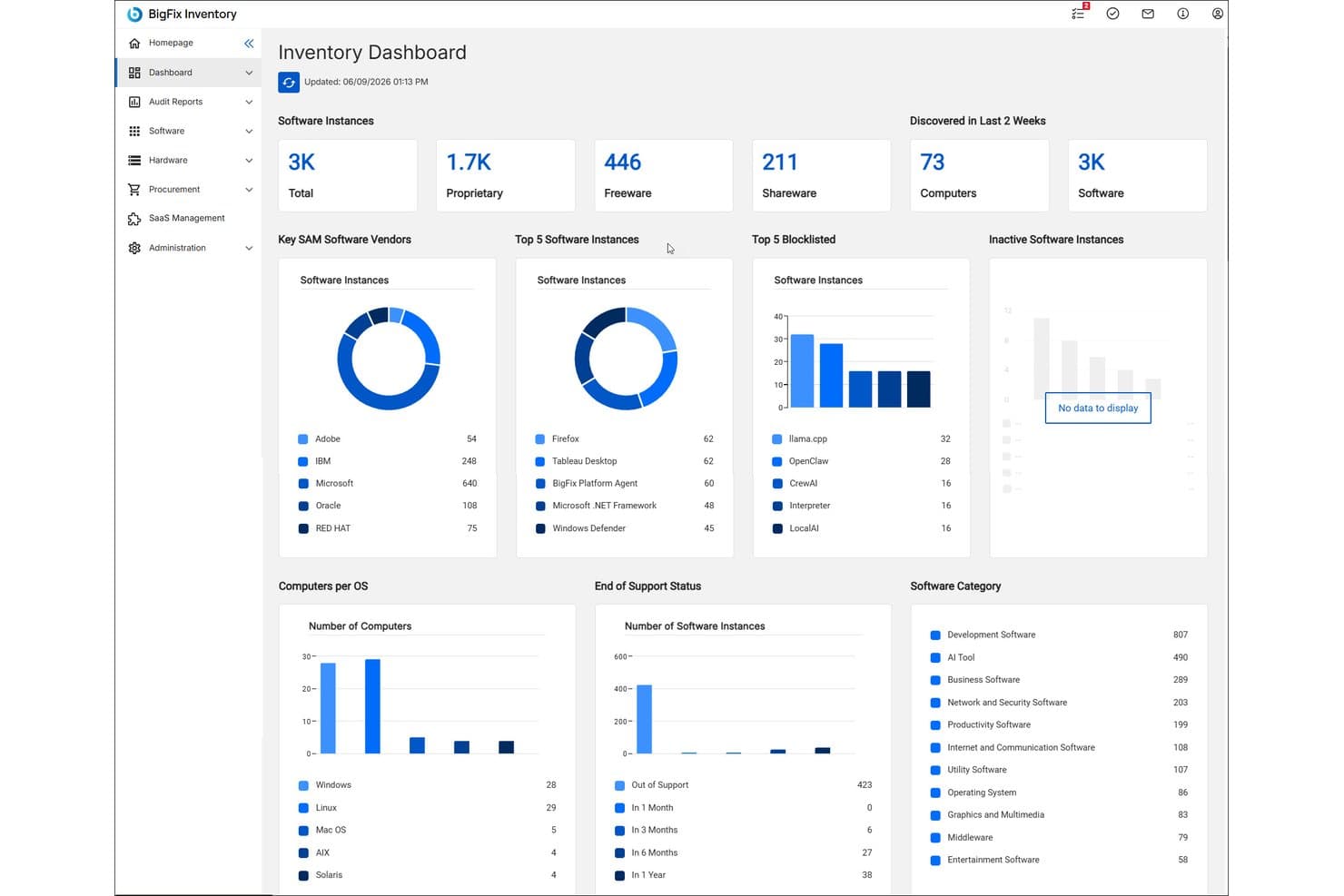
HCL BigFix offers a centralized Inventory Dashboard displaying software instances, top vendors, blocklisted software, OS distribution, and end-of-support status across the enterprise. HCL BigFix is an enterprise endpoint management platform that unifies patch management, vulnerability remediation, compliance enforcement, asset inventory, and cloud lifecycle management across on-premises, hybrid, and multi-cloud environments through a single agent and console.
Who Is HCL BigFix Best For?
HCL BigFix is a strong fit for large enterprise IT and security operations teams managing thousands of endpoints across distributed, heterogeneous infrastructure environments.
Why I Picked HCL BigFix
HCL BigFix earns its spot on my shortlist because of how it handles patch deployment at scale. I like that it covers 100+ OS variants through a single agent, so my team isn't juggling separate tooling for Windows, Linux, and Unix servers simultaneously. The 600K+ pre-built remediations mean we can push patches without authoring content from scratch, and the greater than 98% first-pass patch success rate holds up even across air-gapped environments.
HCL BigFix Key Features
- Agentic AI for employee support: Built-in AI assistant provides automated troubleshooting and IT self-service for end users.
- Digital Employee Experience module: Monitors device health, usage analytics, and employee experience data from a centralized dashboard.
- ServiceNow integration: Connects natively to ServiceNow for automated asset discovery, incident response, and ITSM workflows.
- Software inventory and asset management: Tracks hardware and software assets across every managed endpoint for compliance and audit needs.
HCL BigFix Integrations
HCL BigFix offers native integrations with ServiceNow, Tenable, Qualys, Rapid7, and supports connecting BigFix Inventory with ServiceNow CMDB and Vulnerability Response. An API is available for custom integrations.
Pros and Cons
Pros:
- 600K+ ready-to-use remediation actions
- Single agent for endpoints, servers, and cloud
- Rapid multi-OS patching for large environments
Cons:
- Limited macOS device management depth
- No built-in network device management
Learn more about HCL BigFix: Best for script-based task automation
- Free demo available
- Pricing upon request

Kaseya VSA offers a comprehensive default dashboard displaying system status, active alerts, patch status, and critical system monitoring across multiple client groups. Kaseya VSA is an RMM platform that combines endpoint monitoring, automated patch management, network monitoring, mobile device management, and remote control into a single unified management console.
Who Is Kaseya VSA Best For?
Kaseya VSA is a strong fit for IT operations teams managing large, distributed endpoint environments who need deep scripting flexibility and centralized control at scale.
Why I Picked Kaseya VSA
Kaseya VSA earns its spot on my shortlist because of the depth of its scripting engine. I've worked with the 600+ out-of-the-box script templates to automate everything from patch compliance checks to incident remediation, and the policy-based automation layer lets you push those workflows across thousands of endpoints simultaneously. The auto-remediation capability means alerts don't just notify you, they trigger fixes before a ticket is ever created.
Kaseya VSA Key Features
- Remote monitoring and control: Manage endpoints, servers, and network devices securely from a single interface.
- Automated patch management: Schedule and deploy OS and third-party application patches across distributed environments.
- Network device discovery: Scan and map connected network assets automatically for complete hardware visibility.
- Role-based access control: Configure granular permissions and user roles for multi-team and multi-site administration.
Kaseya VSA Integrations
Kaseya VSA offers native integrations with IT Glue, BMS, Autotask, RocketCyber, and more. An API is available for custom integrations.
Pros and Cons
Pros:
- Policy-based patch and compliance management
- Granular role-based access controls
- Extensive library of pre-built automation scripts
Cons:
- Support response times can vary
- User interface feels outdated
Learn more about Kaseya VSA: Best for automated workflow orchestration
- Free demo available
- Pricing upon request
Visit WebsiteCustomer Rating:4.4/5
ServiceNow ITOM offers an AIOps 360° overview dashboard displaying noise reduction, workload savings, and alert MTTR metrics across assignment groups. ServiceNow ITOM is an AIOps-driven IT operations management platform that unifies infrastructure discovery, event management, service mapping, and automated incident remediation across hybrid and multi-cloud enterprise environments.
Who Is ServiceNow ITOM Best For?
ServiceNow ITOM is built for large enterprises with complex, distributed IT environments where IT directors and operations managers need centralized control at scale.
Why I Picked ServiceNow ITOM
ServiceNow ITOM earns its spot on my shortlist because its agentic AI remediation handles the full incident loop, from root cause identification to triggering a fix workflow, without manual intervention. Flow Designer and IntegrationHub let me build cross-domain orchestration that connects event detection directly to remediation across hybrid environments. In practice, my team handles far fewer incidents manually because the platform resolves them before they escalate.
ServiceNow ITOM Key Features
- Service mapping: Creates dynamic maps of applications and their dependencies across cloud and on-premises environments.
- Event management: Consolidates alerts from third-party monitoring tools and correlates them to critical business services.
- Operational intelligence: Uses machine learning to identify anomalies and forecast potential incidents.
- Cloud governance: Enables policy-driven management of resources and change impact analysis across multi-cloud infrastructure.
ServiceNow ITOM Integrations
ServiceNow ITOM offers native integrations with AWS, Microsoft Azure, Google Cloud Platform, Microsoft Teams, Slack, Jira, Salesforce, Okta, and Power BI, and provides an API for custom integrations.
Pros and Cons
Pros:
- Centralized real-time operations dashboard
- End-to-end service dependency mapping
- Automated issue remediation with AI workflows
Cons:
- Patch automation not included by default
- Requires extensive configuration before deployment
Learn more about ServiceNow ITOM: Best for Microsoft ecosystem integration
- Free trial available
- From $60/user/month (billed annually)
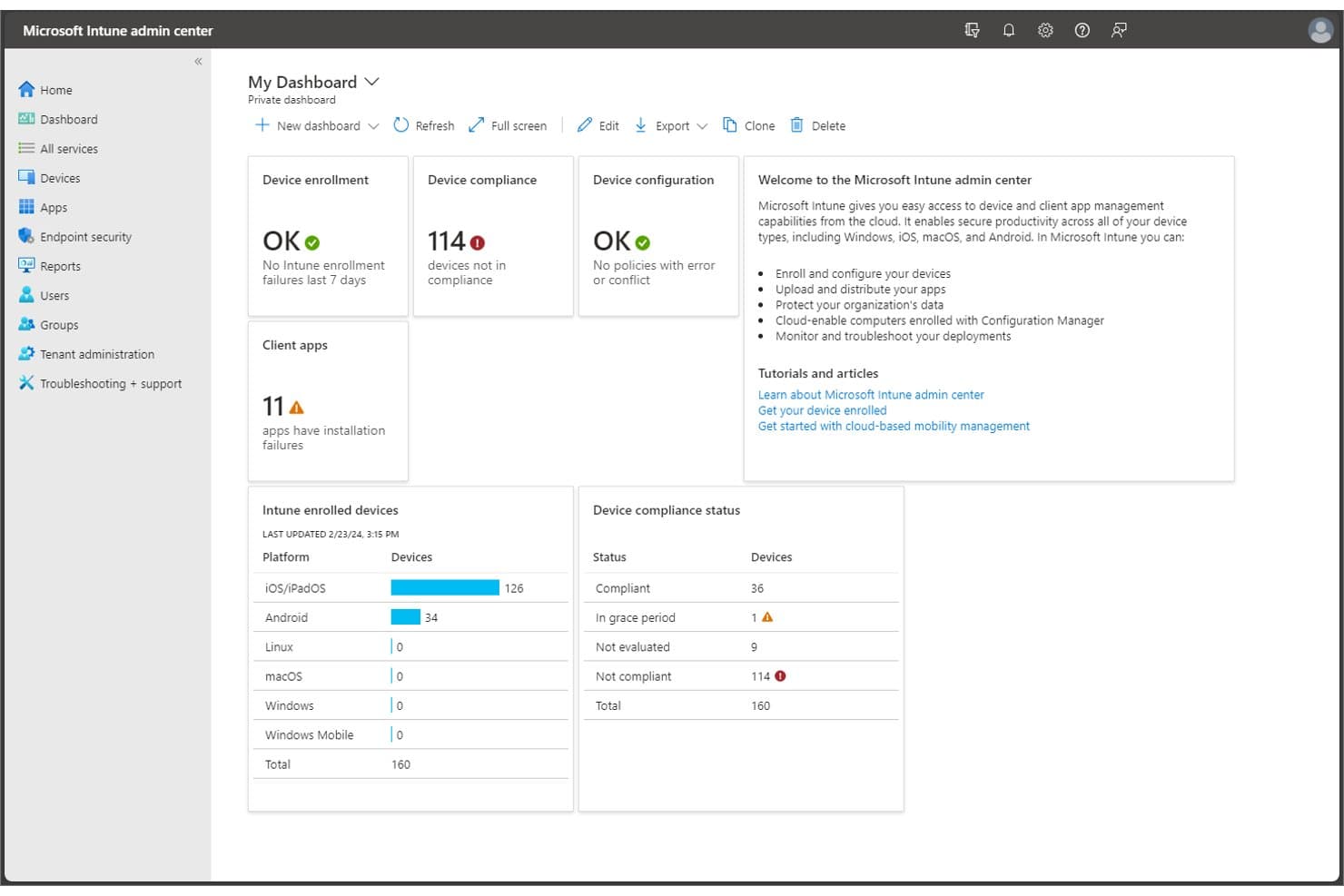
Microsoft Intune offers a unified admin dashboard displaying device enrollment, compliance status, client app failures, and enrolled device breakdowns by platform. Microsoft Intune is a cloud-native unified endpoint management (UEM) platform that covers device enrollment, configuration policy enforcement, patch deployment, application management, and compliance reporting across Windows, macOS, iOS, Android, and Linux environments.
Who Is Microsoft Intune Best For?
It's a strong fit for enterprise IT teams already running Microsoft 365 or Azure, where native integration with Entra ID, Defender, and Configuration Manager adds the most value.
Why I Picked Microsoft Intune
I've included Microsoft Intune in my top picks because its native integration with Entra ID and Microsoft Defender creates a unified security and management layer that no third-party tooling can replicate. I particularly like Endpoint Privilege Management, which lets standard users run only IT-approved elevated tasks without local admin rights. Microsoft Security Copilot in Intune also surfaces AI-driven remediation recommendations directly in the admin console, cutting through alert noise during incident triage.
Microsoft Intune Key Features
- Cloud-based remote help: Secure, real-time remote assistance connections between IT staff and end users for troubleshooting device issues.
- Enterprise application management: Centralized platform to deploy, update, and revoke applications across all enrolled devices.
- Advanced analytics and device queries: Provides detailed reporting and custom device queries to surface compliance and configuration data.
- Specialized device management: Supports management for kiosks, shared devices, and IoT specialty endpoints alongside standard computers and mobile devices.
Microsoft Intune Integrations
Microsoft Intune has native integrations across the Microsoft ecosystem, including Microsoft 365, Azure, Microsoft Entra ID, Microsoft Defender, and Configuration Manager, and offers an API for custom integrations.
Pros and Cons
Pros:
- Scales to 100,000+ endpoints per tenant
- Advanced compliance automation with Microsoft Purview
- Centralized policy enforcement for all device types
Cons:
- Limited visibility into non-Microsoft environments
- Lacks built-in server and network monitoring
Learn more about Microsoft Intune: Best for predictive service management
- Free demo available
- Pricing upon request

BMC Helix ITSM offers an AI-powered 'Ask HelixGPT' insights panel that surfaces potential resolutions, related knowledge articles, and similar ticket data directly within a critical incident record. BMC Helix is an enterprise IT management suite that spans ITSM, AIOps, network observability, CMDB, asset management, and SecOps across cloud, hybrid, and on-premises environments.
Who Is BMC Helix Best For?
BMC Helix is a strong fit for large enterprises with complex, distributed IT environments that need a single platform spanning service management, AIOps, and infrastructure visibility.
Why I Picked BMC Helix
I picked BMC Helix as one of the best because its Proactive Problem Management genuinely shifts IT ops from reactive firefighting to predictive resolution. I like how the AIOps engine automatically identifies root causes and triggers remediation before incidents escalate. BMC HelixGPT is bundled natively into the suite, so my team gets AI-driven insights without bolting on a separate tool.
BMC Helix Key Features
- Unified CMDB: Centralizes and maps IT infrastructure components with automatic dependency discovery.
- Service catalog and portal: Lets users submit requests and track incidents through a configurable self-service interface.
- Role-based access control (RBAC): Supports granular permission models for large, distributed teams and organizations.
- Integrated ChatOps connectors: Enables real-time collaboration using Microsoft Teams and Slack within ITSM workflows.
BMC Helix Integrations
BMC Helix offers native integrations with Microsoft Teams, Slack, Salesforce, and other BMC products like Discovery and CMDB. An API is available for custom integrations.
Pros and Cons
Pros:
- Proactive anomaly detection in cloud and hybrid
- Extensive cross-domain IT service management suite
- Agentic AI automates complex incident remediation
Cons:
- Customization can require specialist BMC expertise
- Limited native patch management capabilities
Learn more about BMC Helix: Best for agentless remote monitoring
- Free trial + free demo available
- Pricing upon request
Visit WebsiteCustomer Rating:5/5
NinjaOne offers a unified IT patching dashboard that displays compliance rates, patch installation status, and device counts by OS version across the enterprise. NinjaOne is a cloud-native unified IT operations platform that combines endpoint management, remote monitoring, automated patch management, backup, MDM, and IT documentation in a single console.
Who Is NinjaOne Best For?
NinjaOne is a strong fit for IT operations teams and MSPs managing large, distributed endpoint environments across hybrid Windows, macOS, and Linux infrastructures.
Why I Picked NinjaOne
NinjaOne earns its spot on my shortlist because of how it handles agentless remote monitoring for network infrastructure. Using SNMP-based polling, I can pull real-time health data from switches, routers, and printers without deploying any software to those devices. I've used this alongside Patch Intelligence AI, which flags problematic updates before they roll out to agent-managed endpoints, keeping the full estate stable across both monitored and managed device types.
NinjaOne Key Features
- Autonomous patch management: Schedule and deploy OS and third-party application updates across multiple platforms.
- Mobile device management: Enroll, monitor, and set policies for Android, iOS, Windows, and macOS devices from a unified dashboard.
- IT asset management: Track hardware and software inventory with automated discovery and comprehensive reporting.
- Integrated backup: Configure endpoint and server backups for fast restore and protection of critical systems.
NinjaOne Integrations
NinjaOne offers native integrations with Microsoft Intune, SentinelOne, ServiceNow, Autotask, HaloPSA, IT Glue, Slack, Zendesk, and more. An API is available for custom integrations.
Pros and Cons
Pros:
- Centralized backup and recovery management
- Automated multi-OS patch deployment
- Agentless monitoring for networked devices
Cons:
- Lacks advanced ITSM workflow modules
- No native network performance monitoring
Learn more about NinjaOne: Best for unified endpoint automation
- 30-day free trial + free demo available
- From $795/50 endpoints (billed annually)
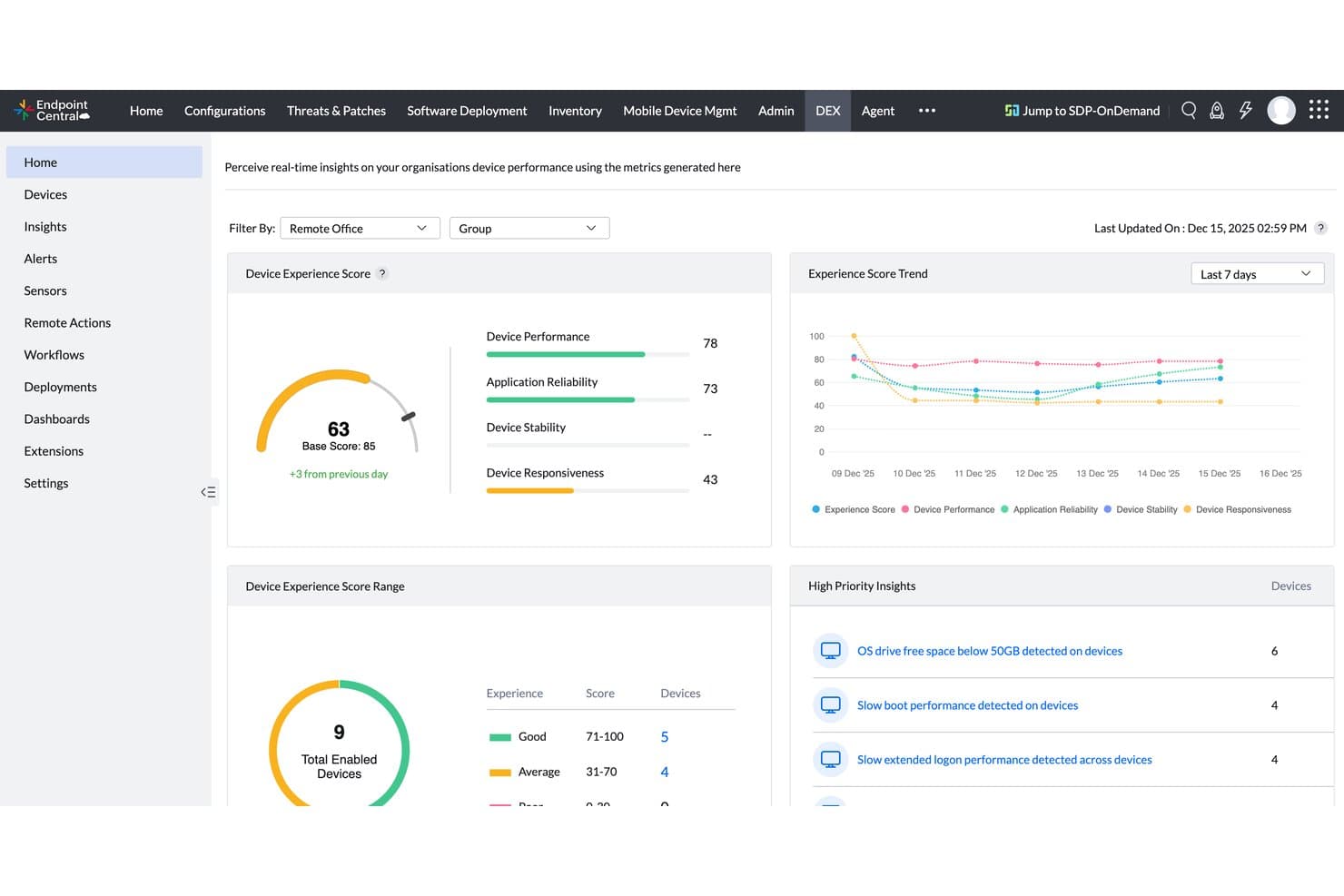
ManageEngine Endpoint Central offers a DEX (Digital Experience) dashboard with real-time device performance scores, experience trends, and high-priority IT insights for enterprise device management. ManageEngine Endpoint Central is a unified endpoint management and security platform that covers patch management, OS deployment, mobile device management, asset management, remote troubleshooting, and built-in endpoint security across Windows, macOS, Linux, and mobile devices.
Who Is ManageEngine Endpoint Central Best For?
It's a strong fit for IT operations teams in mid-size to large enterprises managing distributed endpoints across multiple locations or remote workforces.
Why I Picked ManageEngine Endpoint Central
ManageEngine Endpoint Central earns its spot on my shortlist because the automation depth here is genuinely hard to find in a single platform. I rely on its automated scan-detect-test-deploy workflows to patch 1,100+ third-party applications with a 99% first-pass success rate. I also use the 350+ script repository alongside DEX telemetry to build event-driven remediation workflows that catch and fix endpoint issues before users report them.
ManageEngine Endpoint Central Key Features
- OS imaging and deployment: Create, customize, and deploy operating system images to multiple devices across your environment.
- Role-based access control (RBAC): Set granular permissions for technicians and admins managing endpoints in different locations or departments.
- Built-in endpoint detection and response (EDR): Detect, investigate, and remediate threats with integrated AI-assisted EDR tools.
- Remote control and troubleshooting: Initiate remote sessions to troubleshoot, assist, and resolve issues directly on user devices.
ManageEngine Endpoint Central Integrations
ManageEngine Endpoint Central offers native integrations with ServiceDesk Plus, Zendesk, Splunk Enterprise, Jira Service Management, CrowdStrike, Rapid7, and Tenable Cloud Security. An API is available for custom integrations.
Pros and Cons
Pros:
- Granular role-based access for distributed teams
- Built-in EDR and ransomware rollback features
- Automated patch management for third-party software
Cons:
- Reporting customization options are somewhat limited
- Network monitoring requires separate ManageEngine product
Learn more about ManageEngine Endpoint Central:
Andre samlede IT-administrasjonsplattformer for virksomheter
Her er noen flere alternativer for samlede IT-administrasjonsplattformer for virksomheter som ikke kom med på kortlisten min, men som likevel er verdt å se nærmere på:
- 11Omnissa Workspace ONE UEMBest for multiplatform device control
- 12FreshserviceBest for intuitive service automation
- 13SolarWinds Service DeskBest for advanced ticket management workflows
- 14Hexnode UEMBest for cross-platform device administration
- 15AteraBest for all-in-one IT automation toolkit
- 16Action1Best for cloud-based endpoint compliance
- 17Datto RMMBest for integrated backup and recovery tools
- 18Jamf ProBest for Apple device lifecycle management
- 19ConnectWise RMMBest for policy-driven device oversight
- 20N-able N-central RMMBest for scalable multi-site management
How I Evaluate Enterprise United IT Management Platforms
I split my evaluation into baseline criteria every platform must meet—like cross-domain visibility and automated patching at scale—and differentiating factors that separate the leaders from the rest.
Core Functionality (Table Stakes For This List)
When I'm selecting tools for my list, I rank each one on a scale from 0 (does not offer the functionality) to 5 (excels in this area) for each core functionality listed below. Then, I calculate the tool's total score into a percentage. Each tool needs to achieve a minimum total score of 75% to be considered for inclusion.
- Unified IT Dashboard: I look for a single view that correlates data across endpoints, networks, and cloud—so you're not jumping between tabs to trace an outage.
- Multi-Domain Coverage: The platform should natively handle at least endpoint, network, ITSM, and asset management without bolting on separate products.
- Enterprise-Scale Architecture: I check whether the platform supports multi-site deployments with granular RBAC, since large orgs need delegated admin across regions.
- Automation & Orchestration: Cross-domain workflow automation matters—like auto-creating a ticket, isolating an endpoint, and notifying the team when a threat fires.
- Patch & Configuration Management: I evaluate how the tool handles OS and third-party patching together, plus whether it enforces configuration baselines post-deployment.
- Security & Compliance: Built-in vulnerability management and compliance reporting aligned to frameworks like SOC 2 or ISO 27001 should come standard, not as add-ons.
Once I have a list of tools that meet the criteria, I consider what sets each platform apart.
Differentiating Factors (What Sets Vendors Apart)
Here's how I compare and contrast different vendors:
Standout Features
AIOps capabilities make a real difference—I look for platforms that use ML-driven anomaly detection to cut through alert noise and flag root causes before a minor blip becomes a major outage. A unified CMDB is another separator, since it gives you one source of truth for asset dependencies across ITSM, ITOM, and ITAM modules. I also evaluate low-code workflow builders that let your team automate cross-domain processes without writing custom scripts for every scenario.
Beyond Features
Integration depth matters—I check whether a platform offers native connectors to the enterprise systems you're already running, like AWS, Azure, and ServiceNow, plus open APIs for custom workflows. Licensing transparency is equally important, since hidden costs around implementation and premium support can blow up your total cost of ownership after you've committed. I also evaluate compliance certifications like SOC 2 Type II and ISO 27001, along with granular RBAC and audit trails that regulated industries need to pass audits without scrambling.
Slik velger du samlede IT-administrasjonsplattformer for virksomheter
Det er lett å gå seg vill i lange funksjonslister og komplekse prismodeller. For å hjelpe deg med å holde fokus mens du går gjennom den unike programvarevalgsprosessen din, får du her en sjekkliste over faktorer du bør ha i mente:
| Faktor | Hva du bør vurdere |
|---|---|
| FaktorSkalerbarhet | Hva du bør vurdereVil plattformen håndtere den forventede veksten, utvidelser av lokasjoner eller fusjons- og oppkjøpsaktivitet uten forringelse eller lisensproblemer? |
| FaktorIntegrasjoner | Hva du bør vurdereKan den kobles direkte til de viktigste appene, skyplattformene og automatiseringsverktøyene dine, eller må du utvikle midlertidige løsninger? |
| FaktorTilpasningsmuligheter | Hva du bør vurdereTilpasser plattformen seg retningslinjene, prosessene og rapporteringsbehovene dine – eller krever den midlertidige løsninger og kostbar rådgivning? |
| FaktorBrukervennlighet | Hva du bør vurdereVil teamet ditt faktisk ta den i bruk, eller vil forvirrende grensesnitt og arbeidsflyter føre til frustrasjon og økt bruk av uautoriserte verktøy? |
| FaktorImplementering og innføring | Hva du bør vurdereHvilke ressurser, hvilken ekspertise og hvilken tidsplan kreves for å rulle ut løsningen og lære opp team i stor skala? Finnes det akseleratorer eller tilgjengelige partnere? |
| FaktorKostnad | Hva du bør vurdereForstår du lisensmodellene, implementeringskostnadene og kostnadene etter lansering fullt ut, inkludert nødvendige tillegg eller skjulte gebyrer? |
| FaktorSikkerhetstiltak | Hva du bør vurdereHvor godt samsvarer RBAC, kryptering, revisjonsspor og arbeidsflyter for hendelseshåndtering med sikkerhetsmodellen og risikotoleransen din? |
| FaktorEtterlevelseskrav | Hva du bør vurdereTilbyr leverandøren sertifiseringene og dokumentasjonen for etterlevelse som kreves for bransjen din eller de geografiske områdene du opererer i? |
Hva er samlede IT-administrasjonsplattformer for virksomheter?
Samordnede IT-administrasjonsplattformer for virksomheter er løsninger i virksomhetsklasse som lar deg overvåke, administrere og automatisere alle aspekter ved IT-miljøet ditt – inkludert endepunkter, nettverk, servere og skysystemer – fra ett samlet grensesnitt. Disse plattformene bidrar til å effektivisere IT-driften, forbedre tjenesteleveransen og støtte optimalisering på tvers av komplekse infrastrukturer ved å redusere driftsmessige siloer og fjerne flaskehalser i arbeidsflyten.
De kombinerer ofte ITSM-verktøy, kunnskapsadministrasjon, prosjektstyring, DevOps, endringsadministrasjon og IT-støttefunksjoner med brede integrasjonsmuligheter. Dette gir IT-team bedre innsikt i nøkkeltall, styrker kundestøtten og gjør det mulig for organisasjoner å samarbeide mer effektivt med teknologileverandører.
Funksjoner i samordnede IT-administrasjonsplattformer for virksomheter
Når du velger samordnede IT-administrasjonsplattformer for virksomheter, bør du se etter følgende viktige funksjoner:
- Samlet kontrollpanel: Gir et konsolidert grensesnitt for overvåking og administrasjon av alle IT-ressurser, slik at behovet for å bytte mellom verktøy eller skjermer reduseres.
- Administrasjon på tvers av domener: Gjør det mulig å ha oversikt over endepunkter, nettverk, servere, skyressurser og applikasjoner på ett sted, noe som forenkler administrasjon og feilsøking.
- IT-automatisering: Automatiserer repetitive oppgaver som installasjon av sikkerhetsoppdateringer, programvaredistribusjon og hendelseshåndtering, slik at teamet får mer tid til arbeid med høyere verdi.
- Rollebasert tilgangskontroll: Lar deg angi detaljerte tillatelser for brukere og team, slik at de rette personene får riktig tilgangsnivå til systemer og data.
- Administrasjon av oppdateringer og konfigurasjoner: Distribuerer sikkerhetsoppdateringer og håndhever konfigurasjonsregler automatisk på tvers av heterogene miljøer, noe som reduserer sårbarheter og konfigurasjonsavvik.
- Integrert sikkerhet og samsvar: Tilbyr innebygde verktøy for sårbarhetsvurdering, samsvarsrapportering og håndheving av regler for å oppfylle organisatoriske standarder og forskrifter.
- Ressursoppdagelse og oversikt: Skanner miljøet kontinuerlig for å oppdage og katalogisere maskinvare, programvare og skyressurser, og gir en IT-oversikt i sanntid.
- Orkestrering av arbeidsflyter: Lar deg utforme og utføre prosesser i flere trinn på tvers av flere IT-domener uten manuell inngripen eller komplisert koding.
- Tilpassbar rapportering: Genererer detaljerte rapporter som kan deles, om IT-ytelse, samsvar og ressursstatus for å støtte revisjoner, ledelsesbeslutninger og regelmessige gjennomganger.
- API- og integrasjonsøkosystem: Støtter tilkobling til eksisterende virksomhetsapplikasjoner, skyplattformer og sikkerhetsverktøy, slik at data kan utveksles sømløst og funksjonaliteten utvides.
Fordeler med samordnede IT-administrasjonsplattformer for virksomheter
Implementering av samordnede IT-administrasjonsplattformer for virksomheter gir flere fordeler for teamet og virksomheten din. Her er noen av fordelene du kan se frem til:
- Sentralisert oversikt: Få full oversikt over endepunkter, nettverk, servere og skysystemer for raskere beslutningstaking og feilsøking.
- Forbedret sikkerhetsnivå: Benytt integrert sårbarhetsadministrasjon, håndheving av regler og samsvarsrapportering i sanntid for å redusere risikoen på en konsekvent måte.
- Driftseffektivitet: Automatiser oppdateringer, konfigurasjon og repetitive arbeidsflyter, slik at teamet kan konsentrere seg om strategiske prioriteringer.
- Forenklet styring: Håndhev regler og kontroller på tvers av IT-domener med rollebasert tilgang og detaljerte revisjonsspor, noe som gjør samsvar enklere.
- Raskere hendelseshåndtering: Identifiser, isoler og utbedre problemer raskt ved hjelp av samlede kontrollpaneler og automatiseringsfunksjoner.
- Kostnadsbesparelser: Konsolider flere eldre verktøy og punktverktøy i én plattform, slik at løpende programvarekostnader og opplæringsbehov reduseres.
- Bedre brukeropplevelse: Utnytt innsikt i den digitale medarbeideropplevelsen for å løse problemer proaktivt når de påvirker produktiviteten.
Kostnader og priser for samordnede IT-administrasjonsplattformer for virksomheter
Valg av samordnede IT-administrasjonsplattformer for virksomheter krever en forståelse av de ulike prismodellene og abonnementene som er tilgjengelige. Kostnadene varierer basert på funksjoner, teamstørrelse, tillegg og mer. Tabellen nedenfor oppsummerer vanlige abonnementer, gjennomsnittsprisene deres og typiske funksjoner som er inkludert i løsninger for samordnet IT-administrasjon i virksomheter:
Sammenligningstabell for abonnementer for samordnede IT-administrasjonsplattformer for virksomheter
| Plantype | Gjennomsnittspris | Vanlige funksjoner |
|---|---|---|
| PlantypeGratisabonnement | Gjennomsnittspris$0 | Vanlige funksjonerGrunnleggende enhetsovervåking, begrenset tilgang til dashbord og brukerstøtte fra fellesskapet. |
| PlantypePersonlig abonnement | Gjennomsnittspris$20-$50/bruker/måned | Vanlige funksjonerTilgang for én bruker, grunnleggende automatisering, standardrapportering og grunnleggende oppdateringshåndtering. |
| PlantypeForretningsabonnement | Gjennomsnittspris$50-$100/bruker/måned | Vanlige funksjonerStøtte for flere brukere, arbeidsflytautomatisering, integrasjonsalternativer, rollebasert tilgangskontroll og verktøy for overholdelse av krav. |
| PlantypeVirksomhetsabonnement | Gjennomsnittspris$100+/bruker/måned | Vanlige funksjonerAvansert automatisering, tilpassbare dashbord, dekning av flere domener, prioritert brukerstøtte og forbedret sikkerhet. |
Vanlige spørsmål om samlede IT-administrasjonsplattformer for virksomheter
Her er noen svar på vanlige spørsmål om samlede IT-administrasjonsplattformer for virksomheter:
Hvordan skiller samlede IT-administrasjonsplattformer for virksomheter seg fra tradisjonelle verktøy for IT-administrasjon?
Samlede IT-administrasjonsplattformer for virksomheter kombinerer flere IT-domener – som administrasjon av endepunkter, nettverk og sky – i én løsning, mens tradisjonelle verktøy vanligvis fokuserer på bare ett område. Denne enhetlige tilnærmingen reduserer mengden verktøy og gjør det enklere å håndheve retningslinjer og feilsøke problemer.
Kan disse plattformene integreres med eksisterende virksomhetsapplikasjoner og skytjenester?
Ja, de fleste moderne plattformer tilbyr innebygde integrasjoner for populære virksomhetsverktøy og skyplattformer, samt åpne API-er for tilpassede arbeidsflyter. Dette lar deg koble IT-administrasjonsmiljøet ditt sammen med systemene du allerede bruker.
Hvilke sikkerhetstiltak bør jeg forvente fra disse plattformene?
Du bør forvente funksjoner som rollebasert tilgangskontroll, kryptering av data i ro og under overføring, innebygde revisjonsspor og samsvarssertifiseringer som SOC 2 Type II eller ISO 27001. Disse sikkerhetstiltakene bidrar til å oppfylle både interne krav og lovpålagte krav.
Hvor lang tid tar det å implementere en samlet IT-administrasjonsplattform for virksomheter?
Implementeringstiden varierer etter organisasjonens størrelse og eksisterende kompleksitet, men du kan forvente alt fra noen uker for grunnleggende oppsett til flere måneder for store utrullinger på tvers av flere domener. Forhåndsbygde maler og støtte fra partnere kan bidra til å fremskynde prosessen.
Er samlede IT-administrasjonsplattformer for virksomheter egnet for multinasjonale organisasjoner?
Ja, disse plattformene er ofte utviklet med globale operasjoner i tankene og støtter regional datalagring, grensesnitt på flere språk og delegert administrasjon, slik at du kan overholde krav og arbeide effektivt på tvers av flere regioner.