

Etter min erfaring kan den rette plattformen endre måten du håndterer enhetskommunikasjon og overvåking på. Jeg har testet og vurdert disse løsningene uavhengig for å gi deg et objektivt innblikk i de beste tilgjengelige alternativene.
I denne artikkelen finner du innsikt i de beste plattformene for IoT-enhetsadministrasjon, som hver har unike funksjoner og fordeler tilpasset dine behov. La oss se nærmere på hvordan disse verktøyene kan hjelpe teamet ditt med å administrere IoT-enheter mer effektivt.
Hvorfor du kan stole på våre programvareanbefalinger
6,700+
Reviews
20
Industry experts
16+
Evaluation factors
14
Years
Teamet vårt har testet og anmeldt programvare siden 2012. Vi er selv teknologiledere, så vi vet hvor vanskelig og hvor viktig det er å velge riktig programvare.
I denne guiden har vi vurdert verktøyene gjennom praktisk testing og uavhengig research og gitt dem poeng ut fra våre utvelgelseskriterier.
Anmeldelsene våre bygger på vår egen redaksjonelle vurdering. De er ikke et salgsargument.
Ekspertanmeldere:
- Paulo Gardini MiguelTech Director
 Tim FisherVP of AI
 Gabriel RosasTech Lead & Software Architect
 Christhian GruhnTech Lead & Platform Architect

Sammenligningstabell for plattformer for IoT-enhetsadministrasjon
Denne sammenligningstabellen oppsummerer prisdetaljene for mine utvalgte plattformer for IoT-enhetsadministrasjon:
Score legend (out of 5)
- Excellent4.5–5
- Good4–4.4
- Average3–3.9
- Below average2–2.9
- Poor1–1.9
Sorted by: Default
| Tool | Starting Price | Website | |||||||
|---|---|---|---|---|---|---|---|---|---|
Best for real user monitoring | Not rated | Not rated | 3 | 2 | 3 | 4 | 3 | $10/month Free plan + 30-day trial + demo available | Website |
Best for offline sites and central oversight | 3.7 out of 5 | 3 | 3 | 3 | 5 | 4 | 4 | $49/month Free plan available | Website |
Best for cloud and air-gapped operations | 3.7 out of 5 | 3 | 4 | 4 | 4 | 3 | 4 | €215/month 30-day free trial available | Website |
Best for edge intelligence and cloud logic | 3.7 out of 5 | 4 | 3 | 4 | 3 | 4 | 4 | $299/block/month Free plan available | Website |
Best for white-label, self-hosted deployments | 3.8 out of 5 | 3 | 4 | 4 | 4 | 4 | 4 | $9.99/month Free plan + 14-day trial available | Website |
Best for edge fleets with intermittent internet | 3.8 out of 5 | 4 | 4 | 3 | 4 | 3 | 5 | Pricing upon request Free plan + 30-day trial available | Website |
Best for VPN-free remote troubleshooting | 3.7 out of 5 | 3 | 4 | 3 | 4 | 4 | 4 | Pricing upon request Free plan available | Website |
Best for group campaigns with stop rules | 3.8 out of 5 | 3 | 4 | 3 | 5 | 4 | 4 | Pricing upon request Free demo available | Website |
Best for coordinating multi-component updates | 3.8 out of 5 | 5 | 4 | 4 | 3 | 3 | 4 | $34/month Free plan + 12-month free trial + free demo available | Website |
Best for correlating edge and cloud health | Not rated | Not rated | 3 | 2 | 2 | 4 | 1 | $15/month Free plan available | Website |


Anmeldelser av de beste plattformene for IoT-enhetsadministrasjon
Nedenfor finner du mine detaljerte sammendrag av de beste plattformene for IoT-enhetsadministrasjon som kom med på kortlisten. Anmeldelsene mine gir en detaljert gjennomgang av de viktigste funksjonene, fordelene og ulempene, integrasjonene og de ideelle bruksområdene for hvert verktøy, slik at du kan finne det som passer best for deg.
 Best for real user monitoring
- Free plan + 30-day trial + demo available
- From $10/month
Visit WebsiteCustomer Rating:4.7/5
Site24x7 displays real-time performance metrics and protocol monitoring views that help you track API availability, DNS resolution, and network response times from a single dashboard. Site24x7 is an appealing choice for businesses seeking an IoT device management platform. As a comprehensive monitoring solution, it caters to IT and DevOps teams that need to manage diverse environments, providing tools to monitor everything from cloud infrastructure to application performance. This platform addresses challenges like ensuring seamless connectivity and performance management across IoT devices, making it a reliable partner in maintaining operational efficiency.
Why I Picked Site24x7
I picked Site24x7 for its ability to integrate seamlessly with Azure IoT Hub, offering sophisticated monitoring and management tools for IoT devices. The platform's capability to configure thresholds and alert systems for critical issues provides you with proactive management, reducing the risk of downtime. Additionally, its user management features, including role-based access control, enable you to streamline operations and enhance security within your IoT ecosystem.
Site24x7 Key Features
In addition to its seamless integration with Azure IoT Hub, Site24x7 offers a variety of features that enhance IoT device management:
- Real User Monitoring: This feature allows you to track real user interactions with your applications, providing insights into user behaviour and application performance.
- Synthetic Transaction Monitoring: You can simulate user transactions to identify potential issues before they impact actual users, ensuring a smooth user experience.
- Log Management: Collect and analyze log data from various sources to troubleshoot issues and maintain optimal device performance.
- AIOps Capabilities: Utilize artificial intelligence to detect anomalies and automate incident responses, improving the efficiency of your IoT management.
Site24x7 Integrations
Integrations include Azure IoT Hub, AWS, Google Cloud Platform, Kubernetes, VMware, Docker, Microsoft Exchange, Microsoft SQL Server, Oracle Database, and MySQL.
Pros and Cons
Pros:
- Broad infrastructure monitoring coverage
- Strong alerting and threshold controls
- Native Azure IoT Hub monitoring
Cons:
- Azure-centric IoT functionality
- Not a dedicated IoT platform
Learn more about Site24x7: Best for offline sites and central oversight
- Free plan available
- From $49/month
Visit WebsiteCustomer Rating:4.6/5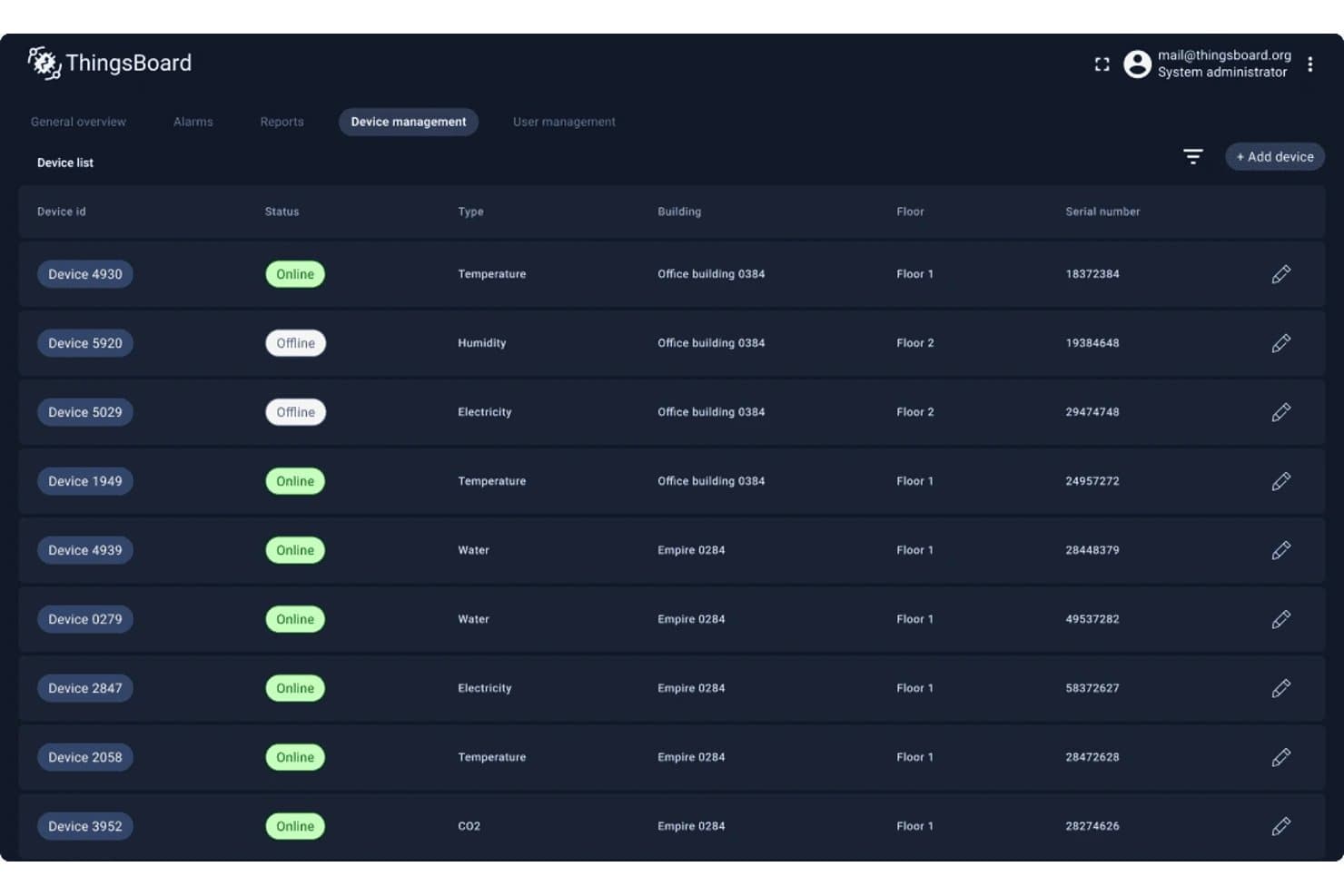
ThingsBoard lets users manage and monitor all IoT devices in one place. ThingsBoard is an IoT device management platform that covers device provisioning, real-time monitoring, OTA firmware updates, rule-based automation, and multi-protocol connectivity across MQTT, CoAP, HTTP, LwM2M, and gateway-bridged protocols like Modbus and OPC-UA.
Who Is ThingsBoard Best For?
ThingsBoard suits teams running distributed IoT deployments across sites with unreliable connectivity, where local data processing and centralized visibility both matter.
Why I Picked ThingsBoard
I've included ThingsBoard in my top picks because its Edge Computing add-on solves a problem most cloud-only platforms can't: keeping IoT sites running and processing data locally when network connectivity drops, then syncing everything back to the central ThingsBoard server once the connection returns. I particularly like that each Edge instance runs its own Rule Engine, dashboards, and alarm processing, so a remote site isn't just buffering raw data. That combination of local autonomy and centralized visibility is genuinely rare at this price point.
ThingsBoard Key Features
- Multi-protocol device connectivity: ThingsBoard supports native connections over MQTT, CoAP, HTTP, LwM2M, Sparkplug B, and SNMP, plus gateway bridging for Modbus, OPC-UA, BACnet, and BLE.
- Role-based access control: Granular RBAC lets you assign generic or group-scoped roles, controlling read/write permissions for credentials, telemetry, attributes, and device RPC across tenants and customers.
- OTA firmware and software updates: Assign firmware packages to individual devices or device profiles, with built-in dashboards tracking per-device update status, history, and failure details.
- Bulk and auto device provisioning: Import devices from CSV or trigger provisioning via REST API, with zero-touch auto provisioning supporting X.509 certificate-chain authentication on first boot.
ThingsBoard Integrations
ThingsBoard documents seven native integrations, including AWS IoT, Azure IoT Hub, Google Cloud Pub/Sub, ChirpStack, The Things Stack, Loriot, and ThingPark. REST and WebSocket APIs, plus MQTT, CoAP, HTTP, LwM2M, and SNMP device APIs, support custom connectivity.
Pros and Cons
Pros:
- Live dashboards clarify device telemetry
- Broad protocol support across mixed fleets
- Local rule processing survives network outages
Cons:
- Rule chains require manual canvas assembly
- OTA rollback controls aren't documented
Learn more about ThingsBoard: Best for cloud and air-gapped operations
- 30-day free trial available
- From €215/month (billed annually)

Take a look at the svgTest dashboard of Cumulocity IoT is designed for ease of use. Cumulocity IoT is an industrial IoT device management platform that connects and manages distributed device fleets through zero-touch provisioning, OTA updates, digital twin modeling, and deployment options spanning cloud, on-premises, and air-gapped environments.
Who Is Cumulocity IoT Best For?
Cumulocity IoT is a strong fit for IT/OT infrastructure teams managing large, distributed device fleets across environments where both cloud connectivity and fully offline edge deployments are requirements.
Why I Picked Cumulocity IoT
Cumulocity IoT earns its spot on my shortlist because it's one of the few platforms that handles both cloud-connected fleets and fully offline, air-gapped edge deployments without requiring separate tooling. I particularly like how the Air-Gapped Edge option runs local data collection, analytics, and storage with zero internet dependency, while the Connected Edge mode keeps devices synchronized with a cloud tenant for remote OTA updates. The Digital Twin Manager adds another layer I find genuinely useful, letting you model complex asset hierarchies that persist through hardware replacements.
Cumulocity IoT Key Features
- Bulk device operations: Triggers and monitors operations like OTA updates across your entire fleet simultaneously, with filtering by device status, group, type, and alarm state.
- SmartRules and real-time event processing: Configures automated business rules and event-driven responses that execute when defined device conditions are met.
- Device certificate management: Provisions and renews device certificates using an integrated Certificate Authority, with MQTT authentication bound to certificate Common Names.
- Streaming analytics builder: Builds and deploys analytics models across connected fleets using drag-and-drop visual modeling to convert device data into operational metrics.
Cumulocity IoT Integrations
Cumulocity IoT offers a documented Microsoft Azure integration and supports AWS, Google Cloud, Alibaba Cloud, and Oracle Cloud Infrastructure deployment environments. MQTT, OPC UA, LWM2M, LoRaWAN, thin-edge.io, REST APIs, and SDKs support device connectivity and custom integrations.
Pros and Cons
Pros:
- Dashboards surface alerts, battery, and system status
- Reviewers report managing fleets above 500,000 devices
- Supports fully offline air-gapped edge operations
Cons:
- Reviewers cite complex customization and difficult navigation
- Device connection status can lag several minutes
Learn more about Cumulocity IoT: Best for edge intelligence and cloud logic
- Free plan available
- From $299/block/month
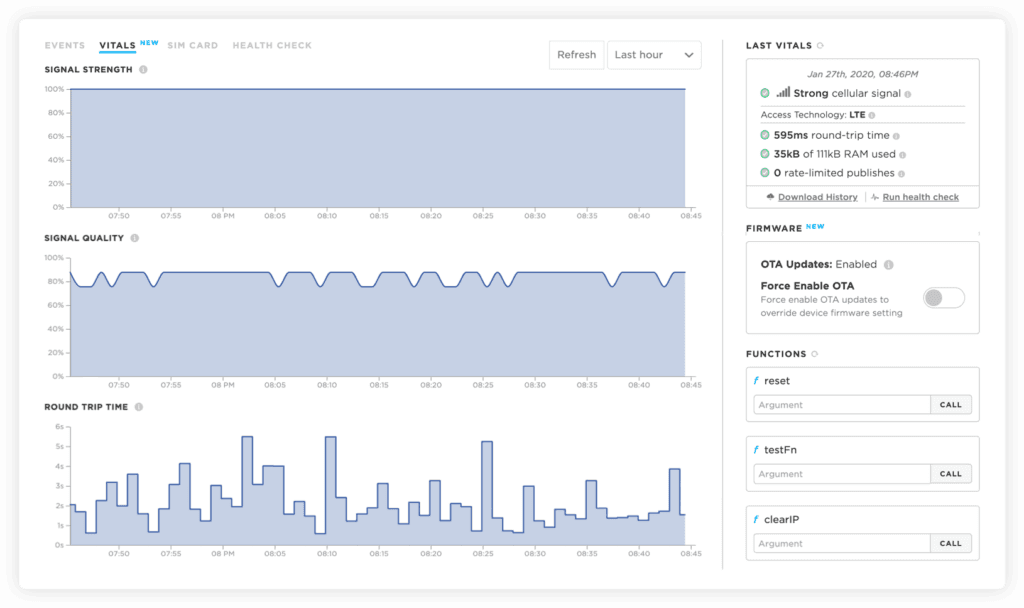
The vitals tab of Particle shows the statistics for signal strength, quality and round trip time. Particle is an IoT device management platform that integrates edge computing, cellular connectivity, OTA firmware updates, cloud logic, and fleet monitoring across its own purpose-built hardware ecosystem.
Who Is Particle Best For?
Particle is a strong fit for embedded and firmware engineers building connected hardware products on Particle's own device ecosystem.
Why I Picked Particle
I picked Particle as one of the best because of how tightly it integrates edge intelligence with cloud-side logic through its Ledger and Logic features. In practice, that means I can store device-specific state in Ledger and trigger JavaScript Logic Functions on a schedule or in response to device events, running conditional workflows without spinning up separate infrastructure. I also like that Edge ML, powered by Edge Impulse, lets me deploy trained machine-learning models directly to Particle hardware for on-device inference.
Particle Key Features
- OTA firmware, Device OS, and asset updates: Delivers application firmware, Device OS upgrades, and binary assets to individual device groups or entire product fleets over the air, with atomic updates and automatic reversion if an update is interrupted.
- Device vitals dashboard: Displays real-time and historical signal strength, round-trip time, memory use, battery charge, and connection statistics for each device through the Console.
- RSA mutual authentication and OAuth2 API scoping: Authenticates every device using unique RSA public-private key pairs and lets you scope API tokens to specific operations across devices, firmware, groups, integrations, Ledger, and teams.
- Bulk device import and SIM activation via CLI and Cloud API: Imports device IDs in bulk, assigns groups and names, and activates associated Particle SIMs programmatically through the command-line interface or Cloud API.
Particle Integrations
Particle claims hundreds of integrations, with documented connections to AWS Lambda, Google Cloud Pub/Sub, InfluxData, and Blynk. REST APIs, webhooks, SDKs, and a CLI support custom integrations.
Pros and Cons
Pros:
- Bundled hardware and cloud speed deployment
- OTA updates include rollback safeguards
- Edge logic connects device state with events
Cons:
- Hardware and cellular support vary by region
- Fleet health alerts and diagnostics are limited
Learn more about Particle: Best for white-label, self-hosted deployments
- Free plan + 14-day trial available
- From $9.99/month
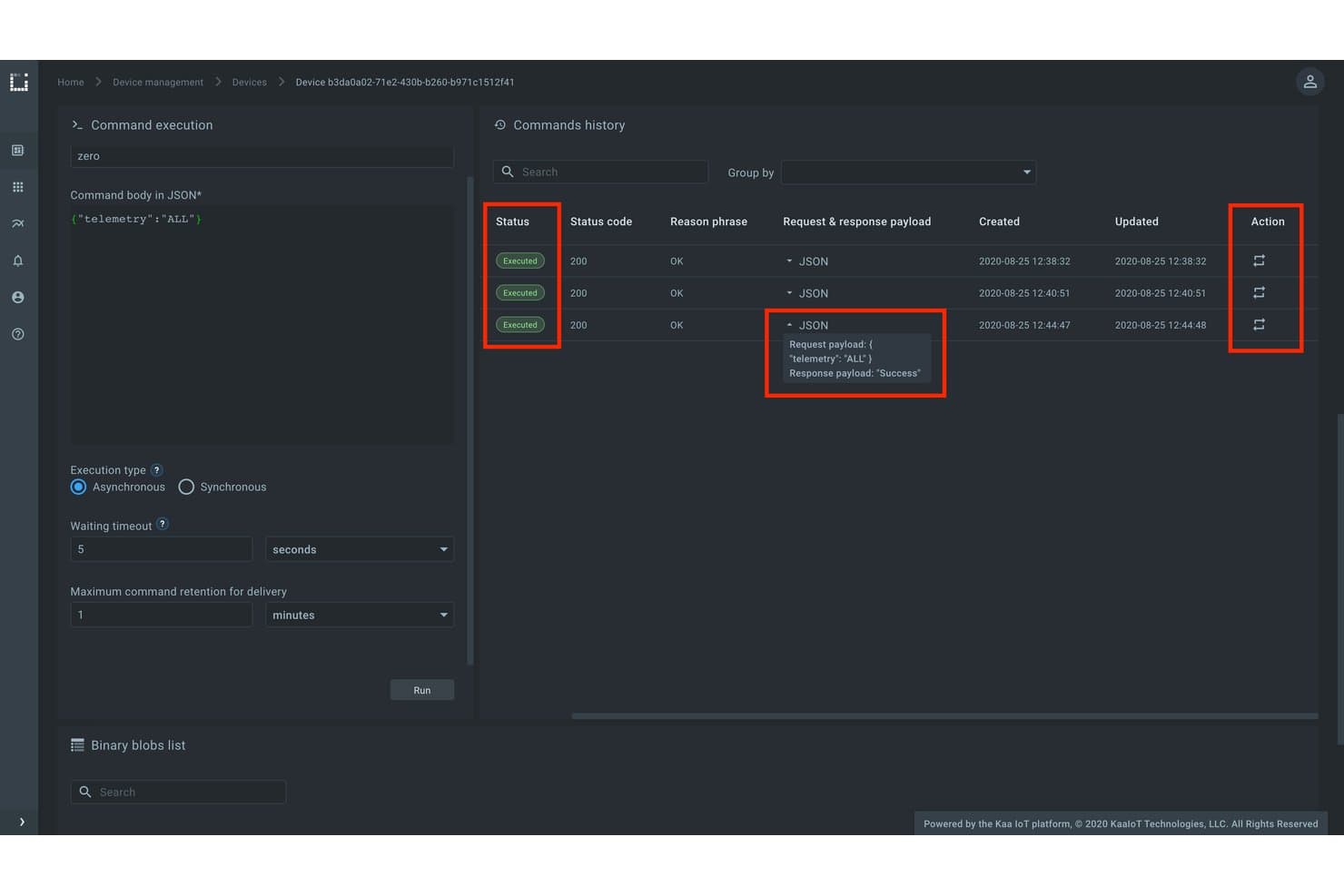
Kaa IoT Platform tracks device command history with execution status. Kaa Enterprise IoT Platform is a modular, end-to-end IoT device management platform built on microservices architecture, covering device provisioning, remote monitoring, OTA updates, fleet organization, and multi-tenant application management.
Who Is Kaa Enterprise IoT Platform Best For?
Kaa is a strong fit for engineering and infrastructure teams that need to deploy a fully self-hosted or white-labeled IoT platform on their own infrastructure, without being locked into a managed cloud vendor.
Why I Picked Kaa Enterprise IoT Platform
Kaa Enterprise IoT Platform earns its spot on my shortlist because it's one of the few platforms that lets you deploy a fully self-hosted, white-labeled IoT solution on your own infrastructure, whether that's bare-metal Kubernetes clusters or public cloud like AWS or Google Cloud Platform. I particularly like its multi-tenancy architecture, where each tenant gets isolated data, users, applications, and dashboards in a single instance, which is ideal if you're managing devices across separate business units or customer environments. Its microservices design also means you can swap out or extend individual components without rebuilding the whole stack.
Kaa Enterprise IoT Platform Key Features
- Attribute-based endpoint filtering: Dynamically segments devices into groups using attributes like firmware version, location, type, and custom properties, with automatic reevaluation when attributes change.
- JavaScript rules engine: Lets you define event-triggered rules using JavaScript expressions to fire real-time alerts, notifications, or automated responses based on incoming device data.
- Token and certificate lifecycle management: Manages device credentials through documented states—active, suspended, and revoked—for both endpoint tokens and X.509 certificates, with mutual TLS support.
- OTA rollout strategies: Supports targeted and general software rollout modes, with semantic versioning and compatibility graphs to control which devices receive which update versions.
Kaa Enterprise IoT Platform Integrations
Kaa Enterprise IoT Platform integrates with Open Distro for Elasticsearch, Kibana, and Slack. It also supports REST, WebSockets, NATS, Kafka, and Logstash interfaces for custom integrations.
Pros and Cons
Pros:
- Isolated tenants separate customer environments
- Device records help track fleet activity
- Supports varied hardware and protocols
Cons:
- Device-side OTA update logic needs implementation
- Troubleshooting tutorials can be limited
Learn more about Kaa Enterprise IoT Platform: Best for edge fleets with intermittent internet
- Free plan + 30-day trial available
- Pricing upon request

You can always change policies in Microsoft Azure IoT Hub, making it easier to collaborate when working on IoT applications. Microsoft Azure IoT Hub is a cloud-hosted IoT device management platform that handles device provisioning, identity management, two-way messaging, OTA updates, and edge fleet connectivity across large, mixed-hardware deployments.
Who Is Microsoft Azure IoT Hub Best For?
Azure IoT Hub is a strong fit for IT and OT infrastructure teams managing large, mixed-hardware device fleets that need reliable edge operation when internet connectivity isn't guaranteed.
Why I Picked Microsoft Azure IoT Hub
I picked Azure IoT Hub as one of the best because of how well it handles edge fleets that can't count on a stable internet connection. IoT Edge keeps running after its initial cloud sync, storing upstream messages locally and forwarding them once connectivity returns, so a temporary outage doesn't mean lost data. I also like that Device Update for IoT Hub lets you stage OTA rollouts by device group with A/B update support, which means you can roll back cleanly if a firmware push goes sideways across a distributed fleet.
Microsoft Azure IoT Hub Key Features
- Device Provisioning Service (DPS): Automates zero-touch, attestation-based device registration using X.509 or TPM credentials, with support for custom allocation policies via Azure Functions webhooks.
- Device twins: Stores each device's metadata, desired configuration, and reported state in a queryable JSON document that back-end applications can read and write.
- Message routing: Routes device telemetry to other Azure services without custom code, with support for MQTT, AMQP, and HTTPS protocols.
- Per-device identity registry: Maintains individual credentials for every connected device and module, with selective access revocation at the device level.
Microsoft Azure IoT Hub Integrations
Microsoft Azure IoT Hub offers native integrations with Azure Event Grid, Azure IoT Edge, Azure IoT Hub Device Provisioning Service, and Device Update for IoT Hub. It also supports device, service, and management SDKs for custom workflows.
Pros and Cons
Pros:
- Twin-based targeting supports staged fleet operations
- DPS automates X.509 and TPM provisioning
- Edge devices queue messages through outages
Cons:
- Certificate setup can involve many manual steps
- Device status can lag actual connectivity
Learn more about Microsoft Azure IoT Hub: Best for VPN-free remote troubleshooting
- Free plan available
- Pricing upon request

Here's a screenshot of the dashboard for AWS IoT Device Management which showcases visualization for analyzed data for devices and disconnects. AWS IoT Device Management is a cloud-based IoT device management service from Amazon Web Services that covers device provisioning, fleet organization, remote monitoring, OTA updates, and secure tunneling to individual devices behind firewalls.
Who Is AWS IoT Device Management Best For?
AWS IoT Device Management is a strong fit for engineering and operations teams already running workloads on AWS who need to provision, monitor, and troubleshoot large device fleets without relying on VPN access.
Why I Picked AWS IoT Device Management
AWS IoT Device Management earns its spot on my shortlist because Secure Tunneling lets you open an encrypted session directly to a device sitting behind a firewall, no VPN required. I've used this in practice to SSH into a field device mid-incident without touching network infrastructure. Pair that with Device Jobs for staged OTA rollouts and fleet indexing to query connectivity state across thousands of devices, and you have a credible remote operations setup built entirely on existing AWS infrastructure.
AWS IoT Device Management Key Features
- Bulk device registration: Upload templates with device details and X.509 certificates to register and configure entire fleets through the console or API in one workflow.
- Dynamic thing groups: Automatically add or remove devices from groups based on fleet-index search criteria, keeping group membership current without manual updates.
- Software Package Catalog: Track software package versions in a central dashboard and target OTA updates at devices running specific versions using fleet indexing.
- Commands: Send custom-format instructions to individual devices or groups with configurable timeouts, real-time execution updates, and fine-grained access control.
AWS IoT Device Management Integrations
AWS IoT Device Management offers native integrations with ZigBee, Z-Wave, and Wi-Fi through Managed integrations. Its AWS IoT API supports custom integrations.
Pros and Cons
Pros:
- Fleet indexing surfaces connectivity across deployments
- Jobs stage OTA updates with abort criteria
- Secure tunnels reach firewalled devices without VPNs
Cons:
- Setup complexity can slow first fleet deployment
- Fleet Hub retirement removed its operator dashboard
Learn more about AWS IoT Device Management: Best for group campaigns with stop rules
- Free demo available
- Pricing upon request
The website of One-IoT provides options for either requesting a demo or downloading their brochure to fully check on their services. One-IoT is an IoT device management platform by Friendly Technologies that covers device provisioning, remote monitoring, OTA firmware updates, and fleet organization across a wide range of protocols—including LwM2M, MQTT, TR-069, and TR-369 USP.
Who Is One-IoT Best For?
One-IoT is a strong fit for device fleet operations teams that need to run scheduled group campaigns across large, protocol-diverse IoT deployments.
Why I Picked One-IoT
I picked One-IoT as one of the best because of how precisely its group campaign controls are designed for real fleet operations. You can target devices by model, geography, or firmware version, schedule update windows like 1:00–2:00 a.m. every Tuesday, and automatically stop a campaign if more than 5% of devices fail. That stop-rule logic is what sets it apart: it prevents a bad update from cascading across a large deployment before anyone notices.
One-IoT Key Features
- Multi-protocol IoT engine: Supports LwM2M, MQTT, MQTT-SN, CoAP, TR-069, TR-369 USP, and custom protocols through a unified Smart Layer™ that normalizes device management across protocol types.
- Custom rules and event automation: Lets you define business logic that triggers automated actions—like resetting a device when a fault condition is detected—without manual intervention.
- Flexible deployment options: Runs on-premises on physical or virtual servers, in a private cloud on your own infrastructure, or as a Friendly-hosted public-cloud tenant.
- Role-based technician access: Assigns differentiated access levels so basic-function technicians and expert-level staff each see only the controls appropriate to their role.
One-IoT Integrations
One-IoT has a native One IoT Bridge for Microsoft Azure, including Azure IoT Central, Azure IoT Hub, and Azure Device Provisioning Service. It also supports integrations with AWS IoT and Google Cloud core, plus a REST API for custom connections.
Pros and Cons
Pros:
- On-premises, private-cloud, or hosted deployment
- Broad support spans constrained and legacy protocols
- Group campaigns stop after failure thresholds
Cons:
- Rollback and staged-update safeguards aren’t documented
- MQTT requires custom provisioning and update workflows
Learn more about One-IoT: Best for coordinating multi-component updates
- Free plan + 12-month free trial + free demo available
- From $34/month
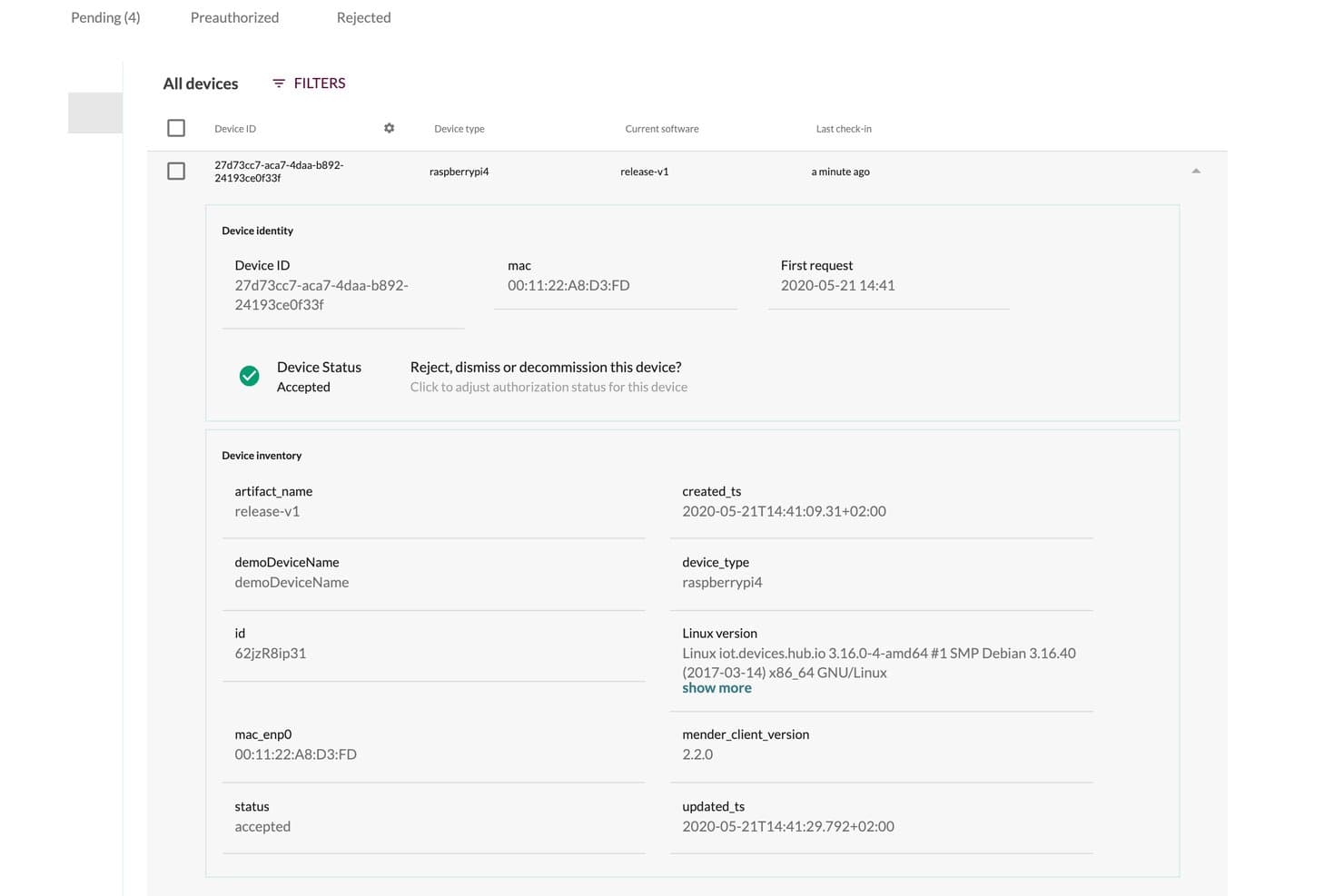
Mender displays detailed device inventory and identity metadata. Mender is an open-source IoT device management platform from Northern.tech that handles OTA software updates, device provisioning, fleet organization, remote monitoring, and multi-component update orchestration across Linux and Zephyr-based device fleets.
Who Is Mender Best For?
Mender is a strong fit for engineering and operations teams managing Linux or Zephyr-based device fleets that need reliable, structured OTA update workflows across multiple hardware components.
Why I Picked Mender
I picked Mender as one of the best because its Orchestrator is built specifically for products where a single OTA push isn't enough. When a device has separate processors, MCUs, and an OS that all need updating in a defined sequence, Mender lets you define that architecture in a manifest and handles the ordering automatically. If a subsystem update fails mid-sequence, it rolls the entire system back to its last known good state, not just the component that failed.
Mender Key Features
- A/B full-image updates: Deploys complete root-filesystem images to devices, maintaining consistent software across your fleet with built-in rollback on failure.
- Delta update deployment: Transmits only the binary differences between software versions, reducing bandwidth and artifact transfer time for large fleets.
- Remote terminal access: Connects you directly to individual devices in real time for live diagnostics, file transfers, and port forwarding via the Troubleshoot add-on.
- REST API and webhook integration: Exposes device lifecycle events, inventory changes, and authentication state through HTTP REST APIs and webhooks for CI/CD and third-party system integration.
Mender Integrations
Mender documents more than 70 integrations, including AWS IoT Core, Azure IoT Hub, and webhooks. Its REST API and personal access tokens support CI/CD, ERP, and custom interface integrations.
Pros and Cons
Pros:
- Useful APIs and scripts for fleet automation
- Coordinates sequenced component updates with system rollback
- Reliable A/B updates with rollback
Cons:
- Monitoring lacks broad telemetry and trend analysis
- Board integration can demand upfront engineering
Learn more about Mender: 10Best for correlating edge and cloud health
Datadog
- Free plan available
- From $15/month (billed annually)
Visit WebsiteCustomer Rating:4.5/5
Datadog allows you to customize your own interface for a more personalized feel. Datadog is a cloud-based monitoring and analytics platform that allows companies to observe their infrastructure and applications. By providing real-time data monitoring and performance metrics, Datadog excels in giving organizations the tools they need to keep an eye on every aspect of their systems, making it best for real-time monitoring and performance metrics.
Why I Picked Datadog:
I chose Datadog after a comprehensive analysis of various monitoring tools, judging its ability to provide robust real-time data insights. What makes it stand out is its extensive integration capabilities and easy-to-use dashboards. I have determined that Datadog is best for those who need constant surveillance over their systems and require detailed performance metrics to make informed decisions.
Standout Features & Integrations:
Datadog provides an array of features like real-time dashboards, customizable alerts, and detailed log management. These features allow users to keep track of every vital statistic about their system. In addition, Datadog integrates with over 400 popular technologies like AWS, Docker, Slack, and more, offering flexibility and convenience in monitoring diverse environments.
Pros and Cons
Pros:
- Customizable dashboards for personalized monitoring
- Wide range of integrations with popular technologies
- Comprehensive real-time monitoring capabilities
Cons:
- Learning curve for users new to system monitoring tools
- Pricing may be expensive for smaller teams
- Can be overwhelming for small businesses due to its extensive features
Andre plattformer for IoT-enhetsadministrasjon
Her er noen flere alternativer for plattformer for IoT-enhetsadministrasjon som ikke kom med på kortlisten min, men som likevel er verdt å se nærmere på:
- 11BlynkBest for branded customer-facing apps
- 12balenaBest for container-based Linux edge fleets
- 13Cisco IoTBest for matching SIM rate plans to fleet use
- 14Bosch IoT SuiteBest for customer-controlled Edge deployments
- 15LosantBest for one workflow across cloud and edge
- 16GoliothBest for OTA delivery of firmware and models
- 17Siemens Insights HubBest for factory-level performance insights
- 18UbidotsBest for branded customer portals and billing
- 19Ayla Networks IoT PlatformBest for OEM-branded smart-home services
- 20Exosite ExoSense IoTBest for OEM-branded condition monitoring
- 21IoT In a BoxBest for sensor deployment logistics
- 22Telit IoT platformBest for routing edge data to multiple systems
How I Evaluate IoT Device Management Platforms
I split my evaluation into three parts, giving the most weight to core needs: securely onboard devices at scale and monitor fleet health, connectivity, and telemetry. Next, I consider differentiators such as edge processing or digital twins. Finally, I weigh factors beyond features, including implementation support and pricing as fleets grow.
Core Functionality (Table Stakes For This List)
When I'm selecting tools for my list, I score each one on a scale from 0 (does not offer the functionality) to 5 (excels in this area) for each core functionality listed below. I then convert the total into a percentage to help assess each tool's overall fit, with extra weight on any functionalities I’ve deemed essential.
- Device Provisioning (Essential): I look for automated enrollment, identity checks, and reusable templates for bringing mixed device types online in batches.
- Monitoring & Diagnostics (Essential): I assess real-time device health, connectivity, and telemetry, including alerts that help teams investigate a remote sensor outage.
- Over-the-Air Updates: I check for scheduled, staged updates by device group, plus rollback and version tracking if a deployment causes issues.
- Fleet Organization: I look for flexible tags, filters, and groups that let teams target devices by model, location, or operational role.
- Security & Access: I evaluate per-device credentials, certificate handling, permission controls, and options to revoke access when hardware is retired.
- Protocols & Hardware: I consider support for common IoT protocols and varied hardware, especially when one fleet includes devices from multiple vendors.
Once I have a list of tools that meet the criteria, I consider what sets each platform apart.
Differentiating Factors (What Sets Vendors Apart)
Here's how I compare and contrast different vendors:
Standout Features
I evaluate whether a platform includes a rules engine that lets teams define event-triggered actions without writing custom code. For example, automatically isolating a device when it reports abnormal temperature readings saves hours of manual intervention. Edge computing support matters just as much—I check if the platform can run logic locally on gateways so decisions happen closer to the device, which is essential for sites with unreliable connectivity. I also look at digital twin modeling, where platforms like AWS IoT and Azure IoT let you simulate device behavior before pushing changes to a live fleet.
Beyond Features
I evaluate whether a platform can deploy on-premise or in hybrid mode, since factories and remote sites with intermittent connectivity can't rely on cloud-only architectures. Scalability matters just as much—I check vendor case studies to confirm pricing and performance stay predictable as fleets grow from hundreds to millions of devices. I also look at native integrations with hyperscalers like AWS and Azure, because a platform that fits your existing cloud and data stack cuts months off implementation timelines.
Slik velger du en plattform for IoT-enhetsadministrasjon
Det er lett å gå seg vill i lange funksjonslister og kompliserte prisstrukturer. For å hjelpe deg med å holde fokus mens du går gjennom den unike programvarevalgsprosessen din, har vi laget en sjekkliste over faktorer du bør ha i mente:
| Faktor | Hva du bør vurdere |
|---|---|
| FaktorSkalerbarhet | Hva du bør vurdereHvor mange enheter planlegger du å administrere nå og i fremtiden? Sørg for at plattformen kan vokse i takt med behovene dine uten uoverkommelige kostnader. |
| FaktorIntegrasjoner | Hva du bør vurdereKan plattformen kobles til de eksisterende systemene og verktøyene dine? Kontroller at den er kompatibel med den nåværende teknologistakken din for å unngå integrasjonsproblemer. |
| FaktorTilpasningsmuligheter | Hva du bør vurdereKan du tilpasse plattformen til de spesifikke arbeidsflytene og prosessene dine? Se etter fleksibilitet i kontrollpaneler og rapportering, slik at løsningen passer dine unike behov. |
| FaktorBrukervennlighet | Hva du bør vurdereEr plattformen intuitiv nok til at teamet ditt kan bruke den uten omfattende opplæring? Vurder brukergrensesnittet og tilgjengelige ressurser for brukerstøtte. |
| FaktorImplementering og introduksjon | Hva du bør vurdereHvor lang tid tar det å komme i gang? Vurder hvor komplisert oppsettet er, og hvor mye støtte som er tilgjengelig under introduksjonen, for å unngå forsinkelser. |
| FaktorKostnad | Hva du bør vurdereHva er budsjettet ditt? Sammenlign prisplanene og vær oppmerksom på skjulte gebyrer. Sørg for at kostnaden samsvarer med verdien du får. |
| FaktorSikkerhetstiltak | Hva du bør vurdereTilbyr plattformen robuste sikkerhetstiltak for å beskytte dataene dine? Vurder kryptering, tilgangskontroller og samsvar med bransjestandarder. |
| FaktorTilgjengelig brukerstøtte | Hva du bør vurdereEr det hjelp tilgjengelig når du trenger det? Se etter brukerstøtte døgnet rundt, og vurder kvaliteten på kundeservicen leverandøren tilbyr. |
Hva er en plattform for IoT-enhetsadministrasjon?
Plattform for administrasjon av IoT-enheter er en programvareløsning som hjelper virksomheter med å administrere og kontrollere sine IoT-enheter. IT-fagfolk og utviklere bruker vanligvis disse verktøyene for å sikre effektiv drift av enheter og datahåndtering.
Enhetsintegrering, fjernovervåking og fastvareoppdateringer bidrar til å administrere storskalaimplementeringer og opprettholde enhetssikkerheten. Disse verktøyene gir viktig støtte for optimalisering av IoT-infrastrukturen og forbedring av driftseffektiviteten.
Funksjoner
Når du velger en plattform for administrasjon av IoT-enheter, bør du se etter følgende nøkkelfunksjoner:
- Enhetsintegrering: Forenkler tillegging av nye enheter i nettverket, noe som reduserer tiden og innsatsen som kreves for oppsett.
- Fjernovervåking: Gjør det mulig å følge med på enhetenes ytelse fra hvor som helst, slik at problemer kan håndteres raskt.
- Fastvareoppdateringer: Gjør det mulig å utføre automatiske oppdateringer for å holde enhetene sikre og oppdaterte.
- Sikkerhetsadministrasjon: Tilbyr kryptering og tilgangskontroller for å beskytte data og enheter.
- Dataanalyse: Gir innsikt i enhetsdata for å bidra til å optimalisere driften og ta velinformerte beslutninger.
- Tilpassbare dashbord: Lar deg tilpasse visninger og rapporter etter dine spesifikke behov og preferanser.
- Integrasjonsmuligheter: Sikrer kompatibilitet med eksisterende systemer og verktøy for smidigere drift.
- Automatiserte varsler: Varsler teamet ditt om kritiske hendelser, slik at tiltak kan iverksettes i tide.
- Skalerbarhet: Støtter veksten i IoT-infrastrukturen uten betydelige kostnadsøkninger.
- Rollebasert tilgangskontroll: Sikrer at bare autoriserte brukere kan administrere og få tilgang til enheter og data.
Fordeler
Implementering av en plattform for administrasjon av IoT-enheter gir flere fordeler for teamet og virksomheten din. Her er noen av fordelene du kan se frem til:
- Forbedret effektivitet: Automatisering av enhetsintegrering og oppdateringer sparer tid og reduserer manuelle feil.
- Forbedret sikkerhet: Funksjoner for sikkerhetsadministrasjon beskytter dataene og enhetene dine mot uautorisert tilgang.
- Bedre beslutningstaking: Dataanalyse gir innsikt som bidrar til å optimalisere driften og legge til rette for velinformerte beslutninger.
- Redusert nedetid: Fjernovervåking og automatiserte varsler sikrer raske svar på problemer med enhetene.
- Skalerbarhet: Støtter vekst ved å administrere et større antall enheter uten betydelige tilleggskostnader.
- Kostnadsbesparelser: Effektivisert administrasjon reduserer driftskostnadene og maksimerer utnyttelsen av ressursene.
- Tilpassbar drift: Tilpassede dashbord og rapporter lar deg fokusere på det som betyr mest for virksomheten din.
Kostnader & Priser
Valg av en plattform for administrasjon av IoT-enheter krever en forståelse av de ulike prismodellene og planene som er tilgjengelige. Kostnadene varierer basert på funksjoner, teamstørrelse, tillegg og mer. Tabellen nedenfor oppsummerer vanlige planer, gjennomsnittsprisene deres og typiske funksjoner som er inkludert i løsninger for plattformer for administrasjon av IoT-enheter:
Sammenligningstabell for planer for plattform for administrasjon av IoT-enheter
| Plantype | Gjennomsnittspris | Vanlige funksjoner |
|---|---|---|
| PlantypeGratisplan | Gjennomsnittspris$0 | Vanlige funksjonerGrunnleggende enhetsovervåking, begrenset dataanalyse og brukerstøtte fra fellesskapet. |
| PlantypePersonlig plan | Gjennomsnittspris$5-$25/bruker/måned | Vanlige funksjonerEnhetsintegrering, fjernovervåking, fastvareoppdateringer og grunnleggende sikkerhetsadministrasjon. |
| PlantypeForretningsplan | Gjennomsnittspris$30-$75/bruker/måned | Vanlige funksjonerAvansert dataanalyse, tilpassbare dashbord, integrasjonsmuligheter og automatiserte varsler. |
| PlantypeBedriftsplan | Gjennomsnittspris$80-$150/bruker/måned | Vanlige funksjonerFull sikkerhetsadministrasjon, skalerbarhet for store implementeringer, rollebasert tilgangskontroll og prioritert brukerstøtte. |
Vanlige spørsmål om IoT-enhetsadministrasjonsplattform
Her er noen svar på vanlige spørsmål om IoT-enhetsadministrasjonsplattformer:
Hvordan kan en virksomhet administrere IoT-utrulling på tvers av flere lokasjoner?
Et sentralisert kontrollpanel gjør det enklere å overvåke og kontrollere alle enheter i sanntid. Automatisk klargjøring sikrer et ensartet oppsett på alle lokasjoner. Regelmessige eksterne oppdateringer holder ytelsen stabil og sikkerheten oppdatert.
Hvordan kan en organisasjon håndtere IoT-skalerbarhet?
Velg en plattform som enkelt kan registrere og gruppere tusenvis av enheter. Sanntidsovervåking sikrer at alt fungerer problemfritt etter hvert som nettverket utvides. Skalerbare verktøy bidrar til å opprettholde påliteligheten selv under rask vekst.
Hvilke feil bør virksomheter unngå når de bruker IoT-plattformer?
Mange team går raskt i gang med implementeringen uten tilstrekkelig integrasjonstesting eller opplæring. Det er best å bekrefte at plattformen fungerer godt sammen med de eksisterende systemene før utrullingen. Ved å ta seg tid til å planlegge på forhånd kan man unngå kostbare avbrudd senere.
Kan jeg tilpasse IoT-enhetsadministrasjonsplattformen etter mine spesifikke behov?
Ja, mange plattformer for IoT-enhetsadministrasjon kan tilpasses. Enten det gjelder å skreddersy kontrollpaneler, konfigurere egendefinerte varsler eller integrere med bestemte forretningsapplikasjoner, gir disse plattformene ofte fleksibilitet til å tilpasses organisasjonens unike behov. Omfattende tilpasninger kan imidlertid kreve profesjonelle tjenester eller medføre ekstra kostnader.