

Et godt Basecamp-alternativ gir teamet ditt fleksible funksjoner for prosjektstyring, pålitelige samarbeidsverktøy og tilpasningsmuligheter som passer arbeidsflyten deres. Hvis du leter etter en erstatning fordi Basecamps struktur, integrasjoner eller priser ikke lenger dekker behovene dine, er du ikke alene.
Mange IT-spesialister og prosjektledere ønsker verktøy som håndterer komplekse prosjekter, støtter automatisering og gir mer detaljert kontroll over oppgaver og rapportering. Denne listen hjelper deg med å sammenligne de beste Basecamp-alternativene for 2026, slik at du kan finne en løsning som oppfyller teamets krav og holder prosjektene på rett spor.
Hva er Basecamp?
Basecamp er programvare for prosjektstyring som hjelper team med å organisere oppgaver, dele filer og kommunisere på ett sted. Den kombinerer gjøremålslister, oppslagstavler, tidsplaner og dokumentlagring for å støtte prosjektsamarbeid.
Basecamp brukes av virksomheter i alle størrelser til å koordinere arbeid, følge fremdrift og samle prosjektinformasjon på ett sted. Det enkle grensesnittet og fokuset på teamkommunikasjon gjør løsningen til et populært valg for håndtering av både interne prosjekter og kundeprosjekter.
Sammenligningstabell for Basecamp-alternativer
Denne sammenligningstabellen oppsummerer prisopplysninger for mine utvalgte Basecamp-alternativer:
| Tool | Best For | Trial Info | Price | ||
|---|---|---|---|---|---|
| 1 | Best for fully customizable dashboards | Free plan available | From $9/user/month (billed annually) | Website | |
| 2 | Best for cross-team workflow automation | Free plan available | From $10.99/user/month (billed annually) | Website | |
| 3 | Best for centralized team discussions | 14-day free trial + free demo available | From $45/month (billed annually) | Website | |
| 4 | Best for teams that need self-hosted project management | 14-day free trial + free plan available | From $7.25/user/month (billed annually) | Website | |
| 5 | Best for client-facing project management | 14-day free trial + free demo available | From $9.99/user/month (billed annually) | Website | |
| 6 | Best for milestone-driven roadmaps | Free plan + free demo available + 14-day free trial | From $39/user/month (billed annually) | Website | |
| 7 | Best with AI-powered project automations | Free plan available | From $9/user/month (billed annually) | Website | |
| 8 | Best for spreadsheet-style task planning | 30-day free trial | From $9/user/month (billed annually) | Website | |
| 9 | Best for native email integration | Free plan + 14-day free trial + free demo available | From $5/user/month (billed annually) | Website | |
| 10 | Best for advanced reporting tools | Free plan + 14-day free trial available | From $10/user/month (billed annually) | Website |


Why Trust Our Software Recommendations
6,700+
Reviews
20
Industry experts
16+
Evaluation factors
14
Years
Our team has been testing and reviewing software since 2012. As tech leaders ourselves, we know how difficult—and important—it is to choose the right software.
For this guide, we evaluated tools using hands-on testing and independent research, scoring tools using our selection criteria.
Our reviews reflect our human editorial judgment, not a sales pitch.
Expert reviewers:
- Paulo Gardini MiguelTech Director
 Tim FisherVP of AI
 Gabriel RosasTech Lead & Software Architect
 Christhian GruhnTech Lead & Platform Architect

Anmeldelser av Basecamp-alternativer
Nedenfor finner du mine detaljerte sammendrag av Basecamp-alternativene som kom med på kortlisten. Anmeldelsene mine gir et detaljert innblikk i funksjonene, de beste bruksområdene og integrasjonene til hver plattform, slik at du kan finne den som passer best for deg.
 Best for fully customizable dashboards
- Free plan available
- From $9/user/month (billed annually)
Visit WebsiteCustomer Rating:4.6/5
ClickUp is an all-in-one project management tool built for supporting tasks, time tracking, and teamwork ClickUp stands out for teams that want to build dashboards tailored to their exact needs. IT departments and project managers who need granular control over project data and reporting will appreciate its flexible dashboard widgets. Unlike Basecamp, ClickUp lets you visualize and track almost any metric or workflow in one place.
Why ClickUp Is a Good Basecamp Alternative
ClickUp gives you the freedom to design dashboards that fit your team’s unique workflows and reporting needs. I picked ClickUp because its dashboard builder lets you add custom widgets for tasks, time tracking, goals, and workload—all in one view.
You can mix and match charts, lists, and visualizations to monitor exactly what matters to your projects. For teams that want more control over how they see and manage work, ClickUp’s dashboard customization goes far beyond what Basecamp offers.
ClickUp Key Features
Some other features in ClickUp make it a flexible choice for project management teams:
- Multiple Project Views: Switch between list, board, Gantt, calendar, and mind map views to manage tasks in the way that suits your team best.
- Task Automation: Set up automated actions for recurring processes, such as assigning tasks or updating statuses based on triggers.
- Docs and Wikis: Create, edit, and share documents and knowledge bases directly within your workspace.
- Goal Tracking: Set measurable goals and link them to tasks or projects to monitor progress in real time.
ClickUp Integrations
Integrations include Slack, Google Drive, Zoom, Microsoft Teams, Dropbox, GitHub, Evernote, Salesforce, Trello, Outlook, and more.
Pros and Cons
Pros:
- Built-in docs and wikis keep project knowledge in one place
- Multiple project views support Agile, waterfall, and hybrid workflows.
- Custom dashboards let teams track project metrics their way
Cons:
- Feature-rich interface can feel cluttered for smaller teams
- Permissions and sharing options can be confusing for new users
Learn more about ClickUp: Best for cross-team workflow automation
- Free plan available
- From $10.99/user/month (billed annually)
Visit WebsiteCustomer Rating:4.4/5
Asana is a project management tool for organizing tasks and tracking team progress Asana gives teams a flexible way to manage projects with automation and cross-functional workflows. IT specialists and project leads who need to coordinate complex tasks across departments will find its automation features especially useful. If you’re looking for more customization and integration options than Basecamp offers, Asana stands out with its adaptable workflow design.
Why Asana Is a Good Basecamp Alternative
What sets Asana apart as a Basecamp alternative is its focus on workflow automation across teams. I picked Asana for this list because it lets you automate repetitive tasks and set up custom rules that trigger actions based on project activity.
Its workflow builder allows you to design processes that span multiple departments, making it easier to coordinate complex projects. For teams that need more than just basic task lists, Asana’s automation features help reduce manual work and keep projects moving.
Asana Key Features
Some other features in Asana make it a versatile choice for project management teams:
- Timeline View: Visualize project schedules and dependencies with a Gantt-style timeline that helps you map out tasks and deadlines.
- Workload Management: Monitor team capacity and balance assignments to prevent overloading any one team member.
- Task Dependencies: Easily set up relationships between tasks so that teams know what needs to be completed before starting the next step.
- Custom Fields: Add custom data fields to tasks and projects, allowing you to track information specific to your team’s workflow.
Asana Integrations
Integrations include Slack, Microsoft Teams, Google Drive, Zoom, Salesforce, Dropbox, Jira, Tableau, and Zendesk.
Pros and Cons
Pros:
- Timeline and workload views help visualize project schedules and team capacity
- Custom rules and triggers support complex cross-team processes
- Workflow automation reduces manual task management for teams
Cons:
- Advanced automation features are only available on higher-tier plans
- Notification volume can become overwhelming on large projects
Learn more about Asana: Best for centralized team discussions
- 14-day free trial + free demo available
- From $45/month (billed annually)
Visit WebsiteCustomer Rating:4.5/5
ProofHub is a project management software for planning, collaboration, and delivery If your team needs a single place to organize conversations, ProofHub puts discussion tools front and center. This platform is a good fit for agencies, creative teams, and cross-functional groups that want to keep project chats, feedback, and decisions in one searchable space. Unlike Basecamp, ProofHub offers dedicated discussion boards and threaded conversations to help teams avoid scattered communication.
Why ProofHub Is a Good Basecamp Alternative
When you want to keep all team discussions organized and accessible, ProofHub stands out with its centralized communication tools. I appreciate that you can create dedicated discussion boards for each project or topic, making it easy to keep conversations focused and searchable.
ProofHub also supports threaded replies and in-context comments, so teams can track feedback and decisions without losing context. If your projects involve a lot of back-and-forth or require clear documentation of conversations, ProofHub offers more structure than Basecamp’s message boards.
ProofHub Features
Some other features in ProofHub help teams manage projects and resources more effectively:
- Task Management: Assign tasks, set deadlines, and track progress with visual boards and lists.
- Gantt Charts: Plan project timelines and adjust schedules using interactive Gantt charts.
- Time Tracking: Log billable and non-billable hours directly within each project.
- File Sharing and Proofing: Upload, share, and annotate files for collaborative feedback and approvals.
ProofHub Integrations
Integrations include Google Drive, Dropbox, Box, OneDrive, FreshBooks, QuickBooks, Xero, Slack, iCal, and Outlook.
Pros and Cons
Pros:
- Time tracking is included for monitoring billable and non-billable hours
- Built-in proofing tools support visual feedback on shared files
- Discussion boards keep project conversations organized and searchable
Cons:
- Native integrations with third-party tools are very limited
- No built-in automation for recurring tasks or workflows
Learn more about ProofHub: Best for teams that need self-hosted project management
- 14-day free trial + free plan available
- From $7.25/user/month (billed annually)
Visit WebsiteCustomer Rating:4.5/5
OpenProject is an open-source project management tool that focuses on secure planning and collaboration Organizations that need full control over their project data often turn to OpenProject for its self-hosted deployment options. This platform is a strong fit for IT teams, government agencies, and privacy-focused businesses that require on-premises project management. Unlike Basecamp, OpenProject gives you the flexibility to host your own instance and meet strict security or compliance requirements.
Why OpenProject Is a Good Basecamp Alternative
For teams that need to keep sensitive project data on their own infrastructure, OpenProject stands out with its self-hosted deployment options. I appreciate that you can install and manage the platform on your own servers, which is essential for organizations with strict data privacy or regulatory requirements.
OpenProject also supports advanced user permissions and on-premises backups, giving you more control over access and data retention. If you’re looking for a Basecamp alternative that puts you in charge of your project environment, OpenProject is a strong choice.
OpenProject Key Features
Some other features in OpenProject help teams manage complex projects and collaborate more effectively:
- Agile Boards: Organize tasks and track progress using Kanban and Scrum boards.
- Gantt Charts: Plan and visualize project timelines with interactive Gantt charts.
- Wiki and Documentation: Create and maintain project documentation directly within the platform.
- Time and Cost Tracking: Log hours and monitor project budgets with built-in tracking tools.
OpenProject Integrations
Integrations include Slack, GitHub, GitLab, Bitbucket, Jenkins, Jira, Redmine, Excel, Microsoft Project, and CSV.
Pros and Cons
Pros:
- Integrated wiki and documentation tools centralize project knowledge
- Advanced role-based permissions allow granular control over user access
- Self-hosted deployment supports strict data privacy and compliance needs
Cons:
- Fewer native integrations compared to cloud-based project management tools
- Initial setup and server maintenance require technical expertise
Learn more about OpenProject: Best for client-facing project management
- 14-day free trial + free demo available
- From $9.99/user/month (billed annually)
Visit WebsiteCustomer Rating:4.5/5
Teamwork is a project management software for team collaboration and client work Agencies and service teams looking for project management software that’s built for client collaboration often turn to Teamwork. The platform is designed to help you manage client projects, track billable time, and share progress updates with external stakeholders. Unlike Basecamp, Teamwork includes client-specific permissions and invoicing features that make it easier to deliver work transparently.
Why Teamwork Is a Good Basecamp Alternative
For teams that work directly with clients, Teamwork offers features that go beyond what Basecamp provides. I like that you can set client-specific permissions, so clients only see what you want them to see.
Built-in time tracking and invoicing tools help you manage billable work and keep client projects organized from start to finish. If your projects require frequent client updates and collaboration, Teamwork’s client-facing controls make it a strong alternative to Basecamp.
Teamwork Key Features
Some other features in Teamwork help you manage projects and collaborate with your team:
- Task Dependencies: Set up relationships between tasks to control project flow and prevent bottlenecks.
- Gantt Charts: Visualize project timelines and adjust schedules with drag-and-drop tools.
- Notebooks: Store meeting notes, project documentation, and reference materials in one place.
- Project Templates: Create and reuse templates to standardize project setup and save time.
Teamwork Integrations
Integrations include Slack, Microsoft Teams, Google Drive, Dropbox, HubSpot, QuickBooks, Xero, Zapier, Harvest, and Zendesk.
Pros and Cons
Pros:
- Gantt charts and task dependencies help manage complex project timelines
- Built-in time tracking supports accurate billing and invoicing
- Client users can access projects with customizable permission settings
Cons:
- Mobile app lacks some desktop features like Gantt charts
- File storage limits may require upgrading for large client projects
Learn more about Teamwork: Best for milestone-driven roadmaps
- Free plan + free demo available + 14-day free trial
- From $39/user/month (billed annually)
Visit WebsiteCustomer Rating:4.7/5
Nifty is a project management tool with real-time collaboration and progress tracking Teams that need to organize projects around clear milestones often look to Nifty for its roadmap-focused approach. This platform is especially useful for product managers, marketing teams, and agencies that want to visualize progress and keep everyone aligned on key deliverables. Unlike Basecamp, Nifty puts milestones at the center of project planning, making it easier to track goals and dependencies.
Why Nifty Is a Good Basecamp Alternative
If your team needs to manage projects with a strong focus on milestones, Nifty offers a structure that’s hard to find in Basecamp. I like that Nifty’s milestone-driven roadmaps let you break down projects into phases and visually track progress toward key goals.
The platform also links tasks and discussions directly to milestones, so everyone can see how daily work connects to larger objectives. For teams that want to keep deliverables front and center, Nifty’s approach makes it easier to align work with outcomes.
Nifty Key Features
Some other features in Nifty help teams coordinate and deliver projects more efficiently:
- Automated Progress Reporting: Generate real-time updates on project status without manual input.
- Document Management: Store, share, and collaborate on files directly within each project.
- Time Tracking: Log hours and monitor team workload from within the platform.
- Custom Task Views: Switch between Kanban, list, calendar, and swimlane layouts to match your workflow.
Nifty Integrations
Integrations include Google Drive, Slack, Zoom, Microsoft Teams, Dropbox, GitHub, Trello, Asana, Jira, and Evernote.
Pros and Cons
Pros:
- Automated progress reporting reduces manual status update work
- In-app document management centralizes files and project assets
- Milestone tracking keeps project goals visible and actionable
Cons:
- Guest access permissions are less granular than in Basecamp
- Advanced reporting options are less customizable than some competitors
Learn more about Nifty: Best with AI-powered project automations
- Free plan available
- From $9/user/month (billed annually)
Visit WebsiteCustomer Rating:4.6/5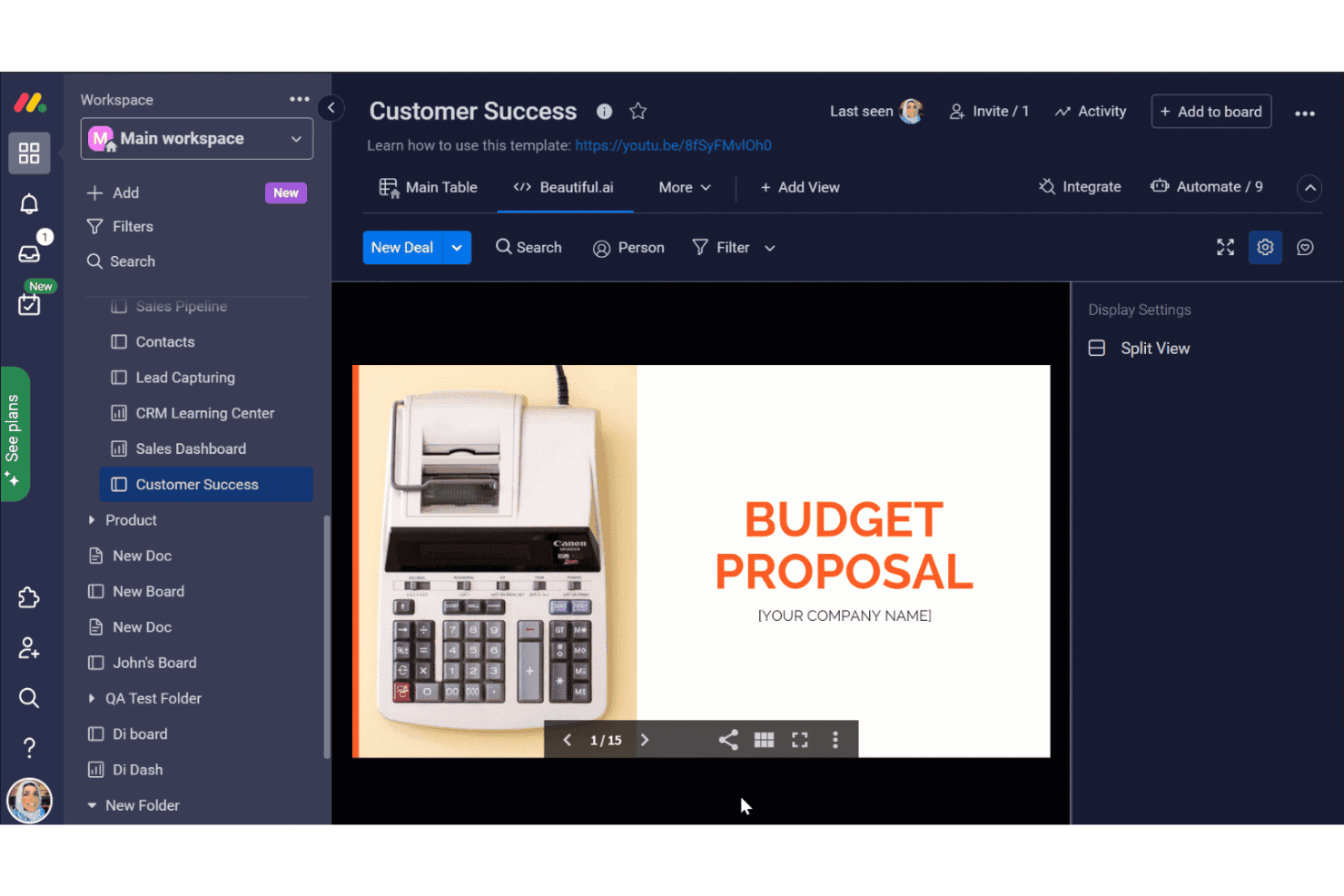
monday.com offers a Customer Success board with an integrated Beautiful.ai view displaying a Budget Proposal presentation within its AI Workspace. monday AI Workspace is a flexible work management platform built for technical teams who need more than Basecamp's basics—combining AI-driven automations, sprint planning, and cross-functional project tracking in one place.
Who Is monday AI Workspace Best For?
It's a strong fit for mid-size to enterprise IT and engineering teams managing multiple concurrent projects across functions.
Why monday AI Workspace Is a Good Basecamp Alternative
I picked monday AI Workspace because its AI workflow builder does something I haven't seen elsewhere: it constructs multi-step automation sequences from a plain-language description of your process. AI columns can then auto-categorize tasks, summarize updates, or extract action items, cutting the manual admin work my team used to handle after every sprint. The AI also flags resource over-allocations before they turn into missed deadlines.
monday AI Workspace Key Features
- Sprint management tools: Organize backlogs, sprints, and releases natively for agile development cycles.
- Portfolio and workload dashboards: Visualize project progress, team workload, and cross-project status in real time.
- Native GitHub integration: Connect version control and development workflows directly to project boards.
- Granular permission controls: Set detailed user roles, multi-level access, and guest permissions across multiple projects.
monday AI Workspace Integrations
monday AI Workspace offers hundreds of native integrations and marketplace apps, including Slack, GitHub, Google Workspace, Microsoft Teams, Jira, Zoom, Dropbox, Salesforce, HubSpot, and Outlook. It also supports Zapier and provides an API for custom integrations.
Pros and Cons
Pros:
- Highly customizable views including Gantt and timeline
- Native agile sprint and backlog management
- AI automates multi-step workflows from plain text
Cons:
- Can feel over-engineered for simple projects
- Automation limits apply on lower-tier plans
Learn more about monday AI Workspace: Best for spreadsheet-style task planning
- 30-day free trial
- From $9/user/month (billed annually)
Visit WebsiteCustomer Rating:4.5/5
Smartsheet is a collaborative work management tool for planning, tracking, and automating workflows If your team prefers planning projects in a familiar spreadsheet format, Smartsheet offers a flexible alternative to traditional project management tools. It’s especially useful for operations, IT, and project managers who need to track tasks, dependencies, and resources in a grid-based view. Smartsheet stands out from Basecamp by supporting formulas, conditional formatting, and automated workflows directly within its sheets.
Why Smartsheet Is a Good Basecamp Alternative
Unlike Basecamp, Smartsheet gives you a spreadsheet-style interface that’s ideal for teams who want granular control over project data. I appreciate how you can use formulas, filters, and conditional formatting to organize and analyze tasks just like you would in Excel. Smartsheet also lets you automate repetitive processes with built-in workflow automation tools.
If your projects require detailed tracking and custom data management, Smartsheet offers flexibility that Basecamp doesn’t match.
Smartsheet Key Features
Some other features in Smartsheet help teams coordinate and manage projects at scale:
- Card View: Switch to a kanban-style board for visual task management and workflow tracking.
- Resource Management: Allocate team members to tasks and monitor workload across multiple projects.
- Update Requests: Send automated requests for task updates or approvals to keep information current.
- Document Attachments: Attach files directly to rows for easy access to project documents and reference materials.
Smartsheet Integrations
Integrations include Microsoft Teams, Slack, Google Workspace, Dropbox, Salesforce, Box, Jira, DocuSign, Tableau, and ServiceNow.
Pros and Cons
Pros:
- Automated workflows reduce manual updates and repetitive tasks
- Card view enables kanban-style project and task management
- Spreadsheet-style interface supports advanced formulas and conditional formatting
Cons:
- Mobile app lacks some advanced sheet editing capabilities
- File storage per user is limited on lower-tier plans
Learn more about Smartsheet: 9Best for native email integration
Hive
- Free plan + 14-day free trial + free demo available
- From $5/user/month (billed annually)
Visit WebsiteCustomer Rating:4.5/5
Hive is a project management tool with task tracking and AI-powered productivity Teams that rely on email for project updates and task assignments will find Hive’s native email integration especially useful. This platform is designed for marketing teams, client services, and any group that needs to manage projects and email communications in one place. Unlike Basecamp, Hive lets you send, receive, and track emails directly from your project workspace, reducing the need to switch between tools.
Why Hive Is a Good Basecamp Alternative
If your team spends a lot of time managing projects through email, Hive offers a unique advantage with its built-in email integration. I like that you can send and receive emails directly from tasks, so all related communication stays attached to the work itself.
Hive also lets you turn emails into actionable tasks without leaving the platform, which helps teams avoid missing important requests or updates. For anyone who wants to bridge the gap between project management and email, Hive provides a level of connectivity that Basecamp doesn’t match.
Hive Key Features
Some other features in Hive help teams coordinate and track work across multiple projects:
- Gantt Chart View: Visualize project timelines and dependencies with interactive Gantt charts.
- Time Tracking: Track time spent on tasks directly within the platform.
- Automated Workflows: Set up custom automations to handle repetitive project actions.
- In-App Messaging: Communicate with team members in real time without leaving the workspace.
Hive Integrations
Integrations include Slack, Google Drive, Zoom, Microsoft Teams, Dropbox, Salesforce, Jira, Trello, HubSpot, and OneDrive.
Pros and Cons
Pros:
- Built-in time tracking helps monitor hours spent on each task
- Multiple project views include Gantt, Kanban, calendar, and table
- Native email integration lets you manage emails within project tasks
Cons:
- Occasional performance issues occur with large or complex projects
- Some integrations require additional setup or third-party connectors
Learn more about Hive: 10Best for advanced reporting tools
Wrike
- Free plan + 14-day free trial available
- From $10/user/month (billed annually)
Visit WebsiteCustomer Rating:4.3/5
Wrike is an enterprise project management platform for collaboration and workflow control Wrike stands out for teams that need advanced reporting and analytics built into their project management workflow. IT departments, project managers, and operations teams often turn to Wrike when they need to track performance metrics and generate custom reports across multiple projects. Unlike Basecamp, Wrike offers granular dashboards and real-time analytics that help you monitor progress and spot issues early.
Why Wrike Is a Good Basecamp Alternative
If your team needs more than basic task lists, Wrike’s advanced reporting tools set it apart from Basecamp. I picked Wrike because it lets you build custom dashboards, track KPIs, and generate detailed reports on project health and resource allocation.
The analytics widgets and real-time data visualizations help you spot trends and address issues before they become problems. For teams that rely on data-driven decision-making, Wrike offers reporting capabilities that go far beyond what Basecamp provides.
Wrike Key Features
Some other features in Wrike help teams coordinate and deliver projects efficiently:
- Request Forms: Collect project requests and automatically route them to the right team or workflow.
- Time Tracking: Log hours directly on tasks to monitor effort and project costs.
- Document Proofing: Review, comment on, and approve files within the platform to speed up feedback cycles.
- Resource Management: Allocate team members to projects and visualize workload across multiple initiatives.
Wrike Integrations
Integrations include Salesforce, Microsoft Teams, Slack, Google Drive, Dropbox, Adobe Creative Cloud, Jira, Box, Tableau, Zendesk, and more.
Pros and Cons
Pros:
- Request forms automate intake and task assignment for teams
- Built-in time tracking helps monitor billable and non-billable hours
- Custom dashboards let you track project metrics in real time
Cons:
- Advanced reporting and analytics require higher-tier paid plans
- Initial setup and workflow configuration can be time-consuming for new users
Learn more about Wrike:
Andre Basecamp-alternativer
Her er noen flere Basecamp-alternativer som ikke kom med på kortlisten min, men som fortsatt er verdt å sjekke ut:
- 11Zoho ProjectsBest with built-in time tracking
- 12GoodDayBest with integrated goal management
- 13FreedcampBest for unlimited user access
- 14PodioBest for custom workflow automation
- 15CeloxisBest for portfolio-level resource management
- 16ProProfs ProjectBest for built-in client invoicing
- 17MeisterTaskBest for intuitive drag-and-drop boards
- 18TrelloBest for Kanban-style task organization
- 19GanttPROBest for interactive Gantt chart planning
- 20BreezeBest for simple time tracking on tasks
- 21AirtableBest for database-driven project tracking
- 22NuclinoBest for real-time collaborative documentation
- 23SmartSuiteBest with flexible data visualization options
- 24Microsoft PlannerBest with native Microsoft 365 integration
- 25JiraBest for Agile software development teams
How I Evaluate Basecamp Alternatives
I split my evaluation into two layers: the baseline capabilities a tool must have to replace Basecamp's message boards, tasks, and docs—and the differentiators that set the best options apart.
Core Functionality (Table Stakes For This List)
When I'm selecting tools for my list, I rank each one on a scale from 0 (does not offer the functionality) to 5 (excels in this area) for each core functionality listed below. Then, I calculate the tool's total score into a percentage. Each tool needs to achieve a minimum total score of 75% to be considered for inclusion.
- Task & Project Management: I check whether you can create tasks with subtasks, assignees, and due dates across multiple views like boards, timelines, or Gantt charts for planning sprints or releases.
- Team Collaboration & Messaging: Basecamp centers communication around message boards and campfire chats, so I look for comparable async and real-time messaging tied to projects.
- File Sharing & Document Storage: Each tool should let teams attach files to tasks and store shared docs or wikis in a central location, similar to how Basecamp organizes docs and files per project.
- Developer Tool Integrations: I evaluate native connections to tools like GitHub, GitLab, Slack, and CI/CD platforms so your dev and IT workflows stay connected without manual updates.
- Progress Tracking & Reporting: Dashboards, milestones, and workload views matter here. I look for the ability to monitor project health at a glance across active development cycles.
- Multi-Project & Access Controls: Managing several concurrent projects with role-based permissions and guest access is essential, especially when external contractors or clients need visibility.
Once I have a list of tools that meet this criteria, I consider what sets each platform apart.
Differentiating Factors (What Sets Vendors Apart)
Here's how I compare and contrast different vendors:
Standout Features
For dev and IT teams, I look closely at native agile support—sprint planning, backlogs, and burndown charts make a real difference when you're running two-week release cycles. Workflow automations also matter: tools like ClickUp and monday.com let you auto-assign tasks or change statuses based on triggers, which cuts down repetitive overhead. I also evaluate how flexible views and custom fields are, since infrastructure teams and dev squads rarely organize work the same way.
Beyond Features
Pricing structure is a big differentiator here. Basecamp's flat-fee model is unusual, so I check whether per-user pricing stays reasonable as your engineering team scales. Security and compliance also deserve attention—SOC 2, SSO, and SCIM provisioning matter when your IT team manages sensitive systems or works in regulated environments. I evaluate integration depth too, especially two-way sync with GitHub, GitLab, or Bitbucket, since a tool that can't connect to your existing dev stack creates more overhead than it removes.
Hvorfor se etter et Basecamp-alternativ?
Selv om Basecamp er et populært planleggingsverktøy som er kjent for brukervennlighet og kort opplæringstid, finnes det flere grunner til at noen team ser etter alternative løsninger. Det kan hende du ser etter et Basecamp-alternativ fordi …
- Du trenger mer avanserte funksjoner som oppgaveavhengigheter, deloppgaver og strukturerte prosjektarbeidsflyter
- Teamet ditt trenger innebygd tidsregistrering eller ressursstyring
- Du ønsker mer omfattende rapporterings- og analysefunksjoner
- Du trenger mer fleksible brukertillatelser og tilgang for gjester
- Organisasjonen din er avhengig av et bredere integrasjonsøkosystem enn det Basecamp støtter
- Du ser etter en løsning som skalerer bedre utover små team og enkle prosjekter
Basecamp fungerer godt for enkelt samarbeid, men tilbyr ikke innebygde Kanban-tavler med avanserte tilpasningsmuligheter eller detaljerte verktøy for håndtering av oppgaveetterslep. Hvis det er avgjørende for teamet ditt å håndtere komplekse forfallsdatoer, lagdelte arbeidsflyter eller automatiserte prosesser, kan det hende du trenger programvare som er utviklet for mer strukturert prosjektplanlegging.
Hvis noe av dette høres ut som deg, har du kommet til rett sted. Listen min inneholder flere alternativer for prosjektstyringsprogramvare som egner seg bedre for team som møter disse utfordringene med Basecamp, og som ser etter alternative løsninger.
Viktige funksjoner i Basecamp
Her er noen av de viktigste funksjonene i Basecamp, slik at du kan sammenligne hva alternative løsninger tilbyr:
- Oppgavelister for tildeling og oppfølging av oppgaver
- Meldingstavler for diskusjoner i teamet
- Sanntidsgruppechat med Campfire
- Delte tidsplaner og kalenderintegrasjon
- Lagring av filer og dokumenter på ett sted
- Automatiske innsjekkingsspørsmål for oppdateringer fra teamet
- Klienttilgang med tilpassbare tillatelser
- Sentraliserte prosjekthjemmesider for rask oversikt
- Hill Charts for visualisering av fremdriften i prosjektet