

Er du lei av å gå gjennom enorme datamengder uten å få tydelig innsikt? Programvare for prosessutvinning kan være svaret. Den hjelper deg med å avdekke ineffektivitet og flaskehalser i driften, slik at du sparer tid og ressurser.
Gjennom min erfaring med å teste og vurdere programvare har jeg funnet ut at de riktige verktøyene kan endre hvordan teamet ditt arbeider med prosessadministrasjon. Jeg gir deg en oversikt over de beste løsningene for prosessutvinning og deler upartisk innsikt som hjelper deg med å ta informerte beslutninger.
Du får se hvordan disse verktøyene kan dekke dine spesifikke behov, enten du jobber i en liten oppstartsbedrift eller en stor virksomhet. Følg med for en grundig gjennomgang av funksjoner, fordeler og ulemper, samt hva som gjør hvert alternativ unikt.
Why Trust Our Software Recommendations
6,700+
Reviews
20
Industry experts
16+
Evaluation factors
14
Years
Our team has been testing and reviewing software since 2012. As tech leaders ourselves, we know how difficult—and important—it is to choose the right software.
For this guide, we evaluated tools using hands-on testing and independent research, scoring tools using our selection criteria.
Our reviews reflect our human editorial judgment, not a sales pitch.
Expert reviewers:
- Paulo Gardini MiguelTech Director
 Tim FisherVP of AI
 Gabriel RosasTech Lead & Software Architect
 Christhian GruhnTech Lead & Platform Architect

Sammenligningstabell for programvare for prosessutvinning
Denne sammenligningstabellen oppsummerer prisdetaljene for mine beste utvalgte programmer for prosessutvinning:
| Tool | Best For | Trial Info | Price | ||
|---|---|---|---|---|---|
| 1 | Best for automation opportunity discovery | Free demo available | Pricing upon request | Website | |
| 2 | Best for harmonizing RPA and process mining | Free plan available | From $25/month | Website | |
| 3 | Best for AI-driven process insights | Free demo | Pricing upon request | Website | |
| 4 | Best for connecting operations to customer experiences | Free trial + free demo available | From $0.45/case | Website | |
| 5 | Best for root cause analysis | Free demo available | Pricing upon request | Website | |
| 6 | Best for integrating financial insights | Pricing upon request | Website | ||
| 7 | Best for scalability and enterprise integration | From $150/user/month (min 10 seats) | Website | ||
| 8 | Best for combining RPA with process analytics | From $750/user/month (billed annually) | Website | ||
| 9 | Best for real-time process performance | From $120/user/month | Website | ||
| 10 | Best for rapid process discovery | From $99/user/month (billed annually) | Website |


Anmeldelser av den beste programvaren for prosessutvinning
Nedenfor finner du mine detaljerte sammendrag av den beste programvaren for prosessutvinning som kom med på kortlisten min. Anmeldelsene mine gir en detaljert gjennomgang av de viktigste funksjonene, fordeler & ulemper, integrasjoner og ideelle bruksområder for hvert verktøy, slik at du kan finne det beste alternativet for deg.
 Best for automation opportunity discovery
- Free demo available
- Pricing upon request
Visit WebsiteCustomer Rating:5/5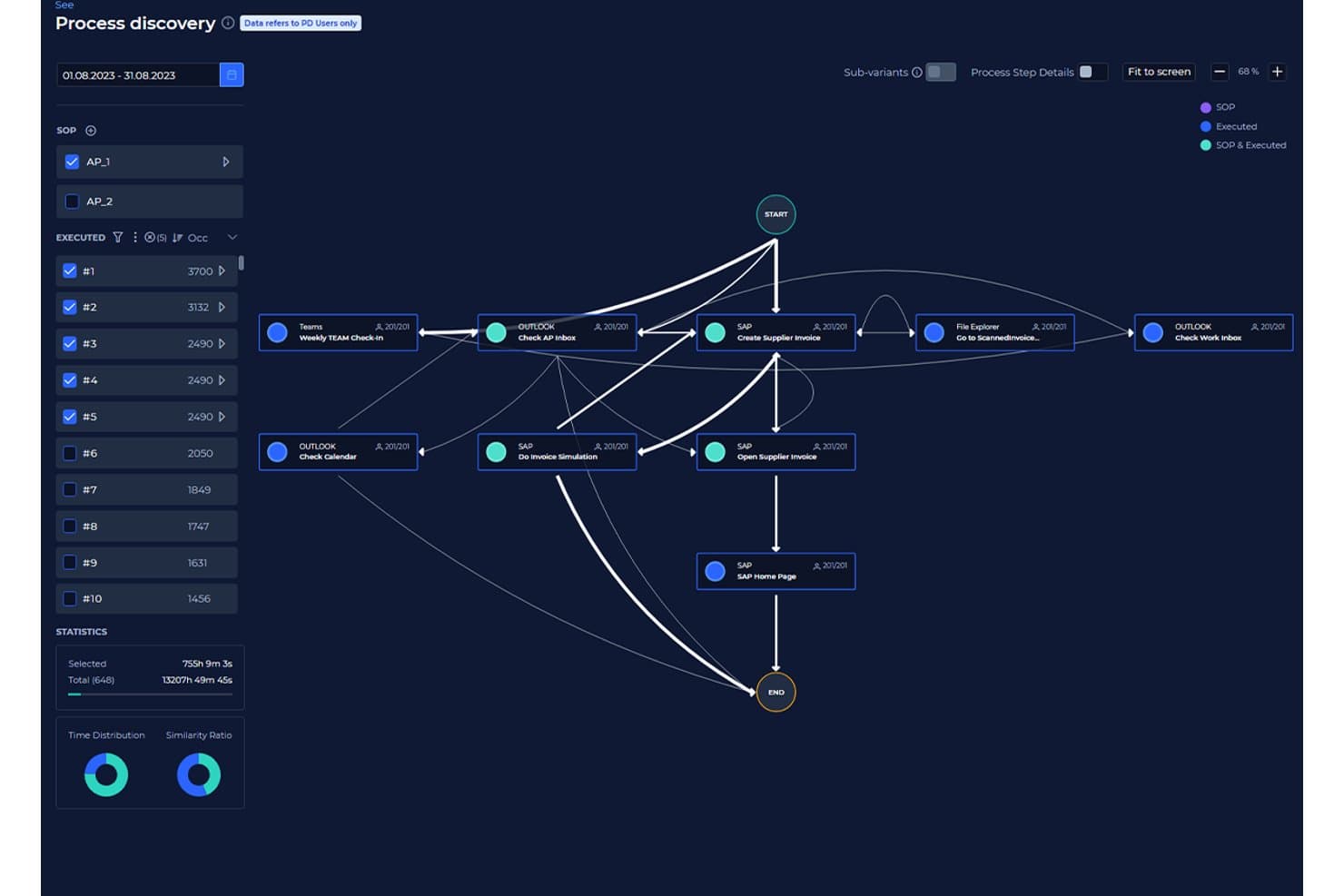
KYP.ai visualizes process flows to uncover execution patterns. KYP.ai is a process intelligence platform that captures desktop-level activity across applications and systems to reconstruct process flows, identify inefficiencies, and generate production-ready automation code—without relying on traditional event log extraction.
Who Is KYP.ai Best For?
KYP.ai is a strong fit for operations and automation teams in BPO, business services, and BFSI enterprises that need to identify and prioritize automation opportunities across desktop workflows.
Why I Picked KYP.ai
I picked KYP.ai because it surfaces automation opportunities that traditional process mining tools miss entirely. Most event-log-based tools can't see what happens in spreadsheets, email threads, or manual handoffs between systems, but KYP.ai captures all of it at the desktop level. I especially like that it doesn't just identify inefficiencies—it calculates automation ROI by task type and then generates production-ready agent code for platforms like UiPath and Copilot Studio, so there's no gap between discovery and execution.
KYP.ai Key Features
- 360° enterprise view: Aggregates real-time data from desktops, applications, and systems for a unified view of organizational activity.
- Conformance and compliance tracking: Captures regulatory steps and automatically flags deviations from company standards or SLAs.
- Performance analytics dashboard: Provides task durations, workload distributions, and bottleneck reports with interactive filtering options.
- Integration database: Combines data from enterprise systems, BI tools, and workforce platforms for enhanced process visibility.
KYP.ai Integrations
KYP.ai offers integrations through its API and Integration Database, allowing you to connect with platforms like PowerBI, UiPath, SAP Joule, and Copilot Studio. An API is available for custom integrations.
Pros and Cons
Pros:
- Built-in ROI quantification per process and task
- Auto-generates deployment-ready automation code
- Captures desktop activity traditional log mining misses
Cons:
- Minimal public user reviews for peer benchmarking
- No pre-built ITSM or ServiceNow connectors
Learn more about KYP.ai: Best for harmonizing RPA and process mining
- Free plan available
- From $25/month
Visit WebsiteCustomer Rating:4.6/5
UiPath Process Mining Software drag-and-drop feature UiPath excels in its commitment to bringing RPA (Robotic Process Automation) and process mining together under one platform. This harmonization ensures organizations can automate tasks while simultaneously gaining insights into their processes.
Why I Picked UiPath: UiPath came to my attention due to its unique blend of RPA and process mining. In weighing the offerings of multiple tools, I determined that UiPath provided a harmonious blend not commonly found elsewhere. It's this synchronization of automation and insights that convinced me it's "best for harmonizing RPA and process mining."
Standout Features & Integrations:
Central to UiPath's offering is its Orchestrator, a platform that coordinates software robots ensuring they're deployed where most needed. Additionally, the UiPath Studio empowers users to craft custom workflows. Integration-wise, UiPath offers compatibility with a wide array of applications, including SAP, Oracle, and Salesforce.
Pros and Cons
Pros:
- Custom workflow creation with UiPath Studio
- Orchestrator platform for efficient bot deployment
- A unique fusion of RPA and process mining
Cons:
- Licensing model can be complex for some users
- Might be overkill for small-scale operations
- The steeper learning curve for those new to RPA
Learn more about UiPath:

Celonis process mining software benchmarking capabilities Celonis stands as a beacon for organizations leaning into the future, harnessing the power of AI to derive deep insights from their processes. The AI core of Celonis sets it apart, driving smarter process decisions and forward-thinking strategies.
Why I Picked Celonis: The decision to include Celonis stemmed from its strong AI-driven analytics. Among the myriad of tools available, Celonis particularly stood out due to its AI core, which I believe is pivotal for future-ready businesses. It’s this AI-centric approach that led me to deem it "best for AI-driven process insights."
Standout Features & Integrations:
At the heart of Celonis is its AI engine that powers deep process insights, pushing businesses to optimize at every turn. The platform also supports process simulations, enabling hypothetical scenario testing. On the integration front, Celonis is versatile, interfacing with a multitude of data sources from ERPs to CRMs.
Pros and Cons
Pros:
- Broad integration capabilities with diverse data sources
- Process simulation for strategic planning
- AI engine for deep, predictive insights
Cons:
- Priced on the higher side for smaller businesses
- Advanced features can be daunting to newcomers
- Might require a shift in mindset to fully harness AI benefits
Learn more about Celonis: 4Best for connecting operations to customer experiences
Pega
- Free trial + free demo available
- From $0.45/case
Visit WebsiteCustomer Rating:4.3/5
Pega's App Studio process mining software people hub feature Pega Platform stands out not just as a process mining tool but as a holistic platform connecting operational processes to customer experiences. When the goal is to see how backend operations impact front-end customer interactions, Pega is the go-to choice.
Why I Picked the Pega Platform: My selection of Pega was influenced by its unique approach to blending operational processes with customer experience. Unlike many other tools, Pega offers a bridge between back-end operations and front-end customer touchpoints. This dual focus led me to choose it as "best for connecting operations to customer experiences."
Standout Features & Integrations:
Pega connects BPM, case management, and real-time analytics. This trio ensures that businesses can tweak processes based on customer feedback in real-time. As for integrations, Pega has built-in connectors for leading CRM, ERP, and data warehousing tools.
Pros and Cons
Pros:
- Built-in connectors for leading business tools
- Real-time analytics for quick decision-making
- Synchronous view of operations and customer experience
Cons:
- Requires dedicated training to maximize its potential
- Can be overwhelming with its myriad of features
- Higher price point compared to some competitors
Learn more about Pega : Best for root cause analysis
- Free demo available
- Pricing upon request
Visit WebsiteCustomer Rating:4.5/5
market-leading dashboard of QPR ProcessAnalyzer process mining software QPR ProcessAnalyzer stands as a tool that doesn’t just showcase processes but delves deep into the 'why' behind process behaviors. For organizations that aim to understand the root causes of process variations, QPR offers invaluable insights.
Why I Picked QPR ProcessAnalyzer: In comparing tools, QPR ProcessAnalyzer's prowess in root cause analysis became evident. Many tools can showcase 'what' is happening, but few can consistently identify 'why' it's happening. It was this strength in root cause determination that made me label it as "best for root cause analysis."
Standout Features & Integrations:
The tool is equipped with advanced diagnostic tools, making root cause analysis precise. It also supports AI-based predictions for process outcomes. When it comes to integrations, QPR easily syncs with most major ERPs and data warehouses.
Pros and Cons
Pros:
- Efficient integration with major ERPs
- AI-based predictions for enhanced Foresight
- Precision in root cause analysis
Cons:
- Some features might be redundant for smaller setups
- AI predictions require clean datasets for accuracy
- Might be a learning curve for non-technical users
Learn more about QPR ProcessAnalyzer:

PwC's effort mining reports and dashboard PwC's process mining solution is more than just a visualization tool; it bridges the gap between processes and financial insights. This melding of process data with financial analytics makes PwC unparalleled when it comes to financial-centric process mining.
Why I Picked PwC: In my comparative analysis, I noticed a gap: few tools effectively connect process mining with financial insights. PwC filled this void perfectly. I chose PwC as "best for integrating financial insights" due to its prowess in merging process data with financial metrics, offering a holistic view of business operations.
Standout Features & Integrations:
PwC boasts features that connect operational processes directly with financial performance indicators. Additionally, it has risk assessment tools that tie financial risks to processes. As for integrations, PwC's tool integrates with most enterprise financial systems and ERPs.
Pros and Cons
Pros:
- Broad compatibility with financial systems
- Risk assessment features tied to financial metrics
- Deep integration of process data with financial insights
Cons:
- The pricing model might be on the higher side for some
- The interface can be intricate for first-timers
- It might be overkill for smaller businesses
Learn more about PwC: Best for scalability and enterprise integration
- From $150/user/month (min 10 seats)

IBM process mining software process discovery dashboard IBM Process Mining offers businesses a robust solution to analyze, monitor, and optimize their operations. Tailored for larger enterprises, this tool stands out for its scalability and deep integration capabilities.
Why I Picked IBM Process Mining:
When selecting tools, the scalability and integration capabilities of IBM Process Mining caught my eye. Given IBM's longstanding reputation in the enterprise space, it's no surprise that they have a tool designed with scalability at its core.
It's this focus on large-scale operations and enterprise compatibility that led me to believe it's "best for scalability and enterprise integration."
Standout Features & Integrations:
IBM's tool provides a comprehensive view of business operations, offering metrics-driven insights. It also includes a simulation feature, allowing for hypothetical scenario analyses. The platform integrates with IBM's vast ecosystem but also offers connectors to other enterprise-grade software solutions.
Pros and Cons
Pros:
- Extensive integration capabilities with enterprise software
- Metrics-driven insights for data-driven decisions
- Designed with large enterprises in mind
Cons:
- The cost might be prohibitive for some organizations
- Requires a deep understanding to utilize its full potential
- It might be overwhelming for small businesses
Learn more about IBM Process Mining: Best for combining RPA with process analytics
- From $750/user/month (billed annually)

Automation Anywhere's bot insights dashboard Automation Anywhere merges the realms of Robotic Process Automation (RPA) with the analytical dimension, presenting a holistic tool for businesses looking to automate and analyze simultaneously. Its dual capability serves organizations that prioritize both automation and insights derived from their processes.
Why I Picked Automation Anywhere: When deliberating on tools with the potential to not only automate but also offer process insights, Automation Anywhere rose to the top of my list. Most tools specialize in one or the other, but Automation Anywhere successfully combines both, which is a rare find. Based on this integrated approach, I tagged it as "best for combining RPA with process analytics."
Standout Features & Integrations:
The tool's strength resides in its Bot Insight feature, which presents real-time analytics directly from the bots. Additionally, the platform's IQ Bot employs AI to learn from human users and makes decisions based on that learning. Integration-wise, Automation Anywhere interfaces smoothly with most enterprise software, from ERPs to CRMs.
Pros and Cons
Pros:
- Adaptive AI learning with IQ Bot
- Real-time insights through the Bot Insight feature
- Dual capability of RPA and process analytics
Cons:
- Comprehensive features might be overwhelming
- High price point for small businesses
- The steeper learning curve for beginners
Learn more about Automation Anywhere - RPA | Robotic Process Automation:

ARIS process mining software process model overlay feature ARIS Process Mining delves into processes, uncovering inefficiencies and offering real-time visibility into how processes are performing. Its commitment to real-time insights ensures organizations always have an up-to-date view of their operations.
Why I Picked ARIS Process Mining: I chose ARIS for its undeniable emphasis on real-time process analytics. In my opinion, having immediate visibility into processes is invaluable. Thus, seeing ARIS’s dedication to offering real-time insights, I felt it deserved the label "best for real-time process performance."
Standout Features & Integrations:
ARIS emphasizes real-time process discovery, allowing businesses to understand and adapt processes on the fly. Its conformance checking ensures processes adhere to predefined models. Regarding integrations, ARIS connects efficiently with major ERP systems and various other data sources.
Pros and Cons
Pros:
- Efficient integration with leading ERP systems
- Conformance checking against set models
- Immediate visibility into process performance
Cons:
- Some features might be excessive for simpler operations
- May be complex for non-technical users
- Requires proper training for full utility
Learn more about ARIS Process Mining: Best for rapid process discovery
- From $99/user/month (billed annually)

Disco's sandbox dashboard Disco by Fluxicon is an agile tool designed to dive swiftly into your data and showcase processes with minimal setup time. Its speed and efficiency make it the prime choice for organizations aiming for rapid process discovery.
Why I Picked Disco by Fluxicon: When deliberating over which tool would serve businesses looking for quick results, Disco stood out. Its efficiency in dissecting large datasets quickly without compromising on accuracy was remarkable. I labeled it "best for rapid process discovery" as its nimbleness allows businesses to get actionable insights in record time.
Standout Features & Integrations:
Disco shines with its speed, capable of analyzing vast datasets in moments. Its visualization tools are intuitive, making the interpretation straightforward. For integrations, Disco supports a variety of data formats and connects effortlessly with major ERPs and IT systems.
Pros and Cons
Pros:
- Supports multiple data formats for ease of integration
- Intuitive visualization tools for quick interpretation
- Exceptional speed in process data analysis
Cons:
- Annual billing might not be preferable for all organizations
- Pricing can be a barrier for smaller businesses
- Lacks some of the deeper analytics tools of competitors
Learn more about Disco by Fluxicon:
Annen programvare for prosessutvinning
Her er noen flere alternativer innen programvare for prosessutvinning som ikke kom med på kortlisten min, men som likevel er verdt å se nærmere på:
- 11iGrafx Process Explorer 360Best for comprehensive process visualization
- 12ApromoreBest for open-source process analytics
- 13MinitBest for detailed process insights
- 14AppianGood for rapid application development
- 15NintexGood for drag-and-drop workflow design
- 16Process StreetGood for checklist-driven workflows
- 17SAP SignavioGood for collaborative process design
- 18Kofax TotalAgilityGood for bridging process management and automation
- 19Scout PlatformGood for automating process discovery
- 20Kofax InsightGood for visual business intelligence analytics
- 21UpFlux Process MiningGood for optimizing cycle times
- 22mpmXGood for performance-driven process insights
How I Evaluate Process Mining Software
I split my evaluation into baseline criteria—like whether a tool can ingest SAP or ServiceNow event logs—and differentiators that separate the best options from the rest.
Core Functionality (Table Stakes For This List)
When I'm selecting tools for my list, I rank each one on a scale from 0 (does not offer the functionality) to 5 (excels in this area) for each core functionality listed below. Then, I calculate the tool's total score into a percentage. Each tool needs to achieve a minimum total score of 65% to be considered for inclusion.
- Event Log Ingestion: I look at what source formats and systems each tool can pull event data from—like importing ticket lifecycle logs from ServiceNow or order-to-cash records from SAP.
- Automated Process Discovery: Each tool should generate visual process maps directly from raw logs, so I evaluate how well it reconstructs real execution paths without manual modeling.
- Conformance Checking: I check whether the tool can overlay discovered processes against a reference model and flag deviations, such as skipped approvals in a change management workflow.
- Performance Analytics: Dashboards should surface KPIs like cycle times, bottleneck locations, and throughput across process variants—not just static case counts.
- Root Cause & Variant Analysis: Drilling into why certain incident tickets take three times longer matters, so I evaluate how each tool lets you filter variants and isolate contributing factors.
- System Integrations & Connectors: I look for pre-built connectors to the enterprise systems IT teams rely on—SAP, Oracle, Salesforce, Jira, ServiceNow—and whether open APIs support custom sources.
Once I have a list of tools that meet this criteria, I consider what sets each platform apart.
Differentiating Factors (What Sets Vendors Apart)
Here's how I compare and contrast different vendors:
Standout Features
Task mining is a big differentiator—I look for tools that capture desktop-level user interactions to fill gaps that system logs miss, like manual data entry between two disconnected apps. Process simulation matters too, because modeling a proposed change before rolling it out to production beats guessing. I also evaluate how well a platform hands off insights to automation tools like UiPath or Power Automate, since discovering a bottleneck is only useful if you can act on it.
Beyond Features
Security and compliance certifications like SOC 2 and ISO 27001 matter when your process data includes sensitive ITSM records or customer information—I check what each vendor offers for data masking and role-based access. Implementation speed is another factor I weigh, especially whether a platform includes pre-built accelerators for common IT workflows like incident management. I also consider deployment flexibility, since some organizations need on-premise options to meet internal data residency policies.
Slik velger du programvare for prosessutvinning
Det er lett å gå seg vill i lange funksjonslister og kompliserte prisstrukturer. For å hjelpe deg med å holde fokus mens du går gjennom den unike prosessen din for valg av programvare, får du her en sjekkliste over faktorer du bør ha i tankene:
| Faktor | Hva du bør vurdere |
|---|---|
| FaktorSkalerbarhet | Hva du bør vurdereVil programvaren vokse med virksomheten din? Sjekk om den kan håndtere økt datamengde og brukerbelastning uten ytelsesproblemer. |
| FaktorIntegrasjoner | Hva du bør vurdereKan den kobles til de eksisterende systemene dine? Se etter enkel integrasjon med verktøy som ERP, CRM og databaser. |
| FaktorTilpasningsmuligheter | Hva du bør vurdereKan du tilpasse den til prosessene dine? Sørg for at programvaren tillater justeringer av arbeidsflyter slik at de samsvarer med behovene dine. |
| FaktorBrukervennlighet | Hva du bør vurdereEr den brukervennlig for teamet ditt? Vurder læringskurven og om grensesnittet er intuitivt nok til daglig bruk. |
| FaktorImplementering og opplæring | Hva du bør vurdereHvor lang tid vil det ta å sette den opp? Vurder tiden og ressursene som trengs for implementering, inkludert opplæring og støtte. |
| FaktorKostnad | Hva du bør vurderePasser den inn i budsjettet ditt? Sammenlign abonnementsavgifter og tilleggskostnader, og se om det finnes en gratis prøveperiode eller demo. |
| FaktorSikkerhetstiltak | Hva du bør vurdereEr dataene dine beskyttet? Se etter kryptering, samsvar med personvernregler og sikkerhetssertifiseringer fra leverandøren. |
| FaktorTilgjengelig brukerstøtte | Hva du bør vurdereEr hjelp tilgjengelig når det trengs? Sjekk om det finnes støtte døgnet rundt, responstider og kvaliteten på de tilgjengelige kundeservicealternativene. |
Hva er programvare for prosessutvinning?
Programvare for prosessutvinning er et verktøy som analyserer forretningsprosesser for å identifisere ineffektivitet og flaskehalser. Fagpersoner som forretningsanalytikere, prosessledere og IT-spesialister bruker vanligvis disse verktøyene for å få innsikt og forbedre driften. Funksjoner for datavisualisering, prosessoppdagelse og ytelsesanalyse bidrar til å forstå arbeidsflyter og optimalisere prosesser. Samlet sett gir disse verktøyene verdifull innsikt som fører til mer effektive og kostnadseffektive arbeidsprosesser.
Funksjoner
Når du velger programvare for prosessutvinning, bør du se etter følgende viktige funksjoner:
- Prosessoppdagelse: Kartlegger automatisk forretningsprosesser for bedre forståelse og analyse.
- Samsvarskontroll: Sammenligner gjeldende prosesser med ønskede modeller for å identifisere avvik.
- Ytelsesanalyse: Evaluerer effektiviteten og hastigheten til prosesser for å finne flaskehalser.
- Datavisualisering: Tilbyr tydelige og interaktive diagrammer og grafer som gjør data enklere å forstå.
- Integrasjonsmuligheter: Kobler sømløst til eksisterende forretningssystemer som ERP og CRM.
- Tilpassbare instrumentpaneler: Lar brukerne tilpasse visninger og rapporter etter spesifikke forretningsbehov.
- Prediktiv analyse: Gir prognoser og innsikt som hjelper med å forutse fremtidige prosessresultater.
- Sanntidsovervåking: Gir løpende oppdateringer for å følge prosessene mens de pågår, slik at du får umiddelbar innsikt.
- Innsikt drevet av kunstig intelligens: Bruker kunstig intelligens til å tilby grundigere analyser og anbefalinger.
- Sikkerhetstiltak: Sikrer databeskyttelse gjennom kryptering og samsvar med regelverk.
Fordeler
Implementering av programvare for prosessutvinning gir flere fordeler for teamet og virksomheten din. Her er noen av fordelene du kan se frem til:
- Bedre effektivitet: Identifiserer flaskehalser og ineffektivitet, noe som bidrar til å fremskynde prosessene.
- Bedre beslutningstaking: Gir innsikt og datavisualisering som støtter velinformerte valg.
- Forbedret samsvar: Sikrer at prosessene samsvarer med regelverket gjennom samsvarskontroll.
- Kostnadsbesparelser: Reduserer sløsing og optimaliserer ressursbruken ved å analysere ytelsen.
- Økt åpenhet: Gir tydelig innsyn i prosessene gjennom sanntidsovervåking.
- Prediktiv innsikt: Hjelper med å forutse fremtidige trender og resultater gjennom prediktiv analyse.
- Tilpasning: Tilpasser instrumentpaneler og rapporter til spesifikke forretningsbehov, noe som forbedrer brukervennligheten.
Kostnader & priser
Valg av programvare for prosessutvinning krever en forståelse av de ulike prismodellene og abonnementene som er tilgjengelige. Kostnadene varierer basert på funksjoner, teamstørrelse, tillegg og mer. Tabellen nedenfor oppsummerer vanlige abonnementer, gjennomsnittsprisene deres og typiske funksjoner som er inkludert i programvareløsninger for prosessutvinning:
Sammenligningstabell for abonnementer for programvare for prosessutvinning
| Plantype | Gjennomsnittspris | Vanlige funksjoner |
|---|---|---|
| PlantypeGratisabonnement | Gjennomsnittspris$0 | Vanlige funksjonerGrunnleggende prosessoppdagelse, begrenset datavisualisering og støtte fra fellesskapet. |
| PlantypePersonlig abonnement | Gjennomsnittspris$10-$50/bruker/måned | Vanlige funksjonerProsessoppdagelse, ytelsesanalyse og grunnleggende dataintegrasjon. |
| PlantypeBedriftsabonnement | Gjennomsnittspris$50-$150/bruker/måned | Vanlige funksjonerAvansert datavisualisering, sanntidsovervåking og tilpassbare dashbord. |
| PlantypeStorbedriftsabonnement | Gjennomsnittspris$150+/bruker/måned | Vanlige funksjonerPrediktiv analyse, KI-drevne innsikter, prioritert støtte og full integrasjonsfunksjonalitet. |
Vanlige spørsmål om prosessutvinningsprogramvare
Her er noen svar på vanlige spørsmål om prosessutvinningsprogramvare:
Hva er de vanligste utfordringene ved implementering av prosessutvinningsprogramvare?
Vanlige utfordringer omfatter problemer med datakvalitet, kompleks integrasjon og motstand mot endringer i teamene. Det er viktig å sikre nøyaktig datainnsamling og kommunisere fordelene med prosessutvinning tydelig til teamet ditt for å overvinne disse hindringene.
Hvordan støtter prosessutvinningsprogramvare samsvar?
Prosessutvinningsprogramvare støtter samsvar ved å tilby funksjoner for samsvarskontroll. Disse funksjonene lar deg sammenligne gjeldende prosesser med regulatoriske standarder, slik at du kan identifisere og rette opp eventuelle avvik for å opprettholde samsvar med bransjeregelverket.
Er det mulig å tilpasse prosessutvinningsprogramvare til spesifikke behov?
Mange verktøy for prosessutvinning tilbyr tilpasningsalternativer, for eksempel justerbare dashbord og rapporter. Dette gjør det mulig å tilpasse programvaren til virksomhetens unike prosesser og krav, slik at den effektivt dekker de spesifikke driftsbehovene dine.