

Et godt alternativ til Help Scout gir teamet arbeidsflyter for kundestøtte, integrasjoner, automatisering og datakontroller som det trenger etter hvert som tjenestedriften vokser. Hvis en delt innboks ikke lenger passer til arkitekturen din, kan du sammenligne brukerstøtteplattformer basert på distribusjonsalternativer, skalerbarhet, AI-funksjoner, støtte på tvers av kanaler og CRM-kompatibilitet. Denne veiledningen fremhever hva hvert alternativ passer til, fra fokusert e-poststøtte til kundeservice i større virksomheter.
Hva er et alternativ til Help Scout?
Et alternativ til Help Scout er en kundestøtteplattform som erstatter eller supplerer Help Scout. Disse verktøyene kan tilby delte innbokser, saksbehandling, automatisering, AI-assistanse, CRM-integrasjoner, meldinger på tvers av kanaler eller selvhostet distribusjon. Velg basert på teamets støttebehov.
Sammenligningstabell for alternativer til Help Scout
Sammenlign priser og spesifikasjoner side om side for alternativene til Help Scout som kom med på kortlisten min.
| Tool | Best For | Trial Info | Price | ||
|---|---|---|---|---|---|
| 1 | Best for multi-channel ticketing at scale | 14-day free trial | From $24/user/month (billed annually) | Website | |
| 2 | Best for email-first teams needing CRM sync | 14-day free trial | From $25/user/month (billed annually) | Website | |
| 3 | Best for AI-driven ticket resolution at scale | Free demo available | Pricing upon request | Website | |
| 4 | Best for Gmail-native shared inbox teams | Free plan available | From $35/user/month | Website | |
| 5 | Best for migrating from Help Scout with call center | Free trial available | From $15/user/month (billed annually) | Website | |
| 6 | Best for AI-driven omnichannel support at scale | 14-day free trial | From $29/user/month (billed annually) | Website | |
| 7 | Best for omnichannel customer context at scale | Free demo available | Pricing upon request | Website | |
| 8 | Best for on-premise and private cloud deployments | Free demo available | From $39/user/month | Website | |
| 9 | Best for enterprise-scale CRM-native support | 30-day free trial | From $25/user/month | Website | |
| 10 | Best for teams scaling beyond per-seat limits | 14-day free trial | From $49/month | Website |


Hvorfor du kan stole på våre programvareanbefalinger
6,700+
Reviews
20
Industry experts
16+
Evaluation factors
14
Years
Teamet vårt har testet og anmeldt programvare siden 2012. Vi er selv teknologiledere, så vi vet hvor vanskelig og hvor viktig det er å velge riktig programvare.
I denne guiden har vi vurdert verktøyene gjennom praktisk testing og uavhengig research og gitt dem poeng ut fra våre utvelgelseskriterier.
Anmeldelsene våre bygger på vår egen redaksjonelle vurdering. De er ikke et salgsargument.
Ekspertanmeldere:
- Paulo Gardini MiguelTech Director
 Tim FisherVP of AI
 Gabriel RosasTech Lead & Software Architect
 Christhian GruhnTech Lead & Platform Architect

Anmeldelser av alternativer til Help Scout
Nedenfor finner du sammendragene mine av de beste alternativene til Help Scout som kom med på kortlisten min. Disse anmeldelsene ser nærmere på funksjonene, prisene og integrasjonene til hver plattform, slik at du kan velge den rette for teamet ditt.
 Best for multi-channel ticketing at scale
- 14-day free trial
- From $24/user/month (billed annually)
Visit WebsiteCustomer Rating:4.5/5
HappyFox organizes support tickets by status, priority, and category. HappyFox is an AI-powered help desk for customer service, IT, HR, and operations teams that need customizable workflows, self-service portals, and unified support across departments.
Who Is HappyFox Best for?
HappyFox suits customer service and IT teams managing high ticket volumes across email, chat, phone, social media, and web forms.
Why HappyFox Is a Good helpscout alternative
I picked HappyFox, Best for multi-channel ticketing at scale, because email, chat, phone, social media, and web forms feed one ticket queue. My team uses automation to categorize, prioritize, assign, and escalate tickets across departments. When a phone issue becomes an email follow-up, we keep the conversation in one record instead of splitting work across inboxes.
HappyFox Key Features
- AI Copilot: Summarizes conversations and drafts ticket responses.
- Self-service portals: Let users find answers and track ticket status.
- Custom roles: Set granular permissions for agents and departments.
- Reporting and analytics: Monitor ticket trends, bottlenecks, and service data.
HappyFox Integrations
HappyFox lists integrations with 100+ business apps, including Slack, Microsoft Teams, Zoom, Salesforce, Jira, Azure DevOps, Shopify, Okta, Google Workspace, and Zapier. An API is available for custom integrations.
Pros and Cons
Pros:
- Supports multiple departments and self-service portals
- Routes tickets with granular automation rules
- Consolidates email, chat, phone, and social tickets
Cons:
- Reports can confuse without higher-tier features
- Ticket merging closes one instead of combining
Learn more about HappyFox: Best for email-first teams needing CRM sync
- 14-day free trial
- From $25/user/month (billed annually)
Visit WebsiteCustomer Rating:4.6/5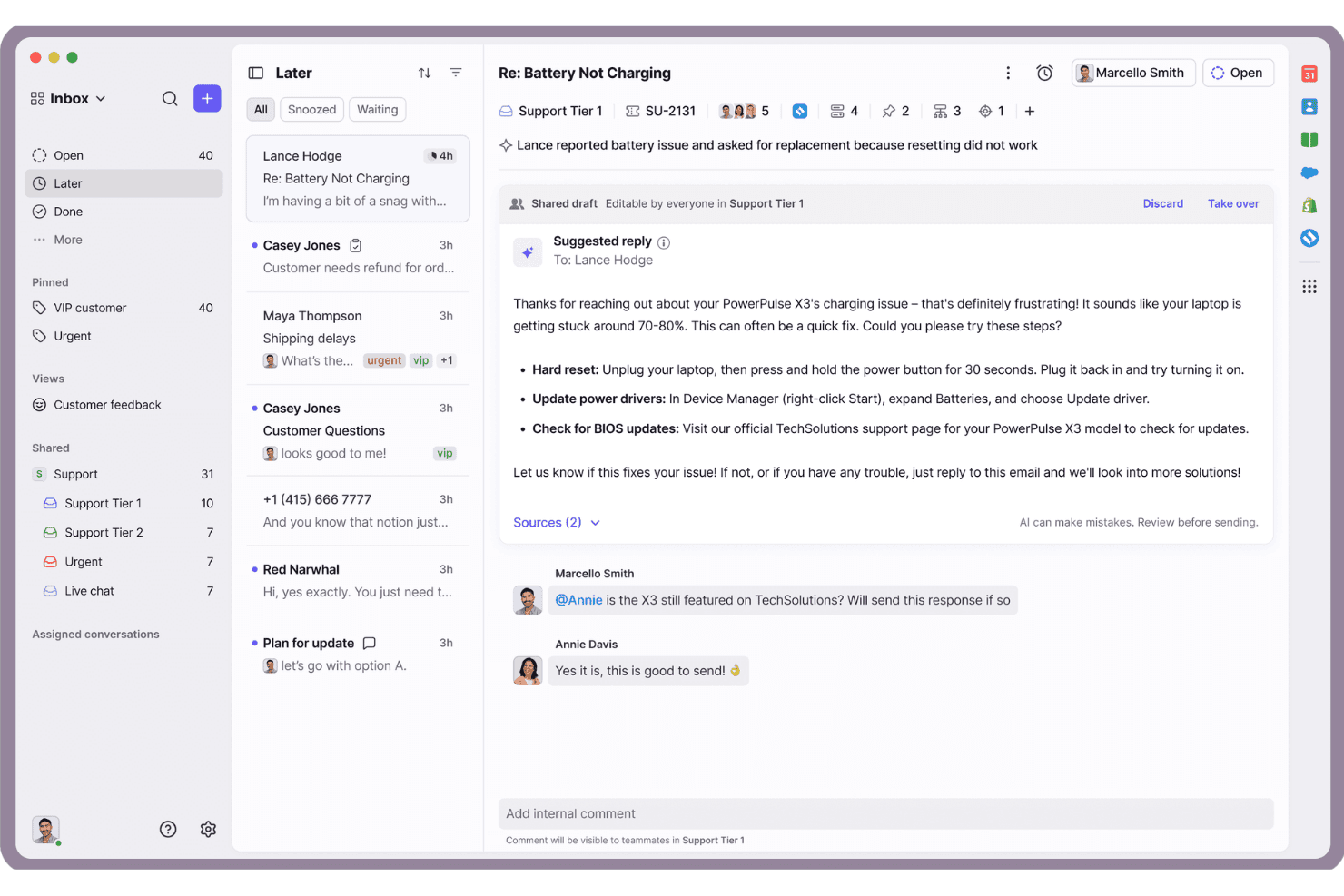
Front centralizes team email replies with AI-suggested responses and collaboration. Front is a customer operations and help desk platform for support teams that need shared inboxes, ticketing, live chat, and CRM-connected workflows instead of scattered email threads—Best for email-first teams needing CRM sync.
Who Is Front Best for?
Front suits customer support and operations teams that manage high volumes of email and need shared workflows connected to CRM records.
Why Front Is a Good helpscout alternative
I picked Front because it combines shared inboxes with ticketing and live chat for email-first support workflows. I use its CRM-connected conversations to keep customer context alongside each request, rather than switching between email threads and records. That makes Front a strong fit for email-first teams needing CRM sync.
Front Key Features
- Omnichannel support: Manage multiple customer communication channels in one workspace.
- Knowledge base: Publish self-service content for recurring customer questions.
- Integrations and API: Connect Front with business tools through 160+ integrations.
- Front AI: Automate complex requests, assist teams, and analyze support quality.
Front Integrations
Front supports 160+ integrations and provides an API for custom integrations. Specific native integration vendors aren’t clearly documented here.
Pros and Cons
Pros:
- Live chat complements email-based ticket workflows
- CRM context stays beside customer conversations
- Shared inboxes suit email-heavy support teams
Cons:
- High-volume inboxes can feel visually dense
- Reporting needs more setup than Help Scout
Learn more about Front: Best for AI-driven ticket resolution at scale
- Free demo available
- Pricing upon request
Visit WebsiteCustomer Rating:4/5
Kayako unifies customer conversations across email, Twitter, and Messenger. Kayako is an AI help desk for support and IT teams that need omnichannel ticketing, automated triage, customer context, and knowledge-based replies without replacing existing platforms.
Who Is Kayako Best for?
Kayako suits support and IT teams handling high ticket volumes across multiple channels with AI-assisted triage and resolution.
Why Kayako Is a Good helpscout alternative
I picked Kayako because its AI-driven ticket resolution handles high-volume queues without requiring a platform migration. I use AI triage to classify, prioritize, and route tickets, then apply AI-generated answers to repetitive billing, refund, and self-service requests. Kayako’s continuous learning escalates edge cases to agents and trains on resolved tickets over time.
Kayako Key Features
- Omnichannel inbox: Manage email, live chat, social, and voice conversations in one workspace.
- Customer context: SingleView displays customer history and order details alongside tickets.
- No-code workflows: Create routing, assignment, and escalation rules without scripting.
- Knowledge base: Provide semantic search across self-service documentation.
Kayako Integrations
Kayako offers native integrations with Salesforce, Slack, Microsoft Teams, WhatsApp, Shopify, Stripe, Chargebee, Jira, GitHub, and LaunchDarkly. It also connects with Zapier and provides REST API access and webhooks for custom integrations.
Pros and Cons
Pros:
- Semantic search supports knowledge-based replies
- SingleView keeps customer history beside tickets
- AI triage routes repetitive tickets automatically
Cons:
- AI rollout requires phased ticket-data training
- Reporting capabilities receive mixed user feedback
Learn more about Kayako: Best for Gmail-native shared inbox teams
- Free plan available
- From $35/user/month
Visit WebsiteCustomer Rating:4.7/5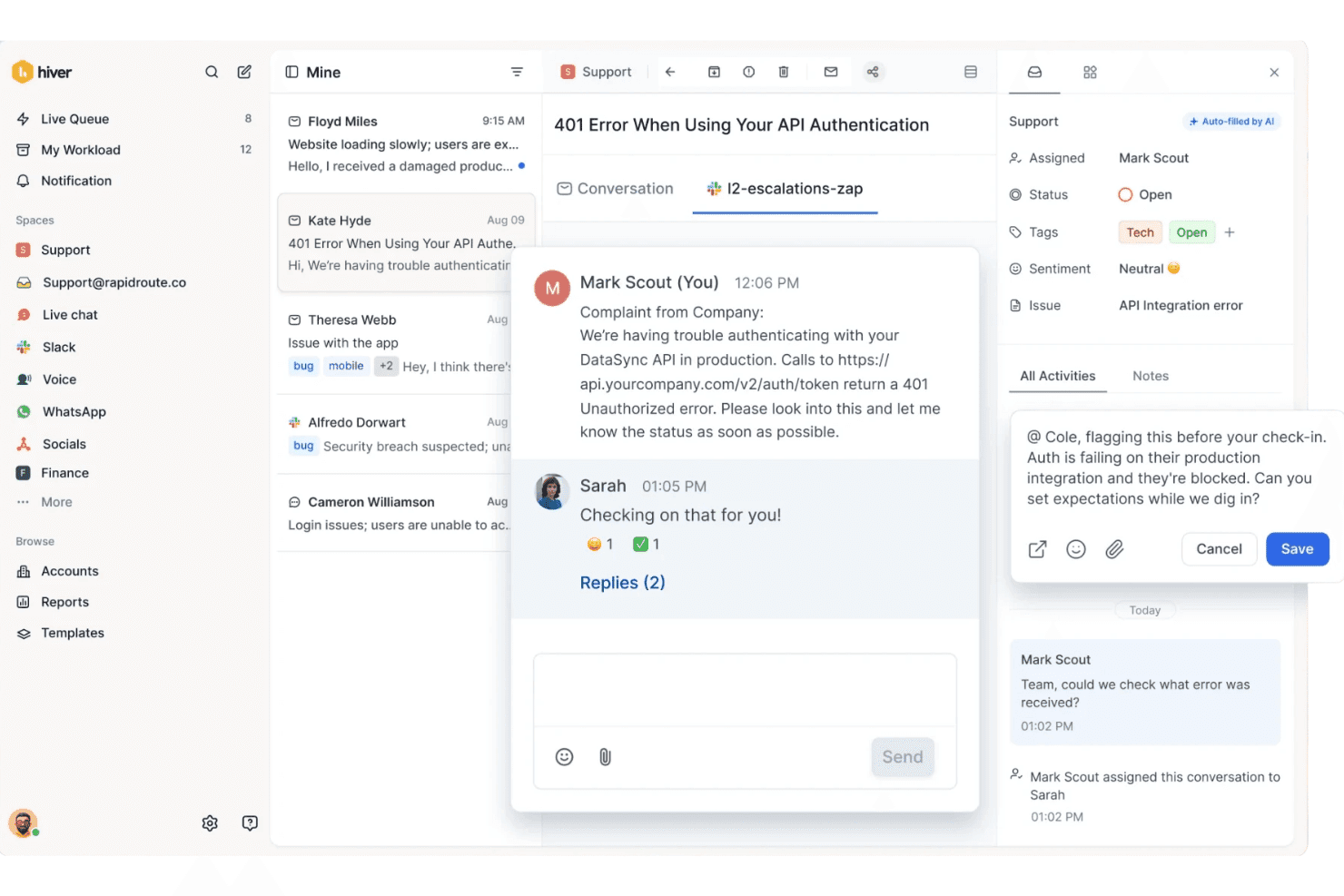
Hiver lets teams collaborate on support tickets via internal notes and Slack channels. Hiver is a Gmail-native help desk for IT and support teams that need shared email queues, ticket assignment, internal collaboration, and workflow automation without moving away from Gmail.
Who Is Hiver Best for?
Hiver suits support and IT teams that need to assign and track shared email requests while keeping Gmail as their main workspace.
Why Hiver Is a Good helpscout alternative
I picked Hiver because it keeps shared support inboxes inside Gmail, making it a strong choice for Gmail-native shared inbox teams. I use conversation assignment and internal notes to route requests without forwarding email threads. Workflow rules can also handle triage, routing, and SLA alerts from the same Gmail-based help desk.
Hiver Key Features
- Omnichannel inbox: Manage email, chat, Slack, voice, SMS, WhatsApp, and social messages.
- AI Agents: Handle multi-step support requests across connected business systems.
- AI Copilot: Investigate issues, draft replies, and suggest approved actions.
- AI Help Center: Turn resolved tickets into help center articles and identify knowledge gaps.
Hiver Integrations
Hiver offers native integrations with Salesforce, HubSpot, Shopify, NetSuite, Jira, Asana, Linear, Slack, and QuickBooks, and connects with Zapier. It also provides an open API for custom integrations.
Pros and Cons
Pros:
- Internal notes keep collaboration within threads
- Assignment prevents duplicate email responses
- Gmail-native inbox keeps adoption straightforward
Cons:
- Advanced reporting trails dedicated help desks
- Busy queues can load slowly
Learn more about Hiver: Best for migrating from Help Scout with call center
- Free trial available
- From $15/user/month (billed annually)
Visit WebsiteCustomer Rating:4.6/5
LiveAgent centralizes customer emails into urgent, trackable support tickets. LiveAgent is an omnichannel help desk for support teams that need email ticketing, live chat, AI assistance, social messaging, and knowledge base tools beyond Help Scout’s core workflows.
Who Is LiveAgent Best for?
LiveAgent suits customer support teams migrating from Help Scout that need email ticketing, live chat, social channels, and a built-in call center.
Why LiveAgent Is a Good helpscout alternative
I picked LiveAgent as a Best for migrating from Help Scout with call center because my team can handle email tickets, live chat, and calls in one help desk. Its built-in call center supports phone-based customer service alongside social messaging and knowledge base tools. This fits teams moving beyond Help Scout’s core workflows.
LiveAgent Key Features
- AI chatbot : Answers questions using your knowledge base, website content, and documents.
- AI answer composer : Generates complete replies based on your knowledge base.
- AI answer improver : Revises agent replies for clarity and professionalism.
- Multilingual support : Provides chatbot assistance in more than 100 languages.
LiveAgent Integrations
LiveAgent supports 200+ integrations and plugins, including Salesforce, Jira, Pipedrive, ClickUp, Shopify, Gmail, and ActiveCampaign. It also provides an API for custom integrations and connects with Zapier.
Pros and Cons
Pros:
- AI assistance spans over 100 languages
- Social channels share one support inbox
- Built-in call center alongside ticketing
Cons:
- Mobile app feels clunky compared with desktop
- Interface feels dated in places
Learn more about LiveAgent: Best for AI-driven omnichannel support at scale
- 14-day free trial
- From $29/user/month (billed annually)
Visit WebsiteCustomer Rating:4.4/5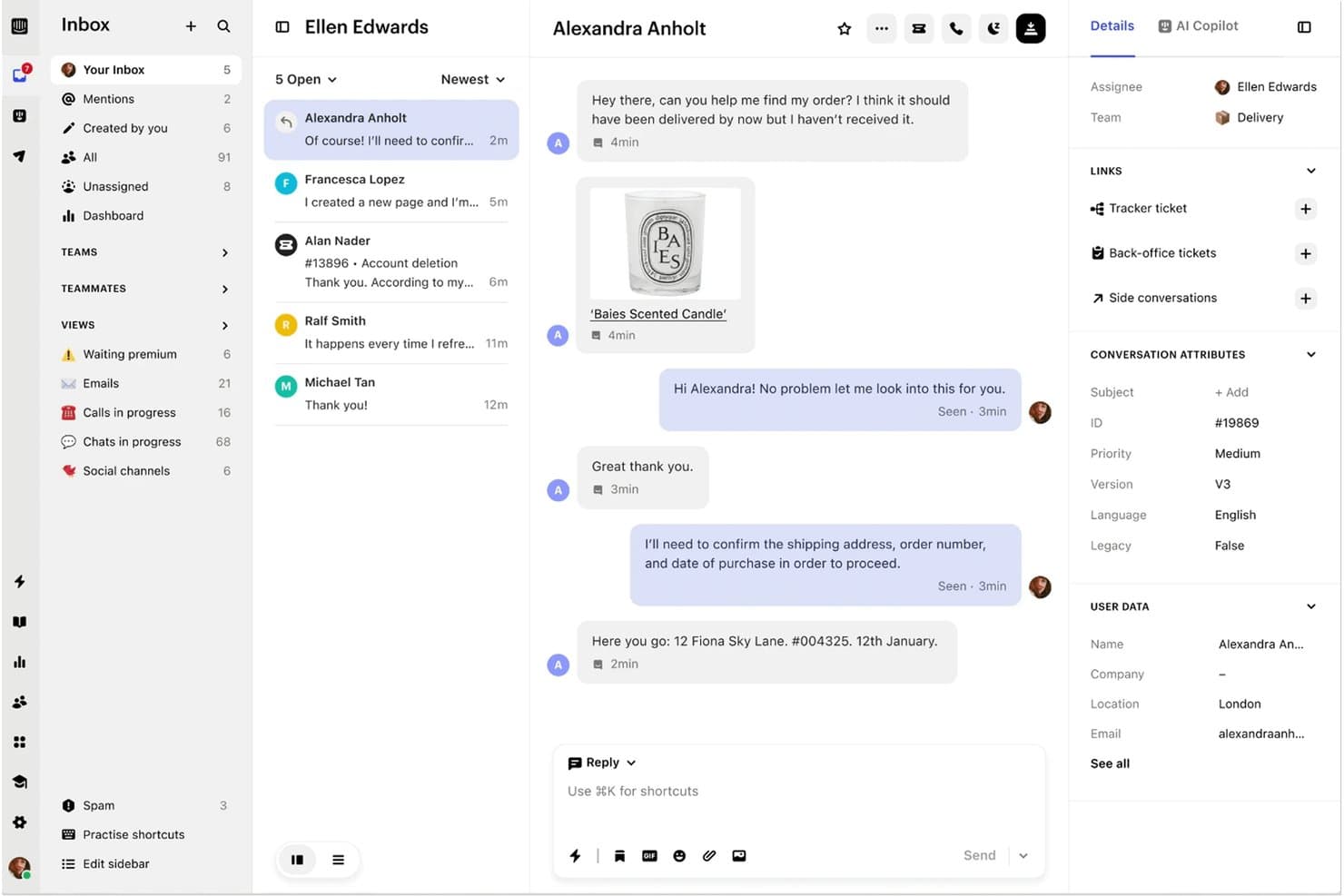
Intercom centralizes customer conversations in a shared team inbox. Intercom is an AI-enhanced helpdesk for support teams that combines omnichannel conversations, ticketing, knowledge management, and automation to handle customer issues across growing businesses.
Who Is Intercom Best for?
Intercom suits customer support leaders at growing companies that need AI-assisted conversations across chat, email, and other channels.
Why Intercom Is a Good helpscout alternative
I rate Intercom highly because it provides AI-driven omnichannel support at scale, beyond a shared inbox. My team uses Fin across chat, email, phone, and Slack, while Copilot assists with ticketing, translation, and repetitive tasks. We also use tracker tickets for widespread incidents and the Knowledge Hub to align AI and human responses.
Intercom Key Features
- Outbound messaging: Send in-context messages for onboarding, education, and notifications.
- AI simulations: Test customer conversations before deploying workflows.
- Conversation insights: Monitor trends and identify areas for retraining.
- Third-party integrations: Connect Slack, Salesforce, Jira, Shopify, and other tools.
Intercom Integrations
Intercom supports integrations with Slack, Shopify, GitHub, Claude, Stripe, Salesforce, Jira, Linear, Google Calendar, and HubSpot. Fin can pull customer data and take actions through APIs or MCP.
Pros and Cons
Pros:
- Tracker tickets coordinate widespread incidents
- Conversation insights expose trends for retraining
- Fin resolves documented questions across channels
Cons:
- Ticket views can feel cluttered at scale
- Fin accuracy depends on maintained knowledge
 Best for omnichannel customer context at scale
- Free demo available
- Pricing upon request
Visit WebsiteCustomer Rating:4.5/5
Kustomer centralizes customer history and AI copilot in one view. Kustomer is a customer service platform for support teams that need unified customer data, conversations, and workflows across channels, making it a fit for growing B2C and B2B businesses managing complex inquiries.
Who Is Kustomer Best for?
Kustomer suits B2C and B2B support teams that need unified customer context across omnichannel conversations.
Why Kustomer Is a Good helpscout alternative
I picked Kustomer because its omnichannel workspace keeps customer history and conversations together across every support channel. My team uses its contextualized CRM to see past interactions during active cases, then applies workflows and automation to route follow-ups. This fits complex B2C and B2B inquiries better than a mailbox-centered helpdesk.
Kustomer Key Features
- Reporting and analytics: View real-time visual metrics for support operations.
- Turnkey integrations: Connect Kustomer with existing tools and data sources.
- No-code setup: Configure the platform without writing code.
- AI agent assistance: Give representatives contextual guidance during interactions.
Kustomer Integrations
Kustomer offers turnkey integrations and an integration library that includes Aircall, Amazon Connect, BigCommerce, AfterShip, Ada, 8x8, Assembled, AskNicely, Attentive, and Acuity Scheduling. Its open API and webhook system support custom integrations when your tools aren’t listed.
Pros and Cons
Pros:
- AI uses context during agent interactions
- No-code workflows support custom routing
- Unified timeline consolidates customer interactions
Cons:
- Initial setup can require backend data planning
- Reporting can load slowly during high volume
Learn more about Kustomer: Best for on-premise and private cloud deployments
- Free demo available
- From $39/user/month
Visit WebsiteCustomer Rating:4.5/5
Deskpro centralizes ticket conversations, notes, and contact details in one view. Deskpro is a customizable IT help desk for support teams that combines omnichannel ticketing, workflow automation, knowledge bases, and reporting across internal and customer-facing requests.
Who Is Deskpro Best for?
Deskpro suits IT support teams that need flexible deployment options, including on-premise or private cloud environments.
Why Deskpro Is a Good helpscout alternative
I picked Deskpro because it supports on-premise and private cloud deployments when your support data needs tighter hosting control. I use its omnichannel ticketing and workflow automation to manage internal IT requests across controlled environments. Its knowledge base and reporting tools keep support documentation and service metrics in the same help desk.
Deskpro Key Features
- In-built CRM: View complete user profiles while responding to tickets.
- AI assistance: Draft replies, summarize threads, and flag tickets for review.
- Workspace switching: Move between multiple help desks from one interface.
- Third-party integrations: Connect Deskpro with Slack, Salesforce, HubSpot, and Jira.
Deskpro Integrations
Deskpro integrates with Slack, Salesforce, HubSpot, and Jira. It also supports an API for custom integrations.
Pros and Cons
Pros:
- Handles multiple help desks from one interface
- Combines omnichannel ticketing with workflow automation
- Supports on-premise and private cloud deployments
Cons:
- More administration than lightweight SaaS alternatives
- Self-hosting requires infrastructure ownership
Learn more about Deskpro: Best for enterprise-scale CRM-native support
- 30-day free trial
- From $25/user/month
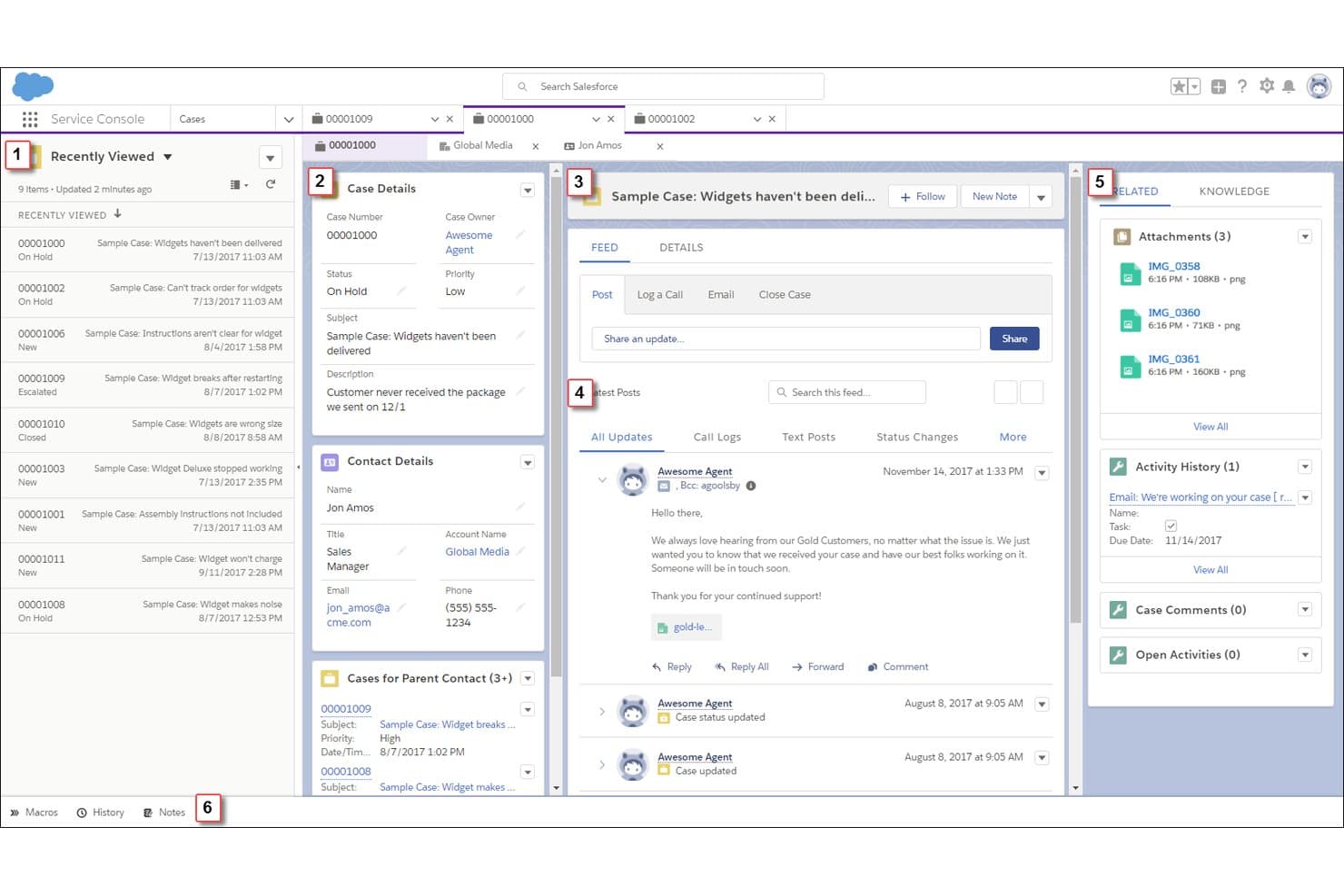
Salesforce Service Cloud centralizes case details, feeds, and contacts in one view. Salesforce Service Cloud is a CRM-based customer service platform for enterprise support teams that need case management, omnichannel requests, self-service knowledge, and unified customer context across complex operations.
Who Is Salesforce Service Cloud Best for?
Enterprise IT and customer support teams can use Salesforce Service Cloud to manage CRM-linked cases, omnichannel requests, and self-service across complex operations.
Why Salesforce Service Cloud Is a Good helpscout alternative
I picked Salesforce Service Cloud because its CRM-native case management connects support requests with unified customer records. I use omnichannel routing for email, chat, and other requests, while its knowledge base supports self-service. This fits enterprise operations where agents need customer context across complex cases.
Salesforce Service Cloud Key Features
- Service Rep Assistant: Provides step-by-step plans and real-time guidance for support agents.
- Service Replies: Generates suggested responses from customer data and organizational knowledge.
- Slack Swarming: Lets agents involve subject matter experts in Slack while preserving case context.
- Command Center: Monitors agent and AI conversations, service trends, and support activity.
Salesforce Service Cloud Integrations
Salesforce Service Cloud has a native Slack integration and supports Salesforce’s AgentExchange marketplace for partner apps and solutions. It also provides REST, SOAP, and Pub/Sub APIs for custom integrations.
Pros and Cons
Pros:
- AI-guided case assistance
- Capacity-based omnichannel routing
- Unified CRM customer context
Cons:
- Reporting can frustrate nontechnical users
- Dedicated administrators often remain necessary
Learn more about Salesforce Service Cloud:

Helply organizes tickets by status across a multi-column inbox view. Helply is a customer support platform for growing B2B and B2C teams that need shared inboxes, messaging, knowledge bases, workflows, and analytics without per-seat limits.
Who Is Helply Best for?
Growing support teams that need shared inboxes, workflow automation, and customer messaging without per-seat pricing.
Why Helply Is a Good helpscout alternative
I picked Helply because it supports teams scaling beyond per-seat limits with shared inboxes and workflow automation. My team uses shared inboxes to route support conversations, while knowledge bases handle repeat questions without creating extra tickets. Messaging and analytics also give us visibility across growing support operations.
Helply Key Features
- AI agents: Investigate support requests, take actions, and escalate issues.
- Audit logs: Track actions taken by AI agents.
- Permission controls: Set boundaries for agent access and actions.
- Multi-channel integrations: Connect email, Slack, Microsoft Teams, SMS, and WhatsApp.
Helply Integrations
Helply supports integrations with Slack, Microsoft Teams, and WhatsApp, alongside built-in email and SMS channels.
Pros and Cons
Pros:
- Shared inbox and knowledge base included
- AI agents investigate and resolve requests
- Unlimited teammates support growing support teams
Cons:
- Some users cite missing advanced capabilities
- Reviewers report occasional template formatting bugs
Learn more about Helply:
Andre alternativer til Help Scout
Her er noen flere alternativer til Help Scout som ikke kom med på kortlisten min, men som likevel er verdt å se nærmere på:
- 11ZendeskBest for scaling beyond a shared inbox
- 12Zoho DeskBest for Zoho CRM users scaling support
- 13FreshdeskBest for multi-channel ticketing on tiered plans
- 14ServiceNowBest for enterprise IT and cross-dept service ops
- 15Re:amazeBest for ecommerce teams on multi-brand support
- 16CrispBest for small teams needing omnichannel chat support
- 17GorgiasBest for ecommerce support teams on Shopify
- 18ChatwootBest for open-source self-hosted support
How I Evaluate Help Scout Alternatives
I split my evaluation into three parts. First, I check core functionality—specifically whether a tool can handle a shared inbox across multiple agents and convert conversations into trackable tickets with full history; these carry the most weight. Second, I look for standout features like AI-powered ticket summarization or native IT tool integrations. Third, I consider pricing model transparency and migration support.
Core Functionality (Table Stakes for This List)
When I'm selecting tools for my list, I score each one on a scale from 0 (does not offer the functionality) to 5 (excels in this area) for each core functionality listed below. I then convert the total into a percentage to help assess each tool's overall fit, with extra weight on any functionalities I've deemed essential.
- Shared Inbox Management (Essential): I check for collision detection, assignment visibility, and load balancing so two agents don't reply to the same customer at once.
- Ticketing & Case Tracking (Essential): Each tool needs custom statuses, SLA tracking, and full conversation history so your team can trace a ticket from first contact to resolution.
- Knowledge Base Creation: I look for searchable, categorized help articles with usage analytics, since a well-structured knowledge base deflects repeat tickets before they reach an agent.
- Workflow Automation: Rule-based routing, tagging, and escalation matter here. Tools like Zendesk and Zoho Desk both offer multi-condition triggers, so I evaluate how flexible and layered the rules can get.
- Reporting & Analytics: Dashboards should cover response times, resolution rates, and volume trends with filtering by agent, team, or channel. Exportable data is a must for teams reporting to leadership.
- Multi-Channel Support: I evaluate whether email, live chat, and social messaging all feed into one unified view. Switching between separate interfaces to check different channels adds unnecessary friction for agents.
Once I have a list of tools that meet the criteria, I consider what sets each platform apart.
Differentiating Factors (What Sets Vendors Apart)
Here's how I compare and contrast different vendors:
Standout Features
I look for AI-powered ticket summarization that condenses long threads and suggests replies, not just canned responses. Tools like Zendesk and Intercom handle this differently, so I evaluate how well each reduces agent handling time on complex tickets. Native two-way sync with dev tools like Jira or GitHub also matters. When a bug report lands in your support queue, your agents need visibility into the fix without switching platforms. I also check how well each tool pulls customer data—billing, usage, account health—directly into the ticket view for faster resolution.
Beyond Features
I evaluate how each tool handles migration from Help Scout—importing ticket history, saved replies, and knowledge base content without losing data or disrupting active support queues. Security and compliance also carry weight. Teams in regulated industries need SOC 2 compliance, SSO/SAML support, and data residency options before they can even consider a vendor. I also check whether pricing scales predictably as you add agents, since some platforms charge extra for automation tiers or API access that inflate costs well past the listed seat price.
Hvorfor se etter et alternativ til Help Scout?
Help Scout er et godt valg av IT-brukerstøtteprogramvare, men noen brukere ser etter alternative løsninger for å dekke andre behov innen kundestøtte. Det kan hende du ser etter et alternativ til Help Scout fordi …
- Du trenger lokal installasjon for å oppfylle strengere krav til datalagring
- Du trenger avanserte ITSM-arbeidsflyter for hendelser og endringsforespørsler
- Du opplever mindre forutsigbare kostnader når kundestøtteteamet legger til agenter
- Du trenger innebygd tale- og meldingsstøtte for sosiale medier i ett arbeidsområde
- Du ønsker mer omfattende AI-automatisering for sortering av store mengder saker
Hvis noe av dette høres kjent ut, har du kommet til rett sted. Listen min inneholder flere alternativer innen IT-brukerstøtteprogramvare som passer bedre for team som møter disse utfordringene med Help Scout og ser etter alternative løsninger.
Viktige funksjoner i Help Scout
Her er noen av de viktigste funksjonene i Help Scout, slik at du kan sammenligne hva alternative løsninger tilbyr:
Administrasjon av delt innboks: Help Scout samler e-postaliaser, sosiale meldinger og teammedlemmer i ett arbeidsområde. Medarbeidere kan se kundeprofiler, samtalehistorikk og appaktivitet uten å bytte mellom postkasser.
Tildeling av samtaler: Automatisk sortering, merking og tildeling ruter innkommende forespørsler til riktig teammedlem. Dette reduserer antallet doble svar og gir medarbeiderne et tydelig ansvar for hver samtale.
Internt samarbeid: Medarbeidere kan bruke private notater og omtaler til å diskutere svar uten å eksponere intern kommunikasjon for kundene. Dette holder overleveringer og teamavgjørelser knyttet til den relevante samtalen.
Lagrede svar: Team kan opprette gjenbrukbare svar for tilbakevendende spørsmål og støttesituasjoner. Medarbeidere kan tilpasse disse malene før de sender dem, noe som legger til rette for ensartede svar uten gjentatt kopiering og innliming.
Automatisering av arbeidsflyt: Regler og automatiserte handlinger kan sortere, merke, tildele og organisere samtaler basert på definerte betingelser. Dette gir team en måte å bruke repeterbare prosesser for ruting og køadministrasjon på.
Kunnskapsbase: Help Scout Docs lar team opprette et profilert, søkbart hjelpesenter uten koding. Artikler kan besvare vanlige spørsmål, mens bruksrapporter viser søk, innholdshull og artikkelvurderinger.
Innebygd selvbetjening: Beacon plasserer hjelpeartikler og støttealternativer direkte på et nettsted eller inne i en applikasjon. Kunder kan søke etter svar i riktig kontekst før de kontakter en medarbeider.
KI-assistanse: Help Scout tilbyr KI-verktøy som kan generere utkast, foreslå tiltak for sortering og besvare spørsmål fra eksisterende kunnskapsinnhold. Compass AI Agent kan også håndtere utvalgte forespørsler og videreformidle konteksten til et teammedlem.
Rapportering og analyse: Rapporter sporer samtalevolum, svartid, behandlingstid, ventetid, kundetilfredshet og teamets resultater. Tilpassede rapporter kan fokusere på bestemte selskaper, samtaletyper, kanaler eller hjelpeinnhold.
Kostnader og priser for alternativer til Help Scout
Valg av alternativer til Help Scout krever en forståelse av prismodellene og abonnementene som er tilgjengelige. Kostnadene varierer basert på funksjoner, teamstørrelse, tillegg og mer. Tabellen nedenfor oppsummerer vanlige abonnementer, gjennomsnittlige priser og typiske funksjoner som er inkludert i alternative løsninger til Help Scout.
Sammenligningstabell for abonnementer for alternativer til Help Scout
| Abonnementstype | Gjennomsnittlig pris | Vanlige funksjoner |
|---|---|---|
| AbonnementstypeGratisabonnement | Gjennomsnittlig pris$0/user/month | Vanlige funksjonerDelte innbokser, grunnleggende saksbehandling, begrenset automatisering og brukerstøtte fra fellesskapet. |
| AbonnementstypePersonlig abonnement | Gjennomsnittlig pris$5-$25/user/month | Vanlige funksjonerDelte innbokser, saksbehandling via e-post, grunnleggende rapportering, lagrede svar og verktøy for kunnskapsbaser. |
| AbonnementstypeForretningsabonnement | Gjennomsnittlig pris$25-$100/user/month | Vanlige funksjonerStøtte i flere kanaler, automatisering av arbeidsflyt, avansert rapportering, integrasjoner og prioritert brukerstøtte. |
| AbonnementstypeVirksomhetsabonnement | Gjennomsnittlig pris$100-$300+/user/month | Vanlige funksjonerTilpassede arbeidsflyter, avanserte sikkerhetskontroller, dedikert brukerstøtte, tjenestenivåavtaler og funksjoner for datastyring. |