

En AI-agentplattform er programvare som hjelper deg med å bygge, distribuere og administrere team av AI-drevne agenter for å automatisere og koordinere komplekse forretningsprosesser i stor skala. Hvis du sammenligner de beste AI-agentplattformene, opplever du sannsynligvis press om å orkestrere alt fra kundeopplevelse til IT-drift – uten å miste oversikt, fleksibilitet eller samsvar med regelverket. I denne veiledningen forklarer jeg hvordan de beste løsningene støtter arbeidsflyter med flere agenter, styring og automatisering, slik at du kan finne en plattform som passer både det tekniske landskapet og de operative kravene dine.
Why Trust Our Software Recommendations
6,700+
Reviews
20
Industry experts
16+
Evaluation factors
14
Years
Our team has been testing and reviewing software since 2012. As tech leaders ourselves, we know how difficult—and important—it is to choose the right software.
For this guide, we evaluated tools using hands-on testing and independent research, scoring tools using our selection criteria.
Our reviews reflect our human editorial judgment, not a sales pitch.
Expert reviewers:
- Paulo Gardini MiguelTech Director
 Tim FisherVP of AI
 Gabriel RosasTech Lead & Software Architect
 Christhian GruhnTech Lead & Platform Architect

Sammenligningstabell for AI-agentplattformer
Denne sammenligningstabellen oppsummerer prisdetaljene for mine beste utvalgte AI-agentplattformer:
| Tool | Best For | Trial Info | Price | ||
|---|---|---|---|---|---|
| 1 | Best for RPA-plus-agent automation in enterprise | Free plan available | From $25/month | Website | |
| 2 | Best for self-hosted multi-agent automation | Free trial available | From €20/month (billed annually) | Website | |
| 3 | Best for enterprise multi-agent IT automation | Free plan available | Pricing upon request | Website | |
| 4 | Best for governing agents across the enterprise | 14-day free trial | Pricing upon request | Website | |
| 5 | Best for agent observability and eval workflows | Free plan + free demo available | From $39/user/month | Website | |
| 6 | Best for graph-based multi-agent orchestration | Free plan + free trial + free demo available | From $39/user/month | Website | |
| 7 | Best for no-code multi-agent workforce builds | Free demo available | Pricing upon request | Website | |
| 8 | Best for Python-native multi-agent collaboration | Free plan + free trial available | Pricing upon request | Website | |
| 9 | Best for Microsoft-native multi-agent deployments | 30-day free trial available | From $0.165 per 1M input tokens | Website | |
| 10 | Best for multi-agent orchestration on Google Cloud | Free demo available | Pricing upon request | Website |


Anmeldelser av AI-agentplattformer
Nedenfor finner du mine detaljerte sammendrag av de beste AI-agentplattformene som kom med på kortlisten. Anmeldelsene mine gir et detaljert innblikk i funksjonene, de beste bruksområdene og egenskapene til hver plattform, slik at du kan finne den beste for deg.
 Best for RPA-plus-agent automation in enterprise
- Free plan available
- From $25/month
Visit WebsiteCustomer Rating:4.6/5
UiPath lets users build AI agent orchestration flows visually. UiPath is an agentic automation platform that combines RPA robots, multi-agent orchestration, LLM integration, and human-in-the-loop controls to automate complex, multi-step enterprise workflows.
Who Is UiPath Best For?
UiPath is a strong fit for enterprise IT and automation engineering teams managing complex, multi-system workflows that mix legacy infrastructure with modern AI agents.
Why I Picked UiPath
UiPath earns its spot on my shortlist because no other platform in this category converges RPA robots and AI agents the way it does. I love that Maestro orchestrates agents, robots, and human approvals within a single BPMN workflow, so your team can automate across both modern APIs and legacy systems that have no APIs at all. Agent Builder lets you configure multi-agent logic visually or in code, while the AI Trust Layer governs every LLM call across providers like Azure OpenAI, Anthropic, and AWS Bedrock from one centralized policy layer.
UiPath Key Features
- Context Grounding: Retrieves information from permissioned, access-controlled knowledge bases using vector databases like FAISS and Pinecone for RAG-style workflows.
- Action Center HITL controls: Pauses agent execution at defined checkpoints so human reviewers can approve, reject, or redirect decisions before high-risk actions proceed.
- MCP-native tool integration: Connects agents to external systems through four MCP integration types in Orchestrator, covering pre-built, coded, command-based, and remote server options.
- Maestro Case Management: Models complex, adaptive workflows with stages, SLA tracking, escalation rules, and exception handling across agents, robots, and human participants.
UiPath Integrations
UiPath offers native integrations with Azure OpenAI, Anthropic, Google Vertex AI, AWS Bedrock, Snowflake, Databricks, Salesforce, and CyberArk. An API is available for custom integrations.
Pros and Cons
Pros:
- Integrates agentic automation with legacy systems
- Advanced audit trails and governance features
- Orchestrates agents, robots, and humans together
Cons:
- Limited independent container deployment
- Needs significant hardware resources
Learn more about UiPath: 2Best for self-hosted multi-agent automation
n8n
- Free trial available
- From €20/month (billed annually)
Visit WebsiteCustomer Rating:4.7/5
n8n lets users build AI agent workflows with tools, memory, and branching logic. n8n is an open-source AI agent platform that combines a visual workflow canvas with embedded JavaScript and Python support to build, orchestrate, and deploy single-agent and multi-agent automation pipelines.
Who Is n8n Best For?
n8n is a strong fit for DevOps and IT engineering teams that need full control over their infrastructure and want to run AI agent workflows on their own servers.
Why I Picked n8n
I've included n8n in my top picks because it's the only tool on this list where you can run the entire agent runtime on your own infrastructure, including air-gapped environments, with no data leaving your network. I particularly like the supervisor/worker multi-agent architecture, which lets you build hierarchical pipelines where a coordinating agent delegates tasks to specialized sub-agents for research, QA, or execution. The built-in human-in-the-loop approval gates are also a genuine differentiator, letting you embed manual checkpoints before any high-risk agent action runs.
n8n Key Features
- Model-agnostic LLM routing: Connect multiple LLM providers—OpenAI, Anthropic, Gemini, and self-hosted models—within a single workflow and route tasks to different models based on logic you define.
- AI Evaluations framework: Run pre-deployment regression tests on agent workflows using real data to track correctness, token usage, and response quality before pushing changes to production.
- Git-based version control: Manage workflow definitions as code with full version history, staging and production environment separation, and side-by-side workflow diffs for auditable change management.
- Vector database integration: Connect natively to Pinecone, Qdrant, Weaviate, and other vector stores to build RAG pipelines that let agents query internal knowledge bases, documents, and wikis.
n8n Integrations
n8n offers 500+ native integration nodes, including OpenAI, Anthropic, Google Gemini, Pinecone, Qdrant, Weaviate, Salesforce, HubSpot, Slack, and GitHub. An API is available for custom integrations.
Pros and Cons
Pros:
- Manages vector database queries
- Commits workflow versions directly
- Fully self-hosted in air-gapped environments
Cons:
- Workflow editor lacks auto-save functionality
- Visual canvas gets cluttered on large workflows
Learn more about n8n: Best for enterprise multi-agent IT automation
- Free plan available
- Pricing upon request
Visit WebsiteCustomer Rating:4.6/5
Kore.ai lets users build and validate multi-agent AI workflows visually. Kore.ai is an enterprise AI agent platform that lets you build, orchestrate, and govern multi-agent systems using a visual studio, a compiled declarative agent language, and an AI-generated agent architect.
Who Is Kore.ai Best For?
Kore.ai is a strong fit for large enterprises in regulated industries—banking, healthcare, insurance, and government—that need to deploy multi-agent IT automation with strict compliance and governance requirements.
Why I Picked Kore.ai
I picked Kore.ai as one of the best because it's built specifically for the kind of multi-agent IT automation that large enterprises actually need—think coordinating ServiceNow ticket resolution, BMC Helix alerts, and Jira updates across a single workflow without manual handoffs. I'm particularly impressed by its six natively compiled orchestration patterns, which let you run supervisor, fan-out, and delegation logic as first-class constructs rather than workarounds. The engine-enforced guardrails and FedRAMP Moderate authorization make it the right call for regulated environments where governance isn't optional.
Kore.ai Key Features
- Agent Blueprint Language (ABL): A compiled, declarative DSL that lets you define agent goals, tools, memory, and guardrail logic as Git-native YAML artifacts with full CI/CD pipeline support.
- Model Hub: A model-agnostic routing layer that supports OpenAI, Anthropic, Cohere, NVIDIA, Meta LLaMA 2, Hugging Face open-source models, and bring-your-own-model configurations.
- Auto Loop™: A continuous optimization engine that monitors production agent outcomes and auto-tunes prompts, tools, and workflows without manual re-engineering cycles.
- Agent Evals: An automated testing framework that runs multi-scenario quality and safety evaluations with regression tracking integrated directly into deployment pipelines.
Kore.ai Integrations
Kore.ai offers native integrations with ServiceNow, BMC Helix, Jira, Ivanti, Salesforce, SAP, Workday, ADP, Slack, and Microsoft Teams. An API is available for custom integrations.
Pros and Cons
Pros:
- CI/CD-native agent versioning with full audit trails
- Recompiles execution paths automatically
- Agent orchestration patterns are natively compiled
Cons:
- Knowledge base refresh is not fully automatic
- Steep platform engineering requirements for advanced use
Learn more about Kore.ai: Best for governing agents across the enterprise
- 14-day free trial
- Pricing upon request
Visit WebsiteCustomer Rating:4.6/5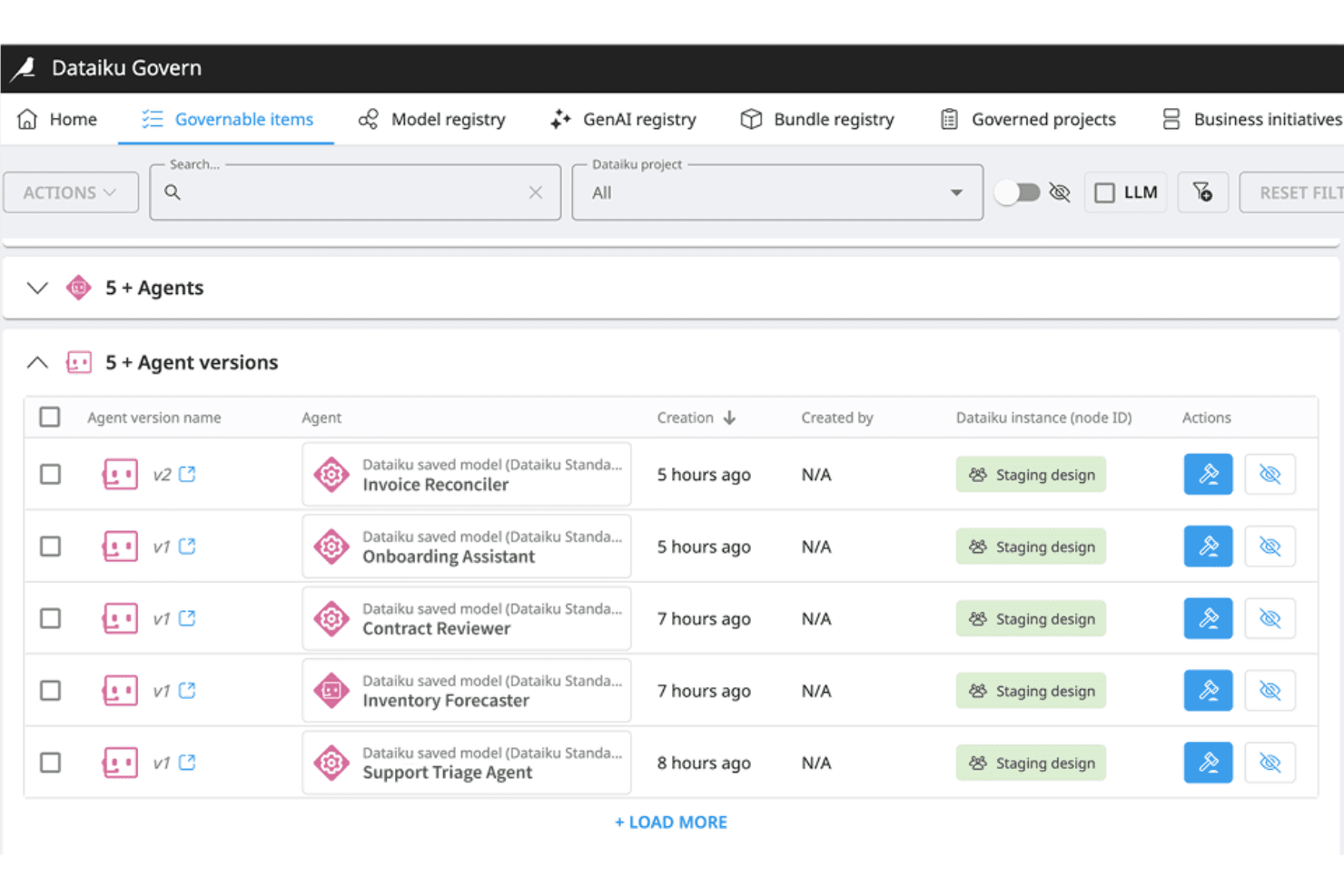
Dataiku Govern tracks AI agent versions across staging environments. Dataiku is an enterprise AI agent platform that combines visual and code-based agent building, multi-agent orchestration, model-agnostic LLM routing, and built-in governance tools including guardrails, approval workflows, and audit trails.
Who Is Dataiku Best For?
Dataiku is a strong fit for large enterprises that need to build, deploy, and govern AI agents across multiple teams, platforms, and compliance requirements from a single platform.
Why I Picked Dataiku
Dataiku earns its spot on my shortlist because no other platform matches its depth of built-in governance across the full agent lifecycle. I particularly like the LLM Guard Services layer, which combines Cost Guard, Safe Guard, and Quality Guard to enforce budget limits, detect PII, and block prompt injection before agents ever reach production. Pair that with Dataiku Govern's approval workflows and audit trails, and you have end-to-end oversight that most agent frameworks can't replicate natively.
Dataiku Key Features
- LLM Mesh routing: A model-agnostic gateway that connects to 10+ LLM providers—including OpenAI, Anthropic, and Mistral—with dynamic routing, response caching, and cost tracking built in.
- Visual and code agent builder: Dual-path agent creation lets non-technical users build agents with a no-code visual flow builder while engineers write full-code agents using the SDK.
- ReAct loop execution: Simple Visual Agents apply a native Reason-and-Act loop, autonomously selecting tools, executing actions, observing results, and iterating until task completion.
- Agent Run Inspector: A step-by-step debugging interface that surfaces warnings and errors at each stage of an agent's execution for diagnosing unexpected behaviour.
Dataiku Integrations
Dataiku offers native integrations with OpenAI, Anthropic, Mistral, AWS Bedrock, Azure OpenAI, Databricks, Snowflake Cortex, Salesforce, ServiceNow, and Jira, plus Slack and Microsoft Teams for agent deployment. It also supports Model Context Protocol (MCP) servers and OpenAPI for custom tool and API connections.
Pros and Cons
Pros:
- Centralized observability for multi-platform agents
- Built-in LLM guardrails and approval workflows
- Visual and code agents in one platform
Cons:
- UI can be clunky for complex workflows
- Agent management module not yet available
Learn more about Dataiku: Best for agent observability and eval workflows
- Free plan + free demo available
- From $39/user/month
Visit WebsiteCustomer Rating:4.4/5
LangChain LangSmith surfaces coding agent insights by category, effectiveness, and hallucination rate. LangChain LangSmith is an AI agent platform that combines agent building, LLM orchestration, production deployment, and deep observability—including full trace visualization, online and offline evaluations, and automated issue detection—into a single engineering-focused environment.
Who Is LangChain LangSmith Best For?
LangChain LangSmith fits AI engineering teams that need deep visibility into agent behaviour across the full development lifecycle—from local testing through production monitoring.
Why I Picked LangChain LangSmith
LangChain LangSmith earns its spot on my shortlist because no other AI agent platform matches its depth of observability and evaluation tooling. I love that SmithDB delivers full step-by-step trace visualization across every tool call and LLM decision, and LangSmith Engine automatically clusters production failures every six hours, identifies root causes, and can open a GitHub PR with a proposed fix. Paired with both offline and online evaluation pipelines, my team can catch regressions before deployment and score live agent behaviour in production.
LangChain LangSmith Key Features
- LangSmith Sandboxes: Run agent-generated code in ephemeral microVMs with full root access, Docker support, and sub-second cold starts for isolated execution at scale.
- LangSmith Fleet: A no-code agent builder where non-technical users can create, configure, and deploy agents into Slack, Teams, or Gmail using prebuilt templates.
- LLM Gateway: Routes LLM traffic across providers through a centralized LangSmith layer, giving you per-agent model routing and cost visibility in one place.
- Memory Store: Provides persistent, semantic search-enabled long-term memory for agents across sessions, with short- and long-term memory APIs built into the deployment runtime.
LangChain LangSmith Integrations
LangChain LangSmith offers native integrations with OpenAI, Anthropic, Google Gemini, Slack, Microsoft Teams, Gmail, Google Calendar, GitHub, Linear, and Tavily, plus native support for open standards like MCP, A2A, Agent Protocol, and OpenTelemetry. It provides an SDK and API for custom integrations, connects to any remote MCP server, and supports BYOC deployment on AWS, GCP, and Azure.
Pros and Cons
Pros:
- Pro-code and no-code agent building options
- Automated issue root cause detection built in
- Deepest agent trace visualization and dashboards
Cons:
- Requires Python or JS/TS SDK for integration
- Full features tightly coupled to LangChain stack
Learn more about LangChain LangSmith: Best for graph-based multi-agent orchestration
- Free plan + free trial + free demo available
- From $39/user/month
Visit WebsiteCustomer Rating:4.4/5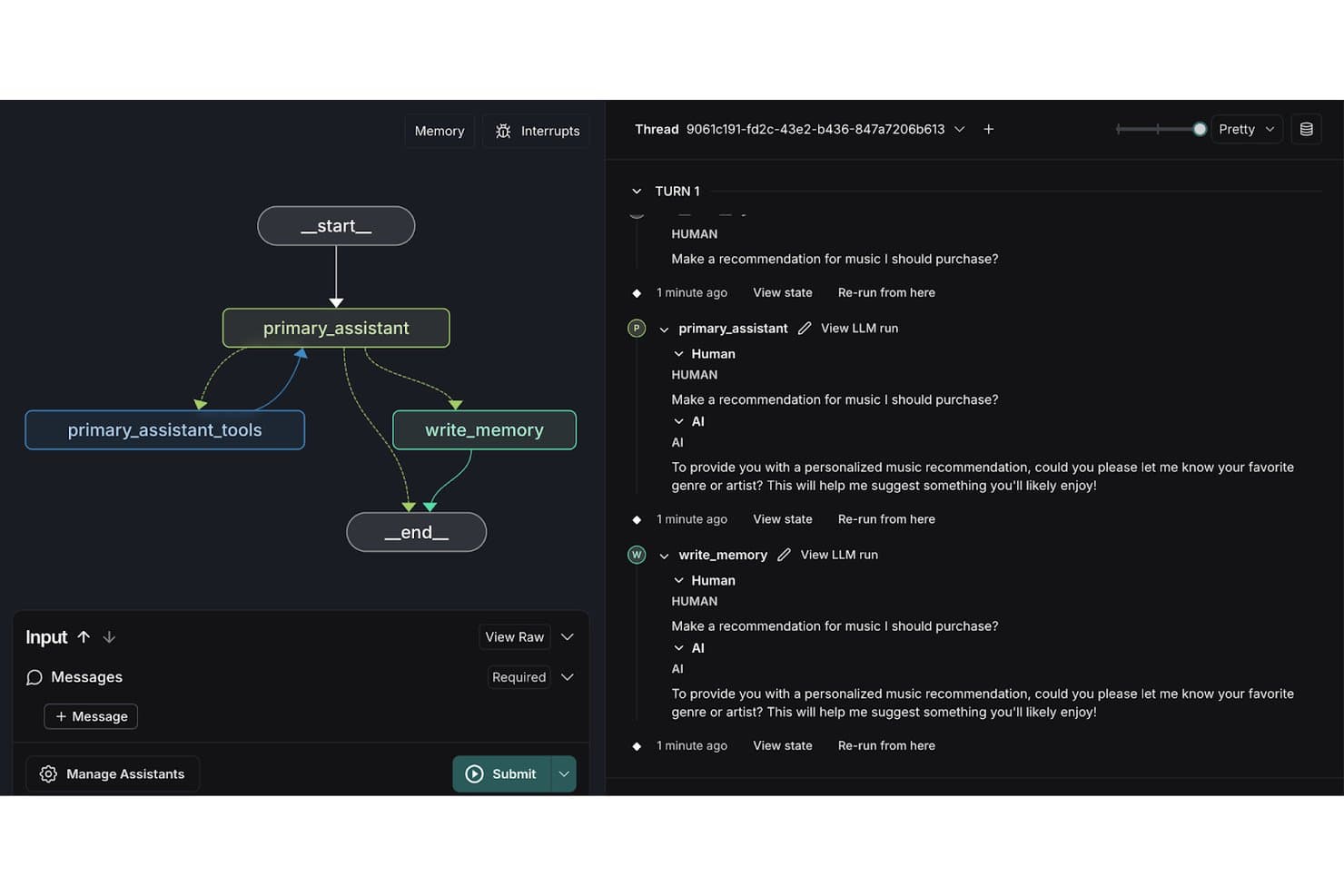
LangChain LangGraph visualizes agent workflows with memory and tool nodes. LangChain LangGraph is a graph-based AI agent framework that supports stateful, multi-step agent workflows, multi-agent orchestration, human-in-the-loop controls, and long-term memory management across Python and JavaScript/TypeScript environments.
Who Is LangChain LangGraph Best For?
LangChain LangGraph is a strong fit for engineering teams building complex, stateful AI agents that require fine-grained control over multi-step workflows and multi-agent coordination.
Why I Picked LangChain LangGraph
LangChain LangGraph earns its spot on my shortlist because its
StateGraphmodel gives you explicit, node-by-node control over how agents think, branch, retry, and loop—something linear chain-based frameworks simply can't replicate. I particularly like its supervisor/worker architecture for multi-agent orchestration, where a top-level agent decomposes tasks and delegates to specialized subagents running in parallel. Built-in checkpointing at every graph node means long-running agents can pause for human approval, resume after a failure, or rewind to any prior state for debugging.LangChain LangGraph Key Features
- LangSmith tracing: Captures distributed traces of every agent step, LLM call, and tool invocation so you can inspect exactly what happened inside a running agent.
- Human-in-the-loop interrupt gates: Pauses agent execution at defined graph nodes to request human approval or input before proceeding to the next step.
- Long-term memory store: Persists agent state and conversation context across sessions using a built-in memory store with semantic search support.
- LangGraph Studio: A visual IDE for inspecting, debugging, and iterating on agent execution graphs in real time during development.
LangChain LangGraph Integrations
LangChain LangGraph offers native integrations with OpenAI, Anthropic, Google Gemini, Mistral, Pinecone, Weaviate, Chroma, pgvector, PostgreSQL, and Redis. An API is available for custom integrations.
Pros and Cons
Pros:
- First-class human-in-the-loop interrupt gates
- Stores semantic historical interactions
- Fine-grained control over agent workflows
Cons:
- High scaling can trigger memory issues
- Predefined static graph state design is required
Learn more about LangChain LangGraph: Best for no-code multi-agent workforce builds
- Free demo available
- Pricing upon request
Visit WebsiteCustomer Rating:4.3/5
Relevance AI lets users build and manage AI agents from one dashboard. Relevance AI is an AI agent platform built around a visual multi-agent canvas, letting you design, deploy, and govern autonomous agent workforces with built-in LLM orchestration, a 2,700+ integration library, hybrid RAG memory, and a native eval and observability system.
Who Is Relevance AI Best For?
Relevance AI is a strong fit for operations and automation teams that need to deploy multi-agent workflows without writing infrastructure code from scratch.
Why I Picked Relevance AI
I picked Relevance AI as one of the best because the visual Workflows canvas lets you assemble entire multi-agent pipelines without writing a line of infrastructure code. You can connect specialist agents with defined handoffs, parallel execution streams, and built-in approval gates, all from a drag-and-drop interface. I also love that every agent ships with an auto-generated eval suite that scores live production runs and blocks failing versions from deploying.
Relevance AI Key Features
- Hybrid RAG memory: Connect agents to internal knowledge bases with semantic search, auto-syncing with Google Drive, SharePoint, Notion, and Confluence.
- Sandboxed code execution: Run Python and JavaScript natively within agent tool steps in an isolated sandbox environment.
- LLM routing: Route tasks across multiple providers—including Anthropic, OpenAI, and Google—with fallback models and per-task cost-optimized model selection.
- Human-in-the-loop approval gates: Pause agent execution at configurable checkpoints for human sign-off before high-stakes actions proceed.
Relevance AI Integrations
Relevance AI offers native integrations with Salesforce, HubSpot, Slack, Google Drive, SharePoint, Notion, Confluence, GitHub, Snowflake, and DataDog. An API is available for custom integrations.
Pros and Cons
Pros:
- Embeds secure script execution spaces
- Integrated evaluation gates and agent versioning
- Visual workforce canvas for multi-agent workflows
Cons:
- No self-hosted or on-premises deployment option
- GTM and sales templates dominate use cases
Learn more about Relevance AI: Best for Python-native multi-agent collaboration
- Free plan + free trial available
- Pricing upon request
Visit WebsiteCustomer Rating:4.2/5
CrewAI lets users build AI automations from natural language descriptions. CrewAI is a Python-native AI agent platform that lets you build, orchestrate, and deploy multi-agent systems using a code-first SDK, a visual studio editor, and a suite of tools for memory management, LLM routing, and workflow automation.
Who Is CrewAI Best For?
CrewAI is a strong fit for engineering teams that need to build and govern multi-agent AI systems in Python, particularly in organizations with compliance or security requirements.
Why I Picked CrewAI
I picked CrewAI as one of the best because it's built Python-first, which means agent definitions, tool bindings, and orchestration logic all live in code your team already versions and reviews. I especially like how it separates Crews (autonomous, role-based agents that delegate tasks between themselves) from Flows (deterministic, event-driven pipelines with conditional branching and typed state), letting you blend both patterns in a single runtime depending on how much autonomy a given workflow needs.
CrewAI Key Features
- LLM routing per agent: Assign a different LLM to each agent in a crew, including a separate model dedicated specifically to tool/function calls.
- Human-in-the-loop gates: The
@human_feedbackdecorator pauses flow execution at defined checkpoints so a human can review, override, or approve before the next step runs. - Enterprise connector repository: Pre-built connectors for Salesforce, Jira, Snowflake, Microsoft 365, Google Workspace, Slack, and Zendesk pipe real system data directly into agent workflows.
- PII redaction at runtime: A governance hook automatically strips personally identifiable information at every LLM and tool call before data leaves your environment.
CrewAI Integrations
CrewAI offers native integrations with Salesforce, HubSpot, Snowflake, Jira, Zendesk, Slack, Gmail, Microsoft 365, Teams, and Google Workspace. An API is available for custom integrations.
Pros and Cons
Pros:
- Per-agent LLM assignment for advanced orchestration
- Hierarchical memory structure with composite scoring
- Native Python SDK with code and visual builder
Cons:
- Complex automation setup requires strong Python skills
- Consumes high local memory
Learn more about CrewAI: Best for Microsoft-native multi-agent deployments
- 30-day free trial available
- From $0.165 per 1M input tokens

Microsoft Foundry lets users build multi-agent sequential workflows visually. Microsoft Foundry is an AI agent platform built on Azure that lets you build, deploy, and orchestrate agents using a 10,000+ model catalogue, multi-agent workflows, and native integrations across the Microsoft ecosystem.
Who Is Microsoft Foundry Best For?
Microsoft Foundry is the right fit for enterprise IT and engineering teams already running on Azure who need to build and orchestrate multi-agent AI workflows across the Microsoft ecosystem.
Why I Picked Microsoft Foundry
Microsoft Foundry earns its spot on my shortlist because of how deeply it's wired into the Azure ecosystem for multi-agent deployments. I love that Connected Agents lets one agent call another as a specialized sub-agent, so you can decompose something like an IT incident response workflow into discrete agents handling detection, diagnosis, and remediation in parallel. The Agent Harness adds planning and to-do tracking on top of that, keeping long-running autonomous runs on course without constant human intervention.
Microsoft Foundry Key Features
- Model benchmark leaderboard: Compare 10,000+ models side by side on quality, latency, throughput, and cost before committing to a deployment.
- PyRIT red teaming: Run automated adversarial simulations against your agents to surface safety and security vulnerabilities before going to production.
- Provisioned Throughput Units (PTUs): Reserve dedicated model processing capacity on a monthly or annual basis for predictable latency on high-volume workloads.
- Per-agent Entra identity: Each hosted agent is automatically assigned its own Microsoft Entra identity, giving you granular access control at the individual agent level.
Microsoft Foundry Integrations
Microsoft Foundry offers native integrations with Microsoft 365, Teams, SharePoint, Fabric, Entra, Cosmos DB, Key Vault, Azure Functions, and GitHub. An API is available for custom integrations.
Pros and Cons
Pros:
- Per-agent Entra identity enables granular access
- MSC/LLM model benchmark leaderboard built in
- Integrated multi-agent orchestration with A2A protocol
Cons:
- Needs proprietary cloud infrastructure
- No built-in disaster recovery for agent state
Learn more about Microsoft Foundry: Best for multi-agent orchestration on Google Cloud
- Free demo available
- Pricing upon request
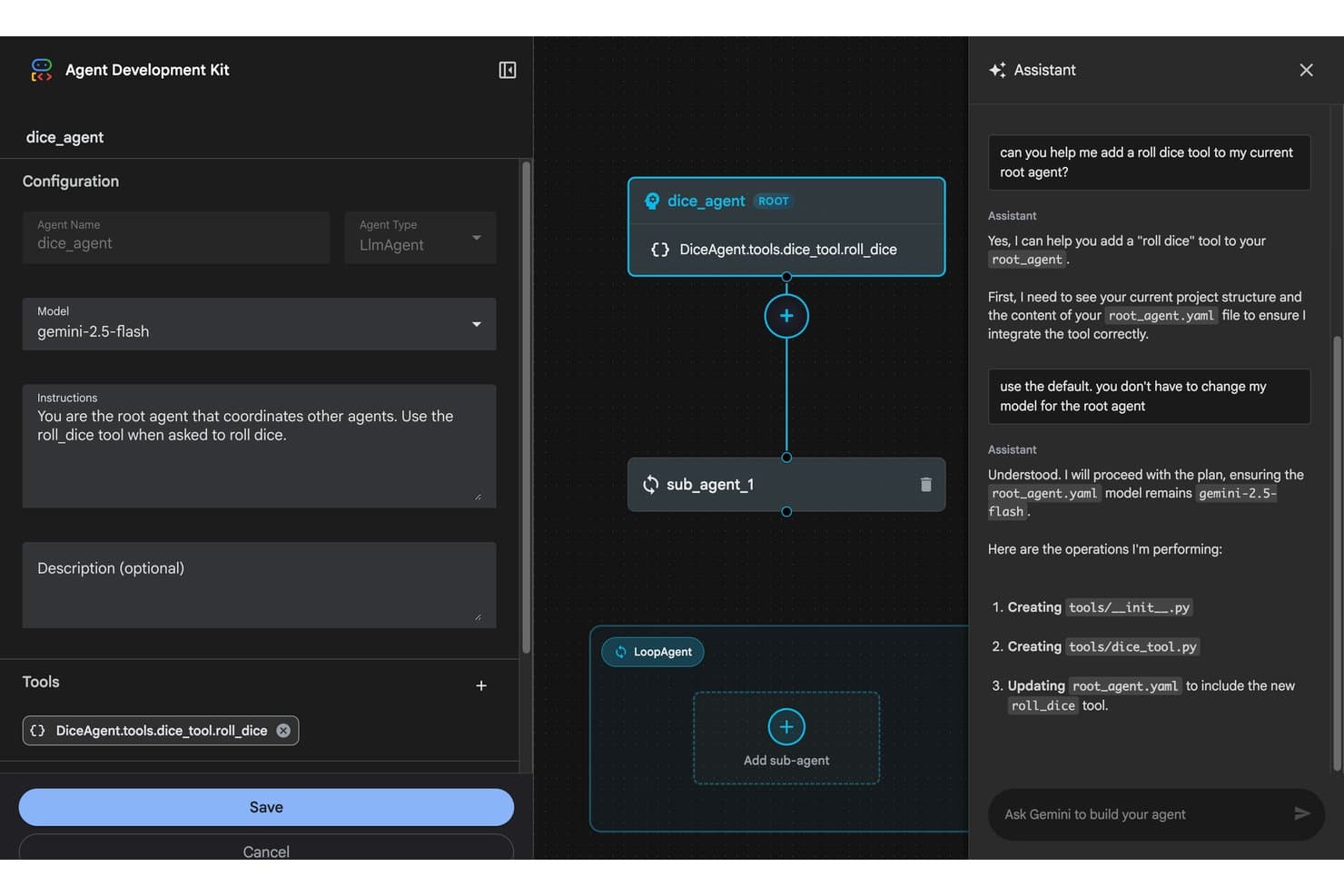
Agent Development Kit (ADK) lets users build agents visually with AI chat assistance. Google ADK is an open-source, code-first AI agent framework with multi-language SDKs (Python, TypeScript, Go, Java, and Kotlin) for building, evaluating, and deploying single agents, multi-agent pipelines, and graph-based workflows with built-in support for MCP, A2A protocol, and sandboxed code execution.
Who Is Agent Development Kit (ADK) Best For?
ADK is a strong fit for engineering teams already running infrastructure on Google Cloud who need to build and orchestrate production-grade multi-agent systems at scale.
Why I Picked Agent Development Kit (ADK)
ADK earns its spot on my shortlist because of how naturally it handles multi-agent orchestration on Google Cloud infrastructure. I love that ADK 2.0 introduced graph-based and collaborative workflow patterns, where a coordinator agent dynamically delegates tasks to specialized sub-agents, letting teams decompose complex IT and DevOps pipelines across purpose-built agents. Per-agent model assignment means each sub-agent runs the right model for its task, and native A2A protocol support lets those agents talk across frameworks without custom plumbing.
Agent Development Kit (ADK) Key Features
- Multi-language SDK support: Build agents in Python, TypeScript, Go, Java, or Kotlin using consistent APIs across all five languages.
- ADK Eval framework: Run test files, evalset, and conformance evaluations with LLM-as-judge scoring, hallucination detection, and automated user simulation for production agent reliability testing.
- Human-in-the-loop controls: Pause and resume agent execution mid-workflow using
RequestedInputevents and tool confirmation flows before high-risk actions execute. - Sandboxed code execution: Run agent-generated code and shell commands in isolated server-side sandboxes via the Code Execution Tool, Daytona integration, or Bash Tool.
Agent Development Kit (ADK) Integrations
Agent Development Kit offers native integrations with Gemini, Claude, BigQuery, Firestore, Datadog, Jira, Confluence, Cloud Run, and GKE. An API is available for custom integrations.
Pros and Cons
Pros:
- Native support for open agent communication protocols
- Interprets local shell commands safely
- Multi-language SDKs for Python, Go, Java, TypeScript, Kotlin
Cons:
- Most production deployments remain Google Cloud-only
- State management in multi-turn agents is complex
Learn more about Agent Development Kit (ADK):
Andre AI-agentplattformer
Her er noen flere alternativer for AI-agentplattformer som ikke kom med på kortlisten min, men som likevel er verdt å se nærmere på:
- 11NiCE Cognigy.AIBest for enterprise CX agent deployments at scale
- 12Amazon Bedrock AgentCoreBest for AWS-native multi-agent deployments
- 13RasaBest for self-hosted conversational agents
- 14WriterBest for enterprise knowledge-work agent governance
- 15AgentforceBest for Salesforce-native enterprise agent deployment
- 16Microsoft Copilot StudioBest for Microsoft 365-native multi-agent workflows
- 17Botpress StudioBest for visual and code-based multi-agent builds
- 18VellumBest for version-controlled agent evaluation
- 19Sema4.aiBest for back-office agents on Snowflake data
- 20MastraBest for TypeScript-native multi-agent workflows
How I Evaluate AI Agent Platforms
To make this list, a platform has to deliver real, measurable AI value—whether that means autonomously resolving IT incidents, orchestrating multi-step DevOps workflows, or coordinating specialized agents across business functions. I split my evaluation into two layers: core functionality every platform must meet to qualify, and the differentiating factors that separate the best from the rest.
Core Functionality (Table Stakes For This List)
When I'm selecting tools for my list, I rank each one on a scale from 0 (does not offer the functionality) to 5 (excels in this area) for each core functionality listed below. I then calculate the tool's total score as a percentage, using 75% as a benchmark to help assess its overall fit for the list.
- Agent building framework: I evaluate whether a platform offers SDK-based, visual, or hybrid agent design with support for defining roles, goals, and multi-agent hierarchies.
- LLM orchestration: I look for flexibility across model providers, including per-agent model routing and the ability to swap between proprietary and open-source LLMs at runtime.
- Tool and API integration: The connector ecosystem matters here—I check for native integrations, custom function calling, and secure auth handling for enterprise systems like databases and internal APIs.
- Memory and context management: I evaluate how each platform handles short-term and long-term memory, including RAG pipelines, vector store support, and shared context across agents.
- Multi-step reasoning and autonomy: Platforms need to go beyond simple prompt chains. I look for autonomous planning, self-correction loops, and the ability to handle long-running, multi-step tasks without constant human input.
- Agent observability and governance: I check for tracing, evaluation tooling, cost and token tracking, guardrails, and audit controls that let you monitor and govern agent behaviour in production.
Once I have a list of tools that meet the criteria, I consider what sets each platform apart.
Differentiating Factors (What Sets Vendors Apart)
Here's how I compare and contrast different vendors:
Standout Features
I look for human-in-the-loop controls that go beyond simple approval buttons—things like staged escalation workflows and intervention points before high-risk actions like production deployments or database writes. Prompt and agent versioning is equally important; I check whether a platform supports git-style rollback and A/B testing so teams can iterate safely. I also evaluate each platform's evaluation and simulation harness, since replaying production traces against golden datasets before shipping changes catches failures that unit tests miss.
Beyond Features
I evaluate each platform's deployment model and data residency options, since teams in regulated industries need self-hosted or VPC deployments where agent traces and LLM traffic stay within controlled boundaries. Pricing transparency matters just as much—autonomous agents can generate unpredictable compute costs, so I check for built-in token budgets and rate limits that prevent runaway loops in production. I also look at ecosystem maturity, including SDK quality, documentation depth, and community activity, because a platform with strong CI/CD integration and pre-built agent templates gets your team to production faster.
Slik velger du en AI-agentplattform
Når du velger en AI-agentplattform, bør du fokusere på de operative prioriteringene dine og hvor agentautomatisering vil ha størst innvirkning på virksomheten din:
| Hvis prioriteten din er … | Se etter … |
|---|---|
| Hvis prioriteten din er …Full oversikt over agenter og samsvar med regelverket | Se etter …Sporing, revisjonslogger og versjonskontroll |
| Hvis prioriteten din er …Styring av agenter i hele virksomheten | Se etter …Sentralisert styrings- og tilgangskontroll |
| Hvis prioriteten din er …Krav til datalagring i skyen eller lokalt | Se etter …Distribusjonsalternativer med VPC eller egen drift |
| Hvis prioriteten din er …Orkestrering av flere agenter for IT-arbeidsflyter | Se etter …Innebygde koblinger for ITSM, RPA og API-er |
| Hvis prioriteten din er …Implementering uten kode for forretningsbrukere | Se etter …Byggere med dra-og-slipp eller arbeidsflyt |
Slik vurderer du kortlisten
- Test sporing av agenter i sanntid: Start en arbeidsflyt og gjennomgå revisjons- og sporingsartefakter for fullstendige logger over agentens resonnement og handlinger.
- Be om en sikkerhetshvitbok: Be om den nyeste dokumentasjonen, inkludert informasjon om datalagring, tredjepartsdatabehandlere og trafikkflyt for LLM.
- Prøv funksjoner for agentevaluering: Kjør en testpakke mot dine egne eksempelsamtaler eller arbeidsflyter, og undersøk funksjonene i evalueringsrammeverket.
- Kontroller distribusjonsalternativene: Be om en kopi av instruksjonene for egen drift eller VPC-oppsett, eller avtal en gjennomgang innen to uker.
- Avveining – integrasjon med den opprinnelige teknologistakken kontra et åpent økosystem: Avgjør om tett kompatibilitet med eksisterende sky- og RPA-systemer er mer verdifullt enn omfattende SDK-er og fleksibilitet for egendefinerte utvidelser.
Hva er AI-agentplattformer?
AI-agentplattformer er programvaresystemer som lar deg utforme, distribuere og administrere team av autonome AI-agenter for å automatisere og koordinere komplekse forretningsprosesser. Disse plattformene tilbyr rammeverk for å bygge arbeidsflyter med flere agenter, koble til API-er og håndtere minne, kontekst og oversikt. Team bruker dem til å opprettholde oversikt, håndheve styring og trygt skalere AI-drevet automatisering på tvers av infrastrukturen og driften.
Funksjoner i en AI-agentplattform
Ved valg av en plattform for AI-agenter bør du se etter følgende viktige funksjoner:
- Rammeverk for bygging av agenter: Lar deg opprette tilpassede agenter ved å definere rollene, atferden og samhandlingslogikken deres. Støtter SDK-er, visuelle byggere eller hybride tilnærminger, slik at du kan utforme alt fra enkle agentteam til komplekse agentteam som er tilpasset behovene dine.
- Orkestrering av LLM-er: Tilbyr verktøy for å dirigere forespørsler på tvers av ulike store språkmodeller, inkludert støtte for bytte av modell under kjøring. Dette lar deg optimalisere kostnader og nøyaktighet og sikrer at agentene bruker den beste språkmodellen for hvert scenario.
- API- og verktøyintegrasjon: Tilbyr innebygde koblinger og sikre integrasjonsrammeverk for å koble agenter til databaser, SaaS-plattformer og interne systemer. Gjør det mulig for agentene dine å utføre faktiske handlinger, få tilgang til forretningsdata og utløse automatiseringer på tvers av teknologistakken din.
- Håndtering av minne og kontekst: Støtter både kortsiktig og langsiktig kontekstbevaring ved hjelp av vektordatabaser, generering med utvidet gjenfinning (RAG) eller tilpassede minnesystemer. Dette lar agentene føre pågående samtaler, referere til tidligere data og forbedre beslutningstakingen over tid.
- Orkestrering av arbeidsflyter med flere agenter: Lar deg koordinere grupper av agenter for å håndtere oppgaver i flere trinn, delegere arbeid og dele informasjon. Nyttig for utrulling av agenter som administrerer komplekse forretningsprosesser eller må samarbeide om større prosjekter.
- Observerbarhet og styring: Inkluderer funksjoner som sporingslogger, revisjonsspor, evalueringsverktøy og tilgangskontroller. Gir deg innsyn i agentenes handlinger, muliggjør etterlevelse og hjelper deg med å overvåke AI-ytelsen i produksjonsmiljøer.
- Autonom oppgaveplanlegging: Utstyrer agentene med evner innen planlegging, selvkorrigering og iterativ resonnering. Støtter agentene i å håndtere langvarige eller komplekse oppgaver uten konstante instruksjoner fra mennesker.
- Versjonering og tilbakeføring: Gjør det mulig å spore, teste og tilbakeføre endringer i agentinstruksjoner, logikk eller arbeidsflyter – noe som er avgjørende for sikre oppdateringer, A/B-testing og krav til etterlevelse.
- Fleksibel utrulling: Tilbyr alternativer for utrulling i skyen, på egen infrastruktur eller i VPC. Dette er avgjørende for team med krav til datalagring, sikkerhet eller regelverk som trenger full kontroll over infrastrukturen og agenttrafikken.
- Rammeverk for evaluering og testing: Tilbyr simuleringsverktøy, funksjoner for avspilling eller evalueringer med gylne datasett for å stressteste agenter før lansering. Hjelper deg med å oppdage logiske feil og sikre pålitelighet før agentene samhandler med aktive data eller brukere.
Fordeler med plattformer for AI-agenter
Implementering av plattformer for AI-agenter gir flere fordeler for teamet og virksomheten din. Her er noen av fordelene du kan se frem til:
- Forbedret automatisering på tvers av arbeidsflyter: Koordiner systemer med flere agenter for å automatisere komplekse forretnings- og IT-prosesser, og reduser manuelle oppgaver og menneskelige feil.
- Forbedret observerbarhet og styring: Få tilgang til funksjoner som revisjonsspor, sporingslogger og evalueringsverktøy for å overvåke agentenes handlinger og opprettholde etterlevelse av interne retningslinjer.
- Direkte integrasjon med virksomhetssystemer: Koble agenter til API-er, databaser og SaaS-plattformer ved hjelp av innebygde koblinger og sikker autentisering, slik at agentene kan handle på reelle forretningsdata.
- Fleksibel utrulling og datalagring: Velg mellom utrulling i skyen, på egen infrastruktur eller i en virtuell privat sky for å oppfylle organisasjonens krav til sikkerhet og regelverk.
- Funksjoner for versjonskontroll og tilbakeføring: Jobb trinnvis på en trygg måte med innebygd versjonering av instruksjoner og arbeidsflyter, slik at du kan teste, godkjenne og tilbakestille endringer etter behov.
- Kontroll med mennesker i loopen: Sett inn godkjenningstrinn, eskaleringer eller intervensjonspunkter før høyrisiko-handlinger, slik at du sikrer tilsyn når det er viktigst.
- Avansert minne- og konteksthåndtering: Gjør det mulig for agentene å beholde korttids- og langtidsminne ved hjelp av vektorlager eller generering med utvidet gjenfinning, slik at samhandlingene blir mer relevante og kontekstbevisste over tid.
Kostnader og priser for plattformer for AI-agenter
Valg av plattformer for AI-agenter krever en forståelse av de ulike prismodellene og abonnementene som er tilgjengelige. Kostnadene varierer basert på funksjoner, teamstørrelse, tillegg og mer. Tabellen nedenfor oppsummerer vanlige abonnementer, gjennomsnittsprisene deres og typiske funksjoner som er inkludert i løsninger for plattformer for AI-agenter:
Sammenligningstabell for abonnementer på plattformer for AI-agenter
| Abonnementstype | Gjennomsnittspris | Vanlige funksjoner |
|---|---|---|
| AbonnementstypeGratisabonnement | Gjennomsnittspris$0 | Vanlige funksjonerGrunnleggende verktøy for bygging av agenter, begrensede arbeidsflyter, brukerstøtte fra fellesskapet og tilgang til standardintegrasjoner. |
| AbonnementstypePersonlig abonnement | Gjennomsnittspris$20–$40/bruker/måned | Vanlige funksjonerVisuelle byggere, distribusjon av enkeltagenter, arbeidsflytmaler, kundestøtte og grunnleggende verktøy for observasjon. |
| AbonnementstypeForretningsabonnement | Gjennomsnittspris$50–$150/bruker/måned | Vanlige funksjonerOrkestrering av flere agenter, avanserte koblinger, håndtering av minne og kontekst, versjonskontroll og rollebasert tilgangskontroll. |
| AbonnementstypeBedriftsabonnement | Gjennomsnittspris$200+/bruker/måned | Vanlige funksjonerTilpassede distribusjonsalternativer, VPC eller selvhosting, avansert styring, revisjonslogger, SLA-er og dedikert støtte ved oppstart. |
Vanlige spørsmål om AI-agentplattformer
Her er noen svar på vanlige spørsmål om AI-agentplattformer:
Hvordan håndterer AI-agentplattformer sikkerhet og samsvar?
AI-agentplattformer tilbyr vanligvis datasikkerhetsfunksjoner som revisjonslogger, rollebasert tilgangskontroll og datakryptering. For team med strenge krav til samsvar bør du se etter plattformer med alternativer for selvhosting eller VPC-distribusjon og detaljert dokumentasjon om hvor data lagres. Det er viktig å kontrollere støtte for SOC 2, HIPAA, GDPR eller bransjespesifikke standarder hvis virksomheten din har regulatoriske krav.
Kan AI-agentplattformer integreres med eksisterende IT-systemer?
Ja, en god plattform for arbeidsflytautomatisering gir deg koblinger eller API-rammeverk for å integrere AI-agentene dine. Du kan koble agenter til ITSM-verktøy, RPA-plattformer, datakilder eller SaaS-apper. Noen plattformer har innebygde integrasjoner, mens andre lar deg bygge tilpassede koblinger ved hjelp av funksjonskall, kodekjøring eller webhooks for å støtte automatiserte arbeidsflyter. Kontroller alltid at sikre metoder for autentisering og autorisering støttes.
Hvilke distribusjonsmodeller støtter AI-agentplattformer?
Du finner alternativer for distribusjon i skyen, selvhosting og virtuelt privat sky (VPC). Skymodeller gir raskest verdiuttak, men selvhosting og VPC-distribusjon er bedre hvis du trenger streng nettverkskontroll for AI-modellene og LLM-ene dine. Be om et rammeverk med åpen kildekode eller tekniske dokumenter for å sikre at infrastrukturen din oppfyller plattformkravene.
Hvordan kan team evaluere agentytelsen før de distribuerer til produksjon?
De fleste ledende plattformer inkluderer evalueringsverktøy, sporingslogger og en visuell redigerer for versjonskontroll. Du kan teste systeminstrukser, kjøre tilpassede agenter mot testdatasett og bruke sikkerhetsmekanismer med menneskelig kontroll før lansering. Dette gjør det mulig å oppdage logikkfeil, vurdere nøyaktighet og teste pålitelighet i virkelige situasjoner – noe som er avgjørende i produksjonsmiljøer.
Hva er typiske tegn på at du trenger en AI-agentplattform i stedet for tradisjonelle automatiseringsverktøy?
Hvis teamet ditt trenger agentbaserte arbeidsflyter, oppgavedeling og autonome beslutninger på tvers av komplekse systemer med flere agenter, passer en AI-agentplattform bedre enn tradisjonelle automatiseringsverktøy. Plattformer er også nyttige når du trenger minne, konteksthåndtering eller observasjon som grunnleggende chatboter og tradisjonell arbeidsflytautomatisering ikke kan tilby.