

Recensione Setyl 2026: Pro, Contro, Caratteristiche e Prezzi

Recensiamo gli strumenti in modo indipendente e le commissioni ci aiutano a finanziare i nostri test. Consulta la nostra politica sulla trasparenza, la nostra metodologia, oppure suggerisci uno strumento.
Losing track of laptops, hunting down software licenses, and relying on messy spreadsheets can waste time and money. Setyl is an IT asset management software that tackles those problems by giving you a clear view of every device, license, and user. It’s a strong fit for midsize organizations across various industries, like finance, professional services, and tech, where assets move often and accountability matters. In this review, I’ll cover Setyl’s features, pros and cons, best and worst use cases, pricing, and more—so you can see if it makes your daily IT work easier and your team more efficient and accurate.
Setyl Evaluation Summary

4.9/5
- From $300/month
- Free demo available
Perché fidarsi dei nostri consigli sui software
6,700+
Reviews
20
Industry experts
16+
Evaluation factors
14
Years
Il nostro team testa e recensisce software dal 2012. In quanto leader tecnologici noi stessi, sappiamo quanto sia difficile — e importante — scegliere il software giusto.
Per questa guida, abbiamo valutato gli strumenti attraverso test praticie ricerche indipendenti, assegnando un punteggio agli strumenti in base ai nostri criteri di selezione.
Le nostre recensioni riflettono il nostro giudizio editoriale umano, non un discorso di vendita.
Revisori esperti:
- Paulo Gardini MiguelDirettore tecnico
 Tim FisherVP dell'IA
 Gabriel RosasTech Lead e architetto software
 Christhian GruhnTech Lead e architetto della piattaforma

Setyl Overview
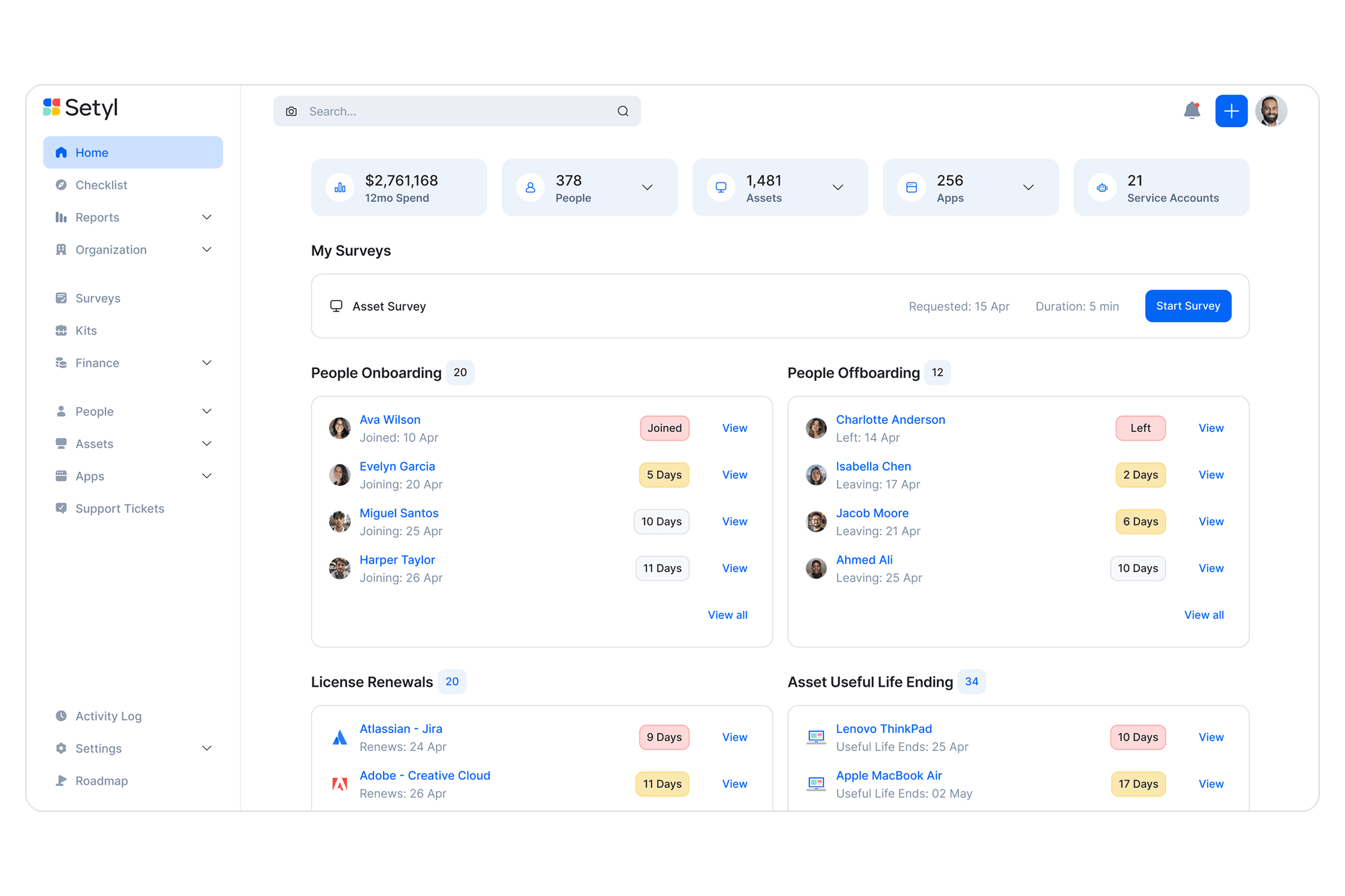
Setyl gives IT teams a clear way to manage hardware, software, and users in one place, which makes day-to-day tracking easier. It focuses on ease of use, so even non-technical staff can pick it up quickly. Overall, it's suitable for teams that are looking to upgrade from basic tracking tools and spreadsheets, but are not quite ready for highly complex enterprise solutions.
Pros
- You can easily track and manage a large number of IT assets in one place.
- You can track the full history of each asset, which makes audits easier.
- Alerts help you catch expiring warranties or licenses before they lapse.
Cons
- Reports feel limited if you need deep, custom insights.
- Visual customization is limited if you want tailored dashboards.
- Doesn’t offer the complex functionalities that may be needed for large enterprise organizations
Is Setyl Right For Your Needs?
Who Would be a Good Fit for Setyl?
Setyl is best suited for midsize organizations that need clear visibility and control across both hardware and software assets without the complexity of legacy enterprise systems. It’s ideal for IT, finance, and operations leaders who want to streamline workflows, automate onboarding and offboarding, and maintain compliance as teams and technology stacks grow. Companies in tech, professional services, and finance particularly benefit from Setyl’s unified approach to asset, license, and spend management.
- Tech & Professional Services FirmsIdeal for fast-scaling teams managing distributed staff, shared software, and multiple client environments.
- Finance TeamsSpend visibility, renewal tracking, and license utilization metrics help control budgets.
- Midsize OrganizationsBuilt for midsize companies that need comprehensive visibility without the overhead of legacy systems.
- Remote/Hybrid TeamsYou can track devices and licenses even when teams span different locations.
- IT & Security TeamsYou’ll have audit trails, compliance readiness, and insights into shadow IT.
- HR/Ops DepartmentsYou can tie onboarding/offboarding workflows to asset allocations, reducing gaps.
Who Would be a Bad Fit for Setyl?
Setyl may not be the right choice for organizations at the extreme ends of the spectrum—either too small to need structured IT management or so large and regulated that they require fully customized, certified enterprise systems. Highly specialized industries like engineering, defense, or large-scale financial institutions may also find their requirements exceed Setyl’s current focus and flexibility.
- Massive EnterprisesYou’ll likely outgrow its depth and need enterprise-grade custom workflows.
- Enterprises with On-Prem RequirementsSetyl currently only offers a cloud-based solution.
- Defense/Government OrganizationsStrict controls and certifications may exceed what Setyl supports today.
- Heavy Engineering and Industrial OperationsManaging complex machinery, maintenance schedules, and physical plant assets typically requires niche industry tools.
- Very Small BusinessesTeams with only a few employees and devices will find Setyl more powerful than necessary for their scale.
- Custom Platform DevelopersIf you need highly specialized asset modeling or custom-built workflows, Setyl’s structured framework may feel restrictive.
La Nostra Metodologia di Recensione
Come Testiamo e Valutiamo gli Strumenti
Abbiamo trascorso anni a costruire, perfezionare e migliorare il nostro sistema di testing e valutazione del software. Il nostro schema è progettato per cogliere le sfumature della selezione software e cosa rende efficace uno strumento, focalizzandosi sugli aspetti critici del processo decisionale.
Di seguito, puoi vedere esattamente come funziona il nostro testing e punteggio su sette criteri. Ci permette di offrire una valutazione imparziale del software basata su funzionalità principali, caratteristiche distintive, facilità d’uso, onboarding, assistenza clienti, integrazioni, recensioni dei clienti e rapporto qualità-prezzo.
Funzionalità Principali (25% del punteggio finale)
Il punto di partenza della nostra valutazione è sempre la funzionalità principale dello strumento. Ha le funzioni e caratteristiche base che ci si aspetta? Alcune di queste caratteristiche sono limitate ai piani tariffari superiori? Fondamentalmente, ci aspettiamo che uno strumento regga il confronto rispetto alle capacità di base dei concorrenti.
Caratteristiche Distintive (25% del punteggio finale)
Successivamente, valutiamo le caratteristiche distintive e non comuni che vanno oltre la funzionalità base tipicamente trovata negli strumenti di questa categoria. Un punteggio alto riflette funzionalità specializzate o uniche che rendono il prodotto più veloce, efficiente o offrono ulteriore valore all’utente.
Valutiamo inoltre quanto sia semplice integrare altri strumenti tipicamente utilizzati nell’infrastruttura tecnologica per espandere la funzionalità e l’utilità del software. Gli strumenti che offrono numerose integrazioni native, connessioni di terze parti e accesso API per creare integrazioni personalizzate ottengono i punteggi migliori.
Facilità d’Uso (10% del punteggio finale)
Consideriamo quanto sia rapido e semplice svolgere i compiti definiti nella funzionalità principale utilizzando lo strumento. Il software con punteggio alto è ben progettato, intuitivo da usare, offre app mobili, fornisce modelli e rende semplici attività relativamente complesse.
Onboarding (10% del punteggio finale)
Sappiamo quanto sia importante l’adozione rapida da parte del team per una nuova piattaforma, quindi valutiamo quanto sia facile imparare e utilizzare uno strumento con formazione minima. Valutiamo quanto velocemente un membro del team possa iniziare a usare lo strumento anche senza esperienza. Soluzioni con punteggio alto indicano che sono richiesti pochi o nessun supporto.
Assistenza Clienti (10% del punteggio finale)
Esaminiamo quanto sia veloce e facile ricevere assistenza e risolvere problemi tramite telefono, live chat o knowledge base. Gli strumenti e le aziende che garantiscono supporto in tempo reale ottengono il miglior punteggio, mentre i chatbot ottengono il peggiore.
Recensioni dei Clienti (10% del punteggio finale)
Oltre ai nostri test e valutazioni, prendiamo in considerazione il net promoter score dei clienti attuali e passati. Valutiamo la probabilità che, data la scelta, selezionerebbero nuovamente lo strumento per la funzionalità principale. Un software con punteggio alto riflette un alto net promoter score da parte dei clienti attuali o passati.
Rapporto Qualità-Prezzo (10% del punteggio finale)
Infine, considerando tutti gli altri criteri, analizziamo il prezzo medio dei piani base rispetto alle funzionalità principali e consideriamo il valore degli altri criteri di valutazione. Il software che offre di più a meno otterrà un punteggio più alto.
Core Features
Hardware and Software Asset Tracking
You can log every laptop, phone, or piece of software and see who has it at any time. It keeps a full history, so you never lose track.
User Management
You can assign assets to people and know who’s responsible. This makes onboarding, offboarding, and accountability easy.
Lifecycle Tracking
You can follow assets from purchase to disposal. This helps you plan upgrades and avoid surprise failures.
Warranty & License Alerts
You’ll get reminders before contracts expire. That way you don’t overspend or miss renewals.
Reporting & Audits
You can record and track all compliance information, ensuring you are always audit-ready. It saves you from digging through spreadsheets.
Multi-Site Visibility
You can manage assets across offices or regions in one view. It keeps everything consistent, no matter the location.

Ease of Use
Setyl’s layout is clean and intuitive, so you and your team can pick it up quickly without tons of training. Tasks like assigning assets or pulling reports feel straightforward, and you don’t get lost in cluttered menus. Some advanced settings take a little practice, but overall, it makes tracking assets less of a chore and more of a routine you can trust.
Integrations
Setyl integrates natively with Intune, Jamf, Iru (Kandji), Landsweeper, Meraki, Zendesk, Jira Service Management, Okta, Microsoft 365, Google Workspace, Slack, Zoom, NetSuite, Xero, and BambooHR.
Setyl also provides an API and connects with third-party integration tools like Zapier.

Setyl Specs
- 2-Factor Authentication: Yes
- API: Yes
- Asset Tagging: Yes
- Dashboard: Yes
- Data Export: Yes
- Data Import: Yes
- Data Visualization: Yes
- Database: Yes
- Document Management: Yes
- External Integrations: Yes
- Hardware Integration: No
- Hardware Modernization: No
- Inventory Tracking: Yes
- Multi-User: Yes
- Network Device Performance Monitoring: No
- Network Traffic Monitoring: No
- Network Visualization: Yes
- Notifications: Yes
- Scheduling: Yes
- Status Notifications: Yes
- Third-Party Plugins/Add-Ons: Yes
- Workflow Management: Yes


